
0%On this pageContents
Webinar invitation emails have one job: to get people who already know you to register for a session they don't know about yet. A good webinar invitation names the problem the session solves, gives the date and time, and carries one registration link. Send the first invitation two to three weeks out and a second one about a week before, then let confirmation and reminder emails take over. In EasyWebinar you copy the link from the webinar's Share dialog and send the invitation as an EasyCRM broadcast, which shows your average open and click rates against benchmarks.
At a glance
| Question | Short answer |
|---|---|
| What must the invitation say? | Who it's for, the problem it solves, what they'll leave with, the date and time with a time zone, and one registration link |
| Which link goes in it? | The Registration Page Link for anyone, or the One-Click Registration Link for contacts you already hold |
| When do you send it? | A first invitation two to three weeks before, and a second about a week before |
| Who gets the second one? | The same list, with a line telling people who already registered they can ignore it |
| How do you send it in EasyWebinar? | As a one-off broadcast from Marketing → Broadcasts in EasyCRM, once sending is set up |
| What do you measure? | Opens, clicks and registrations. The screen shows average open and click rates against 21% and 2.6% benchmarks |
| Can you keep your own email tool? | Yes, it's your CRM or ours. Keep HubSpot, Salesforce Pardot (Account Engagement), ActiveCampaign, Mailchimp or Kit, or use EasyCRM natively |
Where webinar invitation emails fit
Say you're a leadership coach with 800 past clients and newsletter readers in a spreadsheet. Your free live session on giving hard feedback is three weeks away. The registration page is built, but nobody on that list knows it exists. A webinar invitation is the email that closes that gap: the first message that turns a contact into a registrant.
What they're for
An invitation moves people from your list onto your registration page. After they register, other emails take over: the registration confirmation goes out immediately, and reminders go out before the session starts. The invitation only has to earn the click.
How they help
- They reach your warmest audience first. People who already know your work are the likeliest to register.
- They fill seats before you pay for any other promotion. Your list costs nothing extra to email.
- They give you a number to beat. Opens and clicks show whether the subject or the offer is the weak part.
- They set up the rest of the sequence. Every registrant they bring in gets your confirmation and reminders automatically.
What happens without them
Without an invitation, the people most likely to come never hear about the session. The registration page waits for search or social traffic that may not arrive, and your list goes cold while you post into feeds.
Why coaches and consultants care
For a coach or consultant, a webinar is often the start of a booked call or a new client. A room of people who already trust you is worth more than a room of strangers. The invitation decides how full that room gets.
The EasyWebinar approach to webinar invitation emails
Picture a typical case. An independent management consultant who advises family-owned manufacturers runs a quarterly live briefing on succession planning. She has about 800 contacts from past projects and events, and she wants 60 of them in the room.
The usual workaround is to export the webinar link into a separate email tool, build the list there, and send from it. That can work well. It can also mean two logins, a list that drifts out of date, and registrants who never reach the place where you track them.
What changed is simple. The people you invite and the people who register are the same contacts. So it helps when the list, the send and the registration sit close together. Then you can see who came in from which webinar without stitching files.
EasyWebinar gives each webinar a Share dialog with its registration links, and EasyCRM sends the invitation as a one-off broadcast to a saved list. Registrants and attendees can then be imported back into EasyCRM, tagged with the webinar they came from. If you already run HubSpot, Mailchimp or another tool, EasyWebinar connects to it instead.
One fact you can check on the page: the Broadcasts screen shows your average open rate against 21% and your average click rate against 2.6%. How that sits beside other platforms is covered in How EasyWebinar compares for webinar invitation emails, below.
When to send a webinar invitation
There's no single rule for how far ahead to invite people. This plan is a sensible starting point, because it leaves time for people to plan and still lands close enough to feel current.
| When | What to send | Who gets it |
|---|---|---|
| Two to three weeks before | The first invitation | Your whole list, or the segment the topic suits |
| About a week before | A second invitation with a new angle | The same list, with a line for people who already registered |
| The day before | Nothing from you to the list | Registrants get your reminders from the webinar instead |
Evergreen and just-in-time webinars change the timing. A recorded webinar that runs every day, like an evergreen webinar, doesn't need a countdown. Invite people when you launch it, then again when you change the topic or the offer.
What makes a webinar invitation work
Every line of an invitation has a job. If a line doesn't help someone decide to register, cut it.
A sender people recognise
People decide whether to open an email by who sent it. Nielsen Norman Group's research found that unrecognisable sender information was the top reason people gave for not opening email (2008). Send from your own name or a name your list knows, not a brand they've forgotten.
A subject line that names the outcome
The subject line carries most of the open. Nielsen Norman Group advises showing no more than about 40 characters and putting the useful words first, so nothing important is cut off (2014). For more subject lines to test, read our guide to webinar email subject lines that increase registrations.
The problem before the product
Open with the reader's problem in a sentence they'd say themselves. Then say what they'll be able to do after the session. Your name, your credentials and the webinar title can wait until the second paragraph.
Date, time and time zone in one line
Write the date, the start time, the time zone and the length together, so nobody has to hunt. If your list spans countries, give a second time zone in brackets.
One link, said twice
Use one registration link and repeat it: once as a button or plain link after the opening, and once at the end. Two different links split your clicks and make results harder to read.
A reason to register now
Give an honest reason to act this week: a live question-and-answer slot, a limited number of seats, or a handout for people who attend. Don't invent scarcity you won't keep.
Webinar invitation email template
Copy this template and replace every field in square brackets. It's a plain-text pattern for you to fill in, not a template stored inside EasyWebinar.
Subject line options (pick one):
- [Outcome] in [length]: live on [day]
- Can I show you how to [outcome]?
- [Problem in four words]? Join me [day]
Preview text: A free live session on [topic], [date] at [time] [time zone].
Body:
Hi [first name],
[One sentence naming the problem in the reader's words, for example: "Most managers I work with put off hard feedback until it becomes a bigger problem."]
On [day, date] at [time] [time zone], I'm running a free [length]-minute live session on [topic]. You'll leave with [specific result 1] and [specific result 2].
[Registration link: Save your seat]
Here's what we'll cover:
- [Point 1]
- [Point 2]
- [Point 3]
[One line on why you: "I've [relevant credential or experience]."]
I'll stay on for questions at the end, so bring the situation you're stuck on. [Or your honest reason to register now.]
[Registration link: Register for [day]]
[Your name] [Your business name and postal address] [Unsubscribe link]
The second invitation
Should you send a second invitation to people who didn't register? Yes, once, with a new angle rather than the same email again. Lead with one question the session answers, or with what a real attendee will be able to do.
Hi [first name],
Quick one: if [specific situation], this is the session for you.
[Day] at [time] [time zone], I'm covering [the one thing that matters most]. It's free and live, and there's time for your questions.
[Registration link: Save your seat]
Already registered? Thank you. You can ignore this, and your confirmation email has your join details.
[Your name] [Your business name and postal address] [Unsubscribe link]
Invitation mistakes that are easy to make
- Sending before sending is set up. In EasyCRM nothing goes out until a provider is connected and your sender is verified, so do it days before, not on the morning.
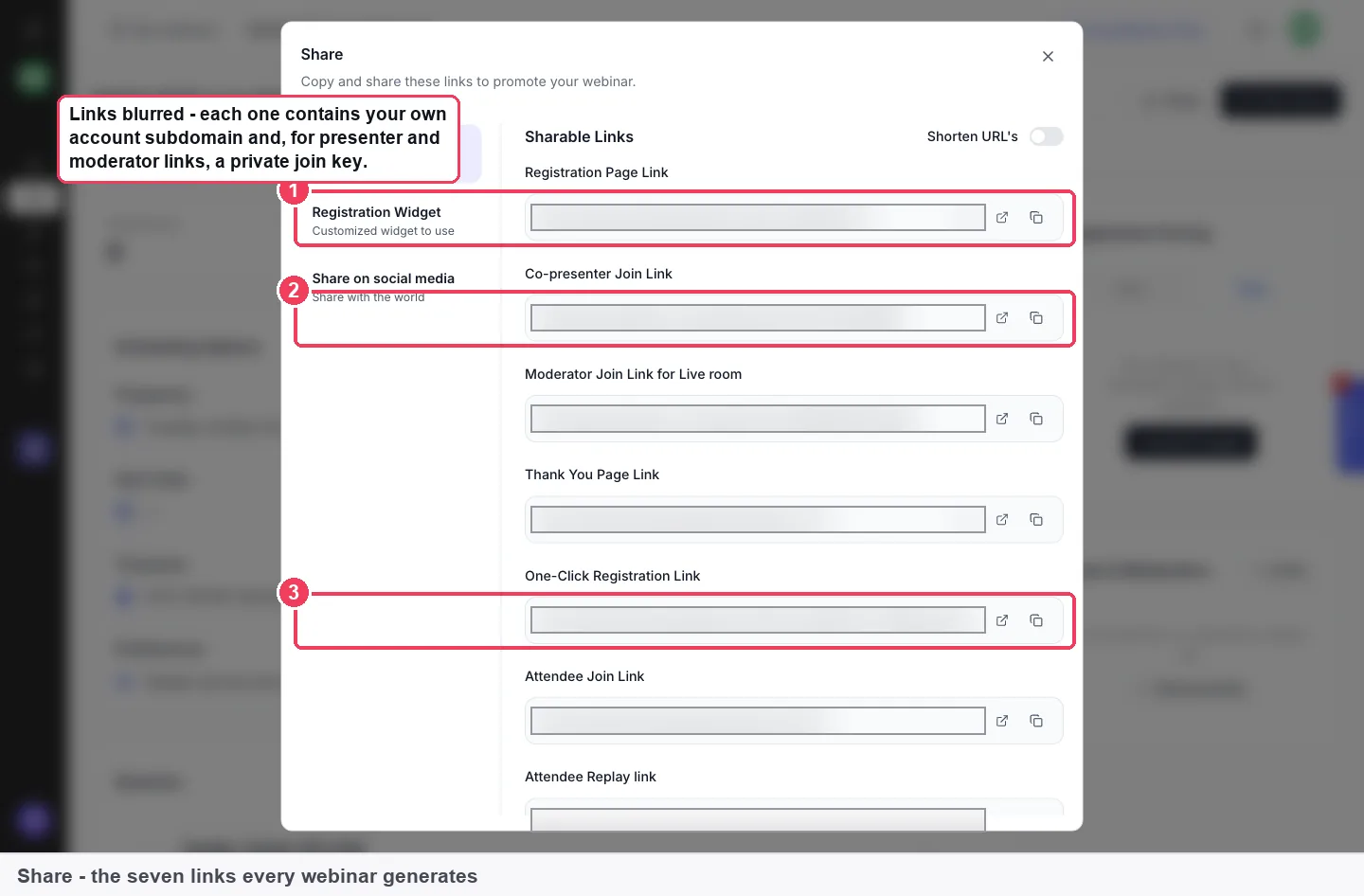
- Pasting a private link. The Co-presenter Join Link and Moderator Join Link for Live room let anyone join your room in that role. Only the registration, attendee and replay links are meant for your audience.
- Forgetting the time zone. A time without a zone sends half a mixed list to the wrong hour.
- Two different links. One link, repeated, gives you a click count you can trust.
- Inviting the whole list to a narrow topic. A saved list for the segment the topic suits protects your open rate.
What the law and mailbox providers ask of an invitation
A webinar invitation to your list is usually a marketing email, so these rules apply to it. This is a summary, not legal advice.
United States: an opt-out and a postal address
The CAN-SPAM Act requires commercial email to carry a clear notice that people can decline further email, and "a valid physical postal address of the sender". It also bars a subject heading likely to "mislead a recipient". The template above leaves room for both lines.
United Kingdom: a stated purpose
UK data protection law says personal data must be "used for specified, explicit purposes" and handled fairly, lawfully and transparently. Invite people whose details you collected for this kind of contact.
Gmail: unsubscribe and spam rates
Google's email sender guidelines say marketing messages must support one-click unsubscribe and show a visible unsubscribe link. Every sender should keep the spam rate in Postmaster Tools below 0.3%. Extra rules apply above 5,000 messages a day to Gmail accounts.
How to send a webinar invitation by hand
If you're not using a CRM yet, this is the manual way to do the job.
- Copy the public registration link from your webinar platform.
- Export your contacts to a spreadsheet and remove anyone who has unsubscribed.
- Write the invitation and a second version with a new angle.
- Send a test to yourself and click every link.
- Send the first invitation from your email tool and note the date.
- A week later, check registrations against the list and send the second invitation.
- Count opens, clicks and registrations for each send in a spreadsheet.
The weak points are steps 2 and 7. The list goes out of date, and registrations live somewhere other than the opens and clicks.
The same job in EasyWebinar
In EasyWebinar, the registration link comes from the webinar's Share dialog, and your list lives in EasyCRM. You send the invitation as a broadcast, and the Broadcasts screen keeps the totals and average rates for you. Registrants arrive on the webinar, and Import from EasyWebinar brings registrants and attendees back into EasyCRM.
Send your webinar invitation in EasyWebinar
EasyCRM is built into EasyWebinar from the Growth plan; compare plans to see what each one includes. If your list already lives in another tool, skip to the last step below.
Set up sending first
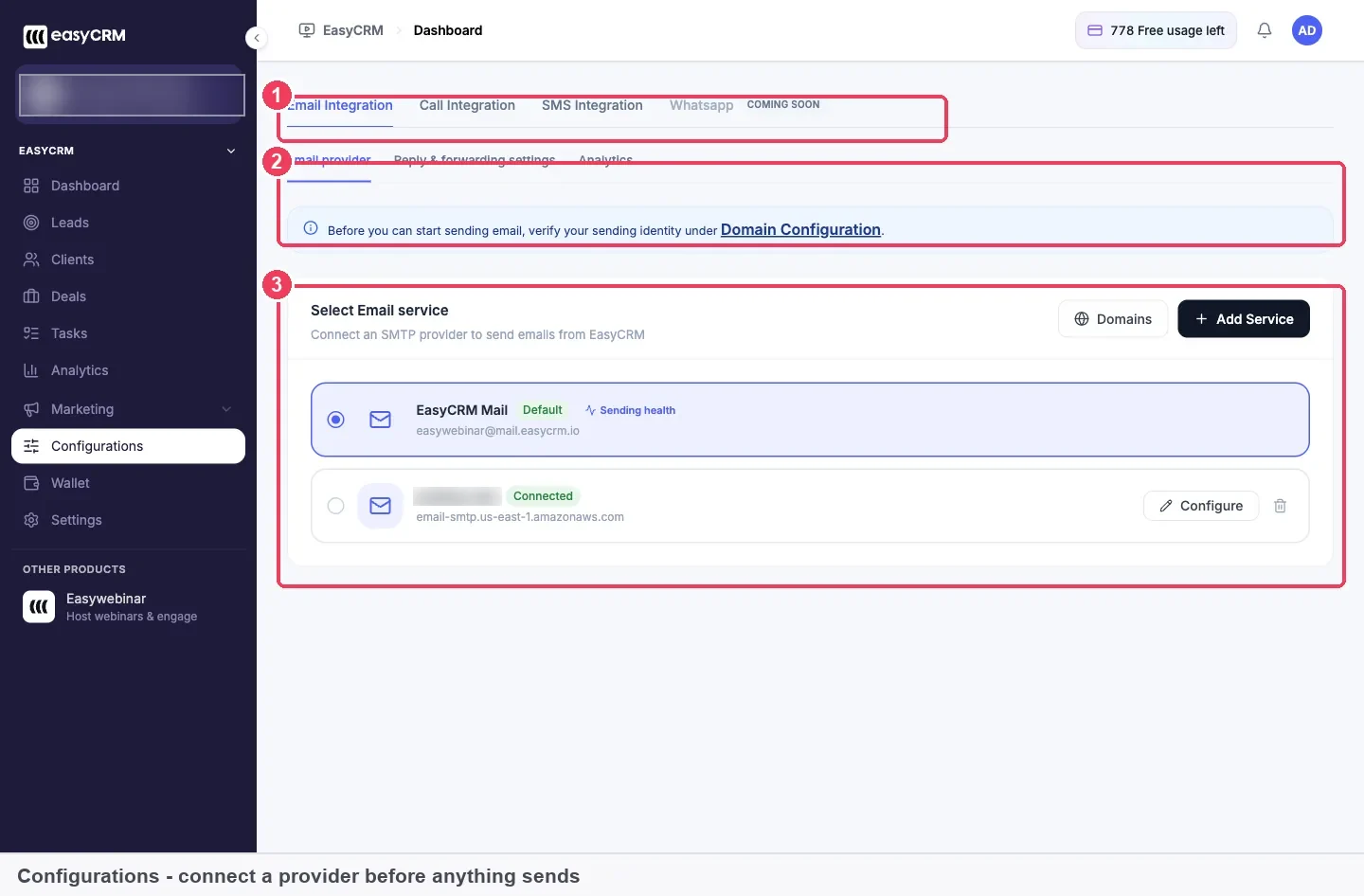
Click Configurations in the EasyCRM sidebar. Connect an SMTP provider (Amazon SES SMTP Mail, Sendgrid SMTP Mail or Mailgun SMTP Mail), then verify who you send as. You can verify a whole domain or a single business email address. Set Reply & forwarding settings to an address someone reads, because people do reply to invitations. The full walkthrough is in setting up sending and verifying your domain.
Copy the registration link
Open the webinar's Overview tab and click Share. Copy the Registration Page Link, which is the public one you promote. For contacts you already hold, the One-Click Registration Link carries name and email in the URL, so a known contact registers without filling in the form. Send a test to yourself and check that the link registers you as expected. Turn on Shorten URL's if you want a tidier link. The sharing links guide covers every link in the dialog.
Build the list you'll invite
Broadcasts send to lists, so build the list first. Import your spreadsheet into EasyCRM's leads, then use Add List to save the group you'll invite. Every import is kept as an audience with its own name, source and member count, so you can send to it again without importing twice. Make one list per topic rather than inviting everyone to everything.
Create the broadcast
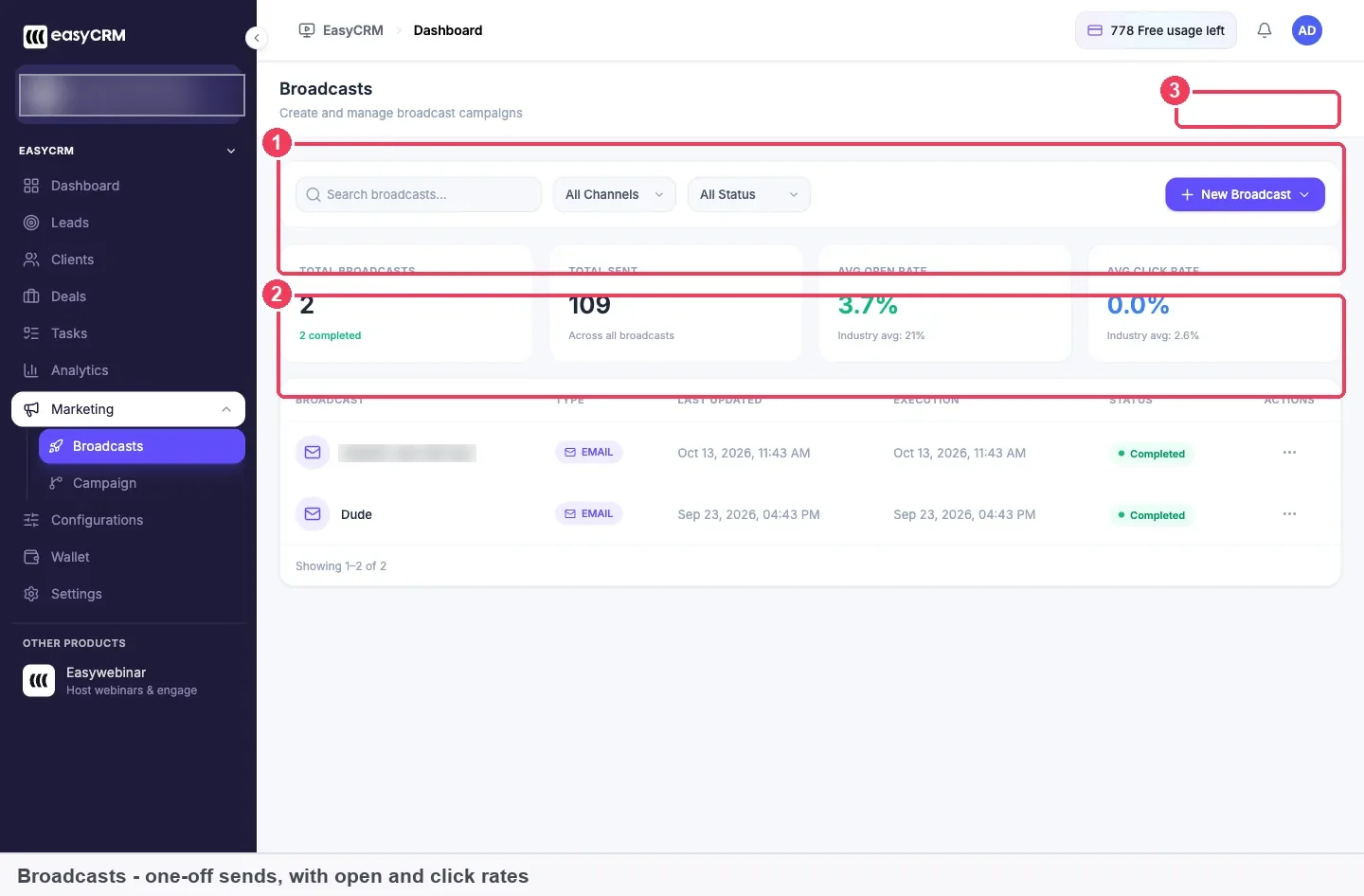
- Click Marketing → Broadcasts in the EasyCRM sidebar.
- Click New Broadcast.
- Choose the channel.
- Pick the list to send to.
- Write the message, pasting your template and registration link.
- Send it now, or schedule it.
Name each broadcast clearly, such as "Feedback session: invite 1", so the list on the Broadcasts screen is easy to read later. Each send counts against your Wallet allowance, which includes 1,000 emails a month and resets on your signup date.
If AI drafted your invitation
If you built the webinar with Create with AI, it can draft your emails as well. Treat the draft as a first pass: check the date, time zone and link, then rewrite the opening in your own words.
If your list lives in another email tool
EasyWebinar works with your CRM or ours. Keep HubSpot, Salesforce Pardot (Account Engagement), ActiveCampaign, Mailchimp or Kit (formerly ConvertKit), or use EasyCRM natively. Paste the same registration link into your tool's campaign. Then connect that tool to EasyWebinar so registrants are tagged by what they did.
Once people register from your invitation, reminder emails take over. This EasyWebinar video shows how to set them up.
See whether your invitation worked
Three numbers tell you how an invitation did: opens, clicks and registrations. Each one points at a different line of the email.
| Measure | Where you see it | What a weak figure points to |
|---|---|---|
| Open rate | Avg open rate on the Broadcasts screen, against a 21% benchmark | The subject line or the sender |
| Click rate | Avg click rate on the Broadcasts screen, against a 2.6% benchmark | The body or the reason to register |
| Registrations | The webinar's analytics and its Overview tab | The registration page, if clicks are healthy |
A low open rate is usually a subject line or sender problem. A good open rate with a low click rate means people opened the email and the offer didn't land.
How far to trust these numbers
The rates on the Broadcasts screen are averages across all your broadcasts, not the figures for one send. Write down the totals after each invitation so you can see how that send moved the average. Registrations also come from other places, such as social posts or an embedded form on your site, so not every registrant came from the email.
Worked example: two invitations to an 800-person list
This is an illustrative calculation with sample figures, not an EasyWebinar output. The leadership coach sends two invitations to the same 800 contacts.
| Invitation 1 | Invitation 2 | Both | |
|---|---|---|---|
| Sent | 800 | 800 | 800 + 800 = 1,600 |
| Opens | 200 (200 ÷ 800 = 25%) | 136 (136 ÷ 800 = 17%) | Average (25% + 17%) ÷ 2 = 21% |
| Clicks | 32 (32 ÷ 800 = 4%) | 16 (16 ÷ 800 = 2%) | Average (4% + 2%) ÷ 2 = 3% |
| Registrations | 28 | 12 | 28 + 12 = 40, which is 40 ÷ 800 = 5% of the list |
The average open rate lands on the 21% benchmark, and the average click rate beats 2.6%. But the second send pulled both averages down, which is why you note each send yourself. The two sends also use 1,600 emails, more than the 1,000 included each month, so plan them around your Wallet reset date.
What works with webinar invitation emails
| Works with | What it adds to your invitation |
|---|---|
| Registration page builder | The page your link opens, which has to match the promise in the email |
| Custom registration fields | Questions you ask at sign-up, so you learn who your invitation reached |
| Registration confirmation emails | The email each registrant gets the moment they sign up |
| Webinar reminder emails | Reminders timed relative to the webinar, so they work for recurring sessions |
| Webinar follow-up emails | What you send after the session to attendees and no-shows |
Who sends webinar invitations
Coaches and consultants
A career coach invites past clients to a monthly live clinic on salary negotiation. She keeps one EasyCRM list for clients and another for newsletter readers, and invites each with a different opening line.
Small businesses and solo operators
A two-person bookkeeping firm invites local business owners to a session on year-end records. The owner sends one invitation three weeks out and a second a week before, then reads the averages on the Broadcasts screen.
B2B marketing teams
A marketing team keeps HubSpot as its CRM and sends invitations from there. It pastes the EasyWebinar registration link into the campaign and maps webinar events to CRM tags so sales sees who registered.
Agencies
An agency runs webinars for several clients and needs each invitation to come from the right sender. It verifies each client's sending identity before any broadcast goes out.
How EasyWebinar compares for webinar invitation emails
EasyWebinar puts the registration links, the list and the send under one login. Its Broadcasts screen sets your average open and click rates beside benchmarks, so you know at a glance whether an invitation needs work.
Webinar invitation email features, from each platform's public documentation:
| Platform | One-click registration link for your list | Email your list from the same product | Open and click rates with a benchmark |
|---|---|---|---|
| EasyWebinar | Yes | Yes | Yes |
| Demio | Yes (1-click registration link template) | Partly (sent from your integrated CRM) | Not in docs |
| WebinarKit | Yes (one-click registration links) | Yes (CRM broadcasts) | Not in docs |
| Livestorm | Not in docs | Yes (built-in invitation feature) | Not in docs |
| Kajabi | Not in docs | Yes (email broadcasts) | Partly (open and click rates per newsletter) |
Yes: documented and built in. Partly: documented with a limit, shown in brackets. Not in docs: not found in the vendor's public documentation.
Why EasyWebinar is the stronger choice for webinar invitation emails
- Your list and your send in one place. EasyWebinar sends the invitation from EasyCRM, while Demio's one-click link is added to emails from your integrated CRM. See EasyWebinar vs Demio.
- A benchmark beside your rates. EasyWebinar shows average open and click rates against 21% and 2.6%, while WebinarKit documents broadcasts to your contacts without one. See EasyWebinar vs WebinarKit.
- A one-click link for known contacts. EasyWebinar's Share dialog includes a One-Click Registration Link, while Livestorm's invitations ask people to register and opt in. See EasyWebinar vs Livestorm.
- A webinar platform first. EasyWebinar's invitation leads to a live or automated webinar it runs itself, while Kajabi's email broadcasts sit inside a wider creator suite. See EasyWebinar vs Kajabi.
Competitor details checked against each vendor's public documentation on 4 November 2026. Features and plans change, so confirm with the vendor before you decide.
Limits of sending invitations this way
- A broadcast is a one-off send. For anything triggered or repeating, use an EasyCRM workflow instead.
- Broadcasts send to saved lists. Build the list before you create the broadcast.
- Sending has to be configured first. Nothing goes out until a provider is connected and your sender is verified.
- Rates on the Broadcasts screen are averages across all your broadcasts, not the figures for a single send.
- Email sends draw on your Wallet allowance, which resets on your signup date rather than the first of the month.
Common questions about webinar invitations
What should a webinar invitation email include?
A webinar invitation should name the reader's problem, say what they'll leave with, and give the date, time, time zone and length. It needs one registration link, repeated, plus your name, postal address and an unsubscribe link.
How far ahead should you send a webinar invitation?
A sensible starting plan is a first invitation two to three weeks before a live webinar and a second about a week before. After people register, your confirmation and reminder emails take over.
Should you send a second invitation to people who didn't register?
Yes, once, with a new angle rather than the same email. Add a line telling people who already registered that they can ignore it, and point them to their confirmation email.
Is there a webinar invitation template I can copy?
Yes. This page has a fill-in webinar invitation template with subject line options, preview text and body, plus a second invitation. Replace every field in square brackets before you send.
Which link should go in a webinar invite email?
Use the Registration Page Link from the webinar's Share dialog for anyone. For contacts you already hold, the One-Click Registration Link registers them without the form. Never send the presenter or moderator links.
What is a one-click registration link?
It's a registration link that carries a contact's name and email in the URL. A known contact clicks it and is registered without filling in the form, so it only works for people already on your list.
Where do I send webinar invitations in EasyWebinar?
Send them as a broadcast from Marketing → Broadcasts in EasyCRM. Click New Broadcast, choose the channel, pick the list, write the message, then send or schedule it.
Why can't I send my broadcast?
Sending usually isn't set up yet. In EasyCRM, check Configurations: you need a connected SMTP provider and a verified domain or business email address before anything goes out.
What is a good open rate for a webinar invitation?
The Broadcasts screen sets your average open rate beside a 21% industry benchmark, and your average click rate beside 2.6%. Those figures are averages across all your broadcasts, so note each send's totals yourself.
Can I schedule a webinar invitation?
Yes. An EasyCRM broadcast can be sent straight away or scheduled for later, so you can write both invitations at once and set their send times.
Do I need EasyCRM to send invitations?
No. You can keep HubSpot, Salesforce Pardot (Account Engagement), ActiveCampaign, Mailchimp or Kit, or use EasyCRM natively. EasyCRM is built in from the Growth plan.
Do invitations count against my email allowance?
Yes. EasyCRM broadcasts draw on your Wallet, which includes 1,000 emails a month. The allowance resets on your signup date, not the calendar month.
How long should a webinar invitation subject line be?
Short enough that the useful words show. Nielsen Norman Group advises displaying no more than about 40 characters and putting the most important words first.
What's the difference between a webinar announcement and an invitation?
An announcement tells people a webinar exists, often on social media or your site. An invitation is a personal email to your list with a registration link, asking each person to save a seat.
Further reading
- Transactional and confirmation email, Nielsen Norman Group (2008): why a recognisable sender decides whether email gets opened.
- Email subject lines: 5 tips, Nielsen Norman Group (2014): how long a subject line can be before it's cut off.
- 15 U.S. Code 7704, Legal Information Institute: the CAN-SPAM rules on opt-outs, postal addresses and subject lines.
- Data protection, GOV.UK: the UK principles for using personal data.
- Email sender guidelines, Gmail Help: what Gmail requires of every sender and of bulk senders.
Related
Updated 4 November 2026: first published with a fill-in invitation template, sending steps, a measurement guide and a worked example.