Webinar platform comparison
EasyWebinar vs WebinarGeek. Which webinar platform is right for you?
WebinarGeek is built for teaching, with quizzes, assessments and Interactive Sessions. EasyWebinar is the webinar platform built for conversions: attendees join from any browser, and the session that works live runs on autopilot every day — training customers on demand or selling with checkout inside the room, with your CRM or ours. Automation starts at Growth.
7-day full access. Cancel anytime.


Rated a G2 LeaderSOC 2 Type II · GDPR-aligned
WebinarGeek + add-onsTeaching room
- Live & automatedAutomation from Premium
- CheckoutAt registration
- CRM & follow-upExternal CRM
- MultistreamingRestream add-on
One account
- Live & automatedOne account
- CheckoutInside the room
- CRM & follow-upEasyCRM or yours
- MultistreamingEasyCast, 10+ platforms
What actually differs
Both run a good webinar room. They part ways at the sale.
WebinarGeek is built around the lesson. The differences show up when the webinar has to train customers on its own, sell from the room and follow up on what each attendee did.
Where WebinarGeek's setup stops
0checkout inside the room
Buyers pay at registration through Stripe or Mollie, before they have seen the pitch.
0built-in CRM
Follow-up runs in a CRM you connect; HubSpot sync is a paid add-on or an Enterprise inclusion.
Add-onto multistream
Restream is a paid Premium add-on, and RTMP studio streaming waits for Enterprise.
With EasyWebinar it's one platform, one login, one subscription. Run it live, then let that session run every day as automated training or a sales webinar, take payment inside the room, follow up on what each attendee did, and stream it to 10+ platforms with EasyCast.
7-day full access. Cancel anytime.
“I personally use EasyWebinar and they are the best. I moved from using other platforms and nothing compares to their reliability and customer support!”
 Amy PorterfieldOnline marketing expertVideo testimonial
At a glance
EasyWebinar vs WebinarGeek at a glance
EasyWebinar and WebinarGeek both run live and automated webinars that attendees join from a browser. WebinarGeek is built for teaching, with quizzes and assessments; EasyWebinar is built for webinars that keep working, with automated customer training, checkout inside the room, EasyCRM and behavior follow-up in one account.
WebinarGeek leads on scored quizzes and assessments; on everything after the session, EasyWebinar leads.
| Topic | WebinarGeek | |
|---|---|---|
| Automated training | Runs every day, with follow-up on six behavior triggers | Automated sessions; follow-up through your own tools |
| Checkout | Inside the room, during the pitch | At registration, through Stripe or Mollie |
| CRM & follow-up | EasyCRM, or keep yours | External CRM; HubSpot as an add-on or on Enterprise |
| AI | Webinar Builder on every plan; Moderator from Pro | AI Analysis; chat assistant as a paid add-on |
| Multistreaming | EasyCast to 10+ platforms, from Growth | Restream add-on on Premium |
| Quizzes & assessments | Polls and Q&A; not an assessment tool | Scored quizzes, assessments, evaluation forms |
Better fit for EasyWebinar Better fit for WebinarGeek
Which should you choose?
Choose by the job, not the feature list.
Buy WebinarGeek when the session is a lesson that has to be tested and graded. Buy EasyWebinar when the webinar has to train customers on demand or sell from the room, and follow up on what each attendee did.
- Best for
- Webinars built for conversions — live and automated, on one subscription.
- Standout
- Automated training that runs every day, and checkout inside the room.
- Not ideal for
- Courses with lessons and certificates — pair it with a course platform.
WebinarGeek
- Best for
- Classroom-style teaching and assessment, with scored quizzes and evaluation forms.
- Standout
- Teaching tools — quizzes, assessments, Interactive Sessions — and up to 100 presenters on Premium.
- Not ideal for
- Taking payment inside the room, or follow-up without a separate CRM.
Plans and CRM
Your CRM or ours
Keep the CRM you already use; EasyWebinar connects to it. Or start with EasyCRM, built in from Growth.
- HubSpot
- Salesforce Pardot (Account Engagement)
- ActiveCampaign
- Kit (formerly ConvertKit)
- GoHighLevel
- EasyCRM, built in
Flat monthly plans
No per-attendee fees within your plan.
- Every planLive webinars, browser join and the AI Webinar Builder
- From GrowthAutomated webinars, EasyCRM, checkout in the room and EasyCast
- From ProThe AI Moderator answers attendee questions in the chat
7-day full access. Cancel anytime.
Results
Webinars that keep selling after the live hour.
$5Mfrom one evergreen webinar funnel
 Carla BiesingerCourse creator
$2Mfrom one automated webinar funnel
 Ryan FennCEO of ChiirP
$750Kfrom a single webinar funnel
 Kim ConstableFounder of The Sculpted Vegan
“With EasyWebinar I sold 25 courses within 3 weeks of my evergreen "launch". Any time I needed support the response time was quick.”
 Laura K. ConnellFounder, lauraconnell.comG2 review
Go deeper
The detailed comparison, topic by topic.
Every figure behind the table, for buyers who want the full picture before they decide. Open any topic.
The full scorecardEleven decision factors, and who each one favours.
| Decision factor | WebinarGeek | Better fit | |
|---|---|---|---|
| Automated training and onboarding | Runs every day; six behavior triggers start each viewer's follow-up | Automated sessions from Premium; follow-up through your own tools | EasyWebinarfor customer education |
| Evergreen and Just-in-Time funnels | Live, simulive, evergreen and Just-in-Time in one account | Automated and just-in-time sessions, without the funnel around them | EasyWebinarlive, then on autopilot |
| Checkout inside the room | Timed offers with checkout, from Growth | Payment at registration only | EasyWebinar |
| CRM and follow-up | EasyCRM from Growth, or keep yours | External CRM; HubSpot sync as an add-on or on Enterprise | EasyWebinaryour CRM or ours |
| AI before and during the webinar | AI Webinar Builder on every plan; AI Moderator from Pro | AI Analysis; chat assistant as a paid add-on | EasyWebinarbuilds the funnel |
| Multistreaming | EasyCast to 10+ platforms, from Growth | Restream add-on on Premium | EasyWebinar |
| Quizzes, assessments, evaluation forms | Polls, Q&A and handouts | Scored quizzes, assessments and Interactive Sessions | WebinarGeekfor teaching and testing |
| Large presenter line-up | A host plus up to 4 presenters | Up to 100 presenters on Premium | WebinarGeekfor panel-heavy formats |
| Very long single sessions | 4-hour sessions from Growth | 8 hours on Premium, 12 on Enterprise | WebinarGeekfor full training days |
| Security reviews | SOC 2 Type II report; GDPR-aligned, with a DPA | EU data centres and granular privacy controls | Tieaudited controls vs EU residency |
| Trial | 7 days free with full access | 14 days free | Tie |
| What matters | WebinarGeek | |
|---|---|---|
| Best for | Automated customer training, onboarding and webinars that sell from the room | Classroom-style teaching, quizzes and assessments |
| How attendees join | Any browser, desktop or mobile, with nothing to download | Browser-based |
| Automated & evergreen webinars | Simulive, automated, evergreen and on-demand from Growth, on the same account as live | Automated and on-demand webinars from Premium |
| Just-in-Time scheduling | Sessions start minutes after someone registers, in their own time zone | Published 5, 10 or 15-minute intervals |
| Behavior-based follow-up | Six triggers — registered, attended, no-show, watched replay, clicked offer, purchased — each start their own sequence, from Growth | Email follow-up in-platform; conditional workflows through integrations |
| Checkout inside the webinar | Timed offers with checkout completed in the room, from Growth | No native in-room checkout found; payment sits at registration |
| Paid registration | Stripe and PayPal, from Growth | Stripe or Mollie at registration |
| Built-in CRM | EasyCRM from Growth — or keep the CRM you already use | No native CRM; HubSpot sync as a paid add-on or an Enterprise inclusion |
| AI before the webinar | AI Webinar Builder writes the script, pages, emails, polls and follow-up — on every plan | AI Analysis reports on sessions; no AI that builds funnel assets |
| AI during the webinar | AI Moderator from Pro answers attendee questions from the files you upload, in live, simulive and automated webinars | AI assistant answers live chat questions, as a paid add-on |
| Multistreaming | EasyCast to 10+ platforms at once — YouTube, LinkedIn, Facebook, Instagram, X and more, plus any RTMP destination — from Growth | Restream is a paid add-on on Premium; RTMP studio streaming on Enterprise |
| Teaching, quizzes and assessments | Polls, Q&A, chat and handouts; not a quiz or assessment tool | Deeper — scored quizzes, assessments, evaluation forms and Interactive Sessions |
| Presenters on stage | A host plus up to 4 presenters, with TrueVoice audio | 1 on Basic, up to 100 on Premium |
| Session length | 2 hours on Launch, 4 hours from Growth | 2 hours on Basic, 8 on Premium, 12 on Enterprise |
| Automated viewer capacity | Published per session, at 5× the live limit: 1,000 Growth · 2,500 Pro · 5,000 Scale | Automated sessions draw on the viewer tier you bought |
| Largest published room | 1,000 live on Scale; larger events on Enterprise, by quote; no hard cutoff at the plan limit | 5,000 viewers on Enterprise |
| Security & compliance | SOC 2 Type II and GDPR-aligned data practices, with a published DPA | GDPR, with EU data centres in Amsterdam and Frankfurt |
| Verified ratings | 4.5/5 from 104 G2 reviews | 4.5/5 from 529 G2 reviews; 4.6/5 from 217 on Capterra |
| Trial | 7 days free with full access | 14-day free trial |
Facts checked August 31, 2026 against each vendor's published documentation. Live and automated allowances are separate session types and are not added together.
Automated training & customer educationBoth automate the session. EasyWebinar automates what happens next.
WebinarGeek automates delivery from Premium: automated and on-demand sessions, just-in-time starts, simulated chat and in-session quizzes. EasyWebinar runs the same session live first, then every day — with the AI Moderator answering questions from your files on Pro, a next step for each viewer on six behavior triggers, and an upgrade offer that takes payment in the room.
Training that follows up
The session trains, answers and follows up on its own.
- Run the session live, then let that exact session run every day — simulive, evergreen, on-demand and Just-in-Time from Growth
- 1,000 / 2,500 / 5,000 automated viewers per session, separate from your live seats
- From Pro, the AI Moderator answers attendee questions from the PDFs and files you upload, in live, simulive and automated webinars
- Six behavior triggers give each viewer the next step: a replay, a call, an upgrade offer
- Timed offers with checkout inside the room, so training can sell the next plan
WebinarGeek
Automated lesson
A capable automated lesson, with the follow-up assembled outside.
- Automated and on-demand webinars from Premium, with just-in-time starts
- Simulated chat and timed calls to action in the room
- Quizzes and assessments inside automated sessions — a genuine strength for teaching
- Payment sits at registration; follow-up runs through an external CRM or email tool
| The plain question | WebinarGeek | |
|---|---|---|
| Can a recorded session run on its own every day? | Yes — simulive, automated and evergreen from Growth | Yes — automated webinars from Premium |
| Can a new customer watch onboarding the moment they sign up? | Yes — Just-in-Time and on-demand, in the viewer's time zone | Yes — on-demand and just-in-time start times |
| Are questions answered when nobody from your team is online? | From Pro, the AI Moderator answers in the chat from the PDFs and files you upload | An AI assistant answers chat questions, as a paid add-on |
| Can the automated session test what people learned? | Not a quiz or assessment tool | Quizzes, assessments and evaluation forms — deeper than ours |
| Does each viewer get a next step based on what they did? | Six behavior triggers start their own sequences, in EasyCRM or your CRM | Email follow-up; conditional workflows through integrations |
| Can the automated webinar sell an upgrade in the room? | Yes — timed offers with checkout, no redirect | Timed calls to action; payment happens at registration |
| Who builds the pages, emails and follow-up around it? | The AI Webinar Builder drafts the whole set, on every plan | Built by hand |
Automation verdict
If the automated session ends with a graded quiz, WebinarGeek does that better. If it ends with a new customer activated, a question answered at 3am or an upgrade sold, EasyWebinar does the next step for you.
Selling in the room & CRMPaying at registration and paying during the pitch are two different products.
WebinarGeek connects Stripe or Mollie so people pay while they register, which filters for people who already decided. EasyWebinar takes payment inside the room with a timed offer, so you can close the people you convinced during the session — then follow up in EasyCRM or the CRM you already use.
| Revenue workflow | WebinarGeek | |
|---|---|---|
| When the buyer pays | During the pitch, with checkout inside the room | Before the session, at registration |
| Paid registration | Stripe and PayPal, from Growth | Stripe or Mollie at registration |
| Engagement analytics | Attendance, watch time, questions, poll answers, offer clicks and purchases per attendee | Webinar statistics, plus AI Analysis on every plan |
| Sale tied to watch behavior | Revenue reporting on Pro links each sale to in-session behavior | The transaction sits at registration, before any watch behavior exists |
| CRM | EasyCRM from Growth, or native HubSpot and Salesforce Pardot (Account Engagement) sync from Pro | No built-in CRM; HubSpot sync as an add-on or on Enterprise, Zapier and ActiveCampaign below that |
| Who builds the follow-up | Six behavior triggers start their own sequences | You do, in the email tool or CRM you connect |
| What you still buy around it | Nothing for checkout or CRM — registration, offer, payment and follow-up run in one account | A CRM, and the connector work between it and the webinar |
Revenue verdict
WebinarGeek passes webinar data to your stack and does it well. EasyWebinar includes the parts that sit between the offer and the pipeline — in-room checkout, EasyCRM and behavior follow-up — or connects to the CRM you already run.
The live roomOne room is built to teach. The other answers questions and takes the payment.
WebinarGeek's toolkit is deeper for the classroom: scored quizzes, assessments, evaluation forms, Interactive Sessions and up to 100 presenters. EasyWebinar's room is built to answer and sell: the AI Moderator from Pro, reactions, polls, Q&A, chat, handouts, timed offers with checkout, A/B split testing on registration pages, moderator controls and TrueVoice audio for a host plus up to 4 presenters.
| Live room capability | WebinarGeek | |
|---|---|---|
| Polls, chat, Q&A and handouts | Included | Included |
| AI answering attendee questions | AI Moderator from Pro, answering from the files you upload | AI assistant for live chat, as a paid add-on |
| Selling tools | Timed offers with checkout in the room, and A/B split testing on registration pages | Timed calls to action and discount codes; payment at registration |
| Attendee reactions and moderator controls | Included | Question upvotes and private chat |
| Recorded sessions that still feel live | Chat and offers keep working in simulive and evergreen sessions | Simulated chat and polls replay live messages into a recorded session |
| Quizzes, assessments, evaluation forms | Not a quiz or assessment tool | Scored quizzes, assessments, evaluation forms and Interactive Sessions |
| People speaking on stage | A host plus up to 4 presenters, with TrueVoice audio built for five speaking at once | Up to 100 presenters on Premium |
| Streaming | Sub-second latency on Dolby OptiView (formerly Millicast) WebRTC | HD+ on every plan |
Live room verdict
Is your session a lesson or a pitch? If the quiz and the assessment are the product, buy WebinarGeek — EasyWebinar is not an LMS. If the session has to answer the question that stalls a buyer and take the card while the offer is on screen, EasyWebinar's room does both.
AI & reachAI on both sides of the webinar, and a room that reaches 10+ platforms.
WebinarGeek offers AI Analysis on every plan and an AI assistant for live chat as a paid add-on. EasyWebinar uses AI before and during the session: the AI Webinar Builder drafts the funnel on every plan, and from Pro the AI Moderator answers attendee questions from the files you upload. EasyCast then takes the same room to 10+ platforms at once.
01 · Before
AI builds the funnel before you go live
Answer a few questions and the AI Webinar Builder writes the script, registration pages, emails, polls, offer and follow-up as editable assets — on every plan. WebinarGeek's AI Analysis reports on sessions after they run.
02 · During
The AI Moderator answers while it runs
On Pro and above, upload your PDFs and other files and the AI Moderator answers attendee questions in the chat from them, in live, simulive and automated webinars — so an onboarding session at 3am still gets answers.
03 · After
Follow-up that reacts to what each person did
Registered, attended, no-show, watched replay, clicked offer, purchased: six behavior triggers, each with its own sequence from Growth, in EasyCRM or the CRM you already use.
04 · Reach
EasyCast streams it to 10+ platforms
YouTube, LinkedIn, Facebook, Instagram, X, Vimeo, Twitch, TikTok, Kick, Rumble, Dailymotion and any RTMP destination at once, from Growth, while timed offers, polls and Q&A keep running for attendees.
AI & reach verdict
WebinarGeek's AI reports on the session. EasyWebinar's AI builds the funnel before it and answers attendees during it, and behavior follow-up acts on what they did afterwards.
Growth & reachGrowing your webinars should not mean adding tools around the room.
Attendee capacity is the easy number to compare. What changes your setup as you grow is automated viewers, extra users, multistreaming and the tools around the room.
| As volume grows | WebinarGeek | |
|---|---|---|
| Automated viewer allowance | 1,000 on Growth · 2,500 on Pro · 5,000 on Scale, per automated session | No separate automated allowance; automated sessions draw on the viewer tier you bought |
| Adding people who run events | Up to 4 co-hosts and unlimited team members | Extra users are a paid add-on; included on Enterprise |
| Multistreaming | EasyCast to 10+ platforms at once, from Growth, while offers, polls and Q&A keep running | Restream is a paid add-on on Premium |
| RTMP | Any RTMP destination through EasyCast, from Growth | RTMP studio streaming on Enterprise |
| Largest published room | 1,000 live on Scale; larger events on Enterprise, by quote; no hard cutoff at the plan limit | 5,000 viewers on Enterprise |
| On-demand catalogue on your site | Registration and funnel pages are built in | Webinar channel collects live and on-demand sessions in one place |
Growth verdict
WebinarGeek publishes a larger top room and a webinar channel for an ongoing catalogue — real advantages. EasyWebinar counts automated viewers separately, includes the team, never stops your webinar at the plan limit, and streams to 10+ platforms from Growth.
Security & complianceAudited controls, or EU data residency: match the clause in your contract.
EasyWebinar holds a SOC 2 Type II report and follows GDPR-aligned data practices, with a published Data Processing Agreement, encrypted data and per-attendee consent records. WebinarGeek keeps attendee data in EU data centres and publishes more granular privacy controls than we do.
| Requirement | WebinarGeek | |
|---|---|---|
| SOC 2 Type II | Report held, available for security reviews | Not publicly claimed |
| GDPR & Data Processing Agreement | GDPR-aligned data practices, with a published DPA including Model Clauses | GDPR, with a DPA in-account |
| Data residency | US-hosted; Model Clauses cover EU-to-US transfer | EU data centres in Amsterdam and Frankfurt |
| Granular privacy controls | Consent capture and per-attendee consent records | Deeper — registration anonymisation, IP and domain restriction, data lifecycle rules |
| SSO / SAML and API access | Scale and Enterprise | Not documented in public plan pages |
Security summary
SOC 2 Type II · GDPR-aligned · Published Data Processing Agreement · Encrypted data · SSO/SAML and API on Scale and Enterprise · 99.9% uptime guarantee for Enterprise customers, with service credits. We do not hold ISO 27001, PCI-DSS or HIPAA. If a contract writes EU-only residency, WebinarGeek is the shorter path.
Try before you decideStart free for 7 days, with full access to every feature.
EasyWebinar gives you 7 days free with full access. WebinarGeek offers a 14-day free trial. What matters most is what each window lets you put through a real webinar.
7 days freewith full access
The complete app at full plan access: AI webinar creation, live and automated sessions, Just-in-Time, paid registration, checkout inside the room and EasyCRM.
You can rehearse the session, the sale and the follow-up before you pay.
WebinarGeek
Free trial14 daysfree trial
Two weeks on the Premium feature set — quizzes, assessments, Interactive Sessions and automated webinars.
Good for judging the teaching experience.
Trial verdict
Run the same session in each room. The trial that answers your real question is the one that lets you build the follow-up and take a payment too — and on EasyWebinar every feature is unlocked from day one.
Trial conditions taken from published vendor documentation, August 31, 2026. Confirm current trial terms with each vendor before evaluating.
Run the session. Take the payment. Keep the recording selling.
Build it with AI, run it live, then let the session that converts sell on autopilot.
7-day full access. Cancel anytime.
4.5/5 on G2 · 100+ reviews · 7-day full access · SOC 2 Type II · GDPR-aligned
Complete buyer's guide
Continue with the full research behind the comparison.
Written by Pranav Sharma, Chief Business Officer at EasyWebinar, on August 27, 2026. Plan capabilities and G2 review figures were reverified against WebinarGeek's public plan pages on August 31, 2026, and the article was updated on October 14, 2026.
In this guide
EasyWebinar vs WebinarGeek: Automation, Selling & Engagement Tools Compared
Pranav Sharma · Chief Business Officer · August 27, 2026 · 11 min read
TL;DR
- WebinarGeek is built for teaching: scored quizzes, assessments, evaluation forms, Interactive Sessions and up to 100 presenters on Premium. If the quiz or the assessment is the product, buy WebinarGeek.
- EasyWebinar is built for webinars that keep working: run a session live, then let that session run every day as automated customer training or a sales webinar, from the Growth plan.
- WebinarGeek connects Stripe or Mollie at registration. EasyWebinar takes payment inside the room with timed offers and checkout, so an offer made mid-session can be paid for without a redirect.
- WebinarGeek has no built-in CRM. EasyWebinar runs follow-up on six behavior triggers in EasyCRM or the CRM you already use.
- AI on both sides of the webinar: the AI Webinar Builder on every plan, and from Pro the AI Moderator answers attendee questions from the files you upload. EasyCast streams to 10+ platforms, plus any RTMP destination, from Growth.
- Run five to ten live sessions and clear a 10% attendee-to-buyer rate before automating anything. Automation scales whatever the live version already does.
EasyWebinar runs live, simulive, evergreen and just-in-time sessions on one account, with a built-in sales CRM and checkout inside the room, and attendees join from any browser. WebinarGeek keeps attendee data in EU data centres, leads with GDPR and goes deeper on teaching tools; its automated webinars unlock on the Premium tier. Buy WebinarGeek if a contract clause forces attendee data to stay inside the EU, or if scored quizzes and assessments are the product. Buy EasyWebinar if the webinar has to train customers on its own or has a revenue number attached to it.
Some context on where this lens comes from. EasyWebinar's founder, Casey Zeman, started in real estate. When the market crashed he went from mid six figures to almost nothing in a single year and nearly lost his house. He then spent six months building a YouTube course that sold zero copies, until a webinar finally moved it. That history is why EasyWebinar was built around revenue mechanics rather than broadcast quality.
You are not shopping for a broadcast tool. You are choosing what sits between your ad spend and your bank account. Both platforms will get a room full of people watching slides, so it helps to compare on revenue mechanics rather than stream quality.
The 90-second decision table
| Criterion | EasyWebinar | Webinargeek |
|---|---|---|
| Automation included from | Growth | Premium |
| Follow-up | Six behavior triggers, from Growth | Email follow-up; workflows through integrations |
| Session length cap | 2h on Launch, 4h from Growth | 2h Basic, 8h Premium, 12h Enterprise |
| Presenters | A host plus up to 4 presenters | 1 on Basic, up to 100 on Premium |
| Payments | Checkout inside the room, and paid registration | Stripe or Mollie at registration |
| Built-in CRM | EasyCRM, included from Growth | None native; HubSpot as an add-on or on Enterprise |
| Multistreaming | EasyCast to 10+ platforms, from Growth | Restream add-on on Premium |
| Data hosting | US-based, GDPR-aligned, published DPA | EU data centres in Amsterdam and Frankfurt |
| Security attestation | SOC 2 Type II, SSO/SAML, API access | GDPR and granular privacy controls; no published certification |
| Support geography | US timezone team | Europe-based, 4.8 service score |
| Verified rating | 4.5/5 from 104 G2 reviews | 4.5/5 from 529 G2 reviews |
| Free trial | 7-day free trial with full access | 14 days |
| Best for | Automated customer training and selling an offer 24/7 | Teaching, assessment and EU residency |
The two-sentence rule
Buy WebinarGeek if a contract clause forces your attendee data to stay inside the EU, or if the assessment is what you are delivering. Buy EasyWebinar if the webinar has to keep working after the live hour — training customers on its own, or selling with a revenue number attached to it.
Everything else is detail.
What operators say before they switch
There is a small delay in what I see as host and what the viewers see. Video quality was really good, but the conversion was not good.
Where the real work hides
Neither feature page tells you what happens after the session. Add-ons, integration gating and the tools you connect around the room do that quietly.
EasyWebinar runs live, simulive, evergreen and just-in-time formats on one account, and includes EasyCRM, behavior follow-up, paid webinars and checkout inside the room from Growth — tooling most comparison charts leave to other products.
Takeaway: Both platforms stream competently. The decision sits on whether your webinar is a lesson or a pitch, and on where your attendee data is legally required to live.
Yes, but not on the entry plan. WebinarGeek's Basic plan covers live and on-demand with a two-hour cap and one presenter. Automated webinars, custom branding and up to 100 presenters begin on Premium, where the cap rises to eight hours. EasyWebinar includes automated, simulive, evergreen and just-in-time scheduling with attendee timezone detection from the Growth plan, with automated viewer allowances of 1,000 on Growth, 2,500 on Pro and 5,000 on Scale.
Four words vendors use interchangeably
Live means you are actually presenting, right now.
On demand means a recording someone watches whenever they click.
Simulive means a recording that plays on a schedule, with you in the chat.
Just-in-time (JIT) means the next session starts minutes after someone registers — the core mechanic behind any automated webinar.
| Format | EasyWebinar | Webinargeek |
|---|---|---|
| Live | All plans; 2h cap on Launch, 4h from Growth | Basic, 2h cap, 1 presenter |
| On demand | All plans | Basic |
| Automated | From Growth | Premium, 8h cap |
| Simulive | From Growth | Premium tooling |
| Just-in-time | Included, attendee timezone detected | Published 5, 10 or 15-minute intervals |
| Automated viewer allowance | 1,000 Growth · 2,500 Pro · 5,000 Scale | Automated sessions draw on the viewer tier you bought |
| RTMP | Any RTMP destination through EasyCast, from Growth | RTMP studio on Enterprise |
Why just-in-time is the whole ballgame
JIT is not a marketing word. It is a toggle that sets the next session to start minutes after someone lands on the page. Compare that to "next Tuesday at 7pm Eastern." One captures intent while it is hot. The other asks a stranger to remember you for six days.
EasyWebinar ships just-in-time scheduling with attendee timezone detection, so a Sydney registrant sees a session starting soon on her own clock, not yours.
Credit where it is due
WebinarGeek publishes explicit just-in-time intervals of 5, 10 or 15 minutes and describes a session that starts every few minutes depending on your wishes. That precision is a real strength.
The wall a coach hits first
Here is a common sequence. A coach buys Basic, runs three live sessions, then decides to automate the winner.
The automation toggle is not there. The upgrade to Premium feels minor — until custom branding and multi-presenter turn out to sit behind the same gate.
WebinarGeek-style automated setups with some live interaction layered in are probably the sweet spot. I have experience with both fully…
The question to ask a sales rep
Ask whether, on the plan just quoted, the team can run an automated webinar, brand it as its own, and start a session within fifteen minutes of registration.
If any part of the answer is "on the next tier up," you have your real plan.
An evergreen funnel is only as good as the live version you cloned it from, so nail it live first, then automate — see how the scheduling modes differ.
Takeaway: Both platforms automate, and both gate it behind their second tier. EasyWebinar counts automated viewers separately at five times the live limit; WebinarGeek's automated sessions draw on the viewer tier you already bought.
Both platforms ship polls, quizzes, chat and call-to-action buttons. The difference is intent. WebinarGeek's interaction set is broader and engagement-first — quizzes with scored answers, assessments, evaluation forms, Interactive Sessions, question upvotes and simulated chat — though attendees can chat but never speak. EasyWebinar wires timed CTAs and offers to a checkout and a CRM record, so a click becomes a tracked buying signal instead of a dashboard number.
A room full of poll answers and zero sales
Picture an operator reading a beautiful engagement report. Ninety-two percent poll participation, forty minutes average watch time, two sales. Engagement is not cash. The interaction that matters is the one that sits next to an ask.
| Tool | Engagement job | Revenue job |
|---|---|---|
| Polls | Warm the room | Qualify buyers by answer |
| Quizzes | Hold attention | Segment for follow-up |
| Chat | Build presence | Capture objections to close on |
| CTA button | Look interactive | Open checkout mid-session |
| Countdown | Create pace | Time the offer window |
Where WebinarGeek is genuinely deeper
Saying this before the halfway point is what makes the rest of the comparison credible. WebinarGeek's published toolkit goes further than EasyWebinar's on teaching: quizzes with scored answers, assessments and evaluation forms, information boxes, question upvotes and private chat, discount codes, simulated chat and polls that replay live messages into a recorded session, up to 100 presenters on stage against EasyWebinar's host plus up to 4 presenters, and an AI assistant that answers live chat questions as a paid add-on.
EasyWebinar's room is built to answer and sell instead: the AI Moderator from Pro answers attendee questions from the files you upload, plus attendee reactions, polls, Q&A, chat, handouts, timed offers with checkout inside the room, A/B split testing on registration pages, moderator controls and TrueVoice audio for a host plus up to 4 presenters — with each interaction recorded against the attendee. If the quiz, the assessment and the certificate are the product, buy WebinarGeek. EasyWebinar is not an LMS.
I love that we can have a poll, offer and countdown right in the event. That's going to be so great for sales and interactions.
What stands out immediately is the ease of use, from setting up your webinar to analyzing results afterward, everything is clear and intuitive.
The quality when using multiple presenters. If you have more presenters on different location the quality of the webinar will go down a lot.
The friction pattern in aggregated reviews
G2's aggregated dislikes for WebinarGeek are specific, not vague: eighteen reviewers cite a steep learning curve, fifteen cite CRM integration problems, and twelve cite limited registration page and analytics customisation.
EasyWebinar carries its own honest gripe. Setting up an automated webinar expects the presentation uploaded before you can build the funnel, which frustrates operators promoting far in advance — though the AI Webinar Builder shortens the rest of the build.
Three placements to test on your next run
First, ask permission before the close: tell the room there is a paid offer that goes deeper, ask whether it is okay to walk through it, and invite a one in the chat.
Second, promise a bonus for people still there at pitch time. Third, keep the CTA button live through the entire Q&A, not just the offer slide.
It's easy to get someone to sign up. The main issue I have with webinars is less than 15% of people that register show up.
Engagement design only matters after show rate is fixed. EasyWebinar attaches every in-webinar CTA and timed offer to EasyCRM, so the person who clicked at minute 47 lands in a follow-up sequence instead of a spreadsheet.
Takeaway: WebinarGeek wins on the depth of interaction. EasyWebinar wins on what happens to the interaction afterwards, because every CTA and timed offer lands in EasyCRM instead of a spreadsheet.
WebinarGeek charges at registration through Stripe or Mollie, then hands follow-up to your email tool, with HubSpot available as a paid add-on and included on the Enterprise plan. Fifteen G2 reviewers report CRM integration friction. EasyWebinar sells inside the session with timed offers and checkout in the room, then follows up with buyers and no-shows on six behavior triggers, in EasyCRM — with an auto-dialer — or the CRM you already use.
The 90 minutes that decide your revenue
Most operators think the webinar ends when they stop talking. It does not. The next 90 minutes carry most of the money — that window is when a buyer is still warm, still in the tab, still holding a credit card. Whatever your platform can do inside those 90 minutes is your real conversion tooling.
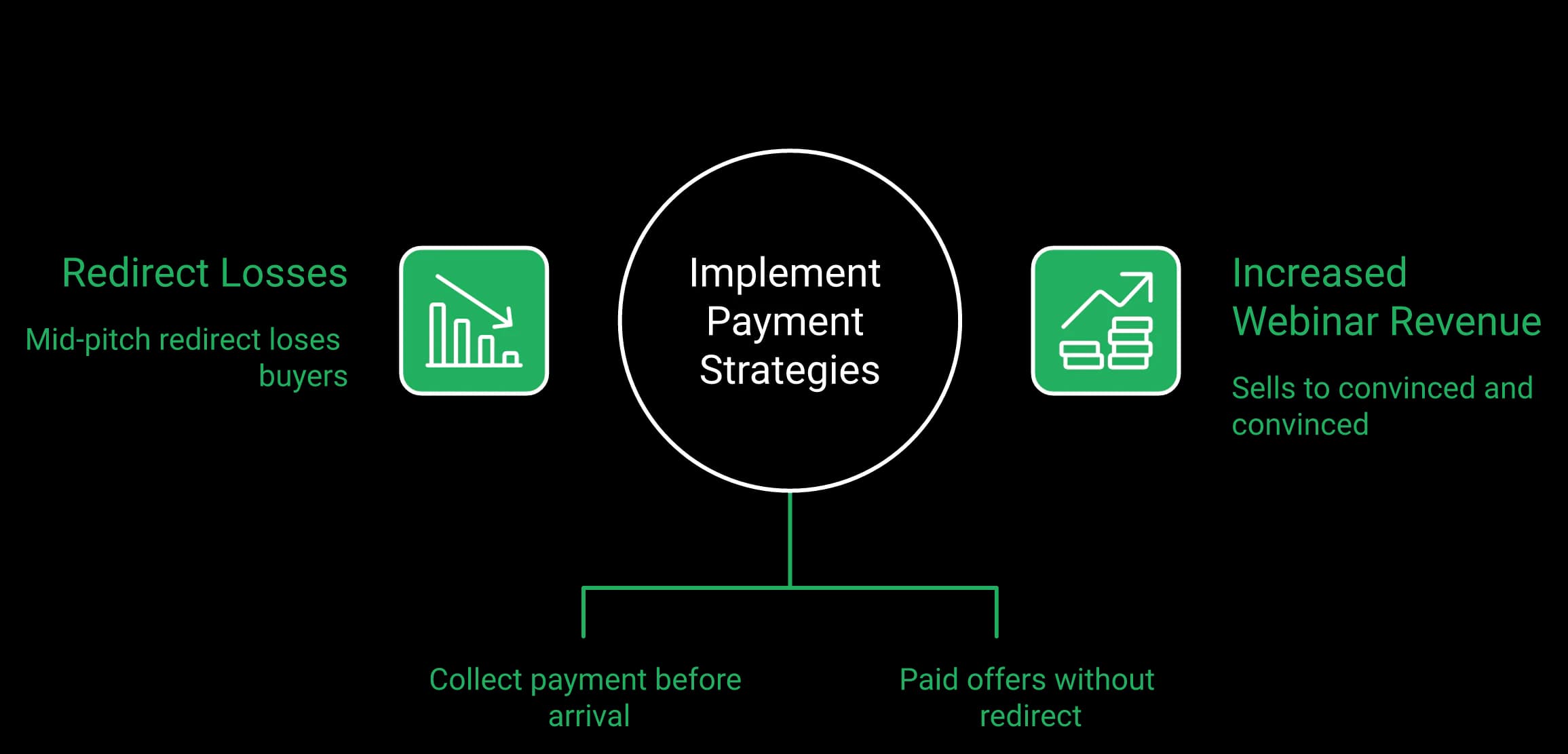
Where the money leaks. Payment collected before arrival sells to people who already decided; an in-room offer without a redirect sells to the people you convinced during the session.
Where the handoff usually breaks
Payment at registration is a different product than payment during the pitch. One filters for people who already decided. The other closes people you just convinced. WebinarGeek connects Stripe or Mollie so attendees pay while they register, then follow-up moves to your email platform and deeper CRM sync waits for the Enterprise tier.
| Capability | EasyWebinar | Webinargeek |
|---|---|---|
| Payment timing | Checkout inside the room, and paid registration via Stripe and PayPal | At registration, via Stripe or Mollie |
| Native CRM | EasyCRM from Growth | None |
| Behavior follow-up | Six triggers: registered, attended, no-show, watched replay, clicked offer, purchased | Handled in the CRM or email tool you connect |
| Auto-dial follow-up | Included | Not offered |
| HubSpot / Salesforce Pardot (Account Engagement) | Native sync from Pro | HubSpot as a paid add-on; included on Enterprise |
| Reported integration friction | Bugs noted, fixed fast | 15 G2 reviewers cite CRM issues |
It also seamlessly integrated with our CRM. Also want to give a shout out to Rakesh who has been extremely helpful customer support rep.
I do use other email systems to send post-webinar email sequences because I can't track open and click rates on EasyWebinar.
With WebinarGeek, you can connect payment providers like Stripe or Mollie to let people pay during registration.
Why EasyWebinar built the CRM, and one caution
EasyWebinar built a sales CRM into the platform because leads were dying in the gap between tools, so EasyCRM project-manages, qualifies and auto-dials them. This is the single biggest functional difference between the two options here.
Be skeptical of any tool claiming to cover even more than that, though. When a platform promises to also be your community, your course host and your ad manager, quality usually drops.
The five-step follow-up to run Monday
- Tag buyers and no-shows separately before you leave the room.
- Send the replay to no-shows within two hours.
- Call anyone who clicked the offer but did not buy.
- Send one objection-specific email, not a generic nudge.
- Close the sequence with a real deadline you honor.
That sequence is the backbone of any working webinar funnel, and it does not care which platform you bought. On EasyWebinar the pitch, the payment and the callback live in one system — see how in-room monetisation works.
Takeaway: Only one of these platforms takes payment inside the room. If your offer is made at minute 47, that distinction is small on a feature chart and large on a revenue report.
WebinarGeek rates 4.5 out of 5 across 529 G2 reviews and 4.6 out of 5 across 217 Capterra reviews, with customer service at 4.8, its strongest sub-score. EasyWebinar sits at 4.5 out of 5 across 104 G2 reviews. Read the dislikes on both, because that is where the buying decision actually hides.
The scorecard, with counts attached
A rating without a review count is decoration. Here is the same data both directory pages publish, with the volumes visible.
| Metric | EasyWebinar | Webinargeek |
|---|---|---|
| G2 rating | 4.5/5 | 4.5/5 |
| G2 review count | 104 | 529 |
| Capterra | Listed on profile | 4.6/5 across 217 reviews |
| Support sub-score | Praised for live Zoom help | 4.8/5 |
| Support geography | US timezone team | Europe-based |
The WebinarGeek complaint taxonomy
G2's aggregated dislikes are unusually specific. Eighteen reviewers cite a steep learning curve, fifteen cite CRM integration problems, thirteen cite thin onboarding guidance and twelve cite limited registration page and analytics customisation. There is no mobile or desktop app either, and Capterra reviewers add that attendees can chat but never speak in the room.
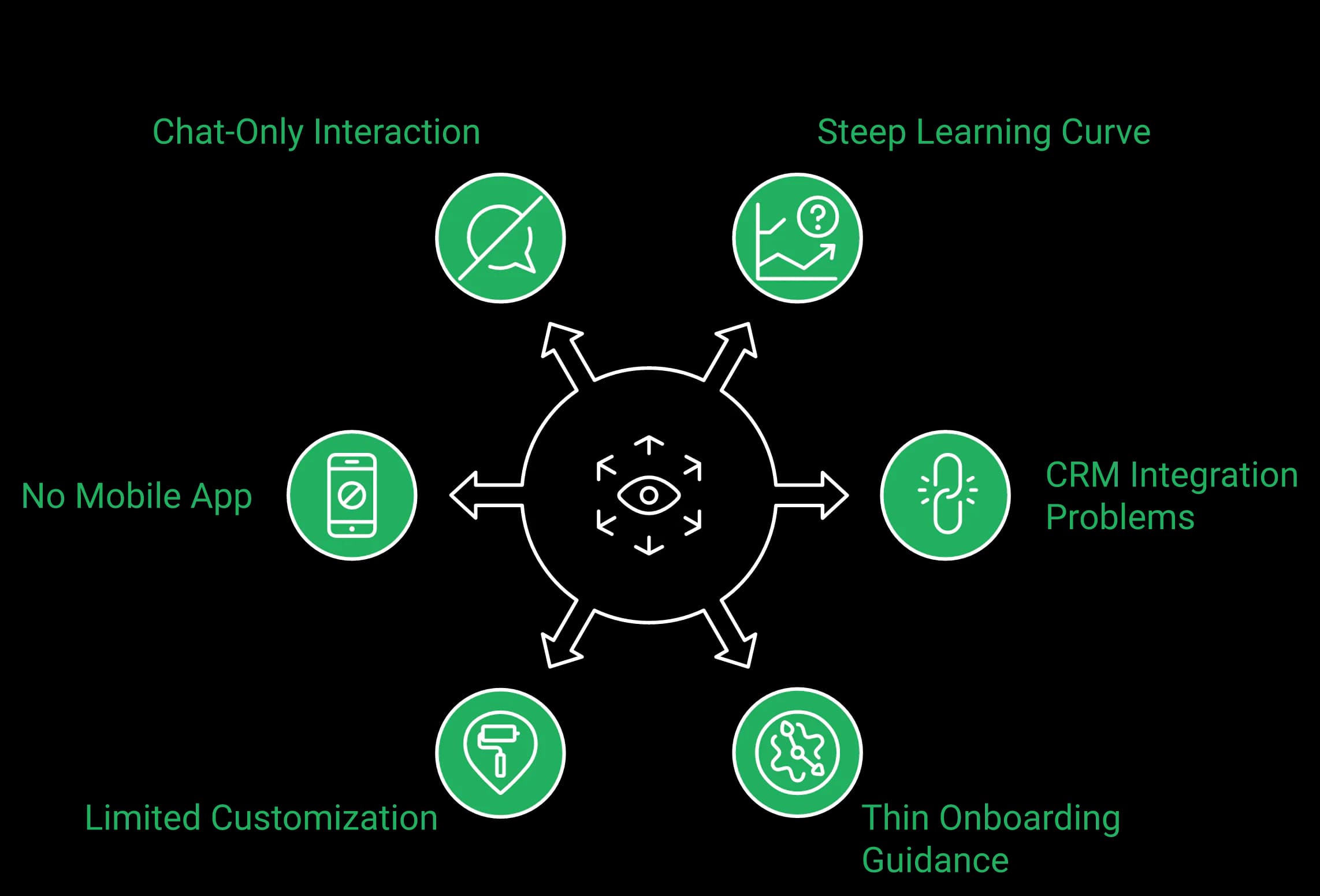
The complaint taxonomy. Counted from G2's aggregated dislikes — the six patterns reviewers raise most often about WebinarGeek.
EasyWebinar's honest weak spots
EasyWebinar's reviews are not spotless. The most repeated complaint is that automated webinars want the presentation uploaded before you can build the funnel. The second is that in-platform email open and click tracking is thinner than a dedicated ESP.
The biggest challenge is around setting up automated webinars, and needing the presentation uploaded first in order to set it up.
I would love to have more screen display options, like where I place my screen compared to my slides.
The competitor complaint worth reading twice
Design polish is the complaint that matters least. Simple scales, and fancy fails. Ugly pages have sold plenty, because the presentation carries the sale — a small host-to-viewer delay with weak conversion, as that reviewer described, is a more serious signal than an unfashionable registration page.
What support hours feel like at 2am
WebinarGeek earns a 4.8 service score, delivered on European hours. That is excellent if you are in Amsterdam and awkward if your webinar starts at 8pm Pacific.
Also watch the volume gap. A 529-review base and a 104-review base are not comparable evidence, and several directory pages still quote stale counts.
Takeaway: Identical star ratings, very different review volumes and complaint patterns. Their friction is learning curve and CRM integration; EasyWebinar's is the build order on automated funnels.
These two platforms solve different compliance problems, so match the platform to the clause your contract actually contains. WebinarGeek positions as the European alternative, with attendee data in EU data centres and unusually granular privacy tooling. EasyWebinar answers procurement with SOC 2 Type II, GDPR-aligned data practices with a published Data Processing Agreement, SSO and SAML, and API access.
Two different questions, not one
Data residency asks where the records physically sit. Security attestation asks whether an auditor checked your controls. A GDPR claim does not produce a SOC 2 report, and a SOC 2 report does not move your servers to Frankfurt. Buyers who conflate the two waste weeks in review.
| Requirement | EasyWebinar | Webinargeek |
|---|---|---|
| GDPR | GDPR-aligned, with a published DPA and Model Clauses | Yes, with a DPA in-account |
| EU data residency | US-hosted, with Model Clauses covering EU-to-US transfer | EU data centres in Amsterdam and Frankfurt |
| SOC 2 Type II report | Yes | Not published |
| Granular privacy controls | Consent capture and per-attendee consent records | Deeper — registration anonymisation, IP and domain restriction, data lifecycle rules |
| SSO and SAML | Yes, on Scale and Enterprise | Not documented |
| Largest published room | 1,000 live on Scale; larger events on Enterprise, by quote | 5,000 viewers on Enterprise |
| Dedicated CSM and SLA | Enterprise; 99.9% uptime guarantee for Enterprise customers, with service credits | Enterprise |
What EasyWebinar does not hold, and where WebinarGeek's DPA lands
EasyWebinar does not hold ISO 27001, PCI-DSS or HIPAA. WebinarGeek's privacy controls are more granular than anything EasyWebinar publishes, and procurement will find that out anyway.
One correction worth making in both directions: EU data centres are not the same as a contractual promise. WebinarGeek's own DPA permits processing outside the EEA where sub-processors meet Chapter V safeguards, so ask for the sub-processor list rather than relying on the marketing line.
Four questions for your security reviewer
- Where is attendee personal data stored, and can we name the region in a contract?
- Is a current SOC 2 Type II report available under NDA?
- Does the platform support SSO or SAML on the plan we are buying?
- What is the documented data deletion and export process at cancellation?
Question four is usually settled by the data processing addendum rather than a sales call.
The tier trap in compliance shopping
Compliance features often live on the most expensive plan. WebinarGeek's Enterprise tier carries the custom domain, RTMP streaming, SLA and dedicated success manager.
List your compliance requirements before you count your attendees. Most buyers do this backwards and get surprised in month two.
Takeaway: If a German public sector buyer writes EU-only residency into the contract, WebinarGeek is the shorter path. If procurement wants an audited control environment, SSO and SAML, EasyWebinar is.
Both are browser-based and quick to a first live session, though 18 G2 reviewers describe WebinarGeek's learning curve as steep and 13 cite thin onboarding guidance. EasyWebinar assembles registration pages, reminder sequences and replay flows from one build, though automated setup expects your deck uploaded first. Budget one working day either way.
The honest time estimate
A first live session takes an afternoon on either platform. A complete evergreen funnel with reminders, replay and follow-up takes a day. Anyone promising fifteen minutes is describing a test room, not a funnel. The build time is not the platform — it is your offer copy.
The day-one sequence
- Record or upload the presentation before touching the funnel.
- Build the registration page and set attendee timezone detection.
- Write three reminder emails, then one replay email.
- Place the offer CTA and the countdown inside the room.
- Run one internal rehearsal from a phone, not a laptop.
I love how easy to use EasyWebinar is. It didn't take long to get set-up. I'm going live with my first webinar in just a few hours.
The migration path, in order
Switching platforms is mostly a data and reminder problem. Export your registrant list first, because you own that asset and should never leave it stranded. Then rebuild one funnel, not five. Re-point your email automations, keep the old account live for one full cycle, and cancel only after a clean run.
Usually, I have to find outside help to implement any techy things. I found EasyWebinar all made sense and I could connect it to my other things and it all went smoothly.
Check the tech, every single time
Test the registration button on a phone, not a desktop. In one EasyWebinar test, sending a join link inside a text message hurt booking rate badly, because phone attendees behaved differently.
What the switching debate sounds like
WebinarGeek-style automated setups with some live interaction layered in are probably the sweet spot. I have experience with both fully…
One more workflow note that saves hours: editing a recorded session by deleting words from a transcript is far faster than scrubbing a timeline, so record with a tool that transcribes.
Takeaway: One working day to a real funnel on either platform. EasyWebinar's AI Webinar Builder generates the registration page, reminder sequence and replay flow from one brief, which is the difference between a Monday launch and a Friday one.
Run live first. Operators split hard here — some build evergreen from day one because live show rates disappoint, while others insist on a sprint of five to ten live sessions until the offer clears a 10% attendee-to-buyer rate. EasyWebinar runs the live sprint and the evergreen version on one account, so proving an offer live does not mean buying a second platform later.
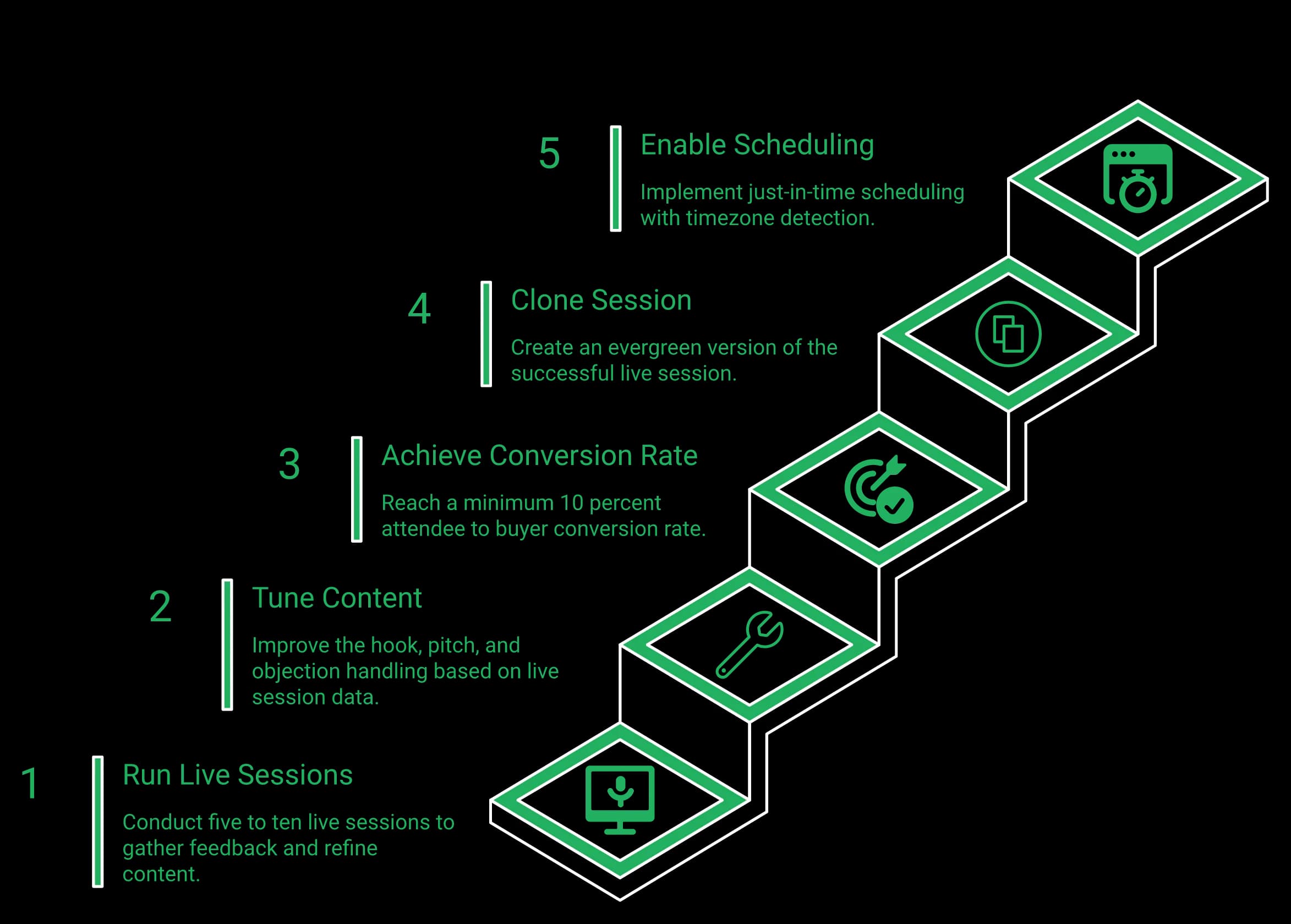
The order that works. Five to ten live sessions, tune the hook and the pitch, clear 10% attendee-to-buyer, then clone the winner into an evergreen funnel with just-in-time scheduling.
The advice you have already heard
The popular playbook says automate immediately. Record once, run it forever, stop showing up on Wednesday nights. The appeal is real — and that advice quietly wrecks a lot of good offers, including one of EasyWebinar's own.
The counter view, stated fairly
There is a real camp that disagrees with EasyWebinar's guidance. Yuri Elkaim argues you do not need a live workshop every week, because show-up rates are poor and evergreen scales better. That camp is not wrong about show rates — fewer than 15% of registrants showing up is a normal complaint among operators. EasyWebinar's read is that this argues for better reminders, not for skipping the live phase.
The gate EasyWebinar uses
Run five to ten live sessions, fix the hook, the pitch and the objection handling, then automate the winner.
The number that matters is 10% attendee-to-buyer. Below that, automation just scales a broken offer to more people, faster.
In EasyWebinar's work with K21 Academy, show-up climbed to 47% alongside 5× registrant growth — and that only happened because the live version was tuned first.
The three-hour failure behind this rule
One webinar ran close to three hours. A presenter rebuilt the slide deck alone, the energy was off, and a sophisticated audience checked out. That session produced one sale.
Automating it would have produced one sale per month, on autopilot, forever. An automated webinar without traffic is also a billboard in the desert.
How this changes the plan you buy
This decision maps directly to money. If you run the live sprint on WebinarGeek Basic, you get a two-hour cap and one presenter. Automation arrives on Premium, where the cap rises to eight hours. So the honest sequence is either two upgrades, or one platform that carries both phases.
One rule that holds regardless of platform
Never tell an automated audience the session is live, and never insist it is not. Say "this session is starting now" and let the room behave normally. Trust survives a recording. It does not survive a lie in the chat.
Takeaway: Prove the offer live, then automate the winner. Buying a platform that only does one of those phases means paying for the migration later.
Course creator selling an evergreen offer: EasyWebinar. Customer success team running automated onboarding and education: EasyWebinar. B2B SaaS team needing HubSpot sync: EasyWebinar, or WebinarGeek Enterprise. EU agency with data residency clauses in client contracts: WebinarGeek. Educator running scored assessments or classroom-style teaching: WebinarGeek.
How this guide weighted the decision
Three criteria carry most of the decision: where your data must live, whether automation and follow-up run without extra tools, and whether the platform can take money in the room. Everything else is preference. Both tools stream video competently, and neither will embarrass you in front of an audience.
Five profiles, with a verdict each
- Course creator with a paid evergreen offer — EasyWebinar, because checkout and CRM ship with the plan.
- Customer success team running automated onboarding — EasyWebinar, because sessions run every day with follow-up on six behavior triggers.
- B2B SaaS demand gen team wanting HubSpot sync — EasyWebinar, with native sync from Pro, or WebinarGeek Enterprise.
- EU agency with data residency clauses — WebinarGeek, on EU data centres.
- Solo educator hosting live sessions in Europe — WebinarGeek Basic, at a two-hour cap.
| Operator profile | Recommended platform | Deciding factor |
|---|---|---|
| Course creator, paid evergreen offer | EasyWebinar | Checkout and CRM inside the plan |
| Customer success team, automated onboarding | EasyWebinar | Sessions run every day, with behavior follow-up and the AI Moderator from Pro |
| B2B SaaS demand gen team | EasyWebinar, or WebinarGeek Enterprise | HubSpot sync — from Pro on EasyWebinar, on Enterprise on WebinarGeek |
| EU agency with residency clauses | WebinarGeek | EU data centres |
| Educator running scored assessments | WebinarGeek | Quizzes, assessments and evaluation forms |
| Solo educator, live sessions in Europe | WebinarGeek Basic | Live and on-demand, with a two-hour cap |
Do not buy EasyWebinar if
EasyWebinar would rather lose the sale than sell the wrong tool. Skip EasyWebinar for one-off internal team meetings, where a meeting tool is simpler, and for pure live-only events with no funnel intent.
Skip webinars entirely for very low-ticket offers, because the economics rarely justify the production work.
The integration with my email service provider was seamless, allowing me to automate a follow-up sales sequence once someone watches the webinar.
Rakesh was fantastic to work with, he helped set up everything from our email responses to our landing page seamlessly.
An offer lesson worth learning once
Consider a free Sunday night strategy session at 7pm Eastern. It gets draggy, and neither side wants to be there. Rebuilt for people willing to pay, it becomes worth showing up for.
Price the model you can sustain, not the one that looks generous, and let paid webinars carry the filter for you.
Your next step
If your answer was EasyWebinar, the next question is which plan matches your attendee count, and the fastest way to know is to watch the evergreen funnel run once. You can check every plan and what it includes on the pricing page, or keep shortlisting with EasyWebinar vs Demio.
One prediction going into 2027: as AI-built funnels become easy to make, live workshops come back hard, because the scarcity of a real human moves offers. That read could be early, so check it against your own show rates.
Takeaway: You have the comparison. Now test it against your own webinar, and pick the platform whose included features match the job you are actually hiring it for.
Still deciding?
The side-by-side comparison above goes deeper than any single answer here — automation, live room, CRM, checkout and security, row by row.
EasyWebinar vs WebinarGeek FAQ
WebinarGeek is a browser-based webinar platform built around teaching: scored quizzes, assessments, evaluation forms, Interactive Sessions and up to 100 presenters on Premium. EasyWebinar is the webinar platform built for conversions: attendees join from any browser with nothing to download, you run a session live and then let that session run every day as automated customer training or a sales webinar, with checkout inside the room, follow-up on six behavior triggers and your CRM or ours. The structural difference is what happens after the session: WebinarGeek takes payment at registration and hands follow-up to the CRM you connect; EasyWebinar sells in the room and runs the follow-up in the same account.
Yes, when your webinars have to keep working after the live hour. EasyWebinar is best for webinars built for conversions — live and automated, on one subscription: automated onboarding and customer education that runs every day, and sales webinars with checkout inside the room. Stay with WebinarGeek if the session is a lesson that has to be tested and graded, with scored quizzes and assessments, or if a contract requires attendee data to stay in EU data centres.
Yes. Run your onboarding or training session live once, then turn it into a simulive, evergreen, on-demand or Just-in-Time webinar from the Growth plan, so a new customer can watch minutes after signing up, in their own time zone. On Pro and above the AI Moderator answers attendee questions in the chat from the PDFs and files you upload, in live, simulive and automated webinars. Six behavior triggers — registered, attended, no-show, watched replay, clicked offer, purchased — send each viewer the right next step, and a timed offer with checkout in the room can sell the upgrade. Your team gets its live hours back.
Yes, from its Premium plan. WebinarGeek's Basic plan covers live and on-demand sessions with a two-hour session limit and one presenter; automated webinars, just-in-time scheduling and paid webinars begin on Premium. WebinarGeek publishes explicit just-in-time intervals of 5, 10 or 15 minutes, a precise and genuine strength. EasyWebinar runs live, simulive, automated, evergreen, on-demand and Just-in-Time formats, with automation from Growth at 1,000 automated viewers per session and 2,500 on Pro, so a proven live session becomes the automated one without rebuilding the funnel.
Only on EasyWebinar. WebinarGeek's paid webinars connect a Stripe or Mollie account so people pay during registration, which works well for ticketed workshops where the transaction happens before anyone shows up. EasyWebinar supports paid registration through Stripe and PayPal and timed offers with checkout inside the room, so the offer you make at minute 47, right after you handle the third objection, can be paid for without a redirect. After the session, EasyWebinar's follow-up runs on six behavior triggers in EasyCRM or the CRM you already use, while WebinarGeek hands that work to your email tool or CRM.
For teaching, WebinarGeek. Its toolkit is built for the classroom: scored quizzes, assessments and evaluation forms, information boxes, question upvotes and private chat, simulated chat and polls in recorded sessions, and up to 100 presenters on Premium. For selling and answering, EasyWebinar: the AI Moderator from Pro answers attendee questions from the files you upload, plus attendee reactions, polls, Q&A, chat, handouts, timed offers with checkout inside the room, A/B split testing on registration pages, moderator controls, and TrueVoice audio for a host plus up to 4 presenters. If the quiz and the assessment are the product, buy WebinarGeek; EasyWebinar is not an LMS.
No. EasyWebinar attendees join from any browser, desktop or mobile — one click from the link to the room, nothing to download. Delivery runs on Dolby OptiView (formerly Millicast) WebRTC with sub-second latency, so chat, polls and offers land in real time. WebinarGeek is also browser-based.
Yes — your CRM or ours. Keep HubSpot, Salesforce Pardot (Account Engagement), ActiveCampaign, Mailchimp, Kit (formerly ConvertKit), GoHighLevel, Keap or Ontraport, or connect others via Zapier and webhooks; native HubSpot and Salesforce Pardot sync starts on Pro. Or use EasyCRM, built in from Growth. WebinarGeek has no built-in CRM; HubSpot sync is a paid add-on or an Enterprise inclusion, with Zapier and ActiveCampaign below that.
Both, in different ways. EasyCast, from the Growth plan, streams your webinar to 10+ platforms at once — YouTube, LinkedIn, Facebook, Instagram, X, Vimeo, Twitch, TikTok, Kick, Rumble and Dailymotion — plus any RTMP destination, while timed offers, polls and Q&A keep running for attendees in the room. WebinarGeek offers restreaming through a paid Restream add-on on Premium, with RTMP studio streaming on Enterprise.
They answer different questions in a security review, so match the platform to the clause your contract contains. WebinarGeek is a Dutch vendor with EU data centres in Amsterdam and Frankfurt and granular privacy tooling: consent fields, double opt-in, registration anonymisation, email blocklists, IP and domain restriction, data lifecycle rules, and a custom Data Processing Agreement on Enterprise. EasyWebinar holds a SOC 2 Type II report and follows GDPR-aligned data practices, with a published Data Processing Agreement including Model Clauses, plus SSO/SAML and API access on Scale and a 99.9% uptime guarantee for Enterprise customers, with service credits. We do not hold ISO 27001, PCI-DSS or HIPAA. One caveat on the EU line: WebinarGeek's own DPA permits processing outside the EEA where sub-processors meet Chapter V safeguards, so ask for the sub-processor list.
Every plan includes live webinars with browser join and the AI Webinar Builder. Automation, EasyCRM, checkout and EasyCast start at Growth; the AI Moderator starts at Pro; SSO/SAML, white label, the API and team routing are on Scale; Enterprise is by quote. There is no free plan, and monthly and annual plans are available. Current plan details are on the pricing page.
WebinarGeek offers a 14-day free trial. EasyWebinar offers 7 days free with full access; a card is required to start it. EasyWebinar's trial runs at full plan access — live and automated webinars, Just-in-Time, AI webinar creation, paid registration, checkout inside the room and EasyCRM — so you can rehearse the whole workflow, from the live session to the follow-up, before you pay. WebinarGeek's window suits evaluating its teaching and assessment tools.
Yes, on Pro and above. Upload your context, such as PDFs and other files, and the AI Moderator answers attendee questions in the chat from that material during live, simulive and automated webinars. It is not included on Launch or Growth.