
Every live session is a gamble
A shaky connection, a flat delivery or a missed slide can cost the room. Your strongest take should be the one everyone sees.

Put your best presentation on a schedule. Real people answer the chat, offers appear on cue, and attendees join from any browser with nothing to download.
7-day full access. Cancel anytime.



















The webinar platform built for conversions, trusted by 25,000+ coaches, consultants, course creators and trainers, and by B2B teams at companies like these.



from one automated webinar funnel

ROI on cold paid traffic

in revenue from a single webinar funnel

Deliver simulive webinars at scale, blend recorded content with live interaction, and create engaging experiences without presenting live every time.
DEFINITION
A simulive webinar is a pre-recorded presentation that plays at a scheduled time while attendees interact in real time through chat, Q&A, polls and offers. The presentation is identical every time; the conversation around it is live.
Simulive is short for “simulated live.”
On EasyWebinar, only the presentation is recorded: the people answering questions are real.
WHY TEAMS SWITCH TO SIMULIVE
A shaky connection, a flat delivery or a missed slide can cost the room. Your strongest take should be the one everyone sees.
Founders, sales leaders and coaches can’t give the same talk ten times a week, so pipeline stalls when their calendar fills up.
A recording sent by email has no start time, no one to ask and no reason to act today.
A recording with an empty chat leaves real questions hanging, and an unanswered objection is usually a lost sale.
A 10 a.m. Eastern session is late evening in Europe and the middle of the night in Asia.
The person who stayed to the end and clicked your offer gets the same email as the person who never showed up.
Hover to explore · Click to keep a card open
THE PLATFORM
Everything a simulive session needs, from the registration page to the sale.
Add custom fields, testimonials and countdowns to pages built to turn visitors into registrants.


Share PDFs, slides, worksheets, links and resources directly inside the webinar room.

Show session times in the time zone you choose to improve attendance and show-up rates.
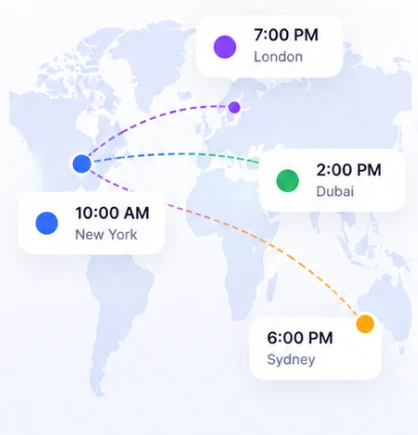
Run the same webinar daily, weekly, several times a day, or at times set for each region.
Keep attendees engaged with live chat, polls, reactions and timed offers.
Set ticket pricing, connect Stripe or PayPal and accept payments inside your webinar.
Trigger follow-up automatically when people register, attend, miss the session, watch the replay, click an offer or buy.
Sync attendee activity to your CRM and track registrations, engagement, conversions and revenue.



HOW IT WORKS
Record once. Schedule anywhere. Engage like it’s live.
Describe your webinar and AI drafts the script, registration page, reminder emails and polls, with suggestions for where to place them. A full funnel takes about 10–15 minutes.
Use a session you already ran live on EasyWebinar, which is recorded automatically, or upload one from anywhere else. The version that converted becomes the version everyone sees.
Pick the time zone and session times, choose what appears in the room and when, and connect payments if you're selling.
The session starts on its own. A moderator joins the chat to answer questions, and nobody has to present.
See where attendees dropped off, which offer moment converted and what each session earned, then adjust the next run.
7-day full access. Cancel anytime.
Choosing a simulive platform
Meeting tools are built for the live hour, and automated-only tools for the recording. EasyWebinar runs live, simulive and evergreen on one platform, one login, one subscription: test your pitch live, rerun the version that converted as simulive, and clone it into a just-in-time or evergreen webinar when you want it running around the clock.
| Type of platform | Built for | What you'd still need |
|---|---|---|
| Meeting and event platforms e.g. Zoom, GoTo Webinar | Company events, town halls and marketing webcasts, with simulive as one session option | A checkout, sales-style follow-up and an evergreen funnel |
| Automated-only tools e.g. EverWebinar, eWebinar | Recordings that run on autopilot, around the clock | A separate live product to test your pitch in front of a real audience (EverWebinar pairs with WebinarJam) |
| EasyWebinar | Webinars that have to produce revenue or pipeline: live, simulive, evergreen and on-demand from one account | Nothing extra to sell or follow up: in-room checkout and EasyCRM are built in from Growth, with native integrations such as HubSpot, Salesforce Pardot (Account Engagement) and GoHighLevel |
EasyWebinar — Best for: repeatable webinars that sell, proven live and then run on a schedule · Not ideal for: internal meetings, multi-track conferences or courses with lessons · Standout: clone your best live session into a simulive, just-in-time or evergreen webinar in one switch
Choosing a format
Each format trades presenter time against interaction and scheduling flexibility. All five run on EasyWebinar.
| Format | Best for | When it runs | Audience interaction | Presenter live? |
|---|---|---|---|---|
| Live | Launches and one-off events | A date and time you set | The host responds on camera | Yes |
| SimuliveThis page | Repeatable sessions that need urgency | Set times you choose, in one time zone, on any recurring schedule | Moderators answer chat and Q&A as it happens | No |
| Automated | Hands-off lead-gen and sales funnels | Evergreen, just-in-time or on-demand schedules | Pre-timed polls, offers and CTAs | No |
| Evergreen | Always-on funnels for global audiences | Recurring sessions in each attendee's local time, plus just-in-time starts | Pre-timed polls, CTAs and simulated chat | No |
| On-demand | Instant access and replays | Whenever the viewer presses play | Self-paced | No |
USE CASES
Turn one webinar into a repeatable funnel that drives engagement and conversions.
Start Free Trial7-day full access. Cancel anytime.

Run a weekly top-of-funnel session for paid traffic and score every registrant on how they engaged.

Turn your best demo into a scheduled group session; your SDRs work the chat instead of the slides.

Keep enrollment open between launches with a masterclass that pitches the same way every time.

Move recurring weekly onboarding off your team's calendar; the session runs itself and CS answers questions in chat.

Give partners a session they can book for their own list, without asking your presenter for another date.

Hand each regional team the same session at local business hours, moderated by people who know the market.
RESULTS
EasyWebinar helps teams turn live sessions, automated webinars, product demos, trainings, and evergreen funnels into measurable business outcomes.
from one webinar funnel
from a single webinar funnel
ROI on cold paid traffic
registrations, up from 351, after moving to just-in-time automated webinars
Online Marketing Expert
“I personally use EasyWebinar and they are the best. I moved from using other platforms and nothing compares to their reliability and customer support!”See Amy’s testimonial →

MD Medical Direct Care
A healthcare business using webinars to educate and grow: optimized live sessions first, then automated the winner.
Read Dr. Fryer’s story →
Online course creator
Carla combined live webinars, just-in-time sessions and custom replays to grow her course business.
Read Carla’s story →
Can’t find your answer? Visit the Help Center.
Use simulive when you give the same presentation again and again: demos, lead-generation sessions, onboarding or enrollment webinars. Use live for launches, announcements and one-off events where the presenter needs to react on camera. Many teams do both: run it live until the pitch works, then switch to simulive.
Simulive runs at times you choose, in one time zone, so a moderator can be in the chat for every session. Evergreen runs around the clock in each attendee's local time, with just-in-time starts, instant replays and optional simulated chat. Pick simulive when live answers from a person on your team matter, and evergreen when always-on availability matters more. In both formats, on Pro and above, the AI Moderator can answer attendee questions from the PDFs and files you upload.
Only if you tell them, and many hosts do. Being upfront rarely hurts, because the part attendees care about is live: their questions get real answers while the session runs.
No. Attendees join from a desktop or mobile browser with no app or plugin, straight from the link in their confirmation or reminder email.
Staff the chat for every session, greet people by name as they join, and time polls and offers to the moments in the recording where energy peaks. Recordings made in front of a real audience also tend to land better than ones recorded to an empty room.
Yes, and it's the approach we recommend. Live sessions on EasyWebinar are recorded automatically, so the take that converted best can become your simulive session without re-recording. You can also upload a recording made in another tool.
Yes, as many as you like. Clone Funnels copies the full setup, including registration page, emails and offers, so you can launch the same session for a new date, audience or campaign in a few clicks.
Both. Set a ticket price so attendees pay at registration, or keep the session free and sell during it with timed offers, discounts and bonuses. Payments run through built-in checkout connected to Stripe or PayPal. More on paid webinars.
Yes. EasyWebinar includes EasyCRM, email follow-up and built-in checkout on Growth and above, with integrations for GoHighLevel, ActiveCampaign, Keap, Mailchimp, Stripe, PayPal, SamCart and ThriveCart. Native HubSpot and Salesforce Pardot (Account Engagement) integrations are on Pro and above, and Zapier connects other tools. See all integrations.
Yes. The Analytics Dashboard shows each attendee's watch time, chat messages, questions and offer clicks, so sales can start with the people who were most interested. Lead scoring from watch time, poll answers and offer clicks is included from Growth, and Pro adds custom weights.
Yes. For example, no-shows can be invited to the next session, people who clicked an offer without buying can get a reminder, buyers can go straight to onboarding, and your sales team can be alerted about the most engaged leads.
Simulive, automated and evergreen webinars are included on the Growth plan ($116/month, or $96/month billed annually) and above, along with EasyCRM and built-in checkout; the Launch plan covers live webinars only. Pricing is a flat monthly rate with no per-attendee fees within your plan; attendees beyond your plan's limit are billed as overage under our Terms, and every plan starts with a 7-day full-access trial. Compare plans.
EasyWebinar is best for webinars built to sell, live and evergreen: launch live, then run the version that converted as simulive or evergreen on one platform. It is built for webinars that have to produce revenue or pipeline, during the live session and for months after it. If you need a course platform with lessons and certificates, pair EasyWebinar with one. If you need an internal meeting tool, Zoom or Teams is the better fit.
SaaS companies use them for product demos, healthcare practices for patient education, financial advisors for client seminars, and coaches, course creators and training organizations for enrollment and onboarding.
Build it with AI today, schedule it for this week, and only show up for the chat.
Start Free Trial7-day full access. Cancel anytime.