Webinar platform comparison
EasyWebinar vs Zoom. Which webinar platform is right for you?
Zoom runs the meeting; EasyWebinar runs the webinar that has to sell. Attendees join from any browser with nothing to download. You run the session live, then turn the version that converts into an automated webinar that runs every day, with checkout inside the room and your CRM or ours. Automation starts at Growth.
7-day full access. Cancel anytime.


Rated a G2 LeaderSOC 2 Type II · GDPR-aligned
Zoom WebinarsA room plus add-ons
- Live webinarWebinars + Workplace Pro
- Automated replayScheduled, on Plus only
- CheckoutNot in the room
- Follow-upYour external CRM
One account
- Live webinarEvery plan
- Simulive & evergreenFrom Growth
- CheckoutInside the room
- Follow-upEasyCRM or yours
What actually differs
Zoom runs the meeting. EasyWebinar runs the webinar that has to sell.
Both host a professional live session. The differences show up around it: what happens to the recording, where the buyer pays, and who follows up on what each attendee did.
Where Zoom's setup stops
2licences before the first webinar
Every Zoom webinar product needs a Zoom Workplace Pro licence on top of the webinar licence.
0just-in-time sessions
Simulive runs on a fixed schedule, on Webinars Plus only. Nothing starts minutes after a visitor lands.
1external CRM to follow up
Zoom hands you reports. The follow-up runs in a CRM and checkout you buy and connect.
With EasyWebinar it's one platform, one login, one subscription. Run it live, let that exact session run every day in each attendee's time zone, take payment inside the room, and follow up on what each attendee did — in EasyCRM or the CRM you already use.
7-day full access. Cancel anytime.
“I personally use EasyWebinar and they are the best. I moved from using other platforms and nothing compares to their reliability and customer support!”
 Amy PorterfieldOnline marketing expertVideo testimonial
At a glance
EasyWebinar vs Zoom at a glance
Zoom is a video-conferencing platform with a webinar add-on built on its meeting infrastructure. EasyWebinar is the webinar platform built for conversions — live, automated and on demand, with checkout inside the room and EasyCRM or your own CRM, in one account.
Zoom wins for internal meetings and teams standardised on Zoom; everything a webinar needs to keep selling after the live hour is where EasyWebinar pulls ahead.
| Topic | Zoom | |
|---|---|---|
| After the live hour | Simulive, evergreen and just-in-time, from Growth | Recording; scheduled simulive on Webinars Plus |
| Checkout | Inside the room | Paid registration; no checkout in the room |
| CRM & follow-up | EasyCRM with six behaviour triggers, or keep yours | Reports, then your external CRM |
| AI | Builder on every plan; Moderator from Pro | AI content tools on Webinars Plus |
| Multistreaming | EasyCast to 10+ platforms at once, from Growth | YouTube, Facebook, Twitch or custom RTMP |
| Room built to sell | AI Moderator, polls, Q&A, timed offers with checkout | Polls, Q&A, chat; Production Studio on Plus |
| What you buy | One subscription, one login | Webinar licence plus Workplace Pro, plus your stack |
| Internal meetings | Not built for internal meetings | Meetings, breakouts and familiar admin |
Better fit for EasyWebinar Better fit for Zoom
Which should you choose?
Choose by the job, not the feature list.
Keep Zoom for the meeting. Step up to EasyWebinar the moment a webinar has to sell — the live session, the automated replay, the payment and the follow-up in one account.
- Best for
- Webinars built for conversions — live and automated, on one subscription.
- Standout
- Checkout inside the room, and the live session that becomes your automated webinar.
- Not ideal for
- Courses with lessons and certificates — pair it with a course platform.
Zoom
- Best for
- Internal meetings and teams standardised on Zoom.
- Standout
- A familiar join and admin experience, with Backstage and Production Studio on Webinars Plus.
- Not ideal for
- Webinars that have to keep selling after the live hour — evergreen funnels, in-room checkout and behaviour follow-up.
Plans and CRM
Your CRM or ours
Keep the CRM you already use; EasyWebinar connects to it. Or start with EasyCRM, built in from Growth.
- HubSpot
- Salesforce Pardot (Account Engagement)
- ActiveCampaign
- Kit (formerly ConvertKit)
- GoHighLevel
- EasyCRM, built in
Flat monthly plans
No per-attendee fees within your plan.
- Every planLive webinars, browser join and the AI Webinar Builder
- From GrowthAutomated webinars, EasyCRM, checkout in the room and EasyCast
- From ProThe AI Moderator answers attendee questions in the chat
7-day full access. Cancel anytime.
Results
Webinars that keep selling after the live hour.
$5Mfrom one evergreen webinar funnel
 Carla BiesingerCourse creator
$2Mfrom one automated webinar funnel
 Ryan FennCEO of ChiirP
$750Kfrom a single webinar funnel
 Kim ConstableFounder of The Sculpted Vegan
“With EasyWebinar I sold 25 courses within 3 weeks of my evergreen "launch". Any time I needed support the response time was quick.”
 Laura K. ConnellFounder, lauraconnell.comG2 review
Go deeper
The detailed comparison, topic by topic.
Every figure behind the table, for buyers who want the full picture before they decide. Open any topic.
The full scorecardNine decision factors, and who each one favours.
| Decision factor | Zoom | Better fit | |
|---|---|---|---|
| After the live hour | Simulive, evergreen, just-in-time and on-demand from Growth | Recording and on-demand; scheduled simulive on Webinars Plus | EasyWebinarfor the replay window |
| Checkout inside the room | Timed offers with checkout in the room, from Growth | Paid registration through PayPal; CTAs on Webinars Plus | EasyWebinar |
| CRM and follow-up | EasyCRM with six behaviour triggers, or keep your CRM | Reports plus external CRM integrations | EasyWebinaryour CRM or ours |
| AI before and during the webinar | AI Webinar Builder on every plan; AI Moderator from Pro | AI content tools on Webinars Plus | EasyWebinarbefore and during the session |
| Multistreaming | EasyCast to 10+ platforms at once plus any RTMP, from Growth | YouTube, Facebook, Twitch or custom RTMP | EasyWebinarmore destinations, offers still running |
| Live room for selling | AI Moderator from Pro, reactions, polls, Q&A, handouts, timed offers, split testing | Chat, polls, Q&A; Backstage and Production Studio on Plus | EasyWebinarfor the close |
| What you buy | One subscription for live, automated, checkout and CRM | Webinar licence plus required Workplace Pro; CRM and checkout external | EasyWebinar |
| Internal meetings | Not built for internal meetings | Meetings, breakouts, phone audio and familiar admin | Zoomteams standardised on Zoom |
| Security for procurement | SOC 2 Type II and GDPR-aligned practices, with a DPA | SOC 2 Type 2, GDPR documentation and broad enterprise adoption | Tieboth pass a security review |
| What matters | Zoom | |
|---|---|---|
| Best for | Webinars built for conversions — live and automated, on one subscription | Internal meetings and teams standardised on Zoom |
| Joining | Any browser, desktop or mobile, with nothing to download | The familiar Zoom join most teams already use |
| Live delivery | Sub-second latency on Dolby OptiView (formerly Millicast) WebRTC; TrueVoice audio for a host plus up to 4 presenters | Reliable live broadcasting with familiar Zoom controls |
| After the live event | Simulive, evergreen, just-in-time and on-demand from the same recording, from Growth | Recording and on-demand viewing; scheduled simulive on Webinars Plus |
| Automated viewer capacity | A separate allowance per session: 1,000 Growth · 2,500 Pro · 5,000 Scale | No separate automated allowance published |
| Offer inside the room | Timed offers with checkout completed in the room | Resources and CTAs on Webinars Plus |
| Paid registration | Stripe and PayPal | PayPal; advanced ticketing and Stripe on higher event tiers |
| CRM | EasyCRM from Growth, or keep HubSpot, Salesforce Pardot (Account Engagement), ActiveCampaign, Kit or GoHighLevel | Reports plus external CRM and marketing integrations |
| Behaviour follow-up | Six triggers — registered, attended, no-show, watched replay, clicked offer, purchased — from Growth | Built by hand in whichever CRM you connect |
| AI | AI Webinar Builder on every plan; AI Moderator answers attendee questions from your files, from Pro | AI-assisted content tools on Webinars Plus |
| Multistreaming | EasyCast to 10+ platforms at once plus any RTMP destination, from Growth | YouTube, Facebook, Twitch or custom RTMP |
| Production tooling | Moderator controls, a host plus up to 4 presenters | Backstage and Production Studio on Webinars Plus |
| Security & compliance | SOC 2 Type II and GDPR-aligned data practices, with a DPA; SSO/SAML on Scale | SOC 2 Type 2, ISO programmes and GDPR documentation |
| Largest published room | 1,000 live on Scale; larger events on Enterprise, by quote | Up to 100,000 attendees on custom configurations |
| Verified ratings | 4.5/5 from 100+ G2 reviews | 4.4 to 4.6 out of 5 across a far larger review base |
Product information checked against each vendor's published pages, August 27, 2026. Zoom capabilities vary by product and tier. EasyWebinar live and automated capacities are separate session allowances and are not added together. See plan details for what each EasyWebinar plan includes.
After the session endsZoom ends at the recording. EasyWebinar keeps the session selling.
Standard Zoom Webinars gives you a live session and an on-demand recording; Webinars Plus adds scheduled simulive that can start without a host. EasyWebinar runs live on every plan and, from Growth, turns the session that converts into simulive, evergreen, just-in-time and on-demand webinars on the same account — with the offer, checkout and follow-up still attached.
One subscription
The launch and its replay run in the same account.
- Live on every plan; simulive, evergreen, just-in-time and on-demand from Growth
- Just-in-time starts the next session minutes after someone registers, in their own time zone
- 1,000 / 2,500 / 5,000 automated viewers per session on Growth, Pro and Scale, separate from the live limit
- The same offer, checkout, CRM tagging and follow-up stay attached to every replay
- AI Moderator (Pro and above) answers attendee questions from the PDFs and files you upload, in live, simulive and automated webinars
Zoom
Scheduled playback
A capable live room whose automation stops at the schedule.
- Standard Zoom Webinars: live sessions and on-demand recordings
- Webinars Plus: scheduled simulive that can start without a host, including recurring schedules
- No visitor-triggered just-in-time or continuous evergreen funnel
- No separate automated-viewer allowance published
Automation verdict
Run 5 to 10 live sessions and clear a 10% attendee-to-buyer rate before you automate anything. Then the question is whether the replay can start minutes after someone registers, in their time zone, with the offer still live. On Zoom it runs at the next scheduled slot; on EasyWebinar it runs when the buyer is ready.
Checkout, CRM & follow-upA report after the webinar is not the same as a sale inside it.
Zoom supports paid registration and, on Webinars Plus, resources and CTAs — then hands attendance reports to the CRM you connect. EasyWebinar takes the payment inside the room from Growth and starts a follow-up sequence on what each attendee did, in EasyCRM or the CRM you already run.
| Revenue workflow | Zoom | |
|---|---|---|
| Offer shown at a scripted minute | Timed offers and countdowns in live and automated sessions | Resources and CTAs on Webinars Plus |
| Payment completed in the room | Built-in checkout inside the room, from Growth | Not in the room — checkout stays external |
| Paid registration | Stripe and PayPal, with access delivered after payment | PayPal; advanced ticketing and Stripe on higher event tiers |
| CRM | EasyCRM from Growth, plus native HubSpot and Salesforce Pardot (Account Engagement) sync on Pro | Broad CRM and marketing integrations; follow-up lives in the system you connect |
| Who builds the follow-up | Six behaviour triggers start their own sequences — registered, attended, no-show, watched replay, clicked offer, purchased | You do, by hand, in the CRM you connect |
| Revenue tied to watch behaviour | Attendance, watch time, questions, poll answers, offer clicks and purchases recorded per attendee | Attendance and engagement reports, exported to your stack |
Revenue verdict
Each behaviour needs its own message: clicked the offer, watched the replay, attended but did not buy, registered and never showed. On EasyWebinar those six triggers start their own sequences. Around Zoom, somebody on your team builds that by hand in a separate system — or nobody does.
The live roomOne room is built for production. The other answers questions and takes the payment.
Zoom's strength is familiar delivery, with Backstage and Production Studio on Webinars Plus. EasyWebinar's room is built for the close: an AI Moderator from Pro that answers attendee questions from your files, reactions, polls, Q&A, handouts, A/B split testing on registration pages, and a timed offer that takes the payment without leaving the room.
| Live room capability | Zoom | |
|---|---|---|
| AI Moderator answering attendee questions | From Pro, answering from the files you upload | AI content tools on Webinars Plus |
| Timed offer with checkout in the room | Included from Growth | Not in the room |
| Polls, chat, Q&A | Included, with reactions, handouts and a countdown in the same room | Included |
| A/B split testing on registration pages | Included | Advanced event pages on Webinars Plus |
| Speakers | A host plus up to 4 presenters, with TrueVoice audio built for up to five people speaking at once | Hosts and panelists |
| Backstage and Production Studio | Moderator controls for mute, camera and remove | On Webinars Plus |
Live room verdict
Judge the room by the close, not the production polish. Backstage does not answer the question that stalls a buyer; the AI Moderator does, and the in-room checkout takes the card while the offer is still on screen.
MultistreamingStream to 10+ platforms and keep selling in the room.
EasyCast, from Growth, streams one session to 10+ platforms at once plus any RTMP destination, while timed offers, polls and Q&A keep running for the attendees in the room. Zoom can live-stream a webinar to YouTube, Facebook, Twitch or a custom streaming service.
| Streaming | Zoom | |
|---|---|---|
| Destinations at once | 10+ platforms — YouTube, LinkedIn, Facebook, Instagram, X, Vimeo, Twitch, TikTok, Kick, Rumble, Dailymotion | YouTube, Facebook, Twitch or a custom streaming service |
| Custom RTMP | Any RTMP destination | Custom RTMP |
| Selling while you stream | Timed offers, polls and Q&A keep running for attendees in the room | Broadcast only — no checkout in the room to sell from |
Multistream verdict
Streaming alone is not a funnel. EasyCast puts the session in front of every audience you have, and the registered attendees still get the offer, the checkout and the follow-up.
EasyCast destinations as listed on the EasyWebinar multistream page, October 2026.
AI & the CRM that acts on itAI on both sides of the webinar, and follow-up that runs itself.
Zoom Webinars Plus adds AI-assisted content tools. EasyWebinar uses AI before and during the session: the AI Webinar Builder drafts the whole funnel on every plan, and from Pro the AI Moderator answers attendee questions from the files you upload. Behaviour follow-up then runs on the attendee data the session produced.
01 · Create
AI drafts the whole funnel from one brief
Answer a few questions and the AI Webinar Builder writes the script, registration and thank-you pages, emails, polls and the timed offer — on every plan. During the webinar, from Pro, the AI Moderator answers attendee questions from your files.
02 · Convert
The offer and the payment stay inside the room
Timed offers, countdowns, paid access and in-room checkout, without routing the buyer through a disconnected page at the moment of intent.
03 · Reuse
One proven live session becomes an evergreen asset
Run it live, then let that exact session run every day: recurring, timezone-aware, on-demand and just-in-time, from the same recording.
04 · Follow up
EasyCRM turns webinar behaviour into the next step
Registered, attended, no-show, watched replay, clicked offer, purchased: six triggers, each with its own sequence from Growth — or synced to the CRM you already run.
AI verdict
Zoom gives you a capable room and connectors, and expects your team to build the funnel around it. EasyWebinar builds it in: AI writes the funnel, every attendee's behaviour is recorded, and EasyCRM runs the follow-up that turns a watched webinar into a sale or a booked call.
Streaming, security & scaleReal-time delivery, audited security, and no cutoff at the plan limit.
Both platforms pass a security review. EasyWebinar adds browser join with nothing to download, sub-second WebRTC delivery and no hard cutoff at the plan limit. Zoom publishes the larger room — up to 100,000 attendees on custom configurations — while EasyWebinar runs 1,000 live on Scale and larger events on Enterprise, by quote.
Sub-second
Real time between question and answer
EasyWebinar streams on Dolby OptiView (formerly Millicast) WebRTC with sub-second latency, so polls and offers land while the point is still on screen.
Browser join
One click from the link to the room
Attendees join from any browser, desktop or mobile, with nothing to download — the join step where paid traffic usually leaks.
No hard cutoff
Your webinar never stops at the plan limit
Attendees beyond your plan's limit are billed as overage under our Terms instead of being turned away. Enterprise customers get a 99.9% uptime guarantee with service credits.
Audited
Ready for a security review
SOC 2 Type II (report held), GDPR-aligned data practices with a DPA, and SSO/SAML on Scale. Zoom also holds SOC 2 Type 2 and publishes GDPR documentation.
Security summary
SOC 2 Type II · GDPR-aligned · Published Data Processing Agreement · SSO/SAML and API on Scale · 99.9% uptime guarantee for Enterprise customers, with service credits. We do not hold ISO 27001, PCI-DSS, HIPAA or CCPA, because those are separate audits we have not done.
Try before you decideStart free for 7 days, with full access to every feature.
EasyWebinar gives you 7 days free with full access. Use the window to rehearse the job Zoom cannot show you — build the funnel with AI, run the session live, turn it into an evergreen webinar, sell inside the room and watch the follow-up fire.
Trial verdict
Run your next live session on EasyWebinar during the trial, then switch the recording to evergreen with just-in-time on. If the replay books sales while you sleep, the decision is made — and the first 7 days cost nothing.
Trial terms as published on easywebinar.com, October 2026.
Run the session. Take the payment. Keep the recording selling.
Build it with AI, run it live, then let the session that converts sell on autopilot.
7-day full access. Cancel anytime.
4.5/5 on G2 · 100+ reviews · 7-day full access · SOC 2 Type II · GDPR-aligned
Complete buyer's guide
Continue with the full research behind the comparison.
Written by Pranav Sharma, Chief Business Officer at EasyWebinar, on August 27, 2026. Product and plan claims were fact-checked throughout and updated October 14, 2026.
In this guide
EasyWebinar vs Zoom Webinar (2026): Conversion-Built Platform vs Video Conferencing Standard
Verified August 27, 2026
TL;DR
- Zoom Webinars optimizes the room. EasyWebinar optimizes the path — registration, timed offer, checkout, and behavioral follow-up.
- Standard Zoom Webinars covers live delivery and on-demand recordings. Webinars Plus adds scheduled simulive that can start without a host. EasyWebinar adds recurring evergreen, timezone-aware, on-demand, and just-in-time delivery inside one conversion workflow.
- Every Zoom webinar product needs a Zoom Workplace Pro licence on top of the webinar licence, and CRM, checkout, and evergreen follow-up still live in tools you connect.
- Every EasyWebinar plan includes live webinars with browser join and the AI Webinar Builder. Automation, EasyCRM, in-room checkout, and EasyCast start at Growth; the AI Moderator starts at Pro. Growth, Pro, and Scale include 1,000, 2,500, and 5,000 automated viewers per session alongside their live-room capacity.
- Target 80% retention from peak show rate to the pitch. ON24's 2026 benchmarks report 239 average attendees and 60% registration-to-attendee conversion.
- Run five to ten live webinars and clear 10% attendee-to-buyer conversion before automating anything — automation multiplies whatever the live session already does.
Choose Zoom Webinars when the priority is a familiar live broadcast room, Zoom-standardized administration, or advanced production and event tooling on the higher tiers. Choose EasyWebinar when reliable live delivery also needs to become a repeatable revenue system. EasyWebinar runs Live, Simulated Live, and Evergreen from one webinar platform that attendees join from any browser with nothing to download, with AI-assisted funnel creation, an AI Moderator from Pro, timed offers, in-room checkout, your CRM or EasyCRM, and behavioral follow-up, so a registrant can move from signup to revenue without a disconnected stack.
Consider a coach with 380 registrants for a Wednesday 2pm session. Ninety-five people showed. The deck was fine, but the offer sat in a Google Doc, and the checkout lived three tabs away.
Why your show rate keeps swinging
Many operators describe their numbers the same way. Show rate is all over the place, booking rate is worse, and nobody modeled a bad month before spending on ads.
That randomness is rarely a video problem. It is a path problem, and the path is where a hosting tool ends and a revenue platform begins.
⭐ The seven-row decision matrix
| Criterion | Zoom Webinars | EasyWebinar |
|---|---|---|
| Formats | Live; simulive on Webinars Plus | Live, Simulated Live, Evergreen |
| Scheduling | Fixed and recurring schedules | Fixed, recurring, on-demand, timezone-aware JIT |
| In-session offers | Engagement; resources and CTAs on Plus | Timed offers, countdown, polls, chat |
| Payments | PayPal registration; advanced ticketing on Plus | In-room checkout via Stripe and PayPal |
| Follow-up | Reports and external integrations | EasyCRM tagging, sequences, and outreach |
| Page customization | Basic; advanced on Plus | Registration and thank-you pages built in |
| Peer rating | 4.4 to 4.6 out of 5 | 4.4 to 4.5 out of 5 |
Ratings are close. Review volume is not, and neither is the complaint type.
What reviewers on both sides actually report
First, Zoom Webinar is ridiculously glitchy. We've had problems with presenters being able to enter the webinar, with reminder notices going out eight hours after an event has concluded, and with broadcast quality.
One EasyWebinar reviewer, Ash A., names a real limitation. She wants to build an automated webinar before the video is recorded, and today the presentation has to be uploaded first.
The one question that decides it
Strip the feature lists away and one question remains. Are you broadcasting to people who already know you, or moving a stranger to a credit card?
Broadcast work rewards familiarity and production control, where Zoom is a strong contender. Revenue work rewards connected instrumentation before, during, and after the room, which is where EasyWebinar is differentiated.
EasyWebinar was built around the webinar funnel rather than the meeting room, which is why formats, timed offers, checkout, and CRM follow-up sit inside one system instead of five separate subscriptions.
A broadcast platform optimizes the room: joining, streaming, production, and recording. A webinar revenue platform also optimizes the path: registration, reminders, engagement, offers, checkout, behavioral follow-up, and revenue attribution. Zoom now covers more of that path on Webinars Plus, but EasyWebinar keeps the complete live-to-evergreen revenue workflow inside one operating system.
Room versus path
A room has one job. Get people in, keep the audio clean, and record it.
A path has six or seven jobs, and they run before and after the session. That is the part operators underestimate when they compare price tags.
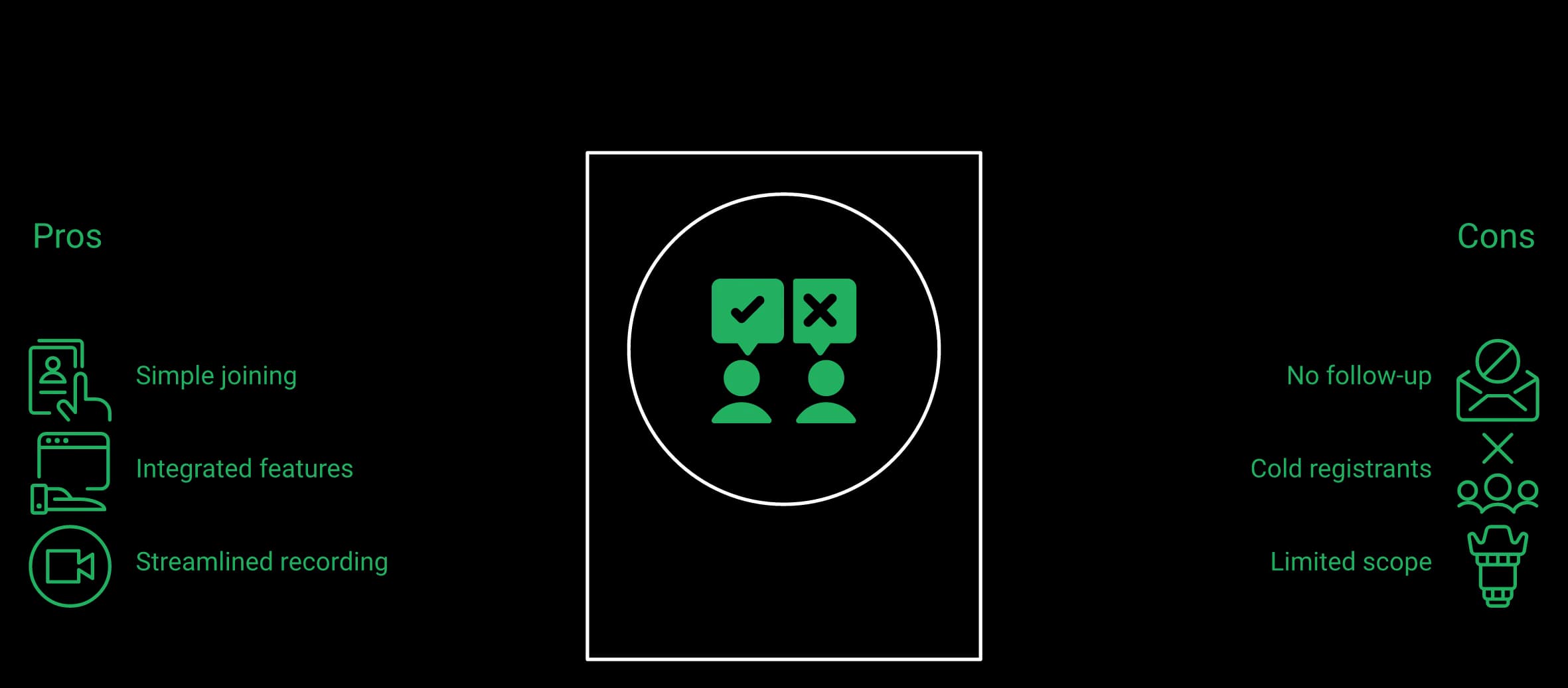
The Frankenstack you build around Zoom
Once Zoom is the room, you buy the rest. Landing page builder, email service provider, CRM, checkout, replay host, and usually a scheduler.
Each of those tools sits on top of the room, and each one needs its own integration, its own login, and its own failure point.
EasyWebinar's integrations layer covers Stripe, PayPal, HubSpot, Salesforce Pardot (Account Engagement), ActiveCampaign, Keap, Kit (formerly ConvertKit), GoHighLevel, Zapier, and other tools used in webinar revenue stacks, so the connections are documented rather than improvised.
Where the money leaks
The leak is never dramatic. A registration form does not sync, a tag does not fire, and 200 people quietly never enter the follow-up sequence.
The integration with Marketo is mediocre at best. For example, if using a Zoom registration form then the registration information does not sync to Marketo. This is inferior to other webinar providers.
EasyWebinar has its own gap here. Its reviewers ask for deeper in-platform email metrics, and some run post-webinar sequences elsewhere for that reason.
I do use other email systems to send post-webinar email sequences because I can't track open and click rates on EasyWebinar.
Be careful with claims to replace your whole stack
The webinar category oversells consolidation. Any platform promising to be your community, your CRM, your email provider, and your checkout is usually mediocre at three of them.
The useful boundary is narrower. Own conversation, content, and the event, then connect the rest through documented integrations.
That is also why the phrase webinar software undersells what changes here. The room is a commodity, and the path is where revenue per registrant moves.
EasyWebinar covers the webinar-to-revenue workflow natively and integrates for everything else, which is a smaller claim than total consolidation and a more defensible one. For the side-by-side view, EasyWebinar's compare webinar platforms hub lays out the same criteria across every major tool.
Where EasyWebinar AI changes the operating model
EasyWebinar AI is not only a meeting-summary assistant. It helps turn an idea or uploaded source into the assets required to launch: webinar script, registration page, thank-you page, reminder and follow-up emails, polls, and the timed CTA. Growth and higher plans can use uploaded content so the output reflects the team's source material and voice.
AI also works during the session. On Pro and above, the AI Moderator answers attendee questions in the chat from the PDFs and files you upload, in live, simulive, and automated webinars, so the question that stalls a buyer gets answered while the offer is still on screen.
That matters to marketing teams and lean operators for the same reason. The bottleneck is often not broadcasting the session; it is getting the campaign, pages, reminders, offer, and follow-up ready consistently. AI compresses that setup work while the live room, automation, CRM, and revenue reporting remain inside the same platform.
Zoom can run prerecorded sessions, but the tier and automation model matter. Standard Zoom Webinars focuses on live sessions and on-demand recordings. Zoom Webinars Plus supports scheduled simulive webinars that can start without the host present, including recurring schedules. EasyWebinar adds the continuous marketing layer: Simulated Live and Evergreen, multiple daily slots, timezone-aware scheduling, instant on-demand access, and just-in-time sessions triggered by visitor intent.
What Zoom actually gives you
Zoom gives a reliable live broadcast and a recording afterwards. Standard Webinars can gate the recording, while Webinars Plus can schedule prerecorded simulive delivery and let hosts or panelists join for live chat and Q and A.
The remaining distinction is continuous intent-based delivery. Zoom's simulive model is scheduled. EasyWebinar can also present the next session one to fourteen minutes after a visitor arrives, adjust schedules to the visitor's timezone, and keep the same funnel running every day.
⏰ The taxonomy that keeps this straight
These names matter, because sloppy naming is how operators buy the wrong tool.
| Format | Scheduling available | Engagement layer |
|---|---|---|
| Live | Fixed or Fixed Recurring, single time zone | Real-time chat, polls, timed offers |
| Simulated Live | Fixed or Fixed Recurring, single time zone | Real-time chat, polls, timed offers |
| Evergreen | Just-in-time, timezone adjusted, multiple daily slots, Instant Replay, On-Demand | Async question box, pre-configured polls and offers |
Simulated Live is dipping your toes into automation. Evergreen is the deeper tier, and just-in-time runs on Evergreen alone.
How just-in-time actually fires
Just-in-time means the next session starts shortly after the visitor lands, rather than at a fixed hour. In EasyWebinar, toggling JIT on an Evergreen event sets the next start between roughly one and fourteen minutes out.
That single setting is what removes the three-day gap between interest and attendance. It is also the setting operators most often forget to turn on, which is why EasyWebinar's guide to simulated live webinars walks through the scheduling choices one at a time.
Where scheduled simulive still differs from evergreen
Zoom Webinars Plus no longer requires a host simply to start a simulive session. A host may still join to handle live chat or Q and A. The practical gap is not playback automation; it is the absence of EasyWebinar's visitor-triggered just-in-time and continuous evergreen funnel model.
Operators are openly unsure whether Zoom's automation is worth it at all.
By the way, has anyone experimented with Zoom+ webinars? I recently noticed they offer a feature for automated webinars, but I'm unsure if it's really beneficial.
A recorded session should never be presented as happening live. The working rule: never say it is live, and never say it is not.
⏰ Your move this week
Take your best-performing recording. Build it as an Evergreen event, turn on timezone-adjusted delivery, and give it three daily slots plus JIT.
Then watch registration-to-attendance for two weeks before touching the offer. One variable at a time, or you learn nothing. Operators weighing the trade-offs first should read EasyWebinar's breakdown of live vs automated webinars.
EasyWebinar's Evergreen tier carries just-in-time, timezone-adjusted delivery, and multiple daily schedules, plus a Simulated Chat feature that can push prior chats into new events.
Target roughly 80 percent retention from peak show rate to the pitch. Standard Zoom Webinars includes chat, polls, Q and A, and PayPal-based paid registration. Webinars Plus adds resources, CTAs, advanced landing pages, and richer production. EasyWebinar keeps timed offers, countdowns, chat, polls, checkout, CRM tagging, and follow-up connected across live, Simulated Live, and Evergreen, so the offer lands at the scripted minute and the response stays attached to the lead record.
⏰ The 80 percent retention rule
Here is the number to manage to. From peak show rate to the moment of the pitch, 80 percent of live attendees should still be there.
Below that, the deck is losing people before the offer exists. Fixing the platform will not fix a slide problem.
What the 2026 benchmarks say
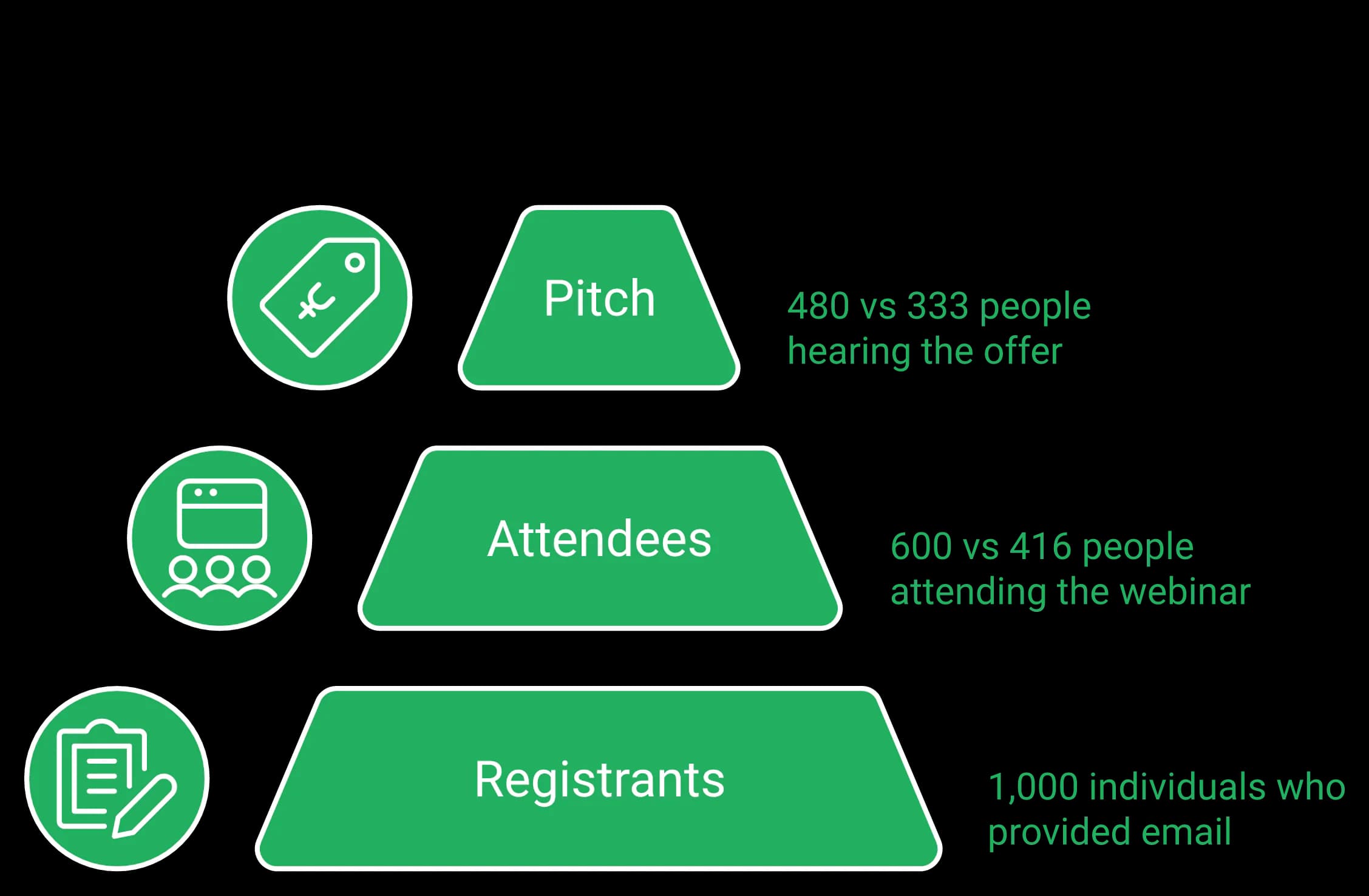
ON24's 2026 Digital Engagement Benchmarks report 239 average attendees per webinar, up 11 percent year over year, with 60 percent registration-to-attendee conversion, up from 57 percent in 2024 and 56 percent in 2023, and an 18 percent engagement increase.
Cross-platform data tells a harder story. Median live attendance across roughly 12,400 B2B webinars sits at 41.6 percent.
Run the math on 1,000 registrants. At 60 percent you get 600 attendees, at 41.6 percent you get 416, and at 80 percent pitch retention that is 480 versus 333 people hearing your offer.
For ice-cold traffic, expect 10 to 15 percent show rate as your floor. Every retained attendee is expensive, which is why the layer that holds them matters more than resolution. EasyWebinar's webinar analytics reporting tracks that drop-off from registration through the pitch minute.
Where Zoom's engagement layer depends on the tier
There's no pre-webinar waiting room or post-webinar exit page. There's no ability to distribute resources or files. The polling and survey functions are rudimentary.
The engagement features were minimal and did not appeal to a large crowd. The lack of opportunities to personalize was missed.
Operators notice the difference in the offer moment specifically, and the same pattern shows up across EasyWebinar's library on interactive webinars that drive 5x engagement.
I love that we can have a poll, offer and countdown right in the event! That's going to be so great for sales and interactions.
Two retention plays that pay for themselves
First, bait the stay. Tell people early that bonuses go out right after the session, to the people still there live.
Second, ask permission before you close. Say you have a paid offer that helps, ask if it is fine to walk through it, and have them drop a one in the chat.
The second play often does more for retention than any design change, though operators who use it also tend to have tighter offers, so the effect is hard to isolate. If you are selling access as well as the offer, EasyWebinar's paid webinars setup handles ticketing inside the same session.
EasyWebinar's room carries the full selling layer: the AI Moderator on Pro and above, attendee reactions, polls, Q and A, chat, handouts, timed offers with checkout inside the room, A/B split testing on registration pages, moderator controls, and a host plus up to 4 presenters on TrueVoice audio.
EasyWebinar keeps real-time live chat, polls, and timed offers active inside Simulated Live sessions, which is the exact layer a basic automated replay strips out.
Partly, and the boundary matters. EasyWebinar's EasyCRM ingests registrant data, webinar activity tags, and custom fields, qualifies leads, and supports outreach, while in-room checkout sells live, simulive, or evergreen access through Stripe and PayPal. It can replace the webinar-to-revenue workflow for many teams, while still syncing to an external CRM when required. Zoom supports PayPal paid registration and strong CRM and marketing integrations, but its lead management and revenue follow-up generally remain in connected systems.
The handoff is where money leaks
EasyWebinar's pre-launch checklist starts with a tech audit for a concrete reason. A Zapier plan can hit its monthly limit mid-campaign; in one case the gap surfaced four hours before the session.
A couple hundred opt-ins never reached the CRM. Nothing looked broken. The registration page worked fine, and the leads simply stopped arriving.
What EasyCRM actually ingests
EasyWebinar's support documentation lists what its sales CRM receives automatically from a webinar. That list is short and specific:
- Registrant data captured at signup
- Webinar activity tags, based on what the attendee did
- Custom field values you define on the form
From there, tags drive the follow-up. A person who stayed to the pitch gets treated differently from someone who left at minute six.
What native checkout covers
Selling access is a separate job from selling the offer. EasyWebinar's paid webinars support ticketed access to live, Simulated Live, or Evergreen sessions through Stripe and PayPal, with access delivered after payment.
Operators use this two ways. Charge for the room, or run the room free and sell inside it.
I've been using EasyWebinar to automate my webinars and drive course sales. The integration with my email service provider was seamless, allowing me to automate a follow-up sales sequence once someone watches the webinar.
The honest limit
EasyWebinar covers the webinar-to-revenue workflow, and it does not replace an enterprise CRM or your full email platform. Reviewers are direct about where the seams show.
I do use other email systems to send post-webinar email sequences because I can't track open and click rates on EasyWebinar, and also, I can't unsubscribe someone from the email campaign once the client has joined my program.
Promises to replace the whole stack break at exactly this point. Own the conversation, the content, and the event, then connect the rest through documented integrations.
See where the complete revenue workflows differ
Compare formats, simulive and JIT scheduling, timed offers, payments, EasyCRM, AI creation, and follow-up, including where Zoom is the stronger fit.
Compare EasyWebinar vs ZoomEasyWebinar tags attendees on webinar behavior and hands the qualified list to auto-dial follow-up, so pipeline work starts before the replay email goes out.
Ratings sit close, but the complaints differ in kind. Zoom reviewers report glitchy sessions, reminders sent eight hours late, presenters unable to enter, and support with no consistent point of contact. EasyWebinar reviewers report limited page and email customization and having to upload the presentation video before an automated webinar can be built.
What Zoom reviewers report
The severe reviews cluster around support, not video. Enterprise buyers describe months of unresolved tickets while still being billed.
The automated email sequences are full of bugs, and customer support is extremely unhelpful. There is no consistent POC, which resulted in repeatedly requiring us to explain our issues over six months without resolution.
Build-time friction shows up too. One reviewer walks through the polling interface in painful detail.
For the polling feature, it has two options, Single Choice and Multiple Choice. In Zoom-speak though, both are what we all think of as multiple choice. It's almost impressive that they took what should be a stupid simple feature and somehow made it incredibly confusing.
What EasyWebinar reviewers report
EasyWebinar holds a 4.4 to 4.5 out of 5 aggregate across G2 and Capterra, and the recurring complaints are worth reading before you buy. More of them sit inside EasyWebinar's roundup of webinar platform reviews.
| Complaint theme | What reviewers actually say |
|---|---|
| Build sequence | Presentation video must be uploaded before an automated webinar can be set up |
| Email metrics | Open and click tracking is thin inside the platform |
| Customization | Page and email design options feel limited to some operators |
| Display controls | Screen layout options during presentation are restricted |
The biggest challenge is around setting up automated webinars, and needing the presentation uploaded first in order to set it up. Oftentimes, I'm promoting things far in advance and want to be able to create quickly on the fly.
⭐ Which complaints are survivable
Not all defects cost the same. A layout constraint annoys you on Tuesday, and a late reminder email destroys a Wednesday launch.
That is the sorting rule worth applying. Rank complaints by whether they can break a session that has ad spend behind it.
Support is part of implementation, not an afterthought
Reviewers on the EasyWebinar side keep naming response speed as the reason they stayed, which matters when a session is hours away. EasyWebinar also offers 24/7 support, dedicated account guidance on qualifying plans, and setup assistance for larger teams. The distinction is practical: support helps the team get the webinar, integrations, and funnel out of the gate, not only troubleshoot the broadcast room. More are on the EasyWebinar customer reviews page.
I love EasyWebinar's support team; they're responsive and helpful, providing peace of mind when I encounter problems.
Any vendor's summary of its own reviews deserves scrutiny. Read both products' one-star and two-star reviews before you decide.
EasyWebinar rates 4.4 to 4.5 out of 5 across G2 and Capterra, with reviewers naming automation depth and support responsiveness as the two reasons they stay.
Both platforms are credible for enterprise procurement and high-capacity delivery. Zoom brings broad enterprise familiarity, integrations, and published capacity up to 100,000 attendees. EasyWebinar combines a SOC 2 Type II report held, GDPR-aligned data practices, SSO/SAML, API and webhooks, high-capacity enterprise events, setup guidance, and EasyCast multistreaming to 10+ platforms with the conversion workflow. The decision is not whether EasyWebinar can scale; it is whether the team wants scale alone or scale connected to pipeline and revenue.
⭐ Compliance and distribution, side by side
| Criterion | Zoom Webinars | EasyWebinar |
|---|---|---|
| Attestation | SOC 2 and ISO programs published | SOC 2 Type II (report held) |
| Data handling | GDPR documentation available | GDPR-aligned data practices, with a DPA |
| Integrations and API | Broad CRM and marketing automation coverage | Documented integrations plus Zapier reach |
| Attendee ceiling | Up to 100,000, plan and sales dependent | 1,000 live on Scale; larger events on Enterprise, by quote |
| Streaming | YouTube, Facebook, Twitch, or custom RTMP | EasyCast to 10+ platforms at once plus any RTMP destination, from Growth |
| Support model | Standard; professional event services add-on | 24/7 support, dedicated and setup support by plan |
Ask both vendors to confirm your attendee number in writing, because marketing pages age faster than infrastructure. EasyWebinar's GDPR documentation covers the data-handling questions procurement asks first.
The support asymmetry procurement misses
Enterprise buyers evaluate capacity and price, then discover the escalation path after signing. That order is backwards.
Only enterprise admin could submit a ticket, then they did not reply for 5 business days, then they sent an automated email asking if the issue is still causing trouble, and when we confirmed that it was, they responded after three more days with a completely irrelevant answer.
Data questions surface late too, especially in regulated sectors like higher education.
I would like to know how my data is being processed, what data is being kept, and what's happening live-time with my data.
What multistream changes for a training team
EasyWebinar's EasyCast multistreaming pushes one session to 10+ platforms at the same time — YouTube, LinkedIn, Facebook, Instagram, X, Vimeo, Twitch, TikTok, Kick, Rumble, and Dailymotion — plus any RTMP destination, from Growth. Timed offers, polls, and Q and A keep running for attendees in the room while it streams.
The alternative is a second workflow and a second person. Teams can end up spending more on that handoff than on the platform, the same pattern covered in EasyWebinar's guide to webinar training for team leaders.
Where EasyWebinar is the wrong buy
EasyWebinar is not intended to replace everyday internal meeting software. For a one-off internal meeting with no registration, audience programme, follow-up, or conversion objective, staying inside the existing Zoom tenant may be the simpler choice. For enterprise webinars, customer education, product launches, demand generation, and training programmes that need measurement and follow-up, EasyWebinar is fully in scope.
Two honest questions decide it. Does the session carry an offer, and will anyone act on the attendee data afterwards?
EasyWebinar pairs a SOC 2 Type II report held and GDPR-aligned data practices with EasyCast multistreaming, so one session reaches 10+ platforms and any RTMP destination without a second production workflow.
Who the enterprise offer is built for
The enterprise use case is broader than selling a course. Product marketing teams use webinars for demos and launches. Demand-generation teams connect source, attendance, and offer behavior to pipeline. Customer-success teams run onboarding and education programmes. Training teams reuse high-quality live sessions across regions. Agencies, coaches, creators, and educators use the same system with fewer handoffs.
The common requirement is a reliable, high-capacity webinar that continues to work after the broadcast. Dedicated support and setup assistance help larger teams configure that system, while SSO/SAML and API on Scale, webhooks, a DPA, and a 99.9% uptime guarantee for Enterprise customers, with service credits, support formal procurement.
Keep Zoom when the organization is already standardized on Zoom, the priority is a familiar broadcast and production environment, or the event programme needs Zoom's broader ecosystem. Zoom Webinars Plus adds simulive, backstage, Production Studio, 1080p, advanced event pages, resources, CTAs, AI-assisted content, and richer analytics. EasyWebinar remains the stronger fit when those events must also become evergreen acquisition and conversion systems with native CRM, checkout, and follow-up.
⭐ The four conditions where Zoom wins outright
The webinar category rarely says this: there are sessions where buying conversion tooling is a waste of money.
Zoom is the right call when all four of these hold:
- The audience is internal, or already deep inside your Zoom tenant
- Production consistency and existing Zoom administration matter more than evergreen, just-in-time, or revenue workflow
- Attendee data will already be managed in the organization's connected marketing and CRM systems
- Familiarity at the join screen matters more than the offer moment
Why familiarity is a real advantage, not a soft one
Many teams already use Zoom daily, and that familiarity reduces join friction for internal audiences and enterprise panels. That operational comfort is a real advantage even when another platform offers a more connected conversion workflow.
That is not a small thing. Every extra click at the join screen costs you attendees you already paid for, which is why EasyWebinar's guide to how to improve webinar attendance starts with join friction.
It was easy to use as most virtual meetings take place on Zoom.
It let us host and attend our important meetings and conferences and gives us HD quality of video. It integrated very well with other applications.
⏰ What Webinars Plus actually adds
Zoom's higher webinar tier adds simulive, backstage coordination, branded layouts, 1080p, advanced event pages, resources, CTAs, AI-assisted content, and richer analytics. It is a capable production environment rather than only a larger Zoom room.
The distinction is that Zoom's simulive remains event-scheduled, while EasyWebinar also supports continuously available evergreen and visitor-triggered just-in-time funnels. That split is covered across EasyWebinar's top video conferencing tools for teams.
Where the line sits
The boundary is the offer. The moment a session exists to move a stranger toward a purchase, the room stops being the important part.
At that point you need timed offers, checkout, tagging, and follow-up. Those live in a different product category, and no amount of broadcast polish substitutes for them. EasyWebinar's live webinar software pages show what that instrumentation looks like in practice.
One integrity rule applies to both platforms. Never tell people a recorded session is happening live, and never pretend a live session is automated.
The cash test before you switch anything
Run this before buying either tool. If your offer is low-ticket, a webinar may not be required at all.
Low-ticket offers often convert better through a short video and a checkout page. Run the numbers on your own offer before you build any webinar funnel.
EasyWebinar is the wrong purchase for a purely internal live broadcast, and the right one the moment the session carries an offer.
Run five to ten live webinars and hit at least a 10 percent attendee-to-buyer conversion rate before automating anything. Automation multiplies whatever the live session already does, including nothing. The counter-camp argues for evergreen from day one because live show rates are poor, which is defensible only when you already have traffic.
The most common automation mistake
Operators automate to escape the discomfort of presenting. Then they wonder why the automated version underperforms the live one.
Automated sessions built from unvalidated decks consistently do worse in head-to-head tests. Live selling is still the harder, better teacher, and EasyWebinar's comparison of live vs automated webinars lays out where each format earns its place.
⏰ The 10 percent gate, explained
Attendee-to-buyer conversion means buyers divided by people who actually showed, not registrants. Hold live sessions until that number clears 10 percent.
Five to ten live runs is usually enough to find the two slides that are killing you. Fix the offer live, where you can hear the objection in real time.
I convert really well with live webinars, but I can't be everywhere at once. EasyWebinar gives me the ability to multiply my efforts and offer a human touch.
The honest case for automating early
The opposing camp has a fair point. Live show rates are genuinely rough, and ON24's 2026 benchmarks put registration-to-attendee conversion at 60 percent even for well-run programs.
Coaches who present monthly for years burn out long before they burn through demand. That exhaustion is a real business risk, and it is the reason EasyWebinar's automated webinar tiers exist at all.
AUTOMATED WEBINARS. Yes, I wrote that in all caps. I've been going live every month since 2020 and I'm exhausted.
Traffic decides more than format
An automated session without traffic is a billboard in the desert. Nobody drives past it, and the automation was never the constraint.
Operators comparing platforms often ask about automation before they have an audience.
I'm in search of a platform. Anyone can share advice on automated webinar platforms? I am kinda lost and would love to hear about actual experience.
⭐ The ladder that actually works
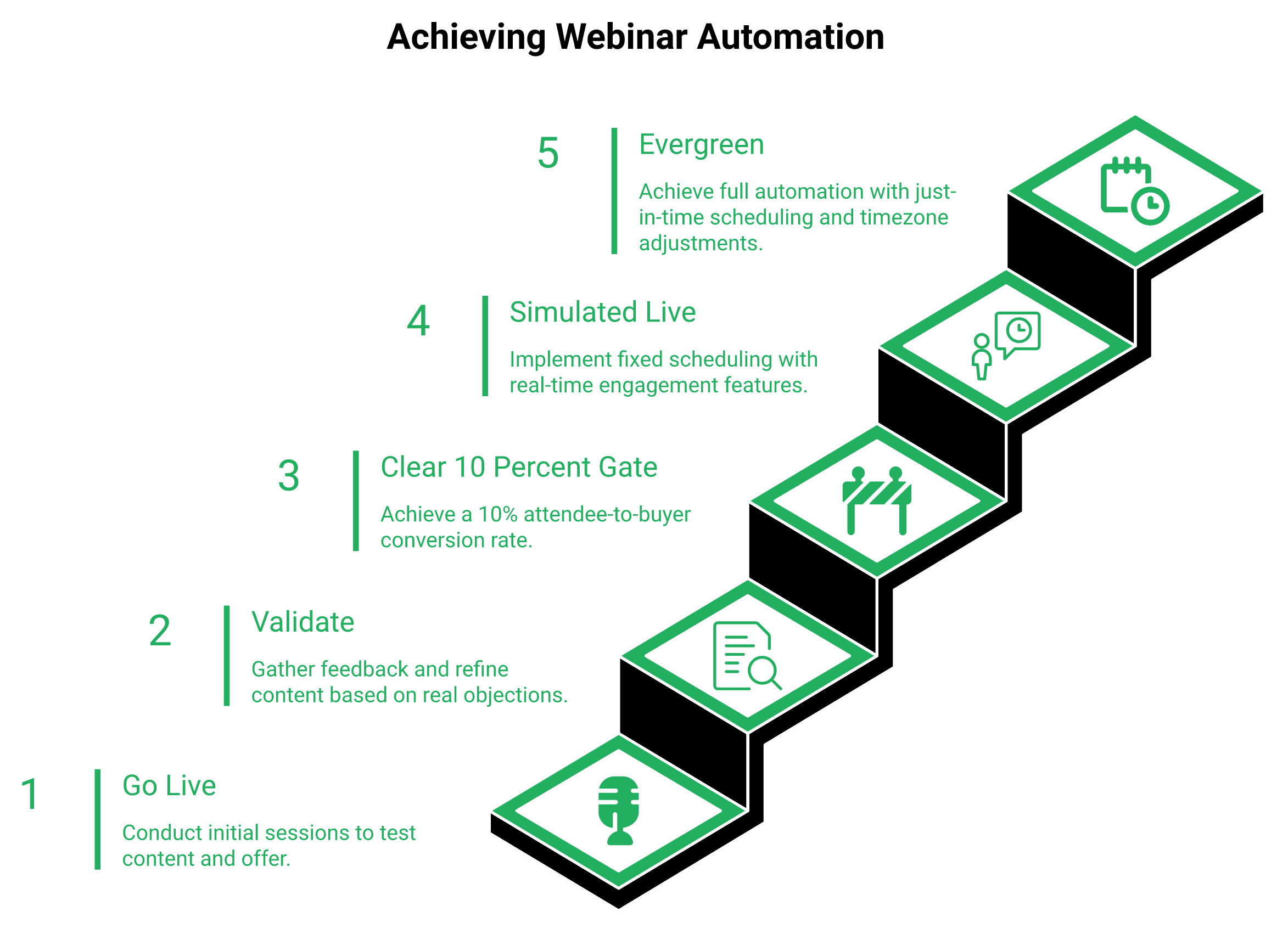
Here is the progression to run:
- Go live, five to ten times, same offer
- Validate the content and the offer against real objections
- Clear 10 percent attendee-to-buyer conversion
- Graduate the winning session into Simulated Live, keeping real-time chat and polls
- Or graduate it into Evergreen, with just-in-time scheduling and timezone-adjusted delivery
One more thing about proof. A webinar with 100 small customer results usually persuades better than one with two enormous ones, and EasyWebinar's course creator case study shows what compounding proof looks like.
EasyWebinar is built for that exact ladder, so a proven live session becomes a Simulated Live or Evergreen event without rebuilding the funnel around it.
Day one, rebuild the registration page and reminder sequence natively. Day two, import the list and map webinar tags into EasyCRM. Day three, run one live session with the same deck. Day four, convert that recording into Simulated Live or Evergreen. Day five, wire checkout and audit every automation limit before spending on traffic.
⏰ The five-day runbook
Each step has one expected outcome. If you do not get that outcome, do not move to the next day.
Day one. Registration page and reminders live natively. Outcome: one working signup flow with no external page builder.
Day two. List imported, tags mapped. Outcome: attendance behavior writes into EasyCRM fields automatically.
Day three. One live session, same deck, small audience. Outcome: a clean recording plus a baseline attendee-to-buyer number.
Day four. Convert that recording. Outcome: a Simulated Live event with chat, or an Evergreen event with just-in-time scheduling.
Day five. Checkout connected, quotas audited. Outcome: a purchase path that works end to end at 2am.
Operators who want the full build sequence can follow EasyWebinar's walkthrough on how to create webinars before day one begins.
The pre-flight check nobody runs
EasyWebinar's launch checklist starts with a stack audit, because an automation plan that hits its monthly cap can drop a couple hundred opt-ins before they land in the CRM.
Check quotas and opt-in counts four hours before, not four minutes before. Compare the registration count on the page against the count in your webinar CRM.
One more field-tested rule. Keep the join link out of your SMS reminders.
Tested both ways, adding the link raised show rate while wrecking booking rate. The likely reason: people join casually, half-listen, and never book.
⭐ Which operator should actually switch
| Operator type | Verdict |
|---|---|
| Coach or course creator | Switch. Evergreen plus checkout is the whole business model |
| B2B SaaS demand gen | Switch if webinars feed pipeline, stay on Zoom for customer panels |
| Agency running client webinars | Switch. Multiple client funnels in one place beats five stacks |
| Enterprise marketing or training | Choose EasyWebinar when automation, CRM, attribution, or guided setup matter; choose Zoom for a standardized Zoom production environment |
Check what each plan includes before you migrate
Launch is live only. Automation, EasyCRM, in-room checkout, and EasyCast start at Growth; the AI Moderator starts at Pro. Start with the 7-day free trial with full access.
See EasyWebinar plansWhat may change by 2027
One likely shift: AI-built funnels compress the setup week into an afternoon, and the scarce skill becomes the offer itself. EasyWebinar's AI funnel builder already points in that direction.
The other shift is a return to smaller live workshops, as audiences tire of over-produced automated content. Teams testing either pattern this quarter should compare show rate and booking rate against their current baseline.
EasyWebinar can turn a completed live session into a Simulated Live or Evergreen event, so migration reuses the asset you already recorded instead of starting over.
EasyWebinar vs Zoom FAQ
Zoom is a video-conferencing platform, and Zoom Webinars is an add-on built on its meeting infrastructure. Standard Zoom Webinars runs live sessions with on-demand recordings; Webinars Plus adds scheduled simulive, resources, CTAs, Backstage and Production Studio; each webinar product needs a Zoom Workplace Pro licence. EasyWebinar is the webinar platform built for conversions: attendees join from any browser with nothing to download, you run the session live, then turn the version that converts into an automated webinar that runs every day, with checkout inside the room and your CRM or ours. Zoom runs the meeting; EasyWebinar runs the webinar that has to sell.
Yes, the moment a webinar has to sell. EasyWebinar is the step up from Zoom: live sessions on every plan, and from Growth the same session runs as simulive, evergreen or just-in-time, with timed offers, checkout in the room, EasyCRM and six behaviour triggers for follow-up. Keep Zoom for internal meetings and teams standardised on Zoom — many teams run both, with Zoom for the meeting and EasyWebinar for the webinar that sells.
Yes, but the products solve different automation jobs. Standard Zoom Webinars provides live delivery and on-demand recordings. Zoom Webinars Plus supports scheduled simulive webinars that can start automatically without the host present, including recurring schedules. A host or panelist may still join for live chat and Q and A. EasyWebinar adds continuous evergreen and visitor-triggered just-in-time delivery. The next session can appear shortly after a visitor lands rather than only at a predefined scheduled time, with timezone-aware options and the same offer, checkout, CRM tagging, and follow-up attached. EasyWebinar treats Automated Webinars as an umbrella over exactly two tiers, and the distinction matters when you buy: Simulated Live runs on Fixed or Fixed Recurring schedules in a single time zone, and keeps real-time live chat, polls, and timed offers active. Evergreen is the deeper tier, and it alone carries just-in-time scheduling, timezone-adjusted delivery, multiple daily slots, Instant Replay, and On-Demand. On our side, toggling just-in-time on an Evergreen event sets the next start between roughly one and fourteen minutes out. That single setting removes the three-day gap between someone's interest and their attendance. Zoom Webinars Plus removes the need for a host simply to start the simulive playback. The decision is therefore about scheduling depth and the connected funnel, not whether Zoom can play prerecorded content. If you want the full mechanics before choosing, our breakdown of live vs automated webinars walks through each format and its scheduling limits.
Inside the room, only on EasyWebinar. Zoom supports paid registration through PayPal, with more advanced ticketing and Stripe on higher event tiers, and Webinars Plus adds resources and CTAs; the checkout itself stays outside the webinar. EasyWebinar adds timed offers with checkout completed inside the room, from Growth, plus paid registration through Stripe and PayPal. Keeping the payment in the room keeps the sale tied to what the buyer watched, clicked and asked.
EasyWebinar, if the session exists to sell. Zoom is the better call when your audience is internal, every event runs live, and nobody will act on attendee-level behaviour data afterwards. The difference shows up at the offer moment. Zoom gives you chat, polls, and Q and A, but no timed offer overlays, no exit page, and no file distribution, and reviewers describe its polling as rudimentary. What a selling session actually needs: A timed offer that fires at a scripted minute, not a link pasted into chat. Checkout inside the flow, so the buying decision does not require three tabs. Behavioural tagging, so someone who stayed to the pitch is followed up differently from someone who left at minute six. EasyWebinar's checkout sells ticketed access to live, Simulated Live, or Evergreen sessions through Stripe and PayPal, with access delivered after payment. Operators use it two ways: charge for the room, or run the room free and sell inside it. Zoom also supports paid registration through PayPal, with more advanced ticketing and Stripe availability on higher event tiers; EasyWebinar's distinction is the in-room purchase and the native connection to webinar behavior and follow-up. We are honest about the ceiling here. This covers the webinar-to-revenue workflow, not an enterprise CRM, and some of our own reviewers run post-webinar email sequences elsewhere for deeper open and click tracking. See how the monetisation layer is structured on our paid webinars page.
EasyWebinar includes one; Zoom integrates with yours. Zoom hands you attendance and engagement reports and connects to CRM and marketing tools, so the follow-up runs in the system you connect. EasyWebinar includes EasyCRM from Growth, with six behaviour triggers — registered, attended, no-show, watched replay, clicked offer, purchased — each starting its own sequence, plus SMS reminders through Twilio. From Pro it syncs natively with HubSpot and Salesforce Pardot (Account Engagement), and it also connects to ActiveCampaign, Kit (formerly ConvertKit), Keap, GoHighLevel and more. Your CRM or ours.
No. Attendees join from any browser, desktop or mobile — one click from the link to the room, nothing to download. Real-time delivery runs on Dolby OptiView (formerly Millicast) WebRTC with sub-second latency, and TrueVoice audio is built for up to five people speaking at once, so a host plus up to 4 presenters stay clear.
Yes, from Growth. EasyCast streams one session to 10+ platforms at once — YouTube, LinkedIn, Facebook, Instagram, X, Vimeo, Twitch, TikTok, Kick, Rumble and Dailymotion — plus any RTMP destination, while timed offers, polls and Q&A keep running for the attendees in the room. Zoom can live-stream a webinar to YouTube, Facebook, Twitch or a custom RTMP service.
Both pass a standard security review. EasyWebinar holds SOC 2 Type II (report held) and follows GDPR-aligned data practices, with a published Data Processing Agreement, SSO/SAML on Scale and a 99.9% uptime guarantee for Enterprise customers, with service credits. Zoom publishes SOC 2 Type 2, ISO programmes and GDPR documentation, with broad enterprise adoption. We do not hold ISO 27001, PCI-DSS, HIPAA or CCPA and will not imply otherwise. Confirm current certifications with either vendor during procurement.
Yes. Every plan starts with a 7-day free trial with full access, and a card is required to start it; there is no free plan. In that week you can rehearse the whole workflow — build the funnel with AI, run a live session, turn it into an automated webinar, sell inside the room and trigger the follow-up. Automation, EasyCRM, checkout and EasyCast start at Growth; the AI Moderator starts at Pro.
Ratings sit close. EasyWebinar holds a 4.4 to 4.5 out of 5 aggregate across G2 and Capterra, while Zoom Events and Webinars sits between 4.4 and 4.6 across a far larger review base. The complaints differ in kind, and that difference matters more than the score. Zoom reviewers cluster around reliability and support: Glitchy sessions, presenters unable to enter, and reminder notices sent eight hours after an event concluded. No consistent point of contact, with one enterprise buyer describing six months of unresolved tickets while still being billed. Near-absent customisation of landing pages, reminders, and calendar invites. EasyWebinar reviewers name our own seams just as plainly: The presentation video has to be uploaded before an automated webinar can be built. Open and click tracking is thin inside the platform. Page and email design options feel limited to some operators. My sorting rule for operators: rank complaints by whether they can break a session with ad spend behind it. A layout constraint annoys you on Tuesday. A late reminder email destroys a Wednesday launch. Read both products' one-star and two-star reviews, then compare against our published customer reviews.
Give it five working days, one outcome per day, and do not advance until you hit the outcome. Day one. Rebuild the registration page and reminder sequence natively. Outcome: one signup flow with no external page builder. Day two. Import the list and map webinar tags. Outcome: attendance behaviour writes into CRM fields automatically. Day three. Run one live session with the same deck. Outcome: a clean recording plus a baseline attendee-to-buyer number. Day four. Convert that recording into Simulated Live or Evergreen. Outcome: an automated session with chat or just-in-time scheduling. Day five. Wire checkout and audit automation quotas. Outcome: a purchase path that works at 2am. Two field-tested rules save launches. First, check quotas and opt-in counts four hours before, not four minutes before. Our own automation plan hit its monthly cap once, and a couple hundred opt-ins never landed in the CRM while the registration page looked perfectly healthy. Second, keep the join link out of your SMS reminders. We tested it both ways, and adding the link raised show rate while wrecking booking rate. EasyWebinar converts a completed live session into a Simulated Live or Evergreen event, so the migration reuses the asset you already recorded. The how to create webinars guide covers the build sequence before day one.
Choose Zoom for internal meetings and teams standardised on Zoom: the audience already lives in your Zoom tenant, every session runs live, Backstage, Production Studio, phone audio or breakouts matter more than the offer, and attendee data is already handled by your connected CRM. Choose EasyWebinar the moment the session carries an offer — when the live session, the automated replay, the payment and the follow-up should run from one account.
Yes, on Pro and above. Upload your context, such as PDFs and other files, and the AI Moderator answers attendee questions in the chat from that material during live, simulive and automated webinars. It is not included on Launch or Growth.