Webinar platform comparison
EasyWebinar vs WebinarJam. Which webinar platform is right for you?
WebinarJam runs a capable live room. EasyWebinar is the webinar platform built for conversions: attendees join from any browser, and the session that converts live keeps selling on autopilot, with checkout inside the room and your CRM or ours. Automation starts at Growth.
7-day full access. Cancel anytime.



Rated a G2 LeaderSOC 2 Type II · GDPR-aligned
WebinarJam + EverWebinarTwo products
- Live webinarWebinarJam
- Automated replayEverWebinar
- CheckoutExternal page
- Follow-upYour CRM
One account
- Live webinarEvery plan
- Simulive & evergreenFrom Growth
- CheckoutInside the room
- Follow-upEasyCRM or yours
What actually differs
Both run a good live webinar. They part ways after it.
The differences show up when the live hour ends: where the recording goes, where the buyer pays, and how long the session is allowed to run.
Where WebinarJam's setup stops
2products for live and automated
The session that converted moves to EverWebinar to run on autopilot.
1external checkout page
The sale finishes outside the room, away from what the buyer watched.
1–4 hrsession cap by plan
Starter stops at one hour and Basic at two, mid-pitch if it runs long.
With EasyWebinar it's one platform, one login, one subscription. Run it live, then let that exact session run every day, take payment inside the room, and follow up on what each attendee did — with live sessions up to 4 hours from Growth.
7-day full access. Cancel anytime.
“I personally use EasyWebinar and they are the best. I moved from using other platforms and nothing compares to their reliability and customer support!”
 Amy PorterfieldOnline marketing expertVideo testimonial
At a glance
EasyWebinar vs WebinarJam at a glance
EasyWebinar and WebinarJam both host live webinars. WebinarJam is the live room, with automated webinars in its sister product EverWebinar; EasyWebinar runs live, automated and evergreen webinars, checkout inside the room and EasyCRM from one account.
Session length is a tie on the top tiers; everything after the live hour is where they differ.
| Topic | WebinarJam | |
|---|---|---|
| Automated webinars | Same account, from Growth | In EverWebinar, included from Basic |
| Checkout | Inside the room | On an external page |
| CRM & follow-up | EasyCRM, or keep yours | Integrations; email and SMS on every tier |
| AI | Builder; Moderator from Pro | None published (August 2026) |
| Session length | 2 hrs on Launch, 4 hrs from Growth | 1 to 4 hrs by plan |
| Live room | AI Moderator from Pro, reactions, polls, split testing | Spotlight, panic button, whiteboard, split testing |
| Trial | 7 days free with full access | $1 for 14 days |
Better fit for EasyWebinar
Which should you choose?
Choose by the job, not the feature list.
Buy WebinarJam when the pitch finishes inside two hours and the recording is not the asset. Buy EasyWebinar when the launch, the payment and the follow-up should live in one account.
- Best for
- Webinars built for conversions — live and automated, on one subscription.
- Standout
- Checkout inside the room, and the live session that becomes your automated webinar.
- Not ideal for
- Courses with lessons and certificates — pair it with a course platform.
WebinarJam
- Best for
- One-off live launches, with automation in a separate product.
- Standout
- Stagecraft tools — spotlight, panic button, whiteboard — on every tier.
- Not ideal for
- Taking payment inside the room, or follow-up without a separate CRM.
Plans and CRM
Your CRM or ours
Keep the CRM you already use; EasyWebinar connects to it. Or start with EasyCRM, built in from Growth.
- HubSpot
- Salesforce Pardot (Account Engagement)
- ActiveCampaign
- Kit (formerly ConvertKit)
- GoHighLevel
- EasyCRM, built in
Flat monthly plans
No per-attendee fees within your plan.
- Every planLive webinars, browser join and the AI Webinar Builder
- From GrowthAutomated webinars, EasyCRM, checkout in the room and EasyCast
- From ProThe AI Moderator answers attendee questions in the chat
7-day full access. Cancel anytime.
Results
Webinars that keep selling after the live hour.
$5Mfrom one evergreen webinar funnel
 Carla BiesingerCourse creator
$2Mfrom one automated webinar funnel
 Ryan FennCEO of ChiirP
$750Kfrom a single webinar funnel
 Kim ConstableFounder of The Sculpted Vegan
“With EasyWebinar I sold 25 courses within 3 weeks of my evergreen "launch". Any time I needed support the response time was quick.”
 Laura K. ConnellFounder, lauraconnell.comG2 review
Go deeper
The detailed comparison, topic by topic.
Every figure behind the table, for buyers who want the full picture before they decide. Open any topic.
The full scorecardTwelve decision factors, and who each one favours.
| Decision factor | WebinarJam | Better fit | |
|---|---|---|---|
| Team seats and concurrency | 4 co-hosts, unlimited team members, concurrent sessions via sub-accounts | 1, 2, 4, 6 hosts by tier; team members capped at 1, 5, 10, 25 | EasyWebinarfor growing teams |
| Live-room toolkit | AI Moderator from Pro, reactions, polls, Q&A, timed offers, split testing | Spotlight, panic button, whiteboard, split testing — every tier | EasyWebinarAI in the room |
| Trial | 7 days free with full access | $1 for 14 days | EasyWebinarfree option |
| Email and SMS in the plan | Email included; SMS via Twilio | Email and SMS on every tier | WebinarJam |
| Published session limits | 2 hours on Launch; 4 hours on Growth, Pro and Scale | 1 to 4 hours by tier | EasyWebinaron lower tiers; both reach 4 hours |
| Evergreen and automated webinars | Live on every plan; simulive, automated and evergreen webinars from Growth | Directed to EverWebinar, a separate product | EasyWebinarfor the replay window |
| Checkout inside the room | Paid offers with checkout, March 2026 | Offer displays only; payment on an external page | EasyWebinar |
| Built-in CRM | EasyCRM from Growth; native HubSpot and Pardot sync on Pro | External integrations only | EasyWebinar |
| AI before and during the webinar | AI Webinar Builder on every plan; AI Moderator from Pro | No AI feature on 36 captured pages | EasyWebinarbefore and during the session |
| Security and compliance | SOC 2 Type II and GDPR-aligned practices, with a published DPA | No compliance messaging captured | EasyWebinarfor procurement |
| Streaming and capacity | Sub-second latency on Dolby OptiView WebRTC; 1,000 live on Scale | 5,000 attendees on Enterprise; stack not named | TieEasyWebinar names its stack; WebinarJam publishes more seats |
| What matters | WebinarJam | |
|---|---|---|
| Best for | Launches, evergreen funnels, coaches and course creators selling from the room | One-off live launches under two hours, with automation in a separate product |
| Maximum session length | 2 hours on Launch; 4 hours on Growth, Pro and Scale | Capped by tier: 1, 2, 3 and 4 hours |
| Hosts and team seats | Up to 4 co-hosts, with unlimited extra team members — no cap | 1, 2, 4 and 6 hosts by tier, plus 1, 5, 10 and 25 extra team members |
| Concurrent sessions | As many as you need — sub-accounts run concurrent sessions under one account | Two answers on the same FAQ page conflict |
| Live-room toolkit | AI Moderator from Pro, reactions, polls, Q&A, timed offers with checkout, split testing on registration pages | Spotlight, panic button, whiteboard, video injections, split testing; no AI moderator |
| Automated & evergreen webinars | Live on every plan; simulive, automated and evergreen webinars from Growth | Directed to the companion product EverWebinar — a second product and login |
| Automated viewer capacity | Published per session at 5× the live limit: 1,000 Growth · 2,500 Pro · 5,000 Scale | Not applicable inside WebinarJam; capacity lives in EverWebinar |
| Offer inside the room | Timed offers with checkout completed in-session, shipped March 2026 | Live offer displays on every tier; no native checkout documented |
| Paid registration | Native, through Stripe and PayPal | Not documented in published material |
| Built-in CRM | EasyCRM built in from Growth — or keep the CRM you already use | External integrations only — Kartra, ActiveCampaign, Keap, Kit (formerly ConvertKit), Drip, Ontraport, Zapier |
| Behavior-based follow-up | Six triggers — registered, attended, no-show, watched replay, clicked offer, purchased — each start their own sequence, from Growth | Follow-up rules are built by hand in whichever CRM you connect |
| Email and SMS | Email included; SMS runs through a Twilio integration | Email and SMS on every tier, including Starter |
| AI webinar creation | AI Webinar Builder writes the script, pages, emails, polls and follow-up — on every plan | No AI feature found on 36 captured WebinarJam or EverWebinar pages |
| Streaming quality & latency | Sub-second latency on Dolby OptiView (formerly Millicast) WebRTC, joined from any browser with nothing to download | Published equipment floor: quad-core 2.3GHz, hardwired ethernet, 5Mbps up, sub-135ms latency |
| Security & compliance | SOC 2 Type II and GDPR-aligned data practices, with a published DPA | No security or compliance messaging captured on public pages |
| Largest published room | 1,000 live on Scale; larger events on Enterprise, by quote | 5,000 attendees on Enterprise |
| Verified ratings | 4.5/5 from 100+ G2 reviews | 3.9/5 from 277 Capterra reviews · value 3.8 · support 3.6 |
| Trial | 7 days free with full access | $1 for a 14-day trial; no free option |
Facts checked against each vendor's published pricing and documentation, captured August 2026. Live and automated allowances are separate session types and are not added together.
Session limits & seatsNobody plans a 47-minute launch webinar.
WebinarJam caps sessions at 1, 2, 3 or 4 hours by tier, and caps team members at 1, 5, 10 or 25. EasyWebinar publishes 2-hour sessions on Launch and 4-hour sessions from Growth, allows up to 4 co-hosts with unlimited team members, and runs concurrent sessions through sub-accounts.
Up to 4 hours, no seat meter
Four-hour sessions from Growth, with the whole team in the room.
- 4-hour sessions on Growth, Pro and Scale; 2 hours on Launch
- Up to 4 co-hosts and unlimited team members — no per-seat metering
- Concurrent sessions through sub-accounts, as many as you need
- A host plus up to 4 presenters with TrueVoice audio, plus attendee-to-presenter promotion
- 50 to 1,000 live by plan, with larger events on Enterprise by quote
WebinarJam
Metered by tier
Everything is published to the number — and every number is a ceiling.
- Sessions capped at 1, 2, 3 and 4 hours by tier
- Its FAQ handles longer events by “setting up a second session that is scheduled to begin 30 minutes after the first webinar”
- 1, 2, 4 and 6 hosts, plus 1, 5, 10 and 25 extra team members
- Concurrency answered two contradictory ways on the same FAQ page
- 100 to 5,000 attendees, and 5,000 is the published ceiling
Limits verdict
Time your last three sessions from the pitch, not the deck, then add 25 minutes of Q&A. If that total crosses two hours, the entry tier is a timer running underneath your close. Then count the humans who need a login on launch day: WebinarJam meters them by tier, EasyWebinar does not.
After the session endsOne platform ends at the broadcast. The other keeps the recording selling.
WebinarJam's own FAQ directs users to “our companion product, EverWebinar” for evergreen automated webinars, included at no additional cost on Basic, Professional and Enterprise. That is an architecture fact stated by the vendor, not an accusation — and it is the single biggest difference on this page.
One subscription
The launch and its afterlife run in the same account.
- Live on every plan; simulive, automated and evergreen webinars from Growth
- 1,000 / 2,500 / 5,000 automated viewers per session, already included
- Timed offers that complete payment inside the room
- The recording never changes platforms, so Thursday's replay is already built
- AI Moderator (Pro and above) answers attendee questions from the PDFs and files you upload, in live and automated webinars
WebinarJam
Two products
A strong live product that draws its boundary at the broadcast.
- Live sessions are the core product, and a genuinely good one
- Evergreen automated webinars are directed to EverWebinar
- Simulive and on-demand funnels are not documented on the pricing page
- Two products, and one recording handed across the gap
Automation verdict
Run 5 to 10 live sessions and clear a 10% attendee-to-buyer rate before you automate anything. The sprint only works if the platform can automate the session you just proved — if the replay lives in a different product, the proven session and the automated session are two separate builds.
Conversion & revenueDisplaying an offer and taking the money are two different products.
WebinarJam ships live offer displays on every tier. EasyWebinar shipped paid offers with checkout inside the room in March 2026. The gap costs you attribution more often than revenue — but attribution is what fixes the next session.
| Revenue workflow | WebinarJam | |
|---|---|---|
| In-room offer panel | Timed offers published | Live offer displays on every tier |
| Payment completed in the room | Paid offers with built-in checkout, shipped March 2026 | Not documented — the sale completes on an external page |
| Paid registration | Stripe and PayPal | Not documented |
| Sale tied to watch behavior | Revenue reporting on Pro links each sale to in-session behavior | An external page breaks the link between the timeline and the transaction |
| CRM | EasyCRM from Growth, plus native HubSpot and Salesforce Pardot (Account Engagement) sync on Pro | External integrations only — follow-up lives in the CRM you buy and connect |
| Who builds the follow-up | Six behavior triggers start their own sequences — registered, attended, no-show, watched replay, clicked offer, purchased | You do, by hand, across two systems |
| Email, SMS and integration breadth | Email included; SMS through Twilio | Email and SMS on every tier, and a broader connector list — Kartra, ActiveCampaign, Keap, Kit (formerly ConvertKit), Drip, Ontraport, Twilio, Zapier |
Revenue verdict
An external checkout is not a disqualifier — plenty of launches clear seven figures with a redirect to a tuned page. The cost is the link between behavior and money. Each behavior needs its own message: clicked the offer, watched the replay, attended but did not buy, registered and never showed. On EasyWebinar those triggers start their own sequences; across two disconnected systems, somebody on your team does it by hand, or nobody does.
The live roomOne room has stagecraft. The other answers questions and takes the payment.
WebinarJam ships stagecraft on every tier — attendee spotlight, the panic button, an on-screen whiteboard, video injections and split testing. EasyWebinar matches the split testing and adds what moves revenue: an AI Moderator from Pro that answers attendee questions from your files, attendee reactions, and a timed offer that takes the payment without leaving the room.
| Live room capability | WebinarJam | |
|---|---|---|
| Attendee spotlight and presenter promotion | Attendee-to-presenter promotion published | Every tier, with camera, mic, screen share and slides |
| Panic button, whiteboard, video injections | Not published | Every tier |
| A/B split testing on registration pages | Included | Every tier |
| AI Moderator answering attendee questions | From Pro, answering from the files you upload | Not published |
| Attendee reactions | Included | Not published |
| Moderator controls (mute, camera, remove) | Published | Control panel, every tier |
| Simultaneous speakers | Host plus up to 4 presenters, TrueVoice audio | Attendee promotion documented |
| Polls, chat, Q&A, handouts | Included, with a countdown and offer in the same room | Included |
| Offer that completes payment in the room | In-room paid offers with checkout, March 2026 | Live offer displays only |
Live room verdict
Judge the room by the close, not the button count. A whiteboard does not answer the question that stalls a buyer; the AI Moderator does, and the in-room checkout takes the card while the offer is still on screen.
AI & the CRM that acts on itThe platform should do the analysis, not hand you a spreadsheet.
WebinarJam publishes no AI feature across 36 captured pages. EasyWebinar uses AI on both sides of the session: the AI Webinar Builder drafts the funnel before you launch, and from Pro the AI Moderator answers attendee questions from the files you upload while it runs. Behavior-based follow-up then runs on the attendee data the session produced.
01 · Build
AI drafts the whole funnel from one prompt
Script, registration and confirmation pages, the reminder sequence and the in-session polls — generated as editable assets, not a locked campaign. Shipped January 2026, and it turns a six-week build into a testable funnel.
02 · Measure
Every attendee becomes first-party intent data
Attendance, watch time, questions, poll answers, offer clicks and purchases are recorded for each attendee and tied to revenue. You see who to call next, not a CSV of who attended.
03 · Follow up
EasyCRM does the heavy lifting
Registered, attended, no-show, watched replay, clicked offer, purchased: six behavior triggers, each with its own sequence from Growth, running on the attendee data the session just produced — without a Zapier chain to babysit.
04 · Compound
Better reminders, better rooms, better closes
The same attendee data drives registration reminders that lift show rate, timed offers fired at the moment of intent, and replay nudges to the people who watched but did not buy — the highest-intent list you will ever own.
AI verdict
WebinarJam gives you the room and the connectors, and expects your team to build the intelligence. EasyWebinar builds it in: AI writes the funnel, every attendee's behavior is recorded, and EasyCRM runs the follow-up that turns a watched webinar into a booked call.
Streaming quality & reliabilitySub-second latency, and a webinar that never stops at the plan limit.
EasyWebinar publishes a 99.9% monthly uptime guarantee with service credits for Enterprise customers (Terms, Section 12); WebinarJam does not publish one. Beyond that, compare the stack each one runs, the ceiling each one holds, and what reviewers report from their own rooms.
Sub-second
Real-time between question and answer
EasyWebinar streams on Dolby OptiView (formerly Millicast) WebRTC with sub-second latency. Chat lands while the point is still on screen, so polls and offers fire in sync with intent instead of after you have moved on. WebinarJam names no stack in its published material.
No hard cutoff
Your webinar never stops at the plan limit
Attendees beyond your plan's limit are billed as overage under our Terms instead of being turned away, and larger events run on Enterprise by quote. WebinarJam publishes a 5,000-attendee ceiling on its Enterprise plan.
TrueVoice audio
Audio built for a panel, not just a host
TrueVoice audio is built for up to five people speaking at once — a host plus up to 4 presenters — so a guest testimonial or a co-host Q&A stays clear. EasyCast multistreams the same feed outward from Growth.
The honest part
What actually breaks a launch is the plumbing
WebinarJam publishes an equipment floor we do not — quad-core 2.3GHz, hardwired ethernet, 5Mbps upstream, sub-135ms latency — and ships a panic button that reboots a broken room. Credit where it belongs. But stream quality rarely kills a launch; a Zapier task limit hit four hours before it does.
Reliability verdict
Naming the stack is more useful than any adjective: sub-second WebRTC on Dolby OptiView, TrueVoice audio, and no hard cutoff at the plan limit. Then test the plumbing — register for your own webinar on mobile data, tap every button including the offer, and reconcile registration counts against your CRM by number.
Security & complianceEnterprise-grade security, independently audited.
EasyWebinar holds SOC 2 Type II and follows GDPR-aligned data practices, with a published Data Processing Agreement, encrypted data and per-attendee consent records. No security or compliance messaging was captured on WebinarJam or EverWebinar's public pages.
Security summary
SOC 2 Type II · GDPR-aligned · Published Data Processing Agreement · Encrypted data · SSO/SAML and API on Scale and Enterprise. We do not hold ISO 27001, PCI-DSS, HIPAA or CCPA, because those are separate audits we have not done.
Try before you decideStart free for 7 days, with full access to every feature.
EasyWebinar gives you 7 days free with full access. WebinarJam offers the $1 fourteen-day trial only. What matters most is what each window lets you validate.
7 days freewith full access
The complete app at full plan capacity: AI funnel creation, live and simulive sessions, evergreen funnels, paid registration, in-room checkout and EasyCRM.
You can rehearse the entire launch and its replay window before you pay.
WebinarJam
$1 trial14 daysfor $1, no free option
Two weeks on the live product. The automated replay sits in EverWebinar, so the trial cannot show you the evergreen side.
Good for judging the live room. Evergreen sits in a separate product.
Trial verdict
Run the same session in each room and time the pitch. The trial that answers your real question is the one that lets you build the replay funnel too, because that decision is the expensive one — and on EasyWebinar the first 7 days cost nothing.
Trial conditions taken from published vendor documentation, August 2026. Confirm current trial terms with each vendor before evaluating.
Run the session. Take the payment. Keep the recording selling.
Build it with AI, run it live, then let the session that converts sell on autopilot.
7-day full access. Cancel anytime.
4.5/5 on G2 · 100+ reviews · 7-day full access · SOC 2 Type II · GDPR-aligned
Complete buyer's guide
Complete EasyWebinar vs WebinarJam Buyer's Guide
Written by Pranav Sharma, Chief Business Officer at EasyWebinar, on August 19, 2026 · 13 min read. Session caps, host seats and review figures were verified against each vendor's published pages in August 2026. Session durations, automation eligibility and EverWebinar inclusion rechecked October 12, 2026.
In this guide
EasyWebinar vs WebinarJam (2026): Live Webinar Platforms Compared on Automation & Reliability
Verified September 2, 2026 · Session durations, automation eligibility and EverWebinar inclusion rechecked October 12, 2026
TL;DR
- WebinarJam publishes exact host and team-member counts by tier, and ships live offer displays on every plan.
- WebinarJam caps sessions at 1, 2, 3, or 4 hours by tier, and its own FAQ suggests scheduling a second session 30 minutes later.
- EasyWebinar publishes 2-hour live sessions on Launch and 4-hour sessions on Growth, Pro, and Scale, with live on every plan and simulive, automated, and evergreen webinars from Growth.
- Evergreen replay on WebinarJam requires its companion product, EverWebinar, so the recording moves to a second account and login.
- EasyWebinar shipped in-room paid offers with checkout in March 2026, plus an AI webinar builder in February 2026, and holds a SOC 2 Type II report with GDPR-aligned data practices.
- EasyWebinar publishes a 99.9% uptime guarantee with service credits for Enterprise customers; WebinarJam publishes none. Beyond that, reliability here means published limits, equipment floors, and reviewer reports.
Buy WebinarJam for one-off live launches that run under two hours, with automation handled in a separate product. Its Basic tier publishes 500 attendees and two named hosts. Buy EasyWebinar when the session has to keep selling afterwards, because from Growth one subscription covers live, simulive, automated, and evergreen webinars, with checkout and CRM in the same account.
⏰ The 4pm scene, ninety minutes before cart open
A coach with 380 registrants had a slide deck she had rehearsed four times. Her VA was watching chat, her Stripe link was pasted in a notes app, and nobody had timed the pitch.
The webinar ran long. The room closed before the close landed. That is the moment this decision is actually about, not dashboards.
WebinarJam publishes exactly how many people can run the room. Its tiers list 1, 2, 4, and 6 hosts, plus 1, 5, 10, and 25 extra team members.
What WebinarJam's live tiers do not carry
- A two-hour session cap on that plan, set by tier.
- No documented native checkout inside the room, only live offer displays.
- No built-in CRM, so follow-up lives in a tool you buy separately.
- No AI build feature on its published pages.
- Evergreen replay requires their companion product, EverWebinar.
⭐ What operators actually report
I love the partner service, everwebinar, (which you have to pay more for) that allows the participant to watch the webinar and feel as though it's a live webinar.
That is the split stated by a paying customer, not by a competitor. EasyWebinar sits on the other side of that split, which reviewers notice in their own words, and the full EasyWebinar vs WebinarJam breakdown lays the architecture out side by side.
EasyWebinar is hands-down THE webinar platform for evergreen webinars, no contest.
The honest test, in two questions
One course creator learned this the expensive way. In the recession, revenue fell from mid six figures to a $15,000 year, and a six-month course launch sold zero copies. A webinar is what moved money again, building a 14,000 person list and $245,000 in course sales inside a year.
So ask two things. How long does your pitch really run, and what happens to the recording on Thursday?
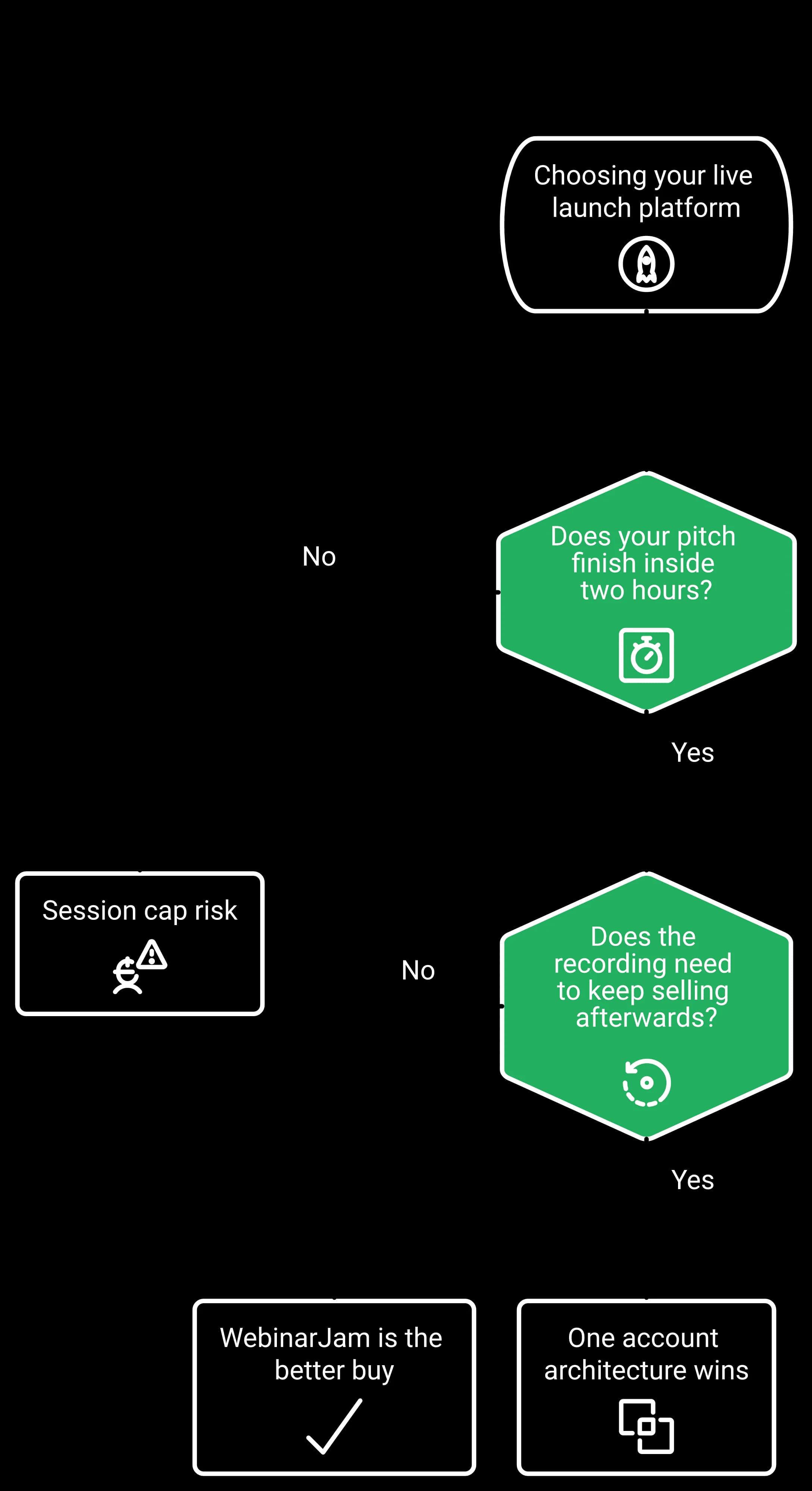
If the answer is "under two hours, and nothing," WebinarJam is the better buy. If the answer is "it becomes the asset," you are choosing an architecture, not a template. Simple scales. Fancy fails.
EasyWebinar runs the live launch and its evergreen afterlife from one account, with paid webinars and in-room checkout shipped in March 2026 through Stripe and PayPal.
WebinarJam caps sessions at 1, 2, 3, or 4 hours by tier, and publishes exact seats of 1, 2, 4, and 6 hosts plus 1, 5, 10, and 25 additional team members. Its own FAQ advises "setting up a second session that is scheduled to begin 30 minutes after the first webinar." EasyWebinar publishes 2-hour live sessions on Launch and 4-hour sessions on Growth, Pro, and Scale.
Launches run long, by design
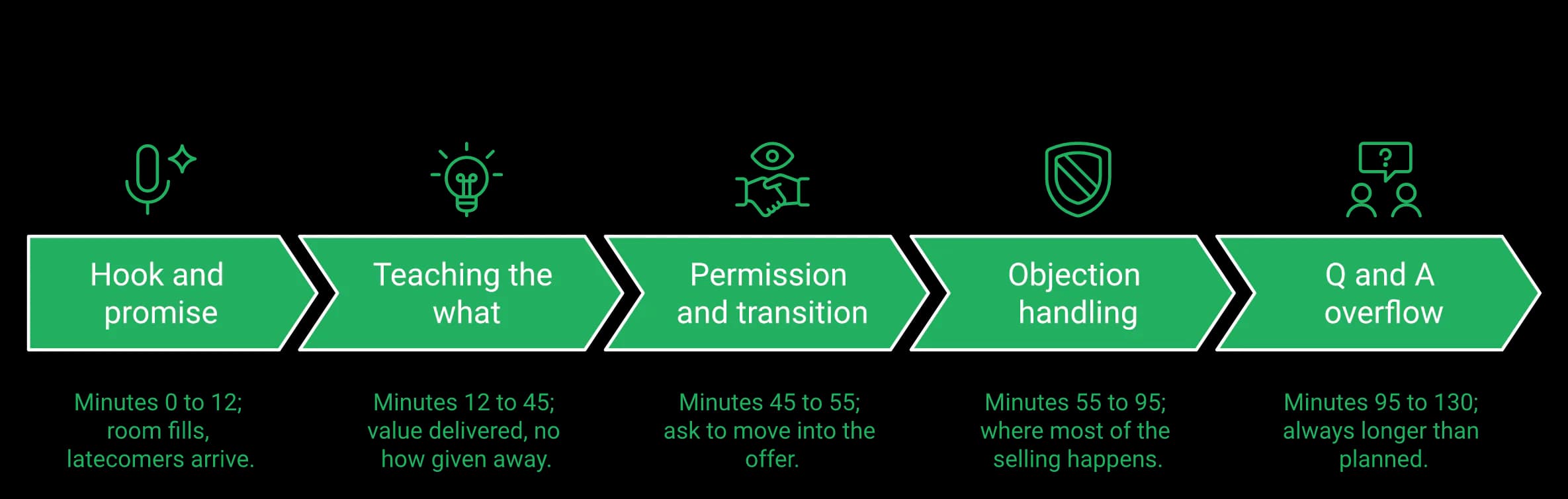
Nobody plans a 47-minute launch webinar. Q&A runs, objections stack, and the close arrives later than the calendar invite implied.
Experienced closers disagree about ideal length, which tells you something. Jason Fladlien argues a four-hour webinar beats a three-hour one, because most of that time is objection handling. Jon Penberthy runs 30 to 40 minutes for high ticket when the hook holds.
⏳ The cap, and the workaround the vendor recommends
Here is the constraint table, taken from both published pricing pages.
| Constraint | WebinarJam | EasyWebinar |
|---|---|---|
| Max session length | 1 hr, 2 hrs, 3 hrs, 4 hrs by tier | 2 hrs on Launch, 4 hrs on Growth, Pro, Scale |
| Live attendee ceiling | 100 to 5,000 by tier | 50 to higher tiers, automated viewers listed separately |
| Host seats | 1, 2, 4, 6 published | Not published |
| Extra team members | 1, 5, 10, 25 published | Not published |
| Concurrent sessions | FAQ answers conflict on the same page | Not published |
Read the workaround sentence again. Splitting a launch into a second session that starts 30 minutes later splits the audience mid-pitch. That is the vendor's own guidance, quoted, not an accusation.
Where the transparency runs the other way
WebinarJam publishes seat counts to the number. EasyWebinar publishes none, and that is a real gap for a buyer who needs to know whether a launch manager gets a login.
The same standard applies in both directions. EasyWebinar publishes 2-hour live sessions on Launch and 4-hour live sessions on Growth, Pro, and Scale, so check your real runtime against those numbers too.
A three-hour lesson
In one launch, a stand-in presenter rebuilt the deck without telling the host. The webinar came out near three hours long. It was intolerable for that audience, and it produced one sale.
Length was one failure among several, but the room ending would have made it terminal. A more useful benchmark is retention based. From peak show rate to the pitch, you want about 80% of the live room still there.
Your Monday check, in ten minutes
- Open your last three webinar recordings and note the actual runtime.
- Note the timestamp where the pitch began, not where the deck ended.
- Add 25 minutes of Q&A, because launches always attract more than you plan for.
- Compare that total against the 1, 2, 3, or 4 hour tier you would buy.
- Count the humans who need a login on launch day, then ask each vendor to confirm seats in writing.
If your number crosses two hours, the entry tier is a timer running underneath your close.
EasyWebinar publishes 4-hour live sessions on Growth, Pro, and Scale, so a pitch that runs past two hours can still finish in the room where it started.
The one that answers questions and takes the payment. EasyWebinar's room includes the AI Moderator from Pro, attendee reactions, polls, Q&A, timed offers with checkout inside the room and A/B split testing on registration pages. WebinarJam ships stagecraft on every tier — attendee spotlight, the panic button, an on-screen whiteboard, video injections and split testing — but no AI moderator and no in-room checkout.
What WebinarJam does well
This toolkit was built by people who have run launches. Promoting an attendee to a full presenter with camera, mic, screen share, and slides is not a demo feature. It is what you do when a student's testimonial needs to land live.
Both platforms split-test registration pages. Where EasyWebinar pulls ahead is inside the session: the AI Moderator answers attendee questions from the files you upload, and reactions keep the room visible to the host. See the live webinar software page for the full room.
What the panic button actually is
It moves your audience into a clean room when the current one breaks. Reviewers describe it as useful, and it is honest engineering.
It also tells you something about the operating assumption behind the product. Rooms break, so there is a button for it. Capterra's review base flags glitches at meaningful volume, with technical issues appearing in a large share of negative reviews.
⭐ Operator reports from both rooms
1. Cannot enable or disable speak of audience by presenter 2. PowerPoint file size constraint to 80MB ... 5. Live constraint to 3 hours only.
The real chat feature is not working properly. I face some difficulties on the screen sharing, big delay and not clear picture.
I love that we can have a poll, offer and countdown right in the event! That's going to be so great for sales and interactions.
The row that changes the calculus
| Live room capability | WebinarJam | EasyWebinar |
|---|---|---|
| Attendee spotlight and presenter promotion | Every tier | Attendee-to-presenter promotion published |
| Panic button, whiteboard, video injections | Every tier | Not published |
| AI Moderator answering attendee questions | Not published | From Pro |
| Attendee reactions | Not published | Included |
| A/B split testing on registration pages | Every tier | Included |
| Moderator controls (mute, camera, remove) | Control panel, every tier | Published |
| Simultaneous speakers | Attendee promotion documented | Host plus up to 4 presenters, TrueVoice audio |
| Offer that completes payment in the room | Live offer displays only | In-room paid offers with checkout, March 2026 |
Ask EasyWebinar to fire a timed offer and take the card without leaving the room. That is the one row that decides revenue rather than stagecraft.
Judge the room by the close, not the button count
A reliable close line is a permission ask. "I have a paid offer that goes deeper. Is it okay if I transition to that? Drop a one in the chat."
That moment needs two things. A moderator who can read the room, and a mechanism that converts on cue. It pairs well with a stay-to-the-end bonus, announced early, delivered right after the session.
One sales webinar can replace six sales reps, but only if the buying step happens where the attention already is.
EasyWebinar's live room lets the host trigger a paid offer that completes checkout in-session, putting the cue and the transaction in the same place. Operators who want the moderator view first can browse all features before booking a session.
EasyWebinar publishes a 99.9% uptime guarantee with service credits for Enterprise customers (Terms); WebinarJam publishes no uptime SLA, and neither publishes an incident history, so beyond that reliability here means published limits. WebinarJam documents a hardware floor: a modern quad-core 2.3GHz processor, a hardwired ethernet connection, at least 5Mbps upstream under load, and under 135ms latency. EasyWebinar publishes no equipment requirement, which cuts both ways and should be said out loud.
What can actually be compared
WebinarJam gives you no uptime number. EasyWebinar publishes a 99.9% uptime guarantee with service credits for Enterprise customers (Terms).
Beyond that, what exists is published constraints, vendor guidance, and what reviewers report from their own rooms. That is the evidence base for this section.
The equipment floor, and the FAQ that argues with itself
WebinarJam's published requirements list a dedicated hardwired connection, 5Mbps upstream under load, and sub-135ms latency. That is a real operational constraint, stated plainly by the vendor.
Its pricing FAQ then says concurrent webinars are "not advised nor supported," while a later answer on the same page says, "Yes. You can host simultaneous webinars under a single account." Both sentences live on one page. They are quoted here, not interpreted.
⭐ What reviewers report, described as reports
Capterra shows WebinarJam at 3.9 out of 5 across 277 reviews, with customer service at 3.6. One aggregated review analysis puts support responsiveness near 6.3 out of 10, with resolution times ranging from over a day to weeks.
Sometimes the slide transitions don't work correctly. Sometimes. The user interface is clunky and ugly. It fails to send emails sometimes, too.
EasyWebinar collects the same kind of candid feedback and publishes it rather than hiding it. More of it is on the EasyWebinar customer reviews page.
The video quality came and went when I switched from the slides as the main screen back to me. It was pixelated and then cleared.
The failure that actually costs you money
The contrarian read: stream quality is rarely what nukes a launch. Broken plumbing is.
In one launch, a Zapier account hit its task limit four hours before the webinar. There was a discrepancy of a couple hundred opt-ins between the registration page and the CRM. Nobody noticed until someone checked.
That is why show rates and booking rates feel random to so many operators. The funnel was never stress-tested for a bad day.
Check the tech, in six steps
- Register for your own webinar on a phone, using mobile data, not office wifi.
- Tap every button, including the offer button, and confirm the tap registers.
- Compare registration counts in the platform against your CRM, by number.
- Run a speed test under load, then compare it to the vendor's published floor.
- Confirm who can log in as a host on launch day, in writing.
- Save one recording of a full dry run, so you can time the pitch.
Run this before every launch. It is unglamorous, and it protects more revenue than any deck redesign. If your gear is the weak link, the EasyWebinar guide on webinar equipment covers the floor you actually need.
Naming the stack
EasyWebinar streams on Dolby OptiView (formerly Millicast) WebRTC with sub-second latency. Naming the stack is more useful than any adjective, though the spec may carry less weight in smaller rooms.
EasyWebinar shipped paid offers with built-in checkout inside the live room in March 2026, plus paid registration through Stripe and PayPal. WebinarJam ships live offer displays but documents no native checkout, so the sale completes on an external page. That split separates the transaction from the engagement data.
Two different products, one confusing word
"Offer" gets used for two unrelated things. Displaying an offer means a panel appears with a button. Completing a transaction means the card is charged where the attendee already is.
WebinarJam's published inclusions list live offer displays on every tier. Native checkout does not appear in that material, so treat the redirect as the default path until their help centre says otherwise. EasyWebinar's mechanic is documented on the paid webinars page.
The worked example, with a number
Say 95 people show up and you pitch at minute 52. Eleven click the button. Six complete payment on an external page.
You now know six sales happened. You do not know which of the eleven hesitated, how long they watched, or what they clicked before leaving. The attendee timeline and the payment record live in separate systems.
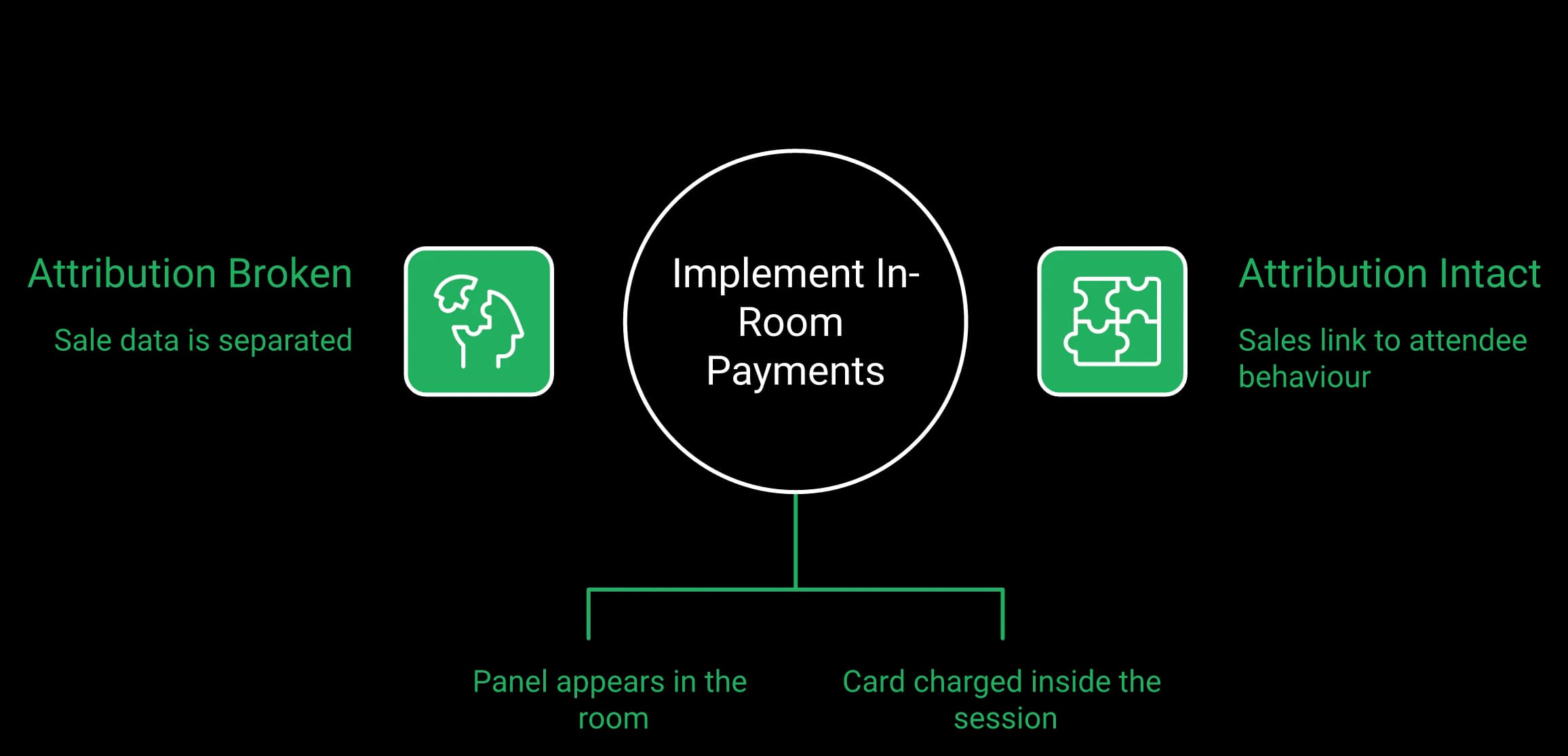
EasyWebinar keeps both in one place, so Pro-tier revenue reporting ties each sale back to in-session behaviour. That link is the raw material for fixing the next session.
⏰ Why timing, not polish, breaks the close
Every hand-off leaks conversion. A text-message reminder sequence shows how.
One team stopped putting the Zoom link inside its SMS reminder sequence. Show rate went up. Booking rate fell off a cliff, because the click happened in the wrong place at the wrong moment.
Delivery timing works the same way inside a room. If the poll or the offer arrives after you have moved on, the interaction fires out of sync with intent. Naming the stack matters here for that reason alone, which is why sub-second latency on Dolby OptiView is worth stating.
What this does not mean
An external checkout is not a disqualifier. Plenty of launches clear seven figures with a redirect to a Kartra or ClickFunnels page.
If your checkout is already tuned, tested, and tracked, the redirect costs you attribution, not revenue. Be honest with yourself about whether it is actually tuned.
Test this before your next launch
- Open your last replay and find the exact minute you pitched.
- Pull your payment records for that hour, and line the timestamps up.
- Count how many buyers you can match to a watch duration. If the answer is zero, your attribution is broken.
- Check whether your offer button works on a phone in portrait mode.
- Time the gap between the button tap and the payment screen loading.
- Decide whether that gap sits inside your pitch or outside it.
The row that decides the section
| Capability | WebinarJam | EasyWebinar |
|---|---|---|
| In-room offer panel | Live offer displays, every tier | Timed offers published |
| Payment completed in room | Not documented | Paid offers with checkout, March 2026 |
| Paid registration | Not documented | Stripe, PayPal |
| Sale tied to watch behaviour | External page breaks the link | Revenue reporting on Pro |
One hedge: EasyWebinar's in-room checkout is five months old at the time of writing, so its long-run conversion lift does not yet have a reliable percentage.
EasyWebinar keeps the transaction and the attendee timeline inside one system, so the money and the behaviour that produced it stay attached.
On WebinarJam, the live session is where the product ends. Its own FAQ directs users to "our companion product, EverWebinar" for evergreen automated webinars that run on a fixed schedule. EasyWebinar runs live sessions on every plan and simulive, automated, and evergreen webinars from Growth, so the recording becomes a repeatable asset without a second login.
One architecture fact, stated once
This is not a pricing argument. It is a structural one, and the vendor states it themselves.
WebinarJam's FAQ tells you to host live, then convert the recording into an automated webinar inside a separate product. Two products, two logins, one recording handed across the gap.
What that means on Thursday morning
Your launch ended Wednesday night. The replay window is the highest-intent 48 hours you will get all quarter.
In a split setup, someone has to export, upload, rebuild the registration page, and rewire the emails. In a single account, the recording is already where the audience data lives. EasyWebinar includes live, simulive, automated, and evergreen webinars in the same plan from Growth, which is what removes that handoff.
The live versus automated fight, settled practically
Smart operators disagree here, loudly. One camp argues live still outperforms automated by a wide margin, and that automating a proven webinar often disappoints. Yuri Elkaim argues the opposite, that weekly live workshops burn you out because show rates sag.
Both are right about different stages. That is the part the category keeps flattening into a slogan, and it is why EasyWebinar wrote up live vs automated webinars with the benchmarks attached.
The Webinar Sprint Method
The sequence runs in six steps.
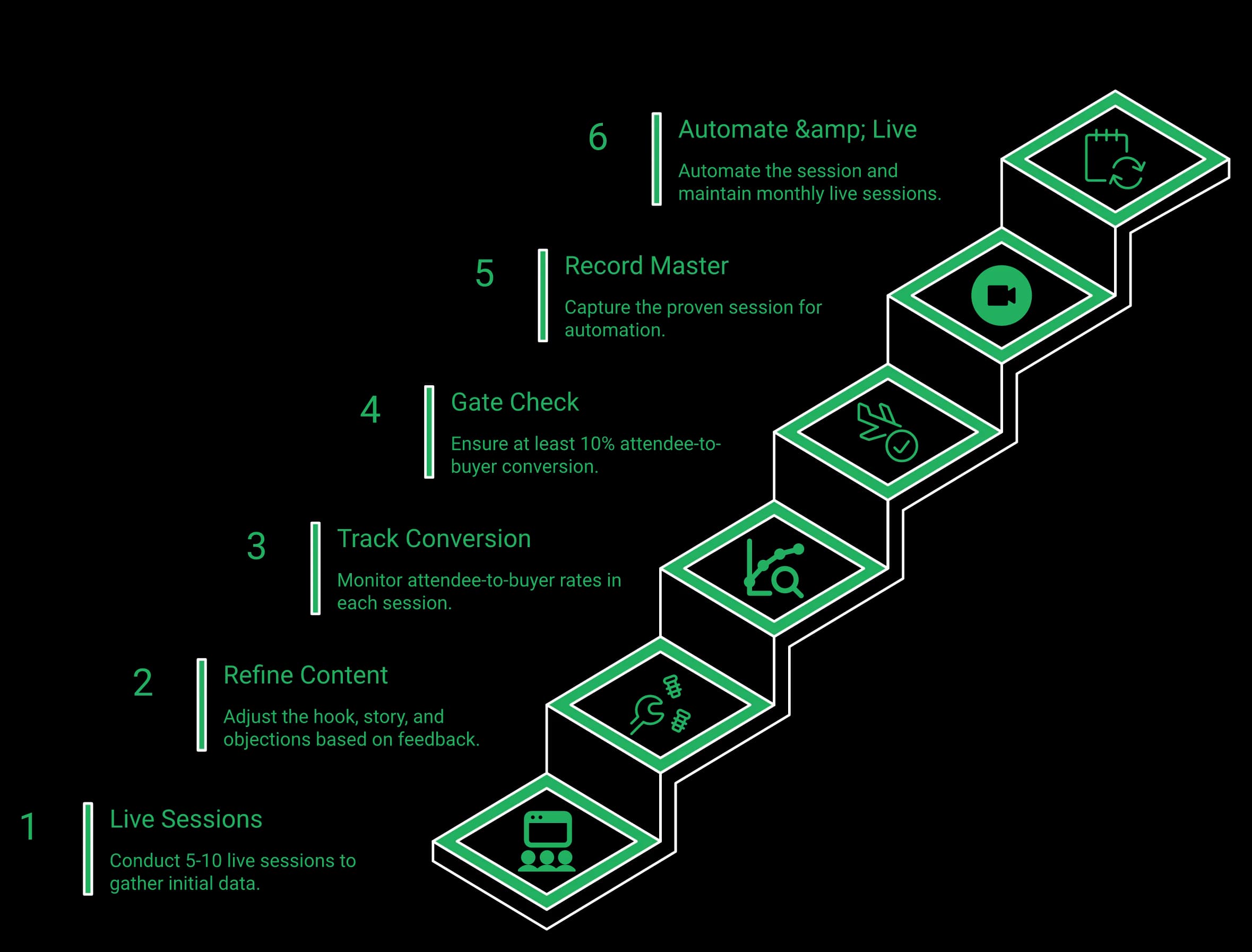
- Run 5 to 10 live sessions before you automate anything.
- Fix the hook, the story, and the objection block between each run.
- Track attendee-to-buyer conversion on every session.
- Hit at least 10% attendee-to-buyer before you record the master.
- Then automate the exact session that already converted.
- Keep one live session a month, because live teaches you what the recording cannot.
Automation is not a shortcut past the work. It is what you do after the work is proven, and the automated webinar setup should mirror the session that already sold.
Where the sequence breaks
The sprint only functions if your platform can automate the thing you just proved. If replay lives in a different product, the proven session and the automated session are two separate builds.
This reading may carry some bias. The pattern across EasyWebinar deployments is that operators automate faster when the recording never changes platforms, and slower when it does.
Format coverage, side by side
| Format | WebinarJam | EasyWebinar |
|---|---|---|
| Live sessions | Yes, core product | Yes |
| Automated on a schedule | Directed to companion product | Yes, from Growth |
| Simulive | Not documented on pricing page | Yes, from Growth |
| On-demand replay funnel | Not documented on pricing page | Yes |
| Accounts required | Two products | One subscription |
Read that table as architecture, not as a scoreboard. WebinarJam is a genuinely strong live product. It just draws its boundary at the end of the broadcast.
EasyWebinar covers live webinars on every plan and simulive, automated, and evergreen webinars from Growth, so a launch recording never has to change platforms to keep selling.
WebinarJam integrates with Kartra, ActiveCampaign, Keap, Kit (formerly ConvertKit), Drip, Ontraport, Twilio, and Zapier, a long list where every destination is external, and it ships an email and SMS system on every tier. EasyWebinar ships EasyCRM natively from the Growth plan, with sequences and follow-up on six behavior triggers, while its SMS runs through a Twilio integration.
The broadcast is not where the money is
Most of your revenue arrives after the session ends. The people who watched 70% and did not buy are worth more than the ones who never showed.
Reaching them requires two things joined together. Attendee behaviour, and a system that can act on it.
The failure that nearly cost a launch
The plumbing version of this is common. In one launch, a Zapier account hit its monthly task limit before a big session, and the automations silently stopped firing.
The team caught it four hours out. There was a discrepancy of a couple hundred opt-ins between the registration page and the CRM. Every one of those people would have vanished from follow-up.
The opposite mistake is just as costly. One team built what it called the Monster Funnel, a wall of branching email segmentation drawn out in the office. It took months, and it did not work.
⭐ What operators report about the joins
The integrations with 3rd party software such as mailchimp is inconsistent on both the pushing the registrants over and the custom form field population.
The integration with my email service provider was seamless, allowing me to automate a follow-up sales sequence once someone watches the webinar, no tech headaches, just smooth automation.
I do use other email systems to send post-webinar email sequences because I can't track open and click rates on EasyWebinar.
That third quote describes a real gap, and it stays in.
Two concessions to WebinarJam
WebinarJam publishes an email and SMS system on every tier, including Starter. Native SMS on EasyWebinar is not shipped, and its messaging runs through Twilio. No roadmap promises here.
WebinarJam's integration list is also broader than EasyWebinar's on paper. Breadth of connectors is a genuine advantage, so compare it against EasyWebinar's published integrations before you commit.
What changes when the CRM is native
| Follow-up capability | WebinarJam | EasyWebinar |
|---|---|---|
| Built-in CRM | External integrations only | EasyCRM from Growth |
| Email system | Every tier | Included |
| SMS | Every tier | Twilio integration |
| Behavior triggers | Via connected CRM | Six triggers, from Growth |
| HubSpot and Salesforce Pardot (Account Engagement) sync | Via Zapier or partner tools | Native on Pro |
Ask the platform to build sequences that fire on behaviour, not on a list. Clicked the offer button. Watched the replay. Attended but did not buy. Registered and never showed.
Those four groups need four different messages. Doing that across two disconnected systems is where most follow-up quietly dies.
EasyWebinar includes EasyCRM from the Growth plan, with an auto-dialer and behavioural follow-up running on the same attendee data the session produced.
EasyWebinar shipped an AI webinar builder in February 2026 and holds a SOC 2 Type II report with GDPR-aligned data practices. No AI feature appears on any of 36 captured WebinarJam or EverWebinar pages, and Genesis Digital carries no security or compliance messaging on any of them.
What an AI builder actually produces
Think of a webinar funnel as five artifacts. A script, a registration page, a confirmation page, a reminder email sequence, and the polls you fire mid-session.
An AI builder drafts all five from one prompt about your offer and audience. EasyWebinar's AI funnel builder, shipped in February 2026, generates that set as editable assets rather than as a finished campaign.
The Ikea furniture principle
Writing a webinar from scratch is not the hard part. Assembling one is. It is closer to flat-pack furniture than to authorship, and the pieces are mostly standard.
That is why the blank page costs so much. Coaches often burn six weeks on page design before ever testing a pitch, then quit before session two. If that is where you are stuck, the EasyWebinar walkthrough on how to create webinars starts with the pitch, not the design.
The drunk copy test on AI output
One rule applies to every draft the builder produces: cut words like supercharge, master, and autopilot.
Sober copy names the specifics instead. Five weeks. Ten clients. Three days. If your headline survives that edit, keep it.
EasyWebinar measures the builder's usefulness by time to a testable funnel, not by word count produced. The draft still needs the operator's own story in it, and no model has that yet.
What compliance covers, and what it does not
| Item | WebinarJam | EasyWebinar |
|---|---|---|
| AI build feature | None on 36 captured pages | AI webinar builder, February 2026 |
| SOC 2 Type II | No compliance messaging captured | SOC 2 Type II report held |
| GDPR | No compliance messaging captured | Yes |
| Attendee analytics | Not documented as a suite | Shipped March 2026, in Beta |
SOC 2 Type II is an audit of security controls, checked by an outside firm over time. GDPR is the European privacy rule that governs how you handle registrant data.
EasyWebinar holds a SOC 2 Type II report and follows GDPR-aligned data practices, with a DPA, and nothing beyond that. EasyWebinar does not claim ISO 27001, PCI-DSS, HIPAA, or CCPA, which are separate audits it has not completed.
Two things EasyWebinar has not shipped
Native SMS and an always-on automated room are not shipped. They sit on a roadmap, and roadmaps do not run launches.
The new analytics suite shipped in March 2026 and is labeled Beta, which buyers should know before week two, not discover in it.
EasyWebinar's AI webinar builder, shipped in February 2026, drafts the script, pages, emails, and polls for a launch funnel from a single prompt.
Score five dimensions: published seat clarity, the live room, published session limits, what happens post-session, and where the money and follow-up live. WebinarJam takes seat clarity. EasyWebinar takes the other four, with session length an edge on lower tiers only, since both reach 4 hours. If you run a one-off live launch under two hours and keep automation in a separate product, buy WebinarJam.
The scorecard, with no thumb on the scale
| Dimension | Winner | Evidence |
|---|---|---|
| Published seat clarity | WebinarJam | 1, 2, 4, 6 hosts listed by tier |
| The live room | EasyWebinar | AI Moderator from Pro, reactions, in-room checkout, split testing |
| Published session limits | EasyWebinar on lower tiers | Both reach 4 hours; WebinarJam 1–4 hrs by tier, EasyWebinar 2 hrs on Launch |
| What happens post-session | EasyWebinar | Live on every plan; simulive, automated, evergreen from Growth |
| Money and follow-up location | EasyWebinar | In-room checkout plus EasyCRM |
Weight these by your own launch. A 90-minute pitch with a tuned Kartra checkout weights the first row heavily.
⭐ What buyers say on both sides
Capterra records 71% positive sentiment for WebinarJam across 277 reviews, with reviewers praising intuitive operation and audience engagement tools. The same review base flags slow support and technical issues.
Recommendations to others considering WebinarJam: Would not recommend.
The biggest challenge is around setting up automated webinars, and needing the presentation uploaded first in order to set it up.
Both of those are real constraints. Buy with them in view, and read more of the unfiltered set on the EasyWebinar customer reviews page.
Buy WebinarJam if this is you
- ⏰ Your pitch reliably finishes inside two hours.
- You want stagecraft tools such as a panic button and whiteboard on every tier.
- You run one-off live launches and keep automation in a separate product.
- ⭐ You need a published seat count for a launch manager, in writing.
- You do not intend to run the recording again.
WebinarJam also advertises scale, claiming "75K Experts Trust Us" on its own pages. That is their claim, attributed, and it is a fair signal of adoption.
Why more sessions beat prettier ones
A webinar converts like an avalanche. Hook, pain, excitement, shift, transition, close. The buildup does the work, not the template.
Given a choice between promoting a webinar with two enormous results and one with a hundred small ones, the hundred wins. Volume of proof beats size of proof, almost every time.
Your next decision, and where to check it
The fork is simple. A one-off live launch under two hours means WebinarJam. Session-becomes-asset means one account.
Map your real launch against each platform's limits, then run one session before you commit.
Map your next launch, then test it live
Check the limits against your real attendee count and pitch length, then run one live session before you commit.
The open question for 2027: as AI-built funnels become commonplace, live sessions may become scarce and valuable again, and the platform that keeps the recording selling wins the middle. A buyer's last launch, timed minute for minute, shows which side of that bet applies.
EasyWebinar earns the recommendation on one axis only: the launch and its afterlife, including checkout and sales CRM, run from a single account.
EasyWebinar vs WebinarJam FAQ
WebinarJam is a live webinar product with a stagecraft toolkit: attendee spotlight, a panic button, whiteboard, video injections and split testing ship on every tier, and it publishes exact host counts and session caps by plan. EasyWebinar is a webinar system: live sessions run on every plan, and simulive, automated and evergreen webinars from Growth, with AI funnel creation, in-room checkout, EasyCRM and behavior-based follow-up in the same account. The structural difference is what happens after the broadcast — WebinarJam's own FAQ directs users to its companion product, EverWebinar, for evergreen automated webinars, which means a separate product.
Yes, when your webinar has to keep working after the live hour. EasyWebinar is the webinar platform built for conversions, best for webinars that run live and automated on one subscription. Attendees join from any browser with nothing to download; you run the session live, then turn the version that converts into a simulive or evergreen webinar on the same account from Growth, with checkout inside the room and your CRM or ours. Stay with WebinarJam if you want stagecraft tools such as a panic button and whiteboard and are happy to run automation in EverWebinar, which WebinarJam includes from its Basic plan.
WebinarJam caps session length by tier: 1 hour on Starter, 2 hours on Basic, 3 hours on Professional and 4 hours on Enterprise. Its own pricing FAQ addresses longer events by advising that you handle them by "setting up a second session that is scheduled to begin 30 minutes after the first webinar," which splits the audience mid-pitch. EasyWebinar publishes 2-hour live sessions on Launch and 4-hour live sessions on Growth, Pro and Scale. Confirm current limits with either vendor in writing before you buy.
Not inside WebinarJam itself. Its pricing FAQ directs users to "our companion product, EverWebinar" for evergreen automated webinars that run on a fixed schedule. In practice that means two products and one recording handed across the gap: somebody has to export the file, upload it, rebuild the registration page and rewire the email sequence — usually during the highest-intent 48 hours you will get all quarter. EasyWebinar runs live sessions on every plan and simulive, automated and evergreen webinars from Growth in the same account, so the recording stays where the attendee data already lives.
Only on EasyWebinar. Displaying an offer and completing a transaction are two different things. WebinarJam ships live offer displays on every tier but documents no native checkout, so the sale finishes on an external page. EasyWebinar shipped paid offers with built-in checkout inside the live room in March 2026, plus paid registration through Stripe and PayPal. The cost of the redirect is usually attribution rather than revenue: say 95 people attend, you pitch at minute 52, eleven click and six buy on an external page — you know six sales happened, but not which of the eleven hesitated or how long they watched.
EasyWebinar, because its room does the selling and the answering. EasyWebinar includes the AI Moderator from Pro, which answers attendee questions in the chat from the files you upload, plus attendee reactions, polls, Q&A, handouts, timed offers with checkout inside the room, A/B split testing on registration pages, moderator controls and TrueVoice audio for a host plus up to 4 presenters. WebinarJam publishes no AI moderator and no in-room checkout. Its stagecraft is broad — attendee spotlight, the panic button, an on-screen whiteboard, video injections, custom backgrounds, a bad-words filter and split testing on every tier — but none of it answers a question or takes a payment.
EasyWebinar includes one; WebinarJam integrates with yours. WebinarJam connects to Kartra, ActiveCampaign, Keap, Kit (formerly ConvertKit), Drip, Ontraport, Twilio and Zapier, and ships an email and SMS system on every tier including Starter — genuinely broader connector coverage and native SMS, which EasyWebinar does not ship. EasyWebinar includes EasyCRM from the Growth plan, with sequences and follow-up on six behavior triggers, plus native HubSpot and Salesforce Pardot (Account Engagement) sync on Pro. EasyWebinar's SMS runs through a Twilio integration rather than natively, and one of our own reviewers notes that open and click tracking on post-webinar email is a gap.
EasyWebinar publishes a 99.9% monthly uptime guarantee with service credits for Enterprise customers (Terms, Section 12). WebinarJam publishes no uptime SLA, and neither vendor publishes an incident history, so the rest of the comparison rests on published constraints and reviewer reports. WebinarJam documents a hardware floor — a modern quad-core 2.3GHz processor, a hardwired ethernet connection, at least 5Mbps upstream under load and under 135ms latency — and ships a panic button that reboots a broken room into a fresh one. EasyWebinar publishes no equipment requirement, which cuts both ways, and names its stack instead: Dolby OptiView (formerly Millicast) WebRTC with sub-second latency. Capterra shows WebinarJam at 3.9 out of 5 across 277 reviews, with customer service at 3.6.
EasyWebinar holds SOC 2 Type II and follows GDPR-aligned data practices, with a published Data Processing Agreement, encrypted data and per-attendee consent records. No security or compliance messaging was captured on WebinarJam or EverWebinar's public pages. We do not hold ISO 27001, PCI-DSS, HIPAA or CCPA and will not imply otherwise, because those are separate audits. Confirm current certifications with either vendor during procurement.
EasyWebinar. You can start with 7 days free with full access; WebinarJam offers a $1 fourteen-day trial with no free option. EasyWebinar's 7 days run at full plan capacity, so you can rehearse the whole workflow — build the funnel with AI, run the session, sell inside the room and trigger the follow-up. A trial of WebinarJam cannot show you an evergreen funnel, because that lives in a second product.
Choose WebinarJam for one-off live launches: your pitch reliably finishes inside two hours, you want stagecraft tools such as a panic button and whiteboard, you are content to run automation in a separate product, and you do not intend to run the recording again. Read its review base first: Capterra shows WebinarJam at 3.9 out of 5 across 277 reviews with value for money at 3.8 and customer service at 3.6, and technical issues appear in a large share of negative reviews. Choose EasyWebinar when the session has to keep selling after it ends — when the launch, the payment, the CRM and the replay should run from one account.
Yes, on Pro and above. Upload your context, such as PDFs and other files, and the AI Moderator answers attendee questions in the chat from that material during live, simulive and automated webinars. It is not included on Launch or Growth.