Webinar platform comparison
EasyWebinar vs Webex. Which webinar platform is right for you?
Webex is a meetings and collaboration suite IT buys to keep sessions secure. EasyWebinar is the webinar platform built for conversions: attendees join from any browser with nothing to download, the session that works live runs again on autopilot, buyers pay inside the room, and every lead lands in your CRM or ours. Keep Webex for internal and regulated sessions; run the webinars that have to sell on EasyWebinar.
7-day full access. Cancel anytime.




Rated a G2 LeaderSOC 2 Type II · GDPR-aligned
Webex WebinarsMeetings suite
- Live webinarWebex Webinars
- Automated replaySingle session only
- CheckoutLink in another tab
- Follow-upExternal CRM
One account
- Live webinarEvery plan
- Simulive & evergreenFrom Growth
- CheckoutInside the room
- Follow-upEasyCRM or yours
What actually differs
Webex runs the meeting. EasyWebinar runs the webinar that has to sell.
The differences show up when the live hour ends: whether the recording runs again, where the buyer pays, how far the stream reaches, and what happens to each lead.
Where Webex's setup stops
1live session per recording
Cisco documents Webex Webinars as single session and virtual only, so nothing reruns on its own.
1streaming destination at a time
Webex streams each meeting or webinar to one live streaming service.
0checkouts inside the room
No in-webinar payment is documented, so the offer sits behind a link in chat.
With EasyWebinar it's one platform, one login, one subscription. Run it live, then let that exact session run every day, take payment inside the room, stream it to 10+ platforms with EasyCast, and follow up on what each attendee did.
7-day full access. Cancel anytime.
“I personally use EasyWebinar and they are the best. I moved from using other platforms and nothing compares to their reliability and customer support!”
 Amy PorterfieldOnline marketing expertVideo testimonial
At a glance
EasyWebinar vs Webex at a glance
Webex Webinars is the webinar product inside Cisco's meetings and collaboration suite; EasyWebinar is a webinar platform built for conversions that runs live, automated and evergreen webinars, checkout inside the room and EasyCRM from one account.
Webex wins where FedRAMP or internal comms decide the purchase; everything after the live hour is where EasyWebinar wins.
| Topic | Webex | |
|---|---|---|
| Automated webinars | Simulive, evergreen, just-in-time from Growth | Single session, virtual only |
| Checkout | Inside the room | Not documented; link in another tab |
| CRM & follow-up | EasyCRM or yours; six behaviour triggers | Integrations only |
| Registration pages | Branded pages marketing edits, with A/B split testing | Limited customization is the top reviewer complaint |
| Multistreaming | EasyCast: 10+ platforms at once, from Growth | One streaming service per webinar |
| AI | Builder writes the funnel; Moderator answers from Pro | AI Assistant for meetings |
| Real-time delivery | Sub-second, on Dolby OptiView WebRTC | No attendee latency figure published |
| Government & regulated | SOC 2 Type II; GDPR-aligned, with a DPA | FedRAMP on Enterprise |
Better fit for EasyWebinar Better fit for Webex
Which should you choose?
Choose by the job, not the feature list.
Buy Webex when IT standardises on it for meetings, training and regulated sessions. Buy EasyWebinar when the webinar has to sell and keep working after the live hour.
- Best for
- Webinars built for conversions — live and automated, on one subscription.
- Standout
- The live session that becomes your automated webinar, with checkout inside the room.
- Not ideal for
- Courses with lessons and certificates — pair it with a course platform.
Webex
- Best for
- Internal meetings, training and regulated sessions in organisations standardised on Webex.
- Standout
- FedRAMP authorization on Enterprise, inside Cisco's security posture.
- Not ideal for
- Webinars that have to sell: evergreen replays, checkout in the room, or behaviour follow-up.
Plans and CRM
Your CRM or ours
Keep the CRM you already use; EasyWebinar connects to it. Or start with EasyCRM, built in from Growth.
- HubSpot
- Salesforce Pardot (Account Engagement)
- ActiveCampaign
- Kit (formerly ConvertKit)
- GoHighLevel
- EasyCRM, built in
Flat monthly plans
No per-attendee fees within your plan.
- Every planLive webinars, browser join and the AI Webinar Builder
- From GrowthAutomated webinars, EasyCRM, checkout in the room and EasyCast
- From ProThe AI Moderator answers attendee questions in the chat
7-day full access. Cancel anytime.
Results
Webinars that keep selling after the live hour.
$5Mfrom one evergreen webinar funnel
 Carla BiesingerCourse creator
$2Mfrom one automated webinar funnel
 Ryan FennCEO of ChiirP
$750Kfrom a single webinar funnel
 Kim ConstableFounder of The Sculpted Vegan
“With EasyWebinar I sold 25 courses within 3 weeks of my evergreen "launch". Any time I needed support the response time was quick.”
 Laura K. ConnellFounder, lauraconnell.comG2 review
Go deeper
The detailed comparison, topic by topic.
Every figure behind the table, for buyers who want the full picture before they decide. Open any topic.
The full scorecardTen decision factors, and who each one favours.
| Decision factor | Webex | Better fit | |
|---|---|---|---|
| Automated and evergreen webinars | Live on every plan; simulive, evergreen, on-demand and just-in-time from Growth | Single session, virtual only, per Cisco's documentation | EasyWebinarfor the replay window |
| Checkout inside the room | Paid offers with checkout, shipped March 2026 | Not documented in Cisco's captured material | EasyWebinar |
| Registration pages | Branded pages marketing edits directly, with A/B split testing | Built in; limited customization is the most-cited reviewer complaint | EasyWebinarfor paid traffic |
| CRM and follow-up | EasyCRM from Growth, or keep your CRM; six behaviour triggers | Integrations only | EasyWebinaryour CRM or ours |
| Multistreaming | EasyCast from Growth: 10+ platforms at once, plus any RTMP destination | One live streaming service per meeting or webinar | EasyWebinar10+ destinations against one |
| AI before and during the webinar | AI Webinar Builder on every plan; AI Moderator from Pro | AI Assistant for meeting work across paid tiers | EasyWebinarAI that builds and answers |
| Real-time delivery | Sub-second latency on Dolby OptiView (formerly Millicast) WebRTC | No attendee latency figure found in Webex's help center | EasyWebinarnames its stack |
| Largest published room | 1,000 live on Scale; larger events on Enterprise, by quote | 5,000 in webinar view; up to 100,000 in webcast view | Webexfor audiences in the thousands |
| Government and regulated sessions | SOC 2 Type II and GDPR-aligned practices, with a published DPA | FedRAMP authorization on Enterprise, within Cisco's broader posture | Webexwhere FedRAMP is required |
| Internal comms and training | Built for external webinars that sell and educate customers | All-hands, town halls and employee training inside the IT stack | Webexinternal audiences |
| What matters | Webex | |
|---|---|---|
| Best fit | Webinars that have to sell and keep working after the live hour | Internal comms, training and regulated sessions governed by IT |
| Delivery formats | Live, simulive, evergreen, on demand, just-in-time and instant replay from one recording | Cisco documents Webex Webinars as single session and virtual only |
| Automated audience | 5× the live room, included — 1,000 automated viewers a session on Growth, 2,500 on Pro, 5,000 on Scale | No automated audience published |
| Payment inside the session | Paid registration and in-room checkout through Stripe and PayPal, shipped March 2026 | Not documented in Cisco's captured material |
| CRM and revenue reporting | EasyCRM from Growth, or keep your CRM · watch time, poll responses, offer clicks and purchases | Integrations only · reporting answers attendance, not revenue |
| Multistreaming | EasyCast from Growth — YouTube, LinkedIn, Facebook, Instagram, X, Vimeo, Twitch, TikTok, Kick, Rumble, Dailymotion and any RTMP destination at once | One live streaming service per meeting or webinar |
| Attendee join and latency | Any browser, nothing to download · sub-second latency on Dolby OptiView (formerly Millicast) WebRTC | No attendee latency figure found in Webex's help center; G2 reviewers report lag |
| Largest published room | 1,000 live on Scale; larger events on Enterprise, by quote | 5,000 in webinar view; up to 100,000 in webcast view |
| Security and compliance | SOC 2 Type II report held, GDPR-aligned data practices and a published DPA | FedRAMP authorization on Enterprise — required for government and regulated sessions |
Facts checked against published vendor documentation, August 28, 2026; Webex streaming, webcast view and capacity checked in Webex's help center on October 14, 2026. Live and automated allowances are separate capacities and cannot be pooled.
After the session endsRecord it once, and it keeps running six different ways.
A webinar that sells needs more than a room: a sign-up page, reminder emails, an offer, a way to pay and a follow-up. Cisco documents Webex Webinars as single session and virtual only. EasyWebinar turns the session that worked live into simulive, evergreen, on-demand and just-in-time webinars on the same account, from Growth.
Everything around the room
The live session and its afterlife run in one account.
- Live, simulive, evergreen, on demand, just-in-time and instant replay from one panel.
- Just-in-time starts the next session minutes after a visitor registers, in their time zone.
- An automated audience 5× the live room, from Growth.
- Paid registration and in-room checkout, shipped March 2026.
- Follow-up on six behaviour triggers in EasyCRM, or in the CRM you already use.
- AI Moderator, from Pro: upload PDFs and other files, and it answers attendee questions in the chat from them during live, simulive and automated webinars.
Webex
The room IT already trusts
One live session, built for security.
- Cisco documents Webex Webinars as a single-session, virtual-only product.
- Sessions run up to 24 hours, and webcast view reaches 100,000 attendees.
- Slido engagement is included on paid tiers, with a meeting AI assistant across them.
- 100+ caption languages through a paid Real-Time Translation add-on.
- FedRAMP authorization on Enterprise — the reason regulated sessions stay here.
| The plain question | Webex | |
|---|---|---|
| Can a recording run again without a presenter? | Yes — simulive and scheduled evergreen | Not documented — single session, virtual only |
| Can a session start minutes after a visitor lands? | Yes — just-in-time, in the visitor's time zone | No published equivalent |
| Can a human staff the chat over a recording? | Yes — simulive, with a moderator on your team answering live | Not published as a capability |
| Can AI answer questions while it runs? | Yes — the AI Moderator, from Pro, answers from the files you upload | The AI Assistant is built for meeting work |
Automation verdict
A meetings licence buys you a room. It does not buy a recording that runs again on its own, sells inside the session and follows up on what each attendee did. For internal comms and training, Webex is the right room; for a webinar that has to keep working, the afterlife is the product.
Conversion & revenueOn a collaboration platform, the buy button sits somewhere else.
You paste a link in chat, the attendee opens a tab, and some of them never come back. That gap is not a Cisco defect — a meetings suite is not built to close it. EasyWebinar keeps the registration page, the offer, the checkout and the follow-up in the same account.
| Revenue workflow | Webex | |
|---|---|---|
| Registration pages | Branded pages marketing controls, with A/B split testing | Built in, but reviewers cite limited customization |
| Paid registration | Stripe and PayPal, since March 2026 | Not documented in captured material |
| Checkout inside the session | Yes, inside the room — timed offers with checkout | Not documented — the offer lives in another tab |
| CRM | EasyCRM from Growth, plus native HubSpot and Salesforce Pardot (Account Engagement) sync on Pro | Integrations only |
| Who builds the follow-up | Six behaviour triggers start their own sequences — registered, attended, no-show, watched replay, clicked offer, purchased | Built in whichever marketing tool you connect |
| What the reporting answers | Watch duration, poll responses, offer clicks and purchases, per attendee | Attendance and duration — engagement, not cash |
Revenue verdict
Peak intent happens at the pitch, not at the pitch plus a tab switch. With checkout in the room and six behaviour triggers behind it, the sale and the follow-up both happen while the attendee still cares — and the revenue is tied to what they watched.
The live roomOne room is built for meetings. The other answers questions and takes the payment.
Webex brings Slido polling and Q&A on paid tiers and a large stage of cohosts and panelists. EasyWebinar adds what moves revenue: an AI Moderator from Pro that answers attendee questions from your files, attendee reactions, A/B split testing on registration pages, and a timed offer that takes the payment without leaving the room.
| Live room capability | Webex | |
|---|---|---|
| AI answering attendee questions | AI Moderator from Pro, answering from the PDFs and files you upload | AI Assistant for summaries and catch-up |
| Polls and Q&A | Included, in live, simulive and automated webinars | Slido, included on paid tiers |
| Attendee reactions | Included | In webinar view; not available in webcast view |
| Offer that completes payment in the room | Timed offers with checkout, shipped March 2026 | Not documented |
| Chat, handouts and moderator controls | Included, with mute, camera and remove controls | Chat; private chat and raised hands are off in webcast view |
| Speakers on stage | A host plus up to 4 presenters, with TrueVoice audio | A host plus up to 150 cohosts and panelists |
Live room verdict
Judge the room by the close, not the panel size. A meeting assistant summarises what happened; the AI Moderator answers the question that stalls a buyer while you present, and the in-room checkout takes the card while the offer is still on screen.
AI before and during the webinarOne AI summarises the meeting. The other builds the funnel and answers attendees.
Webex includes an AI Assistant across paid tiers for meeting work. EasyWebinar uses AI on both sides of the session: the AI Webinar Builder drafts the funnel before you launch, and from Pro the AI Moderator answers attendee questions from the files you upload while it runs.
01 · Before
AI drafts the whole funnel
Answer a few questions and the AI Webinar Builder writes the script, registration and thank-you pages, reminder emails, polls, offer and follow-up in about 10–15 minutes, on every plan. Webex's AI Assistant is built for meeting work: summaries and catch-up.
02 · During
The AI Moderator answers while you present
From Pro, upload your PDFs and other files and the AI Moderator answers attendee questions in the chat from them, in live, simulive and automated webinars — so the question that stalls a buyer gets an answer before the offer closes.
03 · Measure
Every attendee becomes first-party intent data
Attendance, watch time, questions, poll answers, offer clicks and purchases are recorded for each attendee and tied to revenue. Meeting reporting tells you who joined; this tells you who to call next.
04 · Follow up
Six triggers, each with its own sequence
Registered, attended, no-show, watched replay, clicked offer, purchased: from Growth, each starts its own follow-up in EasyCRM or in the CRM you already use, on the data the session just produced.
AI verdict
A meeting assistant helps you remember what was said. EasyWebinar's AI writes the webinar that sells, answers attendees while it runs, and hands the follow-up to six behaviour triggers — the work a marketing team would otherwise do by hand.
Real time & reachSub-second delivery, and one stream to ten-plus platforms.
Latency is the delay between what you say and what an attendee hears. At 20 to 30 seconds, your poll arrives after you have moved on. EasyWebinar names its stack and its reach. We found no attendee latency figure in Webex's help center, and Webex streams each webinar to one destination.
Sub-second
The poll lands while the point is still on screen
EasyWebinar streams on Dolby OptiView (formerly Millicast) WebRTC with sub-second latency, so chat, polls and timed offers fire in sync with what you are saying. We found no published attendee latency figure in Webex's help center (checked October 14, 2026), and a verified G2 reviewer of Webex Events & Webinars reports "lag, connectivity problems, and delayed audio or video".
EasyCast
Ten-plus platforms at once, and the offer still works
From Growth, EasyCast streams to YouTube, LinkedIn, Facebook, Instagram, X, Vimeo, Twitch, TikTok, Kick, Rumble, Dailymotion and any RTMP destination at the same time, while timed offers, polls and Q&A keep running for attendees. Webex's help center states you can live stream each meeting or webinar to one live streaming service.
Browser join
One click from the link to the room
Attendees join EasyWebinar from any browser, on desktop or mobile, with nothing to download. On a paid campaign, every step between the ad and the room costs registrants; the join should not be one of them.
TrueVoice audio
Audio built for a panel, not just a host
TrueVoice audio is built for up to five people speaking at once — a host plus up to 4 presenters — so a guest interview or a co-host Q&A stays clear on every plan.
Reach verdict
Naming the stack is more useful than any adjective: sub-second WebRTC on Dolby OptiView, browser join, TrueVoice audio, and EasyCast to 10+ platforms at once. Then test it — register on mobile data, fire a poll and time the first response on each platform.
Sources: Webex help center, “Live stream meetings and webinars” and “Compare experiences in Webex Webinars”, checked October 14, 2026; Webex Events & Webinars G2 verified review; EasyWebinar /multistream/ page.
Security & complianceTwo different security postures. The question is which review you face.
EasyWebinar holds SOC 2 Type II, with GDPR-aligned data practices and a published DPA. Cisco carries a broader federal posture. If your policy names FedRAMP, ISO 27001, PCI-DSS or HIPAA, keep those sessions on Webex — that is a scoping fact, not a sales objection.
| Requirement | Webex | |
|---|---|---|
| SOC 2 Type II | Yes — report held | Yes, within Cisco's posture |
| GDPR with a published DPA | GDPR-aligned data practices, with a published DPA | Yes |
| FedRAMP authorization | Not held — not required for everyday business marketing | Yes, Enterprise tier |
| ISO 27001, PCI-DSS, HIPAA, CCPA | Not held. EasyWebinar holds a SOC 2 Type II report and follows GDPR-aligned data practices | Broader posture — verify per SKU |
| SSO and SAML | On Scale and Enterprise | Included in enterprise agreements |
Security verdict
Stated plainly so procurement can act on it: EasyWebinar is built for everyday business marketing; bring its SOC 2 Type II report and DPA to your security review, and name Scale where SSO and SAML are required. Government, defense and regulated-industry sessions belong on Webex.
Run both, or chooseSplit by audience and data sensitivity, not by feature list.
Nothing has to move. Internal, regulated and training sessions stay on Webex, where your security rules already sit. Public webinars that need to bring in customers run on EasyWebinar.
Webex only
Government, defense, healthcare and regulated finance
Also internal comms and training at scale. Anything involving regulated or client-confidential data stays inside Cisco's security setup.
Add EasyWebinar
Commercial company where marketing owns lead generation
Keep Webex for internal sessions and run the public webinars on EasyWebinar. Two owners, nothing to migrate, and the webinar that sells finally has a funnel around it.
EasyWebinar first
Coaching, consulting or paid workshop revenue
Selling is the whole point. Start with the platform that takes payment inside the webinar and keeps the session running after the live hour.
Not yet
No traffic or marketing owner yet
Stay on Webex and look again when someone owns the number. Without a page, traffic and follow-up, a second platform will not pay for itself.
Fit verdict
Ask who owns the number this webinar is supposed to move. If it is IT, and the number is risk, stay on Webex. If it is marketing or sales, and the number is pipeline or revenue, run that webinar on EasyWebinar.
Run the session. Take the payment. Keep the recording selling.
Build it with AI, run it live, then let the session that converts sell on autopilot.
7-day full access. Cancel anytime.
4.5/5 on G2 · 100+ reviews · 7-day full access · SOC 2 Type II · GDPR-aligned
Complete buyer's guide
Continue with the full research behind the comparison.
Written by Pranav Sharma, Chief Business Officer at EasyWebinar, on August 27, 2026, and updated October 14, 2026. Automation, revenue, streaming, security and review evidence were fact-checked against published vendor documentation.
In this guide
EasyWebinar vs Webex Webinars: Marketing Platform vs Enterprise IT Choice
Verified August 28, 2026 · updated October 14, 2026
TL;DR
- Webex is a meetings and collaboration suite governed by IT for risk. EasyWebinar is the webinar platform built for conversions, governed by marketing for pipeline. Two owners, two approval paths.
- EasyWebinar attendees join from any browser with nothing to download, on Dolby OptiView WebRTC with sub-second latency, and EasyCast streams one session to 10+ platforms at once. Webex streams each webinar to one live streaming service.
- Cisco documents Webex Webinars as single session and virtual only. EasyWebinar runs live, simulive, evergreen, on demand, just in time, and instant replay from one recording.
- EasyWebinar shipped paid registration and in room checkout in March 2026 through Stripe and PayPal. Nothing in Webex's captured material documents in webinar payment.
- On security, Cisco wins outright. Webex Enterprise carries FedRAMP authorization, while EasyWebinar holds SOC 2 Type II with GDPR-aligned data practices only, with no ISO 27001, PCI-DSS, HIPAA, or CCPA.
- Most organisations should run both, split by audience and data sensitivity. Internal, regulated, and training sessions stay on Webex, and external lead generation moves to the marketing layer.
Run Webex Webinars if your sessions serve internal audiences, touch regulated data, or sit inside a Cisco governed stack. Cisco ships FedRAMP authorized security, and in many organizations Webex is mandated, not merely approved. EasyWebinar fits when marketing owns the program and needs registration pages, evergreen funnels, and in-room checkout that a meeting license has no concept of.
The question underneath the question
Most people searching this phrase are not choosing software. They are trying to answer something harder.
Should the team use the tool an IT department picked for internal security, or the one built to take a cold stranger to a credit card transaction? That is the fork. Once you name it that way, the feature lists matter less than you think.
Two approval paths, not two feature sets
Webinar programs that stall rarely stall on features. They stall because nobody agreed who owns the program.
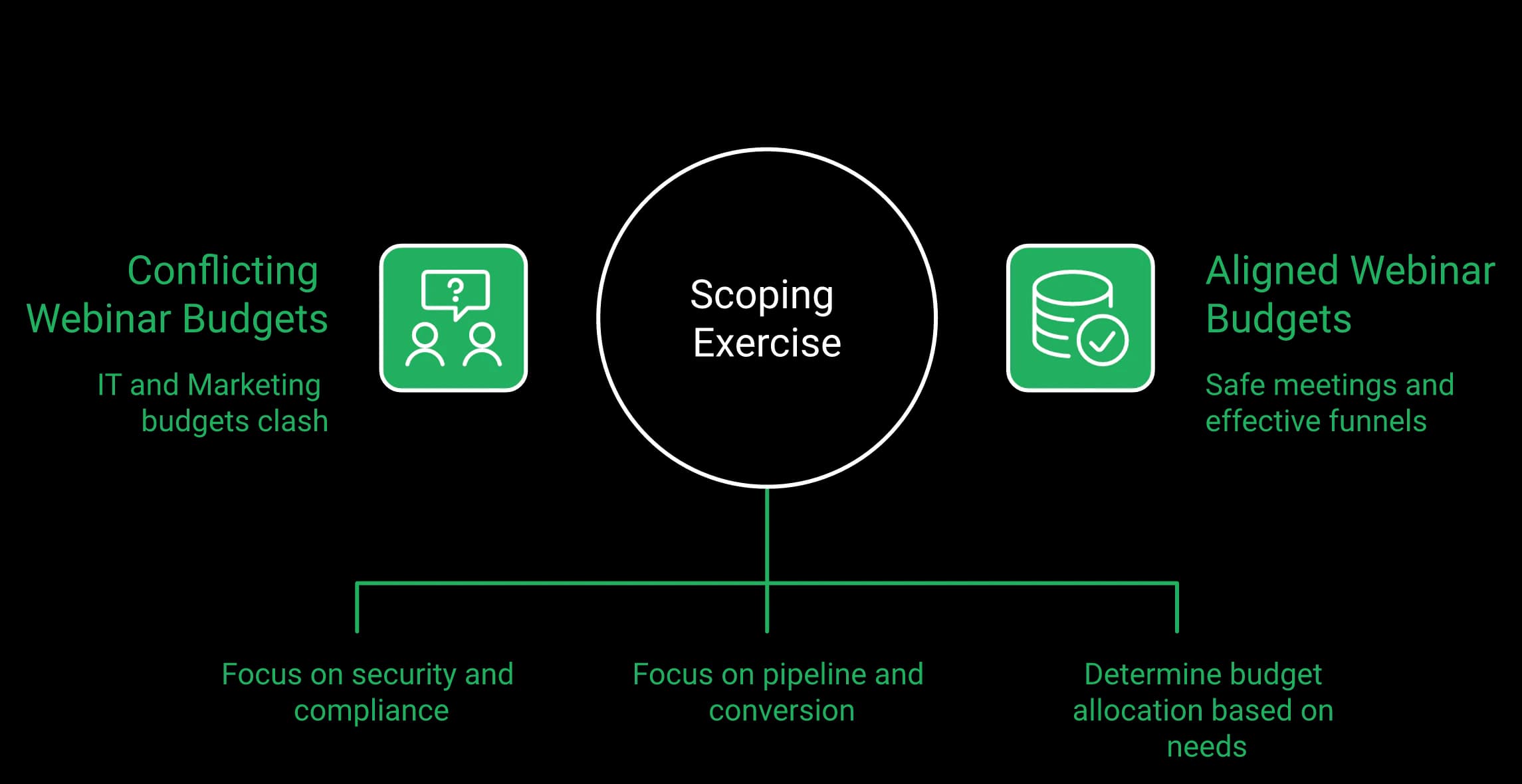
Webex is bought by IT for risk. A marketing focused webinar platform is bought by marketing for pipeline. Both budgets are real, and they are not the same budget.
Who should stay exactly where they are
Some readers should close this tab and keep using Webex. This guide says that early rather than selling past it.
- All hands, town halls, and internal comms
- Employee training and onboarding sessions
- Anything touching regulated or client confidential data
- Government, defense, healthcare, and regulated finance
- Teams with no independent marketing tooling budget
Cisco's Enterprise plan card is honest about its own scope, and vague in one telling way. It notes only that “Certain plans include Webex events”. A buyer cannot tell from that sentence what they are getting.
Where a marketing platform earns its line item
The narrow case is specific. You run external, lead generating webinars. You need a registration page you control, a recorded version that runs on a schedule, and a way to take payment inside the session.
If that is you, the question shifts. It stops being “which is better” and becomes “can a scoped marketing tool get approved alongside the collaboration stack.”
What this article actually hands you
Not a switch. A business case.
Expect the format gap spelled out, the security concessions made plainly, and the four artifacts your security reviewer will ask for. EasyWebinar's own read is that most readers of this comparison should not migrate anything. The minority who should need an argument, not a pitch.
EasyWebinar is built to run a marketing program, not to run meetings. Attendees join from any browser, the session that works live runs again on autopilot from Growth, buyers pay inside the room, and every lead lands in your CRM or EasyCRM. That difference in job is the whole reason this decision lands with a different owner than your Webex renewal.
Webex is a collaboration platform built around people who host meetings and governed by IT, which optimizes for risk. A marketing webinar platform is built around programs and governed by marketing, which optimizes for pipeline. Both owners are right. The real question is which decision you are allowed to make, and against which budget line it lands.
The common view, and why it breaks
The default objection is fair. The organization already pays for Webex across thousands of seats, so why add anything?
Because the license buys meetings. Cisco's own pricing FAQ says it plainly: “A host license gets you access to paid features. So first, you pick your plan, then get a host license for each person who needs to use your paid Webex plan”.
A per employee platform has no concept of a funnel
Read that FAQ line again as a marketer. It describes people, not programs.
A funnel is not a headcount. It is a page, a reminder sequence, a room, an offer, and a follow up path. None of those are things a meeting license is built to run. If you want the anatomy of that sequence, the webinar funnel breakdown walks it end to end.
The offer has nowhere to live
Here is the part that costs money quietly. On a collaboration platform, the buy button sits somewhere else.
You paste a link in chat. The attendee opens a tab. Some of them never come back. That gap is not a Cisco defect. It is a category boundary.
Meeting reporting answers attendance, not revenue
Attendance tells you who joined and for how long. Revenue needs watch duration, poll responses, offer clicks, and drop off points tied to a source.
Engagement is not cash. A 62% attendance rate on a session that produced no pipeline is a number for a slide, not a decision. The webinar analytics guide lists the metrics worth checking.
The shift that makes this urgent
Something structural is moving. Enterprise budgets are dissipating into creator style motions, and even large companies now run podcasts and content into lead generation.
That motion needs a page, a recording that reruns, and a checkout. EasyWebinar's read is that the collaboration license was never designed to carry it, and it should not be blamed for that.
The honest framing for your VP
Two budgets, two owners, two definitions of success:
- IT owns Webex, measures uptime and compliance risk, and is correct to do so
- Marketing owns the funnel, measures cost per registrant and close rate, and needs different tooling
- The two costs are not fungible, so the comparison is a scoping exercise rather than a bake off
EasyWebinar exists because one high converting webinar cannot be run 24 hours a day by a human presenter. The platform clones that session into automated and evergreen modes instead of hosting another meeting, which is the difference between owning a room and owning a revenue asset.
Cisco documents Webex Webinars as a single session, virtual only product with sessions up to 24 hours and capacity up to 100,000 attendees on higher tiers. EasyWebinar runs live, simulive, evergreen, on-demand, just-in-time, and instant replay from one recording. Just-in-time means the next session starts one to fourteen minutes after someone lands on the page.
The one definition this article owes you
Two terms, defined once, because Cisco does not sell either.
An evergreen webinar is a recorded session scheduled to run again and again, with chat, polls, and timed offers firing at fixed timestamps. A just-in-time webinar shows a visitor a session starting within minutes of their arrival. Registration and attendance collapse into one visit instead of a five day wait full of drop off.
Why the JIT window matters more than the recording
The mechanic is small and the effect is not.
Toggle just-in-time on, and whenever someone lands, the next session starts between one minute and about fourteen minutes later. You never lose them to a calendar invite they forget.
The ladder, one rung at a time
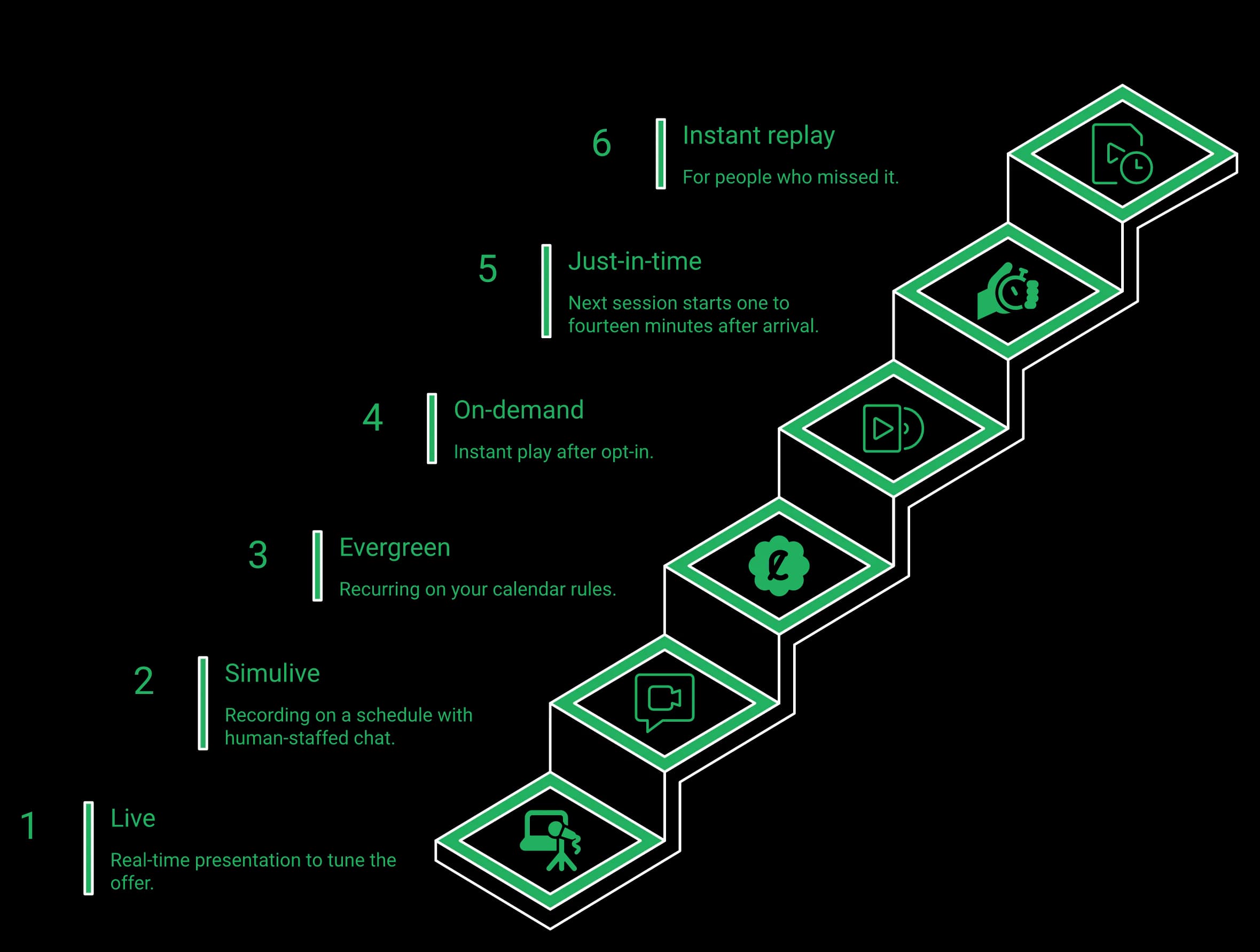
Same asset, six delivery modes:
- Live, presented in real time
- Simulive, a recording playing on a schedule with chat staffed by a human
- Evergreen, recurring on your calendar rules
- On-demand, instant play after opt in
- Just-in-time, starting minutes after arrival
- Instant replay, for the people who missed it
An integrity rule worth holding to: never tell an audience a recording is live. Never tell them it is not, either, unless they ask. Say “session,” schedule it honestly, and staff the chat. The simulated live webinar mechanics spell out how that is set up without misleading anyone.
The contested part nobody agrees on
Operators split hard here, and both sides deserve a hearing.
One camp builds evergreen from day one, arguing live show up rates are poor and not worth the weekly grind. The other camp, which EasyWebinar's guidance follows, runs five to ten live sessions first, tunes the offer, and clears roughly 10% attendee to buyer conversion before automating anything. Funnel data from an earlier EasyWebinar launch showed the automated version converting at 13% against 8% for a four video series, but only after the live version worked. The full argument sits in EasyWebinar's live versus automated webinars breakdown.
The constraint that kills most automated funnels
An automated webinar without traffic is like a billboard in the desert.
You grow the audience by running webinars, not by waiting until the funnel is perfect. Automated funnels also carry the highest cost per lead, because there are more steps between click and conversation. The pattern has held across the accounts EasyWebinar reviewed this year, though the sample is limited.
What operators say about interactivity on Cisco
It was very secure and allowed for a professional and stable connection overall... The video quality really became behind other systems that were around. Additionally, it's interactivity tools for webinars left much to be desired, unfortunately.
EasyWebinar runs the same recording as simulive, evergreen, on-demand, or just-in-time from one settings panel, which is a capability a meeting first platform has no commercial reason to build. If you want the mechanics rather than the pitch, the evergreen scheduling rules live here.
EasyWebinar shipped paid registration through Stripe and PayPal in March 2026, along with paid offers and checkout inside the live room. Lead scoring is available in EasyCRM, and HubSpot and Salesforce Pardot (Account Engagement) sync at Pro. Nothing in Webex's captured material documents in-webinar payment. On a collaboration platform, the offer lives elsewhere: a link, a tab switch, and a measurable drop.
The moment your funnel leaks
Peak intent happens at minute 47, not at minute 47 plus a tab switch.
You have just handled the third objection. Hands are up in chat. Then you paste a URL, and the room splits into people who buy and people who go looking for the link they lost.
What the leak actually costs
The pattern shows up session after session, and it is boring and expensive.
Attention does not survive navigation. Every extra click between wanting the offer and entering a card removes a slice of the room.
The path, stated as a path
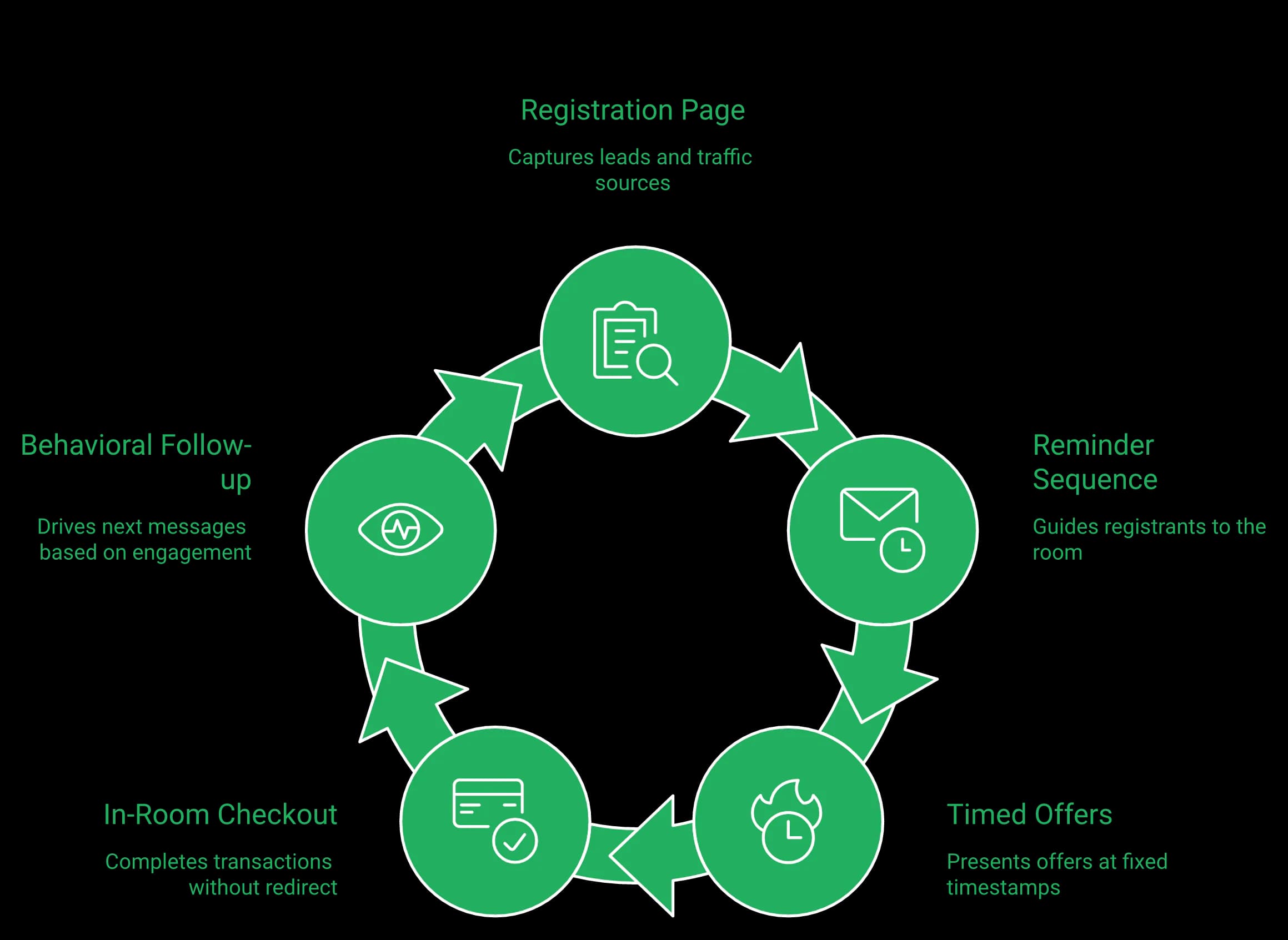
EasyWebinar keeps the whole sequence in one account, and here is the order it runs in:
- Registration page captures the lead and the source
- Reminder emails carry them to the room
- Timed offers fire at fixed timestamps
- Checkout opens inside the session, with no redirect
- Behavioral follow up runs on six triggers, from no-show to clicked offer
If you want that sequence built out step by step, the webinar marketing automation guide covers each handoff.
The benchmarks worth measuring against
Useful numbers when auditing a funnel: engagement above 60%, close rate between 3% and 8%, and evergreen versions holding 60% to 80% of the live conversion rate.
Those are working ranges, not promises. If your live version does not clear them, automating it will not fix the offer.
In-room checkout
If the offer needs to live inside the room
Paid registration and in-webinar checkout shipped in March 2026, with Stripe and PayPal, and no redirect out of the session.
Charging for access changes who shows up
Here is the part most operators miss about paid registration. A price is a filter before it is revenue.
Consider a free Sunday night strategy session at 7 p.m. Eastern that runs for a long stretch. It gets draggy, and neither the host nor the attendees want to be there.
Rebuilt for people willing to pay, it becomes worth the host's time to show up, and the attendees' time to attend. The same logic runs through EasyWebinar's creator monetization playbook.
Where this argument does not apply
Be honest about the boundary. If your webinars are internal training or all hands sessions, there is no offer, so none of this matters.
If the product is low ticket, the math often does not justify a webinar at all. A checkout inside the room pays for itself on higher ticket offers.
The comparison, stated flatly
| Capability | EasyWebinar | Webex Webinars | Zoom Webinars |
|---|---|---|---|
| Paid registration | Yes, Stripe and PayPal (March 2026) | Not documented in captured material | Not native |
| In-session checkout | Yes, inside the room | Not documented | Not native |
| Native CRM | EasyCRM from Growth | Integrations only | Integrations only |
EasyWebinar takes the payment inside the room, with paid registration and in-session checkout both shipped in March 2026. That single design choice means the transaction happens at the moment of intent, and the sales CRM that scores those buyers sits in the same account rather than in a separate tool.
Reporting built for meetings answers who joined and for how long. A revenue program needs watch duration, poll responses, offer clicks, drop off points, and the source behind each registration. EasyWebinar records those per attendee and runs follow-up on six behaviour triggers, so follow up runs on behavior instead of a flat attendance list.
The measurement gap, not the feature gap
This is not really a dashboard argument. It is a question of which number your VP asks for.
Attendance is an operations metric. Pipeline is a revenue metric. A collaboration platform was scoped to report the first one, and it does that well.
The four numbers worth checking
EasyWebinar measures these per attendee, which is what makes the checks possible:
- Show up rate against registrations, by traffic source
- Retention from peak show rate to the pitch, targeting about 80%
- Poll and offer interaction, per person
- Drop off timestamp, so you know which slide loses the room
For cold traffic, treat 10% to 15% show up as the floor, not the goal. EasyWebinar's webinar analytics breakdown defines each of these metrics in full.
What operators say about the reporting
The detailed analytics are great as they save me the hassle of calculating KPIs, and the registration and email notification features are really handy.
The same reviewer names a real limit, quoted here rather than hidden:
I do use other email systems to send post-webinar email sequences because I can't track open and click rates on EasyWebinar.
The failure that makes reconciling counts essential
In one case, a Zapier account hit its plan limit for total Zaps that could fire. The team caught it four hours before the webinar.
There was a discrepancy of a couple hundred opt ins between the registration page and the CRM. Nobody got an alert. The tool did exactly what its plan allowed.
Randomness is usually a modeling failure
When show rates and booking rates look “all over the place,” the cause is rarely the audience.
It is usually an unmodeled worst case plus a broken handoff between tools. One client's booking rate cratered because a phone link sent attendees to a mobile session. Intent on a phone is different from intent on a laptop, and that only became clear once the data was split.
The four hour pre flight check
Run this before every session:
- Compare registrant counts on the page against the CRM
- Click every link in the reminder sequence yourself
- Confirm the automation quota has room to fire
- Load the attendee view, not just the presenter view
That takes fifteen minutes. It saves sessions that would otherwise be lost. If your show up numbers are the problem, the webinar attendance guide is the next place to look.
EasyWebinar tracks attendance, watch time, poll responses, offer clicks, and drop off per attendee. Keeping registration, reminders, and the room in one account removes the seam where a couple hundred registrant discrepancy hides, which is the practical reason to stop stitching this together by hand.
Cisco publishes up to 100,000 attendees on higher Webex tiers with sessions up to 24 hours, and up to 1,000 attendees on the Enterprise plan. EasyWebinar's Growth tier holds 200 live attendees, Pro holds 500 and Scale 1,000, with larger events on Enterprise by quote. EasyWebinar streams on Dolby OptiView WebRTC with sub-second latency, so timed offers land while the topic is still on screen.
The capacity ladder, with units
Capacity is the first filter for most enterprise buyers, so here it is without adjectives.
| Tier | Live attendee cap | Notes |
|---|---|---|
| EasyWebinar Growth | 200 live | 1,000 automated viewers |
| EasyWebinar Pro | 500 live | 2,500 automated viewers |
| EasyWebinar Scale | 1,000 live | 5,000 automated viewers |
| EasyWebinar Enterprise | Larger events | By quote |
| Webex Enterprise (quote) | Up to 1,000 | FedRAMP authorized security |
| Webex Webinars (webcast view) | Up to 100,000 | Sessions up to 24 hours |
The unflattering part, stated plainly: if you need 5,000 concurrent attendees next month, Cisco's published ladder is the shorter conversation. For rooms in the thousands, EasyWebinar's guide to a webinar platform for 1,000 attendees sets out what actually changes at that size.
Why latency is a revenue variable
Latency is the delay between what you say and what an attendee hears.
At 20 to 30 seconds of delay, your poll arrives after you have moved on. The offer overlay appears while you are answering a different question. Engagement mechanics stop being mechanics and become noise.
The stack, named rather than claimed
EasyWebinar runs on Dolby OptiView (formerly Millicast) WebRTC, which is a real time browser streaming standard.
The spec is sub-second latency. The live webinar software page lists the delivery stack in full.
On the Webex side, its help center showed no published attendee latency figure when checked on October 14, 2026. What it does document: above 10,000 attendees, attendees are switched to webcast view automatically, where private chat, raised hands and emoji reactions are not available, and each webinar can be live streamed to one streaming service. EasyCast, from Growth, streams one EasyWebinar session to 10+ platforms at once, plus any RTMP destination.
Where operators report friction on each side
Peer reviews are the fairest evidence here, so both sides get one.
The platform consistently suffers from lag, connectivity problems, and delayed audio or video, even with stable internet. It takes a long time to join meetings, and the app often freezes during screen sharing.
The video quality came and went when I switched from the slides as the main screen back to me. It was pixelated and then cleared. I have a Canon R6 and Google Fiber internet.
What to test before signing anything
Do not take either vendor's word, EasyWebinar's included.
Run one dry session at your expected attendee count. Fire a poll and time the gap to the first response. Then load the attendee view on a mid range laptop, not your own machine. The webinar equipment checklist covers what to fix on your end first.
EasyWebinar streams on Dolby OptiView WebRTC with sub-second latency, which is the reason a timed offer can land while attendees are still on the slide that sets it up. That is an operational claim about sync, not a quality boast, and the dry run above is how you check it.
Yes. Webex Enterprise carries FedRAMP authorization inside Cisco's broader certification posture. EasyWebinar holds SOC 2 Type II and follows GDPR-aligned data practices, with a published data processing addendum, and does not hold ISO 27001, PCI-DSS, HIPAA, or CCPA. For a federal, healthcare, or regulated financial buyer, Webex is the correct answer, and this article says so plainly.
Cisco's position, stated without spin
FedRAMP is the US government's standardized security authorization program for cloud services. Cisco holds it on the Enterprise tier.
Add a decades long enterprise security practice, toll dial in across 55 or more countries, and a collaboration suite that includes calling. For many regulated organizations, Webex is not merely approved. It is mandated.
The compliance set, both columns
| Item | EasyWebinar | Webex |
|---|---|---|
| SOC 2 Type II | Report held | Yes, within Cisco's posture |
| GDPR with published DPA | Yes | Yes |
| FedRAMP authorization | No | Yes, Enterprise tier |
| ISO 27001, PCI-DSS, HIPAA, CCPA | Not held | Broader posture, verify per SKU |
On this scorecard, EasyWebinar loses, and pretending otherwise would cost the reader's trust. EasyWebinar's GDPR page states the scope in plain terms.
Governance friction is real on both sides
Compliance controls have a user cost, and reviewers notice it.
I dislike the user interface. It is overloaded, over complicated and overly complex. I hate the meeting joining experience. It asks me to check a box and accept their T&C every single time before joining a meeting.
Even a critical reviewer credits the security posture, which is the honest read:
It was very secure and allowed for a professional and stable connection overall.
Who should stop reading here
Some readers should close the tab and keep Webex. That list is specific:
- Government, defense, and public sector programs
- Healthcare and anything touching patient data
- Regulated financial services with data residency rules
- Internal all hands, training, and employee communication
- Any session where regulated data appears on screen
Be skeptical of anyone claiming everything
The same caution applies to any vendor promising everything, EasyWebinar's own category included.
Be cautious of any tool telling you it is your platform, your community, and your CRM. When a vendor promises all of it, the parts usually get thin. Compliance claims deserve the same scrutiny, which is why the honest answer here is a short list rather than a long one.
EasyWebinar holds SOC 2 Type II and follows GDPR-aligned data practices, with a published data processing addendum. That is the right scope for external marketing audiences, and it is not a substitute for a FedRAMP authorized collaboration platform. Where your security review requires the second thing, Webex is the answer.
Webex includes an AI Assistant on every paid tier, Slido powered polling and Q&A, and Real Time Translation across 100 or more caption languages as a paid add on. EasyWebinar ships an AI webinar builder on every plan since February 2026 and, on Pro and above, an AI Moderator that answers attendee questions from your files. Cisco wins on caption languages. The honest distinction is what the AI does.
Concession first: Cisco has AI, and markets it
Anyone telling you Webex has no AI is wrong. Cisco includes its AI Assistant across paid tiers, and it is prominently marketed.
That assistant handles meeting work. Summaries, catch up, transcript help. It is genuinely useful.
Slido is a mature engagement product
Webex bundles Slido for polling and Q&A on paid tiers. It is widely used, and it works.
Reviewers credit the session tooling even when they dislike other parts of the product:
I like the breakout rooms feature very much. It allows you to quickly and seamlessly switch between large meetings into smaller working groups for more efficient collaboration.
If you are comparing session tooling across the category, EasyWebinar's roundup of webinar engagement tools lists what each platform actually ships.
Language coverage and the engagement layer
Cisco covers more languages. That is not close.
| Item | EasyWebinar | Webex | Zoom Webinars |
|---|---|---|---|
| Engagement layer | Native polls, Q&A, reactions, timed offers with checkout | Slido, included on paid tiers | Native polls, Q&A |
| AI scope | Funnel builder (Feb 2026); AI Moderator on Pro and above | Meeting assistant, all paid tiers | Meeting assistant |
The fair framing is breadth versus depth. If you need 40 caption languages, Cisco is your answer. If you need the room to sell, EasyWebinar is.
The reframe: what is the AI actually building?
Here is the distinction that matters for a marketer. One AI helps you remember the meeting. The other builds the thing that sells and, on Pro and above, answers attendee questions from your uploaded files while it runs.
EasyWebinar's builder runs about a dozen questions, then generates the script, registration page, thank you page, reminder emails, polls, and follow up flow. EasyWebinar's internal benchmark for that flow is roughly 10 to 15 minutes.
Why assembly beats authorship
The output is not art.
The end result is not so much writing a webinar as assembling one. It is closer to flat pack furniture, which is far easier than staring at a blank slide deck.
Simple scales. Fancy fails. Plenty of plain template libraries share one trait: they were finished, which beats beautiful and unlaunched. The same principle runs through EasyWebinar's webinar landing page examples.
Where the evidence is thin
EasyWebinar's data points toward faster launches when the AI drafts first, though the sample is limited.
The builder removes blank page paralysis. It does not fix a weak offer, and no model will. For established coaches, the script is usually the easy part.
Operators do notice the build speed, including the rough edges:
The ease of use and setup. Pretty much once I have run one webinar, I can clone and setup multiple in a breeze... My only dislike is their can be some bugs at times that can be frustrating.
EasyWebinar's AI webinar builder shipped in February 2026, trained on six to eight years of proprietary webinar data. It generates the script, pages, emails, and polls for a funnel rather than summarizing a meeting, and the AI funnel builder flow is documented in full.
Webex Events and Webinars holds 4.6 out of 5 across 1,079 G2 reviews, with strengths in attendee management and Slido engagement. The recurring complaints are countable: limited customization in 17 and 13 review clusters, steep learning curve 14, non intuitive setup 14, overwhelming complexity 12, slow performance 11, and poor interface and navigation 10 each. Webex Suite holds 4.4 out of 5 across roughly 7,400 Capterra reviews.
Method, stated before the findings
Counted themes beat anecdotes, which is why this section exists.
G2 publishes how many reviews mention each theme. Those counts were captured from the Webex Events and Webinars review page and the Capterra Webex Suite page in August 2026. No sampling, no cherry picking.
The strength clusters, in full
Reviewers credit Cisco most often for:
- Attendee management, 32 mentions
- Engagement and polling, 31 mentions
- Customer support, 28 mentions
- Security and stability, cited across multiple reviews
That is a strong profile. A 4.6 average across more than a thousand reviews is not a product in trouble.
What the complaint counts mean for a marketer
Read the same list through a demand generation lens, and it changes shape.
| Theme | Mentions | What it costs a marketing team |
|---|---|---|
| Limited customization | 17 and 13 | Registration pages you cannot brand properly |
| Non intuitive setup | 14 | Slower launches, more IT tickets |
| Steep learning curve | 14 | Guest presenters need training |
| Slow performance | 11 | Attendee drop off mid session |
Customization is the theme to weigh hardest. Your registration page is your ad's landing page, which is why webinar registration software deserves its own evaluation.
Capterra says the same thing in plainer words
The heavy client complaint repeats across thousands of reviews:
Sometime the app feels heavy take longer to load.
That is a small friction with a real cost. Every second before join is a share of your room you never see.
The critical review on EasyWebinar's side
Balance means quoting the complaints about EasyWebinar too.
The biggest challenge is around setting up automated webinars, and needing the presentation uploaded first in order to set it up. Oftentimes, I'm promoting things far in advance and want to be able to create quickly on the fly.
That is accurate. The recording gates the automated build, and buyers should know that before they buy, not after. EasyWebinar's guide to creating webinars sets out the recording step in order.
Where EasyWebinar's score comes from
EasyWebinar shows 4.5 out of 5 from 100+ reviews on G2, the figure cited across this page.
This page quotes one site on purpose. Star averages differ across review sites, and mixing them would undercut every other number in this article. Read the complaints as closely as the score: they tell you more about fit.
EasyWebinar cites its G2 rating, 4.5 out of 5 from 100+ reviews, rather than a blended average across sites, and the customer reviews page carries the full text of what operators actually say, critical reviews included.
Scope it narrowly. A tool running public registration pages and recorded funnels for external audiences, touching no internal communication and no employee data, is a smaller procurement question than a company wide platform. Bring four artifacts: the SOC 2 Type II report, the data processing addendum, the GDPR posture, and a data flow description. EasyWebinar gates SSO and SAML at its Scale tier.
The objection, in your words
“IT chose Webex, and marketing does not get a vote.”
That is the truest objection in this comparison, and most readers cannot overcome it. Nothing here argues for replacing the collaboration stack. Webex was chosen for good reasons.
Reframe the scope, not the decision
The winning request is narrow, and narrow is the whole trick.
You are not asking to replace a platform. You are asking for a marketing tool that runs public pages for external audiences, stores no employee data, and touches no internal communication.
The four artifacts to bring
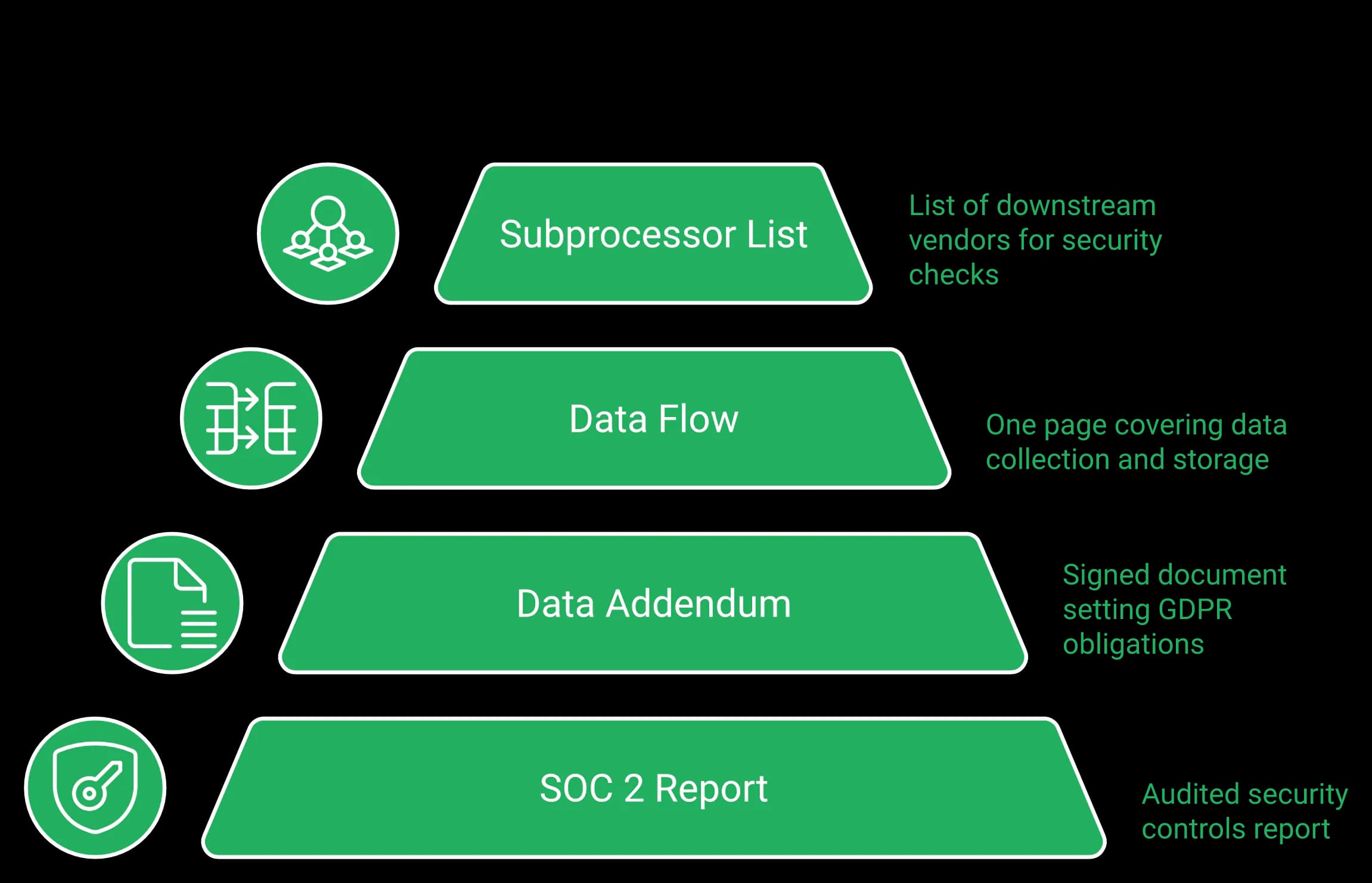
Ask for these before you open a ticket:
- The SOC 2 Type II report (an audited security controls report)
- The signed data processing addendum, which sets GDPR obligations
- A one page data flow description: what is collected, where it is stored
- The subprocessor list, so security can check downstream vendors
EasyWebinar publishes its data processing addendum and GDPR terms openly, which shortens the first review cycle considerably.
Name the tier where the requirement is actually met
Do not quote the entry plan to your security team.
SSO and SAML, API access, and white labeling arrive at Scale, not Growth. If single sign on is mandatory at your company, Scale is the honest destination, and every tier is listed on the webinar pricing page.
| Requirement | EasyWebinar tier | Webex |
|---|---|---|
| Basic program use | Growth | Existing Webex license |
| SSO and SAML | Scale | Included in enterprise agreements |
| FedRAMP authorization | Not held | Enterprise tier |
Keep the request simple, or it dies
Funnels teach the same lesson, and procurement behaves the same way.
Years ago, EasyWebinar's team built what it called the monster funnel. Branching emails, segmentation everywhere, months of work. It did not work.
You do not want your request to look like a subway map. Every branch is another place for a “no.”
The Monday version of this
Two emails, not a project plan:
- To IT security: the four artifacts, plus one line on what data the tool touches
- To finance: the tier and the pipeline metric you will report against it
Then propose a 60 day scoped test on one external campaign. Small asks clear faster than good ones. If security asks what connects to what, the integrations list answers it in one page.
The honest gate
Where marketing has no independent tooling budget, the answer is Webex.
A procurement conversation is not a formality. It is a real gate, and some readers will not clear it this year. That is fine. Run the program on Webex, and revisit when you have a budget line.
EasyWebinar publishes a data processing addendum and GDPR terms, and gates SSO and SAML at Scale. Stating that tier openly matters, because a vendor security review will find it anyway, and surprises in a security questionnaire cost more than an honest tier choice.
Most organizations should run both. Keep Webex for all hands, training, internal communication, and anything touching regulated data, because Cisco positions the product for exactly that. Add EasyWebinar for the external lead generation layer: registration pages, evergreen scheduling, in room checkout, and attendee analytics. The split is by audience and data sensitivity, not by feature preference, and it avoids a migration entirely.
The split that requires no migration
Cisco's own material describes Webex Webinars as commonly used for all hands, trainings, and lead generation. Two thirds of that list hold up; lead generation is the exception.
Nobody has to switch anything. You draw a line by audience, and both tools stay in place.
What stays on Webex
Keep these where they are:
- All hands and town halls
- Employee onboarding and internal training
- Partner or client sessions under a security review
- Anything with regulated data on screen
- Sessions where IT must own the recording
What moves to the marketing layer
Move only the revenue motion:
- Public registration pages tied to ad campaigns
- Recorded sessions running on a schedule
- Paid workshops with checkout inside the room
- Attendee level analytics and behaviour follow-up
EasyWebinar's Growth tier covers the registration pages, scheduled sessions, in-room checkout, EasyCRM and follow-up on six behaviour triggers, at 200 live attendees. Scale is where single sign on is required. The webinar lead generation guide shows how that layer is run day to day.
What operators report after making the split
I would like my registrants to be able to see their own time zone when they register on the plan that I am paying for. I think it's important in improving the show-up rate.
Scenario verdicts
| Your situation | Recommendation |
|---|---|
| Government, defense, healthcare, regulated finance | Webex only |
| Internal comms and training at scale | Webex only |
| Commercial company, marketing owns lead gen | Add a scoped marketing platform |
| Course, coaching, or paid workshop revenue | Marketing platform first |
| No independent marketing budget | Webex, revisit next cycle |
The constraint that decides this
Audience size decides this more than software does.
Thirty percent of a large audience is a great quarter. Thirty percent of zero is nothing. If you have no list and no ad budget, fix that before you buy anything.
Where this goes next
EasyWebinar's read for the next 18 months is that this fork gets sharper, not softer.
Collaboration vendors will keep adding AI to meetings. Marketing platforms will keep adding revenue mechanics to sessions. Neither side is likely to cross the middle, mostly because the buyers do not share a budget.
EasyWebinar is the additive marketing layer in that split: registration, evergreen scheduling, in room checkout, and attendee analytics for external audiences. It is recommended on one explicit condition, which is that IT will clear a scoped tool. If you are building that case, request a demo first, because your colleagues will want to see it before they read about it.
So here is the question to put to your team: who in your company owns the number this webinar program is supposed to move? Answer that, and the tool choice usually answers itself.
EasyWebinar vs Webex Webinars FAQ
Webex Webinars is the webinar product inside Cisco's meetings and collaboration suite, bought by IT for secure meetings, training and regulated sessions, with FedRAMP authorization on Enterprise. EasyWebinar is the webinar platform built for conversions: attendees join from any browser with nothing to download, you run a session live, then turn the version that converts into an automated webinar that runs every day, with checkout inside the room and your CRM or ours. Webex runs the meeting; EasyWebinar runs the webinar that has to sell and keep working after the live hour.
Yes, when the webinar has to produce customers. EasyWebinar is best for webinars built for conversions — live and automated, on one subscription. From Growth you get simulive, evergreen and just-in-time sessions, in-room checkout through Stripe and PayPal, EasyCRM or native connections to the CRM you already use, follow-up on six behaviour triggers and EasyCast multistreaming. Keep Webex for internal comms, training and any session where your security policy names FedRAMP.
Cisco documents Webex Webinars as a single session, virtual only product, with sessions running up to 24 hours. It supports live delivery, recording, and on demand playback, but Cisco does not sell an evergreen funnel or timezone aware recurring scheduling. That distinction matters more than it sounds. An evergreen webinar is a recorded session scheduled to run again and again, with chat, polls, and timed offers firing at fixed timestamps. A just in time session starts minutes after a visitor lands on the page, so registration and attendance collapse into a single visit instead of a five day wait full of drop off. EasyWebinar runs the same recording as live, simulive, evergreen, on demand, just in time, or instant replay from one settings panel, from the Growth plan. We built that ladder because a single high converting session cannot be presented 24 hours a day by a human. • Live first, to tune the offer and clear roughly 10% attendee to buyer conversion • Then clone the winner into automated delivery • Then layer just in time scheduling to compress the registration gap If you want the mechanics rather than a feature list, our breakdown of live versus automated webinars explains when each format earns its place.
Nothing in Webex's captured feature material documents in webinar payment or paid registration. On a collaboration platform, the offer has to live somewhere else, which usually means pasting a link into chat and hoping attendees come back from the new tab. EasyWebinar shipped paid registration through Stripe and PayPal in March 2026, together with paid offers and checkout inside the live room. That keeps the transaction at the moment of highest intent rather than after a navigation step. • Registration page captures the lead and the traffic source • Timed offers fire at fixed timestamps • Checkout opens inside the session, with no redirect • Follow-up runs on six behaviour triggers: registered, attended, no-show, watched replay, clicked offer, purchased There is a second reason to charge. A price is a filter before it is revenue. I ran a free Sunday night strategy session for a long stretch until it went draggy, and neither side wanted to be there. Rebuilding it as a paid session changed who showed up and how they behaved. Our paid webinars page shows how the checkout is configured.
EasyWebinar streams on Dolby OptiView (formerly Millicast) WebRTC with sub-second latency, and attendees join from any browser with nothing to download, so a poll or timed offer lands while the point that sets it up is still on screen. We found no published attendee latency figure in Webex's help center when we checked on October 14, 2026, and a verified G2 reviewer of Webex Events & Webinars reports "lag, connectivity problems, and delayed audio or video." Above 10,000 attendees, Webex automatically switches attendees to webcast view, where private chat, raised hands and emoji reactions are not available. Run one dry session at your expected size on both before you decide.
On EasyWebinar, yes. From Growth, EasyCast streams to 10+ platforms at once — YouTube, LinkedIn, Facebook, Instagram, X, Vimeo, Twitch, TikTok, Kick, Rumble and Dailymotion — plus any RTMP destination, while timed offers, polls and Q&A keep running for registered attendees. Webex's help center states that you can live stream each meeting or webinar to one live streaming service, such as Facebook Live or YouTube Live.
It depends on your sector, and the honest answer costs us some readers. Webex Enterprise carries FedRAMP authorization inside Cisco's broader certification posture, which is decisive for federal, defence, healthcare, and regulated financial buyers. In those environments, Webex is the correct answer. EasyWebinar holds SOC 2 Type II and follows GDPR-aligned data practices, with a published data processing addendum. It does not hold ISO 27001, PCI-DSS, HIPAA, or CCPA certification, and we will not imply otherwise in a security questionnaire. The request most likely to clear review is a narrow one. You are not asking to replace the collaboration stack. You are asking for a marketing tool that runs public registration pages and recorded funnels for external audiences, stores no employee data, and touches no internal communication. Bring four artifacts to the first conversation: • The SOC 2 Type II report • The signed data processing addendum • A one page data flow description covering what is collected and where it is stored • The subprocessor list, so security can check downstream vendors Also name the tier where the requirement is actually met, because SSO and SAML sit on Scale rather than Growth. Our GDPR terms are published for exactly this review.
Many organisations run both, and the split requires no migration at all. Draw the line by audience and data sensitivity rather than by feature preference. Keep Webex for the sessions Cisco is genuinely built for: • All hands, town halls, and internal communication • Employee onboarding and training • Anything with regulated or client confidential data on screen • Sessions where IT must own the recording Run the revenue motion on EasyWebinar: • Public registration pages tied to paid campaigns • Recorded sessions running on a schedule • Paid workshops with checkout inside the room • Attendee level analytics and behaviour follow-up Automation, EasyCRM and checkout start at Growth, and Scale adds single sign on where it is required. The plan details are on our pricing page. One constraint decides more than software does: audience size. Thirty percent of a large list is a strong quarter, and thirty percent of zero is nothing. Fix traffic first, then automate. Our webinar lead generation guide covers how that layer is run week to week.
Yes — your CRM or ours. EasyWebinar connects natively to HubSpot, Salesforce Pardot (Account Engagement), ActiveCampaign, Mailchimp, Kit (formerly ConvertKit), Keap, GoHighLevel and Ontraport, plus webhooks and other apps via Zapier, with SMS reminders through Twilio. If you do not have a CRM yet, EasyCRM is built in from Growth. Either way, what each attendee watched, asked, clicked and bought follows them into the record.
Yes, on Pro and above. Upload your context, such as PDFs and other files, and the AI Moderator answers attendee questions in the chat from that material during live, simulive and automated webinars. It is not included on Launch or Growth.
Start with a 7-day free trial with full access. A card is required to start the trial. Use the window to build the funnel with the AI Webinar Builder, run a live session, sell inside the room and trigger the follow-up, so you judge the whole workflow rather than the room alone.