What Is a Simulive Webinar? How Simulated Live Works

Casey Zeman
Published on May 5, 2026 • 45 min read

Q1. What Is a Simulated Live Webinar, and How Does It Compare to Live, Automated, Hybrid, and Evergreen Formats?
A simulated live webinar (also called a “simulive” webinar) is a pre-recorded video presentation broadcast on a fixed or recurring schedule with live engagement mechanics, including real-time chat, polls, timed CTAs, and Q&A, active throughout the session. Attendees experience the event as live; the presenter is free from delivering the same content repeatedly.
✅ Where the Term “Simulive” Comes From
The word “simulive” is a portmanteau of simulated and live, first used by enterprise broadcast platforms to describe pre-recorded events delivered with live-event interactivity. It’s now the industry-standard term across webinar marketing, SaaS demos, and corporate training. The key to understanding it: simulive is not a watered-down live event. It’s a structurally different format designed to preserve engagement while removing the presenter from the delivery loop.
🎯 Master Format Comparison Table
| Attribute | Live | Simulive | Hybrid | Automated | Evergreen |
|---|---|---|---|---|---|
| Presenter required during broadcast | ✅ Yes | ❌ No (moderator optional) | ✅ Partial (live segments) | ❌ No | ❌ No |
| Real-time chat/polls active | ✅ Yes | ✅ Yes | ✅ Yes | ⚠️ Configurable | ⚠️ Configurable |
| Scheduling model | Fixed single date | Fixed recurring or JIT | Fixed single date | Defined cadence | 24/7, timezone-adjusted |
| Content consistency session-to-session | ❌ Varies by presenter energy | ✅ Identical every session | ⚠️ Mixed (recorded + live) | ✅ Identical | ✅ Identical |
| Technical failure risk | ⚠️ High (audio, connectivity) | ✅ Near-zero | ⚠️ Moderate (live segments) | ✅ Near-zero | ✅ Near-zero |
| Time zone flexibility | ❌ One slot | ✅ Multiple scheduled slots | ❌ One slot | ✅ Multiple slots | ✅ Always available |
| Best use case | High-ticket launches, trust-building | Scaling a proven presentation | Expert panels, multi-speaker events | Nurture sequences, recurring education | Always-on revenue funnels |
| Conversion mechanics | Live urgency + real-time objection handling | Timed offers + live chat + countdown CTAs | Mixed live + pre-set CTAs | Pre-configured offers only | Pre-configured offers, JIT urgency |
EasyWebinar supports all five formats natively from a single webinar platform dashboard: Live, Automated Gold (simulive), Automated, Evergreen, and Hybrid. You toggle between lifecycle stages without migrating platforms.
🔍 What the Attendee Sees vs. What You Do Behind the Scenes
From the attendee perspective, they register, receive reminder emails, join at the scheduled time, and interact with chat and polls, identical to a live session. They can’t rewind the stream. If they refresh the page, it picks up from where the broadcast is, not from the beginning.
From the host perspective, the video plays from upload while you (or a moderator) monitor chat from a separate interface, respond in real time, and fire timed offer CTAs at pre-set timestamps, without presenting a single slide.
⚡ The Key Distinctions That Matter
Simulive preserves the live engagement that automated strips away. Automated webinars schedule a recording, but most platforms deactivate chat, polls, and timed offers during playback, turning the session into a glorified video replay. Hybrid adds live host segments around a pre-recorded core, ideal for multi-speaker panels. Evergreen runs 24/7 with no real-time human presence, the ultimate “set it and forget it” model. For a deeper breakdown, see our guide on pre-recorded webinar platforms vs. live.
The progression I built EasyWebinar around is straightforward. Go live first to validate your content and offer with a real audience, hit at least 10% attendee-to-buyer conversion, then convert your highest-performing session into a simulive or evergreen funnel. Simulive is not a shortcut: it’s a maturity step. You automate what’s proven, not what’s untested.
Q2. Why Are Teams Switching to Simulated Live Webinars, and What Are the Limitations to Know First?
Simulated live webinars eliminate presenter burnout, deliver consistent high-quality sessions every time, and scale globally without cloning the presenter. However, they require upfront production investment, dedicated chat moderation per session, and a strict content-aging discipline to remain effective long-term.
⏰ The Live-Only Burnout Cycle
Here’s what happens when live is your only format. You present the same webinar 3 to 4 times per week. By session three, your energy is flat. By session four, you’re phoning it in, and your audience can tell. Conversion rates drop because enthusiasm fades, not because the content changed.
Zoom and GoToWebinar lock operators into this cycle. No simulive option. No automation. No evergreen. The only way to scale is to present more. I lived this: running weekly live webinars where my baseline was 60 registered, 30 showed up, and 3 bought. That math works, but it requires me in the chair every single week. If you’re evaluating alternatives, our GoToWebinar alternatives guide breaks down the options.
The eight benefits of simulive solve exactly this:
- Burnout elimination: no more declining energy by session three
- Consistent, polished delivery: your best take, every session, no off days
- Zero technical failures: no connectivity drops, no audio glitches, and no screen-share crashes
- Global time zone flexibility: same recording, multiple schedules across Americas, EMEA, and APAC
- Evergreen compounding: record once, run indefinitely; 1 recording × 4 sessions/day × 365 days equals 1,460 delivery events
- Compliance and legal pre-approval: regulated industries can review and approve content before broadcast
- Complete A/B testing control: identical presentation across all sessions means you’re testing one variable at a time
- Higher chat quality: you’re fully focused on interaction, not presenting; objection handling improves when it’s your only job
❌ The 7 Limitations, and Honest Workarounds
Platforms like Demio and Livestorm added automated replay, but here’s the gap most operators miss: automated playback on those platforms strips engagement. No live chat, no polls, and no real-time interaction. Simulive without engagement is just a video replay with a countdown timer.
That said, simulive isn’t perfect. Be honest with yourself about these:
- Chat monitoring is required per session.Workaround: pre-prepare 10 FAQ chat templates so a VA can moderate, not just you.
- Limited spontaneity. You can’t adapt the video in real time. Workaround: the live Q&A window at the end handles dynamic interaction.
- Upfront production effort is heavier than going live once. Workaround: the AI production toolkit (covered in Q4) compresses this to under a day.
- Content dating risk if you reference years, prices, or current events. Workaround: apply the evergreen content checklist before recording.
- Platform cost exceeds basic video hosting.Workaround: a single platform from $116/mo replaces $600 to $1,000/mo in disconnected tools. See current webinar pricing.
- Engagement drops without intentional interaction design.Workaround: plan polls, CTAs, and chat prompts at specific timestamps before you record.
- Attendee perception risk if transparency is absent.Workaround: disclose the format upfront (see Q3’s transparency framework).
💰 The Compounding Business Architecture
The eight benefits above aren’t about convenience. They’re compounding infrastructure. One recording with consistent delivery, zero failure risk, global scheduling, and behavioral follow-ups running 24/7 doesn’t just replace live webinars: it outperforms them at scale.
EasyWebinar’s simulive format, Automated Gold, broadcasts a pre-recorded session on a recurring schedule with live chat, polls, timed offers, and Power Follow-Up sequences running natively. Just-in-Time scheduling and Instant Replay eliminate the scheduling burden. Compliance-ready: SOC 2 Type II and GDPR-certified. Explore the full automated webinar capability set.
“I convert really well with live webinars, but I can’t be everywhere at once. EasyWebinar gives me the ability to multiply my efforts and offer a human touch, without having to be everywhere at once.”— Ash A. Easywebinar G2 – Verified Review
“I used to do live webinars to sell my online course. With EasyWebinar I sold 25 courses within 3 weeks of my evergreen launch. It feels like a live class but takes away the exhaustion of showing up live, while also performing 100% better in terms of course revenue.”— Laura C. Easywebinar G2 – Verified Review
Q3. Is a Simulated Live Webinar “Fake”? The Ethical Operator’s Transparency Framework
A simulated live webinar is not “fake” when the operator is transparent. The content, engagement, and value are entirely real. What makes a simulive webinar unethical is not the pre-recording; it’s injecting fake chat messages, inflating attendee counts, or hiding the pre-recorded nature from attendees who explicitly ask.
⚠️ The Fear That Keeps Creators Trapped
Here’s the fear I hear from operators every week: “What if attendees find out it’s pre-recorded and feel deceived?” That fear keeps creators trapped in the live-only burnout loop, presenting the same content weekly, declining in energy, and watching conversion rates fall, because they’re terrified of a perception problem that doesn’t actually exist.
The reality: attendees care about content quality and whether their questions get answered. They don’t care whether you’re presenting live at that exact moment. I’ve been doing this for 14 years. The complaints I see aren’t about pre-recorded content: they’re about pre-recorded content delivered dishonestly.
❌ The Bad Actors Who Created the Stigma
Let’s name the practices that created the “fake webinar” stigma, because ethical simulive is architecturally different from this:
- Fabricated attendee counts: “487 people watching now” when 12 are actually connected
- Pre-scripted fake chat messages from invented attendees scrolling on timers
- Locked “leave” buttons preventing attendees from exiting
- Explicit “LIVE” badges on sessions that are definitively pre-recorded
- Fake urgency: “only 3 spots left” when the session is unlimited
These aren’t simulive problems. They’re dishonesty problems, and they erode trust for every operator in the space.
✅ The Transparency Framework: 6 Ready-to-Copy Disclosure Phrases
Transparency isn’t a constraint: it’s a trust amplifier. Here’s the disclosure language library you can copy and paste directly:
- Registration page:“This is a pre-recorded masterclass with live Q&A support, same content, same results, no schedule conflict.”
- Confirmation email:“Your seat is reserved for [DATE/TIME]. This is a pre-recorded presentation; our team will be live in chat to answer your questions in real time.”
- Chat opener (minute 0):“Welcome! Quick note: today’s presentation is pre-recorded for quality and consistency. I’m here live to answer every question you have. Drop them in the chat!”
- Landing page FAQ:“Is this live? The presentation is pre-recorded; the Q&A is live.”
- Replay email:“You missed the live chat session, but the recording is available. Book a call if you have questions.”
- Social media promo:“Watch my masterclass on [TOPIC], pre-recorded so you get my best session, with live Q&A support during the broadcast.”
For landing page inspiration, see webinar landing page examples that convert.
💬 Real Chat vs. Simulated Chat vs. Async Chat
The chat architecture you choose determines whether your simulive is ethical or deceptive:
| Chat Type | How It Works | Trust Level | Best For |
|---|---|---|---|
| Real live chat | A human moderates in real time; attendees get authentic responses | ✅ Highest | Revenue-focused simulive with objection handling |
| Simulated chat | Platform auto-injects pre-written messages at timestamps; no human present | ❌ Lowest | Avoid: this is the source of “fake webinar” complaints |
| Async chat | Attendees submit questions; host reviews and responds after the session | ⚠️ Moderate | Low-touch educational content, large-scale training |
EasyWebinar uses real live chat. The moderator sees the attendee feed and the video timeline simultaneously, responds from desktop or mobile, and every chat interaction is logged to our built-in sales CRM for behavioral follow-up. The key to using automated webinars with integrity: never say it’s live, but don’t say it’s not live. Make sure people never feel duped.
“AUTOMATED WEBINARS. Yes, I wrote that in all caps. I’ve been going live every month since 2020 and I’m exhausted. I feel like I have had a big sigh of relief since signing up and I can see the end in sight!”— Verified User in Photography Easywebinar G2 – Verified Review
“EasyWebinar provides the platform that allows me to seamlessly and brilliantly provide a 1-to-many platform that allows the perfect formula for conversion and the closing of business.”— Dr. Loren M. Easywebinar G2 – Verified Review
“We faced so many issues and bugs with our Zoom events that made the tool completely unreliable and impossible to use, so there is nothing positive to say about it.”— Verified User in Translation and Localization Zoom Events – G2 Verified Review
Q4. How Do You Create a Simulated Live Webinar? Step-by-Step Guide + AI Production Toolkit
Create a simulated live webinar in 15 steps: record a validated presentation, edit for evergreen delivery, upload to a simulive platform, configure scheduling and engagement at timestamps, build behavioral follow-up sequences, and launch with transparency-first promotion. The entire production cycle now compresses to under one day with AI-assisted tools.
🎥 Steps 1 to 4: Production (Record and Edit)
Step 1: Equipment setup. Minimum: 1080p webcam or mirrorless camera, condenser microphone, and a key light. Recommended gear: Logitech Brio 4K, Rode NT-USB, and Elgato Key Light Air. You don’t need a studio; you need clean audio and consistent lighting. For a deeper walkthrough, see how to upgrade your webinar skills and equipment.
Step 2: Scripting and teleprompter. Write to camera, not to slides. Use a teleprompter app (Teleprompter Premium or PromptSmart) and aim for 90 to 120 WPM pacing. Script the engagement moments before recording; note exactly where polls, CTAs, and chat prompts will appear at timestamps.
Step 3: Recording. Multi-take workflow: record the full run-through twice. Keep take two; it has more energy and fewer nerves. Use a clean ending cue: hold your final pose for three seconds so your editor has a clean cut point. Our record a webinar technical setup guide covers the full process.
Step 4: Editing. Remove dead air (pauses over 1.5 seconds), normalize audio to -14 LUFS, add captions, and insert branded lower-thirds. This is where the 2026 AI toolkit earns its place.
🤖 The AI Production Toolkit (2026)
- Descript: removes filler words (“um,” “uh,” “you know”) in one click; auto-generates transcripts and captions at 99% accuracy
- Riverside AI Editor: auto-creates highlight clips from long recordings; isolates audio tracks per speaker
- ElevenLabs: voice correction for minor audio patches without re-recording entire segments
- EasyWebinar AI Webinar Builder: generates the complete funnel (registration page, thank-you page, email reminder sequences, timed offers, poll questions, and scheduling config) from a single prompt in under 10 minutes, trained on 14 years of proprietary funnel data
⚙️ Steps 5 to 8: Platform Setup and Scheduling
Step 5: Choose your simulive platform. Use the decision framework in Q9. The short version: if you need live + simulive + automated + evergreen from one system, that’s EasyWebinar. If you need only simulive with deeply authentic live chat, evaluate eWebinar. You can also compare webinar platforms side by side.
Step 6: Upload and configure playback. 1080p minimum, H.264 encoding, and original file (not a compressed export). Compressed re-exports introduce artifacts that erode attendee trust.
Step 7: Configure scheduling. Three models: fixed recurring (2 to 3 times daily), Just-in-Time (session starts within 15 minutes of registration), and on-demand Instant Replay. Run all three for paid traffic campaigns.
Step 8: Email sequence configuration. Confirmation + 3 reminders (1 week, 1 day, and 1 hour before) + 4 behavioral follow-up paths: attended and clicked offer, attended but left early, registered but no-show, and replay watched.
📋 Steps 9 to 15: Engagement, Launch, and Follow-Up
Step 9: Add polls at the 15-, 30-, and 45-minute marks. Place the primary CTA offer overlay at 75% of video duration with a countdown timer.
Step 10: Choose real live chat (recommended). Pre-prepare 10 FAQ responses as chat templates. Assign a moderator.
Step 11: Registration page, above-the-fold: headline, bullet benefits, countdown to next session, and single CTA. No navigation links. No distractions.
Step 12: Promote with urgency framing, “Next session starts in 47 minutes,” social proof from real past sessions, and a clear value proposition.
Step 13: Chat moderation playbook by minute:
- Min 0 to 5: Welcome, warm up the chat, and seed 3 icebreaker questions
- Min 5 to 30: Engage with content questions, answer live
- Min 30 to 50: Offer timestamp, monitor CTA clicks, and handle objections in chat
- Min 50 to 60: Q&A close
Step 14: Transition from recording to live: “The presentation has wrapped. I’m here live for the next 15 minutes. Drop your questions.”
Step 15: Post-webinar, replay link email within 2 hours, resource PDF, answered Q&A document, and next-step CTA (book call, buy now, or register for next session).
⚡ How EasyWebinar Compresses Steps 6 to 12
EasyWebinar’s AI funnel builder generates steps 6 through 12 from a single prompt in under 10 minutes: registration page, thank-you page, email reminder sequences, timed offer configuration, poll questions, and scheduling setup. The AI is trained on EasyWebinar’s proprietary funnel data, not generic LLM output.
“Rakesh was fantastic to work with. He helped set up everything from our email responses to our landing page seamlessly. I love that I can either record videos directly in the app or upload my own, and the integration with our ESP is a huge plus.”— Chris N. Easywebinar G2 – Verified Review
“We have run close to 30 [webinars] since we started running it this new year and it has been a game changer for our business. It also seamlessly integrated with our CRM.”— Darrin B. Easywebinar G2 – Verified Review
Q5: How Do You Schedule Simulated Live Webinars to Reach Every Global Time Zone?
A scheduling problem killed more simulive funnels than bad content ever did. If your recording converts at 12% when people actually show up, but 80% of your registrants live in time zones where the session runs at 3 AM, you don’t have a webinar problem. You have an access problem. The fix isn’t recording more webinars. It’s architecting your schedule so every registrant on the planet gets a session within 15 minutes of their peak intent.
⏰ The 3-Model Scheduling Architecture
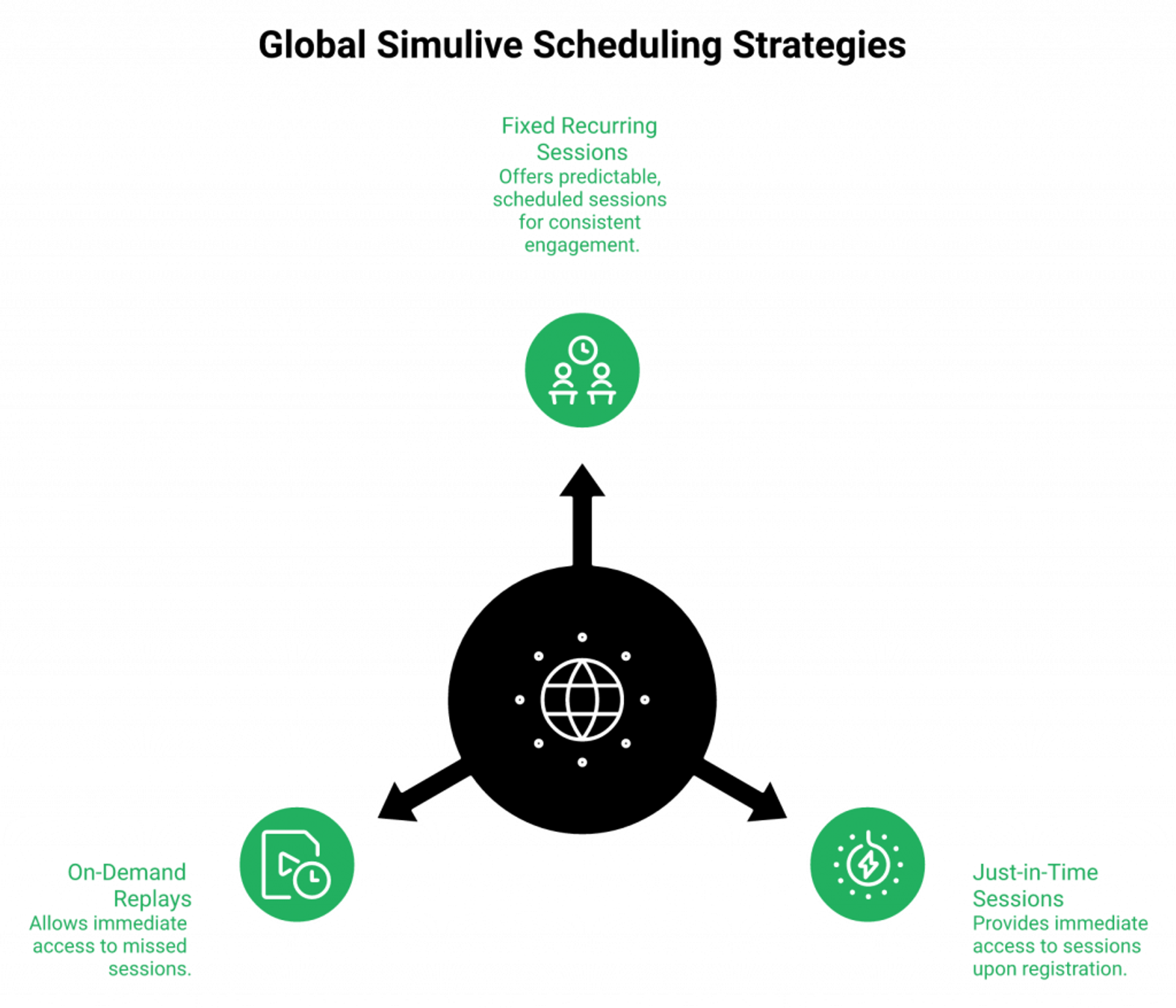
The system that consistently pushes show-up rates above 40% uses three scheduling models running simultaneously, not one:
Fixed Recurring Sessions: 3 to 4 sessions spaced 6 hours apart (6:00 AM, 12:00 PM, 6:00 PM, and 12:00 AM UTC). These cover every major region’s prime viewing window without manual cloning per time zone.
Just-in-Time (JIT) Sessions: The next session starts within 15 minutes of the moment someone registers. This collapses the intent-to-attendance gap from days to minutes, which is where most funnels hemorrhage show-up rates. Our automated webinar engine runs JIT natively.
On-Demand / Instant Replay: Available immediately for registrants who miss every scheduled window. Not as high-converting as JIT, but it captures replay intent that would otherwise be lost entirely.
🌍 The Global Scheduling Matrix
| UTC Window | Primary Region | Secondary Region | Recommended Use |
|---|---|---|---|
| 6:00 AM UTC | APAC prime time | EMEA early morning | Morning sessions for Asia-Pacific audiences |
| 12:00 PM UTC | EMEA prime time | US East morning | Midday sessions for European audiences |
| 6:00 PM UTC | US prime time | LATAM afternoon | Evening sessions for North American audiences |
| 12:00 AM UTC | US late / APAC early | Night owls globally | Catch-all for cross-region stragglers |
The recommendation: activate all three models for paid traffic campaigns. Fixed and JIT for organic traffic. On-demand for replay email sequences. When you’re spending $300/day driving cold traffic to a registration page, every hour between signup and session is an hour where that $8 to $12 lead decays. JIT eliminates that decay entirely. See more webinar landing page examples that convert.
✅ The Evergreen Recording Checklist: 15 Never-Say and 10 Always-Do Rules
A simulive webinar only stays evergreen if you record it with discipline. One stray “this year” or a specific software price reference, and your recording has an expiration date.
15 Never-Say Rules:
- Never reference “this year,” “last month,” or any specific calendar year
- Never say “recently” or “just last week”
- Never mention current events, elections, or trending news
- Never quote specific product prices that may change
- Never name software versions (“Canva 4.2,” “ChatGPT-5”)
- Never reference team members by name who may leave the company
- Never mention your current number of students, clients, or attendees
- Never say “we just launched”, it dates instantly
- Never reference seasonal events (“this holiday season”)
- Never name competitors by current branding that may rebrand
- Never mention your current pricing or tier structure
- Never use slang or memes that age within months
- Never reference a specific social platform’s algorithm behavior
- Never quote statistics without timeless framing (“research shows” vs. “a 2024 study found”)
- Never say “right now” when describing market conditions
10 Always-Do Rules:
- Say “today” instead of specific dates
- Use evergreen benefit language (“businesses like yours” vs. “in this economy”)
- Reference “current attendees” without quoting numbers
- Record a separate intro/outro segment that can be swapped without re-recording the full session
- Describe results in ratios, not absolute numbers (“2x,” “10% conversion”)
- Frame examples as archetypes (“a course creator selling a $997 program”)
- Test the recording with someone unfamiliar, ask if anything feels dated
- Include a “last updated” text overlay only on the intro slide
- Build the script around problems that won’t change, not tools that will
- Review the recording every 90 days against this checklist
Our record a webinar technical setup guide covers the production side in depth.
How EasyWebinar Handles This Natively
We built all three scheduling models directly into the platform. Automated Gold recurring sessions auto-adjust to each registrant’s detected time zone, no manual event cloning per region. JIT starts within 15 minutes of registration. Instant Replay is always available as a fallback. The evergreen checklist guidance is built into our AI webinar builder‘s script generation, so you’re recording content designed to last from the start.
K21 Academy serves learners across 12+ time zones. After switching to EasyWebinar’s timezone-adjusted scheduling, their show-up rate jumped from under 20% to 47%, no new recordings, no new sessions, just architectural scheduling. Read the full edtech case study (K21).
“EasyWebinar gives me the ability to multiply my efforts and offer a human touch, without having to be everywhere at once.”— Ash A. Easywebinar G2 – Verified Review
“I used to do live webinars to sell my online course. With EasyWebinar I sold 25 courses within 3 weeks of my evergreen launch. It takes away the exhaustion of showing up live, while also performing 100% better in terms of course revenue.”— Laura C. Easywebinar G2 – Verified Review
Q6: What ROI Can You Expect from an Evergreen Simulated Live Webinar Funnel?
Most teams run webinars without ever calculating whether they’re making money from them. They track registrations, maybe attendance, and call it a day. That’s not ROI. That’s hope. A simulive funnel gives you something live webinars structurally cannot: a fixed production cost amortized across unlimited sessions, which means every additional session is nearly pure margin.
💰 The Simulive Revenue Formula
Here’s the math that tells you exactly whether your funnel is profitable:
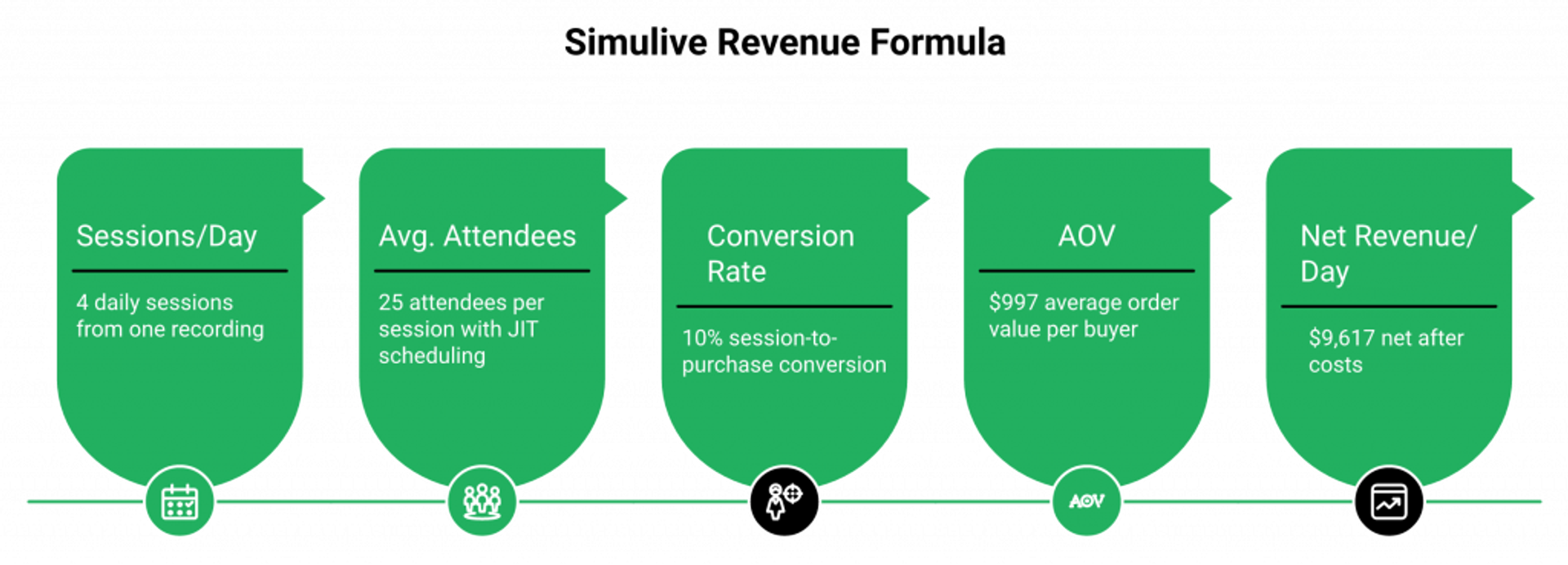
Net Revenue/Day = (Sessions/Day × Avg. Attendees × Conversion Rate × AOV) − (Platform Cost + Ad Spend + Moderation Time)
Worked example:
- 4 sessions/day × 25 attendees × 10% conversion × $997 AOV = $9,970/day gross
- Minus: $116/mo platform ($3.87/day) + $300/day ad spend + $50/day moderation = $353.87/day
- Net: $9,616.13/day
That’s the power of the multi-replay multiplication effect. One recording × 4 sessions/day × 365 days = 1,460 delivery events from a single production investment. No live presenter can match that unit economics. Learn more about how to make money with webinars and 4X your revenue.
📊 Webinar Benchmarks by Format Type
| Format | Attendance Rate | Session-to-Purchase Conversion | Best For |
|---|---|---|---|
| Live Webinar | 25 to 35% | 8 to 12% | High-ticket launches, real-time trust building |
| Simulive with JIT | 35 to 47% | 10 to 15% | Recurring evergreen funnels, scaling proven content |
| Automated (no live chat) | 20 to 28% | 4 to 8% | Nurture sequences, low-touch education |
| On-Demand Recording | 10 to 15% | 2 to 5% | Replay funnels, gated content lead magnets |
JIT scheduling is the single biggest lever for simulive attendance rates. When someone registers and immediately enters a session starting in 12 minutes, show-up isn’t a question. It’s a default behavior.
The 6 Metrics That Actually Matter
Track these or you’re guessing:
- Registration rate: Target: 30 to 40% from paid traffic. Below 25%? Your landing page copy or ad-to-page message match is broken.
- Attendance rate: Target: 35 to 47% with JIT. Below 25%? Enable JIT and tighten reminder sequences.
- Watch time (stick rate): Target: >70% completion. Low stick rate? Add open loops, reduce value overload, and shorten the sales portion.
- Engagement score: Poll responses, chat messages, and CTA clicks per attendee. Low engagement equals low conversion, always.
- Offer click rate: Target: 25 to 40% of attendees who reach the offer. Below 15%? The transition from teaching to selling is too abrupt.
- Post-event conversion: Target: 8 to 15% of attendees. This is the number that determines your entire funnel’s viability.
💸 The Stack Consolidation Savings
Here’s where most operators are leaking money without realizing it:
| Tool | Monthly Cost |
|---|---|
| ClickFunnels (landing pages) | $150 to $250 |
| Zoom (webinar hosting) | $100 to $200 |
| HubSpot/Pipedrive (CRM) | $80 to $150 |
| Zapier (glue) | $50 to $100 |
| Restream (multistreaming) | $50 |
| Payment processor fees | Variable |
| Total | $600 to $1,000/mo |
We built EasyWebinar to consolidate that entire stack into one platform from $116/mo, covering hosting, CRM, email follow-up, checkout, and distribution. That’s $500 to $900/mo flowing directly back into your ROI denominator. See full webinar pricing.
Rick Mulready achieved 166% ROI on Facebook ads driving to automated EasyWebinar sessions. 30% registration conversion from cold paid traffic, $8 to $12 cost per lead, consistent across 12 months because the evergreen format eliminated per-session quality variation.
“We have run close to 30 [webinars] since we started running it this new year and it has been a game changer for our business. It also seamlessly integrated with our CRM.”— Darrin B. Easywebinar G2 – Verified Review
“We’ve made a lot of money since implementing this tool in our sales strategy using a set it and forget it sales funnel with Facebook ads.”— Meaghan L. Easywebinar G2 – Verified Review
Q7: What Are the Best Use Cases for Simulated Live Webinars? (B2B Sales Demos, Lead Gen, Training & More)
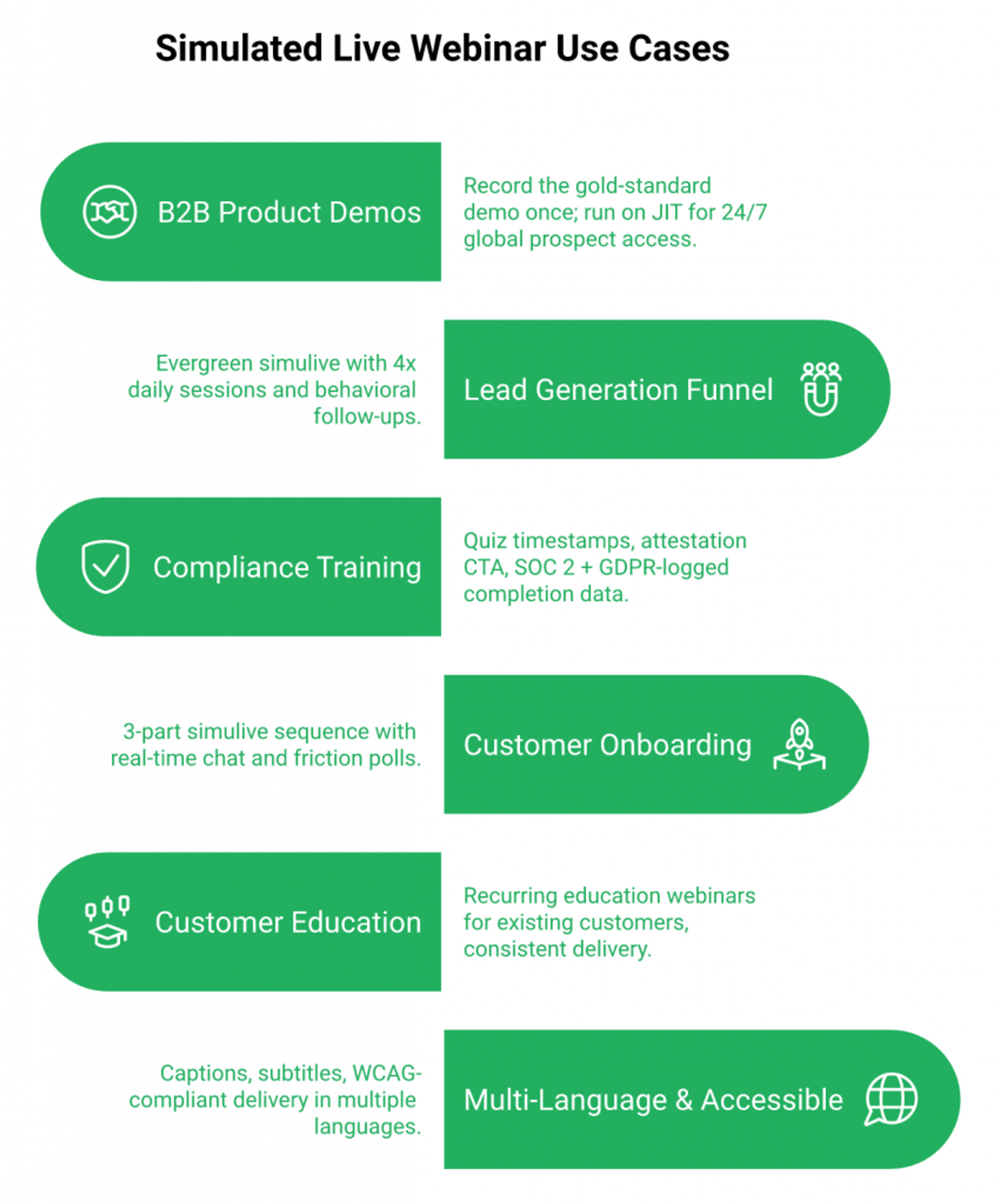
Simulated live webinars aren’t just for course creators. The format works in any scenario where the same high-quality presentation needs to be delivered repeatedly, across time zones, without degrading in quality or requiring a live presenter every session. Here are six use cases where the simulive architecture creates measurable operational leverage.
Use Case 1: B2B SaaS Product Demos, The Demo Automation Engine
Your top AE has 6 demo calls on Wednesday. By call 4, the energy is flat and the conversion rate drops. Meanwhile, 3 APAC prospects couldn’t find a slot that worked. The demo backlog grows, and pipeline velocity stalls.
The fix: Record the gold-standard demo once, the one where your AE is sharpest and covers every objection. Broadcast it on JIT schedule so it starts within 15 minutes of a prospect clicking “Watch Demo.” Live chat stays active for real-time objection handling. Our sales CRM scores every attendee as Hot, Warm, or Nurture based on what they clicked, how long they watched, and whether they engaged with the offer. Same polished demo, 24/7, globally.
One of our clients eliminated 6 of 7 sales reps by placing a simulive demo at the front of their sales process. The webinar qualified and converted leads autonomously, and the remaining rep handled only the highest-intent, demo-engaged prospects.
Use Case 2: Top-of-Funnel Lead Generation
You’re running paid traffic to a webinar registration page, but your single weekly live session means prospects wait 5 to 7 days to attend. By then, intent has decayed, calendars have filled up, and your show-up rate sits at 18%.
The fix: Evergreen simulive with JIT scheduling, 4x daily sessions, and behavioral Power Follow-Ups segmenting clickers from non-clickers. Registration-to-purchase cycle compresses from weeks to days. The webinar runs continuously; the follow-up adapts to each attendee’s behavior automatically. Our automated webinars 2025 scalable funnel strategies guide breaks down the full workflow.
Use Case 3: Employee Compliance and Regulatory Training
Your HR/L&D team manually schedules the same compliance training 3 times per year across departments. Employees miss sessions. Documentation is manual. Audit trail is a spreadsheet nightmare.
The fix: Simulive compliance session with quiz interactions at timestamps, attestation CTA at the end, automatic completion confirmation email, and CRM-logged completion data. SOC 2 Type II and GDPR compliance ensure regulated industries can deploy this architecture without procurement friction. See our how to master webinar training guide for team leaders for a deeper breakdown.
Use Case 4: Customer Onboarding and Education
CSMs spend 4+ hours per week repeating the same product onboarding call. Churn spikes when customers skip onboarding entirely because the next available session is 2 weeks out.
The fix: A 3-part simulive onboarding sequence with JIT scheduling, real-time chat for questions, in-session polls that identify friction points, and automated follow-up to non-completers. Every new customer gets onboarded within 15 minutes of signup, not 2 weeks later. Read more about how webinars are changing customer education in 2026.
Use Case 5: Multi-Language and Accessible Delivery
Global teams need the same training delivered in multiple languages with captions, subtitles, and WCAG compliance. Recording once per language and broadcasting on timezone-adjusted schedules eliminates the need for multilingual presenters on standby.
✅ Why One Platform Handles All 6
We designed EasyWebinar so that the same simulive infrastructure handles product demos, compliance training, lead gen funnels, and onboarding sequences, all from one dashboard. SOC 2 Type II certification covers enterprise training use cases. GDPR compliance handles multi-geography delivery. You don’t need separate tools for separate use cases. See all features in one view.
“It is solving a big hole for us, our current webinar software is clunky, old, and not reliable.”— Verified User in Information Services Easywebinar G2 – Verified Review
“The ability to automate webinars has allowed us to reach more people on a consistent basis without having to be available for every live session.”— Jo K. Easywebinar G2 – Verified Review
Q8: Simulated Live Webinar Best Practices: 10 Rules for Ethical, High-Converting Delivery
Running a simulive webinar that converts isn’t about tricks. It’s about operational discipline. These 10 rules are the difference between a funnel that generates revenue on autopilot and one that leaks trust, engagement, and sales at every stage.
Rules 1 to 5: The Foundation
1. ✅ Be transparent, every time, everywhere.
Use the disclosure phrases from the ethics section. Put them on your registration page, in your confirmation email, and in your first chat message. Transparency isn’t a liability. It’s the reason attendees trust you enough to buy.
2. Design interaction moments at specific timestamps before recording.
Plan poll questions, CTA overlays, and chapter-break callouts before you enter the recording booth. You cannot retrofit engagement to a finished video. If you didn’t plan a poll at minute 18 before recording, you’re not adding one at minute 18 after. See our interactive webinars that drive 5x engagement playbook.
3. Apply the evergreen content checklist to every recording.
Use the 15 never-say and 10 always-do rules from the scheduling section. One stray “this year” reference and your recording has a shelf life. Evergreen discipline is what separates a simulive that runs for 12 months from one that dates in 90 days.
4. ⚠️ Test the full attendee experience 24 hours before launch.
Register as a test attendee. Watch the full session. Submit a chat question. Verify every email fires, including confirmation, reminders, follow-up for attended, and follow-up for no-show. If you skip this step, your first real attendees become your beta testers.
5. Promote like a live event: urgency, exclusivity, and scarcity.
“Next session starts in 23 minutes.” Limited replay windows. “Only available until [date]” for offers. Simulive gets the conversion power of live urgency without the operational burden of live presenting. Don’t throw that away with passive “watch anytime” language. See webinar content strategy for high-impact sessions.
Rules 6 to 10: The Revenue Layer
6. Seed 3 to 5 chat questions in the first 5 minutes.
Dead chat in the opening minutes kills engagement for the entire session. Have your moderator post 3 to 5 icebreaker questions before real attendees even arrive. “What’s your biggest challenge with [topic]?” isn’t just engagement theater. It generates real objection data you can use in follow-up.
7. 💰 Close with a live Q&A window, this is your highest-converting moment.
Announce at minute 55: “The presentation is wrapping up, I’m live for the next 15 minutes. Drop your questions.” The Q&A close is where attendees voice the final objections standing between them and a purchase. Answer those live, and conversion rates spike.
8. Schedule across all major time zones.
Use the 3-model scheduling architecture: fixed recurring, JIT, and on-demand. If your content converts when people show up, and they’re not showing up, the problem isn’t your webinar. It’s the access.
9. Connect every registrant to CRM for behavioral follow-up.
Every registrant behavior, attended, clicked offer, watched replay, and left early, must flow into CRM automatically. Not batch-and-blast “thanks for attending” emails. Behavioral sequences: clicked but didn’t buy gets objection-handling. Left early gets a replay with the key moment timestamped. No-show gets urgency re-invite. Our integrations handle the handoff natively.
10. Repurpose every session into clips, blog posts, and email content.
One webinar recording should produce: 5 to 8 highlight clips for social, a full transcript converted into a blog post, a Q&A summary converted into an FAQ article, and pull-quotes for email sequences. The webinar isn’t a single event. It’s a content engine.
❌ 4 Common Simulive Mistakes and the Recovery Playbook
| Mistake | What Happens | Fix |
|---|---|---|
| Forgot to enable JIT scheduling | Low show-up rates from traffic spikes, registrants wait days for next session | Activate JIT and on-demand as immediate backup |
| Content dated mid-run | Attendees notice year/price references, trust erodes | Re-record intro/outro segment only, not full video |
| Chat went dead in first 5 minutes | Low engagement cascades into low conversion | Moderator pre-seeds questions and uses FAQ template library |
| Forgot to test follow-up sequences | Attendees received wrong or no emails, pipeline leaks | Run 24-hour full test protocol before every new version launch |
How EasyWebinar Prevents These Mistakes
We built a pre-launch test mode directly into the platform. You can run a private simulive session as yourself before publishing, verifying video playback, chat, polls, offer CTAs, and email sequences in one 60-minute walkthrough. The platform’s launch checklist is built into the publishing flow, so you physically cannot skip the critical steps. Request a demo to see it in action.
“AUTOMATED WEBINARS. Yes, I wrote that in all caps. I’ve been going live every month since 2020 and I’m exhausted. I feel like I have had a big sigh of relief since signing up and I can see the end in sight!”— Verified User in Photography Easywebinar G2 – Verified Review
“Easy to set up live or evergreen webinars, including replay options. The analytics also show how many saw or clicked your offer.”— Verified User in Professional Training & Coaching Easywebinar G2 – Verified Review
“Automating webinars that we used to have to run live every week and over time also saving us money, being more efficient.”— Darrin B. Easywebinar G2 – Verified Review
Q9: Best Simulated Live Webinar Software in 2026: Top Platforms Ranked with Pricing
The best simulated live webinar software in 2026, ranked by format flexibility, engagement authenticity, CRM integration depth, and monetization capability, are: (1) EasyWebinar, (2) eWebinar, (3) EverWebinar, (4) WebinarNinja, (5) Demio, (6) StealthSeminar, (7) WebinarKit, (8) Livestorm, (9) WebinarGeek, and (10) Adobe Connect.
✅ Quick Decision Tree: Match Your Need to the Right Platform
Before scanning the full list, route yourself:
- Need live, simulive, automated, and evergreen from one platform: EasyWebinar
- Need simulive-only with deeply authentic live chat: eWebinar
- Need automated-only with realistic simulation features: EverWebinar or StealthSeminar
- Need B2B CRM bidirectional sync: Livestorm
- Need GDPR-first European compliance: WebinarGeek
- Need enterprise SOC 2 with 50K+ attendees: EasyWebinar Unlimited or Adobe Connect
1. EasyWebinar: Full-Funnel Webinar Revenue Platform
EasyWebinar is a webinar platform built for creators, marketing teams, and mid-market businesses that want hosting, automation, CRM, follow-up, monetization, and multistreaming in one system.
- ✅ 5 webinar formats natively: Live, simulive (Automated Gold), automated, evergreen, and hybrid
- ✅ EasyCRM with behavioral lead scoring and auto-dialer, no third-party CRM required
- ✅ AI webinar builder: complete funnel (pages, emails, offers, and polls) from a single prompt in under 10 minutes
- ✅ In-webinar monetization: native Stripe, PayPal, and PayU checkout, timed offers, and ticketed access
- ✅ EasyCast multistreaming to YouTube, LinkedIn, Facebook, and custom RTMP
- ✅ SOC 2 Type II, GDPR, and SSO/SAML: enterprise-ready compliance
⚠️ Limitations: Smaller G2 review footprint than Zoom or Demio, which can slow enterprise procurement conversations. The breadth of features means a steeper initial setup than single-purpose tools.
💰 Pricing: Growth at $116/mo ($96 billed annually) for 200 live and 1,000 automated attendees. Pro at $198/mo ($165 billed annually) for 500 live and 2,500 automated. See full webinar pricing.
Best For: Teams who want one platform for the entire webinar revenue workflow: hosting, automation, CRM, follow-up, checkout, and distribution. Skip If: You only need a basic live meeting room with no funnel, no automation, and no monetization.
“EasyWebinar is hands-down THE webinar platform for evergreen webinars, no contest. EasyWebinar makes it, well, easy to work smarter, not harder.”— Ash A. Easywebinar G2 – Verified Review
2. eWebinar: Simulive Specialist with Real Live Chat
eWebinar is purpose-built for simulated live delivery, turning any pre-recorded video into an interactive, scheduled session with real live chat and Slack-integrated notifications.
- ✅ Real live chat on every automated session, attendees get authentic human responses
- ✅ Flexible scheduling: recurring, just-in-time, and on-demand replay
- ✅ Strong interaction toolkit: polls, questions, tips, and timed CTAs during playback
⚠️ Limitations: No live webinar format, simulive and on-demand only. No built-in CRM, checkout, or multistreaming.
💰 Pricing: Level 1 at $99/mo (up to 1 active webinar, 1,000 registrants/mo). Level 2 at $199/mo for up to 5 active webinars. Level 3 at $299/mo for up to 15.
Best For: Teams that run simulive-only and want the most authentic live chat experience. Skip If: You need live webinars, built-in CRM, or in-session monetization.
3. EverWebinar: Realistic Automated Simulation Engine
EverWebinar, from Genesis Digital, focuses on making pre-recorded sessions feel indistinguishable from live events through features like Replica Replay and just-in-time scheduling.
- ✅ Replica Replay mimics live stream behavior: no rewind, no fast-forward
- ✅ Just-in-time scheduling with simulated attendee activity
- ✅ Dynamic scheduling across time zones
❌ Limitations: Annual-only pricing. Complex setup with documented cloning bugs. No native CRM or in-session checkout. Customer support has been consistently flagged. See our full EasyWebinar vs WebinarJam breakdown.
“Upon using this software, we ran into many problems including inability to clone webinars without serious resulting issues. It took 10 emails to get the above issue even figured out.”— Kaylen M. EverWebinar – G2 Verified Review
💰 Pricing: Starts at approximately $99/mo (annual billing required). No monthly option.
Best For: Operators who want the most “live-feeling” automated replay with scarcity triggers. Skip If: You need a monthly plan, reliable cloning, or live webinar capability.
4. WebinarNinja: All-Format Versatility (With Caveats)
WebinarNinja positions itself as an all-in-one webinar solution supporting live, automated, series, and hybrid formats with built-in marketing tools.
- ✅ 4 webinar formats from one dashboard
- ✅ Built-in email sequences and registration pages
- ✅ Browser-based, no downloads for attendees
❌ Limitations: Severe reliability issues documented across G2 and Trustpilot, including live webinar failures, server instability during high-traffic events, and broken co-host invite flows. See EasyWebinar vs Webinar Ninja.
“The system is NOT ready to be used by real users. It supposes to be in BETA. The constant issues with connection during live webinars, bugs, issues with the booking system make it extremely unreliable.”— Eitvydas Rastutis WebinarNinja – Trustpilot Review
💰 Pricing: Starts at approximately $29/mo for basic plans.
Best For: Budget-conscious solo operators testing webinar formats. Skip If: You run high-stakes live events or need reliability at scale.
5. Demio: Clean UX with Engagement Analytics
Demio is a browser-based webinar platform built for marketers who prioritize clean design, fast setup, and engagement analytics for live and automated sessions.
- ✅ Zero-download browser experience for attendees
- ✅ Strong per-attendee engagement tracking (polls, CTAs, and attendance duration)
- ✅ Clean, modern interface with fast event setup
⚠️ Limitations: No built-in CRM, all lead management requires HubSpot or ActiveCampaign via integration. No in-webinar checkout. Data export blocked after cancellation. Pricing scales steeply. Compare directly at EasyWebinar vs Demio.
“I used Demio to run a webinar and collected registrant emails while on a paid plan. After canceling, I was shocked to find out I couldn’t export the list unless I subscribed again.”— Sheida M. Demio – G2 Verified Review
💰 Pricing: Starts at $59/mo for 50 attendees. Scales to $734/mo at 3,000 attendees.
Best For: Marketers who want a polished live webinar UX with solid analytics. Skip If: You need a CRM, in-webinar monetization, or affordable pricing at scale.
6. StealthSeminar: Conversion-Focused Automated Engine
StealthSeminar is built for conversion optimization in automated webinar funnels, with scarcity tools, split-testing, and Active Response Statistics tracking attendee behavior in real time.
- ✅ Automated and live formats with Active Response Statistics
- ✅ SMS reminders (worldwide), split testing, and white-label options
- ✅ Reliable backend with strong uptime record
⚠️ Limitations: No built-in CRM or native checkout. Interface feels dated compared to modern competitors. No simulive-specific format. See EasyWebinar vs Stealth Seminar.
💰 Pricing: Starter at $69.95/mo (100 simultaneous attendees). Growth at $175/mo for 300 to 500 attendees.
Best For: Conversion-focused operators who run automated funnels with scarcity and urgency. Skip If: You need live webinars with modern UX, CRM, or in-session payment.
7. WebinarKit: Affordable Automation with Unlimited Attendees
WebinarKit is an AI-forward automated webinar platform offering unlimited webinars, registrants, and attendees at a flat rate, making it the most affordable pure-automation option.
- ✅ Unlimited webinars, registrants, and attendees at flat pricing
- ✅ AI features for webinar creation
- ✅ Flexible scheduling: just-in-time, recurring, and multi-day series
❌ Limitations: No live webinar capability at all. Newer brand with limited enterprise trust signals. No built-in CRM.
💰 Pricing: Starts at $57/mo (automated only). Pro at $97/mo. Agency at $147 to $297/mo with white-label.
Best For: Solo operators who only run automated webinars and want unlimited scale at the lowest price. Skip If: You ever need to go live: WebinarKit has no live webinar capability.
8. Livestorm: B2B CRM-Integrated, Browser-Based
Livestorm serves B2B marketing teams with a browser-based platform, strong CRM integrations (HubSpot, Salesforce bidirectional sync), GDPR compliance, and AI-powered summaries.
- ✅ Bidirectional CRM sync with HubSpot and Salesforce
- ✅ GDPR-compliant with EU data hosting
- ✅ AI meeting summaries and unlimited recording replays
⚠️ Limitations: No native CRM, no built-in checkout, and no multistreaming. Expensive for solopreneurs. Not funnel-native.
💰 Pricing: Free plan for up to 30 registrants. Pro from $99/mo. Business and Enterprise tiers require sales contact.
Best For: B2B marketing teams with existing CRM infrastructure who need compliant, browser-based live events. Skip If: You need automation depth, simulive, or in-webinar monetization.
9. WebinarGeek: GDPR-First for European Teams
WebinarGeek is a Netherlands-based platform designed for European companies that need strict GDPR compliance, live chat during automated sessions, and multi-language support.
- ✅ GDPR-compliant by architecture: EU data hosting and cookie consent built-in
- ✅ Live chat active during automated webinar playback
- ✅ Multi-language interface and registration pages
⚠️ Limitations: Video quality degrades with multiple remote presenters. Conversion tracking is limited. Smaller ecosystem of integrations.
“Video quality was really good, but the conversion was not good. The quality when using multiple presenters will go down a lot.”— Verified User WebinarGeek – G2 Verified Review
💰 Pricing: Starts at €24/mo for basic plan. Professional tiers scale with attendees and features.
Best For: European teams requiring GDPR-first architecture with live chat on automated sessions. Skip If: You need enterprise-grade monetization, CRM, or multi-presenter reliability.
10. Adobe Connect: Enterprise Documentation and Training
Adobe Connect is an enterprise virtual room platform built for corporate training, compliance documentation, and large-scale internal communications with deep content library management.
- ✅ Persistent virtual rooms with rich content layouts
- ✅ Deep compliance documentation: attendance tracking, quiz scoring, and completion certificates
- ✅ Breakout rooms, whiteboard collaboration, and advanced host controls
⚠️ Limitations: Over-engineered for marketing webinar use cases. No automation, no evergreen, no CRM, and no in-webinar checkout. Requires desktop client. Pricing is opaque and enterprise-only.
💰 Pricing: Custom enterprise pricing, no published rates. Typically $30K+ ACV.
Best For: Enterprise training departments that need persistent rooms, compliance tracking, and document management. Skip If: You’re running marketing or sales webinars: Adobe Connect wasn’t built for conversion.
Q10: Ready to Build Your Simulated Live Webinar Funnel? Start Here
If you’ve made it this far, you’ve already decided that simulated live webinars are the right format. The next question isn’t “should I go simulive?”. It’s “which platform matches my revenue model, not just my budget?”
⏰ The Difference Compounds Over Time
Simulive platforms have evolved well beyond “play a video on a schedule.” The differentiators that actually drive revenue outcomes are format range, engagement authenticity during playback, CRM integration depth, monetization architecture, and behavioral follow-up intelligence, not feature counts or pricing tiers alone.
Here’s what I’d evaluate before committing to any platform:
- Does it support live, simulive, and evergreen from one system, or do you need separate tools per format?
- Is chat real or simulated during playback?
- Does in-session behavior (poll responses, offer clicks, and watch time) feed CRM automatically?
- Can it accept payments inside the webinar, or does intent decay while attendees navigate to an external checkout?
- Is follow-up triggered by specific attendee actions, or generic batch blasts?
💰 See the Full Side-by-Side Breakdown
Each platform in our detailed compare webinar platforms resource scores against these 5 criteria with specific pricing, attendee limits, real operator reviews, and architectural trade-offs, so you can match the platform to your workflow, not your vendor’s marketing page.
This guide is grounded in 14 years of building and running webinar funnels across every format (live, simulive, automated, and evergreen), generating eight figures in total sales for my own business and the thousands of operators who’ve built their revenue systems on EasyWebinar.
Q11: FAQ: Simulated Live Webinar Questions Answered
Quick answers to the most common simulive webinar questions, each designed to stand alone as a complete, extractable response.
What is a simulated live webinar?
A simulated live webinar (also called “simulive”) is a pre-recorded presentation broadcast on a set schedule with live engagement tools (real-time chat, polls, and timed offers) active during playback. Attendees experience it as live; the presenter delivers content without being present in real time. The term combines “simulated” and “live” to describe the hybrid nature: pre-recorded video, live interaction layer. Learn more about pre-recorded webinar platforms vs live.
Is a simulated live webinar fake?
No. When operated ethically with transparent disclosure and real live chat, a simulive webinar delivers identical value to a live session. What makes a simulive unethical is fabricated chat messages, inflated attendee counts, or hiding the pre-recorded nature when directly asked. Transparency is a trust amplifier, not a constraint.
✅ What is the difference between simulive and automated?
Simulive runs on a fixed schedule with live engagement (real chat and polls) active during playback. Automated webinars play at a set time with pre-scripted or no engagement. Simulive preserves the live-feel conversion mechanics (chat, objection handling, and real-time Q&A) that automation strips away. This is the most misunderstood distinction in the space. Our Automated Webinars for Passive Income guide covers the trade-offs in depth.
Can you run simulive webinars on Zoom?
Zoom Events supports a basic simulive format, but it lacks live engagement features during automated playback and has no built-in CRM, behavioral follow-up, or in-session monetization. We built EasyWebinar’s Automated Gold format specifically to support full simulive with all engagement mechanics natively: real chat, polls, timed offers, and Power Follow-Ups running from within the same platform. See EasyWebinar vs Zoom for a full feature comparison.
“We faced so many issues and bugs with our Zoom events that made the tool completely unreliable and impossible to use.”— Verified User in Translation and Localization Zoom Events and Webinars – G2 Verified Review
Can you do a live Q&A during a simulated live webinar?
Yes. The presenter or moderator monitors chat in real time while the pre-recorded video plays, then conducts a live Q&A window at the end of the session when the recording concludes. This is actually where the highest-converting moment happens: attendees have absorbed the content and are ready to ask the questions that stand between them and a purchase decision.
💡 How do you make a pre-recorded webinar feel live?
- Use real (not simulated) live chat, attendees can tell the difference
- Seed 3 to 5 chat questions in the first 5 minutes to prevent dead air
- Add timed poll questions that appear at key content moments
- Close with a live Q&A window after the recording ends
- Disclose transparently on the registration page and in the first chat message
- Schedule with JIT urgency so attendees join while their intent is at its peak
Our guide to interactive webinars that drive 5x engagement goes deeper on each of these tactics.
Is it legal to run a simulated live webinar?
Yes. Simulive webinars are legal in all jurisdictions. Legal exposure arises only from fraudulent misrepresentation (explicitly claiming to be live when directly asked and denying it). Transparent disclosure eliminates this risk entirely. The ethical standard isn’t “never use pre-recorded content”, it’s “never deceive when asked directly.”
⭐ What is the best simulive webinar software in 2026?
EasyWebinar supports all 5 webinar formats (live, simulive, automated, evergreen, and hybrid), includes a built-in sales CRM with behavioral lead scoring, native in-session checkout, and AI-powered funnel generation, making it the most complete simulive revenue platform at its price point.
“I convert really well with live webinars, but, I can’t be everywhere at once. EasyWebinar gives me the ability to multiply my efforts and offer a human touch, without having to be everywhere at once.”— Ash A. Easywebinar G2 – Verified Review
“With my live class I used to sell 10-12 courses. With EasyWebinar I sold 25 courses within 3 weeks of my evergreen launch. This is an incredible tool that feels like a live class but takes away the exhaustion of showing up live, while also performing 100% better in terms of course revenue.”— Laura C. Easywebinar G2 – Verified Review
Q12: How One Course Creator Generated $5M from a Single Simulive Funnel
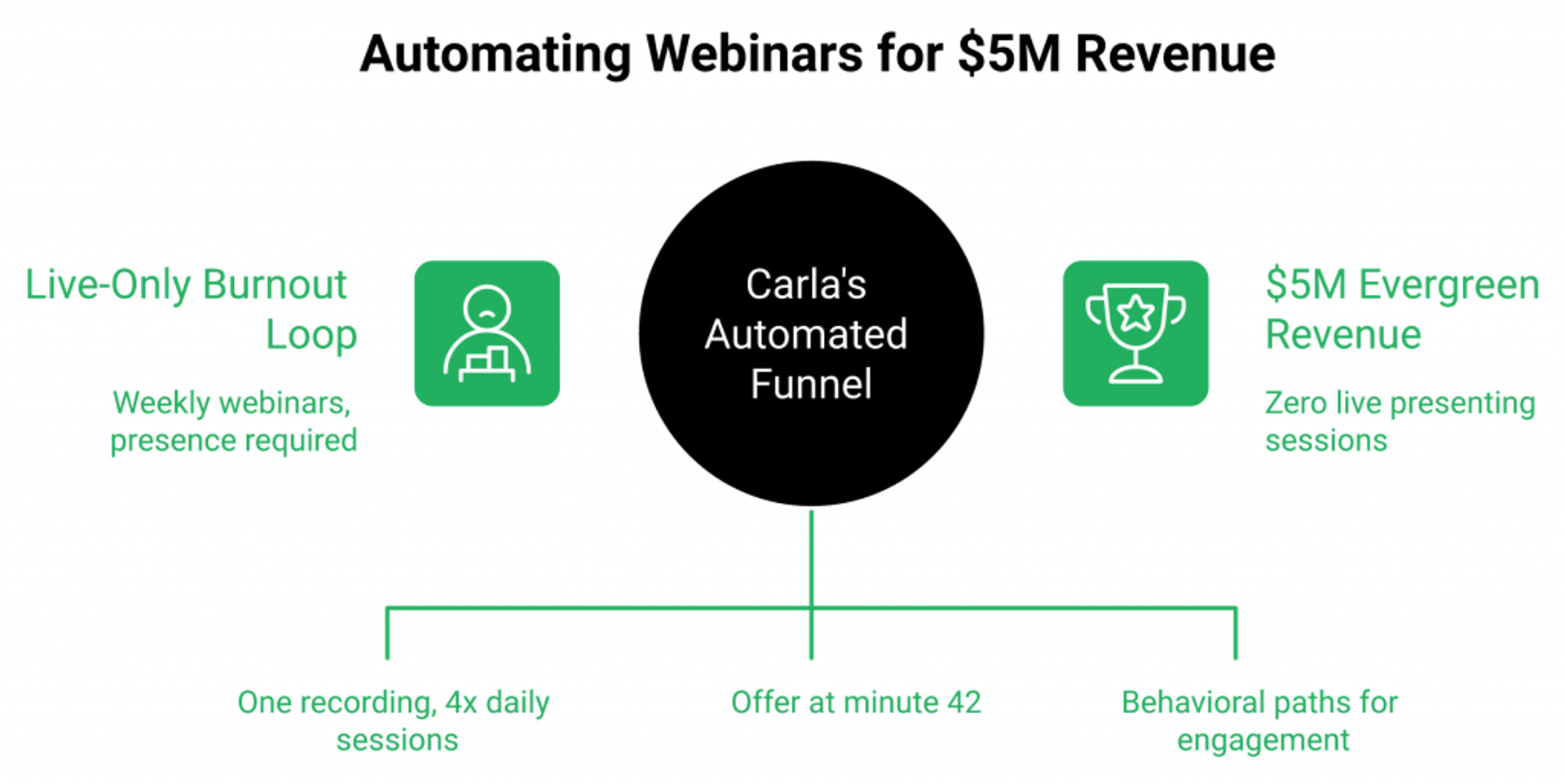
Carla Biesinger generated $5M in revenue from a single EasyWebinar evergreen funnel. One pre-recorded webinar, running multiple times daily on automated scheduling, with in-session timed offers and Power Follow-Ups doing the selling 24/7 while she stopped presenting entirely. Read the full course creator case study.
⚠️ The Situation Before: Trapped in the Live Loop
Carla was running live webinars manually: same presentation every week, follow-ups through a separate email tool, payments processed through an external checkout page. The funnel converted. That wasn’t the problem. The problem was that her presence was required for every single session. She couldn’t take a vacation without the revenue stopping. She couldn’t scale without cloning herself. And after months of weekly live delivery, the burnout was real.
This is the trap most operators don’t see coming. The webinar works, so you keep doing it. But “works” and “scales” are two different things. One requires your energy. The other requires a system.
✅ What She Built: One Recording, Four Behavioral Paths
Carla recorded her highest-converting live webinar, the one that had already been validated through 10+ live sessions, and converted it to an Automated Gold evergreen funnel on EasyWebinar. The session runs 4x daily, timezone-adjusted per registrant. A timed CTA offer appears at minute 42 with a countdown timer. The engagement layer (polls, chat prompts, and timed offers) runs natively inside the session, identical to what her live attendees experienced.
Post-webinar, Power Follow-Ups segment attendees into 4 behavioral paths:
- Clicked offer but didn’t buy: objection-handling email sequence within 2 hours
- Attended but left early: replay invitation with the key conversion moment timestamped
- Registered but no-show: urgency re-invite to the next available session
- Watched replay: final-push sequence with deadline
No CSV exports. No Zapier chains. No manual tagging. Every follow-up is triggered by what each person actually did inside the webinar. Read more about how webinars 4x revenue when behavioral follow-ups are built in.
💰 The Numbers
- $5M total revenue from a single evergreen webinar funnel
- 24/7 automated delivery: webinar runs across all time zones without Carla presenting
- 4 behavioral follow-up paths, each triggered by in-webinar actions, automated through Power Follow-Ups
- Single-platform operation: hosting, pages, offers, checkout, CRM, and follow-up all inside EasyWebinar
- Zero live presenting sessions post-launch
💡 The Principle: You Don’t Start with Automation, You Earn It
Carla’s result wasn’t about a magic webinar script. It was about removing herself from the delivery loop while keeping every conversion mechanic intact. Urgency (countdown timers), personalization (behavioral follow-up paths), and consistency (same polished delivery every session) compounded over time.
This is the framework I’ve taught for 14 years: go live first to validate your content and offer with a real audience, hit at least a 10% attendee-to-buyer conversion rate, then convert your best-performing session into a simulive or evergreen funnel so it sells while you sleep. You don’t start with automation. You earn it by proving the webinar converts when you’re in the room. Then you let the system run the room for you. See more customer reviews from operators who’ve done the same.
“AUTOMATED WEBINARS. Yes, I wrote that in all caps. I’ve been going live every month since 2020 and I’m exhausted. I feel like I have had a big sigh of relief since signing up and I can see the end in sight!”— Verified User in Photography Easywebinar G2 – Verified Review
“I used to do live webinars to sell my online course. With EasyWebinar I sold 25 courses within 3 weeks of my evergreen launch. This is an incredible tool that feels like a live class but takes away the exhaustion of showing up live.”— Laura C. Easywebinar G2 – Verified Review

Casey Zeman
Founder of EasyWebinar
About Author
Over the past decade, I've helped thousands of entrepreneurs, coaches, and consultants turn webinars into a predictable, powerful way to grow their audience, build trust, and scale, without the constant hustle. I created EasyWebinar because I couldn't find a system that combined authenticity, engagement, and automation the way I needed. So, I built one.
Related Posts

10 Best Community Engagement Platforms in 2026
Compare the 10 best community engagement platforms in 2026. Course creators, evaluate live hosting, analytics, and replay to pick your winner today.
10 Best Online Coaching Tools in 2026: Live Session Quality, Scheduling, Recording, and Client Engagement Analytics
Compare the 10 best online coaching tools of 2026 on session quality, scheduling, and analytics. Discover the right fit for your coaching revenue model.
10 Best Webinar Hosting Platforms Ranked by Uptime, Streaming Quality & Cost
Compare 10 webinar hosting platforms ranked by uptime, streaming quality, and cost. Discover which tool actually turns attendees into revenue.
Turn every webinar into a revenue stream
Launch your first paid event in just a few clicks - and start monetizing your expertise.
Book a Call