How to Build an Evergreen Sales Funnel That Generates Revenue 24/7 [With 3 Proven Examples]

Casey Zeman
Published on Jun 6, 2026 • 24 min read

TL;DR
- An evergreen sales funnel sells to each lead on their own timeline, through a registration page, an automated webinar, follow-up, and checkout.
- Go evergreen only after your live webinars convert at least 10% of attendees. Then automate the winning recording.
- Real urgency comes from personal deadlines that actually end, such as a 72-hour replay window, not countdown timers that reset.
- The three proven models are the webinar-to-checkout funnel, the video-to-application pipeline, and the paid workshop funnel.
- Most stalled funnels fail on plumbing, not the pitch. Fix the earliest stage that misses its benchmark first.
Q1: What is an evergreen sales funnel, and how is it different from a launch?
An evergreen sales funnel is an always-on path that sells to each lead on their own timeline. It runs from a registration page to an automated webinar, then to follow-up and a checkout or application. A launch gives every buyer one shared deadline. EasyWebinar runs a webinar live first, then turns that proven session into an automated webinar on the same platform and subscription.
The launch treadmill most creators know
⏰ A Sunday night with three tabs open
A coach sits at her kitchen table on a Sunday night. She has three tabs open: her launch calendar, her email platform, and next Tuesday's webinar link. Her last launch made money, but it took six weeks. This one starts from zero again.
That is the launch model. You open the cart, run live sessions, close the cart, and recover. Revenue comes in spikes, and so does the exhaustion.
💸 Launch vs. evergreen at a glance
| - | Launch | Evergreen funnel |
|---|---|---|
| Deadline | One date for everyone | A personal deadline for each lead |
| Cart | Opens and closes on a calendar | Always open, with the offer timed per lead |
| Revenue | Spikes, then silence | Daily, as long as traffic keeps coming |
| Your time | Live every cycle | Live to prove it, then automated |
| Main risk | Burnout | Automating a pitch that never sold |
What changed: the presentation is the asset
⚠️ Why "always on" often means "always leaking"
Many creators heard that evergreen means passive income, so they built the automated funnel first. That skips the step that matters. An automated webinar repeats whatever you recorded. A pitch that never sold live will not sell at 3 a.m. either.
EasyWebinar's read is that the proven presentation is the asset, not the funnel around it. I learned that the hard way after spending six months on a YouTube course that launched to crickets. Webinars were the only thing that finally produced sales. My first year of live webinars built a 14,000-person email list and $245,000 in course sales.
How EasyWebinar turns a live win into an everyday session
✅ One switch from live to automated
EasyWebinar hosts the live session and the automated version on one platform with one login. Once the live version converts, a single click turns that live webinar into an automated evergreen funnel. You never rebuild a presentation that already works.
The change shows up in your calendar first. EasyWebinar users spend live hours testing new offers instead of repeating last month's pitch every Tuesday. The proven session keeps selling while you build the next one.
⭐ What a proven session can carry
EasyWebinar customer Carla Beisinger generated $5 million from one evergreen webinar funnel after growing from small live events into a fully automated system. Her result came from a session that worked live first. That order is the pattern worth copying.
EasyWebinar converts the live session that proved your offer into Just-in-Time, Evergreen, Simulive, or On-Demand formats with one switch. Just-in-Time starts a session minutes after someone registers, in their own time zone. Simulive plays the recording on a schedule, and On-Demand plays it instantly. Think of it as live validation to evergreen scaling.
Q2: Should you go evergreen now, or keep selling live?
Go evergreen once at least 10% of live attendees consistently buy. Below that line, automation repeats a pitch that is not working yet. EasyWebinar's Webinar Sprint Method sets the order: run 5 to 10 live webinars, reach a 10% attendee-to-buyer rate, then automate the winning recording. The rule settles a real disagreement among operators about cold traffic.
Two experienced operators, two opposite answers
⚠️ The case against automating
Jeremy Haynes has run ads for webinar funnels for over a decade. He took one evergreen webinar client to $2.5 million a month. Today he runs sales webinars live. He reports that webinars that converted well live did far worse once automated on cold ad traffic.
Yuri Elkaim argues the other side. His team recorded one evergreen webinar, ran it around the clock, and reports more than $217 million generated for itself and its clients. He calls weekly live webinars a trap with poor show-up rates.
💸 What early automation costs
Both are right about different stages. Haynes warns against automating too early, while Elkaim describes a pitch that was already proven. Rick Mulready tells operators to expect evergreen numbers to run at roughly half of their live numbers. A 4% live webinar may become a 2% automated one, and ad spend outruns revenue.
EasyWebinar's 10% rule exists for that math. My own early baseline was 60 registrants, 30 attendees, and 3 buyers a week, roughly $12,000 a month. Three buyers from 30 attendees is exactly the 10% line.
What changed: proof became the entry ticket
✅ The Webinar Sprint Method, step by step
Amy Porterfield, who runs both live and evergreen webinars, argues that live launching is the best way to perfect an evergreen product. EasyWebinar's Sprint Method turns that idea into a sequence:
- Run 5 to 10 live webinars on the same offer.
- Fix your message using the objections people raise live.
- Reach a 10% attendee-to-buyer rate, consistently.
- Record the winning session and automate it.
EasyWebinar runs both halves on one subscription. WebinarJam handles live sessions, and its automated replays require EverWebinar, a separate paid product.
⭐ What operators report after the switch
"With my live class I used to sell 10-12 courses. With EasyWebinar I sold 25 courses within 3 weeks of my evergreen 'launch'." - Laura C., Online course creator, January 2025, EasyWebinar G2 - Verified Review
"EasyWebinar gives me the ability to multiply my efforts and offer a human touch, without having to be everywhere at once." - Ash A., March 2026, EasyWebinar G2 - Verified Review
"I love the partner service, everwebinar, (which you have to pay more for) that allows the participant to watch the webinar and feel as though it's a live webinar." - Tara G., 0/5 rating, June 2023, WebinarJam G2 - Verified Review
Laura's numbers fit the pattern. She proved the class live, then automated it.
EasyWebinar keeps live and automated webinars on one subscription, so the sprint and the rollout happen in the same account. The session that hit 10% becomes the automated version without a rebuild, a second tool, or a second bill. See how the two formats compare in live vs. automated webinars.
Q3: What are the parts of an evergreen funnel, and how do you build one in 7 steps?
An evergreen funnel has five parts: traffic, a registration page, an automated presentation, follow-up, and a checkout or application. The offer and the presentation carry most of the conversion weight. Build it in seven steps. First, validate live to 10%, record the winner, and keep the sign-up button above the fold. Then set Just-in-Time start times, collect each registrant's top question, send three reminders, and run a 72-hour replay.
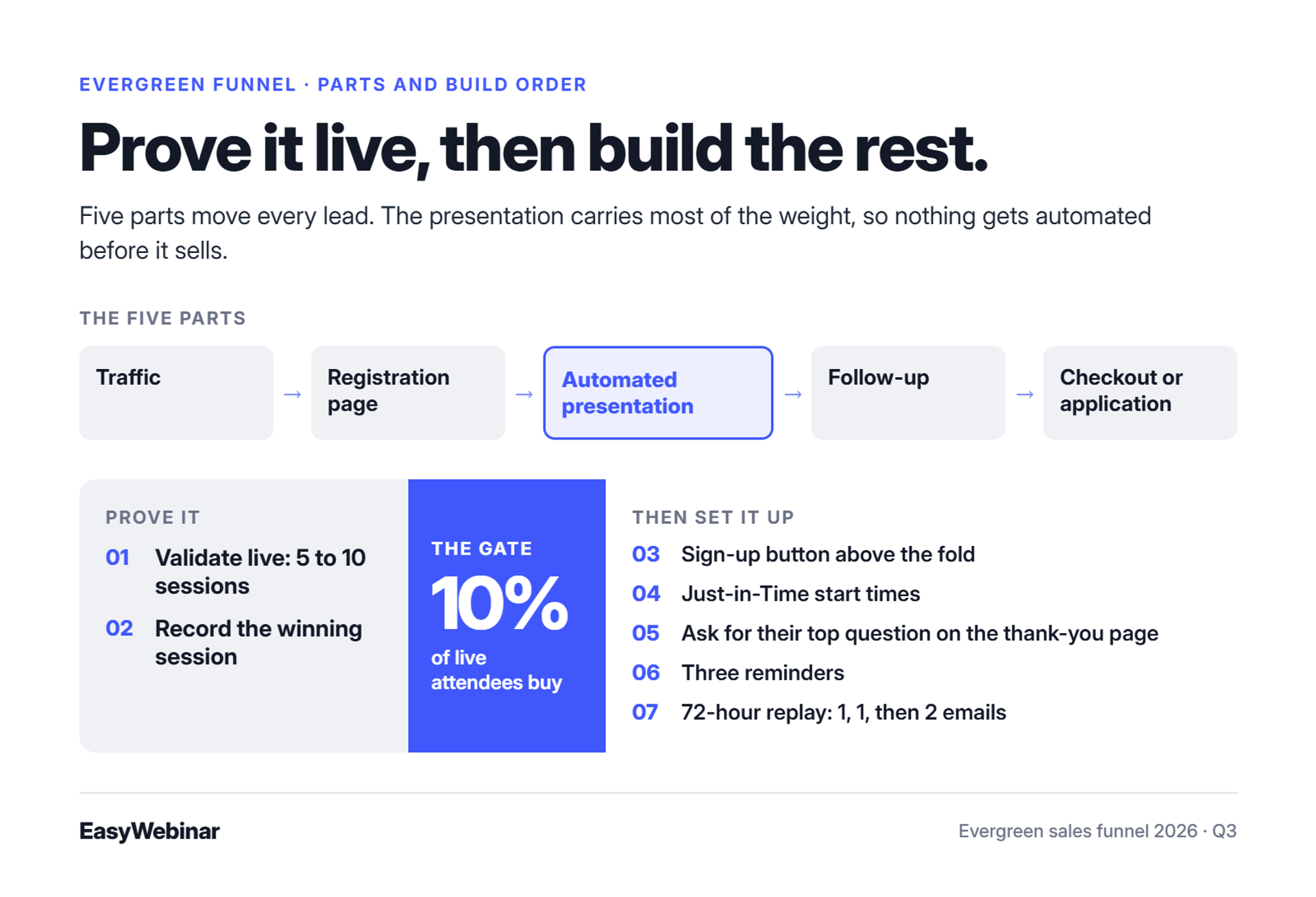
The five parts and what each must do
⭐ The component map
| Part | Its job | The common mistake |
|---|---|---|
| Traffic | Brings in new leads every day | Expecting the funnel to find its own buyers |
| Registration page | Turns a click into a registrant | Hiding the sign-up button below the fold |
| Automated presentation | Teaches, builds belief, makes the offer | Recording a pitch never tested live |
| Follow-up | Brings non-buyers back to the offer | Branching sequences that break silently |
| Checkout or application | Captures the sale or the call | Sending buyers to a separate site |
In the EasyWebinar handbook, I put the traffic point plainly: "An automated webinar without traffic is like a billboard in the desert." Pages, emails, and checkout matter. They only move people the presentation already convinced.
The 7-step build
✅ Steps 1 to 4: prove it, then set it up
- Validate live. Run 5 to 10 live sessions until 10% of attendees buy.
- Record the winner. Use the session that hit 10%, not a fresh studio take. EasyWebinar asks for the presentation file before you schedule the automated version, as a 2026 reviewer pointed out.
- Build the registration page. Keep the headline, subheadline, and sign-up button above the fold, the part visible before scrolling. For layouts that work, see these webinar landing page examples that convert.
- Set Just-in-Time start times. EasyWebinar's Just-in-Time format starts a session minutes after someone registers, in their own time zone. Intent is highest right after the click.
⏰ Steps 5 to 7: reminders and the replay window
- 5. Ask one question on the thank-you page. Alex Cattoni suggests asking each registrant for their number one question, then answering those questions in the session. People show up to hear their answer.
- 6. Send three reminders. Keep the pre-webinar sequence short and linear. More ideas live in this guide on how to improve webinar attendance.
- 7. Run a 72-hour replay. Send one email on day one, one on day two, and two on day three: "replay comes down today" in the morning and "final hours" at night. Jon Penberthy found that sending everyone the same replay beats segmented branches.
⚠️ What reviewers flag in this setup
"I'm blown away with how easy it was to setup a sequence of 10 webinars and have all the steps done that I need." - David L., February 2025, EasyWebinar G2 - Verified Review
"I do use other email systems to send post-webinar email sequences because I can't track open and click rates on EasyWebinar." - Eliza W., 4.5/5 rating, February 2026, EasyWebinar G2 - Verified Review
"the replay didn't show the live polls and CTAs" - Ivanhoe S., 4/5 rating, August 2024, Demio G2 - Verified Review
Eliza's point is worth planning around. If you need open and click tracking, send the replay emails from your own email platform.
EasyWebinar's AI Webinar Builder asks about 12 questions. It then drafts the script, registration and thank-you pages, emails, polls, and follow-up in about 10 to 15 minutes. You still bring the session you proved live, and the builder handles the setup work in steps 3 through 7.
Q4: How do you create real urgency in an evergreen funnel without fake scarcity?
Evergreen urgency works when each lead gets a personal deadline that actually ends. Countdown timers that reset on refresh teach buyers to wait. EasyWebinar sets expiring replay pages and "Wait For It" scarcity dates, which open registration only on dates you choose. That keeps the deadline inside the funnel itself. Pair it with follow-up emails timed to each lead's own clock.
Why a deadline does the closing
⏰ No cart close means "later" wins
A launch closes the cart for everyone on Friday, and that date does the selling. An evergreen funnel has no shared Friday. The answer is a deadline for each person, starting when that lead enters, rather than one calendar date for the whole audience.
Without that deadline, a good webinar ends and the buyer thinks, "I'll come back." Most never do. The replay sits open for weeks, and the offer slowly loses its pull.
❌ The old way: timers that lie
The common shortcut is a countdown timer that restarts whenever the page reloads. Buyers notice. Builders who run evergreen funnels at scale stress that the deadline itself has to be genuine.
A fake deadline also discounts your next offer in the buyer's head. Once someone sees a "final hours" timer reset, they stop believing any of your timers.
What changed: buyers test your deadline
⚠️ The device-switch loophole
A February 2026 Deadline Funnel reviewer on G2 credited real deadlines for 11 sales in 3 weeks from an evergreen webinar. The same reviewer warned that savvy buyers can rerun a funnel with a different device and email to catch an offer they missed.
EasyWebinar's read is that a deadline you won't enforce costs more sales than having no deadline. I could be reading this too strongly. Still, it is what I keep seeing when creators quietly reopen "closed" offers. Enforce the end, and accept that a few people will game it.
How EasyWebinar keeps the deadline honest
✅ Deadlines that live in the funnel
EasyWebinar builds the deadline into the evergreen webinar funnel instead of relying on a separate timer:
- Expiring replay pages. The replay comes down when the window closes.
- "Wait For It" dates. Registration opens only on dates you set, which creates real scarcity.
- Recurring "Next Available" sessions. Each lead sees the next real start time.
- Live-room countdowns. Timed offers and countdowns run inside live sessions.
⭐ What reviewers say about urgency tools
"I love the built-in countdown offers and polls as well." - Annette S., October 2024, EasyWebinar G2 - Verified Review
"I love that we can have a poll, offer and countdown right in the event! That's going to be so great for sales and interactions." - Verified User in Photography, 4.5/5 rating, August 2025, EasyWebinar G2 - Verified Review
EasyWebinar sets expiring replay pages, "Wait For It" scarcity dates, and recurring "Next Available" sessions. The deadline lives in the funnel, not in a timer that resets. When the replay comes down on day three, it is gone. That is what lets your follow-up emails say "final hours" and mean it. For more on in-session urgency, see these webinar engagement tools.
Q5: Example 1: How does an automated webinar-to-checkout funnel sell high-ticket offers?
The automated webinar-to-checkout funnel sends cold traffic to a registration page, then to a Just-in-Time webinar that ends with an offer. One session teaches, answers objections, and asks for a $500 to $5,000 sale. On EasyWebinar, Rick Mulready ran this on cold paid traffic with a 30% registration rate, $8 to $12 per lead, and a 166% ROI. Buyers pay inside the webinar, so the sale and the attendee data stay together.
How the flagship funnel is wired
⭐ Four stages from ad to buyer
- Traffic. Paid ads or social content send people to one page.
- Registration page. One promise and one sign-up button.
- Just-in-Time webinar. The session starts minutes after registration, in the viewer's own time zone. See how automated webinars handle this scheduling.
- Offer. Checkout in the room for lower tickets, or an application call for higher ones.
The EasyWebinar handbook calls this the fastest path from awareness to a high-ticket purchase. One session does the work of a sales page, an email sequence, and a first sales call.
The old way: the pitch lands, then the buyer leaves
❌ The redirect problem
In a stitched funnel, the webinar ends with a link to an outside checkout page. The buyer clicks at the peak of the pitch, then waits for a new site to load. Some never finish.
Attendance data sits in one tool and purchase data in another. You cannot tell which minute of the pitch actually sold.
⚠️ When the platform gets in the way
A 2018 EverWebinar reviewer spent weeks building a webinar up to the moment of purchase. The end screen then added a star rating prompt and a WebinarJam link. The pitch was fine, but the exit was not. For a fuller side-by-side, see EasyWebinar vs. EverWebinar.
What changed: buyers pay where they decide
✅ The sale moves into the room
Buyers now expect to act the moment they decide. EasyWebinar shows offer overlays during the session, with built-in checkout through Stripe, PayPal, or PayU. SamCart and ThriveCart also connect through EasyWebinar integrations.
The offer lands at the peak of the pitch. The sale, the attendee, and the data stay in one place.
💰 What this funnel has produced
- Rick Mulready: 166% ROI on cold paid traffic, with a 30% registration rate and $8 to $12 per lead.
- Ryan Fenn of ChiirP: $2 million from one automated funnel.
- Kim Constable of Sculpted Vegan: $750,000.
- Jason Caruso: $14,000 from a first webinar.
Each of those funnels was proven live before it was converted into an automated evergreen system. That is the honest weakness of this model. It fails if you automate before the pitch converts.
"The integration with my email service provider was seamless, allowing me to automate a follow-up sales sequence once someone watches the webinar." - Jennifer B., Course creator, 5/5, April 2025, EasyWebinar G2 - Verified Review
"I am selling a digital product and use Easywebinar for my sales webinar." - Pat G., 5/5, January 2025, EasyWebinar G2 - Verified Review
"they then, outrageously, have their OWN LINK on the screen to Webinarjam!!" - Verified User in Health, Wellness and Fitness, 0/5, July 2018, EverWebinar G2 - Verified Review
EasyWebinar shows in-webinar offer overlays with checkout through Stripe, PayPal, or PayU, so buyers never leave the room. With no redirect, revenue is attributed to the webinar that earned it. You see which session, and which offer, produced each sale.
Q6: Example 2: How does a 24/7 video-to-application pipeline replace live sales calls?
A video-to-application pipeline sends cold traffic to an opt-in page, then to a 30- to 60-minute evergreen presentation, then to an application or consult call. Yuri Elkaim reports more than $217 million generated for his company and clients with this model. It converts when the presentation shares perspective rather than step-by-step tactics. Giving away the "how" releases the tension that drives the call.
The architecture
⭐ Five stages, one trust asset
- Cold paid traffic. YouTube or Meta ads.
- Opt-in page. Name and email for access.
- Evergreen presentation. A free 30- to 60-minute video.
- Application or consult call. The lead asks for help.
- Enrollment. High-ticket coaching or a done-for-you service.
✅ Why it replaces weekly live calls
Elkaim's team recorded one presentation and let it run around the clock. He describes weekly live webinars as a time trap with poor show-up rates. Sabri Suby, who reports more than $50 million in ad spend across thousands of split tests, sells from the same kind of single asset.
The weakness: know-how without the how
⚠️ Tension does the selling
Elkaim's warning is blunt. The more of the "how" you give away, the less tension the viewer feels, and tension drives conversions alongside trust. Share perspective and nuance instead of the full protocol.
| Gives away the how (empties the calendar) | Shares know-how (fills the calendar) |
|---|---|
| A step-by-step protocol | Why the usual approach fails |
| The full template | What the result looks like |
| Every tactic you use | The one shift that matters most |
💸 Where the calls go wrong
Application volume without qualification buries reps in bad calls. EasyWebinar worked with a corporate client that went from 6 sales reps to 1 after putting a webinar in front of its pipeline. My read is that the webinar did the first call's job, so reps only spoke with people who had already decided.
"Automating webinars that we used to have to run live every week and over time also saving us money/being more efficient" - Darrin B., 5/5, April 2025, EasyWebinar G2 - Verified Review
"I want to get my content out without having to rely solely on 1-to-1 calls. I'm going to use it, once my webinar is perfected, to put the presentation on autopilot for more consistent sales." - Micaela S. B., 5/5, September 2024, EasyWebinar G2 - Verified Review
Micaela's phrase "once my webinar is perfected" is the right order. Prove the presentation, then let it qualify applicants around the clock.
EasyWebinar runs the presentation in On-Demand format, so it plays the moment a lead opts in. EasyCRM then scores each attendee as Hot, Warm, or Nurture from what they watched and clicked. The auto-dialer lets reps call the warmest applicants the same day. Lead scoring starts on the Pro plan.
Q7: Example 3: When does a paid workshop or low-ticket funnel beat a free webinar?
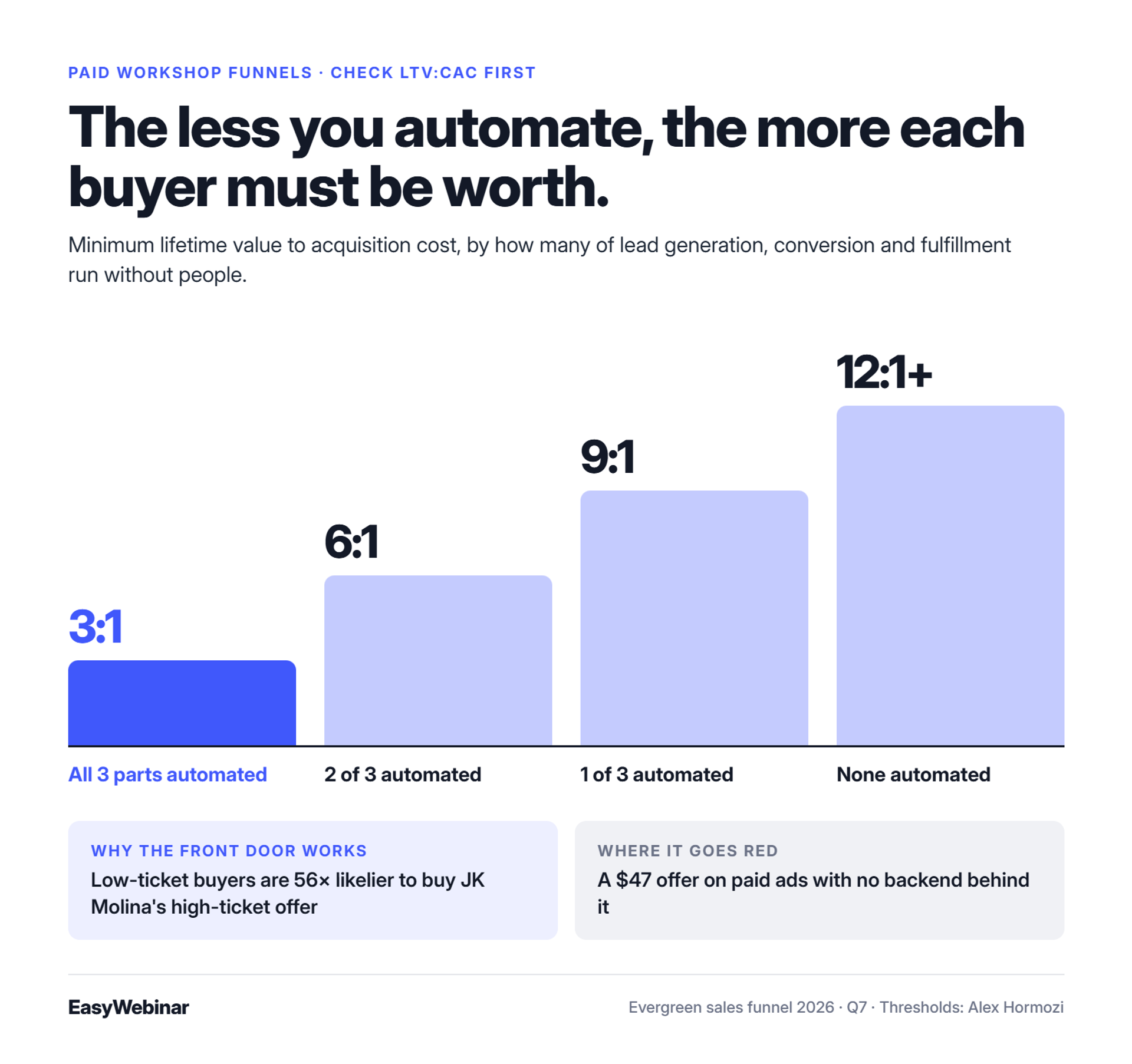
A paid workshop funnel sells a $10 to $100 workshop or digital asset first, then offers a core program or membership. JK Molina reports that buyers of a low-ticket offer are 56 times likelier to buy his high-ticket offer. The model fails when ads point at a $47 offer with no backend. Check your LTV:CAC ratio (lifetime value divided by customer acquisition cost) before spending.
The architecture
⭐ From a small purchase to the core offer
- Entry. A social reel, a DM keyword trigger, or an ad.
- Low-ticket offer. A $10 to $100 workshop or digital asset.
- One-click upsell. A bigger offer shown right after purchase.
- Core enrollment. A community or recurring membership.
Molina runs this kind of lean funnel with 95% profit margins and no cold sales calls. A buyer who has paid once has already crossed the hardest line.
The math that decides it
💰 LTV:CAC thresholds by automation level
Alex Hormozi ties the safe LTV:CAC ratio to how much of the business runs without people. The three parts are lead generation, conversion, and fulfillment.
| Parts automated | Minimum LTV:CAC |
|---|---|
| All 3 | 3:1 |
| 2 of 3 | 6:1 |
| 1 of 3 | 9:1 |
| None | 12:1 or more |
💸 Where low-ticket goes red
In the EasyWebinar handbook, I put it this way: "It's not the spend of ads. It's what the backend looks like." Sell a $47 product with paid ads and nothing behind it, and you end up in the red. Evergreen funnel builder Anna Konchar, speaking with Amy Porterfield in March 2026, said offers under $500 leave too little margin for profitable ads.
So the low-ticket offer works as a front door, not the business. Its job is to fund ad spend and find buyers for the backend.
Free webinar vs. paid workshop
⚠️ The trade-offs side by side
| - | Free webinar | Paid workshop |
|---|---|---|
| Lead volume | Higher | Lower |
| Lead quality | Mixed, with more freeloaders | Buyers who already paid |
| Ad spend | Paid back by backend sales | Partly paid back upfront |
| Revenue per sale | Higher | Lower at entry |
| Needs | A proven high-ticket pitch | Steady content or audience traffic |
The weakness is volume. A paid workshop needs a consistent audience or a steady stream of short-form content to keep enough buyers coming in.
✅ When to pick which
Pick the paid workshop when your audience already knows you and your backend has a clear next step. Pick the free webinar when your pitch is proven and the backend ticket is high enough to absorb lead costs.
EasyWebinar sells seats directly through paid and ticketed webinars, with checkout inside the room through Stripe, PayPal, or PayU. Replays and follow-up run after the session, so the upsell to the core program happens on the same platform. For health and fitness practitioners, that means selling workshop seats, never patient care.
Q8: Why do evergreen funnels stall, and how do you diagnose yours?
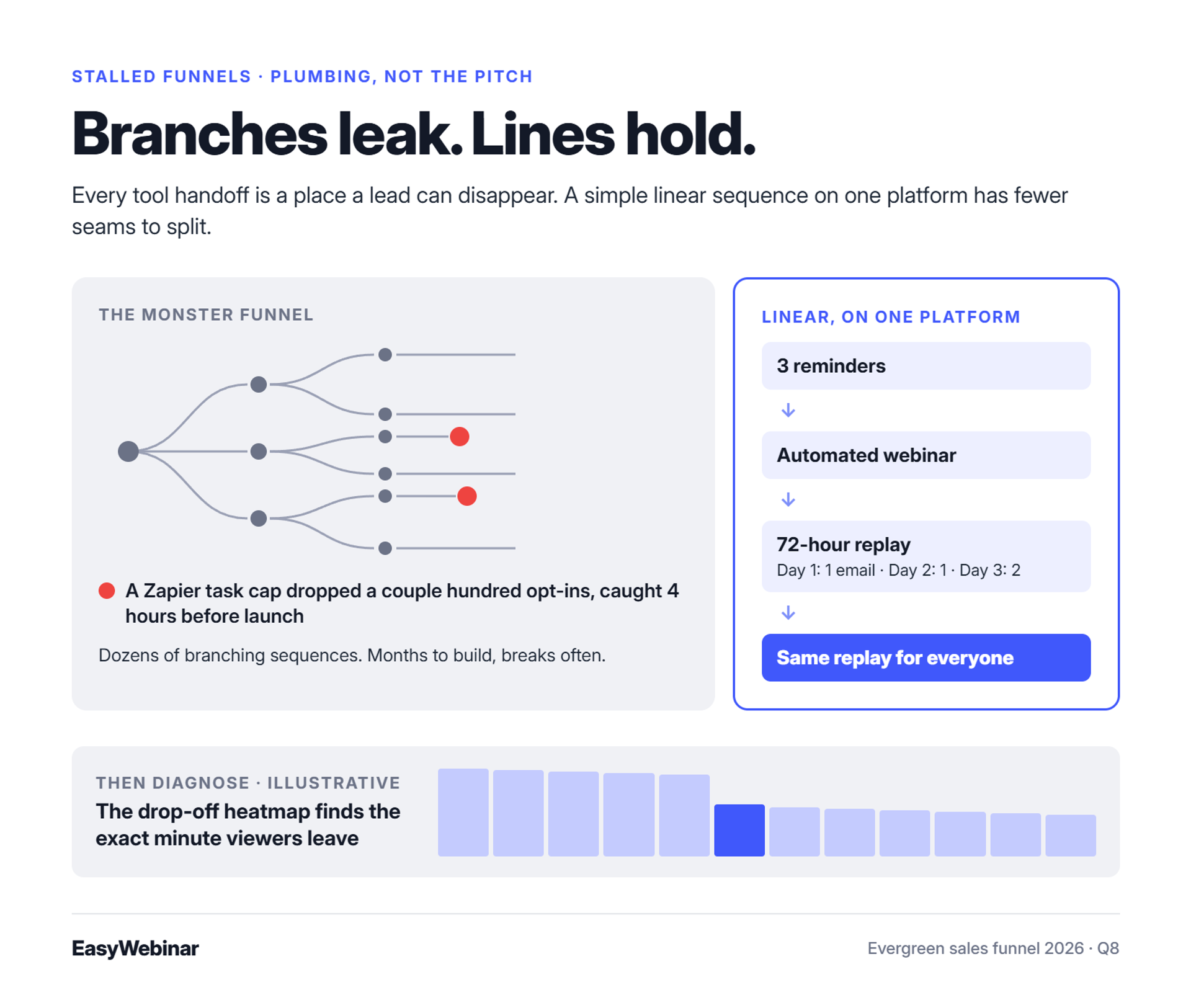
Evergreen funnels usually stall from plumbing, not the pitch. Three common causes are over-branched email trees, integrations that silently drop leads, and attendees who leave at the same minute. One operator found she had profited only $3,000 from her evergreen funnel over several months. EasyWebinar's drop-off heatmap shows the exact minute attendees leave, and its behavior-based follow-up sends each segment its own sequence.
The stall
⚠️ The spreadsheet moment
During a coaching hot seat, an operator opened her evergreen metrics spreadsheet and found just $3,000 in profit since October 1. Her webinar converted at about 2%. The diagnosis started with timing: if viewers drop off at minute 10, the problem lives in those first 10 minutes.
She also admitted she had not watched her own webinar in months. That is the quiet part of most stalls.
The old way: the monster funnel
❌ The tube map on the office floor
Jon Penberthy's team once mapped a "monster funnel" across their office floor, with dozens of branching email sequences. It took months to build, broke often, and underperformed a simple linear replay sequence. In EasyWebinar's strategy sessions, I have said that this kind of build "can take more than 2 months to perfect."
💸 Leads that vanish between tools
Jeremy Haynes caught a Zapier plan limit 4 hours before a webinar on an $80,000 ad campaign. Zapier connects apps, but each plan caps how many automated tasks can run. A couple hundred opt-ins never reached the CRM his reps were dialing.
"Upon reporting our errors (duplicate chat messages, emails not being sent to registrants, pop-ups not working, etc.) we were told that we should not have cloned webinars or changed their schedule" - Kaylen M., 0/5, August 2021, EverWebinar G2 - Verified Review
"We use a third party capture form and had to do several zaps to get all data to flow accurately from our form to Hubspot to Demio." - Verified User in Education Management, 4/5, April 2023, Demio G2 - Verified Review
What changed: simple scales
✅ Fewer handoffs, fewer failures
Penberthy now sends everyone the same replay with no segmentation, and it performs better. Every tool handoff is a place where a lead can disappear.
| Failure point | Stitched stack | EasyWebinar |
|---|---|---|
| Lead handoff | Task caps can drop leads | Registration, room, and follow-up on one platform |
| Video playback | Third-party host changes can break it | In-house video storage |
| Diagnosis | Attendance and sales in separate tools | Drop-off heatmap and conversion funnel |
EasyWebinar still connects some tools through Zapier. If you stitch those back in, the cap risk returns. One more test is worth running: leave the join link out of SMS reminders, so more people watch on desktop.
EasyWebinar's behavior-based follow-up sends no-shows, early leavers, offer-clickers, and replay viewers their own sequences. The drop-off heatmap shows the exact minute people leave, so you fix that minute instead of rebuilding the funnel. In-house video storage means an outside service change cannot quietly break playback.
Q9: Which numbers tell you your evergreen funnel is working?
Track five stages of an evergreen funnel. A 30% opt-in rate is solid on cold traffic. Registration-to-attendee averaged 60% in ON24's 2026 benchmarks. Keep 80% of peak viewers through to the pitch, and aim for 10% of attendees to buy. Lifetime value should be at least three times acquisition cost when the funnel is fully automated. Fix the earliest stage that misses its benchmark first.
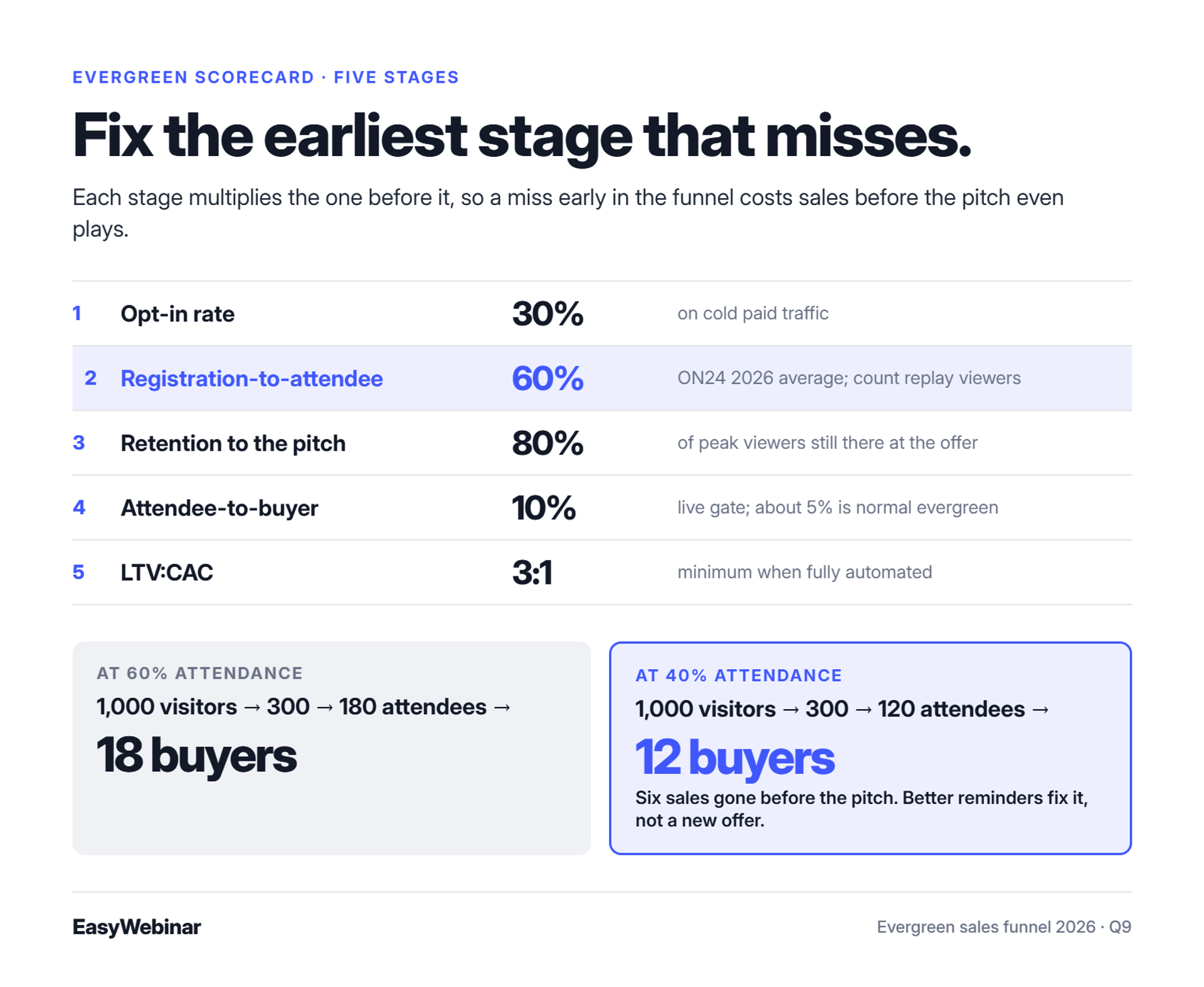
The five-stage scorecard
⭐ Benchmarks by stage
| Stage | What it measures | Benchmark | Source |
|---|---|---|---|
| 1. Opt-in rate | Registrants divided by page visitors | 30% on cold paid traffic | Rick Mulready on EasyWebinar |
| 2. Registration-to-attendee | Attendees divided by registrants | 60% average | ON24, 2026 |
| 3. Retention to pitch | Viewers at the offer divided by peak viewers | 80% | Jeremy Haynes |
| 4. Attendee-to-buyer | Buyers divided by attendees | 10% (the live gate) | EasyWebinar handbook |
| 5. LTV:CAC | Lifetime customer value divided by acquisition cost | 3:1 when fully automated | Alex Hormozi |
EasyWebinar measures stages 2 through 4 per attendee, not per event. Its analytics record watch time, offer clicks, and purchases for each person who registered. That lets you see which stage is leaking instead of guessing from one total.
⚠️ Read the benchmarks honestly
ON24's data leans toward B2B marketing webinars. The same report found that 43% of attendees chose to watch on demand. Count replay viewers in your attendance, or your stage 2 number will look worse than it is.
The 10% buyer rate is a live benchmark. Rick Mulready advises expecting evergreen numbers to land around half of live numbers. EasyWebinar's read is that a 5% evergreen rate from a 10% live pitch is normal, not a failure.
How to read the scorecard
✅ Fix the earliest stage that misses
Work top-down, because every stage multiplies the one before it. Here is a worked example:
- 1,000 visitors at 30% opt-in gives 300 registrants.
- 300 registrants at 60% attendance gives 180 attendees.
- 180 attendees at 10% conversion gives 18 buyers.
Now drop attendance to 40%. You get 120 attendees and 12 buyers, so six sales disappear before the pitch even plays. Rewriting the offer would not fix that. Better reminders would.
ON24's 2025 report found that automated nurture sequences lifted on-demand attendance by 69% and overall attendees by 32%. Reminder emails are usually the cheapest repair in the whole funnel.
💰 Tune on revenue, not attendance
EasyWebinar's view is that attendance is a vanity number on its own. A webinar with 300 attendees and 3 buyers loses to one with 90 attendees and 9 buyers. Track revenue per registrant, which is total webinar revenue divided by everyone who signed up.
I could be off here, but most stalled funnels I review are judged on show-up rate alone. The fix is often a stage 3 problem: people leave before the offer appears.
Where the data lives
⏰ Check the minute, not the month
EasyWebinar's drop-off heatmap shows the exact minute attendees leave. If retention to the pitch sits below 80%, look for the cliff in the heatmap. Then rewrite that minute of the presentation.
UTM tags (labels added to links that show which ad or email sent each visitor) connect stage 1 to stage 4. That shows which traffic source produces buyers, not just registrants.
EasyWebinar tracks attendee-level watch time, offer clicks, and purchases, with revenue attributed back to the webinar that produced each sale. The conversion funnel view runs from registration to purchase in one place. You score all five stages without exporting data from three separate tools, as shown across EasyWebinar's features.
Frequently Asked Questions

Casey Zeman
Founder of EasyWebinar
About Author
Over the past decade, I've helped thousands of entrepreneurs, coaches, and consultants turn webinars into a predictable, powerful way to grow their audience, build trust, and scale, without the constant hustle. I created EasyWebinar because I couldn't find a system that combined authenticity, engagement, and automation the way I needed. So, I built one.
Related Posts

10 Best Community Engagement Platforms in 2026
Compare the 10 best community engagement platforms in 2026. Course creators, evaluate live hosting, analytics, and replay to pick your winner today.

10 Best Online Coaching Tools in 2026: Live Session Quality, Scheduling, Recording, and Client Engagement Analytics
Compare the 10 best online coaching tools of 2026 on session quality, scheduling, and analytics. Discover the right fit for your coaching revenue model.

10 Best Webinar Hosting Platforms Ranked by Uptime, Streaming Quality & Cost
Compare 10 webinar hosting platforms ranked by uptime, streaming quality, and cost. Discover which tool actually turns attendees into revenue.
Turn every webinar into a revenue stream
Launch your first paid event in just a few clicks - and start monetizing your expertise.
Book a Call