How to Build a Webinar Funnel That Actually Sells: Templates, Metrics, and the Right Builder Tools

Casey Zeman
Published on May 4, 2026 • 31 min read
Q1: What Is a Webinar Funnel and Why Does It Outperform a Standalone Webinar or Landing-Page-Only Funnel?
A webinar funnel is a 4-stage system: traffic, registration, live or automated session with in-webinar offer, and segmented follow-up, operated inside one workflow so every click, attendance minute, and offer view becomes a tracked revenue signal rather than a one-time event. It outperforms standalone webinars because follow-up and monetization are built into the architecture, not bolted on after.
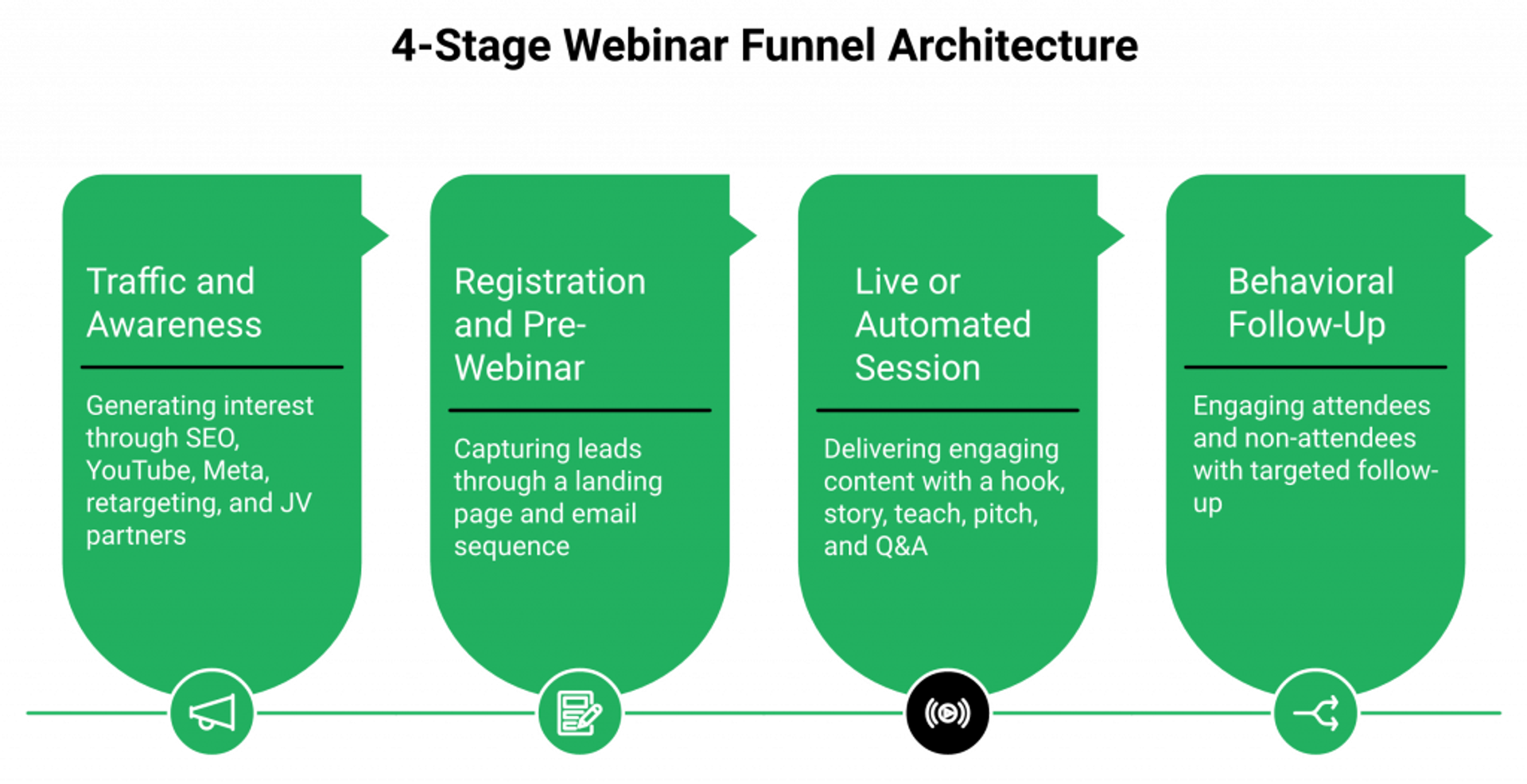
Four dense points frame the architecture:
- Webinar funnels vs. landing-page-only funnels: webinars add trust, education, and urgency that static pages cannot manufacture, making them the dominant conversion format for high-ticket, complex, and consultative offers over $500.
- Four funnel types and when to use each: live (launch, relationship, new offer validation), evergreen/automated (scale a proven session 24/7), simulive (live-feel at scale without real-time hosting), hybrid (live pitch plus recorded content). For a deeper breakdown, see pre-recorded webinar platforms vs live.
- Primary use cases: coaches ($997 to $10K programs), SaaS (demo-to-trial), agencies ($3K to $20K retainers), course creators, B2B services, and consultants. Course creators should review webinars to sell online courses effectively.
- The full journey mapped: awareness traffic, registration page, confirmation plus pre-webinar sequence, live or automated session, in-session offer, post-webinar follow-up (attendee, no-show, replay), closed sale or long-term nurture.
EasyWebinar’s webinar platform compresses all four funnel types, live, simulive, automated, and evergreen, plus registration pages, in-webinar checkout, and behavioral follow-up into a single system so every stage shares one data layer. Without a connected system, each stage handoff loses attribution and adds friction. Carla Biesinger’s $5M from a single evergreen funnel illustrates what a connected, compounding funnel architecture produces versus a one-off broadcast, as documented in the course creator case study.
“EasyWebinar has helped me generate over $5 million dollars in sales with just one evergreen funnel. It is the best webinar platform out there.”— Carla Biesinger, Course Creator Easywebinar G2 – Verified Review
Q2: Which Webinar Funnel Archetype Fits Coaches, SaaS, and Agencies, and How Do You Choose?
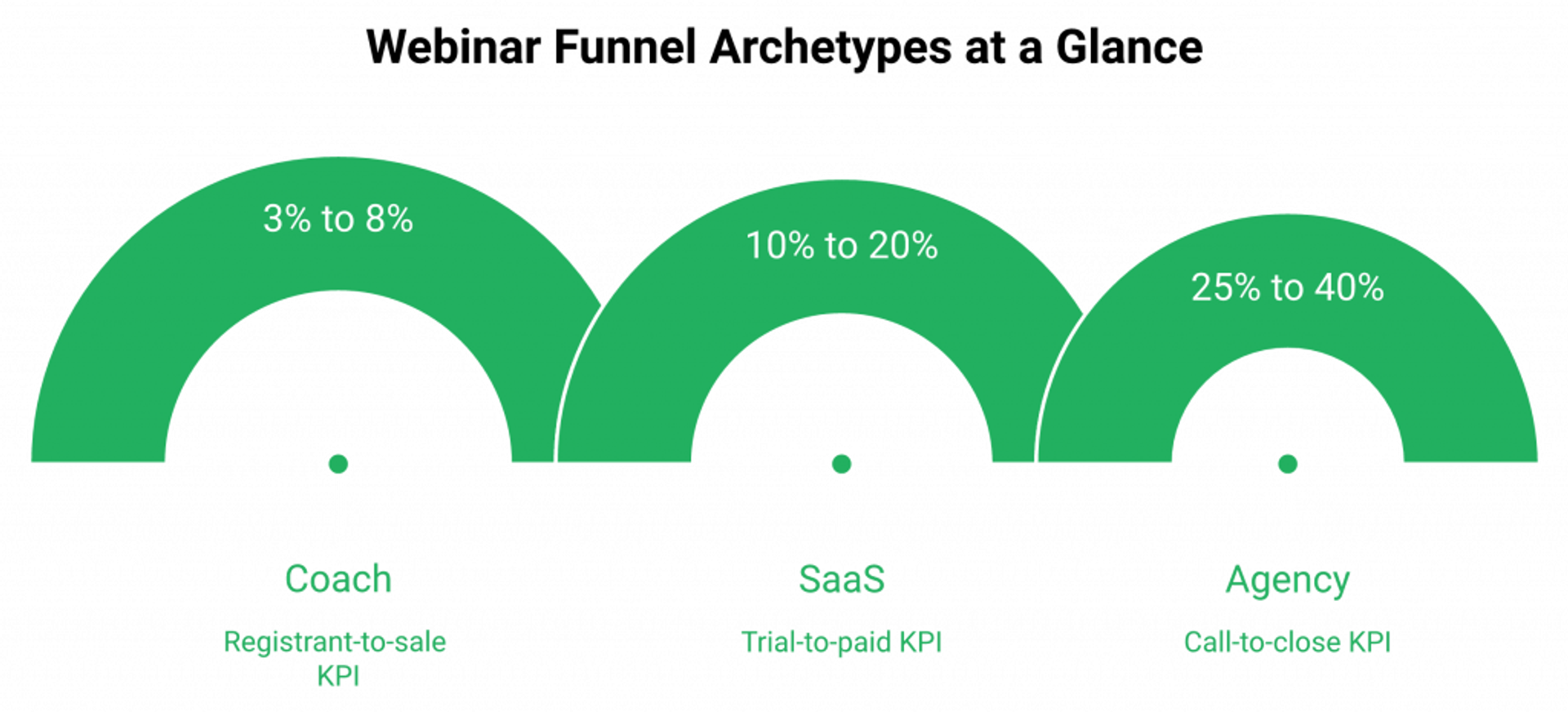
Choose the archetype by three variables: offer price point, sales motion (self-serve vs. call), and audience temperature. Coaches use a high-ticket pitch funnel, SaaS uses a product-led demo funnel with PQL handoff, and agencies use an authority-to-consult funnel built around a case-study masterclass leading to a booked strategy call.
| Archetype | Price Point | Session Length | Session Structure | In-Session Offer | Follow-Up | KPI (Reg-to-Sale) |
|---|---|---|---|---|---|---|
| Coach | $997 to $10K | 60 min | Hook, story, teach, pitch, Q&A | Direct application or buy-now | 8 to 12 email touches | 3% to 8% |
| SaaS | $49 to $499/mo | 30 min | Pain, demo, trial offer | Free trial or live demo booking | 5 to 7 touches, Sales handoff on Hot tag | 10% to 20% trial-to-paid |
| Agency | $3K to $20K retainer | 45 min | Masterclass, case study, consultation | Booked strategy call | 6 to 10 touches | 25% to 40% call-to-close |
Selection Criteria
- Price point of the offer: under $500 means self-serve checkout, over $1K means call or application.
- Sales motion: does the buyer need a conversation before buying?
- Audience temperature: cold traffic needs more education, warm list needs less.
- Content-to-sell ratio: high-ticket is 70% teaching, 30% pitch, and low-ticket is 50/50.
- Replay dependency: evergreen archetypes require a proven live conversion first before automating.
EasyWebinar’s AI funnel builder pre-loads archetype-specific templates, registration pages, email sequences, script skeletons, and offer timing, so teams launch the correct structure in under 10 minutes instead of reverse-engineering a coach funnel inside SaaS-shaped tools. For agencies specifically, EasyWebinar plus GoHighLevel covers the combined stack. Ryan Fenn built a $2M agency-style funnel on EasyWebinar, replacing a ClickFunnels plus Zoom plus ActiveCampaign stack with a single platform matched to his archetype and offer.
Q3: How Do You Build a High-Converting Webinar Registration Page and Pre-Webinar Sequence?
A high-converting registration page pairs a specificity-outcome headline, a 3-bullet curiosity stack, a presenter credibility block, a single above-the-fold form, a timezone-aware date selector, and a stripped CTA targeting 35% to 55% conversion on warm traffic and 20% to 30% on cold. The pre-webinar sequence runs 9 touches from confirmation to 15-minute live-join nudge, and attendance rises or falls on the scheduling architecture, not just the email copy.
Registration Page Template (8 Elements)
- Headline formula: [Outcome] for [Audience] in [Timeframe] without [Pain].
- Subhead outcome promise.
- Three curiosity-and-takeaway bullets.
- Presenter bio with proof (revenue generated, students taught, recognizable logos).
- Date/time selector with auto-timezone.
- Single-field or 2-field form.
- Trust row (logos, testimonials, G2/Trustpilot badge).
- Single CTA button with no navigation.
Copywriting frameworks to apply: AIDA for warm traffic, PAS for cold, BAB for outcome-driven audiences. Conversion benchmarks: industry average 30% to 40%, top-quartile 50% plus, broken under 20%. Page speed (under 2s), form field count (1 to 3), and above-fold CTA are the three highest-impact levers. For reference designs, see webinar landing page examples that convert.
Pre-Webinar Sequence
- Confirmation email (immediate): delivers access link, calendar save, and bonus if applicable.
- Email 2 (24h before): value preview of what attendees will walk away knowing.
- Email 3 (1h before): social proof story plus urgency.
- Email 4 (15 min before): live-join nudge.
SMS and WhatsApp reminders, used as supplemental channels, can push show-up rates 8% to 12% higher on mobile-heavy audiences. All pre-webinar communication should reiterate the promised outcome, not just logistics, to maintain commitment and set expectation.
EasyWebinar’s built-in page builder ships registration, confirmation, live, and replay pages pre-wired to EasyCRM and Power Follow-Ups, eliminating the Leadpages plus Zapier plus email-tool chain most teams use. Timezone-aware scheduling is native, no manual event cloning per region. For a full how-to on session prep, see how to start a webinar. K21 Academy grew registrations 5x and hit a 47% show-up rate after replacing their stitched landing page plus Zoom setup with EasyWebinar’s native pages and Just-in-Time scheduling, as detailed in the edtech case study.
“EasyWebinar’s landing pages and automation let us run daily sessions across time zones without cloning events or stitching tools. Our show-up rate nearly doubled.”— Verified User, EdTech Operations Lead Easywebinar G2 – Verified Review
Q4: What Should Happen Inside a High-Converting Webinar Session, and How Do You Structure the Offer?
A high-converting webinar runs 45 to 75 minutes, structured as: Hook (0 to 5 min), Presenter story plus credibility (5 to 12 min), Teaching block with proof (12 to 45 min), Offer reveal plus pitch (45 to 60 min), Q&A plus objection handling (60 to 75 min). The optimal value-to-pitch ratio is 60% to 70% teaching and 30% to 40% offer for high-ticket programs, and 50/50 for lower-ticket.
Minute-by-Minute Timeline
- Hook: pattern interrupt plus big promise.
- Story: relatability plus authority.
- Teaching: 3 key insights that create the “informed gap,” they know enough to want help, not enough to DIY.
- Offer reveal: outcome framing, not feature listing.
- Bonuses, guarantee, and deadline: urgency without deception.
- Verbal and visual CTAs: spoken plus on-screen overlay simultaneously.
Engagement mechanics run throughout: polls at minutes 5, 20, and 40 to maintain attention and gather segmentation data, chat prompts, live demos, and hot seats for social proof. For deeper engagement tactics, see interactive webinars that drive 5x engagement.
Offer Design Checklist
- Clear outcome stated in one sentence.
- Two or three bonuses that remove implementation objections.
- Risk-reversal guarantee.
- Deadline with real scarcity (webinar-only pricing, seats, bonus expiry).
- Payment plan option for offers over $500.
- Single checkout URL shown on screen.
Checkout flow must be frictionless: a 2-field form maximum, with Stripe/PayPal native embed preferred over redirect. Common mistakes include too many CTAs, a checkout redirect that breaks momentum, and no payment plan for high-ticket. To monetize directly inside the session, review paid webinars.
Technical Best Practices
- Audio quality matters more than video quality.
- Stable wired connection plus backup mobile hotspot.
- Slide design: dark background, minimal text, single idea per slide.
- Full rehearsal at least once.
- For simulive/evergreen, record the best live session, re-edit for pacing, and rebuild the offer segment with timed overlays.
EasyWebinar’s in-platform timed offers, one-click Stripe/PayPal checkout, and poll/chat tools run natively during both live and automated webinar sessions. Offer clicks are captured at the attendee level and route directly into Power Follow-Ups segmentation. Customers using EasyWebinar’s timed offers report measurable lift in offer conversion versus external checkout redirects, as reflected in customer reviews.
“The timed offers and native checkout inside EasyWebinar changed our conversion math. We stopped losing buyers at the redirect step and our close rate climbed immediately.”— Verified User, Course Creator Easywebinar G2 – Verified Review
Q5: What Email and Automation Sequence Converts Attendees, No-Shows, and Replay Viewers After the Webinar?
The post-webinar system requires four distinct sequences: (1) an attendee who didn’t buy gets replay, objection-handling, and final close, (2) an attendee who bought gets onboarding and upsell, (3) a no-show gets replay access and re-registration, and (4) a replay viewer gets pitch reinforcement and deadline. Segmenting by behavior rather than broadcasting to a single list lifts conversion 30% to 60%, and protects deliverability.
The Four Sequences, Mapped by Behavior
Broadcasting the same “thanks for attending” email to everyone is the single most common follow-up mistake I see. The revenue lives in the segmentation. Here’s how each segment gets handled:
Segment 1, Attendee who didn’t buy (5 to 7 emails over 5 days):
- Email 1 (0 to 2h post): replay link plus top objection addressed up front.
- Email 2 (24h): social proof story from a past buyer.
- Email 3 (48h): FAQ and objection handling.
- Email 4 (72h): bonus reminder with deadline.
- Emails 5 to 6 (Day 4 to 5): ⏰ scarcity and final close.
Segment 2, No-show (3 to 5 emails):
- Email 1 (1h post): “we missed you” plus replay link.
- Email 2 (24h): value teaser of what they missed.
- Emails 3 to 5: pitch plus deadline, compressed timeline.
Segment 3, Replay viewers: once the replay-completion tag fires, route the contact into Segment 1 from Email 2 onward. They’ve now seen the teach, so the sequence skips the intro.
Segment 4, Buyer: immediate confirmation plus a 5-step onboarding sequence, completely separate from the sales flow. They should never see another pitch email for the same product. For a deeper look at how automated webinar funnels run these sequences without manual intervention, the playbook is the same regardless of tool.
Tags, Logic Rules, and Deliverability
The tags required at minimum: attended, left_early, offer_clicked, watched_replay, and purchased. Without these, you can’t branch.
✅ Trigger sequences on behavioral tags, not static lists.
✅ Kill every sales sequence on the purchased event. Nothing kills trust faster than pitching a buyer their own product.
✅ Route offer-clickers into an objection-handling fast-path, not the generic attendee flow. They saw the offer and hesitated, that’s a different conversation than “here’s the replay.”
⚠️ Use a separate sending subdomain for webinar follow-ups to protect your primary domain reputation.
Deliverability basics: SPF, DKIM, and DMARC configured, domain warmup for new sending domains, maximum 1 to 2 emails per day in follow-up sequences, and an unsubscribe link in every email. For leads who don’t buy in the initial cycle, drop them into a 30 to 90 day re-engagement sequence with periodic replay re-invites and the next live event registration. This is how you keep a list hot without burning it.
✅ How EasyWebinar Simplifies This
Our Power Follow-Ups fires all four behavioral sequences natively from in-session data, including poll answers, offer clicks, watch-time, and departure timestamp, without a Zapier chain between webinar tool and ESP. The segmentation that takes four tools and six Zaps in a stitched stack happens inside one system, which means no broken automations on Friday morning. Teams pairing Power Follow-Ups with the native sales CRM get revenue attribution in the same dashboard where the sequences run.
“The integration with my email service provider was seamless, allowing me to automate a follow-up sales sequence once someone watches the webinar, no tech headaches, just smooth automation. I also love that I can trigger emails directly from EasyWebinar as soon as someone registers.”— Jennifer B. Easywebinar G2 – Verified Review
“I do use other email systems to send post-webinar email sequences because I can’t track open and click rates on EasyWebinar, and also, I can’t unsubscribe someone from the email campaign once the client has joined my program.”— Eliza W. Easywebinar G2 – Verified Review
Laura C. moved from 10 to 12 course sales per live webinar to 25 sales in three weeks on a single evergreen. The lift came almost entirely from behavioral follow-up doing the work while she slept, not from a bigger list.
Q6: Which Webinar Funnel Metrics and Benchmarks Signal a Funnel That Actually Sells, and How Do You Optimize It?
The six metrics that determine whether a webinar funnel actually sells are registration conversion rate, show-up rate, engagement rate (poll, chat, and offer-view), offer-view rate, offer close rate, and revenue per registrant (RPR). A healthy funnel clears 35%+ registration, 40%+ show-up, 20%+ offer-view, 3% to 8% registrant-to-sale, and $5 to $50 RPR depending on offer price. Optimization starts at the earliest broken stage, not at the pitch.
The Reality Most Teams Operate In
Most teams running underperforming funnels spend their optimization energy on the pitch or the email subject lines, rewriting the close, testing button colors, and adding urgency copy. The data lives in four places: Zoom’s basic analytics, the email tool’s open-rate report, a Stripe dashboard that shows sales without tying them to a specific webinar, and a Google Sheet somebody updates on Mondays. Nobody can confidently say which part of the funnel produced the last $20K.
Why Broadcast-Era Tools Keep You Stuck
Optimization playbooks from broadcast-era webinar tools focus on email copy because that’s the only lever those tools expose. Zoom and GoToWebinar show attendance counts. They don’t show offer-view rate, departure timing, or which email drove the replay view that produced the sale. Without stage-by-stage data in one place, you can’t diagnose the real leak, you can only guess. For teams considering a switch, the GoToWebinar alternatives breakdown maps this gap directly.
“Zoom is missing a lot of core webinar features that should be table stakes today. There’s no pre-webinar waiting room or post-webinar exit page. There’s no ability to distribute resources or files, reporting is a bit of a maze.”— Casey S. Zoom Events and Webinars – G2 Verified Review
The Optimization Sequence That Actually Moves Revenue
Fix in funnel order: registration architecture, show-up rate, in-session engagement, offer-view rate, follow-up branching, then pitch copy. A 10-point show-up lift from 30% to 40% on 1,000 registrants is 100 additional attendees seeing your offer. No amount of pitch rewriting delivers that math. 💰 The earliest broken stage is always the highest-leverage test.
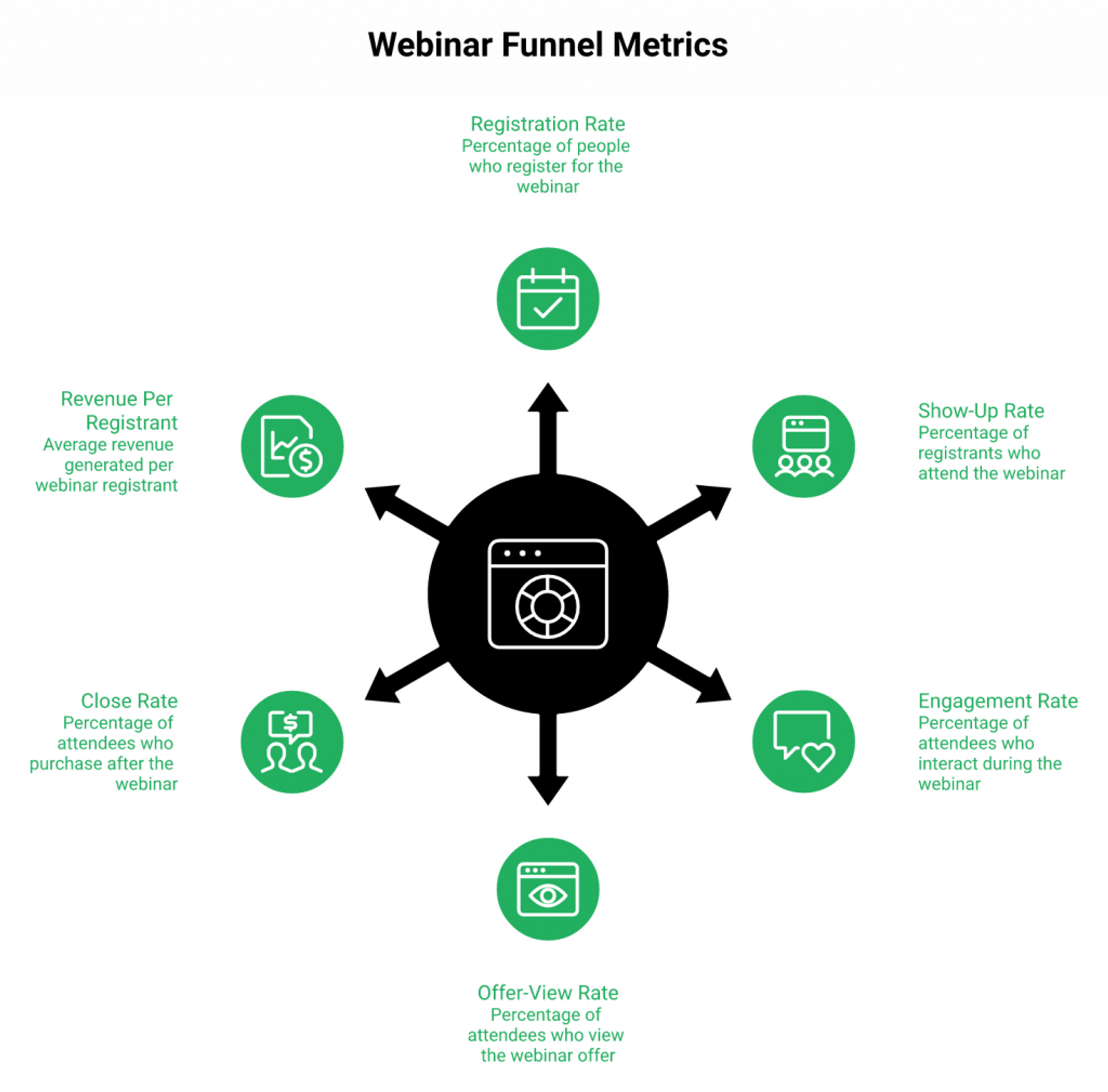
📊 The 6-Metric Diagnostic Matrix
| Metric | ✅ Healthy | ⚠️ Warning | ❌ Broken | Most Common Cause | Specific Fix |
|---|---|---|---|---|---|
| Registration rate | 35%+ | 20% to 35% | Under 20% | Weak headline, too many form fields | Rewrite [Outcome]+[Pain] headline, drop to 1 to 2 fields |
| Show-up rate | 40%+ | 25% to 40% | Under 25% | Scheduling architecture, timezone | Add Just-in-Time plus auto-timezone, not more reminders |
| Engagement rate | 60%+ | 40% to 60% | Under 40% | No polls, passive content | Polls at min 5/20/40, chat prompts every 10 min |
| Offer-view rate | 20%+ | 10% to 20% | Under 10% | Offer reveal too late, left early | Reveal at 45 min mark, tighter teach |
| Close rate | 3% to 8% | 1% to 3% | Under 1% | Offer-audience fit, no payment plan | Fix offer first, then pitch |
| RPR | $5 to $50+ | $2 to $5 | Under $2 | Low-ticket plus cold traffic | Raise offer price or narrow audience |
✅ How EasyWebinar’s Approach Fixes Architecture, Not Cosmetics
EasyCRM surfaces all six metrics in one dashboard the morning after every session, so the earliest leak is visible before the team starts debating button colors. Registration UTMs stitch to attendance to offer clicks to revenue, and RPR and CAC per archetype become reportable, not a BI project. K21 Academy’s 47% show-up rate (versus 25% to 35% industry average) came from fixing scheduling architecture inside EasyWebinar, not from rewriting reminder emails, as documented in the edtech case study. The metric moved because the architecture moved.
Q7: How Do You Drive Traffic to a Webinar Funnel, Organic, Paid, and Promotional Calendar?
Webinar funnel traffic comes from four sources: organic content (SEO blog, YouTube, podcast), owned channels (email list, social following), paid acquisition (Google, Meta, YouTube, retargeting), and partnerships (affiliates, JV webinars). The fastest path to registrations is a combination of paid retargeting to warm audiences plus organic content aligned to high-intent keywords, not cold paid traffic alone.
Organic Channels: Intercept High-Intent Searches
Organic traffic isn’t slow, it’s unpriced. The trick is aligning webinar topics to queries your audience already types into Google:
- SEO blog content targeting “how to [problem your webinar solves]”, intercepting searchers who are already looking for the answer.
- YouTube long-form video delivering a partial answer and driving to registration via description link and pinned comment.
- Podcast episode teasing the webinar topic, with a registration CTA in the show notes.
- Short-form video (Reels, Shorts, TikTok) showing one insight from the session as a hook.
⭐ Keyword alignment matters more than volume. A webinar titled “How coaches book 10 high-ticket clients a month without posting daily” intercepts real search demand. “Masterclass on client acquisition” doesn’t. Match the landing page headline to the searched query word-for-word when you can. For idea generation, the business marketing webinar ideas library pairs topics to search intent.
Paid Traffic: Where the ROAS Actually Lives
Paid is a math problem before it’s a creative problem. The back-end offer determines the front-end math, $8 to $12 CPL into a $5K to $10K program is the working model. Low-ticket offers bleed on paid traffic.
- Google Search, bottom-of-funnel problem keywords with a registration CTA.
- Meta and Instagram, cold interest stacks and lookalikes for top of funnel, plus retargeting for warm.
- YouTube pre-roll, target competitor and category search intent.
- 💰 Retargeting, always the highest-ROAS layer. Allocate 30% to 50% of paid budget here.
Example budget split: 50% retargeting, 30% cold paid, and 20% content amplification. Add the registration pixel from day one so the retargeting pool compounds before you ever run cold traffic at scale. Additional revenue tactics live in 5 proven strategies to increase online sales.
The Promotional Calendar That Fills a Live Webinar
A live webinar needs a 14-day runway. Anything shorter is a scramble.
| Day | Activity |
|---|---|
| Day minus 14 to minus 8 | List seeding plus organic teaser content |
| Day minus 7 | Email announcement to list plus paid cold launch |
| Day minus 5 | Social proof drop, past attendee result or case study |
| Day minus 3 | Reminder to non-openers plus retargeting ramp |
| Day minus 1 | “Last chance to register” plus partner/JV send |
| Day 0 | Live-day last-minute push plus SMS where consented |
🤝 Partnerships: The Highest-Leverage Channel People Skip
JV webinars, co-hosting with a partner’s audience, can fill 50 to 200+ registrations from a single send at zero ad spend. Affiliates running replay funnels to their list extend the reach of one recording for months. This is the channel most teams ignore because it requires outreach and negotiation, not a credit card, which is exactly why it’s still undervalued. The affiliate program model is a starting template for how this gets structured.
✅ How EasyWebinar Simplifies This
EasyCast multistreaming streams a live or simulive session simultaneously to YouTube, LinkedIn, Facebook, and any custom RTMP destination, so one session becomes a distribution event across 3+ platforms, driving replay traffic and future registrations from audiences who discover the recording organically. Registration pages ship SEO-indexed and OG-tagged so organic and social shares actually pull through. The webinar isn’t a walled garden, it’s a distribution engine.
Rick Mulready hit 166% ROI on Facebook ads driving automated EasyWebinar funnels, proof that paid traffic into a connected funnel produces traceable math, not guesswork.
Q8: How Do You Choose the Right Webinar Registration Software and Builder Stack?
Pick the stack that collapses registration, delivery, follow-up, CRM, and checkout into the fewest tool handoffs. Every tool added after the third doubles attribution breakage and adds roughly $150/mo in SaaS cost without measurable lift. The right evaluation framework tests format range, native CRM, in-session monetization, behavioral automation, attribution, and enterprise compliance, not just attendee capacity or UI polish.
The 7-Criterion Evaluation Framework
Every one of these is testable, no vague “best-in-class” nonsense:
- Does the platform support live, automated, evergreen, and simulive from one account?
- Is the registration and landing page builder native, or does it require a third-party tool?
- Does the platform include a CRM with behavioral lead scoring, or does it require Zapier to push data to HubSpot or ActiveCampaign?
- Can attendees check out inside the session, or are they redirected to an external payment page?
- Does follow-up segment by in-session behavior (offer click, departure time, poll answer) or only by attendance yes/no?
- Can you tie registrations to revenue in one dashboard without a separate BI tool?
- Does the platform meet SOC 2 Type II, GDPR, and SSO/SAML for enterprise procurement?
Options meeting 6 to 7 of these are genuine revenue platforms. Below 5, you’re buying a room and stitching the revenue workflow yourself. For a broader market scan, see the top automated webinar platforms of 2026 and the best webinar software comparison guide.
📊 How the Options Actually Score
| Platform | Criteria Met | Monthly Cost | Best For |
|---|---|---|---|
| ⭐ EasyWebinar | 7 / 7 | $99 to $299 | Full revenue workflow in one system |
| Demio | 3 / 7 | $734 at 3K attendees | Clean browser-based live events |
| Livestorm | 3 / 7 | Around $150 to $500 | EU-based live and simulive |
| WebinarKit | 3 / 7 | $99 to $199 | Automated-only solo operators |
| eWebinar | 2 / 7 | $99 (limited) | Simulated interactions, narrow use |
| Zoom plus Stack | 3 to 4 / 7 | $600 to $1,000 | Teams already locked into HubSpot |
| ON24 | 6 / 7 | $30K+ ACV | Enterprise with deep procurement |
❌ Where Competitors and Stacks Leak Revenue
Demio has strong UX but no native CRM, no built-in checkout, and pricing scales painfully at 3K attendees. Context on the full Demio gap sits inside the EasyWebinar vs Demio comparison.
WebinarKit is automated-only, so you can’t test and validate live before you scale.
Zoom plus ClickFunnels plus HubSpot plus Zapier plus Stripe runs $600 to $1,000/mo in disconnected tools where attribution breaks at every handoff. Nobody can explain which email drove the replay view that produced the sale. The head-to-head is mapped in EasyWebinar vs Zoom.
ON24 has deep analytics, but $30K+ ACV is overkill for operators who just need a system that converts.
“I used Demio to run a webinar and collected registrant emails while on a paid plan. After canceling, I was shocked to find out I couldn’t export the list unless I subscribed again.”— Sheida M. Demio – G2 Verified Review
“We faced so many issues and bugs with our Zoom events that made the tool completely unreliable and impossible to use.”— Verified User in Translation and Localization Zoom Events and Webinars – G2 Verified Review
The Decision Tree That Ends the Debate
- Solo creator or coach on a budget, EasyWebinar Starter or WebinarKit.
- Growth-stage SaaS or marketing team needing CRM plus attribution, EasyWebinar (all 7 criteria native).
- Already on HubSpot plus Zoom and just need better delivery, Demio or Livestorm as a layer.
- Enterprise procurement with SOC 2 requirement, EasyWebinar Unlimited or ON24.
- Agency managing multiple clients, EasyWebinar with sub-account management.
✅ Speed-to-Launch and the Consolidation Case
The AI funnel builder route launches a full funnel in under 10 minutes. Manual stack assembly (ClickFunnels plus Zoom plus HubSpot plus Zapier plus Stripe) takes 3 to 7 days plus ongoing Zap maintenance. Monthly delta: $99 to $299 (consolidated) versus $600 to $1,000 (stack). Review current webinar pricing alongside your existing stack spend to see the real consolidation math.
“It also seamlessly integrated with our CRM, once I have run one webinar, I can clone and setup multiple in a breeze. We have run close to 30 since we started running it this new year and it has been a game changer for our business.”— Darrin B. Easywebinar G2 – Verified Review
Q9: How Does a Built-In Webinar CRM Eliminate the Zoom Plus HubSpot Plus Zapier Attribution Problem?
A built-in webinar CRM eliminates the multi-tool stack’s biggest failure point, the Zapier handoff, by capturing registration, attendance, engagement, and offer-click data inside the same system that scores the lead and triggers the next action. Without this, UTM data breaks at the registration form, engagement data never reaches the CRM, and revenue can’t be attributed to a specific webinar or campaign.
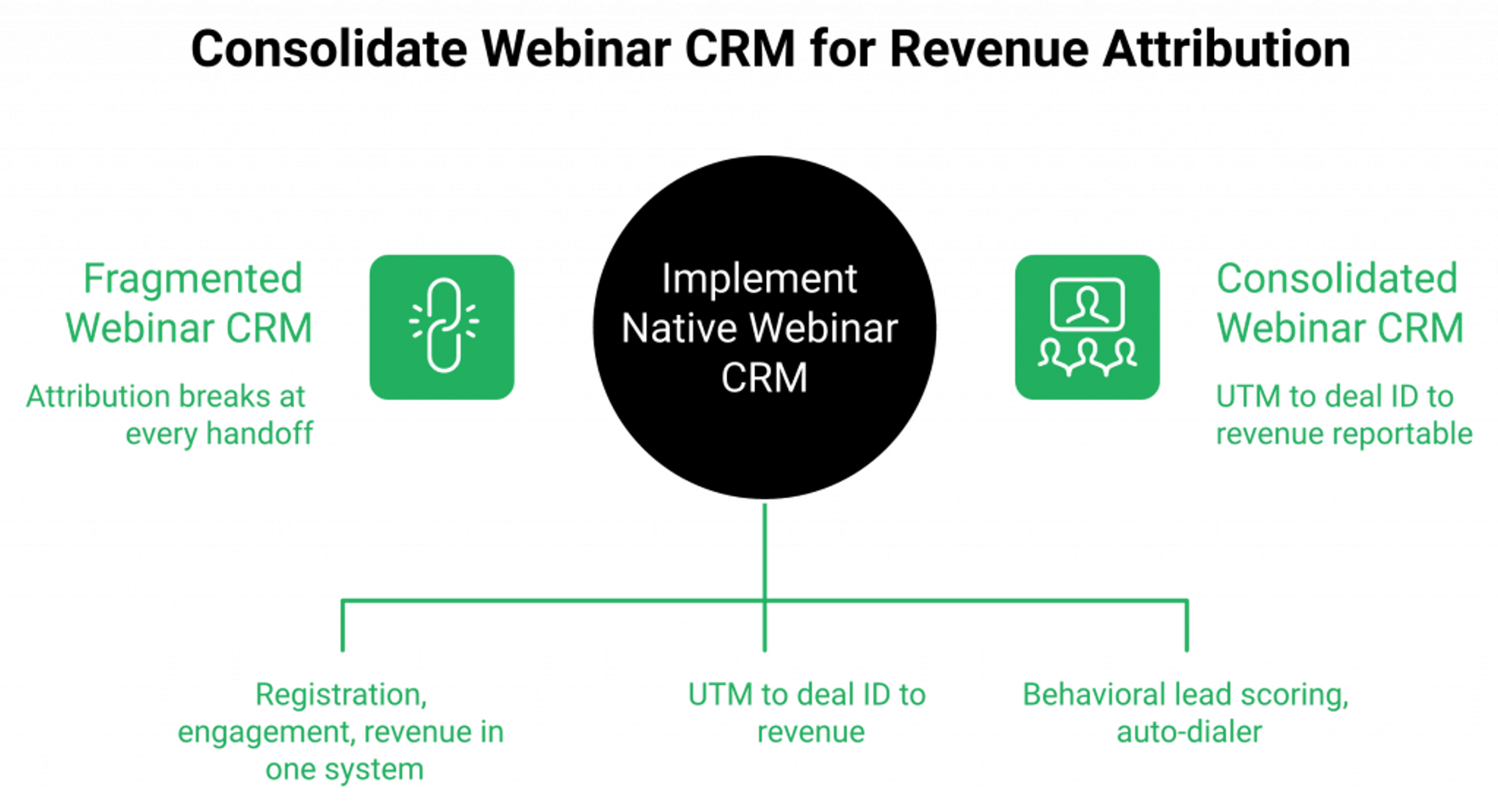
The Friday Morning Reality
Most growth-stage teams I talk to run some variant of Zoom plus HubSpot, or ActiveCampaign plus ClickFunnels plus Zapier plus Stripe. Registrations land in one place, engagement data in another, and payments in a third. Somebody on marketing ops spends every Friday fixing broken Zaps, not analyzing what’s working. The webinar happened. The stack hosted it. Nobody can confidently answer “which ad drove the sale?” by 10 AM Monday. For teams evaluating a cleaner path, the integrations layer removes most of the Zap chain entirely.
Why the “Modern-But-Incomplete” Category Doesn’t Fix It
Demio and Livestorm offer clean UX but no native CRM. Broadcast tools like Zoom end at “the event happened.” The modern-but-incomplete category forces teams to bolt on CRM and checkout, recreating the same attribution-breaking stack problem with a nicer interface. WebinarKit automates delivery but still pushes leads out to external CRMs. No mid-market platform before EasyWebinar built the CRM inside the webinar system, which means every platform that came before us treated sales as somebody else’s job. The compare webinar platforms page maps the native-CRM gap across all major options.
“Livestorm offers a pretty wide range of features, but unfortunately, most of them only become available on the more expensive plans.”— Verified User in Marketing and Advertising Livestorm – G2 Verified Review
The Strategic Shift: CRM as System of Record
The webinar CRM should be the system of record for behavioral revenue signals, not a downstream sync target. When attendance duration, poll answers, and offer clicks live in the same platform as lead scoring and the auto-dialer, attribution stops breaking.
✅ UTM discipline at registration, source, medium, and campaign tagged on every form.
✅ CRM stitching, registration ID to deal ID to revenue, visible in one view.
✅ Behavioral lead scoring, Hot/Warm/Nurture tagging based on what the attendee actually did, not on what list they’re on.
❌ Not a Frankenstein BI project, no Looker dashboards, no data warehouse stitching, and no weekly CSV exports to reconcile Stripe against HubSpot.
✅ How EasyWebinar Simplifies This
Our sales CRM scores leads Hot/Warm/Nurture on in-session behavior, includes a native auto-dialer so sales reps can call scored leads without switching tools, and surfaces RPR and stage-by-stage conversion in one dashboard. Enterprise clients including Dolby, Teachable, Keap, and AWeber use EasyWebinar for high-stakes delivery, validating the platform’s attribution and compliance posture at organizational scale. Teams consolidating onto EasyCRM report meaningful stack cost reduction alongside attribution clarity their prior stack couldn’t produce. More context on the revenue math sits in how to make money with webinars.
“It also seamlessly integrated with our CRM, allowing leads to move into our workflow effortlessly. The user interface is simple and easy to use for my team, even those with less technical expertise.”— Darrin B. Easywebinar G2 – Verified Review
“HubSpot’s reporting and analytics dashboards feel cluttered at times, and building custom reports is less intuitive than competitors like Salesforce.”— Rajat D. HubSpot – G2 Verified Review
Q10: How Do You Turn One Live Webinar Into an Evergreen Funnel, and Manage Risk, Compliance, and Deliverability at Scale?
Turn a live webinar evergreen by selecting the highest-converting recorded session, editing for pacing, deploying on Just-in-Time plus scheduled times with timezone-aware delivery, preserving engagement mechanics (polls, chat, and timed offers), and layering behavioral follow-up. Expect 60% to 80% of live conversion at 10x the delivery volume. Scale sustainability depends on deliverability hygiene, GDPR consent at registration, and platform reliability above 1,000 concurrent attendees.
The 6-Step Evergreen Workflow
Live first, automate later. Only scale a session that already has the conversion math. Here’s the sequence:
- Select the session with the highest offer-close rate, not the highest attendance. Vanity metrics lie.
- Re-cut to 45 to 55 minutes. Remove slow segments, backtracks, and anything that only made sense live.
- Rebuild the offer segment with timed CTAs and countdown overlays, don’t just record over the top.
- Configure scheduling: Just-in-Time for same-session registrants, plus fixed daily times for global reach with auto-timezone.
- Wire behavioral follow-up sequences triggered by replay behavior, not just attendance.
- Set KPI alarms: if show-up drops below 35% or close rate drops below 50% of live baseline, trigger a re-shoot review.
⏰ Evergreen assets age. Re-record annually, or whenever conversion drops more than 20%. For background on why pre-recorded formats win at scale, see automated webinars for passive income.
⚠️ The Risk and Compliance Layer Nobody Wants to Write About
Scale exposes what one-off webinars can hide. A stack that works at 100 registrants quietly breaks at 10,000.
- Deliverability: SPF, DKIM, and DMARC on the sending domain, separate subdomain for webinar follow-up sequences, maximum 1 to 2 emails/day, and list hygiene, removing bounces and unengaged contacts after 90 days.
- Consent and GDPR: explicit opt-in checkbox at registration, audit log per registrant, data retention policy visible in the privacy notice, and consent captured before any SMS or WhatsApp touchpoint. See GDPR compliance for the platform’s posture.
- Platform reliability: verify concurrent attendee capacity with the provider before scaling, test stream stability at 500, 1,000, and 5,000, and confirm SLA and failover protocol in writing.
- Emergency plan: if a live session fails, send an immediate email to registrants with replay link plus reschedule option, and keep a pre-drafted apology and replay template ready before every live event.
The Enterprise Procurement Layer
SOC 2 Type II, SSO/SAML, and sub-account management aren’t features, they’re procurement gates. Without them, enterprise deals die in security review. With them, the same platform serves a solo coach and a Fortune 500 without changing systems.
✅ How EasyWebinar Simplifies This
Our Automated Gold format, delivered via the automated webinar engine, pairs Just-in-Time scheduling with native chat, poll, and offer-overlay preservation plus auto-timezone delivery, the four elements broadcast tools can’t replicate in evergreen mode. The Unlimited plan includes SOC 2 Type II, SSO/SAML, SLA options, and 50K+ concurrent capacity, enterprise parity with ON24 at a fraction of the ACV. Current tier breakdowns sit in webinar pricing.
“EasyWebinar is hands-down THE webinar platform for evergreen webinars, no contest. This is especially important for solo entrepreneurs wearing 800 different hats.”— Ash A. Easywebinar G2 – Verified Review
“Its automated webinar feature has been a game-changer for our business, allowing us to share our products with a wider audience while saving time and resources.”— Verified User in Marketing and Advertising Easywebinar G2 – Verified Review
Carla Biesinger generated $5M from a single pre-recorded EasyWebinar evergreen funnel, one recording, 24/7 delivery, and behavioral follow-up doing the selling, documented in the course creator case study. Enterprise clients including Dolby and Teachable deploy the platform for compliance-sensitive, high-capacity events where reliability at scale is non-negotiable.
Q11: What Does a Complete Webinar Funnel Build Look Like From Zero to First Registrant?
A complete webinar funnel build runs seven phases from archetype selection to live launch, and with an AI builder, the same build that takes 3 to 7 days manually can go from prompt to first registrant in an afternoon. The sequence is identical regardless of tool choice. The time-to-launch is what changes.
The 7-Phase Implementation Roadmap
| Phase | What Happens | Time (Manual) | Time (AI Builder) |
|---|---|---|---|
| 1. Archetype plus KPIs | Pick coach/SaaS/agency template, set registration goal, show-up target, close target, and RPR target | 30 min | 30 min |
| 2. Registration plus thank-you pages | Apply template, write [Outcome]+[Audience] headline, 2-field form, and auto-timezone | 2 to 4 hours | 10 min |
| 3. Pre-webinar sequence | 4-email confirmation-to-live-join cadence | 1 to 2 hours | 10 min |
| 4. Webinar session prep | Script hook, story, teach, pitch, Q&A, slides, polls, offer overlays, and test stream | 4 to 8 hours | 4 to 8 hours |
| 5. Post-webinar sequences | 4 behavioral segments, 15 to 20 emails total | 1 to 2 hours | 15 min |
| 6. Attribution setup | UTMs on all traffic, registration-ID to deal-ID stitching, and RPR tracking | 1 hour | 1 hour |
| 7. Launch plus promote | Activate retargeting plus list plus organic teaser, technical rehearsal, and go live | Ongoing | Ongoing |
⏰ Total manual timeline: 3 to 7 days of focused work. AI Builder timeline: one afternoon. For step-by-step host preparation, see how to start a webinar.
The Full Asset Checklist
Every piece below needs to exist before traffic goes on:
✅ Registration page plus confirmation page
✅ 4-email pre-webinar sequence
✅ Webinar script plus slide deck
✅ 3 polls plus 1 to 2 timed offer overlays
✅ 4-segment post-webinar sequences (15 to 20 emails total)
✅ UTM tracking sheet
✅ Replay page
✅ Emergency communication template
For reference designs on the registration page, the webinar landing page examples that convert library is the fastest shortcut.
Next Steps by Maturity Level
- Beginner: launch one live webinar, measure, and iterate before automating anything. Don’t build evergreen on a funnel that hasn’t closed a live sale. Live webinar software is where this starts.
- Intermediate: convert the best live session to an evergreen Automated Gold funnel, add paid retargeting, and open up SMS reminders.
- Advanced: multi-archetype funnels running simultaneously, affiliate/JV partnerships filling registrations, EasyCast multistreaming to YouTube/LinkedIn/Facebook, and full RPR attribution dashboard by source and archetype.
✅ How EasyWebinar Simplifies This
Our AI webinar builder collapses Phases 2, 3, and 5 into a single prompt-to-launch workflow, including pages, emails, script direction, polls, offer timing, and behavioral sequences generated from one input. For teams already on a multi-tool stack, the migration path is a parallel launch: build the EasyWebinar funnel alongside the existing stack, run one live session, compare attribution clarity, and consolidate once the numbers settle the debate.
“Just trying to create webinar campaigns in one day has always been a headache with other platforms I’ve used. However, EasyWebinar simplifies this process by giving you instant access to useful AI webinar templates and detailed funnel creation for all your marketing efforts.”— Verified User in E-Learning Easywebinar G2 – Verified Review
“We have run close to 30 since we started running it this new year and it has been a game changer for our business. I would highly recommend EasyWebinar to anyone looking to run Webinars often.”— Darrin B. Easywebinar G2 – Verified Review
Teams launching via the AI Builder cut time-to-first-registrant from days to the same afternoon, validated across coach, SaaS, and agency archetypes. The build isn’t the hard part anymore. Picking the right archetype and offer is.
Q12: Ready to Launch? Here’s What Separates a Webinar Funnel From a Webinar Revenue Engine
The difference between a webinar funnel and a webinar revenue engine is whether follow-up, monetization, and attribution are built into the same system that hosts the event, or bolted on afterward through tools that don’t share data.
Why Great Webinars Still Leak Revenue
Most teams host great webinars and still leave 60% to 70% of revenue on the table, not because the content is weak, but because the stack breaks at the handoff points. Registration data doesn’t reach the CRM. Offer clicks don’t trigger the right sequence. Revenue can’t be attributed to the session that produced it. The webinar did its job. The stack didn’t. The full platform market scan lives in best webinar software comparison guide.
💰 What to Look For in a Platform
✅ Format range: live, automated, evergreen, and simulive in one account without per-format pricing tiers.
✅ Native CRM with behavioral lead scoring, not a Zapier connection to HubSpot that breaks every other Friday.
✅ In-webinar checkout: offer-click to purchase without leaving the session, because intent decays the moment they leave. The paid webinars module handles this natively.
✅ Attribution in one dashboard: registration, engagement, and revenue visible without a BI tool.
Where EasyWebinar Fits
EasyWebinar is built for operators who want all four of those capabilities in one system, including coaches running high-ticket programs, SaaS teams running product demos, and agencies managing client funnels without a 6-tool stack underneath. The right starting point depends on your current setup and offer price point. You can also request demo or sign up free to validate the platform before migrating. The full platform comparison, covering pricing, format breakdown, CRM capabilities, and monetization features, is in the guide below.
This framework reflects 14 years of webinar funnel architecture across hundreds of operators, including coaches, SaaS teams, and agencies, generating eight figures in combined revenue across every format and price point. Pick the archetype, pick the stack, and commit to a test launch date. The engine only works once you turn it on.

Casey Zeman
Founder of EasyWebinar
About Author
Over the past decade, I've helped thousands of entrepreneurs, coaches, and consultants turn webinars into a predictable, powerful way to grow their audience, build trust, and scale, without the constant hustle. I created EasyWebinar because I couldn't find a system that combined authenticity, engagement, and automation the way I needed. So, I built one.
Related Posts
10 Best Community Engagement Platforms in 2026
Compare the 10 best community engagement platforms in 2026. Course creators, evaluate live hosting, analytics, and replay to pick your winner today.
10 Best Online Coaching Tools in 2026: Live Session Quality, Scheduling, Recording, and Client Engagement Analytics
Compare the 10 best online coaching tools of 2026 on session quality, scheduling, and analytics. Discover the right fit for your coaching revenue model.
10 Best Webinar Hosting Platforms Ranked by Uptime, Streaming Quality & Cost
Compare 10 webinar hosting platforms ranked by uptime, streaming quality, and cost. Discover which tool actually turns attendees into revenue.
Turn every webinar into a revenue stream
Launch your first paid event in just a few clicks - and start monetizing your expertise.
Book a Call