
0%On this pageContents
A sales webinar for a small business is a free online session that teaches one useful thing and ends with one clear offer. If you've never run one, the hard part isn't presenting. It's getting the format, the registration page, the offer and the follow-up to work together while you do everything alone. Run your first one live, show your offer inside the room with a countdown, then email attendees and no-shows separately afterwards. EasyWebinar holds all four steps in one webinar, so you build them once and reuse them.
At a glance
| Step | What you decide | Where it happens in EasyWebinar |
|---|---|---|
| 1. Format | Live for your first session, then an automated copy | The webinar type, chosen when you create it |
| 2. Registration page | A headline, a short promise and a two-field form | The registration page builder |
| 3. Reminders | A day, an hour and fifteen minutes before | The Notifications tab |
| 4. The offer | One offer, a button to your own checkout, an optional countdown | The CTAs tab |
| 5. Follow-up | Replay and offer for attendees, replay for no-shows | Webinar Follow-ups on the Notifications tab |
| 6. Review | Where people dropped out, and which step to fix next | The Analytics tab |
Where sales webinars fit for a small business
You've got a service or product that people buy once they understand it, and explaining it one call at a time is eating your week. A sales webinar lets you explain it once to a room of interested people, then make the offer while their interest is high.
What they're for
A sales webinar turns a list of curious people into buyers in one sitting. It teaches something useful first, so the offer at the end feels like the natural next step rather than a pitch.
How they help
- One explanation for many buyers. You present once instead of repeating the same call.
- The offer sits in the room. Attendees click a button while they're still watching.
- The session keeps working. A live session can be cloned into an automated one that runs on a schedule.
- Your contacts stay where you keep them, in your CRM or ours. Keep HubSpot, Salesforce Pardot (Account Engagement), ActiveCampaign, Mailchimp or Kit (formerly ConvertKit), or use EasyCRM natively.
What happens without them
Without a sales webinar, every sale needs its own conversation. Your time sets the ceiling on how many people you can sell to, and interested people who can't get a call slot drift away.
Why small business owners care
It matters most to owners and solo operators who sell something that takes ten minutes or more to explain. It matters most in the weeks before a launch or a seasonal push, when you need many conversations at once.
The EasyWebinar approach to your first sales webinar
Take a typical case. A one-person home organising business sells a paid decluttering package, and every new client has asked the same questions on a discovery call. The owner wants to answer those questions once, in a free 40-minute session, and invite the room to book.
The usual workaround is to string tools together. That often means a video-call link, a payment page, a spreadsheet of who signed up and a few emails sent by hand. Each piece works alone, but nobody tells you who watched, who clicked and who still needs the recording.
What changed is simple. A webinar no longer has to be live every time. Once you've presented it well, the recording can play at set times while the offer and follow-up run on their own.
EasyWebinar keeps the registration page, the reminders, the offer and the follow-up inside one webinar. It shows the offer as a card in the room, with a button that opens your own checkout. It then sends different emails to attendees and no-shows, and it can turn the live session into an evergreen one by cloning it.
You can check one part of this on the offer editor shown further down this page. The Countdown timer is a single switch on the offer card, beside the price and the button settings. How that compares with other webinar platforms is covered in How EasyWebinar compares for sales webinars for small business, below.
Live or automated: choosing your first format
Run your first sales webinar live. You'll hear which parts land, which questions come up and where people leave, and that tells you what to fix before you automate it. EasyWebinar offers three types, and you choose one when you create the webinar.
Live
You present in real time and attendees join at the scheduled moment. Choose live when the value is in you being there, such as a launch or a workshop. You can create and schedule a live webinar in four steps, and recording can be switched on so you keep the session.
Simulive
Simulive plays a recording at set times, with attendees registering for specific dates. Everyone in a session sees the same moment together, so the chat still works as a shared room. It suits a second run when you want to be in the chat but not on camera. The setup is covered in create a simulive webinar.
Evergreen
Evergreen makes the recording available around the clock, and each registrant picks a time that suits them. It suits an offer you sell all year. When your live session has gone well, you can turn it into an evergreen webinar by cloning it and choosing Evergreen on the copy.
What to check before you choose
The type can't be changed after you create the webinar. If you pick the wrong one, clone the webinar and choose the right type on the copy. Your original stays untouched, and its registrants stay with it.
How a sales webinar leads to the sale
Most sales webinars follow one of four patterns for where the offer goes. Each one catches some buyers and misses others, so pick the pattern before you write a word of your script.
The offer at the end
You teach for most of the session and introduce the offer in the last few minutes. It feels least pushy and builds trust with a cold audience. It misses anyone who leaves early, and on a first webinar that can be a large share of the room.
The offer woven through
You teach and mention the offer at natural points, then close with a clear invitation. People who leave halfway have still heard what you sell. The risk is that each mention interrupts the teaching if it isn't tied to what you just showed.
The direct pitch
The session centres on the offer, with repeated calls to act and strong urgency. It suits a warm audience that already knows you. It can feel heavy to people meeting you for the first time.
The offer after the session
You keep the session purely educational and make the offer in the follow-up emails. It suits a very cautious audience. The cost is time: a 2011 Harvard Business Review article found that most companies weren't responding to online leads nearly fast enough.
What EasyWebinar does here
When AI drafts your webinar, EasyWebinar asks you to choose one of three positions: Soft Pitch, Balanced Approach or Direct Pitch. The offer card appears in the room when you choose to show it, and the follow-up emails can carry the offer afterwards. So all four patterns can run from the same webinar.
Write a short sales webinar script
A sales webinar script needs a hook and welcome, the problem your buyer has, what you teach, and the offer. Plan those sections before you build slides, using the webinar outline template if you want a structure to fill in. Write in the words your buyers use. Nielsen Norman Group's guidance on plain language says simple, familiar words help experts as well as beginners.
If you'd rather start from a draft, EasyWebinar can generate a sales webinar script from a description of your audience, your topic and your offer. The script comes back in named sections with timings and speaker notes. Read it before you move on, because the pages and emails are built from it.
Build a registration page that gets sign-ups
Your registration page is the link you promote, so it carries most of the work before the session. It needs a headline that names the result, three or four things people will learn, the date and time, and a form.
Keep the form short. Nielsen Norman Group's form design research says every field you cut raises the form's conversion rate. EasyWebinar's default form asks for Full name and Email only, and for a first webinar that's usually enough.
The registration page builder opens straight after you create the webinar, with your date, time and a live countdown already in place. Pick a template, then check the page in the Device toggle's mobile view, because many people will register from a phone. The page isn't public until you click Publish.
To invite people already on your list, send the One-Click Registration Link from sharing links. It carries their name and email in the URL, so a known contact registers without filling in the form.
Get people to turn up
Getting people to register is the easy part. Getting them to turn up is what reminders are for. A common pattern is three reminder emails: a day before, an hour before and fifteen minutes before. The last one does most of the work.
Reminder timing is set relative to the webinar, not a fixed clock time, so the same three reminders work on recurring and evergreen schedules. Set the sender name to one people recognise, and set the reply-to address to an inbox you read, because people do reply. An SMS reminder (Beta) can go alongside email, if you add the Phone field to your form.
Sell during the webinar
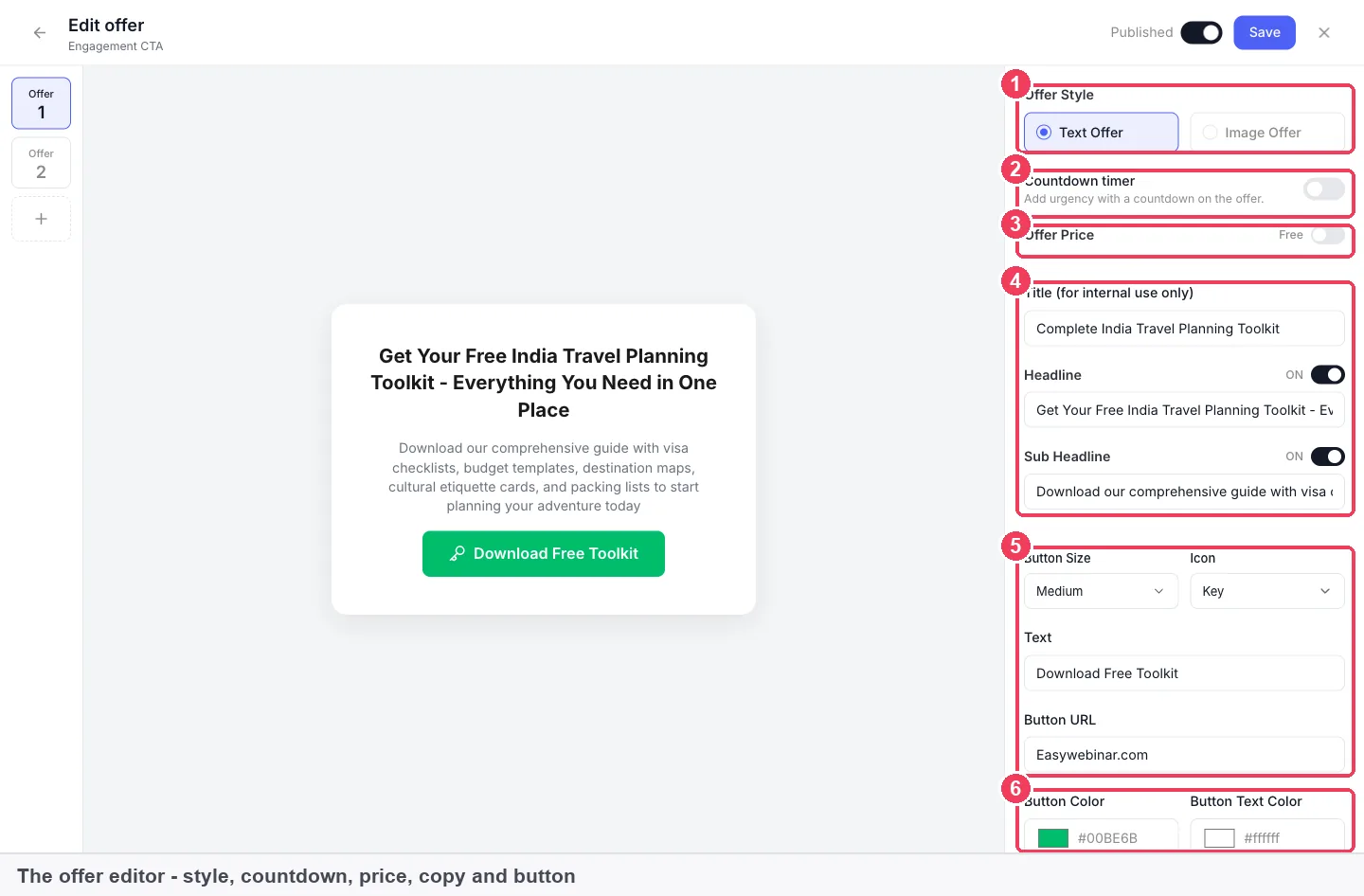
Your offer is a card with a headline and a button, shown in the room while people watch. Build it before the session on the CTAs tab, and keep its toggle off until you're ready to show it. This video shows an offer being made to attendees during a webinar, without sending them away first.
Set up the offer card
Write a headline that names what the buyer gets, then set the button. Button URL is where attendees land when they click: your checkout, booking page or sales page. Write the button Text to match what happens next, such as "Book your package", never "Click here". The steps are on the offers page.
Add a countdown
Switching on Countdown timer puts a countdown on the offer card, which makes the offer feel time-limited. Only use one if the deadline is real. The countdown timers page covers how it behaves.
Warm the room with a poll
Ask an easy question about the audience before you make the offer. A question such as "when are you planning to start?" also tells you who's ready to buy. Build it on the same tab, as described under polls.
If you charge to register
A sales webinar is usually free, but you can charge for a paid workshop instead. Attendees pay through a secure Stripe checkout, and the money goes straight to your Stripe account. EasyWebinar never holds your funds. The setup is under paid webinars.
Follow up with attendees and no-shows
Most of your registrants won't attend live, so the follow-up is where much of the selling happens. Send attendees a thank-you with the replay and the offer, and send no-shows the replay. Webinar Follow-ups go after the session, and you choose the audience for each: everyone who registered, only attendees, or only no-shows.
Turn on the replay page before you paste its link into an email. If the replay uses Webinar Replica, the same offers and polls carry over, so replay viewers can buy too. The replay pages guide covers the expiry options, and the full email set is on webinar follow-up emails.
For warmer leads, Attendee Action Follow-ups send based on what someone did, such as clicking your offer. In People, the filter for high watch time plus an offer click shows who was interested and didn't buy.
How to run a sales webinar by hand
You can run a first sales webinar with general tools. It takes more steps, and the gaps between tools are where people get lost.
- Write a one-page sign-up form in a form tool and collect names and emails.
- Create a meeting link in a video-call tool and paste it into a confirmation email.
- Send reminders by hand from your email tool the day before and an hour before.
- Present, then paste a payment link into the chat when you make the offer.
- Export the call's attendance list and match it against the sign-up sheet.
- Upload the recording somewhere and email the link to no-shows.
- Count who paid by checking your payment tool against the attendance list.
The same job in EasyWebinar
In EasyWebinar the same steps sit in one webinar. The registration page, reminders and follow-ups are built in, and the offer card shows inside the room. Analytics count visitors, registrations, attendance and each offer's views, clicks and purchases, so you don't match lists by hand.
Set up your first sales webinar in EasyWebinar
This recipe gets a live sales webinar ready in one sitting. The manual builder walks you through four steps and takes about two minutes, and every page has a working default you can improve later.
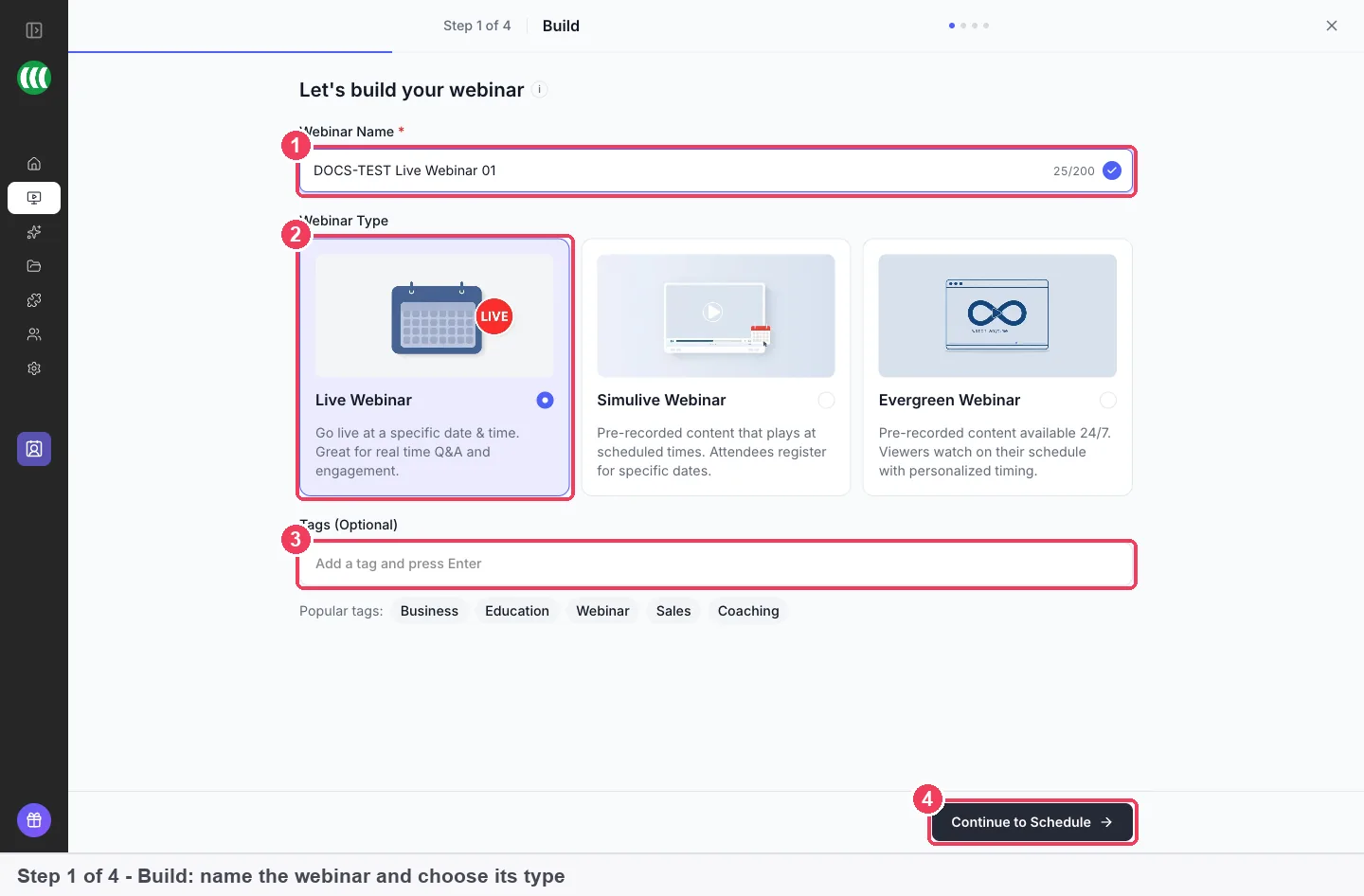
- On My Webinars, create a webinar, give it a name and choose Live.
- Set the date and time. The timezone defaults to your account timezone.
- On the pricing step, leave the webinar Free unless you're charging to register.
- Pick a registration template, or choose Default Register Page for a simple one-column page.
- Edit the headline and promise in the builder, check the mobile view, then click Publish.
- On Notifications, set three reminders and two Webinar Follow-ups: one for attendees, one for no-shows.
- On CTAs, build your offer, set the Button URL to your checkout and leave its toggle off.
- Switch the offer on at the right moment during the session.
Before you go live, run through the webinar setup checklist to test your camera, sound and offer link.
If AI drafts it for you
Create with AI writes the script, builds the pages, drafts the emails and creates polls and offers from one description. It takes about ten minutes, and a full build of all five parts costs around 23 credits. Check every page and email before you publish, especially what they say about your offer.
If your list lives in an email tool
EasyWebinar connects to email tools including HubSpot, ActiveCampaign, Mailchimp, AWeber and Kit (formerly ConvertKit). It can tag contacts by what they did, such as Attended, Missed or Clicked offer. The steps are under connect a CRM and map your webinar data. If you'd rather not run a separate tool, EasyCRM keeps contacts beside your webinars.
What each plan includes
Every plan includes live webinars with browser join, so attendees click a link and watch without installing anything. Automation, EasyCRM and checkout start at the Growth plan. There's no free plan: the standard trial is 7 days and requires a card. Pricing is flat monthly, with no per-attendee fees, and monthly plans are available. Current plans are on the pricing page.
Measure your first sales webinar
Two measures tell you most of what a first sales webinar did. The first is how many registrants attended. The second is how many people who saw your offer clicked it and then bought.
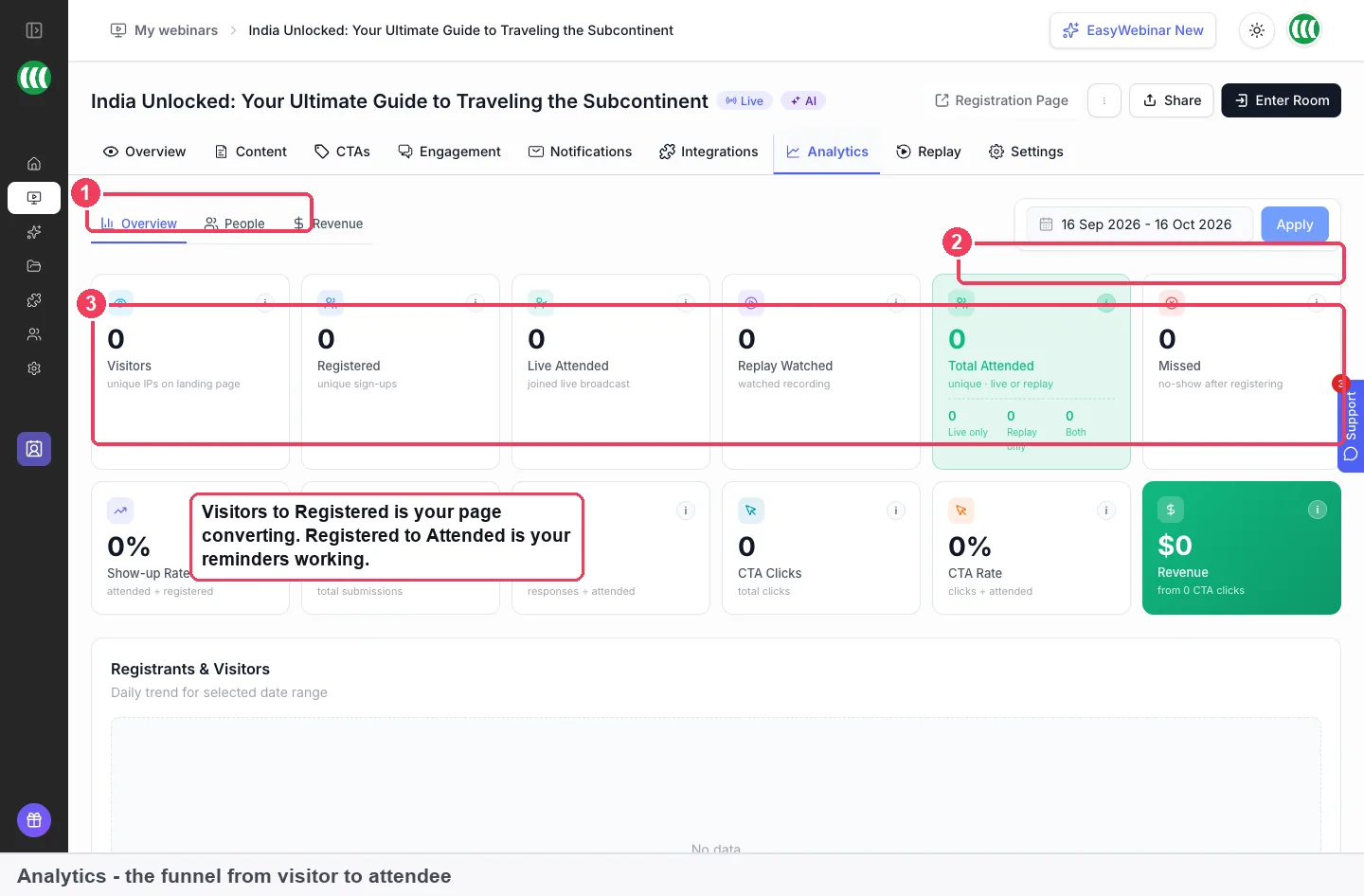
On the Analytics tab, Visitors to Registered shows whether your registration page is doing its job. Registered to Attended shows whether your reminders are. Lower down, Views to Clicks and Clicks to Purchases separate the two offer problems. Low views to clicks means the offer isn't landing, and low clicks to purchases points to your checkout or pricing. The webinar analytics page explains each figure.
How far to trust these numbers
A first webinar has a small audience, so a few people change the percentages a lot. Compare one step with the next rather than with someone else's results. Replay views are counted separately from live attendance, so check Total Attended before you judge the session. If everything shows zero, widen the date range.
Worked example: reading your first sales webinar funnel
This is an illustrative calculation with sample figures, not an EasyWebinar output. A solo operator promotes a free live session and reads the funnel the next morning.
| Step | Count | Calculation | Rate |
|---|---|---|---|
| Visitors to the registration page | 400 | ||
| Registered | 120 | 120 ÷ 400 | 30% |
| Attended live | 54 | 54 ÷ 120 | 45% |
| Missed | 66 | 120 − 54 | 55% of registrants |
| Offer clicks | 13 | 13 ÷ 54 | 24% of attendees |
| Purchases | 4 | 4 ÷ 13 | 31% of clicks |
More than half the registrants never showed up, so the replay email to 66 no-shows is the biggest next step. For the next webinar, the reminders deserve attention before the offer does, because the offer converted a fair share of the people who saw it.
How EasyWebinar compares for sales webinars for small business
EasyWebinar runs live and automated sales webinars in one product, with the offer card and its countdown inside the room. It also reports each offer's views, clicks and purchases, so you can see which step of the sale lost people.
Sales webinar features, from each platform's public documentation:
| Platform | Live and automated in one product | Offer card in the room, with a countdown | Offer views, clicks and purchases reported | AI drafts the script and offers |
|---|---|---|---|---|
| EasyWebinar | Yes | Yes | Yes | Yes |
| WebinarJam + EverWebinar | Partly (live and automated are two products) | Yes (Apply urgency countdown) | Partly (sales tracked by codes on your pages) | Not in docs |
| Demio | Yes (Standard and Automated events) | Partly (one Featured Action at a time) | Partly (click count and share who clicked) | Not in docs |
| Kajabi | Partly (webinar runs on a host such as Zoom) | Not in docs | Not in docs | Not in docs |
| eWebinar | Partly (recorded webinars, no live presenter) | Partly (countdown in one guide example) | Partly (one conversion event per eWebinar) | Partly (standard script template) |
| WebinarKit | Partly (live webinars depend on your plan) | Partly (countdown named on the Live product page) | Partly (clicks on offers on the dashboard) | Yes (AI builds a sales webinar script) |
Yes: documented and built in. Partly: documented with a limit, shown in brackets. Not in docs: not found in the vendor's public documentation.
Why EasyWebinar is the stronger choice for sales webinars for small business
- One product for your live session and its automated copy. EasyWebinar clones a live webinar into an evergreen one, while EverWebinar sessions run in a separate product from WebinarJam. See EasyWebinar vs WebinarJam.
- Offer views, clicks and purchases in one panel. EasyWebinar reports all three per offer, while WebinarKit's dashboard lists clicks on offers. See EasyWebinar vs WebinarKit.
- The sale happens in the room. EasyWebinar shows a timed offer card during the session, while Kajabi's webinar funnel runs on a host such as Zoom. See EasyWebinar vs Kajabi.
- Live and recorded in the same room. EasyWebinar runs both from one account, while eWebinar is built for recorded sessions without a live presenter. See EasyWebinar vs eWebinar.
Competitor details checked against each vendor's public documentation on 4 November 2026. Features and plans change, so confirm with the vendor before you decide.
What EasyWebinar doesn't do for a sales webinar
EasyWebinar doesn't hold the money from your offer. The offer button opens your own checkout URL, and paid registration runs through your Stripe account. A webinar's type is fixed once it exists, so moving from live to evergreen means cloning it. Reminders and follow-ups are set per webinar, so a new webinar needs its own set or a clone of an earlier one. The replay link is public while the replay page is on.
Common questions about sales webinars
Should a first sales webinar be live or automated?
Run your first sales webinar live. You'll learn which parts land and where people leave. Once it works, clone it in EasyWebinar and choose Evergreen, so the recording plays on a schedule with the same offers.
How do you sell on a webinar without being pushy?
Teach one useful thing first, then make one offer that follows from it. Show the offer card when the teaching reaches the problem your product solves. Use a countdown only when the deadline is real.
What should a sales webinar script include?
A sales webinar script needs a hook and welcome, the buyer's problem, what you teach and the offer. EasyWebinar's AI can draft one in named sections with timings and speaker notes, which you then edit.
What makes a good sales webinar topic?
Pick a topic that solves the first part of the problem your product solves. A home organiser might teach how to clear one room in a weekend, then offer the full package for the whole house.
How long should a sales webinar be?
In EasyWebinar you set the duration and slide count before AI writes the script, so decide how long you need to teach, make the offer and answer questions before you generate it.
Is there a sales webinar template I can start from?
EasyWebinar has registration page templates in categories such as Coach, Lead Magnet and Marketing. Its AI can also draft the script, pages, emails, polls and offers from one description of your webinar.
How does a webinar sales funnel work?
A webinar sales funnel moves people from the registration page to the session, then to the offer and checkout. EasyWebinar's analytics count each step, from visitors and registrations to offer views, clicks and purchases.
Can I take payments during a webinar?
Yes. An EasyWebinar offer button opens your own checkout, booking or sales page. For paid registration, attendees pay through a Stripe checkout and the money goes straight to your Stripe account.
Do attendees need to download anything?
No. Every EasyWebinar plan includes live webinars with browser join, so attendees click their link and watch in the browser. Contacts on your list can register through a one-click link that skips the form.
Will EasyWebinar work with my email tool?
EasyWebinar connects to tools including HubSpot, ActiveCampaign, Mailchimp, AWeber and Kit (formerly ConvertKit). It can tag contacts as attended, missed or clicked offer. You can also keep contacts in EasyCRM instead.
Is there a free trial, and do I need a card?
EasyWebinar has no free plan. The standard trial is 7 days and requires a card. Plans are priced flat monthly, with no per-attendee fees, and current prices are on the pricing page.
Which plan do I need for an automated sales webinar?
Every EasyWebinar plan includes live webinars. Automation, EasyCRM and checkout start at the Growth plan, so an evergreen or simulive sales webinar needs Growth or above.
What should I send people who missed it?
Send no-shows the replay link as soon as the session ends. In EasyWebinar, add a Webinar Follow-up with its audience set to no-shows. A replay set to Webinar Replica repeats the live offers.
How do I know if my sales webinar worked?
Compare registrations with attendance, then offer clicks with purchases. EasyWebinar's Analytics tab shows both, with Views to Clicks and Clicks to Purchases for each offer, so you can see which step to fix.
Further reading
- The Short Life of Online Sales Leads (Harvard Business Review, 2011): why the speed of your response to a new lead matters.
- Website Forms Usability: Top 10 Recommendations (Nielsen Norman Group): why fewer form fields mean more sign-ups.
- Plain Language Is for Everyone, Even Experts (Nielsen Norman Group): how simple words make a script easier to follow.
Related
Updated 4 November 2026: first published with the format choice, offer patterns, the manual method, a measurement guide and a worked example.