
0%On this pageContents
Most guides to the types of webinars sort them by format, but you start with a job: fill a course, win clients, or explain a product. This page sorts webinars by that job instead. For each one it tells you which format fits, which features matter and which guide to follow next. EasyWebinar is a webinar platform that runs all three formats, so you can start with one and move to another as the job changes.
At a glance
Find the row closest to what you're trying to do. The format column tells you what to pick when you create the webinar, and the last column is where to go next.
| The job you have | Format that usually fits | Start with |
|---|---|---|
| Sell a course you host elsewhere | Live for the launch, then Evergreen | Selling online courses with webinars |
| Bring in new leads for a sales team | Live or Simulive | Webinar lead generation |
| Get the right people to register | Any format | Webinar invitation emails |
| Plan what you will say, section by section | Any format | Webinar outline template |
| Check everything before you go live | Live or Simulive | Webinar setup checklist |
| Win back no-shows and convert attendees | Any format | Webinar follow-up emails |
If you already use a CRM, you can keep it. Keep HubSpot, Salesforce Pardot (Account Engagement), ActiveCampaign, Mailchimp or Kit, or use EasyCRM natively. The CRM mapping guide shows how webinar data reaches the CRM you already have.
Where each type of webinar fits
Take a typical case. A small travel company sells guided walking holidays and wants more bookings from people who are still deciding. A live talk once a month works, but the team can't present every evening for every time zone. What they need is a set-up that matches that job, not a list of features.
A webinar type is the way your content reaches people. EasyWebinar offers three types of webinar, and you choose one when you create it. The choice sets your schedule and how attendees take part. All three use the same pages, emails, polls, offers and analytics, so only the delivery differs.
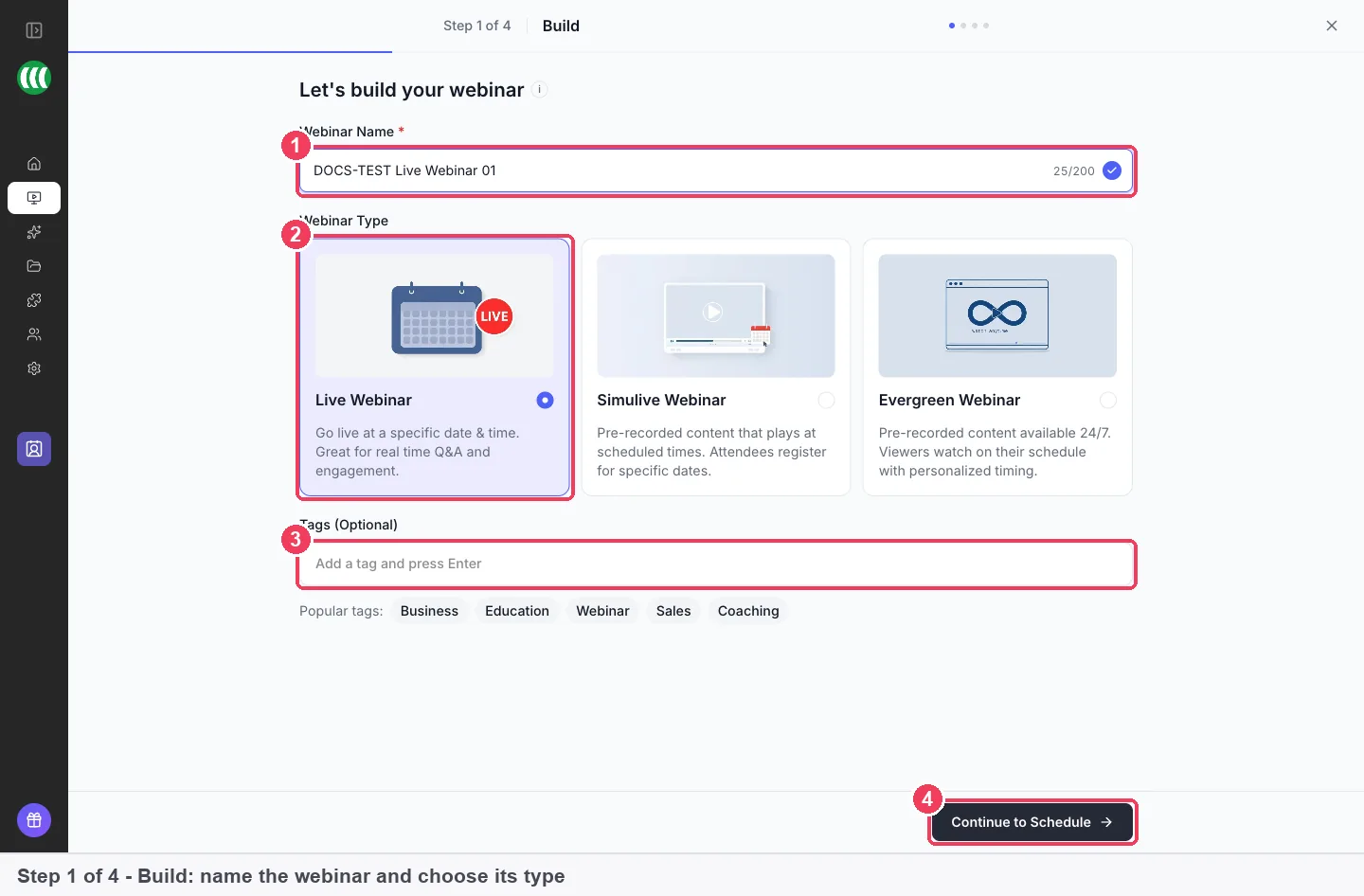
Live
You present in real time, and attendees join at the scheduled moment. Chat and questions happen as they happen. A live webinar is best for a launch, a workshop or any session where people come for the conversation. It is not the right fit when nobody can be there at the set time, every time.
Simulive
You record the session in advance, and it plays at set times. Everyone in a session watches together, and the recording plays while you and your moderators answer in the chat live. Simulive suits a talk you give again and again, or a session in a time zone you'd rather sleep through. It is not for a session you haven't recorded yet.
Evergreen
The recording runs on a repeating schedule, with each registrant picking their own time. Evergreen suits a demo, an onboarding session or an offer you run all year. It is not the best fit for a one-off event where the live questions are the point. The automated webinar overview explains how the schedules work together.
Which one to pick
| If you want | Pick |
|---|---|
| To answer questions as they come, in real time | Live |
| A polished recording at set times, with you in the chat | Simulive |
| A session that runs all the time and lets each person choose | Evergreen |
| To run the same session weekly without presenting it again | Simulive or Evergreen |
Live and Simulive both need you to pick dates, while Evergreen handles the schedule for you. Our walking-holiday company would run the talk live first, then turn it into an evergreen webinar for the evenings nobody can present.
Webinar examples by job
These webinar examples are grouped by what the webinar has to achieve, which is usually the way a sale works. Each one says who it suits, who it doesn't suit, and where the full steps live. For a wider view by sector, the EasyWebinar solutions for all industries cover more ground.
Sell a course or programme
Course creators often open enrolment with a live session in launch week, then keep selling with an evergreen version. You can show an offer during the session and add a countdown on the offer. The full plan is in selling courses with webinars.
This suits course creators, educators and trainers. It is not for hosting the course itself. EasyWebinar is the layer that sells your course, and the course stays on your own course platform.
Win clients as a coach or consultant
Coaches and consultants usually teach something useful, then invite attendees to apply or book a call. A live session works well here, because trust grows when people can ask you questions. Plan the talk with the outline template, and use timed offers for the booking link. A full guide to coaching webinars is on the way.
Fill a sales pipeline
B2B marketing teams and SaaS teams run webinars to bring in leads, then pass the warmest ones to sales. The lead generation guide covers capturing registrants and their source. The People view then shows who watched and who clicked. Guides to a first sales webinar and to automated product demos are planned.
This suits teams with a steady flow of prospects. If you only need a quick internal meeting, a full webinar set-up is more than the job needs.
Launch a product or onboard customers
Product teams can announce and demonstrate in one live session, then keep the recording working. Customer success teams often run the same onboarding session each week, which suits Simulive or Evergreen. You can let people watch straight after registering instead of waiting for the next slot. Guides to product launch webinars and customer onboarding webinars are still being written.
Run webinars for clients or as a team
Agencies run webinars for several clients, and small businesses often share the work between two or three people. Give each person their own login with team members and roles. To repeat a set-up, clone a webinar instead of building it again. Guides to client webinar funnels and team webinar programmes are planned.
Charge for a workshop or seminar
Solo operators sometimes sell a seat rather than a product at the end. The set-up for that is in paid webinars and paid registration. A separate guide to paid seminars and workshops is planned.
Choose your starting point
Work through these steps in order. Most set-up problems come from skipping the first two.
- Name the job. Write one sentence about what the webinar must achieve, such as "book ten discovery calls". Match it to a row in the table at the top.
- Pick the format. Choose Live, Simulive or Evergreen from the table above. If the format needs a recording, have it ready first.
- Choose how to build it. In Create a Webinar, pick Create with AI or Create Manually.
- Follow the guide for your format. Use the steps to create a live webinar, create a simulive webinar or create an evergreen webinar.
- Plan the follow-up before the session. Decide what attendees and no-shows each receive, using the follow-up email guide.
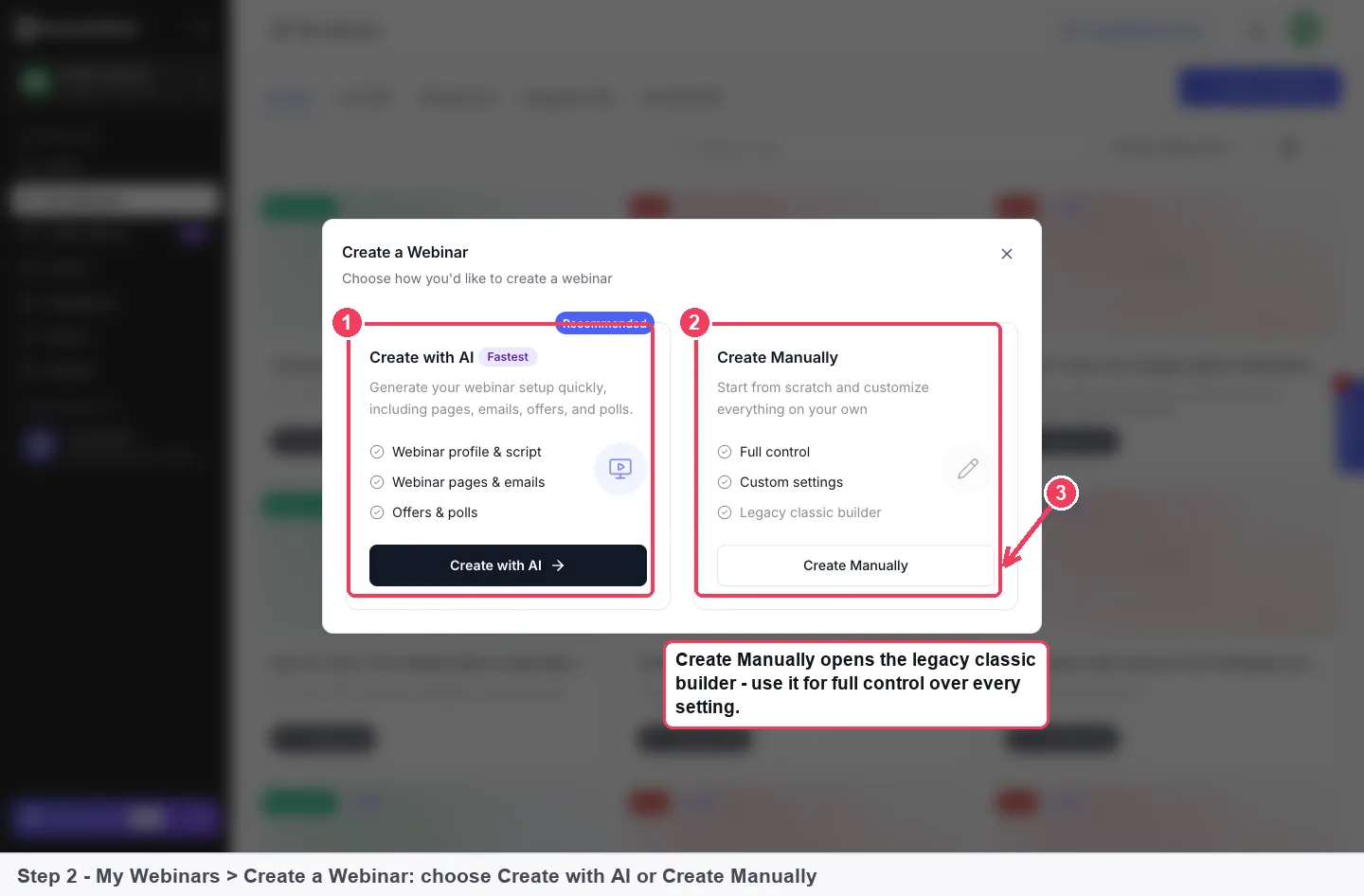
If you choose AI, Create with AI builds a complete webinar from a description. You then review and edit what it drafted before anyone sees it.
What goes wrong, and what to check
You picked the wrong format. You can't change the type later. Clone the webinar and choose the right type on the copy. Cloning is also how you turn a live webinar into an evergreen one, as the guide to turning a live session into an evergreen one explains.
There's no recording yet. Simulive and Evergreen need a recording, but Live webinars don't. If you haven't recorded anything, run it live first and use that recording later.
Most registrants don't turn up. Reminders are where attendance is won or lost. Check your reminder emails, and send no-shows a follow-up with the replay page.
Your audience speaks another language. Language is set per webinar, so each webinar can run in its own language. Language settings don't translate your content, though, so write your pages and emails in your audience's language.
Your leads stay in the webinar tool. Plan where contacts go before you run the session. You can bring registrants and attendees into EasyCRM, or send them to the CRM you already use.
Common questions
What are webinars used for?
Webinars are used to sell courses and programmes, win clients, bring in sales leads, launch products and onboard customers. The job decides the format. A live session suits real-time questions, while a recording on a schedule suits sessions you repeat.
What are the main types of webinars?
EasyWebinar offers three: Live, Simulive and Evergreen. Live is presented in real time. Simulive plays a recording at set times, with you in the chat. Evergreen plays a recording on a repeating schedule, and each registrant picks their own time.
Which type of webinar is best for a sales funnel?
Evergreen, in most cases, because it runs without you being there. Many people run the session live a few times first to sharpen it. Then they clone it as Evergreen and use the recording.
Can I change a webinar from live to evergreen?
Not directly, because the type is fixed when you create the webinar. Clone the webinar and choose Evergreen on the copy. That is the supported way to turn a live session that works into an evergreen one.
Can I still talk to attendees on a recorded webinar?
Yes, on Simulive. The recording plays while you and your moderators answer in the chat live. Attendees can also send questions through questions and answers, which keeps them apart from the chat.
Do I need to record something before I start?
Only for Simulive and Evergreen, because both play a recording. For a Live webinar you supply the content by presenting, so you need nothing recorded in advance.
Do I have to give up my CRM?
No. EasyWebinar works with your CRM or ours. You can keep the CRM you use today and send webinar data to it, or use EasyCRM in the same product.
Can EasyWebinar host my course?
No. EasyWebinar is not a course platform. It runs the webinar that sells your course, and the course itself stays on the platform you already use.
Can AI write the webinar for me?
It can draft it. The AI webinar overview explains what AI drafts before the session and what you still review. You stay in charge of the final wording.