What Is a Webinar? How It Works, Types and When to Use One

Casey Zeman
Published on Apr 21, 2022 • 23 min read
TL;DR
- A webinar is an online seminar: one or a few hosts present to a registered audience, who join from a link and interact through chat, polls and Q&A.
- A webinar runs as a six-step journey: register, reminders, join, watch and interact, one clear next step, then replay and follow-up. Keep the path straight, not branched.
- Unlike a meeting, a webinar is one-to-many: only hosts and panelists are seen and heard. A webcast is one-way with little interaction.
- There are three formats: Live, Simulated Live and Evergreen. Automated webinars is the umbrella over Simulated Live and Evergreen; Just-in-Time and On-Demand are Evergreen options.
- Run it live first, reach about 10% attendee-to-buyer, then automate the proven session. Never present a recording as live.
- Webinars sell, generate leads, demo software, train teams and onboard customers. Registration, reminders, replays and offers need webinar software, not just a meeting tool.
By Casey Zeman, Founder of EasyWebinar
When the market crashed in the recession, my income dropped to about $15,000 for the year. I spent six months building a course on YouTube marketing. I launched it, posted everywhere, and sold nothing. Crickets.
The only thing that finally sold it was a webinar. That year of weekly sessions built a 14,000-person email list and $245,000 in sales. EasyWebinar, the company I founded in 2013, grew out of that lesson. Yet the word still confuses people who hear it from a boss or a coach. This guide gives you the plain answer first, then shows how a webinar works from both seats, the formats you can choose from, and when one is the right tool.
Q1. What Is a Webinar?
A webinar is an online seminar: a presentation, class, or demo that one or a few hosts deliver over the internet to a registered audience. Attendees join from a link, watch the host's video and slides, and take part through chat, polls, and Q&A. The word blends "web" and "seminar." Webinars run live at a set time or as automated recordings that play on a schedule.
📖 The definition in plain words
Think of a classroom lecture, then move it online. One person (or a small panel) presents. Everyone else watches, listens, and responds in writing. That one-to-many shape is what separates a webinar from a group video call, where everyone talks.
Most webinars have three parts. There is a host who presents, an audience who registered in advance, and a set of interaction tools. Those tools are usually chat (a running text conversation), polls (quick multiple-choice questions), and Q&A (a separate queue for questions the host answers).
🔤 Where the word "webinar" came from
The word is a blend, or portmanteau, of "web" and "seminar." Secondary histories report that Eric R. Korb registered "WEBinar" as a US trademark in 1998, and that the mark was later assigned to InterCall, according to MyOwnConference's history of webinars. By the late 2000s, the term had become generic, which is why anyone can use it today (TrueConf). I haven't checked the original USPTO record myself, so treat the dates as reported, not certified.
🎯 Three everyday examples
You've probably seen one of these without calling it a webinar:
- A coach teaching a method. A business coach runs a 60-minute session on pricing, answers questions, then invites people to join a program.
- A software company showing a demo. A product manager shares her screen, walks through a feature, and takes questions from prospects.
- A trainer onboarding new staff. An HR lead explains benefits and tools to 40 new hires spread across three offices.
🎥 Hear it from EasyWebinar's founder
Casey Zeman, who founded EasyWebinar, explains what a webinar is in under three minutes.
So a webinar is a presentation people join online, with ways to take part while it runs. EasyWebinar has found that this is where most confusion starts. In my own words from our strategy sessions: "A lot of people know what a webinar is but they don't exactly know what it can be used for and they don't know what an automated webinar is." The rest of this guide fixes both gaps.
✅ Where EasyWebinar fits
EasyWebinar is a webinar platform built for conversions, live, automated, and on demand, founded in 2013 by Casey Zeman. Attendees join live webinars from any browser on desktop or mobile, with nothing to download. A host can run a session live, then turn the version that works into an automated webinar on the same platform, with one login and one subscription.
Q2. How Does a Webinar Work, Step by Step?
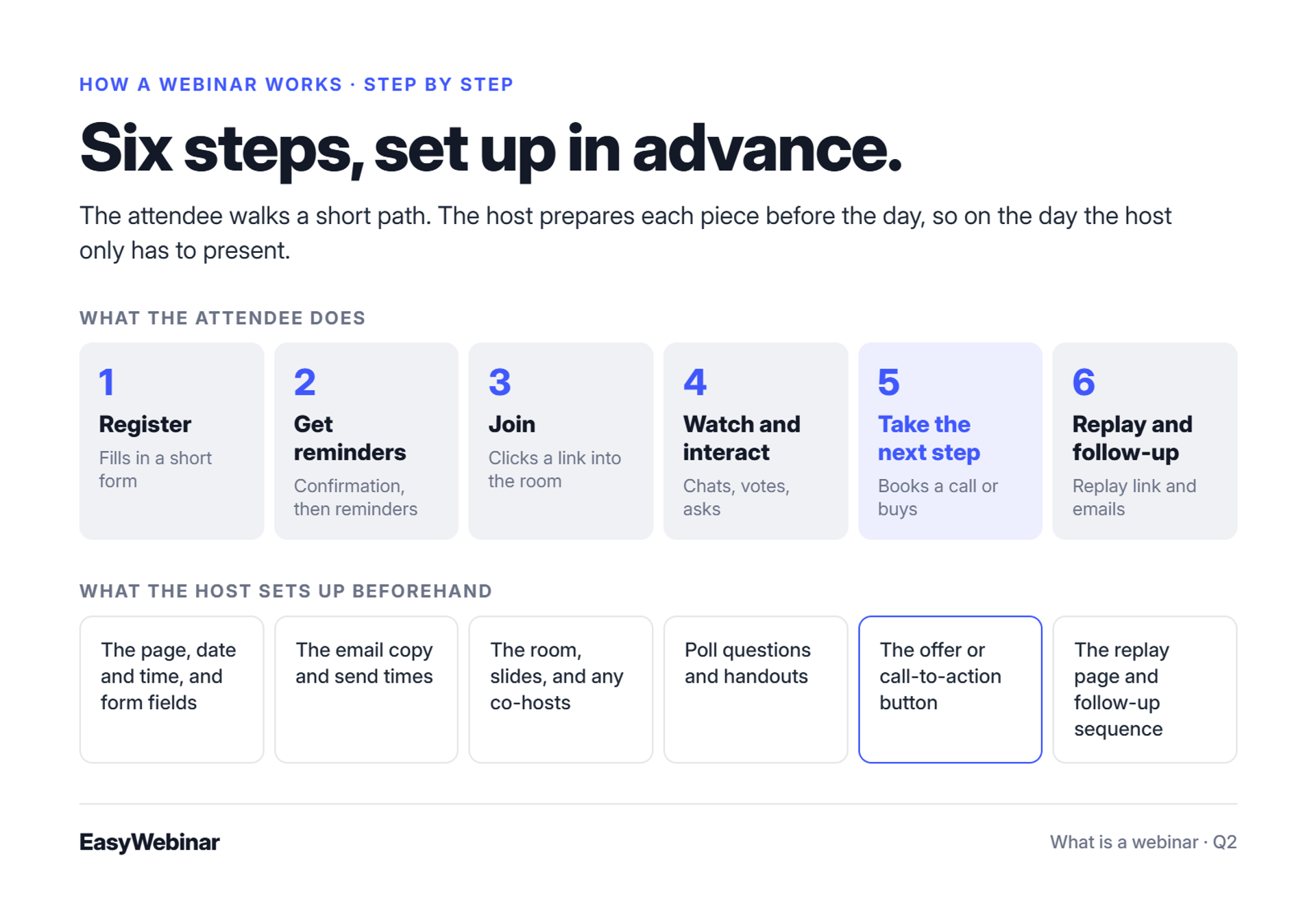
A webinar works as a short journey. People register on a page, receive confirmation and reminder emails, join through a link at the start time, watch the presentation and interact through chat, polls, and Q&A, see one clear next step, then get a replay or follow-up afterwards. The host sets up each piece in advance. On the day, the host only has to present.
🧭 The six steps of a webinar
Here is the full path an attendee takes, with what the host prepares before each step:
- Register. The attendee fills in a short form on a registration page. Host sets up: the page, the date and time, and the form fields.
- Get reminders. A confirmation email arrives, then reminders before the start. Host sets up: the email copy and send times.
- Join. At start time, the attendee clicks a link and lands in the webinar room. Host sets up: the room, slides, and any co-hosts.
- Watch and interact. The host presents. Attendees chat, vote in polls, and send questions. Host sets up: poll questions and handouts.
- Take the next step. The session ends with one clear action, such as booking a call or buying. Host sets up: the offer or call-to-action (CTA) button.
- Replay and follow-up. Attendees and no-shows get a replay link and follow-up emails. Host sets up: the replay page and the follow-up sequence.
🧱 Keep the path straight
The biggest mistake I see is turning those six steps into a maze. Operator Jon Penberthy described sitting on his office floor with his team after months of building branching email sequences. Links broke and emails stopped firing. He rebuilt everything as a straight line: register, confirmation, presentation, then replay or call booking.
That matches my own experience building EasyWebinar funnels. One path, a short replay window, and clear reminders beat a dozen branches that nobody can debug. Penberthy's own replay rule is three days with four emails, then the replay closes. For more on building the path, see our guide to the webinar funnel.
⭐ What hosts say about the setup
"I want to run a monthly webinar but was concerned about the many tasks involved - registrations, reminder emails, follow ups, making the recordings available etc etc. Having tested EasyWebinar for the last two weeks I'm blown away with how easy it was to setup a sequence of 10 webinars and have all the steps done that I need." - David L., February 27, 2025, EasyWebinar G2 - Verified Review
"I do use other email systems to send post-webinar email sequences because I can't track open and click rates on EasyWebinar, and also, I can't unsubscribe someone from the email campaign once the client has joined my program." - Eliza W., February 11, 2026, EasyWebinar G2 - Verified Review
That second review is fair. Some hosts keep their own email tool for long nurture sequences, and EasyWebinar connects to it rather than replacing it.
✅ How EasyWebinar runs the six steps
EasyWebinar sets up the registration page, confirmation and reminder emails, the room, the offer, and the replay inside one event. Follow-up reacts to what each person did: no-shows, early leavers, offer-clickers, and replay viewers each get their own sequence. Hosts can run it with EasyWebinar's built-in email or through Mailchimp, ActiveCampaign, or Kit (formerly ConvertKit) via integrations.
Start your 7-day trial or watch the demo
Q3. What Happens During a Webinar, From the Attendee's Seat and the Host's?
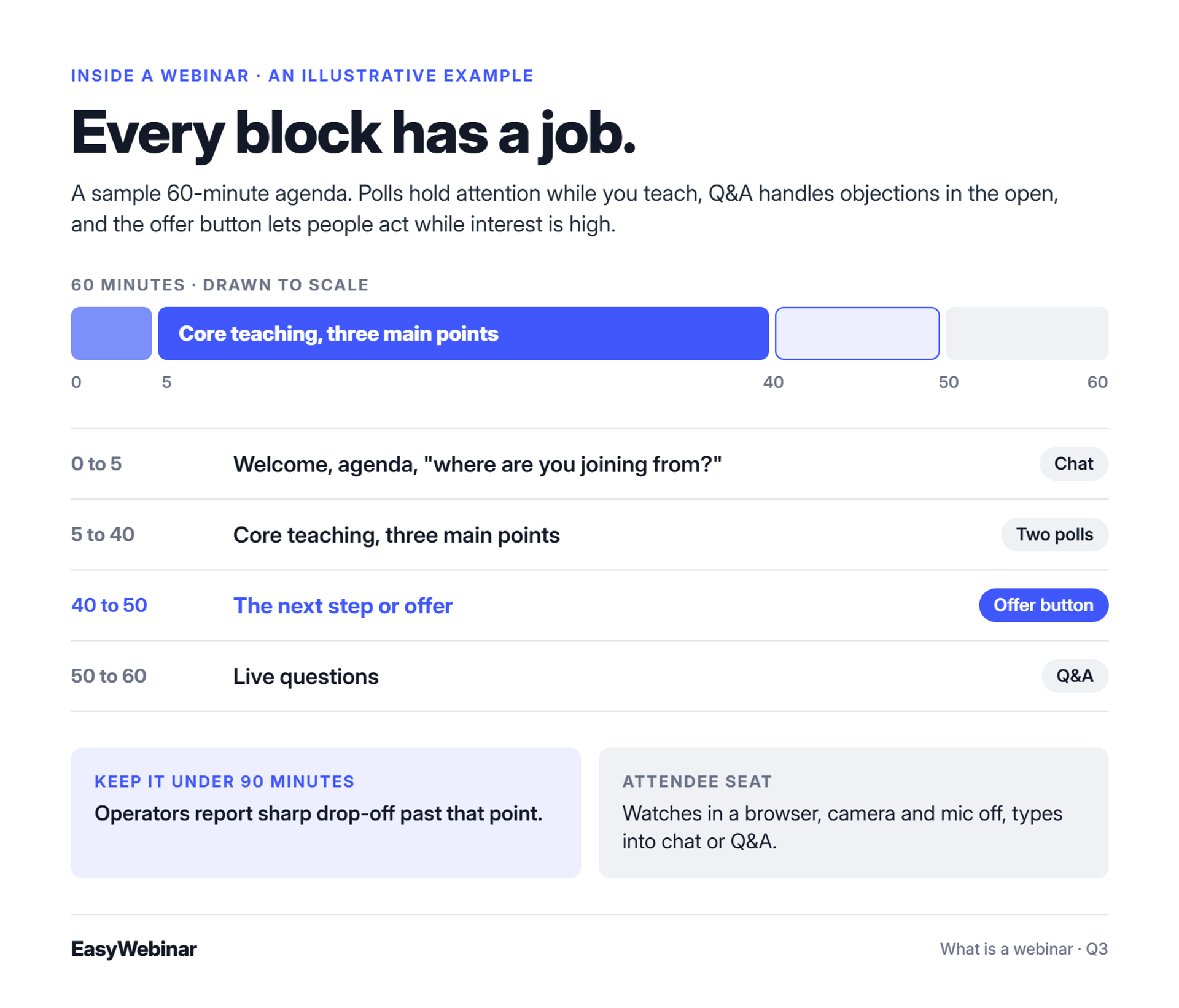
A typical webinar opens with a welcome and agenda, teaches for 30 to 45 minutes with polls and chat, takes questions, and ends with one clear next step. Attendees watch in a browser, usually without a camera or microphone, and type into chat or Q&A. The host sees the same room plus controls: slides, polls, the question queue, and the moment to show an offer.
👀 The attendee's seat
You click the link from your reminder email. On most modern platforms, the room opens in your browser. You see the host's video, the slides, and a chat panel on the side. Your camera and microphone stay off unless the host invites you on screen.
This is also the answer to "what is a webinar class" or "what is a virtual webinar." Both are the same thing: a webinar used to teach. You watch, take notes, answer polls, and ask questions in writing. Many hosts also share handouts, which are downloadable files like worksheets or slides.
🎛️ The host's seat
The host sees the same room plus a control panel. From there, the host advances slides, launches polls, reads the Q&A queue, and decides when to show an offer. Co-hosts or moderators can answer chat in the background so the presenter keeps talking.
To see the host's side of a real EasyWebinar event, watch Casey's walkthrough of the platform.
⏰ A sample 60-minute agenda
This is an illustrative example, not a fixed rule:
| Minutes | What happens | Interactive feature |
|---|---|---|
| 0 to 5 | Welcome, agenda, "where are you joining from?" | Chat |
| 5 to 40 | Core teaching, three main points | Two polls |
| 40 to 50 | The next step or offer | Offer button |
| 50 to 60 | Live questions | Q&A |
Each feature has a job. Polls keep attention during the teaching block. Q&A handles objections in the open. An offer button lets people act while interest is high. Keep the whole session under 90 minutes, because operators such as Jeremy Haynes report sharp drop-off past that point. For more ways to hold attention, see these webinar engagement tools.
⭐ What hosts say about the room
"It is easy to set up call to actions and polls and easy to use them in both types of webinars. The analytics also show how many saw or clicked your offer." - Verified User in Professional Training & Coaching, November 1, 2024, EasyWebinar G2 - Verified Review
"It also didn't seem to like me screen sharing another tab. From the presenter view, it was fine, but on the attendee view, it was continue to cycle and load. But I switched to .pdf files and it worked flawlessly." - Verified User in Photography, August 26, 2025, EasyWebinar G2 - Verified Review
✅ How EasyWebinar runs the room
In EasyWebinar, attendees join from any browser with nothing to download, no plugin, and no account. Polls and offers land in real time, with ultra-low latency, sub-500ms via Dolby OptiView WebRTC. The offer appears inside the room, so buyers can pay without leaving the webinar.
Q4. What Is the Difference Between a Webinar, a Virtual Meeting and a Webcast?
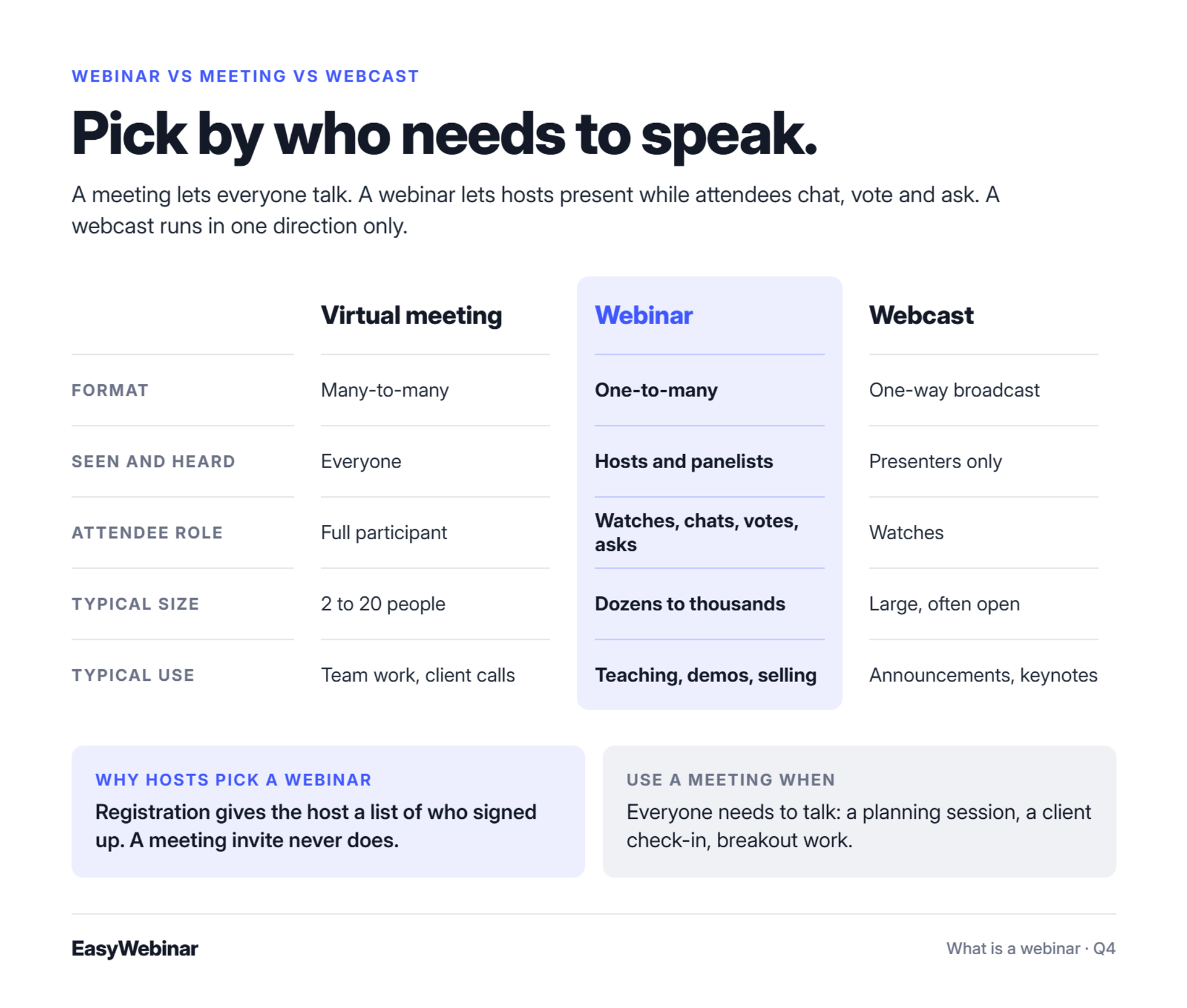
A virtual meeting is many-to-many: everyone can talk and be seen, and it works best for small groups. A webinar is one-to-many: only hosts and panelists are seen and heard, attendees interact through chat, polls, and Q&A, and it scales to hundreds. A webcast is a one-way broadcast with little or no interaction. Pick by how many people need to speak.
📊 Side by side
| - | Virtual meeting | Webinar | Webcast |
|---|---|---|---|
| Format | Many-to-many | One-to-many | One-way broadcast |
| Who is seen and heard | Everyone | Hosts and panelists | Presenters only |
| Attendee role | Full participant | Watches, chats, votes, asks | Watches |
| Registration | Usually an invite link | Usually a registration page | Varies |
| Typical size | 2 to 20 people | Dozens to thousands | Large, often open |
| Typical use | Team work, client calls | Teaching, demos, selling | Announcements, keynotes |
Zoom's own guide draws the same line. A webinar centers on presenters speaking to a large audience, while a meeting supports discussion among all participants. The IONOS Digital Guide separates a webinar from a webcast by interaction: a webcast runs in one direction only.
🔒 Why the difference matters for hosts
In a meeting, every attendee's name, camera, and microphone are exposed. With 150 strangers, that means someone's dog barking during your best slide. Betsy Sabatini makes this point in her breakdown of Zoom Webinars Plus. Dedicated webinar formats fix it with hidden attendee lists, a backstage for co-hosts, and controlled Q&A.
A webinar also starts with registration. That gives the host a list of who signed up, which a meeting invite never does.
🤝 When a meeting is the better choice
Use a meeting when everyone needs to talk. A six-person planning session, a client check-in, or a workshop with breakout discussions all work better as meetings. If you want the full breakdown of formats like workshops and podcasts, see our guide on webinar vs workshop and other formats.
✅ Where EasyWebinar fits
EasyWebinar is built for the webinar column of that table, not the meeting column. It adds what a meeting tool leaves out when a session has to produce something: registration pages, reminders, replays, in-room offers, and attendee-level webinar analytics. Zoom runs the meeting; EasyWebinar runs the webinar that has to sell, as our EasyWebinar vs Zoom comparison lays out.
Q5. What Are the Types of Webinars: Live, Simulated Live and Evergreen?
There are three webinar formats. A Live webinar is presented in real time at a set date. A Simulated Live webinar plays a recording at a fixed time while chat, polls, and timed offers run live. An Evergreen webinar plays a recording on flexible schedules, including Just-in-Time and On-Demand, with an async question box. Simulated Live and Evergreen together make up automated webinars.
🗂️ The three formats at a glance
| Format | How it runs | Scheduling | Interaction | Host effort |
|---|---|---|---|---|
| Live | Presented in real time | Fixed or fixed recurring, one time zone | Real-time chat, polls, Q&A, offers | High: present every time |
| Simulated Live | A recording plays as a scheduled event | Fixed or fixed recurring, one time zone | Real-time live chat, polls, timed offers | Medium: someone answers chat |
| Evergreen | A recording plays on flexible schedules | Just-in-Time, timezone-adjusted, multiple daily slots, Instant Replay, On-Demand | Async question box, pre-set polls and offers | Low after setup |
Simulated Live and Evergreen both sit under the "automated webinars" umbrella. Automated is the family name, not a fourth format. You may also hear "hybrid." That means one session that starts live, plays a recorded segment, then returns to live.
⏳ The old way: show up every single time
For years, a webinar meant one thing. You picked a date and presented live in one time zone, then did it all again next month. Every repeat carried new risk: a bad connection, a rushed pitch, a forgotten slide.
🔄 What changed: automate what is proven
Once a talk works, it doesn't need to be re-performed. It needs to be replayed, honestly, on a schedule that suits the audience. I think of Simulated Live as dipping your toes into automation, because a real person still answers the live chat. Evergreen is the deeper tier, where scheduling flexes to each registrant.
One integrity rule matters here. An automated webinar should never be presented as live. Clear framing keeps trust intact, and buyers notice when it slips.
✅ How EasyWebinar handles all three
EasyWebinar lets a host run a webinar Live, find the version that converts, then turn that exact session into Simulated Live or Evergreen. It stays on the same platform, with one login and one subscription. Simulated Live keeps real-time chat, polls, and timed offers. EasyWebinar's Simulated Chat feature can also bring prior chat messages into a new event.
Evergreen adds the scheduling toolkit. Just-in-Time starts a session minutes after someone registers, in that person's own time zone. On-Demand starts the moment they land. Both are Evergreen features, not Simulated Live features.
⭐ What hosts say about moving formats
"I used to do live webinars to sell my online course. I decided to do an evergreen webinar instead using EasyWebinar. With my live class I used to sell 10-12 courses. With EasyWebinar I sold 25 courses within 3 weeks of my evergreen "launch"." - Laura C., January 28, 2025, EasyWebinar G2 - Verified Review
"The only downside is that to have the "just in time" feature you have to pay a premium that is about double the price of the basic subscription." - Laura C., January 28, 2025, EasyWebinar G2 - Verified Review
Laura's numbers are her own result, and your offer decides yours.
Q6. When Should You Use a Webinar, and Which Format Fits Your Goal?
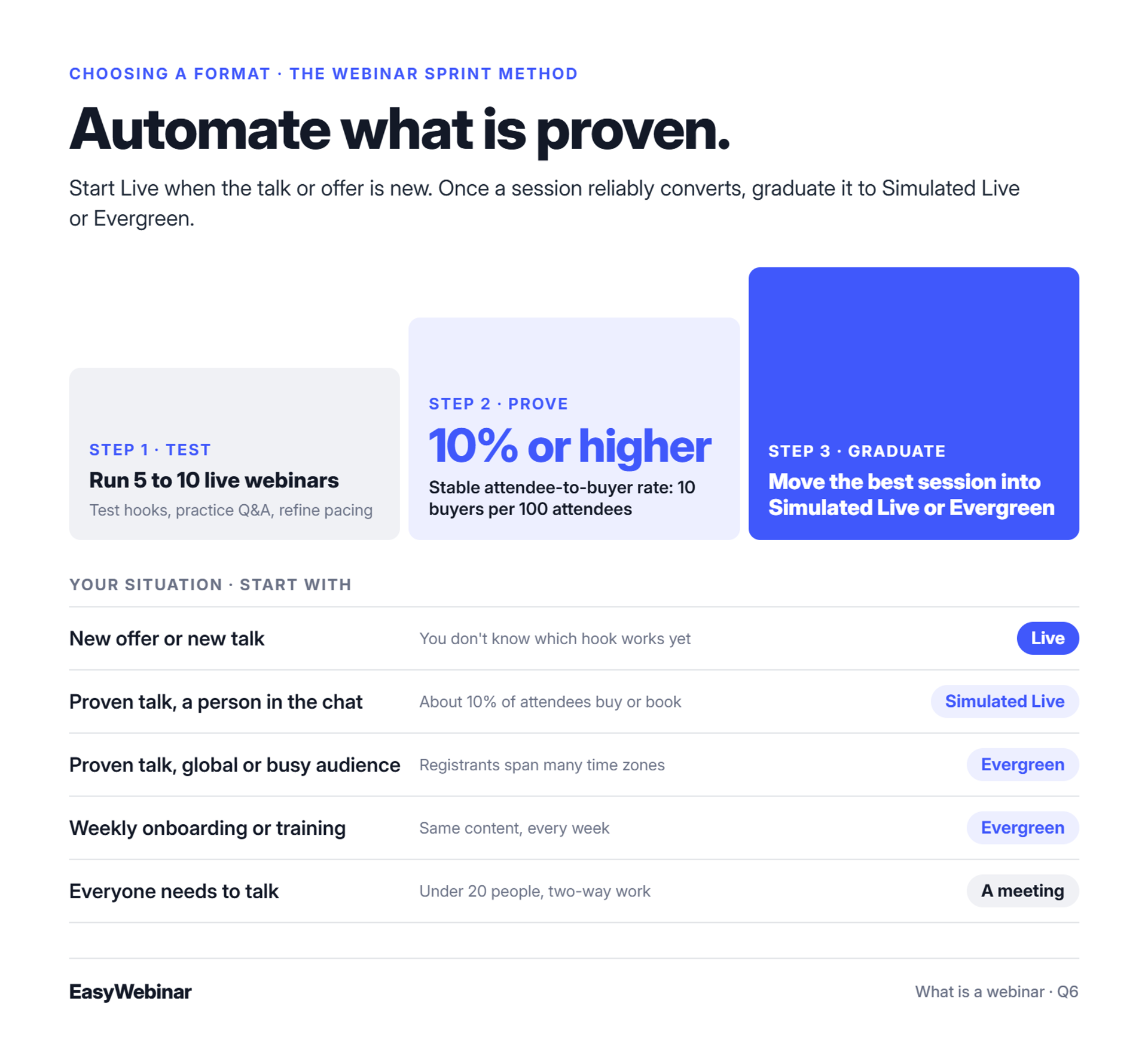
Use a webinar when you need to teach or persuade many people at once and want them to act afterwards. Start Live when the talk or offer is new, so you can test it and answer real questions. Once a session reliably converts, move it to Simulated Live to keep a live chat, or Evergreen to run it in every time zone. Use a meeting instead for small working sessions.
🧩 A quick decision table
| Your situation | Signal | Start with |
|---|---|---|
| New offer or new talk | You don't know which hook works yet | Live |
| Proven talk, you want a person in the chat | About 10% of attendees buy or book | Simulated Live |
| Proven talk, global or busy audience | Registrants span many time zones | Evergreen |
| Weekly onboarding or training | Same content, every week | Evergreen |
| Everyone needs to talk | Under 20 people, two-way work | A meeting, not a webinar |
😮💨 The old way: the live treadmill
Hosts usually fall into one of two traps. Some present the same live talk every week until they burn out. Others record an untested talk on day one, automate it, and wonder why nothing sells.
The first costs your evenings. The second burns ad spend on a pitch nobody has tested.
📈 What changed: validate live, then graduate
My rule is simple: automate what is proven. I call it the Webinar Sprint Method.
- Run 5 to 10 live webinars to test hooks, practice Q&A, and refine pacing.
- Reach a stable 10% or higher attendee-to-buyer rate (10 buyers per 100 attendees).
- Graduate the best session into Simulated Live or Evergreen.
Formats are not locked to use cases. I have run high-ticket launches on Evergreen myself. People also tell me "webinars are dead." That line is mostly a marketing tactic meant to sound salacious. Webinars work, but they have changed. For a deeper side-by-side, see live vs automated webinars.
✅ How EasyWebinar supports the path
EasyWebinar is built for the webinar that already works. The same session moves from Live to Simulated Live or Evergreen without moving platforms. The version that proved your offer is the one that keeps running, with lead scoring on Pro and team routing on Scale. See how that works on the automated and evergreen webinars page.
⭐ What hosts say about leaving the treadmill
"AUTOMATED WEBINARS. Yes, I wrote that in all caps. I've been going live every month since 2020 and I'm exhausted." - Verified User in Photography, August 26, 2025, EasyWebinar G2 - Verified Review
"My only dislike is their can be some bugs at times that can be frustrating but often, they are solved quick and this is to be expected with technology." - Darrin B., April 29, 2025, EasyWebinar G2 - Verified Review
❌ When a webinar is the wrong tool
EasyWebinar is honest about this. A webinar is not the right fit for internal all-hands, small cohort or language classes, accredited courses with certificates, or investor-relations calls. Those need meeting tools, course platforms, or regulated webcasting instead.
Q7. What Are Webinars Used For?
Webinars are used to sell products and programs, generate and qualify leads, demo software, train teams and partners, and onboard or educate customers. What links them is a one-to-many format that teaches and moves people to a next step. A coach can fill a program, a SaaS team can run a demo that books meetings, and a support team can onboard customers without repeating the same call.
Want to see these uses in practice? Here are 15 real webinar examples with their formats, offers and results, and a guide to how much to charge for a webinar if you plan to sell tickets.
Casey walks through what webinars are actually used for, from building an email list to selling and qualifying clients.
Those uses fall into the groups below.
💰 1. Selling programs and products
This is where webinars earn their reputation. EasyWebinar customer Carla Beisinger built $5M with one evergreen funnel, as told in the Carla Beisinger case study. Kim Constable of Sculpted Vegan reached $750K. Ryan Fenn of ChiirP reported $2M from one automated funnel.
📬 2. Generating and qualifying leads
My own first year is the example I know best. A typical weekly webinar drew about 60 registrants, 30 attendees, and 3 buyers at $1,000. That is $3,000 per session. Over 12 months, it built a 14,000-person list and $245,000 in sales.
🖥️ 3. Demoing software
A product team can show the product, answer questions live, and book meetings at the end. EasyWebinar's approach to product demos is to turn the best demo into a 24/7 demo that keeps booking meetings after the live hour.
🎓 4. Training teams and partners
Training works well as a webinar because the content repeats. EasyWebinar customer K21 Academy uses webinars in education; see the K21 Academy case study.
🤝 5. Onboarding and educating customers
Support teams answer the same setup questions every week. An automated onboarding webinar gives the team its live hours back. Dr. Gregory Fryer uses EasyWebinar in his wellness practice; see the Dr. Fryer case study.
⭐ What hosts say about the results
"The ability to automate webinars has allowed us to reach more people on a consistent basis without having to be available for every live session." - Jo K., March 26, 2025, EasyWebinar G2 - Verified Review
"I would like my registrants to be able to see their own time zone when they register on the plan that I am paying for." - Jennifer B., April 15, 2025, EasyWebinar G2 - Verified Review
✅ Where EasyWebinar fits
EasyWebinar customers run all five uses on one platform. In-room checkout handles selling, CRM sync or EasyCRM handles leads, and automated webinars handle onboarding. For the money side, see how to make money with webinars.
Q8. Do You Need Special Software to Host a Webinar?
You can run a small webinar on a meeting tool, but registration pages, reminder emails, replays, offers, and attendee analytics need webinar software. Meeting tools are built for conversations among people who already know each other. Webinar software is built for presenting to people who signed up, then following up based on what each one did. Choose based on whether your webinar has to produce leads or sales.
🧰 What webinar software adds
- Registration pages that collect sign-ups into a list
- Reminder emails and SMS (text messages) that lift attendance
- Browser join, so attendees don't install anything
- Interaction tools: chat, polls, Q&A, and handouts
- Offers that appear during the session
- Replays with an expiry date
- Analytics at the attendee level: who watched, how long, and what they clicked
- Integrations with your email tool or CRM (customer relationship management system)
🔧 The old way: stitched tools
Many first webinars run on a meeting link plus a form tool, an email tool, and a spreadsheet. It works until it doesn't. Operator Jeremy Haynes described finding a 200-lead gap between page sign-ups and the CRM, four hours before a broadcast. The cause was an automation tool hitting its task limit.
🌐 What changed: the webinar has to keep working
Attendees now expect one click from the link to the room. Hosts expect the webinar to keep producing after the live hour, with replays, follow-up, and data flowing into one place. A meeting tool is still fine for an internal session. It stops short when a webinar has to sell.
✅ How EasyWebinar answers it
EasyWebinar attendees join from any browser with nothing to download. Registration, reminder, and replay pages and emails are built in. Attendee activity flows into HubSpot, Salesforce Pardot (Account Engagement), ActiveCampaign, Mailchimp, Kit (formerly ConvertKit), or EasyCRM. EasyWebinar carries a 99.9% uptime guarantee and never cuts a webinar off at the plan limit.
As of November 2026, EasyWebinar plans start at $44 a month for Launch (live webinars for up to 50 attendees). Growth, at $116 a month, adds automated webinars. Every plan comes with a 7-day full-access trial; see the EasyWebinar pricing page for current plans.
⭐ What hosts say about switching
"It is solving a big hole for us - our current webinar software is clunky, old, and not reliable." - Verified User in Information Services, April 17, 2025, EasyWebinar G2 - Verified Review
"Intergration is somewhat limited, but if you are comfortable with Zapier you can easily update that." - Verified User in Professional Training & Coaching, November 1, 2024, EasyWebinar G2 - Verified Review
EasyWebinar is the step up from a meeting tool, worth it the moment a webinar has to produce revenue or pipeline. To compare options side by side, see our tested list of webinar platforms.
Q9. How Do You Host Your First Webinar?
To host your first webinar, pick one narrow topic your audience already asks about, run it Live, build a simple registration page, set confirmation and reminder emails, rehearse once, then go live and end with one clear next step. Don't wait for a perfect deck. Your first few live sessions teach you which hooks and answers work before you automate anything.
🚀 Five steps to your first session
- Pick one narrow topic. Choose a question your audience already asks you, such as "How do I price my first coaching package?" One problem, one hour.
- Run it Live. Your first session should be live, so you hear real questions and see where attention drops.
- Build a simple registration page. A headline, the date and time, three bullet points on what people will learn, and a short form. These webinar landing page examples show what works.
- Set confirmation and reminder emails. Send one right after sign-up, one the day before, and one shortly before the start. More on this in our guide to improving webinar attendance.
- Rehearse once, then go live. Do a single run-through with a friend in the attendee seat. End the real session with one clear next step.
For the full walkthrough, see our guide on how to host a webinar. For filling the room, see webinar marketing.
⚠️ Live and imperfect beats perfect and stuck
At EasyWebinar, I've watched first-time hosts spend weeks polishing slides and never launch. There is no perfect webinar. I did awful webinars when I started, and they still sold.
Jason Fladlien puts it bluntly: "Nobody buys from an almost done webinar." His analogy is water in the desert. If people are thirsty, you don't design the bottle first. You hand them water in whatever cup you have.
🧠 One rule I won't bend
Teach only what you know from doing it. My own line is "Never, never, never teach what you don't know." Your first audience can tell the difference between lived experience and a summary of someone else's blog.
⭐ What first-time hosts say
"I'm going live with my first webinar in just a few hours and am so excited!" - Verified User in Photography, August 26, 2025, EasyWebinar G2 - Verified Review
"During the trial period, I completed 2 webinars and learned my way about the backend of the system." - Micaela S. B., September 13, 2024, EasyWebinar G2 - Verified Review
"The only thing I regret, and this is on me, is that I didn't use the time to dig into their content library." - Micaela S. B., September 13, 2024, EasyWebinar G2 - Verified Review
✅ How EasyWebinar helps a first-time host
EasyWebinar's AI Webinar Builder asks a short set of questions, then drafts the script, registration and thank-you pages, emails, polls, offers, and follow-up. A first-time host starts from a working funnel instead of a blank page. Run it live first, and when it converts, turn that same session into Simulated Live or Evergreen.
So what are you planning to teach first? Tell the EasyWebinar team about it, and we'll show you how that first session would run.
Start your 7-day trial or watch the demo
Frequently Asked Questions

Casey Zeman
Founder of EasyWebinar
About Author
Over the past decade, I've helped thousands of entrepreneurs, coaches, and consultants turn webinars into a predictable, powerful way to grow their audience, build trust, and scale, without the constant hustle. I created EasyWebinar because I couldn't find a system that combined authenticity, engagement, and automation the way I needed. So, I built one.
Related Posts
How Much to Charge for a Webinar: Price Ranges by Format and Real Ticket Prices
How much to charge for a webinar: real ticket prices from $39 to $199, price ranges by format, and a simple formula to set your own price.
Webinar Examples: 15 Real Webinars, What They Did and the Results
Explore 15 real webinar examples with titles, formats, lengths, offers and results, from a $200K live launch to an Evergreen webinar with 571K sign-ups.

11 Best Community Engagement Platforms in 2026
Compare the 11 best community engagement platforms in 2026. Course creators, evaluate live hosting, analytics, and replay to pick your winner today.
Turn every webinar into a revenue stream
Launch your first paid event in just a few clicks - and start monetizing your expertise.
Book a Call