Webinar vs Webcast, Seminar, Workshop and Podcast: Which Format to Use

Shubhangi Gorantla
Published on Sep 17, 2025 • 18 min read
TL;DR
- A webinar is online and two-way: attendees register and interact through chat, polls, and Q&A. A webcast is a one-way broadcast built for reach.
- A workshop is mostly doing, in small groups of often 5 to 25 people. A webinar is mostly showing, to dozens or thousands.
- A seminar is usually in person and discussion-led. The word webinar blends web and seminar, but webinars cost less and can be replayed.
- A podcast builds an audience over months; a webinar converts it in one session. Use them in sequence, and repurpose webinar recordings as episodes.
- Live or recorded no longer separates formats. EasyWebinar runs Live, Simulated Live, and Evergreen; automate a session only after it converts live.
- Choose by goal: teach or sell with a webinar, reach with a stream, discuss in a seminar, practice in a workshop, build an audience with a podcast.
A coach I was helping last spring had a slide deck, a 90-minute talk, and a question she couldn't settle. Should she call it a webinar, a workshop, or a masterclass? Her calendar invite sat half-written for three days while she debated the word.
That pause is common, and the word does matter, but less than you'd think. What matters is the job the session has to do. If you want the basics first, start with what is a webinar. This guide compares five formats in one table. Then it gives each pair its own short answer, so you can pick the right vehicle and get back to the talk.
Q1. What is the difference between a webinar, webcast, seminar, workshop and podcast?
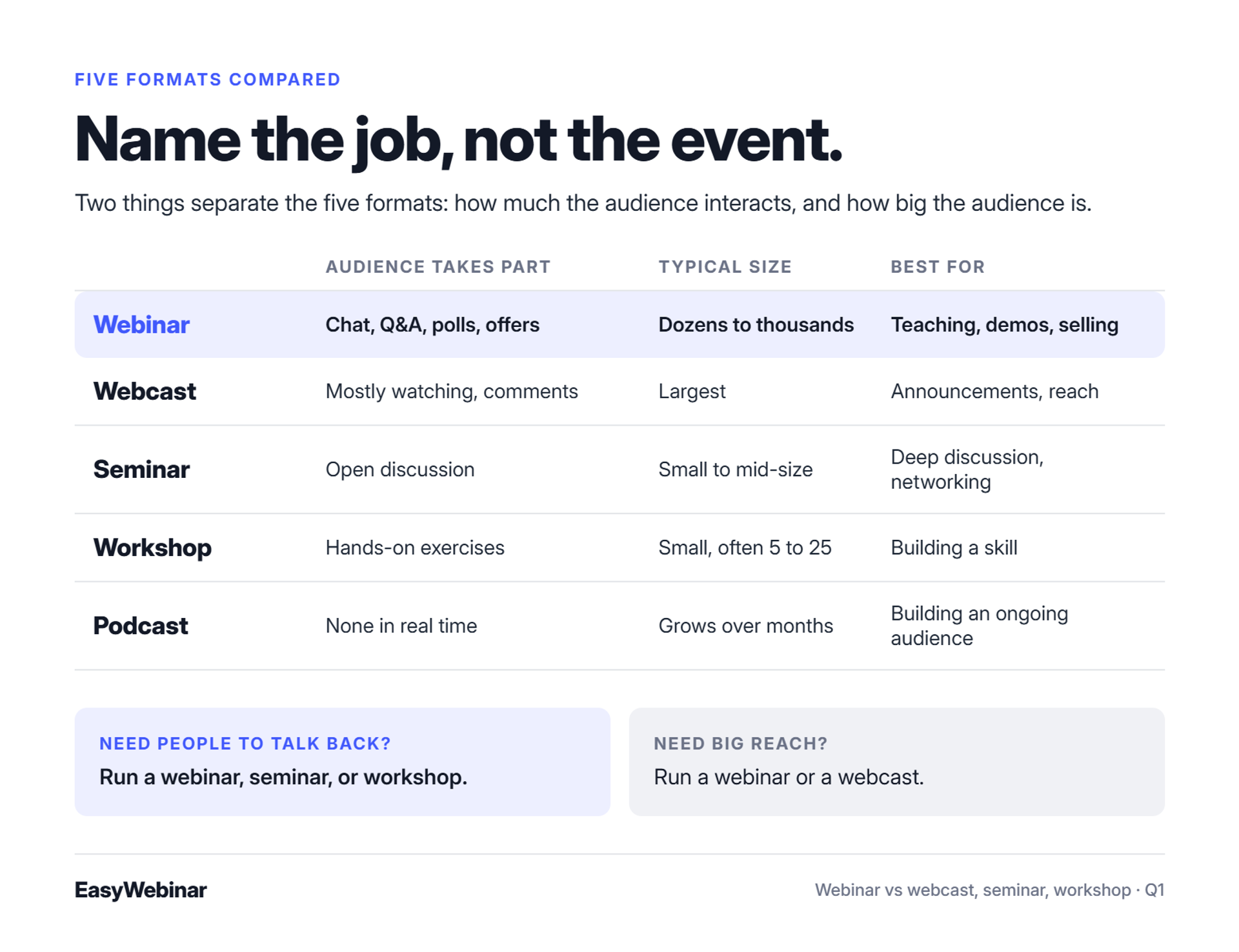
A webinar is an online session where attendees register and interact through chat, polls, and Q&A. A webcast is a one-way broadcast to a large audience that mostly watches. A seminar is a discussion-led session, usually in person. A workshop is hands-on practice in a small group. A podcast is a recorded audio or video series people play on demand. Two things separate them: how much the audience interacts, and how big the audience is.
📊 The five formats side by side
| Format | Where it happens | How the audience takes part | Live or recorded | Typical size | Best for | Run it online on |
|---|---|---|---|---|---|---|
| Webinar | Online | Chat, Q&A, polls, offers | Live, Simulated Live, or Evergreen | Dozens to thousands | Teaching, demos, selling | EasyWebinar live webinars |
| Webcast or live stream | Online, broadcast | Mostly watching, comments | Live or replay | Largest | Announcements, reach | EasyWebinar EasyCast streams a webinar outward |
| Seminar | Mostly in person | Open discussion | Live | Small to mid-size | Deep discussion, networking | A venue, or a webinar room for the online version |
| Workshop | In person or online | Hands-on exercises | Live | Small (often 5 to 25) | Building a skill | A webinar room with exercises built in |
| Podcast | Audio or video feed | None in real time | Recorded, on demand | Grows over months | Building an ongoing audience | A podcast host, not a webinar platform |
Workshop sizes follow WebinarNinja's July 2026 comparison.
🧭 The two questions that sort every format
Ask two things before you name your event. Do you need people to talk back? And how many people do you need to reach?
Talk-back points to a webinar, seminar, or workshop. Big reach points to a webinar or webcast.
Here's the reframe I give every coach. If it's long-form and it sells, I treat it as a webinar, whatever you call it. My rule of thumb is price-based. Sell anything over $200 and you need a webinar, because buyers need time with you first.
✅ Where EasyWebinar fits in the table
EasyWebinar runs the webinar row as Live, Simulated Live, or Evergreen, and the webcast row through EasyCast multistreaming. That puts two of the five formats on one platform, with one login. Seminars and podcasts need a venue or a podcast host, and EasyWebinar doesn't pretend otherwise.
Q2. Webinar vs workshop: what is the actual difference?
A webinar is mostly showing. One or a few hosts teach or demo to a larger audience that joins in through chat, polls, and Q&A. A workshop is mostly doing. A smaller group practices a skill with a facilitator, usually with exercises and feedback. Choose a webinar to inform, demo, or sell at scale. Choose a workshop when attendees must leave able to do something new.
🔍 How they differ, point by point
- Group size. Webinars run from dozens to thousands. Workshops usually hold 5 to 25 people.
- Interaction. Webinar attendees type questions and answer polls. Workshop attendees complete tasks and get feedback on their work.
- Outcome. A webinar leaves people informed or ready to buy. A workshop leaves them with a skill or a finished draft.
- Length. WebinarNinja puts workshops at two hours to several days. Most webinars fit in about an hour.
🏷️ The label changes what people will pay
JK Molina, who runs a coaching business, says he has run 18 webinars and 19 workshops and ranked them by results. He also tells a story about a fitness coach named Carter. Carter's workshop sold about $1,400. The next month he called the same thing a "protocol," and it sold five times as much.
My read is simple. The line between a webinar and an online workshop is thinner than most articles admit. An online workshop is often a webinar with exercises built in. So pick the name that matches the promise, then build the session to keep that promise.
⭐ What operators say
"It is easy to set up call to actions and polls and easy to use them in both types of webinars. The analytics also show how many saw or clicked your offer." - Verified User in Professional Training & Coaching, November 1, 2024, EasyWebinar G2 - Verified Review
The same 4.5-star reviewer flagged a limit: "Intergration is somewhat limited, but if you are comfortable with Zapier you can easily update that."
💰 Paid workshops on EasyWebinar
EasyWebinar sells seats to paid workshops and masterclasses through paid registration, checkout inside the room, replays, and follow-up. Buyers pay while they're watching, with no redirect, through in-room checkout. That keeps the workshop's sales and attendee data in one place.
Q3. How do you run a workshop online with webinar software?
Run an online workshop as a webinar with exercises built in. EasyWebinar handles this with handouts for worksheets, polls as checkpoints, and chat and Q&A for feedback. Hosts can also promote an attendee to presenter to show their work. Keep teaching blocks short, time each exercise, and sell seats with paid registration. For heavy small-group breakout work, a meeting tool is the better fit.
🛠️ Six steps that work
- Plan in blocks. Teach for 10 to 15 minutes, then give one exercise. Need exercise ideas? See these workshop ideas for professional development.
- Share the worksheet as a handout. EasyWebinar lets you push handouts and PDFs into the room, so nobody hunts for a link.
- Use polls as checkpoints. A quick "Done with step 2?" shows who's stuck.
- Collect work through Q&A and chat. Review two or three answers out loud.
- Bring one attendee on screen. EasyWebinar lets you promote an attendee to presenter, so the room watches a peer work.
- Send the replay. People who fell behind can finish the exercises later.
⚠️ The honest limit: breakout rooms
Small-group breakouts are the one thing a webinar room doesn't do well. Even fans of big webinar platforms point this out. One TrustRadius reviewer rated GoTo Webinar 6/10 and wrote:
"It is less appropriate for brainstorming sessions by different business verticals as it does not offer breakout rooms to network or brainstorm." - Khyati Doshi, Senior Marketing Manager, December 6, 2023, GoTo Webinar TrustRadius - Verified Review
EasyWebinar doesn't offer breakout rooms either. If your workshop depends on groups of four working in private, run that part in a meeting tool.
⭐ What hosts notice in the room
"I love that we can have a poll, offer and countdown right in the event! That's going to be so great for sales and interactions." - Verified User in Photography, August 26, 2025, EasyWebinar G2 - Verified Review
That same 4.5-star reviewer also hit a snag: screen sharing another browser tab kept loading on the attendee side, so they switched to PDF slides. Test your screen share before a paid workshop.
💰 The room and the till in one place
EasyWebinar gives an online workshop its room and its checkout. Handouts, polls, Q&A, and promote-to-presenter cover the exercises. Paid registration and in-room checkout sell the seats inside the same session.
Q4. What is a webcast vs a webinar?
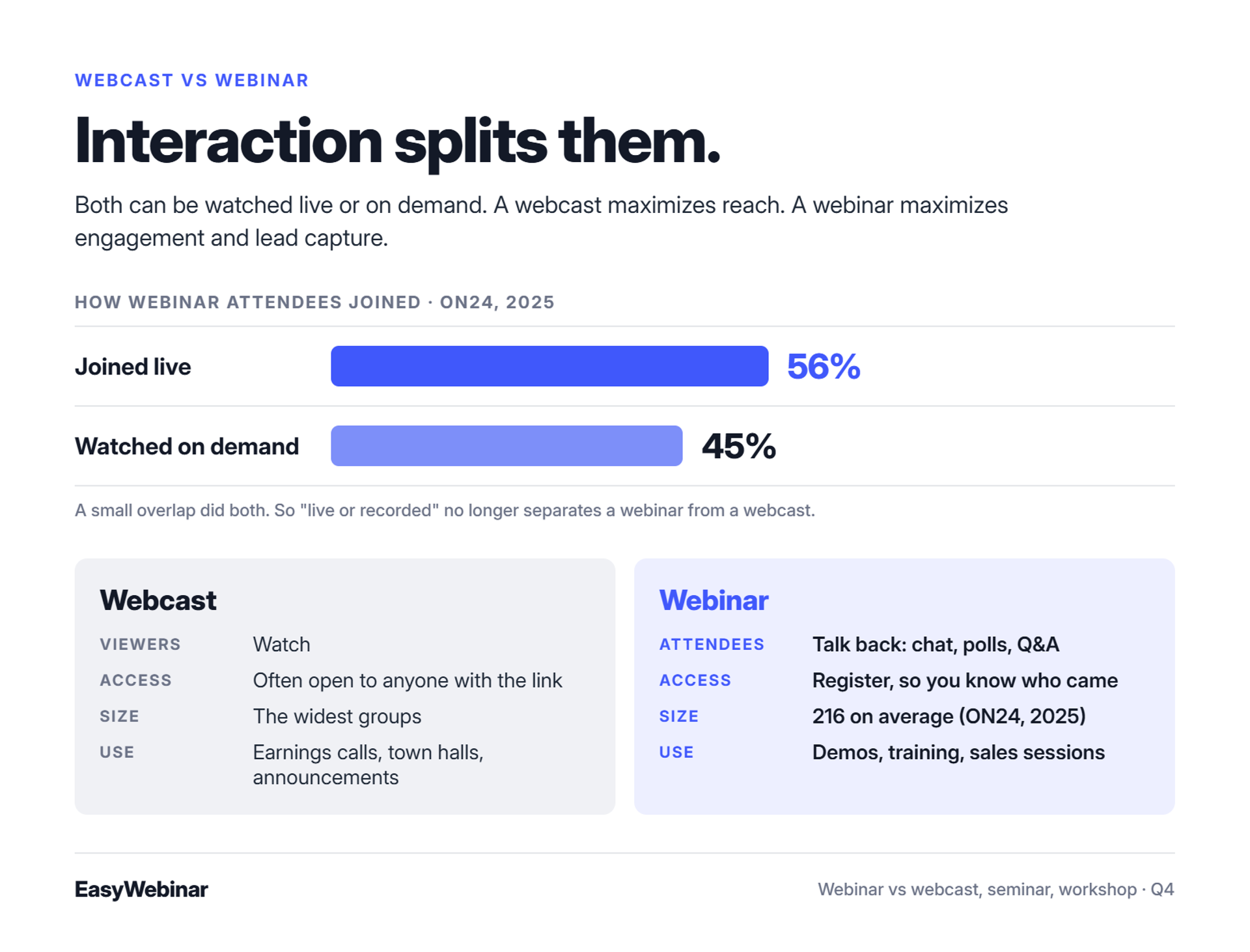
A webcast is a one-way broadcast: audio or video streamed to a large audience that mostly watches. A webinar is two-way: attendees register, ask questions, answer polls, and act on offers during the session. Webcasts maximize reach. Webinars maximize engagement and lead capture. Both can be watched live or on demand, and ON24 reports that 45% of webinar attendees joined on demand in 2024.
📡 Four differences that matter
- Interaction. Webcast viewers watch. Webinar attendees talk back through chat, polls, and Q&A, as Demio's comparison lays out.
- Registration. Webinars usually ask people to register, so you know who came. Many webcasts are open to anyone with the link.
- Audience size. Webcasts reach the widest groups. ON24's 2025 benchmarks put the average webinar at 216 attendees.
- Typical uses. Webcasts carry earnings calls, town halls, and big announcements. Webinars carry demos, training, and sales sessions.
🔄 The myth: "webinars are live, webcasts are recorded"
Many comparison pages still say this. In ON24's 2025 report, 56% of webinar attendees joined live and 45% watched on demand, with a small overlap who did both.
So "live or recorded" doesn't separate the two formats anymore. Interaction does. If people need to ask, vote, or buy during the session, it's a webinar.
🎯 When to use each
Use a webcast for an all-hands or a keynote where questions can wait, and compare webcast software if that's your job. Use a webinar when you need names, questions, and a next step from every attendee.
I'll be direct about scope. A webinar, to me, is a conversion tool, not just a presentation. Regulated investor-relations webcasts and internal all-hands belong on tools built for them.
✅ EasyWebinar on the webinar side
EasyWebinar is built for the two-way side of this pair. Attendees join from any browser with nothing to download. Chat, polls, and timed offers run in the room. Each attendee's watch time, questions, and offer clicks are recorded as first-party intent data you can act on in webinar analytics.
Q5. Can one session be a webinar and a webcast at the same time?
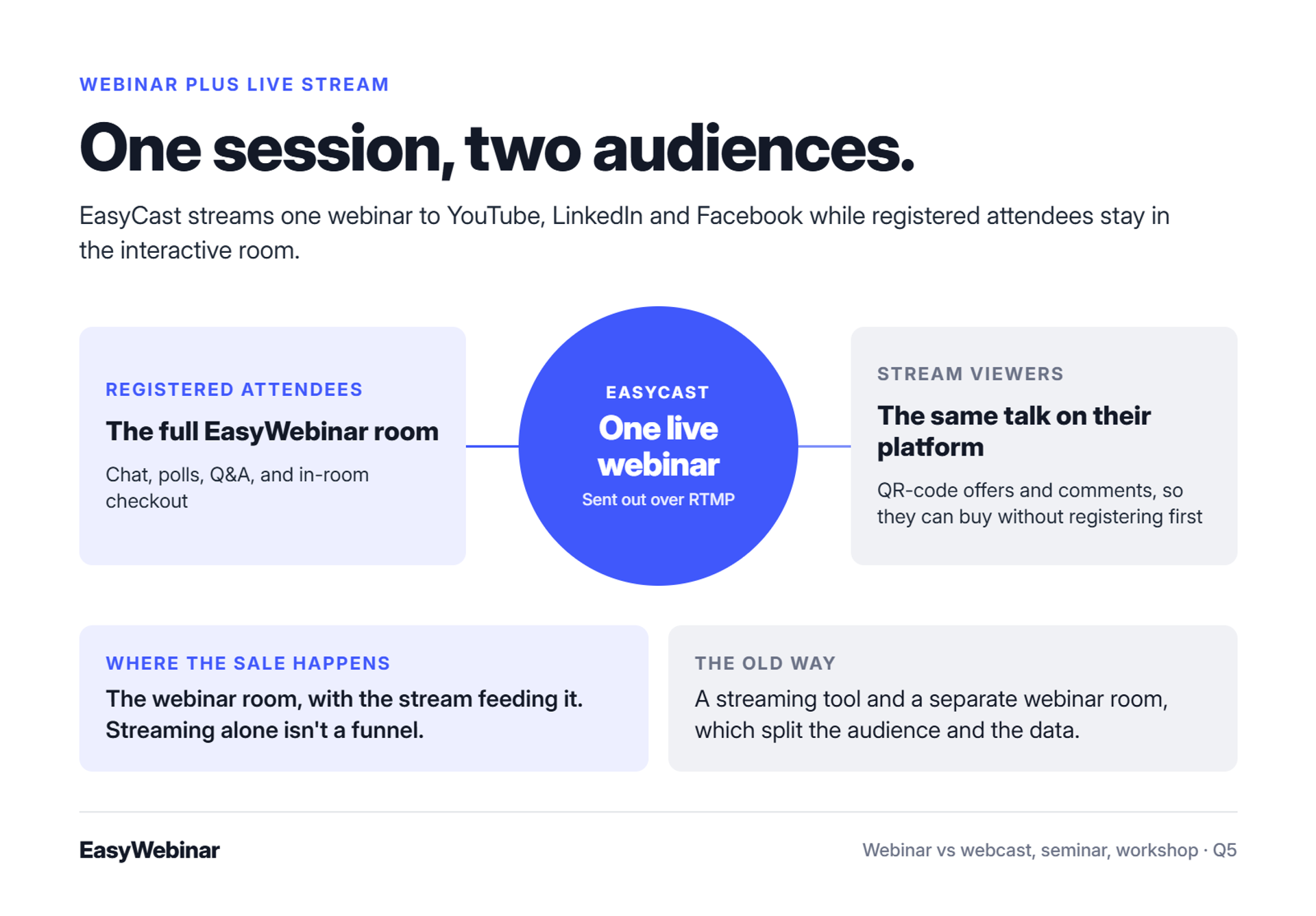
Yes. EasyWebinar's EasyCast streams one webinar to YouTube and social channels such as LinkedIn and Facebook while registered attendees stay in the interactive room. The old choice was a webinar for engagement or a stream for reach, often run in two tools. One session can now serve both audiences, and QR-code offers let stream viewers who never registered still buy.
🎥 The choice most hosts thought they had to make
You've built one strong talk. You want reach, and you want sales. Those goals used to pull apart.
The usual setup was a streaming tool for YouTube and a separate webinar room for registrants. That split the audience and the data. Stream viewers left no name, and the people who could buy sat in a smaller room.
🔀 What changed
Multistreaming flipped the order. The webinar becomes the source, and the stream becomes the amplifier. But a stream on its own has no registration page, no offer, and no checkout. Streaming alone isn't a funnel.
So the real question is where the sale happens. For me, that stays the webinar room, with the stream feeding it.
✅ How EasyWebinar runs both at once
EasyWebinar's EasyCast sends one live webinar out over RTMP (the standard protocol streaming sites accept). Here's what each audience gets:
| Audience | What they see | How they act |
|---|---|---|
| Registered attendees | The full EasyWebinar room | Chat, polls, Q&A, in-room checkout |
| Stream viewers | The same talk on their platform | QR-code offers and comments |
⭐ Proof from a host who made the switch
"I've been using Streamyard for my webinars but switched to EasyWebinar so I could allow the attendees to choose their time and work towards automation." - Verified User in Photography, August 26, 2025, EasyWebinar G2 - Verified Review
That 4.5-star reviewer wasn't perfectly happy, either. They noted video quality "came and went" when switching from slides back to the camera.
EasyWebinar keeps the registered room as the place where the sale happens, while EasyCast carries the same session to off-platform viewers. Reach grows without the work doubling. QR-code offers give stream viewers a way to buy without registering first.
Start your 7-day trial or watch the demo
Q6. Seminar vs webinar: is a webinar just an online seminar?
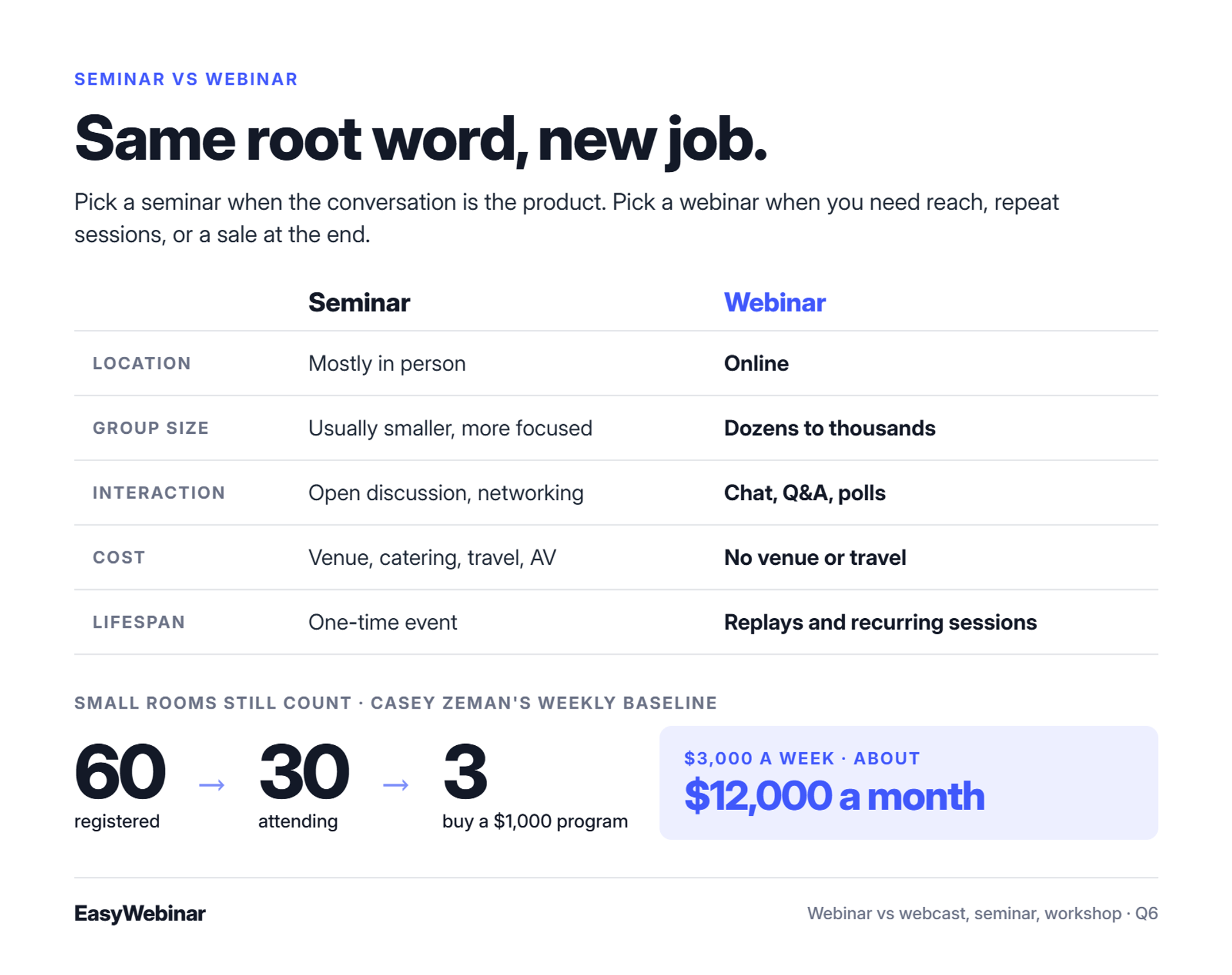
The word webinar is a blend of "web" and "seminar," but the two now work differently. A seminar is usually in person and discussion-led, with a small group that talks back and forth. A webinar is online, presenter-led, and built for larger groups that interact through chat, polls, and Q&A. Seminars carry venue and travel costs. Webinars don't, and they can be replayed.
📜 A short history of the word
Eric R. Korb registered "WEBinar" as a trademark with the USPTO in 1998, according to Wikipedia's web conferencing entry. The mark was later reassigned and then cancelled in 2007, and the word passed into everyday use. Merriam-Webster added it in 2008.
⚖️ How they compare today
| - | Seminar | Webinar |
|---|---|---|
| Location | Mostly in person | Online |
| Group size | Usually smaller, more focused | Dozens to thousands |
| Interaction | Open discussion, networking | Chat, Q&A, polls |
| Cost | Venue, catering, travel, AV | No venue or travel |
| Lifespan | One-time event | Replays and recurring sessions |
Cvent's March 2026 comparison sums up the trade: seminars give "richer discussion," while webinars offer "lower overall cost."
Pick a seminar when the conversation is the product. Pick a webinar when you need reach, repeat sessions, or a sale at the end.
📈 Why small rooms still count
People often think a 30-person webinar is a failure. It isn't. When I started, I ran about 30 to 60 people a week.
My baseline was 60 registered, 30 attending, and 3 buying a $1,000 program. That's $3,000 a week, or about $12,000 a month. In my first year, those small rooms built a 14,000-person list and $245,000 in course sales.
⭐ What repeat hosts say
"I'm blown away with how easy it was to setup a sequence of 10 webinars and have all the steps done that I need." - David L., February 27, 2025, EasyWebinar G2 - Verified Review
"I do use other email systems to send post-webinar email sequences because I can't track open and click rates on EasyWebinar." - Eliza W., February 11, 2026, EasyWebinar G2 - Verified Review
EasyWebinar turns a recurring seminar-style session into a repeatable webinar. Registration pages, reminders, and replays are set once and reused every month, so the host shows up and teaches.
Q7. Webinar vs podcast: which one grows your business?
A podcast builds an audience over time. People listen on their own schedule, episode after episode, and 55% of Americans aged 12 and older consumed podcasts monthly in 2025, per Edison Research. A webinar converts that audience. Attendees register, interact, and can act on an offer in the same session. Use a podcast for reach and trust, and a webinar to turn listeners into buyers.
🎧 How they differ
- Interaction. A podcast has no real-time back-and-forth. A webinar has chat, polls, and Q&A.
- Timing. Podcasts are always on demand. Webinars run at a set time, or on a schedule when automated.
- Reach. Edison Research's Infinite Dial 2025 found 73% of Americans 12+, about 210 million people, have listened to or watched a podcast.
- Conversion. A listener has to leave the episode to buy. A webinar attendee can buy in the room.
🔁 Use them in sequence
These formats work best as stages, not rivals. The podcast builds trust, and each episode can invite listeners to a webinar where they decide.
Repurposing runs the other way too. A webinar recording can become a podcast episode with light editing, and a clean recording setup makes that easier. Edison found 51% of Americans 12+ have watched a video podcast, so a recorded talk fits that feed.
💵 My price-point rule
My rule is based on price. Under $47, a lead magnet can sell. Under $197, a long-form sales letter can.
Over $200, you need a webinar. Here's more on how to make money with webinars. A podcast can warm a buyer for a high-ticket offer, but it rarely closes one alone.
EasyWebinar sits on the conversion side of this pair. A podcast audience lands on a registration page, joins from any browser with nothing to download, and can buy inside the room. EasyWebinar records every session automatically, but it isn't a podcast host or studio.
Q8. Does a webinar have to be live?
No. EasyWebinar runs webinars in three formats: Live, Simulated Live, and Evergreen. Simulated Live plays a recording at a set time with real-time chat, polls, and timed offers. Evergreen runs on demand or Just-in-Time, starting minutes after someone registers, with a question box. Simulated Live and Evergreen sit under the Automated umbrella. The usual path is to go live, prove the offer, then automate it.
😮💨 How it used to work
Many hosts believed a webinar had to be live. So they went live every week or month, for years.
"I've been going live every month since 2020 and I'm exhausted." - Verified User in Photography, August 26, 2025, EasyWebinar G2 - Verified Review
The other old option was a replay tool that stripped out chat and polls.
🔄 What changed
On-demand viewing became normal. In ON24's 2025 report, 45% of webinar attendees watched on demand. Automation also learned to keep interaction, so a recorded session no longer has to feel like a dead replay.
The debate isn't settled, and I won't pretend it is. Jeremy Haynes, who runs paid ads for large webinar funnels, argues that live sessions beat automated ones for cold paid traffic. I've also run high-ticket launches on Evergreen. My read is that the gap comes from what you automate, not whether you automate.
✅ The three formats in EasyWebinar
| Format | When it runs | Engagement |
|---|---|---|
| Live | Fixed or fixed recurring time, one time zone | Real-time chat, polls, Q&A, offers |
| Simulated Live | Fixed or fixed recurring time, one time zone | Real-time live chat, polls, timed offers |
| Evergreen | Just-in-Time, timezone-adjusted, multiple daily or weekly slots, Instant Replay, On-Demand | Question box, pre-set polls and offers |
Just-in-Time and timezone-adjusted scheduling are Evergreen features. Simulated Live is the first step into automation, because it keeps the live chat.
🎯 Automate what's proven
The rule I follow: go Live first. Prove the content and the offer.
Once roughly 10% of attendees buy, move the winning session into Simulated Live or Evergreen. This automated webinar guide walks through the setup. An automated webinar still needs traffic. Without it, it's like a billboard in the desert.
⭐ Proof from the switch
"With my live class I used to sell 10-12 courses. With EasyWebinar I sold 25 courses within 3 weeks of my evergreen 'launch'." - Laura C., January 28, 2025, EasyWebinar G2 - Verified Review
"I would like my registrants to be able to see their own time zone when they register on the plan that I am paying for." - Jennifer B., April 15, 2025, EasyWebinar G2 - Verified Review
EasyWebinar runs Live, Simulated Live, and Evergreen on one platform and one subscription, as covered in live vs automated webinars. The session that converted live becomes the one that runs every day, without rebuilding the presentation.
Q9. Which format should you choose?
Choose by goal. To teach, demo, or sell, run a webinar. To reach the biggest audience, stream a webcast. To discuss a topic in depth with a small group, hold a seminar. To build a skill, run a workshop. To build an audience over months, start a podcast. Most businesses use two or three of these together, with the webinar as the place where interest turns into a decision.
🧭 The decision rule
| If your goal is to... | Run a... |
|---|---|
| Teach, demo, or sell | Webinar |
| Reach as many people as possible | Webcast or live stream |
| Discuss in depth with a small group | Seminar |
| Help people practice a skill | Workshop |
| Build an audience over months | Podcast |
❌ How I picked the wrong vehicle
When the housing market crashed, my real estate income fell to $15,000 in a year. I moved into YouTube consulting and spent six months building a course. I launched it to crickets. Social media, forums, and DMs all failed.
The only thing that started generating sales was a webinar. I hadn't picked a bad product. I'd picked a vehicle that couldn't carry a buyer from interest to a decision.
🔗 What changed: formats now stack
You no longer have to choose just one. A single 20-minute talk can run as a webinar, stream to YouTube at the same time, and become a podcast episode next week.
✅ One platform for the center of the stack
EasyWebinar handles the webinar at the center of that stack:
- Live room. Attendees join from any browser, with chat, polls, Q&A, and timed offers.
- Reach. EasyCast streams the same session to YouTube and social channels.
- Sales. Built-in checkout takes payment inside the room.
- Scale. The proven session moves into Simulated Live or Evergreen on the same subscription.
⭐ What a host said about scaling one webinar
"EasyWebinar gives me the ability to multiply my efforts and offer a human touch, without having to be everywhere at once." - Ash A., March 13, 2026, EasyWebinar G2 - Verified Review
The same 5-star reviewer named a real friction point. Setting up an automated webinar means uploading the presentation first, before registrations can start. Record before you promote.
EasyWebinar is built for the webinar that has to keep working, and you can see how it stacks up against other webinar platforms. Run it live, stream it with EasyCast, take payment in the room, then turn the proven session into an automated webinar. So, which talk are you planning to run first, and who needs to hear it?
Start your 7-day trial or watch the demo
Frequently Asked Questions

Shubhangi Gorantla
Senior Marketing Manager
About Author
Shubhangi Gorantla is the Content Manager at EasyWebinar, where she shapes the stories, strategies, and conversations that connect the platform with the people who matter most. She works across social media, email campaigns, and content strategy to make sure every piece of content builds trust and moves people to take action.
Related Posts
How Much to Charge for a Webinar: Price Ranges by Format and Real Ticket Prices
How much to charge for a webinar: real ticket prices from $39 to $199, price ranges by format, and a simple formula to set your own price.
Webinar Examples: 15 Real Webinars, What They Did and the Results
Explore 15 real webinar examples with titles, formats, lengths, offers and results, from a $200K live launch to an Evergreen webinar with 571K sign-ups.

11 Best Community Engagement Platforms in 2026
Compare the 11 best community engagement platforms in 2026. Course creators, evaluate live hosting, analytics, and replay to pick your winner today.
Turn every webinar into a revenue stream
Launch your first paid event in just a few clicks - and start monetizing your expertise.
Book a Call