What Is an Automated Webinar? How It Works and How to Set One Up

Shubhangi Gorantla
Published on Sep 27, 2019 • 24 min read

TL;DR
- An automated webinar is a recorded presentation on a schedule; registration, reminders, polls, offers, and follow-up run on their own.
- Automated Webinars is the umbrella over two formats: Simulated Live (fixed schedule, real-time chat) and Evergreen (Just-in-Time, timezone-adjusted, question box).
- Run it live first: five to ten sessions and about 10% attendee-to-buyer, then automate the version that worked.
- Setup takes ten steps, from the proven recording and schedule to polls, CRM, behaviour-based follow-up, and a full test.
- Judge results on sales per registrant over 30 days, tell attendees the session is recorded, and keep every countdown real.
- Review the numbers monthly, refresh each quarter, re-record when the offer changes, and keep traffic flowing.
By Casey Zeman, Founder of EasyWebinar.
A coach finishes her fourth live webinar of the month at 9 p.m. on a Thursday. The pitch landed again. Eleven people bought. Then she looks at next week's calendar and sees the same slot, the same slides, and the same hour she will never get back.
I know that feeling well. I built a YouTube course for six months, launched it, and heard crickets. A webinar was the first thing that sold it. In my first year of webinars, I built a 14,000-person email list and made $245,000 in course sales. What I did not have yet was a way to stop presenting the same talk every week.
An automated webinar is that way. It is a recorded presentation that runs on a schedule, while registration, reminders, polls, offers, and follow-up happen on their own. This guide explains how it works, when to automate and when to stay live, how to set one up in ten steps, and what numbers to expect.
Q1. What Is an Automated Webinar?
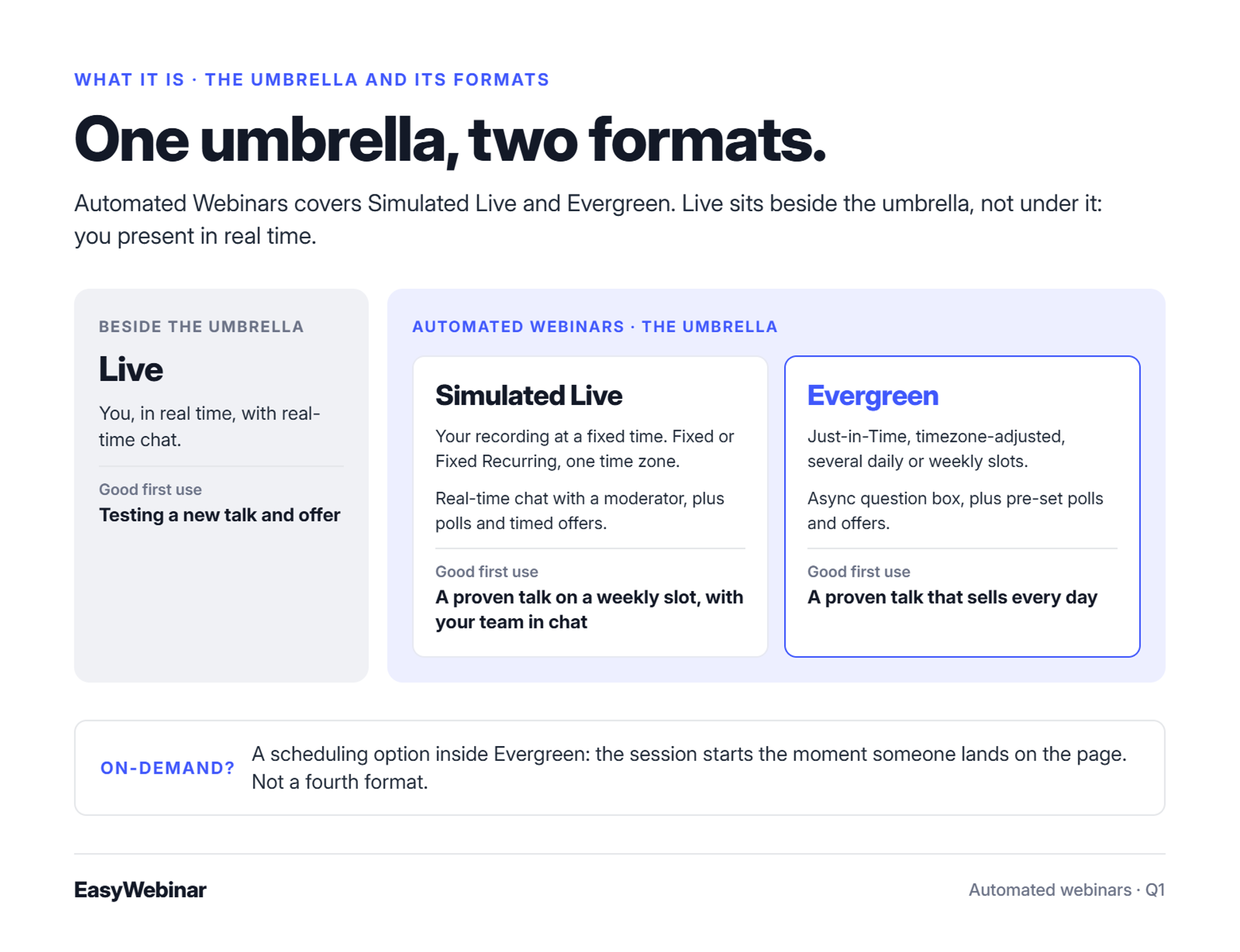
An automated webinar is a recorded presentation that plays at set times without the presenter going live. Registration, reminders, polls, offers, and follow-up run on their own. It is an umbrella with two formats under it: Simulated Live, a scheduled replay with real-time chat, and Evergreen, an always-on session with just-in-time and time-zone scheduling and an async question box.
In half a minute, I explain what an automated webinar is.
🧭 The umbrella and the two formats under it
Most guides treat "automated," "evergreen," "on-demand," and "simulive" as four words for one thing. EasyWebinar draws a cleaner line. "Automated Webinars" is the umbrella, and only two formats sit under it.
- Simulated Live is a recording that plays at a fixed time, with a real person answering chat as it runs. Think of it as dipping your toes into automation.
- Evergreen is the deeper tier. Sessions run on repeating schedules, in each attendee's own time zone, and questions go to an async question box (a form answered by email or later in the session).
The third format, Live, sits beside the umbrella, not under it. You present in real time.
📊 Live, Simulated Live, and Evergreen side by side
| - | Live | Simulated Live | Evergreen |
|---|---|---|---|
| Who presents | You, in real time | Your recording | Your recording |
| Schedule | Fixed or Fixed Recurring, one time zone | Fixed or Fixed Recurring, one time zone | Just-in-Time, timezone-adjusted, several daily or weekly slots, Instant Replay, On-Demand |
| Chat | Real-time chat | Real-time chat with a moderator, plus polls and timed offers | Async question box, plus pre-set polls and offers |
| Good first use | Testing a new talk and offer | A proven talk on a weekly slot, with your team in chat | A proven talk that sells every day |
| Read more | How to host a webinar | Simulive webinar guide | Evergreen webinar guide |
Just-in-Time means a session starts a few minutes after someone registers, so they do not wait days for a slot. EasyWebinar's Just-in-Time starts sessions minutes after registration, in the attendee's own time zone. Both it and timezone-adjusted delivery belong to Evergreen only.
⏰ Is an automated webinar the same as on-demand?
Not quite. On-Demand is one scheduling option inside Evergreen: the session starts the moment someone lands on the page. It is a Just-in-Time session with no wait, not a fourth format.
Format choice is not a rule about use case, either. I have run high-ticket launches on Evergreen. Coaches run weekly Simulated Live sessions for nurture. Pick the format that fits how much of you the session needs.
If you are new to the whole idea, start with what a webinar is and come back.
Easywebinar runs Live, Simulated Live, and Evergreen from one account. That means the format can change without rebuilding the registration page or the emails. A talk can start as a Live session, move to a weekly Simulated Live slot, and then graduate to Evergreen when it is ready.
Q2. How Does an Automated Webinar Work?
You record the session once, set a schedule, and place polls, handouts, and offers at fixed minutes. The platform runs the rest. The registration page collects sign-ups around the clock, reminders go out, and the session streams at its start time. Questions reach a moderator or inbox, and follow-up emails go out based on what each attendee did.
🧩 What runs on its own
EasyWebinar's automated events split the work into six pieces. Each one replaces a task you used to do by hand.
| Piece | What it does | Why it is there | Where in EasyWebinar |
|---|---|---|---|
| Schedule | Starts sessions at set times, or minutes after sign-up on Evergreen | Every registrant gets a session soon after signing up | Event schedule settings |
| Registration page | Collects sign-ups 24/7 | The page sells the seat while you sleep | Registration page builder |
| Reminders | Sends confirmation and reminder emails | Show-up depends on them | Event emails |
| Timed interactions | Shows polls, handouts, and offers at set minutes | Keeps the recording interactive and sells at the right moment | Timed polls and offer overlays |
| Chat | Routes questions to a moderator or inbox | Every question gets a real answer | Live chat (Simulated Live) or question box (Evergreen) |
| Follow-up | Sends replay and offer emails by behaviour | Many sales happen after the session | Replay follow-up |
💬 Can attendees ask questions?
Yes. In Simulated Live, a team member answers in real-time chat while the recording plays. In Evergreen, attendees use a question box, and answers arrive by email.
"The ability to have questions routed to my email is super convenient, and the built-in metrics give helpful insight." - Chris N., Easywebinar G2 - Verified Review
🎬 It plays as a session, not a video
An automated webinar should behave like a broadcast. If someone joins at minute 12, they see minute 12. If they refresh, it does not restart from the top.
BigMarker's documentation calls the interaction layer an "automation timeline," where polls, chat messages, and offers fire at set times. EasyWebinar's timed polls fire at the same minutes they did in your live session, and offer overlays appear at the minute the offer converted best.
🗓️ One session, start to finish (example)
An illustrative Evergreen session for a 40-minute talk:
- 12:03 p.m. Visitor registers on the page.
- 12:03 p.m. Confirmation email arrives with the join link.
- 12:15 p.m. Just-in-Time session starts; a reminder goes out at start time.
- Minute 8. Poll: "What is your biggest blocker?"
- Minute 32. Offer overlay appears with checkout in the room.
- Minute 40. Session ends; the replay page opens.
- Next morning. Follow-up email by behaviour: buyers get next steps, clickers get a checkout reminder, early leavers get the replay.
🏷️ Tag what people do in the room
I tag everyone who clicks a button inside the session; they are the warmest leads. Someone who clicked buy but did not finish checkout needs a different email from someone who watched 70% and left.
"I love the built-in countdown offers and polls as well." - Annette S., Easywebinar G2 - Verified Review
Easywebinar fills each row of that table inside one event. Timed polls and offer overlays run during the session, buyers check out in the room through Stripe or PayPal, and replay follow-up sends no-shows, partial viewers, clickers, and buyers their own next email.
Q3. Automated vs Live Webinars: Which Should You Run?
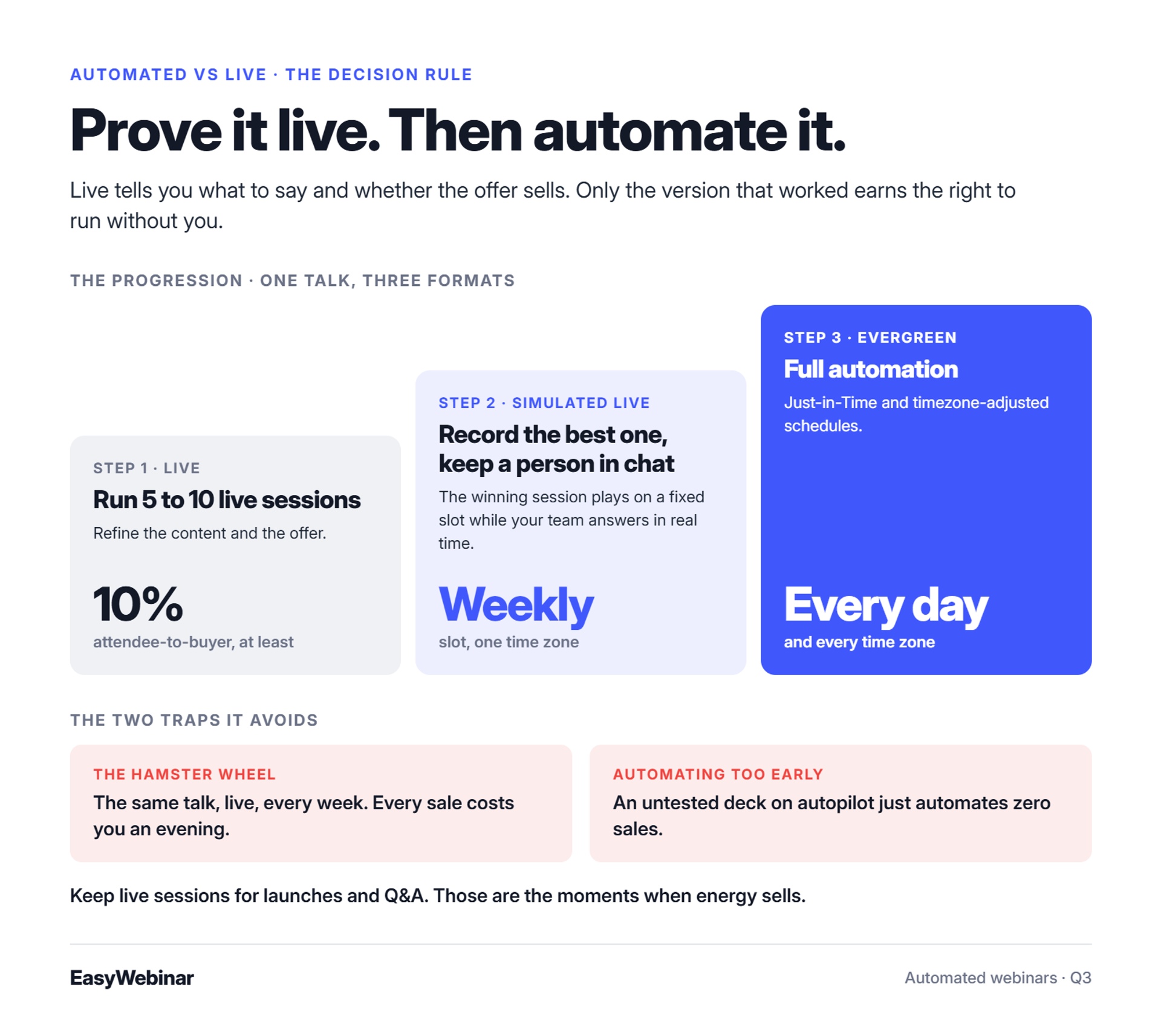
Run it live first. Live tells you what to say, which objections come up, and whether the offer sells. Once five to ten live sessions convert about 10% of attendees, record the best one and automate it. Live wins on energy and real-time selling. Automated wins on reach, consistency, and hours saved. Most operators keep both.
❌ The old way: two traps
The first trap is the hamster wheel. You present the same talk live every week. It converts, but every sale costs you an evening. You cannot take a vacation without the pipeline stopping.
The second trap is automating too early. A creator records a talk that has never been tested, puts it on a schedule, and buys traffic. An untested deck on autopilot just automates zero sales. Some operators say automated sessions now underperform live on cold traffic. My read is that most of those cases skipped validation.
✅ What changed: people already watch on their own time
Audiences no longer insist on the live hour. ON24's 2025 Webinar Benchmarks Report found 45% of attendees chose on-demand viewing in 2024. Nearly half your audience is already comfortable watching a recording.
That changes the question. It is no longer "live or recorded?" It is "which version of this talk has earned the right to run without me?"
📊 Live vs automated, honestly
| - | Live | Automated (Simulated Live or Evergreen) |
|---|---|---|
| Your effort per session | Full hour, every time | Setup once, then monitoring |
| Risk | Tech issues and an off night | A weak recording repeats every day |
| Reach | One time zone, one slot | Every day, and every time zone on Evergreen |
| Interaction | Fully responsive to the room | Real-time chat on Simulated Live; question box on Evergreen |
| Best for | Testing, launches, live Q&A | Selling a proven talk every day |
Here is my rule for when to automate, in the video: run five to ten live webinars first, reach about a 10% conversion rate, then automate the version that worked.
🔁 Graduate the winner, keep the live room
Here is how I run the progression. Go live, refine the content and offer, and hit at least 10% attendee-to-buyer. Then move the winning session to Simulated Live if you want to keep a real person in chat. Move it to Evergreen for full automation with Just-in-Time and timezone-adjusted schedules.
Keep live sessions for launches and Q&A. Those are the moments when energy sells.
⭐ What switching looks like
"With my live class I used to sell 10-12 courses. With EasyWebinar I sold 25 courses within 3 weeks of my evergreen 'launch'." - Laura C., Easywebinar G2 - Verified Review
"I convert really well with live webinars, but, I can't be everywhere at once." - Ash A., Easywebinar G2 - Verified Review
Laura also noted that Just-in-Time sat on a higher plan than she started on. That is fair to know before you budget.
Easywebinar runs both halves on one subscription. The live session you validated becomes the Simulated Live or Evergreen version without a second product, so the page, emails, polls, and offers carry over. Some automated-only tools need a separate product for live hosting.
Q4. How Do You Set Up an Automated Webinar in 10 Steps?
Set up an automated webinar in ten steps. Pick the proven recording, upload it, and choose a format and schedule. Then build the page, write reminders, place polls and offers, set how questions get answered, connect your CRM, and set follow-up. Finally, test the whole path and launch. Each step below has a "done when" check.
🎥 Steps 1 to 3: recording and schedule
- Pick the proven recording. Use the live session that converted best. A 30 to 40 minute talk works well for Just-in-Time. Done when: you can name its conversion rate.
- Upload it. Add the video to a new automated event in EasyWebinar. Done when: it plays end to end in preview.
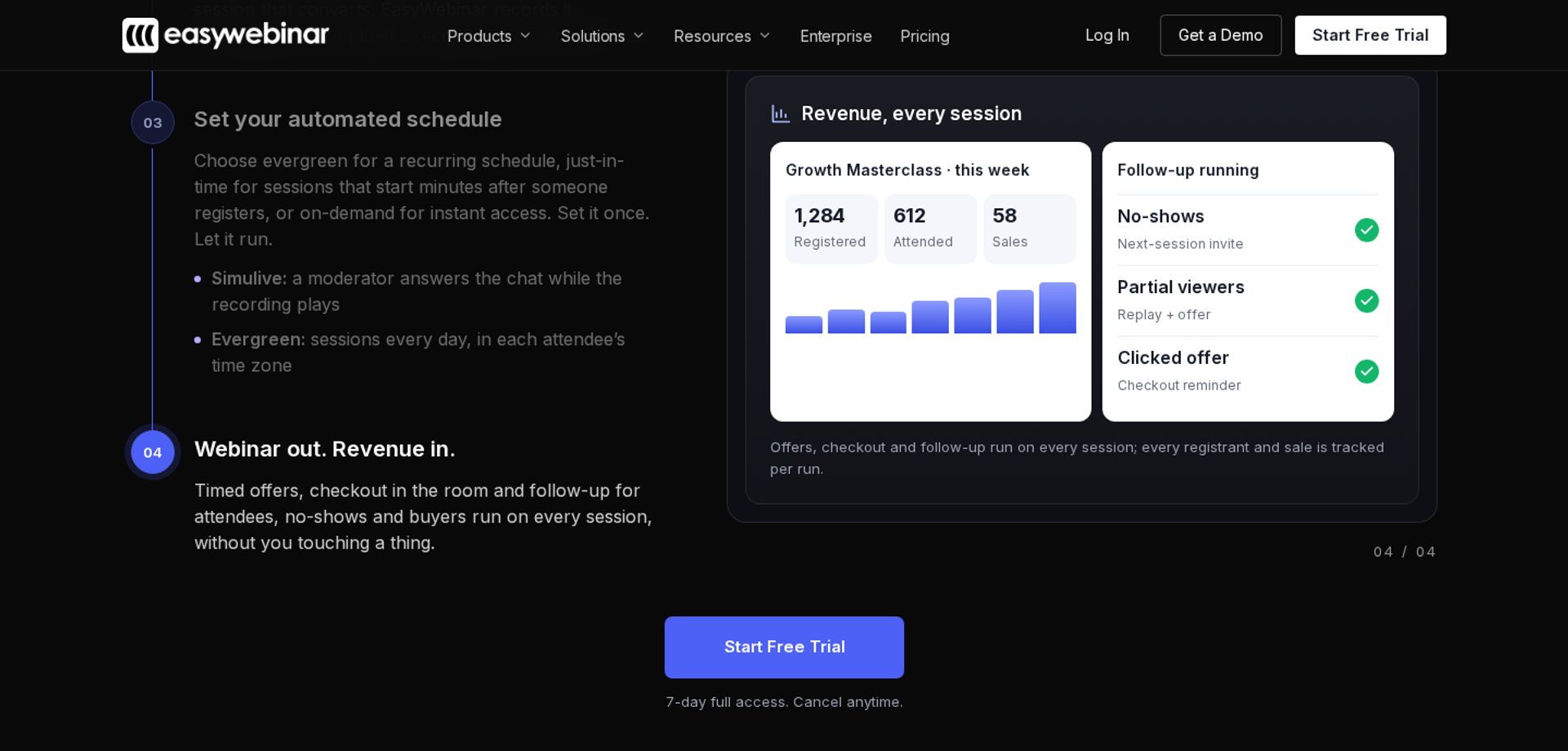
- Choose the format and schedule. Simulated Live uses Fixed or Fixed Recurring times in one time zone. Evergreen adds Just-in-Time, timezone-adjusted, and several daily or weekly slots. Done when: the next three session times look right.
📝 Steps 4 to 6: page, reminders, interactions
- Build the registration page. One promise, one form, one button. Done when: a test sign-up lands in the event.
- Write the reminders. Send a confirmation, then reminders before start. Done when: a test registrant gets every email.
- Place polls, handouts, and offers. Set each at the minute it worked live. Done when: each appears at the right second in preview.
💬 Steps 7 to 9: questions, CRM, follow-up
- Set how questions are answered. Assign a moderator for Simulated Live chat, or route the Evergreen question box to an inbox. Done when: a test question reaches a person.
- Connect your CRM. EasyWebinar connects natively with HubSpot, Salesforce Pardot (Account Engagement), ActiveCampaign, Mailchimp, Kit (formerly ConvertKit), Keap, and GoHighLevel, or Zapier. Done when: a test registrant appears with tags.
- Set follow-up by behaviour. Separate emails for buyers, clickers, partial viewers, and no-shows. Done when: each segment has one email ready.
✅ Step 10: test, then launch
- Test the whole path. Register, attend, click the offer, and check every email and tag. Check automation limits too: a capped Zapier plan can stop syncing opt-ins mid-promotion. Done when: a stranger completes the path without help. Then open the page to traffic.
"The biggest challenge is around setting up automated webinars, and needing the presentation uploaded first in order to set it up." - Ash A., Easywebinar G2 - Verified Review
"Some of the integrations are not intuitive, but Rakesh was able to help me with them." - Ajarae C., Easywebinar G2 - Verified Review
Easywebinar's AI Webinar Builder can draft the page, emails, polls, and follow-up from a short set of questions, so steps 4 to 9 start from a draft. Upload the recording before step 3, as the review above notes.
Start your 7-day trial or watch the demo
Q5. What Results Should You Expect From an Automated Webinar?
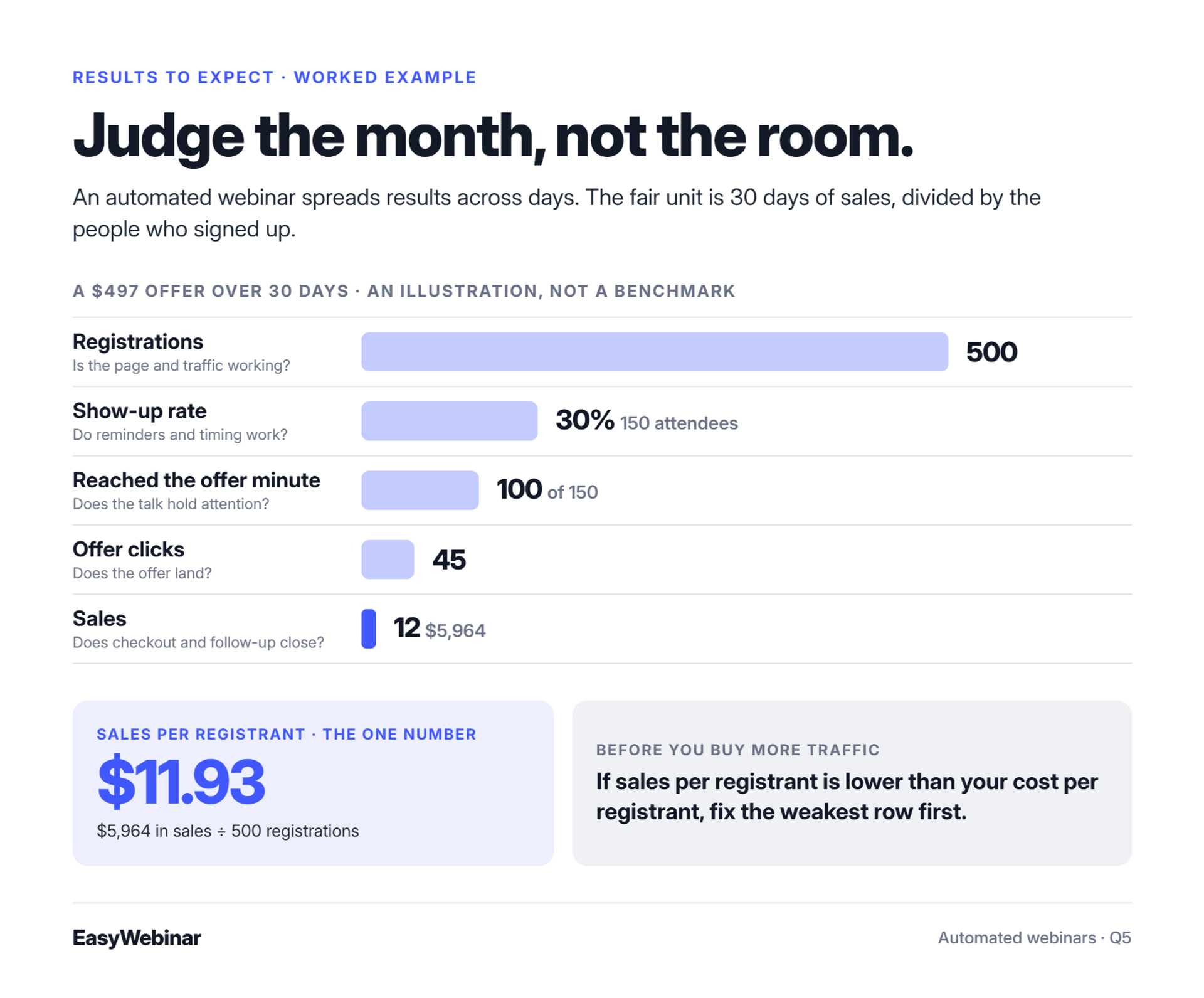
Judge an automated webinar on sales per registrant over 30 days, not on one session's attendance. Expect steadier daily registrations than a live event, and a show-up rate that depends on how soon the session starts after sign-up. Track registrations, show-up, watch time to the offer minute, offer clicks, and sales. Then fix the weakest number first.
Are automated webinars effective? Yes, when the talk already converted live. Automating an unproven talk only repeats its result.
❌ The old way: judging by the head count
A live webinar has one big moment. Two hundred people show up, the chat moves fast, and the host judges the night by the room. If attendance dips, the talk "failed."
That habit breaks with automation. An Evergreen event might run 40 small sessions a week. No single room looks impressive. A host who judges by head count will switch off a funnel that is quietly selling every day.
✅ What changed: results spread across days
An always-on session spreads results across weeks. Registrations arrive daily. Buyers come from the session and from the replay emails that follow. The only fair unit is the whole 30-day window, divided by the people who signed up.
🧮 The numbers to track (example)
Here is a worked example for a $497 offer, labeled as an illustration, not a benchmark.
| Metric | What it tells you | Example, 30 days |
|---|---|---|
| Registrations | Is the page and traffic working? | 500 |
| Show-up rate | Do reminders and timing work? | 30% (150 attendees) |
| Reached the offer minute | Does the talk hold attention? | 100 of 150 |
| Offer clicks | Does the offer land? | 45 |
| Sales | Does checkout and follow-up close? | 12 ($5,964) |
| Sales per registrant | The one number to judge by | $11.93 |
If sales per registrant is lower than your cost per registrant, fix the weakest row before you buy more traffic.
⭐ What long-running automated funnels have done
These are named EasyWebinar customer outcomes:
- Carla Beisinger: $5M with one evergreen funnel.
- Ryan Fenn (ChiirP): $2M from one automated funnel.
- Kim Constable (Sculpted Vegan): $750K.
- Rick Mulready: 166% ROI on cold paid traffic, with a 30% registration rate and $8 to $12 cost per lead.
- Jason Caruso: $14K from his first webinar. He could not present live around his day job, so he automated it.
💬 What users report
"We've seen such a fantastic return on investment after implementing a sales strategy that uses evergreen webinars." - Meaghan L., Easywebinar G2 - Verified Review
"I do use other email systems to send post-webinar email sequences because I can't track open and click rates on EasyWebinar." - Eliza W., Easywebinar G2 - Verified Review
That second point is worth knowing. If email open rates matter to you, track them in your email tool and keep the in-room data in EasyWebinar.
Easywebinar reports each attendee's watch time, poll responses, offer clicks, and purchases, with a drop-off heatmap that shows the minute people leave. Revenue is attributed back to the webinar, so you judge the event on sales per registrant, not on the size of one room.
Q6. Should You Tell Attendees the Webinar Is Automated?
Yes. Say plainly that the session is a recorded presentation, and tell people how their questions get answered. In Simulated Live, a moderator answers in chat. In Evergreen, a question box sends answers by email. Fake countdowns and claims that a recording is happening right now cost trust and can draw regulators' attention. Honest framing keeps the experience and the sale.
Here is why I think an automated webinar should be honest about being automated.
🤝 Why honesty converts better
People can tell. A host who "reacts" to a chat message that arrives at the same minute every day gets caught eventually. Then the whole offer looks like a trick.
My rule is simple: nobody should ever feel duped. A recorded talk that was good enough to sell live is good enough to sell as a recording. You do not need to dress it up.
✍️ Wording you can use
On the registration page:
- "This is a recorded presentation of our most popular training. Sessions start every few minutes, so pick the time that suits you."
In the opening minute:
- "This session is recorded so I can be here for you any day. If you have a question, type it in the box and my team will answer you by email." (Evergreen)
- "This session is recorded, and my team is in the chat right now to answer your questions." (Simulated Live)
On any reused chat:
- Label earlier messages as "from a previous session" so attendees know what they are reading.
In the replay email:
- "Here is the recording you registered for, plus the answer to the most common question we got."
⏰ Countdowns and scarcity: keep them true
Timers and "only five seats left" lines are where trust breaks fastest. The FTC's 2022 staff report, Bringing Dark Patterns to Light, lists fake countdown timers and false low-stock claims as design tricks that create false beliefs.
So keep urgency real:
- ✅ A replay that really expires after a set time.
- ✅ A bonus that really ends when the timer ends.
- ❌ A timer that resets for every visitor.
- ❌ A "live" label on a recording.
⚠️ A short compliance note
Rules on deceptive claims differ by country and industry. If you sell financial, health, or income-related offers, check your page, timers, and testimonials with a qualified advisor. This guide is not legal advice.
The good news is that honest automation needs nothing special. Say what it is, answer every question, and make every deadline real.
🎯 What attendees actually care about
Attendees came for the answer to a problem. They rarely care whether you are on camera at that second. They care whether someone reads their question and whether the offer is real.
Easywebinar's Simulated Chat can carry chat from an earlier session into a new event. Label those messages as earlier chat, and pair them with a real moderator on Simulated Live or the question box on Evergreen, so every attendee gets a genuine answer.
Q7. How Do You Keep an Automated Webinar Working?
Review the numbers monthly, refresh the offer, examples, and dates each quarter, and re-record when the product, price, or pitch changes. Look first at the minute people leave and the minute the offer appears. An automated webinar runs on its own, but it is not something to switch on and walk away from. It still needs an owner and traffic.
🏜️ First, keep traffic flowing
An automated webinar without traffic is a billboard in the desert. The recording can be perfect and still sell nothing if nobody registers. Before you touch the talk, check that ads, email, and content still send people to the page.
For channel ideas, see the webinar marketing guide.
📅 Monthly review (30 minutes)
- Sales per registrant. Up, down, or flat versus last month?
- Show-up rate. If it drops, check reminders and session start times first.
- Drop-off minute. Find where most viewers leave. Fix that minute, not the whole talk.
- Offer minute. What share of attendees are still watching when the offer appears?
- Questions. Read every question from the month. Repeated questions belong in the talk.
🔄 Quarterly refresh
- Update dates, prices, and bonuses mentioned on screen.
- Swap in a newer customer example.
- Test one change to the offer or the registration headline.
- Review session times. I once tested one-day, two-day, and three-day booking windows with several slots a week. Then I kept the most-chosen time and dropped the rest.
🎥 When to re-record
Re-record when any of these is true:
- The product, price, or offer has changed.
- The talk mentions anything that is now wrong.
- Sales per registrant has fallen for two months and small fixes have not helped.
- You have a stronger live version. Run it live, prove it, then swap it in.
📝 Keep a change log
Write down each change, the date, and the result a month later. Without a log, you cannot tell which fix worked.
💬 What users say about running repeat sessions
"Analytics splits out live and replay attendee insights for evergreen webinars." - Verified User in Professional Training & Coaching, Easywebinar G2 - Verified Review
"My only dislike is their can be some bugs at times that can be frustrating but often, they are solved quick." - Darrin B., Easywebinar G2 - Verified Review
The same reviewer noted that replay insights were not captured on live webinars at the time. Check the current reports before you plan your review.
Easywebinar's drop-off heatmap shows the exact minute attendees leave, and the conversion funnel shows how many reached the offer. That turns the monthly review into a short list of minutes to fix.
Q8. How Do Automated Webinars Fit Into a Funnel?
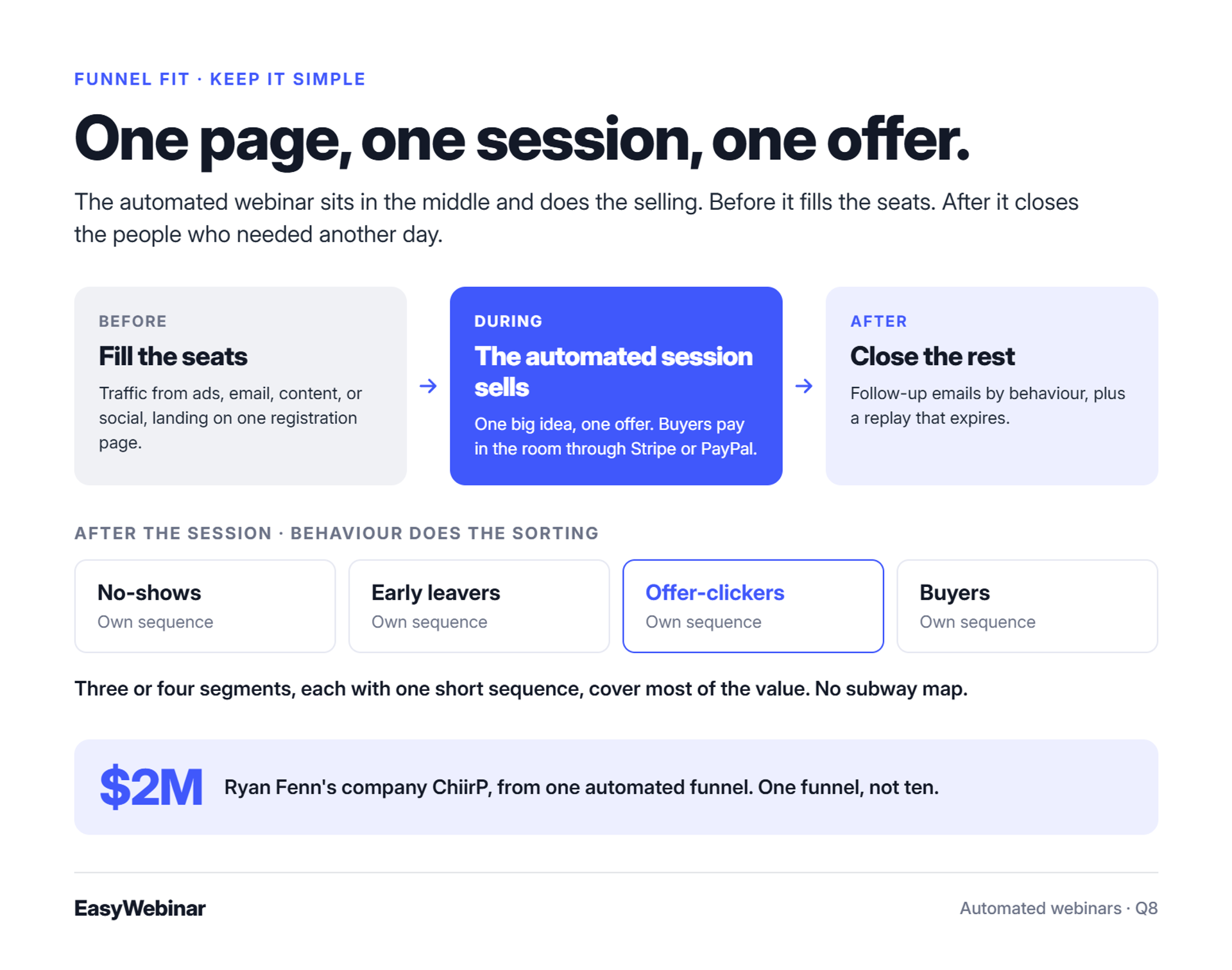
An automated webinar sits in the middle of the funnel. Ads, email, content, or social send people to the registration page. The session teaches and makes the offer. Follow-up based on what each person did turns viewers into buyers. Keep it simple: one page, one session, one offer, and a short replay sequence.
🧭 Where it sits
A webinar funnel has three parts:
- Before: traffic from ads, email, content, or social, landing on one registration page.
- During: the automated session teaches one big idea and makes one offer.
- After: follow-up emails by behaviour, plus a replay that expires.
The automated webinar is the part that does the selling. Everything before it fills the seats. Everything after it closes the people who needed another day.
❌ The old way: the subway-map funnel
I have watched operators build funnels that look like a subway map. Six branches of email, tags on tags, three upsells, and a different path for every click. It takes months to build. Then one broken link breaks the whole thing, and nobody knows which branch failed.
Every extra step also costs you buyers. Each page and each email is another place someone can drop off before they see the offer.
✅ What changed: behaviour does the sorting
You no longer need dozens of branches to personalise follow-up. The session itself tells you who is warm. Someone who clicked the offer, someone who left at minute 10, and someone who never came are three clear groups.
Three or four segments, each with one short sequence, cover most of the value. That is far easier to build, test, and fix.
🛠️ How Easywebinar runs it
Easywebinar keeps the registration page, the session, in-room checkout, and the follow-up in one event. Buyers pay inside the webinar through Stripe or PayPal, with no redirect. Follow-up goes to no-shows, early leavers, offer-clickers, and buyers as separate sequences.
Attendee data then syncs to the system you already use: HubSpot, Salesforce Pardot (Account Engagement), ActiveCampaign, Mailchimp, Kit (formerly ConvertKit), or EasyCRM, which is built in.
⭐ The proof that simple scales
Ryan Fenn's company ChiirP made $2M from one automated funnel. One funnel, not ten. My own start was the same: one course, one webinar, and a list that grew from there.
For the revenue models that sit behind the offer, see how to make money with webinars.
Easywebinar's AI Webinar Builder drafts the script, registration page, emails, polls, and follow-up from a short set of questions, in about 10 to 15 minutes. That gives you a simple, complete funnel to test before you add anything else.
Q9. What Should an Automated Webinar System Include?
Choose an automated webinar system on five things: the schedules it supports, whether the recording stays interactive, how questions get answered, how follow-up reacts to behaviour, and whether you can run live and automated on one subscription. Check pricing on each vendor's own page on the day you decide. A full tested comparison of automated webinar software covers the wider field.
🧭 Start from the talk, not the tool
Most people shop for automated webinar services by feature count. That is backwards. Start with the talk you already proved live and ask what it needs to sell without you. A short talk for cold traffic needs Just-in-Time; a high-ticket talk with a team on hand needs Simulated Live chat.
✅ The five criteria
| Criterion | What to check | Why it matters |
|---|---|---|
| 1. Schedules | Fixed and recurring slots, plus Just-in-Time, timezone-adjusted, On-Demand, and Instant Replay for always-on sessions | Long waits between sign-up and session lose people |
| 2. Interactive recording | Polls, handouts, and offers at set minutes; in-room checkout | A recording with no interaction is a video on a page |
| 3. Question handling | Real-time moderator chat, an async question box, or both | Every attendee should get a real answer |
| 4. Follow-up by behaviour | Separate emails for buyers, clickers, early leavers, and no-shows; CRM sync | Many sales close after the session |
| 5. Live and automated together | Can you run the live version and the automated version from one account? | You validate live, then automate the same session |
🔍 How to test each one in a trial
Do not judge from the pricing page. Run one real test during the trial:
- Schedules. Register at an odd hour from a different time zone. How long until your session starts?
- Interaction. Place one poll and one offer. Do they fire at the right minute on a phone?
- Questions. Ask a question as an attendee. Who sees it, and how fast is it answered?
- Follow-up. Click the offer and leave. Did the right email arrive?
- Live and automated. Run a short live session, then try to turn that exact session into an automated one.
That last test separates tools fast. Some automated-only tools need a second product for live hosting.
⚠️ Watch the split-product setup
The split shows up in user reviews. One WebinarJam user described EverWebinar as a "partner service" that you "have to pay more for." Two products mean two subscriptions, two dashboards, and two places for data to go missing.
"I love the partner service, everwebinar, (which you have to pay more for) that allows the participant to watch the webinar and feel as though it's a live webinar." - Tara G., WebinarJam G2 - Verified Review
That is not a reason to rule a tool out. It is a cost and a workflow to price in before you commit.
💰 Price the whole stack, not the plan
Compare the total cost of webinar hosting, pages, email, CRM, and checkout. A cheaper webinar plan can cost more once you add the rest. Use each vendor's own pricing page, checked on the day.
For the wider field, see our tested comparison of automated webinar software and the webinar platforms comparison.
🙋 When EasyWebinar is not the right fit
EasyWebinar is not a course platform. If you need lessons, progress tracking, and certificates, host the course on a course platform and use a webinar to sell it. It is also the wrong tool for internal all-hands meetings.
Easywebinar is built for turning a proven live session into an automated webinar, with Live, Simulated Live, and Evergreen on one subscription. Automation, EasyCRM, and in-room checkout start on the Growth plan, $116/month as of November 2026 on the pricing page. If you have a talk that already works, book a walkthrough and tell us what you are selling. We will show you how it would run every day.
Start your 7-day trial or watch the demo
Frequently Asked Questions

Shubhangi Gorantla
Senior Marketing Manager
About Author
Shubhangi Gorantla is the Content Manager at EasyWebinar, where she shapes the stories, strategies, and conversations that connect the platform with the people who matter most. She works across social media, email campaigns, and content strategy to make sure every piece of content builds trust and moves people to take action.
Related Posts
How Much to Charge for a Webinar: Price Ranges by Format and Real Ticket Prices
How much to charge for a webinar: real ticket prices from $39 to $199, price ranges by format, and a simple formula to set your own price.
Webinar Examples: 15 Real Webinars, What They Did and the Results
Explore 15 real webinar examples with titles, formats, lengths, offers and results, from a $200K live launch to an Evergreen webinar with 571K sign-ups.

11 Best Community Engagement Platforms in 2026
Compare the 11 best community engagement platforms in 2026. Course creators, evaluate live hosting, analytics, and replay to pick your winner today.
Turn every webinar into a revenue stream
Launch your first paid event in just a few clicks - and start monetizing your expertise.
Book a Call