Webinar Marketing Strategy: A 10-Step Framework to Drive Registrations, Attendance & ROI (2026 Edition)

Casey Zeman
Published on May 9, 2026 • 30 min read
TL;DR
- Webinar marketing in 2026 is judged on revenue after the live hour, not attendance. Track promotion, registration, reminders, the pitch, and follow-up as separate stages.
- Work backward from your revenue goal. Doubling registration page opt-in from 15% to 30% doubles the business with the same ad spend.
- Launch new webinars to warm audiences first to build house money, then scale with cold paid traffic once the offer converts.
- Promote new webinars for 10 to 14 days and proven ones for 3 to 5 days. Stack thank-you page commitments, frequent reminders, and SMS without the join link.
- Treat the replay as a second room, since on-demand viewing now matches live at 51%, and expire it after 72 hours.
- Nail the webinar live before automating it, protect the campaign with fewer tool handoffs, and measure revenue per registrant against cost per lead.
Q1: What does webinar marketing actually mean in 2026: filling the room, or filling the pipeline?
Webinar marketing is the system that brings the right people into a webinar and turns their attention into revenue. It covers five jobs: promotion, registration, reminders, the pitch, and follow-up with replay. In 2026, a webinar is judged on what it produces after the live hour ends. Registrations and attendance are early signals, not the result.
It's 10:58 on a Wednesday. A coach is watching the attendee counter on her screen: 380 people registered, and 95 are in the room. She texts her team, "Is 95 good?" That's the wrong question. The right one is how many of those 95, plus the 285 who never showed, will buy by Friday.
Webinar marketing is a system, not an event
✅ The five jobs every webinar has to do
EasyWebinar breaks every webinar funnel into five stages, and each stage has its own number to watch. A weak stage caps every stage after it, so fix them in order.
| Stage | Its job | The number to watch |
|---|---|---|
| Promotion | Get the right people to the page | Cost per lead (CPL), what you pay for one registrant |
| Registration | Turn visitors into registrants | Opt-in rate, the share of visitors who sign up |
| Reminders | Turn registrants into attendees | Show-up rate |
| The pitch | Turn attendees into buyers | Offer clicks and sales |
| Follow-up and replay | Reach everyone who missed the moment | Replay views and late sales |
⚠️ Why attendance alone misleads you
Most benchmarks describe the room, not the register. ON24's 2026 platform data puts the average webinar at 239 attendees, with 60% of registrants attending. Contrast's independent B2B median live attendance is lower, near 41.6%.
Neither number tells you whether anyone bought. A room full of people who don't buy is just an expensive meeting.
Why I measure webinars by what they sell
💰 The YouTube course that sold nothing
Before I founded EasyWebinar in 2013, I spent six months building a YouTube course. I launched it to crickets, and nobody bought. The only thing that finally produced sales was a webinar. As I still tell operators, it was "hands down, the only thing."
That experience is why EasyWebinar treats attendance as a signal rather than a goal. Attendance shows that the promise worked. Sales show that the webinar worked.
⏰ The live hour is no longer the whole story
The replay now carries real weight. ON24 reported in July 2026 that on-demand viewing has caught up with live attendance, both at 51%. Many people who engage with your webinar may never see it live.
EasyWebinar's read is that most webinar advice still stops at "get people to show up." My view, and I may be overstating it, is that follow-up now does as much selling as the pitch. Plan the whole funnel before you buy the first ad.
How the rest of this guide is built
The sections below follow the funnel in order: the registrant math, the page, the channels, the timing, the show-up sequence, the live room, and the follow-up. Each one is a lever you can pull. Pull them in that order, because an early fix makes every later number larger.
EasyWebinar is built around that revenue scorecard. Its webinars take payment inside the room with built-in checkout, follow up based on what each attendee did, and feed your CRM or EasyCRM (the CRM built into the platform). That is what a webinar that keeps working after the live hour looks like in practice.
Q2: How many registrants do you actually need to hit your sales goal?
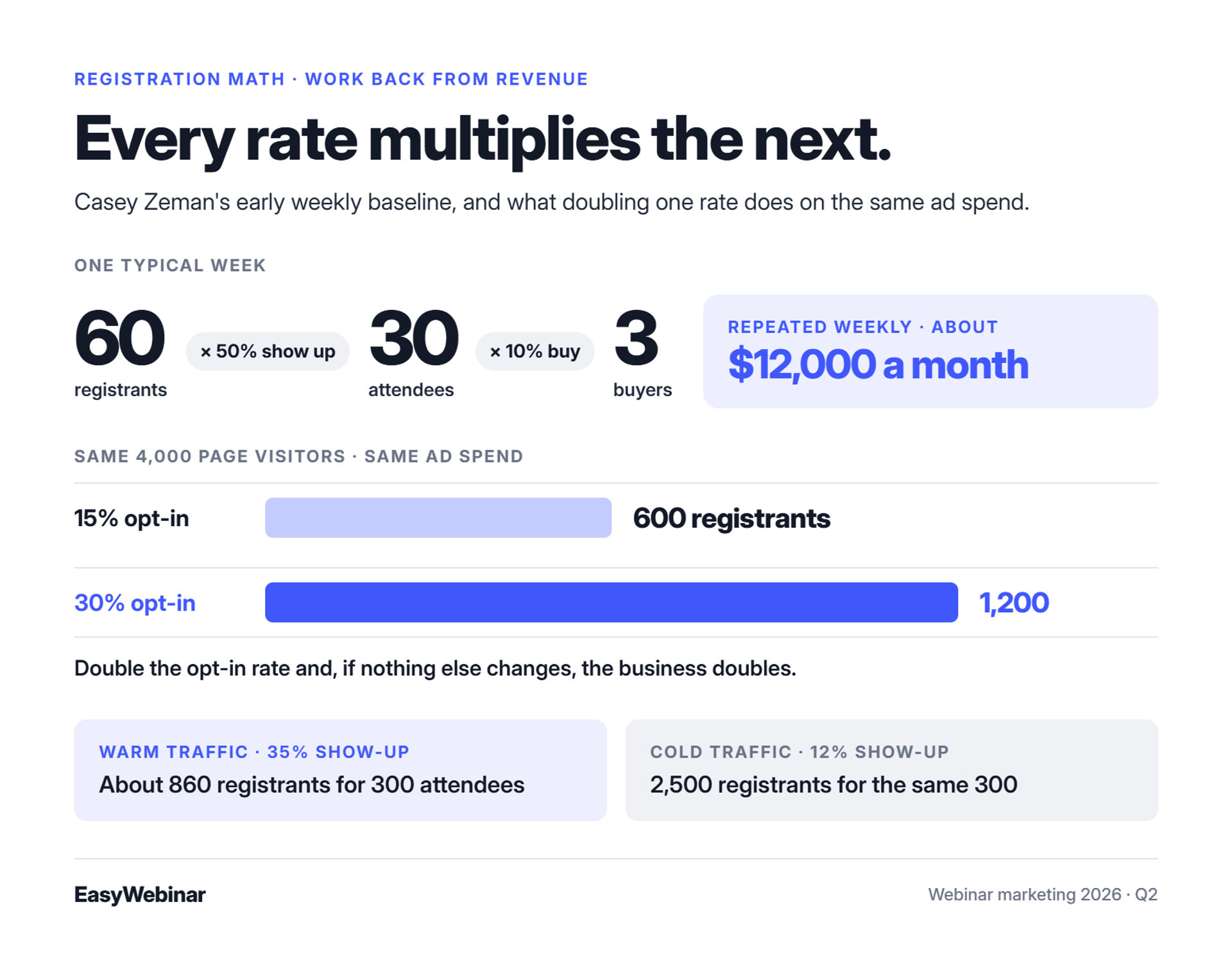
Start from revenue and work backward. Casey Zeman's early weekly baseline was 60 registrants, 30 attendees, and 3 buyers, which came to about $12,000 a month. Each stage multiplies the next. If the registration page's opt-in rate doubles from 15% to 30%, and nothing else changes, the business doubles.
A course creator has a $20,000 launch goal and an empty ad budget cell in her spreadsheet. She asks how many registrants she needs, and nobody can tell her. So she guesses, overspends, and blames the ads.
The reverse-funnel formula
💰 Five steps from your revenue goal to your ad budget
EasyWebinar's funnel reports track the same chain I use to set a target. Work it backward from the money:
- Revenue goal ÷ price = buyers needed.
- Buyers ÷ close rate = attendees needed. Close rate is the share of attendees who buy.
- Attendees ÷ show-up rate = registrants needed.
- Registrants ÷ opt-in rate = page visitors needed.
- Registrants × CPL = ad budget.
⭐ My first-year numbers, worked through
Years before EasyWebinar existed, I ran a live webinar every week to sell my course. A typical week brought 60 registrants, 30 attendees, and 3 buyers. That's a 50% show-up rate and a 10% close rate, and it came to about $12,000 a month.
None of those numbers were big. Repeated every week, they built a 14,000-person email list and $245,000 in course sales in year one. Small, steady numbers compound.
Which multiplier to fix first
⚠️ The opt-in rate is the cheapest lever
Operator Jon Penberthy makes the case with simple math. A page converting at 15% that improves to 30% doubles the business with no other change. You already paid for the traffic, so the page is where the money leaks.
| Page visitors | Opt-in rate | Registrants | Extra ad spend |
|---|---|---|---|
| 4,000 | 15% | 600 | None |
| 4,000 | 30% | 1,200 | None |
⏰ Warm and cold traffic change the plan
Show-up rates depend on who you invite. Operators in our research report 20% to 40% show-up from warm audiences, but only 10% to 15% from cold paid traffic. Plan with your own traffic temperature, not someone else's benchmark.
Say you need 30 buyers at a 10% close rate. That's 300 attendees. Warm traffic at 35% show-up needs about 860 registrants. Cold traffic at 12% needs 2,500.
Watch the numbers, not the vibe
EasyWebinar users say much the same thing about having the math done for them, including the gaps:
"The detailed analytics are great as they save me the hassle of calculating KPIs." - Eliza W., 4.5/5, EasyWebinar G2 - Verified Review
The same reviewer is candid about one limit:
"I do use other email systems to send post-webinar email sequences because I can't track open and click rates on EasyWebinar." - Eliza W., 4.5/5, EasyWebinar G2 - Verified Review
EasyWebinar's conversion funnel shows each stage's rate: registrations, attendance, watch time, offer clicks, and purchases, tracked per attendee. That shows you which multiplier is leaking before you spend more on traffic.
Q3: What makes a webinar title and registration page convert at 30% instead of 15%?
Registration pages convert on the headline and the button above the fold, which is the part of the page visible before scrolling. Zoom's 2026 data found that events labeled "webinar" draw some of the lowest attendance of any common event name. In one operator test, reverting a redesigned page that converted 7% to 8% worse cut cost per lead from $12 to $15 back to $8 to $10. EasyWebinar's AI Webinar Builder writes the registration page, thank-you page, and emails from about 12 questions. Rick Mulready reports a 30% registration rate on cold traffic into his EasyWebinar automated webinar.
The page decides what your ads cost
💸 One redesign, five extra dollars per lead
A media buyer opens Ads Manager on a Monday. Cost per lead was $9 on Friday, and today it's $14. The only change is the new registration page the designer shipped over the weekend.
When EasyWebinar customers ask me why CPL jumped, I check the page before the ads. Jeremy Haynes, an agency owner who runs about $80,000 in ads per webinar, saw exactly this. His team reverted a sleek page that converted 7% to 8% worse, and CPL fell from $12 to $15 back to $8 to $10.
The old way: pretty pages and generic titles
❌ Pages built for the brand, not the click
The old playbook was long pages, many form fields, and titles like "Q3 Growth Webinar." Platform limits made it worse. Some teams couldn't control the page at all:
"It looks like a standard Microsoft form, and we really can't customize it enough to match our high-end marketing campaigns." - Prince Kumar O., 4.5/5, Microsoft Teams Webinars G2 - Verified Review
Others lost people in a redirect. One Zoom reviewer flagged chaos from a registration process that sends everyone off the landing page.
What changed: the promise beats the polish
✅ Above the fold, one promise, one button
Penberthy's rule is that the headline and the opt-in button must sit above the fold. Visitors should "bounce on and bounce through" in seconds. Simple scales, and fancy fails.
⭐ Stop calling it a webinar
Zoom's 2026 data shows that the word "webinar" carries one of the lowest attendance rates among common event names. Name the outcome instead, such as "How to Book 10 Calls in 30 Days," and call it a workshop or masterclass if that's accurate.
How EasyWebinar builds the page for you
✅ About 12 questions, then a full funnel
EasyWebinar's AI Webinar Builder asks about a dozen questions. It then writes your script, registration page, thank-you page, emails, polls, and follow-up in about 10 to 15 minutes. Drag-and-drop editing, templates, and a custom domain handle the rest.
"From setting up your webinar to customising landing pages, thank you pages and emails the platform is so intuitive." - Annette S., 5/5, EasyWebinar G2 - Verified Review
Not every user wants fewer design options, though:
"One area where we've experienced challenges is with the customization options for webinar landing pages. Sometimes it feels a bit limited in terms of design flexibility." - Jo K., 5/5, EasyWebinar G2 - Verified Review
💰 The cold-traffic proof
Rick Mulready runs Facebook ads every day into an EasyWebinar automated webinar. He reports a 30% registration rate on cold traffic, $8 to $12 CPL, and a 166% ROI.
EasyWebinar's AI Webinar Builder writes the registration and thank-you pages, emails, and follow-up in about 10 to 15 minutes, so you can test titles before you spend on traffic. Rick Mulready's 30% cold-traffic registration rate at $8 to $12 CPL shows what a simple, headline-first page does with paid clicks.
Q4: Which channels fill a webinar, and which should you launch first?
Launch a new webinar to warm audiences before buying cold traffic. Livestorm's 2026 benchmark attributes 86.3% of registrations to email. A warm launch costs little and builds "house money," profit that funds cold paid tests later. Paid ads scale on demand, organic short-form video compounds over 30 to 90 days, and partners lend you their audience's trust. EasyWebinar's email broadcasting sends registration links to an uploaded list, and EasyCast streams one session to YouTube, LinkedIn, and Facebook at once.
A founder is about to put $20,000 into Meta ads for a webinar nobody has seen yet. The deck is untested, and so is the headline. If either one misses, the whole budget goes into finding that out.
Why the first launch should go warm
💸 The cold-traffic-first trap
Cold traffic is the most expensive place to learn. Haynes warns that new webinars need test budgets of $20,000 or more to survive the phase where headlines, pages, and decks get fixed. Cold email fares worse for high-ticket offers. Operator JK Molina notes that cold prospects arrive with no trust built up.
✅ The house-money sequence
Haynes calls the alternative "house money." Run the new webinar to your list and organic audience first, where it costs almost nothing. Then use that profit to fund the riskier cold campaigns once the webinar converts.
- Email list and organic followers: validate the offer.
- Partners and joint ventures: borrow trusted audiences.
- Paid cold traffic: scale only what already converts.
What each channel actually does
⭐ Matching the channel to the job
| Channel | Best for | Media cost | Speed | Watch out for |
|---|---|---|---|---|
| Email list | First launches | None | Days | List fatigue |
| Meta ads | Volume at $5 to $12 CPL | High | Immediate | Burn while testing |
| YouTube ads | Viewers ready to watch | High | Immediate | Creative cost |
| Short-form video | Solo creators | None | 30 to 90 days | Slow to compound |
| LinkedIn Events | B2B audiences | None | Days | Smaller reach |
| Partners and employees | Borrowed trust | Shared | Days | Misaligned partners |
| Cold email | Rarely webinars | Low | Days | No trust built |
Penberthy prefers YouTube, where people sit back ready to watch, over fast-scrolling Facebook feeds. Haynes gets Meta to $5 to $12 CPL by testing 5 headlines against 5 primary texts. Piktochart also recommends having employees share the same promotional posts your company publishes. Neil Patel's guide suggests creating a LinkedIn event and promoting it to your followers.
How EasyWebinar fills from the list you already have
✅ Email broadcasting and EasyCast
EasyWebinar's built-in email broadcasting lets you upload a raw list and send registration links. You then warm those leads through the webinar itself. EasyCast streams the session to YouTube, LinkedIn, and Facebook at once. Viewers who never registered can still buy through a QR-code offer.
💰 A billboard in the desert
EasyWebinar can automate a webinar, but it can't invent an audience. I put it this way: "An automated webinar without traffic is like a billboard in the desert." One customer said it plainly:
"I can now forget about them, focus on driving traffic to the webinars and just turn up and present!" - David L., 5/5, EasyWebinar G2 - Verified Review
EasyWebinar's email broadcasting turns an uploaded list into registrants and warms them through the session, so your first launch can run on house money. EasyCast then extends the same webinar to YouTube, LinkedIn, and Facebook viewers, with QR-code offers for people who never registered.
Q5: How far in advance should you promote a webinar?
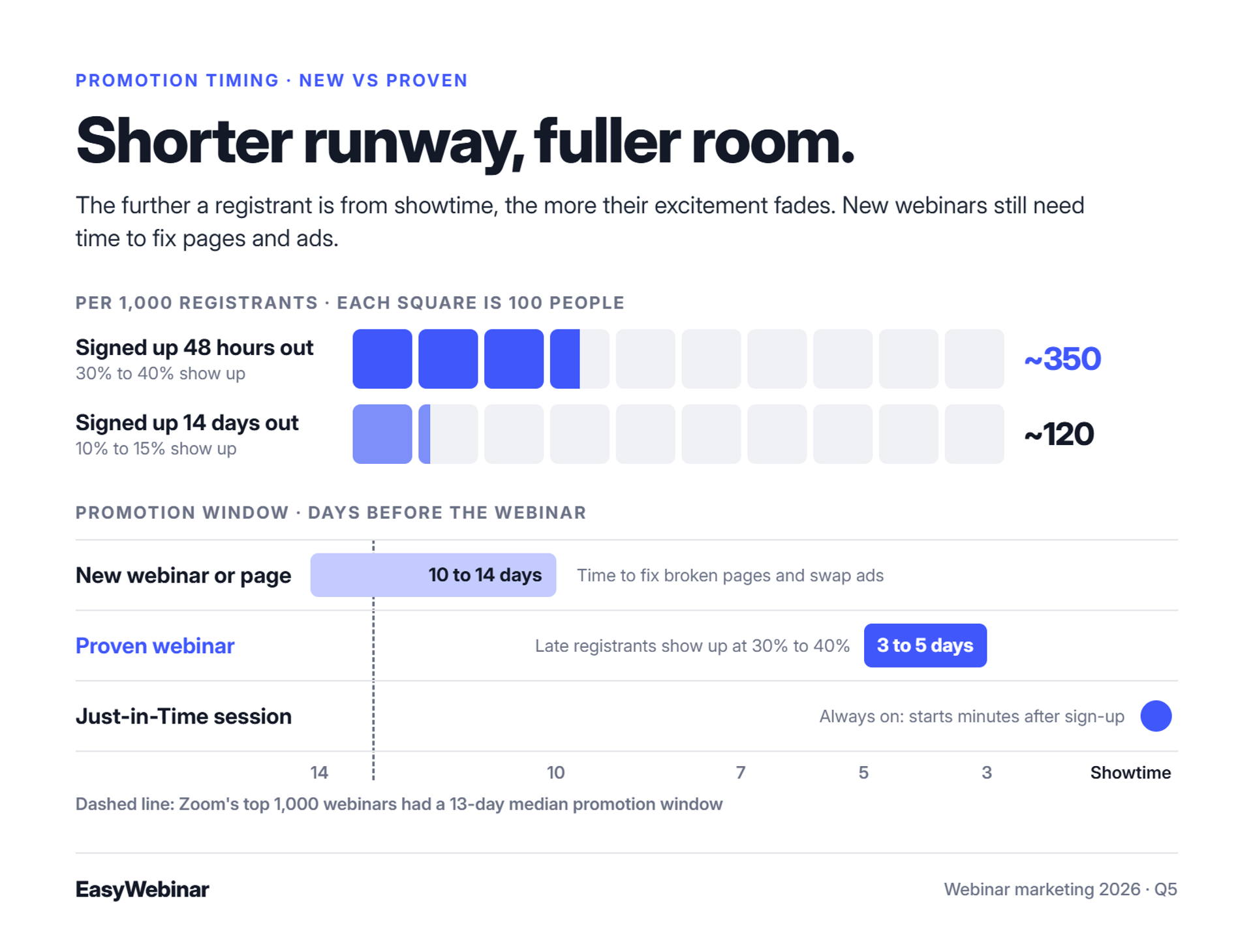
How long to promote depends on whether the webinar is proven. Zoom's top-performing webinars in 2026 had a 13-day median promotion window. A new webinar needs 10 to 14 days, so there is time to fix pages and ads. A proven webinar runs best on a 3- to 5-day cycle. People who register close to the event show up at roughly 30% to 40%, versus 10% to 15% for those who register two weeks out.
A marketing lead opens the content calendar and blocks out 21 days of promotion, because last quarter's deck said "start early." Three weeks later, most of the room is empty. One operator described this exact setup in a community thread: a three-week signup window, four or five reminders, and then "Maybe 10% show up."
The benchmark everyone quotes
⏰ Two weeks is the median, not the rule
Zoom's platform data shows the top 1,000 webinars by attendance had a 13-day median promotion window. LearnyBox adds that close to half of all registrations come in during the final week. A long runway mostly collects early, colder sign-ups.
EasyWebinar's read is that a long runway insures a new webinar but drags down show-up on a proven one. I learned that the expensive way. The further a registrant is from showtime, the more their excitement fades.
New webinar or proven webinar?
✅ The timing decision table
| Situation | Promotion window | Why |
|---|---|---|
| New webinar or new page | 10 to 14 days | Time to fix broken pages, swap ads, and lower CPL |
| Proven webinar | 3 to 5 days | Late registrants show up at 30% to 40% |
| EasyWebinar Just-in-Time session | Always on | A session starts minutes after someone registers |
Jeremy Haynes, an agency owner running $80,000 in ads per webinar, uses this split. When he launches a new webinar, something usually breaks, and the longer window gives his team time to fix it.
⚠️ Why the gap costs you attendees
Haynes reports that registrants who sign up 48 hours out show up at 30% to 40%. Those who sign up 14 days out show up at 10% to 15%. At 1,000 registrants, that is the difference between about 350 people in the room and about 120.
Pick the day and the hour
⭐ Midweek still wins
Contrast finds Wednesday has the highest live attendance, followed closely by Tuesday and Thursday. Piktochart reports that Tuesdays can account for as much as 24% of total signups. Zoom adds that US audiences attend most in midweek early afternoons.
EasyWebinar users notice timing friction too. One five-star reviewer wants to start registrations before the recording exists:
"Oftentimes, I'm promoting things far in advance and want to be able to create quickly on the fly and get registrations going, even if I haven't recorded the presentation yet." - Ash A., 5/5, EasyWebinar G2 - Verified Review
Another values the opposite end, a short turnaround:
"Everything is already set up for last-minute webinars." - Eliza W., 4.5/5, EasyWebinar G2 - Verified Review
EasyWebinar's recurring "Next Available" schedule and Just-in-Time sessions keep the next session close to the moment someone registers. A Just-in-Time session starts minutes after sign-up, in the registrant's own time zone. A proven automated webinar never has to wait two weeks for its audience.
Q6: What happens between registration and showtime that decides who shows up?
A single reminder email loses about half the room. Operators who fill webinars stack small commitments on the thank-you page: add to calendar, submit a question, and share the webinar for a bonus. They then send 12 to 14 emails, rising to six a day in the final 48 to 72 hours. They add SMS without the join link and retarget registrants with short videos. EasyWebinar sends reminder emails and SMS through Twilio, and attendees join from any browser with nothing to download.
It's 24 hours before showtime. A coach checks her registrant list: 600 names, with one reminder email scheduled for the morning. If she matches Contrast's 41.6% median, about 250 people show up. The other 350 already paid for their seat in ad spend.
The gap between registered and in the room
⚠️ The stage nobody owns
EasyWebinar treats the time between sign-up and showtime as its own funnel stage, with its own number: the show-up rate. Most teams skip it. They spend weeks on ads and pages, then send one reminder and hope.
The old way: one reminder and hope
❌ When the reminder itself breaks
A single reminder fails even when it sends. When it doesn't send on time, the damage is worse:
"Reminder notices going out eight hours after an event has concluded." - Casey S., 1.5/5, Zoom G2 - Verified Review
"Their email service doesn't consistently send to registrants, or report emails that have been sent." - Tara G., 0/5, WebinarJam G2 - Verified Review
What changed: show-up is engineered
✅ Commitments on the thank-you page
Right after registering, a person's attention is at its peak. Use that moment to ask for small actions:
- Add to calendar: the webinar now competes for a time slot.
- Submit your top question: registrants come back to hear the answer.
- Share for a bonus: operators report 10% to 15% extra registrations from this alone.
⏰ A cadence that builds toward showtime
Haynes sends 12 to 14 emails in total. Registrants who join 48 to 72 hours out get up to six a day, every two hours from 9 a.m. to 9 p.m., with reported 40% to 60% open rates. His team also stopped putting the join link in text messages. People who joined from their phones booked fewer sales calls.
He also retargets registrants with 25 short videos. Each ad set excludes anyone who watched three seconds of its video, so they see the next one instead. EasyWebinar's view is to test six emails a day on launches first, not on every list.
How EasyWebinar handles the show-up window
✅ Reminders that follow behavior, and no download at the door
EasyWebinar sends welcome and reminder emails from its own engine and SMS through Twilio. Segments update based on what each registrant does. Attendees join from any browser on desktop or mobile, with no app, plugin, or account. That removes the final point where people drop off.
"I can trigger emails directly from EasyWebinar as soon as someone registers. It keeps the whole funnel cohesive and hands-free." - Jennifer B., 5/5, EasyWebinar G2 - Verified Review
The same reviewer wants registrants to see their own time zone on her plan, which she links to show-up rate.
EasyWebinar sends welcome and reminder emails plus SMS through Twilio from custom thank-you pages. Just-in-Time sessions run in each registrant's own time zone. Attendees join from any browser with nothing to download, so the reminder becomes a single click into the room.
Q7: How do you keep attendees in the room until the offer?
Promotion money is wasted when attendees leave before the offer. In one operator's campaign, $20,000 in ads brought 150 live attendees to a three-hour presentation that produced one sale. ON24 reports an average engagement time of 49 minutes in its 2026 benchmarks. EasyWebinar's live room runs chat, polls, Q&A, timed offers, and countdowns with ultra-low latency, sub-500ms via Dolby OptiView WebRTC, and checkout happens inside the room.
Minute 52. The chat has gone quiet, and the presenter is on slide 61 of 140. The offer hasn't appeared yet. The media buyer watches the attendee count slide from 150 to 90 and does the math on the ad spend.
Attendance is not attention
💸 The $20,000 lesson
Haynes tells this story about a client. Paid ads brought in 1,000 registrants and 150 live attendees. The presenter went off script, ran a three-hour presentation with flat energy, and made one sale.
EasyWebinar measures this leak through watch time and a drop-off heatmap. The heatmap shows the exact minute attendees leave. In my experience, that minute is almost never the pitch. It's the long stretch before it.
The old way: a lecture with a pitch at the end
❌ One-way slides and basic tools
The old format is an hour or more of slides, Q&A at the end, and an offer in the last five minutes. Contrast finds only 37% of attendees stay for a full 60 minutes. Webinars that run 30 minutes keep 85% or more. Basic platforms make interaction harder still:
"The polling and survey functions are rudimentary." - Casey S., 1.5/5, Zoom G2 - Verified Review
What changed: the room works like a launch
✅ Tight, interactive, and timed to the pitch
EasyWebinar's view is that the live room is a launch, not a lecture hall. Answer the questions you collected at registration early. Use polls to break up long stretches. Time the offer and countdown to the moment interest peaks.
Latency is part of this. When a stream lags, a poll or offer lands after you've moved on, and the moment is gone.
How EasyWebinar runs the live room
⭐ Real time, in the browser, with checkout in the room
EasyWebinar's live room includes chat, polls, Q&A, timed offers, and countdowns. Buyers pay through Stripe, PayPal, or PayU without a redirect, so the sale and the attendee data stay together. Reviewers mention both the tools and their rough edges:
"I love that we can have a poll, offer and countdown right in the event!" - Verified User in Photography, 4.5/5, EasyWebinar G2 - Verified Review
The same reviewer reports that screen-sharing another browser tab kept loading on the attendee view, and switching to PDF slides fixed it.
"The analytics also show how many saw or clicked your offer." - Verified User in Professional Training & Coaching, 4.5/5, EasyWebinar G2 - Verified Review
EasyWebinar's live room runs chat, polls, Q&A, timed offers, and countdowns with ultra-low latency, sub-500ms via Dolby OptiView WebRTC. Checkout sits inside the room, so buyers pay through Stripe, PayPal, or PayU at the peak of the pitch without leaving the webinar.
Q8: What follow-up turns no-shows and replay viewers into buyers?
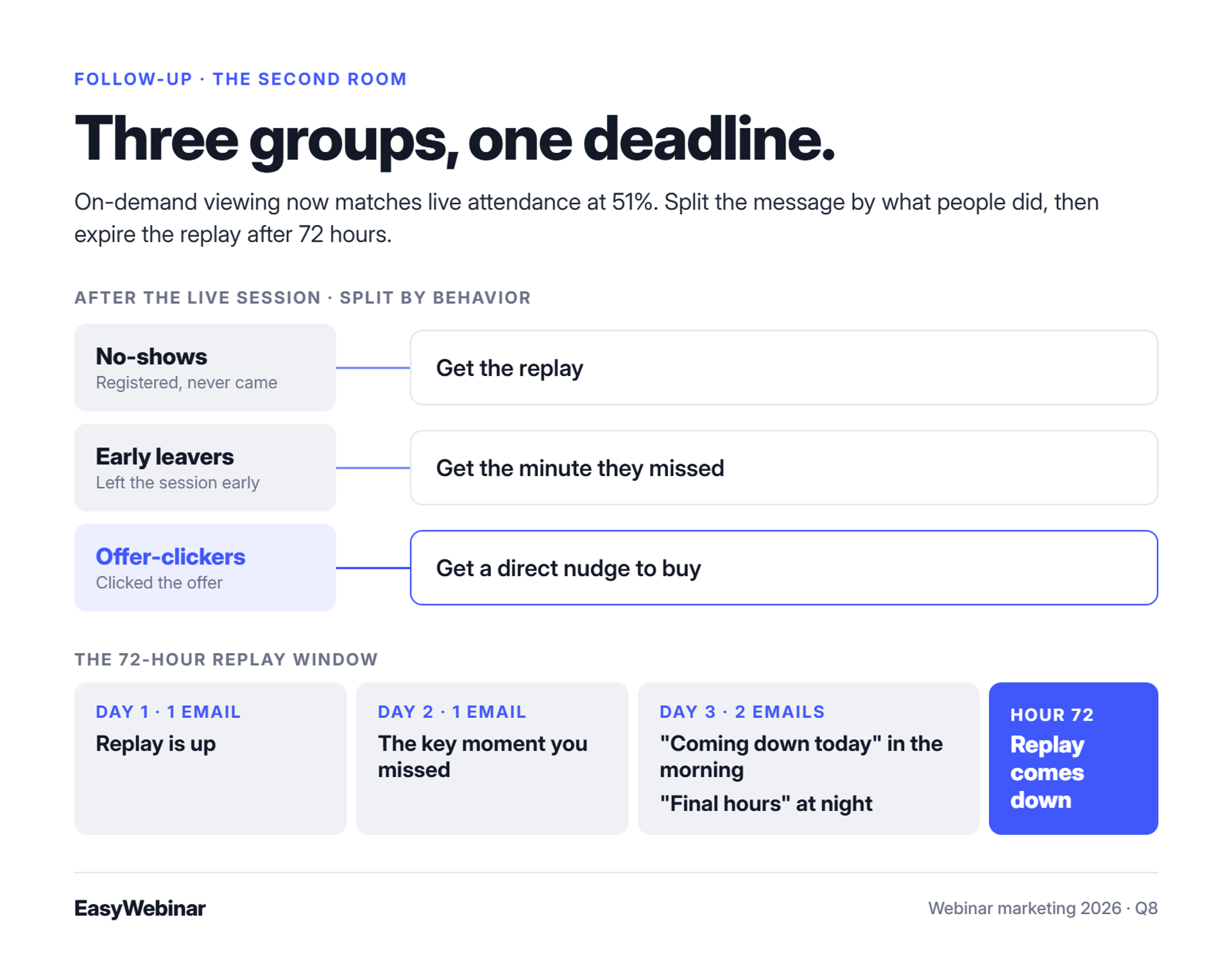
The replay is a second room. ON24 reported in July 2026 that on-demand viewing matches live attendance at 51%. Effective follow-up sends no-shows, early leavers, and offer-clickers different messages, and expires the replay after 72 hours with escalating emails. EasyWebinar sends separate sequences to no-shows, early leavers, offer-clickers, and replay viewers. These run through its own email engine or a connected Mailchimp, ActiveCampaign, or Kit (formerly ConvertKit) account.
It's Friday morning after a Thursday webinar: 400 registered, 160 attended, and 12 bought. The team sends one "Thanks for coming!" recap to everyone, including the 240 people who never came. Half the potential revenue just received the wrong email.
The money after the live hour
💰 Most of your list never saw the pitch
ON24 reports that on-demand viewing now matches live attendance, both at 51%. The people who missed the live session are not lost leads. They're the second room.
EasyWebinar's read is that follow-up deserves as much planning as the live session. I've watched launches double their sales in the 72 hours after the live session ended.
The old way: one recap, or a monster funnel
❌ Too simple, or too clever
Teams usually fail one of two ways. Some send one generic recap. Others build a branching email tree with a path for every behavior.
Jon Penberthy's team mapped a "monster funnel" across their office floor. It took months to build, broke constantly, and lost to a simple four-step linear replay sequence. Complexity also breaks tools:
"Upon reporting our errors (duplicate chat messages, emails not being sent to registrants, pop-ups not working, etc.) we were told that we should not have cloned webinars." - Kaylen M., 0/5, EverWebinar G2 - Verified Review
What changed: behavior plus a deadline
⏰ The 72-hour replay window
EasyWebinar's approach, and mine, is a few segments with one firm deadline. Expire the replay after three days:
| Day | Emails | Message |
|---|---|---|
| Day 1 | 1 | Replay is up |
| Day 2 | 1 | The key moment you missed |
| Day 3 | 2 | "Coming down today" in the morning, "final hours" at night |
Then split the message by behavior: no-shows get the replay, early leavers get the minute they missed, and offer-clickers get a direct nudge to buy.
How EasyWebinar follows up
✅ Sequences triggered by what each attendee did
EasyWebinar tags registrants by attendance, watch time, and offer clicks. It then sends each group its own follow-up sequence, with replay pages that can expire. Users describe the setup this way:
"Allowing me to automate a follow-up sales sequence once someone watches the webinar, no tech headaches, just smooth automation." - Jennifer B., 5/5, EasyWebinar G2 - Verified Review
One reviewer notes a gap: "Replay insights aren't currently captured on live webinars."
EasyWebinar sends different follow-up sequences to no-shows, early leavers, offer-clickers, and replay viewers. It uses its native email engine or your Mailchimp, ActiveCampaign, or Kit (formerly ConvertKit) account. Replay pages can be set to expire, so the 72-hour deadline runs automatically.
Q9: When should you stop going live and turn your webinar into an automated one?
Run a webinar live until the offer converts, then automate that exact session. The live sessions are where the headline, pitch, and offer get tested. Automation then lets the proven version sell in every time zone without the presenter. EasyWebinar switches a live session to Evergreen, Simulive, Just-in-Time, or On-Demand on one subscription. Carla Beisinger built a $5M funnel on a single evergreen webinar this way.
A course creator finishes her 40th Tuesday webinar. It's the same slides, the same stories, and the same offer. Her calendar shows every Tuesday booked through December. The webinar converts, but she's running out of energy before it runs out of buyers.
Live burnout is a success problem
⏰ When your calendar becomes the ceiling
A webinar that converts live has proven its message, and that's the hard part. The trouble is that live revenue only grows with your calendar. EasyWebinar reviewers describe the same wall:
"I can't be everywhere at once." - Ash A., 5/5, EasyWebinar G2 - Verified Review
The old way: stay live forever, or rebuild on a second tool
❌ Two bad options
Operators used to pick one of two paths. Some kept going live every week and capped revenue at their stamina. Others recorded the session and rebuilt it inside a separate automated product, with a second login, a second email setup, and settings that didn't match.
Split stacks also bring their own surprises at the moment of the sale:
"They then, outrageously, have their OWN LINK on the screen to Webinarjam!!" - Verified User in Health, Wellness and Fitness, 0/5, EverWebinar G2 - Verified Review
What changed: validate live, then scale
✅ Prove it in the room first
EasyWebinar's rule, and mine, is to nail the webinar live first and automate it second. My weekly baseline of 60 registrants, 30 attendees, and 3 buyers proved the offer before I automated anything. It's ready to automate when the same offer converts session after session and the questions start repeating.
⚠️ Automation does not create traffic
An automated webinar still needs a steady flow of registrants. As I tell EasyWebinar customers, "An automated webinar without traffic is like a billboard in the desert." Keep the email and ad engine running after you automate.
How EasyWebinar makes the switch
⭐ One session, four automated formats
| EasyWebinar format | How it runs | Best for |
|---|---|---|
| Evergreen | A recorded session plays on a recurring schedule | Always-on sales |
| Simulive | A pre-recorded session plays at one set time | Launches with a fixed date |
| Just-in-Time | A session starts minutes after registration, in the registrant's time zone | Paid traffic |
| On-Demand | Viewers watch instantly | Lead magnets and training |
💰 What happens after the switch
"With my live class I used to sell 10-12 courses. With EasyWebinar I sold 25 courses within 3 weeks of my evergreen 'launch'." - Laura C., 5/5, EasyWebinar G2 - Verified Review
Not every review is spotless. Another five-star user notes "there can be some bugs at times," though they get solved quickly.
EasyWebinar lets you run a session live, find the version that converts, and switch it to Evergreen, Simulive, Just-in-Time, or On-Demand under one login. Laura C. went from 10 to 12 course sales live to 25 within three weeks of going evergreen. Carla Beisinger built a $5M funnel on one evergreen webinar.
Q10: What breaks a webinar campaign hours before showtime, and how do you protect it?
Most webinar campaigns fail in the plumbing, not the ads. One $80,000 campaign lost about 200 opt-ins when its Zapier plan hit its cap. The team caught it four hours before showtime. Registration errors, platform outages, and audio failures cause the same losses. EasyWebinar connects natively to HubSpot, Salesforce Pardot (Account Engagement), and GoHighLevel, includes EasyCRM, and carries a 99.9% uptime guarantee.
Four hours before showtime, a sales team is dialing registrants to lift show-up. Someone compares lists and goes quiet. The CRM has about 200 fewer opt-ins than the landing page.
The failure nobody sees until showtime
💸 A billing cap, not a bad ad
Jeremy Haynes tells this story from an $80,000 webinar campaign. His team traced the gap to Zapier, the tool passing leads from the page to the CRM. The plan had hit its limit, and the fix was simply upgrading the billing.
EasyWebinar's view is that every handoff between tools is a place where leads can disappear. Ad spend keeps running while the data quietly stops.
The old way: a stack held together with webhooks
❌ Every connection is a place to break
A typical stack chains a page builder, a webinar host, an email tool, a CRM, a dialer, and payments, all linked by webhooks (automated messages between apps). Any link can fail. Platform failures hit harder still:
"I have had several registrants tell me they will not attend a webinar of ours until we switch our platform." - Forrester S., 0/5, GoTo Webinar G2 - Verified Review
"As a Host you could not enter the studio nor broadcast the LIVE webinar." - David R., 0/5, WebinarNinja G2 - Verified Review
Another WebinarNinja user says only 20% of 3,000+ people trying to register actually could.
What changed: reliability is a conversion feature
✅ The pre-launch audit
EasyWebinar recommends a simple check before every campaign:
- Register with Gmail, Hotmail, and work addresses. Confirm that each address gets through.
- Check integration plan limits against your expected registrant count.
- Compare page opt-ins with CRM records 24 hours and 4 hours before showtime.
- Join from a phone and a desktop browser.
- Test every speaker's camera and microphone.
- Run a full test webinar.
⚠️ Simple funnels break less
Complex funnels have more seams that can split. EasyWebinar users give the same advice:
"Make sure you test your webinar before going live for best results!" - Meaghan L., 5/5, EasyWebinar G2 - Verified Review
How EasyWebinar protects the campaign
⭐ Fewer handoffs, guaranteed uptime
EasyWebinar removes several handoffs by building registration, email, CRM, and checkout into one system. Native integrations sync leads directly, and video is stored in-house. Setup still takes care, though. One five-star reviewer noted that "some of the integrations are not intuitive."
EasyWebinar carries a 99.9% uptime guarantee, has no hard attendee cutoff at the plan limit, and stores video in-house. Registrations sync natively to HubSpot, Salesforce Pardot (Account Engagement), and GoHighLevel, or stay in EasyCRM, so fewer leads depend on a webhook firing on time.
Q11: Which numbers tell you your webinar marketing worked?
Webinar benchmarks conflict because their samples differ. ON24 reports a 60% attendance rate across its own platform in 2026, while Contrast's independent B2B median is 41.6%. Operators report 20% to 40% show-up from warm traffic and 10% to 15% from cold. Benchmark against your own traffic temperature. Then track CPL, opt-in rate, offer clicks, and revenue per registrant. EasyWebinar ties revenue to each webinar using each attendee's watch, click, and purchase data.
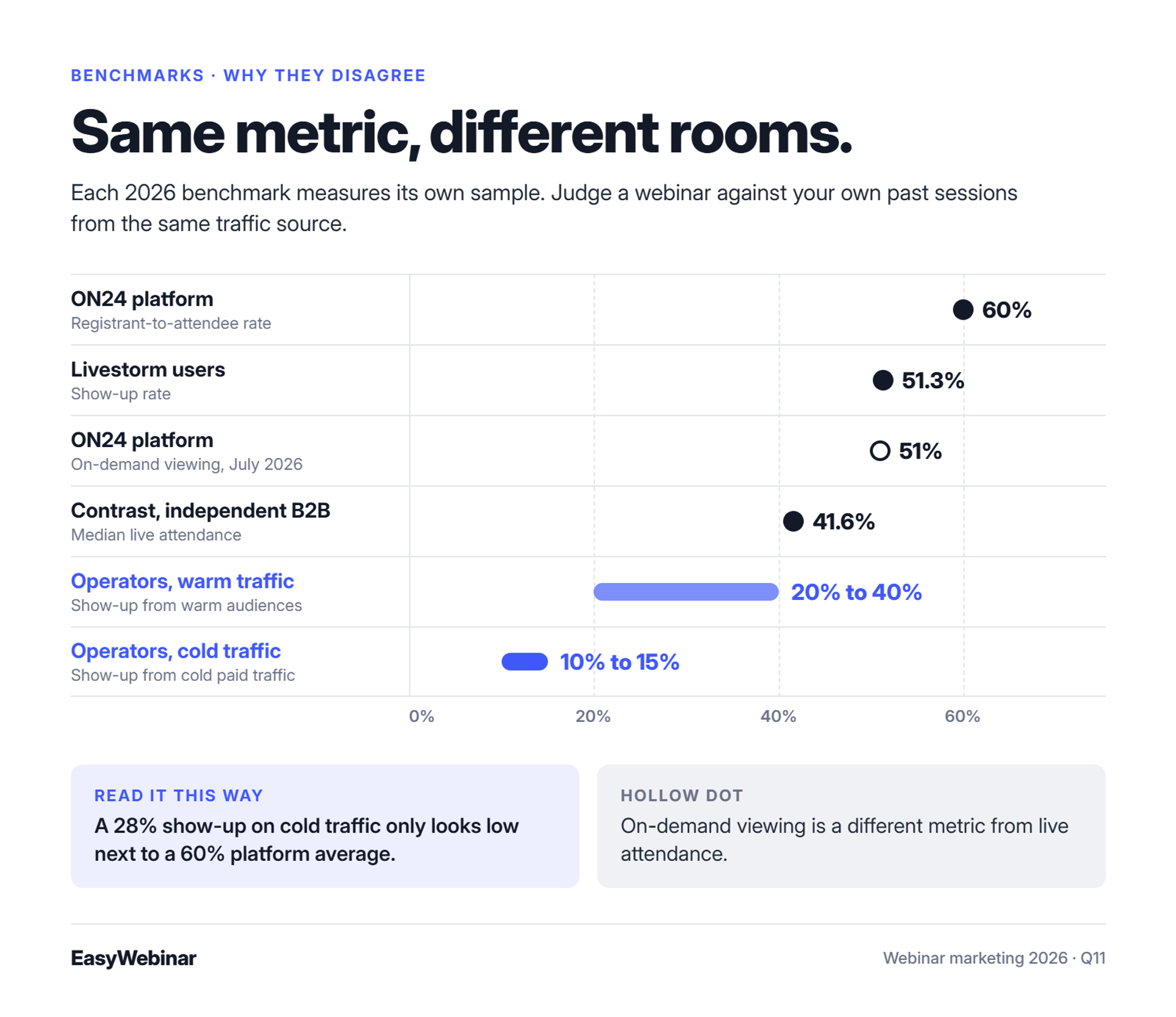
A marketing director pastes "60% attendance" into her board deck because a report said so. Her own webinar hit 28% on cold traffic. Now she has to explain a gap that doesn't actually exist.
Why the benchmarks disagree
⚠️ Different rooms, different numbers
| Source | Year | Metric | Number | Sample |
|---|---|---|---|---|
| ON24 | 2026 | Registrant-to-attendee rate | 60% (239 avg. attendees) | ON24 platform customers |
| Contrast | 2026 | Median live attendance | 41.6% | Independent B2B data |
| Livestorm | 2026 | Show-up rate | 51.3% | Livestorm users |
| ON24 | July 2026 | On-demand viewing | 51% | ON24 platform |
| Operators | 2026 | Warm vs cold show-up | 20% to 40% vs 10% to 15% | Paid and organic funnels |
EasyWebinar's advice is to compare each webinar against your own recent sessions with the same traffic source. Cold Meta traffic and a warm email list are different rooms. Judging both against one benchmark hides what's working.
The five-number scorecard
💰 What to track every session
- Cost per lead (CPL): ad spend ÷ registrants. Rick Mulready runs cold traffic at $8 to $12.
- Opt-in rate: registrants ÷ page visitors.
- Show-up rate: attendees and replay viewers ÷ registrants.
- Offer click rate: offer clicks ÷ attendees.
- Revenue per registrant: total revenue ÷ registrants.
✅ Revenue per registrant is the master number
Revenue per registrant combines every stage into one figure. My early baseline came to roughly $46 per registrant, which is $12,000 a month across about 260 registrants. If revenue per registrant beats CPL, the webinar pays for its traffic before any follow-up sales.
Find the minute people leave
⏰ Drop-off before the offer
EasyWebinar's drop-off heatmap shows the minute attendees leave. If many leave before the offer, cut the content or move the offer earlier. Contrast finds that only 37% of viewers stay for a full 60 minutes.
EasyWebinar records what each attendee watched, asked, clicked, and bought, and scores leads as Hot, Warm, or Nurture. Its drop-off heatmap shows the exact minute people leave, so you tune the next session on revenue, not on attendance.
Frequently Asked Questions

Casey Zeman
Founder of EasyWebinar
About Author
Over the past decade, I've helped thousands of entrepreneurs, coaches, and consultants turn webinars into a predictable, powerful way to grow their audience, build trust, and scale, without the constant hustle. I created EasyWebinar because I couldn't find a system that combined authenticity, engagement, and automation the way I needed. So, I built one.
Related Posts
10 Best Community Engagement Platforms in 2026
Compare the 10 best community engagement platforms in 2026. Course creators, evaluate live hosting, analytics, and replay to pick your winner today.
10 Best Online Coaching Tools in 2026: Live Session Quality, Scheduling, Recording, and Client Engagement Analytics
Compare the 10 best online coaching tools of 2026 on session quality, scheduling, and analytics. Discover the right fit for your coaching revenue model.
10 Best Webinar Hosting Platforms Ranked by Uptime, Streaming Quality & Cost
Compare 10 webinar hosting platforms ranked by uptime, streaming quality, and cost. Discover which tool actually turns attendees into revenue.
Turn every webinar into a revenue stream
Launch your first paid event in just a few clicks - and start monetizing your expertise.
Book a Call