How Much to Charge for a Webinar: Price Ranges by Format and Real Ticket Prices

Casey Zeman
Published on Nov 18, 2026 • 19 min read
TL;DR
- Paid webinars we checked sell for $39 to $199 a seat: live creator workshops $39 to $97, professional webinars with credits $149 to $199, multi-session programs about $500 and up.
- Every price is a public listing checked on 13 November 2026, from Bushwick Film Festival, Luma, SHRM, Lorman and Alkimia Learning, not a range copied from another blog.
- For a 1-hour webinar, $40 to $75 is a defensible start, based on Leading Learning's 2021 survey of $0.66 to $1.25 a minute.
- Keep the webinar free when it sells a bigger offer; charge when the webinar is the product. No controlled study proves paid webinars get higher show-up.
- Price = (costs + profit target) ÷ expected paying buyers. Then check it against the market, offer two or three tiers, and raise prices in public steps.
- Underpricing invites refunds. Casey Zeman's refunds roughly halved when he raised a $97 price, so price for the result and test offers instead of guessing.
By Casey Zeman, Founder of EasyWebinar.
A coach has her workshop slides done. The registration page is built. Then she gets to one empty box, the ticket price, and she sits there for twenty minutes typing $47, deleting it, typing $97, and deleting that too.
I've been that person. Early on, I priced too low, and the refund requests told me so. This guide gives you the answer first, then real prices other hosts charge today (each one sourced and dated), and then the maths. If you're still deciding whether a webinar should sell a ticket at all or sell a bigger offer, start with how to make money with webinars.
Q1. How Much Should You Charge for a Webinar?
Most paid webinars we checked sell for $39 to $199 a seat. A 60 to 90 minute live workshop for creators or consumers sits around $39 to $97. A professional webinar with credits sits around $149 to $199, and a recording or on-demand seat sits at $75 to $199. A multi-session live program starts near $500 (A$497 in one listing). Price by who attends and what they walk away with.
💰 Price ranges by offer type
Every range below comes from a public listing checked on 13 November 2026, or from a named platform guide. None of it is copied from another blog's table.
| Offer type | Price range seen | Example listings |
|---|---|---|
| Live workshop or masterclass, 60 to 90 min, creators and consumers | $39 to $97 | Film festival strategy workshop , $39 Coaching masterclass , $97 |
| Professional live webinar (work skills or credits) | $149 to $199 | SHRM live , $149 non-member Lorman 90-min legal , $199 |
| Recording or on-demand seat | $75 to $199 | SHRM on-demand , $75 non-member Lorman on-demand , $199 |
| Multi-session live program | About $500 and up | Four 3.5-hour sessions , A$497 Maven guidance for live cohort courses , $800 to $2,450 |
🎯 Why the same hour has different prices
Look at the first two rows. Both are about 90 minutes long, yet one sells for $39 and the other for $199. The difference is the buyer: a professional who needs credits, or an employer who pays, will pay more for the same clock time.
That is my reframe. Price the outcome and the audience, not the minutes. Ask what the attendee can do on Monday that they couldn't do on Friday.
✅ Where EasyWebinar fits
EasyWebinar sells seats to paid workshops and masterclasses through your own Stripe account, and attendees are registered automatically once payment clears.
Q2. What Do Real Webinars Charge?
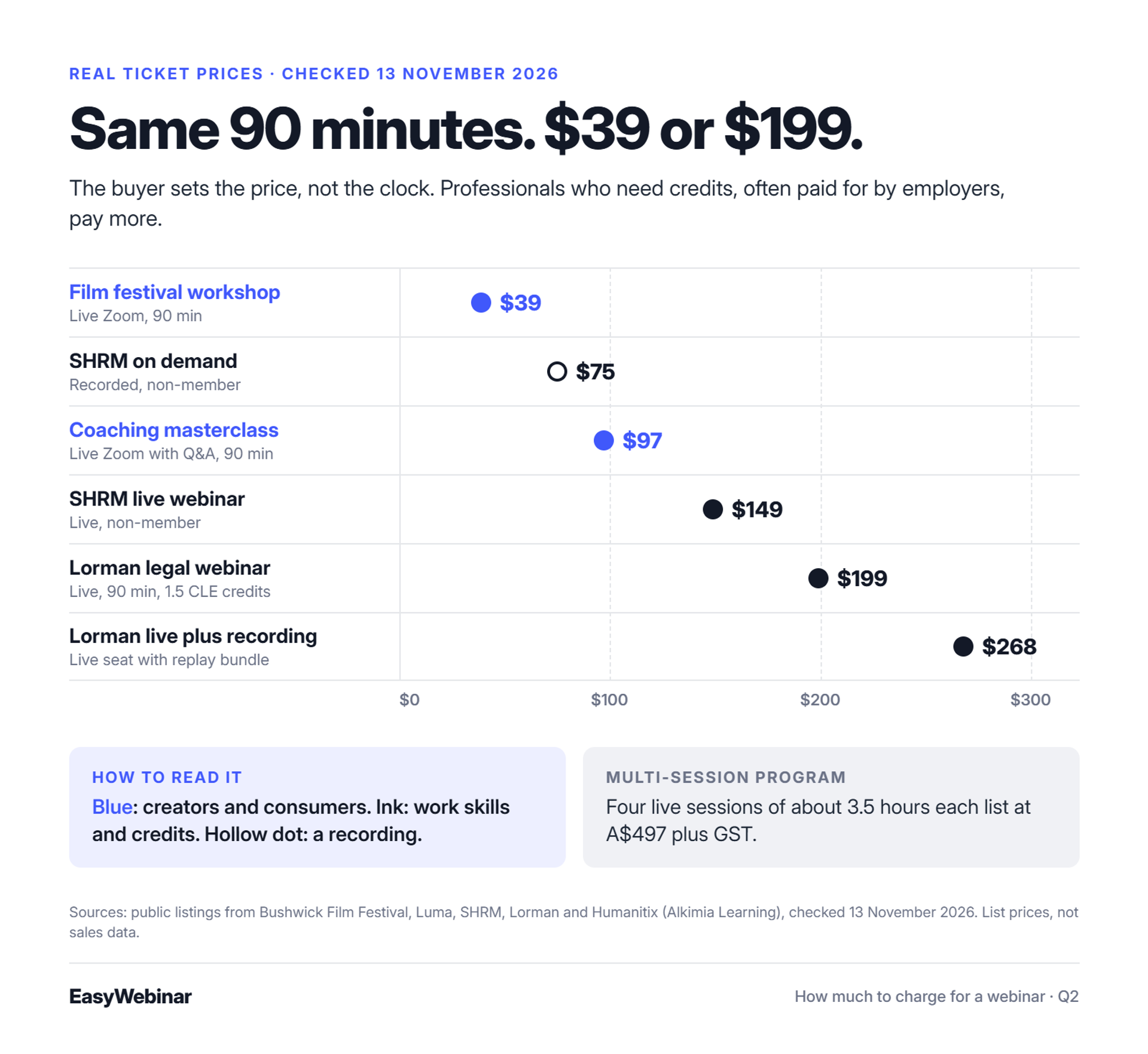
Real listings cluster in clear bands. A 90-minute creator workshop on Zoom sold at $39, and a 90-minute coaching masterclass sold at $97. SHRM lists live webinars at $149 for non-members and on-demand ones at $75. Lorman charges $199 for a 90-minute live legal webinar and $268 with the recording. A four-session live program lists at A$497. Every price was checked on 13 November 2026.
For what webinars like these delivered, see these 15 real webinar examples.
📋 Ticket prices we checked
| Webinar | Format and length | Price | Source |
|---|---|---|---|
| Film Festival Strategy Masterclass (Bushwick Film Festival) | Live Zoom workshop, 90 min | $39 | Listing |
| The Premium Coach Revenue Blueprint | Live Zoom masterclass with Q&A, 90 min (past event) | $97 | Luma listing |
| SHRM upcoming webinar | Live, single session | $149 non-member (several SHRM sessions are free) | SHRM webinars page |
| SHRM on-demand webinar | Recorded, on demand | $75 non-member | SHRM webinars page |
| Legal Ethical Issues (Lorman) | Live webinar, 90 min, 1.5 CLE credits | $199 live; $268 live plus recording; $199 on demand | Lorman course page |
| Liberating Structures Virtual Immersion (Alkimia Learning) | Four live Zoom sessions, about 3.5 hours each | A$497 plus GST and booking fee | Humanitix listing |
🔍 What these prices teach
- Credits and work audiences lift the price. SHRM and Lorman sell to HR and legal professionals, often paid for by employers.
- A recording is either an add-on or priced the same. Lorman charges $69 extra for the recording with a live seat, but sells the on-demand course at the full $199.
- Multi-session programs price the change, not the hour. About 14 live hours at A$497 works out far cheaper per hour than a single $97 masterclass.
📊 What these listings cannot show
No public dataset shows what paid webinars actually sell for, only what they list for. Treat these as list prices, and let your own sales tell you the real number.
✅ How EasyWebinar handles ticket revenue
EasyWebinar takes no platform fee on ticket revenue; standard Stripe fees apply. So any price in this table reaches you minus card fees, which keeps the comparison honest when you set your own on the sell and monetize side of your funnel.
Q3. How Much Should You Charge for a 1-Hour Webinar?
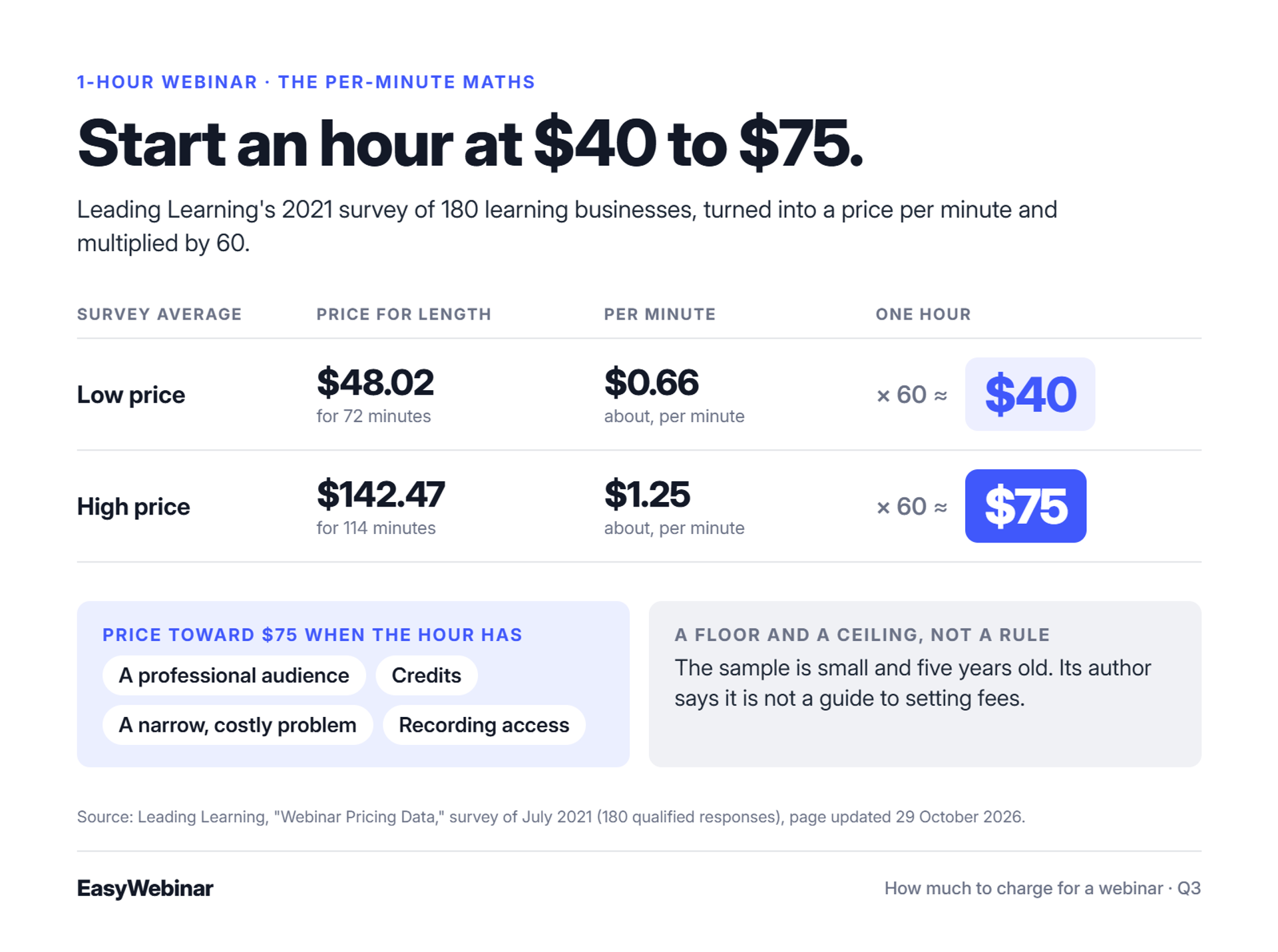
For a 1-hour paid webinar, $40 to $75 is a defensible starting range. Leading Learning's 2021 survey of 180 learning businesses found an average low price of $48.02 for 72 minutes and an average high of $142.47 for 114 minutes. That works out to about $0.66 to $1.25 a minute. Price toward the top if the hour carries credits, a recording, or a result buyers can measure.
🧮 The per-minute maths
Leading Learning ran the survey in July 2021 and updated the page on 29 October 2026. Multiply $0.66 by 60 minutes, and you get about $40. Multiply $1.25 by 60, and you get $75.
Treat that as a floor and a ceiling for an ordinary hour, not a rule. The author says plainly that the data is not a guide to setting fees. The sample is small, and the numbers are five years old.
⚖️ What pushes a 1-hour price up
- Audience: professionals and teams pay more than consumers spending their own money.
- Credits: continuing-education credit (CE, the hours some licences require each year) justifies a higher price.
- Specialism: a narrow, costly problem beats a broad, general topic.
- Recording access: buyers value being able to rewatch.
JK Molina put it bluntly: "There is no like optimal pricing. It's more like, what do you want your pricing to feel like?" I agree with half of that. The feel matters, but the buyer's result is what makes the feel believable.
✅ Selling the same hour twice
EasyWebinar lets you sell the hour live, then turn that same session into an Evergreen webinar people buy on demand. You price the live seat and the replay separately, from one recording.
Q4. Should Your Webinar Be Free or Paid?
Make the webinar free when its job is to sell a bigger offer, such as a course or coaching program. Make it paid when the webinar itself is the product: a workshop, masterclass, or training people would buy anyway. EasyWebinar supports both, with paid registration or free registration plus checkout inside the room. No controlled study we found proves paid webinars get higher show-up, so test it on your own list.
🧭 The two jobs a webinar can have
A webinar either teaches something people pay for, or it earns trust for something bigger. My rule of thumb is simple: if you're selling anything over 200 bucks, you need a webinar. So a free webinar in front of a $500 or $2,000 offer is the classic model.
A paid ticket fits when the session is the thing they bought. Think of a 90-minute workshop where people leave with a finished plan.
❌ The old way, and what it cost
Most hosts used to make everything free, then chase no-shows with reminder emails. Others charged a token $9 and wondered why reach collapsed. Neither choice was made on purpose; it was whatever the tool allowed.
Paying through a separate page didn't help. One Zoom reviewer flagged that registration "needing to leave the landing page" can "cause chaos" for attendees.
🔄 What changed
Now one platform can sell a seat and sell in the room, so you choose per webinar. Yuri Elkaim makes the filtering case: "if someone's not willing to pay even $50 do you think they're going to pay $5,000 not really." A price tells you who is serious.
I'd add a caution. I searched for a controlled study comparing show-up on free and paid webinars and found none. Treat any claimed gap as a test to run, not a fact. If free is your choice, our guide to webinar marketing covers how to fill and convert the room.
| If your webinar... | Then | How to sell it |
|---|---|---|
| Sells a course, program, or service | Keep it free | Offer in the room at the end |
| Is the product people want | Charge for it | Paid ticket at registration |
✅ How EasyWebinar runs both models
EasyWebinar handles both models. Paid registration runs through Stripe and sends access once payment clears; free registration pairs with checkout inside the webinar, so buyers pay without leaving. Course creators use the same setup to sell after the session:
"I've been using EasyWebinar to automate my webinars and drive course sales... I can trigger emails directly from EasyWebinar as soon as someone registers." - Jennifer B., Easywebinar G2 - Verified Review
"I would like my registrants to be able to see their own time zone when they register on the plan that I am paying for." - Jennifer B., Easywebinar G2 - Verified Review
"The pricing options of the product are somehow limited which is inconvenient for huge webinars." - Hetvi B., Zoom G2 - Verified Review
Start your 7-day trial or watch the demo
Q5. How Do You Calculate Your Webinar Price?
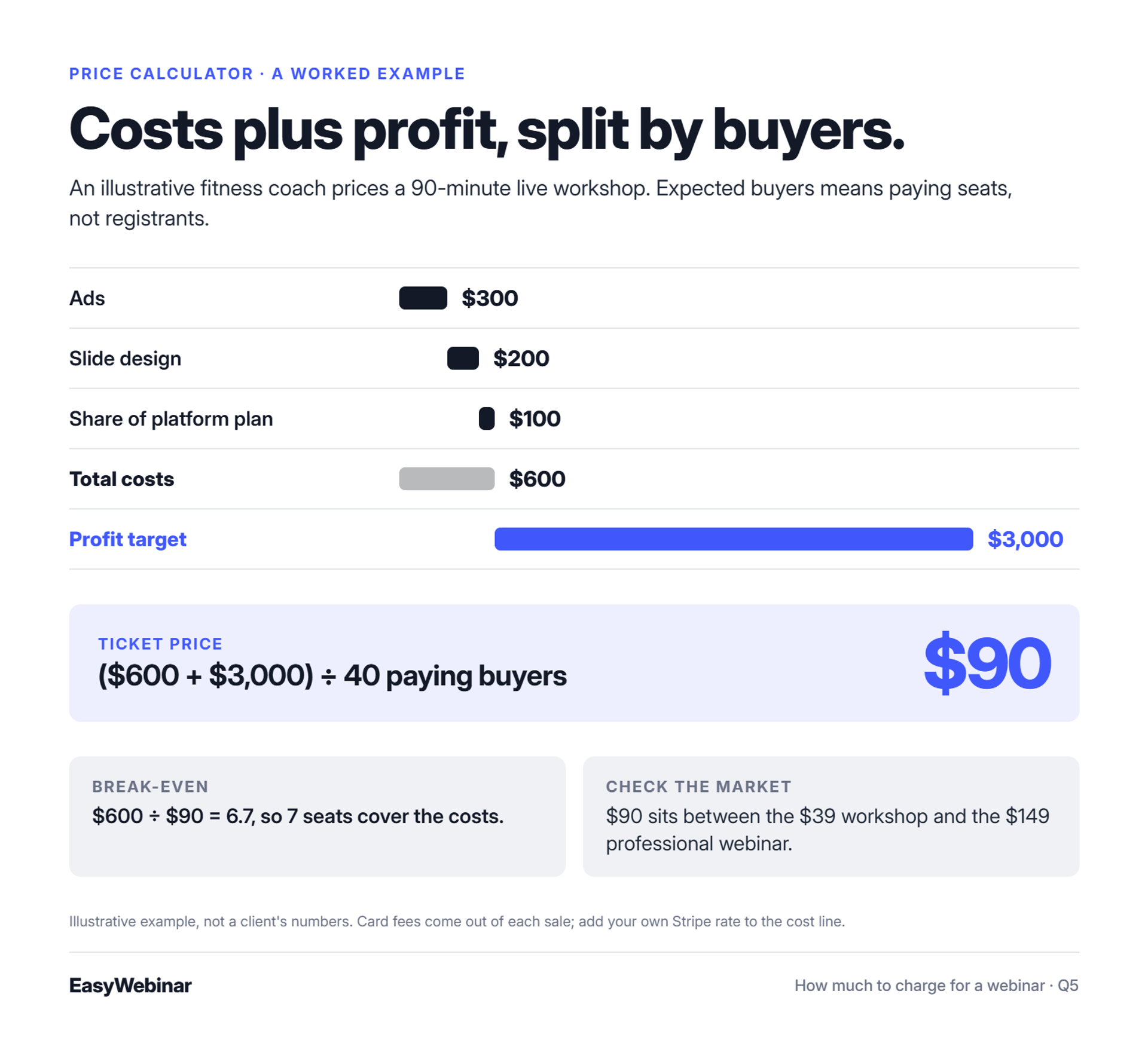
Add your costs and your target profit, divide by the number of buyers you realistically expect, and then check the result against the market range. Expected buyers means paying seats, not registrants. For example, $600 in costs plus a $3,000 profit target, divided by 40 buyers, gives $90 a seat. If that sits far above what similar webinars charge, raise the value or the audience, not just the price.
🧮 The formula
Ticket price = (costs + target profit) ÷ expected paying buyers
Break-even seats = costs ÷ ticket price (round up)
📝 Four steps to your number
- List every cost. Ads, slide design, guest fees, your platform plan, and card fees on each sale.
- Set a profit target. Pick the amount that makes the session worth your week, not a hopeful one.
- Estimate paying buyers honestly. Use your list size and past sales, not the registrant count you hope for.
- Check the market. Compare your result with the ranges in Q1 and the listings in Q2.
💡 A worked example
This is an illustrative example, not a client's numbers. A fitness coach plans a 90-minute live workshop.
| Line | Amount |
|---|---|
| Ads | $300 |
| Slide design | $200 |
| Share of platform plan | $100 |
| Total costs | $600 |
| Profit target | $3,000 |
| Expected paying buyers | 40 |
| Price: ($600 + $3,000) ÷ 40 | $90 |
| Break-even: $600 ÷ $90 = 6.7 | 7 seats |
At $90, she sits between the $39 workshop and the $149 professional webinar in Q2. That fits a consumer audience with a clear result. Card fees come out of each $90 sale, so check your own Stripe account for the current rate and add it to the cost line.
⚠️ When the maths says no
If the formula returns $300 and similar sessions sell at $97, the price is not the problem. Either the audience is too small, or the promise is too thin. Grow the list, sharpen the outcome, or make it a free webinar that sells a bigger offer.
✅ Your real cost line on EasyWebinar
EasyWebinar takes no platform fee on ticket revenue; standard Stripe fees apply. So your cost line is your EasyWebinar plan (plans run from $44 to $349 a month as of November 2026) plus card fees, and every seat above break-even is margin you keep.
Q6. Do Live, Simulated Live and Evergreen Webinars Cost the Same?
Buyers usually pay most for live access and the chance to ask questions. Real listings show both patterns. SHRM charges non-members $149 live and $75 on demand, while Lorman prices live and on demand the same at $199 and sells the recording as a $69 add-on. With Simulated Live and Evergreen, EasyWebinar runs the session without you, so you can sell seats every day instead of on one date.
🎤 What live access is worth
A live seat buys more than the content. It buys a chance to ask the presenter a question and get an answer that day. That is why SHRM halves its non-member price for the recorded version.
Lorman shows the other choice. Its on-demand course costs the same $199 as the live seat, and live buyers pay $69 more to keep the recording. For credit-bearing training, the credit is what people buy, whatever the format.
❌ The old way: one date, one price
Most hosts sold one live date at one price. Then they emailed the recording to everyone, free, a week later. The best-selling version of the session was given away, and the next sale waited for the next live date.
🔁 What changed: the proven session keeps selling
A session that sold well live can now run on a schedule. EasyWebinar keeps both automated tiers under one Automated Webinars umbrella:
| Format | How it runs | Interaction | Pricing angle |
|---|---|---|---|
| Live | You present at a fixed time | Real-time chat, polls, Q&A | Premium for access to you |
| Simulated Live | Your recording plays at a fixed or fixed recurring time, one time zone | Real-time live chat, polls, timed offers | Event feel at a lower price, or the same price |
| Evergreen | Plays on Just-in-Time (starts minutes after sign-up), timezone-adjusted, multiple daily slots, or on demand | Async question box, pre-set polls and offers | Lower price, sold every day |
My rule is to go live first, validate the content and the offer, and then automate what is proven. I pre-sold live bootcamps before I built them and ran them live as the program went. Live was where I learned what people would pay for.
⭐ What creators report
"With my live class I used to sell 10-12 courses. With EasyWebinar I sold 25 courses within 3 weeks of my evergreen 'launch'." - Laura C., Easywebinar G2 - Verified Review
"The only downside is that to have the 'just in time' feature you have to pay a premium that is about double the price of the basic subscription." - Laura C., Easywebinar G2 - Verified Review
✅ From live seat to daily seat
EasyWebinar turns the live session that sold into a Simulated Live or Evergreen webinar on the same subscription, with checkout still inside the room. You can price the live seat as a premium and the automated seat for convenience, from one recording.
Q7. How Do You Set Price Tiers and Raise Prices?
Offer two or three tiers: a live seat, a live seat plus recording, and a bigger package such as a multi-session program. Lorman's live seat is $199, or $268 with the recording, a clean replay bundle. Raise prices in public steps as seats fill or proof grows. Early buyers are rewarded, and late buyers get a real reason to act.
🪜 Three tiers that work
| Tier | What's included | Real example |
|---|---|---|
| Live seat | The live session and Q&A | Lorman live , $199 |
| Live plus recording | Live seat plus replay access | Lorman bundle , $268 |
| Bigger package | Several live sessions, or added coaching | Four-session program , A$497 plus GST |
A tier only works if the extra thing is worth more to the buyer than the price gap. A replay for $69 more works when the content is dense enough to rewatch.
📈 Raise prices on a schedule
JK Molina raises his price in steps as seats sell: "at every 25% checkpoint, I raised it. So when I got to 25% of my goal, I raised it by 50 bucks." Buyers see the next price coming, and that is honest urgency.
Early-bird pricing is the calendar version. Alkimia Learning's early price runs until 30 December 2026, two months before its first session. Both methods reward the people who trusted you first.
⭐ What hosts say
"Easy to set up live or evergreen webinars, including replay options... Analytics splits out live and replay attendee insights for evergreen webinars." - Verified User in Professional Training & Coaching, Easywebinar G2 - Verified Review
"Replay insights aren't currently captured on live webinars (not sure why?)" - Verified User in Professional Training & Coaching, Easywebinar G2 - Verified Review
✅ Selling the next tier in the room
EasyWebinar sells the live seat at registration and the replay or next tier through checkout inside the webinar, so buyers upgrade without leaving. See how it works for launching courses and programs.
Q8. Is Charging Too Little a Mistake?
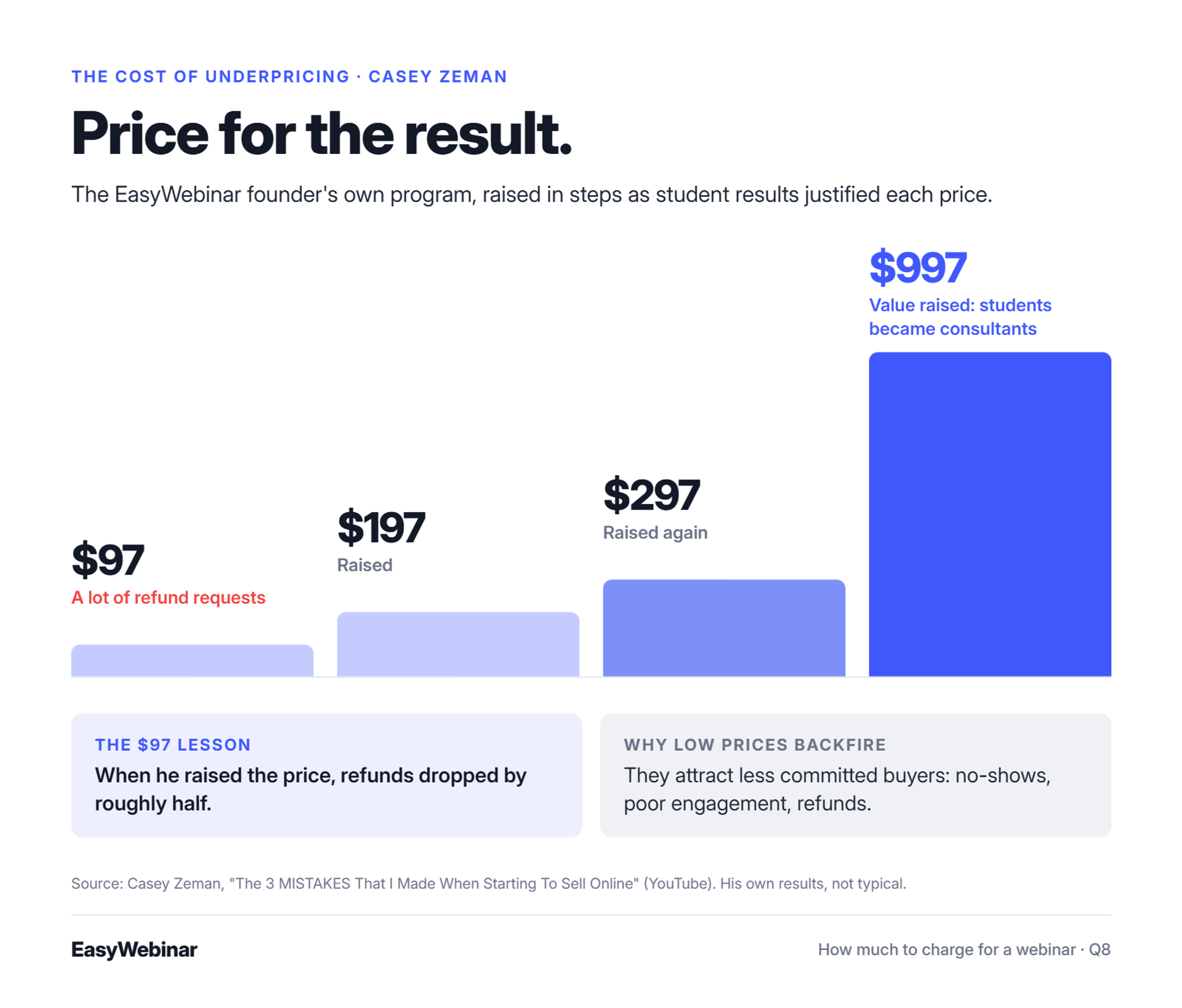
Yes. Underpricing attracts less committed buyers and leaves too little margin to serve them well. EasyWebinar founder Casey Zeman saw it first-hand: at $97 he had many refunds, and when he raised the price, refunds roughly halved. He later moved his program from $197 to $297 to $997 as student results justified it. Price for the result, and then deliver it.
😬 Why low prices feel safe
Most first-time hosts price low out of fear. They worry nobody will buy, so they pick $27 or $47 and hope volume saves them. It rarely does, because the people a low price attracts are the least likely to finish.
Tom Ross, who builds membership communities, puts it this way: "underpricing causes a range of issues... you typically attract lower commitment people." Low commitment shows up as no-shows, poor engagement, and refunds.
💸 My $97 lesson
I made this mistake myself. At $97, I had a lot of refund requests. When I raised the price, refunds dropped by roughly half.
Then I kept going. "I started pricing my program at 197 and then I started pricing it at 297 and then I realized I could actually up the value to 997." Students were using the program to become consultants, so the result carried the higher price.
In this clip, I tell the story of my early pricing mistakes and what raising the price changed.
Pricing too low is a mistake too, not only pricing too high.
🔁 What changed: you can test instead of guess
You no longer need one launch to find out if a price works. Run the same webinar with two offers or two prices, and keep the winner.
⭐ What sellers say
"This is especially important for solo entrepreneurs wearing 800 different hats, who need to find creative ways to sell their work." - Ash A., Easywebinar G2 - Verified Review
"We've seen such a fantastic return on investment after implementing a sales strategy that uses evergreen webinars." - Meaghan L., Easywebinar G2 - Verified Review
"Good channel of upselling but nothing benefits at the moment." - Verified User in Investment Management, WebinarJam G2 - Verified Review
✅ Testing prices with EasyWebinar
EasyWebinar's AI Webinar Builder writes the script, pages, emails, polls, and offers from a short set of questions. That lets you launch versions of the same webinar to test three or four offers or prices in parallel, and then scale the one that sells. If you sell coaching, see the webinar platform for coaches and course creators.
Q9. How Do You Sell Webinar Tickets?
Take payment on the registration page and send the join link the moment payment clears. In EasyWebinar that is one flow: connect your Stripe account, set the ticket price, and attendees are registered automatically after they pay. They then get reminders and a browser join link. EasyWebinar takes no platform fee on ticket revenue; standard Stripe fees apply.
🎟️ Six steps from price to seat
- Connect your payment account. In EasyWebinar, paid registration runs through your own Stripe account, so payments go straight to you.
- Set the price and tiers. Use your number from Q5, and add a live-plus-recording tier if the content rewards a second watch.
- Write the page around the outcome. Lead with what the buyer can do after the session, then the date, length, and price. These webinar landing page examples show the pattern.
- Publish your refund terms. Say plainly when refunds end. Alkimia Learning, for example, offers refunds up to 30 days before its program starts.
- Send reminders. Paid seats still need a nudge, so set a confirmation email and reminders before the session. Our guide to improving webinar attendance covers the timing.
- Plan the replay and follow-up. Decide who gets the recording, for how long, and what you offer next.
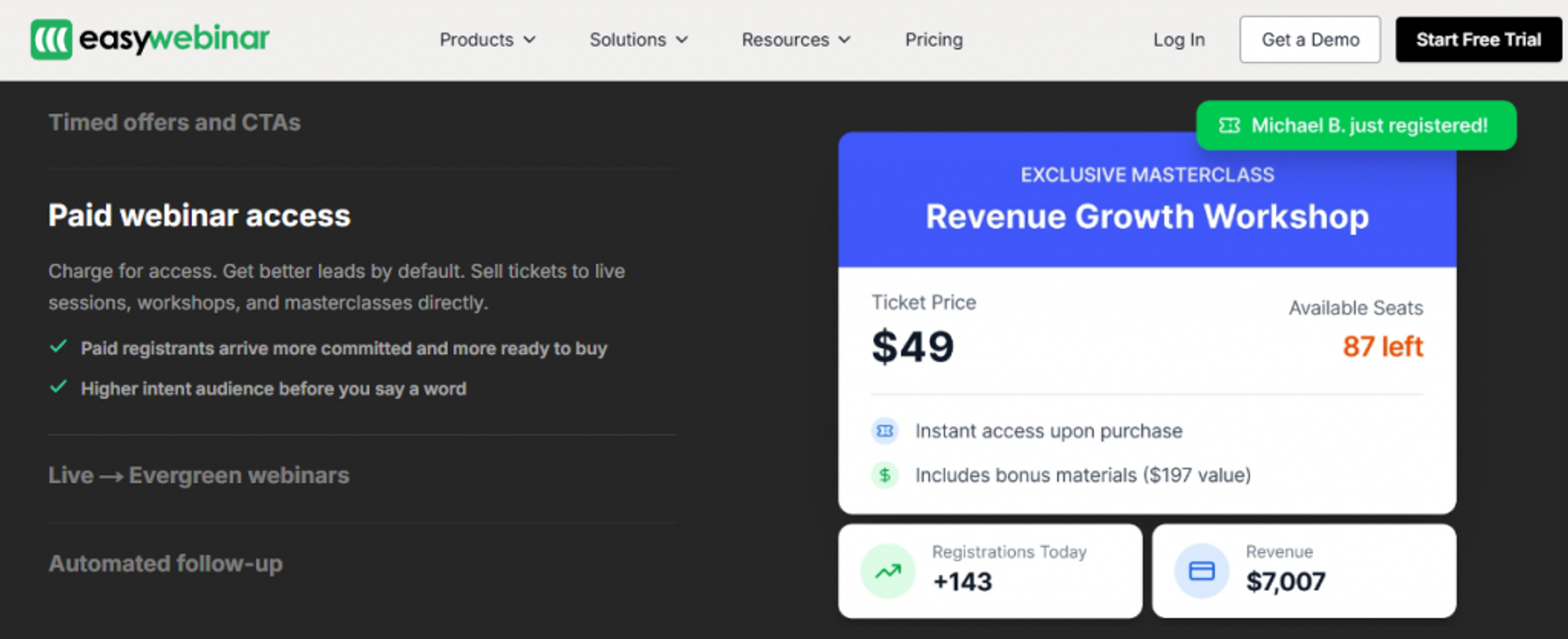
This is how a paid webinar looks on the EasyWebinar product page: a ticket price and seat count on the event, with registrations and revenue tracked.
❌ The old way: three tools and a spreadsheet
Many hosts still sell tickets on one site, host on another, and copy buyer emails across by hand. Every hand-off is a place where a buyer pays and never gets the link. That is a refund request waiting to happen.
Content is the water; the registration and checkout page is only the bucket. But a leaky bucket still loses the water, so keep the steps between "I want this" and "I'm in" as few as possible. If you're still choosing tools, compare the webinar platforms on how they take payment, and see how to host a webinar for the full setup.
⭐ What hosts say
"I am selling a digital product and use Easywebinar for my sales webinar. The email sequences make it easy to promote etc." - Pat G., Easywebinar G2 - Verified Review
"It could also cause chaos because of the registration process needing to leave the landing page for all users." - Hetvi B., Zoom G2 - Verified Review
✅ Selling seats on EasyWebinar
EasyWebinar sells seats to paid workshops and masterclasses with paid registration through Stripe, automatic registration on payment, reminder emails, and a join link attendees open in any browser with nothing to download. See what each plan includes on the EasyWebinar pricing page, check the integrations for your email and CRM, or start with what a webinar is if you're new to the format.
Your price is a guess until people pay it. Pick a number from the bands above, run one session, and let the buyers tell you what the next price should be.
Start your 7-day trial or watch the demo
Frequently Asked Questions

Casey Zeman
Founder of EasyWebinar
About Author
Over the past decade, I've helped thousands of entrepreneurs, coaches, and consultants turn webinars into a predictable, powerful way to grow their audience, build trust, and scale, without the constant hustle. I created EasyWebinar because I couldn't find a system that combined authenticity, engagement, and automation the way I needed. So, I built one.
Related Posts
Webinar Examples: 15 Real Webinars, What They Did and the Results
Explore 15 real webinar examples with titles, formats, lengths, offers and results, from a $200K live launch to an Evergreen webinar with 571K sign-ups.
10 Best Community Engagement Platforms in 2026
Compare the 10 best community engagement platforms in 2026. Course creators, evaluate live hosting, analytics, and replay to pick your winner today.
10 Best Online Coaching Tools in 2026: Live Session Quality, Scheduling, Recording, and Client Engagement Analytics
Compare the 10 best online coaching tools of 2026 on session quality, scheduling, and analytics. Discover the right fit for your coaching revenue model.
Turn every webinar into a revenue stream
Launch your first paid event in just a few clicks - and start monetizing your expertise.
Book a Call