EasyWebinar vs Goldcast: Pricing, Automation & Ease of Setup Compared

Casey Zeman
Published on Sep 16, 2026 • 32 min read
TL;DR
- EasyWebinar and Goldcast are not real competitors: one is a self-serve live and evergreen webinar revenue platform from $44/month, the other an enterprise AI video content platform.
- Goldcast publishes no pricing; third-party transaction data puts the median buyer near $27,590 a year, against $528 to $4,188 a year on EasyWebinar plans.
- Goldcast supports pre-recorded and simulive sessions inside scheduled events, but has no just-in-time evergreen funnel model with timezone detection.
- Goldcast's AI edits recordings into clips with documented caps of 15 videos per user per year; EasyWebinar's AI builds the funnel itself.
- G2 reviewers rate Goldcast 4.7 but flag navigation difficulty, a learning curve, and pricing that gets prohibitive for smaller teams.
- The resolution is sequence, not preference: run five to ten live sessions, clear 10% attendee-to-buyer conversion, then automate the winner.
Q1. EasyWebinar vs Goldcast: Which One Should You Actually Buy?
A course creator emailed me last month with a Goldcast quote open in one tab and her Stripe dashboard in the other. She sells a $1,997 coaching program. The quote was more than her best month.
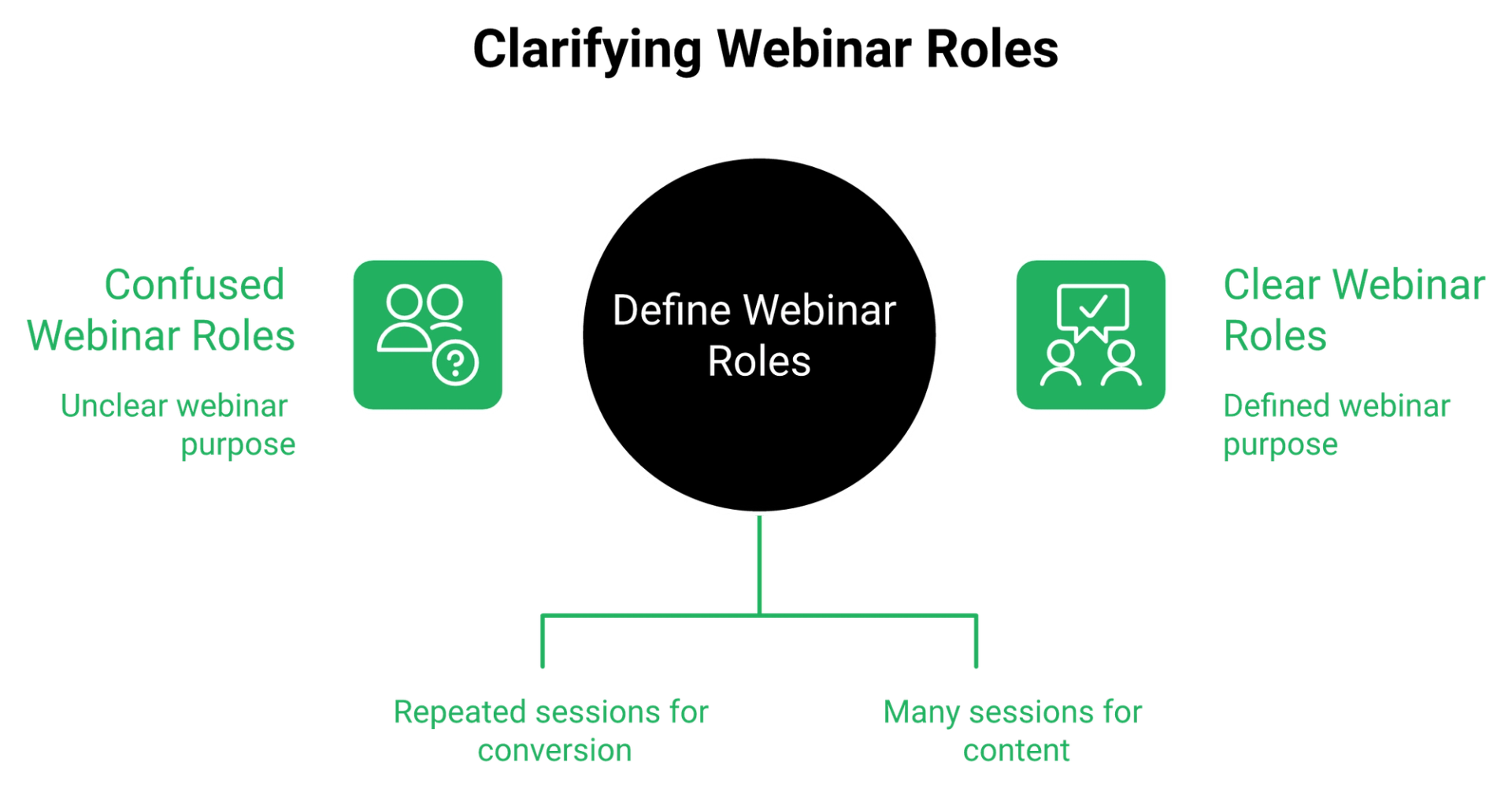
EasyWebinar and Goldcast solve different problems. EasyWebinar is a self-serve live and evergreen webinar platform from $44 per month with a built-in CRM, paid webinars, and just-in-time automation (sessions that start minutes after someone registers), built for coaches, course creators, and lean marketing teams. Goldcast is an enterprise AI video content platform, typically $12,000 to $150,000 per year, built for B2B teams running 10 or more branded events a quarter.
⚠️ These two are not really competitors
You are not choosing between two webinar tools. You are choosing between a sales system and an event production suite. That distinction is where budgets die.
Goldcast is positioned for marketing teams who need event content flowing into Salesforce or Marketo for pipeline attribution. If your revenue comes from one webinar that sells one offer, most of that machinery sits unused.
💰 The snapshot table
| Criteria | EasyWebinar | Goldcast |
|---|---|---|
| Entry price | $44/month, published | Quote only, no public pricing |
| Typical annual spend | $528 to $4,188 | Median $27,590 |
| Contract | Monthly or annual, self-serve | Annual contract, sales-led |
| Evergreen and just-in-time | Native, automated viewers on every plan | Pre-recorded and simulive inside scheduled events, rated basic |
| CRM | EasyCRM included on annual plans | Integrates with Salesforce, HubSpot, Marketo |
| AI focus | Funnel and webinar build | Post-event clipping via Content Lab |
| Peer rating | 4.6 on Capterra | 4.7 on G2, 235 reviews |
✅ What operators actually say
"EasyWebinar is hands-down THE webinar platform for evergreen webinars, no contest. While plenty of software can stream live webinars (and do), EasyWebinar is the only one on the market who makes a product built specifically to scale and 10X your efforts."- Ash A., EasyWebinar G2 - Verified Review
"Because Goldcast provides abundant setting options, it can get confusing trying to set up your webinar/virtual event. There is a bit of a learning curve, and sometimes it will be helpful to get a quick tips or refresh video."- Goldcast user, Goldcast G2 - Verified Review
Both quotes are honest. One reviewer wants scale without a team. The other has a team and still wants a refresher video.
⭐ My read after 100+ webinars
Jon Penberthy put the failure mode better than I can. "You don't want your sales funnels to look like the tube map. If it starts to look like that, backtrack immediately, because what you've just set yourself up for is the potential for so many things to go wrong."
EasyWebinar's read is that the standard buying advice gets this backwards. Buyers compare feature counts when the real variable is how many moving parts they can personally keep alive. I could be reading my own customer base too strongly here, though the pattern has held for years.
Pick Goldcast if you are producing events and need content plus attribution at volume. Pick EasyWebinar if you are selling an offer and the webinar is the sales floor. If you want the wider field first, our guide to compare webinar platforms lays out the category side by side.
EasyWebinar publishes every plan price on one page, Launch $44, Growth $116, Pro $198, and Scale $349, with a 7-day full-access trial, so you can model your real cost before you ever talk to a human.
Q2. What Does Goldcast Actually Cost Compared to EasyWebinar?
Goldcast does not publish pricing. Vendr transaction data shows a median buyer paying about $27,590 per year, with Essentials roughly $12,000 to $30,000, Growth $30,000 to $70,000, and Enterprise $70,000 to $150,000 or more, always annual. EasyWebinar costs $528 to $4,188 per year depending on plan, monthly or annual, with no sales call required. Every tier is listed on the webinar pricing page.
💸 Quote-only pricing hides the escalators
The directories do not agree on Goldcast's entry point. Capterra lists a $19 flat monthly rate, meetingstack lists webinar licenses from $99 per month, and SpotSaaS lists $15,000 per year.
That spread is the tell. When list price is a range this wide, the real number lives in a contract shaped by event volume, seats, and add-ons.
💰 Annual cost at three volumes
| Scenario | EasyWebinar | Goldcast (Vendr bands) |
|---|---|---|
| 12 webinars a year, 200 attendees | $1,392 on Growth | $12,000 to $30,000 Essentials |
| 25 webinars a year, 500 attendees | $2,376 on Pro | $30,000 to $70,000 Growth |
| 50 webinars a year, 1,000 attendees | $4,188 on Scale | $70,000 to $150,000+ Enterprise |
At the low end, that is roughly a 9x gap. At the high end, it clears 35x. Neither number is unfair to Goldcast, because Goldcast is selling event production capacity, not webinar hosting.
⚠️ The math most buyers skip
One operator in the brief described what he sees constantly. People arrive having "not done a lick of math in regards to financially modeling out worst case scenario statistics," then vaporize money because they never checked how bad each number could get before spending stopped making sense.
Casey's version is simpler. It is not about how much you spend; it is about what your back-end offer looks like. A $997 program cannot carry a $27,000 platform before you have bought a single click. If you are still sizing that offer, our breakdown of how to make money with webinars works through the margin math.
✅ What buyers report about cost
Reviews consistently describe Goldcast as high-end and expensive compared to other platforms. Many teams report the cost adds up quickly once additional features or higher-capacity events are needed. G2's aggregated dislikes say the same thing more bluntly. Reviewers report pricing that gets confusing and prohibitive for smaller teams.
"I love EasyWebinar's support team, they're responsive and helpful, providing peace of mind when I encounter problems. EasyWebinar saves me a lot of time, especially since I often host the same webinar monthly."- Eliza W., EasyWebinar G2 - Verified Review
⏰ The break-even question to answer today
Count the events you genuinely ran last quarter, not the ones you planned. If the number is under four, enterprise event pricing has nothing to sell you.
If it is over twenty-five with multi-track sessions and a demand-gen team attached, the Goldcast band starts making sense on cost per event. Teams in that position should read our guide on how to choose a virtual event platform for conferences before signing anything.
EasyWebinar bundles EasyCRM and Paid Webinars free on annual plans, both $49 per month add-ons when billed monthly, which is $1,176 a year that stays in your ad budget. The paid webinars feature covers checkout inside the session itself.
Q3. Can Goldcast Run Evergreen and Just-in-Time Webinars?
Goldcast supports pre-recorded and simulive sessions inside scheduled events, but it has no just-in-time evergreen funnel model, and third-party feature comparisons rate its pre-recorded capability as basic. EasyWebinar sells automated capacity as a plan line item, 1,000 automated viewers on Growth up to 5,000 on Scale, with just-in-time scheduling, timezone detection, and on-demand replay.
📅 Event-centric versus funnel-centric
An event platform starts with a date. You pick the date, build the room, drive registrations, and the asset ends when the session ends.
A funnel platform starts with a visitor. Someone lands on your page at 11:40pm on a Tuesday, and the question is whether a session exists for them right now.
⏰ What just-in-time actually means
Just-in-time means the next session begins a few minutes after registration, usually 15. The visitor never picks a date from a calendar, because waiting five days is where registrations leak.
Here is the setup I teach, and it is one toggle. During registration setup, select just-in-time only. Do not stack scheduled times alongside it, because giving people a choice between "now" and "Thursday" reintroduces the delay you were removing. The mechanics sit inside the automated webinar feature set.
⭐ The integrity rule that keeps this clean
Never say it is live. Never say it is not live. The stream runs in real time, cannot be scrubbed forward, and resumes at the live point if the attendee refreshes.
I care about this because the alternative is fraud dressed as marketing. What surfaces across EasyWebinar deployments is that operators who fake chat and fake headcounts get refunds, not customers.
✅ Why I built for automation in the first place
Live webinars cost you your calendar. You show up, you fight the tech, and you repeat the same presentation until you resent it. Our comparison of pre-recorded webinar platforms versus live covers where each format holds up.
My catalyst was less dignified than a spreadsheet. Anyone can walk behind you undressed, or your kid can put ketchup on your face, while 200 people watch you sell.
That is the real case for automation. Not laziness, but removing the single point of failure that is you being available at 2pm on a Wednesday.
🎯 What to configure this week
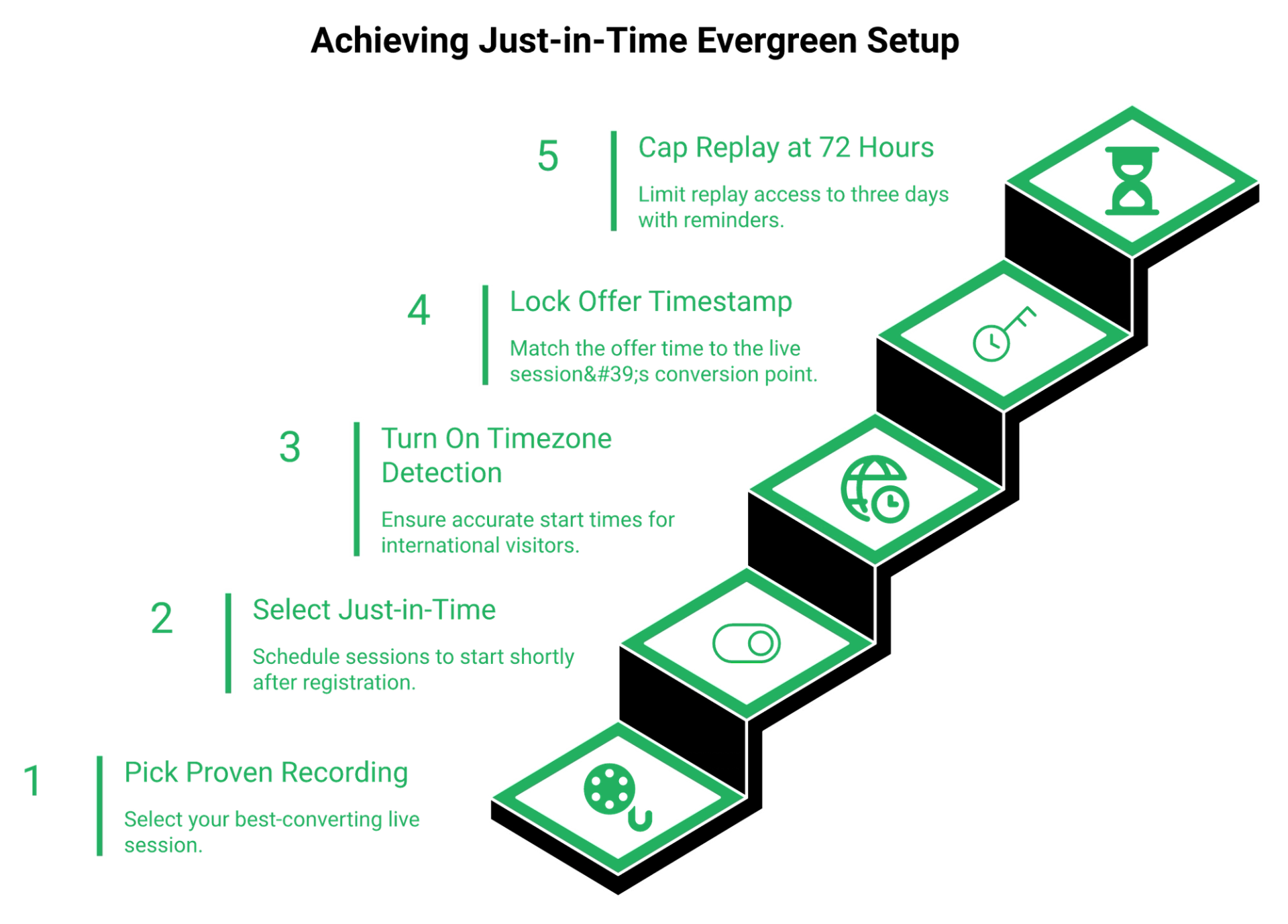
- Pick the recording of your best-converting live session, not your prettiest one.
- Set registration to just-in-time only, then confirm the next session shows minutes away.
- Turn on timezone detection so a Sydney visitor sees a sane local time.
- Set your in-webinar offer to appear at the same timestamp it appeared live.
- Cap the replay window at 72 hours, with a reminder on day three and a final notice hours before it closes.
⚠️ Where automation genuinely underperforms
Some operators running cold paid traffic report automated sessions converting far worse than live right now, including webinars that converted well before automation. Others argue live show-up rates have collapsed and evergreen is the only sane path.
Both are describing real data from different funnels. The resolution is sequence, which is why I tell people to run five to ten live sessions and hit 10% attendee-to-buyer conversion before automating anything. Our walkthrough of scalable webinar funnel automation maps that handoff step by step.
EasyWebinar exists for exactly this handoff, turning your proven live session into a just-in-time evergreen stream, which is why automated viewer counts sit on every plan card rather than behind a sales call.
Q4. How Fast Can You Launch Your First Webinar on Each Platform?
EasyWebinar is self-serve. Start the 7-day full-access trial, use the AI funnel builder, and publish a registration page the same day. Goldcast onboarding is CSM-led (customer success manager assigned to your account). G2 reviewers report the interface is difficult to navigate initially and requires training to locate features, and third-party comparisons cite a significant learning curve despite a clean UI.
⏰ Implementation time is a revenue cost
Every week between signing and your first session is a week of unearned pipeline. That cost never appears on the invoice.
Goldcast's own review profile shows where the friction sits. In G2 comparison data, the recurring cons are navigation difficulty across four reviews and learning curve across three.
✅ What reviewers report about setup
"Because Goldcast provides abundant setting options, it can get confusing trying to set up your webinar/virtual event. There is a bit of a learning curve."- Goldcast user, Goldcast G2 - Verified Review
"I love how easy to use EasyWebinar is. It didn't take long to get set-up. I'm going live with my first webinar in just a few hours."- Verified User in Photography, EasyWebinar G2 - Verified Review
Balance matters here, so take the same reviewer's complaint seriously. She wanted more screen layout options, and tab sharing looked fine to her but cycled on the attendee side until she switched to PDF slides.
⚠️ Polish is not the bottleneck
First-time presenters lose six weeks to page design. I have watched it happen dozens of times.
The default template is ugly, and it is done. One client, Jay Boyer, still uses default registration pages and has made millions from his webinars. What converts is the presentation, not the gradient. If you want proof of what works structurally, study these webinar landing page examples that convert.
🎯 Five steps to your first session
- Choose one problem your audience already searches for, ideally one you solved three years ago.
- Build one registration page, default template, no custom design work.
- Set the reminder emails and the in-webinar offer timing before you write a single slide.
- Run the session live, even to 17 people, and record it.
- Read the drop-off timestamps, fix the segment that drags, then repeat next week.
Anyone building their first one from scratch should follow our complete host preparation guide alongside these five steps.
⭐ The honest hedge on speed
EasyWebinar's setup data points toward same-day launches for most new operators, though I might be reading my own trial cohort too favourably. Reviewers do flag a real limitation. Automated setup currently expects the presentation uploaded first, which frustrates people who want registrations flowing before recording.
That is a fair complaint, and it is on us, not on the reviewer.
EasyWebinar's AI funnel builder generates the registration page, reminder sequence, and in-webinar offer timing from a single prompt, so session one ships in an afternoon rather than an onboarding cycle.
Q5. Whose AI Does More, EasyWebinar's Funnel Builder or Goldcast's Content Lab?
Goldcast's AI is post-production. Content Lab and the Agentic Video Editor turn recordings into clips, captions, and social posts. Each subscription includes 15 individual videos per user per year, AI Edits are limited to videos under five minutes, and unlimited editing is a paid add-on. EasyWebinar's AI builds the funnel itself, meaning the registration page, the reminder emails, and the timed offer sequence.
⭐ What Content Lab genuinely does well
Credit where it is earned. Goldcast's Agentic Video Editor applies zoom cuts, scene changes, B-roll, and dynamic captions from a chat prompt or a preset recipe.
For a marketing team sitting on 40 hours of unedited event footage, that removes a real bottleneck. Goldcast says the workflow turns one recording into as many as 180 clips.
⚠️ The fine print nobody publishes
Every comparison article praises Content Lab. None print the ceilings, so here they are.
- 15 individual videos per user per year included, with unlimited access sold as an add-on
- AI Edits restricted to videos under five minutes
- Content Lab's entry tier allows one hour of uploaded video per month
- The Agentic Content Curator is still in Beta and requires contacting a CSM or sales
Read those next to a webinar that runs 60 minutes. Your main asset is too long for AI Edits until someone splits it first.
💰 Two different AI jobs, side by side
| AI capability | EasyWebinar | Goldcast |
|---|---|---|
| Builds registration page copy | Yes, via AI funnel builder | No, event pages are configured manually |
| Writes reminder and follow-up emails | Yes, inside the funnel build | No, handled by your MAP |
| Auto-edits recordings into clips | No | Yes, with annual per-user caps |
| Captions, zooms, B-roll | No | Yes |
| Requires a CSM to unlock | No, self-serve | Yes for Beta agents |
Ask EasyWebinar to generate the funnel, then judge the output against your own copy. That is the honest test, and it takes an afternoon. The AI webinar builder handles the first draft end to end.
❌ Where I refuse to hand AI the keys
AI gives answers. Humans give context, nuance, and belief.
One operator in my circle put the risk plainly. With so much watered-down content being published, do not let AI write your emails for you. I agree, with one carve-out.
✅ My split, tested on my own funnels
Use AI for structure and sequence. Keep the persuasion layer human, because belief shifting is where the sale happens. Our checklist for webinar content strategy covers where that human layer belongs.
EasyWebinar's telemetry points toward AI-built funnels launching faster than hand-built ones, though I might be over-reading a self-selected trial group. What surfaces across our customer builds is that operators who edit the AI draft convert better than those who ship it untouched.
⏰ Choose by your actual bottleneck
Answer one question. Is your problem that you cannot get a funnel live, or that you cannot get content out of the funnel you already run?
If it is the first, funnel AI wins, and clip AI is decoration. If it is the second, and you have a content team feeding LinkedIn weekly, Goldcast's editor pays for itself.
Most coaches and course creators I talk to have the first problem. Most demand-gen teams at Series B companies have the second. Neither is wrong, and neither tool fixes both.
EasyWebinar's AI writes registration copy, reminder sequences, and timed in-webinar calls to action, which is the part of the funnel that produces sales rather than the part that produces clips.
Q6. Built-In CRM or Integrations: Which Follow-Up Stack Actually Holds?
If your webinar sells anything over $200, follow-up is where the money lands, and every integration is a failure point. EasyWebinar includes EasyCRM, behavioural tagging, an auto-dialer, and paid-webinar checkout natively, free on annual plans. Goldcast integrates with Salesforce, HubSpot, and Marketo for pipeline attribution, but it assumes you already own and staff that stack.
⚠️ The integration that failed four hours before the webinar
One operator described the moment his Zapier account hit its plan limit for total Zaps. He caught it four hours before a webinar, while salespeople were dialing leads to lift the show-up rate.
Nobody plans for that. The failure is silent, and you only notice when the leads stop arriving.
❌ It is not just a Zapier problem
Registration data breaking on the way to your marketing tool is a documented, recurring complaint.
"The integration with Marketo is mediocre at best. For example, if using a Zoom registration form then the registration information does not sync to Marketo. This is inferior to other webinar providers."- Pavel P., Zoom Events and Webinars G2 - Verified Review
Every hop between your attendee and your offer is a place the money can stop. Our list of native integrations shows which hops you can remove entirely.
✅ The four segments that carry the revenue
EasyWebinar tags in-webinar behaviour so each group gets a different message. Here is the map I use on my own funnels.
- Clicked the buy button but did not complete checkout. Warmest group, shortest sequence.
- Watched past 70% and left. They saw the offer and hesitated, so answer the objection.
- Dropped at 30%. Something dragged. Send the shorter version, not the pitch.
- Registered and never showed. Sell the replay, with a 72 hour expiry.
Build those four on Monday. Even without new traffic, they lift revenue per registrant. If you want the reasoning behind each trigger, read our guide to webinar marketing automation.
💰 What the integration tax costs
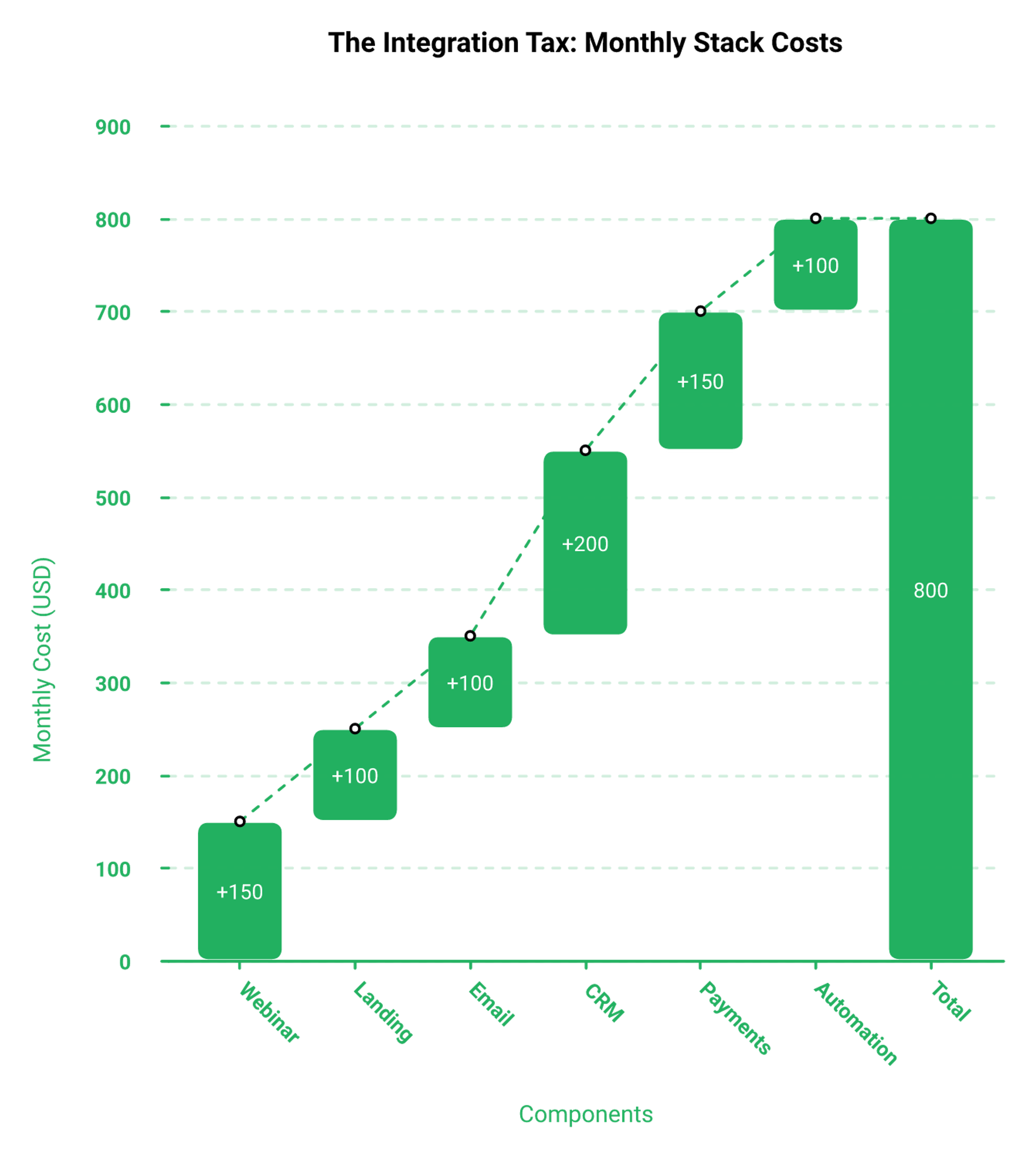
Assembling this outside a single platform means a CRM, an email tool, a checkout, and an automation layer. That routinely runs $600 to $1,000 per month for growth-stage teams.
Goldcast buyers usually already pay for that stack, so the overlap is fine. Solo operators pay it twice. The sales CRM inside the platform is what removes the duplicate spend.
⭐ What operators report about native follow-up
"The integration with my email service provider was seamless, allowing me to automate a follow-up sales sequence once someone watches the webinar, no tech headaches, just smooth automation. I also love that I can trigger emails directly from EasyWebinar as soon as someone registers."- Jennifer B., EasyWebinar G2 - Verified Review
"I do use other email systems to send post-webinar email sequences because I can't track open and click rates on EasyWebinar, and also, I can't unsubscribe someone from the email campaign once the client has joined my program."- Eliza W., EasyWebinar G2 - Verified Review
That second one is a fair hit on us, and I am not going to spin it. Open and click reporting inside the platform is not where it needs to be yet.
⏰ My read on why native still wins here
The platform alone stopped being enough years ago. You need CRM, behaviour-triggered follow-up, and a back-end offer that creates margin.
EasyWebinar's read is that the category gets this backwards by selling attendance features first. Attendance is not revenue. Tagged follow-up is. Our breakdown of the webinar CRM model explains why the tagging layer belongs next to the stream.
EasyWebinar tags every in-webinar action, including button clicks, watch depth, and drop-off point, inside EasyCRM, so follow-up fires without a Zap sitting between your attendee and your offer.
Q7. How Do They Compare on Scale, Security, and Support?
Goldcast's advantage is enterprise event production, meaning large branded experiences with a dedicated customer success manager attached. Capterra reviewers score its customer service 5.0, though third-party feature comparisons note dedicated 24/7 support is not standard across every tier. EasyWebinar covers procurement requirements with SOC 2 Type 2, SSO, and API access, publishes attendee ceilings on every plan, and multistreams to YouTube, LinkedIn, and Facebook through EasyCast.
💰 What scale actually looks like on paper
| Requirement | EasyWebinar | Goldcast |
|---|---|---|
| Published attendee limits | Yes, 50 to 1,000 live by plan | Not published, set by contract |
| Automated viewer capacity | 1,000 to 5,000 by plan | Not sold as a line item |
| SOC 2 | Type 2 attestation | Enterprise tier, contract-dependent |
| Multistreaming to social | Native via EasyCast | Not the product's focus |
| Support model | Self-serve plus human support | CSM-led onboarding |
Teams that need one stream reaching several audiences at once should look at EasyCast multistreaming before adding another tool.
⚠️ What actually breaks at scale
Capacity is rarely the thing that fails. Browser weight, bandwidth, and screen sharing are.
One Goldcast reviewer on Capterra India flagged exactly that, saying even the light version of the platform can strain a machine. Heavy front ends punish attendees on weak connections, and those attendees are your buyers. If you are planning a large session, our guide to running a webinar platform for 1,000 attendees covers the load questions to ask.
❌ Support is where enterprise promises get tested
The pattern across enterprise webinar tools is that support quality degrades once you are past onboarding.
"GoToWebinar is the most basic webinar tool that offers nothing more than any other tool. Customer support is impossible to reach and is completely outsourced. When you do get a hold of them, they are never any help."- Forrester S., GoTo Webinar G2 - Verified Review
"The automated email sequences are full of bugs, and customer support is extremely unhelpful. There is no consistent POC, which resulted in repeatedly requiring us to explain our issues over six months without resolution."- Verified User in Translation and Localization, Zoom Events and Webinars G2 - Verified Review
Goldcast does not have that reputation, and I am not going to imply it does. Its support scores are strong. Buyers weighing the hosting-only options can compare our take on EasyWebinar vs GoToWebinar.
✅ The honest read on our own support
EasyWebinar reviewers name individual support reps, which tells you the team is small enough to be personal.
"Pretty much once I have run one webinar, I can clone and setup multiple in a breeze. We have run close to 30 since we started running it this new year. It also seamlessly integrated with our CRM. My only dislike is their can be some bugs at times that can be frustrating."- Darrin B., EasyWebinar G2 - Verified Review
Bugs at times, solved quickly. That is a real trade-off against a dedicated CSM, and you should weigh it. More unfiltered accounts sit on our customer reviews page.
⭐ Why compliance now matters for a creator platform
Something shifted in the last two years. Enterprise budgets moved toward creator-style content and event-led lead generation.
That is why SOC 2 Type 2 matters for a platform whose core buyer is a coach. My read is that the line between creator tooling and enterprise tooling keeps thinning, and procurement teams are the last to notice. Data-handling questions are answered on our GDPR compliance page.
EasyWebinar clears SOC 2 Type 2, SSO, and API requirements while still starting at $44 per month, which is why it survives procurement reviews without an enterprise contract attached.
Q8. Live or Automated: What Actually Converts Cold Traffic Now?
Both camps are right under different conditions. Operators running cold paid traffic report automated webinars underperforming live sessions badly right now, while evergreen advocates point to collapsing live show-up rates. The resolution is sequence, not preference. Run five to ten live webinars, hit 10% attendee-to-buyer conversion, then automate the winner. EasyWebinar runs both formats from the same event asset, so the switch does not require a rebuild.
❌ The case for live, stated at full strength
One operator running heavy paid spend was blunt about it. Automated webinars have been, in his words, nerfed. Sessions that converted well live fell apart once automated.
He also reports something I have seen: close to half of buyers attend two or three live sessions before purchasing. If that is your funnel, automation removes the repeat exposure that was doing the selling. Our live webinar software pages show what that repeat exposure needs to work.
⏰ The case for evergreen, also at full strength
The other camp argues live is a tax on your calendar. Record once, run it around the clock, and stop begging people to show up on a Wednesday.
Timezone-detected scheduling matters more than people expect here. One EasyWebinar reviewer asked for exactly that, noting registrants seeing their own timezone should improve show-up rate. The trade-offs are laid out in our comparison of live versus automated webinars.
💰 The question that settles it
What do you have more of right now, time or money?
Automated funnels drive the highest cost per lead, because you are buying attention instead of earning it live. If you have more time than money, going straight to automation loses.
⭐ The Webinar Sprint Method
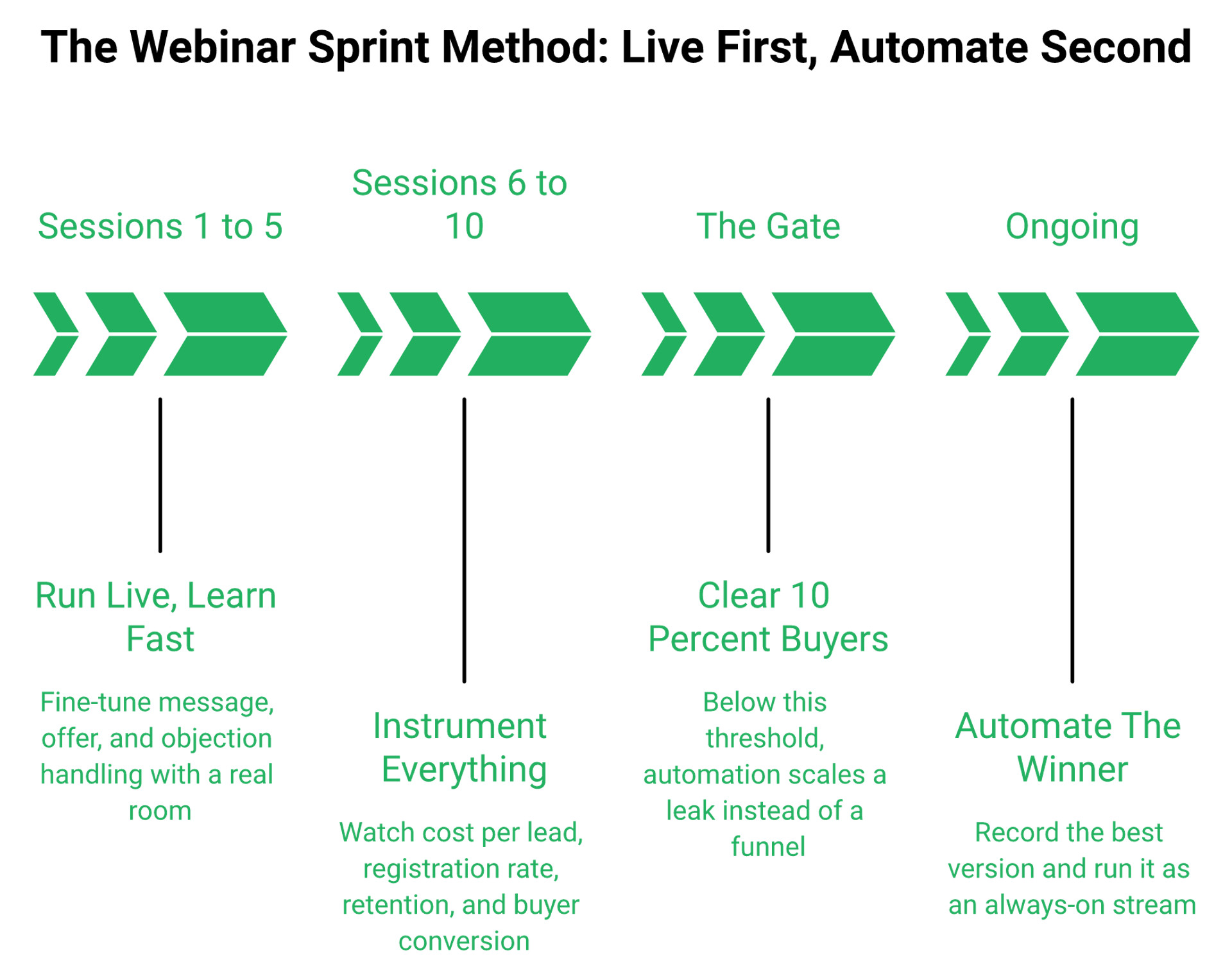
This is the sequence I run and coach, and it resolves the fight.
- Run five to ten live sessions. Fine-tune the message, the offer, and the objection handling.
- Watch four numbers: $8 to $12 cost per lead, 30% registration from cold traffic, 80% retention to the pitch, and 10% attendee-to-buyer conversion.
- Only when you clear 10% do you record the winning version and automate it.
Automating before that threshold does not scale your funnel. It scales a leak. The metrics themselves are explained in our primer on webinar analytics.
⚠️ Where "set it and forget it" fails
Evergreen still needs traffic and maintenance. An automated webinar without traffic is a billboard in the desert.
I also watch a specific failure mode. Operators rebuild the whole presentation instead of iterating on it, and conversion collapses. One rebuilt webinar in that pattern ran three hours long and produced a single sale.
✅ What I think shifts next
Live is coming back, not replacing evergreen. Coaches doing eight figures are moving to weekly live workshops because audiences are tired of feeling handled by software.
EasyWebinar's data points toward hybrid formats performing best, pre-recorded body with a live question and answer at the end, though I hold that loosely. It is what we are seeing this year, not gospel. The mechanics of that hybrid are covered in our explainer on the simulated live webinar.
⏰ Which side of the line are you on today
If you have never run ten live sessions, you are not choosing between formats. You are choosing between practice and premature automation.
If you have cleared 10% conversion and you are still showing up twice a week, you are the person automation was built for. Record the best one you have and stop repeating yourself.
EasyWebinar runs both modes on the same event, so the live sessions that find your winning message become the automated stream without a rebuild.
Q9. What Do Real Users Say About Each Platform?
Goldcast holds 4.7 out of 5 on G2 across roughly 235 reviews, praised for attendee experience and repurposing speed. Recurring complaints are a hard initial learning curve, limited customization and permissions, and pricing reviewers call confusing and prohibitive for smaller teams. EasyWebinar sits at 4.6 on Capterra, with reviews clustering on automation depth and support, and video polish as the common critique.
⚠️ Where Goldcast reviewers get stuck
The pattern is not about quality. It is about surface area.
"Because Goldcast provides abundant setting options, it can get confusing trying to set up your webinar/virtual event. There is a bit of a learning curve, and sometimes it will be helpful to get a quick tips or refresh video."- Goldcast user, Goldcast G2 - Verified Review
G2's aggregated dislike data backs it up. Navigation difficulty appears across four reviews, and learning curve across three. Pricing complaints from smaller teams show up separately.
💸 Why buyers start shopping around
Switching intent shows up in public threads, not just review forms. One operator asked the question straight out.
"Top Goldcast alternatives you'd recommend?"- r/DigitalMarketing, Reddit Thread
That thread is worth reading before any demo call. People do not go looking for alternatives to tools that fit their budget. Our roundup of webinar platform reviews gathers the same signals in one place.
✅ The honest ledger, both sides
| What reviewers praise | What reviewers criticize |
|---|---|
| Goldcast: attendee experience, HubSpot integration, clip repurposing speed | Goldcast: navigation, permissions, cost for SMBs |
| EasyWebinar: evergreen automation, responsive human support, cloning speed | EasyWebinar: occasional bugs, limited screen layouts, no in-platform open or click tracking |
❌ The critique I am not going to spin
Two EasyWebinar reviewers named real gaps, and both are fair.
"I would love to have more screen display options, like where I place my screen compared to my slides. The video quality came and went when I switched from the slides as the main screen back to me."- Verified User in Photography, EasyWebinar G2 - Verified Review
"My only dislike is their can be some bugs at times that can be frustrating but often, they are solved quick and this is to be expected with technology."- Darrin B., EasyWebinar G2 - Verified Review
Layout flexibility and stream polish are where we have work to do. I would rather you read that here than discover it mid-webinar. Anyone tightening their setup should start with our technical setup guide for recording a webinar.
⭐ What the star ratings hide
Averages flatten the thing that actually matters, which is whether the tool solved a revenue problem.
EasyWebinar's work with K21 Academy moved show-up rate to 47%, tripled clicks, and grew registrants fivefold. That is a number you can interrogate, unlike a 4.6 average. The full EdTech case study with K21 shows how that was built.
⏰ How I read reviews before buying anything
Skip the five-star praise. Read the three and four-star reviews, because that is where the trade-offs live.
Then check whether the complaint is about your job to be done. A reviewer frustrated by permissions matters if you have a ten-person team. It means nothing if you are the whole team.
EasyWebinar publishes named case studies, including Carla Biesinger, K21 Academy, and Dr. Fryer, so you can check a claim against a specific person rather than an averaged star rating. Start with the course creator case study.
Q10. When Is Goldcast the Better Choice, and EasyWebinar the Wrong One?
Choose Goldcast if you run 10 or more branded events a quarter, need multi-track conferences, want account-level content analytics feeding Salesforce or Marketo, and can carry a $30,000-plus annual contract with a customer success manager attached. Choose EasyWebinar if one evergreen sales webinar is your revenue engine and you are the marketing team.
⭐ The buyer Goldcast was actually built for
Vendr's data shows Growth-tier contracts landing between $30,000 and $70,000, and Enterprise reaching $150,000 or more. Those numbers only work at volume.
If you produce a quarterly flagship event, a monthly customer series, and a weekly partner webinar, cost per event drops fast. Add a content team that needs clips from every session, and Goldcast earns the line item. Teams in that position should also read our guide to the best virtual event software.
✅ Three signals you belong in that band
- Your events feed a demand-gen team that reports pipeline by account, not by registrant.
- You need multi-track sessions, expo areas, and branded attendee experiences.
- Someone on your team owns Marketo or Salesforce and wants event engagement flowing into it natively.
Miss all three, and you are paying for production capacity you will not use.
💰 Where EasyWebinar fits by industry
| Buyer | Better fit | Why |
|---|---|---|
| Coach or course creator selling a $997 to $10,000 offer | EasyWebinar | Evergreen funnel, checkout, and follow-up in one place |
| Agency running client webinars | EasyWebinar | Cloning and multistreaming without per-event contracts |
| EdTech running cohort intakes | EasyWebinar | Automated viewers scale to 5,000 on plan |
| Series B SaaS with 25+ events a year | Goldcast | Event production plus attribution at volume |
| Enterprise running multi-track conferences | Goldcast | Branded experiences and CSM support |
Coaches and consultants can see the mechanics behind that first row in our guide to building a coaching sales funnel, and EdTech teams have their own playbook on webinars for EdTech.
❌ When EasyWebinar is the wrong buy
I will name these plainly, because pretending otherwise costs you money.
- One-off internal team meetings with no funnel attached.
- Pure live enterprise events where nothing is being sold.
- Products under $200, where a webinar is not mathematically required.
For that last one, a long-form sales page does the job cheaper. Webinars start paying off above roughly $200 in price.
⚠️ My caveat on "all-in-one" claims
One operator I respect warns against any tool claiming to be your community, CRM, email provider, and streaming platform at once, because it usually ends up mediocre at all four.
I take that seriously about our own product. EasyWebinar's read is that the safer promise is narrow depth, which is why we build for webinar revenue mechanics and let you keep your email tool if it already works. The full scope sits on our all features page.
⏰ The one-question test
Ask yourself this. Are you producing events, or are you selling an offer?
Producing events means many sessions, many stakeholders, and content output as the goal. Selling an offer means one session, repeated, until the math works.
Both are legitimate businesses. They just need different tools, and buying the wrong one costs you either capability or roughly $25,000 a year.
EasyWebinar is deliberately narrower than an enterprise event suite, covering live and evergreen sales webinars, CRM, checkout, and multistreaming, which are the four things a webinar-led offer actually needs.
Q11. How Do You Switch and Ship Your First Webinar in Seven Days?
Switching takes a week, not a quarter. Export your registrant lists and past recordings, rebuild one registration page, upload your best recording as the evergreen asset, then rerun promotion. EasyWebinar's 7-day full-access trial covers that entire sequence, including one live session and one automated clone. Then measure four numbers: $8 to $12 cost per lead, 30% cold registration, 80% retention to the pitch, and 10% attendee-to-buyer conversion.
⏰ What transfers, and what does not
Your registrant CSV, your recordings, and your ad creative all move. Your event pages, embedded polls, and automation rules do not.
Plan for one afternoon of rebuild, not a migration project. Reviewers report the second webinar takes minutes once the first exists. Our walkthrough on how to create webinars covers the rebuild order.
"Pretty much once I have run one webinar, I can clone and setup multiple in a breeze. We have run close to 30 since we started running it this new year."- Darrin B., EasyWebinar G2 - Verified Review
✅ The seven-day sequence
- Pick one pressing problem your audience already searches for, ideally one you solved three years ago.
- Confirm the offer and price before writing slides, because the offer sets the format.
- Build one registration page on the default template. No design work.
- Promote for five days: three social posts, direct invites, and one email to your list.
- Run the session live, even to 17 people, and record it.
- Bait retention by promising bonuses sent after the session ends for those who stay.
- Set the replay to expire in 72 hours, with a reminder on day three and a final notice hours before.
If step four is where you usually stall, our field notes on how to drive webinar attendance give you the promotion cadence.
💰 The metrics table to fill in on day eight
| Metric | Baseline to beat | What it tells you |
|---|---|---|
| Cost per lead | $8 to $12 on paid traffic | Whether your front end is affordable |
| Registration rate | 30% from cold traffic | Whether your page matches your ad |
| Retention to pitch | 80% of peak attendance | Whether your content drags |
| Attendee-to-buyer | 10% | Whether you are ready to automate |
EasyWebinar reports these inside the event dashboard, and one operator, Rick Mulready, hit 166% ROI running paid traffic to automated sessions on that stack.
❌ The mistake that kills week one
Teaching too much. Giving away the full how-to is one of the fastest ways to kill conversions.
The session exists to shift belief, not to deliver the curriculum. People who feel taught go away to practice. People who feel understood buy.
⭐ Why one week is enough
My weekly baseline for years was unglamorous. Sixty registered, thirty attended, three bought a $1,000 program, which is $12,000 a month. The structure behind that number is in our guide to the evergreen sales funnel.
EasyWebinar's trial data points toward most operators publishing inside 48 hours, though I suspect motivated switchers skew that. What surfaces across our customer builds is that week one rarely fails on tech. It fails on the offer.
⏰ Your next decision
You have the comparison. The open question I am sitting with is whether cold-traffic buyers in 2027 will still tolerate automated sessions, or whether hybrid formats take over entirely. Tell me what your show-up rate is doing this quarter, because that is the data I want.
EasyWebinar's 7-day full-access trial covers exactly this week, one live session, one automated clone, and the CRM tags to follow up on both. You can sign up free and start with the live session today.
You have the comparison. Now price your own funnel.
Model your real cost on the EasyWebinar pricing page, see how just-in-time streaming works on automated webinars, or tell us what you are building.
Frequently Asked Questions

Casey Zeman
Founder of EasyWebinar
About Author
Over the past decade, I've helped thousands of entrepreneurs, coaches, and consultants turn webinars into a predictable, powerful way to grow their audience, build trust, and scale, without the constant hustle. I created EasyWebinar because I couldn't find a system that combined authenticity, engagement, and automation the way I needed. So, I built one.
Related Posts

10 Best Community Engagement Platforms in 2026
Compare the 10 best community engagement platforms in 2026. Course creators, evaluate live hosting, analytics, and replay to pick your winner today.

10 Best Online Coaching Tools in 2026: Live Session Quality, Scheduling, Recording, and Client Engagement Analytics
Compare the 10 best online coaching tools of 2026 on session quality, scheduling, and analytics. Discover the right fit for your coaching revenue model.

10 Best Webinar Hosting Platforms Ranked by Uptime, Streaming Quality & Cost
Compare 10 webinar hosting platforms ranked by uptime, streaming quality, and cost. Discover which tool actually turns attendees into revenue.
Turn every webinar into a revenue stream
Launch your first paid event in just a few clicks - and start monetizing your expertise.
Book a Call