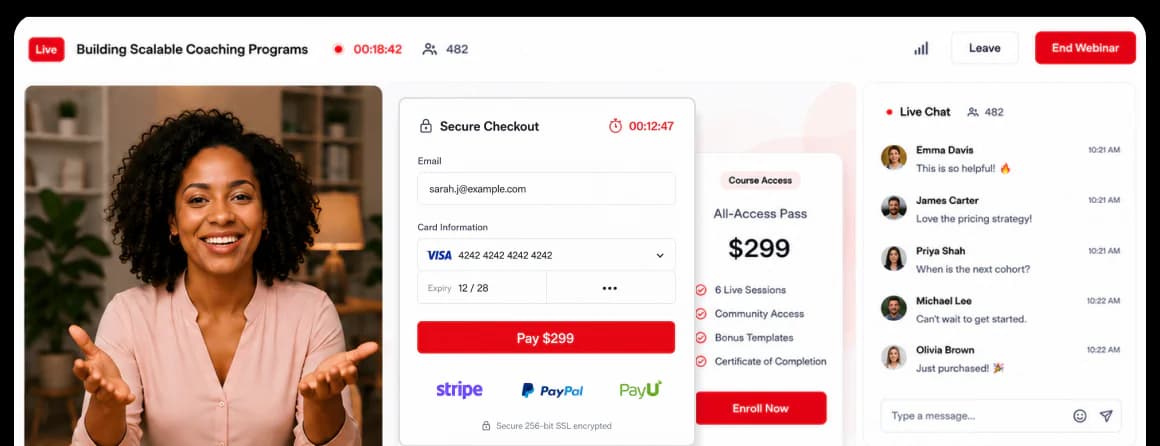
Built-in Payments — Stripe · PayPal · PayU
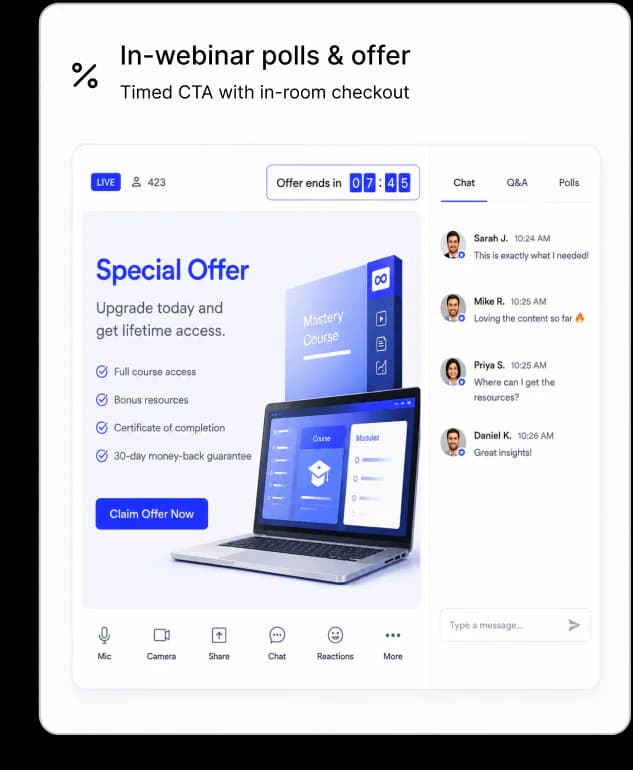
Sell paid courses or workshop tickets directly inside the webinar. Timed CTAs, countdown offers, and in-room checkout. No separate cart, no Zapier hand-off.
EdTech & Online Education
Build your entire webinar funnel with AI. Automate your setup, follow-ups, and delivery. So every session runs, every lead gets followed up, and no enrollment opportunity gets missed.
7-day full access · Cancel anytime



K21 Academy grew registrants 5× and hit a 47% show-up rate using EasyWebinar's evergreen trial classrooms.
Read the case study →The challenge with live-only delivery
When every class, training, or trial session needs a live instructor, your growth is capped by how many hours your team can show up.
Timezones exclude entire markets. Every scheduling conflict is a registration you didn't capture.
And when your best instructor is unavailable — the pipeline stops.
Most EdTech teams respond by adding more live sessions. That just adds more pressure on the same people. The real fix isn't more sessions — it's making every session work harder.

EasyWebinar took away the headache of scheduling reminder emails. We are now able to host our recurring webinars and promote them without all the extra work.
Tyne Brack · Community Director
Maneuvering the Middle

Entire markets excluded because your class only runs at a fixed time. Students in other regions simply never get a chance to register.

Your best session ran once, then disappeared — never to convert again. All that prep, all that energy, gone after a single broadcast.

Every new student needs a live instructor to show up. Scaling your reach means scaling your team — and that's not a content problem, it's a model problem.
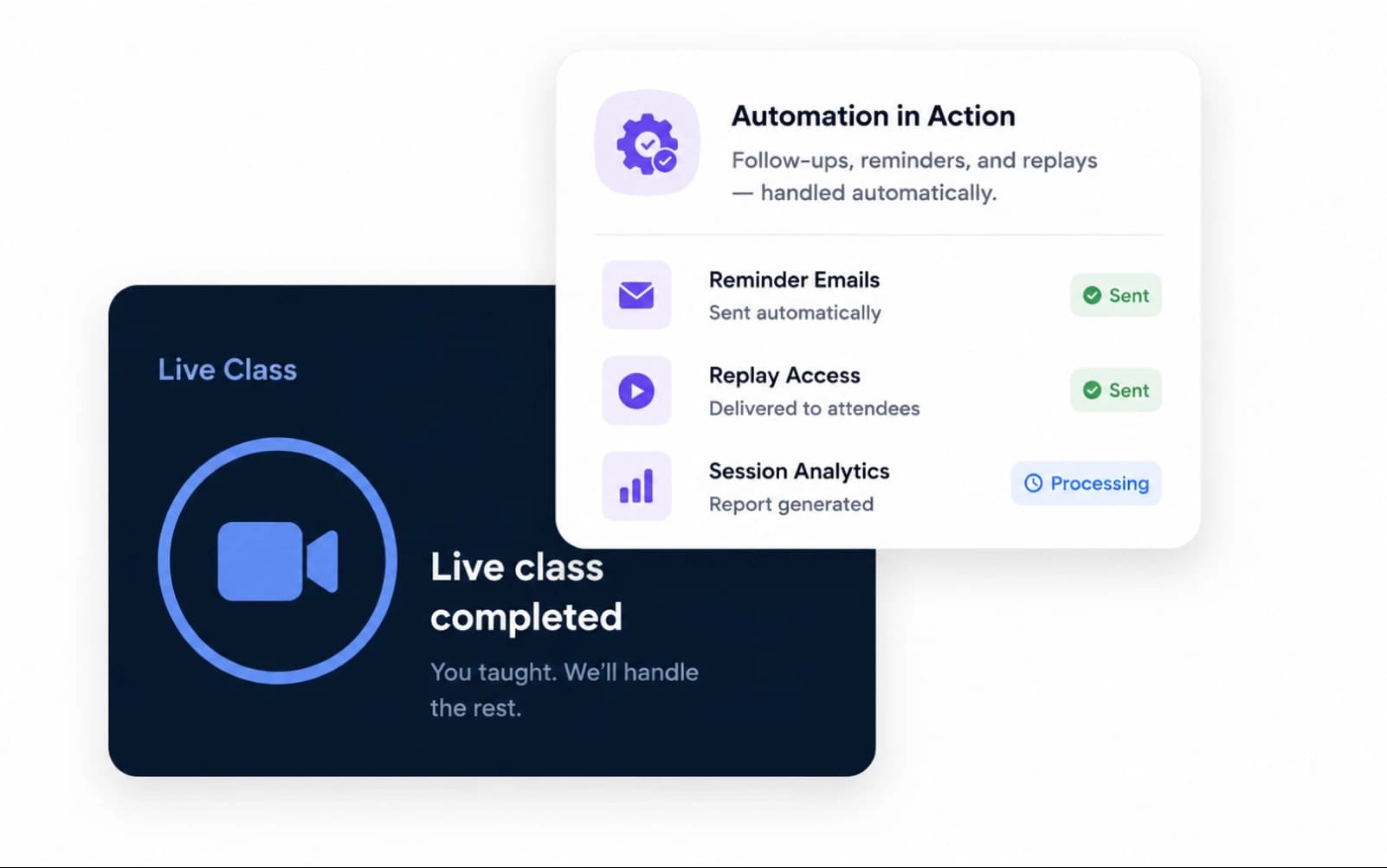
Live & Evergreen Delivery
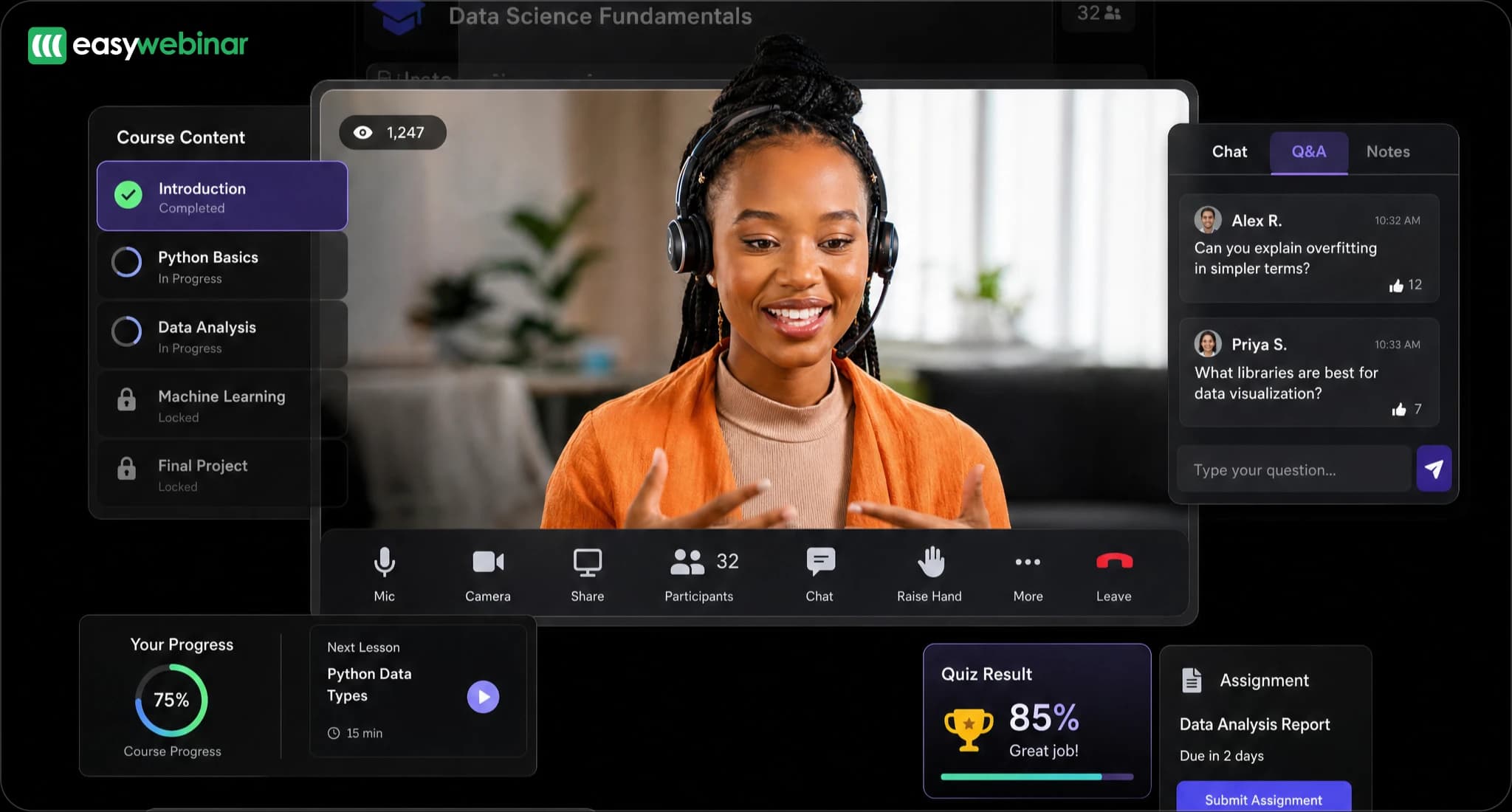
One platform, three formats. Run live HD sessions for launches and Q&A. Schedule Simulive sessions that play on autopilot with the energy of live. Set up 24/7 Evergreen webinars so students in any timezone can start a session whenever they're ready.
Dolby HD audio and video, screen share, multi-speaker, Q&A, polls, and chat — all built in, nothing to install. Scale up to 100,000 attendees on Enterprise plans with dedicated support and a team that helps you launch.

Pre-record your best class. Run it on a weekly or monthly schedule with active chat and polls. Students still chat and answer polls; you get your evenings back.

A session starts within minutes of a visitor landing on your registration page — with a live countdown and no waiting for a fixed time. Reach attendees across every timezone.

Set blackout dates, recurring cohort cadences, and automatic replay windows. One setup — running indefinitely.
REVENUE & ENROLLMENT
EasyWebinar is built to convert, not just broadcast. Sell courses in-webinar, score and prioritize your warmest leads, and follow up automatically based on what each student did or didn't do.
Sell paid courses or workshop tickets directly inside the webinar. Timed CTAs, countdown offers, and in-room checkout. No separate cart, no Zapier hand-off.
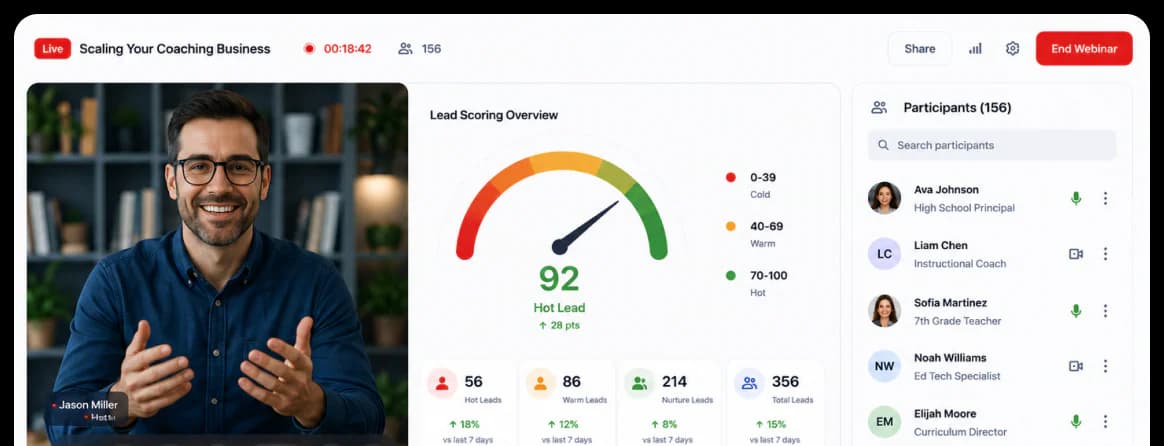
Every registrant is auto-scored by attendance and engagement. Your warmest leads bubble to the top — with a built-in auto-dialer so you can follow up without leaving the platform.
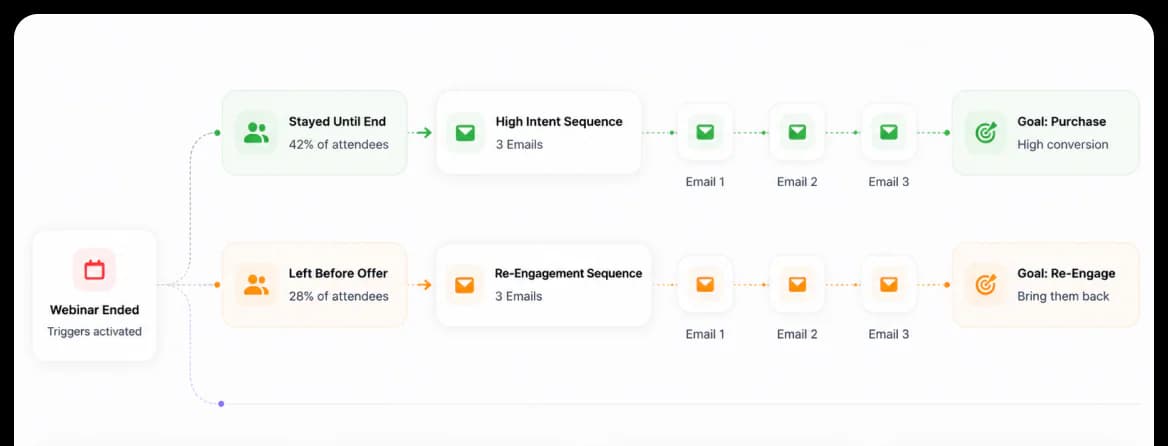
Send different email sequences to people who attended, never showed up, watched the replay or clicked the offer. No more one-size-fits-all "thanks for attending" to people who never attended.
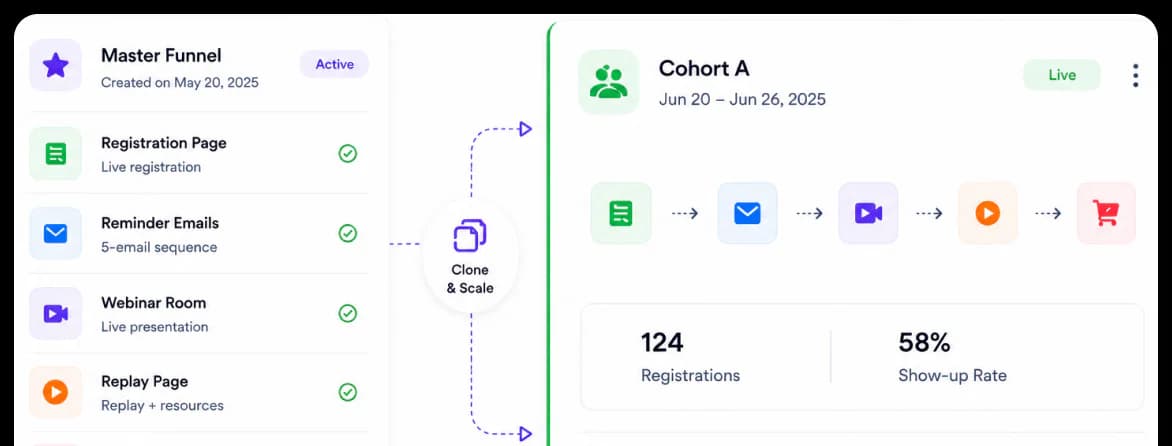
Run your first webinar live then clone the entire funnel — registration page, reminders, replay — for the next one. No rebuilding from scratch.
AI WEBINAR BUILDER
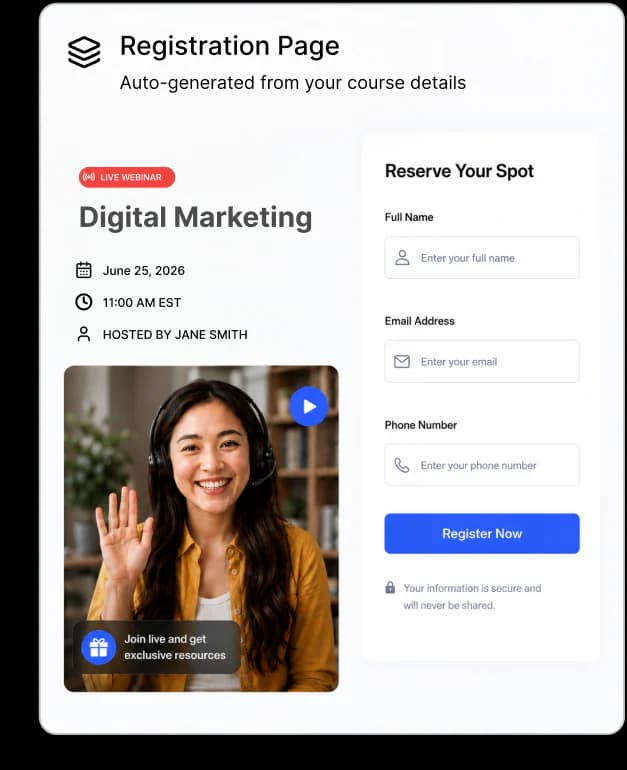
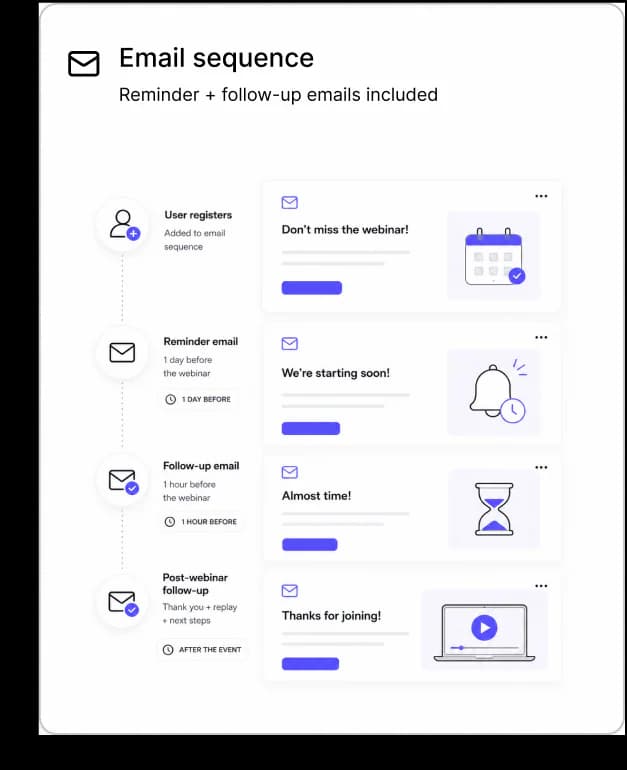
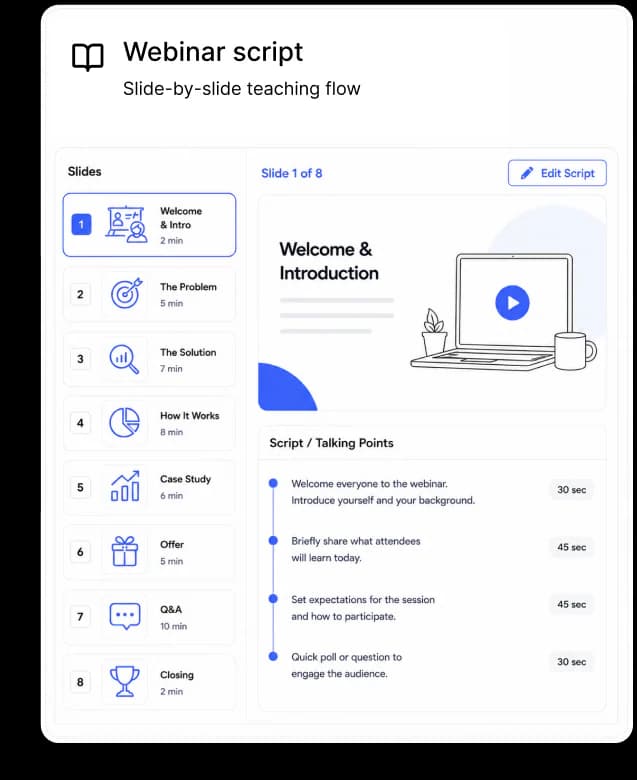
Answer 12 questions about your course or program. EasyWebinar's AI Builder generates your registration page, reminder email sequence, poll questions, offer slide, and a slide-by-slide teaching script — all ready to launch.
Customer Proof
EdTech • Cloud & AI certification training
The challenge. K21 needed to deliver virtual trial classrooms at scale across global timezones. A live-only cadence was capping registrant growth and burning out instructors.
The solution. Switched to 24/7 evergreen trial classrooms with multi-timezone scheduling, Just-In-Time registration, and an in-webinar offer flow.
Read the full case study“Trial classrooms that feel as scalable as a streaming service while staying as personal as a small group.”
47%
Show-up rate
vs ~25% industry avg
5x
Registrant growth
vs. live-only cadence
3X
More clicks
Cloud & AI certifications
+195%
Watched till offer
Increase in watched till the offer
EasyWebinar is recognised by educators, course creators, and training teams on G2, Capterra, and Trustpilot — with consistently high marks for ease of use, support, and results.
Based on 104 reviews
4.5 / 5 stars

Based on 91 verified reviews
Capterra4.4 / 5 stars
Based on 42 reviews
 Trustpilot
4.6 / 5 stars
Real reviews. Real results. See why thousands of educators and businesses trust EasyWebinar.
“EasyWebinar took away the headache of scheduling reminder emails. We are now able to host our recurring webinars and promote them without all the extra work.”

Community Director · Maneuvering the Middle
Mathematics education · Course creator
“With my live class I used to sell 10–12 courses. With EasyWebinar I sold 25 courses within 3 weeks of my evergreen launch. It is increasing my revenue and taking away the exhaustion of showing up live.”

Author & Course Creator
25 courses in 3 weeks · evergreen webinar
“EasyWebinar saves me a lot of time, especially hosting the same webinar monthly. I can easily clone my existing webinar and make small modifications for the next month.”

Founder · Joa Academy
Korean language education · Online academy
Why EasyWebinar
Every tool can create and host. The real difference shows up when it's time to get paid.
| Capability |  | Typical Webinar Tool |
|---|---|---|
CREATE & HOST — TABLE STAKES | ||
| Live, automated, simu-live & evergreen | Yes | Yes |
| Branded registration pages | Yes | Yes |
| Live chat, polls & Q&A | Yes | Yes |
$MONETIZE — WHERE EASYWEBINAR WINS | ||
| Ticket pricing & paid access | Yes | Limited |
| Built-in payments via Stripe | Yes | Limited |
| Auto-registration after payment | Yes | No |
| In-webinar checkout & timed offers | Yes | No |
| Paid replay funnels | Yes | No |
| Revenue analytics & attribution | Yes | No |
| Built-in CRM & buyer follow-up | Yes | No |
Selling vs hosting webinars
More than automated-only
Paid webinars in one platform

“It's been over 5 years and that speaks for itself. I haven't had to go look for another competitor.”

Stock Market Coach
From the Blog
Students buy time-on-brand, not impressions. A field-tested breakdown of the 5-stage EdTech webinar funnel, live vs. simulated vs. just-in-time, the three funnel archetypes (course creator, EdTech SaaS, institutional enrollment), AI-built funnels, compliance, and the metrics that actually predict enrollment.
Webinars are the backbone of modern EdTech funnels because students buy time-on-brand, not impressions. A 45 minute live or just-in-time masterclass earns more trust than 200 short-form clips combined, scales 1-to-many fulfillment for course creators, and gives EdTech SaaS a defensible H2H (human-to-human) channel in an over-AI'd market. That is why coaches, course creators, and online education platforms are rebuilding funnels around webinars in 2026.
I had a YouTube course in 2010 that took six months to build. It sold zero copies. I was posting clips, writing descriptions, chasing thumbnails. The traffic showed up. The trust did not. Then I ran my first live webinar and watched what actually happened. People stayed for 50 minutes. They asked questions. They typed their email into a registration form because they wanted in.
Every EdTech founder I talk to is stuck in the same loop. More TikToks, more Reels, more Shorts. Almost no consumed minutes per follower. Short-form trains the algorithm. It does not train the student.
In high-ticket education, students do not buy because they saw you 40 times. They buy because they spent 40 minutes with you, once, in one room. Call it time-on-brand — the total minutes a student spends consuming you, not the number of impressions you served them. A 45 minute live webinar collapses 40 sessions of TikTok scrolling into one block of attention. That block is where the curriculum gets validated and the offer earns the right to be heard.
Students are getting force-fed AI summaries of every course on the internet. They cannot tell the bots from the teachers anymore. Live and just-in-time webinars are the cleanest H2H signal an EdTech operator has left. You show up, you teach, you answer the question that is not in any FAQ. That is the new moat.
In our work with Carla Biesinger, an evergreen webinar funnel inside EasyWebinar generated $5M in tracked sales. She did not 10x her short-form output to get there — she built one teaching session and let the platform serve it across timezones. K21 Academy moved their show-up rate from the high 20s to 47% by switching their EdTech funnel onto the same engine, with 5x registrant growth alongside.
Pick one piece of short-form on your calendar this week. Replace it with one 45 minute live class on the same topic. Watch the inbox afterward — count the DMs that say “where can I buy?” That is your real audience. Everything else is rented attention.
I used to do live webinars to sell my online course. With EasyWebinar I sold 25 courses within 3 weeks of my evergreen launch.
— Laura C. · EasyWebinar G2 Verified Review
A webinar funnel for an online education platform is a 5 stage system, traffic, registration, live or just-in-time session, behavioral follow-up, and enrollment through in-room checkout. Unlike a generic SaaS demo funnel, the EdTech version measures watch time and time-on-brand, tags attendees by engagement, and sends buyers straight to checkout for a course, bootcamp, or membership instead of a sales call.
Traffic
Paid, affiliate, list, organic
One job: get the registration.
Registration
Headline, one promise
Collect a name and an email.
Session
Live, simulated, just-in-time
The actual webinar.
Follow-up
Behavioral tagging, sequences
Based on what each student did or didn't do.
Enrollment
In-room checkout
No calendar dance.
If you stripped every fancy diagram out of every funnel deck, you would be left with these five moves — and stage five is the one most EdTech funnels skip.
A SaaS demo funnel ends with a sales call. An EdTech funnel ends with a student inside lesson one. That is the part everyone misses.
Ingrid runs an art school. She teaches painting live, free, on Wednesdays. Stage 1, traffic comes from her email list and Instagram. Stage 2, the registration page promises one thing: “leave with one finished painting.” Stage 3, she paints live for 45 minutes, answers chat, ends with a soft pitch for her paid monthly membership. Stage 4, missed registrants get the replay for 72 hours, attendees get a “join the membership” sequence. Stage 5, anyone who buys is auto-enrolled into the membership community before they close the tab.
What changed for her business: the webinar is the first lesson, not the pitch deck. Students join the membership because they already know what a class with Ingrid feels like.
Pull your last webinar's data. Find the number of people who registered, then the number who actually started lesson one inside your course. If the gap is wider than 30%, the funnel is not broken at the webinar — it is broken at the handoff.
EasyWebinar gives me the ability to multiply my efforts and offer a human touch, without having to be everywhere at once.
— Ash A. · EasyWebinar G2 Verified Review
The five stages, traffic, registration, session, follow-up, and enrollment, each have one operator move that determines conversion. Traffic comes from paid plus affiliate plus list. Registration converts on plain headline-led pages. The session uses an IKEA-furniture structure, open hook, pain hook, three teaching beats, and a permission-based transition. Follow-up runs on engagement tagging. Enrollment happens at in-room checkout. K21 Academy hits 47% show-up.
Cold traffic is fine. Warm traffic is better. List plus affiliate plus a small paid layer is the cleanest mix I see working in EdTech right now. Metric to watch: cost per registrant, not cost per click.
Stop designing. Start headlining. The pages that convert in EdTech are almost ugly — one headline, one promise, one date, one button. Every extra design element is a place for the eye to escape. A polished page makes the brand feel professional; a plain page makes the offer feel real. Your student is scanning, not admiring.
This is where most EdTech operators overthink the slides and underthink the structure. Every webinar that converts uses the same parts.
The value trap to avoid: do not teach everything. If you teach the what AND the how, the student leaves to “process,” not to buy. Teach the what. Sell the how. That is the line.
Before you write a single slide, define the student's nagging pain, knowledge baseline, last failed solution, current belief, desired outcome, time horizon, and budget. The slides write themselves after that.
Generic blasts are dead in EdTech. Behavioral tagging is the unlock. Segment by attended, missed, saw-but-didn't-click, clicked-but-didn't-buy, and left-early — each segment gets its own sequence.
Inside our native sales CRM, every attendee is auto-scored Hot, Warm, or Nurture based on what they did during the session. Hot leads route to the auto-dialer within 10 minutes. Warm leads enter the email nurture. Nurture leads enter long-cycle content. Zero Zapier required.
Payment happens inside the webinar room, while the buyer is still watching. No redirect to a separate cart. K21 Academy's number — 47% show-up rate with 5x registrant growth — came from getting this last stage right alongside the rest. The funnel only works if the buyer checks out before the buying high wears off.
Ive been using EasyWebinar to automate my webinars and drive course sales, and its been a total game-changer.
— Jennifer B. · EasyWebinar G2 Verified Review
I had a lot of resistance to creating an evergreen webinar, because I have tried before and it was difficult to set up. There are just a lot of moving parts to these kinds of funnels when done well.
— Ajarae C. · EasyWebinar G2 Verified Review
Use live for the first 5 to 10 runs (the Webinar Sprint), simulated live once the script is dialed, and just-in-time when you need on-demand registration without losing the room dynamic. EdTech specifically benefits from just-in-time because students cannot pause or rewind, which forces active consumption and lifts completion. Cap replays at 72 hours to prevent content hoarding. Pure pre-recorded video belongs inside the course, not inside the funnel.
Replays sit in inboxes. Students promise themselves they will watch on Sunday. Sunday comes, the replay is dead, and the offer window closed three days ago. That is the EdTech replay graveyard.
Why pure pre-recorded video fails as a funnel: a YouTube link does not feel like a class. Students treat it like content, not like a session. Engagement collapses inside ten minutes.
A student lands on the registration page. The next session starts in 5 minutes. They register, they show up, they consume. No “save the date.” No three-email reminder dance. No 48 hour gap where life happens and they forget.
The mechanic that lifts completion: just-in-time blocks pause and rewind. The student is in a real room with a real clock. That is what forces completion past the offer moment.
Run the same webinar live 5 to 10 times before you automate it. You are not testing the slides, you are testing the questions students ask in chat. Every run shows you where the script breaks. By run 8, you have a session that actually closes.
Then, and only then, automate: set the same recording as simulated live on a recurring weekly schedule. Layer just-in-time on top for high-intent traffic. Cap the replay at 72 hours so the offer stays alive. That is hybrid fulfillment — pre-recorded core, live in chat, behavioral follow-up downstream.
I dont LIKE anything about EasyWebinar, I LOVE everything about EasyWebinar. Their name literally says it all.
— Dr. Loren M. · EasyWebinar G2 Verified Review
The only downside is that to have the just in time feature you have to pay a premium that is about double the price of the basic subscription. However, it has been worth it for me to invest in that.
— Laura C. · EasyWebinar G2 Verified Review
EdTech webinar funnels split into three archetypes. Course creators run masterclass-to-course funnels measured by enrollment rate. EdTech SaaS teams run product-education funnels measured by activated trials. Institutional enrollment leads (universities and K-12 districts) run open-house funnels measured by application-submitted rate. Same engine, three different scoreboards.
I watch operators copy a course-creator script into a B2B SaaS pipeline and wonder why the demo requests stall. Then I watch a SaaS marketer hand a registration page to a university enrollment team and watch applications flatline. Same engine. Three different scoreboards. The mismatch is where the funnel breaks.
Rick Mulready runs ad-strategy training for online business owners. His webinar pitches one paid course at the end and routes buyers into the curriculum within minutes. The KPI is simple: registration to enrollment, tracked inside a 7-day window. Why this archetype is the simplest: one offer, one room, one decision — the buyer is the consumer.
K21 Academy runs Oracle and cloud certification training as a SaaS subscription. Their webinar lifted show-up to 47% with 5x registrant growth, and their KPI is not “did they enroll today,” it is “did they activate the trial inside 30 days.” The buyer is a team. The funnel is longer. The features that matter are CRM, lead scoring, and sub-accounts so multiple presenters and reps can run simultaneous tracks. Inside our native sales CRM, every registrant is auto-scored and routed to the right rep before the offer goes live.
Where most teams misfire: they borrow a course-creator script, hard-pitch the offer at minute 47, and wonder why a marketing director did not buy a $4,800 plan from a single session. B2B SaaS buyers need product education first, decision second. The webinar is the open door. The trial is the close.
A university running a virtual open house is not selling a $200 course. They are selling a $40,000 four-year decision. The webinar runs once, the application window runs for months, and the must-haves are SSO, sub-accounts, and 10K-attendee scale because the registration list spans an entire prospective class. EasyWebinar covers this with SSO/SAML, API, and sub-accounts on the Scale plan, Enterprise capacity for 10K to 50K concurrent attendees, and SOC 2 Type II.
The KPI you cannot fake: application submitted, not “registered for the open house.” Most institutions stop measuring at the registration line, which is why their funnels feel busy and produce thin yields.
Before you build anything, name your archetype out loud. Then write the KPI on a sticky note and tape it to your monitor. If the build does not move that one number, you are building the wrong funnel.
AI now compresses a 3-week webinar build into a 30-minute one, registration page, slide outline, script beats, and follow-up emails generated from a single prompt. But the parts that convert students (the live chat, the H2H Q&A, the named-customer story) still have to be human. EdTech wins by using AI for the scaffolding and staying live in the room where students decide to enroll.
Every educator I work with hits the same wall. Slides take a week. Registration page takes 4 days. Email sequence takes another week. By the time the webinar runs, the offer feels stale to its own creator. Most educators are not copywriters, landing page designers, or email automation strategists — the build cycle is a tax on the people least equipped to pay it.
When we built EasyWebinar's AI webinar builder in early 2026, the brief was simple: take a single prompt and produce a full funnel in about 10–15 minutes. The output covers the registration page, the slide outline, the on-stage script beats, the polls, the offer block, and the post-event email sequence. You edit the parts that need your voice. You ship the rest.
What this looks like for a working educator: an EdTech operator who used to spend three weekends per launch now ships a funnel in one afternoon. The AI handles the scaffolding. The educator handles the teaching.
I love EasyWebinars support team… I love the webinar features and functions, and how its simple to host a webinar without having to set everything up from scratch each time.
— Eliza W. · EasyWebinar G2 Verified Review
Pretty much once I have run one webinar, I can clone and setup multiple in a breeze. We have run close to 30 since we started running it this new year and it has been a game changer for our business.
— Darrin B. · EasyWebinar G2 Verified Review
Use AI for the scaffolding. Do not let AI run the room. Students decide to enroll inside the live chat, the on-camera Q&A, and the named-customer story. Those moments cannot be scripted by a model and read off a teleprompter — if they could, every replay would convert as well as the live, and they do not.
Students are getting flooded with AI-generated everything. The teacher who shows up live, makes one specific reference to a chat comment, and tells one human story is the teacher who closes the offer. That is the moat. AI builds the stage. You walk on it.
Run the live, capture the recording, then deploy that recording as simulated live and just-in-time across timezones. Layer behavioral follow-up on top so attendees and missed registrants get different sequences. The AI handled the build. The human handled the room. The platform handles the 24/7 distribution.
Their team is responsive, helpful, and genuinely invested in my success. That personal touch makes a huge difference.
— Jennifer B. · EasyWebinar G2 Verified Review
An EdTech webinar becomes a 24/7 enrollment engine when four pieces are in place, timezone-detected scheduling so students join at a local time that suits them, engagement tagging that segments who clicked or stayed past the offer, behavioral auto-dialing for high-intent registrants who didn't attend, and in-room checkout so a buyer pays while the session is still on screen. Carla Biesinger's $5M evergreen funnel runs on exactly this stack.
Timezone Scheduling
Local “live” slot, every region
Engagement Tagging
Five tags, five sequences
Behavioral Auto-Dialer
Hot leads, 10-minute window
In-Room Checkout
Buy while the session is on screen
A student in Mumbai should not see a session that starts at 3 a.m. local. The platform detects the timezone, surfaces the next “live” slot in their window, and removes the friction that kills evergreen funnels. Show-up rate dies in two places: bad timing and forgotten reminders. Timezone-detected scheduling kills the first one cleanly.
Every attendee gets tagged in real time: watched 80%+, clicked the offer, stayed past the close, left at minute 12, missed entirely. Five tags. Five sequences. Zero blasts. The follow-up stops being a single mass email — it becomes five different conversations matched to five different states of intent.
Inside our native sales CRM, every Hot lead routes to the auto-dialer the moment the session ends. A registrant who left at minute 47 (right before the offer) is the highest-intent call you will make all week. The first 10 minutes after a webinar end is the close window — wait an hour and the buying high evaporates. A “Hot” lead is signaling intent through behavior, not surveys. A 90-second call closes more enrollments than a 7-email drip.
Buyer clicks. Stripe or PayPal processes inside the webinar player, so nobody leaves the session to find a cart. No redirect to a separate checkout page. No 12-hour gap where they second-guess the purchase. The buying high lasts about 90 seconds — if checkout is not inside that window, conversions drop. The checkout is the actual conversion event.
The Carla Biesinger case study details how an evergreen webinar funnel generated $5M in tracked sales running on this exact engine. Rick Mulready's funnel hit a 166% ROI on cold traffic by routing every attendee through behavioral tagging and automated nurture. Neither of them were behind the wheel during every session — the engine ran, they iterated on the offer.
Pull your last evergreen webinar's data. Count the registrants who watched past the offer but did not buy — that is your hottest segment, and most operators ignore it. Build one sequence (or one auto-dial sweep) for that group this week. Watch what closes.
Most webinar tools were built for B2B SaaS demos, not online courses. For EdTech you need four things, evergreen plus just-in-time scheduling, engagement tagging that pipes into your CRM, AI build for non-technical educators, and the ability to scale from a 100-student class to a 10K-attendee enrollment event. Here is how EasyWebinar and the rest stack up on the EdTech-specific rubric.
Operators reach for whatever the SaaS world reaches for. Then they hit walls that are obvious in hindsight. Zoom has zero evergreen capability. GoTo Webinar lacks automation, CRM, or funnel features. Demio has no built-in CRM and gets expensive at scale.
Why this matters for EdTech specifically: a webinar that ends with “we will email you a checkout link” is a webinar that loses buyers between the pitch and the payment. Checkout inside the room is the product.
Zoom Webinar is ridiculously glitchy. We've had problems with presenters being able to enter the webinar, with reminder notices going out eight hours after an event has concluded… Customization of landing pages, reminders, and calendar invites is almost nonexistent.
— Casey S. · Zoom G2 Verified Review
Customer support is impossible to reach and is completely outsourced. When you do get a hold of them, they are never any help… We have several webinars a week, meaning this platform has issues constantly.
— Forrester S. · GoTo Webinar G2 Verified Review
I used Demio to run a webinar and collected registrant emails while on a paid plan. After canceling, I was shocked to find out I couldn't export the list unless I subscribed again.
— Sheida M. · Demio G2 Verified Review
They have more problems than they're worth. The integrations with 3rd party software such as mailchimp is inconsistent… Their email service doesn't consistently send to registrants.
— Tara G. · WebinarJam G2 Verified Review
LearnCube, Class, and LearnWorlds are virtual-classroom delivery tools, not funnel engines. They sit downstream of the enrollment moment. Pairing them with a true webinar engine is the right call. Replacing one with the other is the wrong call.
Course creators and online coaches selling courses: EasyWebinar handles the full enrollment loop in one subscription, replacing a $600 to $1,000/month split stack of Zoom, ClickFunnels, HubSpot, Zapier, and Stripe. EdTech SaaS marketing teams and institutional enrollment leads needing SOC 2 Type II, SSO, sub-accounts, and 10K to 50K concurrent attendee scale: our Scale plan plus Enterprise capacity fits, with ON24 and Webex as enterprise alternatives that trade flexibility for legacy weight.
Ive been using EasyWebinar to automate my webinars and drive course sales, and its been a total game-changer.
— Jennifer B. · EasyWebinar G2 Verified Review
The same webinar engine sells a $99 course and a $50K bootcamp. The difference is the back end. For low-ticket, the webinar drives direct-to-cart with a 1 to 2 week attribution window. For high-ticket, the webinar ends with a paid consult ($49 to $100) that filters for high-intent buyers, or an application-only admission step. Pre-sold bootcamps fund themselves.
Most educators build the bootcamp first and then try to sell it. Wrong order. The cleaner play is to sell the cohort live, take the money, then fulfill it week by week with the students who paid. Cash funds the build. The build funds the next cohort.
Why this de-risks the high-ticket play: you are not gambling six weeks on a curriculum nobody validated. You are letting buyers tell you with their wallets what they actually want taught.
A $50K bootcamp does not close on a free webinar. It closes after a paid consult, usually $49 to $100, that filters for intent. The $49 is not the revenue. The $49 is the qualifier — anyone who pays it is 10x more likely to enroll than someone who clicked a “Book a free call” button.
What this looks like in practice: the webinar teaches the framework. The CTA is “buy the strategy session.” The strategy session sells the bootcamp. Three steps. One engine. Different price points.
For the $25K to $100K range, the webinar ends with an application form, not a checkout button. Applications get reviewed, qualified candidates get scheduled, and the actual close happens on a 30-minute call. This is the model elite cohort programs use, and it works because scarcity plus selectivity raises the perceived value of the seat itself.
The chef-baker generated $49K in 2 months running a webinar funnel into a high-ticket coaching offer. The pickleball course operator hit $200K with the same kind of stacked-offer mechanic — low-ticket digital product into a higher-tier community. Neither rebuilt the funnel between price points. The engine ran the same. The back end (cart vs consult vs application) flexed.
For the $99 course, count enrollments inside 1 to 2 weeks of the webinar. For the $50K bootcamp, count enrollments inside 30 to 90 days. Reading the wrong window kills the wrong funnels and saves the wrong ones.
After the bootcamp delivers, the recordings become the library inside a $97/mo membership. The same content that funded a $50K live cohort now funds a $97/mo recurring base. One webinar. One curriculum. Three revenue streams across the lifecycle.
That is the high-ticket scale move that most operators miss because they think the offer is the product. The offer is the door. The product is the system underneath it.
EdTech webinars touch student data, which means FERPA in U.S. K-12 and higher ed, GDPR for any EU student, SOC 2 Type II for institutional procurement, and WCAG-grade captioning for accessibility. Recording retention should be policy-driven, not default-on. If your webinar tool cannot sign a DPA, support SSO, and deliver real-time captions, you will lose every district and university deal at security review.
Why these four together, not just one: pass three out of four and you still fail the deal. Districts and universities run all four checklists in parallel.
Take this to your next vendor call. Yes or no answers only.
EasyWebinar holds SOC 2 Type II, the Scale plan carries SSO/SAML, API access, and sub-accounts, and Enterprise adds 10K to 50K concurrent attendee scale, which is the posture institutional procurement actually evaluates.
A webinar tool that records every session by default is a procurement-killer for K-12 and higher ed. Recording must be policy-driven, opt-in by the institution, with a defined retention window, and a deletion path. If a parent asks for their child's session footage to be deleted, the answer cannot be “we don't have controls for that.”
Closed captioning is not a nice-to-have for EdTech. It is the difference between a Section 504 complaint and a clean audit. Real-time captions, transcripts the student can search, and a registration flow that works with a screen reader — three boxes. Most webinar tools clear one.
Pull your current webinar tool's compliance page. Find the DPA template. Find the SOC 2 report. Find the WCAG conformance statement. If any of those three pages does not exist, that is your gap, and that is the deal you are about to lose.
Generic webinar dashboards show registrations and replay views. EdTech operators need five different numbers, registration to show-up rate (40%+ healthy, K21 hit 47%), completion past the offer, replay-window engagement (cap at 72 hours), webinar to enrollment rate, and day-30 lesson completion. If the last number is not moving, the webinar sold a course nobody is consuming.
Most EdTech teams stop measuring at the enrollment line. That is where the real data starts. If a student bought the course and never started lesson three, the refund risk is loaded, the testimonial pipeline is dry, and the upsell has nothing to grab.
Why this metric is the whitespace: generic webinar dashboards do not show it. You have to pull it from the LMS. But the operators I see scaling are the ones who treat day-30 completion as the leading indicator, not the lagging one.
Replays sitting in inboxes for 14 days do not convert. They train the student that the offer is never urgent. Cap the replay at 72 hours. Watch the in-window enrollment rate triple. Then close the window and move on.
What the data actually says: inside our customer base, sessions with a 72-hour cap consistently outperform open-ended replays on enrollment per registrant. The cap is the forcing function the funnel needs.
Five metrics is too many to chase at once. Pick the worst one. Move it 5 percentage points. Then move the next. K21 Academy went from a high-20s show-up rate to 47% by focusing on registration page, reminder cadence, and just-in-time scheduling, and by the time show-up moved, registrant volume had grown 5x in parallel. One number at a time, compounded over four quarters, is how the funnel actually wins.
Pick one student avatar, one knowledge gap, and run a 45-minute live webinar next Tuesday with no offer at the end. If three students DM you asking “where can I buy?”, you have validated curriculum and funnel in the same week. Then plug the engine in, spin up the registration page, just-in-time scheduling, and follow-up sequence so your second webinar is the one that sells.
Before you build a sales webinar, run a teaching webinar. No offer at the end. No countdown timer. No “join my program.” Just teach for 45 minutes and watch the inbox afterward. The DMs that say “where can I buy?” are the validation. The silence is the answer too.
Why this beats survey research: surveys ask people what they would buy. Webinars show you what they will buy. The DM is the data.
Pick one student. Define the one knowledge gap they are stuck on. Build a 45-minute teach around that gap. Joshua Wagner used the same one-room, one-message format inside a church congregation and scaled it into a recurring revenue line — the format flexes across categories because the principle is the same. One audience. One problem. One session.
The constraint is the unlock: if you cannot name the avatar in one sentence, you do not have a webinar yet. You have a TED talk.
Once three DMs land, you have curriculum-market fit. Now you need infrastructure. We built the AI webinar builder so the registration page, slide outline, follow-up emails, and timezone-detected just-in-time scheduling come out of a single prompt in about 10–15 minutes. Your second webinar is the one with the offer plugged into the engine.
Run your validation webinar this week. Then let AI build the engine. Three DMs asking “where can I buy?” means your curriculum is validated. The next step is plugging the funnel into a system that scales — registration page, just-in-time scheduling, behavioral tagging, and in-room checkout in one stack.
Start Free Trial →Common questions from online educators and EdTech teams evaluating EasyWebinar.
One platform for live classes, evergreen trial classrooms, paid course funnels, corporate training, and virtual open days.
7-day full access. Cancel anytime.