WebinarNinja Pricing Explained: Plans, Limits, and Best-Fit Users

Casey Zeman
Published on Sep 2, 2026 • 27 min read

TL;DR
- WebinarNinja now sells one plan at $0.30 per attendee per month on annual billing, list price $0.60, billed as $3.60 per attendee per year.
- Starter, Pro, Plus, Power, and Free/$99/$199 tiers are retired, yet six of eight ranking pages still publish them, so most published comparisons are stale.
- Only live concurrent attendance is metered. Registrants are unlimited and all of them can watch the replay, so replay-heavy funnels can buy far smaller capacity.
- There is no free plan, only a 14-day trial. Nothing is feature-gated, and CourseNinja is bundled as worth $1,200 free.
- Limits that matter: 8-hour sessions, 1,000-attendee self-serve ceiling, email-only plan changes, no PayPal, $100 ACH fee above $3,000, no published refund policy.
- Size capacity to expected show rate, not list size, then verify monthly rate, renewal price, refund terms, and overage behaviour in writing before buying.
Q1. How much does WebinarNinja cost in 2026, and why does every other site show a different number?
Last week a course creator had two tabs open on the same screen. One showed a $99 Pro plan. The other showed thirty cents. She was three weeks out from a launch, with ad spend already committed, and she could not tell which number was going on her card. Her real question was not "what does this cost." It was closer to this: will a cheaper, more basic pricing tier limit my conversions, or am I about to build a leaky, complex trap that vaporises my ad budget?
As of August 2026, ProProfs WebinarNinja sells one plan at $0.30 per attendee per month on annual billing. The struck-through list rate is $0.60. That works out to $3.60 per attendee per year. There is a 14-day free trial. Anything above 1,000 attendees is quote-only. The Starter, Pro, Plus, Power, and Free/$99/$199 tiers you see elsewhere no longer exist.
⭐ Why $0.30 tells you almost nothing
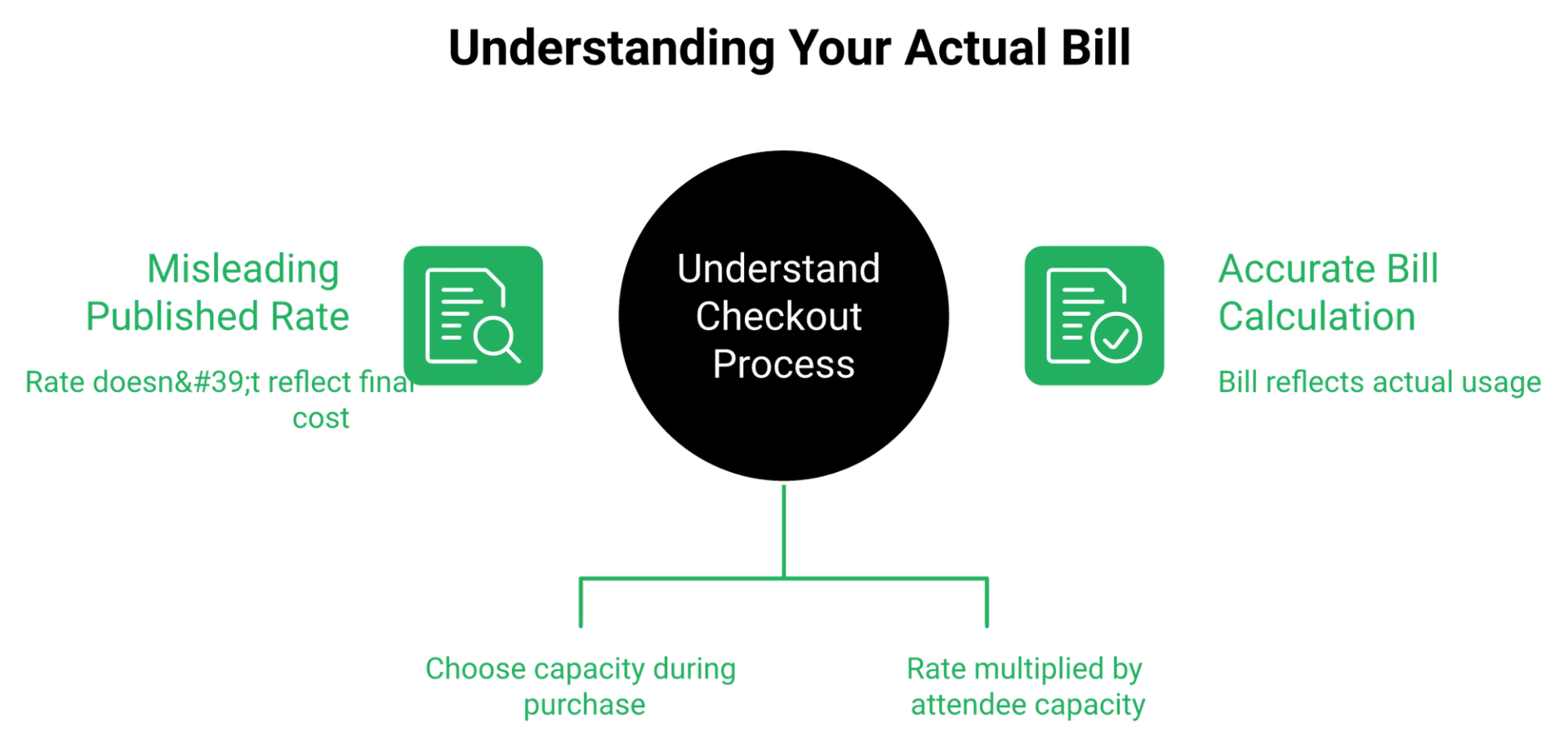
The page says an attendee is anyone who joins your webinar. Then it adds the important part: "You'll get to configure how many attendees you can host per session during purchase."
So $0.30 is a rate, not a price. The multiplier that turns it into a bill is chosen at checkout, and it never appears on the page. You cannot budget from the pricing page alone. If you are still shortlisting, our best webinar software comparison guide lays out how the models differ before you commit a card.
❌ Why other sites still show $49, $99, or $199
WebinarNinja was built as a tiered product, then acquired by ProProfs. The tier names went away. The directory listings did not.
Pricing archaeology is a real buying skill. When a comparison post shows four tier names and the vendor shows one plan, the post is telling you how old its research is. The same staleness shows up across the category, which is why we keep our WebinarNinja alternatives breakdown dated and current.
Before you compare any two platforms, ask EasyWebinar or any vendor on your shortlist to confirm the live rate in writing, then screenshot the reply with the date on it.
⚠️ What budgeting against a dead tier costs you
Two things go wrong. You build a spend model around a number nobody sells anymore, then get a different figure at checkout. Or you assume feature gating that does not exist, and pay for an upgrade you never needed.
My read right now is that the second mistake is more common. Buyers see "Pro" in a listing and assume the good stuff sits above them. Under the current model, there is no above.
EasyWebinar publishes its current figures on the webinar pricing page and treats pricing consistency across every surface as a hard internal rule. Scattered, contradictory numbers are exactly why AI answers quote vendors wrong, and we would rather be quoted correctly than quoted often.
Q2. What does "per attendee" actually mean on your invoice?
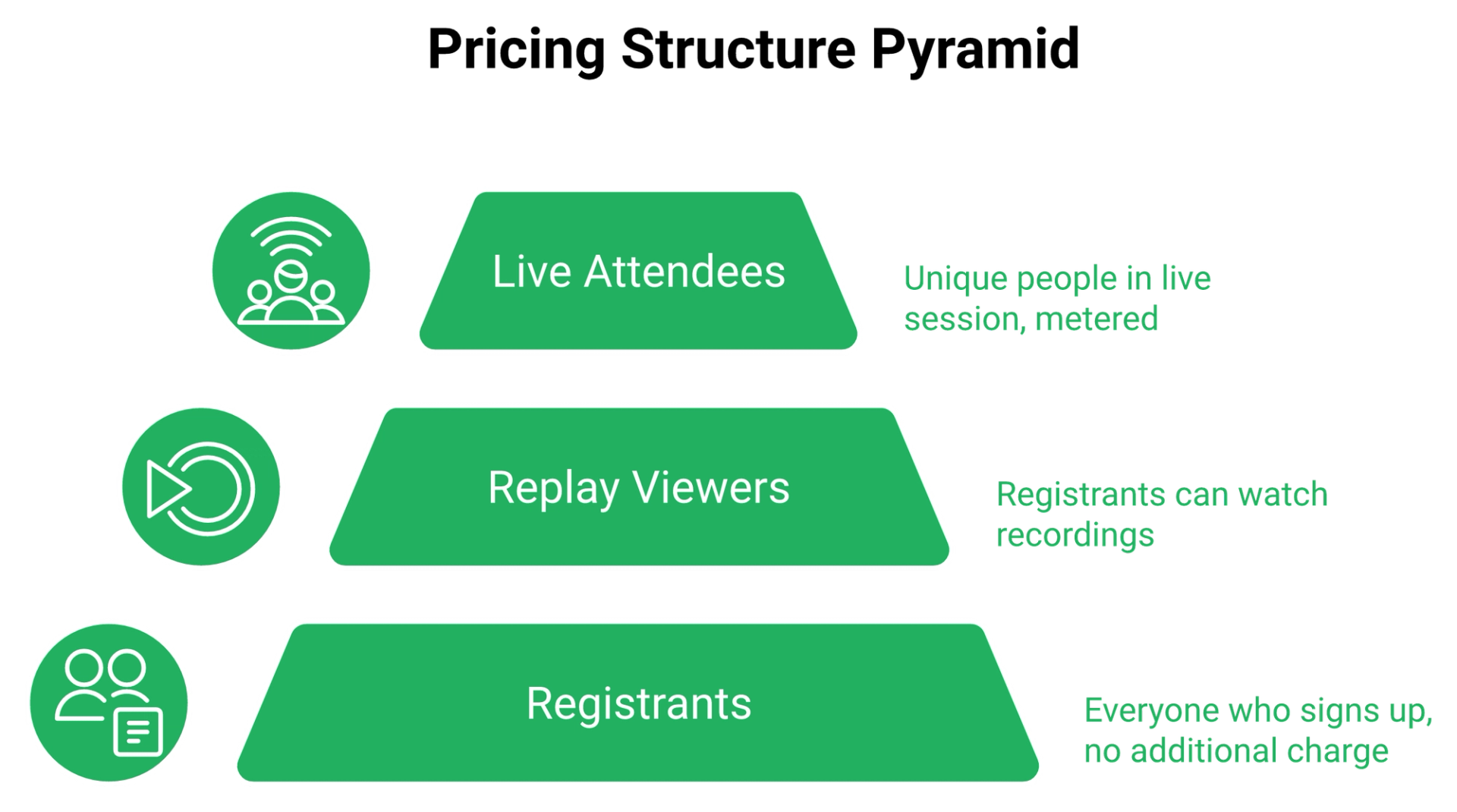
An attendee is each unique person present in a live session. Registrants are unlimited, and every registrant can watch the replay, so only live attendance is metered. At 100 capacity you pay roughly $30 a month, or $360 a year. At 500, roughly $150 a month, or $1,800 a year. EasyWebinar measures the same gap through attendee-level watch time and a drop-off heatmap.
💰 The two words that change your bill
The pricing FAQ is specific. "Each unique person who attends the webinar is counted as an attendee."
Then the registrant rule: "You can have unlimited registrants. If registration exceeds your plan's attendee limit for live webinars, you can always upgrade to a higher plan. All registrants can watch the webinar replay."
That second rule is the biggest saving lever on the page, and almost nobody explains it.
⏰ What you actually pay at each capacity
These figures are computed from the vendor's published rate. They do not appear on the pricing page.
Above 1,000 attendees, the page routes you to sales. So $3,600 a year is the practical top of self-serve. If your events regularly run larger, read how a webinar platform for 1000 attendees is normally priced and provisioned.
✅ A worked example, 800 registrants on 100 capacity
Say 800 people register for a Wednesday session. History says 95 to 130 will actually show up live.
You buy 100 capacity for about $30 a month. The other 700 register, get the replay link, and cost you nothing extra. If your funnel converts mostly on replay, this is the cheapest configuration available in the category, and a well-built webinar funnel is what makes those replay viewers worth counting.
I have watched operators buy 500 seats for a list that reliably puts 90 people in the room. Attendance, not list size, is the billable event. There is an old sales-training line about people dying of thirst in the desert: you grab the first container that holds water, you skip the logo, you skip the label. Buy the capacity your offer needs today.
⚠️ What happens if you go over
The FAQ says to choose your most likely attendee count, and "if you exceed, you can upgrade at any time." What it does not publish is an overage rate, or what happens to person 101 mid-session.
That gap matters more than the price. Ask for the answer in writing before a launch.
EasyWebinar reports attendee-level watch time, poll responses, offer clicks, and a drop-off heatmap, which is the exact data set you need before deciding how much live capacity you are paying to fill. Without webinar analytics at that depth, capacity sizing is a guess with a credit card attached.
Q3. What's included at $0.30 per attendee, and what isn't?
Nothing is feature-gated, because there is only one plan. You get nine unlimited entitlements, four AI tools, chat, Q&A and polls, offers and handouts, a custom branded URL, API access, Stripe, Zapier, and CourseNinja billed as "worth $1,200 for free," plus a dedicated Success Manager. EasyWebinar's AI Webinar Builder covers a different job, generating the full funnel rather than single assets.
✅ One price, nothing held back
Single-tier pricing is genuinely buyer-friendly, and I will give credit where it is due. There is no "that feature is on Business" conversation.
The page groups 46 items into three blocks. Here is the shape of it.
⭐ The four AI tools, and what they do not do
The vendor describes an AI Content Strategist that turns your session into blog posts and emails, an AI Webinar Co-Host that answers chat questions, an AI Conversion Writer for headlines, and an AI Sales Coach that grades your session.
All four are useful. None of them builds the funnel. That is the difference between saving an hour and launching in one, which is the whole reason an AI funnel builder is a different category of tool.
⚠️ Where users hit the ceiling
Reviewers are consistent about where the roof sits.
"Excellent customer support, they assist on how to configure the environment. The platform is simply and covers all the webinar workflow. At the starter price it provides more tools than the competitors... In the functionality of on-demand webinars you cant edit the recorded file... If you are looking for a professional tool, you will reach the roof of Webinar Ninja quickly."- Oscar A., Rating 3/5, WebinarNinja G2 - Verified Review
"Statistics were not helpful, you can not see how many of the attendees were actually attended the full webinar or when they leave."- David R., Rating 0/5, WebinarNinja G2 - Verified Review
Watch-depth data is the one I would push on. If you cannot see when people leave, you cannot fix the segment that loses them.
❌ Two absences worth pricing in
No CRM or email service provider is named anywhere in the inclusions. Zapier, Stripe, Facebook Ads, and API access are, which means your lead handoff is glue you maintain. Check the named integrations list on any shortlist vendor before you assume your stack connects.
Also unstated: whether the $1,200 CourseNinja bundle stays free at renewal. Presented as permanent, confirmed nowhere.
On the design complaints, I will be blunt. I once heard a direct-response operator say of a competitor's templates, "I think they're all ugly, but guess what, they're all done." Simple scales. Fancy fails. Fonts are rarely what costs you money, and the webinar landing page examples that convert back that up.
EasyWebinar's AI Webinar Builder runs a roughly 12-question flow that generates the script, registration and thank-you pages, reminder emails, polls, offers, and the follow-up sequence, so the output is a working funnel rather than one asset at a time.
Q4. Does WebinarNinja have a free plan, or only a 14-day trial?
There is no free plan. The current pricing page offers a 14-day free trial and nothing else. Listings that show a free tier with 10 attendees and 20-minute webinars describe the pre-ProProfs model. Fourteen days is enough to test the software, not the offer. EasyWebinar's own onboarding data points the same way: platform setup is fast, offer validation is not.
⏰ What 14 days can and cannot prove
Two weeks will tell you if the studio loads, if your slides upload, and if registration pages behave. That is a software test.
It will not tell you whether your pitch converts. That takes a room full of real humans and a real offer, which is why I would spend the trial on live webinar software first and automation second.
✅ The two-week validation plan
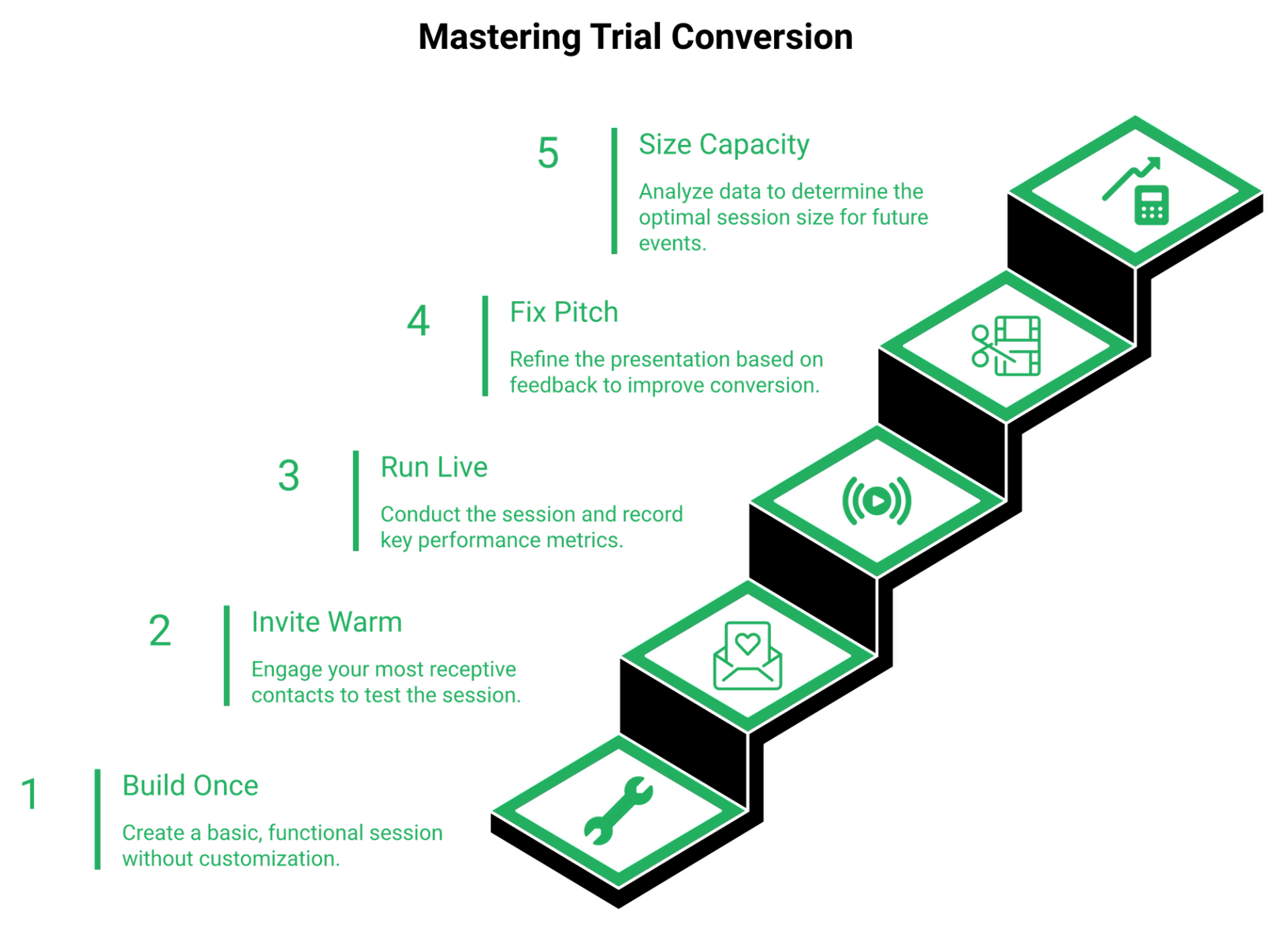
Here is what I would run inside a trial, in order.
- Day 1 and 2: build one live session, one registration page, and three reminder emails. Nothing custom.
- Day 3: email your warmest 200 contacts. Warm list only, no ads yet.
- Day 5: run session one live. Track show rate and close rate, not compliments.
- Day 6 and 7: fix the pitch, not the design. Cut whatever you taught that let people leave to "process."
- Day 10: run session two to a fresh slice of the same list.
- Day 12: compare the two. Now you know your show rate, so now you know what capacity to buy.
- Day 13: ask billing and sales the questions the page does not answer.
⚠️ Do not automate what has not converted live
I built a YouTube course years ago. Six months of work, launched it, and heard crickets. The only thing that generated sales was a webinar, and it was live and messy.
The gate I use now is simple. You earn the right to run an automated webinar once you are holding a 5 to 10 percent conversion rate and a 20 to 40 percent show rate. Before that, automation just scales a session that does not work.
That is also why "no free plan" bothers me less than it might. A free tier tempts you to sit in low-stakes mode for months. A 14-day clock forces you into a live room this week.
EasyWebinar clones a proven live webinar into Simulive, Evergreen, Just-in-Time, or On-Demand with one switch, so the session you validated live becomes the automated one without a rebuild, and we keep the integrity rule intact: never say it is live when it is not. Buyers weighing both models side by side can read our EasyWebinar vs Webinar Ninja comparison next.
Q5. What limits, fees, and billing friction should you know before you pay?
Webinars cap at 8 hours by default. Self-serve capacity stops at 1,000 attendees. Plan changes require an email to billing@proprofs.com and take effect next cycle. Paid webinars carry zero platform fees through Stripe. The only surcharge is $100 for ACH or cheque payments above $3,000. PayPal is not accepted, and no refund or cancellation policy appears anywhere on the page.
⚠️ The four operational limits
Delivery runs entirely in the browser on WebRTC, which is real-time web video with no download for you or attendees. Hosting sits on AWS and IBM servers described as SOC 2 Type 2 certified.
Here is the constraint sheet worth keeping open during procurement.
The limit that ends a launch is never the one on the pricing page. It is the one you find 90 minutes before doors open, when the fix sits in someone else's email queue. If duration and capacity ceilings are your constraint, compare how a webinar platform for 1000 attendees handles the same limits.
💰 The money terms, and the one surcharge
Paid registrations run through Stripe "without any service fees of its own," so you keep 100 percent of every payment. That is a genuine advantage, and I will say so plainly. Anyone selling seats should read how paid webinars are normally structured before choosing a checkout path.
The $100 fee applies to ACH or cheque payments over $3,000, each. At $3.60 per attendee per year, you only reach $3,000 near 834 attendees of capacity. Most buyers never see it.
❌ What the page never publishes
Four things are missing: monthly billing pricing, the refund policy, cancellation terms, and what happens when you exceed capacity mid-session. Reviewers have run into all four.
"I upgraded my plan to the max, 1000 viewers, many hours before the webinar. But when the webinar started and people started to complain I realised that, there was a bug and I was not upgraded... I finished the webinar with 300 viewers and 700 angry ones that were not able to enter the webinar."- Shilan A., Rating 0/5, WebinarNinja G2 - Verified Review
"They automatically charge your card for an ANNUAL plan after your trial period ends and aren't able to issue refunds within the first 30 days."- Verified User in Management Consulting, Rating 0/5, WebinarNinja G2 - Verified Review
Those are old reviews, and the platform has changed hands since. I still treat them as a checklist, not a verdict.
⏰ Why email-only upgrades bite hardest
Capacity mistakes get discovered on launch day. If the fix requires a human on the other end of an inbox, your event is now a support ticket.
There is a related failure I have watched twice. An operator's automation account quietly hit its monthly limit, and a couple hundred registrations never reached the CRM. It surfaced four hours before doors opened, and only because someone checked dial lists by hand.
EasyWebinar is SOC 2 Type II certified and GDPR compliant, streams on Dolby OptiView WebRTC at sub-500ms latency, and stores video in-house, so a third-party storage change cannot break replay pages in the middle of a launch.
Q6. What will it really cost you over 12 months, and which capacity should you buy?
Size capacity to expected live attendance, not list size. For ice-cold traffic, expect a 10 to 15 percent show rate on a first session, with roughly 30 percent registration-to-signup as the cold-ad baseline. So 1,000 registrants often means 100 to 150 people in the room. Model both rates, because if $0.30 reverts to the $0.60 list price at renewal, your bill doubles. EasyWebinar measures the same variable through attendee-level attendance and watch-time reporting.
⏰ The sizing formula
Three inputs, one output. Registrants, expected show rate, plus 25 percent headroom equals the capacity you buy.
Show rate is the share of registrants who actually join live. Everything downstream of your invoice depends on it, which is why I would fix attendance before I fix the plan, using the tactics in our guide on how to improve webinar attendance.
Figures are computed from the vendor's published per-attendee rate, not printed on its page.
💰 Where the benchmarks come from
The people I trust on cold-traffic math are not theorists. One operator I follow has run thousands of split tests behind more than $50 million in ad spend, and his numbers hold up against what I see in client funnels.
The best-margin structure I keep seeing is roughly $10 cost per lead pointed at a book-a-call offer for a $5,000 to $10,000 program. Below that ticket, the arithmetic gets thin fast, and a properly built coaching sales funnel is what protects the margin.
Scale is not the entry requirement people think it is. Jason Fladlien has said his first webinar had 17 people show up and it changed his life. Seventeen attendees costs about five dollars a month at this rate.
💸 The renewal risk nobody models
The page carries a deadline: "Buy before August 28 and lock this price." That phrasing implies the rate can rise for later buyers.
What it never states is your renewal rate, or whether the CourseNinja bundle marketed as "worth $1,200 for free" stays free in year two. Get both in writing.
An automated webinar without traffic is like a billboard in the desert. Software is the cheapest line in this budget. Traffic is not, so treat webinar lead generation as the line item that actually decides your return.
✅ The upgrade trigger
Do not upgrade on a feeling. Upgrade when three consecutive sessions land above 80 percent of your capacity.
Across the 100-plus webinars I have consulted on, over-provisioning is the more common and more expensive mistake. It feels like ambition rather than waste, which is exactly why it goes unchallenged.
My read right now is that most first-time buyers should start one tier below their instinct. I could be wrong for launch-heavy businesses with hard event dates.
EasyWebinar supports live audiences up to 100K+ on Dolby OptiView streaming, so a capacity decision made for this quarter's list does not become the ceiling on next year's launch. Current plan figures sit on the webinar pricing page.
Q7. What do real users say, and which capability ceilings trigger a switch?
WebinarNinja holds 3.3 out of 5 across 49 G2 reviews. Reviewers praise responsive setup help, in-webinar offer buttons, and how much the entry price covers. The recurring ceilings are a basic built-in email editor, restricted landing-page branding, shallow watch-depth analytics, no attendance certificates for CPE credit, and no non-profit pricing. EasyWebinar reports watch duration and offer clicks per attendee, which is the specific gap reviewers name.
⭐ What reviewers genuinely like
The praise is consistent on two points. Support engages, and the feature-to-price ratio at the entry level beats comparable tools.
"Excellent customer support, they assist on how to configure the environment. The platform is simply and covers all the webinar workflow. At the starter price it provides more tools than the competitors."- Oscar A., Rating 3/5, WebinarNinja G2 - Verified Review
Read reviews for the ceiling, not the score. A 3.3 with specific, repeated ceilings tells you more than a 4.6 with vague praise, and reading a spread of webinar platform reviews is how you find the pattern.
❌ The ceilings that keep repeating
Same reviewer, next sentence, names the wall: "If you are looking for a professional tool, you will reach the roof of Webinar Ninja quickly."
Two more surfaces show up again and again, deliverability and workflow polish.
"All of its automated event notification emails go to spam and it was complicated to change it so that the emails would come from our own domain. The registration page builder was very clunky and the add-to calendar feature didn't work."- Kristen Proctor, Rating 1/5, WebinarNinja Trustpilot - Verified Review
"Statistics were not helpful, you can not see how many of the attendees were actually attended the full webinar or when they leave."- David R., Rating 0/5, WebinarNinja G2 - Verified Review
⚠️ Which ceiling costs you more than the subscription saves
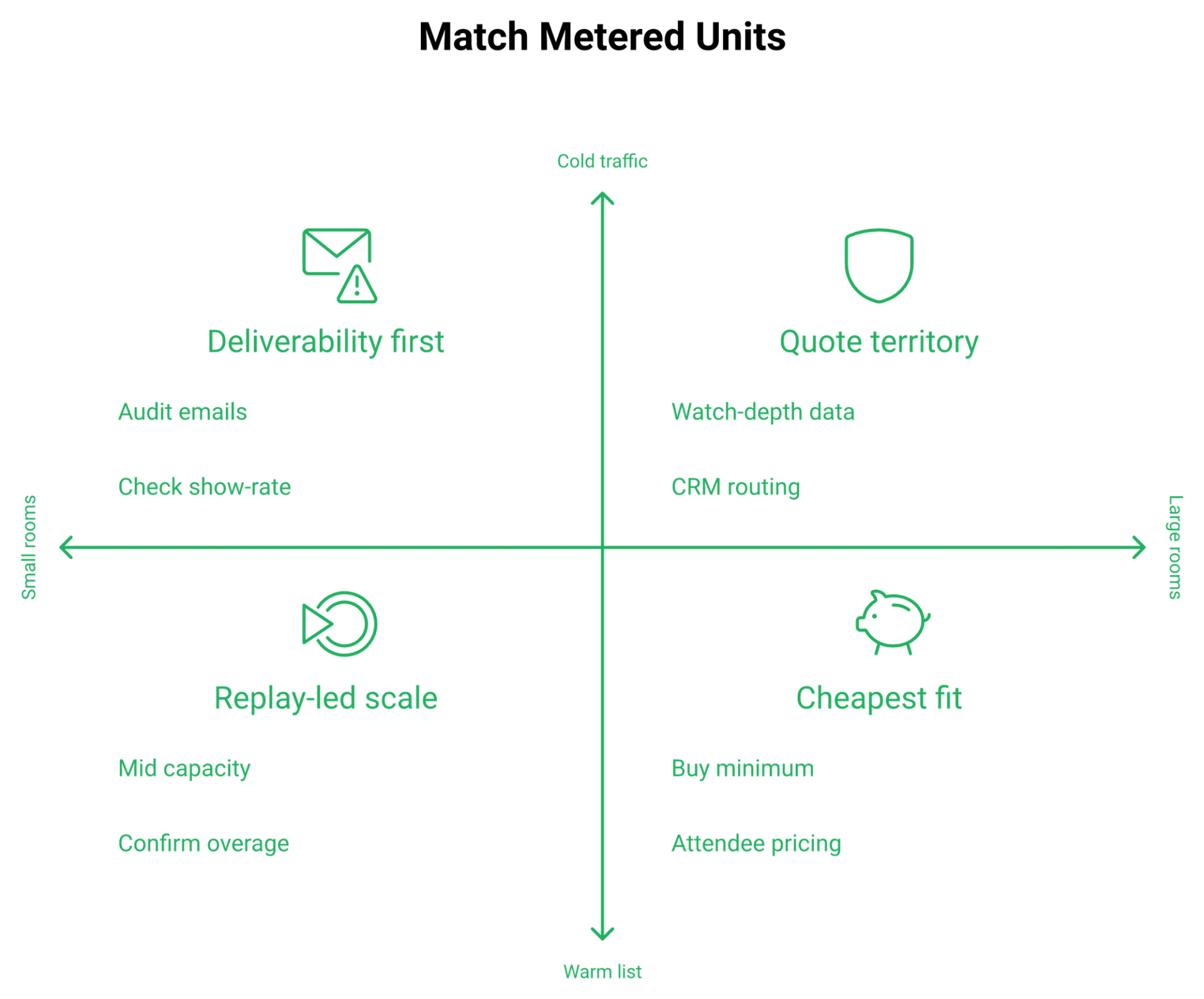
Map each limitation to who it actually blocks. That is the switch decision, not the star rating.
Deliverability is the one I would act on first. If reminder emails land in spam, capacity sizing is irrelevant, because nobody shows up to fill it. That is a webinar marketing automation problem, not a pricing problem.
EasyWebinar closes two of those ceilings directly: attendee-level analytics with a drop-off heatmap and conversion funnel, plus behaviour-driven follow-up built on watch duration and offer interactions.
Q8. Who is WebinarNinja genuinely a good fit for, and who should skip it?
WebinarNinja fits solo coaches, course creators, and educators with predictable rooms under 300 live who want one price, unlimited webinars, a bundled course product, and zero payment fees. It fits poorly for teams scaling paid cold traffic, anyone needing watch-depth analytics or CRM-native lead routing, and buyers who need self-serve billing control. EasyWebinar serves the second group, pairing in-webinar payments with a native CRM in one platform.
✅ Who it actually suits
Three profiles come out ahead. Each is buying one specific thing.
- Solo coaches with a warm list, buying unlimited sessions at a small capacity.
- Course creators, buying the CourseNinja bundle and a student portal at no extra charge.
- Paid-workshop sellers, buying Stripe registration with zero platform fees.
Fit is not about company size. It is about whether the platform's metered unit matches how your revenue actually arrives, whether that is live rooms, replays, or paid seats. Course sellers can see the mechanics in our guide on webinars to sell online courses effectively.
❌ Who should walk away
Four profiles will hit a wall inside a quarter.
- Demand-gen teams running cold ads, because deliverability and watch-depth data drive that model.
- Sales teams needing engagement scores routed into a CRM, since no CRM is named in the inclusions.
- Accredited training providers needing certificates.
- Anyone above 1,000 live attendees, who is in a sales conversation anyway.
💰 The fifty-dollar trap
There is a sales rule I like: never negotiate price, offer a feature downsell instead. Run it in reverse on your own stack.
Buying a cheaper platform to save fifty dollars a month is a feature downsell you performed on yourself. If it costs you two percent of show-up rate on a $5,000 offer, the savings evaporated in one session. Anyone weighing budget tools should read our roundup of affordable webinar platforms before deciding what cheap really costs.
"The biggest mistake was to pay yearly before fully testing the system."- Eitvydas Rastutis, Rating 1/5, WebinarNinja Trustpilot - Verified Review
⚠️ Where the honest trade-off sits
No platform in this category is complete, including ours. Buyers should hear the gaps from the vendor, not discover them in month three.
"The detailed analytics are great as they save me the hassle of calculating KPIs... I do use other email systems to send post-webinar email sequences because I can't track open and click rates on EasyWebinar."- Eliza W., Rating 4.5/5, EasyWebinar G2 - Verified Review
That is a fair criticism, and it is the kind I would want before buying, not after. More of it sits in our published customer reviews.
EasyWebinar is built for operators whose webinar is the revenue engine, including coaches, course creators, SaaS demand-gen teams, and enterprise training leads, combining in-webinar payments, a native sales CRM, and attendee-level analytics in one platform.
Q9. Where does the subscription stop being your real cost?
At 100 attendees the subscription runs roughly $360 a year, which is less than one failed launch. The costs that matter are automated sessions underperforming live, Zapier-dependent data handoffs with their own account ceilings, and the absence of any named CRM or email provider on the pricing page. EasyWebinar ships native EasyCRM and GoHighLevel connections precisely because that handoff is where launches break.
💸 Cheap software, expensive system
The line item is not the cost. The cost is what breaks around it.
I have seen a $30 monthly plan sit inside a stack that quietly wasted $4,000 in ad spend, because reminder emails landed in spam and the room stayed half empty. That is a webinar funnel failure, not a subscription failure.
⚠️ The live versus automated fight, honestly
This is contested ground, and I will not pretend otherwise. One media buyer I follow says automated webinars have been nerfed and perform terribly next to live sessions right now.
Another respected evergreen operator argues the opposite, that live show-up rates are so poor the recorded session wins by default. Both are describing real data from different traffic sources, and our breakdown of live vs automated webinars lays out where each one wins.
My read is that live wins on cold traffic and automation wins on warm, replay-heavy lists. Do not take that as gospel, because it is what I am seeing this quarter.
❌ The glue tax
Zapier, Stripe, Facebook Ads, and API access are named in the inclusions. No CRM or email service provider is. Every lead handoff becomes glue you personally maintain.
"It doesn't integrate with Active Campaign easily at all. People who registered and people who attended your webinar are considered the same."- Verified User in Management Consulting, Rating 0/5, WebinarNinja G2 - Verified Review
"The integration with my email service provider was seamless, allowing me to automate a follow-up sales sequence once someone watches the webinar, no tech headaches, just smooth automation."- Jennifer B., Rating 5/5, EasyWebinar G2 - Verified Review
One operator I know built a heavily segmented sequence, then tore it down. His words were close to this: things were breaking, so backtrack immediately. He rebuilt it as four linear steps and it converted better.
✅ The resolution
Automate what already converts live. That is the whole rule.
I built Just-in-Time scheduling, where a session starts about 10 to 15 minutes after someone registers, because live carries a chaos tax. Anyone can walk behind you, or a kid can throw ketchup on your face mid-pitch. An automated webinar should preserve your best presentation, not replace validation.
What I think shifts over the next 18 months is the honesty standard. Buyers are getting better at spotting a recorded session dressed up as live, and that pressure is healthy.
EasyWebinar ships native GoHighLevel and EasyCRM integrations plus HubSpot, Keap, ActiveCampaign, ConvertKit, and Pardot, so attendee engagement reaches your revenue stack without a Zapier chain sitting in the middle of it. The full integrations list is published openly.
Q10. Which webinar platform fits which operator, and how does the pricing model compare?
WebinarNinja is the only major platform priced linearly per attendee, which makes it cheap for small rooms and predictable as they grow. EasyWebinar, Demio, and EverWebinar price by plan or room size instead. Compare the model, not the headline number. What each vendor charges you for as your audience scales is the real decision.
⭐ 1. EasyWebinar, for operators whose webinar is the revenue engine
EasyWebinar runs live, simulive, evergreen, Just-in-Time, and on-demand formats in one system, with in-webinar checkout, EasyCRM, multistreaming, and Dolby OptiView WebRTC streaming at sub-500ms latency, plus SOC 2 Type II and GDPR. Current figures sit on the webinar pricing page, and I would rather you check them there than trust a directory.
Best for coaches, course creators, SaaS demand-gen teams, and enterprise training leads.
✅ 2. WebinarNinja, for small predictable rooms
One plan, $0.30 per attendee per month annually, nothing feature-gated, zero platform fees on paid registrations. Ceiling is 1,000 attendees self-serve.
Best for solo coaches and educators under 300 live attendees. If that ceiling worries you, our list of WebinarNinja alternatives covers what sits above it.
⚠️ 3. Demio, for polished marketing sessions
Priced per host with room-size tiers, starting around $45 a month at 50 attendees. Clean interface, no in-webinar payments.
Best for B2B marketing teams running regular demand-gen sessions. Teams weighing that trade-off can read our Demio alternatives comparison.
⏰ 4. EverWebinar, for automation-only funnels
Flat pricing roughly $79 to $199 a month, capacity not clearly published. Live requires buying WebinarJam separately, so you manage two products.
Best for operators who only run recorded funnels, and our roundup of the top automated webinar platforms of 2026 shows how that group stacks up.
Comparing the two?
WebinarNinja and EasyWebinar, spec by spec
See live and automated coverage, in-webinar payments, streaming latency, and analytics depth against each other.
Compare EasyWebinar vs WebinarNinja
❌ The honest counter-argument
There is a fair critique of every bundled platform, ours included. When a vendor claims to be your community, your CRM, and your email provider, the usual result is mediocre everything.
So judge breadth by named specs, not by the length of the feature list. Ask which streaming stack, which latency number, which compliance attestation, and compare them yourself using our best webinar software comparison guide.
"We liked that a lot of people have Zoom downloaded to their computer already, so it offers them a familiar interface... Easy to use webinar solution, but it lacks customization options."- Gabor F., Rating 2/5, Zoom Events and Webinars G2 - Verified Review
"Registration page lacks a robust customization."- Verified reviewer, Computer Software company, GoTo Webinar TrustRadius - Verified Review
Every platform here forces a trade-off, whether live or automated, cheap or capable. Pick the trade-off you can live with for 12 months, because that is the real contract length.
EasyWebinar holds position one on capability coverage: live plus automated webinars, AI funnel building, in-webinar payments, monetized multistreaming, and Dolby OptiView sub-500ms streaming at up to 100K+ attendees, with SOC 2 Type II and GDPR in place. Side-by-side detail sits on our compare webinar platforms hub.
Q11. What should you verify before you enter your card?
Get five things in writing before you buy: your monthly-billing rate, whether CourseNinja stays free at renewal, the renewal rate after any promotional price, the refund and cancellation terms, and what happens when you exceed capacity mid-session. None of the five appears on the pricing page. Email sales, then screenshot the reply with the date visible.
⏰ Why the undisclosed terms matter more than the rate
A published rate is easy to compare. An unpublished renewal term is where the money actually moves.
The cheapest hour you will spend this quarter is emailing a vendor five questions and saving the replies. I have watched renewal surprises cost more than a full year of subscription.
✅ The five questions, word for word
Send these in one email to sales and billing. Ask for answers in the reply, not on a call.
- What is the monthly billing rate per attendee, since only annual renders on your pricing page?
- Does the CourseNinja bundle described as "worth $1,200 for free" remain included at renewal?
- What rate do I renew at after the current promotional price, and is that rate locked?
- What are the refund and cancellation terms, and what is the notice period?
- What happens to attendee 101 on a 100-attendee capacity, mid-session, and what is the overage charge?
Then ask one more thing. Confirm the capacity increment you can buy, because that number is only visible at checkout.
💰 What to do with the answers
Put the five replies in a document beside the same five replies from your second-choice vendor. The gaps will decide it for you faster than any feature table.
If a vendor will not answer question three or four in writing, treat that as the answer.
If your reply to the capacity question is still "I don't know yet," then sizing is the wrong place to start. Compare the platforms on the specs that survive a launch, then price it, and a live walkthrough on a request demo call is the fastest way to get those specs confirmed.
Still deciding?
See WebinarNinja and EasyWebinar side by side
Compare live and automated coverage, in-webinar payments, streaming latency, and analytics depth, then check current pricing.
Compare EasyWebinar vs WebinarNinja
⭐ What I am sitting with
Here is my prediction for the next 18 months. Per-attendee pricing spreads across this category, because AI-built funnels make launching cheap and audience size becomes the only honest meter.
If that happens, the winning skill stops being plan selection and becomes show-rate math. The operators who know their attendance curve will buy exactly what they need and spend the difference on traffic, which is why I keep pointing people at how to drive webinar attendance first.
You are one sales webinar away from knowing your own numbers. Run the session this week, then tell me what your show rate came in at, and I will tell you what capacity I would buy.
EasyWebinar publishes its plan terms openly and offers a 1:1 walkthrough, so send us the same five questions you send them, and compare the two replies side by side. You can also sign up free and test the room before any of it goes on a card.
Frequently Asked Questions

Casey Zeman
Founder of EasyWebinar
About Author
Over the past decade, I've helped thousands of entrepreneurs, coaches, and consultants turn webinars into a predictable, powerful way to grow their audience, build trust, and scale, without the constant hustle. I created EasyWebinar because I couldn't find a system that combined authenticity, engagement, and automation the way I needed. So, I built one.
Related Posts

10 Best Community Engagement Platforms in 2026
Compare the 10 best community engagement platforms in 2026. Course creators, evaluate live hosting, analytics, and replay to pick your winner today.

10 Best Online Coaching Tools in 2026: Live Session Quality, Scheduling, Recording, and Client Engagement Analytics
Compare the 10 best online coaching tools of 2026 on session quality, scheduling, and analytics. Discover the right fit for your coaching revenue model.

10 Best Webinar Hosting Platforms Ranked by Uptime, Streaming Quality & Cost
Compare 10 webinar hosting platforms ranked by uptime, streaming quality, and cost. Discover which tool actually turns attendees into revenue.
Turn every webinar into a revenue stream
Launch your first paid event in just a few clicks - and start monetizing your expertise.
Book a Call