EasyWebinar vs BrightTALK: Pricing, Branding & Engagement Tools Compared

Casey Zeman
Published on Aug 28, 2026 • 26 min read

TL;DR
- BrightTALK publishes no pricing, entry sits near $500 per month with no free trial, while EasyWebinar publishes $44 to $349 per month with a 7-day trial.
- BrightTALK sells rented reach on a syndication network, EasyWebinar sells conversion infrastructure, so the real axis is distribution versus in-session revenue.
- Verified reviewers flag limited brand customization, a roughly 30-second stream delay, pre-loaded slides only, and no per-source tracking links.
- One G2 reviewer reported syndicated leads costing about three times their LinkedIn-promoted webinar MQLs, with accidental registrations hurting sales trust.
- BrightTALK covers live plus instant on-demand, not simulated live, just-in-time, hybrid scaling, or ticketed webinars in the standard channel.
- The resolution is sequential: run 5 to 10 live sessions, clear 10% attendee-to-buyer, then automate that exact winning session.
Q1. EasyWebinar vs BrightTALK: which one actually closes sales?
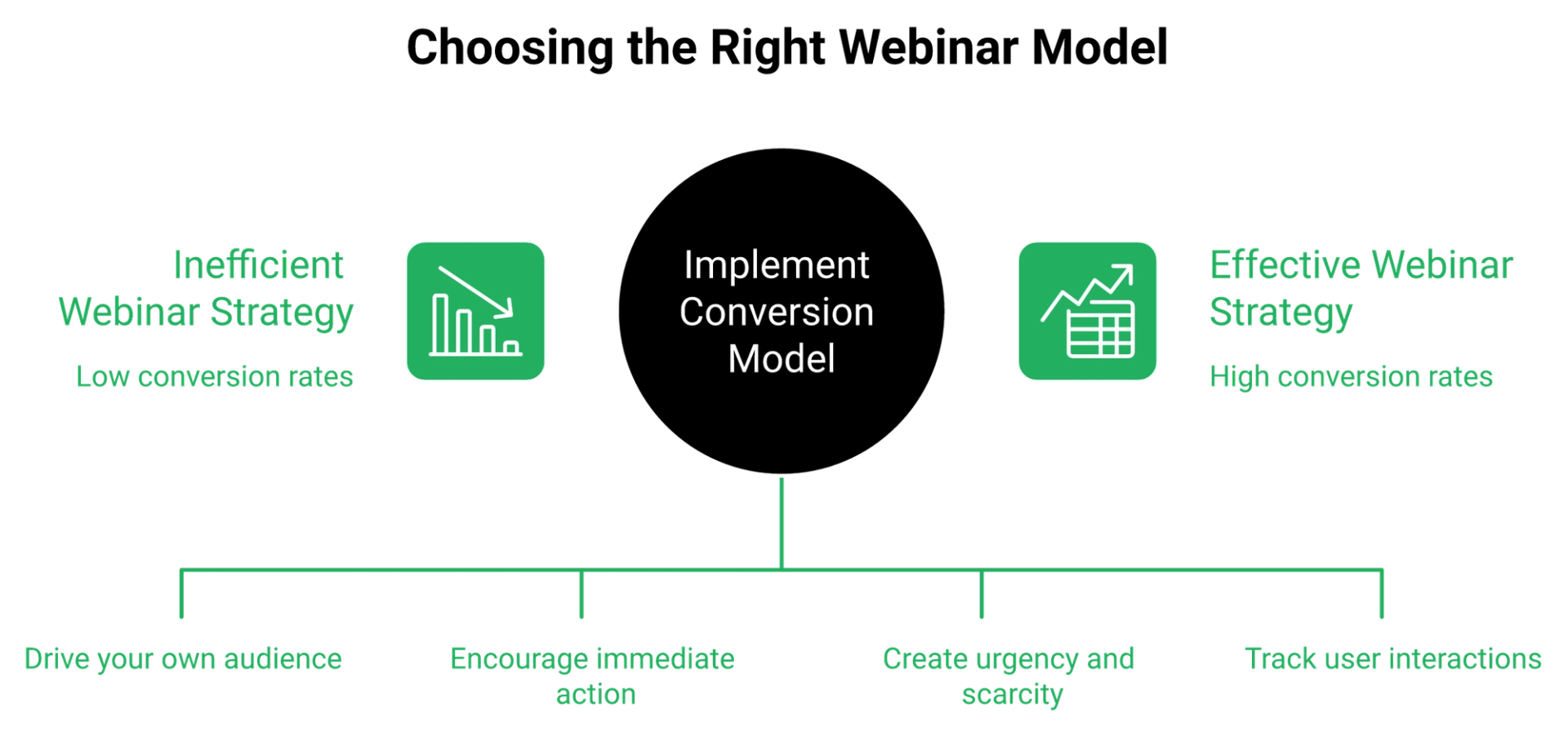
EasyWebinar and BrightTALK solve different problems. BrightTALK rents you reach on a B2B content network and treats a webinar as a broadcast event. EasyWebinar treats the webinar as the sales mechanism, with in-webinar CTAs, timed offers, evergreen and just-in-time delivery, and behavioral follow-up. If you buy your own traffic and sell high-ticket, you need conversion infrastructure, not distribution.
The moment this question actually shows up
A marketing director messaged me last spring with a quote in hand. Her ad budget was live, her offer was $4,800, and procurement wanted a corporate webcasting license.
Her real question was not about features. It was whether an expensive license would convert cold traffic, or just look impressive in a board deck.
🎯 The reframe: distribution is not conversion
I built a YouTube course years ago. It took six months. It sold nothing.
The only thing that started generating sales was a webinar. In my first year running live webinars for that course, I sold about $245,000 of it.
That taught me the axis that matters. Reach gets people in the room. Mechanics get money out of it.
⚠️ What "broadcast event" means in practice
Syndication networks are built to publish content to a shared audience. The webinar sits inside their channel, with a backstage area and a scheduled slot.
Reviewers on G2 flag the consequences directly. Poor audience engagement appears across five separate reviews, along with limited customization and a steep learning curve.
The criteria table
EasyWebinar measures its own fit against both a network platform and a simple marketing tool, so here is the honest three-way read.
| Criteria | EasyWebinar | BrightTALK | Demio |
|---|---|---|---|
| Published pricing | Yes, $44 to $349 per month | No public tiers, near $500 per month at entry | Yes, from $59 per month |
| Free trial | 7-day full access | Not available on listing | Yes |
| Audience source | Your traffic and list | Their B2B network | Your traffic |
| In-webinar offers | CTAs, timed offers, checkout | Not a direct-response toolset | Basic CTAs |
| Automation formats | Live, evergreen, just-in-time, on-demand, hybrid | Live and on-demand recordings | Live and automated |
💰 What operators say on both sides
"EasyWebinar is hands-down THE webinar platform for evergreen webinars, no contest."- Ash A., EasyWebinar G2 - Verified Review
"The end-user experience is bad. And the brand customization is limited."- Verified reviewer, BrightTALK Capterra - Verified Review
Which column are you in?
Pick BrightTALK if brand awareness inside a tech-buyer audience is the goal and reach is the KPI.
Pick a conversion platform if you run paid traffic to an offer above roughly $1,000. My read is simple. If nobody is pitching in the room, you bought a publishing channel. If you want the wider field, our best webinar software comparison guide scores the category on the same criteria.
EasyWebinar was built as a webinar platform for revenue, not a broadcast channel. Live, evergreen, just-in-time, on-demand, and hybrid formats ship in one subscription, with in-webinar CTAs and timed offers included rather than bolted on.
Q2. What does each platform really cost, including trial terms and commitment?
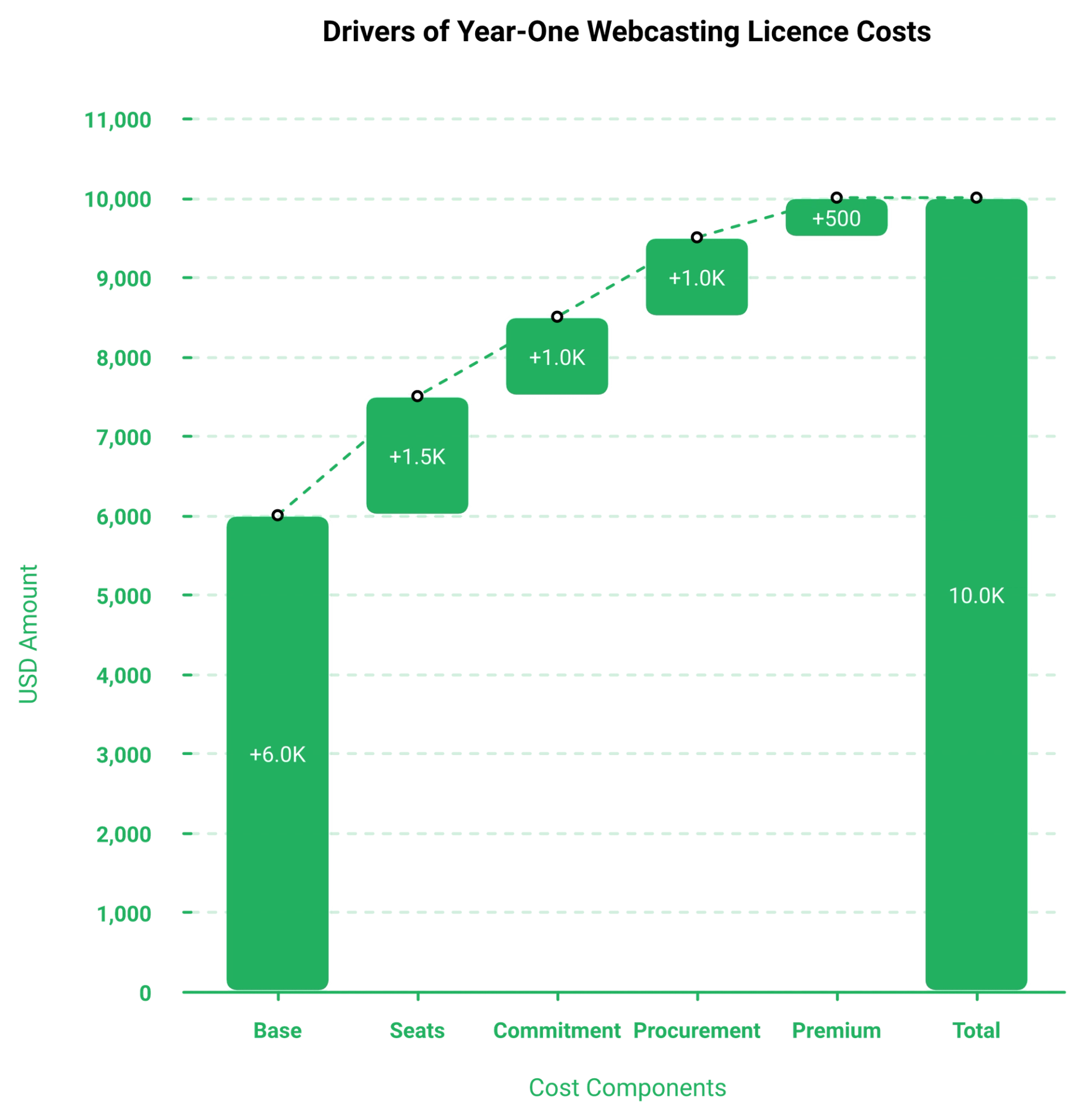
BrightTALK does not publish pricing. Third-party listings put BrightTALK Central near $500 per month at entry, with custom quotes above that, no free trial, and typically an annual commitment. One analyst estimate puts Year-1 cost near $10,000 for ten users. EasyWebinar publishes Launch $44, Growth $116, Pro $198, and Scale $349 per month, with annual discounts and a 7-day trial.
The numbers, dated and sourced
GetApp lists BrightTALK Central starting at $500 per month, with free trial marked as not available. SaaS Adviser lists the same $500 monthly starting figure.
ITQlick's February 2026 review estimates Year-1 total cost near $10,000 for a ten-user setup, and names the lack of transparent pricing as a core drawback.
💸 Why price opacity is itself a cost
A quote-only vendor costs you calendar time before it costs you money. Two discovery calls, a security review, and a legal pass can burn three weeks.
Then there is the trial gap. Without hands-on access, you commit annually based on a demo someone else drove.
I have a rule about price integrity on the selling side. Never negotiate down, offer a payment plan or a feature downsell instead. Applied to buying, a vendor hiding its number is negotiating in the dark.
💰 EasyWebinar's public tiers
EasyWebinar publishes four tiers, verified on its webinar pricing page as of August 28, 2026.
| Plan | Monthly | Fit |
|---|---|---|
| Launch | $44 | First live webinars, 50 live attendees |
| Growth | $116 | Automation and larger rooms |
| Pro | $198 | Full funnel and automation depth |
| Scale | $349 | High-volume operators |
Annual billing cuts the rate, and EasyCRM plus paid webinars, each $49 per month monthly, come included on annual plans. That is roughly $1,176 a year that stays in ad spend.
Three-year math, then the metric that matters
At entry level, BrightTALK's public estimate lands near $18,000 over three years before overages. EasyWebinar Pro on annual sits far below that, with the CRM included.
Jeremy Haynes puts the failure mode bluntly. Most buyers never model worst-case statistics, so they vaporize money willingly.
⏰ Model these three baselines first
- Cost per lead near $10 for paid ads to a high-ticket call offer
- Registration to signup near 30% on cold traffic
- Attendee to buyer at 10% before you automate anything
Sticker price is the wrong denominator. Cost per qualified lead is the real one, and our guide to making money with webinars walks through that math in full.
"The only con I really have about EasyWebinar is that it is a little bit more expensive if you are just starting out. It would be great to have lower payment options as well."- Verified reviewer, EasyWebinar Capterra - Verified Review
"Good part of Martech but costly."- Verified reviewer, 6/10, GoTo Webinar TrustRadius - Verified Review
That first quote is fair, and I am not going to argue with it. Starting cost is real when cash is tight.
EasyWebinar prices in public: four tiers from $44 to $349 per month, annual discounts, and EasyCRM plus Paid Webinars included on annual plans. You can price the decision yourself in two minutes, without a sales call.
Q3. Who owns the brand experience and the registration page?
On BrightTALK you present inside a channel on their network, and verified reviewers repeatedly cite limited brand customization, restricted formatting, and a dated attendee interface. EasyWebinar runs registration, room, and replay on your brand and your domain, so traffic you paid for lands in an asset you keep.
The complaint that repeats
Limited customization shows up across four separate BrightTALK reviews on G2, clustered with operational limits around editing and permissions.
Capterra's verified reviewer is blunter. The end-user experience is bad, and the brand customization is limited.
❌ The tracking detail that quietly hurts
One GetApp reviewer misses unique tracking links per marketing source, a feature they had elsewhere.
That is not cosmetic. Without per-source links, you cannot tell which ad set produced which buyer, which is exactly what webinar analytics exists to answer.
The contrarian half of this
Here is where I break with the polish gospel. Design does not sell the seat. The offer and the presentation do.
My client Jay Boyer still uses plain default registration pages. He has made millions from webinars run on them.
⭐ What to control, and what to ignore
Roughly 60% of visitors never scroll past the fold, so most of your effort belongs in that one section. If you want patterns that already convert, study these webinar landing page examples.
- Control: the domain, the list, the above-the-fold headline, and the follow-up
- Ignore: font pairings, hero animations, and six-week template builds
Hormozi's version is better than mine. If people are dying of thirst, skip the logo and get the container under the tap.
"Easy Webinar simplifies the process of building out landing pages for your events."- Verified reviewer, EasyWebinar Capterra - Verified Review
"I'd like to see more customization options, but with that said, the integrations they have make it super easy."- Verified reviewer, EasyWebinar Capterra - Verified Review
EasyWebinar keeps registration pages, webinar rooms, and replays on your domain and branding, so ad spend compounds into a list you own instead of a channel you rent.
Q4. Which platform gives you engagement tools that move money?
Engagement is BrightTALK's most-criticised area on G2, with poor audience engagement logged across five reviews, no live attendee count, and reviewers reporting roughly a 30-second stream delay with pre-loaded slides only. EasyWebinar ships live chat, Q&A, polls, in-webinar CTA buttons, and countdown-backed timed offers designed to fire at the pitch.
What the reviews actually document
The G2 pros-and-cons view lists poor audience engagement five times, alongside webinar glitches and attendee-visibility problems.
Capterra reviewers add specifics. Around 30 seconds of delay, slides that must be pre-loaded, and a separate tool needed for screen share.
⏰ Why a 30-second delay costs money
Chat is a conversion instrument, not decoration. It carries objections in real time.
At half a minute of lag, the answer arrives after the moment has passed. You are presenting into a void, which is the opposite of what real interactive webinars are built to do.
Mapping tools to the pitch timeline
EasyWebinar measures the drop between peak show rate and the pitch, which is where most revenue leaks.
| Moment | What you need | EasyWebinar | BrightTALK |
|---|---|---|---|
| Minute 5 | Poll to qualify | Yes | Polls available |
| Minute 30 | Live chat with fast reply | Yes | Delay reported |
| Pitch | CTA button plus countdown | Yes | Not a direct-response toolset |
| Post-pitch | Behavioral tagging | EasyCRM | Limited |
✅ The retention number to instrument
Hold near 80% retention from peak show rate to the pitch itself. Bait it honestly by promising bonuses sent right after the session for people who stay.
Russell Brunson's bridge only works if you own the chat. He asks people to drop a one in the chat before transitioning, then pitches.
Ask EasyWebinar to fire the offer at a fixed timestamp, and the countdown, the CTA, and the chat all sit in one frame. The full stack of webinar engagement tools works the same way inside automated sessions.
"I used to do live webinars to sell my online course. With EasyWebinar I sold 25 courses within 3 weeks of my evergreen launch."- Laura C., EasyWebinar G2 - Verified Review
"The engagement features were minimal and did not appeal to a large crowd. The lack of opportunities to personalize was missed."- Verified User in Education Management, 2.5/5, Zoom Events and Webinars G2 - Verified Review
My honest hedge: EasyWebinar's data points to timed offers as the single biggest in-session lever, though I might be weighting it too heavily against offer quality.
EasyWebinar puts the CTA, the countdown, and the chat in the same frame as the pitch, so intent converts in-session instead of leaking into a follow-up sequence. You can test that whole flow on the sign up free trial before committing to a plan.
Q5. Can you run evergreen, just-in-time, and paid webinars on BrightTALK?
BrightTALK centres on scheduled live sessions that convert automatically into on-demand replays inside its channel. It does not sell simulated-live evergreen funnels, just-in-time sessions, or hybrid live-to-evergreen scaling. EasyWebinar ships all five formats plus ticketed paid webinars, an add-on at $49 per month monthly and included on annual plans.
The five formats, in plain English
Format language gets abused, so here are the definitions I use with clients.
- Live: real time, you are present
- Simulated live: pre-recorded video on a scheduled slot, with live chat
- Automated: pre-recorded on a fixed schedule
- Evergreen: automated, running 24/7 across every timezone
- Just-in-time: the session starts a few minutes after someone registers
BrightTALK covers live plus instant on-demand replay. That is two of the five. If the distinction still feels blurry, our breakdown of the simulated live webinar format shows how each one behaves in a funnel.
⏰ Why the missing format costs the most
Just-in-time exists because of one number: the gap between registering and showing up.
EasyWebinar starts each just-in-time session about 10 to 15 minutes after registration, streamed in the visitor's local timezone. That removes the three-day wait where intent dies.
The setup is deliberately boring. In the registration step, you select just-in-time and nothing else. One toggle, done.
🎯 Map the format to the traffic source
| Traffic source | Format that fits | BrightTALK | EasyWebinar |
|---|---|---|---|
| Cold paid ads | Just-in-time | Not offered | Yes |
| Your email list | Live launch | Yes | Yes |
| Organic and SEO | Evergreen, 24/7 | On-demand replay only | Yes |
| Post-webinar traffic | On-demand | Yes | Yes |
| Paid workshop buyers | Ticketed session | Only in their Virtual Events product | Paid Webinars add-on |
The integrity rule nobody talks about
I broke this early. I ran an automated session that felt live, and someone asked a question I never answered.
My rule since: never say it is live, and never say it is not. You mimic the live experience without lying about the clock.
BrightTALK's own post-event guide describes standalone replays as "set it and forget it". That phrase is exactly where operators lose money.
❌ Automation without traffic is a dead asset
An automated webinar without traffic is a billboard in the desert. Beautiful, scheduled, unseen.
Live also has a hidden cost that pushed me toward automation. You show up, fight the tech, repeat the same deck weekly, and hope nobody throws ketchup on your face mid-pitch.
That is not a joke about kids. It is about how fragile a revenue system built on your calendar really is.
💰 Ticketed webinars change the math
Most comparison pages skip monetization completely. That is the part that turns a cost centre into a revenue line.
Ask EasyWebinar to charge for access, and the session itself sells: a $97 workshop, a certification, or a paid intensive. BrightTALK offers ticketing inside its separate Virtual Events product, not in the standard channel. The mechanics of paid webinars are worth reviewing before you price a seat.
Here is a scenario worth modelling before you sign anything. Fifty seats at $97 covers a full year of a mid-tier plan.
Run this sequence Monday
- Record one 45-minute session you have already delivered live
- Set it to just-in-time only, timezone-detected
- Point one small ad set at it, with a $10 cost-per-lead ceiling
- Add a ticketed version of the same session for warm buyers
EasyWebinar runs live, evergreen, just-in-time, on-demand, and hybrid funnels plus ticketed webinars from one subscription, so your best live session becomes a 24/7 asset without a second invoice.
Q6. Does BrightTALK's audience network deliver qualified leads you can actually own?
BrightTALK's audience network is its real product, and it does generate reach. Its own materials claim on-demand viewership produces 60% to 70% more leads than the live session alone. Lead quality is contested: a G2 reviewer reported significantly worse lead quality, with acquisition costs around three times their LinkedIn-promoted webinars.
The concession first
Credit where it is due. Informa TechTarget runs an AI-driven promotional engine that pushes your content to its own B2B audience.
For a security vendor filling a top-of-funnel list, that reach is genuinely hard to replicate. You are buying attention you do not have.
⚠️ What you trade for that reach
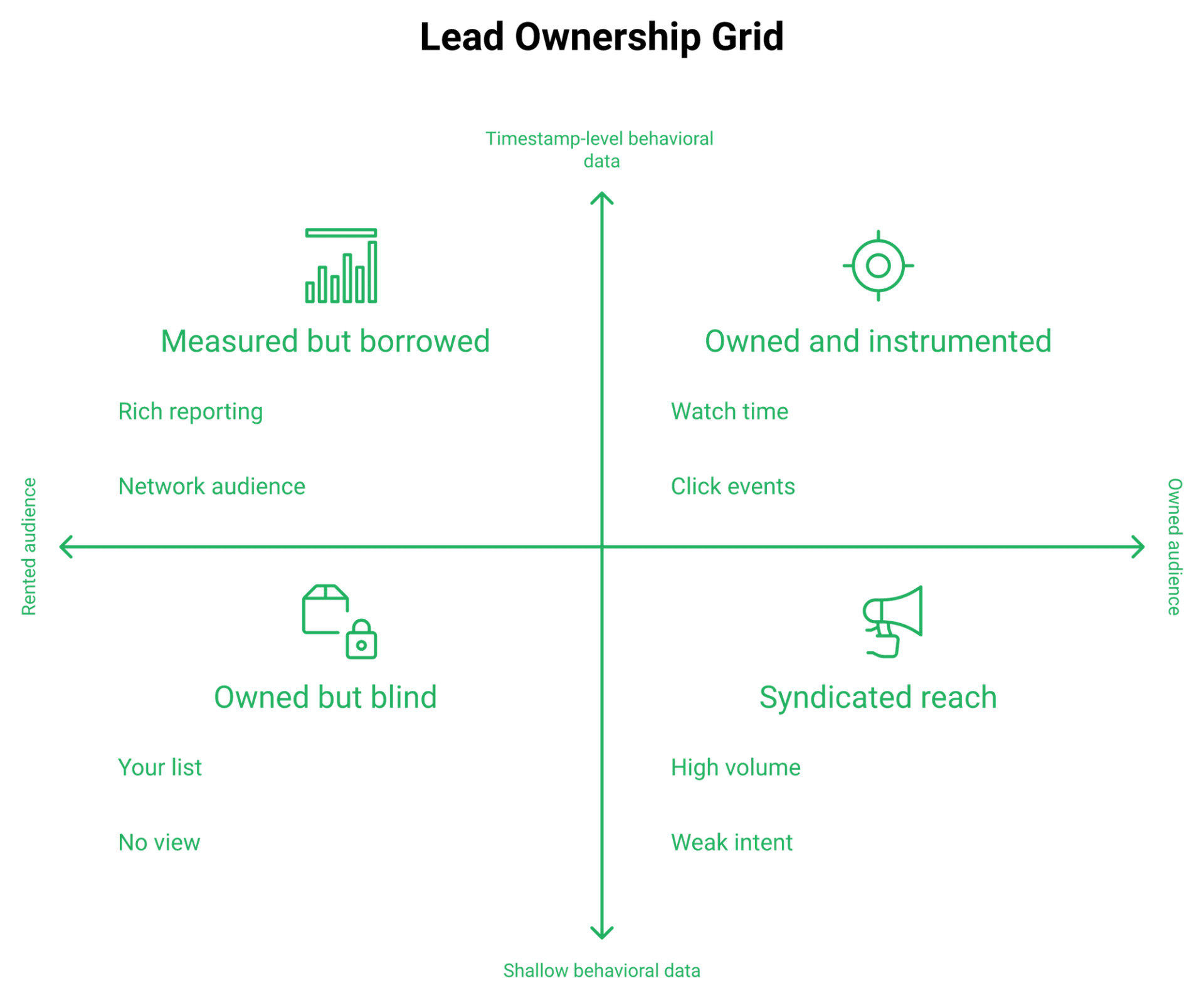
The trade is control. The audience belongs to the network, and the experience belongs to the network.
BrightTALK does feed cleansed lead data into your CRM or marketing automation platform, which is a real strength. Your follow-up quality then depends on what that feed contains, which is why owning your webinar lead generation engine matters more than renting one.
💸 The MQL math operators actually run
MQL means marketing qualified lead, a contact your team agrees is worth a sales touch.
One G2 reviewer's numbers are the sharpest data point on this SERP. Syndicated leads cost roughly 3x per MQL versus LinkedIn-promoted webinars, with accidental registrations damaging sales-team trust.
TrustRadius reviewers add a mechanical cause. Clicking a webinar in a list can register a user without clear intent.
⭐ Voice of buyer
"Users find BrightTALK has poor audience engagement, lacking interactive features."- Aggregated verified reviewer sentiment, BrightTALK G2 - Verified Review
"I used Demio to run a webinar and collected registrant emails while on a paid plan. After canceling, I was shocked to find out I couldn't export the list unless I subscribed again."- Sheida M., 0/5, Demio G2 - Verified Review
"Pretty much once I have run one webinar, I can clone and setup multiple in a breeze."- Verified reviewer, EasyWebinar G2 - Verified Review
That Demio review is the real lesson, and it is not about Demio. Ask any vendor one question before signing: can I export my list the day I cancel?
The counter-model
You grow your audience by running webinars, not the other way around. Rented reach stops the day the contract ends.
My read, and I hold it loosely, is that a rented audience is fine as a supplement. As the foundation, it is a lease on your pipeline.
✅ Behavioral data is where follow-up gets its edge
The follow-up that closes is not "thanks for attending." It is different mail for someone who left at the 30% mark than for someone who clicked the offer and hesitated.
EasyWebinar measures this at the attendee level: watch time, click events, and whether each person reached the offer segment. Those signals drive the segments, not a spreadsheet guess, and they sit inside the sales CRM rather than in a separate tool.
Three tags worth building this week:
- Watched past the pitch, no click
- Clicked the offer, no purchase
- Registered, never attended
EasyWebinar captures every registrant into EasyCRM with attendee-level behavior, including watch time, clicks, and whether they saw the offer, so segmentation runs on evidence rather than on a network's lead list.
Q7. What breaks once you're live on each platform?
Reviewers flag a roughly 30-second BrightTALK stream delay, slides that must be pre-loaded, a separate tool for screen share, and no per-source tracking links. TrustRadius users report presenter bridges dropping speakers and editing cut-offs before go-live. On any platform, the most common failure is not video. It is the integration layer quietly hitting a quota.
The verified failure list
Here is what buyers discover after the contract, sourced to named review platforms.
| Failure mode | Reported on | Impact |
|---|---|---|
| Roughly 30-second stream delay | Capterra | Chat answers land too late |
| Slides must be pre-loaded | Capterra | No live edits, no improvising |
| Separate tool for screen share | Capterra | One more thing to break |
| No per-source tracking links | GetApp | You cannot attribute buyers to ad sets |
| Presenter dropped mid-session | TrustRadius | Dead air during the pitch |
| Resource edits locked before go-live | TrustRadius | Last-minute fixes impossible |
⚠️ The failure that took down my own launch
Our automation account hit its monthly task limit. We caught it four hours before a webinar.
Sales reps were already dialling registrants to push show-up rates. Nothing was firing. Nobody knew why.
That was not a video problem. It was a plumbing problem, and plumbing fails silently.
❌ Do not build the tube map
Jon Penberthy's warning stuck with me. If your funnel diagram starts to look like a subway map, backtrack immediately.
Every connector you add is another point where things go wrong at the worst possible hour. Simple scales, fancy fails, and a clean webinar funnel beats a clever one every time.
EasyWebinar keeps registration, reminders, tagging, and follow-up inside one system, which removes several of those handoffs by default.
💰 What operators report elsewhere
"GoToWebinar is the most basic webinar tool that offers nothing more than any other tool. I have had several registrants tell me they will not attend a webinar of ours until we switch our platform."- Forrester S., 0/5, GoTo Webinar G2 - Verified Review
"We've had problems with presenters being able to enter the webinar, with reminder notices going out eight hours after an event has concluded, and with broadcast quality."- Casey S., 1.5/5, Zoom Events and Webinars G2 - Verified Review
"The ease of use and functionality are awesome. If I ever have a question, the support team and the community are always on it."- Verified reviewer, EasyWebinar Capterra - Verified Review
I will own the honest half here. No platform is glitch-free, including ours, and anyone claiming otherwise has not run enough sessions.
Your pre-flight checklist
Run this 24 hours before every webinar, whatever platform you use. Pair it with our guide on how to start a webinar if this is your first run.
- Fire one test registration end to end, including the confirmation mail
- Check every automation quota and billing status
- Confirm the replay page exists before the session, not after
- Join as an attendee on mobile, not just desktop
- Have a backup broadcast link ready to paste in chat
EasyWebinar keeps registration, reminders, CRM tagging, and follow-up in one system, removing the automation-quota failure point that takes funnels down hours before a launch.
Q8. Should you run live or automated first?
Run live first, then automate what already converts. Practitioners disagree sharply. Some report automated sessions performing far worse than live on cold traffic, while others run evergreen only because live show-up rates disappoint. EasyWebinar's Webinar Sprint Method resolves the split sequentially: run 5 to 10 live sessions, clear a 10% attendee-to-buyer rate, then automate that exact session.
The case for live
Jeremy Haynes argues automation has been weakened for cold traffic. Sessions that converted well live performed noticeably worse once automated.
His second point is the harder one. Nearly half of buyers attend two or three live sessions before purchasing.
If that holds for your market, automating early caps your ceiling. You lose the repeat-attendance path to the sale, which is one reason live webinar software still carries the validation phase.
⏰ The case for evergreen
Yuri Elkaim's position is the opposite. Record once, run 24/7, and stop burning weeks on live sessions with poor show-up rates.
He is right about the math on time. A live launch only sells while you are teaching it.
Independent operator analysis suggests evergreen converts roughly 30% to 40% lower than a live launch on the same audience, while running every single day. Lower rate, more days. Our side-by-side on live vs automated webinars runs that comparison in detail.
⚠️ Where I think both camps overreach
Live purists ignore that your calendar is a hard ceiling on revenue. Evergreen purists ignore that automating a bad webinar just scales the bad part.
EasyWebinar's data points toward sequence, not preference, though I might be reading the pattern harder than it deserves. My read is that the argument is fake, and the order is real.
The Webinar Sprint Method
Three stages, with numbers as gates rather than vibes.
| Stage | Action | Gate before moving on |
|---|---|---|
| 1 | Run 5 to 10 live sessions | Message stops changing between runs |
| 2 | Automate your highest converter | 10%+ attendee-to-buyer rate |
| 3 | Layer evergreen formats | Just-in-time plus timezone scheduling live |
✅ Why the 10% gate matters
At 10% attendee-to-buyer, the funnel has a working offer and a working presentation. Below that, automation multiplies a leak.
Two more baselines to hold alongside it: cost per lead near $10 on paid traffic, and registration-to-signup near 30% on cold traffic.
❌ The mistake that costs the most
I watched an operator rewrite an entire webinar between tests instead of adjusting two specific points. The new version ran three hours and produced one sale.
Iterate the pitch transition, the offer stack, or the opening. Never all three at once, and never the whole deck.
⭐ What I think shifts next
Live workshops are quietly coming back as audiences get over-automated. My guess for the next 18 months is a hybrid default: one live session monthly, evergreen underneath it.
Ask EasyWebinar to promote your best live recording into a simulated-live evergreen slot, and the same funnel keeps running while you sleep. No rebuild, no second subscription. The evergreen sales funnel playbook covers what to sequence after that promotion.
The honest caveat: if your product sits below $200, a webinar may not be mathematically required at all. Run the numbers before you build the machine.
EasyWebinar supports the whole sequence in one account, so you run live validation rounds, then promote the winning session to simulated-live evergreen without rebuilding the funnel or moving platforms.
Q9. Which platform fits your business, and what else should you shortlist?
Choose BrightTALK if you are an enterprise B2B marketer buying syndicated reach, and brand awareness is the KPI. Choose EasyWebinar if you sell courses, coaching, high-ticket programs, or SaaS demos, buy your own traffic, and need conversion, automation, and behavioral follow-up in one owned funnel. EasyWebinar holds SOC 2 Type II attestation while still pricing self-serve.
Four operator profiles, four picks
| Profile | Budget reality | The pick | Why |
|---|---|---|---|
| Enterprise B2B demand gen | $10K+ Year 1 | BrightTALK or ON24 | Rented reach and syndication |
| Coach or course creator | $44 to $198 per month | EasyWebinar | Evergreen funnels and in-session offers |
| SaaS marketing team | Mid-market | EasyWebinar or Livestorm | CRM sync plus owned funnel |
| Agency running client funnels | Per-client billing | EasyWebinar | One account, multiple funnels |
⚠️ The procurement detail buyers miss
Security review usually forces you into an enterprise contract. That is the hidden tax on compliance.
EasyWebinar carries SOC 2 Type II, audited by Scrut Automation, plus GDPR compliance controls, SAML SSO, and SCIM provisioning on Enterprise. Self-serve plans still exist below that tier.
⭐ The shortlist, ranked by fit
- EasyWebinar: live validation plus evergreen and just-in-time in one funnel, with built-in CRM
- ON24: enterprise demand gen needing engagement scoring into marketing automation
- BigMarker: massive branded events, up to very large attendee counts, custom quote
- Livestorm: browser-based sessions with pay-by-attendance credits, 4.4/5 on G2
- Zoom Events and Webinars: very large live broadcasts with no funnel intent
- GoTo Webinar: corporate training and internal communications
- Demio: simple browser-based marketing webinars, from $45 per month annual
If you want the head-to-head detail behind those entries, we keep running scorecards on Livestorm alternatives and on the top webinar platforms.
What the scores actually say
BrightTALK Central sits at 4.1 stars from just 7 reviews on Gartner Peer Insights. Findstack lists BrightTALK at 4.1 from 77 reviews and EasyWebinar at 3.8 from 24.
Small samples, so read them as signals rather than verdicts. Capterra's larger EasyWebinar pool sits at 4.4 from 91 reviews, and you can read more of them on our customer reviews page.
❌ The all-in-one trap
Be careful with suites promising to be your community, CRM, email provider, and streaming layer at once. In my experience, that combination usually ends up mediocre at all four.
My honest line on this: EasyWebinar is webinar-native with a webinar CRM attached, not a CRM with video bolted on. Pick the tool that owns your revenue moment, then integrate outward.
✅ Voice of buyer, both sides
"Not only is EasyWebinar an amazing tool, but the support and community around it is fantastic."- Verified reviewer, EasyWebinar Capterra - Verified Review
"I have usually hard time with all zapier connections. I wish it would integrate seamlessly with Clickfunnels."- Saana K., online coach, 4/5, Demio G2 - Verified Review
"We use GTW for less critical webinars within our organization. For higher-profile events, we use a more premium webinar platform that provides more flexibility and customization."- Verified reviewer, 5/10, GoTo Webinar TrustRadius - Verified Review
When you should buy neither
Skip both if your product sells below $200. The webinar math rarely justifies the build.
Skip both for one-off internal team meetings. A meeting tool is cheaper and faster.
Jason Fladlien's line keeps me honest about scale. His first webinar had 17 attendees, and it changed his life.
EasyWebinar fits operators who own their traffic and need the webinar itself to close: coaches, course creators, agencies, and SaaS teams running paid-ad-to-webinar-to-sale funnels. You can see how the tiers line up on our compare webinar platforms hub.
Q10. How do you move from a broadcast channel to a webinar revenue system in 30 days?
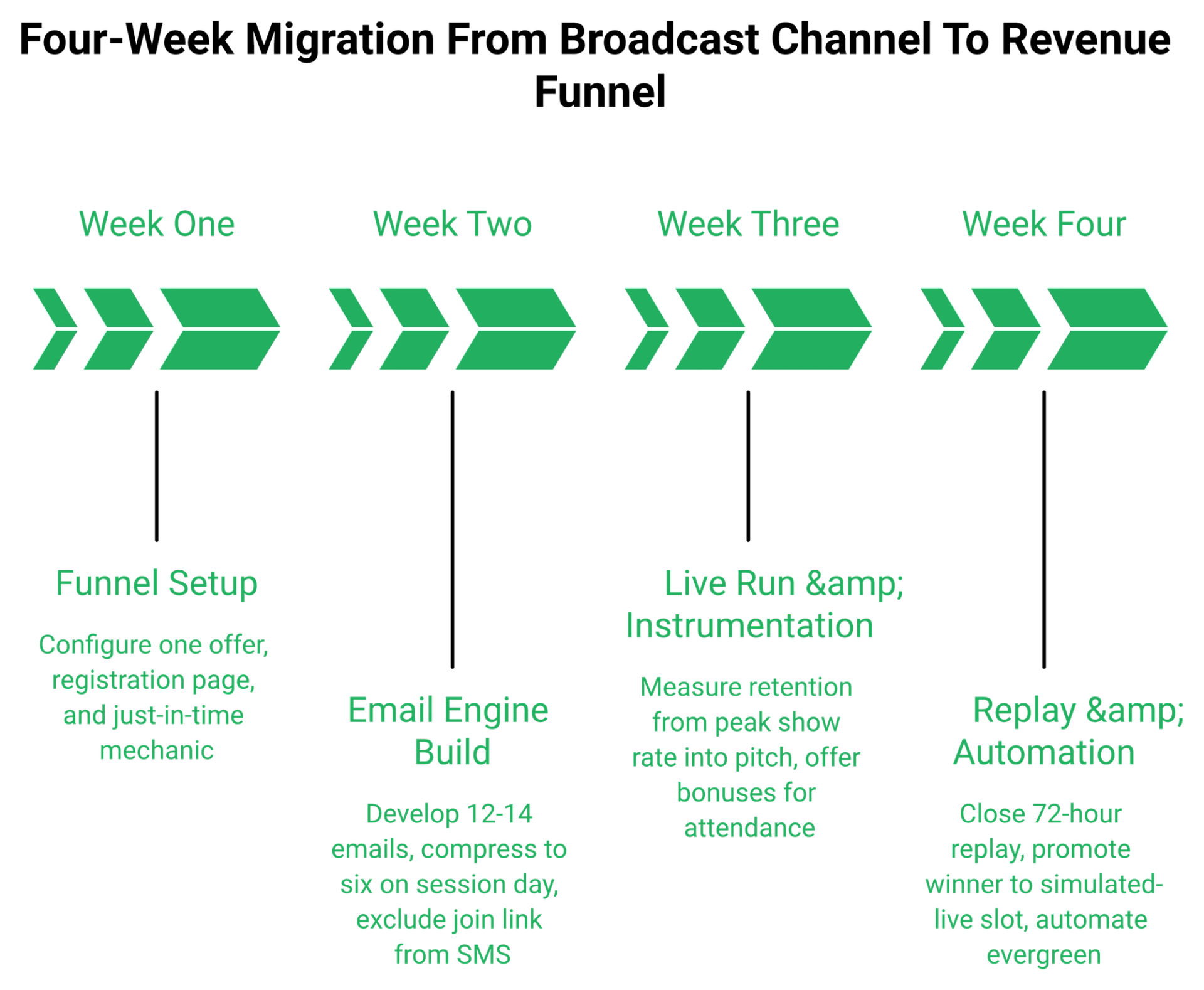
Rebuild one webinar, not your whole stack. Week one, pick a single offer and toggle just-in-time only, meaning the session starts minutes after registration. Week two, build 12 to 14 pre-event emails compressing to six on the day. Week three, run live and measure retention to the pitch. Week four, enforce a 72-hour replay expiry, then automate the winner.
The four-week sequence
Week one is setup, and it should take an afternoon. One offer, one registration page, just-in-time selected and nothing else.
Week two is the email engine. Across 14 days, aim for 12 to 14 messages, then compress to about six on the day of the session. Our webinar marketing automation guide covers the sequencing logic behind that cadence.
⏰ Week three: run it live and instrument it
EasyWebinar measures retention from peak show rate through to the pitch timestamp, which is the number I watch first. Target roughly 80% holding into the offer.
Bait it honestly. Promise bonuses sent right after the session to people who stay through the end.
⏰ Week four: replay discipline, then automation
Give the replay 72 hours, not forever. Two emails on day three: one morning heads-up, and one final notice a few hours before it closes.
Then promote the winning session into a simulated-live evergreen slot. Only after it clears the 10% attendee-to-buyer gate, which is the same threshold we apply across automated webinar software builds.
The two tests worth running first
Test one is your text-message sequence. We found that including the join link in the SMS raised show rate but wrecked booking rate.
The reason, as best we can tell, is device intent. Phone attendees watch, then do not book.
❌ The trap that costs a full launch
One operator I know rebuilt an entire webinar between tests instead of adjusting two specific moments. The new version ran three hours and produced a single sale.
Change the pitch transition. Change the opening. Never both, never the whole deck.
Also resist teaching everything. Giving away the full how is one of the fastest ways to kill conversions, because the audience leaves satisfied instead of motivated.
💰 What this costs to try
EasyWebinar's 7-day full-access trial covers one complete build-and-run cycle, including the live session. That is enough to test the funnel before any annual commitment.
If week one is where you are starting, the only two pages you need next are the plan comparison and the trial signup.
Your Monday move
Run one live webinar this week, then automate the winner
Compare plans from $44/month, or start the 7-day full-access trial and build the funnel end to end before you commit to anything annual.
What I am still sitting with
My open question for the next 18 months is whether cold traffic keeps favouring live sessions as audiences get more automated content. If that holds, the hybrid model wins by default.
I could be wrong about the timing. If you run this 30-day sequence, tell me what your retention-to-pitch number looked like, because that is the metric I trust most.
EasyWebinar's 7-day full-access trial covers one full build-and-run cycle, so you can validate a live session, measure retention to the pitch, and only then commit to an annual plan. Coaches scaling past that first funnel usually move next into a coaching sales funnel built on the same recording.
Frequently Asked Questions

Casey Zeman
Founder of EasyWebinar
About Author
Over the past decade, I've helped thousands of entrepreneurs, coaches, and consultants turn webinars into a predictable, powerful way to grow their audience, build trust, and scale, without the constant hustle. I created EasyWebinar because I couldn't find a system that combined authenticity, engagement, and automation the way I needed. So, I built one.
Related Posts

10 Best Community Engagement Platforms in 2026
Compare the 10 best community engagement platforms in 2026. Course creators, evaluate live hosting, analytics, and replay to pick your winner today.

10 Best Online Coaching Tools in 2026: Live Session Quality, Scheduling, Recording, and Client Engagement Analytics
Compare the 10 best online coaching tools of 2026 on session quality, scheduling, and analytics. Discover the right fit for your coaching revenue model.

10 Best Webinar Hosting Platforms Ranked by Uptime, Streaming Quality & Cost
Compare 10 webinar hosting platforms ranked by uptime, streaming quality, and cost. Discover which tool actually turns attendees into revenue.
Turn every webinar into a revenue stream
Launch your first paid event in just a few clicks - and start monetizing your expertise.
Book a Call