Livestorm Pricing 2026 Breakdown: Plans, Tiers, and Hidden Costs

Casey Zeman
Published on Aug 8, 2026 • 24 min read
TL;DR
- Livestorm bills by attendee credit, not per seat. Credits sell in annual packs at roughly EUR2.50 (about USD3) each, starting near 400 credits for EUR1,000 or USD1,200.
- One credit equals one unique person in one session. Live joins, replay views, and on-demand views all consume credits. No-shows and your own team members do not.
- Business is retired. Only Free, Pro, and Enterprise remain, and Pro bills annually with no monthly option.
- Conflicting third-party prices of USD79 to USD299 exist because legacy active-contact documentation is still published alongside the newer credit model.
- Unused credits expire at period end, and on Pro the room closes to new attendees at quota. Only Enterprise permits overages.
- Past roughly 150 attending humans per year, flat plan pricing usually beats credits, which means better show rates raise a metered invoice.
Q1. How much does Livestorm cost in 2026?
Livestorm bills by attendee credit, not per seat. Credits sell in annual packs at roughly EUR2.50 (about USD3) each. The Pro entry tier is 400 credits for EUR1,000 or USD1,200 per year, scaling to 4,000 credits at EUR8,000 or USD9,600. The free plan includes 30 credits per year with 30-minute events. Pro and Enterprise bill annually only.
I spent six months building a course years ago. It launched to crickets. A webinar was the only thing that ever sold it, which is why I read pricing pages differently now.
The question is never the sticker price. It is what one attending human costs you, and whether that human bought.
💰 The number nobody publishes clearly
Livestorm's own billing documentation is the only place the full ladder appears in both currencies. Directories quote monthly figures that no longer exist on the Pro plan.
That gap matters because you cannot budget against a price nobody agrees on. Your CFO asks one question, and five sources give five answers.
| Annual credits | EUR total | USD total |
|---|---|---|
| 400 | €1,000 | $1,200 |
| 1,000 | €2,400 | $2,900 |
| 1,500 | €3,450 | $4,125 |
| 2,500 | €5,375 | $6,500 |
| 4,000 | €8,000 | $9,600 |
Figures verified against Livestorm's billing documentation in August 2026. Enterprise uses custom credit packages with centralised billing, an assigned CSM, and an SLA.
⚠️ What operators say about the price
Reviewers are consistent on one point. The platform is pleasant to use, and it gets expensive as audiences grow.
"Honestly, Livestorm's pricing feels steep for small teams, and the branding options are pretty limited unless you upgrade."- Ayesha H., Small-Business, 4.0/5, Livestorm G2 - Verified Review
"The steep pricing and restrictive participant limits on its lower-tier plans."- Daniel M., Mid-Market, 4.5/5, Livestorm G2 - Verified Review
Cost complaints are not unique to Livestorm, and I will not pretend otherwise. EasyWebinar carries its own premium-tier gripe on record from a customer who still recommends the platform.
"The only downside is that to have the 'just in time' feature you have to pay a premium that is about double the price of the basic subscription. However, it has been worth it for me to invest in that."- Laura C., 5/5, EasyWebinar G2 - Verified Review
⭐ The only metric worth writing down
Take your annual credit spend. Divide it by the humans who actually showed up and watched. That is your true cost per attendee.
Then divide revenue by the same number. If cost per attendee is climbing while revenue per attendee is flat, your pricing model is fighting your growth.
EasyWebinar prices by plan tier rather than by attendee credit, with entry pricing near USD36 per month, so audience growth does not automatically raise the invoice.
Q2. What is a Livestorm attendee credit and what burns one?
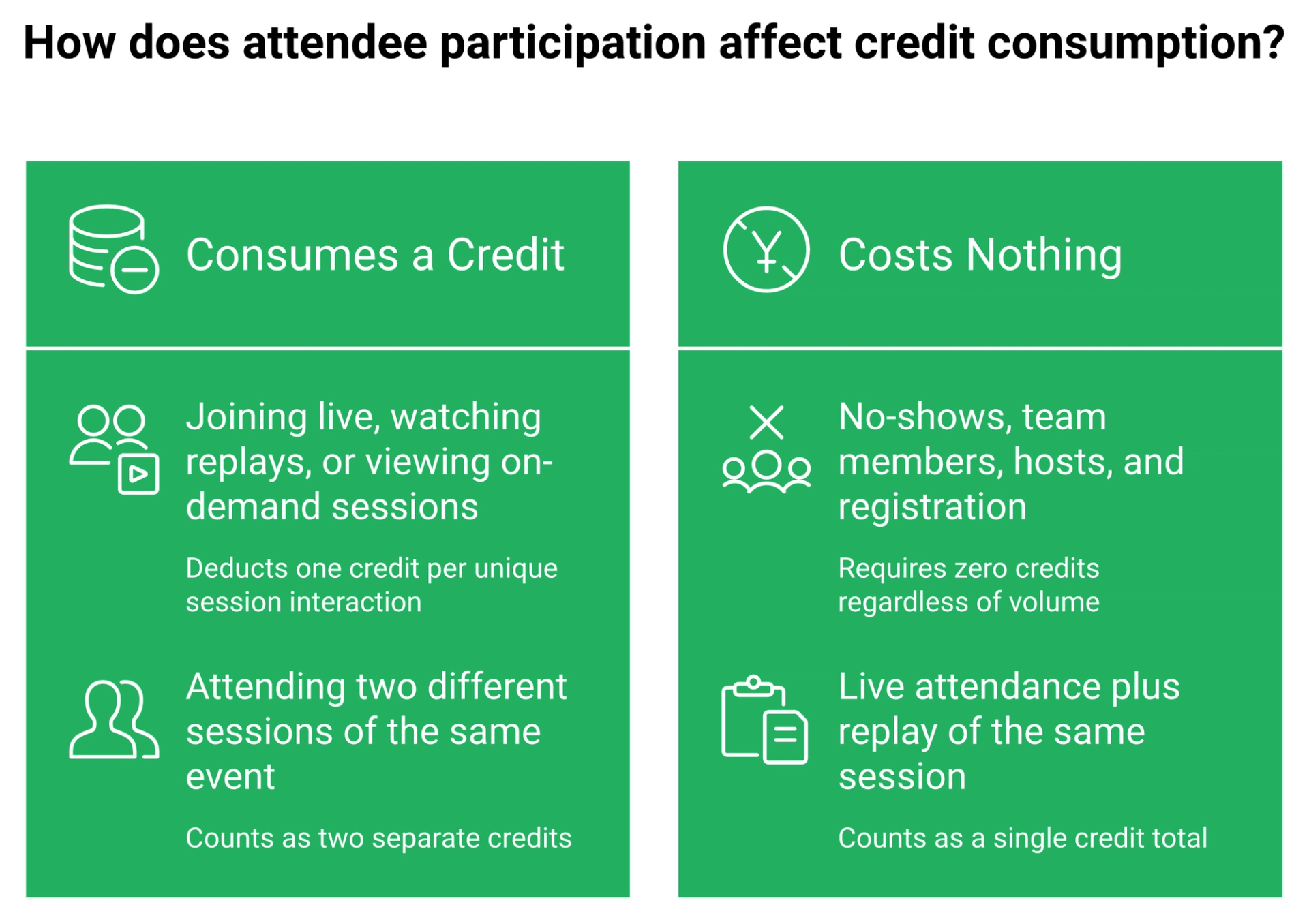
One credit equals one unique attendee in one session. A credit burns when someone joins the room live, watches the replay, or views on demand. Registrants who never join burn nothing, and your own team members are never counted. Attending two sessions of the same event consumes two credits.
A session means one occurrence of a room. An event can hold several sessions, and each one meters separately.
✅ What does and does not consume a credit
The rules are unusually clear once you find them in the billing docs.
- Someone joins live: 1 credit.
- Same person watches that same session's replay later: still 1 credit total.
- Same person joins session one and session two: 2 credits.
- Registers and never shows: 0 credits.
- Your hosts, moderators, and workspace members: 0 credits.
Livestorm's own worked example is blunt. Five sessions with 100 attendees each consumes 500 credits.
⏰ The replay line item people miss
Here is where it gets expensive for anyone running a real follow-up sequence.
I run a three-day replay window on my own launches. Two emails land on day three, one saying the replay comes down today, and a final one saying it comes down in a few hours.
That window is a revenue engine, not a courtesy. When replay viewing consumes credits, every scarcity email you send is also a spend decision.
💸 Do the math on one ordinary webinar
Take 300 registrants at a 40 percent show rate. That is 120 live attendees.
Add 60 people who only catch the replay of that session. Your total is 180 credits from one event.
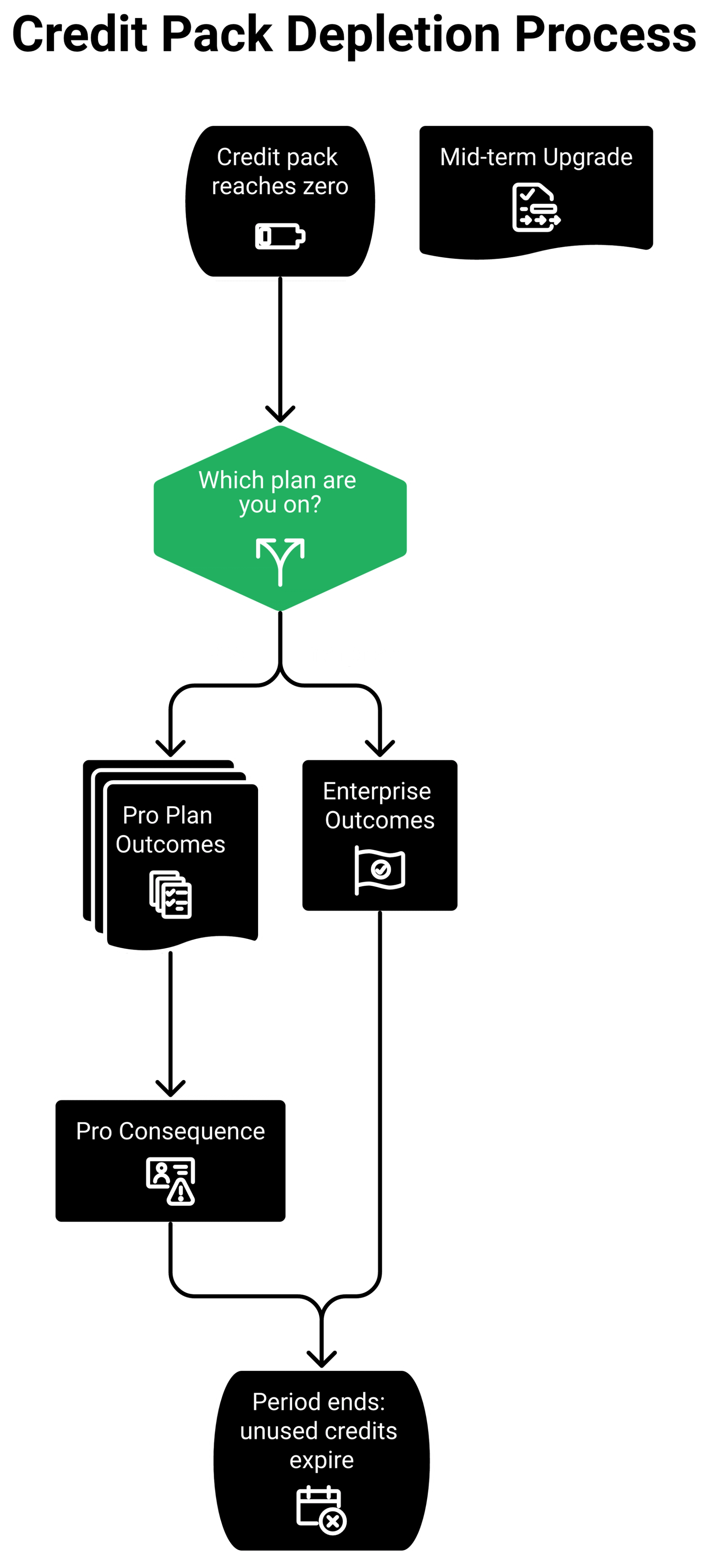
At the 400-credit entry tier, roughly EUR1,000 per year, two webinars of that size consume most of your annual pack. Unused credits do not roll over at the end of a billing period, though remaining credits carry forward when you upgrade mid-term.
⚠️ What happens at zero
When credits run out, new attendees cannot join upcoming sessions. People who already counted as attendees can still return, and registration stays open.
Read that twice. Registration keeps collecting leads while the room stops admitting them.
Enterprise plans allow going beyond quota by default, with overages, and alerts described as less alarming. Pro plans do not get that cushion.
⭐ The operator translation
Credit models reward tight, high-intent audiences. They punish wide-funnel evergreen motion, because every additional viewer is a line item.
EasyWebinar does not meter replay or on-demand viewing as a separate billable event, so extending a replay window stays a marketing decision rather than a budget decision.
Q3. Why do published Livestorm prices contradict each other?
Because two pricing models existed at once. Livestorm still documents a Monthly Active Contacts plan with a migration path, alongside the newer attendee-credit packs. Directories snapshotted whichever model they saw, which is how USD79, USD99, USD110, EUR105, and USD299 all ended up in circulation as current pricing.
The credit documentation settles it. Business is retired, monthly billing is gone, and only Pro and Enterprise remain.
📉 The evidence trail, side by side
| Source | Figure published | Model implied |
|---|---|---|
| Livestorm billing docs | 400 credits at €1,000 / $1,200 per year | Attendee credits, annual only |
| Livestorm legacy docs | 100 to 1,000 monthly active contacts | Monthly Active Contacts |
| Capterra listing | $110/mo, or $88/mo billed annually | Monthly active contacts |
| Third-party cost guides | $99 and $299 monthly | Monthly active contacts |
None of those writers were lying. They were reading a page that was true when they read it.
💰 Why this costs real money
If you cannot state your cost per attendee in one sentence, you are vaporizing money. You will not notice a KPI sitting in code-red territory until the renewal invoice lands.
I have watched marketing directors build a quarterly budget off a directory listing. The gap between USD99 monthly and a USD1,200 annual credit pack is not rounding. It is a different purchase.
⚠️ What buyers report when models shift
Reviewers describe the same pattern from the inside, where capability sits behind tiers and cost climbs with volume.
"Several advanced features are locked behind higher-tier plans, which can start to feel expensive as your event volume increases."- Verified User in Marketing and Advertising, Enterprise, Livestorm G2 - Verified Review
"While Livestorm is easy to use, some advanced customization and branding options are limited unless you are on higher-tier plans."- Kajal K., Mid-Market, Livestorm G2 - Verified Review
✅ Your Monday morning move
Do this before you sign or renew anything.
- Open Account settings, then Billing, and screenshot which model your workspace is on.
- Ask your rep in writing whether your contract is credits or active contacts.
- Ask what happens at quota, and whether overages are permitted on your tier.
- Confirm the renewal date, because credits renew annually and downgrades only apply at period end.
My read right now is that most confusion on this keyword is a documentation artifact, not a bait tactic. I could be reading that too generously.
EasyWebinar publishes one plan ladder instead of two parallel billing models, which is why a quote and a renewal invoice tend to match.
Q4. What do the Free, Pro, Business and Enterprise tiers include?
Business no longer exists. Livestorm's billing documentation confirms the only current plans are Free, Pro, and Enterprise. Free gives 30 attendee credits per year, 30-minute maximum event duration, 10 events, and 20 sessions per event. Pro adds annual credit packs with unlimited team members and events. Enterprise adds custom credit packages, centralised billing, advanced analytics, a dedicated CSM, and an SLA.
If a comparison article still shows you a four-column Business table, it is quoting a retired page.
📋 What each tier actually gates
| Item | Free | Pro | Enterprise |
|---|---|---|---|
| Attendee credits | 30 per year | Annual packs, 400 to 4,000 | Custom packages |
| Event duration | 30 minutes max | Standard limits apply | Scalability and governance |
| Events | 10 per organization | Unlimited | Unlimited |
| Team members | Limited evaluation use | Unlimited | Unlimited |
| Automated actions | 10 per event | Standard integrations | Advanced controls |
| Support | None specified | Email and chat | Dedicated CSM plus SLA |
| Over-quota behaviour | Room closes to new attendees | Room closes to new attendees | Overages permitted |
| Billing | Free | Annual only | Annual, centralised |
Source: Livestorm billing documentation, verified August 2026. Premium features are disabled on Free, which is positioned explicitly for evaluation.
⚠️ The gate that surprises people
Capacity enforcement is the one operators feel on the day of the event.
"If a webinar exceeds its capacity, attendees may be turned away without the host receiving any warning or notification."- Dusiant S., Senior QA Analyst, Mid-Market, Livestorm G2 - Verified Review
That is a revenue event, not a support ticket. A turned-away attendee on a sales webinar is a lost close.
❌ The branding ceiling
Design flexibility is the second recurring gate in the review corpus. Layouts are template-locked, and brand controls open up on higher tiers.
"The branding customization options are pretty limited. I can't tweak the event page or email templates to fully match my company's brand colors and design style."- Gonzalez D., Livestorm G2 - Verified Review
I will hold my usual contrarian line here. Every template I have ever shipped looked ugly to me, and every one of them was done.
What matters is the presentation and the offer, not the font. Upgrading a tier to buy polish is usually the most expensive procrastination available.
To be fair, customization complaints are not a Livestorm-only pattern. EasyWebinar has the same critique on record from a long-term customer.
"One area where we've experienced challenges is with the customization options for webinar landing pages. Sometimes it feels a bit limited in terms of design flexibility."- Jo K., 5/5, EasyWebinar G2 - Verified Review
✅ How to read a tier table before you buy
Ignore the feature checklist first. Find the three numbers that govern your event: attendee ceiling, session duration, and what happens at quota.
Everything else is negotiable. Those three decide whether Wednesday at 2pm goes smoothly.
EasyWebinar includes branded registration and webinar pages on paid plans rather than gating custom branding behind an enterprise quote.
Q5. What will a 400-person or 5,000-attendee webinar actually cost you?
Credits are the meter, so volume sets the bill. Roughly 400 attendee credits runs about EUR1,000 or USD1,200 per year. One fully attended 400-person webinar can consume that entry pack outright. A 10,000-registrant summit at a 50 percent show rate needs around 5,000 credits, which sits above the published 4,000-credit ceiling and moves you to a custom Enterprise quote.
Method and assumptions
Model credits off attendance, never off registrations. I plan against a 30 percent registration-to-signup rate on cold paid traffic.
For show rate, I use 10 to 15 percent as the absolute floor on an ice-cold audience. Warm lists run far higher, often 35 to 45 percent.
📊 Three scenarios, math visible
Each row assumes one credit per unique live attendee, plus separate credits for people who only watch a later session.
| Scenario | Volume assumption | Annual credits | Pack needed |
|---|---|---|---|
| Solo coach, 1 webinar/month | 200 registrants, 35% show, 30 replay-only | ~1,200 | 1,500 credits, €3,450 / $4,125 |
| Marketing team, 2 sessions/month | 150 live plus 50 replay-only monthly | ~2,400 | 2,500 credits, €5,375 / $6,500 |
| Virtual summit, one event | 10,000 registrants, 50% show | ~5,000 | Above 4,000, custom quote |
Third-party benchmarks put large-event cost at roughly USD2.50 to USD3.00 per actual attendee, which matches those packs closely.
💸 Where the model turns against you
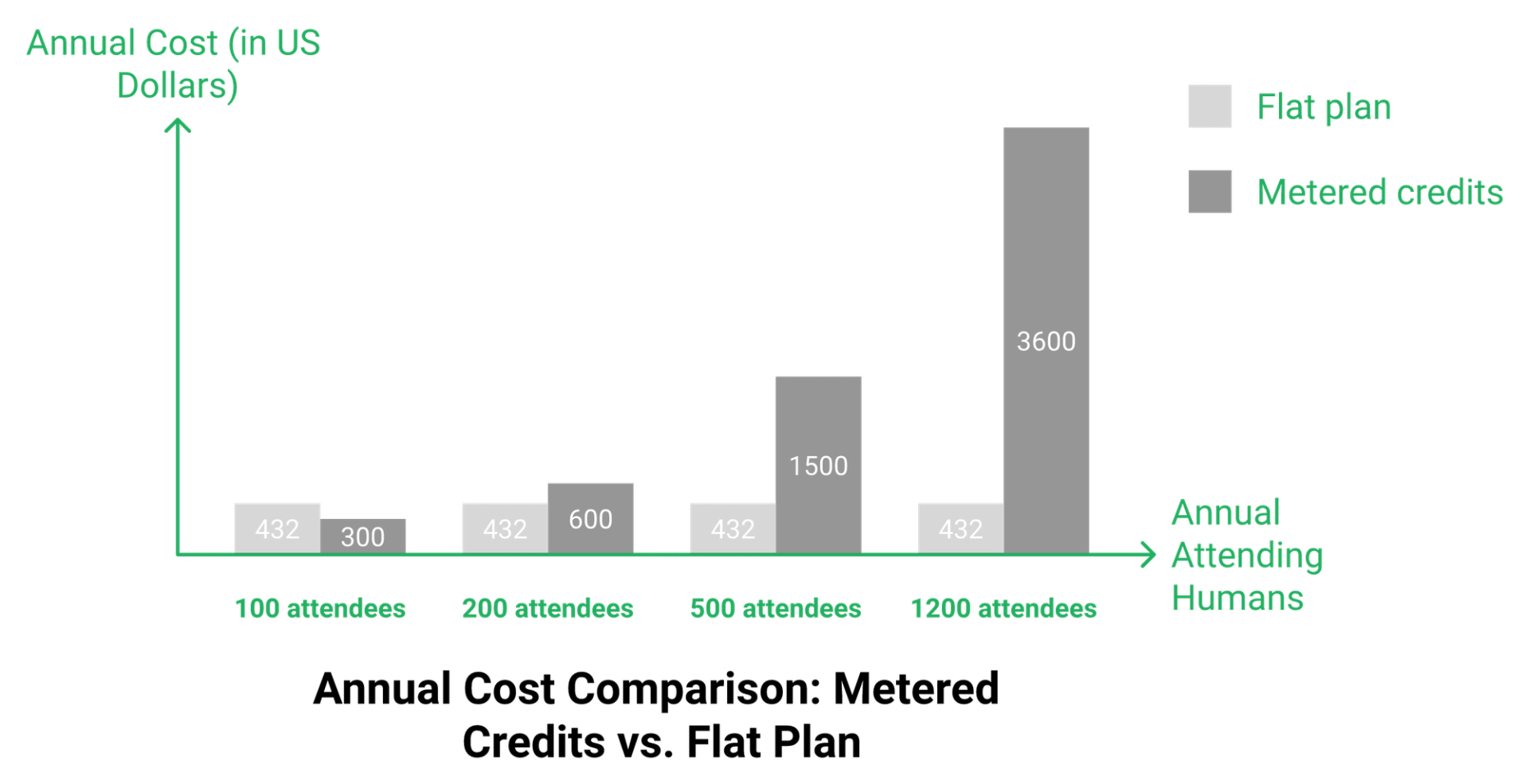
Here is the number most buyers never calculate. At USD3 per credit, a USD432 annual flat plan buys the equivalent of about 144 attendees.
Cross roughly 150 attending humans per year, and flat pricing starts winning on pure cost. Below that, credits can genuinely be cheaper.
That threshold is embarrassingly low. One decent monthly webinar clears it by February.
⚠️ Two mechanics that break the forecast
Unused credits do not roll over at the end of a billing period. A quiet quarter is money burned, not banked.
When credits run out on Pro, new attendees cannot join upcoming sessions. Registration keeps running while the room stops admitting people.
Only Enterprise allows going beyond quota with overages by default. On Pro, your ceiling is a hard wall on a Wednesday afternoon.
⏰ What success does to a credit invoice
This is the part that gets skipped in every pricing roundup I read. Improving your show rate raises your bill.
K21 Academy, an EasyWebinar customer, reported a 47 percent show-up rate alongside 5x registrant growth after restructuring their webinar funnel. Run those numbers through a per-attendee meter and the invoice roughly multiplies with the win.
My read is that credit models quietly tax marketing performance. I could be reading it too strongly for smaller operators who run four events a year.
✅ Do this before you sign
Pull your last twelve months of attendance from your current tool. Not registrations, actual joins.
Add replay-only viewers as a separate count. Multiply the total by USD3, then compare it against an annual flat plan.
EasyWebinar customer K21 Academy reported a 47 percent show-up rate and 5x registrant growth, exactly the success pattern that inflates a credit-metered invoice while a plan-based invoice stays flat.
Q6. Does Livestorm charge you for no-shows, and why do reviewers say they pay twice?
No. Livestorm's own documentation states that registrants who never attend are not counted, and team members are never billed. A competitor comparison page claiming 200 registrations cost about EUR150 monthly is describing the older active-contact model, not credits. The real friction reviewers report is stairstep batches and attendance straddling billing periods.
Where the myth came from
The claim is not invented. It was true under Monthly Active Contacts, where a registered contact counted whether or not they showed up.
That model still has live documentation and a migration path. So the rumour keeps half-surviving on comparison pages written years apart.
❌ The correction, in one line
Registration is free. Attendance is metered. A no-show costs nothing under credits.
If a page tells you otherwise in 2026, it is quoting a retired billing system.
⚠️ The friction that is real
Batch sizing, not no-shows, is the honest complaint. Operators with mid-sized, uneven usage feel it most.
"Stairstep pricing by batch is not flexible enough for medium-sized usage (a few hundred attendees per month). Because of the way registration and viewing spans billing periods, I feel like I'm paying twice."- Livestorm reviewer, Livestorm G2 - Verified Review
"The steep pricing and restrictive participant limits on its lower-tier plans."- Daniel M., Mid-Market, 4.5/5, Livestorm G2 - Verified Review
Billing-boundary pain is a category problem, not a Livestorm problem. Demio drew a harsher version of it over data access after cancellation.
"After canceling, I was shocked to find out I couldn't export the list unless I subscribed again. I paid for the service and hosted the event, but they block access to my own data unless I keep paying."- Sheida M., 0/5, Demio G2 - Verified Review
💰 A word on negotiating price
People who demand the same product for less are not negotiating. They are asking you to work for free.
If you want to pay less now, ask for a payment plan. If you want to pay less overall, accept a smaller feature set.
That logic cuts both ways. Choosing a platform on a rumour you never checked against the vendor's own docs is the buyer-side version of the same mistake.
✅ Four things to confirm in writing
Ask your rep these before renewal, and keep the reply.
- Does my contract meter attendees or active contacts?
- Do unused credits expire at period end? (Under credits, yes.)
- Are overages permitted on my tier, or does the room close?
- Can I mix live and replay viewing in one session without double counting?
EasyWebinar bills on plan tier rather than attendance batches, so a registration spike straddling two billing periods does not create a surprise line item.
Q7. What hidden costs sit outside Livestorm's plan fee?
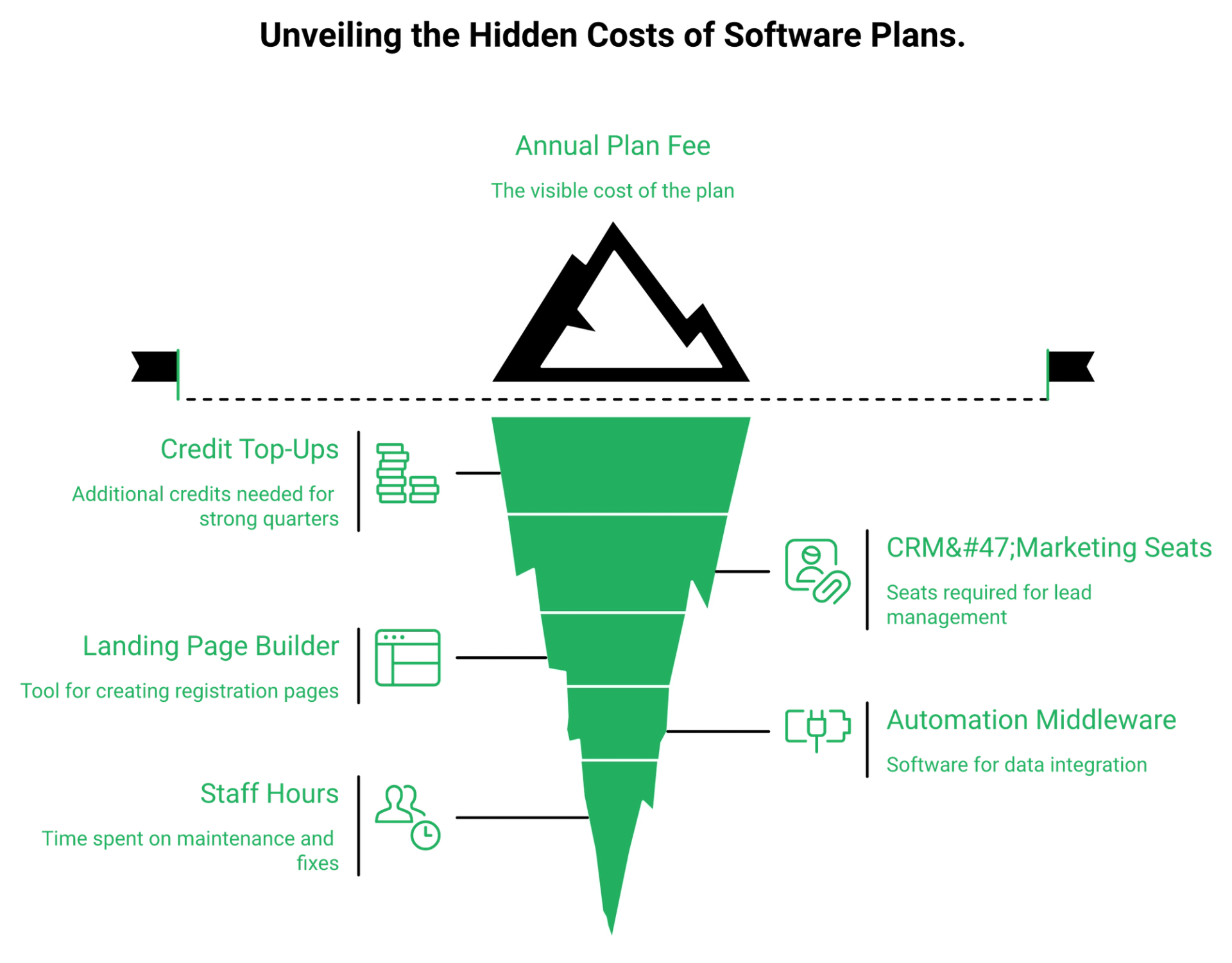
The plan fee is a floor, not a total. Real budgets add mid-year credit top-ups, CRM and marketing-automation seats to route leads, a page builder for registration funnels, and middleware to connect them. Comparable stitched stacks run USD600 to USD1,000 or more per month before the webinar room itself.
The cost lines nobody puts on the pricing page
Write these down before you compare any two platforms.
- Credit top-ups when a good quarter blows through your pack.
- CRM or marketing automation seats to work the leads.
- A landing page builder for registration and thank-you pages.
- Automation middleware to move data between all of it.
- Staff hours spent maintaining the connections.
💸 The Zapier bill that nearly killed a launch
Here is the failure I think about most. An operator's automation account hit its monthly task limit before a large webinar.
They caught it four hours before going live. Salespeople were dialing leads that had stopped syncing, with nobody sure what was happening.
Nothing on any pricing page predicted that. The invoice you can see is rarely the expensive one.
⚠️ What buyers say about cost at scale
The pattern across reviews is consistent. Capability sits behind tiers, and volume raises the bill.
"Several advanced features are locked behind higher-tier plans, which can start to feel expensive as your event volume increases."- Verified User in Marketing and Advertising, Enterprise, Livestorm G2 - Verified Review
Integration gaps create the same tax on our side of the fence, and I will not hide it. Two EasyWebinar customers name it directly.
"Integration is somewhat limited, but if you are comfortable with Zapier you can easily update that."- Verified User in Professional Training & Coaching, 4.5/5, EasyWebinar G2 - Verified Review
"I do use other email systems to send post-webinar email sequences because I can't track open and click rates on EasyWebinar."- Eliza W., 4.5/5, EasyWebinar G2 - Verified Review
📉 The tube map problem
A funnel spread across six tools starts looking like a subway map. Every interchange is a place where links break and emails stop firing.
Each connection also has its own plan limit and its own renewal date. That is where money and show rates quietly die.
✅ How to price the whole system
Add the webinar cost, the page builder, the CRM, the middleware, and the email tool. Divide by attendees who actually showed.
That single number is comparable across vendors. Nothing else is.
EasyWebinar includes a built-in sales CRM with auto-dialer and lead scoring plus native registration pages, removing the middleware layer where a plan limit can silently break a launch.
Q8. Is Livestorm's pricing model right for evergreen and automated funnels?
It depends on whether revenue comes from live or automated sessions. Credits suit occasional live events. Always-on funnels multiply unique attendees across many sessions, and on-demand or replay viewing consumes credits too, so the meter never stops. Operators genuinely disagree about automation itself, which makes this a fit question rather than a verdict.
The cost mechanic that decides it
Evergreen means many sessions. Credits bill per unique attendee per session.
An always-on funnel running daily sessions therefore accumulates credits every single day. There is no version of that math where volume gets cheaper.
❌ The case against automated webinars right now
Some heavy paid-traffic operators report automated sessions underperforming badly against live on cold audiences. One media buyer running large budgets says live converts far harder, and that automated formats have been dulled.
I take that seriously because it comes from spend, not theory. My read is that cold traffic still wants a human in the room.
✅ The case for 24/7 evergreen
The counter-argument is just as grounded. Live workshops carry poor show-up rates and demand your calendar forever.
Evergreen runs while you sleep, which is the entire point for a solo operator. A coach with a warm list often earns more from automation than from another Tuesday night live.
Both camps are describing real results with different traffic. That is why I refuse to give you one answer.
⏰ The fit condition
Use the time-versus-money test. If you have more time than money, run live and use human effort as your capital.
If you have more money than time, graduate to just-in-time sessions. Just-in-time means a registrant sees a session starting within minutes, so intent never cools.
| Situation | Better format | Better pricing model |
|---|---|---|
| 4 to 6 live events a year, warm list | Live | Credits can work |
| Weekly live plus replay window | Live plus replay | Flat plan usually cheaper |
| Daily just-in-time sessions | Evergreen automation | Flat plan, clearly |
| One large annual summit | Live, high volume | Custom Enterprise quote |
⚠️ The integrity rule I will not bend
Never tell an audience a recorded session is live. Never pretend a live one is recorded either.
That rule came from a real moment. Anyone can walk behind you undressed, or a kid can throw ketchup at your face mid-presentation.
Automation that mimics the live experience honestly solves that. Automation that lies to attendees eventually costs you the list.
💰 What to test first
Nail the webinar live before you automate it. You cannot automate a presentation that has never converted.
Once it converts twice live, then build the evergreen version. Automating a broken pitch just scales the loss.
EasyWebinar runs live, simulive, automated, and just-in-time evergreen webinars on the same plan, so a 24/7 funnel does not compound a per-attendee meter.
Q9. How does Livestorm pricing compare to EasyWebinar, Demio and Zoom?
Livestorm meters attendees. Most rivals charge per host. EasyWebinar starts near USD36 per month with automation and a native CRM included. Demio runs roughly USD42 to USD45 monthly billed annually and scales by room size, reported near USD219 against Livestorm's USD289-plus at 500 attendees. Zoom sells webinar capacity as a paid add-on to a meetings license.
The structural difference that decides the bill
One model charges for the room. The other charges for the humans inside it.
That is not a small distinction. It determines whether your invoice grows when your marketing works.
💰 Cost at three audience sizes
Figures assume monthly attending humans, annualised, using published pricing and credit packs. Custom means the volume exceeds published tiers.
| Platform | 100 attendees/mo | 500 attendees/mo | 3,000 attendees/mo |
|---|---|---|---|
| EasyWebinar | From ~$36/mo, plan-based | Plan-based, CRM included | Higher tier, plan-based |
| Demio | ~$42 to $45/mo annual | ~$219/mo reported | ~$734/mo reported |
| Livestorm | ~$344/mo equivalent (1,500-credit pack) | Above published packs, custom | Custom Enterprise quote |
| Zoom | Webinar add-on on top of license | Add-on tier by capacity | Add-on tier by capacity |
Livestorm columns convert the annual credit packs into a monthly equivalent, since Pro bills annually only.
⭐ Who each one actually fits
Zoom earns its reputation on familiarity. Attendees already have it installed, and that removes friction on the day.
"The pricing options of the product are somehow limited which is inconvenient for huge webinars."- Hetvi B., 3.5/5, Zoom Events and Webinars G2 - Verified Review
Demio wins on a clean room and fast setup. It stops short on integrations for some stacks.
"It didn't fully integrate with my CRM (Highlevel), and the replay didn't show the live polls and CTAs."- Ivanhoe S., 4/5, Demio G2 - Verified Review
Livestorm suits polished, compliance-sensitive live events with unlimited internal seats. The cost pressure shows up as volume climbs.
"Honestly, Livestorm's pricing feels steep for small teams, and the branding options are pretty limited unless you upgrade."- Ayesha H., Small-Business, 4.0/5, Livestorm G2 - Verified Review
⚠️ Where I will grant the critique
Be cautious of any tool claiming to be more all-in-one than the last one. When a platform says it is your community, your CRM, and your email service, the depth usually suffers everywhere.
That warning is fair, and I am not going to dodge it. Breadth only pays when each module is deep enough to carry revenue on its own. If you want the full feature-by-feature view, compare webinar platforms side by side before you shortlist.
❌ The limits of this table
Enterprise pricing on every platform here is quoted, not published. Nobody outside the contract can verify those numbers, including me.
Treat published figures as a starting position. Your actual cost depends on volume, term length, and what you negotiate. Independent webinar platform reviews are useful for sanity-checking a quote.
EasyWebinar leads this table because it is the only option here bundling the webinar room, the sales CRM, and the funnel builder into one plan-priced line item.
So the open question is simple: what would your audience actually cost on a flat plan instead of a meter?
Run your own numbers
Metered credits or a flat plan, which is cheaper for your audience?
Put your real show rate and monthly attendee count against a plan that does not charge per head.
See EasyWebinar plans and pricing
Q10. Who should buy Livestorm and who should switch?
Buy Livestorm if you run a handful of large, GDPR-sensitive live events each year and want a browser-based room with unlimited team seats. Switch if you run always-on evergreen funnels, need a native CRM, or cannot accept a bill that rises with your own marketing success. EasyWebinar prices by plan tier from around USD36 per month, so attendance growth does not move the invoice.
The two clear verdicts
Low-frequency, high-polish, compliance-heavy live events fit the credit model. You buy a pack, you run four events, you are done.
High-frequency or automated selling does not fit it. Every extra viewer is a line item, and unused credits expire at period end.
💰 The audit to run this week
Do this before you sign or renew anything. It takes about thirty minutes.
- Export twelve months of attendance data, actual joins and not registrations.
- Add replay-only and on-demand viewers as a separate count.
- Multiply the combined total by USD3 to price the credits.
- Compare that figure against an annual flat plan at your volume.
- Ask your rep in writing whether your contract meters attendees or active contacts.
- Confirm what happens at quota, since only Enterprise permits overages.
⭐ Scale is not the same as seats
My first real webinar had a tiny room. It changed the entire trajectory of my business anyway.
Paying for capacity you will never fill is the most common budgeting mistake I see. Simple scales. Fancy fails. Most teams do better on an affordable webinar platform sized to real attendance.
Operators reviewing platforms say the same thing in plainer language.
"It seems such a reasonable price for all the features you receive."- Pat G., 5/5, EasyWebinar G2 - Verified Review
"We needed a solution that we could just pick up and put down as and when we needed it, and this is perfect for one off webinars without having to be locked into a contract."- Annette S., 5/5, EasyWebinar G2 - Verified Review
❌ When a webinar is the wrong answer entirely
I will say the thing that costs me sales. Some businesses should not buy any webinar platform yet.
One-off internal team meetings do not need one. Neither do offers priced under about USD200, where the math rarely justifies the build. More customer reviews will tell you quickly whether your use case matches.
⏰ What I think shifts next
My read right now is that per-attendee pricing gets harder to defend as AI lowers the cost of producing sessions. When building a funnel with an AI funnel builder takes ten minutes, charging per viewer starts to look like a tax on volume.
I could be wrong about the timeline. If credit models add rollover and monthly billing, the objection largely disappears.
What I would genuinely like to know is your number. Pull your last twelve months of attendance, run both models, and tell me which way it lands.
EasyWebinar offers a low-cost trial so you can run one real webinar and compare an actual invoice against your Livestorm credit forecast before committing to a year.
Before you renew
Run one real webinar on a flat plan and compare the invoice
Test your next session end to end, including registration pages, reminders, replay, and follow-up, without a per-attendee meter running.
See how automated webinars work
Frequently Asked Questions

Casey Zeman
Founder of EasyWebinar
About Author
Over the past decade, I've helped thousands of entrepreneurs, coaches, and consultants turn webinars into a predictable, powerful way to grow their audience, build trust, and scale, without the constant hustle. I created EasyWebinar because I couldn't find a system that combined authenticity, engagement, and automation the way I needed. So, I built one.
Related Posts

10 Best Community Engagement Platforms in 2026
Compare the 10 best community engagement platforms in 2026. Course creators, evaluate live hosting, analytics, and replay to pick your winner today.

10 Best Online Coaching Tools in 2026: Live Session Quality, Scheduling, Recording, and Client Engagement Analytics
Compare the 10 best online coaching tools of 2026 on session quality, scheduling, and analytics. Discover the right fit for your coaching revenue model.

10 Best Webinar Hosting Platforms Ranked by Uptime, Streaming Quality & Cost
Compare 10 webinar hosting platforms ranked by uptime, streaming quality, and cost. Discover which tool actually turns attendees into revenue.
Turn every webinar into a revenue stream
Launch your first paid event in just a few clicks - and start monetizing your expertise.
Book a Call