EasyWebinar vs ON24: Pricing, Automation & Analytics Depth Compared

Casey Zeman
Published on Aug 28, 2026 • 35 min read

TL;DR
- ON24 does not publish pricing. Verified buyer data puts contracts between $25,000 and $150,000 a year, median near $39,350, plus $5,000 to $25,000 onboarding.
- EasyWebinar publishes plans openly and includes a 7 day trial on every plan, so the same 24 webinar year lands in a different order of magnitude.
- ON24 is built as a produced broadcast console. Direct response webinars need a gatekeeper sequence: registration page, urgency scheduling, timed offer, checkout, behavioral follow up.
- Automated webinars is an umbrella with exactly two tiers, Simulated Live and Evergreen. Just in time scheduling, which starts a session minutes after registration, is Evergreen only.
- ON24 wins on reporting depth but G2 reviewers cite export and customization limits. No enterprise webcasting console ships a native cart.
- Cvent closed its ON24 acquisition on April 1, 2026, so ask for roadmap, support continuity, and renewal price protection in writing.
Q1. EasyWebinar vs ON24: which one should you actually buy?
Buy ON24 if you run 12 to 50 webinars a year as a corporate marketing team, need Salesforce or Marketo attribution, and hold a five figure annual budget. EasyWebinar fits operators selling a high ticket offer to cold traffic, because registration pages, evergreen scheduling, in webinar checkout, and behavior based follow up sit inside one account. ON24 broadcasts. EasyWebinar closes.
The scene behind this search
A training lead sent me her vendor spreadsheet at 11pm on a Sunday. Nine tabs, twelve columns, and one empty cell where the ON24 annual price should have been.
She was not confused about features. She was scared of signing a contract that would eat her whole program budget before a single registrant converted.
⭐ The question under the spreadsheet
The real question is never "which tool has more features." It is whether an expensive corporate webcasting license will scale a predictable sales engine, or quietly drain the ad budget funding it.
Simple scales. Fancy fails. I have watched that pattern hold across 100+ webinars I have run or consulted on, and it is the same pattern behind every webinar funnel that survives contact with paid traffic.
The verdict, split by who you are
ON24 earns its price when webinars are a demand generation channel inside a larger enterprise motion. Attribution, content hubs, and program level reporting are genuinely strong there.
EasyWebinar earns its place when the webinar itself is the sales floor. Registration, urgency scheduling, timed offers, and checkout are all one workflow, not five vendors, which is the whole premise of a unified webinar platform.
💰 The seven row decision table
| Criteria | ON24 | EasyWebinar |
|---|---|---|
| Pricing model | Quote only, annual contract | Published self serve plans |
| Published price | None public | Public tiers, listed on site |
| Free trial | No free plan, no standard trial | 7 day trial on every plan |
| Webinar formats | Live, simulive, on demand | Live, Simulated Live, Evergreen |
| Native checkout | Not available | Built in checkout and offer overlays |
| Analytics export | Deep reporting, export limits reported | Attendee level data, CSV export |
| Contract term | Annual minimum | Monthly or annual |
Where each one is the wrong buy
❌ When ON24 is the wrong buy
If you run four webinars a year selling a $997 program, the license floor outruns the pipeline. Verified buyer data places ON24 contracts between $25,000 and $150,000 a year, with a median near $39,350.
That math does not survive a small program, no matter how good the reporting is. Teams at that volume are usually better served by affordable webinar platforms with published pricing.
⚠️ When EasyWebinar is the wrong buy
EasyWebinar is not the answer for one off internal team meetings, or for pure live only enterprise events with no funnel intent behind them.
It is also unnecessary below roughly $200 in product price. At that price a lead magnet or a sales page does the job, and a webinar is not mathematically required.
What I would check before signing either one
My read right now is that most buyers pick on demo polish and regret it on renewal. EasyWebinar's client work keeps surfacing the same thing: the winning platform is the one that shortens the distance between a registration and a payment.
I could be reading that too strongly. It is what shows up in the funnels I audit this quarter.
EasyWebinar publishes its tiers, includes a 7 day trial on every plan, and ships live, Simulated Live, and Evergreen formats plus in webinar checkout inside one subscription, which is why the cost comparison in the next section is arithmetic rather than a quote request.
Q2. What does ON24 actually cost per year versus EasyWebinar?
ON24 does not publish pricing. Verified buyer data puts contracts between $25,000 and $150,000 per year, with a median near $39,350 across 77 tracked purchases, plus $5,000 to $25,000 in onboarding. EasyWebinar publishes its plans openly and bills per account, not per broadcast, so the same 24 webinar year lands in a different order of magnitude.
Why every comparison page fails this question
Open any directory comparison for these two platforms. The ON24 pricing cell says "pricing not provided by vendor," and the article moves on.
That empty cell is the entire buying decision. Leaving it blank is not neutrality; it is an unfinished job.
💸 Do the worst case math before the demo
Jeremy Haynes puts it bluntly: before you spend money, "figure out how bad the stats can be before you actually start losing money."
Most buyers never model that. Two inputs decide everything: a $10 cost per lead baseline, and a 10% attendee to buyer target.
The ON24 cost structure, tier by tier
| Line item | Reported range |
|---|---|
| Essentials tier | $25,000 to $50,000 per year |
| Standard tier | $50,000 to $90,000 per year |
| Advanced tier | $80,000 to $150,000+ per year |
| Onboarding and implementation | $5,000 to $25,000 |
| Listed entry point | From $10,000 per year |
| Median contract paid | $39,350 per year |
Those are buyer reported figures, not vendor claims. Treat the median as your realistic planning number, not the floor.
⏰ The pricing detail buyers miss
Session overages get billed. One verified ON24 reviewer on G2 described it plainly.
"Everything is an upcharge... If you go over your session by just a few minutes, they charge you several hundred dollars."- Verified reviewer, ON24 G2 - Verified Review
That is a program level risk, not a rounding error. Build a buffer into every session estimate.
The same program, priced both ways
EasyWebinar publishes three self serve tiers with automated and evergreen formats available above the entry plan, billed per account. Verify the exact figures on the live webinar pricing page on the day you buy, since plans change.
The structural difference is the point. One platform prices your whole year in the low hundreds of dollars per month. The other prices your year in the tens of thousands.
✅ What the ON24 premium genuinely buys
You are not paying that gap for nothing. ON24 delivers program level attribution, content hub infrastructure, and enterprise reporting depth that self serve tools do not attempt.
If marketing ops needs pipeline attribution inside Salesforce, that premium is defensible. If nobody will ever open those reports, it is a subscription to unused capability.
My honest hedge on this section
EasyWebinar's read is that the standard advice gets license cost backwards. Buyers negotiate hard on the platform, then underfund the traffic that decides whether the platform ever pays for itself.
I have made that mistake myself, early, with tools nobody needed.
EasyWebinar prices per account with automated and evergreen formats included above the entry tier, which keeps the license a rounding error against the ad spend it has to survive.
Q3. How fast can you actually start, from trial to first webinar?
ON24 has no free plan and no standard free trial. Access runs through a sales quote, an annual minimum contract, and a paid implementation typically costing $5,000 to $25,000. EasyWebinar offers a 7 day trial on every plan, with annual billing that includes two free months. Realistically, that is weeks of procurement against an afternoon of setup.
Your launch date is fixed, procurement is not
I built a YouTube course once and spent six months on it. By launch, nobody bought. Crickets.
That taught me something about tooling, not just courses. Long setup cycles kill the testing that finds the offer that actually converts.
⏰ The two timelines side by side
| Stage | ON24 path | EasyWebinar path |
|---|---|---|
| Access | Demo request, then quote | Self serve 7 day trial |
| Commercials | Annual minimum contract | Monthly or annual, no minimum term |
| Security review | Required for enterprise procurement | Documentation available on request |
| Build | Paid onboarding engagement | AI assisted funnel build in account |
| First session | Typically weeks out | Same week, often same day |
What operators report about the first week
EasyWebinar's onboarding is where reviewers get specific, and they are not all glowing. Two verified accounts from the same quarter show both sides.
"During the trial period, I completed 2 webinars and learned my way about the backend of the system. It's user-friendly and had everything that I needed for integration with my CRM."- Micaela S. B., EasyWebinar G2 - Verified Review
"I love how easy to use EasyWebinar is. It didn't take long to get set-up. I'm going live with my first webinar in just a few hours."- Verified User in Photography, EasyWebinar G2 - Verified Review
⚠️ The honest friction point
Setup is not frictionless, and pretending otherwise would be dishonest.
"The biggest challenge is around setting up automated webinars, and needing the presentation uploaded first in order to set it up... Would love to be able to add the video later!"- Ash A., EasyWebinar G2 - Verified Review
On the enterprise side, onboarding friction shows up differently. ON24 holds 4.3 out of 5 across roughly 1,215 G2 reviews, with a steep learning curve for guest presenters cited in 22 reviews and onboarding difficulty in 10.
✅ Three questions that compress the ON24 cycle
Ask them on the first call, before the deck starts.
- What is the earliest broadcast date if I sign this week, including implementation?
- Is onboarding fixed scope or hourly, and what is excluded?
- What happens commercially if my program shrinks in year two?
What I watch during any trial
EasyWebinar's client engagements keep showing one predictor of success: whether an operator publishes a real registration page inside the first week, or only clicks around the dashboard. The teams that ship fast usually start from proven webinar landing page examples that convert instead of designing from scratch.
The dashboard tourists churn. The publishers stay.
EasyWebinar's AI webinar builder generates the script, pages, reminder emails, polls, and offers from a short question flow, which is why a 7 day window is long enough to publish a working funnel rather than just a test event.
Q4. Why does enterprise webcasting struggle to convert cold ad traffic?
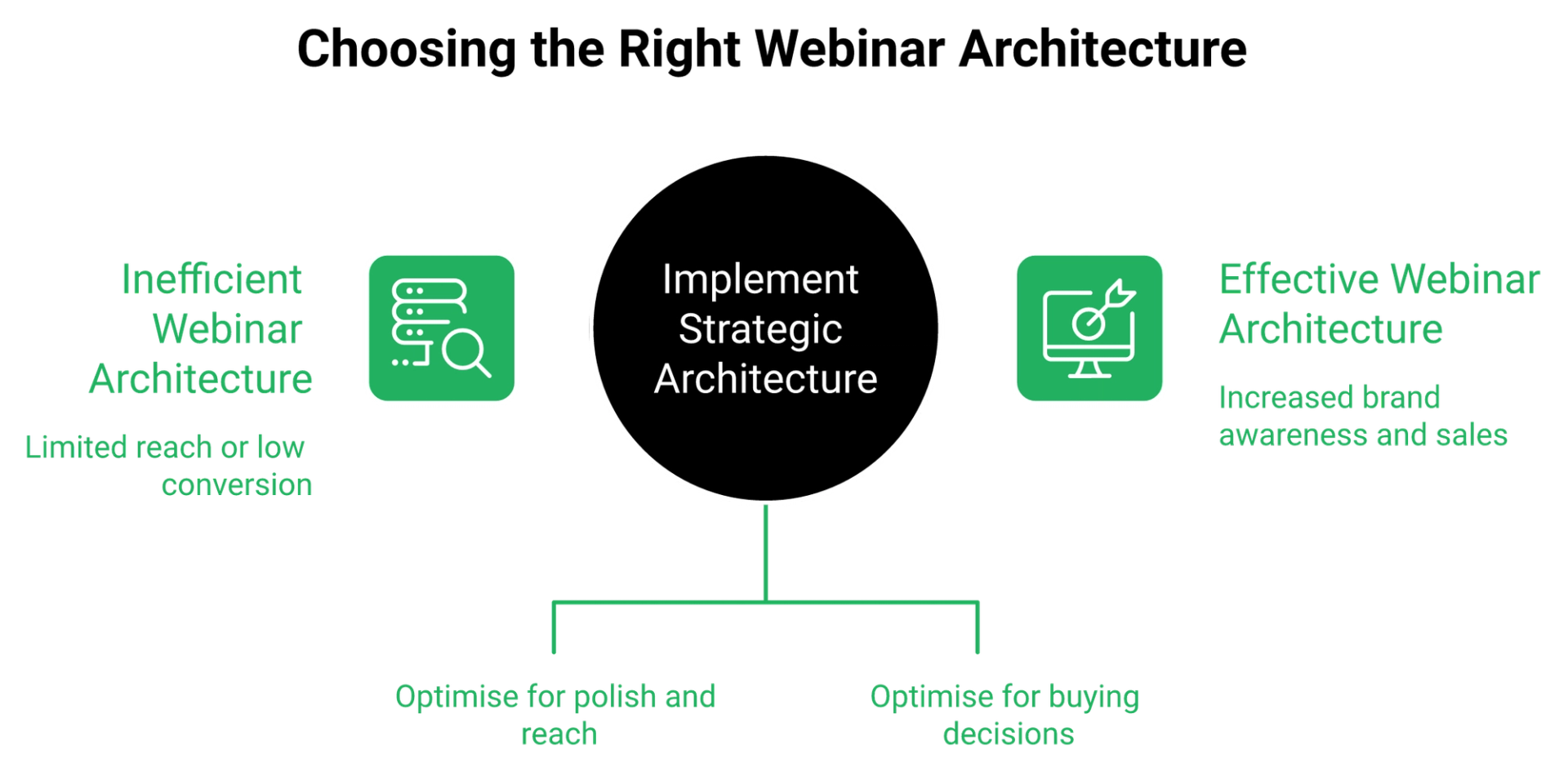
Enterprise webcasting is built around the produced show, a broadcast with a backstage, a presenter console, and a brand awareness objective. Direct response webinars are built around a gatekeeper: registration page, urgency scheduling, timed offer, checkout, and behavioral follow up. Run cold paid traffic into produced show architecture and you bolt third party tools around it, building the fragile funnel you were trying to avoid.
The tube map problem
Jon Penberthy says it better than I do. "You don't want your sales funnels to look like the tube map... if it starts to look like that, backtrack immediately."
His reason matters more than the image. Every junction you add is another place something goes wrong at 2pm on a Wednesday, with 380 registrants waiting.
⚠️ What a produced show optimizes for
A produced show optimizes for polish and reach: speaker green rooms, moderated Q and A queues, branded consoles, and replay libraries.
None of those move a cold buyer from curiosity to a payment. They were never designed to, which is the recurring theme across honest live versus automated webinars comparisons.
The gatekeeper architecture, in order
Direct response needs five things in sequence, and each one has to hand off cleanly to the next.
- A registration page that matches the ad's exact pain point
- Scheduling that creates urgency instead of a future date to forget
- A timed offer that appears while attention is still high
- A checkout or booking step with no new tab and no new context
- Follow up that fires on behavior, not on a list upload
EasyWebinar was built around that sequence, with the page builder and timed in webinar offers shipping in the same product as the live webinar software.
⭐ Why I trust this structure over feature counts
My own history is the argument. My course sold nothing until I put a webinar in front of it. First year of live webinars: a 14,000 person email list and $245,000 in course sales.
The platform was not the variable. The sequence was.
The one diagnostic question for any vendor demo
Ask the rep to show you the path from ad click to money received, without leaving the product. Watch what happens.
If they open a second browser tab, you have found your integration risk. If they open three, you have found your tube map.
❌ The trap in "we can integrate that"
Integration is not a feature; it is a dependency. Every bridge between a broadcast tool and a checkout is a place where a Zapier plan limit or an API change silently drops registrants.
I have watched a team catch that four hours before doors opened, with a few hundred opt ins missing from the CRM. They fixed it by upgrading a billing plan, which is why native integrations matter more than a long connector list.
Where the category is heading
EasyWebinar's read is that the enterprise broadcast and direct response worlds are converging, and the corporate side is moving slower than the creator side. Cvent's positioning of ON24 leans further into enterprise engagement, not funnel mechanics.
That could be wrong. It is my read this quarter, and I would revisit it in twelve months.
EasyWebinar was built for the direct response sequence rather than the broadcast, so registration pages, timed in webinar offers, and behavior triggered follow up live inside one product with no bridge to break. If you want the shortlist view first, our compare webinar platforms hub lays out the same criteria across every major vendor.
Q5. Which platform handles simulated live, evergreen, and just-in-time better?
Automated webinars is the umbrella, and beneath it sit exactly two tiers: Simulated Live and Evergreen. Simulated Live runs a recording with real time chat, polls, and timed offers on a fixed or fixed recurring schedule in one time zone. EasyWebinar places just in time, timezone adjusted delivery, multiple daily schedules, instant replay, and on demand inside the Evergreen tier only.
The taxonomy almost every comparison gets wrong
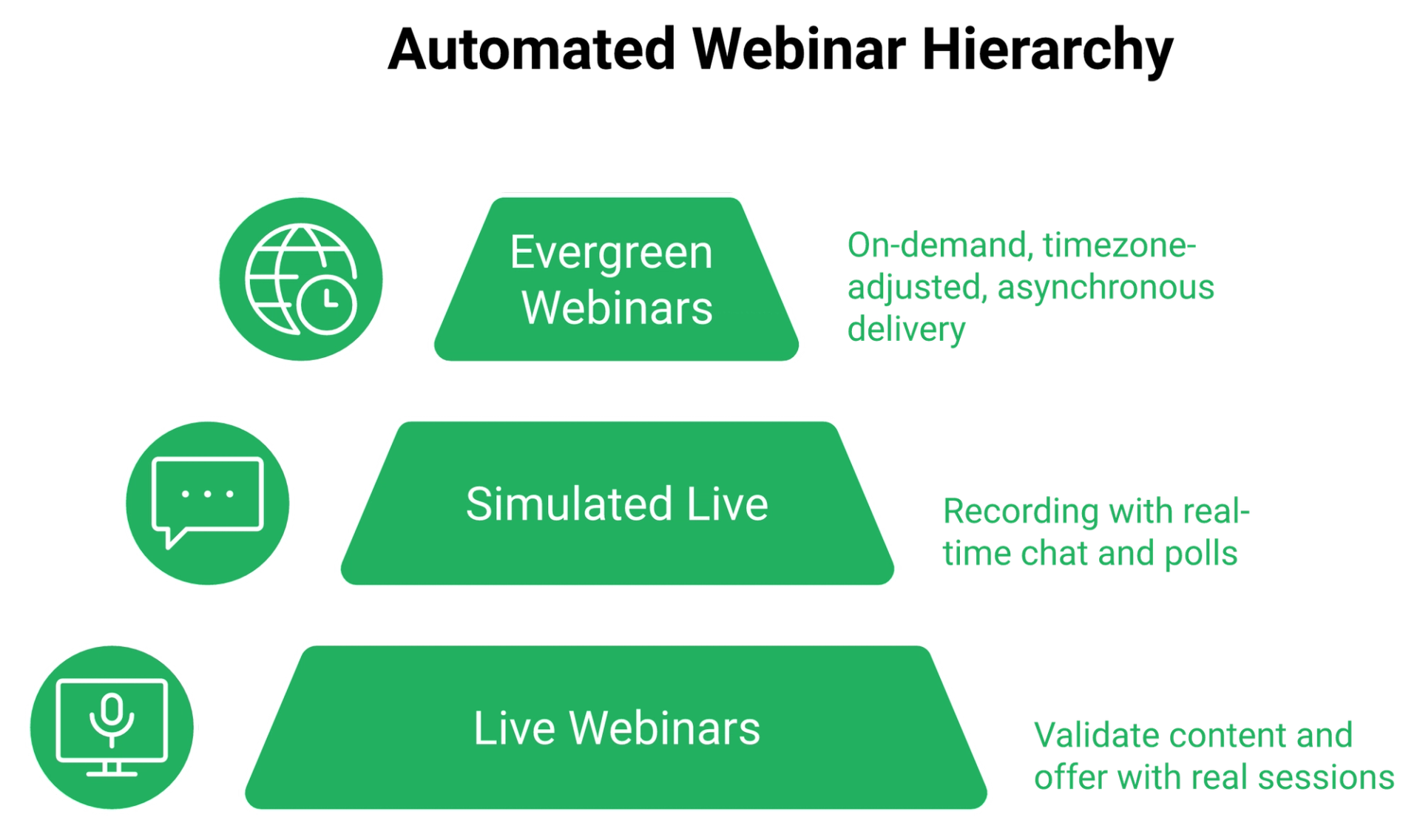
Most articles treat "automated" as a third format sitting beside simulive and evergreen. That is a category error, and it leads buyers to expect features their tier does not include.
Simulated Live is dipping your toes into automation. Evergreen is the deeper tier, with the full scheduling toolkit, and the distinction matters as much as the live versus automated webinars debate itself.
⭐ The engagement layer is the real dividing line
Simulated Live keeps a real time chat window open, so someone answers questions as the recording plays. That chat layer is its defining edge over a plain replay, and it is why a simulated live webinar converts differently from a hosted video.
Evergreen uses an asynchronous question box instead, with pre configured polls and offers. That is a design choice, not a gap, because nobody is standing by at 3am.
Why fixed dates leak registrants
Here is the friction nobody prices in. A registrant picks Thursday at noon, forgets by Wednesday, and never comes back.
Just in time scheduling removes that gap. The mechanic is simple: the next session begins roughly ten to fifteen minutes after someone registers, so intent and attendance happen in the same sitting.
⏰ The format matrix, side by side
| Capability | ON24 | EasyWebinar |
|---|---|---|
| Live sessions | Yes, produced console | Yes |
| Recording on a schedule | Simulive supported | Simulated Live tier |
| Real time chat over a recording | Moderated Q and A | Yes, in Simulated Live |
| Just in time start after registration | Not standard | Evergreen tier |
| Timezone adjusted delivery | Limited | Evergreen tier |
| Instant replay and on demand | On demand hub | Evergreen tier |
The live versus evergreen fight, settled by sequence
Jeremy Haynes argues automation has been weakened for cold traffic and says you want to run it live. Yuri Elkaim argues the opposite, that live show up rates are poor and a recording works around the clock.
Both are right about their own stage. Run five to ten live sessions first, reach a 10% attendee to buyer rate, then graduate the winner into Simulated Live or Evergreen.
✅ What operators report after graduating
"With my live class I used to sell 10-12 courses. With EasyWebinar I sold 25 courses within 3 weeks of my evergreen launch."- Laura C., EasyWebinar G2 - Verified Review
"The only downside is that to have the just in time feature you have to pay a premium that is about double the price of the basic subscription."- Laura C., EasyWebinar G2 - Verified Review
💰 Cloning is the underrated part
"Pretty much once I have run one webinar, I can clone and setup multiple in a breeze. We have run close to 30 since we started running it this new year."- Darrin B., EasyWebinar G2 - Verified Review
Cloning is how you split test schedules. Copy the event, change the day and time, and let registrations tell you which slot wins.
My honest read on automation right now
EasyWebinar's client engagements keep showing that automated sessions fail for one reason more than any other: the offer was never validated live first. I have watched operators automate a webinar that had never converted, then blame the format.
I could be over indexing on that. It is the pattern I keep seeing this quarter.
EasyWebinar ships Live, Simulated Live, and Evergreen in one account, with just in time, timezone adjusted scheduling, instant replay, and on demand sitting inside the automated webinar toolkit rather than sold as separate products.
Q6. Whose analytics actually change what you do on Monday?
ON24 wins on reporting depth, with engagement scoring, engagement minutes, content consumption, and pipeline attribution. It loses on actionability, since G2 reviewers repeatedly cite limited customization on report exports and integrations. EasyWebinar records attendee level watch time, poll responses, offer clicks, and drop off position, which is the data set behavioral follow up sequences actually fire on.
Give ON24 its credit first
ON24's reporting is genuinely strong, and pretending otherwise would be dishonest. Engagement scoring across a whole program, content hub consumption, and attribution into a CRM are real capabilities.
If marketing ops needs board level program reporting, that depth is the product.
⚠️ Where the depth stops being useful
The complaint cluster is specific, not vague. Across roughly 1,215 G2 reviews at 4.3 out of 5, limited customization on integrations and report exports appears in 17 reviews, and a steep learning curve in 22.
Depth you cannot export on your own terms is depth your team stops opening.
Self score before you buy the analytics
Here is a test that costs nothing. ON24 publishes its own benchmarks: about 49 minutes of average engagement and 239 average attendees in the 2026 report, up from 51 minutes and 7% year over year attendance growth in 2025.
Compare your last three webinars against those numbers. If you are already close, better reporting is not your bottleneck.
💰 The six numbers I actually watch
These are direct response metrics, not broadcast metrics. Each one has a fix attached, and together they form the backbone of useful webinar analytics.
- Cost per lead, with $8 to $12 as a workable paid traffic baseline
- Registration rate, where 30% on cold traffic is solid
- Show up rate, improved through reminders and a show up bonus
- Stick rate, meaning the share who stay until the offer
- Attendee to buyer rate, with 10% as the graduation target
- Drop off timestamp, the single most useful number on the list
The Monday workflow nobody sells you
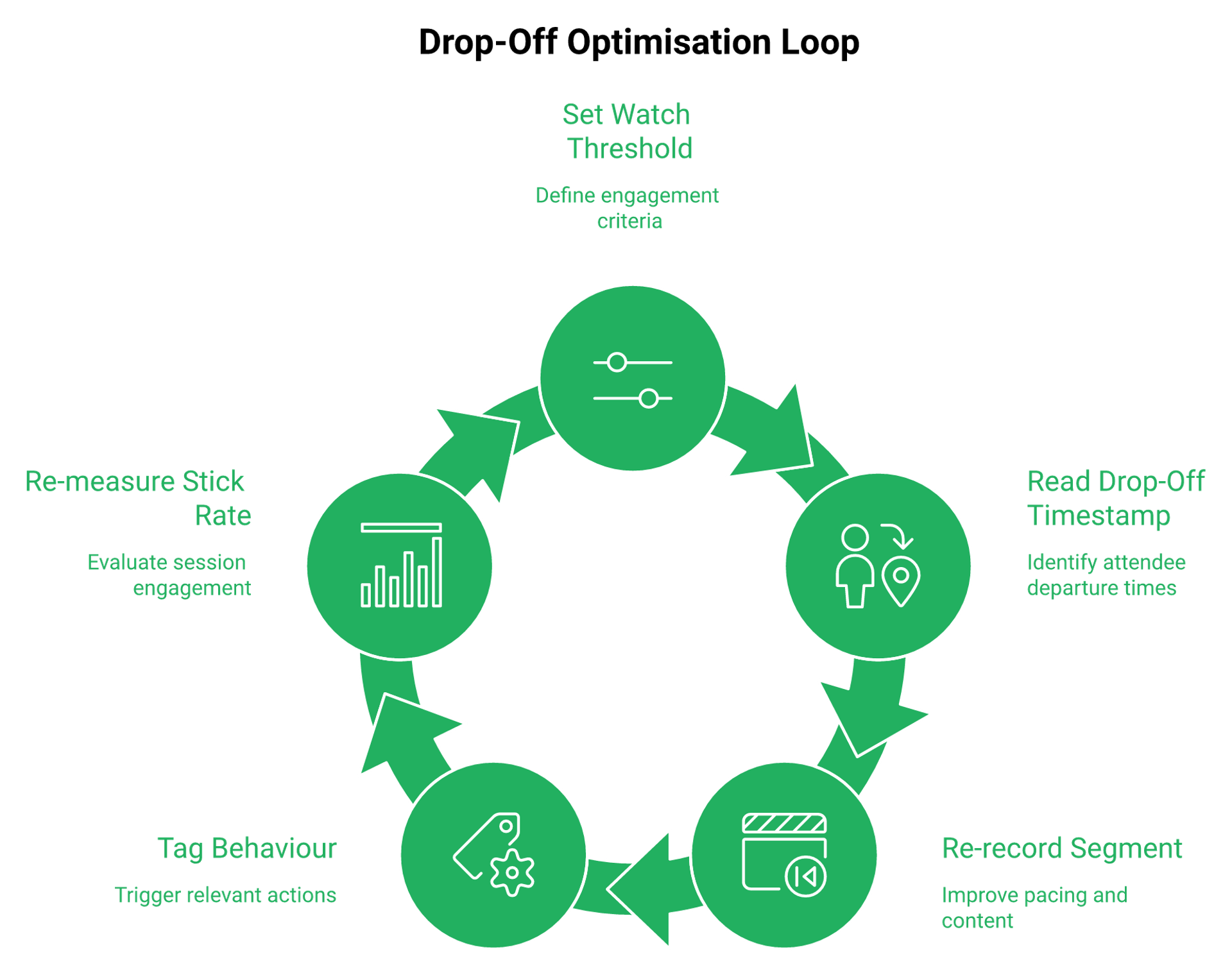
Set a watch threshold, find the exact minute attendees leave, then re record that segment. That is it.
EasyWebinar measures this with a drop off view plus a conversion funnel, so the timestamp and the offer click sit in the same report.
✅ What operators say about the reporting
"Analytics splits out live and replay attendee insights for evergreen webinars... The analytics also show how many saw or clicked your offer."- Verified User in Professional Training and Coaching, EasyWebinar G2 - Verified Review
"I do use other email systems to send post-webinar email sequences because I can't track open and click rates on EasyWebinar."- Eliza W., EasyWebinar G2 - Verified Review
That second quote is a real gap, and I am not going to talk around it. Email open and click tracking is where an external sender still earns its place for some operators.
❌ The tagging chain no broadcast console gives you
Behavioral tagging means labeling a lead by what they did inside the room. Clicked the offer button. Stayed past 70%. Left at minute 22.
Each of those needs its own follow up sequence, which is exactly the job a webinar CRM is supposed to do. A produced show console reports the aggregate and stops there.
My point of view on this
EasyWebinar's read is that the category sells analytics backwards. Buyers pay for dashboards that describe the past, when the money sits in triggers that act on behavior within the hour.
I have been wrong about reporting priorities before. This one I will defend.
EasyWebinar records attendee level watch time, poll responses, offer clicks, and drop off position, then exports or pushes them as tags so the next sequence fires on behavior instead of a list upload.
Q7. Do you need ON24's integration stack, or does it become a tube map?
If attribution lives in Salesforce or Marketo and marketing ops owns the reporting, ON24's integration depth is a legitimate moat worth paying for. If you are bridging a broadcast platform to a page builder, an email tool, a CRM, and a checkout through Zapier, one billing ceiling can cost a full webinar's leads. EasyWebinar consolidates pages, email, SMS, CRM, and checkout in one account.
Start with what ON24 does well here
Enterprise integration depth is not marketing fluff. ON24 connects into the systems where enterprise attribution actually lives, and reviewers credit that repeatedly.
If your CFO wants webinar sourced pipeline in Salesforce, that connection has real value.
⚠️ The scene four hours before doors open
Here is the failure mode I keep hearing about. A team hit their Zapier task ceiling, the automation stopped firing, and a few hundred opt ins never reached the CRM.
They caught it four hours out. Sales reps were dialing a list that was missing people. The fix was upgrading a billing plan, which is exactly how quiet failures look.
Count the tools between registration and cash
That is the whole diagnostic. Registration page, email, CRM, payment page, replay page.
Every handoff is a place data can stop moving. Five vendors means five renewal dates, five status pages, and five support queues on the day something breaks.
❌ What reviewers say about integration friction
Integration pain is not unique to enterprise tools, and EasyWebinar catches this criticism too.
"Some of the integrations are not intuitive, but Rakesh was able to help me with them."- Ajarae C., EasyWebinar G2 - Verified Review
"Integration is somewhat limited, but if you are comfortable with Zapier you can easily update that."- Verified User in Professional Training and Coaching, EasyWebinar G2 - Verified Review
💸 What buyers say when they go looking
On the enterprise side, operators shopping alternatives talk about ratings and integrations before features.
"Check the HubSpot marketplace for ratings; as I recall, Contrast ranked first, followed by WebinarGeek and then Livestorm."- Commenter, r/b2bmarketing Reddit Thread
That thread is a useful signal. Buyers evaluate the connector ecosystem first, then the broadcast quality second.
Consolidation is risk reduction, not just savings
Cutting tools does save money. That is the boring part of the argument.
The real return is fewer silent failure points on the one afternoon that matters. EasyWebinar's native email broadcasting, Twilio backed SMS, sales CRM, and webhooks remove the middle hop where registrant data usually goes missing.
✅ The five minute audit to run today
Do this before your next session, not after it.
- List every tool a registrant's data passes through
- Check the plan limit on each automation account
- Confirm one owner for each handoff
- Send a test registration and watch it land in the CRM
- Delete any hop that exists only out of habit
My honest hedge
EasyWebinar's client audits point toward consolidation almost every time, though I might be reading that too strongly for larger teams. A 40 person marketing org with dedicated ops can run a five tool chain safely.
A two person team cannot. That is where the tube map bites.
EasyWebinar consolidates registration pages, email and SMS, CRM, storage, multistreaming, and checkout in one account, which removes the automation hop where most webinar lead loss quietly happens. Our full integrations list shows what still connects outward when you need it.
Q8. Can you sell inside the room and take payment there?
No enterprise webcasting console ships a native cart. ON24 has no in platform checkout, so a paid workshop or an in room close needs an external payment page, which splits funnel data and drops the buyer at peak intent. EasyWebinar includes built in checkout and in webinar offer overlays with Stripe, PayPal, and PayU, so the transaction closes without a redirect.
The redirect is where the money leaks
Watch what happens when an attendee clicks your offer. A new tab loads, the page looks different, the presenter's voice is gone.
Momentum dies in that gap. Your analytics fork at the same moment, because the sale happened somewhere your webinar data cannot see.
⭐ The transition that makes in room selling work
Russell Brunson uses a permission close, and it works because it is honest. He asks the room whether it is okay to shift into talking about his program, then asks them to drop a one in the chat.
That single beat converts a lecture into a sales conversation. No trick, just consent.
⏰ Bait the pitch to hold attention
You want roughly 80% retention from peak attendance to the moment you pitch. The cleanest way is telling attendees a bonus goes out right after the session ends for people still in the room.
Timing beats polish here. A plain offer overlay that lands at minute 42 outperforms a beautiful page nobody reaches, which is why webinar engagement tools belong inside the room rather than around it.
What operators actually use in the room
"I love that we can have a poll, offer and countdown right in the event! That's going to be so great for sales and interactions."- Verified User in Photography, EasyWebinar G2 - Verified Review
"I love the built-in countdown offers and polls as well... I love the ease of being able to integrate this platform with other platforms we use, like Hubspot and Zapier."- Annette S., EasyWebinar G2 - Verified Review
💰 The offer math that decides everything
Platform choice only matters once your offer is priced for it. Anything above $200 justifies a webinar. Below $47, a lead magnet does the job, and below roughly $197 a long form sales page is usually enough.
Alex Hormozi's car rental story makes the point better than a chart. He arrived for a $19 a day car and left paying $100 a day, because the offer architecture was built to escalate.
Paid webinars as a qualification filter
Charging for a workshop changes who shows up. A $27 ticket removes tire kickers and raises show up rates, because people defend what they paid for.
EasyWebinar supports paid webinars natively, so the ticket, the room, and the upsell all report into the same funnel.
✅ The replay expiry sequence to copy
Urgency needs a deadline that is real. Give the replay 72 hours, then send two emails on the final day.
The first says the replay comes down today. The second says a few hours remain. That is the whole mechanic, and it is one of the more reliable webinar best practices for registrations and sales.
Where I land on monetization
My read right now is that the category treats checkout as a billing feature, when it is really a conversion feature. EasyWebinar's customer outcomes point the same way, including Carla Beisinger's $5M evergreen funnel and Ryan Fenn's $2M from one automated funnel, documented in the course creator case study.
Don't take that as gospel. It is what the strongest funnels in our base keep having in common.
EasyWebinar includes built in checkout and in webinar offer overlays with Stripe, PayPal, and PayU, so a paid workshop or a $1,000 program can close in the room while the presenter is still talking.
Q9. Which platform is genuinely enterprise ready, and when is ON24 the right call?
ON24 fits teams running 12 to 50 or more webinars a year, with Salesforce or Marketo attribution requirements and a five figure budget. Below that volume, the $25,000 floor plus onboarding usually outruns the pipeline the program produces. EasyWebinar holds SOC 2 Type II attestation and GDPR compliance with a Data Processing Agreement, and makes no ISO 27001, PCI DSS, or HIPAA claims.
Start with the volume arithmetic
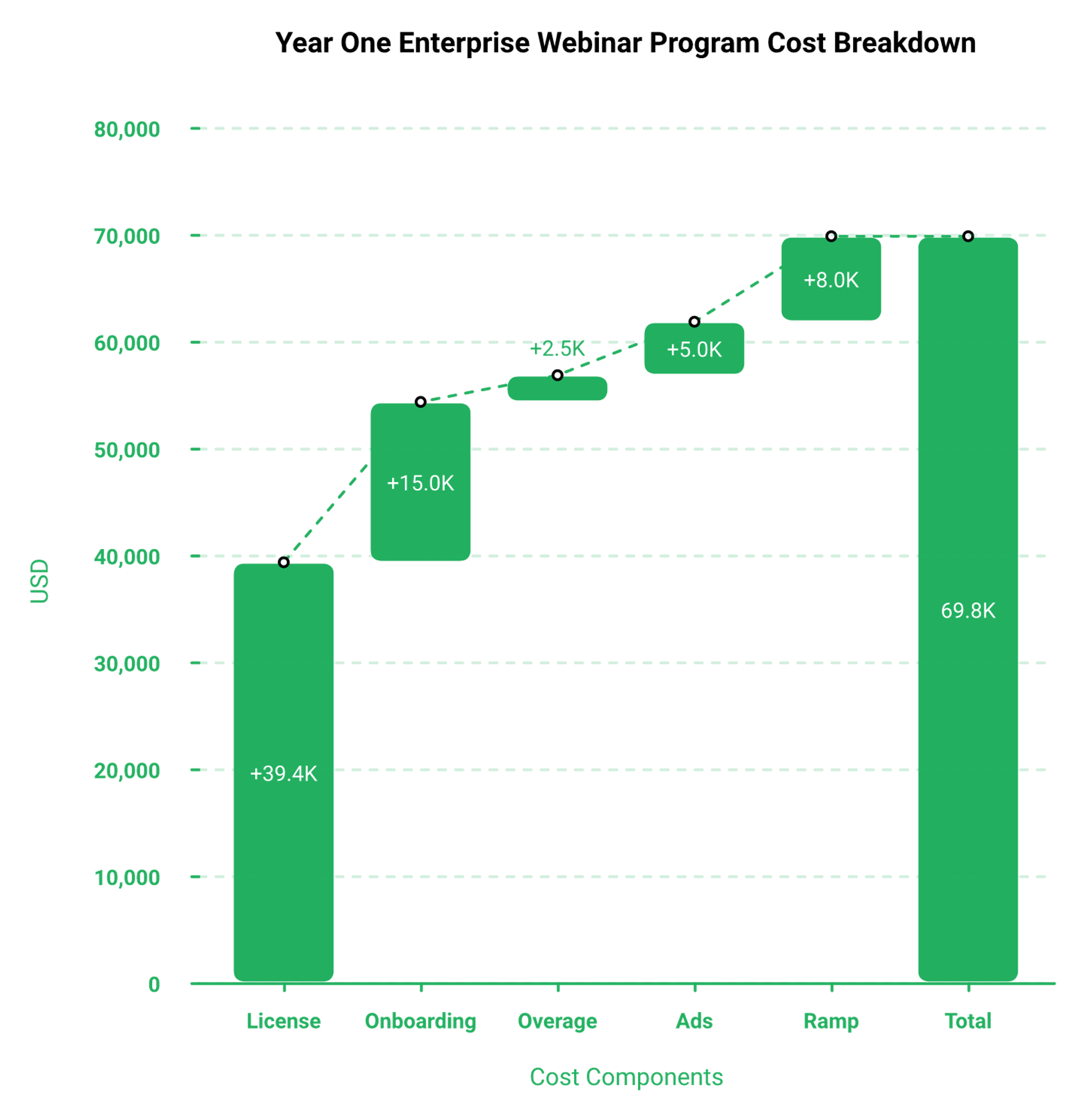
Enterprise readiness is a number before it is a feature list. Take your annual webinar count, divide the license by it, and you get cost per session.
At 24 sessions on a $39,350 median contract, that is roughly $1,640 per webinar before ad spend. At six sessions, it is over $6,500 each.
💰 The threshold where ON24 earns it
Three scenarios make ON24 the honest recommendation. I will name them plainly.
- Marketing ops owns pipeline attribution inside Salesforce or Marketo
- You run a content hub program, not just standalone sessions
- Procurement requires a vendor with enterprise reporting already in place
Compliance, stated exactly
Certification language is where vendors get sloppy, and buyers get burned. So here is the precise version.
EasyWebinar carries SOC 2 Type II, audited by Scrut Automation, plus GDPR compliance with a DPA available. Single sign on and granular admin roles should be confirmed with the vendor in writing before you build a requirement around them.
⚠️ Readiness comparison, side by side
| Requirement | ON24 | EasyWebinar |
|---|---|---|
| SOC 2 Type II | Yes | Yes, auditor Scrut Automation |
| GDPR with DPA | Yes | Yes |
| ISO 27001, PCI DSS, HIPAA | Check with vendor | Not claimed |
| Contract flexibility | Annual minimum | Monthly or annual |
| Streaming architecture | Enterprise webcast console | Dolby OptiView WebRTC, sub 500ms latency |
What operators report on the enterprise side
Longer tenure surfaces the real limits, not the demo highlights.
"We've been using EasyWebinar for a long time... The app is user-friendly and reliable. One area where we've experienced challenges is with the customization options for webinar landing pages. Sometimes it feels a bit limited in terms of design flexibility."- Jo K., EasyWebinar G2 - Verified Review
"We needed a solution that we could just pick and put down as and when we needed it... perfect for one off webinars without having to be locked into a contract or subscription."- Annette S., EasyWebinar G2 - Verified Review
❌ On the ON24 side, the friction is cost and ramp
Across roughly 1,215 G2 reviews at 4.3 out of 5, "excessively expensive" appears in 11 reviews and a steep learning curve in 22, often tied to guest presenters needing training.
That ramp cost is real for enterprises rotating external speakers every month.
Where EasyWebinar is not the answer
I will say this clearly, because the rest of this article only works if I do. EasyWebinar is the wrong choice for one off internal team meetings, and for pure live only corporate events with no funnel intent behind them.
It is also unnecessary below roughly $200 in offer price. At that point the math does not require a webinar at all, and a simple webinar funnel would be overbuilt for the offer.
✅ The security review checklist to send both vendors
Send this before the second call. Five lines, same email to each.
- Current SOC 2 Type II report date and auditor name
- DPA and subprocessor list
- SSO method supported, plus admin role granularity
- Data retention and deletion policy for attendee records
- Documented concurrent attendee ceiling and overage terms
EasyWebinar carries SOC 2 Type II with GDPR and a data processing addendum, and streams via Dolby OptiView WebRTC at sub 500ms latency for large live sessions, which are the specifications to hand a security reviewer rather than a slogan.
Q10. What changes now that Cvent owns ON24?
Cvent completed its acquisition of ON24 on April 1, 2026, in a roughly $400 million all cash deal at $8.10 per share, a 62% premium, weeks after acquiring Goldcast. ON24 reported 2025 revenue of $139.3 million, ARR of $124 million, and a GAAP net loss of $28.9 million. Buyers signing annual contracts should get roadmap and support continuity answered in writing.
The dated facts, from filings only
No speculation here, just the record. ON24 traded publicly as NYSE: ONTF before shareholders approved the merger with a Cvent affiliate in March 2026.
Cvent spent roughly $700 million across December 2025, buying Goldcast for about $300 million and ON24 for about $400 million.
⏰ Why two overlapping deals matter to you
Cvent now owns two enterprise webinar platforms with real product overlap. That raises questions worth asking, not predictions worth making.
Ask which platform receives roadmap investment through 2027. Ask whether your support team stays intact. Ask what happens to your integration if either product consolidates.
Risk comes from not knowing what you are doing
That framing has saved me money more than once. Read the filings before the sales deck, because the filings do not have a quota.
A $28.9 million net loss on $139.3 million in revenue is not a crisis, but it is context. Acquirers under pressure to show synergy make product decisions that customers feel later.
✅ Three clauses worth negotiating this quarter
If you are signing an ON24 contract now, put these on the table before pen touches paper.
- A product continuity clause, naming the platform and the support tier you are buying
- An exit or downgrade right if named capabilities are deprecated or migrated
- Price protection at renewal, with a capped increase in writing
💰 How to read the cost objection
Never negotiate purely on price, in either direction. If the number is too high, ask for a payment structure or a smaller feature tier instead of a discount on the same package.
That keeps the vendor honest about what you are actually buying. It also keeps your renewal from resetting to list, which is worth checking against published webinar pricing before you accept any quote.
My read on the consolidation wave
The enterprise side of this category is consolidating while the creator side keeps fragmenting. I think that gap widens through 2027, not narrows.
Don't take that as gospel. It is what I am watching, and I would revisit it in twelve months.
EasyWebinar remains founder led and independent, which for an annual plan buyer simply means the roadmap conversation happens with the people who own the product, not with an integration committee.
Q11. What do verified users report about each platform?
ON24 holds 4.3 out of 5 across roughly 1,215 G2 reviews, praised for analytics and interactivity, criticised for cost, presenter learning curve, and report export limits. EasyWebinar holds 4.4 out of 5 from 91 Capterra reviews and 4.4 on Trustpilot across 50 reviews, praised for evergreen setup and support responsiveness, criticised for entry price and a tech heavy initial build.
How these numbers were captured
Platforms used: G2, Capterra, and Trustpilot, with review counts as displayed in mid 2026. Complaint clusters are counted mentions inside G2's own review summaries, not my interpretation.
If a count looks off when you check, trust the live page over this article. Our own customer reviews page carries the same figures we cite here.
💸 The ON24 complaint that costs real money
"Everything is an upcharge... If you go over your session by just a few minutes, they charge you several hundred dollars."- Verified reviewer, ON24 G2 - Verified Review
That is a budgeting issue, not a feature complaint. Session overage exposure belongs in your annual model.
⚠️ The ON24 praise, stated fairly
Reviewers credit ON24 with solving limited audience reach, weak interactivity, and difficulty tracking attendee engagement and ROI. Those are legitimate wins.
The dislikes cluster elsewhere: steep learning curve in 22 reviews, limited export and integration customization in 17, and onboarding friction in 10.
The EasyWebinar side, without softening
Here is the complaint I hear most, and it is fair. Automated setup requires the recording uploaded first, which blocks operators who want registrations running before the presentation exists.
"The biggest challenge is around setting up automated webinars, and needing the presentation uploaded first in order to set it up... Would love to be able to add the video later!"- Ash A., EasyWebinar G2 - Verified Review
❌ The pricing complaint on our own side
"The only downside is that to have the just in time feature you have to pay a premium that is about double the price of the basic subscription. However, it has been worth it for me to invest in that."- Laura C., EasyWebinar G2 - Verified Review
EasyWebinar gates automated scheduling above the entry tier, and reviewers say so plainly. That is a real trade off, not a misunderstanding, and it shows up in most honest webinar platform reviews.
⭐ The complaint clusters, side by side
| Theme | ON24 | EasyWebinar |
|---|---|---|
| Cost | Expensive, session upcharges | Automation tiers priced higher |
| Setup | Steep presenter learning curve | Recording needed before build |
| Reporting | Export customization limits | No email open or click tracking |
| Design | Console branding constraints | Landing page flexibility limited |
Which complaint should change your decision
Only one of these is structural. Export limits and gated tiers are annoyances you plan around.
Session overage billing is different, because it scales with your program and surprises you after the fact. Model that before signing anything.
EasyWebinar's lowest rated dimension across verified reviews is setup effort rather than outcome, and the reviewers who finish the build are the same ones describing evergreen funnels that keep selling months later.
Q12. How do you decide, and what do you run on Monday morning?
Decide on program economics, not feature counts. At a $10 cost per lead, a 30% registration rate, and a 10% attendee to buyer target, calculate what a license can cost before the funnel stops making sense. EasyWebinar's graduation path runs live sessions first, then moves the proven winner into Simulated Live or Evergreen inside the same account.
Four scenarios, four answers
Pick the row that describes you and stop reading the rest.
| Your situation | The honest call |
|---|---|
| Enterprise demand gen, Salesforce attribution, 24+ sessions | ON24 |
| Corporate content hub program with a dedicated ops team | ON24 |
| High ticket coaching or course sales on paid traffic | EasyWebinar |
| Agency running client funnels across multiple accounts | EasyWebinar |
💰 The worst case worksheet
Run this before any demo. Five lines, real numbers, ten minutes.
- Ad budget for the quarter, divided by a $10 cost per lead
- Registrants times 40% show up, giving attendees
- Attendees times 10%, giving buyers
- Buyers times offer price, giving revenue
- Subtract ad spend and the license, then look at what remains
My weekly baseline for years was 60 registered, 30 attending, 3 buying a $1,000 program. That is $12,000 a month, and it makes license decisions arithmetic instead of anxiety.
The 30 day sequence
Here is the order that works, and the order matters more than the tools.
- Week 1: run one live session, no automation, real offer
- Week 2: read the drop off timestamp and re record that segment
- Week 3: run two more live sessions and track attendee to buyer rate
- Week 4: at 10% or better, graduate the winner into Evergreen with just in time scheduling, meaning the next session starts about fifteen minutes after registration
- Ongoing: add a 72 hour replay expiry with two emails on the final day
❌ What to skip entirely
Do not spend three weeks designing pages. Jay Boyer still uses default registration pages and has made millions from his webinars, because the presentation carries the sale, not the gradient.
Do not teach the full how either. The goal is shifting beliefs and creating a decision, not delivering a free course that produces analysis paralysis.
⚠️ One rule that outranks all of this
An automated webinar without traffic is a billboard in the desert. Platform choice cannot fix an empty room, and no license refunds you for one.
Fund the traffic first. Rick Mulready hit 166% ROI on cold paid traffic at $8 to $12 per lead with a 30% registration rate, and that ratio is the real benchmark to chase, as our guide to driving webinar attendance lays out step by step.
From comparison to build
You did not open this article to admire a feature table. You opened it because a decision is sitting on your desk with a date attached.
EasyWebinar keeps the whole sequence in one place: validate live, read the drop off, graduate the winner into Evergreen with just in time scheduling, and keep checkout in the room the entire way through. If you want the criteria applied across every vendor, our compare webinar platforms hub uses the same rubric.
Ready to price your own webinar year?
See every plan, what each tier includes, and which one covers Evergreen with just in time scheduling before you commit to anything.
The question I am still sitting with
My read right now is that enterprise webcasting and direct response are converging, and the winner will be whichever side learns the other's discipline first. I could be wrong about the timeline.
If you run this comparison yourself, tell me what your cost per converted attendee actually came out to. That number, not a feature grid, is the conversation worth having, and a free sign up is the cheapest way to generate it.
Frequently Asked Questions

Casey Zeman
Founder of EasyWebinar
About Author
Over the past decade, I've helped thousands of entrepreneurs, coaches, and consultants turn webinars into a predictable, powerful way to grow their audience, build trust, and scale, without the constant hustle. I created EasyWebinar because I couldn't find a system that combined authenticity, engagement, and automation the way I needed. So, I built one.
Related Posts

10 Best Community Engagement Platforms in 2026
Compare the 10 best community engagement platforms in 2026. Course creators, evaluate live hosting, analytics, and replay to pick your winner today.

10 Best Online Coaching Tools in 2026: Live Session Quality, Scheduling, Recording, and Client Engagement Analytics
Compare the 10 best online coaching tools of 2026 on session quality, scheduling, and analytics. Discover the right fit for your coaching revenue model.

10 Best Webinar Hosting Platforms Ranked by Uptime, Streaming Quality & Cost
Compare 10 webinar hosting platforms ranked by uptime, streaming quality, and cost. Discover which tool actually turns attendees into revenue.
Turn every webinar into a revenue stream
Launch your first paid event in just a few clicks - and start monetizing your expertise.
Book a Call