Webinar Best Practices 2026: How to Run Webinars That Convert

Casey Zeman
Published on May 8, 2026 • 33 min read
Q1: What Are the 27 Webinar Best Practices That Actually Convert in 2026?
The 27 best practices are organized across the R.E.L.A.Y. Webinar Framework: Research, Engineer, Launch, Activate, and Yield. They’re anchored to 2026 benchmarks: 35 to 45% registration-to-attendance, 49 to 57% watch time, 22% CTA click, and $35 to $140 cost-per-MQL. Miss those numbers and you’re running an event. Hit them and you’re running a revenue engine.
The 2026 Benchmark Snapshot
Before tactics, get honest about the scoreboard. Most teams “improve” webinars without a metric, which is how you end up with a prettier registration page and the same flat pipeline.
| KPI ⭐ | Industry Median | 2026 Top-Quartile Target |
|---|---|---|
| Registration to Attendance | 35 to 40% | 49 to 57% |
| Average watch time | 28 min | 42+ min |
| Poll response rate | 22% | 40%+ |
| Live CTA click rate | 11 to 14% | 22%+ |
| Registrant to MQL | 8% | 18 to 22% |
| Cost-per-MQL 💰 | $120 to $140 | $35 to $60 |
Who this playbook is for:
- B2B demand-gen leads and marketing directors at $5M to $100M ARR SaaS, EdTech, and D2C companies.
- Founders and course creators who run the webinar and own the P&L.
- Enablement buyers shopping for SOC 2-compliant, SSO-ready infrastructure that scales past 10K attendees on a modern webinar platform.
The R.E.L.A.Y. Webinar Framework
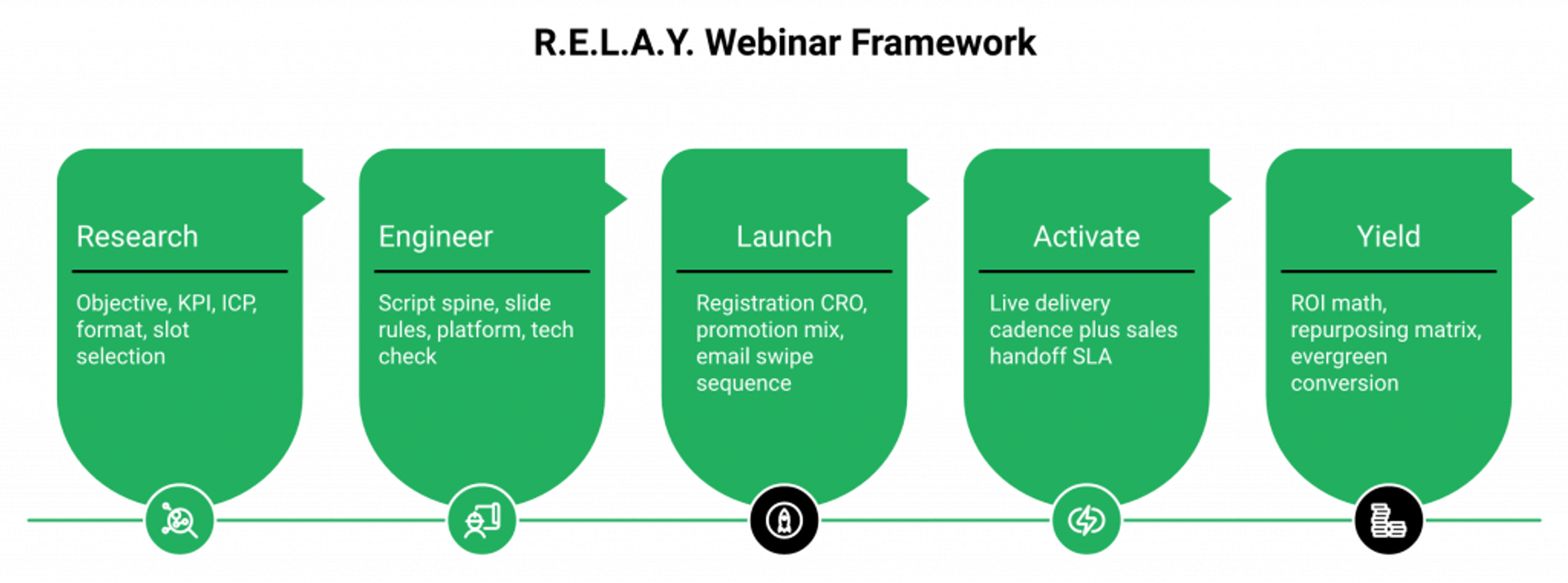
A framework beats a random tactic list because it tells you where you’re losing money, not just what to fix. Every one of the 27 practices in this playbook lives inside one of these five phases.
- ✅ Research & Strategy: objective, KPI, ICP, format, slot.
- ✅ Engineer the Asset: script spine, slide rules, platform, tech check.
- ✅ Launch: registration CRO, promotion mix, email swipe sequence.
- ✅ Activate: live delivery cadence plus sales handoff SLA.
- ✅ Yield: ROI math, repurposing matrix, evergreen conversion.
AI is woven into every phase, not bolted on at the end. Topic validation in Research. Script drafts in Engineer. Title A/B in Launch. Real-time Q&A routing in Activate. Predictive ROI in Yield. The AI compresses the launch, but it doesn’t replace knowing your audience. Teams deploying an AI webinar builder are collapsing the research-to-launch gap from weeks to minutes.
Why “27 Practices” and Not “50 Tips”
Because most webinar advice is padding. 27 is what I’ve seen actually move the needle across live launches, simulive rollouts, and evergreen funnels running 24/7. Anything more than that is a checklist you won’t use.
Where EasyWebinar Fits the R.E.L.A.Y. Loop
Most teams run R.E.L.A.Y. across 5 to 7 tools: Zoom for the room, ClickFunnels for the page, HubSpot for the CRM, Zapier for the glue, Stripe for checkout, and Restream for distribution. That’s $600 to $1,000/month in software and a broken attribution chain. We built EasyWebinar’s Endpoint Ecosystem so the AI funnel builder, EasyCRM with native lead scoring and an auto-dialer, in-platform monetization with timed offers and ticketed access, and EasyCast multistreaming all sit inside one workflow. Every signal from registration to closed payment stays connected.
One System, Compounding Results ⏰
K21 Academy, an enterprise cloud training company, hit a 47% show-up rate (well above the 25 to 35% industry median) and 5x registrant growth after consolidating their webinar operations onto a single revenue platform. More importantly, their click-through rate tripled because every in-session interaction routed directly into behavioral follow-ups. That’s what the R.E.L.A.Y. loop looks like when it’s wired end-to-end instead of duct-taped across five vendors. See the full edtech case study (K21) for the breakdown.
Q2: Why Do Most B2B Webinars Fail to Drive Pipeline (And What Actually Fixes It)?
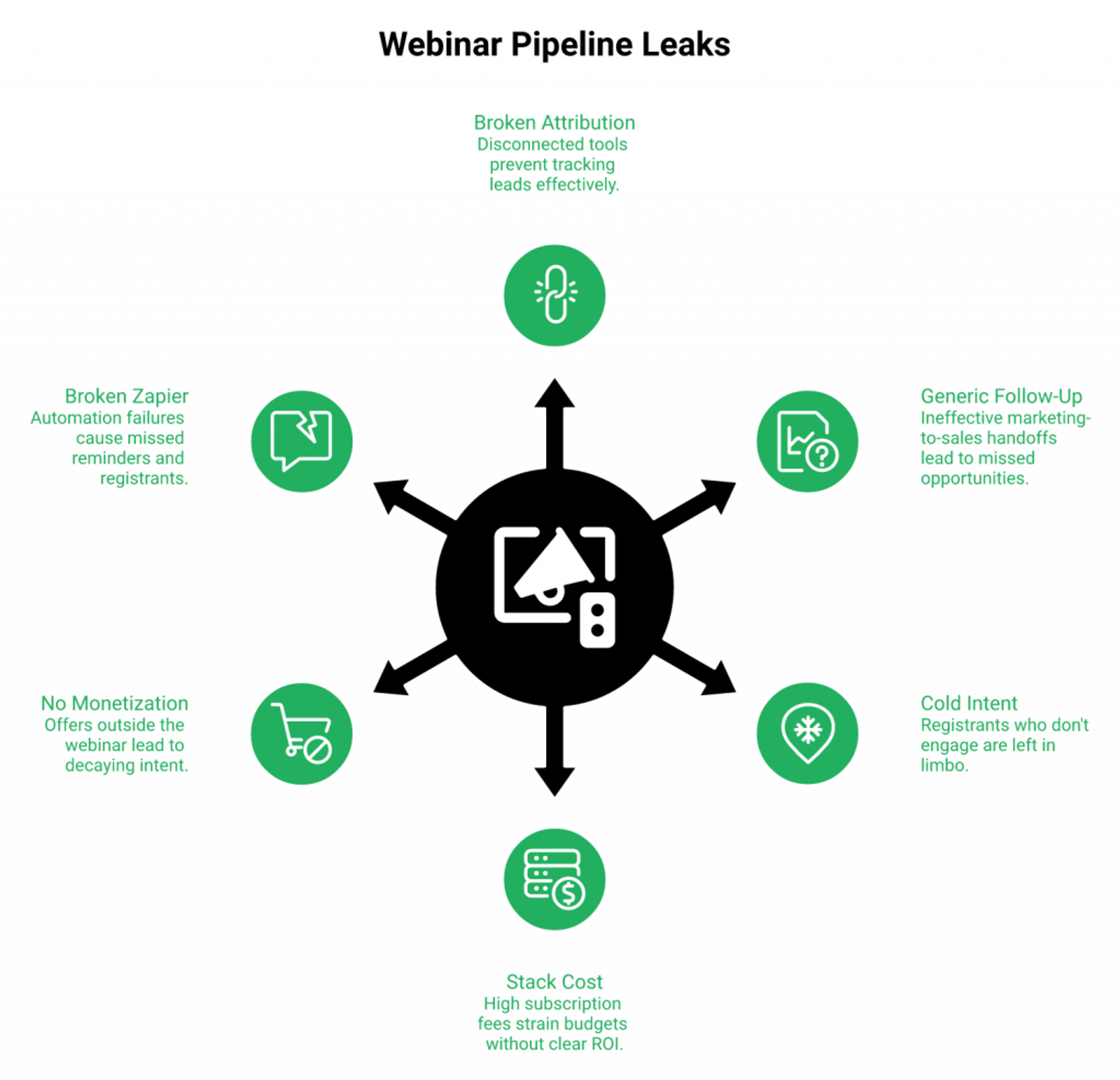
Most webinars fail because teams run them as broadcast events instead of revenue systems. Registration, engagement, follow-up, and monetization live in 5 to 7 disconnected tools, which means attribution breaks, follow-up goes generic, and nobody can tell the CFO which part of the funnel produced the pipeline.
The Operator Reality Nobody Talks About
44% of B2B marketers run webinars at least monthly, yet most can’t map attendance to closed revenue. The operator I’m describing isn’t hypothetical. I’ve watched hundreds of them live it.
- 🕚 Midnight before the webinar: the demand-gen manager is rewriting slides because the script was “too corporate.”
- ⚠️ Morning of: a Zapier automation between Zoom and HubSpot broke overnight and 40% of registrants didn’t get the reminder.
- 💸 Day after: marketing hands sales a CSV. Sales works the top 20 names. The rest, the people who actually clicked the CTA at minute 37, sit in a drip for three weeks until intent is dead.
That’s not a discipline problem. That’s an architecture problem, and it’s why every business needs webinars wired as a system, not a set of disconnected events.
Where the Current Webinar Stack Breaks Down ❌
The market gives you three imperfect options, and most teams end up inside the worst one without realizing they chose it.
- Broadcast tools (Zoom, GoTo Webinar): Every reader has used Zoom. It’s familiar and reliable for the call itself, and it ends at “the event happened.” No automation, no evergreen, no CRM, no funnel pages, and no monetization. Everything after the recording is someone else’s software. See EasyWebinar vs Zoom and EasyWebinar vs GoToWebinar for a full breakdown.
- Modern but incomplete platforms (Demio, Livestorm): Clean browser-based experience and real engagement tools. However, Demio runs around $734/mo at 3K attendees, and neither has a native CRM or built-in checkout. You still need HubSpot and Stripe glued on. See EasyWebinar vs Demio.
- The stitched stack (ClickFunnels + Zoom + HubSpot + Zapier + Stripe + Restream): $600 to $1,000/mo in recurring cost, plus the invisible tax of an ops person babysitting Zapier chains. Attribution leaks at every handoff.
The Reddit Gut Check
“We ran webinars on Zoom + HubSpot + ClickFunnels for two years. I could never give our CEO a clean answer on which webinar produced which deal. When I finally built a dashboard, half the attendee data never made it across from Zoom.”— r/b2bmarketing practitioner Reddit Thread
The Strategic Shift: Event to Engine
Webinars convert when registration, engagement, follow-up, and monetization happen inside one workflow. The webinar isn’t a marketing event that hands leads to a separate sales process. It is the sales process. That’s the shift from event to engine, and it’s the only framing that makes the 27 practices in this playbook compound. For the revenue math, see How to Make Money With Webinars, 4X Your Revenue.
How EasyWebinar Closes the Loop ✅
We built the Endpoint Ecosystem around one principle: don’t make the operator the integration layer. The AI Webinar Builder generates the funnel (page, emails, script, polls, and offer) in under 10 minutes. EasyCRM tags every attendee Hot/Warm/Nurture based on their actual in-session behavior, and the auto-dialer surfaces Hot leads without a Zapier chain. In-platform monetization with timed offers and countdown CTAs captures intent during the webinar, not after. EasyCast multistreams the same session to YouTube, LinkedIn, Facebook, and RTMP in one click. Explore the full sales CRM to see how it all connects.
“I used to do live webinars to sell my online course… with my live class I used to sell 10 to 12 courses. With EasyWebinar I sold 25 courses within 3 weeks of my evergreen launch.”— Laura C. Easywebinar G2 – Verified Review
“EasyWebinar does exactly what it says on the tin, it’s so easy! From setting up your webinar to customising landing pages, thank you pages, and emails the platform is so intuitive. I love the built-in countdown offers and polls.”— Annette S. Easywebinar G2 – Verified Review
Q3: How Do You Research and Strategize a Webinar That Converts? (R.E.L.A.Y. Phase 1)
Phase 1 requires five decisions, in order: webinar objective, primary and secondary KPI, ICP and buyer-journey stage, format and duration, and the slot. Skip any of them and you’re producing content without a revenue thesis.
The 5-Decision Research Sequence ⭐
- Objective. Lead gen, education, product launch, or retention. One per webinar. “All of the above” is how you get a muddled CTA.
- Primary plus secondary KPI. Lead gen leads to MQLs and pipeline created. Launch leads to attendee-to-buyer conversion and revenue. Retention leads to product-qualified activation rate.
- ICP plus journey stage. Name the company size, role, and whether they’re problem-aware, solution-aware, or vendor-aware. This drives everything from headline to offer. If you need help here, see How to Create an Ideal Customer Avatar.
- Format plus duration. Use the trade-off table below.
- Slot. Tuesday, Wednesday, or Thursday, 10 to 11 AM local. Pulled from regional attendance data, not preference.
Duration Trade-Off Table ⏰
| Duration | Best For | Engagement Ceiling | Drop-off Risk |
|---|---|---|---|
| 30 min | Product demos, exec audiences | ~65% watch time | Low |
| 45 min | Education plus soft CTA | ~55% watch time | Medium |
| 60 min | High-ticket launches with Q&A | ~42% watch time | Higher, but MQL quality is best |
Default to 45 minutes unless the offer justifies a 60-minute arc.
ICP-to-Objective Matrix
- SMB founder plus lead gen: problem-aware hook, 45 min, mid-funnel CTA to book a call.
- Mid-market demand-gen lead plus education: solution-aware framing, 45 min, CTA to a benchmark report.
- Enterprise enablement buyer plus launch: vendor-aware proof, 60 min with Q&A, CTA to a procurement-ready pilot.
Global Time-Zone Strategy 🌐
For multi-region audiences, don’t pick one slot and reminder-email people harder. Run a timezone-aware recurring schedule so Sydney, London, and San Francisco all get a 10 to 11 AM local session. Show-up rates above 40% are a scheduling architecture problem, not an email cadence problem.
AI Topic Validation Workflow
Before committing 30+ production hours, validate demand with a repeatable AI prompt chain:
- Pull 12-month search volume plus trend slope for your top 5 topic angles.
- Score LinkedIn post engagement on the same angles (comments-per-impression is a cleaner signal than likes).
- Cross-reference to sales call transcripts. Which angle is actually showing up in deals?
- Kill any topic that doesn’t rank top-2 on all three signals. Narrow to one painful, well-defined problem. For structured planning, see Webinar Content Strategy for High-Impact Sessions.
Internal Alignment Micro-Checklist ✅
Three handoffs break webinars before they launch. Lock them now:
- CTA sign-off. Sales and marketing agree on the offer before the registration page ships.
- Handoff SLA ownership. One named person owns the 24-hour outreach to full-duration attendees.
- SME quote sourcing. Lock the product and customer quotes by day 10 of a 21-day ramp, not day 19.
Where EasyWebinar Compresses Phase 1
We built the AI Webinar Builder so the research-to-launch gap collapses from weeks to minutes. One prompt generates the funnel scaffolding (registration page, 5-touch email sequence, script outline, poll questions, and the offer page) trained on 14 years of webinar data. You still bring the topic thesis and the audience judgment; the platform removes the production drag.
Tue/Wed/Thu 10 to 11 AM sessions convert approximately 25% higher registration-to-attendance than Friday slots (Univid 2026 benchmark). Combined with Just-in-Time scheduling, K21 Academy pushed show-up rate to 47%, and every “slot plus system” customer I’ve watched follow this checklist lands in the top quartile within two webinars.
Q4: How Do You Engineer a High-Converting Webinar Asset? (R.E.L.A.Y. Phase 2)
Engineering converts on five levers: speaker credibility, a bullet-outline script built on the problem-stakes-framework-proof-CTA spine, slide design following the 6-word/one-idea rule, pre- and post-event slide frames, and a 10-point pre-event technical check.
The Storytelling Spine That Actually Sells
Skip the full script. Write a bullet outline on the spine below. It forces the arc without making you read slides.
- Problem (5 min): the specific pain, in your ICP’s language.
- Stakes (5 min): what it costs to not fix it.
- Framework (20 min): your opinionated teaching, the meat.
- Proof (8 min): customer outcome, metric, and before/after.
- CTA (7 min): stacked offer with countdown, then Q&A.
Solo vs. Panel vs. Fireside ⭐
| Format | Best For | Risk |
|---|---|---|
| Solo | High-ticket teach-and-sell | Presenter fatigue past 45 min |
| Panel (3) | Category education, mid-funnel | Diluted CTA ownership |
| Fireside (2) | Executive audiences, trust plays | Prep-heavy; requires a strong host |
Default to solo for launches. Use fireside when your SME is the credibility.
Slide Design Principles
- Six-word rule. Max six words per slide. If it needs more, split it.
- One idea per slide. No multi-concept slides, you’ll rush or lose them.
- Visual hierarchy. One bold headline, one supporting element, and generous whitespace.
- Pre-event frame: “We’ll start at the top of the hour, drop your biggest challenge with [topic] in chat.”
- Post-event frame: offer recap plus countdown timer plus chat prompt for Q&A.
10-Point Technical Validation Checklist ✅
Run this 24 hours before every live session. No exceptions. For a deeper dive, see How to Upgrade Your Webinar Skills & Equipment.
- Internet 25+ Mbps up, wired connection, and mobile hotspot as backup.
- Camera at eye level, 1080p minimum.
- Lardier condenser mic or dynamic USB, not laptop audio.
- Three-point lighting or a large window at 10 o’clock.
- Backup device signed in and muted.
- Test recording (5 min) watched back on a phone.
- Co-presenter invite tested.
- CRM, calendar, and marketing-automation integrations fired with a test registration.
- Recording-consent language on the registration page and in the opening slide (GDPR compliance and SOC 2 aligned).
- Accessibility: auto-captions on, transcript export enabled, and screen-reader check on the registration page.
AI-Era Engineering Workflow 🤖
AI compresses the asset build from weeks to a few working days:
- Generate a bullet-outline script from a topic brief in minutes.
- Auto-suggest slide frames matching the storytelling spine.
- Draft recording-consent copy aligned to GDPR and SOC 2.
- Use AI to produce three headline variants and three offer-page CTAs before publish.
How EasyWebinar Replaces the Engineering Stack
We consolidate the “platform plus scheduler plus CRM plus checkout plus AI tools” stack into one system. Live, simulive, automated webinar, and evergreen run from the same asset with one toggle. Stripe and PayPal checkout are native for paid webinars. SOC 2 Type II and SSO/SAML are included on enterprise. AI-drafted scripts, polls, and offers ship inside the builder, no external generator, no copy-paste.
“Pretty much once I have run one webinar, I can clone and setup multiple in a breeze. We have run close to 30 since we started running it this new year and it has been a game changer for our business. It also seamlessly integrated with our CRM.”— Darrin B. Easywebinar G2 – Verified Review
“Having tested EasyWebinar for the last two weeks I’m blown away with how easy it was to setup a sequence of 10 webinars… I can now forget about them, focus on driving traffic, and just turn up and present.”— David L. Easywebinar G2 – Verified Review
Consolidation Cuts Setup Time
Consolidated platforms cut event setup time by 60%+ versus stitched stacks, because the CRM, page builder, email sequence, and checkout all inherit the same asset instead of being rebuilt per webinar.
Q5: How Do You Design Registration and Promotion to Maximize Attendance? (R.E.L.A.Y. Phase 3)
Registration-to-attendance above 45% requires four non-negotiables: a ≤5-field registration page with a benefit-led headline, a multi-channel promo plan (email, LinkedIn organic, paid social, and partners), a 5-touch email sequence, and AI-driven title A/B testing before you publish. Everything else is optimization noise.
Registration Page Anatomy That Converts ⭐
Most registration pages bury the conversion under brand polish. Strip them back to six elements, in this order:
- Benefit-led H1 (outcome plus timeframe, not the webinar title).
- One-line subhead naming the ICP.
- Date, time, and registrant-local timezone.
- Three social-proof logos or one named quote.
- ≤5 form fields (email, first name, company, role, and one qualifier). More than 5 fields drops registration 30 to 40%.
- One CTA button. “Save my seat,” not “Submit.”
Run headline tests first, form-field tests second, and hero-image tests third. That’s the order that actually moves the needle. For inspiration, see Webinar Landing Page Examples That Convert.
Multi-Channel Promotion Plan 📣
A single-channel promo ceiling is approximately 200 registrants. To break past it, run a four-lane plan:
- Email (owned list): 3 sends over 14 days. The second email is the best-performing one: lead with the pain, not the agenda.
- LinkedIn organic plus LinkedIn Live cross-promo: run a 10-minute teaser as a LinkedIn Live the week before, ending with the full webinar CTA.
- Paid (LinkedIn plus Meta): $8 to $12 CPL target into a $5K to $10K back-end offer. Below a $1K offer, paid bleeds.
- Partners and communities: one co-marketed webinar typically doubles registrant volume with a 0.5x CAC.
For more channel tactics, see Business Marketing Webinar Ideas for Growth.
Webinar SEO Checklist ✅
The registration page should be an SEO asset, not a throwaway URL. Ship with:
- Primary keyword in H1, URL slug, and meta title.
- Structured data (Event plus VideoObject schema) so it shows in event carousels.
- Topic-cluster internal links (blog to registration page to replay page).
- Open Graph tags for clean LinkedIn and X previews.
The 5-Touch Email Swipe Sequence ⏰
| Send | Timing | Subject Line Pattern | Target Open Rate |
|---|---|---|---|
| Confirmation | Instant | “You’re in, here’s how to prep” | 65 to 75% |
| 7-day | T-7 | “What we’ll cover (and why it matters)” | 40 to 45% |
| 1-day | T-24h | “Tomorrow: [ICP-specific outcome]” | 45 to 50% |
| 1-hour | T-60m | “Starting in 60 minutes, join link” | 45 to 60% |
| Live-now | T+0 | “We’re live, come on in” | 30 to 40% |
AI title A/B testing workflow: generate 10 title variants, score each for clarity and curiosity, and then A/B the top 2 on the 1-day and 1-hour reminders. That’s where title variance actually moves attendance. The AI webinar builder handles this out of the box.
HubSpot / Marketo / Keap Automation Map
Four triggers you need wired before the first promo send:
- Registration to CRM contact tagged with webinar source.
- Reminder sends synced to registrant timezone, not a global send time.
- Live-attendance detection with a behavior tag (attended, partial, or no-show).
- Post-webinar split into three parallel sequences by behavior.
Native integrations keep every signal connected to the same contact record.
How EasyWebinar Replaces the Promo Stack
We built the registration builder, SEO-ready landing pages, the 5-touch email sequence, and CRM integrations (HubSpot, ActiveCampaign, Keap, and Marketo) inside one workflow. No ClickFunnels page, no separate ESP, and no Zapier glue for timezone-adjusted reminders. Just-in-Time scheduling lets registrants join a session starting within 15 minutes of sign-up, which is the single biggest show-up-rate lever I’ve seen across 14 years of webinar operations. See the full automated webinar flow for the mechanic.
$5M From One Registration Page 💰
Carla Biesinger generated $5M in revenue from a single EasyWebinar evergreen funnel, one registration page, one pre-recorded webinar on automated scheduling, and behavioral follow-ups doing the selling 24/7. Same offer, same copy, compounding daily because the registration, reminders, replay, and offer all lived in one system instead of four. The full course creator case study (Carla Beisinger) has the breakdown.
Q6: What Are the Live Delivery Best Practices That Drive Engagement and CTA Conversion? (R.E.L.A.Y. Phase 4)
Live CTAs convert above 22% when the presenter runs an interaction every 3 to 4 minutes, opens with a 90-second hook, promise, credibility, and agenda, places stacked CTAs (mid, late, and close), and treats Q&A as periodic pauses, not an end-only segment.
The 90-Second Opening Template ⏰
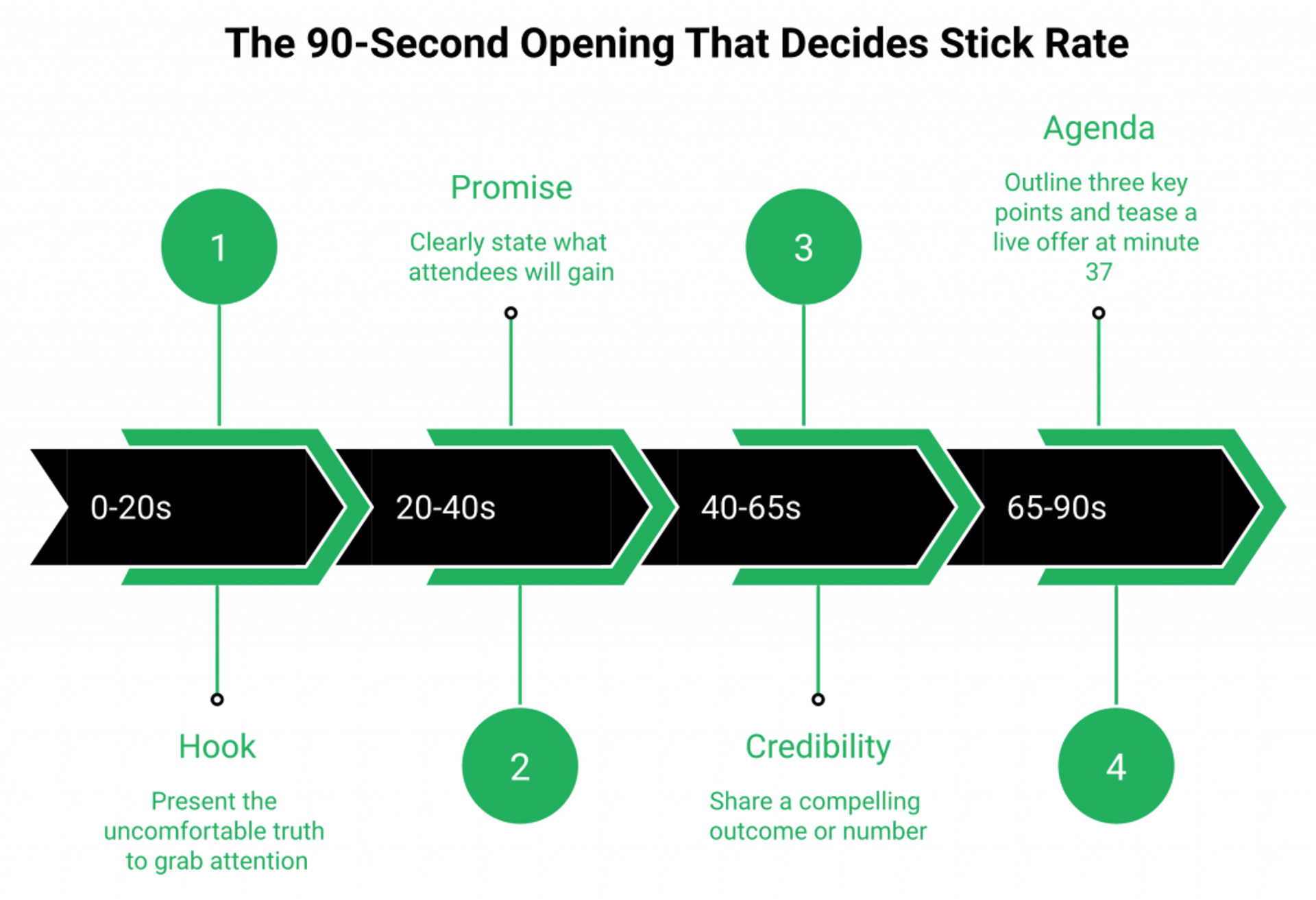
The first 90 seconds decide stick rate. Structure it like this:
- Hook (20s): the uncomfortable truth about the topic.
- Promise (20s): what they’ll leave with.
- Credibility (25s): one outcome or number, not your résumé.
- Agenda (25s): three bullets and a “stay for the offer at minute 37.”
Every second you spend thanking people for coming is a second you’re losing them. For a full host-prep walkthrough, see How to Start a Webinar: Complete Host Preparation Guide.
Interaction Cadence Table
| Minute | Interaction | Purpose |
|---|---|---|
| 4 | Chat prompt | Stick plus segmentation |
| 10 | Poll | Pain validation |
| 18 | Mid-session Q&A pause | Two-way framing |
| 25 | Poll #2 | Solution-awareness signal |
| 32 | Chat prompt | Re-engage the mid-drop |
| 37 | Live CTA #1 (timed offer overlay) | Capture peak intent |
| 45 | Q&A pause | Objection handling |
| 52 | Live CTA #2 (scarcity close) | Convert fence-sitters |
Intent decays the moment they leave. Sell inside the room or don’t sell at all. Live webinar software built for this cadence makes it native, not improvised.
Dress Rehearsal Protocol ✅
- Full script run-through 48 hours out, covering transitions, CTAs, and backup scenarios.
- Co-presenter and moderator call signs agreed.
- Tech check: mic, camera, lighting, backup device, and mobile hotspot.
- “If audio fails in 30 seconds, we switch to slides plus chat,” rehearsed, not improvised.
Chat and Q&A Playbook
- Assign a moderator. Never present and moderate.
- Seed chat with a question in the first 60 seconds.
- Surface Q&A periodically. End-only Q&A sheds 40% of attendees before the CTA.
- Answer the highest-intent question just before the CTA to warm buyers.
For more engagement tactics, see Interactive Webinars That Drive 5x Engagement.
AI-Era Live Workflow 🤖
- Real-time transcripts and auto-chaptering running during the session.
- AI Q&A routing surfacing the top 5 highest-intent questions to the presenter live.
- A tech-failure fallback: an AI-generated summary slide keeps the audience oriented if the stream drops.
Where EasyWebinar Wins the Live Room
Our interaction stack, including polls, chat, Q&A, timed offer overlays with countdown urgency, Dolby-powered HD streaming with automatic backup, and real-time transcripts, is native and data-tagged per attendee. Every poll answer, chat message, and offer click writes to EasyCRM, which means engagement becomes segmentation fuel instead of noise. That’s the difference between a webinar that looks engaging and one that actually produces a revenue signal. Explore all features for the full engagement layer.
The Zoom Gap ❌
“Zoom is missing a lot of core webinar features that should be table stakes today. There’s no pre-webinar waiting room or post-webinar exit page. There’s no ability to distribute resources or files. The polling and survey functions are rudimentary.”— Casey S. Zoom Events and Webinars – G2 Verified Review
“I love the built-in countdown offers and polls as well… I love the ease of being able to integrate this platform with other platforms we use, like HubSpot and Zapier.”— Annette S. Easywebinar G2 – Verified Review
“I love that we can have a poll, offer and countdown right in the event! That’s going to be so great for sales and interactions.”— Verified User in Photography Easywebinar G2 – Verified Review
Q7: How Do You Hand Off Webinar Leads to Sales Without Losing Pipeline? (R.E.L.A.Y. Phase 5)
Effective handoff requires engagement-tier segmentation, a behavior-based lead-scoring rubric, a 24-hour fast-track SLA for full-duration attendees, automated meeting links, AI-drafted follow-ups, and an attendee engagement summary delivered inside the rep’s CRM view.
The Pipeline Leak Nobody Owns
Marketing ends the webinar. Sales gets a flat CSV 48 hours later. Nobody knows who clicked the CTA at minute 37, who asked the objection-revealing question, or who left at minute 12. The “hot” lead gets the same sequence as the no-show, and the rep defaults to the people with the biggest company logos, which is almost never the same as the people with the highest intent. Intent decays in hours, not days. By the time the rep dials, the buyer has moved on or signed with someone who followed up first.
Where the Standard Handoff Breaks ❌
The industry playbook is Zoom to Zapier to HubSpot to Outreach. Every handoff adds latency and loses data:
- Zoom to Zapier: attendance data shows up, but poll answers, CTA clicks, and chat messages are rarely mapped cleanly.
- Zapier to HubSpot: contact records update, but engagement duration and timestamp-level drop-off are lost.
- HubSpot to Outreach: sequences fire, but they’re broadcast-based, the same email to a 45-minute attendee and a 4-minute no-show.
- Demio plus Livestorm: expose engagement data, but neither has native lead scoring or an auto-dialer. Reps still need three tabs to work a lead. See EasyWebinar vs Demio for the side-by-side.
“It didn’t fully integrate with my CRM Highlevel and the replay didn’t show the live polls and CTAs.”— Ivanhoe S. Demio – G2 Verified Review
“Demio is a solid live webinar platform… It’s hard to integrate into HubSpot. We use a third party capture form and had to do several zaps to get all data to flow accurately from our form to HubSpot to Demio.”— Verified User in Education Management Demio – G2 Verified Review
The Strategic Shift: Handoff Is an Architecture Problem
Handoff isn’t a discipline problem you fix with better SLAs in a Notion doc. It’s an architecture problem you fix by killing the handoff. When engagement signal, scoring, and outreach live in one system, the rep’s first touch happens while intent is still hot, not three days later.
How EasyWebinar Closes the Handoff Gap ✅
We built EasyCRM so the scoring and the dialing live where the engagement happened:
- Behavior-based tagging. Every attendee auto-tags Hot, Warm, or Nurture based on in-session actions (CTA click, poll response, and attendance duration).
- Native auto-dialer. Hot leads route into a dialer inside the same platform, no CSV export, no Zapier chain, and no cross-tab handoff.
- AI-drafted follow-ups. Post-webinar sequences write themselves against the attendee’s actual behavior, not a generic template.
- Engagement summary in the rep’s queue. The rep sees the timestamp the attendee joined, what they clicked, what question they asked, and whether they watched the offer, before they dial.
Dig into the full sales CRM to see the engagement-to-dialer flow.
Handoff SLA Table ⏰
| Tier | Signal | Action | SLA |
|---|---|---|---|
| Hot | Full attendance plus CTA click | Auto-dialer plus personal follow-up | 0 to 24 hours |
| Warm | 50%+ attendance, no CTA click | AI-drafted email plus booking link | 24 to 72 hours |
| Nurture | <50% attendance or no-show | Behavioral drip plus replay link | 72h+ |
“I love EasyWebinar’s support team… the registration and email notification features are really handy. EasyWebinar saves me a lot of time, especially since I often host the same webinar monthly.”— Eliza W. Easywebinar G2 – Verified Review
“Pretty much once I have run one webinar, I can clone and setup multiple in a breeze. We have run close to 30 since we started running it this new year and it has been a game changer for our business. It also seamlessly integrated with our CRM.”— Darrin B. Easywebinar G2 – Verified Review
Q8: How Do You Measure Webinar ROI and Prove Revenue Impact? (R.E.L.A.Y. Phase 6)
The 7-metric ROI framework tracks registration conversion, show-up rate, watch time, engagement score, MQL conversion, pipeline created, and closed revenue, combined into ROI equals (Attributed Revenue minus Total Webinar Cost) divided by Total Webinar Cost. Without these seven, you’re guessing.
The 7-Metric ROI Framework ⭐
- Registration conversion (traffic to registrant).
- Show-up rate (registrant to live attendee).
- Watch time (average minutes attended).
- Engagement score (polls, chat, and CTA clicks, normalized 0 to 100).
- MQL conversion (attendee to MQL).
- Pipeline created ($ opportunity value).
- Closed revenue (attributed, multi-touch).
For the deeper revenue math, see How to Make Money With Webinars, 4X Your Revenue.
Cost-Per-Attendee and Cost-Per-MQL Formulas 💰
- Cost-per-Attendee equals (Platform plus production plus paid promo) divided by live attendees.
- Cost-per-MQL equals (Platform plus production plus paid promo) divided by webinar-sourced MQLs.
Worked example: $4,000 all-in cost, 180 attendees, and 40 MQLs gives you $22 cost-per-attendee and $100 cost-per-MQL. Use those two numbers to benchmark every webinar against the last four. Transparent webinar pricing makes the platform line item easy to isolate.
Attribution Model for Webinar-Sourced Revenue
- First-touch: credit the webinar when it was the top-of-funnel entry.
- Multi-touch (recommended): 40% first-touch, 40% last-touch, and 20% middle-touch spread across campaigns.
- Opportunity-level: tag the opportunity with the webinar campaign ID at creation.
Don’t debate attribution philosophy at the CFO meeting. Pick one, write it down, and apply it to every webinar from this point forward.
Predictive ROI With Historical Data 🤖
Once you have 4 to 6 historical webinars, AI-driven predictive modeling turns planning into math:
- Inputs: topic, list size, ICP match, slot, and promo spend.
- Outputs: projected registrants, attendees, MQLs, and pipeline.
- Use it to kill a webinar idea before you spend 30 hours producing it.
Post-Webinar Analytics Dashboard Template
Ship one dashboard per webinar, refreshed within 48 hours of the event. Four panels:
- Funnel: traffic, registrants, attendees, MQLs, pipeline, and revenue.
- Engagement: watch time distribution, poll response rate, and CTA click timestamp.
- Cost: cost-per-attendee, cost-per-MQL, and cost-per-pipeline-$.
- Cohort: this webinar vs. trailing 4-webinar average.
2026 Benchmark Snapshot 📊
| Metric | Median | Top-Quartile |
|---|---|---|
| Registration conversion | 38% | 52% |
| Show-up rate | 35% | 49 to 57% |
| Cost-per-MQL 💰 | $80 to $140 | $35 to $60 |
| Registrant to Closed revenue | 2.1% | 6.5%+ |
If your numbers land below the median line, the architecture is leaking before it’s the content.
How EasyWebinar Collapses the Reporting Stack
Our analytics layer attributes revenue from registration to offer click to closed payment inside one report. No Zapier chain. No spreadsheet reconciliation. No “let me get back to you on that number” when the CFO asks. Every signal from the ad click to the Stripe charge stays on a single contact record, which means the ROI formula above runs automatically instead of being rebuilt every quarter. Explore the full Automated Webinars 2025: Scalable Funnel Strategies playbook for how the reporting loop compounds.
Rick Mulready achieved 166% ROI on Facebook ads driving an EasyWebinar automated webinar funnel, with $8 to $12 cost-per-lead flowing into a high-ticket back-end offer. That’s the back-end-determines-front-end-math principle working as designed: a profitable evergreen funnel that compounds while the ads keep running.
Q9: How Do You Turn One Webinar Into Evergreen Revenue and Repurposable Content? (R.E.L.A.Y. Phase 7)
Compound one live webinar into recurring revenue by deploying a four-channel repurposing matrix (blog, clips, ebook, podcast, carousels, and newsletter), wiring the recording into a Just-in-Time evergreen funnel, ranking an SEO-optimized recording landing page, and using AI auto-chaptering to generate follow-up drafts. One live event, 90 days of compounding assets. That’s the difference between treating the webinar as an event and treating it as an engine.
The “Record-and-Upload” Problem ❌
Most teams spend 30+ hours producing a live webinar, then upload the MP4 to a landing page and call it “on-demand.” Conversion drops from a 10 to 18% live attendee-to-buyer rate to 3 to 5% on-demand, because three things vanish the moment you move off live:
- Timing: there’s no “starting in 10 minutes” urgency.
- Social context: no chat, no polls, and no presenter reading the room.
- Scarcity: the countdown offer is a screenshot, not a mechanic.
Replay files don’t sell. Replay systems do. For a deeper dive, see Pre-Recorded Webinar Platforms vs Live: Which Wins?.
Where the Industry Stalls
The status quo rebuilds the live feel manually with a stitched stack, and it still underperforms.
- Zoom and GoTo: give you a recording, not an evergreen funnel. No Just-in-Time scheduling, no in-player offers, and no behavioral follow-ups.
- Vimeo plus ClickFunnels plus an email tool: rebuilds urgency by duct tape, and attribution breaks at every handoff.
- eWebinar: handles simulated interactions cleverly at approximately $99/mo, but caps attendees, doesn’t host live, and isn’t built for the registration-to-revenue pipeline.
Each option solves one slice of evergreen. None of them own the full path from recording to recurring revenue. For more alternatives, see Best On-Demand Webinar Software 2025.
The Strategic Shift: Evergreen Is a System, Not a File ⭐
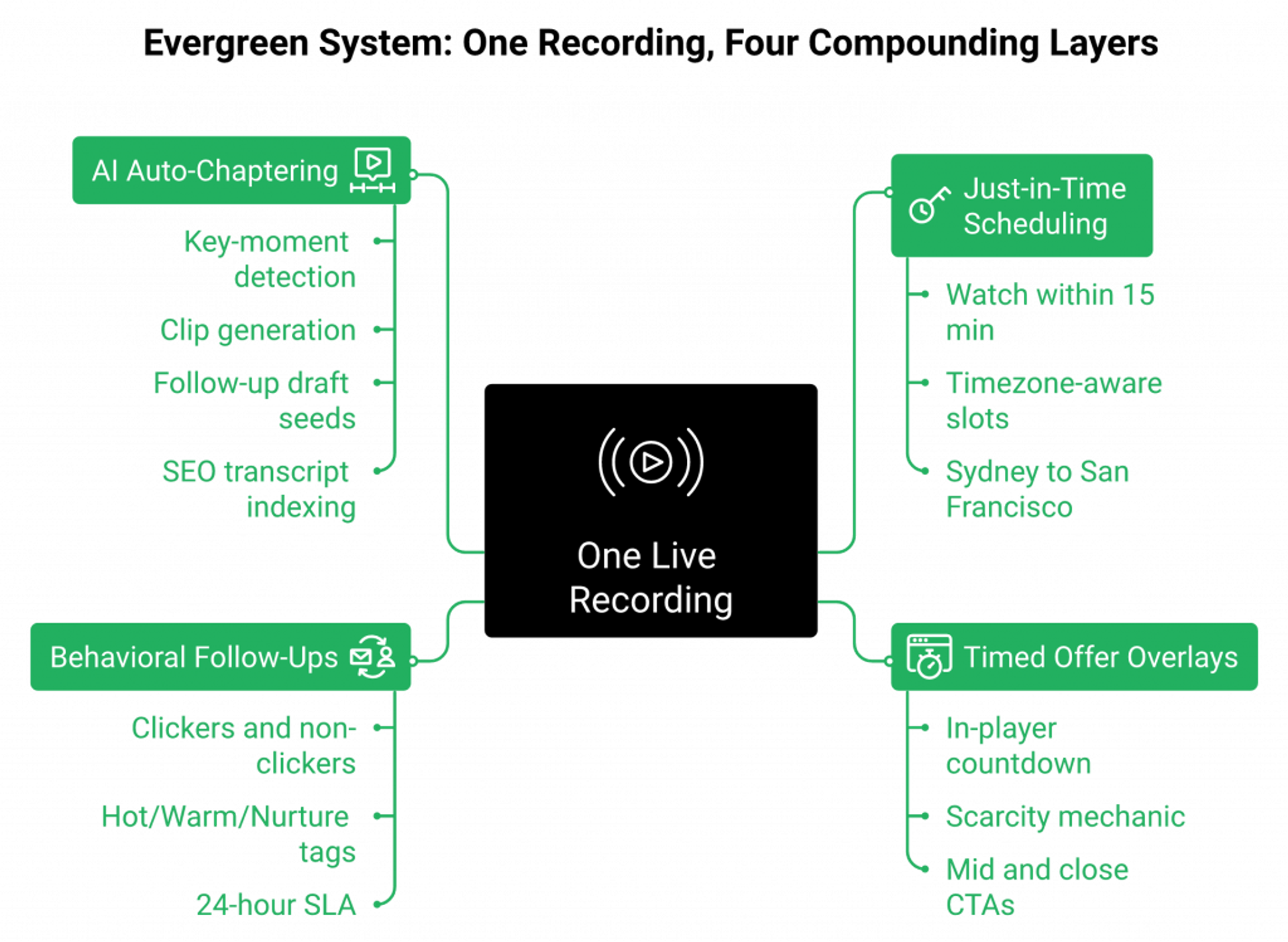
Evergreen only compounds when the scheduling, the urgency, the offer, and the follow-up are part of the asset, not bolted on after the fact. That means Just-in-Time sessions so the registrant watches within 15 minutes of sign-up. Timezone-aware recurring schedules so Sydney and San Francisco both get convenient slots. Timed offer overlays with countdown mechanics inside the player. Behavioral follow-ups routing clickers and non-clickers into parallel sequences. Do that, and a single recording runs as a 24/7 revenue asset instead of a dusty MP4 on a forgotten landing page. See Automated Webinars for Passive Income for the compounding math.
How EasyWebinar’s Automated Gold Runs the Full Loop ✅
We built automated webinar so live-first, automate-later actually works. Run the webinar live, prove the 10% conversion, and then flip the same asset to evergreen with one toggle, same script, same slides, same offers, and same tracking. Just-in-Time scheduling kills the registration-to-attendance gap. AI auto-chaptered replays surface the key moments for repurposing. Power Follow-Ups segment every attendee by behavior. Registration pages are SEO-indexed and OG-tagged, so the recording landing page ranks and feeds the retargeting pixel. EasyCast multistreaming sends the same session to YouTube, LinkedIn, Facebook, and RTMP. The webinar becomes a distribution engine, not a walled garden.
“Setting up evergreen webinars is so simple that we’ve used several so far. We’ve seen such a fantastic return on investment after implementing a sales strategy that uses evergreen webinars that we now recommend this tool to anyone who asks about running evergreen webinars for their online business.”— Meaghan L. Easywebinar G2 – Verified Review
“EasyWebinar is hands-down THE webinar platform for evergreen webinars, no contest… EasyWebinar makes it, well, easy to work smarter, not harder.”— Ash A. Easywebinar G2 – Verified Review
Carla Biesinger generated $5M in revenue from a single EasyWebinar evergreen funnel: one pre-recorded webinar, automated scheduling, in-webinar offers, and behavioral follow-ups doing the selling 24/7. Same offer that sold 10 to 12 seats per live class now sells while she sleeps. That’s the compounding unlock when evergreen is a system, not a file. See the full course creator case study (Carla Beisinger) for the breakdown.
Q10: What Are the Top 10 Webinar Mistakes to Avoid in 2026?
The 10 failure modes that kill webinar ROI in 2026: a weak 90-second opening, an overlong registration form (greater than 5 fields), end-only Q&A, a single CTA, no dress rehearsal, no 24-hour handoff SLA, a broadcast-only platform, no attribution model, no evergreen plan, and zero accessibility (captions and transcripts). Each one silently compounds across the funnel.
The 10 Failure Modes, Ranked by Revenue Impact ❌
- Weak 90-second opening. Drops stick rate by 30%+. The first 90 seconds decide whether they stay for the CTA.
- Registration form greater than 5 fields. Cuts registration conversion by 30 to 40% (Marketo data). Every extra field is a buyer you lost before they ever attended.
- End-only Q&A. Sheds approximately 40% of attendees before the CTA. Periodic pauses keep them in the room where the offer lives.
- Single CTA. One pitch, one shot. Stacked CTAs (mid, late, and close) consistently double the click rate.
- No dress rehearsal. Tech failures in the first 5 minutes are conversion killers, and they’re preventable with a 30-minute rehearsal 48 hours out. See How to Start a Webinar: Complete Host Preparation Guide.
- No 24-hour handoff SLA. Intent decays in hours. Any full-duration attendee not contacted in 24 hours is cold by Friday.
- Broadcast-only platform (Zoom, GoTo). No native CRM, no evergreen layer, and no in-room monetization. The revenue work starts after the event, in a different tool. Compare EasyWebinar vs Zoom and EasyWebinar vs GoToWebinar.
- No attribution model. If you can’t map attendee to MQL to pipeline to revenue, you’re guessing. “Webinars are great” isn’t a number.
- No evergreen plan. Every live webinar without an evergreen flip wastes 30+ hours of production.
- Zero accessibility. No captions or transcripts costs 25%+ engagement from accessibility-dependent viewers, and it kills SEO indexing of the replay.
How EasyWebinar Closes All 10 in One Workflow ✅
We built the webinar platform so these failure modes aren’t discipline problems. They’re architectural defaults. 5-field registration forms ship by default. In-webinar polls, stacked CTAs, and periodic Q&A prompts are native. EasyCRM tags every attendee Hot, Warm, or Nurture and routes Hot leads to the auto-dialer inside 24 hours, no CSV and no Zapier. Live flips to evergreen with one toggle. Auto-generated captions and searchable transcripts ship on every recording. One workflow, ten fewer places for revenue to leak. Explore the full all features page for the architecture.
Q11: Which Webinar Platforms Execute the Full R.E.L.A.Y. Playbook? (Top 8 Compared)
Of the 8 leading webinar platforms, only EasyWebinar natively executes every phase of R.E.L.A.Y. The remaining 7 cover subsets of the loop, forcing multi-tool stacks or format trade-offs. The matrix below grades each on live, simulive, evergreen, native CRM, in-webinar checkout, SOC 2, max attendees, and starting price. For a deeper comparison, see compare webinar platforms.
R.E.L.A.Y. Platform Matrix ⭐
| # | Platform | Live | Simulive | Evergreen | Native CRM | In-Webinar Checkout | SOC 2 | Max Attendees | Starting Price |
|---|---|---|---|---|---|---|---|---|---|
| 1 | EasyWebinar | ✅ | ✅ | ✅ | ✅ (EasyCRM) | ✅ | ✅ Type II | 50K+ | $78/mo |
| 2 | Zoom Webinars | ✅ | ❌ | ❌ | ❌ | ❌ | ✅ | 50K | ~$79/mo |
| 3 | GoTo Webinar | ✅ | ⚠️ limited | ❌ | ❌ | ❌ | ✅ | 3K | $49/mo |
| 4 | Demio | ✅ | ✅ | ⚠️ on-demand | ❌ | ❌ | ⚠️ | 3K | ~$734/mo at 3K |
| 5 | Livestorm | ✅ | ❌ | ⚠️ on-demand | ❌ | ❌ | ✅ | 3K | $99/mo |
| 6 | WebinarJam | ✅ | ✅ | ❌ (add EverWebinar) | ❌ | ⚠️ basic | ❌ | 5K | $39/mo |
| 7 | WebinarKit | ❌ | ✅ | ✅ | ❌ | ⚠️ basic | ❌ | 1K | $49/mo |
| 8 | ON24 | ✅ | ✅ | ✅ | ⚠️ partial | ❌ | ✅ | 100K+ | $30K+ ACV 💸 |
Entries 1 to 4
1. EasyWebinar, Full R.E.L.A.Y. Coverage ✅
- Strengths: AI webinar builder (prompt-to-funnel in under 10 min), EasyCRM with lead scoring and auto-dialer, in-platform monetization with timed offers, EasyCast multistreaming, SOC 2 Type II, and SSO/SAML.
- Best for: growth-stage B2B, course creators, and mid-market consolidators.
- Skip if: you just need a free video-call tool.
2. Zoom Webinars
- Strengths: brand familiarity, and video quality at scale.
- Gaps: no automation, no CRM, no funnel pages, and no in-room monetization.
“There’s no pre-webinar waiting room or post-webinar exit page. There’s no ability to distribute resources or files… Customization of landing pages, reminders, and calendar invites is almost nonexistent.”— Casey S. Zoom Events and Webinars – G2 Verified Review
3. GoTo Webinar, Legacy and Limited
Stable for large broadcasts, dated UX, no funnel layer, and no AI. For alternatives, see GoToWebinar Alternatives for Small Businesses.
“GoToWebinar is the most basic webinar tool that offers nothing more than any other tool… customer support is impossible to reach and is completely outsourced.”— Forrester S. GoTo Webinar – G2 Verified Review
4. Demio, Clean UX, No Revenue Layer
Browser-based, modern, but no native CRM, no in-webinar checkout, and approximately $734/mo at 3K attendees. For side-by-side, see EasyWebinar vs Demio.
“It didn’t fully integrate with my CRM Highlevel and the replay didn’t show the live polls and CTAs.”— Ivanhoe S. Demio – G2 Verified Review
Entries 5 to 8
5. Livestorm, Marketing-First, Not Revenue-First
Clean engagement UX, but no native CRM or checkout. It still requires a HubSpot plus Stripe stack.
6. WebinarJam, Live Depth, Dated UX
Real live capability, but no native CRM, and evergreen requires the separate EverWebinar product. See EasyWebinar vs WebinarJam.
“The integrations with 3rd party software such as MailChimp is inconsistent on both the pushing the registrants over and the custom form field population.”— Tara G. WebinarJam – G2 Verified Review
7. WebinarKit, Automation-Only
Strong on AI and price, but no live capability at all. You can’t validate before scaling.
8. ON24, Enterprise-Only 💸
Deep analytics, enterprise-grade, but $30K+ ACV prices it out of mid-market.
Proof: Consolidation Math
A Zoom + ClickFunnels + HubSpot + Zapier + Stripe + Restream stack runs $600 to $1,000/mo with broken attribution. EasyWebinar Unlimited delivers the same workflow, plus native CRM, checkout, and evergreen, on one bill. See transparent webinar pricing.
Q12: Ready to Run Your Next Webinar as a Revenue Engine? (Your R.E.L.A.Y. Starter Kit)
If you want to operationalize the 27 practices in this playbook, you need two things: the R.E.L.A.Y. Starter Kit (registration wireframe, 5-email swipe file, rehearsal checklist, debrief template, and Webinar Readiness Scorecard) and a platform that executes every phase inside one workflow. Both are one click below.
Your Next Three Actions ⭐
- Run the Readiness Scorecard to benchmark where your current webinar workflow leaks revenue (registration, engagement, handoff, evergreen, and attribution).
- Download the swipe files to shortcut production by weeks. The 5-email sequence alone has lifted show-up rates past 45% for the teams running it.
- Start a 14-day EasyWebinar trial and stand up an AI-generated funnel in under 10 minutes. Live, simulive, automated, and evergreen, same asset, one toggle. Sign up free or request demo.
Grab the Kit and the Platform
Stop running webinars as broadcasts. Start running them as compounding revenue assets, one platform, one workflow, and one scoreboard. See how real operators did it in the customer reviews and the edtech case study (K21).

Casey Zeman
Founder of EasyWebinar
About Author
Over the past decade, I've helped thousands of entrepreneurs, coaches, and consultants turn webinars into a predictable, powerful way to grow their audience, build trust, and scale, without the constant hustle. I created EasyWebinar because I couldn't find a system that combined authenticity, engagement, and automation the way I needed. So, I built one.
Related Posts
10 Best Community Engagement Platforms in 2026
Compare the 10 best community engagement platforms in 2026. Course creators, evaluate live hosting, analytics, and replay to pick your winner today.
10 Best Online Coaching Tools in 2026: Live Session Quality, Scheduling, Recording, and Client Engagement Analytics
Compare the 10 best online coaching tools of 2026 on session quality, scheduling, and analytics. Discover the right fit for your coaching revenue model.
10 Best Webinar Hosting Platforms Ranked by Uptime, Streaming Quality & Cost
Compare 10 webinar hosting platforms ranked by uptime, streaming quality, and cost. Discover which tool actually turns attendees into revenue.
Turn every webinar into a revenue stream
Launch your first paid event in just a few clicks - and start monetizing your expertise.
Book a Call