Post-Webinar Survey Questions: 30 Questions by Goal (+ Free Template)

Shubhangi Gorantla
Published on Jul 2, 2025 • 19 min read

TL;DR
- Pick one goal before writing questions: improve the content, rate the speaker, find buyers, plan the next topic, or score the session. Then ask five to eight questions.
- Keep most questions closed. Pew found open questions go unanswered far more often than closed ones, so use one or two short open boxes at most.
- The bank has 30 questions with answer types: 8 for experience and tech, 6 for content, 5 for the speaker, 6 for buyers, and 5 for next topics.
- Ask one to three questions as a poll before the session ends, then send the full form with the replay within 24 hours, with a separate no-show version.
- Send every "yes, contact me" answer to sales the same day, and change one thing per webinar so you can see what worked.
- Automate what is proven: once survey scores and sales confirm a session works, move it to Simulated Live or Evergreen and keep the survey in the follow-up.
By Casey Zeman, Founder of EasyWebinar.
The webinar ends. The replay email goes out. Then a survey link follows two days later with twenty questions, and almost nobody answers it. I have sent that survey. Most hosts have.
The fix is not a better form. It is a clearer goal. A post-webinar survey works when every question helps you decide one thing: what to teach next, who to call, or what to cut. This guide gives you 30 questions sorted by that goal, a free eight-question template you can rebuild in any form tool, and the timing that gets answers.
If you are planning the whole funnel around this, start with our guide to webinar marketing, then come back for the survey.
Q1. What Questions Should You Ask in a Post-Webinar Survey?
Ask five to eight questions, chosen by what you want to decide next: improve the content, rate the speaker, find buyers, plan the next topic, or score the whole session. Use scales and multiple choice for most of them. Add one or two short open questions and one 0 to 10 "would you recommend" question. Each question should change something you do.
🎯 Pick the goal first
A goal is the decision the answers will feed. Choose one or two goals per webinar, then pull the matching questions from the bank below.
| Goal | Ask | Answer type |
|---|---|---|
| Improve the content | What was the most useful part? What was missing? | Open (one line) |
| Rate the speaker | How clear was the speaker? | Scale 1 to 5 |
| Find buyers | Would you like someone to contact you? | Yes / No |
| Plan next topics | What should we cover next? | Multiple choice |
| Score the session | How likely are you to recommend this webinar? | 0 to 10 (NPS) |
NPS stands for Net Promoter Score. It is one 0 to 10 question that sorts people into promoters, passives, and detractors, as defined by Bain & Company.
⏰ Why five to eight is the limit
SurveyMonkey studied 100,000 of its surveys, from 1 to 50 questions long. Drop-off rose with every added question, and the steepest rise came in the first 15. The data is old (2009 to 2010), so read it as a direction, not a benchmark. The lesson holds anyway: every question you add costs you finished surveys.
Easywebinar's own advice to hosts is blunt. If you will not act on an answer, cut the question. A short survey that people finish beats a long one that tells you nothing.
Easywebinar runs the shortest version of this survey inside the room. Polls launch during the session, attendees answer without leaving, and every poll response is saved against that attendee in the webinar's analytics. See the full list of webinar engagement tools that can carry a question.
Q2. Why Do Most Post-Webinar Surveys Go Unanswered?
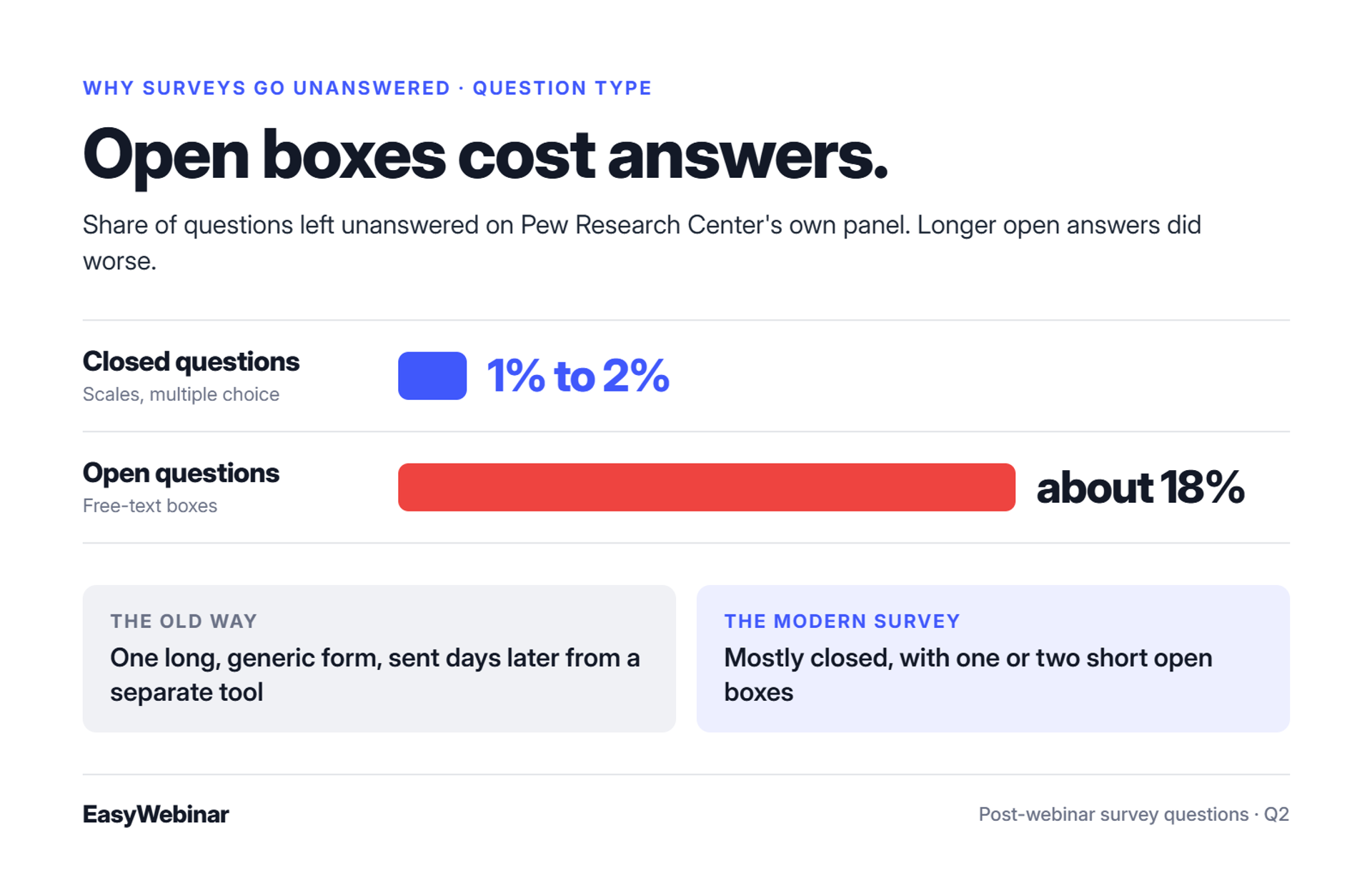
Most post-webinar surveys fail because they are long, generic, and arrive days later from a separate form tool, after the attendee has moved on. Open questions cost the most answers. Easywebinar moves the first questions into the room as polls and sends the rest with the replay, split by who attended and who did not.
📭 The survey nobody opened
Picture a coach on a Thursday morning. She ran a strong webinar on Tuesday. On Thursday, she finally exports the attendee list, builds a form, and emails it to everyone. By then, her attendees have watched three other things.
That was the old way. One generic form, sent late, from a tool that knows nothing about who stayed, who left, or who clicked the offer. Some teams still work like this today:
"I point attendees to an external survey after the webinar ends. But I'd rather point attendees directly to our website instead." - Angelo M., Contrast G2 - Verified Review
"Missing survey functionality, but polls & Q&A work well." - Verified User in Information Technology and Services, Contrast G2 - Verified Review
🔍 What changed
Hosts now treat the survey as a decision tool, not a report card. That changes how questions are written.
Pew Research Center measured this on its own panel. Closed questions went unanswered 1% to 2% of the time on average. Open questions went unanswered about 18% of the time, and longer open answers did worse. So the modern survey is mostly closed, with one or two short open boxes.
✅ What Easywebinar does about it
Easywebinar keeps the survey inside the webinar workflow. Polls run in the room, and timed offers and handouts can carry a link. Follow-up emails go out separately to attendees and to no-shows, so each group gets a survey that fits. Poll responses sit in the same attendee-level report as watch time and offer clicks, as listed on the EasyWebinar features page.
Easywebinar puts polls, offers, follow-up emails, and attendee data in one place. The survey stops being an afterthought sent from another tool. It becomes the last step of the webinar itself.
Q3. Which Questions Measure the Overall Experience and Tech?
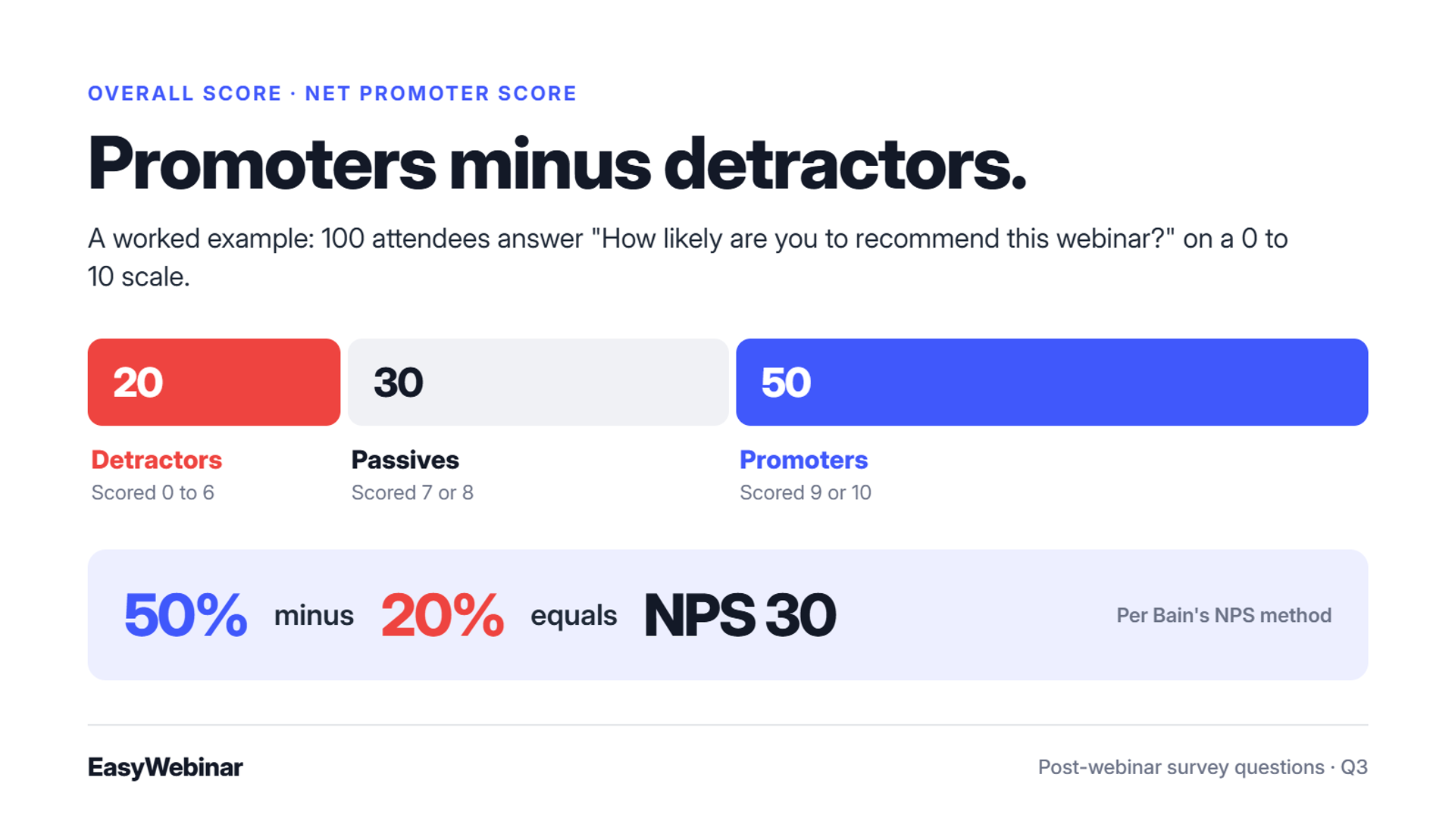
Use four questions for the overall score and four for the tech. Keep all eight closed, so they take seconds and compare cleanly from one session to the next. Net Promoter Score is the percentage of promoters (9 to 10) minus the percentage of detractors (0 to 6), per Bain's NPS method.
⭐ Overall experience (questions 1 to 4)
- How satisfied were you with this webinar? Scale 1 to 5.
- How likely are you to recommend this webinar to a friend or colleague? 0 to 10 (NPS).
- Did the webinar match what the registration page promised? Yes / Partly / No.
- Was this webinar a good use of your time? Scale 1 to 5.
Here is a worked example of the NPS math. Say 100 people answer question 2. Fifty score 9 or 10, thirty score 7 or 8, and twenty score 0 to 6. Your NPS is 50% minus 20%, which equals 30.
A low score on question 3 usually points back to the promise on your webinar registration form and page.
🖥️ Tech and format (questions 5 to 8)
- How easy was it to join the webinar? Scale 1 to 5.
- How was the audio quality? Good / Some issues / Poor.
- How was the video and screen share? Good / Some issues / Poor.
- Was the length right? Too short / About right / Too long.
Tech answers should be boring. If question 5 keeps scoring low, the problem sits in the join step, not the slides. Fix that before you rewrite the talk.
📊 Why track the quiet attendees
Many attendees never type in chat. A private score is often the only signal you get from them. Coaches who run regular NPS check-ins say the same thing: some of their most successful clients are almost invisible in public.
Easywebinar attendees join live webinars from any browser on desktop or mobile, with nothing to download, no plugin, and no account. That removes the most common cause of a low "ease of joining" score before the survey ever goes out.
Q4. Which Questions Improve Your Webinar Content?
Ask what was most useful, what was missing, whether the level fit, and whether the pace was right. Then ask which example helped most and what one change would improve it. Keep each open question to one line, and phrase it with "what", not "why".
📝 Content questions (questions 9 to 14)
- What was the most useful part of the webinar? Open, one line.
- What was missing that you hoped to learn? Open, one line.
- How did the level fit you? Too basic / About right / Too advanced.
- How was the pace? Too slow / About right / Too fast.
- Which example or demo helped you most? Multiple choice, list your segments.
- What one change would make this webinar better? Open, one line.
💬 Ask "what", not "why"
"Why" questions sound like blame. "Why did you leave early?" puts people on the defensive. "What made you leave early?" invites a reason instead. Communication coach Aleena Rais teaches the same swap for this exact purpose: it lowers defensiveness and opens dialogue.
I treat question 10 as the most valuable one in this group. The answer to "what was missing" is usually the title of your next webinar, and it feeds straight into the plan for how to host a webinar next time.
📉 Pair the answers with behaviour
Opinions tell you what people felt. Behaviour tells you where they actually left. Put the two side by side before you change anything. If people say the middle dragged and they also left at minute 35, you know which ten minutes to cut.
Easywebinar shows that behaviour on a drop-off heatmap: the exact minute attendees leave. Read question 12 (pace) next to that minute in your webinar analytics, and you will rarely guess wrong about what to fix.
Q5. Which Questions Rate the Speaker?
Rate the speaker on clarity, knowledge, and engagement on a 1 to 5 scale. Then ask whether the attendee's own question was answered, and whether they would attend another session with this speaker. Scales let you compare speakers fairly across sessions, including guests.
🎤 Speaker questions (questions 15 to 19)
- How clearly did the speaker explain the topic? Scale 1 to 5.
- How well did the speaker know the subject? Scale 1 to 5.
- How engaging was the speaker? Scale 1 to 5.
- Did you get an answer to your question? Yes / No / I didn't ask one.
- Would you attend another webinar with this speaker? Yes / Maybe / No.
If you had more than one presenter, repeat question 15 for each name. One blended score hides who needs help.
🤝 Share the scores with guests
I send guest speakers their scores within a week, good or bad. It is the easiest way to make the next invitation an easy yes. Speakers who see a 4.6 for clarity want to come back. Speakers who see a 3.1 usually ask how to fix it.
Question 18 deserves a close look. A low score there rarely means the speaker was weak. It usually means Q&A ran out of time, which is a scheduling fix, not a talent fix.
Easywebinar lets co-hosts and guest presenters share one live webinar room, so every speaker in a session can be rated on the same scale and compared across your calendar.
Q6. Which Survey Questions Find Buyers?
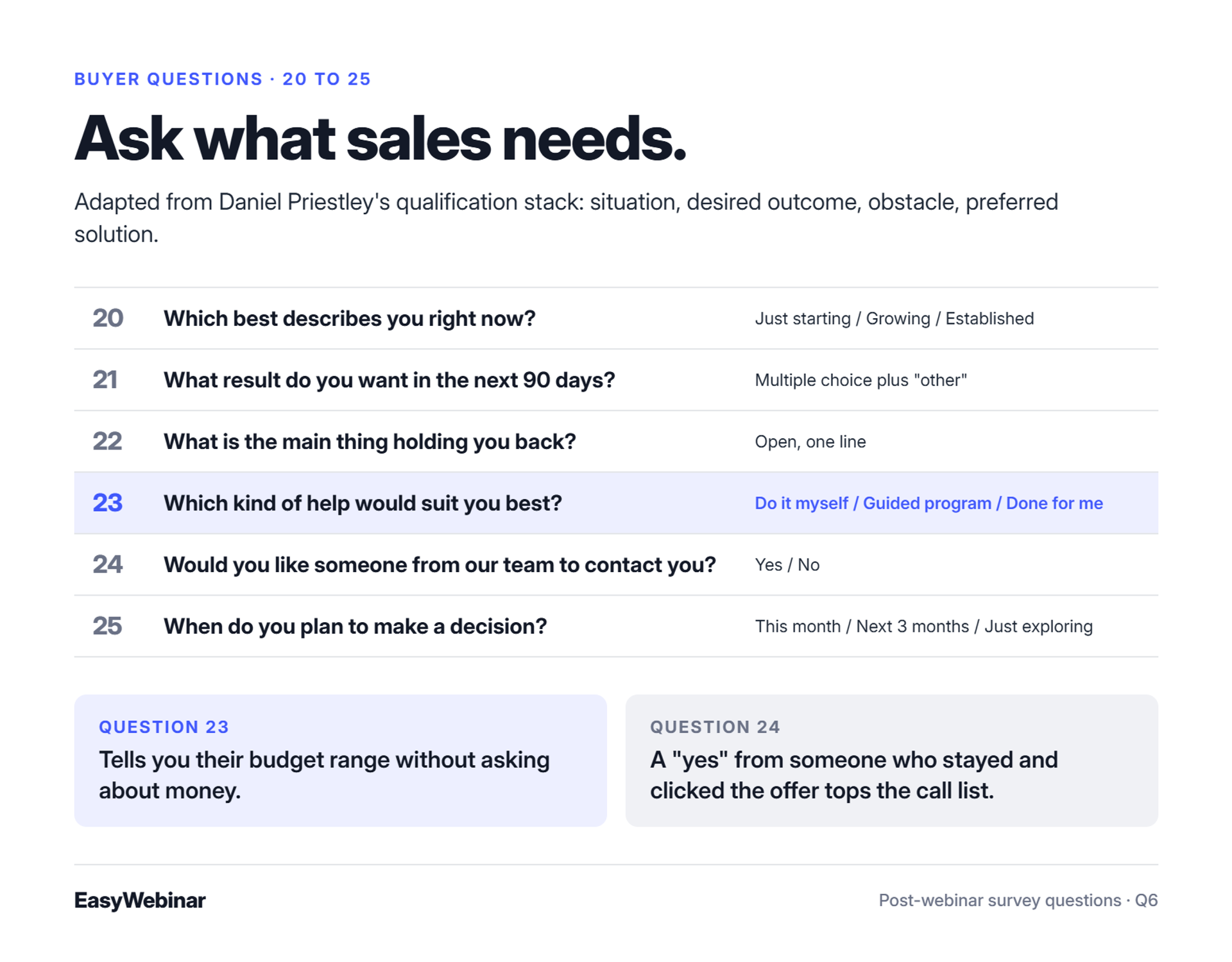
Ask about their situation, the outcome they want in 90 days, the main obstacle, which kind of help suits them, whether they want someone to contact them, and when they plan to decide. Easywebinar records what each attendee watched, clicked, and bought, so each answer sits beside real behaviour.
💸 The feedback form that ignores buyers
Most post-webinar surveys only ask, "Did you like it?" That is useful for the speaker. It is useless for sales. The person who scored you a 7 might be ready to buy next week, and the form never asked.
The old way left sales to guess. Someone scrolled the attendee list, picked the names they recognised, and sent the same "just checking in" email to all of them.
🧭 The buyer questions (questions 20 to 25)
Entrepreneur Daniel Priestley uses a short qualification stack: situation, desired outcome, obstacle, preferred solution, and an open box. I adapted it for webinars:
- Which best describes you right now? Multiple choice (for example: just starting / growing / established).
- What result do you want in the next 90 days? Multiple choice plus "other".
- What is the main thing holding you back? Open, one line.
- Which kind of help would suit you best? Do it myself / Guided program / Done for me.
- Would you like someone from our team to contact you? Yes / No.
- When do you plan to make a decision? This month / Next 3 months / Just exploring.
Question 23 is quietly the most useful. The answer tells you their budget range without asking about money.
📈 What Easywebinar does with the answers
Easywebinar turns every attendee into first-party intent data: what they watched, asked, clicked, and bought. Add the survey answers, and question 24 stops being a guess. A "yes" from someone who stayed 50 minutes and clicked the offer goes to the top of the call list. That is the core of webinar lead generation.
Lead scoring sorts attendees into Hot, Warm, and Nurture, and the data syncs to your CRM or EasyCRM, the CRM built into Easywebinar. Course creators already run their follow-up this way:
"The integration with my email service provider was seamless, allowing me to automate a follow-up sales sequence once someone watches the webinar." - Jennifer B., Easywebinar G2 - Verified Review
Easywebinar records attendance, watch time, questions, poll answers, and offer clicks for every attendee, then syncs them through its integrations to HubSpot, Salesforce Pardot (Account Engagement), ActiveCampaign, Kit (formerly ConvertKit), or EasyCRM. Sales can act on a "yes, contact me" the same day.
Q7. Which Questions Plan Your Next Webinar?
Offer a multiple-choice list of next topics with an "other" box. Ask for their biggest challenge in their own words. Then ask the preferred format, day, and time, and finish with one open "anything else" box. Five questions give you the next title and schedule.
🗓️ Next-topic questions (questions 26 to 30)
- Which topic should we cover next? Multiple choice of 3 to 5 options, plus "other".
- What is the number one challenge you want help with right now? Open, one line.
- Which format do you prefer? Live with Q&A / Short recorded session / Workshop.
- Which day and time suit you best? Multiple choice, plus "let me choose my own time".
- Is there anything else we should know? Open, optional.
Copywriter Alex Cattoni asks her email list a version of question 27 and uses the replies as marketing research, in her audience's own words. It works just as well after a webinar.
⏰ When people ask for their own time
Watch question 29. If many people pick "let me choose my own time", your audience is spread across time zones or schedules. That is a signal to test an automated webinar once the live version converts.
Easywebinar's Evergreen format offers Just-in-Time sessions, which start minutes after someone registers, plus timezone-adjusted scheduling for audiences who ask to choose their own time. Both sit under Easywebinar's automated webinar umbrella, beside Simulated Live.
Start your 7-day trial or watch the demo
Q8. Is There a Free Post-Webinar Survey Template?
Yes. The template below has eight questions: overall rating, recommend 0 to 10, most useful part, what was missing, speaker clarity, next topic, contact request, and an open box. Rebuild it in Google Forms or the form tool you already use. A three-question version for no-shows is included below.
📋 The eight questions in the template
| # | Question | Type | Goal |
|---|---|---|---|
| 1 | How satisfied were you with this webinar? | Scale 1 to 5 | Score the session |
| 2 | How likely are you to recommend it? | 0 to 10 | Score the session |
| 3 | What was the most useful part? | Open, one line | Improve the content |
| 4 | What was missing? | Open, one line | Improve the content |
| 5 | How clearly did the speaker explain the topic? | Scale 1 to 5 | Rate the speaker |
| 6 | Which topic should we cover next? | Multiple choice | Plan next topics |
| 7 | Would you like someone to contact you? | Yes / No | Find buyers |
| 8 | Anything else we should know? | Open, optional | All |
Put "Takes 2 minutes" at the top of the form. People finish what they can see the end of.
❌ The no-show version (three questions)
- What stopped you from joining? Time didn't work / Forgot / Tech issue / Other.
- Would you like the replay? Yes / No.
- Which topic should we cover next? Multiple choice.
✅ Where to put the link
Swap any question for one from the bank that matches your goal, but keep the total at eight. Then place the link where people already are. Platforms differ here. One GoTo Webinar user rates its reporting on "post-session questions, polls, and survey feedback", while scoring the tool 6/10 overall:
"Reporting feature: attendees, registrants, and post-session questions, polls, and survey feedback." - Khyati Doshi, Senior Marketing Manager, GoTo Webinar TrustRadius - Verified Review
Easywebinar users tend to mention the pages and emails:
"From setting up your webinar to customising landing pages, thank you pages and emails the platform is so intuitive. I love the built-in countdown offers and polls as well." - Annette S., Easywebinar G2 - Verified Review
Easywebinar lets you add the form link to the replay email, the thank-you page, and the replay page. Our webinar email templates show where it fits in the sequence. You can also show it as a timed offer button near the end of the session, so attendees open it before they leave.
Q9. When and How Should You Send a Post-Webinar Survey?
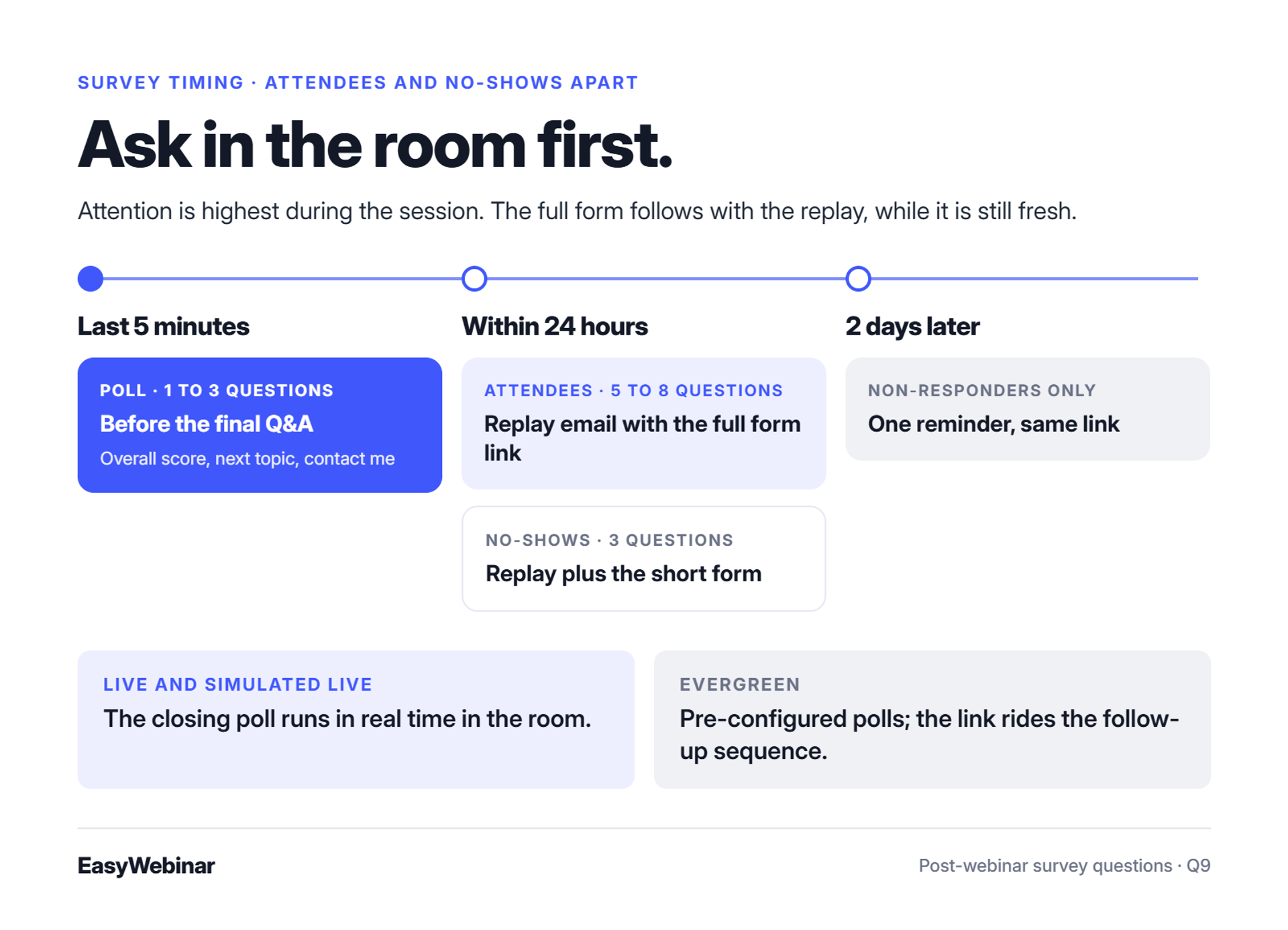
Ask one to three questions as a poll before the session ends. Then email the full survey with the replay within 24 hours, to attendees and no-shows separately. In Easywebinar, Live and Simulated Live sessions run the poll in real time. Evergreen sessions use pre-configured polls, and the survey link rides the follow-up sequence.
⏰ The old way: one blast, days later
Most hosts send one email to everyone, two or three days after the event. Attendees, early leavers, and no-shows all get the same twenty questions. The people who loved it have moved on. The people who missed it get asked to rate a talk they never saw.
Attention is highest in the room. That is the shift: the first questions belong inside the webinar, and the full form belongs with the replay, while the session is still fresh.
🗓️ The timing that gets answers
| Moment | What to send | Questions |
|---|---|---|
| Last 5 minutes of the session | Poll, before the final Q&A | 1 to 3 (overall score, next topic, contact me) |
| Within 24 hours | Replay email with the full form link | 5 to 8 |
| Within 24 hours | No-show email with the replay and short form | 3 |
| 2 days later | One reminder to non-responders only | Same link |
Give people a reason to answer. Offering the slides or a bonus resource on the form's thank-you screen is the incentive most competitor guides recommend, and it costs you nothing. Livestorm notes there is no universal benchmark for survey response rates, so track your own trend from session to session alongside your other webinar statistics.
✅ How Easywebinar handles each format
Easywebinar runs the in-room poll differently by format, following how each one works:
- Live: polls launch in real time, and you can read results aloud before Q&A.
- Simulated Live: the recorded session plays on a fixed schedule with real-time chat and polls, so the closing poll still runs live in the room.
- Evergreen: polls and offers are pre-configured on the timeline, and attendees use an async question box. The survey link goes out in the follow-up sequence after each viewing.
Easywebinar also sends separate emails to attendees and no-shows, which one user called out early:
"Having built in emails is great so you can send immediately to those who attended and those who didn't." - Verified User in Photography, Easywebinar G2 - Verified Review
For the email copy itself, use our webinar follow-up email templates. Easywebinar's webinar follow-up sends each group its own sequence automatically, so the survey link reaches attendees and no-shows with the right replay email.
Q10. What Should You Do With the Survey Answers?
Read the answers within a day, send every "yes, contact me" to sales the same day, and change one thing in the next session. Rick Mulready, an Easywebinar customer, did exactly this. Feedback said parts of his webinar dragged, so he shortened it by 10 to 15 minutes and more viewers stayed to the end.
📂 The spreadsheet graveyard
The usual ending is a CSV file nobody opens. The answers get skimmed once, someone says "people liked it", and the next webinar runs exactly the same way. Meanwhile, the three people who asked to be contacted wait a week and buy somewhere else.
Survey answers lose value fast. A buyer's "yes" is warmest the day they type it.
🔁 The one-change routine
Run this after every webinar:
- Within 24 hours: pull every "yes, contact me" (question 24) and pass it to sales, with their watch time and offer clicks attached.
- Within 3 days: read the open answers (questions 10, 14, and 22) and group them into three or four themes.
- Before the next session: pick one change. One. Then compare NPS and the pace score next time.
Changing one thing at a time tells you what worked. Change five things, and you learn nothing.
⭐ What happened when Rick Mulready listened
Rick told me in a strategy session that a high share of his viewers were not staying as long as he wanted. He kept hearing that the webinar was valuable. He also felt it dragged in places. So he added open loops (teasers that pay off later), shortened the sales portion, and cut the total length by 10 to 15 minutes. The share of people staying on rose sharply.
That is the routine in action: one theme from the feedback, one cut, one measured result. Rick is also the Easywebinar customer who reached 166% ROI on cold paid traffic, so he is not guessing about webinars. More results like his are on our case studies page.
📊 What Easywebinar puts in one report
Easywebinar puts poll responses, watch time, questions, offer clicks, and purchases in one attendee-level report, with a drop-off heatmap and CSV export. You do not have to rebuild the picture from three tools. If you want to go deeper on the numbers, see our guide to webinar analytics, and for routing the buyers, our guide to webinar lead generation.
"The detailed analytics are great as they save me the hassle of calculating KPIs." - Eliza W., Easywebinar G2 - Verified Review
Easywebinar's read is simple: automate what is proven. Once the survey and sales both say a session works, around a 10% attendee-to-buyer rate, turn that exact session into Simulated Live or Evergreen and let it run every day as an automated webinar.
What is the one question you will add to your next survey? Start there, and let the answers write your next webinar.
Start your 7-day trial or watch the demo
Frequently Asked Questions

Shubhangi Gorantla
Senior Marketing Manager
About Author
Shubhangi Gorantla is the Content Manager at EasyWebinar, where she shapes the stories, strategies, and conversations that connect the platform with the people who matter most. She works across social media, email campaigns, and content strategy to make sure every piece of content builds trust and moves people to take action.
Related Posts

How Much to Charge for a Webinar: Price Ranges by Format and Real Ticket Prices
How much to charge for a webinar: real ticket prices from $39 to $199, price ranges by format, and a simple formula to set your own price.
Webinar Examples: 15 Real Webinars, What They Did and the Results
Explore 15 real webinar examples with titles, formats, lengths, offers and results, from a $200K live launch to an Evergreen webinar with 571K sign-ups.

11 Best Community Engagement Platforms in 2026
Compare the 11 best community engagement platforms in 2026. Course creators, evaluate live hosting, analytics, and replay to pick your winner today.
Turn every webinar into a revenue stream
Launch your first paid event in just a few clicks - and start monetizing your expertise.
Book a Call