Webex Webinars Pricing: Licenses, Capacity Tiers, Quote-Only Plans

Casey Zeman
Published on Sep 3, 2026 • 30 min read

TL;DR
- Webex publishes one webinar price: 1,000 attendees at $2,700 per licence per year, discounted 75% to $675, with a Webex Meet plan added at checkout.
- Every capacity above 1,000 attendees is quote-only, despite Cisco's datasheet listing tiers up to 100,000 under single-tier Named User licensing.
- Interactive Webinars caps at 5,000 attendees. The 100,000 number applies only to webcast view, a one-way broadcast mode.
- Billing is per host licence. Attendees cost nothing, but each concurrent session needs another licence, so parallel funnels multiply spend.
- Undisclosed lines include metered international calling, 10GB storage with no overage rate, a reported 5-licence volume minimum, and no refund policy.
- Model cost per buyer, not cost per seat. At a 10% to 15% show rate and $10 cost per lead, ad spend dwarfs the licence line entirely.
Q1. How much does Webex Webinars actually cost in 2026?
Webex Webinars publishes one transactable price: the 1,000-attendee license at $2,700 per license per year, currently 75% off to $675 per license per year (a drop from $225 to $56.25 per month), with a Webex Meet plan added at checkout. Separately, Webex Meet is $144 per license per year, and Webex Suite is $270. Every capacity above 1,000 attendees, and all of Webex Events, is quote-only.
💰 The one price Cisco actually publishes
That $675 figure is the whole public story for webinars. It buys one named host, 1,000 attendee seats, and a bundled Meet plan you did not separately choose.
I spent an afternoon trying to price a 3,000-seat session without talking to a rep. It cannot be done. Cisco stops publishing at exactly one rung of the ladder.
⏰ What annual billing saves on the meetings tiers
The two paid meetings tiers are cheaper annually, and the math is worth checking before your renewal date. If you are running the same comparison across the category, our best webinar software comparison guide lays the plan structures side by side.
Both tiers save exactly $30 per seat per year. The percentage differs only because the base differs.
⚠️ Why the pricing page hides half its own plans
Here is the part that made me laugh, then wince. On 25 August 2026, pricing.webex.com rendered only two plans: Free at $0 and Enterprise at "Let's talk."
Webex Meet and Webex Suite did not render at all. Yet the Enterprise card reads "Everything listed in Webex Suite, plus:" and references a plan the page never shows. The grid is assembled client-side from URL parameters, so what you see depends on your region and query string.
One more inconsistency. The Calling all-features page shows Webex Suite at $15.30 per license per month against the same $270 per year. That does not multiply out. Confirm any figure in cart.
✅ The rule to hold onto
You came here to find out whether this line item survives your CFO. So hold one rule: if the capacity you need is above 1,000 attendees, there is no published price, and your budget number is a negotiation, not a lookup.
That matters more than it sounds. Webex structures plans on capacity tiers, and buying the tier that is too small caps your paid traffic mid-campaign. Buying too large ties up cash you needed for ads.
EasyWebinar publishes its plan tiers on one self-serve webinar pricing page and supports live, automated, and evergreen sessions inside the same product, rather than layering webinars onto a separate meetings SKU. A buyer can size a webinar budget before opening a sales conversation.
Q2. Webex Webinars, Webex Events or Webex Meetings: which one is your quote actually for?
Webex Meetings is collaboration software at $144 to $270 per license per year. Webex Webinars is single-session, virtual-only broadcast. Webex Events covers multi-session and hybrid events, and it is bundled into select Suite Enterprise Agreement SKUs rather than sold per seat. The pricing page's only acknowledgement is one line in the Enterprise card: "Certain plans include Webex events." It never says which.
🔍 Three products, three different jobs
Plain English first. A meeting is a conversation, a webinar is a broadcast, and an event is a multi-session programme.
Webex Events (classic) still exists on some sites, but only where the plan supports up to 3,000 users. If a rep mentions "classic," ask which one you are being quoted.
❌ The mistake almost every price comparison makes
Watch what happens when a coach searches "Webex webinar pricing" and lands on an aggregator. The number quoted back is usually a Meetings seat, around $12 to $22.50 a month.
It feels like a bargain. It is not the same product. That seat gives you a collaboration room with a 1,000-attendee ceiling on Enterprise, not a webinar license with registration, panelist roles, and broadcast controls.
I have watched this specific confusion blow up a launch budget. The team approved the cheap number, then discovered the webinar SKU sat behind a quote.
⭐ Two questions that settle it
Before you compare anything, get these answered in writing.
- Which SKU is on this quote, Meetings, Webinars, or Events, and what is the exact product name?
- Does the price include the bundled Meet plan, or is that a separate line?
Ask both in the same email. A rep who answers only the first is quoting you a room, not a funnel.
⚠️ Why the meeting-first architecture shows up in the price
This is the structural point, not a complaint. Webex was built meeting-first, and webinars arrived as a layer on top.
That is why buyers so often keep a separate workplace license for regular internal meetings while adding webinar capability as a second, pricier line. Two SKUs, two renewal dates, one funnel. Buyers weighing that structure often start with a Webex alternative shortlist instead.
A meetings license buys a room. A webinar license is supposed to buy a funnel. Webex sells the room extremely well, and I say that as a competitor who has watched their reliability at scale.
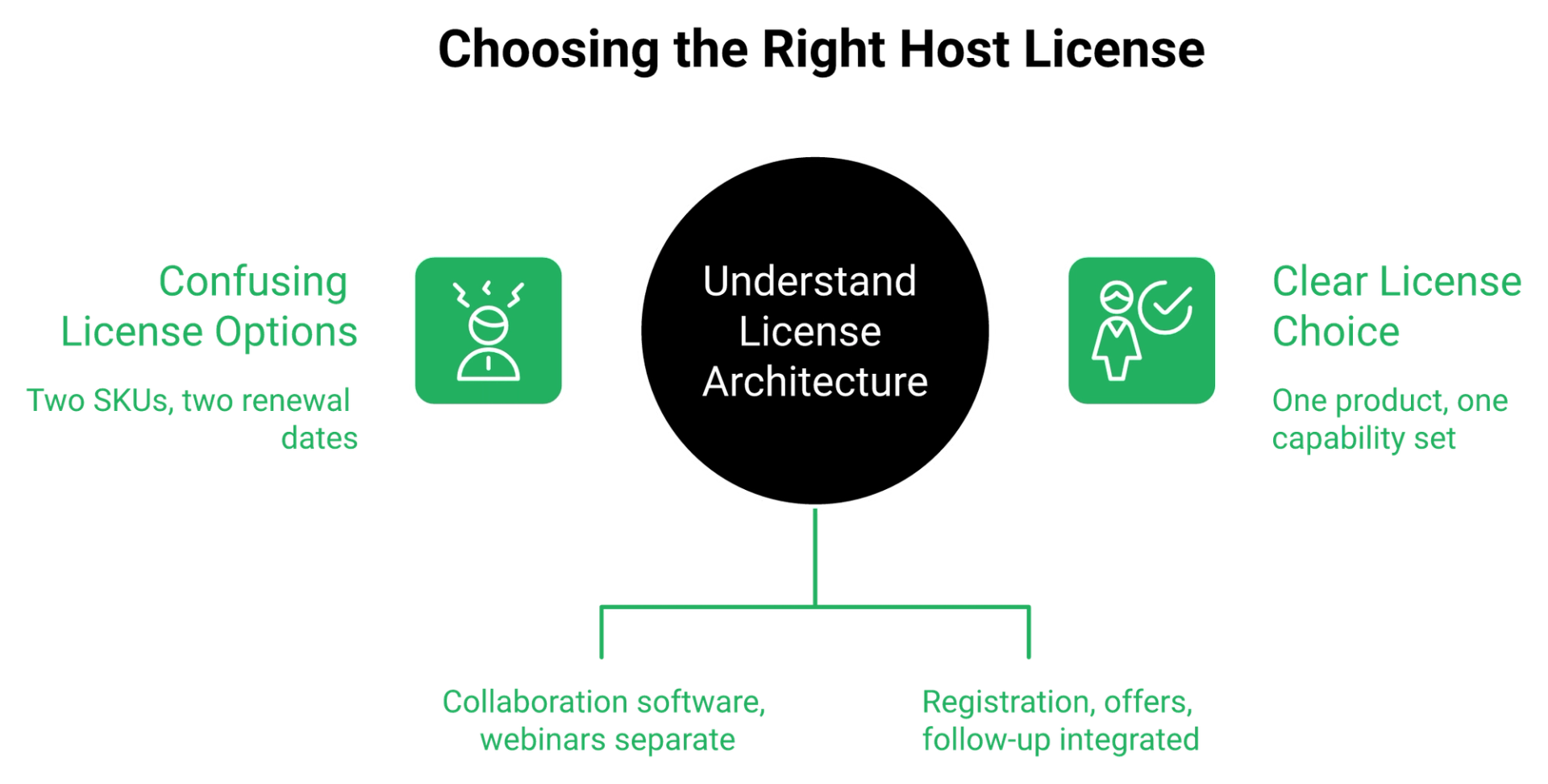
EasyWebinar ships nine webinar formats in one product, including live, simulated live, evergreen, just-in-time, and on-demand, so there is no SKU to decode before you can run a session. That is the practical difference: one product name, one capability set.
Q3. Is Webex webinar pricing per host or per attendee, and what does concurrency cost?
Per host. Webex's own FAQ states it plainly: "Anyone can join a Webex meeting as a participant, they don't need a host license to attend." Attendees cost $0. But each simultaneous session requires another license, and up to 100 hosts, cohosts, and panelists sit above your purchased attendee capacity at no extra cost, including up to 500 video panelists on the 1,000 tier.
✅ The honest part: attendees are free
Let me give Cisco full credit here. On raw seat math, this licensing model is genuinely good value.
A 200-person session on Webex Meet costs one license at $12 a month. An attendee-metered platform charging $0.30 per attendee would bill roughly $60 for the same room. Nobody in your audience needs a license, ever.
💸 The concurrency tax nobody prices in
Now the part that quietly multiplies your bill. One license runs one session at a time.
Webex's FAQ is direct about it: "Each additional license allows you to host a new concurrent meeting." So three parallel regional sessions on a Tuesday means three licenses, not one.
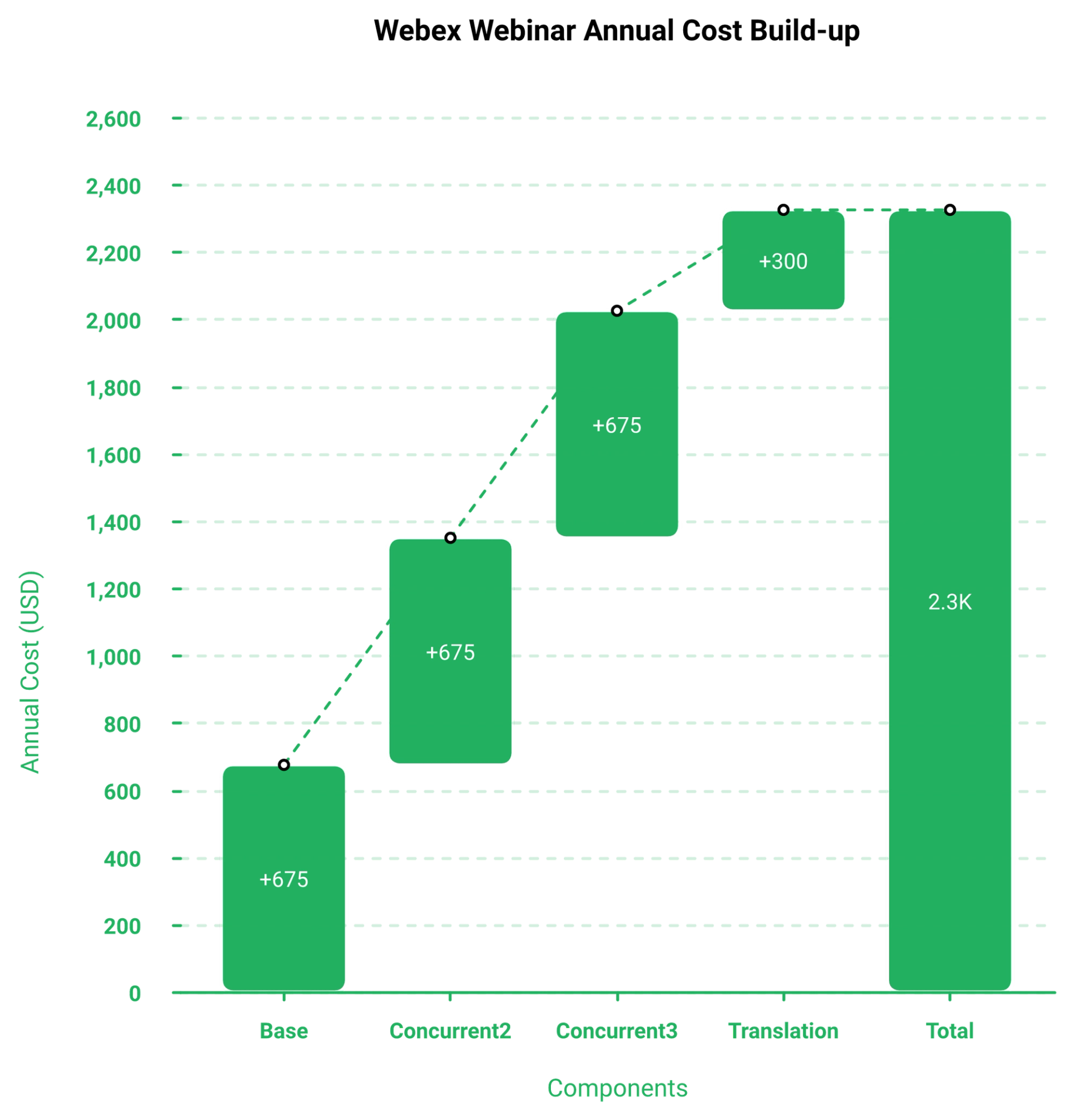
Run the arithmetic on a real schedule. Three simultaneous webinar sessions at the 1,000-attendee tier is $2,025 a year at the promotional rate, not $675. Your attendee count did not change at all.
⭐ The free 100 seats hiding in an admin doc
This one is a real budget lever, and it is buried where buyers never look. Webex's participant-limits help article confirms that purchased capacity equals attendees only.
Up to 100 hosts, cohosts, and panelists sit above that number at no cost. On the 1,000-attendee tier, you can manage up to 500 video panelists.
So a panel-heavy summit does not eat paid seats. If you are running a 12-speaker virtual event for 900 registrants, the 1,000 tier is genuinely enough.
⚠️ Where reviewers say the model strains
Peer reviews are where the licensing model meets Wednesday afternoon. The complaints cluster around experience, not price.
"The platform consistently suffers from lag, connectivity problems, and delayed audio or video, even with stable internet. It takes a long time to join meetings, and the app often freezes during screen sharing."- Verified User in Information Technology and Services, 0/5, Webex Events & Webinars G2 - Verified Review
"The video quality really became behind other systems that were around. Additionally, its interactivity tools for webinars left much to be desired."- Jonathan S., 1/5, Webex Events & Webinars G2 - Verified Review
My read is that cheap seats and expensive concurrency push teams toward fewer, larger sessions. That is the opposite of what a testing operator wants.
EasyWebinar prices by plan rather than per concurrent host session, so running three parallel funnels does not require three separate licenses. For anyone split-testing offers across time zones, that webinar funnel line item is the one that changes.
Q4. What does each capacity tier cost, and where does published pricing stop?
Cisco's datasheet lists Webinars capacities at 1,000, 3,000, 5,000, 10,000, 25,000, 50,000, and 100,000 under single-tier Named User licensing. Only the 1,000 tier carries a public price. Interactive Webinars caps at 5,000 attendees, and 100,000 exists only in webcast view, which is a broadcast mode, not an interactive room.
📊 The full ladder, and the single priced rung
Here is every tier Cisco documents, against what Cisco will actually tell you.
Named User entitlements carry no minimum purchase. That is useful. It also means the rep has no anchor, and neither do you.
⚠️ Interactive 5,000 is not the same as 100,000
This distinction gets flattened in almost every article you will read. The two numbers describe different products.
Interactive Webinars, the room with chat, Q&A, and polls, tops out at 5,000 attendees. The 100,000 figure applies to webcast view, a one-way broadcast. If two-way engagement is the point, compare against purpose-built interactive webinar platforms before you size the tier.
So if a quote says 25,000, ask whether attendees can interact. If they cannot, you are buying a livestream with registration attached.
💰 Most buyers over-buy capacity by an order of magnitude
Now the reframe I would give any operator sizing this. Stop asking which tier, and start asking how many people will actually show up.
Cold-traffic math is brutal and consistent. Expect roughly 30% registration conversion on cold ads, and a 10% to 15% show rate on a first session. A 3,000-seat tier needs about 20,000 to 30,000 registrants to fill. Before you buy headroom, it is worth reading how to improve webinar attendance.
I have run this on my own funnels for years. My weekly baseline was 60 registered and 30 attending, and that sold a $1,000 program three times a month. Capacity was never the constraint. Traffic was.
❌ What the tier does not fix
A bigger tier does not raise your show rate, and it does not shorten your build. An automated webinar without traffic is a billboard in the desert.
Reviewers echo this from the enterprise side, where scale works but the marketing layer does not.
"It was very secure and allowed for a professional and stable connection overall. It was easy to use in the backend and allowed for things like recurring events easier."- Jonathan S., 1/5, Webex Events & Webinars G2 - Verified Review
"I dislike the user interface. It is overloaded, over complicated and overly complex."- Verified User in Higher Education, 1/5, Webex Events & Webinars G2 - Verified Review
My honest hedge: I could be reading the over-buying pattern too strongly from coaching-side funnels. Enterprise town halls genuinely do fill 10,000 seats.
EasyWebinar supports up to 100K+ live attendees on Dolby OptiView WebRTC streaming with sub-500ms latency, so capacity headroom is not gated behind a separate quote-only SKU. Every format sits inside the same all features set, and the tier conversation simply does not happen.
Q5. What can you test on the free plan before you pay anything?
Webex Free is $0 per user per year with no credit card, capped at 100 attendees and 40 minutes per session, with local-only recording and no cloud storage or analytics. Any user can also sign up for a free Webex Events version supporting up to 100 attendees. Real-Time Translation carries a separate 15-day trial.
✅ Exactly what the free plan includes
The Webex Free card lists twelve features, and the useful ones are worth naming precisely.
- Unlimited meetings, up to 40 minutes each
- Up to 100 attendees per meeting
- Screen sharing with annotation
- Unlimited whiteboards
- Local recording only
- Calendar service integration
- Advanced noise cancellation
- Unlimited messaging
- Video creation and sharing via Vidcast
- Advanced Security
- Integration of leading apps
- Basic Support
No payment details are collected. Cisco's FAQ states it directly: "It will always be free, and you never have to worry about any surprise charges."
⏰ The two caps that decide everything
Two numbers define this tier. Forty minutes per session, and 100 attendees.
The attendee cap is generous for testing. The time cap is not. A sales webinar with a real offer runs 45 to 75 minutes, so the cutoff lands somewhere in your pitch.
I have timed my own sessions for years. My value block alone runs 20 to 30 minutes, and the offer starts after that. On a 40-minute ceiling, the room closes mid-close. If you want the structure that fits inside a real session, our guide on how to create webinars walks the timing block by block.
❌ What the free tier cannot prove
Here is the honest limitation. Free gives you local recording, which means the file saves to your machine, with no cloud storage.
That removes the two things a webinar test actually needs. You cannot check a replay funnel, and you cannot review webinar analytics, which are the per-person records of watch time, poll answers, and clicks.
So the free plan validates audio, video, and screen share. It does not validate a funnel.
⚠️ The trials that do exist
There are two other free doors, and both are narrow.
Note what is missing from the pricing page itself. No free trial for the paid plans is mentioned anywhere on it, though third-party review sites report one exists. Ask your rep in writing.
💰 How I would actually run the test
If you are evaluating on a budget, sequence it. Use the free tier to confirm your camera, mic, and slide flow work without stutter.
Then stop. Move the funnel test somewhere that can record to the cloud, publish a replay page, and report who watched what.
My read is that most buyers waste two weeks here. They test the room and conclude they have tested the webinar, which is a different thing entirely.
EasyWebinar's trial runs a complete session, including registration pages, in-webinar CTAs, and attendee-level analytics, so the test reflects the funnel you plan to sell with rather than just the broadcast room. You can sign up free and build the whole sequence before you commit budget.
Q6. Which add-ons and undisclosed line items land after the license?
Real-Time Translation is $300 per license per year on top of the webinar license, and production support is a per-use add-on. Undisclosed on the Webex pricing page: international calling is metered per minute, storage is 10GB per user with no published overage rate, and no refund policy appears anywhere. EasyWebinar includes email broadcasting, SMS, and video storage in-platform, so those layers are not separate line items.
💸 The problem: a page that promises add-ons and prices none
The Webex pricing page meta description promises "innovative optional add-ons." The page then lists and prices almost none of them.
That gap is where budgets go sideways. You approve a seat number, and the extras arrive as separate lines on the quote.
⚠️ What actually gets billed on top
Here is the full gap list from the 25 August 2026 capture, separated by whether Cisco publishes a number.
The international meter is the sharpest one. A global team buys "unlimited calling," then discovers unlimited stops at the border.
❌ The cost that actually kills webinar programs
Now the part I care about more than any of those lines. The license is rarely what breaks a webinar program.
The integration layer is. When your webinar platform does not send email, hold your CRM records, or store video, you bolt on three tools and a connector. That is exactly the sprawl a native webinar CRM is meant to absorb.
One operator I know hit a Zapier task ceiling four hours before a session. They caught a discrepancy of a couple hundred opt-ins in the CRM, and reps were already dialing the wrong list. That is a $0 line item that costs a launch.
⭐ What operators say about the follow-up layer
Reviews on both sides show where the seams sit.
"I do use other email systems to send post-webinar email sequences because I can't track open and click rates on EasyWebinar, and also, I can't unsubscribe someone from the email campaign once the client has joined my program."- Eliza W., 4.5/5, EasyWebinar G2 - Verified Review
"The integration with my email service provider was seamless, allowing me to automate a follow-up sales sequence once someone watches the webinar, no tech headaches."- Jennifer B., 5/5, EasyWebinar G2 - Verified Review
"Customer support is slow, and performance updates are not frequent enough."- Verified User in Information Technology and Services, 0/5, Webex Events & Webinars G2 - Verified Review
I include Eliza's criticism deliberately. No platform closes every gap, and pretending otherwise is how buyers get burned.
✅ The six-line checklist to send your rep
Paste this into the email. Ask for written answers before you compare anything.
- Which add-ons are on this quote, itemised with unit prices?
- What is the per-minute international calling rate for our regions?
- What is the cloud storage allowance, and the overage rate?
- Is production support included, or billed per event?
- What is the refund and cancellation policy in writing?
- Does volume pricing require a minimum license count?
EasyWebinar includes native email broadcasting, SMS through Twilio, in-house video storage, and EasyCRM inside the platform, which removes the third-party connector layer where webinar data pipelines usually break. The full list of native integrations shows what still connects out and what does not need to.
Q7. How does the quote process work, and when does billing actually start?
Named User entitlements carry no minimum purchase. You set a requested start date up to 90 days from the order date, and billing triggers within 30 days of that date or first provisioning, whichever comes first. Enterprise-agreement analysts report realised prices well below list after discounting, so the first quote you receive is rarely the final number.
⏰ The timing lever nobody mentions
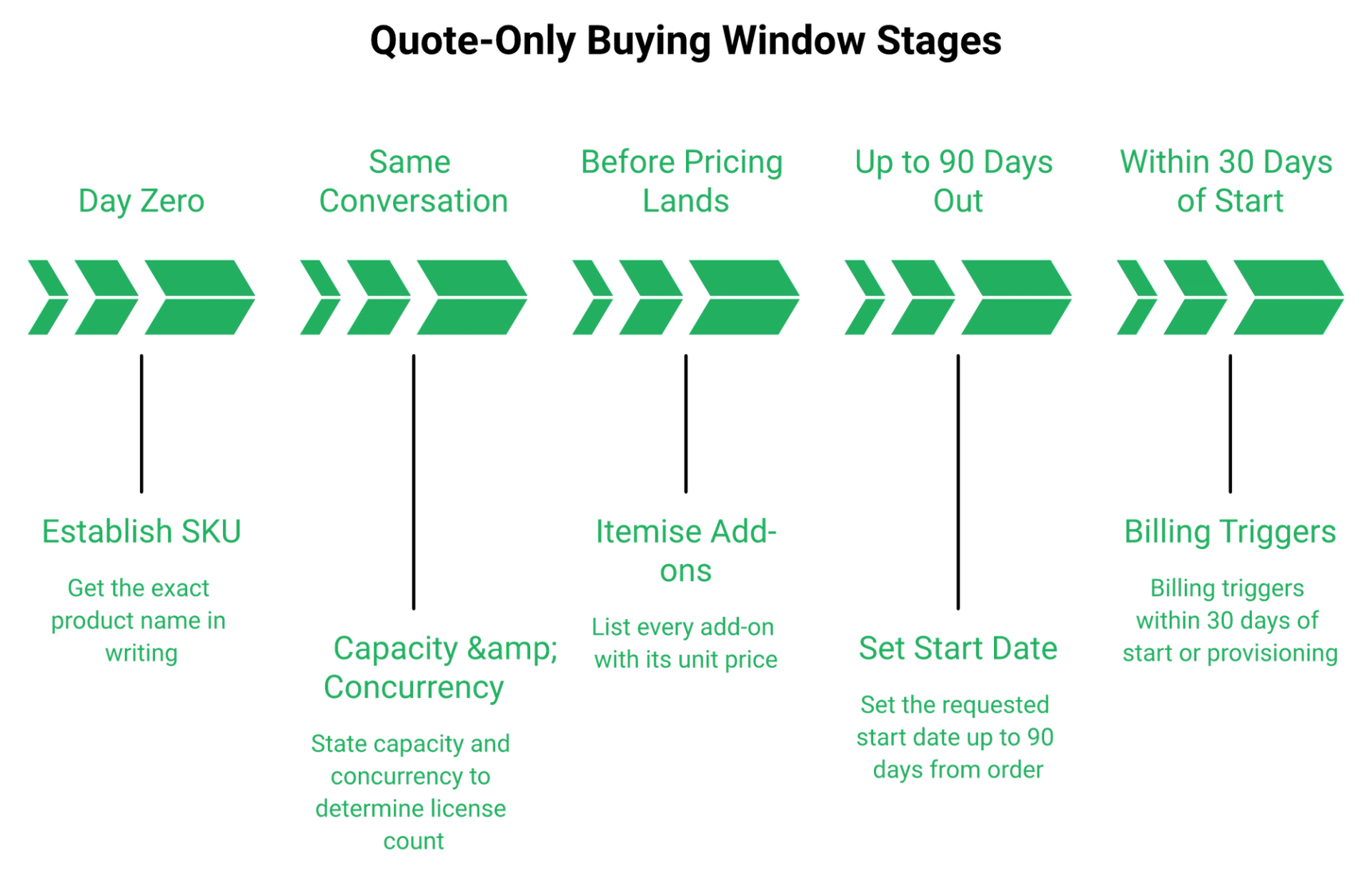
Cisco's datasheet spells out the mechanics, and almost no pricing article repeats them. Named User licenses can be bought with no minimum, and no growth allowance is included.
The start date is the interesting part. You can set it up to 90 days from the order date, and billing triggers within 30 days of that date.
That gives you a real fiscal-year lever. Sign in one quarter, start spend in the next.
💰 What discounting actually looks like
List price is a starting position, not a price. Licensing consultancies analysing Enterprise Agreements report realised figures well under list, in the range of $11 to $17 per user for Suite and $6 to $11 for Meet.
Those are negotiated outcomes, not Cisco figures. Treat them as evidence that room exists, not as your target. If the budget is genuinely tight, it is worth scanning affordable webinar platforms before you enter a negotiation you cannot win.
⭐ Five steps I would run, in this order
Work the sequence. Each step protects the next one.
- Establish the SKU. Get the exact product name in writing: Meetings, Webinars, or Events. A quote without a SKU name is not a quote.
- State capacity and concurrency together. Say how many attendees, and how many sessions running at once. Concurrency drives license count, not audience size.
- Ask for add-ons itemised. Translation, production support, storage, and calling, each with a unit price.
- Set the requested start date against your fiscal calendar. Use the 90-day window on purpose.
- Get discount and renewal uplift in writing. Year-one discount without a year-two cap is a deferred price rise.
❌ Don't haggle. Scope instead.
Here is where I break with standard procurement advice. Demanding a lower price for the identical product rarely works, and it burns the relationship you will need at renewal.
Do the opposite. Define the feature scope you actually need, then let the tier fall out of it.
If the 5,000-attendee interactive tier is out of budget, the honest question is whether you need interactivity at 5,000, or a broadcast at 5,000. Those are different products at different prices, and webcast software sits in the second category.
⚠️ The three answers that decide it
Before signing, you want three things confirmed. Anything missing is a risk you are absorbing.
My honest uncertainty: the discount bands reported by consultancies come from enterprise agreements, and I would not assume a 3-license order lands anywhere near them.
EasyWebinar plans are self-serve, with cancellation and downgrade handled in-account, so there is no start-date negotiation or billing-trigger clause to manage before you can run a session. You can also request a demo if procurement wants a walkthrough first.
Q8. Why do third-party sites quote wildly different Webex webinar prices?
Because Cisco doesn't publish them. For the same 3,000-attendee tier, Contrast reports $795 per month, while DuelStack reports $2,500 per month. Lark mixes per-month and per-year units, and CostBench states the pricing is not publicly disclosed. Treat every unlisted tier figure online as an estimate until a quote confirms it.
❌ The common view, and why it fails
Search the keyword and you will find a dozen clean price ladders. Every one of them looks authoritative.
They cannot all be right. They disagree by up to ten times on the same tier, and none of them flags the disagreement.
💸 Four sources, four different answers
Line them up and the problem is obvious.
Notice the bottom row. Only one number in this table came from the vendor.
⚠️ The mechanism behind the mess
This is the part I found genuinely interesting, and it is documented rather than guessed. The Webex pricing grid is assembled client-side.
Plan cards are driven by URL parameters, including strings like ?plan=starter&terms=monthly&locale=en_, plus locale paths such as /us/en/ and /in/en/. What renders depends on your region and query string.
Our own capture on 25 August 2026 returned only two of four plans. The Enterprise card cited "Everything listed in Webex Suite" for a plan the page never displayed.
So different writers, on different days, in different countries, honestly saw different pages. Then each published what they saw as the price. This is also why aggregated webinar platform reviews should be read alongside a live quote, not instead of one.
✅ Three questions that make a quote comparable
Risk comes from not knowing what you are doing. So replace the ladder with questions.
- What is the annual cost per license, at what attendee capacity, for which SKU? All three variables, one sentence.
- Is that interactive capacity or webcast view? The interactive ceiling is 5,000, and 100,000 is broadcast only.
- What is excluded? Translation, storage overage, international calling, production support.
Ask those three of any vendor, including mine. Any price quoted without all three is decoration.
⭐ What I tell operators to do with this
Stop collecting price screenshots. Start collecting written quotes with the SKU named.
One quote with a SKU beats six aggregator tables. And if a vendor will not put the SKU in writing, that tells you something on its own.
EasyWebinar's plan tiers sit on one public page in a single view, which is why third-party trackers quote them consistently rather than reconstructing them. If you want the like-for-like view, compare webinar platforms side by side before you shortlist.
Q9. What do real buyers say the Webex price gets them?
Webex Events & Webinars holds 4.6/5 across roughly 1,035 G2 reviews. Webex overall sits at 4.2/5 across 18,882 reviews, with about half coming from Enterprise buyers. The recurring cost-adjacent complaints are consistent: limited customization (13 reviews), overwhelming complexity (12), and calendar gaps causing duplicated effort and increased costs (11).
📊 The ratings, with the volumes attached
Volume matters more than the score here. A 4.6 across 1,035 reviews tells you the product works.
The wider Webex portfolio rating of 4.2 across 18,882 reviews, roughly half Enterprise and about a third Mid-Market, tells you who is buying. These are IT-led purchases, not marketing-led ones.
⚠️ The pattern in cost criticism
Read the complaint shape, not the star count. The cost-adjacent themes cluster in three places.
Pricing-transparency sentiment on the quote-only tiers runs negative in aggregated enterprise review data. Implementation fees on an adjacent Webex line have been cited as high as $75,000.
That last figure is not the webinar SKU. It is a signal about how the vendor prices services around the license.
❌ What the low scores actually say
Here is the honest read from the reviews themselves.
"At the moment, Webex is not effectively solving any problems for me. Its performance issues, frequent lags, and connection problems create more obstacles than solutions."- Verified User in Information Technology and Services, 0/5, Webex Events & Webinars G2 - Verified Review
"I like the breakout rooms feature very much. It allows you to quickly and seamlessly switch between large meetings into smaller working groups."- Verified User in Higher Education, 1/5, Webex Events & Webinars G2 - Verified Review
Note the second one. A 1/5 reviewer still praises a feature. That is what a mixed product looks like. Reading a wider set of top webinar platforms the same way keeps the comparison honest.
✅ The fair counterweight
Now the part competitor blogs skip. Webex earns its enterprise reputation on reliability and scale.
"I was looking for a system that allowed for large events for connections and participation. It made things much smoother for managing large groups in these things."- Jonathan S., 1/5, Webex Events & Webinars G2 - Verified Review
Add the compliance layer. Webex Enterprise carries FedRAMP authorized security, which matters to government and regulated buyers more than any feature list.
If your procurement team has a FedRAMP requirement, that single line can justify the whole price.
⭐ How I read reviews before buying anything
"Complex" from a 5,000-seat IT admin and "complex" from a solo coach are two completely different warnings. One means the admin console has depth. The other means the person could not launch.
So sort reviews by company size first, then read the cons. I have watched buyers reject a good platform because they read enterprise complaints as if they were their own.
My honest hedge: 1,035 reviews is a large sample, but review platforms skew toward people with strong feelings either way.
EasyWebinar holds SOC 2 Type II attestation (auditor: Scrut Automation) and GDPR compliance with a data processing addendum, which covers the two gates enterprise webinar reviewers screen for first.
Q10. What does the license not buy: automation, monetization, or attendee data?
Webex Webinars is built for scheduled live and simulive broadcast. Nothing in the published Free, Meet, Suite, or Enterprise feature lists covers just-in-time scheduling, on-demand replay funnels, in-webinar checkout, or behavioural follow-up. Paid tiers give 10GB storage and cloud recording. EasyWebinar runs live, simulive, evergreen, just-in-time, and on-demand formats from one recording, with attendee-level analytics.
🎯 You are buying broadcast capacity, not a funnel
That is the governing point. The license buys a reliable room at scale.
It does not buy the machinery that turns a room into revenue. Three pillars show the gap clearly, and all three come from Webex's own published feature lists.
⚠️ Where the three pillars land
Just-in-time means the mechanic where a registrant is dropped into a session starting shortly after they sign up. It removes date-picking friction, and it is a scheduling feature, not a video feature. If selling access is part of the plan, paid webinars need that checkout layer in the room itself.
💸 The post-event desert
Here is what happens at 3pm when the session ends. You get a recording file and a participant list.
The rest is yours to build: clips, engagement scoring, and follow-up sequences keyed to who watched how long. That work has a real cost, usually a contractor and three connected tools.
I have sat with operators on that Thursday afternoon. The webinar went fine. The follow-up did not exist yet, and the leads cooled in 48 hours. That is the gap webinar marketing automation is supposed to close.
⭐ Why the data gap matters more than the feature gap
Attendee-level data is what makes the next session better. Set a watch threshold, find the exact timestamp people leave, then fix that segment.
That workflow needs per-person records, not attendance totals. Meeting-first platforms rarely collect them, because meetings do not need them.
"EasyWebinar is hands-down THE webinar platform for evergreen webinars, no contest. While plenty of software can stream live webinars, EasyWebinar is the only one on the market who makes a product built specifically to scale and 10X your efforts."- Ash A., 5/5, EasyWebinar G2 - Verified Review
"Additionally, its interactivity tools for webinars left much to be desired, unfortunately."- Jonathan S., 1/5, Webex Events & Webinars G2 - Verified Review
✅ When Webex is the correct purchase
Say it plainly, because the category avoids it. For internal all-hands, compliance training, and FedRAMP-scoped town halls, Webex Webinars is the right buy.
There is no funnel to build. You need a reliable broadcast, security sign-off, and one vendor. That is exactly what the license delivers.
My sequencing rule holds either way. Run five to ten live sessions first, hit roughly a 10% attendee-to-buyer rate, then automate. The trade-offs at each stage are laid out in live vs automated webinars.
EasyWebinar runs live, simulive, evergreen, just-in-time, and on-demand sessions from a single recording, and reports watch time, poll responses, offer clicks, and a drop-off heatmap per attendee.
Q11. How do you calculate whether the license pays for itself?
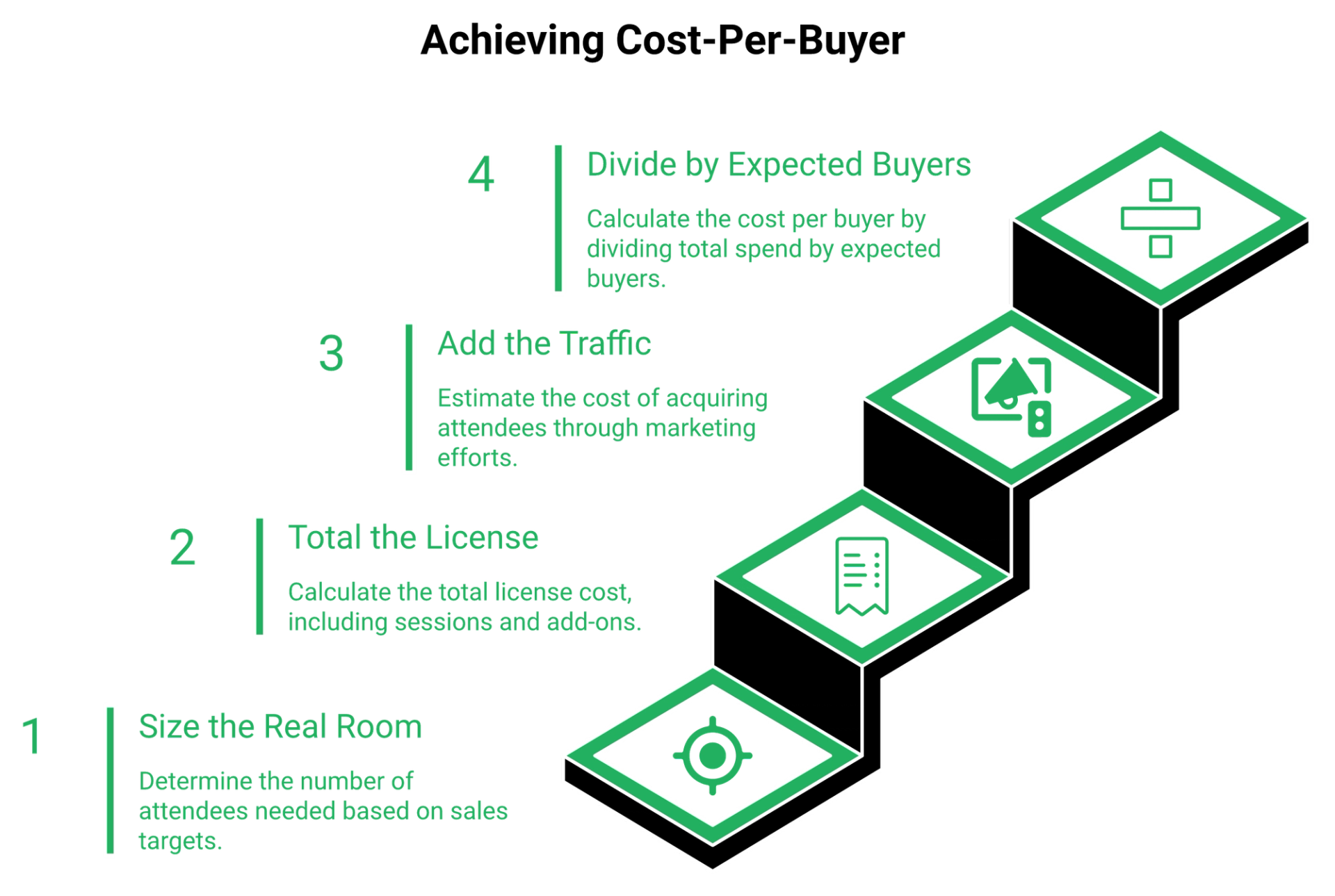
Work backwards from buyers, not seats. Use a cold-traffic baseline of roughly 30% registration conversion, a 10% to 15% show rate on a first session, and a 10% attendee-to-buyer target. Then divide total license plus ad spend by expected buyers. EasyWebinar customer Rick Mulready recorded 166% ROI on cold paid traffic at an $8 to $12 cost per lead.
💰 Step 1: size the real room
Start with buyers and work up. If you want 3 sales at a 10% attendee-to-buyer rate, you need 30 attendees.
At a 15% show rate, that means 200 registrants. At 30% registration conversion, that is about 667 clicks to your page.
Notice what just happened. Three sales needed 30 seats, not 1,000.
⏰ Step 2: total the license honestly
Add every line, not just the headline. Use the published Webex figure as your base.
- 1,000-attendee webinar license: $675 per year at the promotional rate
- Second concurrent session: another $675
- Real-Time Translation, if needed: $300 per license per year
- Storage overage and international calling: unknown, ask the rep
One host, one session, no add-ons is $56.25 a month. That is genuinely cheap. Three parallel sessions with translation is $2,925 a year.
💸 Step 3: add the traffic, because it dominates
Here is where the license stops mattering. Ads cost more than software, every time.
At a $10 cost per lead, 200 registrants cost $2,000. Your $675 license is 25% of a single month's traffic spend.
An automated webinar without traffic is a billboard in the desert. I have watched operators optimise the $56 line while ignoring the $2,000 one. If that $2,000 is the real problem, start with webinar lead generation, not a plan downgrade.
⭐ Step 4: divide, then compare to your offer
Now the number that decides everything. Total spend divided by expected buyers.
At a $5,000 offer, $685 per buyer works. At a $297 offer, it does not, and no cheaper license fixes that.
My own baseline for years was 60 registered, 30 attending, and 3 buyers of a $1,000 program. That was $12,000 a month from one weekly session.
❌ The code-red threshold
There is a point where the tier stops paying, and it is not a price. It is a show rate.
If your show rate drops below roughly 10%, your cost per buyer doubles while your license stays flat. The fix is reminders, timezone-aware scheduling, and show-up bonuses, not a bigger plan. Practical levers sit in how to drive webinar attendance.
Where the standard advice gets this backwards, in my read, is treating capacity as the risk. Capacity is almost never the constraint. Traffic economics are.
I will hedge one thing. These benchmarks come from coaching, course, and consulting funnels, and enterprise demand-gen show rates often run higher on warm lists.
EasyWebinar customers have published the outcome side of this math: Carla Beisinger reached $5M from one evergreen funnel, and Ryan Fenn generated $2M from a single automated funnel.
Q12. Which webinar platform fits your budget and your use case?
Match the platform to the job. EasyWebinar fits webinars that must convert, combining live and automated formats, in-webinar payments, and behavioural follow-up in one platform. For internal all-hands and FedRAMP-scoped compliance training on existing Cisco infrastructure, Webex Webinars at $675 per license per year is the right buy. Webex Free covers a 100-attendee, 40-minute test.
⭐ The shortlist, by the job it does
Ranked by fit for revenue-driving webinars, with the cost basis for each.
1. EasyWebinar
Live, simulive, evergreen, just-in-time, and on-demand in one product, with in-webinar payments, an AI funnel builder, EasyCRM, and attendee-level analytics. Best for coaches, course creators, agencies, and B2B teams selling from webinars.
2. Webex Webinars
$675 per license per year at 1,000 attendees, quote-only above that. Best for enterprise broadcast, compliance training, and FedRAMP requirements.
3. Demio
$45 per month at 50 attendees, room-size tiers. Best for small marketing teams wanting a clean live experience.
4. EverWebinar
$79 to $199 per month, capacity not published. Best for automation-only funnels, paired with WebinarJam for live.
5. WebinarNinja
Roughly $0.30 per attendee per month, about $60 at 200 attendees. Best for low, predictable volumes.
💰 Cost per session, side by side
The per-attendee math flips depending on the model.
On raw seat cost at scale, Webex wins. On revenue mechanics per session, it is not competing.
❌ When a marketing platform is the wrong answer
Three cases where I would send you to Webex instead of us.
You are running a one-off internal team meeting with no funnel intent. You need FedRAMP authorization for a government contract. Your organisation already standardised on Cisco calling and does not want a second vendor.
Add a fourth honest one. If your product sells under $200, the math rarely justifies a webinar at all.
✅ What operators actually value in the room
"I love that we can have a poll, offer and countdown right in the event! That's going to be so great for sales and interactions."- Verified User in Photography, 4.5/5, EasyWebinar G2 - Verified Review
"I've had to rely on alternative platforms to get reliable results."- Verified User in Information Technology and Services, 0/5, Webex Events & Webinars G2 - Verified Review
Simple scales. Fancy fails. The strength of your offer is the water, and the platform is only the container you carry it in. More customer reviews sit alongside those two.
⏰ What I think shifts next
My prediction for the next 18 months: capacity tiers stop being a pricing axis at all. Streaming costs keep falling, and attendee ceilings become a legacy artifact of meeting-era licensing.
What replaces it as the pricing question is conversion data ownership. Who holds the per-attendee behavioural record, and can you act on it without a connector?
I could be early on that. If you are sizing a Webex quote against a revenue target right now, I would genuinely like to hear what number your rep gave you, and for which SKU.
Sizing a webinar license against a revenue target?
Start with what each plan actually includes, then decide which trade-off you are willing to accept.
Compare EasyWebinar plans
See how a conversion-built platform differs from a meetings tool
EasyWebinar combines live and automated webinars, AI-built funnels, in-webinar payments, EasyCast multistreaming, and attendee-level analytics in one platform, which removes the live-or-automated trade-off most webinar buyers are told to accept.
Frequently Asked Questions

Casey Zeman
Founder of EasyWebinar
About Author
Over the past decade, I've helped thousands of entrepreneurs, coaches, and consultants turn webinars into a predictable, powerful way to grow their audience, build trust, and scale, without the constant hustle. I created EasyWebinar because I couldn't find a system that combined authenticity, engagement, and automation the way I needed. So, I built one.
Related Posts

10 Best Community Engagement Platforms in 2026
Compare the 10 best community engagement platforms in 2026. Course creators, evaluate live hosting, analytics, and replay to pick your winner today.

10 Best Online Coaching Tools in 2026: Live Session Quality, Scheduling, Recording, and Client Engagement Analytics
Compare the 10 best online coaching tools of 2026 on session quality, scheduling, and analytics. Discover the right fit for your coaching revenue model.

10 Best Webinar Hosting Platforms Ranked by Uptime, Streaming Quality & Cost
Compare 10 webinar hosting platforms ranked by uptime, streaming quality, and cost. Discover which tool actually turns attendees into revenue.
Turn every webinar into a revenue stream
Launch your first paid event in just a few clicks - and start monetizing your expertise.
Book a Call