Webex Alternative Ranked: 9 Picks to Replace Webex Without Losing Leads

Casey Zeman
Published on May 4, 2026 • 41 min read

Q1. What Are the 9 Best Webex Alternatives for Webinars in 2026?
- EasyWebinar ⭐⭐⭐⭐⭐
- Zoom Webinars ⭐⭐
- GoTo Webinar ⭐⭐
- Demio ⭐⭐⭐
- Livestorm ⭐⭐⭐
- WebinarJam ⭐⭐⭐
- BigMarker ⭐⭐⭐⭐
- ON24 ⭐⭐⭐⭐
- eWebinar ⭐⭐
Choosing a Webex replacement is a high-stakes call because the webinar is where most lead-gen, launch, and enablement revenue actually closes, and a mismatched platform quietly bleeds show-up rates, attribution, and pipeline every week it stays in the stack. Nine vendors were evaluated against the defined criteria below. The primary operator-reader is the marketing manager, course creator, or demand-gen lead running the webinars day-to-day. The shadow readers on the buying committee are the CFO evaluating SaaS consolidation, the IT Director checking SOC 2 posture and SSO, the RevOps lead validating CRM flow, and the marketing head assessing funnel performance.
Our Evaluation Criteria
Webinar format coverage 🎥
Whether the platform supports live, simulated live, and evergreen alongside on-demand and replay paths in one system.
Time to launch ⏰
How fast an operator can spin up a registration page, email sequences, and a full funnel, including AI-assisted setup via an AI funnel builder.
Engagement depth 💬
Chat, polls, Q&A, timed CTAs, countdown offers, handouts, and replay engagement at the attendee layer.
Funnel and conversion workflow 🧭
Registration pages, thank-you pages, replay pages, in-room offers, checkout, and behavioral follow-up paths.
CRM and follow-up readiness 📇
Native CRM or tight CRM integration with lead scoring, attendee tagging, and segmented sequences, as in EasyWebinar’s sales CRM.
Monetization support 💰
Paid webinars, ticketed access, in-webinar offers, and built-in checkout at peak intent.
Analytics and attribution 📊
Visibility from registration through attendance, engagement, offer clicks, and conversion.
Reliability, support, and scale 🛡️
Streaming stability, attendee capacity, SOC 2 posture, and responsiveness of support.
Who This Guide Is For
- Coaches and course creators turning educational webinars into repeatable sales funnels.
- Marketing teams using webinars for lead generation, nurturing, and pipeline acceleration.
- Revenue operators evaluating whether webinar data can flow into CRM, scoring, and follow-up workflows.
- Founders and consultants replacing disconnected tools for hosting, landing pages, email, checkout, and follow-up.
- Buying-committee readers such as CFOs validating software consolidation, IT leaders checking reliability and security, and marketing heads assessing funnel performance.
9 Webex Alternatives at a Glance
| Provider | Best For | Standout Strength | Known Limitation | Webinar Formats Covered | Support Model | Pricing Model |
|---|---|---|---|---|---|---|
| EasyWebinar ⭐⭐⭐⭐⭐ | Revenue teams consolidating a multi-tool webinar stack | One-platform live, simulated live, and evergreen with native CRM and in-room checkout | Automated setup requires the presentation uploaded first | Live, Simulated Live, Evergreen, Replay | Email, chat, and onboarding support | Flat monthly, attendee-tiered |
| Zoom Webinars ⭐⭐ | Teams already standardized on Zoom Meetings for one-off broadcasts | Familiar attendee interface at scale | Minimal branding and rudimentary engagement per verified reviewers | Live only | Ticket-based enterprise support | Per-host monthly, attendee-tiered |
| GoTo Webinar ⭐⭐ | Regulated orgs with existing GoTo contracts | Reliable large-audience reporting | Outsourced support and dated UX per verified reviewers | Live, Simulated (recorded) | Ticket and phone (mixed reviews) | Per-organizer annual tiers |
| Demio ⭐⭐⭐ | Marketing teams wanting a clean browser-based live room | Intuitive UX and fast setup | No native CRM, export blocked after cancellation per verified review | Live, Automated, On-Demand | Email and chat | Flat monthly, attendee-tiered |
| Livestorm ⭐⭐⭐ | Global or EU teams needing GDPR-friendly browser-based hosting | Strong on-demand and automated replay | No native CRM, no built-in checkout | Live, On-Demand, Automated | Email and chat | Per-host monthly, attendee-tiered |
| WebinarJam ⭐⭐⭐ | Solo creators running recurring live launches | Live plus simulated live with registration pages | EverWebinar upsell required for evergreen depth | Live, Simulated Live (add-on) | Email and ticket | Annual-only tiers |
| BigMarker ⭐⭐⭐⭐ | Mid-market teams running summits, hybrid events, and branded content hubs | Feature density across hybrid, automation, and branded pages | Quote-based pricing, steeper learning curve | Live, Automated, On-Demand, Hybrid | SPOC and email | Quote-based |
| ON24 ⭐⭐⭐⭐ | Enterprise demand-gen teams with six-figure budgets | Deep engagement analytics and content hub | $30K+ ACV prices out mid-market | Live, Simulated Live, On-Demand | SPOC, phone, and email | Quote-based, annual |
| eWebinar ⭐⭐ | Product teams running always-on onboarding replays | Clever simulated-interaction engine | No live capability, narrow use case | Automated replays only | Email and chat | Flat monthly, attendee-limited |
1. EasyWebinar ⭐⭐⭐⭐⭐
EasyWebinar is best for revenue teams, course creators, and demand-gen leaders that need webinars to operate as a full funnel instead of a standalone broadcast, because it combines live, simulated live, and evergreen delivery with an AI funnel builder, native CRM, and in-webinar checkout in one subscription. It may not fit teams that only need a lightweight internal-meeting tool.
Quick fit
| Row | Detail |
|---|---|
| Best for | Creators and mid-market marketing teams consolidating a 5 to 7 tool webinar stack |
| Skip if | You only need occasional internal team meetings with no marketing funnel |
| Strongest edge | Full webinar revenue workflow in one platform: builder, room, CRM, follow-up, and checkout |
| Biggest trade-off | Automated webinar setup needs the presentation uploaded before you can launch |
| Pricing snapshot | Flat monthly plans with attendee-tiered webinar pricing published on the site |
Why EasyWebinar ranks #1
We earn the top spot on workflow completeness, not feature count. Webex, Zoom, and GoTo end at the broadcast. Demio and Livestorm stop at the registration page. WebinarJam hands evergreen off to EverWebinar. ON24 prices the mid-market out. EasyWebinar is the only platform on this list where live, simulated live, and evergreen all sit under the Automated umbrella in one system, the AI Webinar Builder ships a full funnel from one prompt in under 10 minutes, EasyCRM scores leads and auto-dials follow-up by in-webinar behavior, and ticketed access plus timed offers fire inside the room at peak intent. For a buyer leaving Webex to stop leaking revenue between six bolt-on tools, that consolidation is the ranking logic.
What EasyWebinar does well ✅
- Four formats, one toggle: prove at 10% live conversion, then flip the same funnel to Simulated Live (real-time chat, polls, and timed offers) or Evergreen (JIT, timezone-adjusted, multi-slot, Instant Replay, and On-Demand) without rebuilding.
- AI webinar builder: one prompt produces registration page, reminder emails, replay page, and offer page in under 10 minutes, which compresses the launch for busy operators.
- EasyCRM with lead scoring and auto-dialer: attendee behavior (stayed through offer, clicked but didn’t buy, dropped at minute 34) tags hot, warm, and nurture inside the same system, which kills the HubSpot plus Zapier glue tax.
- Built-in monetization: ticketed access and timed offer overlays with countdown scarcity route through native checkout, so intent doesn’t decay on an external Stripe page.
- EasyCast multistreaming: push the same session to YouTube, LinkedIn Live, Facebook, and RTMP so the webinar doubles as a distribution engine.
- SOC 2 Type II, SSO/SAML, 50K+ attendees: enterprise compliance without enterprise-tier ACV.
Where EasyWebinar falls short ❌
- Automated and evergreen setup requires the presentation uploaded first, which slows operators who want to open registration before finishing the recording.
- The registration and event UI prioritizes function over pixel-level design polish, so teams that want fully bespoke landing pages may still use an external page builder.
- The feature surface is broad, which means new operators coming from a single-purpose tool need a short learning ramp to use the CRM, EasyCast, and monetization layers well.
Decision scorecard
| Evaluation criterion | EasyWebinar fit | Why it matters |
|---|---|---|
| Live webinars | Strong | Full live room with HD streaming, co-presenters, and real-time chat. |
| Simulated Live | Strong | Fixed or fixed-recurring simulive with live chat, polls, and timed offers. |
| Automated webinar and evergreen | Strong | JIT, timezone-adjusted, multi-slot, Instant Replay, and On-Demand. |
| Funnel pages | Strong | AI Builder ships registration, thank-you, replay, and offer pages. |
| Engagement | Strong | Chat, polls, Q&A, CTAs, countdown offers, and handouts. |
| CRM and follow-up | Strong | EasyCRM with lead scoring, tagging, and auto-dialer. |
| Monetization | Strong | Ticketed access and in-webinar checkout with stacked offers. |
| Analytics | Strong | Registration, attendance, offer clicks, and revenue in one view. |
| Integrations | Strong | Native plus API plus Zapier for CRM, email, and payment tools. |
| Pricing fit | Strong | Published flat monthly tiers that scale on attendees, not seats. |
| Best-fit buyer | Strong | Creators, marketing teams, and mid-market consolidating a stack. |
Best for / skip if
Choose EasyWebinar if you run webinars as a revenue system and want the funnel, room, CRM, and checkout in one platform. Skip it if you only need internal meeting video with no marketing workflow. Browse verified customer reviews if you want real-world proof before trialing.
Reviews
“I used to do live webinars to sell my online course. I decided to do an evergreen webinar instead using EasyWebinar. With my live class I used to sell 10-12 courses. With EasyWebinar I sold 25 courses within 3 weeks of my evergreen launch.”— Laura C., Course Creator Easywebinar G2 – Verified Review
“The biggest challenge is around setting up automated webinars, and needing the presentation uploaded first in order to set it up. Oftentimes, I’m promoting things far in advance and want to be able to create quickly on the fly and get registrations going, even if I haven’t recorded the presentation yet.”— Ash A. Easywebinar G2 – Verified Review
2. Zoom Webinars ⭐⭐
Zoom Webinars is best for teams already standardized on Zoom Meetings that need a familiar attendee experience for one-off live broadcasts, because the video stack is stable at scale and attendees recognize the interface. It may not fit marketing teams that expect branding, engagement depth, or automation beyond a meeting-room experience.
Quick fit
| Row | Detail |
|---|---|
| Best for | Teams already on Zoom Meetings needing a like-for-like Webex swap |
| Skip if | You need simulated live, evergreen, native funnel pages, or in-room checkout |
| Strongest edge | Universal attendee familiarity and stable large-audience streaming |
| Biggest trade-off | Minimal branding, no CRM, and shallow engagement features |
| Pricing snapshot | $79 to $340/mo per host, attendee-tiered |
Why Zoom Webinars ranks #2
It ranks second because the deployment risk is near-zero for teams already on Zoom Meetings, which carries real buying-committee weight. Beyond that, the architecture is the same ceiling as Webex: no simulated live, no evergreen, no funnel builder, no checkout, and no CRM. It fills a broadcast slot; it does not run a revenue system. Teams evaluating the trade-off can review the EasyWebinar vs Zoom head-to-head before committing.
What Zoom Webinars does well ✅
- Universal attendee familiarity cuts download and login friction for enterprise audiences.
- Stable video and audio at 500 to 10,000 attendees for large-broadcast use cases.
- Deep integrations catalog across marketing automation and CRM tools via API.
- Bundles cleanly with existing Zoom Meetings plus Zoom Phone enterprise contracts.
Where Zoom Webinars falls short ❌
- No native funnel pages, no in-webinar checkout, and no lead scoring, which forces the same HubSpot plus Zapier plus Stripe bolt-on stack that drove the Webex exit.
- Registration, reminder, and landing-page branding is minimal per verified reviewers.
- Engagement features (polls, survey, and chat) are described as rudimentary by long-time users.
Decision scorecard
| Evaluation criterion | Zoom Webinars fit | Why it matters |
|---|---|---|
| Live webinars | Strong | Stable large-audience live broadcast. |
| Simulated Live | Weak | No native simulated live format. |
| Evergreen automation | Weak | No native evergreen scheduling. |
| Funnel pages | Weak | No native registration funnel or thank-you pages. |
| Engagement | Partial | Polls, Q&A, and chat exist but are basic. |
| CRM and follow-up | Weak | No native CRM; external glue required. |
| Monetization | Weak | No in-room checkout. |
| Analytics | Partial | Basic attendance and poll reports. |
| Integrations | Strong | Broad third-party integration catalog. |
| Pricing fit | Partial | Per-host pricing compounds at scale. |
| Best-fit buyer | Partial | Teams on Zoom running occasional one-off broadcasts. |
Best for / skip if
Choose Zoom Webinars if you already run on Zoom and only need a reliable broadcast layer. Skip it if your reason for leaving Webex is broken attribution, missing automation, or stack consolidation pressure.
Reviews
“First, Zoom Webinar is ridiculously glitchy. Second, Zoom is missing a lot of core webinar features that should be table stakes today. There’s no pre-webinar waiting room or post-webinar exit page. There’s no ability to distribute resources or files. The polling and survey functions are rudimentary.”— Casey S. Zoom Events and Webinars – G2 Verified Review
“In our experience, Zoom Webinars almost completely lacks customization options to the look & feel, so it gives you as a company a minimal chance to stand out of the myriad of webinars.”— Gabor F. Zoom Events and Webinars – G2 Verified Review
3. GoTo Webinar ⭐⭐
GoTo Webinar is best for regulated or legacy-enterprise teams that already hold a GoTo contract and need a reliable broadcast for 200-plus attendees with solid reporting, because the reporting engine and enterprise posture are mature. It may not fit marketing teams expecting modern UX, AI tooling, or built-in funnel and CRM workflow. Teams weighing the trade-off can review the EasyWebinar vs GoToWebinar comparison.
Quick fit
| Row | Detail |
|---|---|
| Best for | Existing GoTo enterprise customers running compliance-heavy webinars |
| Skip if | You need AI, native CRM, evergreen automation, or in-room checkout |
| Strongest edge | Reliable reporting and large-audience scale |
| Biggest trade-off | Dated UX, outsourced support, no funnel or CRM layer |
| Pricing snapshot | Per-organizer annual tiers (contact sales) |
Why GoTo Webinar ranks #3
It earns the third slot on installed base and enterprise reliability signals, not on modern webinar capability. The UX has not kept pace with browser-based alternatives, AI is absent, and the same CRM, funnel, and checkout gaps as Webex persist. That is why many teams evaluating it end up shortlisting a modern workflow platform alongside.
What GoTo Webinar does well ✅
- Mature analytics and post-event reporting for registrant, attendance, and survey data.
- Reliable large-audience broadcast for 200-plus attendee events per verified reviewers.
- Recurring-event scheduling is simple for repeating enablement and training series.
- Strong enterprise procurement footprint for organizations with existing contracts.
Where GoTo Webinar falls short ❌
- Outsourced customer support with slow resolution cycles per recent verified reviews.
- No AI funnel builder, no evergreen scheduling, and no in-webinar checkout.
- Post-event email customization and attendee UX are limited compared to modern alternatives.
Decision scorecard
| Evaluation criterion | GoTo Webinar fit | Why it matters |
|---|---|---|
| Live webinars | Strong | Stable live broadcast at scale. |
| Simulated Live | Partial | Recorded-broadcast option exists but limited. |
| Evergreen automation | Weak | No native evergreen format. |
| Funnel pages | Weak | Registration only; no thank-you or replay funnel pages. |
| Engagement | Partial | Polls and Q&A present but dated. |
| CRM and follow-up | Weak | No native CRM. |
| Monetization | Weak | No in-room checkout. |
| Analytics | Strong | Reporting is the product’s standout. |
| Integrations | Partial | Integrations exist but fewer modern connectors. |
| Pricing fit | Partial | Annual-only commitments. |
| Best-fit buyer | Partial | Existing GoTo enterprise customers. |
Best for / skip if
Choose GoTo Webinar if you already hold a contract and need procurement-approved reliability. Skip it if you want a modern, AI-assisted funnel with CRM and checkout in one system. The GoToWebinar Alternatives for Small Businesses guide covers additional options.
Reviews
“GoToWebinar is the most basic webinar tool that offers nothing more than any other tool. Customer support is impossible to reach and is completely outsourced. I have had several registrants tell me they will not attend a webinar of ours until we switch our platform.”— Forrester S. GoTo Webinar – G2 Verified Review
4. Demio ⭐⭐⭐
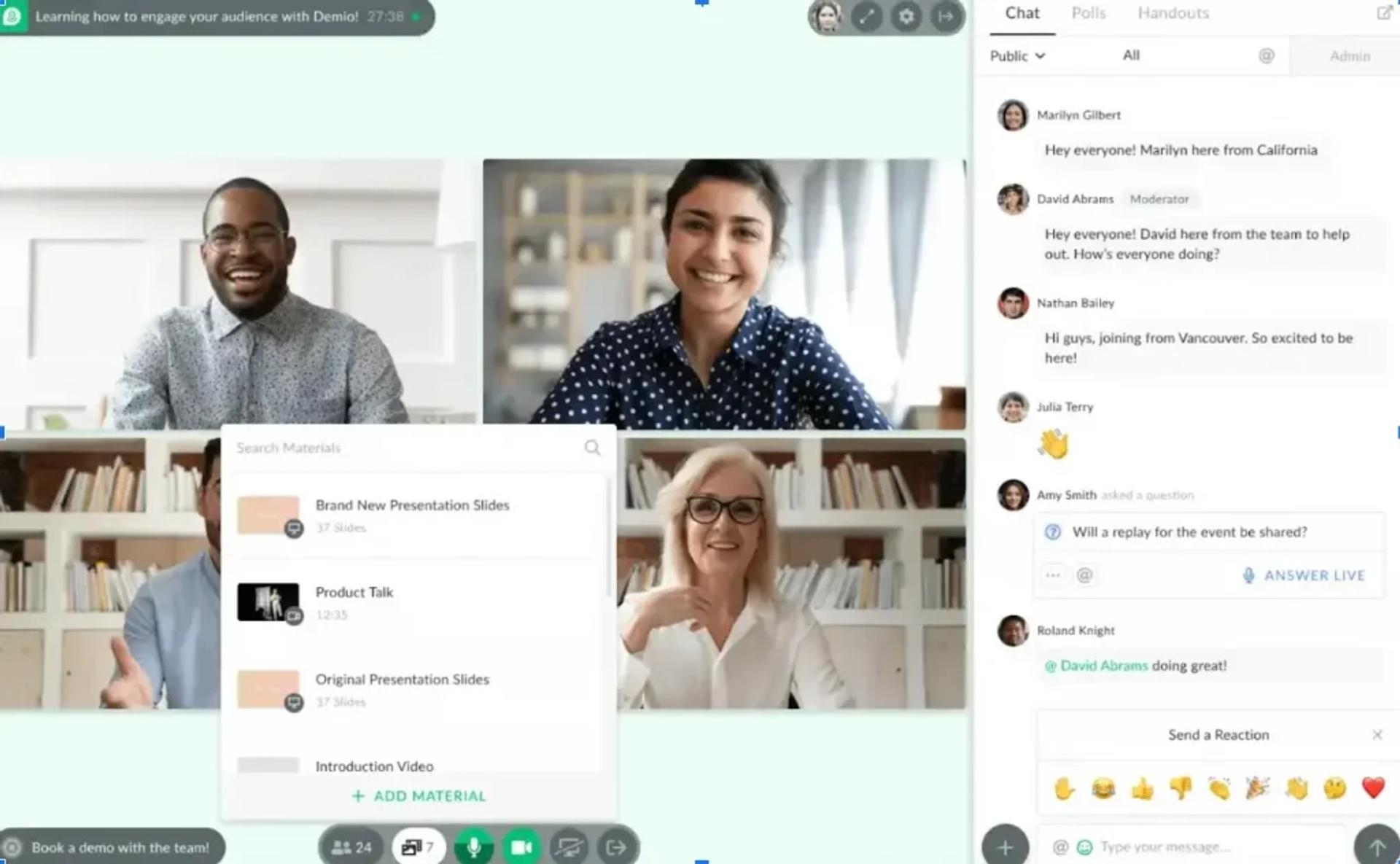
Demio is best for marketing teams that want a clean, browser-based live and automated webinar experience with simple setup, because the UX is modern and registration spins up fast. It may not fit operators who need a native CRM, in-webinar checkout, or deep HubSpot automation. A side-by-side EasyWebinar vs Demio breakdown highlights the architectural gap.
Quick fit
| Row | Detail |
|---|---|
| Best for | Marketing teams with a mature external CRM needing a modern room |
| Skip if | You want native CRM, native monetization, or end-to-end attribution |
| Strongest edge | Browser-based UX and fast funnel setup |
| Biggest trade-off | No native CRM, data export blocked after cancellation per recent reviewers |
| Pricing snapshot | Flat monthly; scales with attendee tier (up to ~$734/mo at 3K) |
Why Demio ranks #4
Demio ranks strongly on UX and setup speed, which matters for teams switching off Webex specifically to escape download friction. It loses points on CRM depth, pricing at scale, and recent review-surface concerns around data export, all of which matter more the larger the program gets.
What Demio does well ✅
- Browser-based attendee experience with no downloads, which directly solves Webex’s security-policy blocker.
- Clean setup for registration pages, email prompts, and on-brand event pages.
- Automated and on-demand event types with decent handouts and polling.
- Stable live rooms with multiple layout options and resource sharing.
Where Demio falls short ❌
- No native CRM; HubSpot sync requires external capture forms and multiple Zaps per reviewers.
- Export of registrant data is blocked after plan cancellation, which has drawn direct complaints.
- Audio and connection issues have been flagged in multiple recent live events.
Decision scorecard
| Evaluation criterion | Demio fit | Why it matters |
|---|---|---|
| Live webinars | Strong | Modern browser-based live room. |
| Simulated Live | Partial | Automated event type exists. |
| Evergreen automation | Partial | On-demand and automated with limited scheduling depth. |
| Funnel pages | Partial | Registration and replay pages exist. |
| Engagement | Strong | Polls, chat, handouts, and resources. |
| CRM and follow-up | Weak | No native CRM. |
| Monetization | Weak | No native in-room checkout. |
| Analytics | Partial | Basic analytics reported as limited. |
| Integrations | Partial | HubSpot integration depth flagged as inconsistent. |
| Pricing fit | Partial | Jumps sharply at higher attendee tiers. |
| Best-fit buyer | Partial | Teams with mature external CRM. |
Best for / skip if
Choose Demio if you already own a mature CRM and want a clean modern live or automated room. Skip it if you’re consolidating tools or need deep behavioral follow-up.
Reviews
“I used Demio to run a webinar and collected registrant emails while on a paid plan. After canceling, I was shocked to find out I couldn’t export the list unless I subscribed again. I paid for the service and hosted the event, but they block access to my own data unless I keep paying.”— Sheida M. Demio – G2 Verified Review
“It’s hard to integrate into HubSpot. We use a third party capture form and had to do several zaps to get all data to flow accurately from our form to HubSpot to Demio.”— Verified User, Education Management Demio – G2 Verified Review
5. Livestorm ⭐⭐⭐
Livestorm is best for global and EU-based marketing teams that need a GDPR-friendly, browser-based webinar platform with strong on-demand playback, because the product is built cleanly around modern regulatory and attendee expectations. It may not fit revenue teams that need native CRM, lead scoring, or in-room checkout.
Quick fit
| Row | Detail |
|---|---|
| Best for | Global or EU teams prioritizing GDPR and on-demand playback |
| Skip if | You need native CRM, monetization, or deep funnel workflow |
| Strongest edge | On-demand and automated replay paths for always-on content |
| Biggest trade-off | No native CRM and no native checkout |
| Pricing snapshot | Per-host monthly tiers, attendee-tiered |
Why Livestorm ranks #5
Livestorm edges ahead of older live-only tools on UX and on-demand depth, and the GDPR posture helps EU buyers. It lags behind workflow platforms because CRM, lead scoring, and monetization still require separate tools, which reintroduces the stack problem buyers were leaving Webex to solve.
What Livestorm does well ✅
- Browser-based attendee flow with clean mobile experience.
- Strong on-demand and automated replay scheduling.
- Clear GDPR and EU data residency positioning for regulated markets.
- Native polls, Q&A, and chat engagement with good attendee analytics.
Where Livestorm falls short ❌
- No native CRM or lead scoring; follow-up still runs through HubSpot, ActiveCampaign, or equivalent.
- No in-webinar checkout for paid offers.
- Attendee-tier pricing climbs quickly for large programs.
Decision scorecard
| Evaluation criterion | Livestorm fit | Why it matters |
|---|---|---|
| Live webinars | Strong | Reliable browser-based live room. |
| Simulated Live | Partial | Automated event types but narrower than simulive spec. |
| Evergreen automation | Partial | On-demand plus automated replay. |
| Funnel pages | Partial | Registration plus replay pages. |
| Engagement | Strong | Polls, Q&A, chat, and emoji reactions. |
| CRM and follow-up | Weak | No native CRM. |
| Monetization | Weak | No in-room checkout. |
| Analytics | Strong | Attendance, engagement, and replay metrics. |
| Integrations | Strong | Native CRM and marketing integrations. |
| Pricing fit | Partial | Scales with attendee tier. |
| Best-fit buyer | Partial | Global and EU marketing teams. |
Best for / skip if
Choose Livestorm if you need modern browser-based hosting with GDPR strength. Skip it if revenue workflow, CRM, and checkout must live inside the webinar platform.
Reviews
“The interface is clean and easy to use, and the on-demand webinar feature has been helpful for extending content reach. However, we’ve run into limitations on customization and advanced analytics compared to other platforms we’ve trialed.”— Verified User, Marketing Livestorm – G2 Verified Review
6. WebinarJam ⭐⭐⭐
WebinarJam is best for solo creators and small teams running recurring live launches with offer overlays, because the live room ships with creator-friendly CTA and registration tooling. It may not fit teams that want evergreen depth and CRM inside the same subscription. The EasyWebinar vs WebinarJam comparison digs into the split-product architecture.
Quick fit
| Row | Detail |
|---|---|
| Best for | Solo creators running recurring live launches with offer overlays |
| Skip if | You need evergreen, CRM, and live in one product without add-ons |
| Strongest edge | Native offer overlays inside the live room |
| Biggest trade-off | EverWebinar required for evergreen; thin CRM layer |
| Pricing snapshot | Annual-only tiers |
Why WebinarJam ranks #6
WebinarJam does live and offer overlays well, which keeps it on the shortlist for small creators. It falls behind workflow platforms on integrations and evergreen, both of which require paid add-ons or third-party tools that reintroduce the glue tax.
What WebinarJam does well ✅
- Native in-room offer overlays for stacked CTAs and timed promotions.
- Creator-focused registration and reminder templates that ship fast.
- Reliable live broadcast with moderation controls for Q&A.
- Familiar platform for long-time info-product creators.
Where WebinarJam falls short ❌
- Evergreen sold separately as EverWebinar, which fragments the workflow.
- Third-party integrations (Mailchimp, custom form fields) reported as inconsistent.
- Native email service is clunky, with limited HTML options per verified reviewers.
Decision scorecard
| Evaluation criterion | WebinarJam fit | Why it matters |
|---|---|---|
| Live webinars | Strong | Core strength with offer overlays. |
| Simulated Live | Partial | Available via add-on. |
| Evergreen automation | Partial | Requires EverWebinar upgrade. |
| Funnel pages | Partial | Registration and thank-you pages. |
| Engagement | Strong | Timed offers, polls, and chat. |
| CRM and follow-up | Weak | Thin native CRM layer. |
| Monetization | Partial | Offer overlays present; checkout via third parties. |
| Analytics | Partial | Event-level reporting. |
| Integrations | Partial | Inconsistent email and CRM push. |
| Pricing fit | Partial | Annual-only commitment. |
| Best-fit buyer | Partial | Solo creators. |
Best for / skip if
Choose WebinarJam for solo creator launches with live offer overlays. Skip it if you need one unified platform for live, evergreen, CRM, and checkout. The WebinarJam Alternatives guide covers unified options.
Reviews
“They have more problems than they’re worth. The integrations with 3rd party software such as Mailchimp is inconsistent on both the pushing the registrants over and the custom form field population. Their email service is clunky, hard to edit, doesn’t have html options.”— Tara G. WebinarJam – G2 Verified Review
7. BigMarker ⭐⭐⭐⭐
BigMarker is best for mid-market and enterprise teams running summits, hybrid events, and branded content hubs, because the feature set spans hybrid, automation, and deep customization. It may not fit creators or lean teams who want fast setup and published pricing.
Quick fit
| Row | Detail |
|---|---|
| Best for | Mid-market and enterprise teams running summits and hybrid events |
| Skip if | You need fast, published-price setup for creator programs |
| Strongest edge | Hybrid event depth and branded registration pages |
| Biggest trade-off | Quote-based pricing and steeper learning curve |
| Pricing snapshot | Quote-based, annual commitments |
Why BigMarker ranks #7
BigMarker earns four stars on feature density, hybrid-event depth, and engagement analytics. It loses ranking on time-to-launch and pricing transparency, both of which matter more for creator and mid-market buyers coming off a fragmented Webex stack.
What BigMarker does well ✅
- Hybrid events, multi-session agendas, and series-based evergreen paths.
- Branded registration and landing pages with strong customization.
- Deep engagement analytics and integrations for enterprise marketing stacks.
- Summit, virtual conference, and content-hub modes that rival dedicated event platforms.
Where BigMarker falls short ❌
- Quote-based pricing slows shortlisting and lands at mid-market-plus ACV.
- Feature density adds training time for creator-tier operators.
- No native CRM or lead scoring inside the platform.
Decision scorecard
| Evaluation criterion | BigMarker fit | Why it matters |
|---|---|---|
| Live webinars | Strong | Reliable live at scale. |
| Simulated Live | Strong | Simulive and series modes. |
| Evergreen automation | Strong | Evergreen paths and on-demand. |
| Funnel pages | Strong | Branded landing and hub pages. |
| Engagement | Strong | Deep polls, Q&A, and interactive tools. |
| CRM and follow-up | Weak | No native CRM. |
| Monetization | Partial | Paid ticketing; external checkout still common. |
| Analytics | Strong | Deep engagement reports. |
| Integrations | Strong | Native marketing-stack integrations. |
| Pricing fit | Weak | Quote-based only. |
| Best-fit buyer | Partial | Mid-market to enterprise summit hosts. |
Best for / skip if
Choose BigMarker for summits, hybrid events, and branded content hubs. Skip it if you want published pricing and a lean creator workflow.
Reviews
“BigMarker has been a solid tool for our team. We appreciate the polls and the interactive whiteboard features. They can be challenging to set up, but the support team is always willing to help.”— Verified User, Marketing BigMarker – G2 Verified Review
8. ON24 ⭐⭐⭐⭐
ON24 is best for enterprise demand-gen teams with six-figure webinar budgets that require deep engagement analytics and content-hub reporting, because the analytics stack is the deepest in the category. It may not fit mid-market or creator teams priced out at a $30K+ ACV.
Quick fit
| Row | Detail |
|---|---|
| Best for | Enterprise demand-gen teams with RFP-driven webinar analytics needs |
| Skip if | You are mid-market or a creator with attendee-based pricing expectations |
| Strongest edge | Deep engagement analytics and content hub |
| Biggest trade-off | $30K+ ACV and over-engineered for lean operators |
| Pricing snapshot | Quote-based, annual |
Why ON24 ranks #8
ON24 scores four stars on analytics and enterprise depth, and loses ranking on accessibility. Most teams leaving Webex are not leaving to trade one enterprise spend for another; they’re consolidating toward a revenue platform with transparent pricing.
What ON24 does well ✅
- Industry-leading engagement analytics and attribution for enterprise demand-gen.
- Content-hub experiences that nurture audiences across multiple webinars.
- AI-driven follow-up sequencing and lead scoring for large sales orgs.
- Strong compliance and SSO coverage for regulated verticals.
Where ON24 falls short ❌
- $30K+ ACV prices mid-market and creator teams out entirely.
- Over-engineered for simple launch and consolidation use cases.
- Onboarding and setup timelines are measured in weeks, not hours.
Decision scorecard
| Evaluation criterion | ON24 fit | Why it matters |
|---|---|---|
| Live webinars | Strong | Enterprise-grade live broadcast. |
| Simulated Live | Strong | Supported simulive workflows. |
| Evergreen automation | Partial | On-demand and content hub. |
| Funnel pages | Strong | Deep branded experiences. |
| Engagement | Strong | Rich interactive widgets. |
| CRM and follow-up | Strong | Lead scoring and AI follow-up. |
| Monetization | Partial | Enterprise-focused, not in-room checkout. |
| Analytics | Strong | Category-leading analytics depth. |
| Integrations | Strong | Enterprise CRM and MAP integrations. |
| Pricing fit | Weak | Enterprise-only ACV. |
| Best-fit buyer | Partial | Enterprise demand-gen only. |
Best for / skip if
Choose ON24 when RFP-mandated for its analytics stack and enterprise budget is available. Skip it for mid-market, creator, or cost-sensitive use cases.
Reviews
“ON24 delivers powerful analytics and a polished viewer experience. The downside is the steep learning curve and cost, which makes it overkill for smaller marketing teams.”— Verified User, Marketing ON24 – G2 Verified Review
9. eWebinar ⭐⭐

eWebinar is best for product and customer success teams running always-on onboarding and demo replays, because the simulated-interaction engine makes pre-recorded content feel live. It may not fit teams that need real live capability, CRM, or monetization inside the same product.
Quick fit
| Row | Detail |
|---|---|
| Best for | Product-led teams running always-on onboarding and demo replays |
| Skip if | You need live validation before automating |
| Strongest edge | Pre-built simulated interactions at low entry cost |
| Biggest trade-off | No live capability, narrow attendee tiers |
| Pricing snapshot | From ~$99/mo, attendee-limited |
Why eWebinar ranks #9
eWebinar wins on a single use case, and loses on everything outside it. Teams cannot prove live conversion before automating, which contradicts the discipline of running a webinar as a revenue system. That limits it to onboarding and CS replay paths.
What eWebinar does well ✅
- Always-on replay with timed interactions that simulate live engagement.
- Fast setup for evergreen onboarding and product demo use cases.
- Predictable flat entry pricing for narrow use cases.
- Chat, polls, and CTAs overlaid on pre-recorded content.
Where eWebinar falls short ❌
- No live capability, so operators cannot validate content live before automating.
- No native CRM, no in-room checkout, and narrow attendee tiers.
- Not a replacement for revenue webinars or launch programs.
Decision scorecard
| Evaluation criterion | eWebinar fit | Why it matters |
|---|---|---|
| Live webinars | Weak | No live capability. |
| Simulated Live | Strong | Core product strength. |
| Evergreen automation | Strong | Always-on replay focus. |
| Funnel pages | Partial | Registration pages available. |
| Engagement | Partial | Simulated but scripted interactions. |
| CRM and follow-up | Weak | No native CRM. |
| Monetization | Weak | No in-room checkout. |
| Analytics | Partial | Replay engagement reports. |
| Integrations | Partial | Standard connectors. |
| Pricing fit | Partial | Attendee-limited tiers. |
| Best-fit buyer | Partial | Product and CS teams for onboarding replays. |
Best for / skip if
Choose eWebinar for automated onboarding and demo replays. Skip it for revenue webinars, launches, or any workflow that depends on live validation. Explore Top Automated Webinar Platforms of 2026 for broader context.
Reviews
“eWebinar is great for evergreen onboarding, but the lack of true live events means we still need another tool for launches and live Q&A sessions.”— Verified User, SaaS eWebinar – G2 Verified Review
Ready to pressure-test the ranking against your own numbers? Run one live session on a revenue-first platform, validate attendee-to-buyer conversion, then graduate it into simulated live or evergreen. Start with a request demo or sign up free and compare the workflow to whatever stack you’re leaving.
Q2. How Did We Score the 9 Best Webex Alternatives?
The scoring framework behind the star ratings is built for operators, not analysts. It rewards platforms that own more of the webinar-to-revenue workflow and penalizes the ones that hand critical steps off to another tool. Five weighted criteria total 100%, every vendor was scored against the same public evidence base as of April 2026, and the raw score maps to a fixed star band.
The Five Weighted Criteria
| Criterion | Weight | What It Measures |
|---|---|---|
| Revenue Workflow Depth | 25% | How much of registration, engagement, follow-up, and monetization runs inside one platform |
| Automation & Evergreen Capability | 20% | Live, Simulated Live, and Evergreen coverage: JIT and timezone-adjusted scheduling (Evergreen-only) |
| Built-In CRM & Attribution | 20% | Native lead scoring, auto-dialer, behavioral tagging, and attribution without Zapier glue |
| Pricing Transparency & TCO | 20% | Published pricing, attendee-tier economics, and total cost with required bolt-ons |
| Verified User Reviews | 15% | Volume and sentiment across G2 and TrustRadius, weighted for recency |
Why These Weights, Not Feature Counts
Feature-count scoring rewards bloat. Workflow scoring rewards revenue. A platform that hosts a beautiful broadcast but leaves CRM, checkout, and follow-up to ClickFunnels, HubSpot, Zapier, and Stripe is hosting events, not closing deals. That is the gap costing teams $600 to $1,000/month in stack spend while attribution breaks at every handoff. Revenue Workflow Depth gets the heaviest weight because it’s the axis Webex itself fails on, and it’s why the webinar platform you pick either compounds revenue or leaks it.
Star Bands and Scoring Snapshot
- 0 to 20 pts, ⭐ (1 star)
- 21 to 40 pts, ⭐⭐ (2 stars)
- 41 to 60 pts, ⭐⭐⭐ (3 stars)
- 61 to 80 pts, ⭐⭐⭐⭐ (4 stars)
- 81 to 100 pts, ⭐⭐⭐⭐⭐ (5 stars)
| Platform | Workflow | Automation | CRM | Pricing | Reviews | Total | Stars |
|---|---|---|---|---|---|---|---|
| EasyWebinar | 23 | 18 | 18 | 17 | 13 | 89 | ⭐⭐⭐⭐⭐ |
| ON24 | 18 | 16 | 14 | 8 | 12 | 68 | ⭐⭐⭐⭐ |
| BigMarker | 17 | 16 | 12 | 10 | 11 | 66 | ⭐⭐⭐⭐ |
| WebinarJam | 13 | 14 | 9 | 14 | 9 | 59 | ⭐⭐⭐ |
| Demio | 14 | 11 | 7 | 12 | 12 | 56 | ⭐⭐⭐ |
| Livestorm | 13 | 12 | 7 | 12 | 11 | 55 | ⭐⭐⭐ |
| eWebinar | 8 | 10 | 5 | 10 | 10 | 43 | ⭐⭐ |
| Zoom Webinars | 9 | 6 | 6 | 10 | 8 | 39 | ⭐⭐ |
| GoTo Webinar | 9 | 6 | 7 | 9 | 7 | 38 | ⭐⭐ |
Data Sources and Exclusions ⚠️
Scores pull from G2 review volume and rating distribution, TrustRadius switcher quotes, published vendor pricing pages, and verified feature documentation. Where a vendor hides pricing behind a quote (ON24, BigMarker, and Webex itself), Pricing Transparency takes a penalty, not because quote-based is inherently bad, but because it slows shortlist decisions and usually correlates with ACVs that price mid-market out. We excluded general meeting tools (Google Meet and Microsoft Teams) and Webex itself from scoring. This is an alternatives list, not a meeting-software comparison. Every score was assigned against the same criteria, on the same day, with the same review sample, so the rankings are reproducible. Buyers can cross-check with the broader Best Webinar Software Comparison Guide before finalizing a shortlist.
Q3. Why Is EasyWebinar the #1 Webex Alternative for Revenue-Focused Webinars?
EasyWebinar earns the top spot on a simple structural argument. It’s the only platform on this list where the webinar, the funnel pages, the CRM, the behavioral follow-up, the in-room checkout, and the multistream distribution all live in one system. Webex ends at “the event happened.” We begin there.
The Endpoint Ecosystem Thesis
Most webinar tools ship a room. We ship the full revenue workflow.
✅ AI webinar builder, one prompt, a launched funnel in under 10 minutes, collapsing copywriter, designer, and page builder into a single step.
✅ Four formats under one toggle, Live, Simulated Live, and Evergreen all sit under the Automated umbrella alongside Live, so a proven live session flips to simulive (real-time live chat, polls, and timed offers) or evergreen (JIT, timezone-adjusted, multi-slot, Instant Replay, and On-Demand) without rebuilding.
✅ EasyCast multistreaming, push the same session to YouTube, LinkedIn Live, Facebook, and RTMP as a distribution multiplier.
✅ SOC 2 Type II, SSO/SAML, 50K+ attendees, enterprise trust at a fraction of ON24’s $30K+ ACV.
The EasyCRM + Monetization Layer 💰
Follow-up on Webex is broadcast. On EasyWebinar, it’s behavioral. EasyCRM tags attendees by what they actually did: stayed through the offer, clicked but didn’t buy, dropped at minute 34. It routes them into parallel sequences with hot, warm, and nurture scoring and an auto-dialer sitting inside the same system. Ticketed access through paid webinars and timed offers fire inside the webinar room at peak intent, with built-in checkout that doesn’t punt buyers to an external Stripe page where intent decays. Teams running behavioral follow-up through the native sales CRM see attribution survive from ad-click through closed revenue.
Pain-Point Map: What Webex Breaks, EasyWebinar Fixes
| Webex Flaw | EasyWebinar Capability |
|---|---|
| Opaque per-seat enterprise pricing | Published flat tiers with attendee-based scaling on the webinar pricing page |
| No Simulated Live or Evergreen formats | Four formats, one toggle, one subscription |
| No native funnel pages | AI funnel builder ships pages in under 10 minutes |
| No in-webinar checkout | Built-in checkout fires during the event |
| No lead scoring or auto-dialer | EasyCRM with hot, warm, and nurture scoring plus dialer |
| Attribution broken at every Zapier hop | One system, one source of truth |
| Download-required joins that trip security policies | Browser-based attendee experience |
What Real Switchers Say
“I used to do live webinars to sell my online course. I decided to do an evergreen webinar instead using EasyWebinar. With my live class I used to sell 10-12 courses. With EasyWebinar I sold 25 courses within 3 weeks of my evergreen launch.”— Laura C., Course Creator Easywebinar G2 – Verified Review
“The ease of use and setup. Pretty much once I have run one webinar, I can clone and setup multiple in a breeze. We have run close to 30 since we started running it this new year and it has been a game changer for our business. It also seamlessly integrated with our CRM.”— Darrin B. Easywebinar G2 – Verified Review
“The biggest challenge is around setting up automated webinars, and needing the presentation uploaded first in order to set it up. Oftentimes, I’m promoting things far in advance and want to be able to create quickly on the fly.”— Ash A. Easywebinar G2 – Verified Review
That last one is a fair trade-off, not a hype quote. Automated webinar setup does require the presentation uploaded first. It’s on the roadmap, and I’d rather you know that now than after you sign up. If you want to see more verified switchers before committing, skim customer reviews from operators running the full workflow today.
Q4. How Do Zoom Webinars and GoTo Webinar Compare as Webex Alternatives?
Zoom Webinars and GoTo Webinar are the two names every buying committee will suggest before anyone else. They deserve a fair hearing and an honest structural comparison against what a revenue-focused webinar platform actually needs to do.
The Familiarity Premium Is Real ⏰
Zoom Webinars ($79 to $340/mo) carries genuine deployment advantages. Attendees already have Zoom installed, the video stack is stable at scale, and the integrations catalog is deep. GoTo Webinar has analyst-shortlist inertia and reliable large-audience reporting, especially for 200-plus attendee broadcasts in regulated industries where procurement mandates the logo. None of that is wrong. It’s just incomplete. A side-by-side breakdown on EasyWebinar vs Zoom and EasyWebinar vs GoToWebinar shows where the gap actually sits.
Where Both Platforms Stop
Both tools share the same architectural ceiling as Webex: meeting DNA retrofitted for marketing webinars. Neither ships Simulated Live or Evergreen, neither has a native funnel builder, neither has in-webinar checkout, and neither scores leads by behavior or triggers a sales call from a webinar action. Every post-event workflow still requires HubSpot, Zapier, and Stripe bolted on, the same $600 to $1,000/month stack that likely drove the Webex exit.
Head-to-Head Snapshot
| Factor | Zoom Webinars | GoTo Webinar |
|---|---|---|
| G2 score (approx.) | 4.4 | 4.2 |
| Pricing | $79 to $340/mo per host | Annual per-organizer tiers |
| Simulated Live / Evergreen | ❌ | ❌ |
| Native funnel pages | ❌ | ❌ |
| In-webinar checkout | ❌ | ❌ |
| Native CRM / lead scoring | ❌ | ❌ |
| Best-for | Teams already on Zoom Meetings | Regulated industries with existing GoTo contracts |
What Switchers Flag in Verified Reviews
“First, Zoom Webinar is ridiculously glitchy. Second, Zoom is missing a lot of core webinar features that should be table stakes today. There’s no pre-webinar waiting room or post-webinar exit page. There’s no ability to distribute resources or files. The polling and survey functions are rudimentary.”— Casey S. Zoom Events and Webinars – G2 Verified Review
“In our experience, Zoom Webinars almost completely lacks customization options to the look & feel, so it gives you as a company a minimal chance to stand out of the myriad of webinars.”— Gabor F. Zoom Events and Webinars – G2 Verified Review
“GoToWebinar is the most basic webinar tool that offers nothing more than any other tool. Customer support is impossible to reach and is completely outsourced. I have had several registrants tell me they will not attend a webinar of ours until we switch our platform.”— Forrester S. GoTo Webinar – G2 Verified Review
The Lateral-Move Verdict ❌
✅ Pick Zoom Webinars only if your team is already standardized on Zoom Meetings, your use case is one-off live webinar software, and you already own a mature downstream CRM and funnel stack you’re committed to keeping.
✅ Pick GoTo Webinar only if procurement mandates it or you hold an existing enterprise contract and the switching cost outweighs the UX gap. Teams evaluating lighter-weight options can scan GoToWebinar Alternatives for Small Businesses before signing.
❌ Skip both if the reason you’re leaving Webex is broken attribution, missing automation, or stack consolidation pressure from your CFO. In that case, Zoom and GoTo are a lateral move, new logo, same architectural ceiling, and the same bolt-on stack every month after. A request demo on EasyWebinar closes the workflow gap instead of restarting it.
Q5. Are Demio, Livestorm, WebinarJam, BigMarker, or eWebinar Better Than Webex for Lead Gen?
Each of these five is a legitimate upgrade on Webex in specific ways, and each has an architectural ceiling worth naming before you shortlist. Below is the per-entry breakdown so a marketing team can disqualify in two minutes instead of two weeks.
Demio ⭐⭐⭐
Browser-based, clean UX, polls plus Q&A plus chat, and fast registration setup. Best for mid-market marketing teams that already own HubSpot and just want a modern live room. A deeper side-by-side sits on the EasyWebinar vs Demio page.
✅ No downloads, directly solves Webex’s security-policy blocker.
✅ Automated and on-demand event types with handouts and polls.
❌ No native CRM; HubSpot sync needs external capture forms plus Zaps.
❌ Scales to roughly $734/mo at 3,000 attendees, expensive without a revenue workflow to justify it.
“I used Demio to run a webinar and collected registrant emails while on a paid plan. After canceling, I was shocked to find out I couldn’t export the list unless I subscribed again.”— Sheida M. Demio – G2 Verified Review
Livestorm ⭐⭐⭐
European-friendly, strong GDPR posture, and solid on-demand plus automated replays. Best for global marketing teams with EU data residency needs, and a logical fit for buyers who already care about GDPR compliance.
✅ Browser-based with a clean mobile attendee flow.
✅ On-demand and automated scheduling for always-on content.
❌ No native CRM or in-webinar checkout, follow-up still runs through HubSpot or ActiveCampaign.
❌ Attendee-tier pricing climbs quickly for large programs.
WebinarJam ⭐⭐⭐
Live rooms plus offer overlays priced for creators. Best for solo creators running recurring live launches. The EasyWebinar vs WebinarJam breakdown covers the split-product trade-off.
✅ Native upsell overlays inside the live room.
✅ Creator-friendly registration pages and reminder sequences.
❌ Evergreen sold separately as EverWebinar, which fragments the workflow.
❌ Third-party integrations and email deliverability flagged as inconsistent.
“They have more problems than they’re worth. The integrations with 3rd party software such as Mailchimp is inconsistent on both the pushing the registrants over and the custom form field population. Their email service is clunky, hard to edit, doesn’t have html options.”— Tara G. WebinarJam – G2 Verified Review
BigMarker ⭐⭐⭐⭐
Feature-dense automation, hybrid events, and branded registration pages. Best for mid-market to enterprise teams running summit-style and content-hub programs, in a category also covered in the Choose Virtual Event Platform for Conferences guide.
✅ Hybrid events, multi-session agendas, and series-based evergreen paths.
✅ Deep engagement analytics and branded pages.
❌ Quote-based pricing slows shortlisting and lands at mid-market-plus ACV.
❌ Feature density adds training time for creator-tier operators.
eWebinar ⭐⭐
Always-on simulated interactions at ~$99/mo (attendee-limited). Best for product and CS teams running onboarding and demo replays, a use case further explored in Best On-Demand Webinar Software 2025.
✅ Clever simulated-interaction engine for pre-recorded content.
✅ Predictable entry pricing for always-on use cases.
❌ No live capability, you can’t validate content live before automating it.
❌ No native CRM, no in-room checkout, and narrow attendee tiers.
The Taxonomy Reminder Before You Shortlist
Simulated Live runs fixed or fixed-recurring in a single time zone with real-time live chat, polls, and timed offers. Evergreen is where JIT, timezone-adjusted delivery, multi-slot cadences, Instant Replay, and On-Demand actually live. If a vendor markets “JIT” inside a simulive spec, it’s marketing, not the format behaving correctly. The automated webinar spec sheet shows how the two formats differ in practice.
“It’s hard to integrate into HubSpot. We use a third party capture form and had to do several zaps to get all data to flow accurately from our form to HubSpot to Demio.”— Verified User, Education Management Demio – G2 Verified Review
Lead-Gen Verdict ✅
All five beat Webex on attendee UX. None of them collapse the full funnel, room, CRM, and checkout stack on their own, which is the structural gap the EasyWebinar webinar platform was built to close.
Q6. Which Webex Alternative Wins on TCO, Compliance, and AI Capability in 2026?
Three vectors decide the shortlist for any serious buyer leaving Webex: what it really costs once you add the bolt-ons, whether it passes compliance review, and whether its AI actually moves revenue, not just summarizes a meeting.
TCO at Three Attendee Tiers 💰
Sticker price lies. TCO is platform subscription plus required bolt-ons plus integration engineering hours. Buyers can cross-check the transparent webinar pricing against their current stack spend.
| Tier | Webex + Stack | Zoom Webinars + Stack | Demio + Stack | ON24 | EasyWebinar |
|---|---|---|---|---|---|
| 500 attendees | $600 to $800/mo | $550 to $750/mo | $500 to $700/mo | $2.5K+/mo | Consolidated single subscription |
| 1,000 attendees | $700 to $900/mo | $650 to $850/mo | $600 to $850/mo | $2.5K+/mo | Consolidated single subscription |
| 5,000 attendees | $1,000+/mo | $950+/mo | $1,100+/mo | $2.5K+/mo | Scales without stack multiplication |
The Attribution Tax Nobody Invoices
Every Zapier hop between Webex, HubSpot, and Stripe introduces a point of attribution failure. It doesn’t appear on any invoice. It shows up in the CFO review as “we can’t prove webinar ROI.” Consolidation kills that tax by default, which is exactly what a native sales CRM inside the webinar platform accomplishes.
Compliance and Security Row 🛡️
| Platform | SOC 2 | ISO 27001 | GDPR | HIPAA | SSO/SAML |
|---|---|---|---|---|---|
| EasyWebinar | ✅ Type II | Partial | ✅ | Verify | ✅ |
| ON24 | ✅ | ✅ | ✅ | ✅ | ✅ |
| Webex | ✅ | ✅ | ✅ | ✅ | ✅ |
| Zoom Webinars | ✅ | ✅ | ✅ | ✅ | ✅ |
| GoTo Webinar | ✅ | ✅ | ✅ | Partial | ✅ |
| Demio | ✅ | Verify | ✅ | ❌ | Partial |
| Livestorm | ✅ | ✅ | ✅ | ❌ | ✅ |
| BigMarker | ✅ | Verify | ✅ | Partial | ✅ |
| WebinarJam | Verify | ❌ | ✅ | ❌ | Verify |
| eWebinar | Verify | ❌ | ✅ | ❌ | Verify |
Webex’s compliance is strong, but compliance does not compensate for missing automation, missing CRM, and missing monetization.
2026 AI Capability Matrix ⚡
| Capability | EasyWebinar | ON24 | BigMarker | WebinarJam | Demio | Livestorm | Zoom | GoTo | Webex |
|---|---|---|---|---|---|---|---|---|---|
| AI funnel builder (prompt-to-launch) | ✅ | Partial | Partial | ❌ | ❌ | ❌ | ❌ | ❌ | ❌ |
| AI follow-up sequencing | ✅ | ✅ | Partial | ❌ | ❌ | ❌ | ❌ | ❌ | ❌ |
| AI repurposing (clips, blog, and email) | ✅ | Partial | ✅ | ❌ | Partial | Partial | ❌ | ❌ | ❌ |
| AI lead scoring | ✅ | ✅ | Partial | ❌ | ❌ | ❌ | ❌ | ❌ | ❌ |
| Meeting-AI (summaries) | ✅ | ✅ | ✅ | ✅ | ✅ | ✅ | ✅ | ✅ | ✅ |
Zoom, GoTo, and Webex ship meeting-AI. EasyWebinar ships revenue-AI through the AI webinar builder. The distinction decides whether AI saves an hour or earns a sale.
Enterprise Verdict ⭐
Choose ON24 only when RFP-mandated for its analytics stack and a six-figure budget exists. Choose EasyWebinar for enterprise compliance and 50K+ attendee scale without enterprise over-engineering or the $30K+ ACV.
Q7. How Do You Migrate Off Webex and Pick the Right Alternative? (FAQ)
Migration off Webex fails not because the new platform is weak, but because teams skip the audit and lose attribution history. Here is the playbook I’d run if I were doing it for you.
The 4-Step Migration Playbook ⏰
- Audit, list every Webex-connected tool: registration forms, CRM, Zapier zaps, Stripe, and ad pixels. Nothing silently breaks at cutover if you know what’s connected. Map the list against the native integrations catalog.
- Export, pull registrant lists, recording archives, and attendee engagement data from Webex before you cancel. Most teams skip this and lose two years of attribution history.
- Rebuild, funnel pages, email sequences, CRM field mapping, and payment integrations inside the new platform. On EasyWebinar most of this consolidates into one workflow instead of six.
- Cutover, redirect registration URLs, archive Webex recordings, cancel bolt-on subscriptions no longer needed (Zapier, Restream, and external funnel builder), and document the new single-workflow SOP. Teams distributing to social channels can lean on EasyCast multistreaming to replace standalone restreaming tools.
The Parallel-Run Rule ✅
Run one Live webinar on the new platform first. Validate engagement rates, show-up rates, and CRM handoff before you retire Webex. Once the live session hits ≥10% attendee-to-buyer conversion, graduate it into Simulated Live (real-time live chat, polls, and timed offers) or Evergreen (JIT, timezone-adjusted, and Instant Replay). Automate what’s proven, never what’s untested. The Live Webinars Made Easy: Host and Join Successfully guide covers the live-validation checklist.
Pick-by-Persona Recap
- Course creators and coaches, EasyWebinar
- Growth-stage SaaS consolidating a 5 to 7 tool stack, EasyWebinar
- Lean teams with an existing mature CRM, Demio or Livestorm
- Enterprise SOC 2, SSO, and 50K attendees, EasyWebinar (or ON24 only if RFP-mandated)
- One-off live broadcasts on an existing Zoom contract, Zoom Webinars
FAQ, PAA-Optimized Snippet Answers
Is there a free Webex alternative?
Zoom offers a limited free meeting tier, but none of the marketing-grade webinar alternatives (EasyWebinar, Demio, Livestorm, WebinarJam, BigMarker, and ON24) ship a free plan. Most offer a 14-day trial so you can test a Live webinar before committing. You can sign up free to start the trial.
What is the cheapest Webex alternative for webinars?
Zoom Webinars at $79/mo is the cheapest sticker price. EasyWebinar is the cheapest true TCO once you consolidate the funnel builder, CRM, email, and checkout that Zoom still needs externally.
Can I run evergreen webinars on Webex?
No. Webex has no native evergreen or Simulated Live format. You need to replay recordings manually or bolt on a separate automation tool. The Top Automated Webinar Platforms of 2026 guide compares the options.
Does Webex have a built-in CRM?
No. Webex has no native CRM, no lead scoring, and no auto-dialer. All follow-up runs through an external HubSpot, Salesforce, or Pipedrive stack.
More PAA Snippets 💬
Webex vs Zoom Webinars, which is better for marketing?
Zoom Webinars wins on UX and attendee familiarity. Neither wins on marketing workflow, both miss funnel pages, evergreen, and in-room checkout. For lead gen, EasyWebinar beats both structurally, and the EasyWebinar vs Zoom comparison shows why.
What is the best Webex alternative for SOC 2 enterprise buyers?
EasyWebinar (SOC 2 Type II, SSO/SAML, and 50K+ attendees) and ON24 are the two enterprise-grade choices. EasyWebinar delivers parity at a fraction of ON24’s $30K+ ACV.
How do I replace Webex for lead generation webinars?
Pick a platform with a native funnel builder, behavioral CRM, and in-room checkout in one subscription. EasyWebinar collapses the Webex, ClickFunnels, HubSpot, Zapier, and Stripe stack into one workflow. Operators who monetize directly can lean on paid webinars for ticketed access inside the same subscription.
What does Webex webinar pricing really cost at 1,000 attendees?
Webex’s per-seat enterprise pricing plus the $600 to $1,000/mo bolt-on stack typically lands at four figures a month by the time you add the CRM and funnel layer.
Ready to run the parallel test? Start the EasyWebinar trial through a request demo, run one Live webinar, and compare attendee-to-buyer conversion against your current Webex session.

Casey Zeman
Founder of EasyWebinar
About Author
Over the past decade, I've helped thousands of entrepreneurs, coaches, and consultants turn webinars into a predictable, powerful way to grow their audience, build trust, and scale, without the constant hustle. I created EasyWebinar because I couldn't find a system that combined authenticity, engagement, and automation the way I needed. So, I built one.
Related Posts

10 Best Community Engagement Platforms in 2026
Compare the 10 best community engagement platforms in 2026. Course creators, evaluate live hosting, analytics, and replay to pick your winner today.

10 Best Online Coaching Tools in 2026: Live Session Quality, Scheduling, Recording, and Client Engagement Analytics
Compare the 10 best online coaching tools of 2026 on session quality, scheduling, and analytics. Discover the right fit for your coaching revenue model.

10 Best Webinar Hosting Platforms Ranked by Uptime, Streaming Quality & Cost
Compare 10 webinar hosting platforms ranked by uptime, streaming quality, and cost. Discover which tool actually turns attendees into revenue.
Turn every webinar into a revenue stream
Launch your first paid event in just a few clicks - and start monetizing your expertise.
Book a Call