WebinarJam Pricing 2026: All 4 Plans, Real Costs, and the Limits Nobody Mentions

Casey Zeman
Published on Sep 17, 2026 • 26 min read

TL;DR
- WebinarJam sells four plans in 2026: Starter $49/mo or $39 annually ($468/yr), Basic $99 or $79 ($948), Professional $299 or $229 ($2,748), and Enterprise $499 or $379 ($4,548).
- It is not annual-only. Both monthly and annual toggles are live, with annual discounts of roughly 19.5% to 20.4%, worth $120 to $1,440 a year depending on tier.
- EverWebinar is included at no additional cost on Basic, Professional, and Enterprise, but not on Starter, so automation is really a tier decision.
- Session length is capped by plan at 1, 2, 3, and 4 hours, and attendee caps are concurrent, not cumulative. No host or seat counts are published.
- There is no free plan. Entry is a $1 trial for 14 days, card required first, with annual refunds inside 30 days and no proration on cancellation.
- Size the plan from concurrent attendees, not registrations, and require a 10% attendee-to-buyer rate before you automate the webinar that works.
Q1. What does WebinarJam actually cost in 2026 across all 4 plans?
WebinarJam sells four paid plans in 2026. Starter is $49 per month, or $39 per month billed annually, which is $468 a year for 100 attendees. Basic is $99 per month, or $79 annually, at $948 a year for 500 attendees. Professional is $299 per month, or $229 annually, at $2,748 a year for 2,000 attendees. Enterprise is $499 per month, or $379 annually, at $4,548 a year for 5,000 attendees. There is no free plan. Entry is a $1 trial for 14 days, per WebinarJam's published pricing page.
Last week a course creator sent me a screenshot of her cart at 11pm. She had two tabs open, one showing $39 and one showing $99, and she genuinely could not tell which one she was buying. That is not her failing. That is a toggle doing its job.
💰 The four plans, as displayed on 16 September 2026
| Plan | Monthly | Annual per month | Annual total | Attendees | Max length |
|---|---|---|---|---|---|
| Basic Trial | $1 for 14 days | not offered | not offered | 500 | not stated |
| Starter | $49 | $39 | $468 | 100 | 1 hour |
| Basic | $99 | $79 | $948 | 500 | 2 hours |
| Professional | $299 | $229 | $2,748 | 2,000 | 3 hours |
| Enterprise | $499 | $379 | $4,548 | 5,000 | 4 hours |
Read the attendee number as concurrent, not cumulative. It is the ceiling on how many people can be inside one room at one time. You can register 3,000 people on Basic and still be fine if only 480 ever show up together. If you are sizing for a bigger room, our breakdown of a webinar platform for 1,000 attendees walks through the same math at scale.
⚠️ Why the sticker price is not your January invoice
Accounts run on a prepaid basis, so payment clears before the room opens. Two policy fees sit outside the plan price: $35 if a balance goes to collections, and $50 per chargeback. The WebinarJam billing policy also references usage-based fees for what it calls Mass Market events, with no price stated anywhere public.
Genesis Digital, WebinarJam's parent, also reserves the right to raise pricing at renewal. That matters more than $10 of monthly difference, because your renewal is 12 months of budget you have not modeled yet.
⭐ Which tier fits which webinar volume
Match the tier to your live peak, then check the clock. Starter suits a 100-person room and a 45-minute talk. Basic suits most coaching launches. Professional and Enterprise exist for list sizes that reliably fill a 2,000-seat room.
Here is the number that actually decides this. In my first year running weekly webinars, I built a 14,000-person list and did $245,000 in course sales. Against that, the gap between $468 and $948 stopped being a decision. Software price only means something next to revenue per webinar, which is why I point operators to the mechanics of how to make money with webinars before they compare plan tiers.
EasyWebinar publishes one flat webinar pricing page with live and automated capacity included, starting at $36 per month on annual billing or $44 month to month. The figure you compare here is the figure you pay.
Q2. Is WebinarJam annual-only, or can you actually pay monthly?
No. WebinarJam is not annual-only in 2026. Its pricing page carries two billing toggles, monthly and annual, and every paid tier displays both figures. Annual billing discounts each plan by roughly 19.5% to 20.4%, which the vendor states as savings of $120, $240, $840, and $1,440 per year across the four tiers. Articles describing a flat $499 per year annual-only structure are describing an older price card.
❌ The claim that will not die
Search this keyword today and you will read that WebinarJam is annual-only, or that Basic is $499 a year and Premium is $999. Those pages are not lying on purpose. They captured a real price card and never went back.
The flaw is structural. Nobody dates their figures, so a 2023 screenshot reads exactly like a 2026 one.
✅ What page one says versus what the toggle says
| Claim on page one | What the vendor page shows, 16 Sept 2026 |
|---|---|
| Annual-only billing | Monthly and annual toggles, both priced |
| Basic $499 per year | Basic $948 per year, or $99 monthly |
| Premium tier at $999 | No Premium tier; Enterprise at $4,548 per year |
| Free trial | $1 trial for 14 days, card required first |
Cancellation has its own clock. You must request it at least 10 days before your next billing date, and unused service is not prorated. So "monthly" is real, but it is not casual.
⏰ What the annual charge does to a first launch
Annual billing takes the full year up front. On Professional that is $2,748 leaving your account before a single registrant opts in.
My rule after 14 years of this: never sign an annual webinar contract before you have run five live webinars and know your attendee-to-buyer rate. Jeremy Haynes, who has spent heavily on webinar traffic, put the failure mode bluntly. Operators arrive having done no financial modeling of the worst case, then burn money because they never learned how bad each statistic could get. An annual prepay is exactly that bet, placed before you have the data.
I hedge one thing here. EasyWebinar's own read is that monthly-first is the safer entry for a first launch, though for a team already converting at 8% or better, the annual discount is straightforward math I would not talk anyone out of. Before that commitment, most operators are better served fixing the webinar funnel that feeds the room.
EasyWebinar lists month-to-month and annual prices side by side on the same page, at $44 monthly or $440 paid yearly, and you can sign up free before choosing either cycle. Nobody should have to reverse-engineer a billing cycle out of a blog post.
Q3. What are the limits nobody mentions in session length, hosts, and attendee caps?
WebinarJam caps maximum webinar length by tier: 1 hour on Starter, 2 hours on Basic, 3 hours on Professional, and 4 hours on Enterprise. Attendee caps of 100, 500, 2,000, and 5,000 are concurrent, meaning simultaneous people in the room, not total registrations. As of 16 September 2026, the vendor's public pricing page does not publish host, presenter, or seat counts per tier at all, so any seat number you read elsewhere is third-party, not vendor-stated.
⏰ The clock is a pricing tier, not a feature note
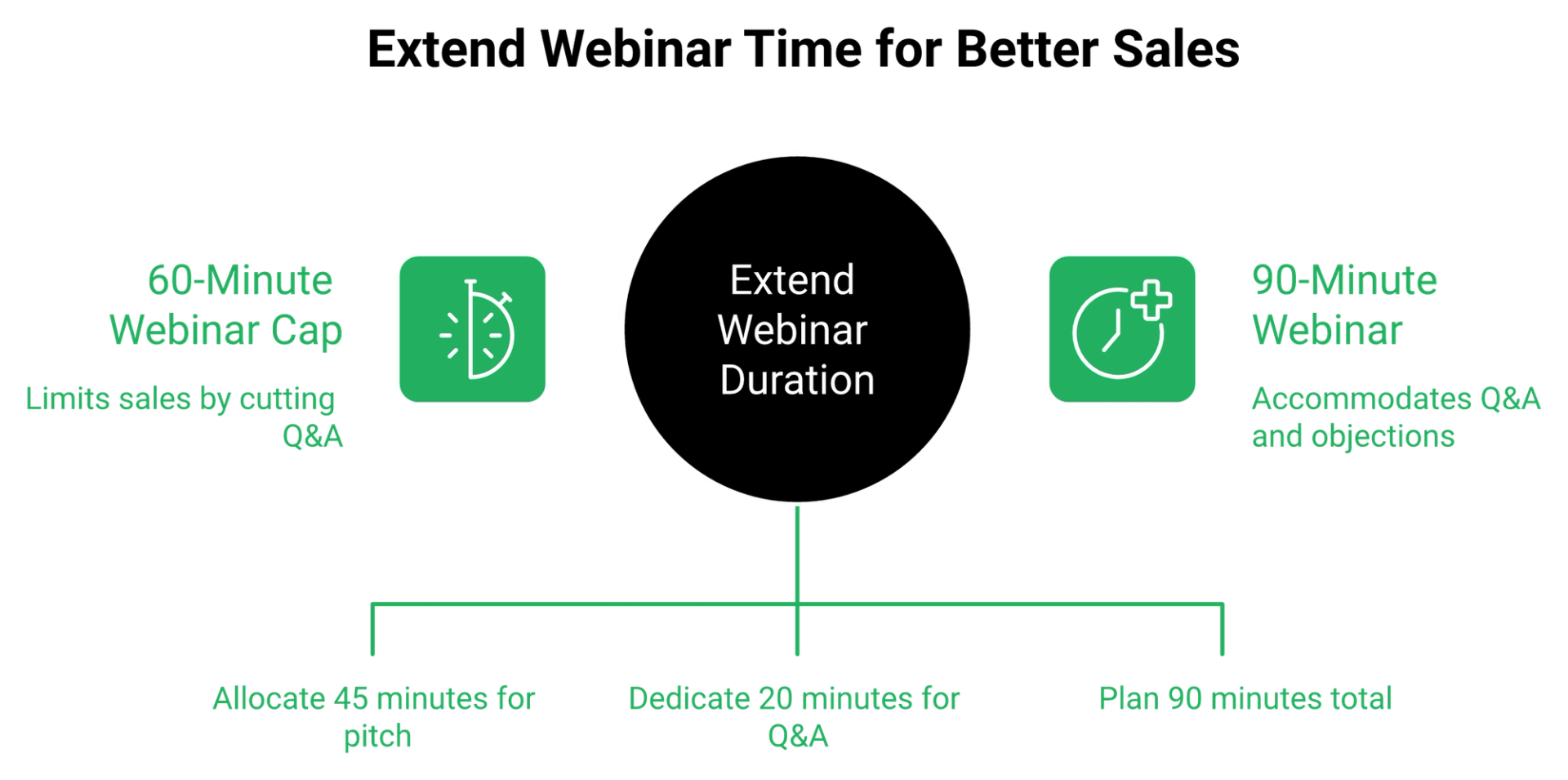
Think of maximum webinar length as a meter on your pitch. Starter gives you 60 minutes total, and that includes your late-joiner buffer, your presentation, your offer, and your Q&A.
Now run the actual math of a launch webinar. A 45-minute presentation plus 20 minutes of objection handling is 65 minutes. On Starter, you are already over.
One reviewer hit the ceiling on the tier above and said so plainly:
"Live constraint to 3 hours only."- Verified User in Investment Management, WebinarJam G2 - Verified Review
⚠️ Why the seat count is the murkiest number here
Seats and concurrent presenters are two different things, and buyers conflate them constantly. A seat is a login. A presenter is a face on screen during a live session.
The honest position is that WebinarJam's pricing page exposes neither number publicly. If your team runs a host plus two guest experts, ask billing in writing before you buy. Reviewers also describe the presenter workflow itself as heavy going:
"The interface is not user friendly. The presenter has to toggle between videos, slides, files, etc."- Tara G., WebinarJam G2 - Verified Review
For balance, those are two of the harsher reviews. WebinarJam's aggregate sits near 3.6 on G2 and 3.9 on Capterra across roughly 277 reviews, so plenty of operators run it happily inside its limits. Our own hands-on webinar platform reviews score the same trade-offs across 15 tools.
⭐ Sizing rules by webinar format
- Short cold-traffic workshop of 30 to 40 minutes: Starter works.
- Standard launch webinar with a real Q&A: budget 90 minutes, so Basic minimum.
- Objection-heavy high-ticket pitch: Jason Fladlien argues a four-hour webinar beats a three-hour one because most of that time is spent on objections. That is Enterprise, or a different platform.
- Multi-presenter panel: get the seat count confirmed in writing first.
That Fladlien point is the whole tension. Longer sessions handle more objections, so a duration cap quietly becomes a conversion cap. You are not buying minutes. You are buying permission to answer the question that closes the sale.
EasyWebinar does not meter session length by plan tier, so the pitch runs as long as the objections require, on live webinar software and automated sessions from the same plan.
Q4. Does WebinarJam pricing include EverWebinar, or is that a second subscription?
EasyWebinar's pricing audit of WebinarJam on 16 September 2026 found that EverWebinar, the automated webinar product, is included at no additional cost on the Basic, Professional, and Enterprise plans, stated in a footnote on WebinarJam's own pricing page. It is not included on Starter. So the automation question is really a tier question: Starter at $468 a year buys live only, and Basic at $948 a year is the cheapest tier that carries automation.
💸 The pain this used to cause, and still causes in search results
For years, evergreen automation was a separate line item, and buyers found out after they had budgeted. A 2023 reviewer describes it in exactly those terms:
"I love the partner service, everwebinar, (which you have to pay more for) that allows the participant to watch the webinar and feel as though it's a live webinar."- Tara G., WebinarJam G2 - Verified Review
I am not going to pretend that review describes today's page. It describes a real experience under an older packaging model, and it is why half the internet still quotes a second $499 a year for EverWebinar. Check the footnote yourself before you budget, then read the side-by-side on WebinarJam vs EverWebinar to see what each product actually does.
⚠️ Two products still means two products
Bundled price is not the same as unified product. EverWebinar remains a separate platform with its own setup, its own account surface, and its own support queue. Reviewers have found that seam painful:
"Purposefully difficult account email change and cancellation processes... during cancellation, are having to track down an old email to find an order ID in order to even begin the cancellation process."- Kaylen M., EverWebinar G2 - Verified Review
✅ The annual scenario, live only versus live plus evergreen
| Scenario | Plan needed | Annual cost | Automation included |
|---|---|---|---|
| Live webinars only | WebinarJam Starter | $468 | No |
| Live plus evergreen | WebinarJam Basic | $948 | Yes, via EverWebinar |
| Live plus evergreen | EasyWebinar annual | $440 | Yes, same platform |
Refunds follow the same tier logic. Annual purchases of WebinarJam or EverWebinar get a full refund inside 30 days, while monthly plans can only recover the most recent payment. If the packaging still feels unclear, the EasyWebinar vs WebinarJam comparison lays out what sits inside one subscription versus two.
⭐ My position on evergreen as an "upsell"
Evergreen is not an add-on. It is the reason you bought webinar software. Running one live webinar a week forever is a job, not a system.
The caveat I keep repeating, because people skip it: automate only after the live version converts. An automated webinar without traffic is a billboard in the desert. You grow the audience by running webinars, then you automate the one that already works, which is the whole argument in our guide to the top automated webinar platforms of 2026.
EasyWebinar runs live streaming and automated webinar scheduling inside one subscription and one login, so there is no sister platform to configure, cancel, or chase for a replay.
Q5. What is the real total cost once you add Zapier, CRM, and email?
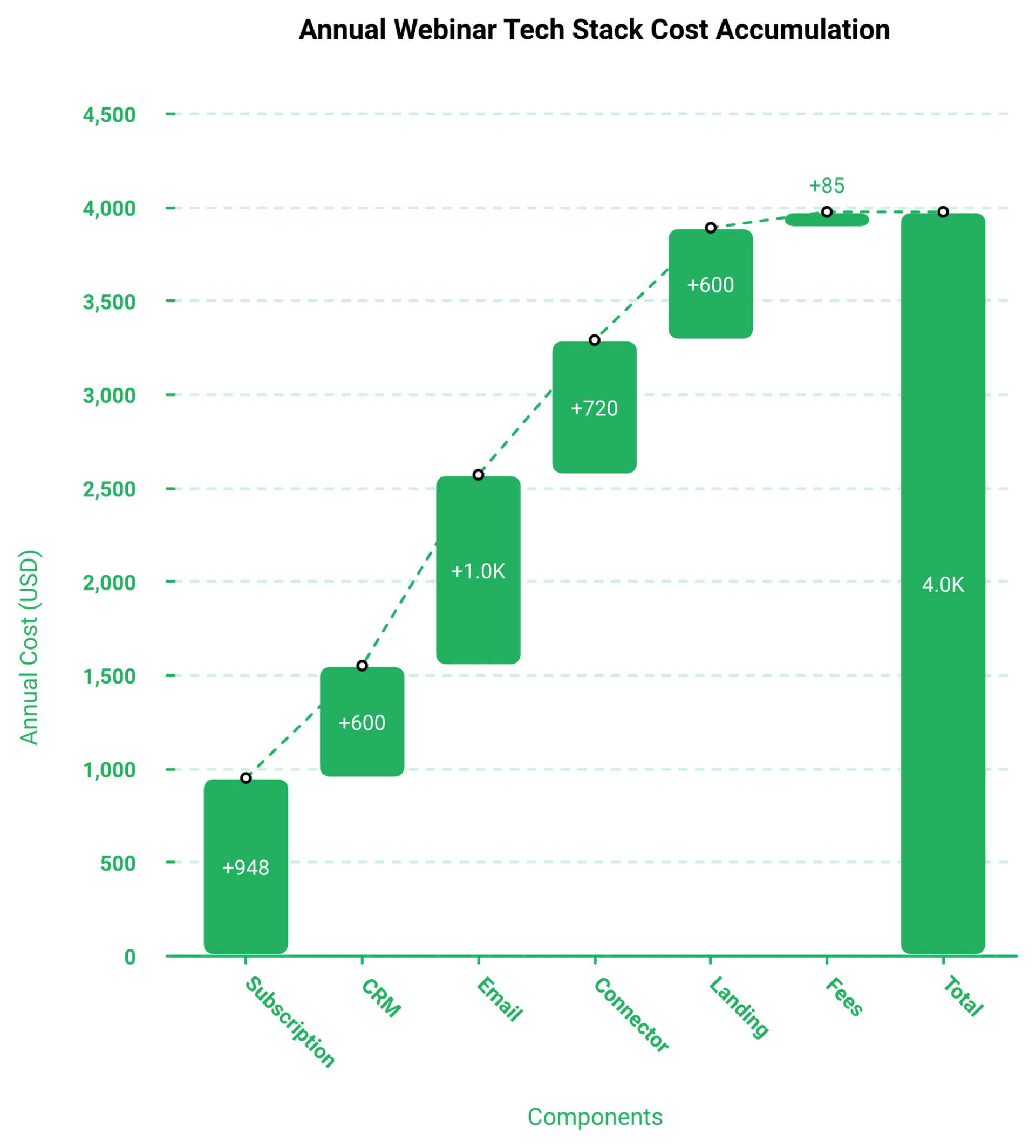
EasyWebinar's cost audits of standalone webinar setups find the subscription is rarely the full bill. A webcasting tool typically needs a customer relationship manager (a CRM, the database holding your leads), an email platform, a scheduler, and a connector like Zapier to move registrant data between them. Layered on WebinarJam Basic at $948 a year, per the WebinarJam pricing page, that stack commonly lands between $2,000 and $4,000 annually before any ad spend, and each connector adds one more place your data can stop moving.
💸 What the line items actually look like
Treat this as a worksheet, not a quote. Fill in your own current invoices, because tool pricing moves constantly.
| Line item | Verified figure | Typical range |
|---|---|---|
| WebinarJam Basic | $948 per year | fixed |
| CRM | not applicable | $0 to $99 per month |
| Email platform | not applicable | $20 to $150 per month |
| Connector (Zapier class) | not applicable | $20 to $100 per month |
| Landing pages | not applicable | $0 to $99 per month |
The vendor's billing policy adds two items nobody budgets for. A $35 collections fee, and $50 per chargeback.
⚠️ The failure that costs more than the subscription
Jeremy Haynes, an operator who runs heavy paid traffic to webinars, described the exact break. His Zapier account hit its task limit, and the team caught it four hours before showtime. Several hundred opt-ins had never reached the CRM, so the sales team had nobody to dial.
The fix was a billing upgrade. The cost was four hours of panic and a show-up rate that never recovered. That is the kind of gap our guide to webinar marketing automation is built to close.
⏰ What a silent connector costs in real money
Run the math on 200 lost opt-ins. At a 12% show-up rate that is 24 attendees who never arrive. At a 10% attendee-to-buyer rate and a $997 offer, that is roughly $2,400 gone from one webinar. If you want to see where those attendees leak out, our breakdown of webinar analytics maps every stage.
Reviewers describe the same seam without the ad spend attached:
"The integrations with 3rd party software such as mailchimp is inconsistent on both the pushing the registrants over and the custom form field population."- Tara G., 23 June 2023, WebinarJam G2 - Verified Review
"There were bugs and problems galore (we've stopped using it) and it is not AT ALL intuitive."- Verified User in Health, Wellness and Fitness, 17 July 2018, EverWebinar G2 - Verified Review
⭐ You are pricing a pipeline, not software
Jon Penberthy has a line I steal often. If your funnel diagram starts looking like a subway map, back out immediately, because you have just built dozens of places for something to break.
That is the reframe. Every connector is a joint, and joints leak quietly. My read is that most operators overpay for tools and underpay for the plumbing, though I hold that loosely for teams with a real ops person on staff. Native integrations remove joints instead of adding them.
EasyWebinar ships a built-in sales CRM with an auto-dialer, so registrant records and follow-up calls live inside the system that ran the webinar, including for people who joined and left early.
Q6. What happens after the $1 trial, and how hard is it to get your money back?
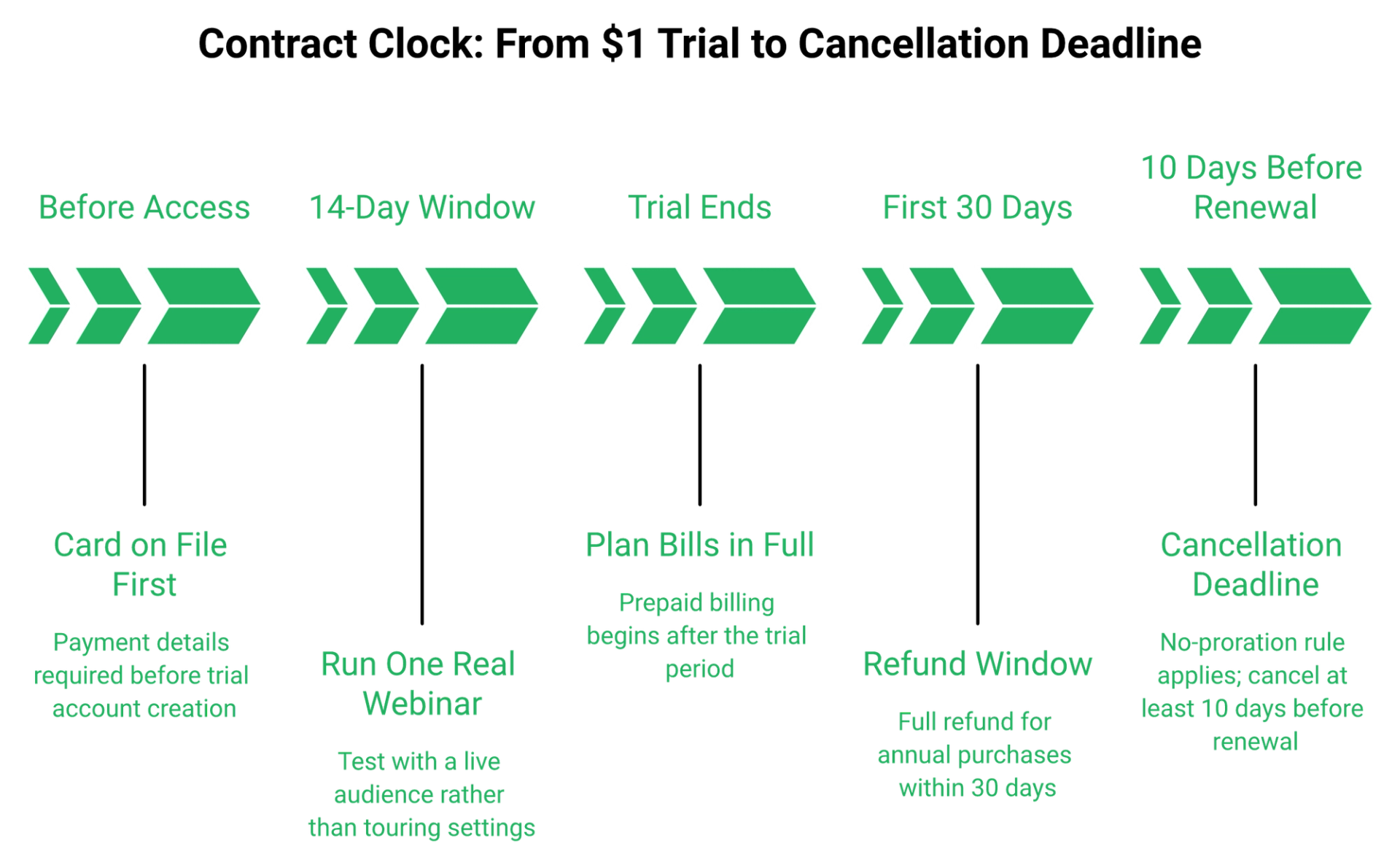
WebinarJam has no free plan. Entry is a $1 Basic Trial for 14 days at the 500-attendee level, and payment details must be on file before the trial account is created. After the trial, the chosen plan bills in full on a prepaid basis. Annual purchases carry a full refund if requested within 30 days. Monthly plans can only recover the most recent payment, and unused service is never prorated.
⏰ The trial clock, and what to actually test in it
Trials are limited to one per person, per product. Buying and cancelling multiple trials may result in permanent account closure.
So do not spend 14 days touring settings. Run one real webinar to a real list. Live sessions only break when strangers show up, when the tech wobbles, or when your kid walks in mid-pitch. That is the test, and our host preparation guide is the checklist I would run inside a trial window.
💰 The refund window, stated precisely
The pricing page advertises a 30-day money-back guarantee. The billing policy defines what that actually means:
- Annual WebinarJam or EverWebinar purchase: full refund within 30 days of purchase.
- Monthly or installment payment: only the most recent payment is refundable, and only within 30 days of that payment.
- Everything else: all subscription fees are nonrefundable outside that policy.
Two more clauses matter. Cancellation must be requested at least 10 days before your next billing date, or you get charged for that cycle. Genesis Digital also states it will not prorate unused subscription services.
⚠️ What reviewers say the exit actually feels like
Policy is one thing. The process is another, and reviewers describe real friction:
"The fact that they didn't allow me to cancel and get a refund, or at least a partial refund."- Verified reviewer, WebinarJam Capterra - Verified Review
"During cancellation, are having to track down an old email to find an order ID in order to even begin the cancellation process, which is still manual on the end of Genesis Digital."- Kaylen M., 24 August 2021, EverWebinar G2 - Verified Review
Those are one-star accounts, and WebinarJam's aggregate sits higher at 3.9 on Capterra across roughly 277 reviews. Both facts are true at once.
✅ Five things to settle before you sign
- Diary the date 10 days before your renewal, today.
- Save your order ID somewhere you will find it in a year.
- Use a billing email your marketing team can actually access.
- If you are unsure after 14 days, take monthly and lose the discount.
- Screenshot the refund clause on the day you buy.
The cheapest platform is the one you can leave. Nobody prices the exit, and after 14 years watching operators switch tools, exit friction is the cost I see people regret most. If WebinarJam's terms are the sticking point, the ranked list of WebinarJam alternatives covers what else is available.
EasyWebinar offers a full-feature trial that includes automated evergreen webinars, so the automation engine is testable before anyone commits to a year, and you can sign up free to run it.
Q7. What do paying customers say the price feels like a year in?
WebinarJam sits near 3.6 on G2 and 3.9 on Capterra across roughly 277 reviews, with a lower Trustpilot spread near 2.3 as reported in platform round-ups. The recurring complaint at renewal is not the sticker price. It is the email module: no HTML editing, form fields that fail to populate, and sends that do not reliably arrive, which pushes operators onto a separate paid email service provider they had not budgeted.
⭐ Why three ratings disagree so much
G2 and Capterra reviewers are mostly buyers who chose the tool deliberately. Trustpilot skews toward people with a billing or support problem urgent enough to go public.
Read the spread as a signal, not a contradiction. The product works. The parts around the product generate the complaints. Our published customer reviews get read the same way, one-star entries included.
⚠️ One reviewer's year, start to finish
Tara G. ran WebinarJam as her company's main marketing channel, delivered by staff. Her reason for buying was sound: pay a presenter once, sell many times.
Then the supporting systems failed her, one layer at a time:
"Their email service is clunky, hard to edit, doesn't have html options, and their own form fields don't populate correctly. Their email service doesn't consistently send to registrants, or report emails that have been sent."- Tara G., 23 June 2023, WebinarJam G2 - Verified Review
Support is the second pattern, and it shows up on the sister product too:
"When things don't work or participants log in late there is no way to get help or reach support except via email which obviously is not an ideal scenario in a live event."- Verified User in Market Research, 2 January 2018, EverWebinar G2 - Verified Review
💸 What those gaps add to the annual bill
Reminder emails are not a side feature. They are the show-up rate. If the built-in sender is unreliable, you buy an email platform, and your $948 becomes $1,500 or more. The sequence itself matters as much as the sender, which is why we documented how to improve webinar attendance step by step.
Do not paper over that with AI-written sequences either. Generic reminder copy is everywhere now, and the emails that lift show-up rates still read like a person wrote them.
✅ How to read any platform's rating before you buy
- Sort by one-star and read only the billing and support complaints.
- Check whether complaints cluster on the core product or the edges.
- Note the review dates. A 2018 complaint may describe a fixed problem.
- Ask what the reviewer had to buy separately to make it work.
EasyWebinar publishes hands-on ratings across 15 webinar platform reviews, criticisms included, because a buyer facing an annual prepay deserves the full picture and not a scoreboard.
Q8. Which plan should you buy at your attendee volume, and when does it pay for itself?
Size the plan from expected concurrent attendees, not registrations. On cold traffic, plan for a 10% to 15% show-up rate and roughly 30% registration-to-signup, then require a 10% attendee-to-buyer rate before you automate anything. At a $997 offer, WebinarJam Basic at $948 a year pays for itself on a single sale. Enterprise at $4,548 a year needs five.
⭐ The four-step sizing calculation
- Take your expected registrations for one webinar.
- Multiply by your show-up rate. Use 12% for cold paid traffic, and 35% or higher for a warm list.
- Add 25% headroom for your best-performing webinar, because caps are concurrent.
- Match that number to the tier, then check the maximum webinar length against your run time.
Step four is where people get caught. Starter allows 1 hour, Basic 2 hours, Professional 3 hours, and Enterprise 4 hours. Registration volume is the input you control first, and our notes on how to drive webinar attendance cover that side of the equation.
💰 Worked example at 1,000 registrants
Run 1,000 registrants at a 12% show-up rate. That is 120 people in the room. Add headroom and you need 150 seats, so Starter's 100-attendee cap fails and Basic's 500 fits easily.
Now the revenue side. 120 attendees at a 10% attendee-to-buyer rate is 12 sales. At $997 that is $11,964 from one webinar, against $948 for the year.
| Plan | Annual cost | Concurrent cap | Sales at $997 to break even |
|---|---|---|---|
| Starter | $468 | 100 | 1 |
| Basic | $948 | 500 | 1 |
| Professional | $2,748 | 2,000 | 3 |
| Enterprise | $4,548 | 5,000 | 5 |
| EasyWebinar annual | $440 | live and automated included | 1 |
⚠️ The price point that breaks the math
Below roughly $200, a webinar usually is not mathematically required. At $47 or $67 there is no margin left to cover traffic, so you will run in the red on paid ads no matter which platform you pick.
Offers at $500, $997, or higher carry the margin to buy attention. That is the real gate, not the software tier, and it is the same logic behind selling through paid webinars.
✅ My sizing rule, and the gate before automation
Run 5 to 10 live webinars first. Fine-tune the message and the offer. Hit at least 10% attendee-to-buyer before you turn the best one into an automated evergreen version, which is exactly the sequence we lay out in live vs automated webinars.
I hold one caveat here. EasyWebinar's data across coaching and course funnels points to that 10% gate being the reliable trigger, though I could be reading it too tightly for high-ticket offers above $5,000, where 4% to 6% often clears the same revenue bar.
EasyWebinar prices capacity as one flat webinar pricing plan with live and automated sessions included, so cost per attendee falls as the funnel grows instead of stepping up at each cap.
Q9. How does WebinarJam pricing compare to EasyWebinar, Demio, and Livestorm at the same attendee count?
EasyWebinar bundles live and automated webinar capacity from $36 per month billed yearly, which is $432 a year, or $44 month to month. At 500 concurrent attendees, WebinarJam Basic costs $948 a year with a 2 hour session cap and EverWebinar included, per the WebinarJam pricing page. Demio charges per host by room size, roughly $45 to $199 or more per month on annual billing, and Livestorm and BigMarker scale on similar per-host logic.
💰 The same room size, four price cards
| Platform | Annual cost at 500 seats | Evergreen included | Native CRM | Session cap | Pricing logic |
|---|---|---|---|---|---|
| EasyWebinar | $440 | Yes | Yes, with auto-dialer | Not tiered by plan | Flat plan |
| WebinarJam Basic | $948 | Yes, via EverWebinar | No | 2 hours | Flat plan, capacity tiers |
| Demio | roughly $540 to $2,400 | Automated on higher tiers | No | Not published per tier | Per host, by room size |
| Livestorm | quote and tier dependent | Varies by tier | No | Varies | Per host and seat |
⚠️ Where the per-host model quietly doubles your bill
Per-host pricing means you pay for each person licensed to run a session. One marketing manager plus two guest experts can mean three licenses.
Flat pricing does not care how many people present. That difference matters most to agencies and B2B teams, and almost not at all to a solo coach. The full field is ranked in our guide to the top webinar platforms.
⏰ The cost-per-attendee curve
Divide annual cost by the seats you actually fill. On WebinarJam Basic at $948, a room of 400 costs about $2.37 per seat per year. Fill only 80 seats, and the same plan costs $11.85 per seat.
That curve is why oversizing hurts. Buy the tier your show-up rate supports, not the tier your registration count flatters. For a like-for-like read on the two closest options, see Demio vs WebinarJam.
⭐ Unified is not the same as bloated
Reviewers do buy these platforms specifically to stop showing up live:
"We originally were excited to find a webinar software that didn't require live events."- Kaylen M., 24 August 2021, EverWebinar G2 - Verified Review
"I love the partner service, everwebinar, (which you have to pay more for) that allows the participant to watch the webinar and feel as though it's a live webinar. This is great because we can then launch a webinar over and over again without having a person live online."- Tara G., 23 June 2023, WebinarJam G2 - Verified Review
I am wary of platforms that claim to be your community, your CRM, your email provider, and your streaming layer at once. Breadth without depth usually produces a mediocre version of everything, and streaming is the part you cannot fake. That is why our all features page names what the platform does rather than everything a stack could theoretically hold.
✅ Which one fits which operator
- Solo coach, one presenter, live plus evergreen: flat pricing wins on both cost and admin.
- B2B team with three presenters: check per-host math before comparing sticker prices.
- Live-only enterprise events with no funnel: hosting-focused tools are honestly fine.
- Under $200 product price: none of this is your bottleneck yet.
EasyWebinar holds row one in that table because it is the only option there bundling live sessions, evergreen automation, and a native sales CRM into a single flat price, which you can verify against the rest of the field on our compare webinar platforms hub.
Q10. So is WebinarJam worth the price in 2026, and who should skip it?
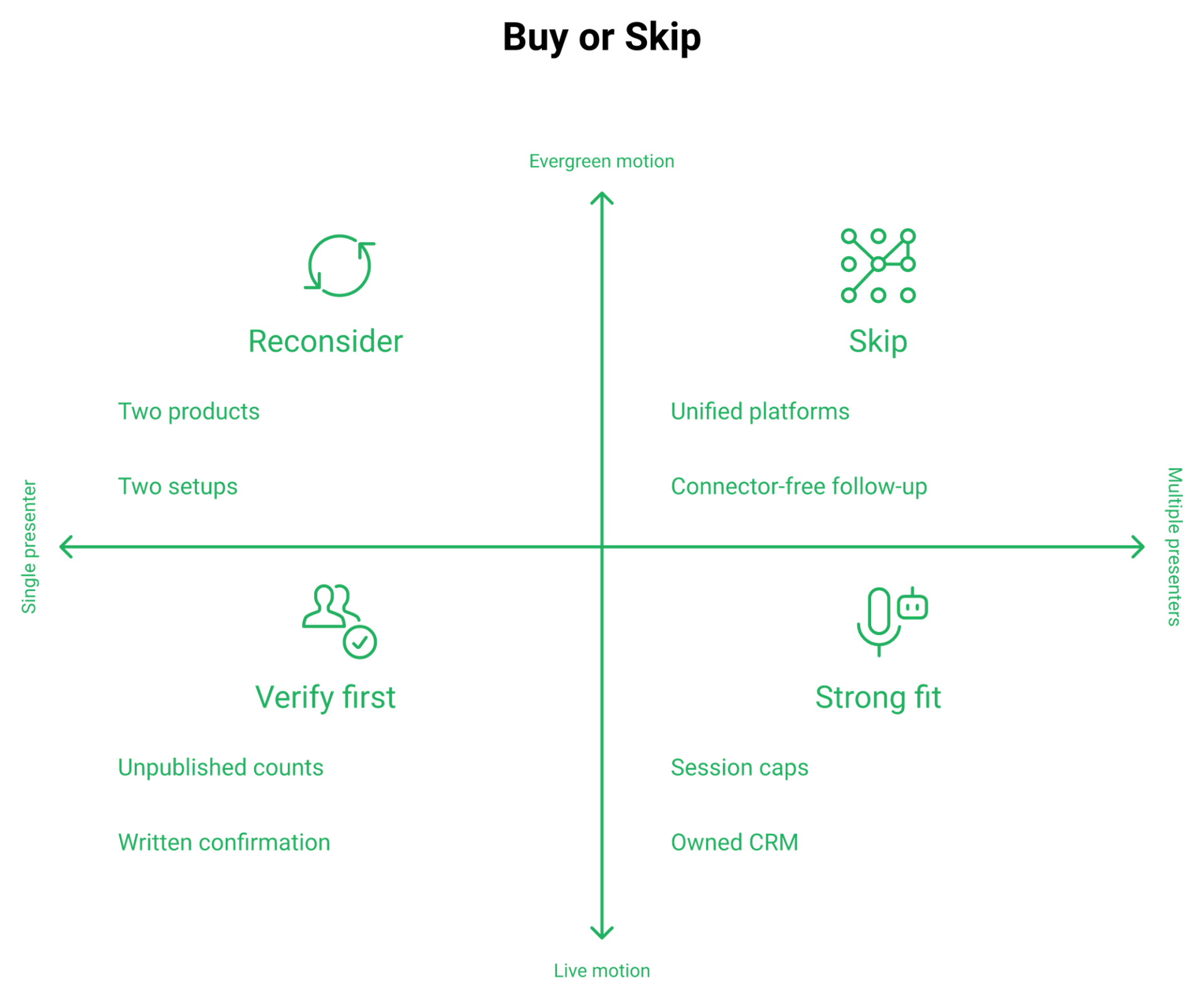
WebinarJam is worth $468 to $4,548 a year if you run live sales webinars inside its session caps, sell above $500, and already own a CRM and email platform. EasyWebinar's platform comparisons find the split-product model breaks down when evergreen automation becomes the main motion, because registrant data then has to travel between systems. Skip WebinarJam if you need multiple presenters, or you do not want a connector sitting between opt-ins and follow-up calls.
✅ Three conditions where it earns the money
Buy it when your webinar is live, under two hours, and priced high enough to carry traffic. Buy it when you want offer pop-ups during the session without building them yourself. Reviewers confirm that mechanic works:
"Can upsell easily by using WebinarJam interface."- Verified User in Investment Management, 3 August 2020, WebinarJam G2 - Verified Review
Buy it when your economics look like Tara G's, who kept it despite her complaints for one reason:
"I pay my staff only one time to deliver a presentation, which is our main method of marketing."- Tara G., 23 June 2023, WebinarJam G2 - Verified Review
❌ Three conditions where you should walk
Skip it if evergreen is your core motion, because you will be running two products with two setups. Skip it if your team presents in pairs or panels, since the pricing page publishes no host counts at all. If either applies, the ranked list of WebinarJam alternatives is the faster path.
Skip it if your offer sits under $200. At that price a webinar is not mathematically required, and no platform fixes the margin.
⚠️ The thing nobody says out loud about platform shopping
Jason Fladlien built a launch that did $57.9 million in 226 days. He is blunt about the registration page behind it. He calls the default templates, WebinarJam's included, ugly, and points out they were done, which is the part that mattered.
That is the trap I watch coaches fall into every month. Six weeks on funnel polish, zero webinars run, and the assumption that design carries conversion. It does not. The presentation does, which is the whole argument in our roundup of webinar landing page examples that convert.
⭐ Ship the webinar before you shop the platform
My first webinar had 17 people show up. It changed my business, and it ran on tools I would be embarrassed by now.
So here is the honest sequence. Pick the cheapest tier that fits your room and your run time. Run five live sessions. Read your attendee-to-buyer rate. Then decide what you actually need, with data instead of a comparison table. Our walkthrough of how to create webinars covers those first five runs.
EasyWebinar's read is that the standard advice gets this backwards. The category tells you to choose the perfect platform first, and I think that is precisely why so many funnels never launch.
💰 What to do on Monday
- Screenshot WebinarJam's pricing page with today's date.
- Confirm your host count in writing with billing.
- Diary the date 10 days before your renewal.
- Book your first live session for next week, not next quarter.
EasyWebinar unites live webinar software, evergreen scheduling, and CRM follow-up in one system, so tell us what you are launching and we will say honestly whether you need us yet, or request demo and we will walk your numbers with you.
Frequently Asked Questions

Casey Zeman
Founder of EasyWebinar
About Author
Over the past decade, I've helped thousands of entrepreneurs, coaches, and consultants turn webinars into a predictable, powerful way to grow their audience, build trust, and scale, without the constant hustle. I created EasyWebinar because I couldn't find a system that combined authenticity, engagement, and automation the way I needed. So, I built one.
Related Posts

10 Best Community Engagement Platforms in 2026
Compare the 10 best community engagement platforms in 2026. Course creators, evaluate live hosting, analytics, and replay to pick your winner today.

10 Best Online Coaching Tools in 2026: Live Session Quality, Scheduling, Recording, and Client Engagement Analytics
Compare the 10 best online coaching tools of 2026 on session quality, scheduling, and analytics. Discover the right fit for your coaching revenue model.

10 Best Webinar Hosting Platforms Ranked by Uptime, Streaming Quality & Cost
Compare 10 webinar hosting platforms ranked by uptime, streaming quality, and cost. Discover which tool actually turns attendees into revenue.
Turn every webinar into a revenue stream
Launch your first paid event in just a few clicks - and start monetizing your expertise.
Book a Call