WebinarJam vs EverWebinar: Comparing Live and Automated Webinar Workflows for Revenue Growth

Casey Zeman
Published on Jun 30, 2026 • 16 min read
TL;DR
- WebinarJam runs live webinars and EverWebinar replays recordings as simulated live; both are Genesis Digital products sold separately.
- The real decision is workflow sequence, not which tool wins, since most operators eventually run both.
- Prove your offer live and hit a 10% attendee-to-buyer rate before you automate anything.
- Running two tools costs around $2,100 a year plus a data seam where chat history and opt-ins quietly leak.
- Automated webinars convert worse than live until the offer is stress-tested, so live to learn, automate to scale.
- EasyWebinar unifies live, simulated live, and evergreen in one login with a built-in CRM and one attendee dataset.
Q1: WebinarJam vs EverWebinar: which one do you actually need?
WebinarJam runs live webinars. EverWebinar replays a recording as “simulated live.” Both come from the same company, Genesis Digital, and are sold separately, so “versus” is the wrong frame. Most operators end up running both. The real question isn’t which tool wins. It’s whether your offer has been proven live before you automate it. Automate too early and you’re a billboard in the desert.
🎯 The question you’re actually asking
I have run and consulted on more than 100 webinars that did eight figures in combined sales. Here’s what I learned: nobody types “webinarjam vs everwebinar” because they care about feature checklists.
You’re asking it because your numbers are all over the place. Cost per lead swings wildly. Show rates wobble. Close rates feel random. The standard read gets this backwards. The tool isn’t your problem. Your unproven offer is.
Maybe you ran one webinar already, watched it flop, and felt your ad money get vaporized in real time. That sting is what sends people tool shopping. A new platform feels like a fix. It usually isn’t.
⚠️ Why “versus” is a false binary
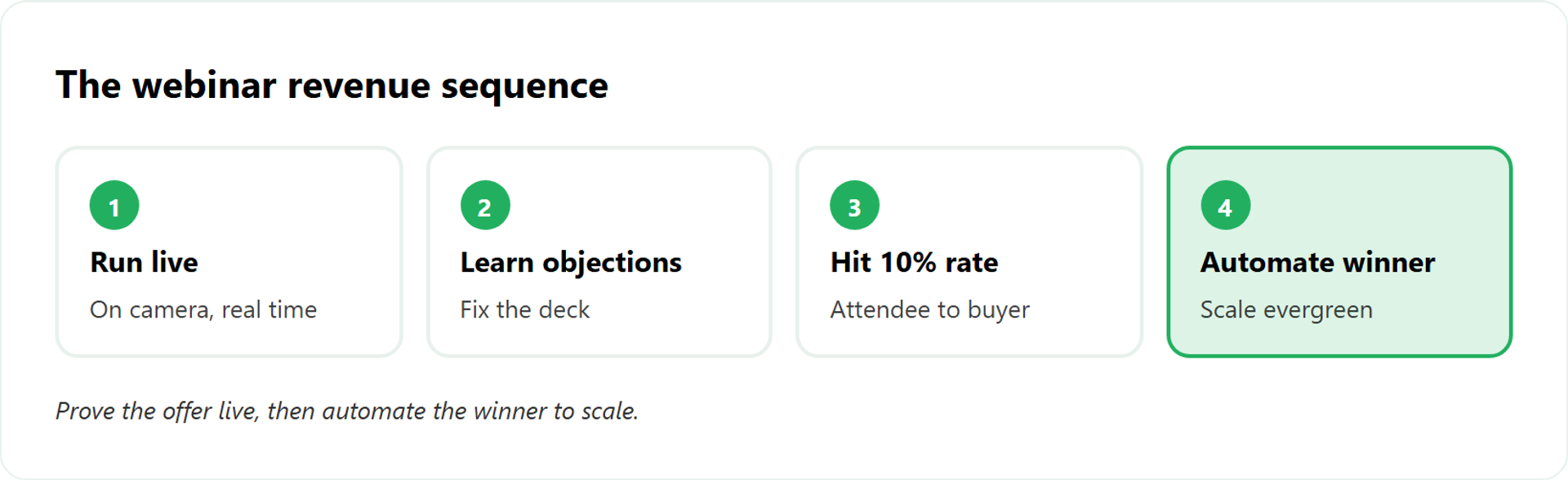
These two products were built to work together, not to compete. WebinarJam hosts the live event. EverWebinar takes a recording and plays it on a schedule. You can even import a WebinarJam session straight into EverWebinar.
So framing it as a duel misses the point. The choice isn’t WebinarJam or EverWebinar. It’s a sequence question, and getting the order right matters more than the brand. If you want the deeper breakdown, see our EasyWebinar vs WebinarJam comparison.
- Live first. You learn what converts, where people object, and what to cut.
- Automated second. You scale only the thing that already sold.
I might be wrong for your exact niche, but from what surfaces when you actually run these, that order rarely changes.
💰 The model decision behind the tool decision
Buying both WebinarJam and EverWebinar means two subscriptions, two logins, and two places for your attendee data to split. That’s a workflow choice, not just a purchase.
There is another model. At EasyWebinar, we built one webinar platform that runs live, simulated live, and evergreen webinars together, so you nail the offer live and flip it to automated webinar mode without a second tool or a migration. More on that later. First, let’s get clear on what “live” and “automated” actually mean.
Q2: What’s the real difference between a live and an automated (evergreen) webinar?
A live webinar (WebinarJam) is broadcast in real time. You’re on camera, reading chat, reacting on the spot. An automated or evergreen webinar (EverWebinar) plays a pre-recorded session on a recurring or just-in-time schedule, with simulated chat, dynamic attendee counts, and timed offers so it feels current. Live builds the proof. Evergreen scales it. The bigger difference is what each does to your numbers.
🧠 The plain-English version
Think of a live webinar like a stage show. You’re up there, sweating, adjusting to the room. Someone asks a question and you answer it right then.
An evergreen webinar is like a TV rerun scheduled to start soon. The content is recorded once. The system makes it feel timely. Both can sell. They just feel different to run and to attend. If you want the long view, our guide on pre-recorded webinar platforms vs live goes deeper.
One integrity rule I hold hard: never tell people a recording is live, and never pretend a live event is canned. EasyWebinar bakes that honesty into how we label sessions, because trust is the whole game on a sales webinar.
⏰ How “automated” actually works
The mechanics matter, so here’s what’s under the hood of an evergreen session:
- Scheduled vs just-in-time (JIT). JIT means the next session starts shortly after someone lands, usually between one minute and about 14 minutes out.
- Dynamic attendee counts. The viewer count rises and falls to feel real.
- Simulated chat. Pre-set messages drop in on a timeline.
- Timed offers. Your call to action appears at the exact minute it did live.
For high-ticket offers, I lean on JIT because those webinars run shorter, around 30 to 40 minutes, and you don’t want a registrant waiting an hour to watch.
⚖️ When each one earns its place
Live is for learning. You hear the objections, you feel the energy dip, you fix the deck. Evergreen is for scale, once the live version already converts.
One honest caveat: simulated chat can backfire with sophisticated buyers who sense it’s fake. EasyWebinar handles the same live, simulated live, and evergreen formats in one place, so you choose the mode per audience instead of buying a separate product for each. Our live webinar software and our automated webinars for passive income guide show both sides.
Q3: Why do automated webinars convert worse than live ones (and when does that flip)?
In direct testing, automated webinars consistently underperform the live version of the exact same offer. Even high-converting live webinars lose steam once automated. The fix isn’t avoiding automation. It’s sequencing. Prove the offer live, hit at least a 10% attendee-to-buyer rate, then automate. Skip that step and you’ll scale a leak, not a win.
💸 The mistake that vaporizes ad budgets
Here’s the scene I watch play out constantly. A coach reads a “passive income” pitch, builds an evergreen funnel day one, points cold ads at it, and waits. Nothing closes.
That’s the trap. An automated webinar with no proven offer and no traffic is a billboard in the desert. Most people think automation is the shortcut. Run it cold and it’s just a faster way to lose money. If you’re serious about this, study how to make money with webinars before you automate anything.
📉 What the split tests actually show
After running thousands of split tests and spending well past $50 million on ads, the pattern is clear to me. We take webinars that crush it live, automate them, and watch conversion drop. Not a little. A lot.
Why? Live carries something a recording can’t fully copy:
- Real-time objection handling, in the moment
- Energy the room can feel
- Trust that builds when you answer a hard question on the spot
I could be off on the exact mechanism. But the direction of the result has held up across years of testing.
🔢 The 10% rule, and the one exception
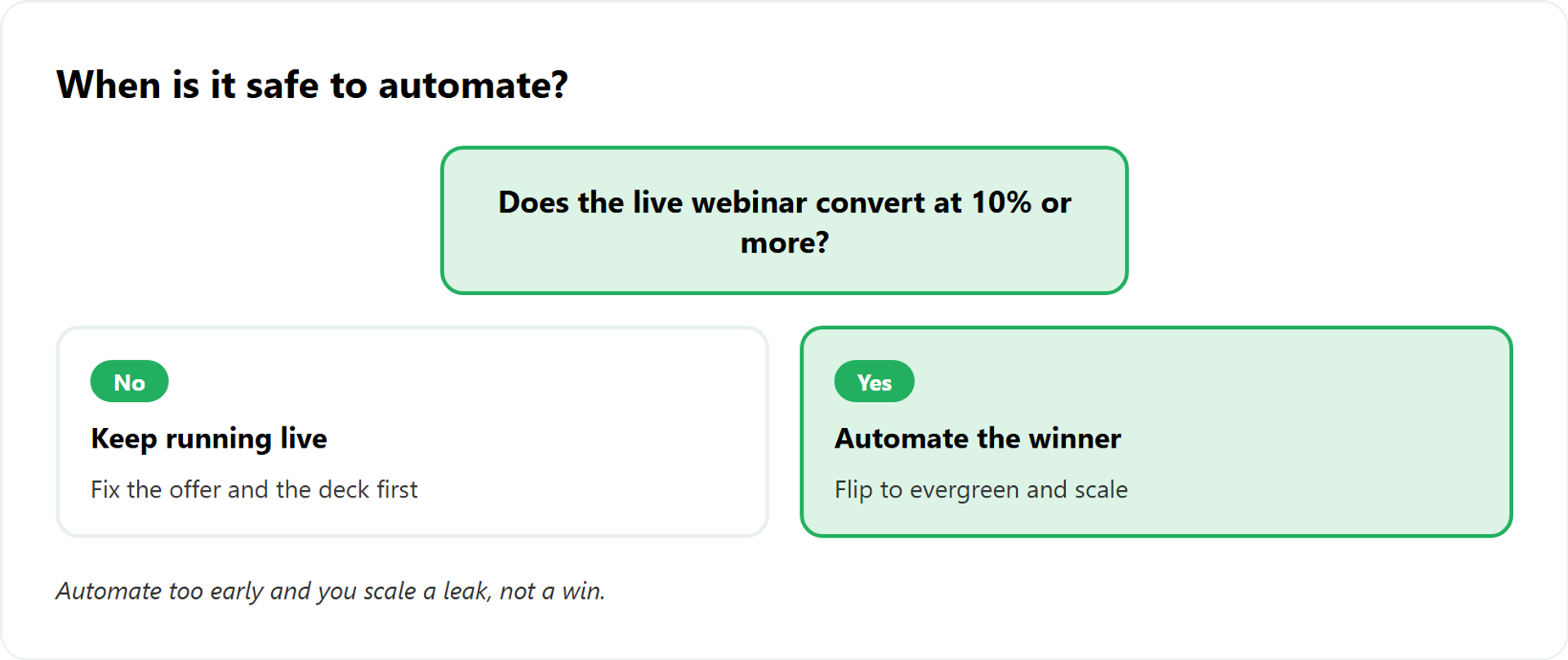
My guardrail: don’t automate until your live webinar converts at least 10% of attendees into buyers. As I like to say, 30% of a massive number is amazing, but 30% of zero is nothing.
There’s a contested exception. If you have more time than money, going automated straight out of the gate usually loses, because you can’t feed it traffic. If you have more money than time, you might buy your way to data faster. It depends on your cash, honestly.
This is where the two-tool model gets clumsy. You prove it live in WebinarJam, then rebuild in EverWebinar. With EasyWebinar, you clear the 10% bar live and flip the same session to evergreen inside one system, no migration. Our automated webinars 2025 scalable funnel strategies guide walks through the timing.
Q4: How do WebinarJam and EverWebinar compare on features, pricing, and limits?
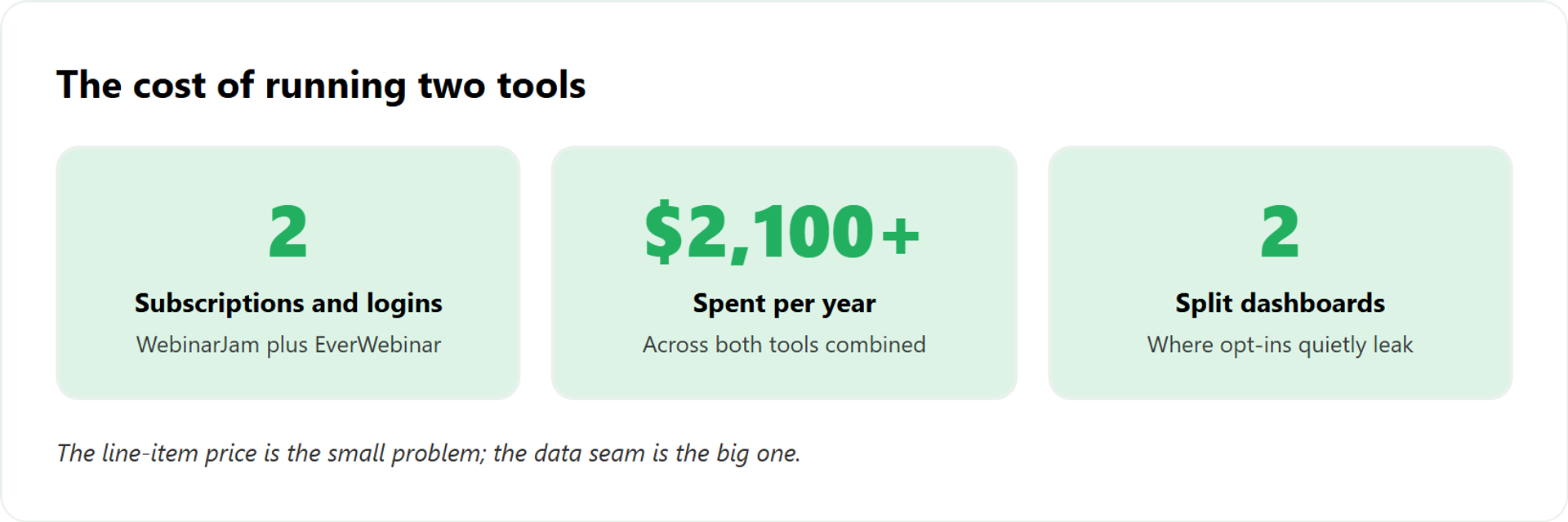
WebinarJam prices by attendee tier, from about $39 to $379 per month billed annually, for 100 to 5,000 attendees. EverWebinar is flat, around $99 per month or $1,188 per year. Buy both and you’re near $2,100+ a year across two logins. WebinarJam adds live tools. EverWebinar adds JIT scheduling and simulated chat. The gap that costs you money isn’t on the spec sheet. It’s the data that falls between two tools.
📊 The three-way comparison
When you start out, the look of your pages barely matters. The presentation does. With that lens, here’s how the options actually stack up. You can see the full picture on our compare webinar platforms page or check current webinar pricing.
| Criteria | EasyWebinar | WebinarJam | EverWebinar |
|---|---|---|---|
| Live webinars | Yes | Yes | No |
| Automated / evergreen | Yes | No | Yes |
| Just-in-time scheduling | Yes | No | Yes |
| Built-in CRM | Yes | No | No |
| One platform for both modes | Yes | No (live only) | No (automated only) |
| Attendee pricing model | Flat tiers | By tier, $39 to $379/mo | Flat, ~$99/mo |
| Typical yearly cost for live and automated | One subscription | ~$948+ | ~$1,188 |
| Combined cost for both | – | ~$2,100+ together | ~$2,100+ together |
⚠️ The cost the spec sheet hides
Two subscriptions is the small problem. The real one is the seam between them. WebinarJam doesn’t save chat history, and your attendee data lives in two dashboards that don’t fully talk. Operators feel that friction:
“They have more problems than they’re worth. The integrations with 3rd party software such as mailchimp is inconsistent… Their email service is clunky, hard to edit… doesn’t consistently send to registrants.”
Tara G. WebinarJam G2 Verified Review
“There were bugs and problems galore… they then, outrageously, have their OWN LINK on the screen to Webinarjam!! So wrong!”
Verified User in Health, Wellness and Fitness EverWebinar G2 Verified Review
Not every review is bad, and I won’t pretend otherwise. The two-tool model genuinely works for some teams. But the unified approach removes the seam entirely.
“I love that there are options for live webinars AND automated so you have options… It was incredibly easy to integrate into Kit with Zapier.”
Verified User in Photography EasyWebinar G2 Verified Review
That’s the EasyWebinar difference in one line: live plus automated in one subscription, one attendee dataset, one login, instead of bridging two Genesis Digital products and hoping the data lines up. See how it stacks against the full field in our best webinar software comparison guide.
Q5: What does running two separate tools actually cost you in the real world?
The line-item cost of two subscriptions, around $2,100 a year, is the small problem. The real cost is the seam between the tools. Chat history that doesn’t carry over. Attendee data split across two dashboards. Automations that silently fail. We once caught a Zapier limit four hours before a webinar, and a couple hundred opt-ins never reached the CRM. Two tools mean two places for revenue to leak.
🧩 The stack you don’t mean to build
It starts innocently. You buy WebinarJam for live. You add EverWebinar for automated. Then a landing page tool, an email tool, and Zapier to glue them.
Zapier is the connector that passes data between apps. Each handoff is a place a wire can pop loose. Before long, you’re running a contraption nobody fully understands. Cleaner native integrations remove most of those failure points.
I’ve lived this. Years back, my team, Josh and Aaron and I, built what we called the monster funnel. It got complicated. Things broke. One day I thought, enough is enough.
⚠️ The four-hour-out near miss
Here’s the moment that stuck with me. Our Zapier account hit its Zap limit, the cap on how many automated actions can fire. We caught it four hours before a webinar.
When we checked the CRM, there was a couple-hundred-person gap in opt-ins. Those leads existed. The system just never recorded them. That’s revenue you can’t follow up with because you don’t know it’s there. A built-in sales CRM keeps that data in one place.
Same lesson, different surface: we once put the join link inside the text reminder. Show rate looked higher, but the booking rate cratered. Small wiring choices move real money. Check the tech.
✅ The fix is fewer moving parts
Operators feel this friction across tools, not just one:
“I had a lot of resistance to creating an evergreen webinar, because I have tried before and it was difficult to set up. There are just a lot of moving parts to these kinds of funnels.”
Ajarae C. EasyWebinar G2 Verified Review
“Inability to clone webinars without serious resulting issues… duplicate chat messages, emails not being sent to registrants, pop-ups not working.”
Kaylen M. EverWebinar G2 Verified Review
EasyWebinar collapses the contraption. Live and automated share one platform, and the built-in CRM means opt-ins and engagement live in one place, so there’s no Zapier seam silently dropping leads four hours before you go on. See the full all features set for how it fits together.
Q6: Should you start with live (WebinarJam) or automated (EverWebinar) first?
Start live if you’re still proving the offer. You need real-time objection data, and you can’t run an evergreen funnel with no traffic anyway. Start automated only if your offer already converts live at 10% or more, and you have more money than time to drive traffic. For an ice-cold audience, expect a 10 to 15% show rate at the floor. Sequence it: live to learn, automate to scale.
⏰ The real fork is time vs money
Most people pick based on the tool. Pick based on your resources instead. The honest split comes down to what you have more of.
If you have more time than money, automated straight out of the gate usually loses. You can’t feed a recording the traffic it needs. An automated webinar with no traffic is a billboard in the desert. Our top automated webinar platforms of 2026 guide covers the traffic prerequisite.
🎯 Two clean scenarios
Here’s how I’d route you, plainly.
✅ Start live (WebinarJam-style) if:
- Your offer is new or unproven
- You haven’t hit 10% attendee-to-buyer yet
- You want to hear objections in real time and fix the deck
⚠️ Start automated (EverWebinar-style) only if:
- Your live webinar already converts at 10%+
- You have ad budget to drive steady traffic
- You’re scaling a winner, not testing an idea
Not for you if you’re hoping automation replaces an offer that never sold live. It won’t. It just loses money faster. If you’re leaning live first, our live webinar software handles the learning phase.
📈 What to expect when you show up
Set your benchmark honestly. For a cold audience, 10 to 15% show rate is the bottom of the barrel you should expect. Anything under that, look at your reminders and confirmation page. Our webinar landing page examples that convert can lift that number.
I could be off by a few points for your niche. But chasing a 30% close rate is pointless if nobody attends. Thirty percent of a massive number is amazing. Thirty percent of zero is nothing.
Because EasyWebinar runs both modes natively, the “which first” question isn’t locked to a purchase. You start live, watch the numbers, and flip the same session to evergreen when the data says go.
Q7: How do you turn a webinar into a measurable revenue workflow (not just engagement)?
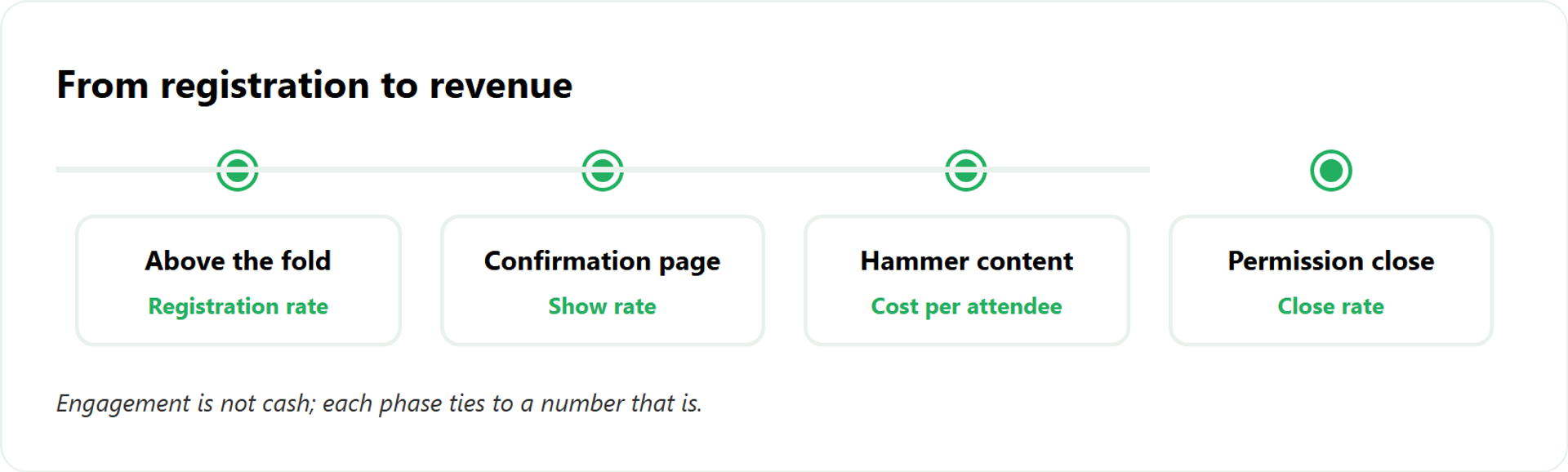
Engagement isn’t cash. A packed room that doesn’t buy is a cost, not a win. Revenue comes from a workflow you can measure: an above-the-fold registration headline, the confirmation page every lead sees, a content sequence that keeps you in their feed, and a permission-based transition into the close. Tie each step to a tracked number. Then pick the platform that lets you control and attribute all four.
🎯 Step 1: Win above the fold
Above the fold means everything a visitor sees before scrolling. When starting out, we spend 80 to 90% of our effort right there.
Your headline carries the weight. Skip drunk copy, words like “supercharge” or “autopilot.” Use sober copy: five weeks, ten clients, three days. Track: registration rate. Study how to make money with webinars for the full framing.
📄 Step 2: Use the confirmation page
The one page 100% of your leads see is the confirmation page, right after they opt in. Most operators waste it with “thanks, see you soon.”
Use it instead. Set expectations, prime the offer, and tell them why to show up. A change here ripples through everything downstream. Track: show rate. Our webinars to sell online courses effectively guide shows the knock-on effect.
📣 Step 3: Hammer them with content
Between opt-in and event, stay in their feed. I run a hammer strategy: 30 to 50 short-form pieces and 15 to 30 long-form pieces, aimed at people who just registered.
This keeps you familiar, so you’re not a stranger on event day. From what surfaces when you actually run this, it lifts the backend stats almost every time. Track: cost-per-attendee and engagement. Our guide on how to 10X engagement goes deeper.
💰 Step 4: Earn the close
Don’t lurch into selling. Ask permission first. A line I use: “I have a lot that can help you, and some of it is in an offer I put together. Is it okay if I transition to that? Drop a one in the chat.”
That tiny yes changes the room. One good sales webinar can replace six sales reps. Track: close rate. And remember, neutral content doesn’t sell, so say what you believe with conviction. Tools like paid webinars help you monetize the close directly.
EasyWebinar runs all four steps in one place. In-webinar calls to action, timed offers, behavioral follow-up, and unified analytics mean you can attribute the whole workflow, instead of stitching the revenue layer onto WebinarJam and EverWebinar with bolt-on tools.
Q8: Is there a better alternative than running WebinarJam and EverWebinar together?
If you’d otherwise pay for and stitch together two Genesis Digital tools, an all-in-one platform that runs both live and automated webinars is the cleaner path. EasyWebinar does live, simulated live, and evergreen in one login, with a built-in CRM so opt-in and engagement data never splits. Carla Biesinger built a $5M evergreen funnel. K21 Academy hit a 47% show-up rate. One stack, one dataset, fewer places to break.
🧩 Why the old two-tool model drags
The classic setup spreads your funnel across products and stages. It takes months to build, and connecting each piece to the next gets complicated fast. Wires break in places you don’t check.
You’ve already seen the cost in this article. The seam between WebinarJam and EverWebinar is where leads and chat history quietly disappear. The standard read says “buy both and you’re covered.” From years inside this work, that’s backwards. Our WebinarJam alternatives guide lays out the cleaner options.
⭐ Proof, not promises
I won’t pretend EasyWebinar fits everyone. For one-off internal team meetings, or pure live-only events with no funnel intent, it’s overkill. But for operators selling with webinars, the unified model shows up in the numbers. See the course creator case study with Carla Biesinger and the edtech case study with K21.
“I used to do live webinars to sell my online course… With my live class I used to sell 10-12 courses. With EasyWebinar I sold 25 courses within 3 weeks of my evergreen launch.”
Laura C. EasyWebinar G2 Verified Review
“It splits out live and replay attendee insights for evergreen webinars… easy to set up call to actions and polls in both types of webinars. The analytics show how many saw or clicked your offer.”
Verified User in Professional Training and Coaching EasyWebinar G2 Verified Review
✅ Your next step
You now know the seam costs you money. The fix is fewer tools, not more glue. If you’re running both products, or weighing whether to, see all three side by side before you commit another year of subscriptions.
Frequently Asked Questions

Casey Zeman
Founder of EasyWebinar
About Author
Over the past decade, I've helped thousands of entrepreneurs, coaches, and consultants turn webinars into a predictable, powerful way to grow their audience, build trust, and scale, without the constant hustle. I created EasyWebinar because I couldn't find a system that combined authenticity, engagement, and automation the way I needed. So, I built one.
Related Posts

10 Best Community Engagement Platforms in 2026
Compare the 10 best community engagement platforms in 2026. Course creators, evaluate live hosting, analytics, and replay to pick your winner today.
10 Best Online Coaching Tools in 2026: Live Session Quality, Scheduling, Recording, and Client Engagement Analytics
Compare the 10 best online coaching tools of 2026 on session quality, scheduling, and analytics. Discover the right fit for your coaching revenue model.
10 Best Webinar Hosting Platforms Ranked by Uptime, Streaming Quality & Cost
Compare 10 webinar hosting platforms ranked by uptime, streaming quality, and cost. Discover which tool actually turns attendees into revenue.
Turn every webinar into a revenue stream
Launch your first paid event in just a few clicks - and start monetizing your expertise.
Book a Call