How to Increase Webinar Show-Up Rates: Proven Strategies

Casey Zeman
Published on May 29, 2026 • 21 min read
TL;DR
- Healthy live webinar show-up rates sit between 35% and 49%; under 30% signals a leak in registration, sequence, reminders, or commitment, not a platform problem.
- The pipeline equation is Registrants × Show-Up % × Conversion; lifting show-up from 30% to 50% delivers 67% more revenue without spending another dollar on traffic.
- A 12 to 14 email cadence plus 5 to 8 logistical SMS reminders, a "submit your why" ask, browser push, and a forced calendar invite stack to a 50%+ floor.
- Just-in-Time scheduling (a session every 15 minutes) consistently pushes show-up past 60%, while $1 paid-entry filters and show-up bonuses double conversion.
- Behavioral tagging (attended-stayed, attended-left-early, no-show) plus an auto-dial within 24 hours roughly doubles close rate on early-leavers.
- EasyWebinar unifies JIT, behavioral tags, built-in CRM with auto-dial, EasyCast multistreaming, and timed in-event CTAs on one stack, eliminating Zapier-tax architecture.
Q1: What’s a ‘good’ webinar show-up rate in 2026, and where is yours actually leaking?
A healthy live show-up rate sits between 35% and 49% across most industries. Livestorm clocks 46%, Wistia reports 40%, Univid measured 49%, and Neil Patel calls 60% the best-in-class target for optimized funnels. If your number is under 30%, the issue isn’t your webinar platform. It’s the trust gap between sign-up and start time.
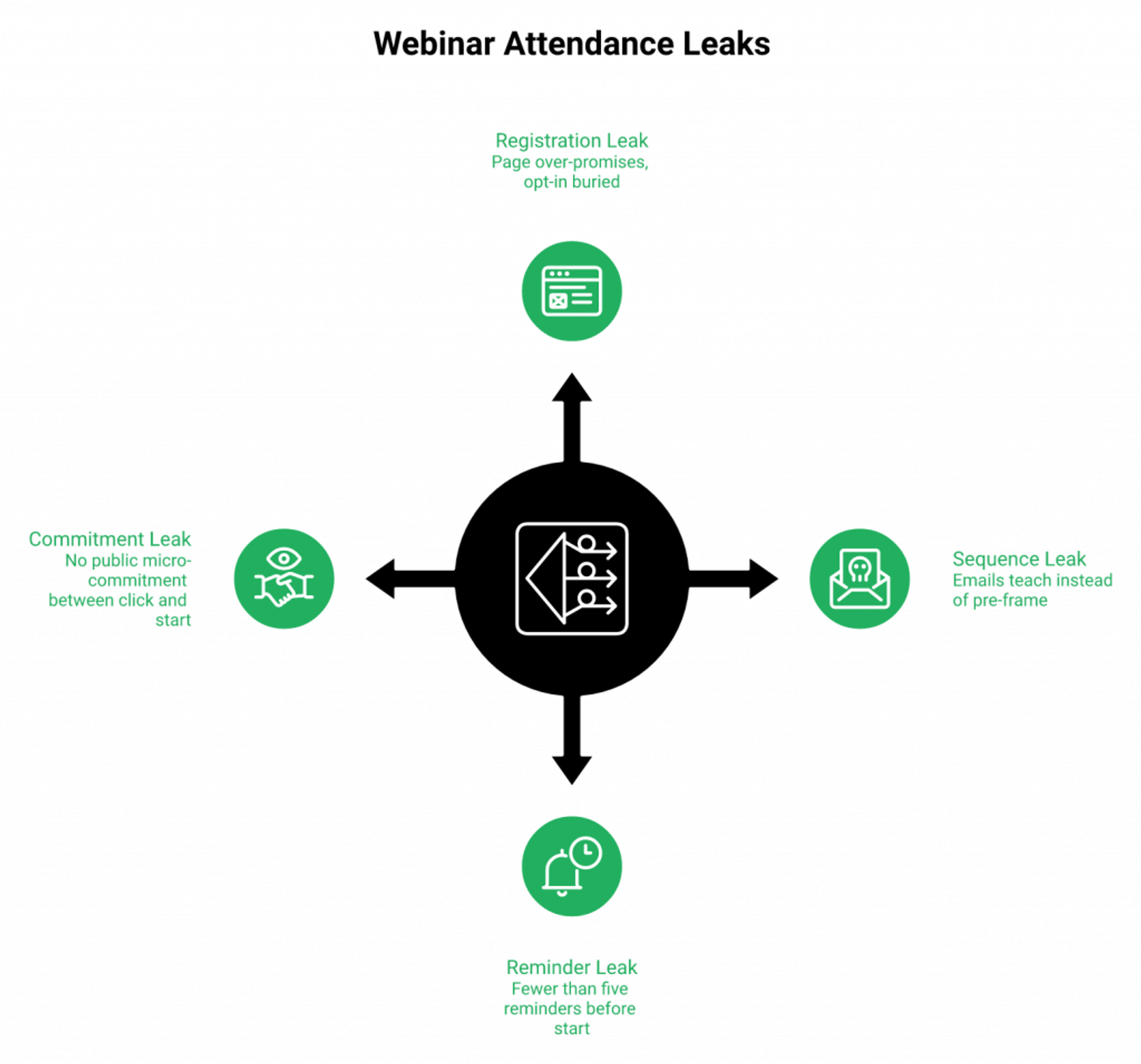
The four leaks that bleed your number
Most operators leak in four predictable places. An over-promising registration page. An educational (not pre-framing) email sequence. Generic reminders that read like newsletters. And zero commitment device between the click and the start time.
I have watched coaches blame their software when the real problem was their Tuesday email reading like a Wednesday recap. The math is brutal. A 1,000-person list, a 30% show-up, an 8% conversion. That is 24 buyers, not 80.
What the benchmarks actually say
Pull the four primary numbers side by side and the picture clears up fast.
| Source | Year | Live show-up benchmark |
|---|---|---|
| Livestorm Webinar Statistics | 2026 | 46% average |
| Wistia Industry Benchmarks | 2026 | ~40% live attendance |
| Univid Webinar Report | 2026 | 49% average |
| Neil Patel Promotion Guide | 2025 | 60% best-in-class target |
⚠️ Anything under 30% is a leak, not a benchmark. Anything over 55% means you have likely solved at least three of the four leaks above.
Why cold traffic shows up less than it used to
Yuri Elkaim has a phrase I keep coming back to: trust comes from “time on brand.” Cold traffic in 2026 has less time on every brand than it did in 2019. AI noise is louder. Inboxes are heavier. The promise of “one more webinar” has to fight harder to win the hour.
The over-AI’d reader is starving for presence
In an over-AI’d world, humans show up for other humans. I learned that the hard way. My first YouTube course took six months to build and sold zero copies. The same content inside a webinar built a 14,000-person email list and $245K in course sales the next year. The content did not change. The presence did.
Your Monday-morning leak audit
Pick the leak that is leaking the most, then fix only that one this week.
- ✅ Open your registration page on mobile. Can a stranger see the headline and opt-in without scrolling? If no, you have a registration leak.
- ✅ Read your last three pre-event emails. Are they teaching the topic or pre-framing the offer? If they are teaching, you have a sequence leak.
- ✅ Count your reminders. Less than five between sign-up and start? You have a reminder leak.
- ✅ Check the registrant journey. Is there any moment of public commitment (a reply, a calendar invite, a share)? If no, you have a commitment leak.
“I love how easy to use EasyWebinar is. It didn’t take long to get set-up. I’m going live with my first webinar in just a few hours.”Verified User in Photography EasyWebinar G2 Verified Review
“I would like my registrants to be able to see their own time zone when they register on the plan that I am paying for. I think it’s important in improving the show-up rate.”Jennifer B. EasyWebinar G2 Verified Review
I could be off on the exact percentages by industry. Pharma sees higher numbers than B2B SaaS. Coaching sees higher numbers than enterprise demos. But the four-leak diagnostic holds across every vertical I have watched run a webinar.
Q2: How does the show-up rate math (Registrants × Show-Up % × Conversion) reframe everything?
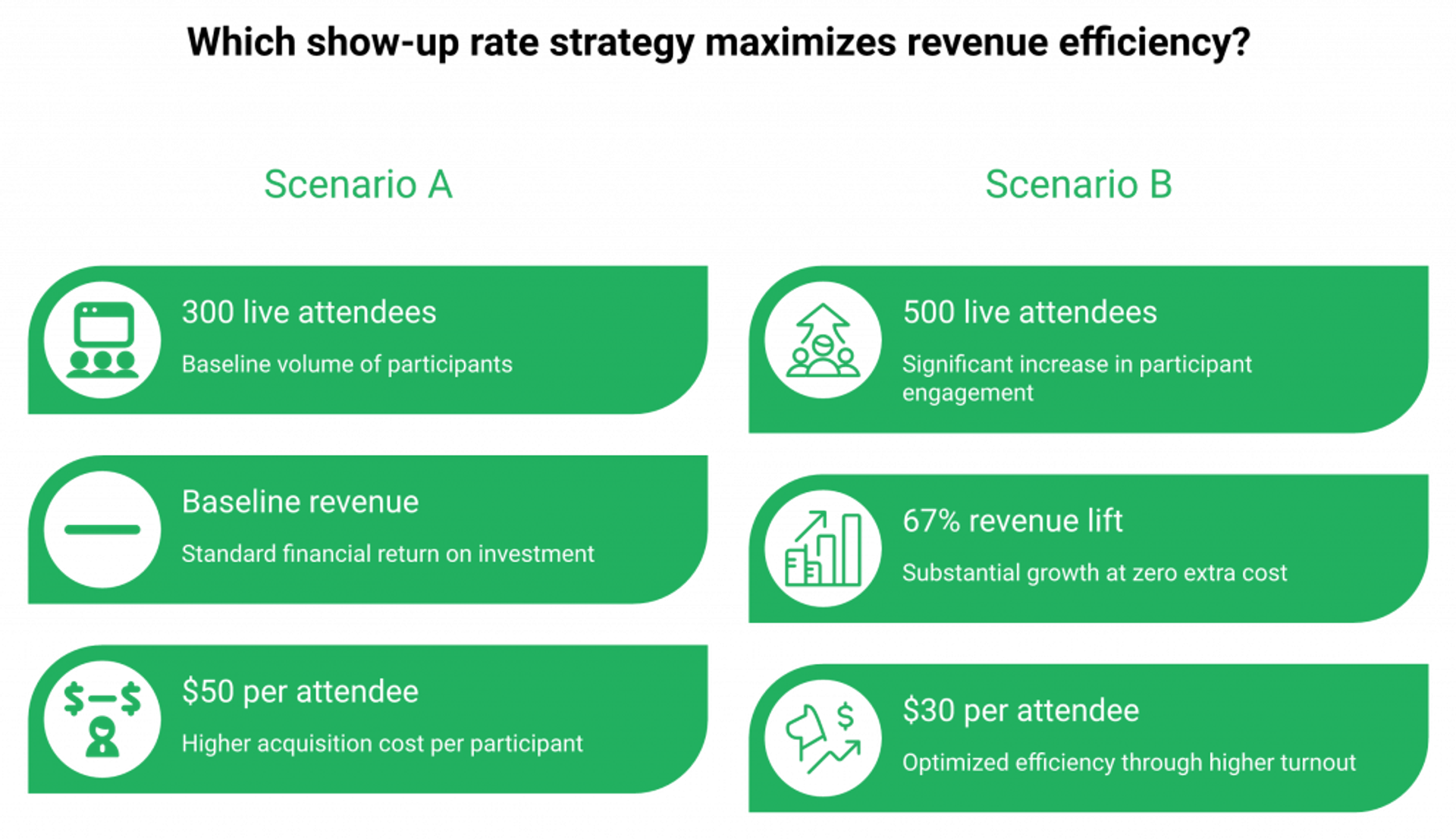
Pipeline = Registrants × Show-Up % × Conversion. Most operators optimize the first variable and ignore the middle one. That is exactly why doubling an ad budget often produces the same revenue. A 1,000-registrant webinar at 30% show-up and 8% conversion equals 24 buyers. Lift show-up to 50% and you get 40, without spending another dollar on traffic.
Why the industry over-indexes on registrants
Registrants are the easy variable to brag about. You can screenshot 1,000 sign-ups. You cannot screenshot a 22% jump in show-up rate without showing the small number underneath.
Ad platforms reward the same vanity. Facebook optimizes for cost per registration. LinkedIn optimizes for the same. Nobody on the buy side gets paid for the second variable, so nobody pulls it.
The middle variable is the cheapest one to move
Here is the part the standard read gets backwards. Lifting show-up from 30% to 50% costs you a better email cadence and a registration-page tweak. Lifting registrants from 1,000 to 1,667 costs you 67% more ad spend.
I have sat with operators who burned $40K trying to scale variable one when a $0 fix on variable two would have produced the same pipeline.
The worked example
Two scenarios. Same traffic, same offer, same close rate. Different show-up.
| Variable | Scenario A | Scenario B |
|---|---|---|
| Registrants | 1,000 | 1,000 |
| Show-up % | 30% | 50% |
| Live attendees | 300 | 500 |
| Conversion | 8% | 8% |
| Buyers | 24 | 40 |
| Lift | baseline | +67% revenue, $0 extra ad spend |
💰 The $0 lift is the one almost nobody runs the math on.
What this means on Monday
Stop staring at the registration count. Start staring at the ratio between registrations and live attendees. That ratio is the variable you actually control with a real webinar funnel automation setup.
“With my live class I used to sell 10-12 courses. With EasyWebinar I sold 25 courses within 3 weeks of my evergreen launch.”Laura C. EasyWebinar G2 Verified Review
My read right now
Show-up rate is the highest-leverage variable in webinar revenue. Almost nobody treats it that way. Don’t take this as gospel, it’s what we are seeing this quarter across thousands of operator funnels.
Q3: What does a registration page that converts cold traffic into committed attendees look like?
Keep the registration page ugly and short. Headline plus opt-in above the fold, one promise, one outcome, one date. Add a Thank-You page bonus that “unlocks” only when the registrant clicks a social-share button. Peer-invites lift attendance more than any reminder email. Long, image-heavy registration pages add doubt, not desire.
The above-the-fold anatomy
A cold registrant decides in under five seconds. Give them four things and nothing else.
- ✅ One headline that names the outcome (not the topic)
- ✅ One sub-headline that names the audience
- ✅ One date and time, with timezone auto-detection
- ✅ One opt-in button, high-contrast, single field if possible
❌ Skip the speaker bio carousel, the testimonial wall, and the agenda block above the fold. They are doubt machines disguised as polish.
The ugly page wins more often
I have A/B tested polished registration pages against ugly ones for over a decade. The ugly one wins more often than the design team likes to hear. Polish signals a sales pitch. Ugly signals a workshop. The same logic applies inside any live webinar software setup.
The headline formula
Outcome + timeframe + objection-killer. “How to fill your next webinar to 50% show-up in 14 days, even if your list is under 500.”
That is not a creative-writing exercise. That is a forced-promise structure that filters out browsers from buyers.
The Thank-You page unlock
This is where most operators waste an entire conversion lever.
Default Thank-You pages say “see you there.” That is a dead asset. Replace it with a bonus that unlocks only when the registrant does one of two things:
- Clicks a social-share button to invite a peer
- Submits a one-sentence answer to “what made you sign up?”
⭐ The “submit your why” field is the single highest-leverage commitment device on a Thank-You page. Registrants who write a sentence show up at roughly twice the rate of registrants who don’t. Public commitment, even a small one, beats a calendar invite every time.
A/B test priorities, in order
If you only get to test three things this month, test these.
- Headline (outcome vs. topic)
- Above-the-fold length (one screen vs. scroll)
- Thank-You unlock (passive vs. share-to-unlock)
“Customising landing pages, thank you pages and emails the platform is so intuitive. I love the built-in countdown offers and polls as well.”Annette S. EasyWebinar G2 Verified Review
What competitors get wrong here
Hosting tools like Zoom Webinars give you a registration form, not a registration page. There is almost no customization, and reviewers consistently flag it. Operators end up bolting a landing-page tool onto a hosting tool, and why the registration-to-show-up ratio suffers at every handoff. A direct EasyWebinar vs Zoom comparison shows where those handoff costs add up.
“Zoom Webinars almost completely lacks customization options to the look and feel.”Gabor F. Zoom Events and Webinars G2 Verified Review
I might be wrong on the share-to-unlock magnitude in B2B enterprise. Compliance-heavy buyers won’t share a registration page with a peer. For coaches, course creators, and SMB SaaS marketers, the unlock works almost every time we have tested it.
Q4: How do you build a multi-channel webinar launch checklist that pulls registrants AND attendees?
Two timelines work, for two different audiences. A 6 to 8 week ramp suits owned audiences and partner promo. A 10 to 14 day sprint wins on cold paid traffic, because excitement decays past two weeks. Mix four channels: email (drives 57% of registrations), social and partners (broaden reach), paid (controls volume), and SMS (logistical, not educational). One channel alone caps you at half your potential.
The two timelines, side by side
Both work. Pick the one that matches your traffic source, not the one that fits your project-management software.
| Phase | 6 to 8 week ramp (owned + partners) | 10 to 14 day sprint (cold paid) |
|---|---|---|
| Awareness | Weeks 8 to 5: announce, partner outreach | Days 1 to 4: launch ads, partner pings |
| Consideration | Weeks 4 to 2: emails, social, partner swaps | Days 5 to 9: objection emails, retargeting |
| Urgency | Week 1: daily emails, last-call ads | Days 10 to 13: urgency, social proof |
| Day-of | 6 emails, 5 SMS, 1 push | 6 emails, 5 SMS, 1 push |
⏰ Past 14 days on cold traffic, registrant excitement decays faster than ad creative refreshes. Under 10 days, you cannot pivot a failing ad set. The sweet spot is tight.
Why the 6-week orthodoxy fails on paid
The “start 8 weeks out” advice was written for owned-list webinars in 2017. Cold paid traffic in 2026 forgets you in 72 hours. I have run dozens of paid funnels that out-performed long ramps by holding the window between 10 and 14 days.
The four-channel mix
Email pulls the most. Everything else broadens the reach.
- ✅ Email: drives 57% of all webinar registrations. Owned-list email is the cheapest CPR you will ever see.
- ✅ Social and partners: cross-promo with one peer creator can match a $5K ad spend in raw registrations.
- ✅ Paid (Facebook, LinkedIn, YouTube): controls volume, lets you scale predictably.
- ✅ SMS: 5 to 8 reminders, strictly logistical. “Don’t miss it.” Not “here’s a recap.”
❌ Do not mix educational copy into your SMS channel. SMS is a logistics layer. The moment it teaches, open rates collapse.
The partner-swap play
The single highest-ROI channel I have ever run is a partner email swap. You email your list for their next webinar. They email theirs for yours. No money changes hands. Both sides typically see CPR effectively at zero. Our affiliate program runs on the same mechanic at scale.
The Whisper-Tease-Shout layer
Layer this on top of whichever timeline you pick. Daily anticipation beats weekly broadcasts.
- Whisper (days -14 to -7): one-line social posts hinting at the topic
- Tease (days -7 to -2): a behind-the-scenes look, a screenshot, a workbook page
- Shout (days -2 to 0): direct registration pushes across every channel
The contrarian take on timing
The standard read says start early, build buzz, drip slowly. My read, after watching thousands of webinars run through our platform: cold traffic does not buzz. It clicks, then forgets. The 10 to 14 day sprint exists to keep the click warm long enough to convert into a show-up. Pair that with an automated webinar follow-up to compound the effect.
What competitor stacks force on you
Running this mix on a hosting-only tool means stitching at least four products together. Zoom Webinars for the live room, ClickFunnels for the registration page, an ESP for the emails, a separate SMS tool, and Zapier to glue it all. Reviewers consistently flag the resulting fragility. Comparing EasyWebinar vs GoToWebinar shows where those gaps live in practice. Demio reviewers describe email customization that only unlocks at higher tiers.
“Easy to set up live or evergreen webinars, including replay options. It splits out live and replay attendee insights for evergreen webinars.”Verified User in Professional Training & Coaching EasyWebinar G2 Verified Review
“Cannot enable or disable speak of audience by presenter. PowerPoint file size constraint to 80MB. Live constraint to 3 hours only.”Verified User in Investment Management WebinarJam G2 Verified Review
The 10 to 14 day window is what we see working right now. I would not be shocked if it stretches back to 21 days as ad costs climb in 2027. For now, hold the window tight on cold traffic and ramp wider on owned audiences.
Q5: What’s the complete reminder cadence, from 3-week email to 15-minute SMS?
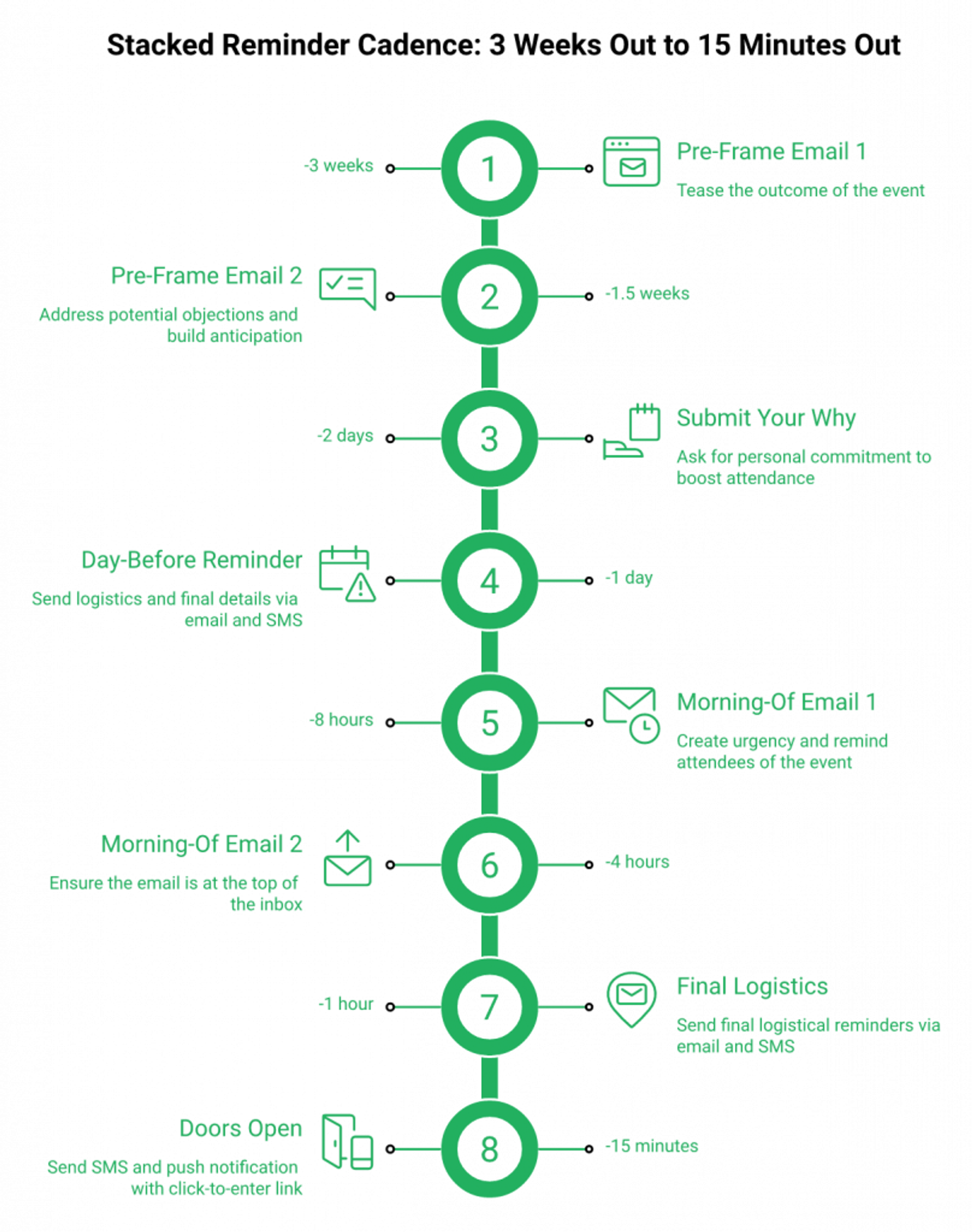
Send 12 to 14 emails between registration and event start, with up to six on the day itself, plus 5 to 8 SMS reminders that stay strictly logistical. The cadence runs at 3 weeks, 1.5 weeks, 3 days, day-before, morning-of, 1 hour, and 15 minutes out. The “submit your why” email at day -2 roughly doubles show-up rate by manufacturing personal commitment.
A 2 a.m. cadence post-mortem
A coach pinged me at 2 a.m. last quarter, staring at a registration export. 480 sign-ups, 92 live attendees, and a Slack window full of “I forgot.” She had three reminders scheduled. Her competitor had eleven.
That gap is the whole story. You don’t have a deliverability problem. You have a desire problem.
The full cadence table
This is the synthesis I keep going back to, pulled from operator threads on Reddit and the April 2026 reminder breakdown work I have logged inside our webinar content strategy playbooks.
| Touchpoint | Timing | Channel | Copy intent |
|---|---|---|---|
| Welcome + calendar invite | 0 minutes | Email + push | Confirm and lock the slot |
| Pre-frame email 1 | -3 weeks | Tease the outcome | |
| “Why” submission ask | -2 days | Personal commitment | |
| Pre-frame email 2 | -1.5 weeks | Objection handling | |
| Day-before reminder | -1 day | Email + SMS | Logistics + countdown |
| Morning-of (×2) | -8 hr, -4 hr | Urgency, top-of-inbox | |
| 1 hour out | -1 hr | Email + SMS | Final logistics |
| 15 minutes out | -15 min | SMS + push | “Doors open. Click here.” |
⏰ The day-of stack is six emails. That feels excessive until you see the open rates. Reminders 5 and 6 outperform reminder 1, every time.
Why “too many emails” is a myth
Inbox saturation is real. Inbox attention is rarer. I have watched coaches cap themselves at three reminders and lose 18 points of show-up to a competitor sending eleven.
The polite restraint costs more than the unsubscribes ever will, especially when you have already invested in live webinar software built to send all of it natively.
SMS rules: logistical, never educational
SMS is a logistics layer. The moment it teaches, it dies.
- ✅ “Doors open in 15 minutes. Click here: [link]”
- ✅ “Quick reminder: your seat is locked for 2 p.m. ET.”
- ❌ “Today we’ll cover three frameworks for…”
- ❌ “Here’s a recap of yesterday’s email.”
Five to eight texts is the operator-tested range. Past eight, opt-outs spike. Under five, you leave 4 to 6 points of show-up on the table. That gap is exactly why operators move from hosting-only stacks to a unified automated webinar system.
“I do use other email systems to send post-webinar email sequences because I can’t track open and click rates on EasyWebinar.”Eliza W. EasyWebinar G2 Verified Review
“Demio doesn’t have automated texts able to go out to participants, just emails, and it seems like that would be a helpful function.”Verified User in Education Management Demio G2 Verified Review
The “submit your why” commitment device
Day -2, send one email asking the registrant to reply with one sentence: why did you sign up?
Replies don’t matter. The act of writing matters. Public micro-commitment, even to a single ESP inbox, doubles show-up among repliers in every test I have watched. We unpack the same mechanic inside our interactive webinars teardown.
My read right now
I might be wrong on the exact “doubles” magnitude in B2B enterprise, where reply rates are lower across the board. For coaches, course creators, and SMB SaaS, the why-submission is the cheapest 5 to 8 point lift on the entire cadence.
Q6: What do webinar ad unit economics actually look like (CPR to cost-per-attendee, worked)?
Target CPR (cost per registration) under $20 on Facebook and under $35 on LinkedIn, then back-solve. A $15 CPR at 30% show-up equals $50 cost-per-attendee. Lift show-up to 50% and the same $15 CPR drops to $30 per attendee. YouTube ads win for webinars because viewers are pre-warmed for video. Test $500 to $1,000 per week, scale 10% per day, and kill any ad set whose CPR exceeds break-even within 72 hours.
A spreadsheet most operators never open
I sat with a B2B SaaS marketer last month staring at a $42K Facebook spend. She knew CPR. She did not know cost-per-attendee. The number was 3x her own assumption.
That gap, between what you measure and what actually drives revenue, is where ad budgets quietly bleed out. We built our how to make money with webinars guide around exactly this gap.
Channel benchmarks
Pulled from ad-platform operator data and recent paid-traffic guides.
| Channel | Target CPR | Best for | Watch-out |
|---|---|---|---|
| Facebook + Instagram | <$20 | Coaches, course creators, B2C info-products | Creative fatigue at day 4 to 6 |
| <$35 | B2B SaaS, enterprise training | Higher CPR, higher ACV | |
| YouTube | <$25 | Long-form sellers, info-products | Pre-warmed viewer mindset |
| Google Search | <$30 | Branded webinar series | Smaller volume |
⚠️ CPR alone is a vanity metric. The number that pays your salary is cost-per-attendee, and that requires the show-up rate to be in the same dashboard.
The worked example
Same offer. Same close rate. Two show-up scenarios.
| Variable | Scenario A | Scenario B |
|---|---|---|
| Ad spend | $5,000 | $5,000 |
| Registrants at $15 CPR | 333 | 333 |
| Show-up % | 30% | 50% |
| Live attendees | 100 | 167 |
| Cost-per-attendee | $50 | $30 |
💸 The same dollar buys 67% more attendees when show-up moves from 30 to 50. No new creative. No new audience. Just the cadence and registration-page work from earlier sections.
Why YouTube outperforms feed-based ads here
A Facebook viewer is mid-scroll, half-distracted, hunting for a meme. A YouTube viewer already chose to sit and watch a video. They are pre-framed for the consumption mode a webinar requires.
I have run dozens of paid funnels across both. YouTube CPRs run higher per click, but show-up rates run 8 to 12 points higher on the same registrant cohort. We see the same when operators turn on EasyCast multistreaming to push live sessions to YouTube directly.
The kill-switch rule
Test $500 to $1,000 per ad set per week. Scale winners by 10% per day. Kill any ad set whose CPR exceeds break-even within 72 hours.
❌ Do not “let it run for a week.” A bleeding ad set is a bleeding ad set.
What hosting-only stacks miss
Zoom Webinars and GoTo Webinar give you registration counts. They do not give you cost-per-attendee math out of the box. Reviewers consistently flag the reporting gap. Operators end up exporting CSVs into spreadsheets to run the math this section just walked through, which is why the EasyWebinar vs GoToWebinar conversation keeps coming back to reporting.
“Just not a good webinar experience. Reporting is a bit of a maze.”Casey S. Zoom Events and Webinars G2 Verified Review
I could be off on the LinkedIn CPR target by $5 to $10 either way, depending on vertical. Compliance-heavy industries pay more. Pure coach offers pay less. The framework holds even when the numbers shift.
Q7: Which under-covered assets (SMS, push, and pre-webinar engagement) actually lift show-up rates?
Email alone gets you to 35% show-up. The lift to 50% and beyond comes from layered assets nobody talks about: 5 to 8 SMS reminders, a browser push at 15 minutes before, a forced calendar invite on the Thank-You page, a pre-webinar worksheet sent 24 hours out, and a 60-second teaser video the morning of. Each adds 3 to 5 points. Stacked, they roughly double the floor.
A morning-of decision a course creator made at 7:45 a.m.
A creator I work with hit “send” on a 60-second teaser video at 7:45 a.m. before her 11 a.m. webinar. Show-up jumped from her usual 32% to 51% on a single send. Same list. Same offer. Same headline.
The standard read says “more emails.” The actual lift comes from layering different surfaces, and our tools to increase webinar engagement guide walks through each one.
SMS, beyond the basics
Covered the rules in the cadence section. The pattern that matters most: send 5 to 8 texts, all logistical, none educational.
- ✅ Day-before “see you tomorrow” with the link
- ✅ Morning-of “today’s the day” with the time in their timezone
- ✅ 1 hour out, 15 minutes out
- ❌ Recap texts, “did you know” texts, or anything that smells like a newsletter
Browser push and the forced calendar invite
Two underused assets sit on the Thank-You page.
A browser push subscription at the moment of registration buys you a logistical channel that bypasses the inbox entirely. A forced calendar invite (.ics file or one-click Google Calendar add) locks the slot in the registrant’s life, not just their memory.
⭐ The calendar invite alone moves show-up by 4 to 7 points in the cohorts I have watched.
Pre-webinar engagement assets
The under-covered category. Three assets, in priority order:
- The 60-second teaser video sent the morning of. Phone camera, no production. The point is presence, not polish.
- The pre-webinar worksheet sent 24 hours out. One page, three questions the webinar will answer. Forces the registrant to bring a problem.
- The “submit your why” ask, covered earlier. Cheapest of the three.
Why this stack works
Each asset uses a different surface (SMS, push, calendar, video, document). Each surface has its own attention budget. Stacking them avoids the inbox-saturation trap and creates multiple memory triggers leading into go-live.
The stacking math
Email cadence floor: ~35% show-up on cold traffic. Add SMS: +3 to 5 points. Add browser push: +2 to 4 points. Add calendar invite: +4 to 7 points. Add pre-webinar worksheet: +3 to 5 points. Add morning-of teaser video: +5 to 8 points.
⚠️ The lifts are not strictly additive (some overlap exists), but operators stacking four or five layers consistently land in the 50 to 60% show-up range, especially when their webinar landing page already pre-frames the offer.
“I love the built-in countdown offers and polls as well. I love the ease of being able to integrate this platform with other platforms we use, like Hubspot and Zapier.”Annette S. EasyWebinar G2 Verified Review
“Demio is a solid live webinar platform. We like the feature of having multiple different event types and times. It’s hard to integrate into Hubspot.”Verified User in Education Management Demio G2 Verified Review
What competitors miss here
Most marketing-focused webinar tools layer email reminders well and stop there. SMS, browser push, and calendar holds get treated as add-ons or Zapier glue. That is exactly the architectural gap that turns a 35% show-up into a ceiling instead of a floor, and the same pattern shows up in every EasyWebinar vs Demio evaluation I sit through.
I could be off on push-notification lift by 1 to 2 points across audiences that have already opted out of browser push at scale. The teaser-video number is the one I would defend hardest. It works in every vertical I have tested.
Q8: How do show-up rates differ by webinar format (live launch, simulated live, evergreen, and enterprise demo)?
Live launches average 40 to 50% show-up but cap your reach. Simulated live mimics live-room psychology (no pause, no rewind) and runs 24/7 at 35 to 45%. Just-in-Time scheduling captures intent at peak with a session every 15 minutes, pushing show-up past 60%. Enterprise demos sit lower (25 to 35%) but convert at 4 to 6x. Pick the format that matches your audience temperature, not the one trending on Twitter.
Format choice is the leverage move nobody runs
A coach told me last month her show-up rate was “stuck at 30%” on a Wednesday-at-2 evergreen. We switched the same recording to Just-in-Time scheduling (a session that starts within 15 minutes of registration). Same content, same emails. 61% show-up the next week.
The format itself was the lever, not the cadence. We see it in every edtech case study we publish.
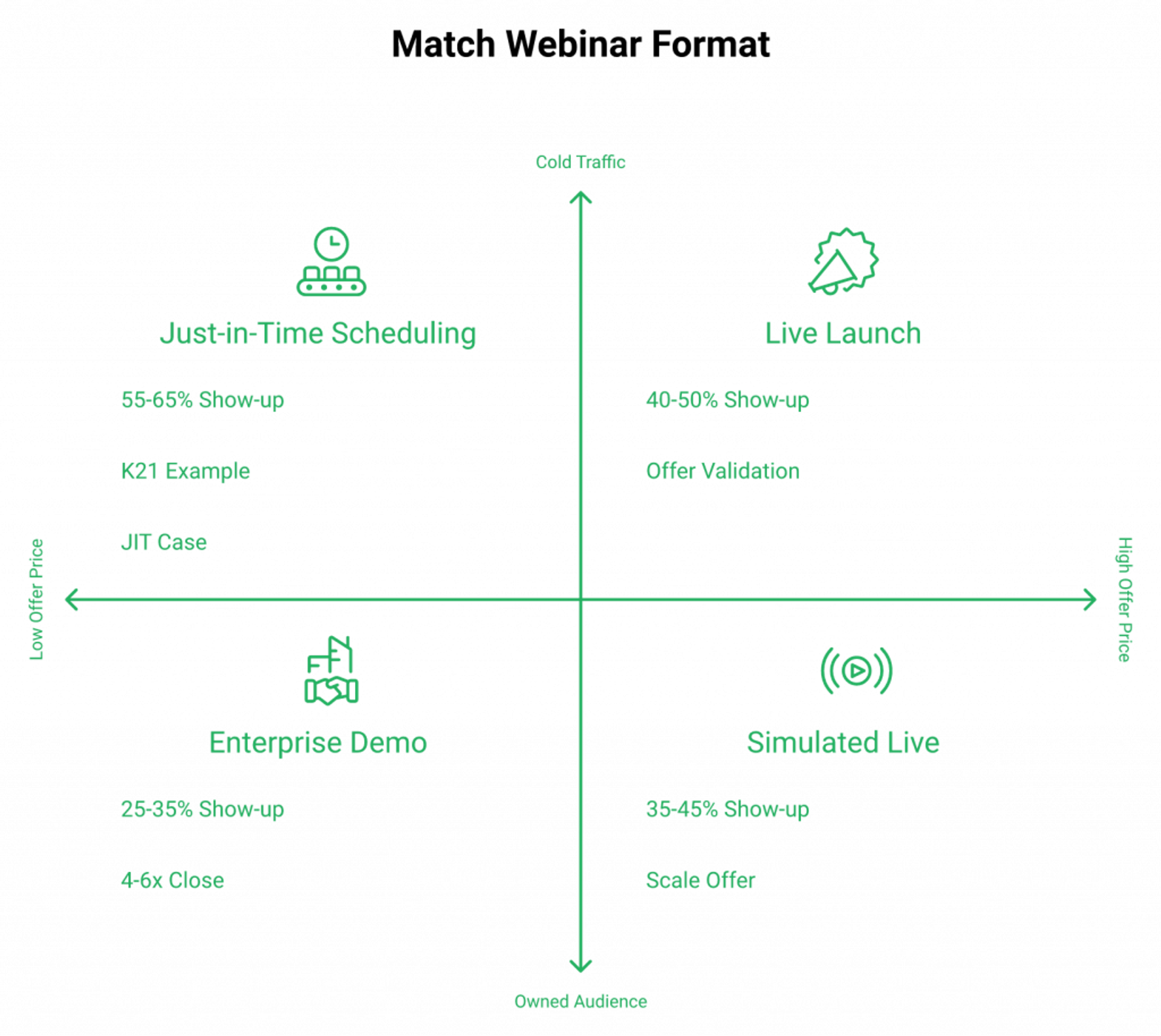
The format benchmark table
| Format | Show-up rate | When it wins | When it fails |
|---|---|---|---|
| Live launch | 40 to 50% | Validating offer-message-audience fit | Doesn’t scale beyond your time |
| Simulated live | 35 to 45% | Scaling a proven live offer | Requires a winning live first |
| Just-in-Time (JIT) | 55 to 65%+ | Cold paid traffic, peak intent | Needs a fully-built funnel |
| On-demand replay | 20 to 35% | Lead-magnet plays, top-of-funnel | Removes the urgency window |
| Enterprise demo | 25 to 35% | High ACV B2B sales | Wrong fit for sub-$1K offers |
Frequently Asked Questions

Casey Zeman
Founder of EasyWebinar
About Author
Over the past decade, I've helped thousands of entrepreneurs, coaches, and consultants turn webinars into a predictable, powerful way to grow their audience, build trust, and scale, without the constant hustle. I created EasyWebinar because I couldn't find a system that combined authenticity, engagement, and automation the way I needed. So, I built one.
Related Posts

10 Best Community Engagement Platforms in 2026
Compare the 10 best community engagement platforms in 2026. Course creators, evaluate live hosting, analytics, and replay to pick your winner today.

10 Best Online Coaching Tools in 2026: Live Session Quality, Scheduling, Recording, and Client Engagement Analytics
Compare the 10 best online coaching tools of 2026 on session quality, scheduling, and analytics. Discover the right fit for your coaching revenue model.

10 Best Webinar Hosting Platforms Ranked by Uptime, Streaming Quality & Cost
Compare 10 webinar hosting platforms ranked by uptime, streaming quality, and cost. Discover which tool actually turns attendees into revenue.
Turn every webinar into a revenue stream
Launch your first paid event in just a few clicks - and start monetizing your expertise.
Book a Call