WebinarGeek Pricing 2026: Basic, Premium, Enterprise Costs Compared

Casey Zeman
Published on Sep 3, 2026 • 25 min read

TL;DR
- WebinarGeek charges EUR 49/mo annual for Basic at 50 live viewers, from EUR 69/mo for Premium up to 1,000 viewers, and from EUR 349/mo for Enterprise up to 5,000.
- Not one price renders on WebinarGeek's own pricing page. Every figure is injected by JavaScript from a viewer selector, so third-party numbers conflict widely.
- Automated webinars start on Premium, so the EUR 49 entry price cannot run an evergreen funnel. Add-ons attach to Premium only, never to Basic.
- Premium add-ons stack fast: extra users, HubSpot, Salesforce, localisation, AI assistant, RTMP, plus roughly EUR 495 one-time onboarding, which can double the invoice.
- Pricing scales on peak concurrency, not registrants. Size on the highest number watching at once, then buy one capacity step above it.
- Cancelling removes your webinars after two weeks, and no refund policy is published anywhere on the pricing page. Export recordings before you cancel.
Q1. What does WebinarGeek cost in 2026, and why can't you see the price on its own page?
Last month a course creator sent me three screenshots of three different "WebinarGeek pricing" blog posts. Each one listed a different Basic price. She was trying to budget a launch, and her spreadsheet had three answers.
WebinarGeek has three plans, billed in euros: Basic at €49/mo annual for 50 live viewers and 2-hour sessions, Premium from €69/mo adding automated webinars, custom branding, and up to 1,000 viewers, and Enterprise from €349/mo for up to 5,000 viewers, RTMP, an SLA, and a dedicated CSM. Monthly billing runs roughly 30% higher. There is no free plan, only a 14-day trial.
💰 The three tiers, as verified in August 2026
Those figures come from G2 and Capterra, not from the vendor's own page. That distinction matters more than it sounds.
⚠️ Why the vendor page shows no numbers at all
Pull WebinarGeek's pricing page source and every plan renders a bare "/mo" with no figure. Every add-on price renders blank. Every viewer capacity renders as an empty label.
The Enterprise card leaks the mechanism in raw form: "per month, billed monthly for ATTENDEES viewers per webinar". ATTENDEES is an un-filled template variable. Price and capacity are both injected by JavaScript from a viewer-count selector.
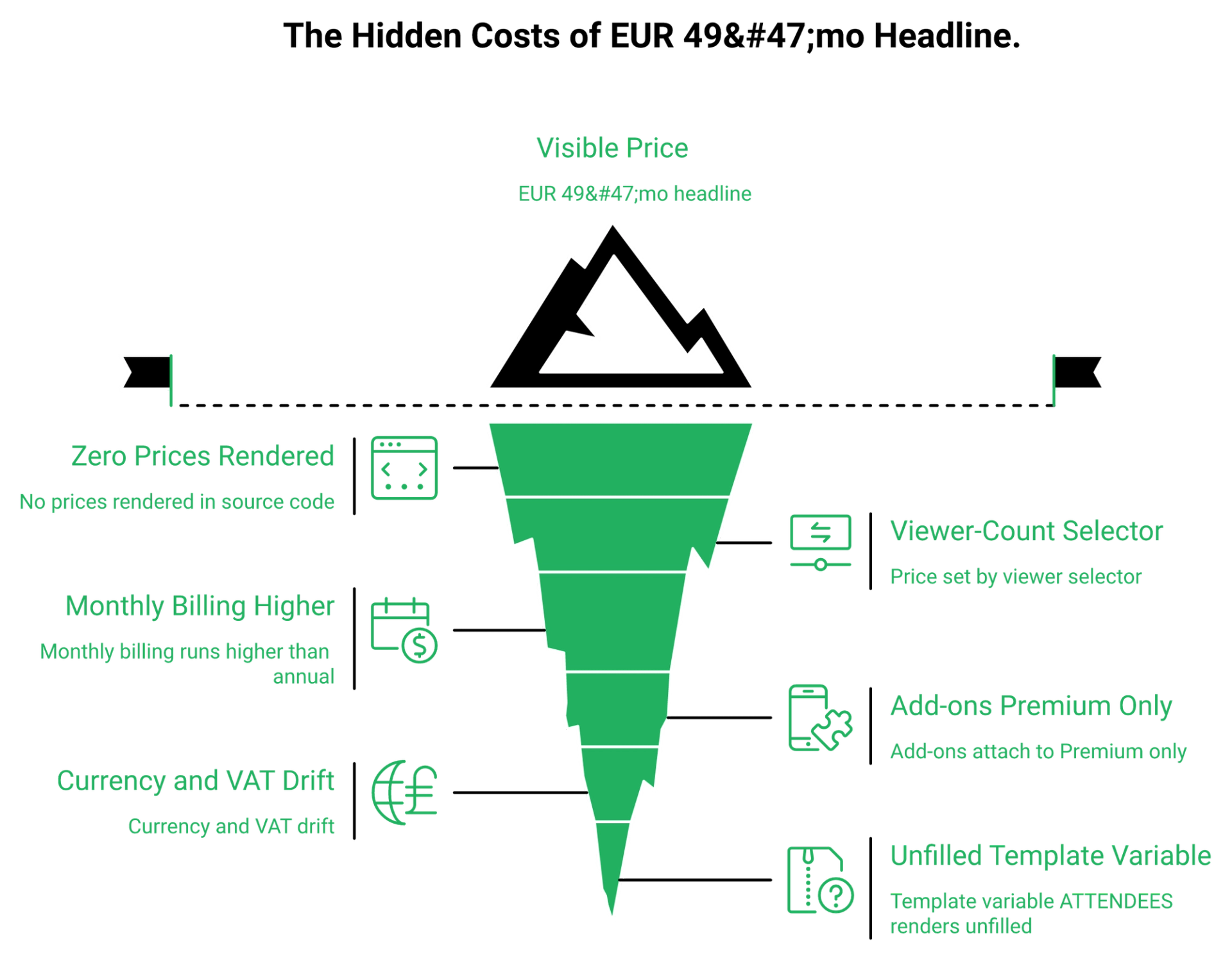
⭐ The only numbers WebinarGeek itself publishes
Four things do render: session limits of 2, 8, and 12 hours, presenter counts of 1 and 100, the 14-day trial, and a "5.000+ companies" claim. Everything else is third party.
EasyWebinar publishes its four plan prices and both attendee limits in the page itself: Launch at $44/mo for 50 live attendees, Growth at $116/mo for 200 live and 1,000 automated, Pro at $198/mo for 500 live and 2,500 automated, and Scale at $349/mo for 1,000 live and 5,000 automated. You can check every tier on the webinar pricing page.
❌ Currency drift, and tier names that no longer exist
I have never picked a platform on sticker price. I pick on what the price stops me from doing. A price you can only see after telling the page how big your audience is scales with your audience, not with your results. If you are shortlisting, our WebinarGeek alternatives breakdown runs the same test across every vendor.
"There is a small delay in what I see as host and what the viewers see. video quality was really good, but the conversion was not good."- Verified User in Management Consulting, WebinarGeek G2 - Verified Review
"The pricing model makes it difficult for smaller organizations to adopt it and pay up as they increase their usage."- Verified User in Construction, Demio G2 - Verified Review
EasyWebinar renders plan prices and attendee tiers on-page, so a buyer, or an AI assistant comparing platforms, reads the number on first load instead of reconstructing it from review directories.
Q2. What do you actually get on Basic at €49, and where does it stop?
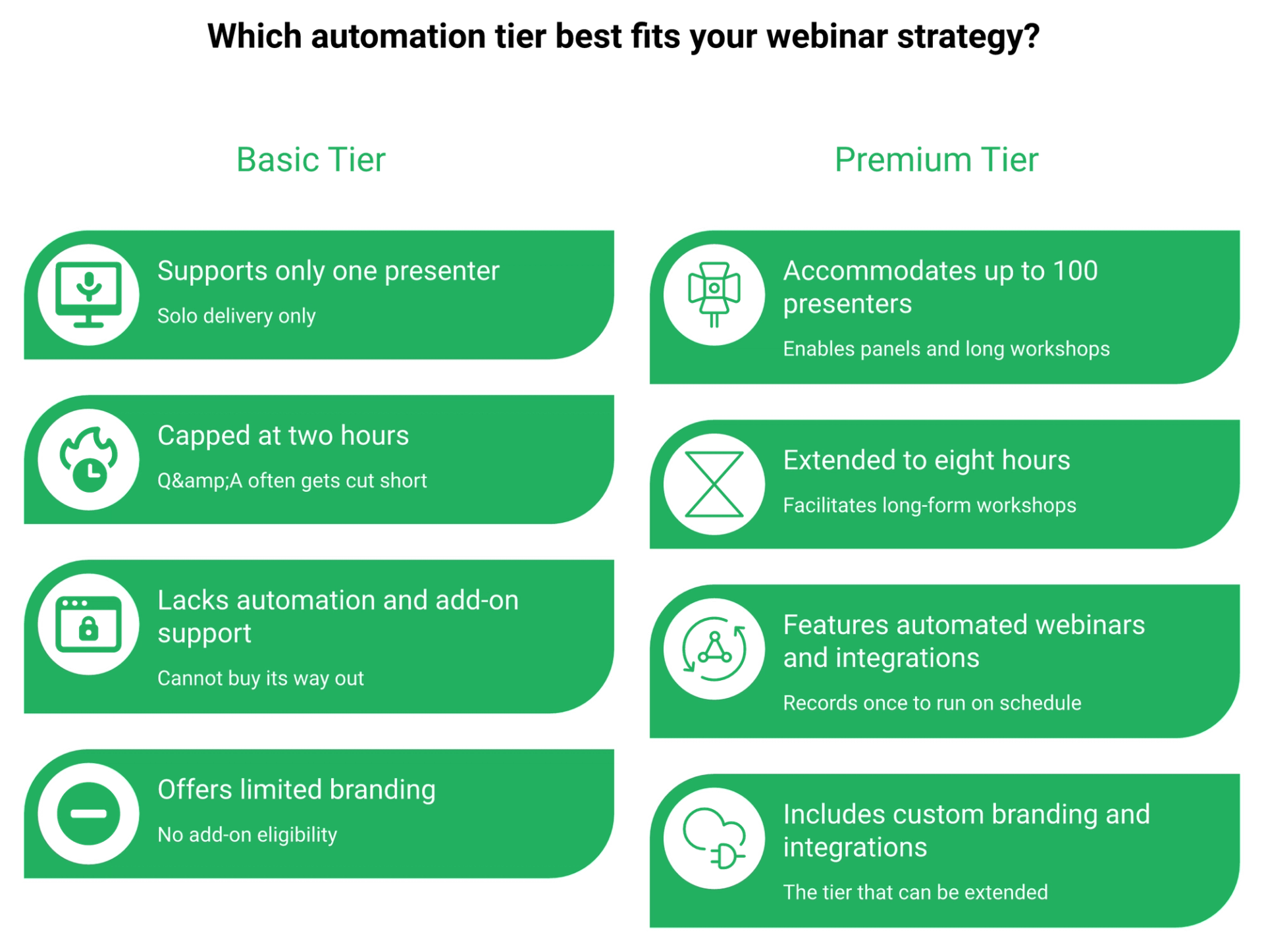
Basic includes 1 presenter, a 2-hour session limit, unlimited HD webinars, live and on-demand formats, limited branding, and AI Analysis, for 50 concurrent live viewers. It excludes automated webinars, custom branding, marketing integrations, live captions, and restreaming. It also cannot take add-ons, because add-ons attach to Premium only. Basic is a testing tier, not a funnel tier.
✅ The six features, exactly as listed
WebinarGeek's Basic card names six things and nothing more. Read them as a list of what you will not have.
- 1 Presenter
- 2-hour session limit
- Unlimited HD+ quality webinars
- Live and on-demand webinars
- Limited branding
- AI Analysis
❌ The automation paywall is the real ceiling
Automated webinars sit on Premium, not Basic. An automated webinar is a recorded session that streams on a schedule with chat and timed offers active, so it sells while you sleep.
That means an evergreen funnel is impossible at €49. If your plan is to record once and run it daily, Basic is the wrong line item.
⏰ What 50 concurrent viewers means in registrant math
Show rates decide whether 50 is generous or tight. Cold traffic on a first session typically shows up at 10% to 15%, and 30% registration-to-signup is a reasonable cold-ad baseline.
At a 12% show rate, 50 concurrent viewers absorbs roughly 400 registrants. On a warm list showing up at 30%, the same cap chokes near 165. EasyWebinar's Launch plan sets the same 50 live attendee limit at $44/mo, and charges $0.78 per additional live attendee instead of blocking the room, as stated in our terms and conditions.
⚠️ Basic cannot buy its way out
The add-ons page heading reads "Extend your Premium subscription with our add-ons". So the escape hatch from Basic is not a €20 add-on, it is a tier change.
A 2-hour cap is fine until the Q&A is the part that sells. In my first year, I ran free weekly live classes with no pitch, and the questions at the end were where the trust got built. I could be reading my own history too strongly here, but every operator I have watched hit their first sale did it in the overtime. The mechanics behind that are in our guide to hosting live webinars successfully.
⭐ Who Basic honestly fits
One live class a month. A warm list under 50 concurrent viewers. No evergreen ambitions this quarter. That buyer gets real value at €49.
"I've been going live every month since 2020 and I'm exhausted. Haha... I feel like I have had a big sigh of relief since signing up and I can see the end in sight!"- Verified User in Photography, EasyWebinar G2 - Verified Review
"The biggest challenge is around setting up automated webinars, and needing the presentation uploaded first in order to set it up."- Ash A., EasyWebinar G2 - Verified Review
EasyWebinar includes automated and evergreen webinar types on its entry paid plan, so a first funnel can run without the presenter before any tier upgrade is required.
Q3. Which Premium add-ons quietly double your bill?
Premium add-ons are billed separately: extra users (about €47.20/mo), branding profiles (about €59/mo), HubSpot and Salesforce (€39 to €49/mo each), RTMP streaming (about €29.50/mo), localisation (about €20/mo), AI assistant (about €20/mo), plus roughly €495 one-time onboarding. EasyWebinar includes native HubSpot, ActiveCampaign, Keap, and ConvertKit integrations plus built-in EasyCRM inside its plans, with no per-integration fee.
💸 The stack-up, and an honest caveat
No add-on price is published by the vendor. Every figure above comes from third-party reviews, and those sources disagree with each other. Treat them as indicative and verify in-app.
⚠️ Concurrent sessions are a paid upgrade
Read the extra-user add-on description closely: "Host webinars simultaneously" sits inside it. So running two webinars at the same time is a purchase, not a setting.
That detail bites agencies hardest. Two clients, two rooms, one Tuesday, and suddenly your €69 plan needs another €47 a month.
💰 The break-even where Enterprise gets cheaper
Enterprise lists Extra Users, Salesforce, HubSpot, and Localisation as "Included". Add those four to Premium and you are near €200 a month with none of the SLA, phone support, or 12-hour sessions.
Alex Hormozi tells a story about walking into a rental office for a $19 a day car. "I came for a $19/day car and I left paying $100/day. A 5x difference!" Pricing pages are built the same way, and you are the one at the counter now.
⭐ Buy the tier that contains your triggers
My read is to buy the tier that already holds the behavioural triggers your funnel needs, rather than downselling yourself into add-on sprawl. Behavioural triggers are follow-ups fired by what someone did in the room, like seeing an offer and not clicking.
EasyWebinar measures those actions natively per attendee, including who saw an offer, who clicked, and who left early, then routes each group into its own sequence through the built-in sales CRM.
"I do use other email systems to send post-webinar email sequences because I can't track open and click rates on EasyWebinar."- Eliza W., EasyWebinar G2 - Verified Review
"The integration with my email service provider was seamless, allowing me to automate a follow-up sales sequence once someone watches the webinar, no tech headaches."- Jennifer B., EasyWebinar G2 - Verified Review
That first quote is the honest trade-off, and I am not going to hide it. Native tracking gaps are real, and some operators still route post-event email elsewhere.
EasyWebinar bundles native CRM integrations, built-in EasyCRM, and behavioural follow-ups inside the plan, so CRM connectivity never arrives as a separate monthly line item on the invoice.
Q4. When is Enterprise at €349 actually the cheaper choice?
Enterprise starts at €349/mo and wins in three cases: you need Extra Users, Salesforce, HubSpot, and Localisation together, all "Included" here and all paid on Premium; you need EU and GDPR depth with an in-account DPA, SLA, phone support, and a dedicated CSM; or you exceed 1,000 concurrent viewers. EasyWebinar's Scale plan covers 1,000 live attendees at $349/mo.
✅ The word "Included" appears four times
That repetition is the actual product. Enterprise is not mainly more capacity, it is add-on absorption.
Alongside it you get a custom domain, 12-hour sessions, RTMP studio-quality streaming, workspaces, advanced GDPR, and onboarding with a CSM. If EU data rules are driving the decision, compare it against our own GDPR compliance posture.
⚠️ One friction signal worth naming
The Enterprise card renders no CTA at all. No trial button, no contact link. For a tier sold to procurement teams, that is an odd omission.
There is a broader caution I hold about absorbed stacks. Judge each included integration on depth, not on the word "Included". A HubSpot connector that only passes registrations is not a CRM strategy.
💰 Where the price keeps climbing
Reviewers note that pricing scales sharply with viewer capacity, and that Enterprise climbs further above the 1,000 to 2,000 viewer band. So model peak concurrency before you enter a procurement cycle.
Peak concurrency is the highest number of people watching at the same moment, not total registrants. Buying against registrant counts is how teams overpay by a full tier, which is exactly the trap covered in our guide to running a webinar platform for 1,000 attendees.
⭐ The scale question nobody asks first
EasyWebinar streams live webinars to YouTube Live alongside the native room, which removes the concurrent viewer cap for very large live audiences without an enterprise-tier jump. Ask EasyWebinar to multistream the session with EasyCast multistreaming, then keep the paid room sized to your paying audience.
That is the trade I would test before signing a €349 floor. Compliance may still force the top tier, and that is a legitimate reason. Capacity alone often is not.
"Different functionalities in a single integrated application to provide an excellent experience... I like the user-friendly interface of the registration sites."- Gabriela C., Webex Events & Webinars G2 - Verified Review
"The pricing options of the product are somehow limited which is inconvenient for huge webinars."- Hetvi B., Zoom Events and Webinars G2 - Verified Review
Both quotes point the same direction. Enterprise buyers pay for consolidation and predictability, and they get punished when capacity pricing meets an unpredictable audience.
EasyWebinar supports large live audiences through YouTube Live streaming alongside the native room, so a spike in attendance does not automatically become a tier negotiation.
Q5. What are the billing, tax, and exit terms before you pay?
Pricing is EUR-native: 21% VAT for Dutch customers, EU reverse charge with a valid VAT number, and 0% outside the EU. Invoice payment exists on annual plans only, after contact, for €15 extra. Upgrades apply immediately and reset the renewal date, while downgrades wait for the next period. The trial runs 14 days with all Premium features. No refund policy is published, and cancelling deletes your webinars after two weeks.
💰 Currency, tax, and how you can pay
WebinarGeek bills in euros. US and UK visitors see an estimated local currency, not an official rate.
Cards accepted are Visa, Mastercard, AMEX, JDC, and Discover. Direct debit is available, but only after a first payment through iDEAL, Bancontact, or Trustly. That sequence matters if your finance team cannot use European payment rails.
⏰ Upgrade and downgrade timing
A reset renewal date is easy to miss. Upgrade mid-cycle and your annual clock starts again from that day. Our own webinar pricing page states monthly and annual terms before you enter a card.
⚠️ Two discounts you have to ask for
Non-profit pricing exists, but the amount is unpublished. You must show tax-free status with fiscal documents from your country.
Single-event pricing is also negotiable. The page says the model is subscription-based, then invites a conversation about one-off events. Both are worth an email before you buy a full year.
❌ The clause that carries real risk
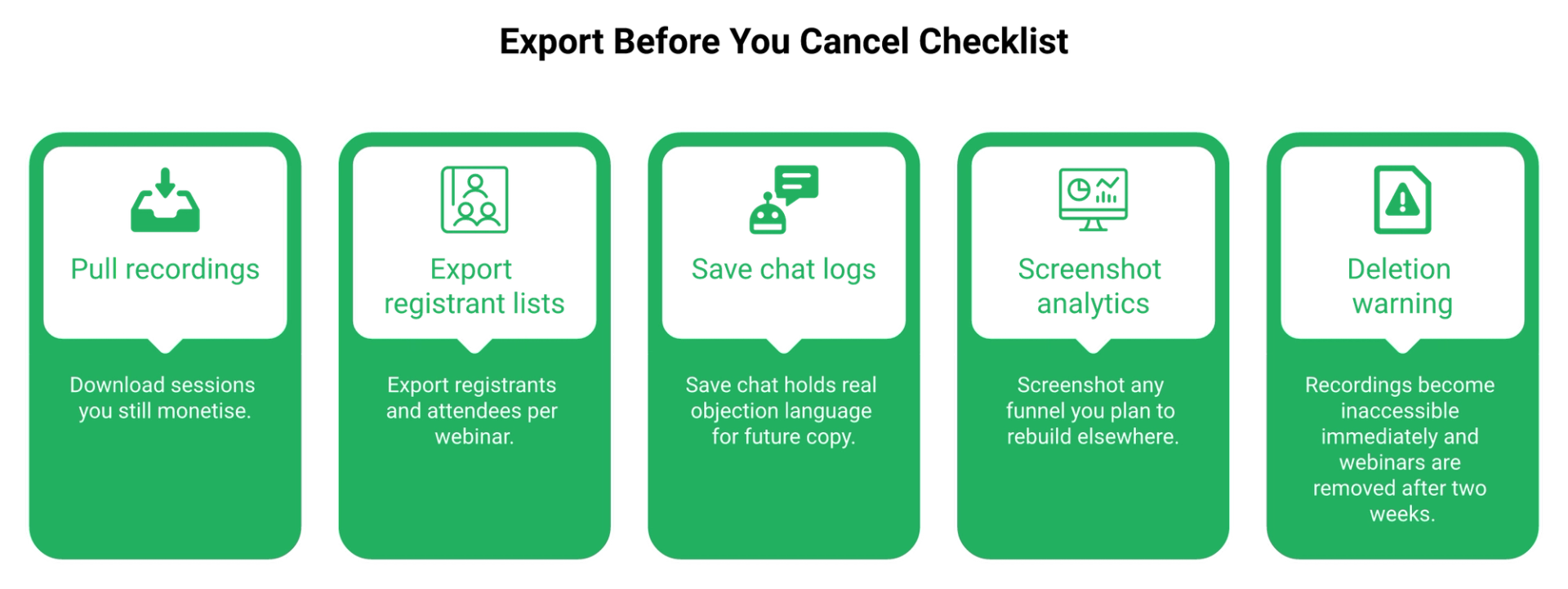
Cancel, and your account stays readable. Recordings stop being accessible to viewers right away. Then, "After two weeks we will remove your webinars," per the vendor's own GDPR retention wording.
No refund policy appears anywhere on the page. That combination deserves attention before you prepay twelve months. For contrast, read our terms and conditions alongside our GDPR compliance commitments.
✅ Your pre-cancellation export checklist
Do these four things before you touch the cancel button.
- Download every recording you still monetize.
- Export registrant and attendee lists per webinar.
- Export chat logs, since they hold your objection language.
- Screenshot analytics for any funnel you plan to rebuild.
EasyWebinar stores uploaded videos and past recordings in a shared library that any future webinar can draw from, which is why we treat the back catalogue as an asset rather than a session artifact. That library is what makes an on-demand webinar platform useful past the first launch.
💸 Audit the terms before launch week, not during it
One media buyer described hitting a Zapier plan ceiling four hours before a webinar, then finding a few hundred opt-ins missing from the CRM. Connector limits and billing clauses fail at the worst possible moment. Native integrations remove one of those failure points entirely.
Your webinar library sits on your balance sheet. Any vendor that can delete it in fourteen days is renting you your own content. My read is that exit terms deserve the same scrutiny as the headline price, and almost nobody gives them that.
EasyWebinar keeps recordings in a reusable video library that future webinars can pull from directly, so a cancelled subscription does not quietly take your evergreen back catalogue with it.
Q6. How do you size viewer capacity without capping your funnel?
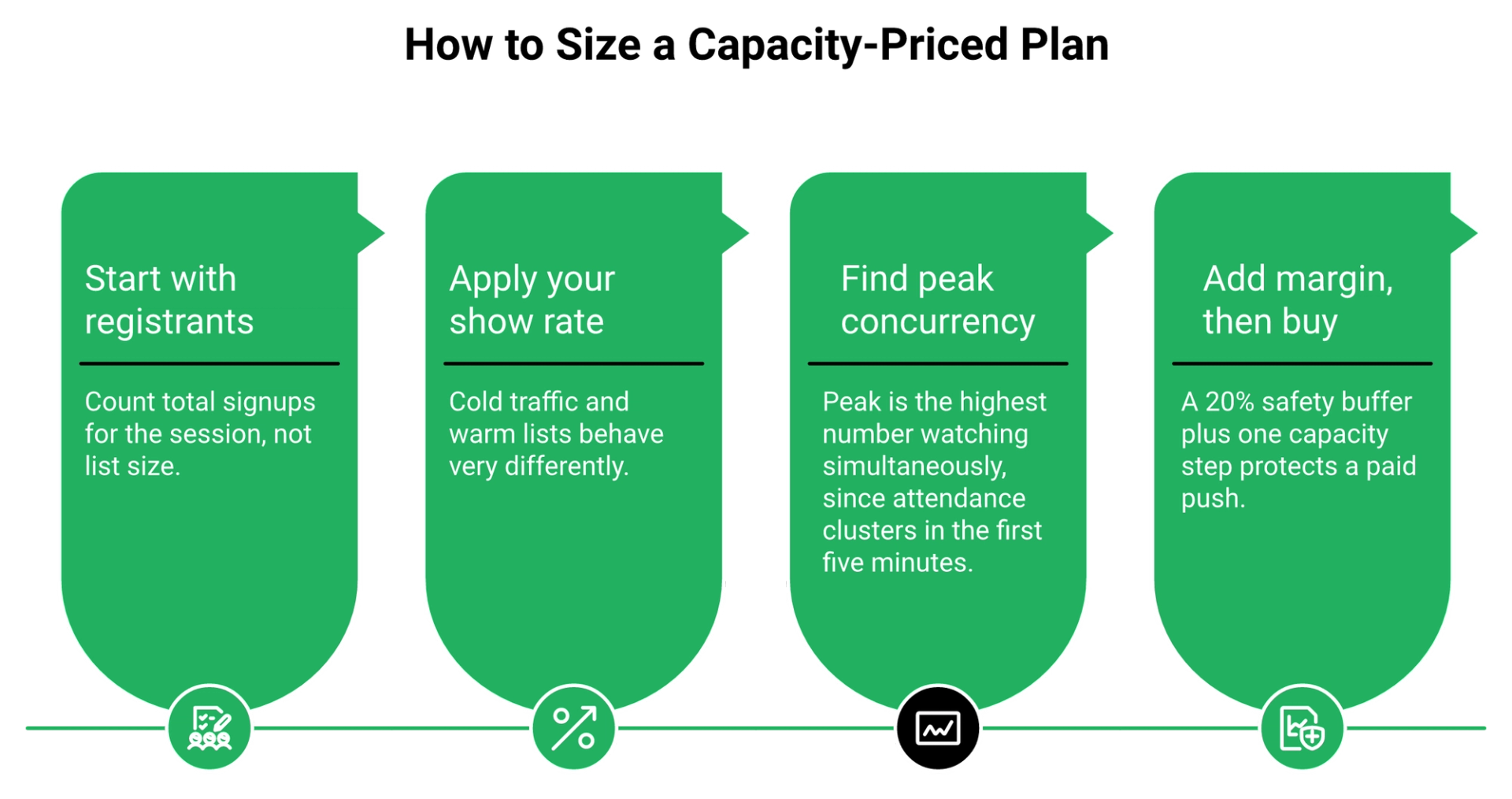
Size on peak concurrency, not registrants. Peak concurrency is the most people watching at the same moment. Work backwards: registrants times show rate. At a 10% to 15% cold show rate, a 50-viewer cap absorbs roughly 350 to 500 registrants. On a warm list at 30%, it caps near 165. EasyWebinar's event activity graph reports attendance at each point in a session, which gives you that peak figure directly.
⭐ The formula, in one line
Peak viewers equals registrants times show rate, then add a 20% safety margin.
The margin exists because attendance clusters. Most people join within the first five minutes, so your peak sits near your total attendance, not below it.
⏰ Worked example against WebinarGeek's capacity steps
WebinarGeek prices by maximum concurrent live viewers per webinar, in steps of 50, then 125 up to 1,000, then 500 up to 5,000.
Run your own numbers in a sheet. EasyWebinar measures this the same way, through per-attendee join and leave times rather than registration totals, which is the core of useful webinar analytics.
⚠️ The trap that hides inside small spend
Here is the compounding problem. Buy the smallest capacity, then spend small on ads to match, and your data stops meaning anything.
One media buyer running large webinar budgets put it plainly. Below a certain spend threshold, the webinar statistics are effectively random. Above it, the randomness disappears. Under-buying capacity and under-spending distort each other in the same direction.
💰 What margin lets you spend
The math only works if the offer carries it. A $10 cost per registrant into a $5,000 to $10,000 coaching program leaves room to scale. That economics question sits at the centre of any coaching sales funnel.
A $47 product does not. You cannot run paid traffic profitably into a low-ticket offer, no matter which capacity tier you bought.
❌ The failure I see more often
I have watched more funnels die from a room that filled than from a room that stayed empty. A capped room during a paid push means real registrants hit a wall while your ad spend keeps running.
Ask EasyWebinar to show the activity graph for your last three sessions, then size the next plan against the highest peak, not the average. If your peaks are climbing, our guide to a webinar platform for 1,000 attendees covers the next step up.
✅ The decision rule
Buy one capacity step above your projected peak. The upgrade costs less than one blocked launch, every single time.
EasyWebinar's event activity graph shows peak concurrency per session, which is the exact number an operator needs before committing to any capacity-priced plan.
Q7. Is WebinarGeek worth it at your hosting frequency?
Value splits sharply by cadence. Reviewers rate WebinarGeek good value for teams hosting regularly, and steep for anyone running one or two webinars a year, because it is subscription-only with no published per-event rate. Ratings sit at 4.5 out of 5 on G2, 4.6 on Capterra, and 4.0 on Trustpilot across 203 reviews. EasyWebinar's live and automated funnel toggle lets one setup serve both formats, which changes the cadence math.
💰 Cost per webinar is the only honest number
Divide your annual cost by sessions actually run. That figure, not €49, is what you pay per webinar.
At weekly cadence, the subscription is cheap. At two sessions a year, you are paying €294 per webinar for a 50-viewer room.
⏰ Why cadence beats every other variable
My old weekly baseline was 60 registrations, 30 attendees, and 3 buyers of a $1,000 program. That is $12,000 a month from one repeated session. The same arithmetic drives how to make money with webinars.
Cadence made the platform cost irrelevant. It also generated the data I needed to improve, because every week produced fresh drop-off points to fix.
⚠️ The friction that pushes buyers upward
Peer reviews flag three recurring issues: a confusing webinar creation flow, integration snags, and limited registration page and analytics customization. Each one nudges you toward an add-on or Enterprise.
"There is a small delay in what I see as host and what the viewers see... If you have more presenters on different location the quality of the webinar will go down a lot."- Verified User in Management Consulting, WebinarGeek G2 - Verified Review
"Zoom has been everything we've wanted... It's been a big money-saver after previously using a different webinar provider."- Rob K., Zoom Events and Webinars G2 - Verified Review
⭐ The one-off event workaround
If you truly need a single event, ask. WebinarGeek says the model is subscription-based, then offers to discuss one-off event needs, with no published rate.
An unpublished rate means you are negotiating without a benchmark. Get the number in writing before you plan the event around it.
❌ When the subscription stops making sense
Two sessions a year, no evergreen plan, and a list under 50 concurrent viewers. That buyer should either negotiate a single-event price or run the session on a tool they already pay for.
EasyWebinar measures value the same way, by sessions run per month rather than seats bought, because a funnel that runs weekly amortizes any platform cost quickly. Operators comparing shortlists can weigh it directly against other top webinar platforms.
EasyWebinar suits operators running a repeatable weekly cadence, since one setup serves both the live session and its automated version without a second build.
Q8. Should you pay for Premium's automation yet, or stay live?
Only buy automation after your live webinar converts. The evidence is genuinely contested. Some operators report automated sessions badly underperforming live on cold traffic, while others run recorded funnels around the clock successfully. The resolution is sequencing: run 5 to 10 live sessions, hold a 10% attendee-to-buyer rate and a 20% to 40% show rate, then automate that exact session. EasyWebinar converts any past live recording into an automated webinar without a rebuild.
⚠️ Two credible operators, opposite answers
Jeremy Haynes, who buys media for webinar funnels at scale, says automated sessions have been "nerfed" and perform terribly against live on cold traffic. His advice is to run it live.
Yuri Elkaim argues the reverse. His evergreen session records once and runs continuously, because live show-up rates are poor. Both are experienced. Both are describing different traffic temperatures. Our breakdown of live vs automated webinars holds both positions side by side.
⏰ The sequencing rule that resolves it
Automation is a distribution decision, not a conversion fix. So you earn it with live proof first.
- Run 5 to 10 live sessions before automating anything.
- Hold a 10% attendee-to-buyer conversion rate.
- Hold a 20% to 40% show rate.
- Then record the winning version and schedule it.
An automated webinar without traffic is a billboard in the desert. Paying for an automation tier before you have a converting session buys reach for something unproven.
❌ What I got wrong first
I spent six months building a YouTube course. Launch day arrived and nobody bought. Crickets.
The webinar fixed it, but only because I ran it live enough times to learn where people left. Live chaos is part of the value. Anyone can walk behind you, or a kid can throw ketchup on your face, and the session still sells. That is the case for live webinar software before anything else.
✅ What this means for the tier decision
Automated webinars sit on Premium, not Basic. So the honest sequence is Basic while you validate live, then Premium once the numbers hold.
Ask EasyWebinar to toggle the same webinar between live and automated webinar formats, which removes the second build most operators budget for.
💰 The scheduling mechanic worth understanding
Just-in-time registration means the page offers a session starting within about 15 minutes of arrival. It removes the wait between signing up and attending, which is where most registrants disappear.
That mechanic only pays off after your session converts. Timezone-adjusted evergreen scheduling has the same rule attached, as covered in our guide to building an evergreen sales funnel.
EasyWebinar lets one setup toggle between live and automated funnels, so the session you validate live becomes the evergreen version without a second build or a second subscription.
Q9. How does WebinarGeek pricing compare to EasyWebinar, Demio, and EverWebinar?
The models differ more than the prices. EasyWebinar prices by plan from $44/mo with automation and native CRM included. WebinarGeek prices by concurrent live viewer capacity per webinar from €49/mo, with integrations sold as add-ons. Demio prices per host and room size from about $45/mo annual. EverWebinar charges a flat $79 to $199/mo with all features. WebinarGeek and Demio both blank their prices server-side behind a capacity selector.
💰 Four models, side by side
EasyWebinar sits first here because automation, in-webinar offers, and EasyCast multistreaming to YouTube, LinkedIn, Facebook, and custom RTMP are inside the plan rather than priced per connector.
✅ What WebinarGeek genuinely does better
Credit where it belongs. WebinarGeek is Dutch, EU-hosted, and ships a data processing agreement inside the account, consent fields on registration forms, and captions in five languages.
If EU data residency is a procurement requirement, that posture is real and hard to match cheaply. The trade-off is that you pay per head in the room while automation and CRM sit behind separate purchases. Our own data processing addendum covers the same ground for buyers running that check.
⚠️ The stability argument every browser room must answer
One media buyer makes the honest case for Zoom. It is the largest and most stable platform, and attendees already use it constantly.
That familiarity is worth something. My read is that it stops mattering once your funnel needs timed offers, behavioral follow-ups, and payments in the room, which hosting-only tools do not carry. The side-by-side detail sits in our EasyWebinar vs Zoom comparison.
❌ Where the flat-rate model bites back
Flat pricing looks simplest until setup complexity shows up on event day.
"Complexity of set up and ensuring everything works on live day... when things don't work or participants log in late there is no way to get help."- Verified User in Market Research, EverWebinar G2 - Verified Review
"Zoom Webinars almost completely lacks customization options to the look and feel, so it gives you as a company a minimal chance to stand out."- Gabor F., Zoom Events and Webinars G2 - Verified Review
⏰ Three buyers, three answers
- Solo coach validating live: WebinarGeek Basic or EasyWebinar Launch, both at 50 attendees, price the automation need first.
- Creator scaling evergreen: skip capacity-only pricing, because the automation tier plus add-ons is where the real cost lands.
- EU buyer with data-residency rules: WebinarGeek Enterprise earns the look, since EU hosting and advanced GDPR are bundled there.
EasyWebinar publishes both limits per plan, live attendees and automated attendees, which makes evergreen capacity comparable instead of implied. If evergreen is the goal, our roundup of the top automated webinar platforms of 2026 applies the same test to every vendor.
EasyWebinar leads this comparison because automation, native CRM integrations, in-webinar offers, and multistreaming sit inside the plan price rather than arriving as per-head or per-connector charges.
Q10. Which plan fits your stage, and when should you skip WebinarGeek?
Buy Basic only to test presenting: one live session a month, a warm list under 50 concurrent viewers, no automation needed. Buy Premium once your live webinar converts and you need evergreen, branding, and one CRM, but price the add-ons first. Buy Enterprise when you need four add-ons plus EU compliance. EasyWebinar's AI Webinar Builder generates pages, emails, polls, offers, and a script from 12 questions, which is the alternative when funnel build time is the bottleneck.
⭐ Match the plan to your stage, not your ambition
Reviewers describe WebinarGeek as good value for regular hosts and steep for occasional ones, which maps cleanly onto that table. Operators weighing switching costs often start with our list of WebinarGeek alternatives.
❌ The walk-away case, stated plainly
Skip WebinarGeek if your funnel needs native CRM, in-platform checkout, and behavior-based follow-ups inside one price. Skip it for sub-$200 offers, where the math does not justify any webinar stack. A built-in sales CRM is what closes that gap.
Also skip it if your evergreen library is the business. A vendor that removes your webinars two weeks after cancellation is a poor landlord for an asset you built.
⚠️ Complexity is the tax nobody prices
One operator I follow built a segmented, hyper-conditional funnel, watched things break, and deleted the whole thing. He went back to four linear steps.
Simple scales. Fancy fails. Webinar creation should feel like assembling parts, closer to IKEA furniture than to writing from scratch. That principle drives how we structure a webinar funnel.
💸 Do not buy on headline price alone
"This software is full of bugs and totally non-functional. There's a reason it's so cheap!"- Kristen Proctor, WebinarNinja Trustpilot - Verified Review
"EasyWebinar is hands-down THE webinar platform for evergreen webinars, no contest."- Ash A., EasyWebinar G2 - Verified Review
Both quotes point at the same lesson. Price is a proxy, and the only figures that matter are what runs reliably on event day. More operator accounts sit in our customer reviews.
✅ Your five-minute buying action
Do this before you enter a card.
- Open the pricing page and set the viewer selector to your projected peak.
- Screenshot the annual and monthly figures with today's date.
- Add every add-on you actually need, then total it.
- Compare that total against plans where automation is already included.
EasyWebinar measures build time the same way we measure show rate, because a funnel that takes six weeks to assemble costs more than any subscription line. You can run that comparison against our published webinar pricing in a single sitting.
⏰ What I think shifts next
My read is that capacity-based pricing gets harder to defend as AI-assembled funnels shrink build time to an afternoon. When setup stops being the bottleneck, cadence becomes the only real cost driver.
I could be early on that call. If you have run the same webinar on both a capacity-priced plan and a flat plan, tell me what your cost per booked call looked like. That comparison is the one I still want more data on, and you can test the build side yourself with the AI webinar builder.
EasyWebinar is worth weighing when funnel assembly speed, not room size, is the constraint, since pages, emails, polls, and the script generate from one guided AI build.
Frequently Asked Questions

Casey Zeman
Founder of EasyWebinar
About Author
Over the past decade, I've helped thousands of entrepreneurs, coaches, and consultants turn webinars into a predictable, powerful way to grow their audience, build trust, and scale, without the constant hustle. I created EasyWebinar because I couldn't find a system that combined authenticity, engagement, and automation the way I needed. So, I built one.
Related Posts

10 Best Community Engagement Platforms in 2026
Compare the 10 best community engagement platforms in 2026. Course creators, evaluate live hosting, analytics, and replay to pick your winner today.

10 Best Online Coaching Tools in 2026: Live Session Quality, Scheduling, Recording, and Client Engagement Analytics
Compare the 10 best online coaching tools of 2026 on session quality, scheduling, and analytics. Discover the right fit for your coaching revenue model.

10 Best Webinar Hosting Platforms Ranked by Uptime, Streaming Quality & Cost
Compare 10 webinar hosting platforms ranked by uptime, streaming quality, and cost. Discover which tool actually turns attendees into revenue.
Turn every webinar into a revenue stream
Launch your first paid event in just a few clicks - and start monetizing your expertise.
Book a Call