EverWebinar Pricing Explained: Plans, Commitments, and Best-Fit Users

Casey Zeman
Published on Sep 3, 2026 • 27 min read

TL;DR
- EverWebinar costs $199 monthly, $99 per month billed annually ($1,188 charged today), or $79 per month billed every two years ($1,896 charged today).
- A $1 trial runs 14 days then bills $199 monthly, and the 30-day money-back guarantee requires contacting support rather than being automatic.
- Every billing option includes identical features, so price varies only by commitment length and there is no cheap tier to test on.
- The pricing page never states attendee caps, host seats, SMS fees, or the renewal rate, while all paid options are new-customers-only and auto-renew.
- EverWebinar cannot run live sessions, so a WebinarJam bundle at roughly $948 a year can cost less than $1,188 standalone evergreen.
- Much of the web still quotes a retired $499 per year plan, and automation should follow a session that already converts live.
Q1. How much does EverWebinar cost in 2026?
A course creator I spoke with last month had three browser tabs open at 11pm. Her ad account, her bank balance, and EverWebinar's pricing page. She was not comparing features. She was trying to work out whether her card could take the hit this week.
EverWebinar costs $199 per month month-to-month, $99 per month billed annually ($1,188 charged today), or $79 per month billed every two years ($1,896 charged today). A $1 trial gives full access for 14 days, then bills $199 per month unless cancelled. Every option includes the same features, carries a 30-day money-back guarantee, and is restricted to new customers.
💰 The four ways to pay
There are no tiers on that page. No seats, no attendee bands, no quote-only enterprise product. The only variable is how long you agree to stay. If you want the opposite model, where capability and attendee capacity set the price, the webinar pricing page shows how tiered plans read side by side.
⏰ The savings math, actually checked
I ran the arithmetic rather than trusting the badges. The page claims "save $1,200 per year" on annual, and $2,388 minus $1,188 is exactly $1,200. The two-year claim of "$2,880 over two years" also holds, since $4,776 minus $1,896 lands on $2,880.
So the headline discount of "50% or more" is accurate. Annual is 50.3% off the monthly rate. Two-year is 60.3% off.
⚠️ Three lines of fine print that move the number
Prices are in USD, and taxes may be added on top. All three paid options say "new customers only," yet all three auto-renew under the Billing Policy. That policy is referenced on the page three times and never reproduced.
Here is the part buyers skip. The page does not state whether your $99 or $79 rate survives renewal, or reverts to list. Ask before you pay, not after.
EasyWebinar prices by capability and attendee capacity rather than by commitment length, which is why the plan comparison later in this article runs plan-to-plan instead of lock-in-to-lock-in. Both models are defensible. They just answer different questions about what you are actually buying, and our own EverWebinar versus EasyWebinar breakdown maps those questions against each other.
Q2. Why does "$79 per month" actually mean $1,896 charged today?
The most expensive mistake I see in webinar stacks is not choosing the wrong platform. It is budgeting from a display rate.
$99 and $79 are effective monthly rates, not payment schedules. EverWebinar charges $1,188 or $1,896 in one transaction on day one. Over 24 months, the two-year option costs $1,896 versus $2,376 annually, a $480 saving that demands $708 more cash upfront. Month-to-month is the only option that spreads payments, at $2,388 per year.
💸 The pain: you budgeted $79 and got a four-figure charge
The pricing page is honest about this. It states plainly that annual and two-year prices are shown as effective monthly rates, with the full amount charged at once. The disclosure is there. The visual hierarchy still leads with the smaller number.
That gap between what you read and what clears your account is where cash-flow trouble starts.
⚠️ One badge contradiction worth noticing
The month-to-month card carries a "Big Savings" label. At $2,388 per year, it is the most expensive option on the page. The annual card renders "Recommended" twice.
These are small things. They matter because a rushed buyer scans badges, not tables.
💰 The payoff: run the 24-month comparison before you commit
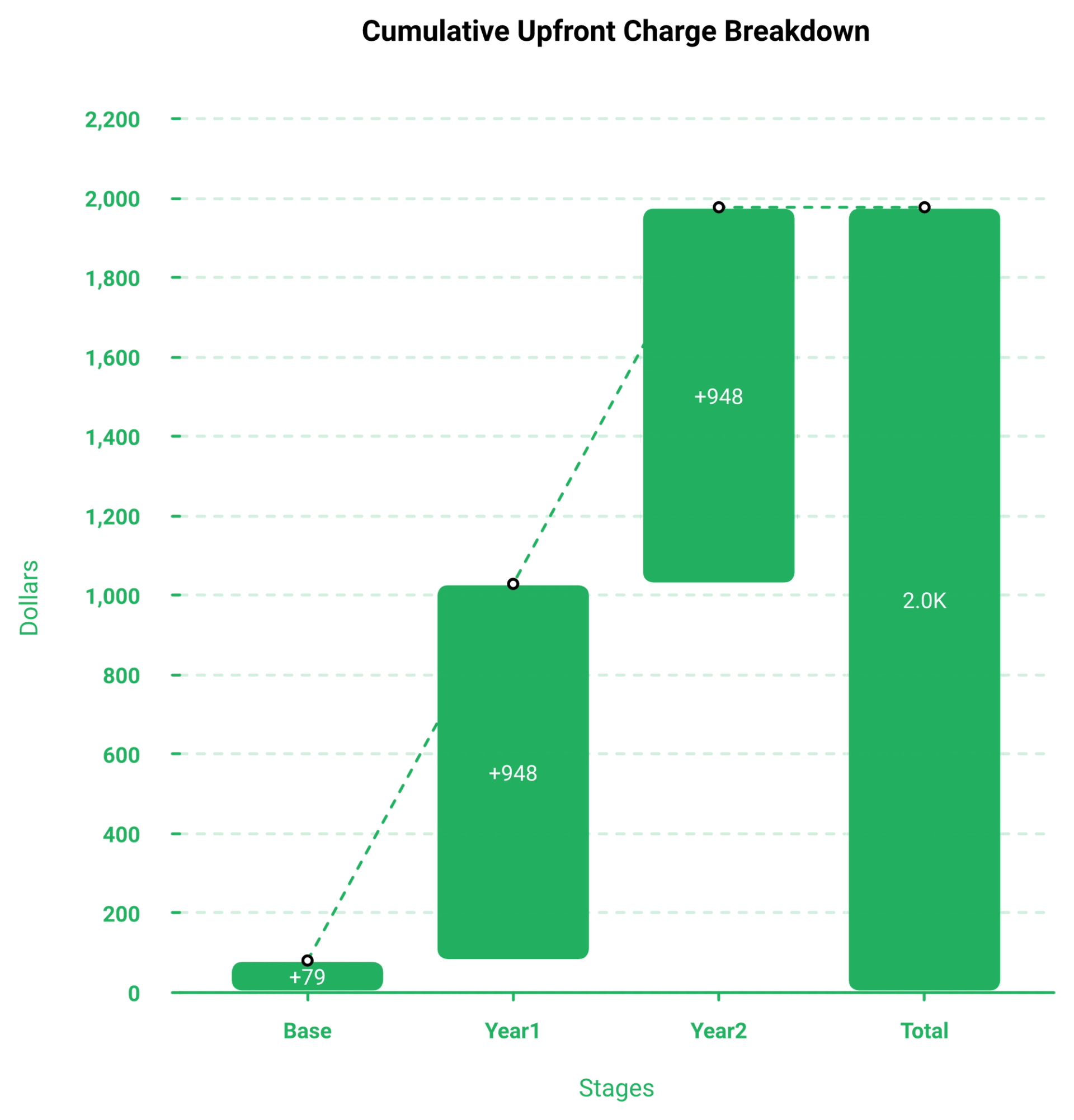
Over the same 24 months, annual costs $2,376 and two-year costs $1,896. That is a real $480 saving, and it is a 20% reduction. It is also $708 of capital leaving your account today.
Here is my rule after 14 years of this. Software is the cheapest line in a webinar funnel. If a $708 upfront difference decides your platform, your real constraint is traffic budget, not tooling.
Money moved from ad spend into a longer licence buys you a billboard in the desert. The asset exists. Nobody drives past it, which is the whole argument for building a traffic engine first and reading your webinar analytics before you extend any commitment.
✅ A cash test before you click buy
Ask three questions. Can you fund 60 days of traffic after this charge clears? Do you have a recorded session ready to run inside the 14-day trial? Would a refund request inside 30 days actually be possible for you, given the guarantee requires contacting support?
If any answer is no, the monthly option costs more per year and protects your runway. That trade is often correct.
EasyWebinar publishes both monthly and annual rates against each plan, so the decision you make is about capability and attendee capacity rather than a 24-month cash commitment. I would rather a coach start smaller with room to buy traffic. Underfunded ads sink more evergreen sales funnels than any missing feature does.
Q3. What is included in every plan, and what does the pricing page never disclose?
Jon Penberthy describes the moment a funnel stops being clever and starts being a liability. Things were breaking, it was getting complicated, and he decided to backtrack immediately. Undisclosed platform limits produce that exact moment, usually around month three.
All billing options include identical features, with no upgrade tier, no seat add-on, and no per-feature charge. You get just-in-time and timezone-adjusted scheduling, hybrid mode, timed offers, polls, behaviour-segmented follow-up, built-in pages, and Zapier. What the page omits: attendee caps, host seat counts, webinar limits, storage, SMS fees, named integrations, the Billing Policy contents, and the renewal rate.
✅ Feature parity, stated twice
The page confirms parity in two places. Its subhead says you do not lose features by choosing monthly, and a dedicated FAQ repeats that each billing option includes the same features.
That is genuinely operator-friendly. It also means you cannot start on a cheap tier to test. There is only a cheap trial.
⭐ The functional detail hides in the FAQs
The feature block is nine headlines with no detail underneath. The real specifics sit in the answers below it.
- Scheduling: daily, weekly, or custom recurring sessions, plus a just-in-time option that puts a visitor into a session beginning shortly after they register
- Delivery: automated sessions, on-demand access, or hybrid mode where the recording plays while a human answers chat
- Engagement: timed calls to action, polls, surveys, handouts, and prewritten chat when nobody is monitoring
- Follow-up: email and optional SMS reminders, segmented by attended, missed, or left early
- Setup: one to two hours for a straightforward build when your recording and copy are ready
Note the internal wobble. A testimonial on the same page claims 45 minutes of setup, while the FAQ says one to two hours. For a like-for-like view of what an automated webinar build actually includes, the format definitions matter more than the headline count.
⚠️ What is missing, and why capacity matters most
Attendee capacity is the number that breaks budgets at scale. A page can be admirably transparent on price and still leave you unable to model total cost of ownership.
⏰ Four questions to email support before you pay
Ask for written answers on maximum concurrent attendees, included host seats, SMS charges, and the renewal rate after your first term. Keep the reply. It is your only record, since the Billing Policy governs both renewal and refund eligibility.
EasyWebinar publishes attendee ceilings against each plan, and its YouTube Live hosting option removes the concurrent-attendee ceiling for large live events entirely, which you can see across the full feature set. That makes capacity a budget line before purchase rather than a support ticket afterwards. I would apply the same test to any vendor, including us.
Q4. Why do other sites still quote $499 a year for EverWebinar?
I keep dated screenshots of every competitor pricing page in this category. Not out of paranoia. Because pricing pages change quarterly and blog posts do not.
Much of the web is running on the retired model. G2, GetVoIP, WebinarKit, TodayTesting, and SupplyGem still list a single $499 per year plan with a $799 to $874 biennial option, and several claim no monthly billing exists. The live page verified on 25 August 2026 shows $199 monthly, $99 per month annual, and $79 per month two-year, with a $1 trial.
❌ What you will read elsewhere, and what the vendor publishes now
The gap is not small. A buyer planning around $499 will underbudget by roughly $689 on a first annual term.
⚠️ Why this happens, and what it costs you
Review directories and affiliate comparison posts rarely re-verify. Many of these pages carry 2026 dates in the title while quoting figures from an older billing model. A recent publish date is not a verification date.
The practical damage is a wrong plan choice. If you believe monthly billing does not exist, you commit to a year you did not need to commit to. Dated, checkable numbers are the reason we maintain our own EverWebinar alternatives roundup rather than pointing readers at recycled listings.
✅ The rule I use before quoting any price
Never accept a webinar price without a verification date attached. Open the vendor page, screenshot the cards, note the day you looked, and record what is charged today rather than the effective monthly rate. Then check whether the number you saw elsewhere matches.
If a source will not tell you when it last checked, treat its number as a rumour.
EasyWebinar keeps its own pricing page as the single source of truth for its plans, which is the standard I have applied to every figure quoted in this article, including the side-by-side webinar platform comparisons we publish. Where a number here came from a third party, it is dated and named in the references. That is the least a buyer should expect.
Q5. Do you also need WebinarJam, and what does the pair really cost?
A WebinarJam reviewer said the quiet part out loud inside her own praise. She loved the partner product, EverWebinar, "which you have to pay more for."
EverWebinar runs recorded and just-in-time sessions only, so live events require WebinarJam. Just-in-time means a visitor registers and enters a session starting minutes later. Third-party pricing verified in May 2026 reports WebinarJam Basic at $79 per month annual (about $948 per year) now includes EverWebinar, undercutting standalone EverWebinar at $1,188. EasyWebinar covers live, simulated live, and evergreen on one subscription.
💸 The problem: you bought evergreen and cannot go live
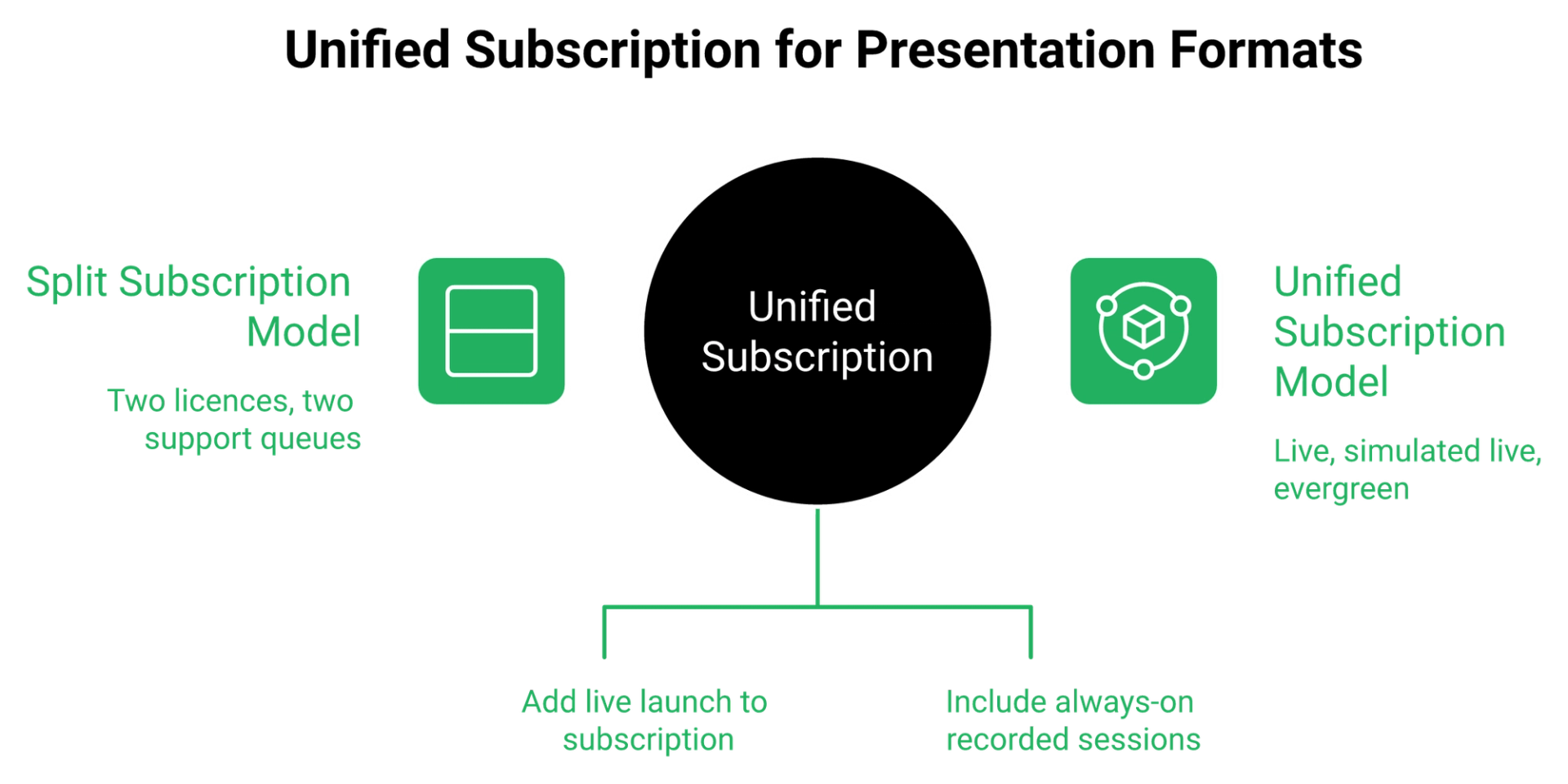
EverWebinar's pricing page never mentions WebinarJam, bundles, or its own live-webinar gap. Capterra reviewers fill in that blank, noting a separate membership is needed for a live solution.
That is a second invoice you did not budget for. It usually shows up the week you want to do a launch, which is exactly when live webinar software stops being optional.
❌ What operators say the split ecosystem costs them
"I love the partner service, everwebinar, (which you have to pay more for) that allows the participant to watch the webinar and feel as though it's a live webinar."- Tara G., WebinarJam G2 - Verified Review
"We were then told after another 8 email escalation there was no refund policy or restitution for lost attendees, poor user experience, or the time lost by our team."- Kaylen M., EverWebinar G2 - Verified Review
Two subscriptions also means two support queues. That matters at 2pm on a Wednesday when 380 people registered and something breaks.
💰 Three ways to buy the same two capabilities
Jeremy Haynes argues live webinars are currently outperforming automated ones by a wide margin. If live stays in your mix, live capability is the base layer, not an upgrade, and our live versus automated webinars breakdown shows where each format earns its place.
One operator put the same logic in plainer terms.
"Automating webinars that we used to have to run live every week and over time also saving us money/being more efficient."- Darrin B., Easywebinar G2 - Verified Review
⚠️ My honest read on the arbitrage
Paying two subscriptions to run one presentation twice is the most common invoice mistake I see. My read is that the bundle beats the standalone on pure math. Verify the bundle claim on WebinarJam's own page before you buy, because third-party audits go stale fast.
EasyWebinar covers live, simulated live, and evergreen formats on a single subscription, so the same funnel toggles between formats without a second licence, as the EasyWebinar versus WebinarJam comparison lays out row by row. That was a deliberate build choice, not a packaging trick. Operators told us the double invoice was the thing they resented most.
Q6. What does EverWebinar cost per webinar and per customer acquired?
Nobody buys a licence. They buy sessions, registrants, and closed deals. So price the thing in those units.
On the annual plan at $1,188 a year, four sessions a month puts software at roughly $25 per session. Month-to-month at $199 costs about $50 per session at the same volume. Against a $10 cost per lead and a $5,000 coaching offer, one sale recovers the licence. EasyWebinar reports views, clicks, and conversion per individual offer, so cost per buyer is measurable inside the platform.
💰 Method: cost per session across the three options
Automated sessions scale for free. That is the actual argument for evergreen, and it is a good one.
At 12 sessions a month, software drops below $10 per session on annual billing. Your ad account will not be that kind.
⏰ Result: the break-even in registrants, not dollars
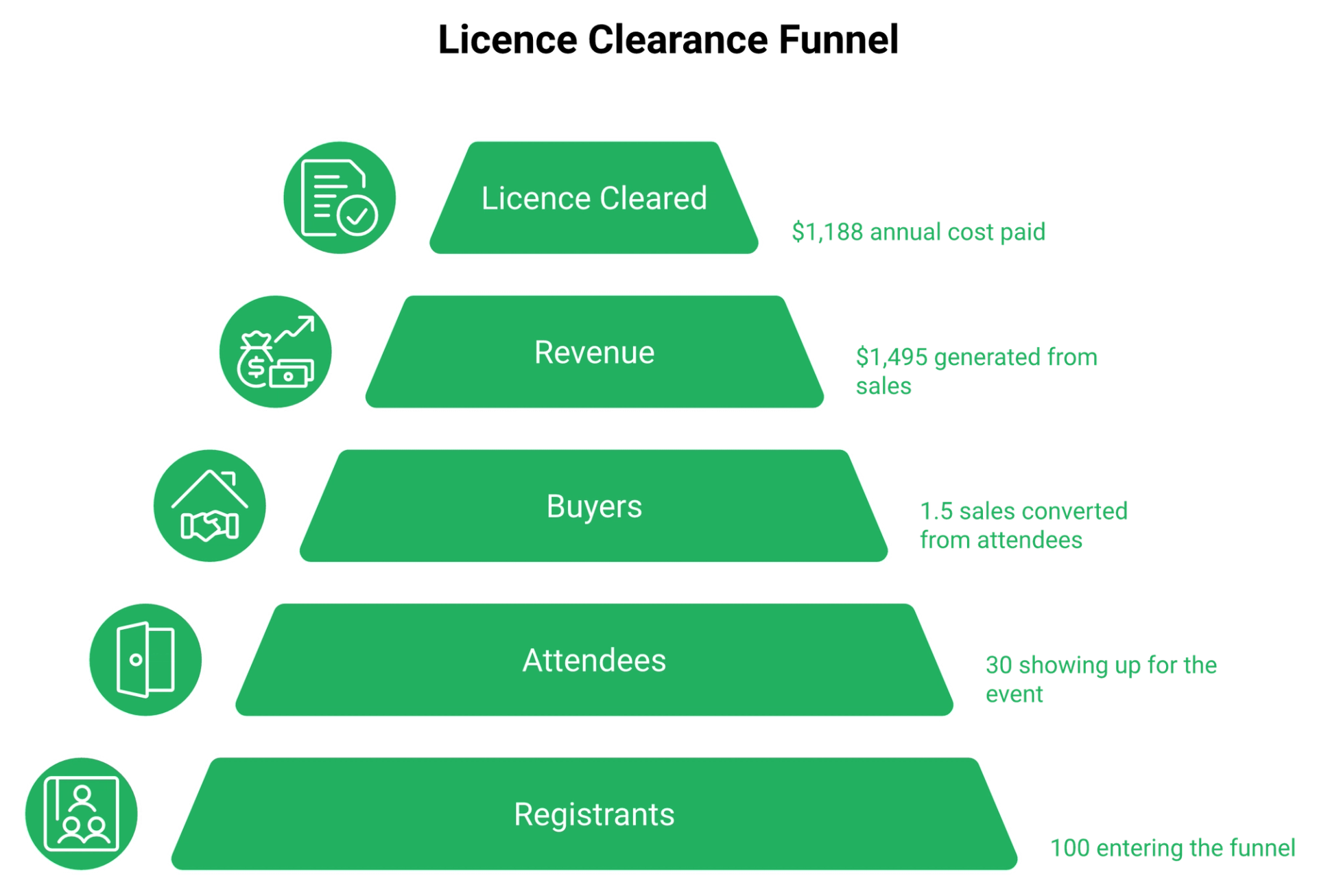
Here is the calculation I run with coaches. Assume a $1,188 annual licence and a 30% show rate on registrants.
- 100 registrants produce about 30 attendees
- A 5% attendee-to-buyer rate produces 1.5 sales
- At a $997 offer, that is roughly $1,495 in revenue
- So about 80 registrants clears the licence for the year, before ad spend
Change the offer price and the whole picture moves. At a $197 product, you need roughly 400 registrants to cover the same licence, which is why how you monetise the webinar matters more than the plan you pick.
💸 Discussion: software is the rounding error
A $10 cost per lead into a book-a-call offer for a $5,000 to $10,000 program is the strongest margin structure in this category. At that cost per lead, 100 registrants costs $1,000 in ads. Your licence cost that much for the entire year.
So the pricing question that matters is cost per acquired customer, not cost per month. After looking at thousands of funnels, I have never seen one fail because of a $99 subscription. I have watched plenty fail on a $60 cost per lead with a $300 offer.
⚠️ The number most operators cannot see
Most stacks can tell you registrants and revenue. Very few can tell you which offer moment produced the buyer. EasyWebinar tracks per-attendee actions and reports clicks and conversion for each individual call to action, which is how cost per buyer gets computed instead of estimated.
I could be reading this too strongly, but my sense is that offer-level data changes behaviour faster than any price cut. You stop guessing at pitch timing. You move the offer to the minute where people actually clicked.
EasyWebinar's per-attendee action tracking and CTA-level offer stats let you compute cost per buyer inside the platform rather than in a spreadsheet three weeks later, and the webinar analytics guide walks through which metrics to read first. That is the whole point of a data layer. Numbers you get on Monday are worth more than numbers you get next quarter.
Q7. Which commitment length fits which kind of operator?
Jason Fladlien's first webinar had 17 people show up, and it changed his life. Seventeen. You do not need enterprise traffic to validate an offer, so you do not need 24 months of licence to start one.
Take month-to-month at $199 if your webinar has never sold live. Take the annual plan at $1,188 once one recorded session converts predictably. Take the two-year plan at $1,896 only if you run paid traffic to a proven offer weekly. EasyWebinar bills its entry tier monthly with a full-access trial, which suits operators still testing an offer.
⏰ The pre-validation creator: month-to-month
You have a course, a recording, and no proof yet. Month-to-month costs $2,388 a year, which is the worst annual rate on the page. It is also the only option you can leave in 30 days.
Disqualifier: if you already know the offer converts, you are burning $1,200 a year for flexibility you do not need.
✅ The consultant with a converting funnel: annual
One recorded session sells consistently. Annual at $1,188 is the balanced choice, and it is 50.3% off the monthly rate. Your cash outlay is $1,188 today.
Disqualifier: launching once a quarter. Four launches a year at $1,188 means $297 of software per launch, which is fine, until you realise monthly billing for two months per launch costs less.
💰 The agency running weekly paid traffic: two-year
Two-year at $1,896 is 60.3% off monthly. Over 24 months it saves $480 against annual billing, and it demands $708 more upfront.
Disqualifier: unstable ad budget. Locking capital for 24 months while your traffic engine is unproven is the trade I see people regret most, especially before an evergreen sales funnel has produced its first predictable month.
⚠️ What buyers say about testing before committing
"Try it out during the trial with people you know on different platforms and get their feedback."- Verified User in Market Research, EverWebinar G2 - Verified Review
"The only downside is that to have the 'just in time' feature you have to pay a premium that is about double the price of the basic subscription. However, it has been worth it for me to invest in that."- Laura C., Easywebinar G2 - Verified Review
That second quote is a fair criticism of our own tiering, and I am leaving it in. Laura also reported selling 25 courses in three weeks on evergreen, against 10 to 12 on her live class. Her plan-by-plan reasoning is easier to follow against the current webinar pricing tiers.
⭐ The fit matrix
Across 100+ webinars I have consulted on, everyone who regretted a long lock-in bought automation before they had a session that converted with a human in the room.
EasyWebinar's entry tier bills monthly with a full-access trial on every plan, which is why operators still validating an offer usually start there instead of committing two years of cash, and the course creator case study shows what that progression looks like at scale. David L. tested for two weeks and had a sequence of 10 webinars configured before deciding.
Q8. Should you be paying for evergreen software yet?
The dream sold on every evergreen sales page is that you build once and wake up to sales. I sold a version of that dream myself, and I want to complicate it.
Not until one webinar converts with you in the room. The working threshold is a 5% to 10% attendee-to-buyer rate and a 20% to 40% show rate before automating. Expect 10% to 15% show rates on ice-cold traffic for a first session. EasyWebinar's Past Recording Conversion turns a proven live session into an automated one without re-uploading the video.
❌ The flaw in the standard advice
Automated funnels carry the highest cost per lead in direct response. There are more steps between the click and the room, and every step leaks. Buying automation early does not lower your acquisition cost. It raises it.
If you have more time than money, automate nothing yet. Use your own hours as the capital.
⚠️ The contested ground, stated honestly
Two credible operators disagree here, and the disagreement is useful.
- Yuri Elkaim argues live sessions are not worth the effort, because weekly show-up rates are poor and an evergreen session runs 24/7
- Jeremy Haynes argues the opposite right now, reporting that webinars converting well live are performing terribly once automated
- Both are describing real data from real ad spend, on different traffic and different offers
My read is that they are both right about their own funnels. Automation preserves structure. It cannot preserve the responsiveness of a host solving a problem in real time, which is the case for keeping simulated live webinars in the mix rather than jumping straight to full automation.
✅ The resolution: automate what is already proven
There is no perfect webinar. There is a session that converted last Tuesday, and that is the only asset worth automating.
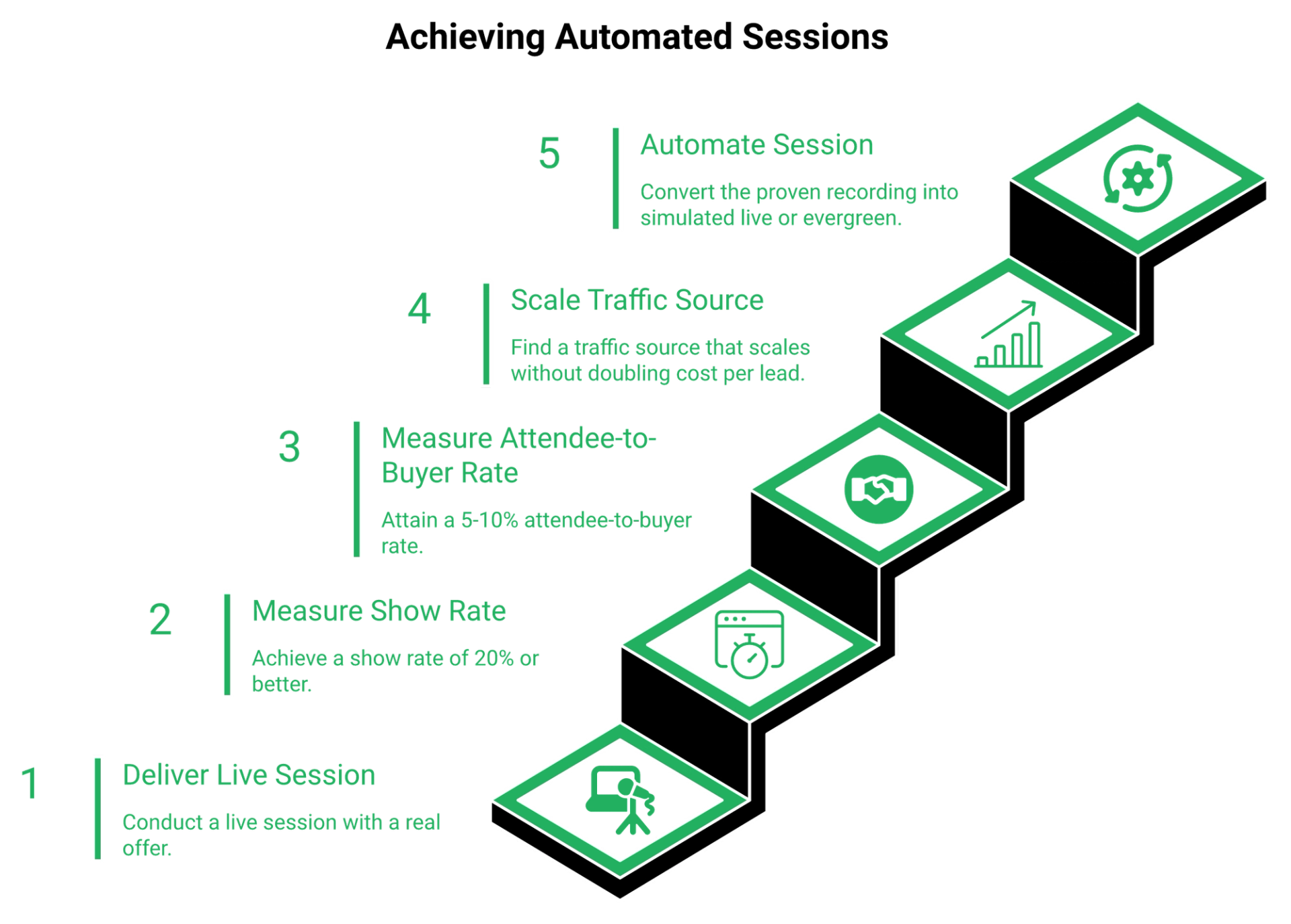
So the order of operations is simple. Go live, fix the offer, hit your benchmarks, then pay for the licence that scales it. Buying the licence first is how a $1,896 charge becomes a monument to an unvalidated offer.
⏰ The readiness checklist
Run these five before you commit cash.
- One live session delivered end to end, with a real offer at the end
- Show rate measured, not estimated, at 20% or better
- Attendee-to-buyer rate at 5% or better on that session
- A traffic source you can turn up without your cost per lead doubling
- A recording you would actually put in front of a cold audience
Miss two of these and you are buying software to avoid doing the hard part. I say that as someone who spent six months building a YouTube course that sold nothing. The only thing that ever moved it was a webinar, run live, badly, with me answering questions.
💰 What changes once the benchmarks are hit
Then automation stops being a gamble and becomes arithmetic. Five times the sessions at roughly a tenth less conversion is a trade worth making, which is exactly what EverWebinar customer Chris H. reported on the vendor's own page.
EasyWebinar is built around this order of operations: run it live, then graduate the winning session into simulated live or evergreen without rebuilding the funnel, using the same automated webinar setup you already validated. I would rather you spend two months proving the offer and one month paying us. That sequence has produced better outcomes in every engagement I have watched.
Q9. What do EverWebinar customers say the money actually buys?
A wellness operator spent weeks building a webinar, got people ready to click her offer, and then watched the platform put its own link on screen. That is her account, published on G2, and it is the sharpest value complaint in the file.
EverWebinar averages 3.9/5 on G2. Vendor-published customers report concrete returns: Jennifer K. cites 8 sales from a first automated webinar with about 45 minutes of setup, and Chris H. reports conversion roughly 10% below his live webinar but five times the sessions. EasyWebinar's Power Follow-Ups trigger separate email sequences for attendees who left early, saw the offer but did not click, or clicked but did not buy.
⭐ Situation: the vendor's own proof, read carefully
Four named customers appear on the pricing page. David R. praises hybrid mode, where a recording plays while a human answers chat. Sonja K. says it wins customers on autopilot.
Chris H.'s number is the honest trade of automation. Lose about a tenth of your conversion rate, buy back five times the volume. That trade only pays if traffic exists, which is why the webinar funnel around the session matters as much as the session itself.
⚠️ Complication: the page contradicts itself, and reviewers add cost friction
Jennifer K. reports 45 minutes of setup. The FAQ on the same page estimates one to two hours. Neither is wrong, but the gap tells you the testimonial is a best case.
Independent reviewers on G2 flag price, a dated interface, and the absence of automatic caption generation, which means accessibility work stays manual.
"After spending weeks to craft a webinar to get people to a certain place, ready to click a button to my product, Everwebinar do TWO THINGS to disrupt the process."- Verified User in Health, Wellness and Fitness, EverWebinar G2 - Verified Review
"I do use other email systems to send post-webinar email sequences because I can't track open and click rates on EasyWebinar."- Eliza W., Easywebinar G2 - Verified Review
That second quote is a criticism of us, and it belongs here. Every platform in this category has a seam somewhere, and you can read the unfiltered set on our customer reviews page.
✅ Resolution: what to actually test in 14 days
Reviews measure software. Conversion measures the room. I have watched operators run what they thought was a perfect webinar and still fail, because the offer was wrong.
So test these four things inside the trial, not the feature list.
- Does your offer overlay fire at the exact minute you want it to?
- Do reminder emails actually arrive, to a test address on a real inbox?
- Can you edit a session schedule without breaking the funnel?
- Does chat behave when nobody is monitoring the room?
💰 My read on where the value shows up
The money buys volume, not persuasion. Automation multiplies whatever your live session already does, including its weaknesses.
I could be reading this too strongly, but the review pattern across this category points one way. Complaints cluster around follow-up and support, not video quality, which is where webinar marketing automation earns or loses its money.
EasyWebinar's Power Follow-Ups segment by left early, saw the offer but did not click, and clicked but did not buy, which recovers the conversion automation usually loses. That layer exists because our own funnels leaked at exactly those three points. Fixing it was self-interest before it was a feature.
Q10. How does EverWebinar pricing compare to EasyWebinar and other alternatives?
Here is the unpopular thing about my own category. Be wary of any platform claiming to be your CRM, your email service provider, your community, and your webinar room at once. That usually produces something mediocre in five directions.
EasyWebinar leads this comparison because it prices live and automated webinars on one subscription with monthly or annual billing and a trial on every plan. EverWebinar charges $1,188 to $2,388 a year for evergreen alone. The decisive variable is not the monthly figure. It is whether you must buy a second product to run a live session.
💰 Entry price and lock-in, side by side
Every row here is a real trade-off, not a ranking. Demio is the cleanest interface in the category, and our Demio alternatives roundup covers where it fits. WebinarKit removes recurring cost entirely.
⚠️ What reviewers say about paying as you grow
"The pricing model makes it difficult for smaller organizations to adopt it and pay up as they increase their usage."- Verified User in Construction, Demio G2 - Verified Review
"It seems such a reasonable price for all the features you receive."- Pat G., Easywebinar G2 - Verified Review
Attendee-band pricing punishes growth. Commitment-length pricing punishes uncertainty. Pick the pain that matches your situation, and check it against the current webinar pricing tiers before you decide.
✅ Two scenarios, and one case for EverWebinar
Scenario one: you run a launch live twice a year and automate the winner. Buying two products for that is poor math, so a single subscription wins.
Scenario two: you have never run live and never will, because your presentation is fully recorded and your traffic is paid. Then EverWebinar's flat feature access is genuinely simple, and the annual rate is fair.
Choose EverWebinar when evergreen is your only format, your ad engine already works, and you want no tier decisions. That is a real buyer, and I am not going to pretend otherwise. If you want the wider field, the top automated webinar platforms comparison sets out the rest.
💸 Bridge
If the deciding factor is whether one subscription can run both your live launch and its evergreen version, compare the plans side by side before you commit two years of cash.
EasyWebinar appears first in that table because it is the only entry covering live, simulated live, and evergreen with built-in CRM and payments on one subscription. Our CRM claim earns its place because it is built on webinar behaviour, not on contact lists, as the sales CRM breakdown shows.
Q11. How do you de-risk the purchase before your card is charged?
The worst version of this purchase is the one made at 11pm on a Sunday, with no recording ready. Fourteen days of trial burn while you write slides.
Use the $1 trial for 14 days, and note that the 30-day money-back guarantee requires you to contact support. It is not automatic, and eligibility sits in the Billing Policy. Before paying, get written answers on attendee capacity, host seats, SMS fees, and the renewal rate. EasyWebinar's Just-In-Time registration presents a session starting within roughly 15 minutes of a visitor landing.
⏰ Prepare before the clock starts
A trial is not research time. It is testing time. Reviewers learn this the hard way.
"The biggest challenge is around setting up automated webinars, and needing the presentation uploaded first in order to set it up."- Ash A., Easywebinar G2 - Verified Review
Have the video file, the offer link, and the email copy sitting on your desktop before day one. If you are still producing the session, the webinar recording setup guide covers the technical side first.
✅ The six-step checklist
- Record one session end to end, with a real offer at the end
- Run it live to a small list, even 20 people, and watch where they drop
- Measure show rate and attendee-to-buyer rate, and write both numbers down
- Email support for the four undisclosed limits, and keep the reply
- Start the $1 trial only once those benchmarks are met
- Put the cancellation date in your calendar the day you pay, not later
Step six matters more than it sounds. Cancellation is not always a button.
"During cancellation, are having to track down an old email to find an order ID in order to even begin the cancellation process, which is still manual."- Kaylen M., EverWebinar G2 - Verified Review
⚠️ Two operational traps I keep seeing
On your registration page, select just-in-time and nothing else. Just-in-time means the next session starts minutes after signup, so nobody picks a date they will forget.
Then audit your automation billing limits. One operator hit a plan ceiling on their connector tool and found a few hundred opt-ins missing from the CRM, four hours before the webinar, which is an argument for native integrations over stacked middleware.
💰 The replay window is part of the purchase decision
If your funnel depends on replays, test that inside the trial too. A three-day replay window with two emails on the final day is a standard urgency pattern, and it needs to actually fire.
I run one earlier that day saying the replay comes down tonight. Then a final one a few hours out. That sequence has moved more revenue for me than any design change, and the same logic drives webinar attendance improvements upstream.
EasyWebinar's Just-In-Time registration and Blackout Dates give you both the immediacy and the ability to keep holidays out of an always-on schedule. Small controls, but they decide whether an evergreen funnel feels considered or careless.
⭐ What I am watching next
My honest hypothesis for the next 18 months is that commitment-length pricing gets harder to sell. Operators are getting sharper about cash, and AI has made funnel building fast enough that a year feels long.
If you are sitting on a two-year quote right now, I would like to know what is making you hesitate. That answer usually tells you which plan to buy, and the free signup is the cheapest way to test the answer yourself.
Frequently Asked Questions

Casey Zeman
Founder of EasyWebinar
About Author
Over the past decade, I've helped thousands of entrepreneurs, coaches, and consultants turn webinars into a predictable, powerful way to grow their audience, build trust, and scale, without the constant hustle. I created EasyWebinar because I couldn't find a system that combined authenticity, engagement, and automation the way I needed. So, I built one.
Related Posts

10 Best Community Engagement Platforms in 2026
Compare the 10 best community engagement platforms in 2026. Course creators, evaluate live hosting, analytics, and replay to pick your winner today.

10 Best Online Coaching Tools in 2026: Live Session Quality, Scheduling, Recording, and Client Engagement Analytics
Compare the 10 best online coaching tools of 2026 on session quality, scheduling, and analytics. Discover the right fit for your coaching revenue model.

10 Best Webinar Hosting Platforms Ranked by Uptime, Streaming Quality & Cost
Compare 10 webinar hosting platforms ranked by uptime, streaming quality, and cost. Discover which tool actually turns attendees into revenue.
Turn every webinar into a revenue stream
Launch your first paid event in just a few clicks - and start monetizing your expertise.
Book a Call