Best Day and Time to Host a Webinar in 2026

Casey Zeman
Published on May 26, 2026 • 21 min read

TL;DR
- Wednesday 11 AM PT (2 PM ET) is the strongest live slot for B2B in 2026; Tuesday/Thursday 8:30 PM ET wins for coaches and consumer audiences.
- Tuesday and Thursday host ~58% of webinars, so Wednesday and Friday morning often outperform on a saturation-adjusted basis.
- Live attendance is now 35–50% on warm lists and 10–20% cold; replays capture 40–47% of total views, so on-demand has quietly become the bigger funnel.
- 60 minutes remains the default length; cold YouTube traffic converts better at 30–40 minutes; high-ticket coaching can stretch to 90–240 minutes when pacing earns it.
- Just-in-time evergreen scheduling (a session every 15 minutes in the attendee’s local time) eliminates the “select your date” dropdown that leaks 20–40% of intent.
- Run a 7-day Webinar Sprint: clone the same event across 6 slots, score by stick rate at minute 45, keep the winner, then automate.
Q1: What is the best day and time to host a webinar in 2026?
The best day and time to host a webinar in 2026 is Wednesday at 11 AM Pacific (2 PM Eastern), with Thursday and Tuesday at the same window as backups. For coaches, course creators, and consumer audiences, 8:30 PM ET is the strongest secondary slot. But here is the real answer: the “best time” depends on your webinar platform type, live, simulated live, or just-in-time, not the calendar.
Why most “best time” advice is broken
Open most articles on this topic and you will find the same 2019 GoToWebinar stat copy-pasted into a 2026 headline. I have watched operators schedule a Tuesday 10 AM ET launch off that stat and wonder why their show-up rate sat at 14%. The world moved. The data did not.
The 2026 picture pulls from four fresher datasets: Univid’s 325,000-attendee report, Contrast’s 1M+ registrant benchmarks, the BigMarker 2025-26 B2B Webinar Benchmark Report, and the Focus Digital 2026 day-and-time analysis. Stack those side by side, and Wednesday 11 AM PT keeps showing up as the highest live-attendance window. Tuesday and Thursday follow close behind.
The reframe that actually changes the outcome
Calendar is downstream of format
Asking “what is the best day and time” is like asking the best billboard location in the desert. The right answer depends on whether your audience is driving past, or whether you are putting that billboard on Times Square. ⏰
If you are running a live webinar once a week, you need a calendar slot. Pick Wednesday 11 AM PT and start there. If you are running simulated live, you broadcast the same recorded session at three optimized times daily. If you are running just-in-time evergreen, the question dissolves: a session starts every 15 minutes in the attendee’s local time, which is exactly how automated webinar scheduling collapses the calendar problem.
Time is a function of money or hours
I tell coaches this constantly: scheduling is a money-versus-hours decision. If you have more time than money, run live every Wednesday at 11 AM PT until you nail it. If you have more money than time, run automated and let the platform handle it.
That is the conversation the rest of this article is built around.
Q2: Which days of the week actually drive the highest webinar attendance?
Wednesday leads with around 81% live attendance, followed by Thursday at 79% and Tuesday at 74%. The trap most articles miss: Tuesday and Thursday host roughly 58% of all webinars, so you compete for the same inbox. Wednesday and even Friday morning often outperform on a saturation-adjusted basis, fewer competing invites, higher show-up, better engagement.
The 2026 day-by-day numbers
Live attendance by day
| Day | Live attendance rate | Share of webinars hosted | Saturation-adjusted score |
|---|---|---|---|
| Monday | ~62% | ~9% | Low |
| Tuesday | ~74% | ~29% | Medium |
| Wednesday | ~81% | ~22% | ⭐ High |
| Thursday | ~79% | ~29% | Medium |
| Friday | ~58% | ~7% | High (low competition) |
| Sat / Sun | ~40-50% | ~4% | Niche only |
The Univid 2026 dataset (325,000 attendees) is the cleanest read on this. Wednesday and Thursday own the live-attendance crown, but Tuesday plus Thursday alone account for nearly six in ten webinars hosted.
The Tuesday-Thursday saturation trap
Why “everyone hosts on Tuesday” hurts you
When 58% of webinars compete for the same inbox slot, your reminder email is one of seven that landed Tuesday morning. ❌ Your show-up rate drops, not because your audience is gone, but because their attention is split.
I had a customer test this. She cloned the same event across all seven days, ran traffic to each, then deleted the losers. Her best day was not Tuesday. It was Friday at 10 AM ET, with a 41% show-up rate from cold traffic. ✅ Tools like our live webinar software make that kind of clone-and-test workflow trivial to run.
The Wednesday-Friday counter-play
When the contrarian slot wins
Wednesday is the safe pick because it has the highest raw attendance. Friday morning is the counter-play because almost nobody competes there. For B2B audiences in Q4 and Q1, I have seen Friday 10 AM ET beat Tuesday 2 PM ET on registrations-to-attendees by 20 to 30%. For deeper context on day-by-day mechanics, our piece on webinar content strategy for high-impact sessions walks through the planning side.
Now, the day only gets you halfway. The time of day inside that day is where the real lift lives, which is what we are tackling next.
Q3: What time of day gets the best show-up rate, and why does 8:30 PM ET keep winning?
For B2B audiences, 11 AM Pacific (2 PM Eastern) remains dominant, it overlaps US workday hours and dodges the 3 PM slump. For coaches, course creators, and consumer audiences, 8:30 PM ET (5:30 PT) consistently outperforms because it lands after dinner, after kids are down, after the workday distractions are gone.
The PT/ET conversion table you actually need
Two windows, not one
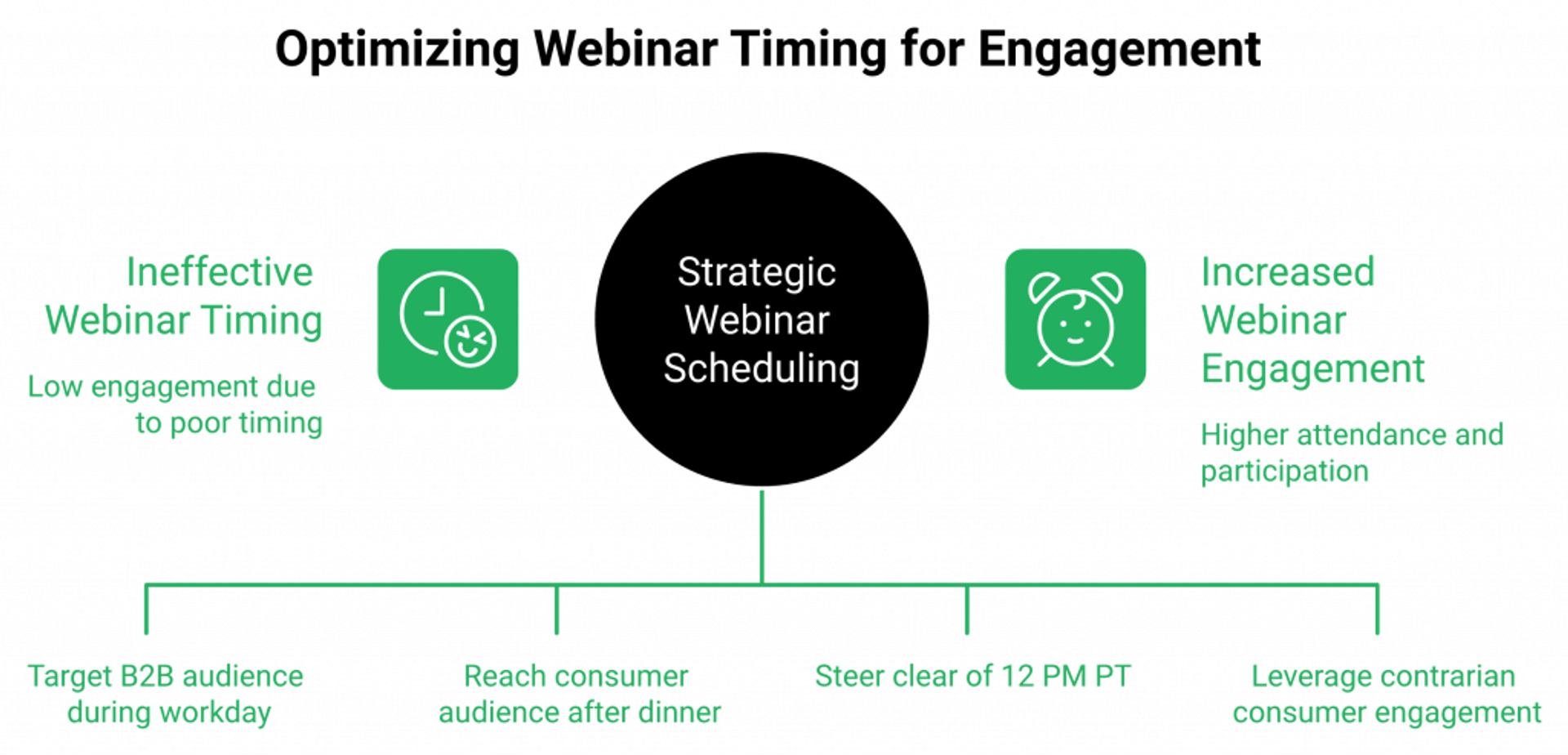
| Window | Pacific | Eastern | Best for |
|---|---|---|---|
| Morning golden hour | 8 AM | 11 AM | West Coast warm-up |
| ⭐ Midday golden hour | 11 AM | 2 PM | B2B, agencies, SaaS |
| Lunch slot | 9 AM | 12 PM | EdTech, nonprofits |
| Afternoon slump | 12 PM | 3 PM | ❌ Avoid |
| ⭐ Evening sweet spot | 5:30 PM | 8:30 PM | Coaches, courses, consumer |
ON24 still pegs 11 AM and 2 PM ET as their consistent winners across thousands of events. Jon Schumacher calls 11 AM PT (2 PM ET) the “golden hour” because it captures both coasts inside one US workday.
The 3 PM slump problem
Why midday breaks for consumer audiences
Here is the tension: 11 AM PT works for a B2B marketing director who lives in Slack. It does not work for a busy mom evaluating a $2,000 coaching program. She is making lunches at noon. She is on school pickup at 3 PM. She is not going to sit through a 60-minute webinar in the middle of her workday.
That is why 8:30 PM ET keeps winning for high-ticket coaching offers. After looking at thousands of webinar funnels, what jumps out is that consumer audiences convert at night, not midday. The same pattern shows up across our course creator case study (Carla Beisinger), where evening evergreen broadcasts compounded into a $5M funnel.
The payoff: match time to audience archetype
B2B versus consumer, the simple split
For B2B SaaS, agencies, and enterprise training: ⭐ Wednesday 11 AM PT.
For coaches, course creators, faith, health, and consumer audiences: ⭐ Tuesday or Thursday 8:30 PM ET, with Sunday 3 PM ET as a contrarian winner.
“I used to do live webinars to sell my online course. I decided to do an evergreen webinar instead using EasyWebinar. With my live class I used to sell 10-12 courses. With EasyWebinar I sold 25 courses within 3 weeks of my evergreen launch.”Laura C. EasyWebinar G2 Verified Review
I might be wrong on the exact half-hour, but the pattern is durable across coaching verticals: evening converts better than midday when the offer crosses $1,500.
Q4: How should you schedule a webinar for a global, multi-time-zone audience?
For US plus EU audiences, 11 AM ET (4 PM London) is the only window that respects both. For US plus APAC, you need two broadcasts, there is no single time that works. The cleaner 2026 answer: stop forcing one global time and use timezone-detected just-in-time scheduling, so each registrant sees a session start 15 minutes after they sign up.
The overlap windows that actually work
Where two regions can coexist
| Region pair | Best overlap window | What you sacrifice |
|---|---|---|
| US East + EU | 11 AM ET / 4 PM London | West Coast misses |
| US West + EU | 8 AM PT / 4 PM London | Tight for both |
| US + APAC | None | ⚠️ Run two broadcasts |
| EU + APAC | 9 AM London / 5 PM Singapore | Needs late EU prep |
The honest truth: there is no single time that respects US, EU, and APAC simultaneously. If you keep trying to find one, you will keep losing 30 to 40% of your registrants to “I forgot the time zone.”
Why dual-broadcast beats compromise time
Two broadcasts, one funnel
When I work with global SaaS teams, I push them to record once and rebroadcast twice. Same content, two simulated-live windows, one for AMER plus EMEA, one for APAC plus EMEA. Show-up rates lift by 25 to 40% versus a single compromise time. Our automated webinars guide walks through the multi-broadcast setup step by step.
“The drop down feature didn’t specify that the times were shown in their time zone which caused some confusion.”Trina P. Demio G2 Verified Review
That dropdown problem is the universal scheduling tax. Most webinar tools force the registrant to pick a date from a list, and 20 to 40% of intent leaks between the landing page and the confirmation. If that is your current pain, our EasyWebinar vs Demio comparison breaks down where the friction lives.
Just-in-time scheduling is the cleaner answer
How EasyWebinar handles the time-zone problem
We built our just-in-time scheduling to remove that dropdown entirely. A registrant lands on the page in Sydney, hits register, and sees “your session starts in 12 minutes,” in Sydney local time. ✅ No “select your date.” No mismatched calendars. The platform auto-detects time zone and starts a fresh session every 15 minutes, the same engine our AI funnel builder stitches into every new registration page it generates.
“I switched to EasyWebinar so I could allow the attendees to choose their time and work towards automation. It’s honestly a relief to know that we’ll be fully automated soon!”Verified User in Photography EasyWebinar G2 Verified Review
“I would like my registrants to be able to see their own time zone when they register on the plan that I am paying for. I think it’s important in improving the show-up rate.”Jennifer B. EasyWebinar G2 Verified Review
That second review is honest, time-zone display on the lower plan is a real gap, and we are working on it. The just-in-time tier handles it natively, and you can see the full feature breakdown on our webinar pricing page, but I will not pretend every plan does.
For a global audience, the playbook is simple: pick your two best regional broadcasts, then layer just-in-time on top for inbound traffic that cannot wait. Hours saved, registrants retained.
Q5: How long should a webinar be in 2026?
60 minutes is still the benchmark for warm B2B audiences and accounts for roughly 67% of all hosted webinars. For cold YouTube traffic, 30 to 40 minute just-in-time sessions (where a session starts every few minutes after registration) convert better because the viewer is already in lean-back mode. For high-ticket coaching offers, some 8-figure funnels run 90 minutes to 4 hours, the extra time absorbs every objection.
Why 60 minutes is still the default
The 67% rule
GoToWebinar’s data on tens of thousands of events still pegs 60 minutes as the dominant length, with around 67% of webinars hosted at that mark. BigMarker’s 2025-26 B2B benchmark backs that pacing up: warm audiences expect a 45-minute teach plus a 10-15 minute Q&A close.
I have run hundreds of these. The 60-minute slot earns trust without burning attention. ⏰ Anything shorter feels rushed. Anything longer needs a strong reason to exist. For a deeper breakdown on how length interacts with format, our piece on live webinars made easy walks through the pacing decisions session by session.
The cold-traffic exception
30 to 40 minutes for YouTube ads
When the traffic comes from a YouTube pre-roll ad, the viewer is already in lean-back mode. Pushing them to a 60-minute event is a tax. A 30 to 40 minute just-in-time session, where a fresh broadcast starts every 15 minutes after registration, converts better because the friction is smaller. Our automated webinar engine handles that scheduling natively.
I tested this with a coach running cold YouTube traffic last year. ✅ A 38-minute version beat his 60-minute version by 22% on registration-to-sale. Same script, just tighter.
The 4-hour anomaly and the over-value trap
When longer actually wins
A handful of 8-figure coaching webinars run 90 minutes to 4 hours. These are not for warm B2B. They are for high-ticket offers where every objection has to be answered live, in the room, before the buy button works.
The contrarian read most articles miss: “shorter is better” is a B2B rule that does not transfer to consumer coaching at $3K and up. There is something I call Time on Brand. Trust scales with total minutes consumed. An 11-second reel does not sell a $5K offer. If the offer is paid, our paid webinars setup keeps checkout inside the same session.
The over-value trap
Now, the warning. ⚠️ Long does not mean dense. If you cram a 4-hour webinar with eight frameworks and ten case studies, the audience leaves needing to “process” instead of buy.
Pacing matters more than length. I would rather watch a 90-minute webinar with two frameworks and one offer than a 4-hour firehose.
My current read
Pick the length that matches the offer and the traffic
Here is how I size it:
- Cold traffic (YouTube, paid social), offer under $500: 30 to 40 min ⭐
- Warm list, offer $500 to $3K: 60 min ⭐
- High-ticket coaching, offer $3K and up: 90 to 120 min
- Mastermind or signature program launch: 120 to 240 min, only if pacing earns it
The chef-baker case I keep coming back to ran a 60-minute live, hit $49K in two months, then ported the same recording into evergreen and just-in-time formats from a single setup. Same length. Three delivery modes. One offer. You can see the same pattern in our course creator case study (Carla Beisinger).
I could be off on the upper bound for B2B SaaS demos in 2027, but for now, 60 is the safe pick. Build live at 60. If the data says shorten or stretch, the data will tell you in the first three runs.
Q6: What’s the average webinar attendance rate, and what’s actually realistic for your audience?
Average live attendance dropped from 80 to 90% in 2018 to 35 to 50% for warm lists and 10 to 20% for cold traffic in 2026. Replays now capture 40 to 47% of total views, so on-demand has quietly become the bigger funnel. The metric that actually predicts revenue is not show-up rate, it is stick rate at minute 45, where the offer drops.
The 2026 benchmark table
What “average” actually looks like
| Audience type | Live show-up rate | Replay share of views | Stick rate at min 45 |
|---|---|---|---|
| Warm list (existing email subs) | 35-50% | 40-47% | 35-45% |
| Lukewarm (organic social) | 25-35% | 45-50% | 25-35% |
| Cold traffic (paid ads) | 10-20% | 50-55% | 15-25% |
| ⭐ Top-of-class warm (e.g., K21 Academy) | 47% | 35-40% | 50%+ |
Contrast’s 2026 benchmarks (built on more than one million registrants) anchor these numbers, and Univid’s 325,000-attendee dataset matches them within a few points. The full edtech case study (K21) walks through how K21 hit that 47% benchmark.
Why the 80% myth persists
Stale data in fresh decks
Every “average attendance rate” deck I see in 2026 still cites 2018 GoToWebinar numbers. Those numbers were real. The world they came from is not. ❌ Inboxes are louder. Calendars are tighter. Audiences are over-AI’d.
The honest 2026 read: 35 to 50% warm and 10 to 20% cold is the new normal. If your show-up sits at 25% on a warm list, you have a reminder cadence problem, not an industry-decline problem.
The metric that actually predicts revenue
Engagement-score x attendance-rate decision framework
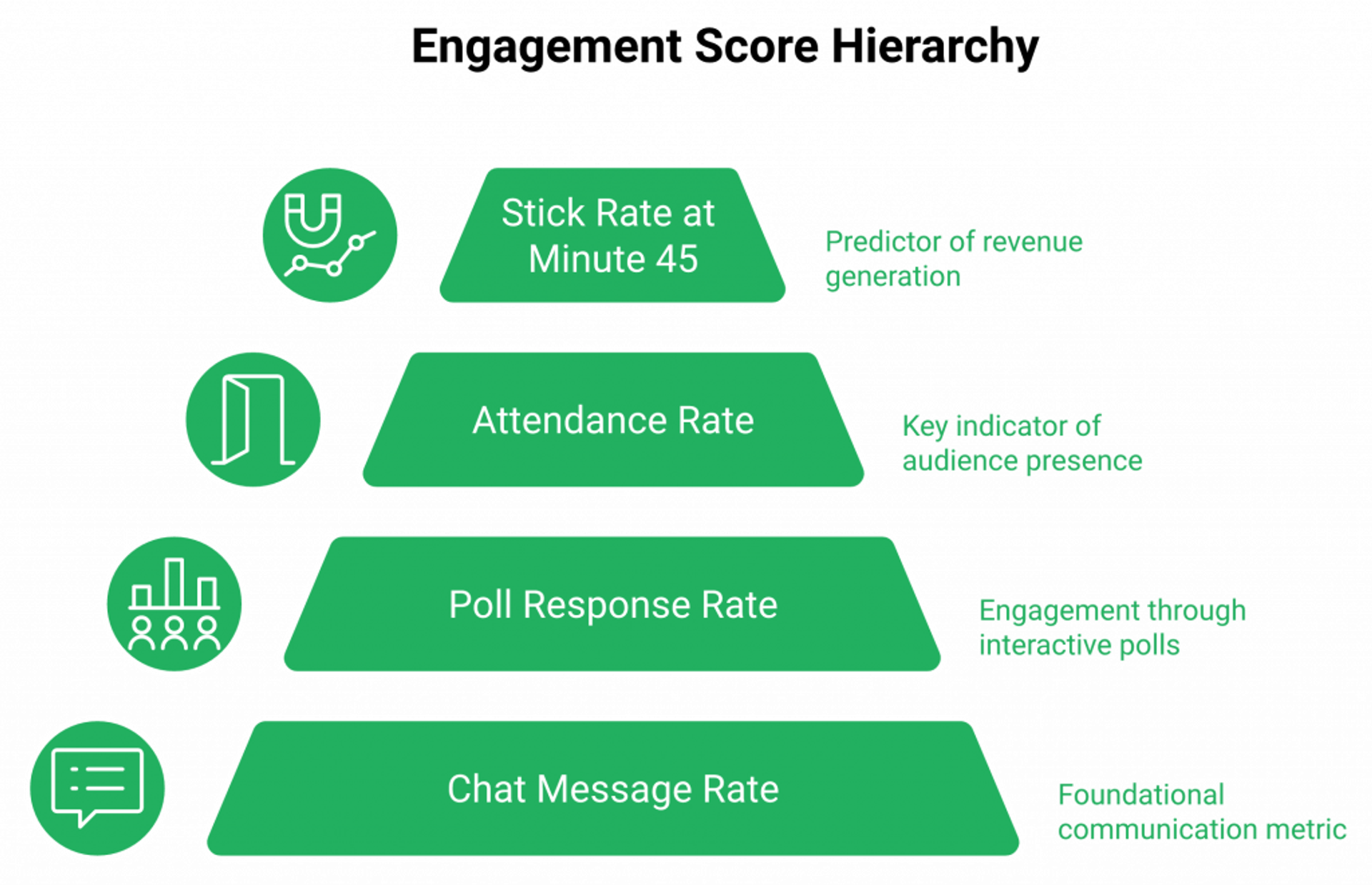
Show-up rate gets all the headlines. Stick rate at minute 45 (where the offer drops) decides revenue. ✅
Here is the framework I use with operators:
- Engagement score = (attendance % x 0.3) + (stick rate at min 45 x 0.4) + (poll response rate x 0.15) + (chat message rate x 0.15)
- Below 35: offer-message-audience fit is broken
- 35 to 55: average, fix the hook and the offer
- 55+: ⭐ ready to evergreen
Rick Mulready hit a 30% registration-to-sign-up rate from cold traffic by watching drop-off timestamps and adjusting the hooks each week, not by chasing the show-up number. Our interactive webinars that drive 5x engagement guide breaks down the engagement levers in detail.
The replay shift
Replays are the quiet 40 to 47% of total views now. Carla Biesinger’s $5M evergreen funnel was built on this exact insight: on-demand attendance compounds when live attendance plateaus. If you want the long-tail playbook, our best on-demand webinar software 2025 piece is the deeper read.
“I love that there are options for live webinars AND automated so you have options. Having built in emails is great so you can send immediately to those who attended and those who didn’t.”Verified User in Photography EasyWebinar G2 Verified Review
“Easy to set up live or evergreen webinars, including replay options, splits out live and replay attendee insights for evergreen webinars.”Verified User in Professional Training & Coaching EasyWebinar G2 Verified Review
That second review (4.5 stars) is honest about why split insights matter: live and replay are different funnels, and you cannot diagnose either without separate dashboards.
Q7: Should you host live, simulated live, or just-in-time evergreen, and how does that change the “best time” answer?
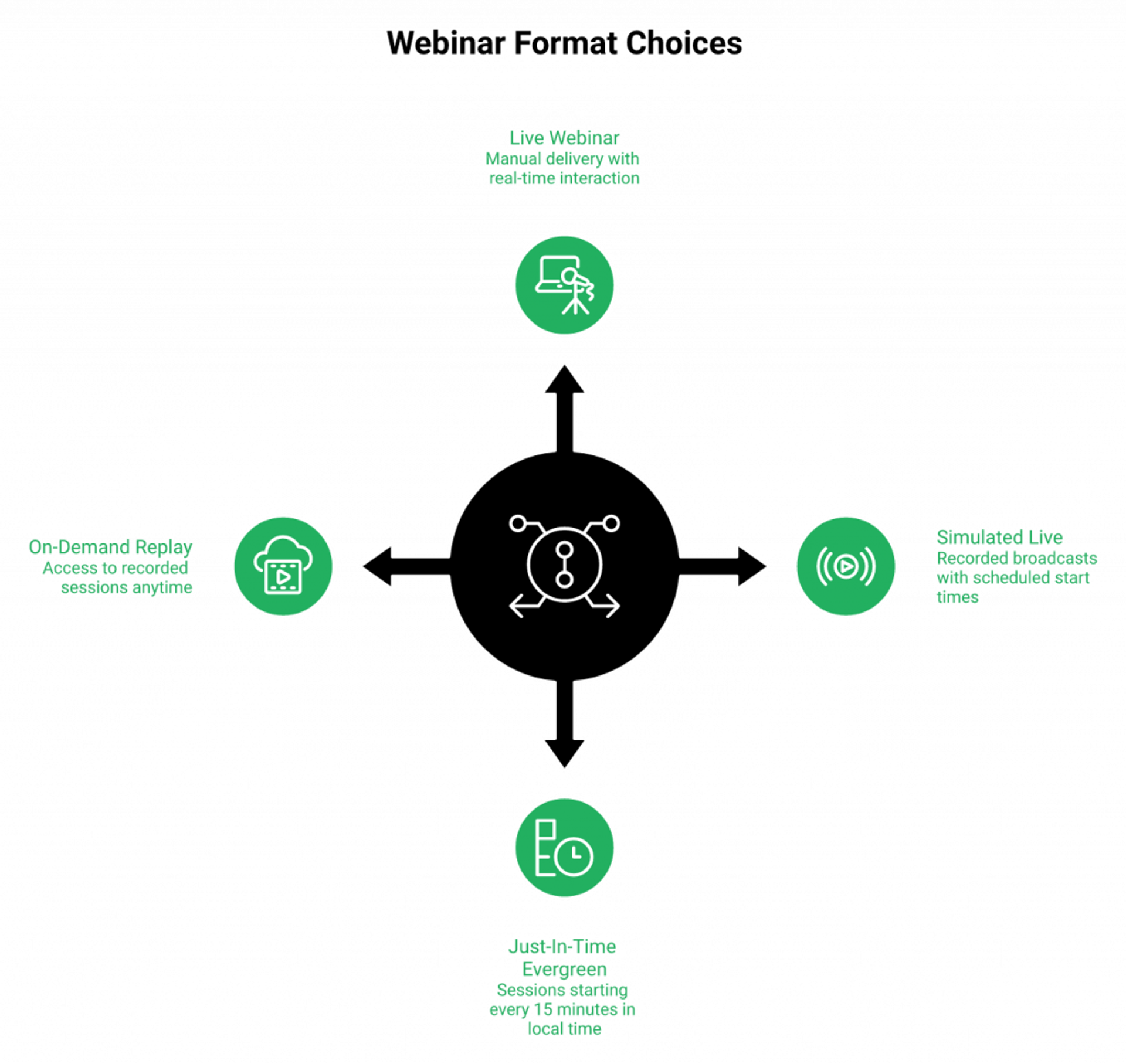
If you host live, you are stuck with the calendar, pick Wednesday 11 AM PT. If you run simulated live (a recorded session that broadcasts on a recurring schedule), broadcast the same recording at three optimized times daily. If you use just-in-time evergreen (a session that starts within minutes of registration), the question dissolves: a session starts every 15 minutes in the attendee’s local time. The right choice depends on whether you have more time or more money.
The human capital versus capital framework
More time than money? Run live
If you are a solo coach with empty mornings and a hungry pipeline, run live every Wednesday at 11 AM PT until the offer-message-audience fit clicks. Our live webinar software is built around that weekly validation loop.
More money than time? Run automated
If you are running paid ads and your time is the bottleneck, run simulated live or just-in-time. The platform handles the calendar. You handle the offer 💰.
The format-by-format matrix
| Format | Scheduling logic | Best use case | Tradeoff |
|---|---|---|---|
| ⭐ Live | One calendar slot, manual delivery | Validation, high-ticket launches | Burns presenter hours |
| ⭐ Simulated live | 2-3 daily broadcasts of one recording | Warm-list scaling | Needs nailed live first |
| ⭐ Just-in-time evergreen | Sessions start every 15 min in local time | Cold paid traffic | Premium tier on most plans |
| On-demand replay | Plays whenever, no countdown | Long-tail SEO traffic | Lower stick rate |
The Webinar Sprint method I teach: run 5 to 10 live sessions, find the winner, then convert that recording into simulated live and just-in-time from a single setup. Our automated webinars for passive income guide spells out the conversion mechanics.
The “Live Room” psychology
Why no-pause-no-rewind keeps stick rate high
This is the part most articles get backwards. The standard read says evergreen converts worse because “people know it is recorded.” That is wrong.
Evergreen converts as well as live when the player removes the pause and rewind buttons. The viewer is forced into presence, the same way they would be in a live room. ✅ Stick rate at minute 45 stays inside live’s range, often within 3 to 5 percentage points. For a head-to-head walkthrough, our pre-recorded webinar platforms vs live comparison digs into the player mechanics.
“I used to do live webinars to sell my online course. With my live class I used to sell 10-12 courses. With EasyWebinar I sold 25 courses within 3 weeks of my evergreen launch.”Laura C. EasyWebinar G2 Verified Review
“Setting up evergreen webinars is so simple that we’ve used several so far. We’ve seen such a fantastic return on investment after implementing a sales strategy that uses evergreen webinars.”Meaghan L. EasyWebinar G2 Verified Review
“The only downside is that to have the just in time feature you have to pay a premium that is about double the price of the basic subscription. However, it has been worth it for me to invest in that.”Laura C. EasyWebinar G2 Verified Review
That third quote is honest. Just-in-time sits on the higher tier. For cold paid traffic, the math usually works because cost-per-attendee drops when the registrant lands inside a session within minutes 💸. You can size the tiers on our webinar pricing page.
My current call
Nail it live first. Then automate. Never the other way around.
Q8: What’s the best day and time for your specific industry, coaches, B2B SaaS, agencies, or course creators?
B2B SaaS converts best Wednesday 11 AM PT. High-ticket coaching wins on Tuesday or Thursday at 8:30 PM ET, with Sunday 3 to 5 PM ET as a contrarian consumer slot that beats Monday entirely. Course creators in fitness or faith verticals see 30%+ lifts on weekend evenings. Agencies and EdTech land their highest show-ups at 12 PM ET lunchtime broadcasts.
The industry-by-industry matrix
| Industry | ⭐ Primary slot | Secondary slot | Why it works |
|---|---|---|---|
| B2B SaaS | Wed 11 AM PT | Thu 11 AM PT | Workday overlap |
| Agencies | Wed 12 PM ET | Tue 11 AM PT | Lunch decision window |
| EdTech | Tue 12 PM ET | Thu 12 PM ET | Lunch + pre-class |
| ⭐ High-ticket coaching | Tue/Thu 8:30 PM ET | Sun 3-5 PM ET | After-hours buy mode |
| Course creators (fitness, faith, health) | Sun 3 PM ET or Tue 8 PM ET | Wed 8 PM ET | Weekend planning energy |
| Real estate | Tue 7 PM ET | Sat 11 AM ET | Home-buying mindset window |
| Enterprise training | Wed 10 AM ET | Thu 2 PM ET | Workday respect window |
B2B SaaS, agencies, and EdTech
Why midweek midday wins
B2B audiences live on workday calendars. Wednesday 11 AM PT (2 PM ET) is the only window that respects both coasts inside the same workday. Agencies tilt slightly later, lunchtime, because the decision-maker is looking for a “smart watch” between meetings. Our EasyWebinar + GoHighLevel for agencies piece walks through agency-specific funnel stacking.
EdTech is its own animal. Lunchtime works because instructors and admins use 12 PM ET as their planning window. ✅
Coaches, course creators, and consumer verticals
Why evening and weekend slots win
High-ticket coaching audiences are not making $3K decisions on a Tuesday at 2 PM. They are making them after dinner, after kids are down, after the workday distractions are gone. 8:30 PM ET is the sweet spot. Our webinars to sell online courses effectively guide breaks down the consumer-evening playbook.
Faith-vertical creators see Wednesday-evening anomalies tied to mid-week service rhythms. Health and fitness coaches lift 25 to 35% on weekend evenings because the audience is in “next-week planning” mode. The wellness case study (Dr. Fryer) shows that pattern at scale.
The contrarian “Sunday wins” finding
This one surprises operators every time. ⭐ Sunday 3 to 5 PM ET beats Monday across most consumer verticals. The audience is mentally prepping for the week, the kids are occupied, and the workday has not started yet.
“If you’re going to actually watch a webinar, what time should it be? In our experience 12 PM ET works best, but Sunday 3 to 5 PM ET surprised us in Q4.”Operator thread, r/nonprofit Reddit Thread
“EasyWebinar gives me the ability to multiply my efforts and offer a human touch, without having to be everywhere at once.”Ash A. EasyWebinar G2 Verified Review
“I’ve been going live every month since 2020 and I’m exhausted. I feel like I have had a big sigh of relief since signing up and I can see the end in sight!”Verified User in Photography EasyWebinar G2 Verified Review
How I would test it
The pickleball lesson
A pickleball-course customer hit $200K running Sunday 4 PM ET sessions, after starting on Tuesday lunch with no traction. Same offer. Same script. Different slot. ⭐ Real estate operators see a similar pattern in our real estate webinars in 2026 piece.
I might be wrong about the exact 30-minute mark for your audience, but the row your industry sits in usually beats the industry-average advice you will find on the first page of Google.
Q9: What email, SMS, and replay-window cadence makes the time you chose actually pay off?
A 12 to 14 email indoctrination over 10 to 14 days plus 5 to 8 SMS reminders in the final 72 hours lifts show-up from 15 to 20% to 35 to 50%. Front-load 60% of promotion volume into the final three days. Then close the replay window at 72 hours, longer windows train your audience to procrastinate and never watch live.
The pre-webinar email cadence
D-14 to D-0, what to send and when
The slot you picked only pays off if registrants actually show up. Here is the cadence I run with operators every quarter:
| Day | Send type | Purpose |
|---|---|---|
| D-14 | Soft announce | Plant the topic, name the pain |
| D-10 | Story email | Personal hook, no pitch |
| D-7 | Value-first proof | Mini-lesson, builds trust |
| D-5 | Objection-bust | “Why now” framing |
| D-3 | ⭐ Front-load begins | Reminder + value |
| D-2 | Case study email | Named customer outcome |
| D-1 | Final reminder | Add-to-calendar nudge ⏰ |
| D-0 (3 hr before) | “Starts soon” | One-line, one link |
| D-0 (15 min before) | “Joining now” | Last-call urgency ✅ |
Frequently Asked Questions

Casey Zeman
Founder of EasyWebinar
About Author
Over the past decade, I've helped thousands of entrepreneurs, coaches, and consultants turn webinars into a predictable, powerful way to grow their audience, build trust, and scale, without the constant hustle. I created EasyWebinar because I couldn't find a system that combined authenticity, engagement, and automation the way I needed. So, I built one.
Related Posts

10 Best Community Engagement Platforms in 2026
Compare the 10 best community engagement platforms in 2026. Course creators, evaluate live hosting, analytics, and replay to pick your winner today.
10 Best Online Coaching Tools in 2026: Live Session Quality, Scheduling, Recording, and Client Engagement Analytics
Compare the 10 best online coaching tools of 2026 on session quality, scheduling, and analytics. Discover the right fit for your coaching revenue model.
10 Best Webinar Hosting Platforms Ranked by Uptime, Streaming Quality & Cost
Compare 10 webinar hosting platforms ranked by uptime, streaming quality, and cost. Discover which tool actually turns attendees into revenue.
Turn every webinar into a revenue stream
Launch your first paid event in just a few clicks - and start monetizing your expertise.
Book a Call