Webinar CRM vs Traditional CRM: What Changes When Engagement Data Becomes Part of the Workflow?

Casey Zeman
Published on Jun 24, 2026 • 10 min read
TL;DR
- A webinar CRM routes engagement data (watch-time, CTA clicks, poll answers, UTM source) into each lead record automatically, while a traditional CRM stores static fields someone updates by hand.
- Show rates and cost-per-lead feel random mostly because tech breaks silently; a mobile button that fails or a Zapier task cap can drop opt-ins with no alert.
- Engagement data only matters when it changes action: call buy-button clickers first, send 70% watchers the offer they missed, branch follow-up by behavior.
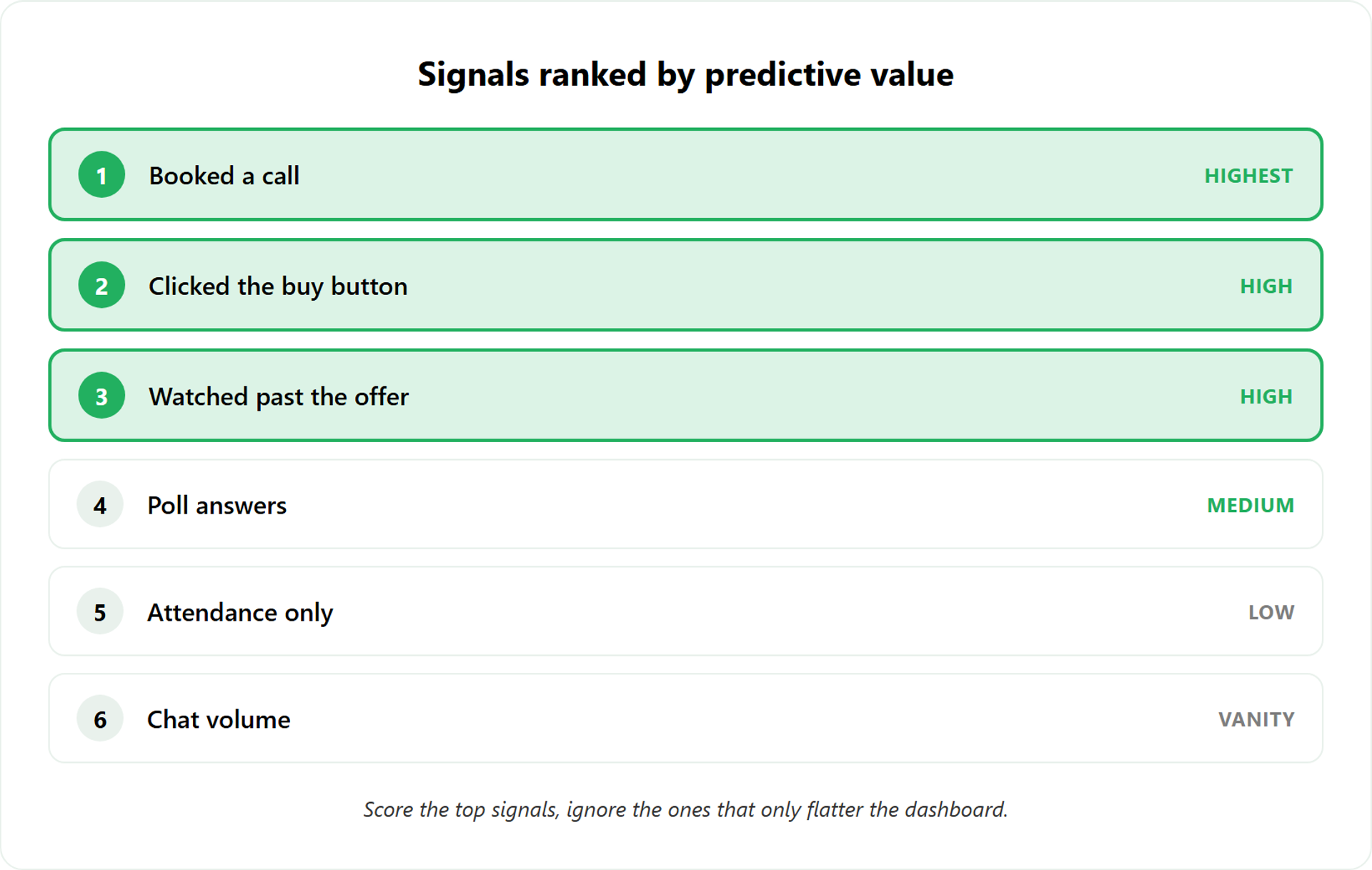
- Not all engagement predicts revenue; CTA clicks, watch-past-offer, and call-bookings score high, while chat volume and raw attendance mostly flatter the dashboard.
- Native sync passes deep, real-time data; Zapier relays are capped by task limits and fail silently, so pressure-test the chain before spending on traffic.
- Choose a traditional CRM for relationship-led, long-cycle deals; choose a webinar CRM when webinars drive revenue and follow-up speed decides the close.
Q1. What is a webinar CRM, and how is it different from a traditional CRM?
A webinar CRM is a contact system where engagement data, registration, attendance, watch-time percentage, in-event CTA clicks, poll and chat activity, replay views, and UTM source, flows into each lead record automatically and triggers action. A traditional CRM stores static fields someone updates by hand. The difference isn’t the database. It’s that behavior, not a rep’s memory, decides who’s hot.
🎯 The category nobody named correctly
Last week, a coach told me she “had a CRM for her webinars.” She meant a contact list with names and emails. That’s the gap I want to close.
Most people hear “webinar CRM” and picture a regular CRM with a webinar plug bolted on. I read it the other way around. The real unit of value isn’t the contact. It’s the action that contact took inside the room.
I could be off on the label. The mechanic, though, I’ve watched play out across thousands of automated webinar funnels.
📊 Same person, two very different records
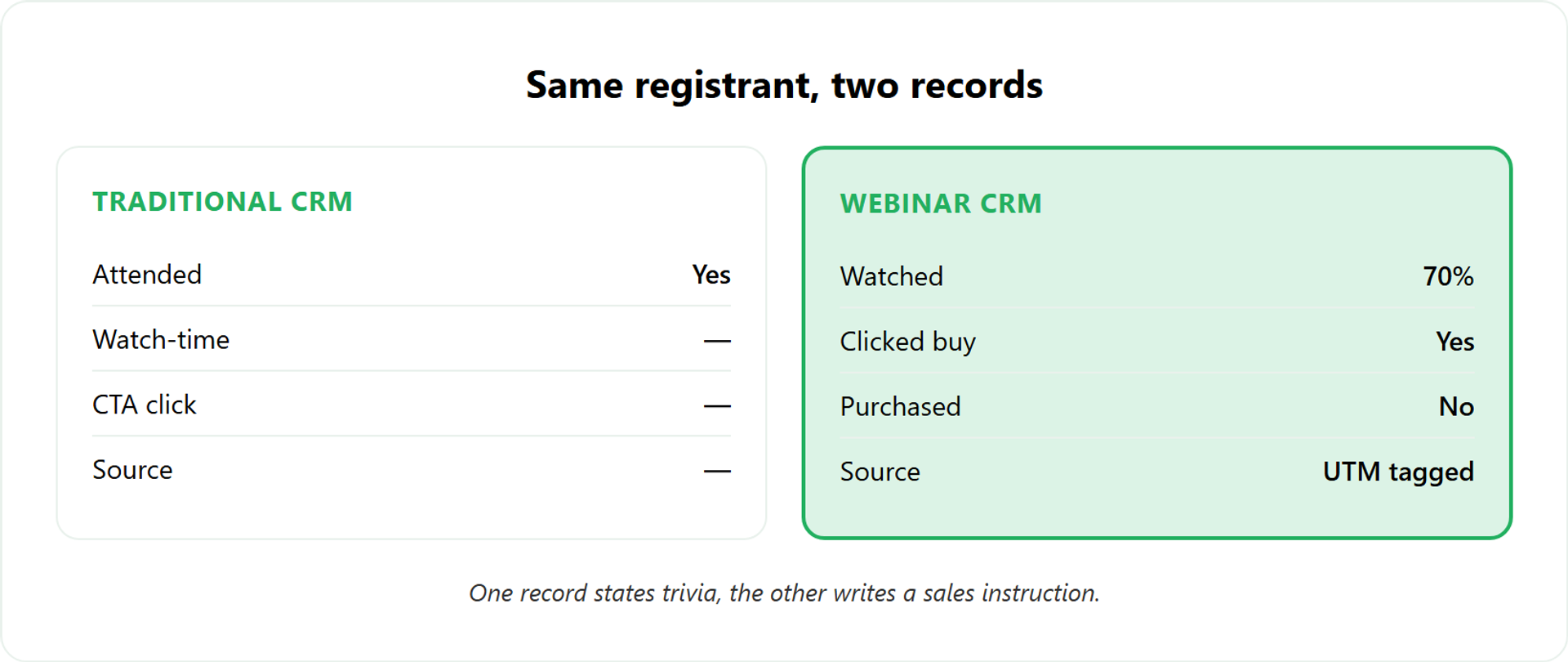
Picture one registrant, Maria, in both systems on the same Wednesday.
In a traditional CRM, Maria’s record says one thing after the event: “Attended: yes.” That’s it. A human has to log anything more.
In a webinar CRM, Maria’s record fills itself in. Here’s the data that lands on her record automatically:
- ✅ Registration source and UTM tag (which ad or email sent her)
- ✅ Attended live, joined late, or watched the replay
- ✅ Watch-time percentage (she watched 70%, then left)
- ✅ Every poll answer she submitted
- ✅ Chat and Q&A activity
- ✅ Whether she clicked the buy button (she did, but didn’t finish)
That last line changes everything. “Watched 70%, clicked buy, didn’t purchase” is a sales instruction. “Attended: yes” is trivia.
I’ll be blunt about a trap here. Engagement data is not money. As I tell operators, engagement ain’t cash. It only matters when it changes what you do next.
⏰ Why behavior tells you who to call first
Here’s the Monday-morning payoff. With a traditional CRM, you treat 95 attendees as one blob and blast one email. With a webinar CRM, you call the buy-button clicker first, today, while the webinar is still fresh in her mind.
You stop guessing. The record already ranked your leads by what they did.
“I was having a hard time finding a webinar platform that could do everything I wanted, instant replays, plus scheduled times, my own custom thank you page, and all the tagging to understand viewing metrics. The new EasyWebinar 2.0 does all of that.”
Verified User in Accounting EasyWebinar G2 Verified Review
That tagging layer is the point. EasyWebinar exposes this engagement data natively in its webinar analytics features and CSV export, so the behavioral signal exists before any downstream sales CRM ever sees it.
Q2. Why do show rates, cost-per-lead, and booking rates feel so random, and is your CRM the problem?
Your numbers feel random because the model was never stress-tested, and because tech breaks silently. A mobile registration button that quietly fails, or a sync that drops opt-ins, can nuke your cost-per-lead with no error message. A traditional CRM won’t warn you. The fix isn’t a fancier CRM. It’s putting engagement data where you can see the discrepancy before the webinar starts.
💸 The stats that swing for no reason you can name
I’ve sat beside operators staring at a dashboard, asking why last month’s cost-per-lead doubled. Same offer. Same ad. Wildly different result.
Here’s the hard part. For an ice-cold audience, 10 to 15% show rate is the bottom of the barrel you should expect. So some swing is normal. But “all over the place” usually isn’t the audience. It’s something breaking quietly underneath.
I lost my job back in the recession and made $15,000 the next year. I almost lost my house. I learned to respect every dollar of ad spend, because mine was painfully finite.
⚠️ Tech breaks, and it doesn’t tell you
This is the part that keeps me up. The failures that hurt most are the silent ones.
A registration button that doesn’t fire on mobile. A confirmation email that lands in spam. None of it throws an error. You just watch your cost-per-lead climb and you blame the algorithm. The right move is a clean webinar setup and host preparation before you spend.
Operators feel this. Here’s one describing the same silent-failure pain on another platform:
“GoToWebinar is the most basic webinar tool that offers nothing more than any other tool. None of my speakers had the option to turn on their webcam. I had to solve my own ticket.”
Forrester S. GoTo Webinar G2 Verified Review
✅ The four-hour save
Here’s a real one from our own team. Our Zapier account hit its task limit. We caught it four hours before a webinar.
When we looked, there were a couple hundred opt-ins sitting in the webinar that never reached the CRM. No alert. No flag. We only caught it because someone went to check the tech.
That’s the lesson. 30% of a massive number is amazing. 30% of zero is nothing. If your front-end data is broken, a fancier CRM optimizes leads that never arrived.
🔍 Visibility beats features
The fix isn’t more CRM. It’s seeing the discrepancy before you spend on traffic.
This is why we built our automated webinar platform to surface opt-in counts and engagement in real time, so the gap shows up on your screen, not in your bank statement after the launch. You can read more on lifting these numbers in our guide to tools that increase webinar engagement.
Q3. What changes in your daily workflow when engagement data becomes part of the record?
When engagement data lives in the record, follow-up stops being one blast and becomes branching by behavior. Someone who clicked buy but didn’t purchase gets a different sequence than someone who watched 70% and left. You stop guessing who’s warm. You tag the in-event button-clickers as your hottest leads and change the offer or hook based on where people actually drop off, not on a hunch.
🔁 From one broadcast to branching
The old way is one email to everyone who registered. The new way routes people by what they did in the room.
Tag everyone who clicks a button inside the webinar. They’re much warmer leads, full stop.
📩 Two people, two completely different emails
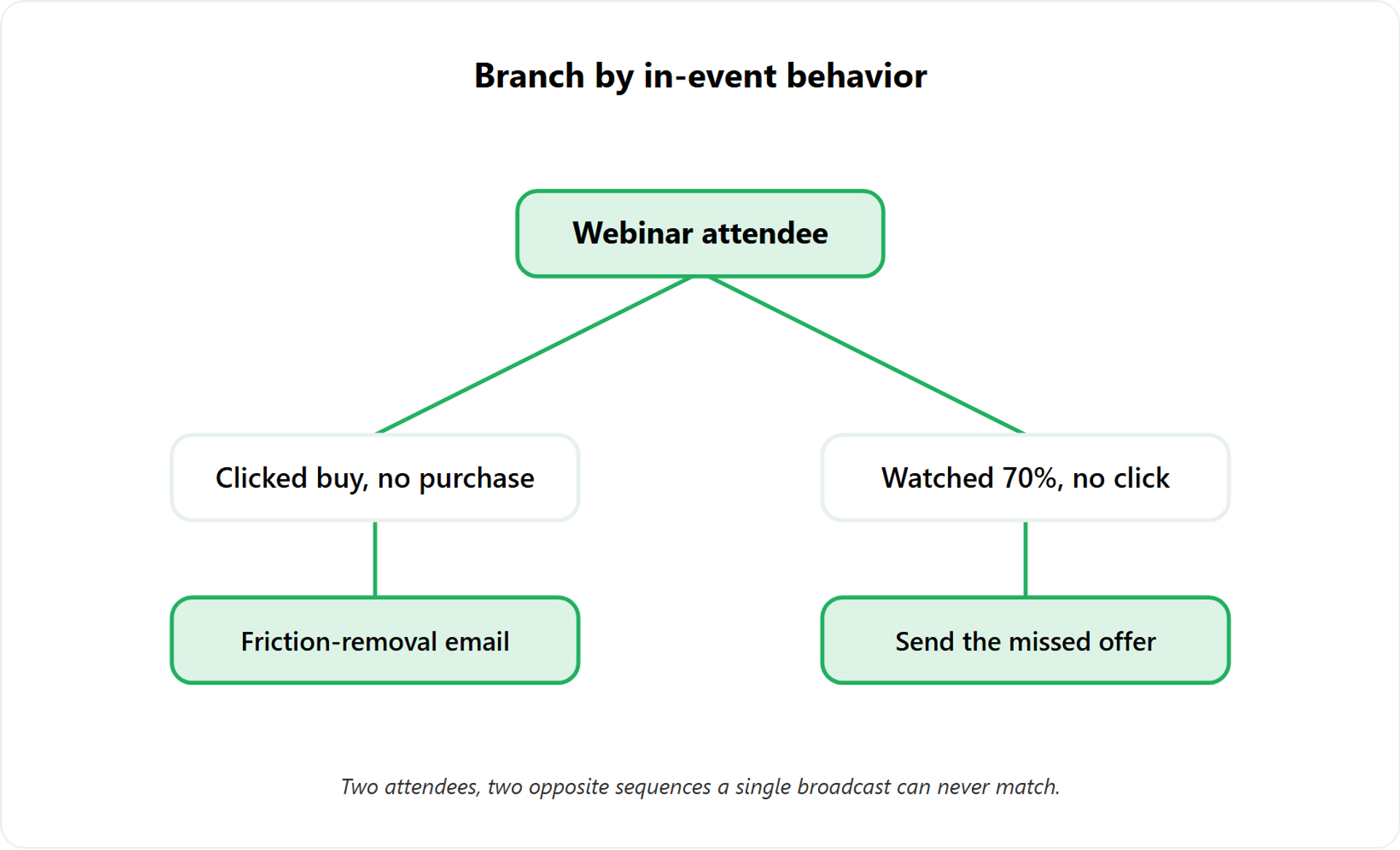
Take two attendees. One clicked the buy button but didn’t complete the purchase. The other watched 70% and left before the offer.
These people need opposite sequences. The buy-button abandoner needs friction removed, a payment-plan reminder, maybe a quick objection-handler. The 70% watcher never saw the pitch, so she needs the offer, not a checkout nudge.
A traditional CRM can’t tell them apart. A webinar CRM already did. Here’s how the daily work shifts:
| Workflow step | Traditional CRM | Engagement-Data-Native workflow |
|---|---|---|
| Lead routing | One list, manual sorting | Auto-sorted by in-event action |
| Scoring trigger | Rep updates by hand | Watch-time and CTA clicks score automatically |
| Follow-up timing | Same email, same day | Branched sequence per behavior |
| Attribution | Guesswork on source | UTM tied to the record |
📈 The Rick Mulready drop-off fix
A specialist operator I know, Rick Mulready, noticed people weren’t staying on his webinar as long as before. His old stats were better.
Because the data was visible, he went back and made changes to the spots where people left. That percentage greatly increased afterward. He didn’t guess. He read the drop-off and fixed the exact moment.
Here’s my “we got this wrong” moment. Years back, my team built what we called the monster funnel, emails branching off emails, segmentation everywhere. It took us months. It didn’t work very well. Complexity isn’t the same as a smart workflow.
🛠️ A three-tag starter system
Start simple on Monday:
- Clicked buy, no purchase → friction-removal sequence
- Watched past 50%, no click → send the offer they missed
- Registered, no-show → replay invite with a deadline
Our live webinar software and follow-up automation branch sequences on these in-event actions, which is the exact workflow this section describes. If you want the foundations first, start with what a webinar is and how it grows businesses.
Q4. Do you even need a CRM for webinars, or is that an upsell?
Honestly, it depends on your model. For a lean operator with a simple offer, tags and a notes app can carry you further than vendors admit. But once you’re booking calls at volume and chasing high-ticket closes, you need a sales CRM to organize leads, auto-dial, and project-manage follow-up. Otherwise warm leads rot while your stats stay all over the place. The trap is buying CRM weight you don’t yet need.
⚖️ Here’s the line I draw
The standard pitch says everyone needs a CRM yesterday. I think that gets it backwards for early operators. The honest answer sits on one question: are you booking sales calls at volume, or selling a self-serve offer?
I’ll give you both of my real positions, because I hold both depending on the model.
❌ The minimalist case
For a lot of operators, you don’t need a CRM. It’s unnecessary for the model. Gmail labels and a notes app will do.
I know creators who run this lean on purpose. One peer, Christian Sessom, just removes labels as a lead moves through each stage. For socials especially, a note with names is plenty. The money is in the follow-up happening, not in the software it happens inside.
If you’re selling a sub-$200 product, a full CRM is usually overkill. The webinar doesn’t even need to carry that much machinery. For pricing that does justify a webinar, see how to make money with webinars and 4X your revenue.
💰 The scale case
Now flip it. You’re booking discovery calls and closing high-ticket. Suddenly the notes app collapses.
Here you need a sales CRM on the back end. It project-manages your leads, organizes who to reach next, and lets you auto-dial so you actually close more deals. One sales webinar can replace 6 sales reps, but only if the leads it produces get worked fast.
Operators feel the pain when a tool can’t hold this:
“I used Demio to run a webinar and collected registrant emails while on a paid plan. After canceling, I couldn’t export the list unless I subscribed again.”
Sheida M. Demio G2 Verified Review
“It also seamlessly integrated with our CRM. We have run close to 30 since we started running it this new year, and it has been a game changer for our business.”
Darrin B. EasyWebinar G2 Verified Review
🎯 The decision rule
So, my read right now. Map it to call volume and ticket size.
- Self-serve, under $200, low volume → tags and a notes app
- High-ticket, calls at volume → a real sales CRM with auto-dial
For that second group, we built a sales CRM with auto-dial into the platform, so you’re not bolting on a second tool the day call volume hits. You can compare EasyWebinar and Demio or request a demo to see the workflow before you commit.
Q5. Native sync or Zapier? How webinar data reaches your CRM, and where it silently breaks
Native integrations pass engagement data through a direct connection with custom field mapping and usually real-time sync. Zapier and Make relay it through third-party automations bound by task limits that can drop records without warning. Native is sturdier at volume. Before you spend on traffic, pressure-test it: send test registrations, reconcile opt-in counts, confirm tags land on the right fields, and check the mobile button on a real phone.
🔌 Native versus relay, in plain terms
Two roads carry webinar data to your CRM. A native integration is a direct pipe built by the platform itself.
A relay tool, like Zapier or Make, sits in the middle and passes data along. It works, but it depends on a monthly task budget you can quietly blow through. Strong native webinar integrations avoid that fragility.
Here’s the difference that bites at volume:
Frequently Asked Questions

Casey Zeman
Founder of EasyWebinar
About Author
Over the past decade, I've helped thousands of entrepreneurs, coaches, and consultants turn webinars into a predictable, powerful way to grow their audience, build trust, and scale, without the constant hustle. I created EasyWebinar because I couldn't find a system that combined authenticity, engagement, and automation the way I needed. So, I built one.
Related Posts

10 Best Community Engagement Platforms in 2026
Compare the 10 best community engagement platforms in 2026. Course creators, evaluate live hosting, analytics, and replay to pick your winner today.

10 Best Online Coaching Tools in 2026: Live Session Quality, Scheduling, Recording, and Client Engagement Analytics
Compare the 10 best online coaching tools of 2026 on session quality, scheduling, and analytics. Discover the right fit for your coaching revenue model.

10 Best Webinar Hosting Platforms Ranked by Uptime, Streaming Quality & Cost
Compare 10 webinar hosting platforms ranked by uptime, streaming quality, and cost. Discover which tool actually turns attendees into revenue.
Turn every webinar into a revenue stream
Launch your first paid event in just a few clicks - and start monetizing your expertise.
Book a Call