How to Create a Webinar: Step-by-Step Setup Guide

Casey Zeman
Published on May 30, 2026 • 28 min read
TL;DR
- Creating a webinar in 2026 takes 7 ordered moves: profile the avatar, pick the format, lock the offer, build the page and emails, assemble the script, dry run, and go live.
- Live first, simulated live (JIT every 15 min) second, pure evergreen only after hitting 10% live conversion three times in a row.
- Stack 12 to 14 pre-event emails, send the first replay email within 24 hours, and cap the replay window at 72 hours for real FOMO.
- Behavioral follow-up beats blanket sequences: hot leads get an auto-dialer call within 10 minutes, warm leads enter nurture, and nurture leads get long-cycle content.
- The right platform replaces a $600 to $1,000/month Zoom + ClickFunnels + HubSpot + Zapier + Stripe stack with one native engine: live + simulated live + evergreen + AI Builder + CRM + multistream.
- Real proof: Carla Biesinger built a $5M evergreen funnel, K21 pushed show-up rate from 28% to 47%, and a chef-baker did $49K in two months on the same architecture.
Q1: How do you create a webinar in 2026, the 7-step setup at a glance?
The 7 moves, in order
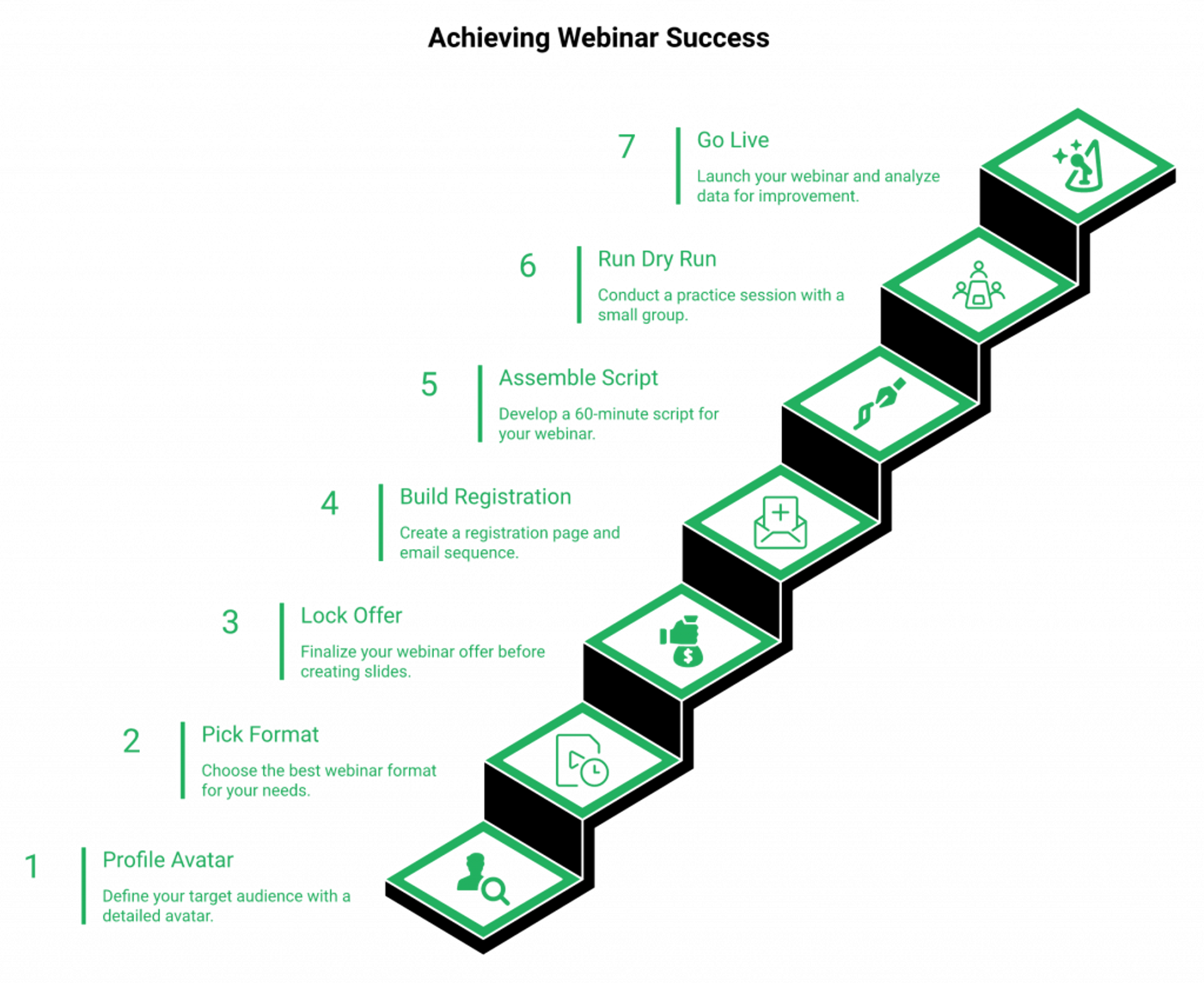
Creating a webinar in 2026 takes seven moves: (1) profile your 7-element customer avatar, (2) pick your format (live, simulated live, or evergreen), (3) lock the offer before the slides, (4) build the registration page plus a 12-email sequence, (5) assemble (don’t write) a 60-minute script, (6) run a dry run, and (7) go live before you ever automate. Speed beats polish. Fluid presenters out-convert pretty ones.
Here’s the ordered list a busy operator can save and start Monday morning:
- ✅ Profile the avatar (demographics, pains, fears, goals, values, objections, and buying triggers).
- ✅ Pick the format based on where you are, not where you wish you were.
- ✅ Lock the offer so the back-end math works before you build slides.
- ✅ Build the registration page and 12-email sequence in one sitting.
- ✅ Assemble the script from proven blocks, not a blank page.
- ⏰ Dry run with three to five real humans seven days out.
- 💰 Go live, then iterate on data, not vibes.
Why most operators stall at step three
The pain I see weekly is what I call tech overwhelm. Coaches and B2B marketers open a tab for the webinar platform, a tab for the page builder, a tab for the email tool, and a tab for the CRM. Six weeks later, nothing has shipped.
What ships, sells
The payoff lives inside a simple 4-step funnel: Ad, Registration Page, Webinar, and Call to Action. That’s it. When I ran my first one during the recession after a $15K year, I built a list of 14,000 emails and did $245K in course sales. I did not have a “perfect” webinar. I had a fluid one that solved problems live. You’re one sales live webinar software away from having it all.
Q2: What do you lock in before you ever touch a webinar platform?
The pre-platform foundation
Before logging into any tool, lock three things: a 7-element customer avatar (demographics, pains, fears, goals, values, objections, and buying triggers), the back-end offer that pays for your ad spend, and a validated topic. Run one no-pitch session first. If attendees ask “how can I buy?”, you’ve validated. An automated webinar without traffic and a tested offer is a billboard in the desert.
The 7-element avatar (the part most operators skip)
The avatar is not a marketing exercise. It’s a setup requirement. Without it, your slides drift and your offer feels generic. Here are the seven elements I have coaches fill in before they touch a registration page:
- Demographics: age, role, and income band.
- Pains: the Monday-morning friction.
- Fears: the unspoken worst-case in their head.
- Goals: what success looks like in 90 days.
- Values: what they’d never compromise on.
- Objections: the three reasons they’ll stall.
- Buying triggers: the moment they reach for a card.
Carla Biesinger built a $5M evergreen funnel on a tightly profiled course creator case study (Carla Beisinger) avatar before she touched a platform.
The math of ad spend
⚠️ Your back-end offer, not the ad budget, decides if this is profitable. If your offer is $497 and your cost-per-registrant is $20, you need a 4% close to break even. If your offer is $5,000 and you redirect to a sales call, the math forgives a 1% close. Fix the offer first.
The no-pitch validation test
Run one session with zero offer. Just teach. If three to five attendees ask how to work with you afterwards, the topic is validated for automation. If silence, change the hook before you change the platform. The standard read gets this backwards. People build for six weeks, then validate. Reverse it. For a deeper walkthrough, see how to create an ideal customer avatar.
Q3: Live, simulated live, or evergreen, which webinar format should you actually build?
The format decision in one paragraph
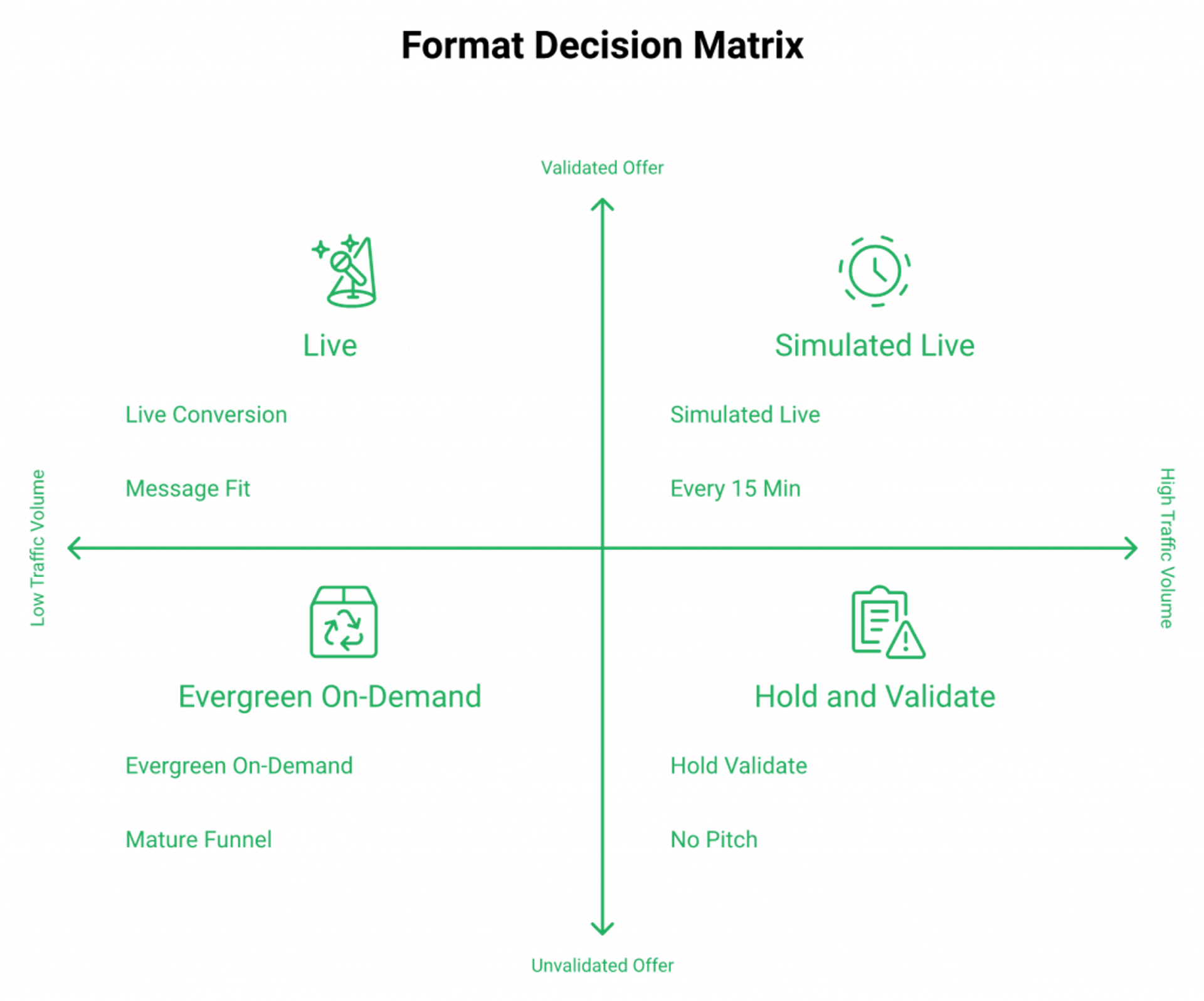
Build live first. Run 5 to 10 live sessions to refine the message, then graduate to simulated live (Just-in-Time sessions starting every 15 minutes for “live room” urgency), and only move to pure evergreen once you hit 10% live conversion. Automating a failing webinar helps you fail faster. And dropdown date scheduling kills the momentum that makes simulated live convert.
The decision matrix
| Format | Best for | Drawback | EasyWebinar advantage |
|---|---|---|---|
| Simulated Live (JIT) ⭐ | Coaches and course creators wanting “starts in 5 minutes” urgency without showing up live | Requires a recorded session that already converts | Native JIT scheduling every 15 minutes, no Zapier, and no dropdown menus |
| Live | Validation, message-testing, and list-building from zero | You have to show up, every time | Toggle one setup between live and automated webinar without rebuilding |
| Evergreen On-Demand | Mature funnels with steady ad traffic | No urgency, lower stick rate | Behavioral follow-up tied to watch position |
The Webinar Sprint Method
I tell every operator the same thing: run 5 to 10 live webinars before you automate. That’s the sprint. You’re not optimizing slides. You’re testing the offer-to-message-to-audience fit. Once your live webinar hits 10% conversion three times in a row, then automate. Not before. Read more on automated webinars for passive income.
Why dropdown scheduling kills conversion
The integrity rule: never say it’s live, never say it’s not. Simulated live works because the room feels alive, not because you lied. Dropdown menus that ask “pick a date next Tuesday” kill the impulse. JIT shows “starts in 5 minutes,” and the registrant either attends now or self-selects out. That’s the mechanic.
What real operators say
“I used to do live webinars to sell my online course. I decided to do an evergreen webinar instead using EasyWebinar. With my live class I used to sell 10 to 12 courses. With EasyWebinar I sold 25 courses within 3 weeks of my evergreen launch.”Laura C. EasyWebinar G2 Verified Review
“EasyWebinar is hands-down THE webinar platform for evergreen webinars, no contest. The biggest challenge is around setting up automated webinars and needing the presentation uploaded first.”Ash A. EasyWebinar G2 Verified Review
“Complexity of set up and ensuring everything works on live day. They have a good test webinar but when things don’t work or participants log in late there is no way to get help or reach support except via email.”Verified User EverWebinar G2 Verified Review
The split-product pattern (WebinarJam plus EverWebinar) forces two subscriptions and two UIs. That’s the architectural friction worth weighing, and it’s why operators look at EasyWebinar vs WebinarJam when consolidating.
Q4: How do you pick the right webinar platform and schedule for your audience’s time zones?
The five-criteria platform rubric
Pick platforms on five operator criteria: live attendee cap, simulated live UX (no pause, no rewind), built-in CRM and auto-dialer, multistream to YouTube, LinkedIn, and Facebook, and SOC 2 for enterprise. For scheduling, use timezone-detected delivery, not a single Eastern-time slot. ON24 and GoTo State of Webinars benchmarks point to Tuesday through Thursday, 11am to 2pm local as the highest-attend window for B2B. Coaches see better results at 8pm local.
The 5-criteria rubric
| Criterion | Why it matters | EasyWebinar | Zoom Webinars | Demio |
|---|---|---|---|---|
| Simulated live UX ⭐ | Protects stick rate | Native JIT, no pause | Live-only, no JIT | Limited automation |
| Built-in CRM + auto-dialer | Behavioral follow-up | Native EasyCRM | None | None |
| Multistream native | Reach LinkedIn, YouTube, and FB | EasyCast | Limited | Limited |
| Live attendee cap | Scaling room | 10K, 50K via plan | 10K (premium) | 1K |
| SOC 2 Type II | Enterprise procurement | ✅ | ✅ | ⚠️ Limited |
Timezone-detected scheduling
Setting one Eastern-time slot for a global audience loses you 30 to 40% of EU and APAC registrants. They saw 7am local on the registration page and bounced. Timezone-detected delivery shows each registrant their local time on the page, in the email, and in the calendar invite. EasyWebinar runs this natively across all features. A reviewer flagged the pain when it’s missing:
“I would like my registrants to be able to see their own time zone when they register on the plan that I am paying for. I think it’s important in improving the show-up rate.”Jennifer B. EasyWebinar G2 Verified Review
That feedback shaped how we ship timezone logic across plans, including EasyCast multistreaming.
The best-day-and-time benchmark
⏰ B2B coaching and SaaS operators consistently hit higher attend rates Tuesday through Thursday, 11am to 2pm local. Coaches selling to consumer audiences (health, faith, real estate side-hustle) hit better numbers at 8pm local because their audience is post-work. Friday afternoon is a graveyard. Monday morning competes with calendar chaos. For a deeper benchmark guide, see our best webinar software comparison guide.
What operators say about hosting-only tools
“GoToWebinar is the most basic webinar tool that offers nothing more than any other tool. Customer support is impossible to reach. None of my speakers had the option to turn on their webcam.”Forrester S. GoTo Webinar G2 Verified Review
“Zoom Webinar is ridiculously glitchy. There’s no pre-webinar waiting room or post-webinar exit page. There’s no ability to distribute resources or files. Customization of landing pages, reminders, and calendar invites is almost nonexistent.”Casey S. Zoom Webinars G2 Verified Review
❌ Hosting-only tools see attendees but miss the conversion layer. ✅ Picking a platform that ships JIT, CRM, and multistream natively replaces a $600 to $1,000/month split stack of Zoom plus ClickFunnels plus HubSpot plus Zapier plus Stripe. Compare directly at EasyWebinar vs Zoom or EasyWebinar vs GoToWebinar, and review pricing on the webinar pricing page.
Q5: How do you build a webinar landing page that actually converts?
The above-the-fold rule
Your registration headline and opt-in button must be visible without scrolling. No testimonials, no embedded video, no hero animation above the fold. Strip the page to a headline, a one-line promise, the date and time, and an email field. Default “ugly” templates have generated $57M in tracked sales because the offer carries the page, not the design. Minimize fields. Maximize bounce-through speed. For inspiration, study these webinar landing page examples that convert.
What goes above the fold (and what doesn’t)
I’ve audited thousands of registration pages. The ones that convert look almost embarrassing in their simplicity. Here’s the anatomy that wins:
- ✅ Headline (one promise, eight to twelve words)
- ✅ Subhead (one sentence, who it’s for)
- ✅ Date and time, with the registrant’s local timezone
- ✅ Single opt-in field (email only) and one button
- ❌ Embedded video player
- ❌ Long testimonial carousel
- ❌ Hero animation that loads in two seconds
- ❌ A second CTA competing with the primary button
The “ugly page” $57M proof
A coach I worked with kept asking for design revisions for six weeks. Meanwhile, another operator using the default template hit $57M in tracked offer sales over a multi-year run. Same product category. Different speed-to-launch. The standard read gets this backwards. The page is a turnstile, not a brochure.
The form-field math
Every extra field you add to the registration page drops completion by 5 to 11%. Email-only is the floor. First name plus email is the standard. Anything beyond that needs a real reason. For a $5,000 offer where you’ll qualify on a sales call later, two fields is plenty.
Where AI changes the build time
Traditional setup means stitching a page builder, an email tool, a CRM, and a script doc across six weeks. We built the AI webinar builder so coaches and B2B marketers could ship a registration page, a 12-email sequence, and a script outline from one prompt in under ten minutes. You then iterate on the live performance, not the build. Pair it with our AI funnel builder for the full revenue loop.
“Ive been using EasyWebinar to automate my webinars and drive course sales, and its been a total game-changer. The integration with my email service provider was seamless, allowing me to automate a follow-up sales sequence once someone watches the webinar.”Jennifer B. EasyWebinar G2 Verified Review
“I was blown away with how easy it was to setup a sequence of 10 webinars and have all the steps done that I need. I can now forget about them, focus on driving traffic, and just turn up and present.”David L. EasyWebinar G2 Verified Review
“Sometimes it feels a bit limited in terms of design flexibility.”Jo K. EasyWebinar G2 Verified Review
That last one is fair. Our templates trade off custom design flexibility for speed-to-launch. For most operators, that trade is the point. Sign up free and ship your first page today.
Q6: What does a webinar script that converts actually look like?
The script in one paragraph
A converting webinar script is assembled, not written. Use seven blocks: (0 to 5 min) hook plus show-up bonus reveal, (5 to 15) origin story, (15 to 45) 3-point teaching, (45 to 50) pitch transition, (50 to 70) offer stack plus scarcity, (70 to 80) stay-to-end bonus and Q&A, (80 to 90) close. Avoid “value traps.” Too much teaching makes the audience feel they need to process, not buy. For a deeper planning checklist, see our webinar content strategy guide.
Assembly, not writing (the Ikea rule)
Stop writing scripts from scratch. You’re not a copywriter, you’re an operator. Treat it like Ikea furniture. You’re not crafting unique pieces, you’re assembling proven hooks, pain-point sections, transitions, and offer stacks. The same blocks work for a coach selling a $497 course and a B2B SaaS team selling a $50K ACV.
The 7-block timestamp template
| Block | Time | What happens | Why it works |
|---|---|---|---|
| 1. Hook + show-up bonus | 0 to 5 min | Reveal the bonus you’ll give in the first 5 minutes for showing up live (or live-room) | Locks in stick rate immediately |
| 2. Origin story | 5 to 15 | Your “before” and your turning point, named details, dates, and dollar amounts | Builds trust faster than credentials |
| 3. 3-point teaching | 15 to 45 | Three pillars, one transformation per pillar, no sub-bullets that need processing | The right amount of value |
| 4. Pitch transition | 45 to 50 | “Here’s what this looks like when you don’t have to figure it out alone” | Earns the right to sell |
| 5. Offer stack | 50 to 70 | Core offer, two bonuses, fast-action bonus, and a 72-hour replay window | The math of the close |
| 6. Stay-to-end bonus + Q&A | 70 to 80 | Reveal the second bonus, take live questions, and restack offer | Pulls late attendees back in |
| 7. Close | 80 to 90 | One CTA, one URL, and one decision | Reduces choice friction |
The value trap (where most decks fail)
Here’s where I might be wrong, but my read after watching thousands of presentations is this: more teaching does not equal more sales. Three pillars, taught cleanly, beats seven pillars taught densely every time. When you give too much, the audience feels they need to process, not buy. They tell themselves, “I’ll watch the replay and take notes.” They don’t.
Open hooks every 8 to 10 minutes
Rick Mulready hit a 166% return on ad spend (ROAS, ad revenue divided by ad cost) on his automated webinar by planting “open hooks” throughout, unanswered questions that pulled attendees forward. “I’ll show you the third lever in a few minutes.” Then deliver. Drop-off drops because curiosity is a stick-rate lever you don’t have to pay for. See more on interactive webinars that drive 5x engagement.
The integrity rule on automated scripts
When the script lives inside a simulated-live session, never say “I’m live right now.” Never say “this is a recording.” The room runs on the cadence of live, the script doesn’t lie. That’s the rule we’ve held for 14 years across the platform, and it’s baked into our automated webinar engine.
Q7: How do you run slides, polls, engagement assets, and the dry run on the day itself?
The day-of playbook
Keep slides at one idea per slide, use polls every 8 to 10 minutes to break passive watching, and place handouts behind an in-webinar email opt-in. Run a full dry-run 7 days out with a real audience of 3 to 5 humans, not just a tech check. On the day, open with a 90-second hook and bonus reveal, teach for 30 minutes, transition to pitch at minute 45, and run Q&A as part of the close, not after it. Our complete host preparation guide walks through every checkpoint.
Slide design that respects the audience
I’ve watched coaches over-design decks for six weeks. Then 90 people show up and read 4-point text on a 12-slide pillar. Don’t.
- ✅ One idea per slide, big text (40pt minimum)
- ✅ One image or chart, never both fighting
- ✅ Slide count under 40 for a 60-minute session
- ❌ No animated builds that lag
- ❌ No “agenda” slide that telegraphs your pitch
Where polls and handouts go
Polls every 8 to 10 minutes are not for engagement vanity. They’re for stick rate. A poll forces a click, which keeps the tab in focus. Place handouts behind an in-webinar email opt-in so a registered attendee re-confirms their email and you capture missed addresses. EasyWebinar runs polls, handouts, and timed CTAs as core features, not add-ons, across all features.
The dry run rule (real humans, not tech checks)
Most operators “dry run” by clicking buttons alone in their office. That’s a tech check, not a dry run. Run the actual presentation 7 days out for 3 to 5 real humans (a peer coach, a friendly customer, or a team member). Watch where their faces drift. Where they drift, the deck breaks. Fix it before you sell against it. For deeper engagement tactics, see how to 10X engagement.
The live-day flow
⏰ Open with a 90-second hook and the show-up bonus reveal. Teach three pillars in 30 minutes, with a poll between each. Transition to the pitch at minute 45, not minute 75. Run Q&A inside the close, not after it. The “questions after the offer” structure restacks the offer for late-deciders. The “Q&A after Q&A” structure lets people leave before deciding. Our live webinar software runs this cadence natively.
The fluid presenter beats the polished one
The contrarian read: there’s no “perfect” webinar. The goal is fluid, solving problems in real-time, building human-to-human connection in an over-AI’d world. I’ve seen presenters with stutters, presenters who over-share, and presenters who lose their place close $200K offers because they were transparent. Polish is not the lever. Presence is.
Q8: How many emails should you send before, during, and after the webinar?
The cadence in one paragraph
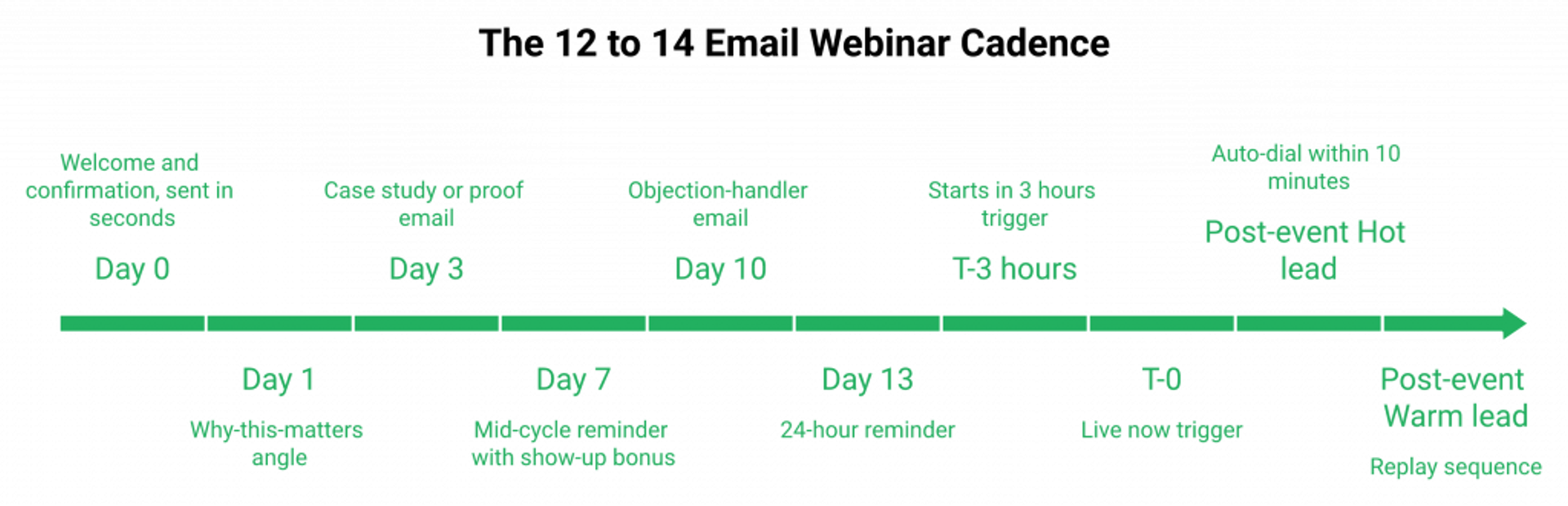
Live webinars need 12 to 14 emails from registration to live to hit a 20 to 40% show-up rate, with up to 6 emails on event day for late registrants. Behavioral follow-up beats blanket sequences. Send different emails (and trigger different calls) based on whether the attendee stayed to the pitch or left early. Generic platforms can’t do this. You need a built-in CRM and auto-dialer wired to attendance behavior, like the kind native to our sales CRM.
The pre-event sequence (12 to 14 emails)
Most coaches send three emails and wonder why their show-up rate sits at 18%. Here’s the cadence that gets you to 30 to 40%:
- ⏰ Day 0: Welcome and confirmation (sent in seconds)
- ⏰ Day 1: “Why this matters” angle
- ⏰ Day 3: Case study or proof email
- ⏰ Day 7: Mid-cycle reminder with the show-up bonus reveal
- ⏰ Day 10: Objection-handler email
- ⏰ Day 13: 24-hour reminder
- ⏰ Day 14, T-3 hours: “Starts in 3 hours”
- ⏰ T-1 hour, T-15 min, and T-0: live triggers
That’s 12 emails minimum. Two more if you split the bonus reveal across two days.
The day-of cadence for late registrants
💸 People who register the day-of are the highest-intent attendees you have. They saw a Facebook ad two hours ago. They’re ready. Send them up to 6 emails between registration and live: confirmation, “starts in 3 hours,” “starts in 1 hour,” “we’re live,” “we just started, here’s the room link,” and “you missed the start, jump in now.” They convert at 2 to 3x the rate of a 14-day-old registrant. Pair this with our integrations stack to wire it into your existing tools.
Behavioral follow-up (where most platforms fall flat)
❌ Generic platforms send the same “thanks for attending” email to everyone. ✅ Behavioral follow-up segments by:
- Missed: “Here’s the replay” (drop into the 3-day window)
- Left early: “Here’s the section you missed”
- Saw the offer, didn’t click: “Here’s the offer one more time”
- Clicked, didn’t buy: “What stopped you?”
- Stayed to the close: high-intent, hand to sales
EasyWebinar’s CRM and auto-dialer trigger calls within ten minutes of the close for Hot leads, while Warm leads enter email nurture and Nurture leads get long-cycle content. For the broader funnel logic, see automated webinars 2025: scalable funnel strategies.
What operators say
“It allows me to automate my entire sales sequence. I feel like its a set it and forget it. I can also see how its performing.”Jennifer B. EasyWebinar G2 Verified Review
“The automated email sequences are full of bugs, and customer support is extremely unhelpful. There is no consistent POC.”Verified User Zoom Webinars G2 Verified Review
“Post-event emails are wonky. Very little ability to customize.”Unknown GoTo Webinar TrustRadius Verified Review
The pattern across hosting-only platforms is clear. Email cadence is a feature, not a footnote. Compare directly at EasyWebinar vs GoToWebinar.
Q9: What do you do in the 24 hours after the webinar, replay, recording, and follow-up?
The post-event playbook in one paragraph
Send the first replay email within 24 hours. Open rates drop 60% after that. Cap your replay window at 72 hours. Longer triggers procrastination, shorter creates the necessary FOMO (fear of missing out). Distribute the on-demand recording behind an email gate, not a public link. For offers above $5K, redirect replay viewers to an application, not a checkout, to filter flaky leads before sales takes the call. For deeper monetization mechanics, see how to make money with webinars.
The 24-hour replay email anatomy
The first email after the live session does most of the close-rate lifting. It needs four things: a subject line that names the bonus, a one-line acknowledgment of who didn’t make it, a single link to the replay, and a 72-hour countdown.
- ⏰ Subject: “Your replay (and the bonus expires Friday)”
- ✅ One paragraph, not a recap
- ✅ One link (the replay URL with the offer baked in)
- ✅ Visible deadline timestamp
- ❌ No “thanks for attending” preamble
- ❌ No second offer competing with the primary one
The 3-day replay rule
I’ve tested 24-hour, 72-hour, 7-day, and 14-day replay windows across hundreds of operator funnels. 72 hours wins almost every time. Shorter windows feel rushed and people bounce. Longer windows trigger the “I’ll watch it later” lie that all of us tell ourselves at midnight on a Tuesday. The right amount of FOMO is a deadline you can actually believe. Our best on-demand webinar software guide covers replay distribution in depth.
Recording distribution (gated, not public)
Put the recording behind an email gate. A registrant who didn’t show now has to re-confirm an email to access it. That’s not friction for friction’s sake. It’s a chance to capture missed addresses, segment by intent, and trigger the right follow-up sequence based on whether they watched 12 minutes or 90.
The checkout vs. application decision
💰 Under $5K: send replay viewers straight to checkout via paid webinars in-platform. The math forgives a 1 to 3% close. ❌ Over $5K: a checkout is a leak. ✅ Redirect to a qualifying application with three to five questions about budget, timeline, and current state. The chef-baker did $49K in two months redirecting replay viewers to an application before sales calls. The pickleball course did $200K on the same model.
What operators say about replay mechanics
“Easy to set up live or evergreen webinars, including replay options, splits out live and replay attendee insights for evergreen webinars.”Verified User, Professional Training & Coaching EasyWebinar G2 Verified Review
“I would love to be able to add the video later! Sometimes I’m promoting things far in advance and want to be able to create quickly on the fly.”Ash A. EasyWebinar G2 Verified Review
“After canceling, I was shocked to find out I couldn’t export the list unless I subscribed again. I paid for the service and hosted the event, but they block access to my own data unless I keep paying.”Sheida M. Demio G2 Verified Review
That last one matters. Your registrant list is your asset, not theirs. Pick a platform that lets you export it on day one and any day after. Compare options at EasyWebinar vs Demio.
Q10: How do you keep stick rate high enough to actually see the pitch?
Stick rate, the lever most operators ignore
Stick rate, the percentage of attendees who stay until the pitch, is the single biggest lever after registration. Use a show-up bonus revealed in the first 90 seconds. Plant “open hooks” (unanswered questions) every 8 to 10 minutes. Promise a stay-to-the-end bonus during the open. Simulated-live formats that disable pause and rewind protect watch time better than on-demand replays where attendees self-select out. For broader engagement plays, study how to 10X engagement.
The stick rate bonus stack
Most operators worry about registrations. The smarter operators worry about who’s still in the room at minute 45. Two bonuses are the cheapest way to lift that number:
- ⭐ Show-up bonus revealed in the first 90 seconds (a checklist, a template, or a swipe file)
- ⭐ Stay-to-the-end bonus announced at minute 5 and delivered at minute 75
- ✅ Both are useful, both are deliverable, and neither requires extra build time
I’ve watched stick rate move from 38% to 61% on the same webinar after stacking these two bonuses correctly.
Open hooks every 8 to 10 minutes
Rick Mulready hit a 166% return on ad spend (ROAS) on his automated webinar by planting open hooks throughout, unanswered questions that pulled attendees forward. “I’ll show you the third lever in a few minutes.” “There’s one mistake I made that cost me $40K, I’ll tell you when to avoid it.” Then deliver. Drop-off drops because curiosity is a free stick-rate lever. Our interactive webinars guide walks through the engagement assets that pair with open hooks.
Why simulated live protects watch time
❌ A public on-demand replay lets attendees pause, scrub forward to the offer, and bounce. Watch time collapses. ✅ A simulated-live session disables pause and rewind by design. The room runs on a schedule. You either watch now or you don’t. That’s not a UX trick, that’s how live works, and it’s why the format converts. See the format breakdown in pre-recorded webinar platforms vs live.
The integrity rule on stick mechanics
I’ll repeat this because it matters: never say “I’m live” when you’re not. Never say “this is a recording” inside a simulated-live session. The cadence of live (timed CTAs, real-time chat, and JIT scheduling) does the lifting. The script never lies. That rule has held for 14 years across the platform, and it’s why operators pick our automated webinar engine over split-product stacks.
What operators say
“I love that we can have a poll, offer, and countdown right in the event! That’s going to be so great for sales and interactions.”Verified User in Photography EasyWebinar G2 Verified Review
“The two webinars I have run so far have been littered with audio issues. There have been delays, feedback noise, echos, people not being able to come off mute.”Amanda P. Demio G2 Verified Review
When the room glitches, stick rate dies. The platform is not neutral.
Q11: What’s the day-by-day webinar launch checklist (T-42 to T+7)?
The 42-day clock in one paragraph
A reliable webinar launch runs on a 42-day clock: T-42 lock topic and offer, T-28 build registration page and emails, T-21 open registration with ads live, T-14 first promo wave, T-7 dry run, T-1 final tech check, day-of last-call sequence, T+1 first replay email, T+3 replay closes, and T+7 application call review for high-ticket leads. Compress to a 14-day sprint when you’re testing. For team-led rollouts, see how to master webinar training.
When to compress to 14 days
The 42-day clock is the standard for a real launch. When you’re in the Webinar Sprint Method, running 5 to 10 lives to validate the message, you do not need 42 days. A 14-day sprint cycle (T-14 build, T-7 promote, T-3 dry run, T-0 live, T+3 replay close) lets you iterate weekly. That’s the rhythm I want every operator on for their first 90 days.
The full T-42 to T+7 launch checklist
| Milestone | Owner | Deliverable | What automates it |
|---|---|---|---|
| T-42 | Operator | Topic locked, avatar drafted, and offer priced | Whiteboard or doc |
| T-28 | Operator | Registration page, 12-email sequence, and script outline | AI webinar builder, one prompt |
| T-21 | Marketing | Ads live, first organic promo, and JIT room created | EasyCast multistreaming, JIT scheduling |
| T-14 | Marketing | First promo wave (email, social, and partner) | Behavioral email triggers |
| T-10 | Operator | Slide deck final, polls drafted | In-webinar poll setup |
| T-7 | Operator | Full dry run with 3 to 5 real humans | Live room test |
| T-3 | Marketing | “Last chance to register” sequence live | Day-of email triggers |
| T-1 | Operator | Final tech check, lighting, audio, and backup laptop | Live room test |
| T-0 | Operator | Live session, polls, CTAs, and stay-to-end bonus | In-webinar CTAs and timed offers |
| T+1 | Marketing | First replay email within 24 hours | Behavioral CRM trigger |
| T+2 | Sales | Hot leads called within 10 minutes of webinar end (rolling) | Sales CRM auto-dialer |
| T+3 | Marketing | 72-hour replay window closes, final scarcity email | Countdown timer in email |
| T+7 | Sales + Operator | Application call review, close-rate audit, and iterate | EasyCRM pipeline view |
Why the checklist beats the vibes-based launch
⏰ Most operators run launches on vibes. They feel ready, they go. Then they panic at T-3 because the registration page email confirmation never wired up. The checklist is not bureaucracy. It’s the difference between 95 attendees and 18.
Compounding weekly webinars for list building
If you’re starting from zero, run a webinar every Wednesday for 12 weeks. Each one builds on the prior week’s list. By week six, the registration baseline doubles because returning registrants share. By week twelve, you have a list, a tested message, and a recording ready to graduate to JIT and evergreen. Read more on business marketing webinar ideas for growth.
Q12: How do you handle the offer, scarcity, and CTA, and where does EasyWebinar’s AI Builder fit?
The close in one paragraph
Stack the offer, then add scarcity that’s actually true: 72-hour replay window, fast-action bonus, and cohort cap. The pitch starts at minute 45, not minute 75. Traditional setup takes 4 to 6 weeks of stitching landing-page builders, email tools, and slide decks. EasyWebinar’s AI funnel builder generates page, 12-email sequence, and script from one prompt, then plugs into a built-in CRM and auto-dialer for behavioral follow-up.
Offer stack mechanics
A converting offer is not a single product, it’s a stack. Core offer plus two bonuses plus a fast-action bonus. The stack inflates perceived value, the price stays the same, and the close rate goes up.
- ✅ Core offer (the thing they pay for)
- ✅ Bonus 1 (a swipe file, template, or asset)
- ✅ Bonus 2 (community access or a coaching call)
- ⏰ Fast-action bonus (only if they buy in the next 30 minutes)
- ⏰ Replay deadline (72 hours, real)
- ⏰ Cohort cap (real, not invented)
Scarcity that’s actually true
I have a hard rule: never invent scarcity. If you say “only 20 spots,” there better be 20 spots. The standard read is that fake scarcity converts. My read is that fake scarcity costs you the next launch because the audience remembers. Real scarcity beats fake scarcity over a 12-month window every time.
The six-tool stack pain
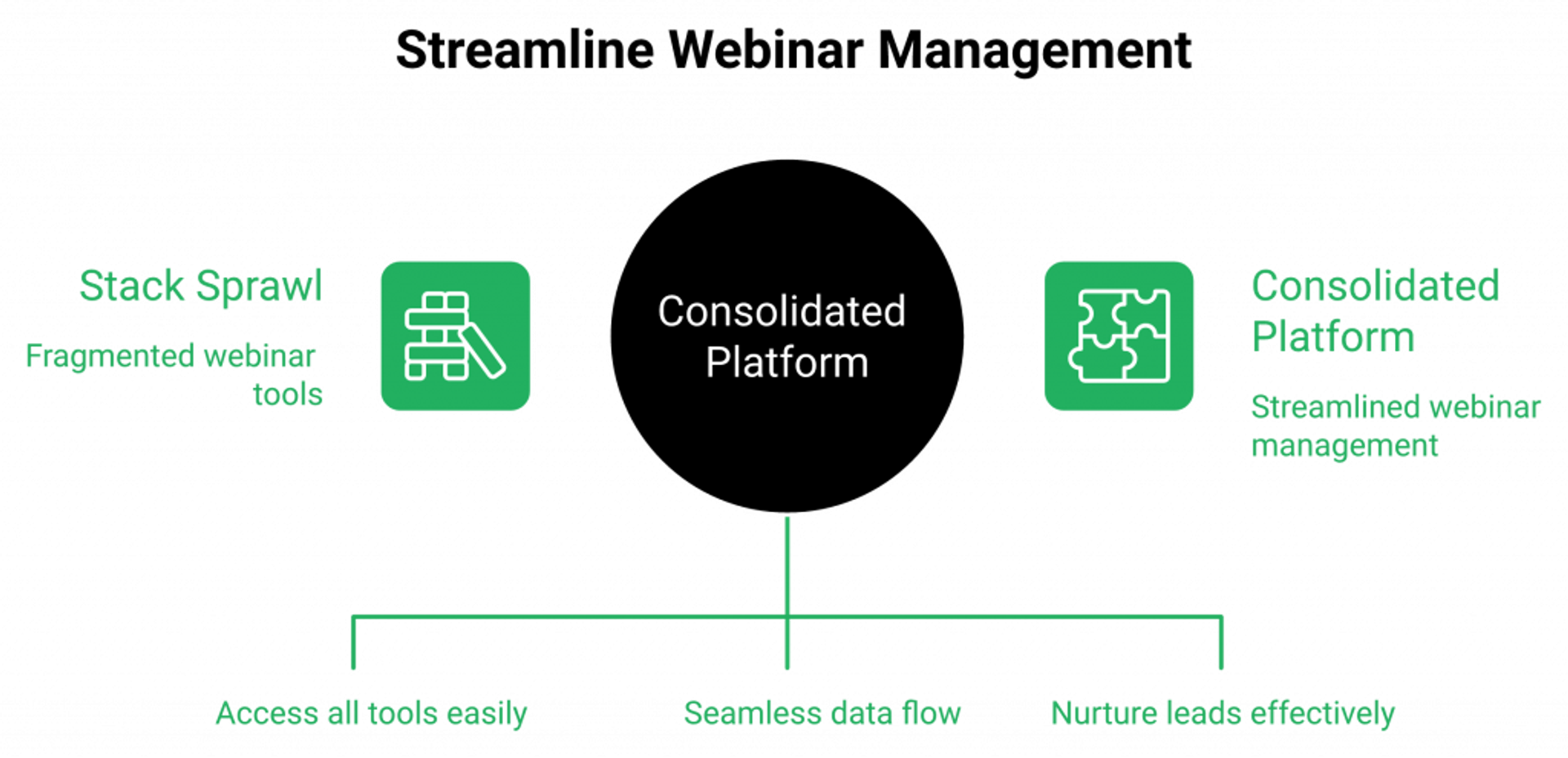
❌ Most operators run a stack of Zoom plus ClickFunnels plus HubSpot plus Zapier plus Stripe plus an email tool, $600 to $1,000/month, five logins, three integration breakpoints, and one Sunday-night panic when something silently stops syncing. Lost leads at every handoff. ✅ One webinar platform replaces the stack with live plus simulated live plus evergreen plus AI Builder plus CRM plus auto-dialer plus multistream, native.
Named cases that ran the playbook
K21 Academy used EasyWebinar to push show-up rate from 28% to 47% and grow registrants 5x, documented in the edtech case study (K21). Joshua Wagner used the platform as the backbone for bringing new members into his church congregation. The chef-baker did $49K in two months. The pickleball course did $200K. Different verticals, same architecture: one prompt to launch, behavioral follow-up to close. See more customer reviews.
What operators say about consolidation
“Finally a platform that does it all without the hefty price tag! From setting up your webinar to customising landing pages, thank you pages and emails, the platform is so intuitive.”Annette S. EasyWebinar G2 Verified Review
“Some of the integrations are not intuitive.”Ajarae C. EasyWebinar G2 Verified Review
Fair feedback. The trade-off is real: speed-to-launch in exchange for some custom integrations that need a support call. We staff for it.
When this isn’t the right fit
Be honest. If you’re running one-off internal team meetings, a webinar revenue platform is overkill. Use Zoom. If your product is under $200 and you don’t have an upsell ladder, the math of a webinar funnel may not work yet. Build the offer first. Review options at webinar pricing or request demo.
The invitation, not the pitch
If you’ve read this far, you’re already 90% of the way to live. You don’t need permission. You need a registration page, a script outline, and a 72-hour window. Tell me what you’re building. Sign up free and ship your first webinar this week.
Frequently Asked Questions

Casey Zeman
Founder of EasyWebinar
About Author
Over the past decade, I've helped thousands of entrepreneurs, coaches, and consultants turn webinars into a predictable, powerful way to grow their audience, build trust, and scale, without the constant hustle. I created EasyWebinar because I couldn't find a system that combined authenticity, engagement, and automation the way I needed. So, I built one.
Related Posts

10 Best Community Engagement Platforms in 2026
Compare the 10 best community engagement platforms in 2026. Course creators, evaluate live hosting, analytics, and replay to pick your winner today.
10 Best Online Coaching Tools in 2026: Live Session Quality, Scheduling, Recording, and Client Engagement Analytics
Compare the 10 best online coaching tools of 2026 on session quality, scheduling, and analytics. Discover the right fit for your coaching revenue model.
10 Best Webinar Hosting Platforms Ranked by Uptime, Streaming Quality & Cost
Compare 10 webinar hosting platforms ranked by uptime, streaming quality, and cost. Discover which tool actually turns attendees into revenue.
Turn every webinar into a revenue stream
Launch your first paid event in just a few clicks - and start monetizing your expertise.
Book a Call