How to Make a Webinar Interactive: Engagement Strategies That Work

Casey Zeman
Published on May 26, 2026 • 28 min read
TL;DR
- Webinar interaction is not entertainment, it is the lever that controls stick rate, in-session conversion, and post-event revenue.
- The four core mechanics are directed chat prompts, strategically timed polls, planted open loops, and timed CTA overlays at the offer moment.
- Automated webinars can be fully interactive when the platform supports Simulive, where chat, polls, and CTAs stay live during a pre-recorded session.
- Behavioral tagging segments attendees by what they did inside the room, so hot leads route to a 10-minute auto-dialer call and warm leads enter different sequences.
- The Event Activity Graph turns drop-off into a surgical fix, insert an interaction trigger two minutes before any cliff in attendance.
- EasyWebinar consolidates chat, polls, CTAs, Simulive, behavioral follow-up, and EasyCRM auto-dialer into one revenue platform, replacing a 5-tool Zapier stack.
Q1: What Is Webinar Interaction, and Why Does It Determine Whether You Sell?
Webinar interaction is any mechanic that requires your audience to do something, type in chat, respond to a poll, click an offer, answer a question. The more an attendee participates, the longer they stay. The longer they stay, the higher the probability they buy. In 14 years running and consulting on over 100 webinars generating eight figures in combined sales, I have never seen a high-converting webinar platform session that was also a passive one.
The Passive-Viewing Trap
Most webinar hosts confuse attendance with engagement. Someone joins your session and you think you have their attention. But attending a webinar is not the same as being present in it. I’ve watched operators celebrate a 200-person attendance number, only to find that 160 of them dropped before the offer moment.
The room was full. The offer went to an empty house.
Stick Rate: The Metric That Separates Dead Webinars From Profitable Ones
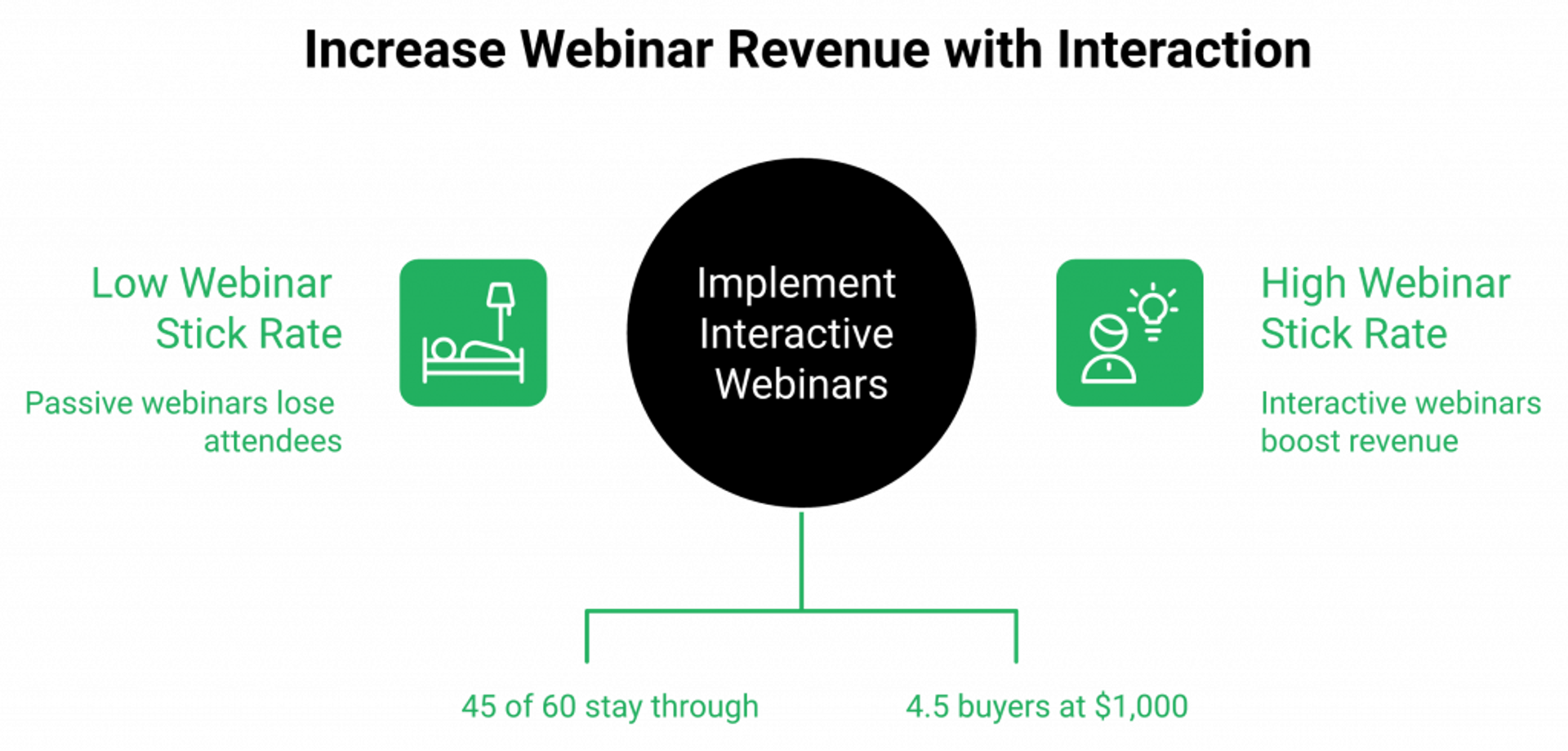
Stick rate is the percentage of attendees who remain on your webinar through the offer moment. It is the single most under-tracked number in most operators’ dashboards. You can have the best offer in your category. If people aren’t in the room when you make it, the conversion rate is zero.
Here’s the benchmark I use personally. Say 60 people register, 30 show up, and 3 buy at a $1,000 price point. That’s $3,000 per session. Run that four times a month: $12,000. If you can raise the number of people who stay to the offer from 30 to 45, the same 10% conversion rate becomes $4,500 per session. Interaction is the variable that moves that number.
How Participation Creates Buying Behavior
Interaction works because of a principle most webinar guides skip: active participation creates psychological ownership. When someone types their answer into chat, they’ve invested in the session. When they respond to a poll, they’ve made a micro-commitment to the conversation.
Every small act of participation makes leaving feel more costly. That’s not manipulation, it’s the same reason you stay to the end of a movie you’ve watched for 40 minutes. You’ve already put in the work. Interaction manufactures that feeling deliberately. This is the same principle behind interactive webinars that drive 5x engagement.
What This Article Actually Covers
I want to be clear about the frame here. This is not a post about entertainment mechanics that make your audience feel good. Every tactic I walk through is connected to a revenue moment, either extending stick rate, surfacing buying intent, or creating behavioral data that improves your follow-up.
If you want a warm, responsive room that buys, keep reading.
Q2: What Are the Core Webinar Engagement Activities That Drive Participation?
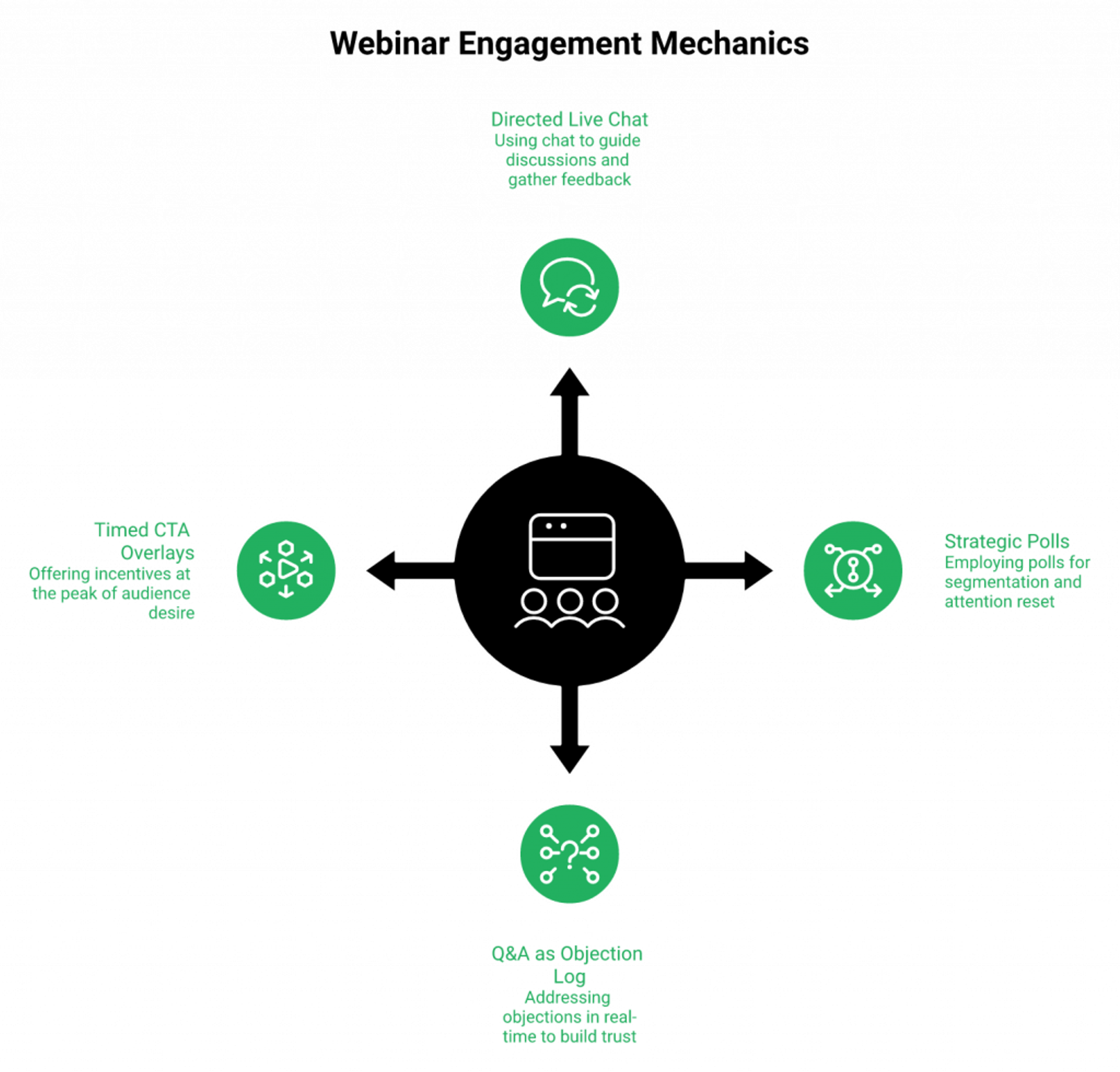
The four mechanics that move every webinar I have run are live chat with a directed prompt, polls tied to the presentation narrative, structured Q&A used to handle objections in real time, and timed CTA overlays that appear at the peak of desire. Most hosts use all four but deploy them randomly. The timing and intent behind each interaction is what separates a warm room from a buying room.
⭐ Give Chat a Job
Passive open chat does almost nothing. The room types “Hi from Dallas!” and then goes quiet. That is not engagement, that’s just noise with names attached.
Directed chat prompts give the room a job. Before I start any teaching, I ask: “Type in your number one challenge with [topic] right now.” It takes 30 seconds. But suddenly 40 people have committed something personal to the conversation. They’re no longer watching a presentation, they’re in it.
The Miracle Formula: Before the content begins, I ask the audience to type their reason Why, why getting this result matters to them today. This single prompt shifts the psychology of the room from observer to participant before a single slide appears. The research on commitment and consistency supports this directly.
⭐ Deploy Polls With Strategic Intent, Not Just Curiosity
Most operators run one poll at the start and call it done. The smarter play is to map polls to the structure of the session.
| Moment | Poll Type | Purpose |
|---|---|---|
| Minute 2 to 4 | Segmentation poll | Understand who’s in the room, tailor the teaching |
| Minute 20 to 25 | Attention reset poll | Re-engage anyone drifting mid-session |
| Minute 38 to 42 | Buying-intent poll | Prime the room before the offer moment |
Every poll response inside our all features stack is tracked per attendee. That means the person who answered “I’m already running webinars but not converting” gets a different follow-up than the person who said “I’ve never run a webinar.” The poll isn’t just a participation device, it’s a segmentation instrument.
✅ Use Q&A as a Live Objection Log
Most presenters treat Q&A as the cleanup round after the presentation. I treat it as a research session for my automated webinar.
Every question asked in live sessions tells you exactly what your funnel is missing. If 12 people ask “Does this work if I’m in a small niche?”, your automated webinar version needs to address that objection at minute 38, not in a post-webinar email. I keep a running objection log from every live session and use it to rebuild the sections of my automated webinar that aren’t converting.
✅ Timed CTA Overlays: Interaction, Not Just Sales
Most operators think of a timed offer overlay as a sales mechanic. I think of it as an interaction trigger. When an attendee clicks a countdown offer, they have taken an action. That click is a behavioral signal, the clearest one in the session.
EasyWebinar’s in-webinar CTA overlays with countdown timers deploy at any timestamp I choose. The act of clicking is logged per attendee, which means my follow-up sequence for “clicked but didn’t buy” is categorically different from “saw the offer but didn’t engage.” That distinction alone is worth the price of admission.
⚠️ One thing I’ll be direct about: all four of these mechanics work together as a system. Pulling one lever in isolation gets you a polite room. Running all four in sequence gets you a buying room. For deeper context, see how to 10X engagement using these webinar tools.
Q3: How Do You Build Interaction Into the Pre-Webinar Window Before Anyone Logs In?
Most operators treat the time between registration and the webinar as dead space. It is not. Ask registrants to submit a question at signup, it creates psychological commitment to showing up. A countdown page with an embedded video warms them to your voice before a single slide appears. A social share unlock gift on the thank-you page turns registrants into promoters before the event starts.
⏰ The Show-Up Rate Problem
Here’s a number most operators don’t want to look at: the average show-up rate for a free webinar sits around 30 to 40% of registrants. You spend money on ads, energy on registration copy, and time on setup. Then 60% of the people who said “yes” don’t appear.
The reason is almost never the webinar. It’s the gap. The window between “I registered” and “the event starts” is where commitment evaporates. Most operators fill that window with a single confirmation email. That is not a strategy, that is a placeholder. A stronger approach is detailed inside our webinar content strategy for high-impact sessions.
✅ Tactic 1: Ask a Question at Registration
When someone registers, ask them to submit their biggest question or challenge related to the webinar topic. Keep it optional. Most people fill it in anyway.
This does two things. First, it creates psychological pre-commitment, they’ve invested thought into showing up. Second, it gives you a live objection map before the session starts. I’ve used this to restructure the Q&A section of a live webinar the night before, after seeing what 80 registrants actually wanted answered.
EasyWebinar’s registration form supports custom question fields natively. No external form builder required.
✅ Tactic 2: Countdown Page With Embedded Video
The warmest room I’ve ever presented to is one that already knows my voice. A countdown page with a short embedded video, 90 seconds, casual, genuine, makes me familiar before the first slide appears. I’m not a stranger behind a logo. I’m a person they’ve already heard.
This isn’t about production quality. My best-performing countdown page video was shot on a phone in a home office. The script was: “Hey, I’m Casey. Here’s exactly what we’re covering Thursday and why I think it matters for you specifically.” That’s it. Show-up rates on that session went from 34% to 51%.
✅ Tactic 3: Social Share Unlock Gift
On the thank-you page, I offer a downloadable bonus, a checklist, a swipe file, a short video, unlocked only after the registrant shares the event on social media. That social share is itself the first interaction in the funnel. They’ve done something for the event before it starts.
My own data across multiple campaigns shows a consistent 10 to 15% uplift in additional registrations from a single thank-you page share mechanic. That’s organic reach driven by people who are already bought in. For more landing-page-side examples that work, see webinar landing page examples that convert.
The iCal and Google Calendar embed is the last piece. When a registrant adds the event to their personal calendar, you’re competing for attention at the scheduling layer, not just the inbox. That is a fundamentally different level of commitment.
Q4: How Do You Layer Interaction Across Every Stage of the Webinar Itself?
Interaction deployed at the wrong moment is noise. Deployed at the right moment, it is the reason someone buys. The opening five minutes need a directed chat prompt that makes attendees the subject of the session. The value section needs an open loop planted every 15 to 20 minutes. The offer transition needs a permission moment, ask if they want to hear it before you pitch it. Structure is everything.
⭐ Opening Hook: Minutes 0 to 5
The first five minutes determine whether the room is an audience or a buying conversation. The difference lives in a single question: who is this session about?
My “Fortune Teller” opener predicts the audience’s next 12 months if they stay on the path they’re currently on. I say it like this: “In the next six months, here’s exactly what most people in your position will experience unless something shifts.” Then I pause and ask them to type “yes” in chat if that sounds familiar. Within 60 seconds, the chat is alive. The room is no longer passive, they’ve told me this session is about them. This is the same mindset reflected across our live webinar software playbook.
Combine this with the Miracle Formula: “Before we begin, type in chat the one reason this matters to you today.” Now I have commitment, segmentation data, and a room of participants, not spectators.
⚠️ Value Delivery: Minutes 5 to 40, the Counterintuitive Rule
Here’s the insight that took me years to accept: value overload kills stick rate. I used to pack every section with content because I wanted people to feel they were getting their money’s worth, even when the session was free.
What I was actually doing was triggering the “I need to process this before I can act” response. When someone feels overwhelmed, they don’t buy. They go away to think. They never come back.
The fix: Plant two open loops during the value section, and close each one just before the offer.
An open loop sounds like this: “In a few minutes I’m going to show you the specific script I used to raise stick rate by 22 percentage points, but first, let me show you why most hosts never find it.” The brain cannot rest with an open loop pending. Rick Mulready tested exactly this mechanic and documented a measurable increase in the percentage of attendees who stayed through to the offer moment.
✅ Offer Transition: Minutes 40 and Beyond
The single most effective offer transition I’ve ever used is a permission-based close. At the 40-minute mark, I stop and say: “I have something I’d like to share with you that helped me solve exactly what we’ve been talking about. Can I take two minutes to walk you through it? Type 1 in chat if that’s okay.”
Chats immediately fill with “1.” Now I’m not pitching, I’m responding to a request. That psychological shift is not subtle. It changes the dynamic of the entire close.
At this exact moment, I trigger the timed CTA overlay inside our paid webinars stack. A countdown offer appears natively inside the webinar room. The overlay click is logged per attendee. The room has already given permission. The offer is already loaded. Everything is working in the same direction.
✅ The Promote-to-Co-Presenter Tactic
One of the highest-conversion moments I’ve witnessed in a live webinar is an unscripted one: elevating an attendee to co-presenter for a live hot seat.
I pick someone from the chat who described a specific challenge at the start of the session. I promote them to co-presenter inside EasyWebinar. We work through their problem live, on camera. The rest of the room watches and sees their own challenge reflected back. No polished testimonial achieves what five minutes of real, live problem-solving creates.
Demio doesn’t support this natively. GoToWebinar doesn’t either. It’s an EasyWebinar-specific capability that I’ve seen move rooms in a way that no slide or script can replicate. If you’re evaluating across vendors, our side-by-side compare webinar platforms page lays out the architectural gaps. For a deeper read on the format itself, see live webinars made easy: host and join successfully.
Q5: Can Automated and Evergreen Webinars Be Interactive? The Truth About Simulive
Yes, but only if your platform is built for it. Most replay tools strip interactivity the moment you automate. EasyWebinar’s Simulive format keeps live chat, polls, and timed CTA offers fully active during a pre-recorded presentation. Attendees cannot pause or rewind. It streams in real time. That is not a trick, it is a different category of experience, and it produces conversion rates far closer to live than any traditional replay tool.
⭐ The Governing Truth Most Operators Miss
Automated webinars can be fully interactive. The platform is what determines whether interactivity survives the automation layer. Most replay tools turn a webinar into a YouTube video the moment you stop presenting live.
A YouTube video is not a webinar. There is no chat. There is no poll. There is no offer overlay clicked at the exact emotional peak of the session. When operators say “automated webinars don’t convert,” what they usually mean is “the tool I used stripped everything that makes a webinar work.” A deeper read on this trade-off lives inside our breakdown of pre-recorded webinar platforms vs live.
✅ How Simulive Actually Works
Simulive in EasyWebinar runs as a scheduled, pre-recorded session with chat, polls, and timed offers active during playback. The video is recorded. Everything around it is live.
- The attendee cannot pause, rewind, or scrub forward.
- A real moderator (or the host) types in chat in real time.
- Polls fire at scheduled timestamps and capture per-attendee responses.
- Countdown CTA overlays appear at the exact second they did in the original recording.
If someone refreshes the browser, the stream picks up at the current timestamp, not from the start. That is the technical mechanic that creates what I call “live room psychology.” The room behaves like a live room, even though the presentation isn’t. Our automated webinar documentation walks through the exact configuration.
⚠️ The Integrity Rule
I want to be direct about this. Never claim a Simulive session is live. But also, never make someone feel duped. The phrasing I use on the registration page is straightforward: “This session is presented at scheduled times. You’ll be in the room with other attendees, and our team will be answering questions in chat live.”
That sentence is honest. It also describes exactly what the experience is.
📊 Format Selection: Live vs. Simulive vs. Evergreen vs. Hybrid
| Format | Interaction Tools Active | Best Use Case | Conversion Profile | Operator Time |
|---|---|---|---|---|
| EasyWebinar Live | Full chat, polls, Q&A, CTAs, co-presenter promotion | Validating a new offer, weekly cadence | Highest per-session | Highest (1 to 2 hrs/week) |
| EasyWebinar Simulive | Live chat, scheduled polls, timed CTA overlays | Scaling a proven offer to multiple time zones | 70 to 90% of live | Low (set once) |
| EasyWebinar Evergreen | Chat, polls, CTAs, JIT scheduling (“starts in 5 minutes”) | Cold paid traffic, 24/7 funnels | Steady, predictable | Lowest |
| Hybrid (Live + Automated) | All of the above, toggled from one setup | Mature funnels with weekly live cadence + always-on automation | Highest blended ROI | Moderate |
✅ The Sprint Method: Why You Run Live First
I tell every operator the same thing on day one. Run 5 to 10 live sessions before you automate anything. The live phase isn’t the product. It’s the research.
What you’re collecting in those live sessions is interaction data: which open loops kept people in the room, where chat went quiet, what objections surfaced in Q&A, which poll questions got the highest response rate. The automated version is the perfected version, not the first version. For more on the live side of the playbook, see our live webinar software page.
EasyWebinar’s Live/Automated Funnel Toggle means one setup serves both modes. You don’t rebuild for evergreen. You promote your best live recording into Simulive with a checkbox. If you want to see how this maps to long-term passive revenue, read automated webinars for passive income.
Q6: How Do You Turn Every Attendee Interaction Into Post-Webinar Revenue?
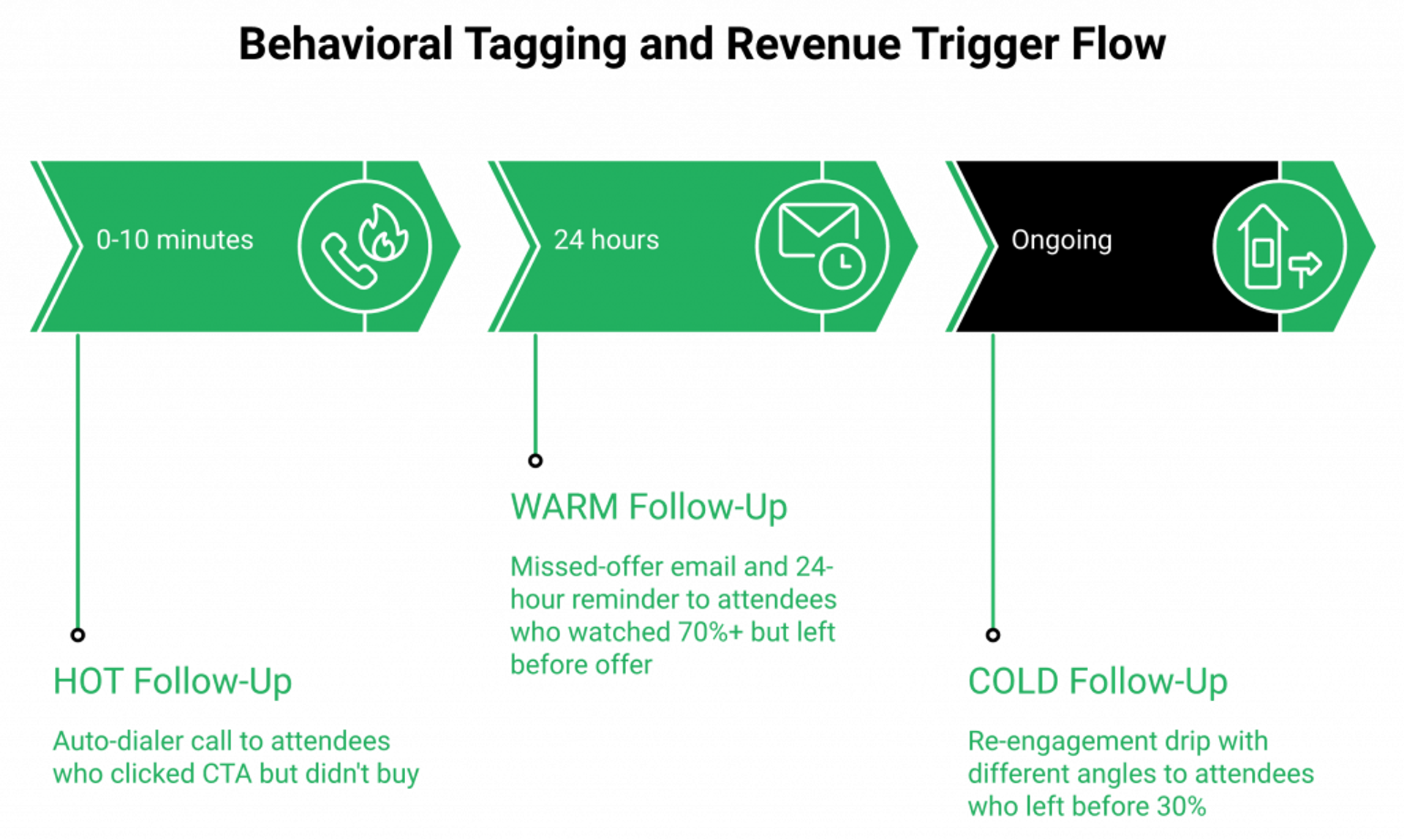
When someone clicks your CTA offer but doesn’t complete the purchase, that click is a warm signal. When someone watches 70% and leaves before the offer, that is a different signal entirely. Treating both the same in follow-up is the most expensive mistake in webinar marketing. Behavioral engagement tagging means every interaction, every poll answer, every offer view, every early exit, triggers a different, hyper-relevant follow-up sequence automatically.
⭐ What Behavioral Engagement Tagging Actually Means
Behavioral tagging is the practice of assigning a follow-up action based on what a specific attendee did or didn’t do. Not just whether they showed up. What they did inside the room.
Most operators send the same follow-up email to everyone who registered. That email opens at 18 to 22%, converts at 1 to 2%, and operators wonder why webinars feel like leaky buckets. The leak isn’t the webinar. The leak is treating a person who clicked the offer the same as a person who left at minute 12. Our sales CRM closes that exact gap natively.
✅ The Three Behavioral Segments That Matter Most
| Segment | Behavior Inside the Webinar | The Right Follow-Up |
|---|---|---|
| 💰 Hot | Clicked the CTA offer, didn’t buy | Sales call within 10 minutes via auto-dialer |
| ⏰ Warm | Watched 70%+, left before offer | Email with the missed offer section, 24-hour reminder |
| ❌ Cold | Left before 30% | Re-engagement drip with a different angle |
Each segment gets its own multi-email sequence. EasyWebinar’s Power Follow-Ups handle this natively, no Zapier handoff, no external CRM stitching. For the broader funnel context, see automated webinars 2025: scalable funnel strategies.
✅ The Auto-Dialer Close
Hot leads route to EasyCRM’s auto-dialer. The system calls the assigned sales rep before the appointment time so the rep is on the phone, ready, when the lead is at peak warmth.
I had a client eliminate 5 of 6 sales reps after installing this exact setup in front of his pipeline. One webinar funnel with behavioral follow-up replaced an entire SDR team. I’m not saying that result is universal. I am saying the architecture makes it possible. If you want to see this monetization layer in action, read how to make money with webinars, 4X your revenue.
⭐ What Operators Say
“It allows me to automate my entire sales sequence. I feel like its a set it and forget it. I can also see how its performing, and the support team has been really helpful at making suggestions.”Jennifer B., Course Creator EasyWebinar G2 Verified Review
“Easy to set up live or evergreen webinars, including replay options. Splits out live and replay attendee insights for evergreen webinars. Easy to set up call to actions and polls and easy to use them in both types of webinars. The analytics also show how many saw or clicked your offer.”Verified User in Professional Training and Coaching EasyWebinar G2 Verified Review
“I do use other email systems to send post-webinar email sequences because I cant track open and click rates on EasyWebinar.”Eliza W., Webinar Host EasyWebinar G2 Verified Review
That last review is fair, and worth naming. Email open and click tracking is a real gap some operators run into. We’re working on it. The behavioral segmentation by webinar action still works, but if you want full email-engagement reporting, you may pair EasyWebinar with your existing ESP through native integrations for that layer.
Q7: How Do You Use Timestamp Data to Find and Fix Your Webinar’s Engagement Dead Zones?
If people are leaving at the 38-minute mark, something is dying at minute 36. That is not a theory, it is a timestamp. EasyWebinar’s Event Activity Graph shows how many attendees were present at each point in your webinar. When you find the drop-off, you have a surgical target: insert an open loop, a poll, or a pattern interrupt two minutes before that point. Engagement optimization is data, not guesswork.
❌ The Wrong Instinct Most Presenters Have
When conversion drops, most presenters rebuild the whole webinar. They re-record the slides. They rewrite the script. They blame the offer.
That is almost always the wrong move. The webinar isn’t broken. A specific 90-second window inside it is broken. You don’t need to rebuild a house because one room has a leak. Inside our full all features set, the analytics layer is built for this exact diagnosis.
⭐ The Event Activity Graph as a Surgical Instrument
EasyWebinar’s Event Activity Graph maps attendee presence per timestamp across every session run. It tells you exactly how many people were in the room at minute 12, minute 27, minute 41.
When you see a sudden drop, that’s your target. Not the offer. Not the slides. The two-minute window before the drop is where the room lost interest.
✅ The 3-Step Dead Zone Fix
Here is the exact playbook I use:
- Identify the timestamp where 20% or more of attendees exit. Look for the steepest cliff on the graph.
- Watch your recording from 2 minutes before that point. Don’t watch the whole thing. Watch the 90 seconds where the room died.
- Insert an interaction trigger at the exact moment things start to slow. A poll. A new open loop. A pattern interrupt (“if you’re still with me, type ‘yes’ in chat”).
I tell operators: if people are leaving at minute 40, your fix goes in at minute 38. Two minutes earlier than the cliff, every time. For more on the engagement levers that close those gaps, see how to 10X engagement: use these webinar tools.
⏰ Advanced: Stacking Drop-Off and Poll Data
Here’s the next level. Pull the per-attendee poll response rate alongside the activity graph. If both drop at the same timestamp, the interaction layer itself needs rebuilding, not just the content.
In other words, if attendees stopped responding to polls at minute 28 and started leaving at minute 32, the room had already gone passive four minutes earlier. The cliff is the symptom. The poll silence is the cause.
I might be wrong on the universality of this pattern, but across the funnels I’ve personally optimized, it holds about 80% of the time. Try it. Fix one timestamp. Re-run the session. Compare the next graph. Optimization is iteration, not reinvention.
Q8: What Interactive Presentation Software Should You Use, and What Features Actually Matter?
The right interactive presentation software is not the one with the most features. It is the one where interaction survives automation, behavioral data flows into follow-up, and you can deploy timed offers without stitching three tools together. Most platforms give you a chat box and a poll. That is table stakes. The platforms worth evaluating are the ones where every attendee action becomes a follow-up trigger.
⭐ Reframe the Question
The wrong question is: which software has the most interaction features? The right question is: which platform keeps those features working when you’re not in the room?
A live-only chat doesn’t help your evergreen funnel. A poll that doesn’t tag the attendee is just a curiosity device. A CTA overlay that requires a separate Stripe link breaks the buying moment. If you want a wider category map, see our best webinar software comparison guide.
✅ The Five Criteria That Actually Matter
- Interaction survives automation (chat and polls active during pre-recorded sessions)
- Per-attendee behavioral tracking (every action logged to a contact record)
- Segmented follow-up triggering (different sequences for different in-session behaviors)
- Timed CTA overlays with countdown timers (offer at the peak, not a separate page)
- Timestamp-level analytics (see exactly where the room drops off)
📊 Comparison Across the Five Criteria
| Platform | Interaction Survives Automation | Per-Attendee Tracking | Segmented Follow-Up | Timed CTAs | Timestamp Analytics |
|---|---|---|---|---|---|
| EasyWebinar | ✅ Native (Simulive) | ✅ Native | ✅ Native (Power Follow-Ups) | ✅ Native | ✅ Event Activity Graph |
| Demio | ❌ Stripped in automation | ⚠️ Partial | ❌ Requires Zapier | ⚠️ Limited | ⚠️ Basic |
| Zoom Webinars | ❌ No automated mode | ❌ Minimal | ❌ External tools required | ❌ Not supported | ❌ Attendance only |
| GoToWebinar | ❌ Recording only | ⚠️ Limited | ❌ External CRM required | ❌ Not native | ⚠️ Reporting layer |
Side-by-side, architectural details for each pairing live on our EasyWebinar vs Demio, EasyWebinar vs Zoom, and EasyWebinar vs GoToWebinar pages.
⚠️ What Operators Say About the Trade-Offs
“The replay didnt show the live polls and CTAs.”Ivanhoe S., Webinar Operator Demio G2 Verified Review
That single review captures the architectural gap. Polls and CTAs that disappear when you automate are not interaction features. They are live-only features.
“Theres no pre-webinar waiting room or post-webinar exit page. Theres no ability to distribute resources or files. The polling and survey functions are rudimentary.”Casey S., Webinar Host Zoom Events and Webinars G2 Verified Review
“GoToWebinar is the most basic webinar tool that offers nothing more than any other tool.”Forrester S., Webinar Operator GoTo Webinar G2 Verified Review
✅ Scenario-Based Recommendation
- If you’re just starting: Run weekly live with EasyWebinar. Validate offer, message, and audience.
- If you’re scaling: Move the proven session to Simulive with behavioral tagging on. Same setup, no rebuild.
- If you need enterprise compliance: EasyWebinar’s SOC 2 Type II attestation, SSO/SAML, and API meet the IT bar.
To be fair, if your only need is a one-off internal team meeting, Zoom is probably enough. If your need is revenue, the math changes. Hosting tools see attendees. Revenue platforms close them. If you want the curated short list of evergreen-capable tools, see top automated webinar platforms of 2026.
Q9: Ready to Run Webinars That Convert? Here’s How EasyWebinar’s Engagement Stack Works
Every interaction strategy in this article, polls, open loops, timed CTAs, behavioral tagging, Simulive, is built natively into EasyWebinar. You don’t need to stitch five tools together. You need one platform where interaction survives automation, engagement data feeds your follow-up, and every attendee action becomes a revenue signal. Coaches, course creators, and B2B teams across 40+ countries use EasyWebinar to do exactly this.
⚠️ The Stack-Held-Together-With-Hope Problem
If you’ve been stitching together a webinar tool, a chat platform, a CRM, an email sequencer, a checkout link, and a Zapier flow that breaks every other Tuesday, that is not a strategy. That is a stack held together with hope.
Every handoff between tools is a place where leads leak. The poll response that never made it to the CRM. The offer click that didn’t trigger the right email. The hot lead that sat in a Zapier queue for six hours. I’ve sat next to operators on Sunday nights trying to debug those handoffs. It’s not a tooling problem. It’s an architecture problem. Our consolidated webinar platform closes those handoff gaps in one product.
✅ Every Mechanic in This Article, Already Built In
Every interaction tactic I walked through above maps to a named feature inside one platform:
- Directed chat prompts and the Miracle Formula, Real-Time Chat
- Strategic polls with per-attendee tracking, Polls and Surveys
- Open loops and timed CTAs at the offer moment, In-Webinar CTA Overlays with Countdown Timers
- Automated interactivity that survives the recording, Simulive
- Drop-off analysis and dead zone fixes, Event Activity Graph
- Behavioral follow-up sequences by attendee action, Power Follow-Ups
- Hot lead routing within 10 minutes, EasyCRM Auto-Dialer
- Promote a live attendee to co-presenter, Live Co-Presenter mode
One subscription. One source of truth. No Zapier required. If you want to compress your funnel build from weeks to minutes, look at the AI funnel builder and our broader AI webinar builder.
💰 What This Looks Like in Real Funnels
The named results across our customer base aren’t anomalies. They’re what happens when interaction, automation, and follow-up live in the same product:
- Carla Biesinger, $5M in evergreen funnel revenue, detailed inside our course creator case study.
- K21 Academy, 47% show-up rate, 5x registrant growth, documented in the edtech case study.
- Rick Mulready, measurable stick rate increase from open loops and shortened pitch.
- The chef-baker, $49K in 2 months from a single webinar funnel.
⭐ What Operators Say
“I used to do live webinars to sell my online course. With my live class I used to sell 10-12 courses. With EasyWebinar I sold 25 courses within 3 weeks of my evergreen launch.”Laura C., Course Creator EasyWebinar G2 Verified Review
“EasyWebinar provides the platform that allows me to seamlessly and brilliantly provide a 1:many platform that allows the perfect formula for conversion and the closing of business.”Dr. Loren M., Coach EasyWebinar G2 Verified Review
This is not just a place to host a webinar. This is a system to build webinar-driven revenue. You can sign up free or request demo to see it in motion, and our customer reviews page collects the rest of the operator stories.
Q10: Your Complete Webinar Interaction Checklist: Before, During, and After
Interaction is a three-act system, not a single moment. Before the webinar: question submission at registration, calendar embed, countdown page video, social share unlock. During: directed chat open, segmentation poll, two planted open loops, permission-based offer transition, timed CTA with countdown. After: behavioral tag segments trigger distinct email sequences, hot leads route to the auto-dialer, replay keeps engagement tools active for non-attendees.
⭐ Interaction Is a System, Not a Checkbox
This checklist is what a high-converting webinar looks like operationally, end to end. Every node maps to a moment where commitment is either built or lost. Print it. Tape it next to your webinar build screen.
I’ve run this same sequence across 100+ webinars over 14 years. It’s not theory. It’s the operational version of the funnel that produced eight figures in combined sales. For a structured pre-event prep list, see how to start a webinar: complete host preparation guide.
⏰ Pre-Webinar Checklist (Before Anyone Logs In)
| # | Action | EasyWebinar Feature |
|---|---|---|
| 1 | Ask registrants to submit a question at signup | Custom Registration Form Fields |
| 2 | Embed the event in their personal calendar | iCal and Google Calendar Integration |
| 3 | Add a 90-second countdown page video | Countdown Page Video Embed |
| 4 | Offer a social share unlock gift on the thank-you page | Social Share Unlock (10 to 15% additional traffic) |
⭐ During-Webinar Checklist (The Live Room)
| # | Timestamp | Action | EasyWebinar Feature |
|---|---|---|---|
| 1 | 0 to 5 min | Directed chat prompt + Miracle Formula | Real-Time Chat |
| 2 | 3 to 5 min | Segmentation poll | Polls and Surveys |
| 3 | Mid-session | Plant 2 open loops, close before offer | Script-driven |
| 4 | Throughout | Q&A as live objection log | Q&A Module |
| 5 | 40+ min | Permission-based close + timed CTA overlay | In-Webinar CTA with Countdown |
For more on the in-session levers, the interactive webinars that drive 5x engagement guide goes deeper into each mechanic.
💰 Post-Webinar Checklist (Where Revenue Actually Closes)
| # | Action | EasyWebinar Feature |
|---|---|---|
| 1 | Trigger behavioral sequences by attendee action | Power Follow-Ups |
| 2 | Route hot leads (offer-clickers) to a sales call within 10 minutes | EasyCRM Auto-Dialer |
| 3 | Send a replay link with engagement tools active | On-Demand Replay |
| 4 | Review the chat and Q&A log to fix the next session | Chat History Export |
If you want the monetization math behind this loop, read how to make money with webinars, 4X your revenue and our companion piece on 5 proven strategies to increase online sales with EasyWebinar.
✅ The 9-Node Revenue Path This Maps To
Every checklist item lives inside a larger funnel sequence: Ad to Registration to Thank-You to Webinar to Redirect to Booking Page to Application to Sales Call to Behavior-Triggered Email to Close.
Each node is a place where attention compounds or breaks. The checklist above is the operational version of that funnel. Run it once, all the way through. Then come back to your Event Activity Graph and find the next thing to fix. For pricing alignment, our webinar pricing page maps each tier to where you are in this loop.
That’s the loop. That’s the work.
Frequently Asked Questions

Casey Zeman
Founder of EasyWebinar
About Author
Over the past decade, I've helped thousands of entrepreneurs, coaches, and consultants turn webinars into a predictable, powerful way to grow their audience, build trust, and scale, without the constant hustle. I created EasyWebinar because I couldn't find a system that combined authenticity, engagement, and automation the way I needed. So, I built one.
Related Posts

10 Best Community Engagement Platforms in 2026
Compare the 10 best community engagement platforms in 2026. Course creators, evaluate live hosting, analytics, and replay to pick your winner today.

10 Best Online Coaching Tools in 2026: Live Session Quality, Scheduling, Recording, and Client Engagement Analytics
Compare the 10 best online coaching tools of 2026 on session quality, scheduling, and analytics. Discover the right fit for your coaching revenue model.

10 Best Webinar Hosting Platforms Ranked by Uptime, Streaming Quality & Cost
Compare 10 webinar hosting platforms ranked by uptime, streaming quality, and cost. Discover which tool actually turns attendees into revenue.
Turn every webinar into a revenue stream
Launch your first paid event in just a few clicks - and start monetizing your expertise.
Book a Call