
Live vs. Automated vs. Evergreen Webinars: Which Should You Run?


Q1. Live vs. Automated vs. Evergreen vs. Simulated-Live vs. On-Demand vs. Hybrid: What Are the Six Webinar Formats and How Do They Compare Across 12 Dimensions?
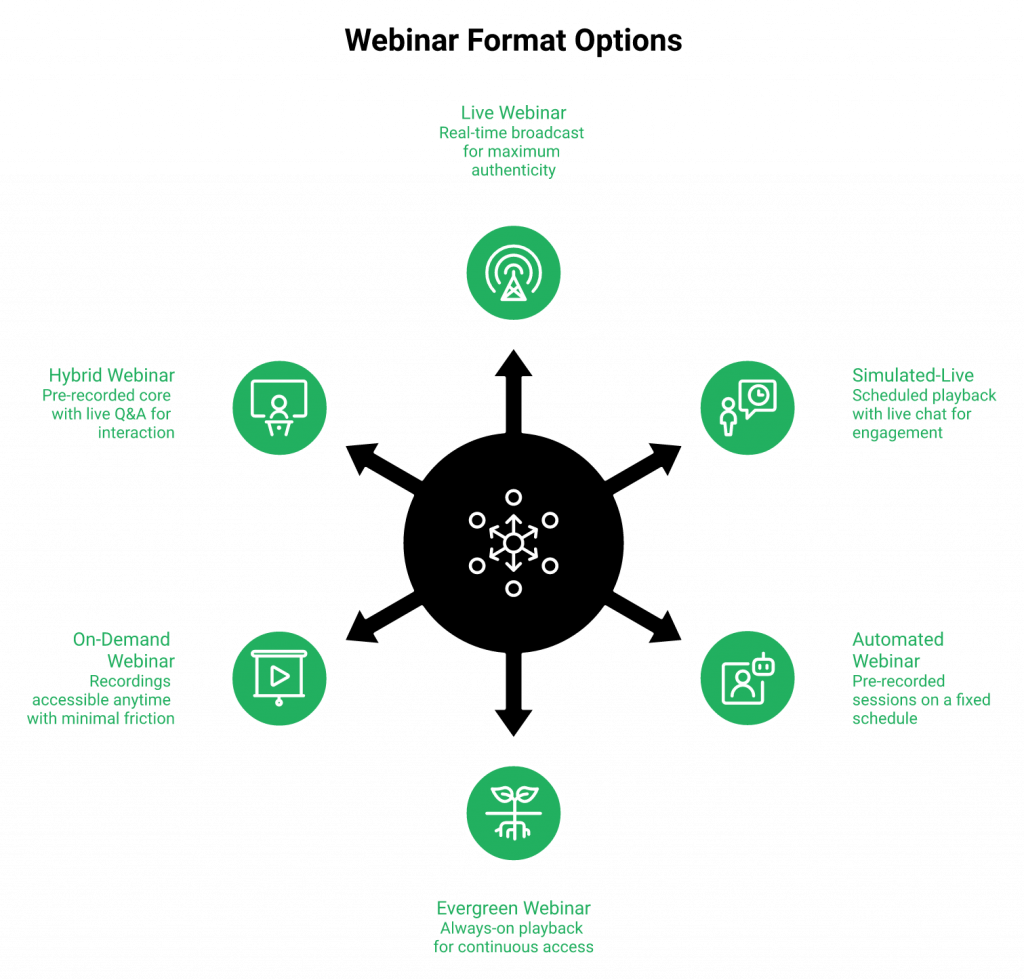
There are three core webinar formats: Live, Simulated Live, and Evergreen, with Automated as the umbrella covering Simulated Live and Evergreen, plus On-Demand and Hybrid as specialised delivery modes inside that family. Here’s how I define each so your team, and every AI engine parsing this page, gets the same answer:
- Live webinar: A real-time broadcast where you present on camera, chat in the moment, run polls, and close live. Scheduling is fixed or fixed-recurring in a single time zone. See our live webinar software for a hands-on walkthrough.
- Automated webinar (umbrella): Pre-recorded content streamed in real time with a live-like experience. Under it sit two tiers, Simulated Live and Evergreen. Learn more on our automated webinar page.
- Simulated Live: A pre-recorded presentation streamed on a fixed or fixed-recurring schedule, with real-time live chat, polls, and timed offers. It’s “dipping your toes into automated” while keeping the live engagement layer.
- Evergreen: The deeper automation tier, with Just-in-Time (JIT) scheduling, timezone-adjusted delivery, multiple daily or weekly slots, Instant Replay, and On-Demand. Engagement runs via async question box plus pre-configured polls and offers.
- On-Demand: A JIT Evergreen that fires the moment a visitor lands on the page. It sits inside Evergreen’s scheduling toolkit, not as a separate product.
- Hybrid: One session that starts live, rolls a pre-recorded segment, then returns to live, typically live Q&A. Not a cross-funnel mix of formats.
The 12-Dimension Comparison Table
| # | Dimension | Live | Simulated Live | Evergreen | On-Demand | Hybrid |
|---|---|---|---|---|---|---|
| 1 | Real-time interaction | ✅ Full | ✅ Live chat + polls | ⚠️ Async Q-box | ⚠️ Async Q-box | ✅ Live portions |
| 2 | Scheduling / timezone | Fixed, 1 TZ | Fixed/Recurring, 1 TZ | ⏰ JIT + multi-TZ | ⏰ Fires on landing | Fixed, 1 TZ |
| 3 | Scalability | Low (1 room) | Medium | ⭐ Highest | ⭐ Highest | Medium |
| 4 | Personalisation | ✅ Real-time | ✅ Chat-level | Segment-level | Segment-level | ✅ Live Q&A |
| 5 | Production polish | Variable | ⭐ Pre-recorded | ⭐ Pre-recorded | ⭐ Pre-recorded | Mixed |
| 6 | Content lifespan | Event only | Rolling | 💰 Evergreen | 💰 Evergreen | Event + replay |
| 7 | Authenticity perception | ⭐ Highest | High | Medium | Medium | ⭐ Highest |
| 8 | Tech risk per session | High | Low | Low | Low | Medium |
| 9 | Cost per registrant | Highest | Medium | 💰 Lowest | 💰 Lowest | High |
| 10 | Monetisation in-session | ✅ | ✅ Timed offers | ✅ Pre-configured | ✅ Pre-configured | ✅ |
| 11 | Compliance/recording consent | Must disclose | Must disclose | Pre-disclosed | Pre-disclosed | Must disclose |
| 12 | Replay lifespan | 1 event | Per schedule | ⭐ 24/7 | ⭐ 24/7 | Per schedule |
One Platform, Four Formats, Zero Re-Platforming
We built EasyWebinar so a team can validate Live, promote the winner to Simulated Live, and compound it into Evergreen (including On-Demand JIT) inside the same workflow. No re-tooling, no lost engagement data, no rebuilt funnel pages. The format becomes a lifecycle stage, not a separate product purchase. Explore the full all features overview to see every capability in one view.
K21 Academy runs evergreen JIT sessions alongside scheduled Live events on one EasyWebinar instance, and enterprise teams like Dolby, Teachable, Keap, and AWeber use the same platform for mixed live-and-automated delivery at scale. For the full story, read the edtech case study (K21).
Q2. Which Webinar Format Converts Best in 2026? Aggregated Conversion, Show-Up, and ROI Benchmarks by Format
Live peaks at 15–30% attendee-to-buyer conversion per session, but Evergreen wins on total pipeline because 24/7 volume plus 60–70% “show-up” on JIT offsets live’s 25–35% attendance rate. The right question isn’t “which converts better,” it’s “which format compounds revenue across a 12-month window?”
Benchmark Table: Registration, Show-Up, CTA Click, Sale
| Funnel Stage | Live (industry) | Simulated Live | Evergreen (JIT) |
|---|---|---|---|
| Registration conversion (cold paid) | 20–30% | 25–35% | 30–40% |
| Show-up rate | 25–35% | 35–45% | 60–70% (JIT) |
| Attendance-to-CTA click | 30–50% | 30–45% | 25–40% |
| CTA click-to-sale | 8–15% | 6–12% | 5–10% |
| Attendee-to-buyer (healthy target) | ~10% | ~8% | ~6% |
| Revenue lifespan (per asset) | 1 event | 4–12 weeks | 12+ months |
How to Read the Numbers
- ⏰ Live is a validation format. Hit 10% attendee-to-buyer across 5 to 10 live sessions before you consider automating anything. See Live Webinars Made Easy for the full host-prep walkthrough.
- 💰 Evergreen compounds. A single validated recording running JIT daily at 12pm and 6:30pm across three time zones can 5x to 10x total pipeline over 12 months versus a weekly live.
- ✅ Simulated Live is the middle tier. You keep real-time chat and polls (its defining edge over a basic replay) while the presentation itself runs pre-recorded on a fixed schedule.
- The benchmarks above collapse the moment traffic is cold, the offer is under $200, or the follow-up sequence isn’t behavioural. Baseline CPL of $8 to $12 only works against a $2K+ back-end offer.
Attribution and Revenue-Lifespan Math
One Live webinar at 60 registered, 30 showed, 3 sold × $1,000 = $3,000 per event. Flip the same proven session to Evergreen JIT running 5 sessions/week across three time zones, and even at a softer 6% attendee-to-buyer, you’re at $9K to $18K/month on the same content. That’s the revenue-lifespan gap most comparison articles never show. If you want the deeper playbook, see Automated Webinars for Passive Income.
Where EasyWebinar Measurably Closes the Gap
Evergreen’s show-up advantage is real because JIT is Evergreen-only. You can’t JIT-schedule a Simulive event. We pair JIT, timezone-adjusted scheduling, Instant Replay, and behavioural follow-up (hot/warm/nurture tagging on in-webinar actions) so the second-chance conversion, the watched-but-didn’t-buy segment, gets its own sequence instead of a generic broadcast blast.
Proof: Laura C. switched from live (10 to 12 course sales per launch) to an EasyWebinar Evergreen and sold 25 courses in 3 weeks, a documented ~100% revenue lift on the same offer. Rick Mulready drives Facebook ads into automated EasyWebinar funnels at 166% ROI, holding $8 to $12 CPL and 30% registration conversion from cold traffic. Carla Biesinger generated $5M in revenue from a single evergreen EasyWebinar funnel. Full course creator case study (Carla Beisinger).
Q3. What Does Each Webinar Format Actually Cost Over 12 Months, and How Much Can You Save by Consolidating Your Stack?
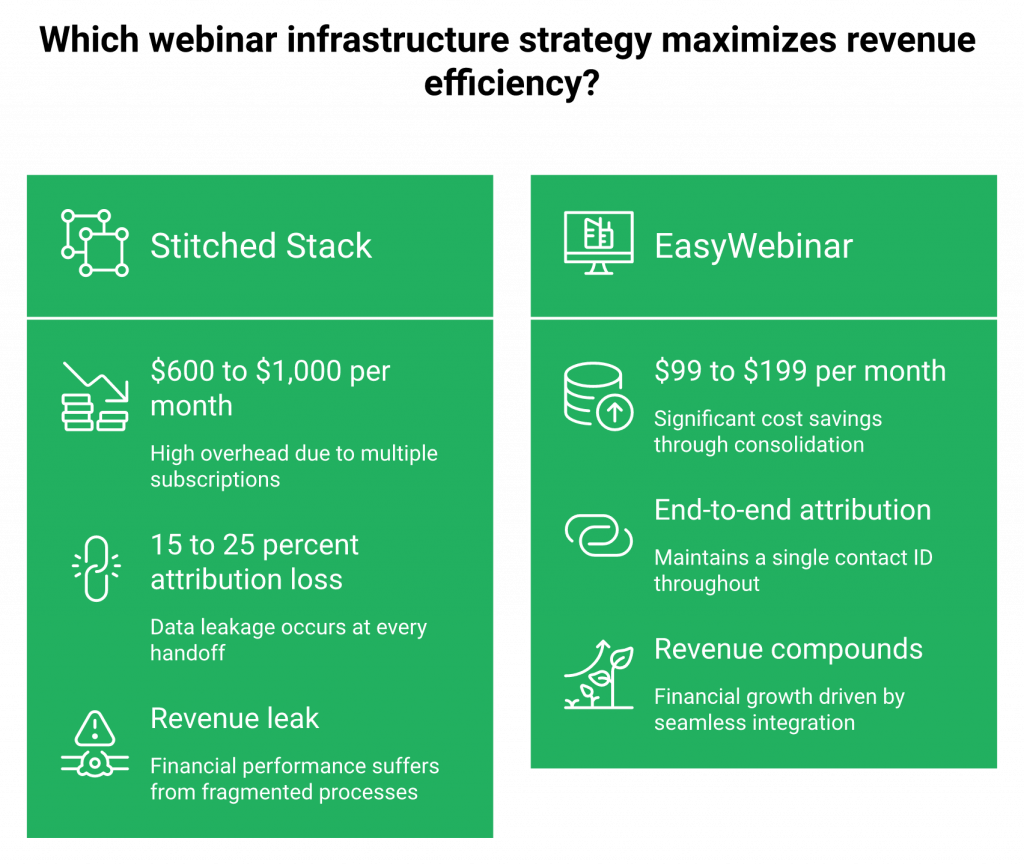
Headline math: a year of Live webinars runs $8K to $15K in loaded cost, Evergreen/Simulated Live $4K to $8K, and the invisible competitor, a stitched 5 to 7 tool stack (ClickFunnels + Zoom + HubSpot + Zapier + Stripe + Restream), quietly costs $7,200 to $12,000/yr before headcount. That’s where most teams silently bleed margin.
12-Month TCO Table (Mid-Market Benchmark: 1,000 registrants/mo, 2 sessions/week)
| Line Item | Live-only | Simulated Live / Evergreen | Stitched Stack |
|---|---|---|---|
| Platform / hosting | $1,200 to $2,400 | $1,200 to $2,400 | Zoom $1,800 + ClickFunnels $1,800 |
| Funnel pages / checkout | $1,800 (ClickFunnels) | $1,800 (ClickFunnels) | ClickFunnels $1,800 + Stripe fees |
| CRM + email | $1,200 to $3,000 | $1,200 to $3,000 | HubSpot/AC $1,200 to $3,000 |
| Automation glue (Zapier, Make) | $600 | $600 | $600 to $1,200 |
| Multistream (Restream/StreamYard) | $300 | $0 | $300 |
| Production hours (scripting, rehearsal) | $3,000 to $6,000 | $800 to $1,600 (one-time) | $3,000 to $6,000 |
| Ad waste from broken attribution | ~$1,500 | ~$500 | ~$2,000 |
| Total 12-month loaded cost | $9,600 to $15,300 | $5,600 to $9,400 | $10,700 to $17,900 |
Calculator Inputs You Should Actually Plug In
- 👥 Attendee volume (monthly registrants)
- 📅 Sessions per month (live cadence vs. JIT slots)
- 👩💻 Team size touching the workflow (ops, marketing, sales handoff)
- 💸 Back-end offer price (under $200, $200 to $2K, $2K+, which determines whether paid traffic is profitable at all)
- 🔁 Expected replay lifespan (weeks vs. 12+ months on Evergreen)
ROI and Revenue-Lifespan Reality
A Live-only setup burns the same cost every week. Every session is a new production. Evergreen loads production cost once and runs the asset for 12+ months. With a $2K to $10K back-end coaching offer, even a soft 6% attendee-to-buyer on Evergreen pays back the entire 12-month TCO inside month one. Low-ticket offers ($47, $97) will lose money on paid traffic regardless of format. That’s offer-math, not platform-math. For more, read How to Make Money With Webinars, 4X Your Revenue.
⚠️ Where the Stitched Stack Really Leaks Money
The $10,700 to $17,900/yr number understates the damage. The real cost is attribution loss: Zoom doesn’t tell HubSpot who clicked the offer, Stripe doesn’t tell ClickFunnels who bounced at minute 5, and Zapier silently drops records when payloads change. You end up paying for five tools and still can’t answer “which ad drove which sale?”
One Line Item, Full Workflow
We consolidated hosting, registration and thank-you pages, Live + Simulated Live + Evergreen delivery, EasyCRM with hot/warm/nurture scoring and auto-dialer, in-webinar checkout, and EasyCast multistreaming into a single EasyWebinar subscription in the $99 to $199/mo range. See full webinar pricing. That’s one line on the CFO’s SaaS report replacing five to seven.
Proof: Ryan Fenn built a $2M automated webinar funnel after ripping out a Zoom + ClickFunnels + ActiveCampaign + Stripe stack and running the full workflow inside EasyWebinar. Annette S. captured the consolidation outcome plainly:
“EasyWebinar does exactly what it says on the tin… I love the ease of being able to integrate this platform with other platforms we use, like HubSpot and Zapier.”
— Annette S., Marketing Professional Easywebinar G2 – Verified Review
Q4. When Do Live Webinars Win, When Do Automated Webinars Outperform, and What Are the Anti-Patterns That Silently Kill Both?
Live wins for launches, trust-heavy audiences, and $2K+ offers where real-time objection handling changes the close rate. Automated (Simulated Live + Evergreen) wins for 24/7 nurture, always-on lead gen, and scaling a proven pitch across time zones. Both fail when you skip validation or treat follow-up as a broadcast instead of a behavioural trigger.
The Operator Reality Most Teams Live Inside
I’ve watched this pattern play out for 14 years. The marketer running weekly lives nails month one, limps through month two, and burns out by month three. The weekly cadence eats scripts, rehearsal, energy, and show-up rate. On the other side, the team that records one webinar, loads it into an automation tool, runs paid traffic, and watches CPL balloon 3x because the recording was never validated against a live audience.
⚠️ Where the Industry Gets It Wrong
- Live-only platforms end at “the event happened.” Zoom is the room. GoTo Webinar is the room with an older UX. Neither has a funnel builder, CRM, behavioural follow-up, or in-room checkout, so every post-event dollar requires ClickFunnels, HubSpot, Zapier, and Stripe to catch it. See how we compare in EasyWebinar vs Zoom and EasyWebinar vs GoToWebinar.
- Automation-only tools skip live validation. EverWebinar and eWebinar are clean for running evergreen, but you can’t host a true live session to prove 10% attendee-to-buyer first, so you’re automating a hypothesis.
- Marketing-first platforms like Demio and Livestorm engage attendees well but have no native CRM and no in-webinar checkout, so the revenue work still sits on a separate toolchain. See EasyWebinar vs Demio for a side-by-side.
The Strategic Shift: Sequence, Don’t Choose
Live is a validation format. Automated is an amplification format. You don’t pick one, you sequence them. Run 5 to 10 live sessions, hit 10% attendee-to-buyer, then promote the winning session to Simulated Live (keep the live-chat edge) or Evergreen (JIT, timezone-adjusted, Instant Replay). Automate what’s proven. Never automate what isn’t.
❌ Anti-Patterns That Silently Kill Both
- Live anti-pattern: Running weekly lives without a show-up bonus, open loops, or a behavioural follow-up sequence. Stick rate collapses, Q&A dies, and the CFO asks why pipeline is flat.
- Automated anti-pattern: Automating a recording that never cleared 10% live. You scale noise, not signal.
- Shared anti-pattern: Treating the post-webinar email as a single broadcast. Someone who clicked the buy button and didn’t purchase needs a completely different sequence than someone who dropped off at minute 5.
How We Run the Sequence Inside One Platform
We built EasyWebinar so Live, Simulated Live, and Evergreen is a toggle, not a migration. Run Live with timed offers, countdown CTAs, and built-in checkout so you sell inside the room at peak intent. Flag the winning session, promote it to Simulated Live (real-time chat + polls + timed offers intact) or Evergreen (JIT, multi-timezone, Instant Replay, On-Demand). EasyCRM tags every attendee hot, warm, or nurture on their in-webinar behaviour and triggers parallel sequences. The auto-dialer calls Hot the same day, Warm gets an objection-handler sequence, and Nurture gets value content. Explore the native sales CRM built into the platform.
Proof: Carla Biesinger built a $5M evergreen funnel from one validated live session. Jason Caruso made $14K from his first EasyWebinar while holding a 9-to-5, using automation to leverage time.
“I used to do live webinars to sell my online course. I decided to do an evergreen webinar instead using EasyWebinar. With my live class I used to sell 10 to 12 courses. With EasyWebinar I sold 25 courses within 3 weeks of my evergreen launch.”
— Laura C., Course Creator Easywebinar G2 – Verified Review
“AUTOMATED WEBINARS. Yes, I wrote that in all caps. I’ve been going live every month since 2020 and I’m exhausted… I feel like I have had a big sigh of relief since signing up and I can see the end in sight!”
— Verified User in Photography Easywebinar G2 – Verified Review
“Automating webinars that we used to have to run live every week and over time also saving us money, being more efficient.”
— Darrin B., Business Owner Easywebinar G2 – Verified Review
Q5. Which Webinar Format Fits Each Use Case, Funnel Stage, Industry, and Regulated Vertical?
The short answer: TOFU = evergreen or automated for always-on lead capture; MOFU = simulated-live with moderator chat for scaled nurture without losing a live feel; BOFU = live for high-ticket closes and enterprise deals. Industry benchmarks and compliance constraints shift the weighting. A regulated pharma team can’t run the same evergreen playbook a coach does.
Use case × format
| Use case | Best format | Why |
|---|---|---|
| Product launches, partner promotions | Live | Real-time urgency, Q&A handles objections |
| Onboarding, customer education | Automated / On-demand | Scale, consistency, searchable replay |
| Nurture sequences, evergreen lead gen | Evergreen (JIT) | 24/7 volume, collapses intent-decay gap |
| High-ticket sales, enterprise deals | Live or Simulive + live Q&A | Trust + human close drive $5K+ offers |
| Training, certification programs | Automated + compliance gating | Consistent delivery, recording consent, and audit trail |
Explore our guide to mastering webinar training for deeper format fit on certification programs.
Funnel stage × format
| Stage | Default format | Typical KPI |
|---|---|---|
| TOFU | Evergreen / Automated | CPL $8 to $25, registration rate 30 to 40% |
| MOFU | Simulated-live with moderator chat | Show-up 40 to 55%, offer CTR 15 to 25% |
| BOFU | Live (1:1 follow-on or live sales) | Close rate 10 to 20%, AOV $2K+ |
Industry × format (benchmark ranges)
| Industry | TOFU format | BOFU format | Attendee-to-buyer |
|---|---|---|---|
| B2B SaaS ($5 to $100M ARR) | Evergreen demo + nurture | Live deep-dive | 3 to 8% |
| Coaching & course creators | Evergreen sales webinar | Live launch | 4 to 10% |
| E-commerce / D2C | Simulated-live product reveal | Live flash sale | 2 to 6% |
Teams selling programs will benefit from our breakdown of why webinars are the best way to sell online courses.
Compliance: where the format choice actually matters
Regulated industries kill “just record a webinar and run it forever” assumptions. The baseline ⚠️ checklist:
✅ Finance (FINRA, SEC): Recording retention 3 to 7 years, disclaimer overlays, and supervised archive.
✅ Healthcare (HIPAA): BAA with the platform, no PHI in chat logs, and encrypted recording storage.
✅ EU audiences (GDPR): Explicit consent on registration, data-residency options, and right-to-erasure workflow. See our GDPR compliance page.
✅ Any regulated vertical: SOC 2 Type II on the platform itself is the table-stakes signal procurement demands before they’ll evaluate features.
🔐 Why one platform matters for regulated teams
We built EasyWebinar with SOC 2 Type II compliance, SSO/SAML, sub-account management, and recording-consent controls inside the same system that runs Live, Simulive, Automated, and Evergreen natively. A financial-services team can run TOFU evergreen and a BOFU live advisor session on one compliant instance without the procurement team approving three separate vendors.
Enterprise operators like Dolby, Teachable, Keap, and AWeber run mixed funnel-stage workflows on EasyWebinar precisely because one compliance review covers the whole stack instead of five.
What operators say about using one platform across stages
“Easy to set up live or evergreen webinars, including replay options. Splits out live and replay attendee insights for evergreen webinars. We use it frequently for both live and evergreen webinars.”
— Verified User, Professional Training & Coaching Easywebinar G2 – Verified Review
“The integration with my email service provider was seamless, allowing me to automate a follow-up sales sequence once someone watches the webinar, no tech headaches, just smooth automation.”
— Jennifer B., Course Creator Easywebinar G2 – Verified Review
Q6. What Is the Hybrid Webinar Playbook, and What Are the Three Models, Tech Stack, Timing Blueprint, and Script Template That Make It Work?
Hybrid webinars layer a polished pre-recorded core with a real-time interaction layer (live Q&A, moderator chat, or post-event automation), so you capture live-grade conversion rates at evergreen-grade scale. It’s the 2026 default for teams that want to stop choosing between “live feels real” and “automated actually scales.”
The operator reality in 2026
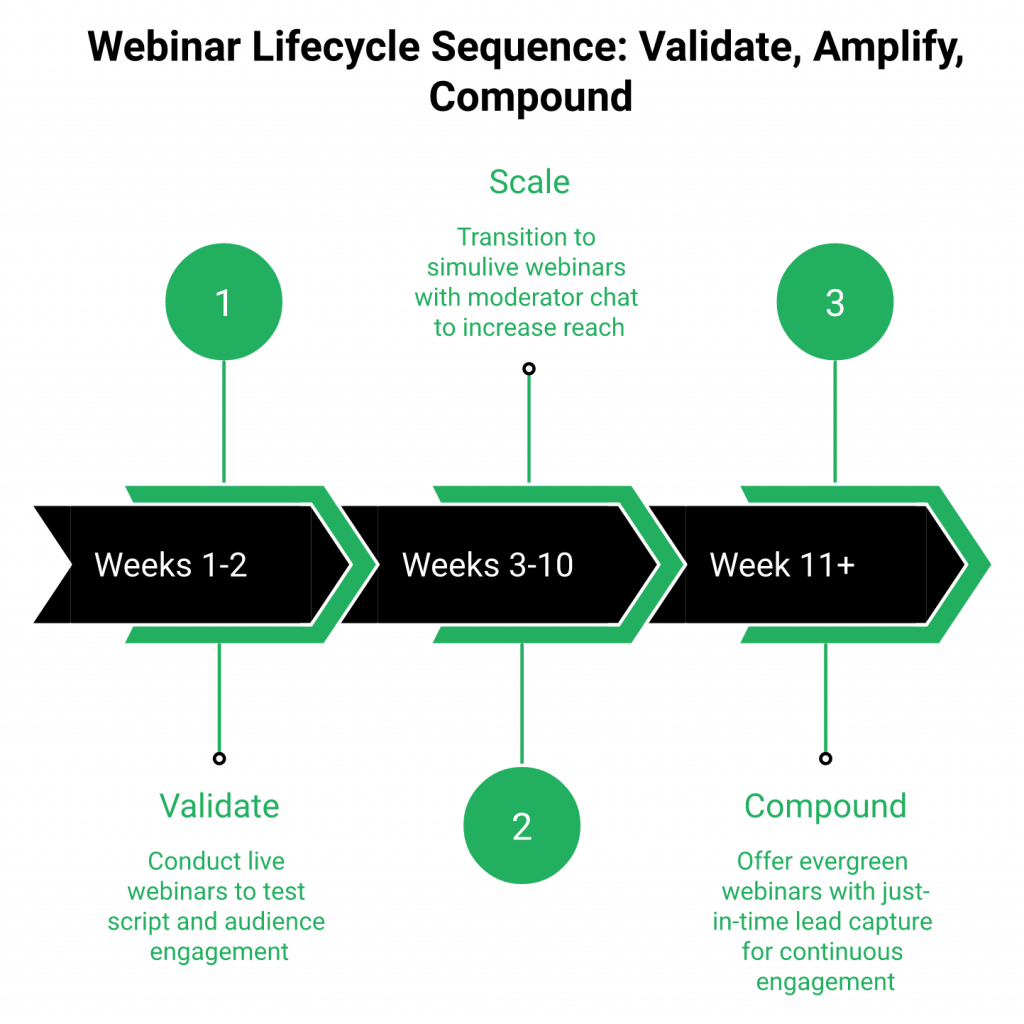
Most teams still think it’s binary. Run live this Thursday, or flip everything to evergreen next quarter. The top-performing funnels I see don’t do either. They layer formats by phase of the funnel and phase of the launch. The opening 2 weeks are live, the next 8 weeks are simulive with moderator chat, and the next 12 months are evergreen with Just-in-Time. One asset, three lifecycle modes.
Where most platforms break down
Zoom is live-only and ends at “event happened.” eWebinar is automated-only with no live validation round. WebinarKit runs strong automation but has no live capability, which means you can’t test the script against a real audience before you scale it. Demio and Livestorm support both modes but with no native CRM or in-room checkout, so the hybrid handoff to revenue still happens in a separate tool. That’s where attribution, behavioural follow-up, and in-room intent all get lost in a Zapier chain. Dig deeper via our EasyWebinar vs Demio comparison.
The three hybrid models that actually work
- ⭐ Pre-recorded core + live Q&A: Play the polished recording, then the host joins live for 15 minutes at the end. Best for founders who hate presenting the same deck weekly.
- ⭐ Simulated-live with live moderator chat: Recorded stream at a scheduled time with a real human answering chat in real time. Best for scaled launches and multi-timezone audiences.
- ⭐ Live event repurposed as evergreen asset: Run one great live, cut the Q&A, and convert to evergreen with JIT. Best for validated content that’s ready to compound.
Tech stack to run any of the three: one platform that supports all four formats, native chat + polls + timed CTAs, built-in checkout, behavioural CRM, and multistream distribution. Our all features page maps the full capability list.
Timing blueprint:
| Phase | Weeks | Format |
|---|---|---|
| Validate | 1 to 2 | Live, 2x/week |
| Scale | 3 to 10 | Simulive with moderator chat |
| Compound | 11+ | Evergreen (JIT) |
Script template skeleton: Hook (2 min) to Story (8 min) to Teach (25 min) to Offer + Stack (10 min) to Q&A (15 min, live or moderated). For more structural guidance, see our webinar content strategy checklist.
Why we built EasyWebinar for hybrid first
We designed EasyWebinar so one asset moves through all four formats inside one workflow. Run live, flip to simulive, convert to evergreen with JIT, and keep every poll, chat message, and offer-click event tagged to the same contact record in EasyCRM. EasyCast multistreaming pushes the live simultaneously to YouTube, LinkedIn, Facebook, and custom RTMP, so the hybrid event doubles as a distribution engine.
Proof: hybrid numbers from real operators
K21 Academy hit a 47% show-up rate and 5x registrant growth running a hybrid model on EasyWebinar, using Just-in-Time evergreen for TOFU and live for closing (see the K21 edtech case study). That’s the format competitors can’t natively support, resolved to a number most SaaS teams would renegotiate their ad budget for.
Q7. How Are AI-Era Features (Auto Q&A, Personalization, Transcription, and Prompt-to-Launch Builders) Reshaping Every Webinar Format in 2026?
AI has collapsed the production gap between live and automated. One operator now ships what used to take a 3-person team a week (the funnel, the emails, the script, the offer, and the polls), because the AI Builder handles the scaffolding and the human handles the strategy.
The four AI shifts that actually matter
- ⭐ AI Q&A routing: Every chat question, poll response, and CTA click gets tagged to the attendee record, then routed into a behavioural follow-up sequence. Hot leads get a call tomorrow, warm leads get a sequence, and nurture leads get monthly content. Follow-up stops being broadcast; it becomes behavioural.
- ⭐ Live transcription and searchable replay libraries: The webinar stops being a 60-minute video and becomes a searchable asset. Attendees who asked about pricing at minute 34 can be retargeted with a pricing-objection sequence, and SEO-indexed transcript pages compound into long-tail search traffic.
- ⭐ Dynamic CTA triggers on engagement score: Timed offers stop being static. The attendee who stayed 45 minutes and clicked two polls gets the premium offer; the one who joined at minute 20 gets the entry-tier. Same session, segmented offers.
- ⭐ Prompt-to-launch funnel builders: Setup compresses from 2 weeks of page-building, email-writing, and Zapier-linking to under 10 minutes from one prompt. Pages, emails, reminders, offers, polls, and follow-up logic ship together, connected from day one. See our AI funnel builder.
Where this changes the math
Launch velocity was the single biggest reason teams stayed stuck on live-only: “we don’t have time to build the automated version.” AI removes that objection. A validated live script on Thursday becomes a full evergreen funnel on Friday. ⏰
How we built AI into EasyWebinar
We trained the EasyWebinar AI Webinar Builder on 14 years of proprietary webinar data (what headlines convert, what offer sequencing works at what price point, and what reminder cadences protect show-up rates), so the prompt-to-launch output isn’t a generic template. It’s a funnel shaped by the patterns that already produced revenue for other operators in the same niche.
Proof: the setup-time collapse
Operators report going from multi-day funnel builds to under 10 minutes from a single prompt, then iterating on the output with real attendee data instead of starting from a blank page. Pair the builder with native integrations to wire downstream tools in minutes.
“Having tested EasyWebinar for the last two weeks I’m blown away with how easy it was to setup a sequence of 10 webinars and have all the steps done that I need.”
— David L., Webinar Host Easywebinar G2 – Verified Review
“Pretty much once I have run one webinar, I can clone and setup multiple in a breeze. We have run close to 30 since we started running it this new year and it has been a game changer for our business.”
— Darrin B., Business Owner Easywebinar G2 – Verified Review
Q8. How Do You Choose the Right Webinar Format Based on Traffic Volume, Team Bandwidth, and Price Point? (With Decision Flowchart & Downloadable Worksheet)
The decision resolves on three axes, not one. Traffic volume (consistent vs. inconsistent), team bandwidth (solo vs. 2+ marketers), and price point × sales cycle (sub-$500 low-ticket vs. $2K+ high-ticket). Score honestly across all three, and the right format almost picks itself.
The decision dilemma, and the wrong shortcuts
Two shortcuts kill more webinar funnels than any tool choice ever will:
❌ “Live always converts better, so we’ll just run weekly lives forever.” Works until month 3, then the team burns out and the cadence collapses.
❌ “Automate everything immediately, we don’t need to run it live.” Works until the CPL triples because the content was never validated.
Both skip the sequencing step that makes the format choice actually work. Our best webinar software comparison guide unpacks the trade-offs tool-by-tool.
The right evaluation framework
Score every format against these six criteria. A format that scores ✅ on 5 of 6 is a fit; anything below 4 is a forced choice that will break later.
- ⏰ Does your traffic arrive consistently enough to fill a fixed live slot each week?
- 👥 Does your team have the bandwidth to present, QA, and debrief live sessions weekly without burning out?
- 💰 Is the offer priced high enough ($2K+) to justify live production labor?
- 🌍 Do you need to serve multiple time zones without cloning events manually?
- 📊 Is the script validated, has it converted at 10%+ attendee-to-buyer at least 3 times?
- 🔁 Does the revenue lifespan of the offer justify a 12-month evergreen asset, or does it refresh every quarter?
Visual decision flowchart (simplified):
- Inconsistent traffic + solo team + sub-$2K offer → Evergreen with JIT.
- Consistent traffic + 2+ marketers + $2K+ offer → Live, weekly.
- Validated script + global audience + $500 to $5K offer → Simulated-live with moderator chat.
- Any of the above + always-on lead gen → Hybrid layering, not format choice.
Downloadable: grab the Webinar Format Decision Worksheet and score your own answers before committing to a platform. When you’re ready to test, sign up free or request a demo.
Product fit scorecard
| Criterion | EasyWebinar |
|---|---|
| Supports all four formats (Live/Simulive/Automated/Evergreen) | ✅ |
| Native CRM with lead scoring + auto-dialer | ✅ |
| Built-in in-webinar checkout | ✅ |
| AI Webinar Builder (prompt-to-launch < 10 min) | ✅ |
| SOC 2 Type II + SSO/SAML | ✅ |
| EasyCast multistreaming (YouTube/LinkedIn/Facebook/RTMP) | ✅ |
The scorecard isn’t rigged. It’s what the framework above demands from any webinar platform trying to run the full revenue workflow. Most tools score on 2 or 3 of these six. That’s the architectural gap. See our built-in sales CRM for the native lead-scoring layer.
Proof: the operator who shifted formats and 3x’d pipeline
Carla Biesinger compounded one validated live webinar into a $5M evergreen funnel on EasyWebinar by sequencing live to simulive to evergreen across the same asset, the exact flowchart above, applied. Read the full course creator case study.
“I used to do live webinars to sell my online course. With EasyWebinar I sold 25 courses within 3 weeks of my evergreen launch, 100% better in terms of course revenue.”
— Laura C., Course Creator Easywebinar G2 – Verified Review
Q9. Three Named-Brand Case Studies: How Live, Automated, and Hybrid Webinars Generated Measurable Revenue
Three operators, three formats, three disclosed numbers: Carla Biesinger generated $5M from a single evergreen funnel, K21 Academy ran a hybrid model to 5x registrants with a 47% show-up rate, and Ryan Fenn built a $2M automated webinar funnel after consolidating his tool stack. Each case isn’t “webinars work.” It’s a specific mechanism applied to a specific format.
Case 1: K21 Academy, hybrid model for technical certification training
K21 Academy runs Oracle Cloud and DevOps certification programs into a global, timezone-spread audience. The challenge wasn’t filling a room; it was filling multiple rooms on different continents without cloning events manually or burning out instructors. They shifted to a hybrid model on EasyWebinar, with a pre-recorded core delivered as simulive for TOFU demos, live for deeper cohort sessions, and evergreen with Just-in-Time scheduling for always-on lead capture.
Disclosed numbers: 47% show-up rate (vs. 25 to 35% industry baseline), 5x registrant growth year-over-year, and 3x CTR on in-session offers. What made it work: routing behavioural engagement data from the webinar into native follow-up, so a registrant who clicked a pricing poll got a different email sequence than one who asked a technical Q&A question. Read the full K21 edtech case study.
Case 2: Ryan Fenn, automated $2M funnel from a consolidated stack
Ryan was running webinars across Zoom + ClickFunnels + ActiveCampaign + Stripe: four tools, four contact IDs, and zero unified attribution. He migrated the entire workflow to EasyWebinar and rebuilt the same funnel on one platform. Result: a $2M automated webinar funnel running 24/7 without a presenter on the line.
The mechanism wasn’t magic. It was subtraction. Removing three tools eliminated three handoffs where contact data, engagement signals, and offer-click events were getting lost. In-session checkout captured purchase intent at peak, and behavioural CRM tagging routed warm leads into follow-up the same day instead of waiting for a weekly Zap sync. Learn more about automated webinars for passive income.
Case 3: Carla Biesinger, $5M evergreen from one validated live
Carla started with a live webinar selling her coaching program. After 3 rounds of iteration, the session was converting consistently above 10% attendee-to-buyer. She flipped the same funnel to evergreen on EasyWebinar with Just-in-Time scheduling and let paid traffic fill it.
Result: $5M in revenue from a single evergreen funnel. The compounding mechanism (24/7 JIT availability, in-webinar stacked offers, and behavioural follow-up for drop-offs) turned one validated recording into a year-round revenue asset. This is the “validate live, amplify automated” sequence playing out exactly as it’s supposed to. See the full course creator case study.
The shared pattern across all three
Every case used the same three-part architecture: validated content, integrated behavioural follow-up, and native in-session monetization, all inside one platform. No Zapier chains, no mis-attributed revenue, and no handoff friction between tools. The format changed; the architecture didn’t. Explore the architecture in all features.
What operators are saying
“I used to do live webinars to sell my online course. With my live class I used to sell 10 to 12 courses. With EasyWebinar I sold 25 courses within 3 weeks of my evergreen launch.”
— Laura C., Course Creator Easywebinar G2 – Verified Review
“I’ve been using EasyWebinar to automate my webinars and drive course sales, and it’s been a total game-changer. The integration with my email service provider was seamless, allowing me to automate a follow-up sales sequence once someone watches the webinar.”
— Jennifer B., Course Creator Easywebinar G2 – Verified Review
“We have run close to 30 since we started running it this new year and it has been a game changer for our business. It also seamlessly integrated with our CRM.”
— Darrin B., Business Owner Easywebinar G2 – Verified Review
Q10. How Do You Measure KPIs, Attribute Revenue, and Run Replay Analytics Across Live, Automated, and Evergreen Webinars?
Track format-specific KPIs. Live measures show-up rate, live-offer CTR, and Q&A depth; automated measures replay completion, behavioural click, and 7-day follow-up conversion; evergreen measures CPL, and 30/60/90-day LTV. Do it inside one attribution model so revenue signal stops getting lost between tools.
The KPI table you should actually be watching
| Format | Leading KPI | Conversion KPI | Revenue KPI |
|---|---|---|---|
| Live | Show-up rate (25 to 35%) | Live-offer CTR (20 to 35%) | Close rate (8 to 15%) within 72h |
| Simulated-live | Show-up (30 to 45%) | Moderated-chat CTR (15 to 25%) | Close rate 5 to 10% within 7 days |
| Automated | Replay completion (40 to 55%) | In-session CTA click (10 to 18%) | 7-day follow-up conversion (4 to 8%) |
| Evergreen | CPL ($8 to $25) | JIT show-up (60 to 70%) | 30/60/90-day LTV |
For a deeper revenue-math walkthrough, see how to make money with webinars.
The attribution model that actually works
Every registrant needs a single contact ID that carries three touches across the entire funnel:
- ⭐ First touch, Registration source: UTM, ad ID, and referring channel. This is the CPL anchor.
- ⭐ Engagement touch, In-session behaviour: Attendance duration, chat messages, poll responses, offer clicks, and drop-off timestamp. This is the segmentation anchor.
- ⭐ Closing touch, Offer interaction: CTA click, checkout start, and purchase. This is the revenue anchor.
When these three touches sit in three different tools (ad platform, webinar tool, and CRM), the chain breaks at every handoff. Multi-tool stacks lose 15 to 25% of revenue attribution to identity mismatches alone. Our native integrations keep the chain intact.
Replay and second-chance conversion
Replays are where most teams leave money on the table. The tactics that move the number:
⏰ Timed replay gating: Replay available for 48 hours, countdown visible, and offer stacked with urgency.
✅ Behavioural objection sequences: Anyone who dropped off before the offer gets an email sequence addressing the most common objection at that drop-off timestamp.
✅ Second-chance simulive: Re-run the winning session as simulive 7 days later for no-shows, with a moderator in chat.
These three tactics typically recover 15 to 20% of initial drop-offs into second-chance conversions. For more engagement tactics, see how to 10X engagement.
Where we removed the attribution gap
We built EasyCRM to capture attendee-level behaviour per session and score leads Hot/Warm/Nurture automatically, with no Zapier chain, no exported CSVs, and no guessing which tool had the accurate number. Offer clicks, poll responses, chat messages, and drop-off timestamps all live on one contact record, tied to the original ad-click registration. That’s the reporting a CFO can actually trust. Explore our native sales CRM.
Proof: data routed into native follow-up
K21 Academy hit 3x CTR and 5x registrant growth after routing engagement data into native behavioural follow-up instead of a third-party sync. Same content, same audience, and different reporting architecture. The numbers moved because the signal stopped leaking.
Q11. Which Webinar Platforms Should You Shortlist for Live, Automated, and Hybrid Capability?
EasyWebinar leads all three shortlists because it runs live, simulive, automated, and evergreen natively inside one workflow with native CRM, in-session checkout, and multistream distribution. Specialist tools follow where their single-format strength is strongest. See our side-by-side compare webinar platforms hub.
Shortlist by format
⭐ Live-capable platforms:
- EasyWebinar: All four formats, native EasyCRM, in-webinar checkout, Dolby-powered streaming, and SOC 2 Type II. Plans $99 to $199/month. Explore live webinar software.
- Zoom Webinars: Familiar UX, large-scale broadcasting, and ubiquity. Limitation: no funnel pages, no CRM, no in-session checkout, and basic polls. $80 to $340/month per host. See EasyWebinar vs Zoom.
- GoTo Webinar: Stable reporting backend, and enterprise polish. Limitation: dated UX, limited customization, no AI, and no native monetization. $89 to $399/month. See EasyWebinar vs GoToWebinar.
⭐ Automated-capable platforms:
- EasyWebinar: Live validation to one-toggle automated/evergreen, JIT scheduling, and EasyCRM behavioural routing.
- EverWebinar: Strong evergreen automation, and tight WebinarJam pairing. Limitation: no native live capability, clunky clone workflow, and dated support. See EasyWebinar vs WebinarJam.
- WebinarKit: Clean automated UX, and affordable entry pricing. Limitation: no live hosting, and no enterprise trust signals.
- eWebinar: Modern automated-only UX. Limitation: no live validation round. For options, see the top automated webinar platforms of 2026.
⭐ Hybrid-capable platforms:
- EasyWebinar: The only platform running Live + Simulive + Automated + Evergreen natively in one instance.
- Demio: Clean modern engagement UX, and solid live and automated. Limitation: no native CRM, no in-session checkout, and limited analytics. See EasyWebinar vs Demio.
- Livestorm: European-favoured UX, and GDPR-friendly. Limitation: expensive at scale, no built-in checkout, and no native lead scoring.
The consolidation play
Most teams don’t need three shortlists. They need one platform that replaces a 5 to 7 tool stack (Zoom + ClickFunnels + HubSpot + Zapier + Stripe + Restream + an automation tool) with a single workflow. We built EasyWebinar for exactly that consolidation, with native CRM with auto-dialer, in-webinar checkout, EasyCast multistreaming, and SOC 2 Type II compliance in one line item.
G2 4.5+ average rating, with Teachable, Keap, AWeber, and Dolby running mixed-format delivery on the same platform. Browse more customer reviews.
What operators say about the alternatives
“I used Demio to run a webinar and collected registrant emails while on a paid plan. After canceling, I was shocked to find out I couldn’t export the list unless I subscribed again.”
— Sheida M. Demio – G2 Verified Review
“Zoom Webinar is ridiculously glitchy. We’ve had problems with presenters being able to enter the webinar, with reminder notices going out eight hours after an event has concluded. Zoom is missing a lot of core webinar features that should be table stakes today.”
— Casey S. Zoom Events and Webinars – G2 Verified Review
“Complexity of set up and ensuring everything works on live day. When things don’t work or participants log in late there is no way to get help or reach support except via email.”
— Verified User in Market Research EverWebinar – G2 Verified Review
Q12. Ready to Run Live, Automated, and Hybrid Webinars on One Platform? Your Next Step
You’ve now mapped the six formats, the conversion and show-up benchmarks, the real 12-month TCO, the decision framework, and the case-study proof. One friction remains: picking a platform that actually supports all four formats, native CRM, in-session checkout, and multistream distribution without duct-taping five tools to get there.
The bridge from insight to action
The article’s core argument was simple: validate live, amplify automated, and compound via hybrid, measured by specific metrics, followed up by behaviour, and monetized in the room. That sequence only works when the format toggle, the CRM, the checkout, the follow-up, and the distribution layer all sit on one contact record. We built EasyWebinar as the only platform that runs the full sequence natively, with an AI Funnel Builder, Live/Simulive/Automated/Evergreen in one system, EasyCRM with hot/warm/nurture scoring and auto-dialer, in-webinar checkout, EasyCast multistreaming, and SOC 2 Type II compliance.
Your next step
Run Live, Automated, and Hybrid Webinars on One Platform
Replace your 5 to 7 tool stack with EasyWebinar: AI Funnel Builder, native CRM, in-platform checkout, and EasyCast multistreaming in one workflow.
Start 14-Day Free Trial Book a DemoPrefer self-serve first? Sign up free or compare plans on our webinar pricing page.
Proof anchoring the decision
Carla Biesinger: $5M evergreen funnel. Ryan Fenn: $2M automated funnel after consolidating four tools into one. K21 Academy: 47% show-up rate and 5x registrant growth on a hybrid model. All three built on the same EasyWebinar workflow the CTA above unlocks.
Was this post helpful?
Related Posts