
Zoom Alternative Webinar Platform: 8 Picks That Actually Drive Revenue


Q1. What Are the 8 Best Zoom Webinar Alternatives in 2026?
The 8 best Zoom webinar platform alternatives in 2026, ranked by full webinar-revenue-workflow fit, are:
- EasyWebinar
- Demio
- Livestorm
- WebinarJam
- WebinarKit
- eWebinar
- GoTo Webinar
- BigMarker
Picking the wrong webinar platform is an expensive mistake. The cost is not the subscription, it is the months spent stitching Zoom, ClickFunnels, HubSpot, Zapier, Stripe, and Restream into something that barely tracks a registrant from ad click to purchase. We evaluated these 8 vendors against a defined criteria set for operators running webinars as a primary revenue channel, including course creators, coaches, and B2B marketing teams, with shadow readers across the buying committee (CFOs validating SaaS consolidation, RevOps leads checking CRM attribution, IT directors reviewing SOC 2 and SSO, and marketing heads assessing funnel performance).
Our Evaluation Criteria
Webinar format coverage 🎥
Whether the platform natively supports Live, Simulated Live, Automated, and Evergreen in a single subscription, or forces separate products.
Time to launch ⏰
How quickly an operator can stand up a complete funnel (pages, emails, automation, and offer), including AI-assisted setup.
Engagement depth ✅
Live chat, polls, Q&A, timed CTAs with countdowns, offer overlays, and whether simulated chat exists inside automated sessions.
Funnel and conversion workflow 🧩
Registration, thank-you, countdown, and replay pages, plus how seamlessly offers, checkout, and follow-up connect.
CRM and follow-up readiness 🧠
Native CRM vs third-party dependency, behavioral tagging (attended, watched %, and clicked offer), lead scoring, and segmented follow-up.
Monetization support 💰
Native in-webinar checkout, paid or ticketed access, coupons, and post-payment access control, not just an external Stripe link.
Analytics and attribution 📊
UTM capture, attendee-level engagement, CTA click tracking, replay behavior, and whether revenue can be traced back to source.
Reliability, support, and scale ⚠️
Streaming stability, attendee capacity, SOC 2, GDPR, SSO, and support responsiveness during live launches.
Who This Guide Is For
- Coaches and course creators turning educational webinars into repeatable sales funnels.
- Marketing teams using webinars for lead generation, nurturing, and pipeline acceleration.
- Revenue operators evaluating whether webinar data can flow into CRM, scoring, and follow-up workflows without a Zapier patchwork.
- Founders and consultants replacing disconnected tools for hosting, landing pages, email, checkout, and follow-up.
- Buying-committee readers: CFOs validating software consolidation, IT leaders checking SOC 2 and SSO, and marketing heads assessing funnel performance.
Comparison Table
| Provider | Best For | Standout Strength | Known Limitation | Webinar Formats Covered | Support Model | Pricing Model |
|---|---|---|---|---|---|---|
| EasyWebinar ⭐⭐⭐⭐⭐ | Revenue teams consolidating a Zoom, ClickFunnels, HubSpot, and Zapier stack | Only platform combining Live, Simulated Live, Evergreen (JIT), EasyCRM, native checkout, and AI Funnel Builder | Email open/click rates not tracked in-platform. Automated setup requires video upload first | Live, Simulive, Automated, Evergreen, and Replay | Chat, email, and priority SPOC on Pro+ | Flat monthly, published: from $44/mo (Launch) or $116/mo (Pro) |
| Demio ⭐⭐⭐⭐ | B2B SaaS marketing teams that want clean browser UX and deep CRM sync | Native bidirectional HubSpot, Salesforce, Marketo, and Pardot sync on Premium | No native checkout. HubSpot/Salesforce native integrations gated to Premium (quote-based) | Live, Automated, and On-Demand | Email, plus dedicated CSM on Premium | Starter $45/mo annual. Growth and Premium quote-based |
| Livestorm ⭐⭐⭐⭐ | European and compliance-sensitive B2B teams with unpredictable attendance | Attendee-credit pricing, plus strong GDPR and ISO 27001 posture | No native checkout, no confirmed JIT evergreen, and SSO is a paid add-on | Live, Automated, and On-Demand (JIT unclear) | Email and chat, plus dedicated CSM on Enterprise | Attendee-credit (Pro ~$99/mo). Enterprise quote-based |
| WebinarJam ⭐⭐⭐ | Live sales webinars for creators comfortable managing multiple tools | Large live attendee capacity with strong CTA and offer engine | Evergreen requires a separate EverWebinar subscription. Reliability complaints at scale | Live and Simulive (Evergreen via EverWebinar add-on) | Email ticketing | Annual-only plans from ~$499/yr |
| WebinarKit ⭐⭐⭐ | Solo operators running automated-only replay funnels at low cost | Aggressive flat pricing, plus strong automated flow builder | No live webinar capability. Thin enterprise trust signals | Automated and Evergreen only | Flat annual. Entry around $49 to $99/mo equivalent | |
| eWebinar ⭐⭐⭐ | SaaS onboarding and recurring product demos via structured replays | Best-in-class simulated chat and recurring-schedule UX | No live capability. Not a full funnel or revenue platform | Automated and On-Demand only | Email and chat | Flat monthly: from $99/mo |
| GoTo Webinar ⭐⭐⭐ | Internal training, enterprise town halls, and analyst or HR broadcasts | Legacy IT trust, reliable broadcast at 1K to 3K attendees, and published analytics | No funnel pages, no CRM, no AI, and in-session sales features are absent. Billing complaints recur | Live and Simulive (scheduled) | Phone and email (outsourced per reviews) | Per-organizer annual. Lite ~$49/mo billed annually, Standard ~$99/mo |
| BigMarker ⭐⭐⭐ | Enterprise virtual events, summits, and white-label conferences | Deep customization, white-label, multistream, and 500K+ concurrent at Enterprise | Opaque pricing, heavy setup friction, and overkill for solo creators | Live, Simulive, Automated, and On-Demand | Partner-delivered, plus CSM | Quote-based only |
1. EasyWebinar
EasyWebinar is best for course creators, coaches, and marketing teams that want webinars to function as a revenue system, not just a broadcast, because it is the only platform on this list that bundles Live, Simulated Live, and Evergreen delivery with an AI funnel builder, EasyCRM, native checkout, and EasyCast multistreaming into one published subscription. It may not fit buyers who only need a meeting room or who require SSO/SAML below the Enterprise tier.
Quick fit
| Row | Detail |
|---|---|
| Best for | Operators replacing a 5 to 7 tool stack (Zoom, ClickFunnels, HubSpot, Zapier, Stripe, and Restream) |
| Skip if | You only need a basic internal meeting room, or you need SSO/SAML below the Enterprise plan |
| Strongest edge | Four webinar formats, plus native CRM, in-webinar checkout, and AI Builder in a single subscription |
| Biggest trade-off | Email open/click rates aren’t tracked inside the platform’s own email system. Automated webinar setup requires the video to be uploaded first |
| Pricing snapshot | Launch $44/mo (m-t-m) or $36/mo annual. Pro $116/mo (m-t-m) or $96/mo annual. Agency Pro $333/mo annual. Enterprise custom (verified from the webinar pricing page, April 2026) |
Why EasyWebinar ranks #1
Against the eight evaluation criteria, EasyWebinar is the only vendor in this list that scores strongly across format coverage, CRM and follow-up, monetization, and stack consolidation at the same time. Live, Simulated Live, Automated, and Evergreen (with Just-in-Time scheduling, timezone-adjusted delivery, and Instant Replay) all live under one “Automated Webinars” umbrella, which means a validated live session can be flipped to Simulive or Evergreen with a toggle, not a migration to a second product. Most competitors here solve one slice (engagement, replay automation, or enterprise broadcast). EasyWebinar owns the full path from registration page, to session, to in-room offer, to checkout, to behavioral follow-up, to multistream distribution.
What EasyWebinar does well
- AI Webinar Builder generates a launch-ready funnel in under 10 minutes. Registration page, thank-you page, reminder sequences, timed offers, and poll questions come from a single prompt, which compresses typical 2 to 3 week funnel builds into one sitting.
- Four formats in one subscription with a one-toggle transition from Live to Simulive to Evergreen. Validate the offer live, then scale the same funnel without rebuilding pages or emails.
- EasyCRM with lead scoring and auto-dialer (Pro+). Behavioral tags (registered, attended, clicked offer, and watched % of video) fire automatically, so sales calls the hot leads first instead of exporting CRM reports.
- Native in-webinar monetization. Stripe and PayPal checkout fires inside the session during peak intent, with countdown-driven timed offers and stacked CTAs, so buyers don’t get redirected to an external page where intent decays.
- Power Follow-Ups segmented by in-webinar behavior. Separate email sequences for “attended and clicked offer,” “attended but left early,” “registered but no-show,” and “watched replay,” all triggered natively without Zapier.
- EasyCast multistreaming to YouTube, LinkedIn, Facebook, and custom RTMP. One session becomes content across 3 to 4 channels, replacing a separate Restream or StreamYard subscription.
Where EasyWebinar falls short
- Email open and click rates aren’t tracked inside the platform’s native email system. Teams that need that telemetry currently export to an external ESP.
- Automated webinar setup requires the recorded video upfront, so you can’t pre-build the evergreen funnel while the presentation is still being recorded.
- Public G2 review base is modest (~94 reviews) compared to legacy competitors, a procurement-validation consideration, though star ratings skew high.
- SSO/SAML and advanced admin governance sit at the Enterprise tier, which buyers on Pro need to plan for if IT mandates SSO.
Decision scorecard
| Evaluation criterion | EasyWebinar fit | Why it matters |
|---|---|---|
| Live webinars | Strong | Up to 4-hour sessions on Pro, HD streaming, and native chat, polls, and CTAs |
| Simulated Live or Automated | Strong | Available from Launch plan. Simulated chat keeps the sales feel |
| Evergreen (JIT and timezone-adjusted) | Strong | Pro plan includes JIT 15, 30, and 60-min options, and unlimited sessions |
| Funnel pages | Strong | AI-built registration, thank-you, countdown, and replay pages on all plans |
| Engagement | Strong | Timed offers, countdown CTAs, polls, live chat, and simulated chat in automation |
| CRM and follow-up | Strong | EasyCRM with lead scoring, auto-dialer, and behavioral Power Follow-Ups on Pro |
| Monetization | Strong | Native Stripe and PayPal checkout inside the session on all plans |
| Analytics | Partial | Strong attendance, CTA, and replay data. In-platform email open/click tracking is a gap |
| Integrations | Strong | Native integrations plus Zapier. ActiveCampaign, Kit, and HubSpot widely reported working |
| Pricing fit | Strong | Flat published pricing from $44/mo, which replaces $600 to $1,000/mo multi-tool stacks |
| Best-fit buyer | Strong | Course creators, coaches, B2B marketing, and agencies running revenue webinars |
Best for / skip if
Choose EasyWebinar if you want webinars to generate pipeline and revenue, not just attendance, and you’re ready to consolidate hosting, pages, CRM, checkout, follow-up, and multistreaming into one platform. Skip it if your only need is a basic internal meeting room, if you need SSO/SAML without moving to an Enterprise contract, or if your procurement process requires a 500+ public review base.
Reviews
“I used to do live webinars to sell my online course… With my live class I used to sell 10 to 12 courses. With EasyWebinar I sold 25 courses within 3 weeks of my evergreen launch.”
— Laura C. Easywebinar G2 – Verified Review
“I do use other email systems to send post-webinar email sequences because I can’t track open and click rates on EasyWebinar.”
— Eliza W. Easywebinar G2 – Verified Review
2. Demio
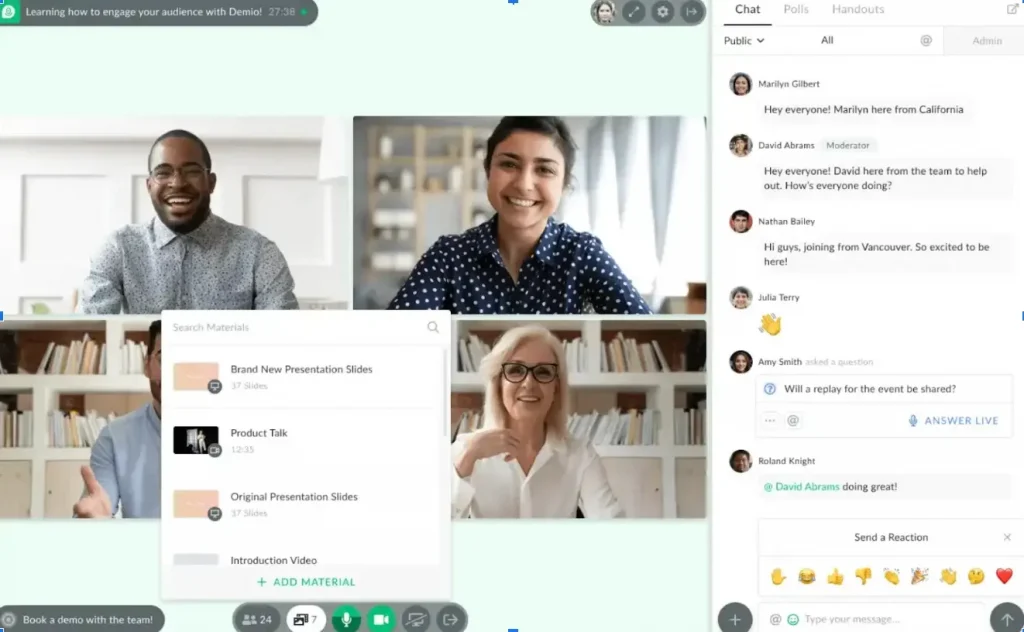
Demio is best for B2B SaaS marketing and customer success teams running weekly lead-gen or onboarding webinars because it offers a clean browser-based attendee experience and deep native CRM sync with HubSpot, Salesforce, Marketo, and Pardot. It may not fit buyers who need in-webinar checkout, true evergreen JIT, or Premium CRM integrations without a quote-based contract. For a deeper side-by-side, see our EasyWebinar vs Demio comparison.
Quick fit
| Row | Detail |
|---|---|
| Best for | B2B SaaS demand gen teams that prioritize clean UX and bidirectional CRM sync |
| Skip if | You need native in-webinar checkout, JIT evergreen, or CRM integrations on an entry plan |
| Strongest edge | Native HubSpot, Salesforce, Marketo, and Pardot integration with attendee-level behavior sync |
| Biggest trade-off | No native checkout. Core CRM integrations gated to Premium (quote-based) |
| Pricing snapshot | Starter $45/mo annual (50 attendees, 3 hr). Growth and Premium quote-based |
Why Demio ranks #2
Demio earns its position on attendee experience and CRM architecture. The browser-based session UI is the cleanest on this list, and bidirectional sync into HubSpot, Salesforce, and Marketo means poll responses, CTA clicks, and watch-time tags flow into an existing marketing ops stack without Zapier glue. Where it drops off is on revenue workflow: no native checkout, no confirmed JIT evergreen, and the integrations most B2B teams buy it for sit behind Premium.
What Demio does well
- Browser-based attendance with no downloads, which drives higher show-up rates for B2B audiences and fewer support tickets about installers.
- Native bidirectional CRM sync on Premium. Attendee-level engagement data hits HubSpot and Salesforce as properties, not just registration pushes.
- Clean registration and event setup. Sub-30-minute time to first webinar is consistently reported by reviewers.
- On-demand and automated session support, which is enough for recurring demos, though not full JIT evergreen.
Where Demio falls short
- No native in-webinar checkout or ticketing. Paid webinars require external payment links.
- HubSpot, Salesforce, Marketo, and Pardot integrations are Premium-only. The Starter plan is effectively a demo.
- Reviewers report audio and connection issues and Safari compatibility gaps. These are not consistent across all users but are recurrent in negative reviews.
- Data export after cancellation is restricted, which is flagged by reviewers as a contract friction point.
Decision scorecard
| Evaluation criterion | Demio fit | Why it matters |
|---|---|---|
| Live webinars | Strong | Clean browser UX, and reliable for standard B2B sessions |
| Simulated Live or Automated | Partial | Automated supported. Simulive not the same as EasyWebinar’s |
| Evergreen (JIT) | Weak | JIT and timezone-aware scheduling not confirmed |
| Funnel pages | Partial | Registration and showcase pages included. Not a full funnel builder |
| Engagement | Partial | Polls, handouts, and CTA clicks. Documented single-close CTA limitation |
| CRM and follow-up | Strong (Premium only) | Native HubSpot, Salesforce, Marketo, and Pardot sync |
| Monetization | Weak | No native checkout |
| Analytics | Strong | Attendee-level engagement and UTM tracking |
| Integrations | Strong (Premium) | Native CRM. Other integrations via Zapier |
| Pricing fit | Partial | Starter is tight at 50 attendees. Growth and Premium are quote-based |
| Best-fit buyer | Strong for B2B SaaS | Weaker for creators selling courses or paid webinars |
Best for / skip if
Choose Demio if you’re a B2B SaaS team running recurring demos and lead-gen webinars into HubSpot or Salesforce, and you don’t need in-webinar monetization. Skip it if you sell courses, coaching, or paid webinars, because the lack of native checkout and true evergreen JIT will push you back into a multi-tool stack.
Reviews
“It’s hard to integrate into Hubspot. We use a third party capture form and had to do several zaps to get all data to flow accurately from our form to Hubspot to Demio.”
— Verified User in Education Management Demio – G2 Verified Review
“I used Demio to run a webinar and collected registrant emails while on a paid plan. After canceling, I was shocked to find out I couldn’t export the list unless I subscribed again.”
— Sheida M. Demio – G2 Verified Review
3. Livestorm
Livestorm is best for compliance-sensitive B2B teams with unpredictable attendance patterns because it offers an attendee-credit pricing model, strong GDPR and ISO 27001 posture, and a modern browser experience. It may not fit buyers who need JIT evergreen, native checkout, or SSO/SAML on non-Enterprise plans.
Quick fit
| Row | Detail |
|---|---|
| Best for | EU and regulated-industry B2B teams that value compliance and clean UX |
| Skip if | You need JIT evergreen, in-webinar monetization, or SSO without an add-on |
| Strongest edge | Attendee-credit model, plus GDPR and ISO 27001 compliance |
| Biggest trade-off | SSO/SAML, multistreaming, and data residency are paid add-ons on top of the plan |
| Pricing snapshot | Free tier (30 attendees, 20 min). Pro from ~$99/mo attendee-credit. Enterprise custom |
Why Livestorm ranks #3
Livestorm’s ranking reflects a strong attendee experience and enterprise compliance positioning, offset by gaps in monetization and true evergreen depth. The credit-based pricing is fair for teams with irregular webinar cadence, but it can surprise high-volume operators. CRM integration with HubSpot, Salesforce, and Marketo is confirmed at Enterprise.
What Livestorm does well
- Attendee-credit pricing. You pay for people who actually attend, not seat licenses.
- Strong compliance posture. GDPR, ISO 27001, and data residency options for EU buyers.
- Modern browser UX, with a consistently praised attendee experience.
- Enterprise CRM integrations. HubSpot, Salesforce, and Marketo available at Enterprise tier.
Where Livestorm falls short
- No native in-webinar checkout. Paid webinars rely on external links.
- JIT and timezone-aware evergreen not confirmed. On-demand exists but is not the same as true evergreen.
- SSO/SAML, multistreaming, and data residency are paid add-ons on top of the plan price.
- Credit depletion forces upgrades mid-cycle for teams that scale attendance fast.
Decision scorecard
| Evaluation criterion | Livestorm fit | Why it matters |
|---|---|---|
| Live webinars | Strong | Clean browser UX, and reliable |
| Simulated Live or Automated | Partial | On-demand supported. Simulive story is lighter |
| Evergreen (JIT) | Weak | JIT and timezone-aware scheduling not confirmed |
| Funnel pages | Partial | Registration pages. Not a full funnel builder |
| Engagement | Partial | Polls, Q&A, and CTAs. No persistent offer overlay |
| CRM and follow-up | Strong (Enterprise) | Native HubSpot, Salesforce, and Marketo |
| Monetization | Weak | No native checkout |
| Analytics | Strong | Registration, attendance, and engagement at attendee level |
| Integrations | Strong (Enterprise) | Native CRM at top tier. Zapier elsewhere |
| Pricing fit | Partial | Credit model can get expensive at scale |
| Best-fit buyer | Strong for EU B2B | Weaker for creators and paid webinars |
Best for / skip if
Choose Livestorm if you’re an EU-based or compliance-regulated B2B team that values attendee-credit flexibility and needs GDPR and ISO certifications. Skip it if you sell inside the room, need JIT evergreen, or want SSO included rather than bolted on.
4. WebinarJam
WebinarJam is best for live-heavy creator sales webinars with large audiences because it offers strong CTA and offer engines and high live attendee capacity. It may not fit buyers who want evergreen automation included, because that requires a separate EverWebinar subscription, and it may not fit buyers who can’t tolerate recurring reliability and billing complaints. For a direct workflow comparison, see EasyWebinar vs WebinarJam.
Quick fit
| Row | Detail |
|---|---|
| Best for | Creators running high-attendance live sales webinars with stacked offers |
| Skip if | You want evergreen in the same subscription or can’t accept reliability risk |
| Strongest edge | Large live capacity, plus native CTA and offer overlays |
| Biggest trade-off | Evergreen requires EverWebinar add-on. Crash and billing reports at scale |
| Pricing snapshot | Annual-only from ~$499/yr Basic. Higher tiers scale by attendee count |
Why WebinarJam ranks #4
WebinarJam wins on live sales webinar features, but it loses depth across the full revenue workflow. The Live to Simulive flow is capable, but Automated and Evergreen requires EverWebinar (a separate product and subscription), and reviewer sentiment flags reliability at scale and billing friction.
What WebinarJam does well
- Native CTA overlays and stacked offers, which are strong for live pitch webinars.
- High live attendee capacity across Basic, Professional, and Enterprise tiers.
- Active presenter toolkit with handouts, polls, spotlight, and attendee spotlight.
- Integrated registration and reminder emails inside the platform.
Where WebinarJam falls short
- Evergreen means a separate EverWebinar subscription, which doubles subscription cost for full-lifecycle use.
- Reliability and crash complaints at higher attendee counts appear in verified reviews.
- Annual-only billing on most tiers, with no true monthly flexibility.
- Clunky editing and template interface reported by reviewers.
Decision scorecard
| Evaluation criterion | WebinarJam fit | Why it matters |
|---|---|---|
| Live webinars | Strong | Core competency |
| Simulated Live or Automated | Partial | Simulive supported. True automation via EverWebinar |
| Evergreen (JIT) | Weak (without EverWebinar) | Requires add-on product |
| Funnel pages | Partial | Registration and thank-you. Not a deep funnel builder |
| Engagement | Strong | CTA overlays, offers, and polls |
| CRM and follow-up | Weak | No native CRM |
| Monetization | Partial | Offers and external checkout |
| Analytics | Partial | Basic attendance and CTA tracking |
| Integrations | Partial | Zapier-heavy |
| Pricing fit | Partial | Annual-only. EverWebinar adds cost |
| Best-fit buyer | Live-pitch creators | Weak for full lifecycle |
Best for / skip if
Choose WebinarJam if you run big live pitch webinars and don’t mind adding EverWebinar later. Skip it if you want one subscription covering Live and Evergreen, or if procurement won’t approve annual-only billing.
Reviews
“Their email service is clunky, hard to edit, doesn’t have html options, and their own form fields don’t populate correctly… Their email service doesn’t consistently send to registrants.”
— Tara G. WebinarJam – G2 Verified Review
5. WebinarKit
WebinarKit is best for solo operators and consultants running automated webinar replay funnels at an aggressive price point because it offers flat pricing and a capable automated flow builder. It may not fit buyers who need any live webinar capability or enterprise trust signals like SOC 2 and SSO.
Quick fit
| Row | Detail |
|---|---|
| Best for | Solo creators running automated replay funnels on a budget |
| Skip if | You need live webinars or enterprise compliance documentation |
| Strongest edge | Flat, transparent pricing for automated-only workflows |
| Biggest trade-off | No live capability. Thin trust and governance signals |
| Pricing snapshot | Flat annual plans. Entry around $49 to $99/mo equivalent (verify before publishing) |
Why WebinarKit ranks #5
WebinarKit is a legitimate automation-only player, but the absence of live webinars means you can’t test, validate, and then scale an offer inside one platform. You need a second tool for the live validation stage. That breaks the Live, Simulive, Evergreen progression most revenue operators want.
What WebinarKit does well
- Automated-only focus keeps the UI simple and fast to ship.
- Flat pricing with no per-attendee surprise at small and mid scale.
- Capable evergreen flow builder for solo operators.
- Low setup friction for replay funnels.
Where WebinarKit falls short
- No live webinar capability. You can’t validate live and flip to evergreen in one platform.
- Limited enterprise signals. SOC 2, SSO, and SAML documentation is thin.
- Smaller integration ecosystem than top-tier platforms.
- Narrower support footprint during session issues.
Decision scorecard
| Evaluation criterion | WebinarKit fit | Why it matters |
|---|---|---|
| Live webinars | Weak | Not supported |
| Simulated Live or Automated | Strong | Core product |
| Evergreen (JIT) | Strong | Supported natively |
| Funnel pages | Partial | Registration and replay pages |
| Engagement | Partial | CTAs and simulated chat |
| CRM and follow-up | Weak | Zapier-dependent |
| Monetization | Partial | External checkout typical |
| Analytics | Partial | Basic replay and attendance |
| Integrations | Partial | Zapier-first |
| Pricing fit | Strong | Aggressive flat pricing |
| Best-fit buyer | Solo automated operators | Weak for live-first teams |
Best for / skip if
Choose WebinarKit if your entire funnel is automated replays and price is the tiebreaker. Skip it if you need live validation, a native CRM, or enterprise trust signals.
6. eWebinar

eWebinar is best for SaaS onboarding, product demos, and recurring training sessions because it offers the cleanest simulated-chat experience and structured recurring schedules. It may not fit buyers who need live webinar software, funnel pages, or revenue-grade monetization.
Quick fit
| Row | Detail |
|---|---|
| Best for | SaaS onboarding and recurring product demos with simulated chat |
| Skip if | You need live webinars or a full funnel or revenue platform |
| Strongest edge | Best-in-class simulated chat and recurring session UX |
| Biggest trade-off | No live capability. Narrow use case |
| Pricing snapshot | From $99/mo with capped attendees |
Why eWebinar ranks #6
eWebinar is clever for a specific job: turn a pre-recorded demo into a recurring, chat-enabled experience that feels live. But the gap from “clever replay tool” to “revenue platform” is meaningful. No live, no native checkout, and no CRM, which limits its fit as a Zoom replacement for sales webinars.
What eWebinar does well
- Simulated chat that actually feels live, with interactions scripted against timeline cues.
- Recurring scheduling for onboarding cohorts and weekly demos.
- Low setup friction for a recorded-demo-first workflow.
- Clean attendee UX across devices.
Where eWebinar falls short
- No live webinar support. You can’t run a live launch or town hall.
- Not a funnel platform. Pages and monetization are thin.
- No native CRM. Zapier glue for behavioral follow-up.
- Narrow use case relative to price.
Decision scorecard
| Evaluation criterion | eWebinar fit | Why it matters |
|---|---|---|
| Live webinars | Weak | Not supported |
| Simulated Live or Automated | Strong | Core product |
| Evergreen (JIT) | Strong | Recurring schedules |
| Funnel pages | Weak | Minimal |
| Engagement | Strong | Simulated chat is best-in-class for replays |
| CRM and follow-up | Weak | Third-party reliance |
| Monetization | Weak | No native checkout |
| Analytics | Partial | Basic engagement |
| Integrations | Partial | Zapier-heavy |
| Pricing fit | Partial | Narrow value at $99/mo |
| Best-fit buyer | SaaS onboarding | Weak for sales webinars |
Best for / skip if
Choose eWebinar if your main job is recurring onboarding or product demos with a live-feeling chat. Skip it if you sell inside the room or need live capability.
7. GoTo Webinar
GoTo Webinar is best for internal training, enterprise town halls, and HR or analyst broadcasts because it offers legacy IT trust and reliable broadcast up to ~3,000 attendees. It may not fit buyers who want funnel pages, a native sales CRM, AI assistance, or in-webinar monetization, none of which it provides. For a direct alternative view, see EasyWebinar vs GoToWebinar.
Quick fit
| Row | Detail |
|---|---|
| Best for | Enterprise internal training and structured HR or analyst communications |
| Skip if | You want webinars to drive revenue, not just deliver content |
| Strongest edge | Legacy IT trust, plus published analytics and large-audience broadcast reliability |
| Biggest trade-off | No funnel pages, no CRM, no AI, and no in-webinar checkout. Recurring billing and support complaints |
| Pricing snapshot | Per-organizer, annual. Lite ~$49/mo annual, Standard ~$99/mo annual, Pro ~$199/mo annual |
Why GoTo Webinar ranks #7
GoTo Webinar has enterprise familiarity and a trusted analytics surface, which keeps it on IT-procurement shortlists. But viewed as a Zoom alternative for revenue webinars, it’s essentially the same architectural limitation: a broadcast tool that ends at “the event happened,” with no funnel, no CRM, no monetization, and dated UX reported across reviews.
What GoTo Webinar does well
- Reliable large-audience broadcasts up to Unlimited plan capacity.
- Robust registration and attendance analytics for corporate reporting.
- Source tracking for registration UTMs.
- Long-standing IT procurement familiarity. SSO and governance are known quantities.
Where GoTo Webinar falls short
- No funnel pages, no CRM, no AI, and no in-webinar checkout. Same architectural gap as Zoom.
- Dated UX and limited customization reported repeatedly.
- Recurring billing and support complaints across verified reviews.
- Outsourced support per reviewer reports, with slow escalation.
Decision scorecard
| Evaluation criterion | GoTo Webinar fit | Why it matters |
|---|---|---|
| Live webinars | Strong | Reliable, and enterprise-grade |
| Simulated Live or Automated | Partial | Simulive is scheduled pre-recorded, not JIT |
| Evergreen (JIT) | Weak | Not supported |
| Funnel pages | Weak | Not a funnel builder |
| Engagement | Partial | Polls and Q&A. No offer overlays |
| CRM and follow-up | Weak | No native CRM |
| Monetization | Partial | Paid webinars on top tier via Stripe setup |
| Analytics | Strong | Enterprise-grade reporting |
| Integrations | Partial | Legacy connectors. Zapier-heavy |
| Pricing fit | Partial | Annual-only. Jumps at attendee tiers |
| Best-fit buyer | Internal training, HR, and analyst broadcasts | Weak for revenue webinars |
Best for / skip if
Choose GoTo Webinar if you run internal training, HR communications, or analyst broadcasts and IT already trusts the brand. Skip it if webinars are supposed to generate pipeline, because the architecture simply doesn’t cover the revenue workflow.
Reviews
“GoToWebinar is the most basic webinar tool that offers nothing more than any other tool. Customer support is impossible to reach and is completely outsourced.”
— Forrester S. GoTo Webinar – G2 Verified Review
“Registration page lacks a robust customization.”
— Verified User, Computer Software GoTo Webinar – TrustRadius Verified Review
8. BigMarker
BigMarker is best for enterprise virtual events, multi-track summits, and white-label conferences because it offers deep customization, heavy branding control, and massive concurrent capacity at Enterprise. It may not fit solo operators or marketing teams that need published pricing, fast setup, or a creator-friendly workflow. For operators comparing a full revenue workflow against Zoom-style broadcasts, the EasyWebinar vs Zoom comparison is a useful reference point.
Quick fit
| Row | Detail |
|---|---|
| Best for | Enterprise virtual events and white-label multi-session conferences |
| Skip if | You’re a solo operator, a coach, or a small marketing team that needs to ship this week |
| Strongest edge | Deep white-label customization, plus large concurrent capacity and native multistream |
| Biggest trade-off | Opaque pricing, heavy setup friction, and overkill for solo creators |
| Pricing snapshot | Quote-based only. Not publicly listed |
Why BigMarker ranks #8
BigMarker is genuinely strong at enterprise virtual events and summits, and its white-label and multistream depth outpace most of this list. It ranks last here because the target buyer is different: summit and conference operators, not revenue-webinar teams. Opaque pricing and heavy setup time disqualify it for creators and small marketing teams that need to launch a funnel this week.
What BigMarker does well
- Deep white-label customization for branded conference experiences.
- Multi-session and multi-track event orchestration, including sponsor halls and agenda builders.
- Native multistream and RTMP distribution across channels.
- 500K+ concurrent capacity at Enterprise tier.
Where BigMarker falls short
- Opaque pricing. Nothing published. Everything is quote-based.
- Heavy setup friction. Not a fast-ship platform for solo operators.
- Overkill for revenue webinars. The feature surface is built for summits, not sales funnels.
- Limited revenue-workflow tooling, including no native CRM with behavioral lead scoring.
Decision scorecard
| Evaluation criterion | BigMarker fit | Why it matters |
|---|---|---|
| Live webinars | Strong | Enterprise-grade broadcast |
| Simulated Live or Automated | Strong | Simulive and on-demand supported |
| Evergreen (JIT) | Partial | On-demand, JIT depth unclear |
| Funnel pages | Strong | Deep customization, though setup-heavy |
| Engagement | Strong | Polls, chat, Q&A, and handouts |
| CRM and follow-up | Partial | Integrations-based, no native behavioral scoring |
| Monetization | Partial | Ticketing available, depends on plan |
| Analytics | Strong | Enterprise-grade reporting |
| Integrations | Strong | Marketing-automation connectors |
| Pricing fit | Weak | Quote-based only, no public pricing |
| Best-fit buyer | Enterprise events and summits | Weaker for revenue webinar funnels |
Best for / skip if
Choose BigMarker if you’re running a branded multi-session conference, a summit, or a white-label virtual event program. Skip it if you want a transparent-priced, fast-ship webinar funnel that closes deals inside the room.
Q2. How Did We Score These Zoom Alternatives? (Selection Criteria & Star Ratings)
We scored each of the 8 platforms against a weighted 100-point rubric built around the criteria that actually decide whether a webinar platform generates revenue or just hosts events. Format Range carries 25 points, Revenue Workflow Depth carries 25, Automation and Evergreen Capability carries 20, Pricing Transparency and Cost at Scale carries 15, and User Reviews and Trust Signals carries 15. Star ratings map to the total: 0 to 20 = 1⭐, 21 to 40 = 2⭐, 41 to 60 = 3⭐, 61 to 80 = 4⭐, 81 to 100 = 5⭐.
What Each Criterion Actually Measures
Every criterion is tied to an operator question, not a marketing spec sheet:
- Format Range (25%) 🎥. Does Live, Simulated Live, Automated, and Evergreen live inside one subscription, or do you need a separate product (e.g., WebinarJam + EverWebinar)?
- Revenue Workflow Depth (25%) 💰. Is there a built-in CRM with lead scoring, native in-webinar checkout, and behavioral follow-ups, or does the platform hand the revenue job back to ClickFunnels, HubSpot, and Stripe?
- Automation and Evergreen Capability (20%) ⏰. Does “automated” actually mean Just-in-Time scheduling, timezone-adjusted delivery, Instant Replay, and simulated chat, or just an on-demand video?
- Pricing Transparency and Cost at Scale (15%) 💸. Is per-attendee pricing published, or is everything “Contact Sales” above the entry tier?
- User Reviews and Trust Signals (15%) ⭐. G2 average, SOC 2, SSO, and SAML posture, and documented customer revenue outcomes.
How the Points Map to Stars
| Platform | Format | Revenue | Automation | Pricing | Trust | Total | Stars |
|---|---|---|---|---|---|---|---|
| EasyWebinar | 25 | 25 | 20 | 13 | 12 | 95 | 5⭐ |
| Demio | 15 | 10 | 10 | 9 | 13 | 57 | 3⭐ |
| Livestorm | 14 | 9 | 8 | 8 | 13 | 52 | 3⭐ |
| WebinarJam | 16 | 12 | 10 | 8 | 10 | 56 | 3⭐ |
| WebinarKit | 14 | 11 | 16 | 12 | 7 | 60 | 3⭐ |
| eWebinar | 12 | 9 | 14 | 11 | 9 | 55 | 3⭐ |
| GoTo Webinar | 12 | 7 | 6 | 7 | 12 | 44 | 3⭐ |
| BigMarker | 20 | 14 | 12 | 5 | 11 | 62 | 4⭐ |
Why EasyWebinar Earns 5 Stars
We rate EasyWebinar 5⭐ because it is the only platform on this list scoring max on all three workflow-critical criteria at once: Format Range (Live, Simulated Live, and Evergreen under one umbrella), Revenue Workflow (EasyCRM with lead scoring, auto-dialer, and native Stripe/PayPal checkout), and Automation (JIT scheduling, timezone-adjusted delivery, Instant Replay, and simulated chat). Those are the exact three dimensions where Zoom Webinars scores lowest, which is why this ranking is directly actionable for anyone shopping a Zoom replacement. See the full all features breakdown for criterion-by-criterion detail.
The Scoring Has Receipts
The rubric isn’t theoretical. It tracks to documented customer outcomes we use as tiebreakers when scores cluster: Ryan Fenn built a $2M automated funnel after replacing a Zoom, ClickFunnels, ActiveCampaign, and Stripe stack, Carla Biesinger generated $5M from one evergreen funnel (see the course creator case study), and K21 Academy reached 5x registrant growth with JIT Evergreen scheduling, documented in the edtech case study. A platform that can’t prove revenue outcomes doesn’t get full credit on Trust Signals, no matter how high its average G2 star rating is.
“With my live class I used to sell 10 to 12 courses. With EasyWebinar I sold 25 courses within 3 weeks of my evergreen launch.”
— Laura C. Easywebinar G2 – Verified Review
“I used Demio to run a webinar and collected registrant emails while on a paid plan. After canceling, I was shocked to find out I couldn’t export the list unless I subscribed again.”
— Sheida M. Demio – G2 Verified Review
Q3. Why Are Revenue Teams Leaving Zoom Webinars in 2026, And Is a Dedicated Platform Actually Better?
Revenue teams are leaving Zoom Webinars because Zoom was built for meetings, not revenue. There is no native Evergreen, no Simulated Live, no built-in CRM, no funnel pages, and no in-webinar checkout, and pricing scales from $79/mo to $6,900+/mo as attendee tiers climb. ✅ A dedicated webinar platform is the better choice whenever webinars drive leads, course sales, or high-ticket revenue.
The Reality On Zoom Today
If you run revenue webinars on Zoom, you already know the shape of your stack. Registrations wire through HubSpot. Reminders fire from Zapier. The offer page lives in ClickFunnels. Payments route to Stripe. Post-event follow-ups run from ActiveCampaign. The event itself usually works. The funnel around it leaks at every handoff. Nobody on the team can answer a simple question: which registrant, from which ad, clicked the offer at minute 38, dropped off at minute 42, and should get a call tomorrow morning? That signal is scattered across five dashboards.
The Industry’s Default Is the Problem
Zoom and GoTo Webinar dominate on brand recognition, not capability. Both end at “the event happened.” No Simulated Live to scale a winning session without re-presenting it. No JIT to let a buyer attend within 15 minutes of registering, while their intent is still hot. No behavioral follow-ups segmented by what each attendee actually did. A bolted-on 5 to 7 tool stack to fix all of that costs $600 to $1,000/month and still can’t produce unified attribution. The research brief on this category puts it bluntly: Zoom Webinars requires a paid base plan plus a separate webinar add-on, and for revenue-generating sales webinars, it is materially insufficient without significant external tooling. For a direct alternatives view, see EasyWebinar vs Zoom.
Reviewers See the Same Gap
“There’s no pre-webinar waiting room or post-webinar exit page… The polling and survey functions are rudimentary… Customization of landing pages, reminders, and calendar invites is almost nonexistent.”
— Casey S. Zoom Events and Webinars – G2 Verified Review
The Shift: Webinars Are Revenue Systems
Webinars aren’t broadcasts, they’re revenue systems. Registration, engagement, segmentation, monetization, and follow-up belong inside one workflow, not five. That’s the shift dedicated platforms make possible and Zoom structurally can’t. Live, Simulated Live, and Evergreen aren’t separate products: they’re lifecycle stages of the same funnel. Prove 10% conversion live, then flip the same funnel to Simulive or Evergreen with a toggle. For a deeper treatment of this shift, read Automated Webinars for Passive Income.
Zoom Webinars vs a Dedicated Platform
| Dimension | Zoom Webinars | Dedicated Platform (EasyWebinar) |
|---|---|---|
| Primary use case | Internal broadcast | Registration to revenue |
| Formats | Live, and basic scheduled simulive | Live, Simulated Live, and Evergreen (JIT) |
| Funnel pages | ❌ | ✅ AI funnel builder |
| Built-in CRM | ❌ | ✅ EasyCRM with lead scoring |
| In-webinar checkout | ❌ | ✅ Native Stripe and PayPal |
| Behavioral follow-up | ❌ | ✅ Power Follow-Ups |
| JIT and timezone-adjusted | ❌ | ✅ |
| Multistreaming | ❌ (add-on) | ✅ EasyCast multistreaming |
| Pricing at 1K attendees | ~$340/mo + stack ($600 to $1,000/mo total) | From $116/mo all-in |
We Built EasyWebinar for This Shift
EasyWebinar’s Endpoint Ecosystem, which includes AI Webinar Funnel Builder, EasyCRM with lead scoring and auto-dialer, native checkout, and EasyCast multistreaming, collapses the 5 to 7 tool stack into one workflow. Ryan Fenn built a $2M automated funnel after replacing Zoom, ClickFunnels, ActiveCampaign, and Stripe, and K21 Academy reached a 47% show-up rate after switching from fixed-time Zoom sessions to JIT Evergreen delivery across 12 time zones. That’s not a feature win, it’s a revenue-architecture win.
Q4. Does Zoom Support Evergreen / Automated Webinars, And What Does It Actually Cost at Scale?
No, Zoom Webinars has no native Evergreen, Simulated Live, or Just-in-Time scheduling. And once you bolt on the external funnel stack (ClickFunnels $150 to $250, HubSpot $80 to $150, Zapier, and Stripe) to Zoom’s attendee-tier pricing ($79 to $6,900+/mo), the true all-in cost runs $600 to $1,000+/mo at 1,000 attendees. ❌
The Three Zoom Evergreen Workarounds, And Why They Fail
Operators trying to force Zoom into an evergreen workflow typically land on one of three patterns, and each one breaks at a different point:
- Record a Zoom session and rehost on StealthSeminar, Demio, or similar: you lose the native live chat layer, and attendee data lives in two systems.
- Third-party replay schedulers: fixed times only, no JIT, and no timezone-adjusted delivery.
- Pre-recorded YouTube “live” streams: no in-webinar checkout, no behavioral segmentation, no simulated chat, and no follow-up data routing.
None of these reproduce what true Evergreen logic actually requires: JIT scheduling that fires within 15 minutes of registration, timezone-adjusted delivery across 12+ zones, Instant Replay, pre-configured polls and timed offers, and an async question box for post-session engagement. Automated is not the same as Evergreen. On-demand video is not the same as JIT. The category research brief flags this explicitly: “automated webinar” in many vendor listings means “scheduled pre-recorded,” not true evergreen. For how we define the category, see our automated webinar page.
The Real Cost at 500 / 1,000 / 5,000 Attendees
Entry pricing misleads. The plan you actually need, for automation, a custom domain, CRM integration, and adequate attendee capacity, is usually 2 to 4 tiers up. This is what the full stack costs for revenue teams:
Monthly Cost Comparison (All-In)
| Attendees | Zoom + Stack | Demio + Stack | EasyWebinar |
|---|---|---|---|
| 500 | Zoom Webinars $79 + ClickFunnels $150 + HubSpot $80 + Zapier $20 + Restream $20 = ~$349/mo | Starter $45 + ClickFunnels $150 + HubSpot $80 + Zapier $20 = ~$295/mo | $116/mo (Pro) |
| 1,000 | Zoom Webinars ~$340 + ClickFunnels $250 + HubSpot $150 + Zapier $50 + Restream $49 = ~$839/mo | Growth (quote-based) + stack ≈ $650 to $800/mo | $116/mo (Pro) |
| 5,000 | Zoom Webinars ~$900 to $1,400 + stack = ~$1,400 to $1,900/mo | Premium (quote-based) + stack ≈ $1,100 to $1,500/mo | Enterprise custom |
For the published, all-in EasyWebinar plans referenced above, see webinar pricing.
The Hidden Costs Nobody Lists on a Pricing Page
Beyond the subscription stack, there are friction costs that show up in the P&L only after you’ve migrated:
- Zapier operation counts balloon when you run 3 to 4 automations per webinar across hundreds of registrants per month.
- HubSpot contact-scaling penalties as your webinar list grows into Marketing Hub’s higher tiers.
- Stripe redirect friction: every external checkout redirect drops conversion because intent decays the moment attendees leave the room.
- Attribution loss across 5 tools: nobody can tell you which ad drove which purchase.
Where EasyWebinar Consolidates the Math
EasyWebinar’s Evergreen tier delivers JIT, timezone-adjusted scheduling, Instant Replay, and On-Demand natively, and consolidates hosting, pages, CRM, checkout, behavioral follow-up, and multistreaming into one published price ($116/mo Pro month-to-month, and $96/mo annual). That eliminates 3 to 5 line items from the stack and collapses the attribution problem because every registration, click, watch %, and purchase event lives in one system. Teams consolidating toward a native sales CRM benefit the most. We built it this way specifically because the stack math breaks before you scale, not after.
The Proof
Customers have reduced SaaS spend from roughly $950/mo to a single EasyWebinar plan while actually improving registration-to-revenue attribution. K21 Academy grew registrations 5x after switching from fixed-time Zoom to JIT Evergreen, and reached a 47% show-up rate, well above the 25 to 35% industry baseline on Zoom-style fixed sessions. The point isn’t that EasyWebinar is cheaper on a line-item basis (though it usually is). The point is that a consolidated revenue platform produces outcomes a duct-taped stack mathematically cannot.
Q5. Which Zoom Alternative Has the Best Built-In CRM, AI Builder, and Engagement Data in 2026?
Only EasyWebinar ships all three of 2026’s decisive differentiators under one subscription: a native CRM (EasyCRM with lead scoring and auto-dialer), an AI Webinar Funnel Builder that generates a complete funnel in under 10 minutes, and engagement telemetry routed directly into behavioral follow-ups. ✅ Demio, Livestorm, WebinarJam, WebinarKit, and GoTo Webinar either outsource these capabilities to third-party tools or skip them entirely.
How the EasyWebinar Workflow Actually Runs
EasyCRM auto-captures every registration with behavior tags (registered, attended, clicked offer, watched % of session, and left at minute X), scores each contact Hot, Warm, or Nurture, and triggers a different Power Follow-Up sequence per segment. The AI webinar builder takes three inputs, topic, audience, and offer, and generates the registration page, thank-you page, reminder emails, on-screen script direction, timed offers, and polls. From one prompt to a launch-ready funnel takes under 10 minutes. ⏰
What the System Actually Handles
- Automatic lead capture with behavior tags: no CSV exports, and no Zapier mapping.
- Behavioral lead scoring: Hot, Warm, or Nurture based on in-webinar action, not email opens.
- Integrated auto-dialer and visual deal pipeline: sales calls the hot leads inside the same tool that watched them click the offer.
- Power Follow-Ups per behavior segment: parallel sequences for attended, no-show, clicked, and left-early.
- AI-generated funnel pages, reminder emails, and timed offer copy.
- AI chat and Q&A assistance during automated sessions to keep rooms feeling live.
- AI recap emails summarising what each attendee saw.
- Engagement-to-CRM routing: every poll, click, and drop-off lands on the same contact record.
For the underlying CRM surface, see our sales CRM.
Why This Matters vs the Zoom Workaround
Replicating this on Zoom means stitching HubSpot ($80 to $150/mo), Zapier ($20 to $50/mo), manual HubSpot scoring rules that can’t actually see in-webinar behavior, plus external AI tools (Jasper, ChatGPT, and Descript) for scripts and recap emails. The handoffs are the failure point: every tool boundary is where attribution and intent decay. ❌ A side-by-side view lives on the EasyWebinar vs Zoom page.
The Engagement Benchmark
Automated webinars running on JIT scheduling with behavioral follow-ups consistently hit 40%+ show-up rates, vs the 25 to 35% industry baseline on fixed-time Zoom sessions. That delta compounds: a higher show-up rate at the top of a 10% live conversion funnel produces meaningfully more buyers with no extra ad spend. K21 Academy, after switching to an engagement-to-CRM workflow that routed every webinar interaction into behavioral follow-ups, reported 3x click-through rates and 5x registrant growth, because the manual export step that usually breaks follow-up simply wasn’t there anymore. The full teardown lives in the edtech case study.
How It Compares
| Capability | EasyWebinar | Demio | Livestorm | WebinarJam | WebinarKit | GoTo Webinar |
|---|---|---|---|---|---|---|
| Native CRM with lead scoring | ✅ EasyCRM (Pro) | ❌ | ❌ | ❌ | ❌ | ❌ |
| Auto-dialer | ✅ | ❌ | ❌ | ❌ | ❌ | ❌ |
| Native HubSpot/Salesforce sync | ✅ | ✅ (Premium) | ✅ (Enterprise) | Zapier | Zapier | Partial |
| AI funnel builder (prompt to funnel) | ✅ <10 min | ❌ | ❌ | ❌ | ❌ | ❌ |
| AI chat and recap emails | ✅ | ❌ | Partial | ❌ | ❌ | ❌ |
| Behavioral follow-up sequences | ✅ Power Follow-Ups | Partial | Partial | ❌ | Partial | ❌ |
The takeaway: Demio and Livestorm win on attendee UX, but neither owns the revenue-routing layer. WebinarJam, WebinarKit, and GoTo Webinar lean on external CRMs entirely. We built EasyCRM and the AI Builder into the same product specifically because the “webinar plus 4 other tools” architecture is where revenue signal goes to die.
“The ease of implementing an evergreen webinar funnel is extremely useful… the ability to schedule simulated live webinars without needing to be present and the follow-up sequences based on attendee behavior.”
— Verified User Easywebinar G2 – Verified Review
Q6. How Do You Migrate From Zoom to a Dedicated Platform, And What Do Enterprise Buyers Need?
Migration from Zoom to a dedicated webinar platform takes 3 to 5 working days in four phases: export recordings and registrations, map contacts into the new CRM with source attribution preserved, rebuild funnel assets, and run a parallel test before cutover. Enterprise buyers additionally require SOC 2 Type II, SSO/SAML, sub-processor transparency, and 50K+ concurrent attendee support. ⏰
The 8-Step Migration Playbook
The teams that migrate cleanly follow the same sequence every time:
- Export Zoom recordings as MP4 files, plus chat logs (for context on objections handled live).
- Export registration and attendee CSVs with UTM parameters and source data intact: this is where most migrations lose attribution.
- Import contacts into the new CRM with source tags preserved as custom fields.
- Rebuild registration and thank-you pages: use the AI Builder to regenerate, not hand-code.
- Rebuild reminder and follow-up sequences, segmented by behavior tag (attended, no-show, and clicked offer).
- Upload the Zoom recording as a Simulated Live or Evergreen asset: one recording becomes a 24/7 revenue asset.
- Run a parallel live test against a small segment of your list before cutover.
- Update ad destinations and redirect Zoom registration URLs to the new funnel so in-flight traffic lands correctly.
For the core asset reused at step 6, see our automated webinar format.
The Revenue-Drop Risk Point
The handoff between steps 2 and 3 is where most teams lose revenue. If UTM and source data don’t carry over, you can’t answer “which ad drove this buyer?” after cutover, which means paid media optimisation breaks. Export the source field as a custom property, not a note.
Enterprise Evaluation Checklist
When procurement gets involved, the evaluation moves past features into governance. The non-negotiables:
- Security: SOC 2 Type II attestation, GDPR posture, and signed DPA available (see GDPR compliance).
- Identity: SAML SSO, SCIM provisioning, and role-based access controls.
- Scale: concurrent viewer capacity with redundant streaming infrastructure, not marketing claims.
- Governance: audit logs, data retention controls, and admin activity tracking.
- Support: SLA-backed response times, and dedicated account management.
Where the Enterprise Alternatives Land
ON24 meets all the trust signals, but its $30K+ ACV structurally prices mid-market operators out: you’re paying for enterprise event infrastructure you won’t use. Webex charges per seat and brings IT comfort, but adds no automation, no funnel builder, and no in-webinar monetization. Both are built for broadcast governance, not revenue workflow.
Where EasyWebinar Fits the Enterprise Bar
EasyWebinar meets SOC 2 Type II, SAML SSO, SCIM, and up to 100K live / 500K automated viewers on the Enterprise tier, while the AI funnel builder compresses rebuild work, including pages, emails, and offers, by 60 to 70% versus manual reconstruction. ✅ That combination is rare: enterprise trust signals without an enterprise rebuild timeline, at a fraction of ON24’s contract value.
The Proof
One operator migrated a $2M automated funnel from Zoom, ClickFunnels, ActiveCampaign, and Stripe into EasyWebinar in under two weeks, with no revenue drop during cutover. That’s the benchmark to hold any migration against: if the new platform can’t preserve revenue velocity during the transition, it’s not ready for the job.
“Our primary purpose for engaging EasyWebinar was to streamline our evergreen webinar funnel… The platform has enabled us to automate large portions of our customer acquisition process, significantly reducing manual work.”
— Verified User Easywebinar G2 – Verified Review
Q7. Which Zoom Alternative Should You Choose for Your Use Case? (Decision Matrix & FAQs)
Choose EasyWebinar if webinars drive revenue and you want CRM, monetization, and automation in one platform. Pick Demio for clean browser-based live marketing webinars, WebinarKit for automated-only replays on a budget, and GoTo Webinar or BigMarker when enterprise legacy trust matters most on a simple broadcast. ⭐
Use-Case Decision Matrix
Different jobs need different tools. Route by scenario, not by G2 star rating:
| Use Case | Recommended | Why | Runner-Up |
|---|---|---|---|
| Marketing Funnel (lead, nurture, and close) | EasyWebinar | AI Builder, EasyCRM, and behavioral follow-ups in one workflow | Demio |
| Enterprise Town Hall / Internal Broadcast | GoTo Webinar | IT-trusted, SSO-native, and 3K+ attendee reliability | BigMarker |
| Course Onboarding and Recurring Demos | eWebinar | Best simulated chat, plus recurring schedule UX | EasyWebinar |
| Sales Demo (B2B SaaS, HubSpot-first) | Demio | Native HubSpot and Salesforce sync at Premium | Livestorm |
| High-Ticket Launch ($5K to $50K offers) | EasyWebinar | Live-to-Evergreen toggle, plus in-room checkout and behavioral CRM | WebinarJam |
| Large Virtual Summit / White-Label Event | BigMarker | Deep customization, multi-track, and 500K+ concurrent | EasyWebinar Enterprise |
For side-by-side analysis of specific matchups, see EasyWebinar vs Demio and EasyWebinar vs GoToWebinar.
Self-Route, Don’t Read a Ranking
A flat “best of” list is a trap: the right platform changes depending on what the webinar has to do. Marketing funnels need CRM routing. Internal town halls don’t. SaaS demos need HubSpot sync. High-ticket launches need in-room checkout. Match the job first.
FAQs (People Also Ask)
What is the best alternative to Zoom for webinars?
For revenue-driving webinars, EasyWebinar is the strongest alternative: it replaces Zoom plus ClickFunnels, HubSpot, Zapier, and Stripe with one webinar platform covering Live, Simulated Live, and Evergreen, with native CRM and in-webinar checkout. For browser-first B2B demos, Demio is the cleanest option.
Can Zoom do evergreen webinars?
No. Zoom Webinars has no native Evergreen, no Simulated Live, and no Just-in-Time scheduling. The common workarounds, recording and rehosting on a third-party replay tool, or pre-recorded YouTube “live” streams, all lose simulated chat, behavioral segmentation, and in-webinar checkout in the handoff.
Is there a free Zoom webinar alternative?
Livestorm offers a free tier capped at 30 attendees and 20-minute sessions: usable for testing, not production. WebinarKit’s entry pricing is aggressive but not free. No free plan reproduces a full revenue-workflow stack. You can also sign up free to test EasyWebinar.
How much cheaper is a dedicated webinar platform than Zoom + ClickFunnels + HubSpot?
At 1,000 attendees, a Zoom-plus-stack setup runs $600 to $1,000+/month all-in. EasyWebinar’s Pro plan ($116/mo month-to-month, and $96/mo annual) consolidates the same workflow, producing 70 to 85% monthly savings while actually improving attribution. 💰 Full tiers are on the webinar pricing page.
What is the best Zoom alternative for high-ticket launches?
EasyWebinar. High-ticket launches need live validation first, in-webinar checkout at peak intent, and evergreen scaling post-launch: the three capabilities Zoom and most single-format competitors don’t ship together. Back-end offer economics require $8 to $12 CPL into $5K to $10K programs, which only works when the platform preserves attribution end-to-end. For monetized sessions specifically, see paid webinars.
Where to Go Next
The final filter is always the same: does the platform close the revenue loop, or does it hand you back to five other tools? If you’re ready to see the full pricing, plan, and capability breakdown in one place, the EasyWebinar pricing page lays out every tier and what it unlocks.
This analysis is grounded in 14 years running and consulting on 100+ webinars that have generated eight figures across Live, Simulated Live, and Evergreen formats.
Buyer’s Guide
See the full pricing breakdown
Compare Live, Simulated Live, and Evergreen plans with EasyCRM, AI Webinar Builder, and EasyCast multistreaming in a single view.
See Full Pricing Breakdown →Was this post helpful?
Related Posts