Webinar Equipment Guide: What You Need to Host a Professional Webinar

Casey Zeman
Published on Jun 1, 2026 • 28 min read

TL;DR
- Six categories cover 95% of webinar setups: camera, mic, light, wired internet, backdrop, software. Everything else is optional gear that drains pitch energy.
- Microphone matters more than camera. A dynamic USB mic (Shure MV7+) or a lavalier (DJI Mic Mini) beats a $1,500 mirrorless rig for talking-head webinars every time.
- Smartphones now match DSLRs for webinar broadcast, with computational HDR, eye-tracking autofocus, and zero overheating risk on 60-minute sessions.
- Wired ethernet, a phone hotspot backup, an $80 UPS battery, and a co-host on a second device prevent 95% of live webinar disasters.
- Live tolerates flaws; evergreen amplifies them. Treat the room (one acoustic panel, a rug, no glass) before upgrading the microphone for evergreen recordings.
- Buy gear by revenue stage, not aspiration. Stage 1 ($0–$10K) ships on a laptop webcam. EasyWebinar's AI Builder lets you go live tonight on whatever's on your desk.
Q1: What webinar equipment do you actually need to look professional (and what can you skip)?
You need six things to host a professional webinar: a 1080p camera (your laptop webcam works to start), a USB or lavalier microphone, one soft light source, wired ethernet, a clean backdrop, and webinar software that handles registration, replay, and CTAs. Everything else, capture cards, ATEM mixers, $2,000 lenses, is optional gear that drains the energy you need to actually sell from stage.
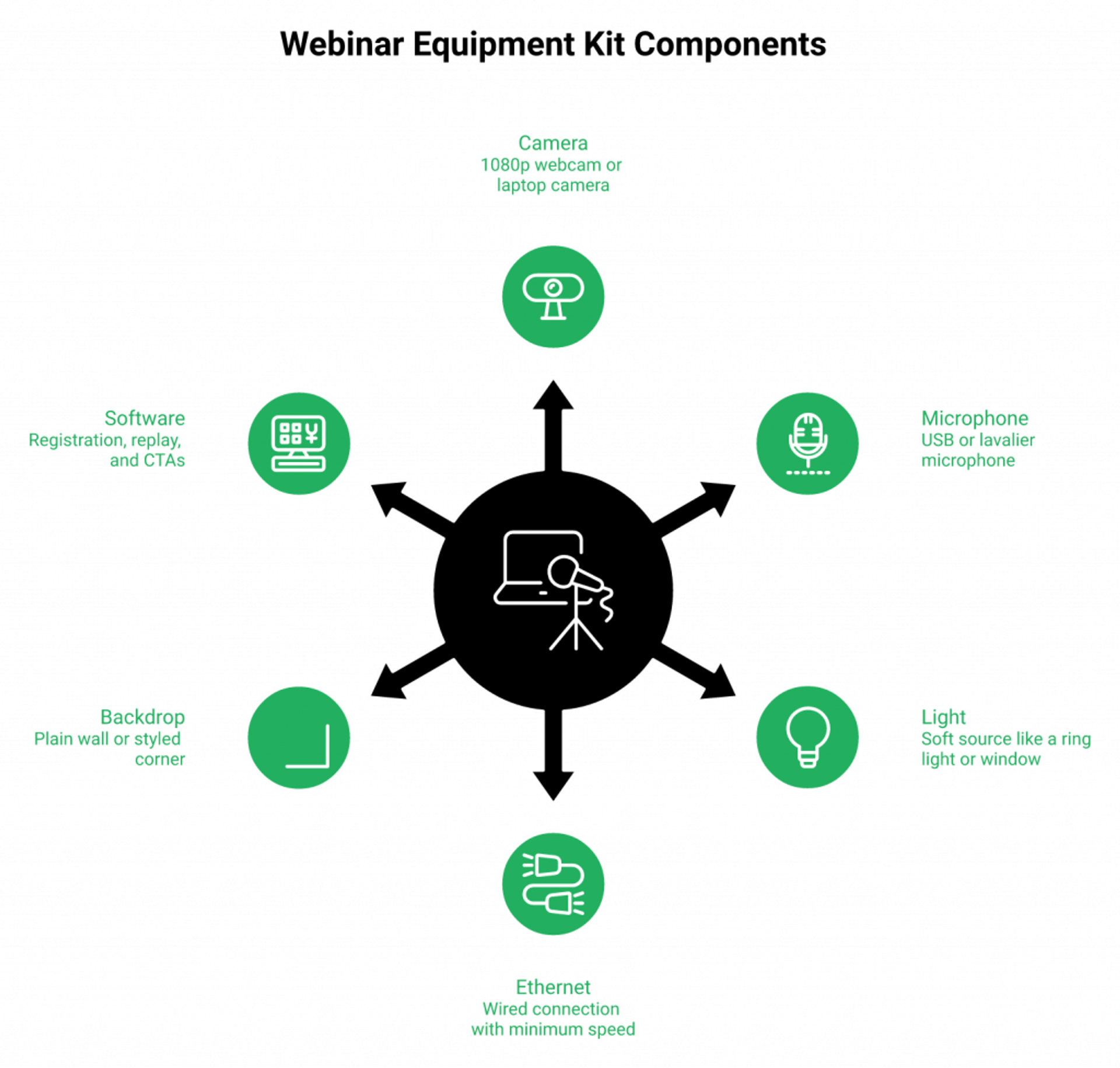
The six-item kit, defined in plain English
A camera captures your face. A microphone captures your voice. A light keeps your face from looking gray. Wired ethernet keeps your video from freezing. A backdrop controls what people see behind you. Software handles registration, reminders, replay, and the CTA you fire mid-pitch. That’s it. Six categories.
The Reddit r/videography pros put it bluntly when a marketer asked for a “pro webinar setup.” The top reply: a basic webinar equipment setup with a webcam and a good lavalier beats a DSLR rig every single Wednesday at 2pm.
Why first-time hosts buy too much gear (and freeze on broadcast day)
Here’s the pattern I’ve watched for 14 years. A coach decides to do her first webinar. She spends three weeks researching. She buys a Sony mirrorless, a Cam Link 4K, a Rode NT-USB, two softboxes, a green screen. ⚠️
Then broadcast day arrives. The Cam Link won’t recognize the camera. The audio routes to the wrong input. She panics. She presents tense, flat, off her game. The webinar converts at 2%, not 10%. The gear cost her the sale, not the audience.
“It was an intuitive program designed so that most can follow prompts and get started right away. I needed and wanted that personalized support.”Rebecca F. EasyWebinar G2 Verified Review
This is what I call the “Simple Scales, Fancy Fails” rule. Every cable is a point of failure. Every extra app is a place your energy leaks out. Your job on webinar day is to be the most engaged human in the room, not the most rigged.
Proof that “ugly” gear still prints money
Jason Fladlien did $57M in launches using default registration templates. The “container” did not matter. The water inside it did.
My own first webinars in 2010 ran on a basic webcam and a USB mic. That year built a 14,000-person email list and $245K in course sales. ✅ The gear did not move that number. The offer did. The presence did. A good webinar content strategy beats a six-figure studio every single time.
Your Monday-morning gear checklist
Here is the exact checklist I’d hand a coach buying their first webinar kit this week. 💰
- ✅ Keep: laptop webcam OR a $90 Logitech C920, USB mic ($60-150), one ring light or window, ethernet cable, plain wall or styled corner, EasyWebinar account.
- ❌ Skip until webinar #5: capture cards, multi-camera switchers, green screens, $400 softboxes, broadcast-grade mics.
- ⏰ Upgrade only after: you’ve run 5 live webinars and have data on your show-up rate, conversion rate, and where your energy actually drops.
“I used to do live webinars to sell my online course. With EasyWebinar I sold 25 courses within 3 weeks of my evergreen launch.”Laura C. EasyWebinar G2 Verified Review
Done beats polished. Always has. The webinar you ship in the next 14 days on a $250 kit will out-earn the studio you build for six months. If you want a head start, the AI webinar builder writes the funnel for you while the gear stays simple.
Q2: Why is your microphone the most important piece of webinar equipment?
Audiences will forgive a soft-focus camera. They will not forgive muddy audio. After 30 seconds of bad sound, attention drops and chat goes quiet. Pick a dynamic USB mic (Shure MV7+, Audio-Technica ATR2100x) for solo desk hosts, a clip-on lavalier (DJI Mic Mini, Rode Wireless Go) if you move around, and avoid headset mics for paid webinars. They signal “support call,” not “authority.”
The 30-second drop-off nobody talks about
I’ve watched thousands of webinar replays. The pattern repeats. When audio is muddy, hollow, or echoey, the live chat goes silent inside 30 seconds. Attendees do not type “your audio is bad.” They just leave. ❌
PCMag’s 2026 Editors’ Choice testing landed on the same conclusion. The DJI Mic Mini and Apogee HypeMiC won not because they sounded “best in studio.” They won because they sound usable in a real, untreated room. That’s the bar for webinars.
The four-mic comparison every operator should know
Here’s the quick decision matrix I give every coach who asks. 💰
| Mic Type | Price | Room Tolerance | Mobility | Best For |
|---|---|---|---|---|
| USB Condenser (Blue Yeti) | $100-150 | ⚠️ Picks up echo, fan, dog | Tethered | Treated rooms only |
| Dynamic USB (Shure MV7+, ATR2100x) | $130-280 | ✅ Rejects room noise | Tethered | Solo desk hosts |
| Lavalier Wireless (DJI Mic Mini, Rode Wireless Go) | $170-330 | ✅ Excellent close-up | ✅ Walk anywhere | Realtors, demos, mobile hosts |
| Headset (Logitech, Plantronics) | $40-200 | ✅ Consistent | ✅ Hands-free | Internal trainings, NOT paid pitches |
If you sit at a desk and present, get a dynamic USB. If you walk, demo, or shoot from a kitchen, get a lavalier. If you’re selling a $2,000 course, skip the headset. The visual pattern reads “tech support,” and your offer ladder fights that signal the whole hour.
What the working pros actually use
The Reddit r/videography thread on webinar setups keeps landing on the same advice from camera ops who shoot for a living: lavaliers beat shotguns for talking-head webinars, dynamic mics beat condensers in untreated rooms, and you should avoid headset mics if you can.
“I love how easy to use EasyWebinar is. It didn’t take long to get set-up. I’m going live with my first webinar in just a few hours.”Verified User in Photography EasyWebinar G2 Verified Review
That review is from a photographer with a Canon R6 and Google Fiber. Pro gear, pro internet. Even she went with simple. The gear is there to disappear, not to perform. If you want a deeper look at what really moves engagement, the interactive webinar tools guide goes far beyond hardware.
Casey’s “state of the presenter” rule
Here’s my rule, and I’ll caveat I might be off on the exact ratio. A microphone that takes 4 minutes to set up steals 4 minutes of pitch energy. ⏰
You only have so much “state” available on broadcast day. Every cable, every dropdown, every input you have to remember costs a unit of state. Pick the mic you’ll plug in once and leave plugged in forever. The Shure MV7+ on a boom arm wins this test for 80% of operators. The DJI Mic Mini wins for the other 20% who need to move.
“EasyWebinar gives me the ability to multiply my efforts and offer a human touch, without having to be everywhere at once.”Ash A. EasyWebinar G2 Verified Review
The “human touch” she mentions is half voice, half presence. Voice is your mic. Don’t cheap out here. If you’re recording for replay, our automated webinar engine plays back the audio exactly as captured, so a clean mic pays compounding returns.
Q3: Webcam, DSLR, mirrorless, or your phone, which camera actually wins for webinars in 2026?
For 80% of webinar hosts, a 1080p webcam (Logitech Brio, Insta360 Link 2) is enough. Smartphones with computational HDR now match $1,500 mirrorless cameras for talking-head broadcast, and they’re better for mobile demos. DSLRs and mirrorless rigs only earn their cost when you record evergreen content you’ll sell for years. Even then, watch for HDMI overheating mid-session.
The five-camera comparison nobody publishes honestly
Here’s the comparison most blogs avoid because it kills affiliate revenue. 📊
| Camera Type | Price | Autofocus | Overheating Risk | Mobility | Best For |
|---|---|---|---|---|---|
| Laptop webcam (built-in) | $0 | ✅ Auto | ✅ None | ❌ Stuck | Webinar #1-3, internal trainings |
| External webcam (Logitech Brio, Insta360 Link 2) | $130-300 | ✅ Excellent | ✅ None | ⚠️ Tethered | 80% of webinar hosts |
| Smartphone (iPhone 15+, Pixel 8+) | Already own | ✅ Computational HDR | ⚠️ Long sessions | ✅ Excellent | Mobile demos, virtual open houses |
| DSLR (Canon, Nikon) | $800-2,500 | ⚠️ Hunt-and-find | ❌ Shuts off in 30 min | ❌ Heavy | Evergreen recording only |
| Mirrorless (Sony ZV-E10, Fuji X-S20) | $700-1,800 | ✅ Eye-tracking | ⚠️ Some models | ⚠️ Tethered | Pro evergreen, multi-cam |
WebinarGeek’s 2025 ultimate guide anchored its minimum at 1080p, autofocus, and a wide-ish angle. Most external webcams hit that bar for under $200.
Why your phone is a better webinar camera than your DSLR
Here’s the contrarian take I’ll defend. A 2024+ smartphone shoots better webinar video than a $1,500 mirrorless for talking-head broadcast. Computational HDR handles uneven lighting. Eye-tracking autofocus is brutal-good. And it never overheats in a 60-minute session. ✅
I worked with a Realtor last year who wanted to run “virtual open houses.” Live walk-throughs of homes for buyers in another city. He tried to rig a Sony A7S III to a gimbal. It took 12 minutes to set up per house. He shot two open houses, then quit.
We rebuilt the workflow on an iPhone 15 Pro mounted to a chest rig. Setup time: 90 seconds. He ran 8 open houses the next month. Three offers. The lower-spec camera printed money because it actually got used. Our real estate webinar workflow handled the stream natively. 💰
The DSLR overheating warning the affiliate guides won’t print
Working video pros on Reddit r/videography keep flagging the same DSLR pitfall that webinar bloggers ignore. Many DSLRs cap recording at 29 minutes 59 seconds, lack clean HDMI output, or shut off when the sensor gets warm.
⚠️ A 60-minute webinar that drops video at minute 31 is a refund event. If you’re going DSLR or mirrorless, do this:
- Confirm “clean HDMI output” in the spec sheet, not the marketing copy.
- Run a 90-minute test on the actual rig before broadcast day.
- Buy a dummy battery so you’re on wall power, not a NP-FZ100.
- Keep the camera in a ventilated spot, not buried in a softbox sandwich.
My honest pick at every tier
I’ll give you the read I give friends. ⭐
- First webinar: laptop webcam. Ship.
- Webinar 2-10: Logitech Brio or Insta360 Link 2. $200. Done.
- Mobile or demo workflows: iPhone 15 Pro on a tripod with a Magsafe mount. $40 in accessories.
- Recording evergreen you’ll sell for 3 years: Sony ZV-E10 with a Sigma 16mm and a Cam Link 4K, only after you’ve already built revenue with the cheaper rig.
The gear ladder follows the revenue ladder. Buy down the next rung only when the current rung is paying. If you want the technical playbook for that recording phase, the webinar recording setup guide covers it end to end.
Q4: How should you light and stage your webinar set without spending $500 on a studio?
You need one soft, diffused light at eye level (a $40 ring light or a north-facing window does 90% of what a $400 softbox does) and an intentional backdrop, not a virtual one. Software virtual backgrounds without a green screen still ghost around your hair and signal “amateur” to enterprise buyers. The cheapest professional option: a 6-foot collapsible backdrop or a styled section of your real room with a plant, a shelf, and depth.
The eye-level rule that fixes 80% of webinar lighting
Most bad webinar lighting comes from one mistake. The light is overhead (raccoon eyes) or behind the host (silhouette). Fix the angle, fix the look. ✅
Put one soft light at eye level, slightly off to one side, about 3-4 feet from your face. That’s it. A $40 ring light works. A bedsheet over a window works better. North-facing windows work best because the light is naturally diffused all day.
The $40 starter setup vs the $400 evergreen setup
Here’s the honest split between “good enough for live” and “ready for a 10,000-replay evergreen asset.” 💰
| Tier | Gear | Price | Use Case |
|---|---|---|---|
| Starter (Live) | One ring light at eye level OR a window | $0-40 | Weekly live webinars, internal trainings |
| 3-Point (Evergreen) | Soft key light (left) + fill light (right, dimmer) + backlight (separates you from wall) | $250-400 | Evergreen recording, paid funnels |
Live tolerates flaws. Evergreen amplifies them. A small shadow under your eye that nobody notices on a Wednesday at 2pm becomes the thing 10,000 replay viewers see for the next two years. When you record an asset for the automated webinar engine to run, light it like it matters. Because it does.
The backdrop matrix nobody publishes honestly
Here is the comparison I run with every coach building their first set. 📊
| Backdrop | Cost | Look | Setup Time | Evergreen-Ready |
|---|---|---|---|---|
| Software virtual blur (Zoom, Teams) | Free | ⚠️ Ghosts hair, ears | 0 min | ❌ Reads “amateur” |
| Green screen + software | $50-150 | ✅ Clean if lit right | 15 min per session | ⚠️ Still fragile |
| Collapsible physical backdrop | $40-120 | ✅ Solid, professional | 2 min | ✅ Yes |
| Styled real room (plant, shelf, art, depth) | $0-200 | ⭐ Best, reads “authority” | One-time | ⭐ Best for evergreen |
Daniel Waas, who ran product marketing at GoToWebinar for years, made the same call in his budget guide: virtual backgrounds without a real green screen “don’t look great” and signal hobbyist to enterprise buyers.
The “don’t fake what you can stage” rule
Here’s where I’ll push back on a popular playbook. “Just use a virtual background, nobody cares.”
I do care. Your enterprise buyer cares. Your $2,000 course buyer cares, even if she can’t articulate why. The hair-ghosting on a virtual background is a tiny signal that fires every 30 seconds. It quietly says “this person didn’t take this seriously.” ❌
The fix is cheap. Move 4 feet from a real wall. Put a plant on a stool 3 feet behind you, off to one side. Add a shelf with two books and one piece of art at the upper third of the frame. Stage three depth layers: you, midground (plant), background (shelf). The room reads “authority” without a single dollar of green-screen software. Pair the staged room with a clean webinar landing page and the whole funnel reads professional, end to end.
Live vs evergreen: when the rules flip
I’ll caveat this with calibrated uncertainty. My read is that live webinars and evergreen recordings deserve different gear priorities, and most operators don’t separate them.
For live, prioritize speed of setup. Plug-and-play wins. A ring light, a styled corner, a USB mic. ⏰ If it takes more than 60 seconds to go live, you’ll skip it on a busy week.
For evergreen, prioritize finish quality. 3-point lighting, room acoustics, a real backdrop. You record it once. The webinar platform runs it for years. The compounding return on one good recording session is the whole game.
Stage the room you’ll respect on replay 5,000.
Q5: What internet, power, and backup setup keeps your webinar from crashing live?
Run wired ethernet, not Wi-Fi. Test at a minimum 25 Mbps up / 50 Mbps down before every live session. Keep a phone hotspot tethered as a hot backup. Add an $80 UPS battery to your modem and laptop so a 10-second power flicker doesn’t end your pitch. And put a co-host on a second device, ready to take over if your machine dies mid-presentation.
The speed-test minimums most operators skip
Wi-Fi is the silent killer of live webinars. A roommate streaming Netflix can spike your packet loss for 8 seconds. That’s all it takes to drop your video. ❌
Real-world testing pegs the floor at 25 Mbps up / 50 Mbps down for a stable HD broadcast with slides and chat. Run a speedtest.net check 30 minutes before every live session. If you’re under, plug straight into the modem with ethernet. ✅
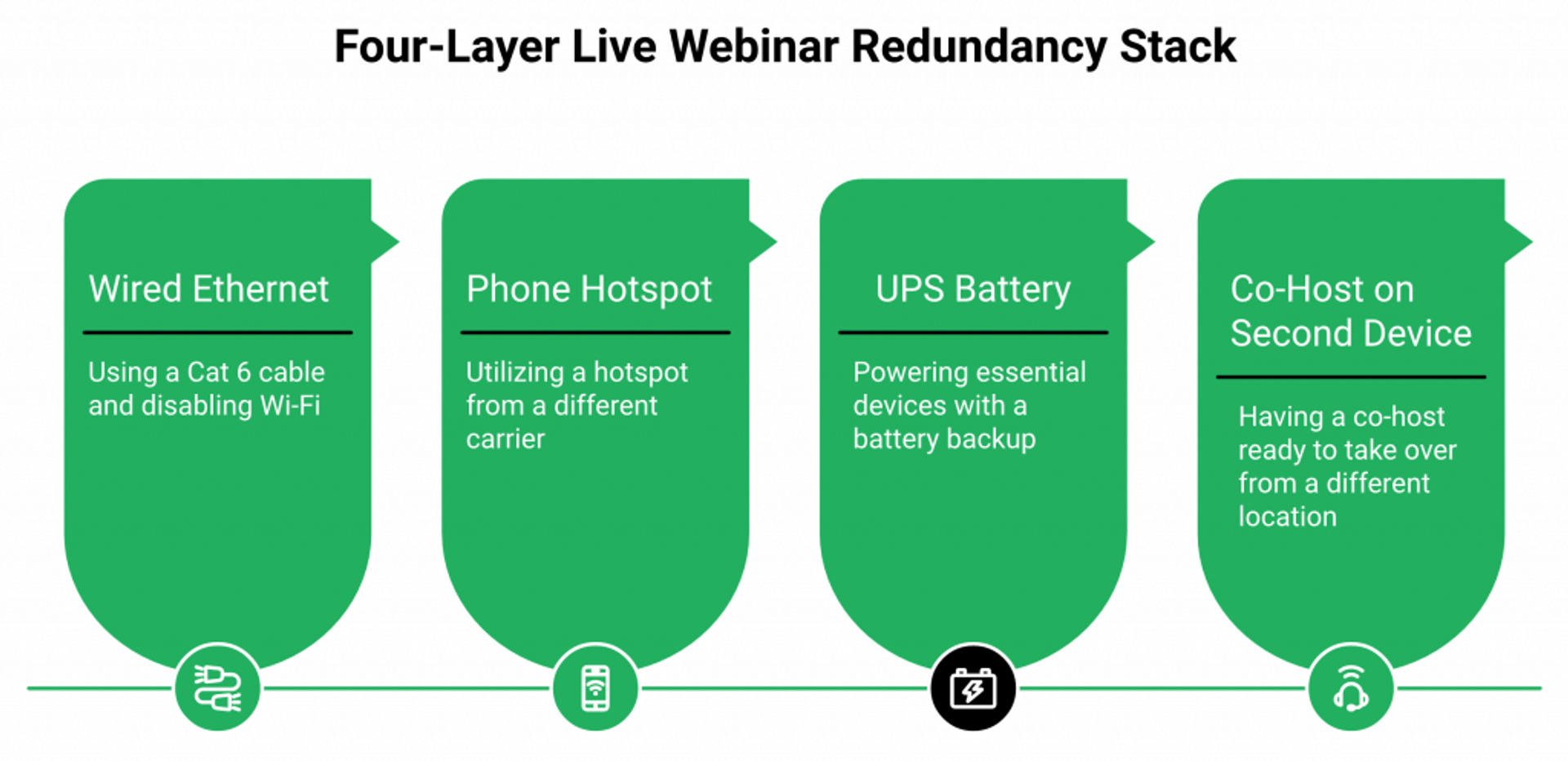
The four-layer redundancy stack
Here’s the protocol I run before every live broadcast. ⏰
- ✅ Layer 1, ethernet: a $10 Cat 6 cable from your modem to your laptop. Disable Wi-Fi entirely so your machine can’t auto-fail to a weaker signal.
- ✅ Layer 2, hotspot: tether your phone with a separate carrier than your home ISP. If Comcast goes down on your block, Verizon LTE keeps you live.
- ✅ Layer 3, UPS battery: an $80 APC or CyberPower unit on your modem, router, and laptop charger. A 10-second power flicker no longer ends the session.
- ✅ Layer 4, co-host on a second device: a partner or VA logged in from another house, on another network, ready to host if your machine dies.
Most operators skip layers 3 and 4. Both are cheap. Both have saved sessions I personally watched almost crater. 💰 The same redundancy thinking shows up in our webinar host preparation guide for a reason.
The “ketchup incident” and why automation is the real backup
Here’s a story I tell coaches who think they can will their way through every live session.
Years ago, mid-broadcast, my kid threw ketchup on my face. Live. In front of paying registrants. I laughed it off. The session survived. But it taught me something you can’t read in a gear guide: live moments are unpredictable in ways no UPS battery covers. ⚠️
The real backup isn’t a second laptop. It’s a recorded version of your best live session running automated. Our automated webinar and simulated-live engine lets you record one live where the energy was right, then run it 24/7 across timezones. The “ketchup moment” risk goes to zero because the recording is locked. If you want the deep dive, the automated webinars for passive income guide walks through the playbook.
“I used to do live webinars to sell my online course. With EasyWebinar I sold 25 courses within 3 weeks of my evergreen launch.”Laura C. EasyWebinar G2 Verified Review
“Automating webinars that we used to have to run live every week and over time also saving us money, being more efficient.”Darrin B. EasyWebinar G2 Verified Review
Run live to find the recording worth automating. Then let the automation be the redundancy your hardware can never fully provide.
Q6: What capture cards, scene switchers, and dual-device workflows do pro hosts actually use?
Once you’ve outgrown a webcam, the workflow layer matters more than another lens. An Elgato Cam Link 4K turns a real camera into a webcam input. An ATEM Mini lets you switch between camera, slides, and a B-roll source live. A Stream Deck triggers scene changes without breaking eye contact. Add a second device, a phone or tablet, to monitor chat so you can field questions without leaving the camera frame.
When you actually graduate to this tier
Don’t buy any of this for webinar #1. ⚠️ This tier earns its cost only after you’ve run 10+ live sessions, know your conversion math, and feel the ceiling of a single-camera webcam setup.
Signs you’re ready: you want to cut between a face shot and a slide deck without screen-share lag, you’re starting to record evergreen assets you’ll sell for years, or you’re running multi-host webinars where each person needs their own camera feed. If you’re already in that scaling lane, our live webinar software handles multi-source switching natively.
The four-tool pro workflow
Here’s the kit I see consistently across pro webinar operators. 📊
| Tool | Purpose | Price |
|---|---|---|
| Elgato Cam Link 4K | Turns a DSLR or mirrorless camera into a USB webcam input | $130 |
| Blackmagic ATEM Mini | Live switcher between cameras, slides, B-roll, with picture-in-picture | $295 |
| Elgato Stream Deck (15-key) | One-tap buttons that trigger scene changes, mute, polls, or CTAs | $150 |
| Second device (phone or iPad) | Monitor live chat without minimizing your broadcast window | Already own |
Real pro desk-setup walk-throughs run this exact stack: a Sony a6400 fed through a Cam Link 4K, with a Stream Deck on the desk for one-tap scene control. The ATEM Mini layers in for multi-source switching, and it’s the upgrade most webinar hosts skip.
The dual-device pattern that wins live Q&A
Here’s the operational tactic I’ve never seen in a written gear guide. ✅
Run the broadcast on your main laptop. Then keep a phone or tablet open beside the camera, signed into the attendee chat. When a question comes in, you read it on the phone, eyes still inside the camera frame, and answer.
The result: you maintain eye contact with the lens (the audience reads it as eye contact with them) while still fielding live questions. The alternative, alt-tabbing on your laptop, breaks eye contact every 30 seconds and signals “presenter, distracted.” 💸
Pair this with in-webinar CTAs, polls, and timed offers fired through the Stream Deck and you’ve collapsed three jobs (presenter, producer, chat monitor) into one human, smoothly. The interactive webinars guide shows how to wire those triggers to actual conversion events.
“I love that we can have a poll, offer and countdown right in the event! That’s going to be so great for sales and interactions.”Verified User in Photography EasyWebinar G2 Verified Review
The pro rig is a workflow, not a hardware list. Buy the workflow, not the components.
Q7: What software stack pairs with your hardware to actually run a webinar?
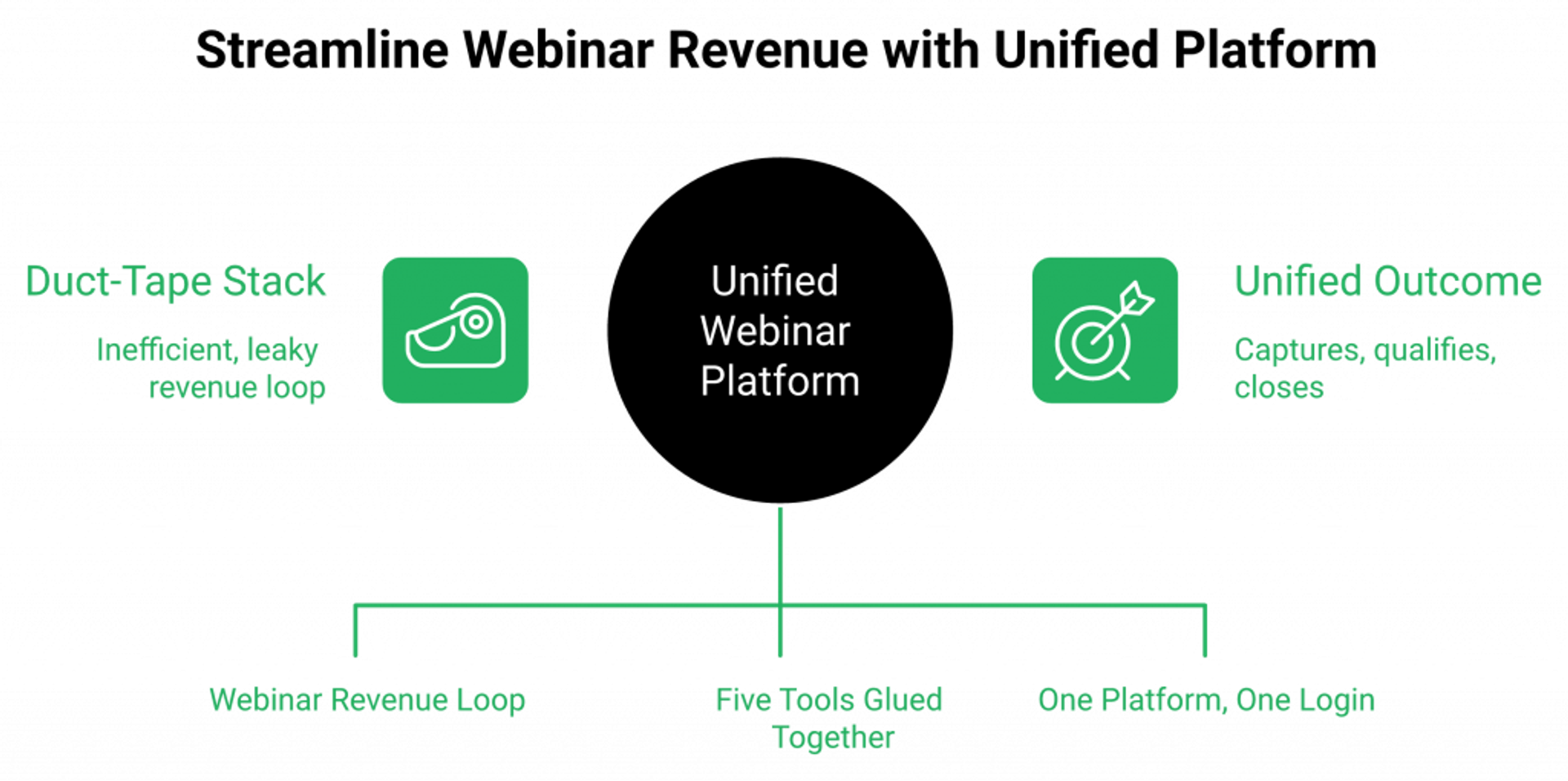
Hardware is half of webinar equipment. The other half is software: a broadcast engine, a registration page, an email and SMS reminder system, in-webinar CTAs, replay logic, and a CRM that picks up the leads. Most operators duct-tape five tools together (Zoom + ClickFunnels + ActiveCampaign + Calendly + Stripe) and lose 30% of registrants in the seams. An all-in-one platform like EasyWebinar collapses that stack into one.
Where the duct-tape stack leaks
I’ve watched the same pattern for 14 years. A coach buys Zoom Webinar for $79/mo. Then ClickFunnels at $147 for landing pages. Then ActiveCampaign at $70 for emails. Then Calendly at $20 for scheduling. Then Stripe for checkout. Then Zapier at $50 to glue them together. ❌
Five subscriptions, six logins, and a Zapier graph that breaks every time a vendor pushes an API update. Registrants get dropped at every handoff. The post-webinar replay email sends 6 hours late. The “missed it” segment never gets the right follow-up. ⚠️
That’s where 30% of revenue per registrant leaks: not in the broadcast, but in the gaps between tools. 💸 If you want to see the alternative architecture, the all features page maps every conversion mechanic to the operator workflow.
The 5 webinar software platforms ranked by revenue mechanics
| Rank | Platform | Live | Automated | AI Builder | Native CRM | In-Platform Checkout | Best For |
|---|---|---|---|---|---|---|---|
| 1 ⭐ | EasyWebinar | ✅ | ✅ | ✅ AI Webinar Builder | ✅ EasyCRM + auto-dialer | ✅ | Coaches, course creators, B2B teams running revenue webinars |
| 2 | Demio | ✅ | ⚠️ Limited | ❌ | ❌ | ❌ | Marketing teams prioritizing UI polish over conversion mechanics |
| 3 | WebinarJam + EverWebinar | ✅ | ✅ Separate tool | ❌ | ❌ | ⚠️ Requires Stripe | Operators willing to manage two subscriptions |
| 4 | Zoom Webinar | ✅ | ❌ | ❌ | ❌ | ❌ | Internal trainings, not sales funnels |
| 5 | GoTo Webinar | ✅ | ⚠️ Basic recordings | ❌ | ❌ | ❌ | Enterprise IT-mandated procurement |
EasyWebinar leads because it’s the only platform that runs live, simulated-live, automated, just-in-time (a “starts in 5 minutes” registration that boosts show-up rate), and on-demand from a single setup, with native CRM and in-platform checkout. Side-by-side breakdowns are on the compare webinar platforms page if you want to dig into specific matchups like EasyWebinar vs Demio.
Where unified architecture changes the math
Here’s the architectural read most blogs miss. ✅ A unified Webinar Revenue Platform doesn’t just save you software cost. It captures, qualifies, and closes from the same session that generated the lead.
The AI webinar builder generates the registration page, reminder emails, polls, and CTA scripts in under 10 minutes. Our sales CRM scores leads as Hot, Warm, or Nurture based on in-session behavior, then triggers an auto-dialer call to Hot leads inside 10 minutes of webinar end. Behavioral follow-up segments by attended, missed, left-early, or saw-but-didn’t-click, every segment getting its own sequence. ⏰
Carla Biesinger built a $5M evergreen funnel on this stack, documented in our course creator case study. K21 Academy moved from a 28% to 47% show-up rate after switching, with 5x registrant growth, captured in the edtech case study.
“With my live class I used to sell 10-12 courses. With EasyWebinar I sold 25 courses within 3 weeks of my evergreen launch.”Laura C. EasyWebinar G2 Verified Review
“Pretty much once I have run one webinar, I can clone and setup multiple in a breeze. We have run close to 30 since we started running it this new year.”Darrin B. EasyWebinar G2 Verified Review
“It is solving a big hole for us, our current webinar software is clunky, old, and not reliable.”Verified User in Information Services EasyWebinar G2 Verified Review
The hardware decides how you look. The software decides whether the leads ever become customers.
Q8: What changes when you record evergreen webinars: room acoustics, audio treatment, and the Live-vs-Evergreen gear split
Evergreen recording is unforgiving. A small audio echo or jump-cut that no live audience would notice becomes a 10,000-replay annoyance. For evergreen, prioritize room acoustics first (one acoustic panel behind the camera, soft furnishings, no glass walls behind you), then a teleprompter app on a second screen, then multi-take redundancy. Live can tolerate flaws. Evergreen amplifies them.
The “live tolerates, evergreen amplifies” rule
Here’s the rule I wish I had in 2010. Live audiences forgive small flaws because they’re sharing the room with you in real time. The “human moment” carries it. ✅
Evergreen audiences don’t. They watch the same recording you watched 200 times in QA. Every “uhm,” every echo, every jump cut compounds across thousands of replays. A 2-second audio glitch at minute 14 becomes the reason 1,200 viewers bounce before your CTA. ❌ Our on-demand webinar software guide goes deeper on this compounding effect.
The room-acoustics fix most operators skip
Here’s the universal gap I keep seeing in webinar gear guides. Nobody talks about the room. ⚠️
A hard-walled home office with a glass door, a wood floor, and a desk against drywall sounds “thin” on every microphone you put in it. The mic isn’t the problem. The room is.
Three cheap fixes that move the needle 80% of the way: 💰
- ✅ One acoustic panel mounted on the wall behind your camera (the wall pointing at your microphone). $30-60.
- ✅ A rug on the floor under your chair. Soft furnishings absorb mid-frequency reflections.
- ✅ Move 3 feet away from any glass surface. Glass is the worst sound reflector in any room.
Working pros on Reddit r/videography land on the same advice for talking-head setups: treat the room before you upgrade the microphone.
“What would you all recommend for a webinar setup?”u/OP, r/videography Reddit Thread
The four upgrades evergreen actually needs
When you’re recording an asset for the automated webinar funnel engine to run for years, prioritize these in order: 📊
- Room acoustics: one panel, one rug, no glass.
- Teleprompter on a second screen: an iPad on a stand below the camera lens running a $10 prompter app keeps your eyes inside the frame.
- Multi-take redundancy: record the pitch and Q&A as separate takes. If one section flubs, you re-shoot 4 minutes, not 60.
- Scene switcher (ATEM Mini or OBS): clean transitions between camera, slides, and B-roll that hide cuts on replay.
The chef-baker’s evergreen payoff
A chef-baker we worked with recorded one evergreen webinar after two live runs that proved the offer. She lit the room properly, treated the acoustics with a single panel and a rug, and ran two takes back to back. ⏰
That single recording did $49K in the first 60 days running 24/7 across timezones. The gear upgrade that moved the KPI was the room treatment, not the camera. The same compounding pattern shows up across customer reviews from operators who treat one good recording as a multi-year revenue asset.
“EasyWebinar is hands-down THE webinar platform for evergreen webinars, no contest. EasyWebinar is the only one on the market who makes a product built specifically to scale and 10X your efforts.”Ash A. EasyWebinar G2 Verified Review
“Setting up evergreen webinars is so simple that we’ve used several so far. We’ve seen such a fantastic return on investment.”Meaghan L. EasyWebinar G2 Verified Review
Record once where the room is right. Run it forever where the audience is.
Q9: Casey’s actual webinar equipment kit (and the budget tier I’d buy at every revenue stage)
Here’s the rig I actually use, and the rig I’d recommend at every revenue stage. Stage 1 ($0 to $10K from webinars): laptop webcam, USB mic, window light, EasyWebinar Standard. Stage 2 ($10K to $100K): Logitech Brio, Shure MV7+, ring light, real backdrop. Stage 3 ($100K to $1M+): Sony ZV-E10, Cam Link 4K, Rode NT-USB, Stream Deck, EasyWebinar Pro with EasyCRM. Buy gear when revenue justifies it, not before.
The “gear tied to revenue stage” rule
I’ll caveat this up front. My read is that most coaches buy gear two stages ahead of their actual revenue. ⚠️
A first-time host with $0 in webinar revenue does not need a Sony A7S III. They need to ship webinar #1. The gear you can afford after Stage 2 funds Stage 3, not the other way around. 💰 The same logic shows up across our customer reviews from operators who started small.
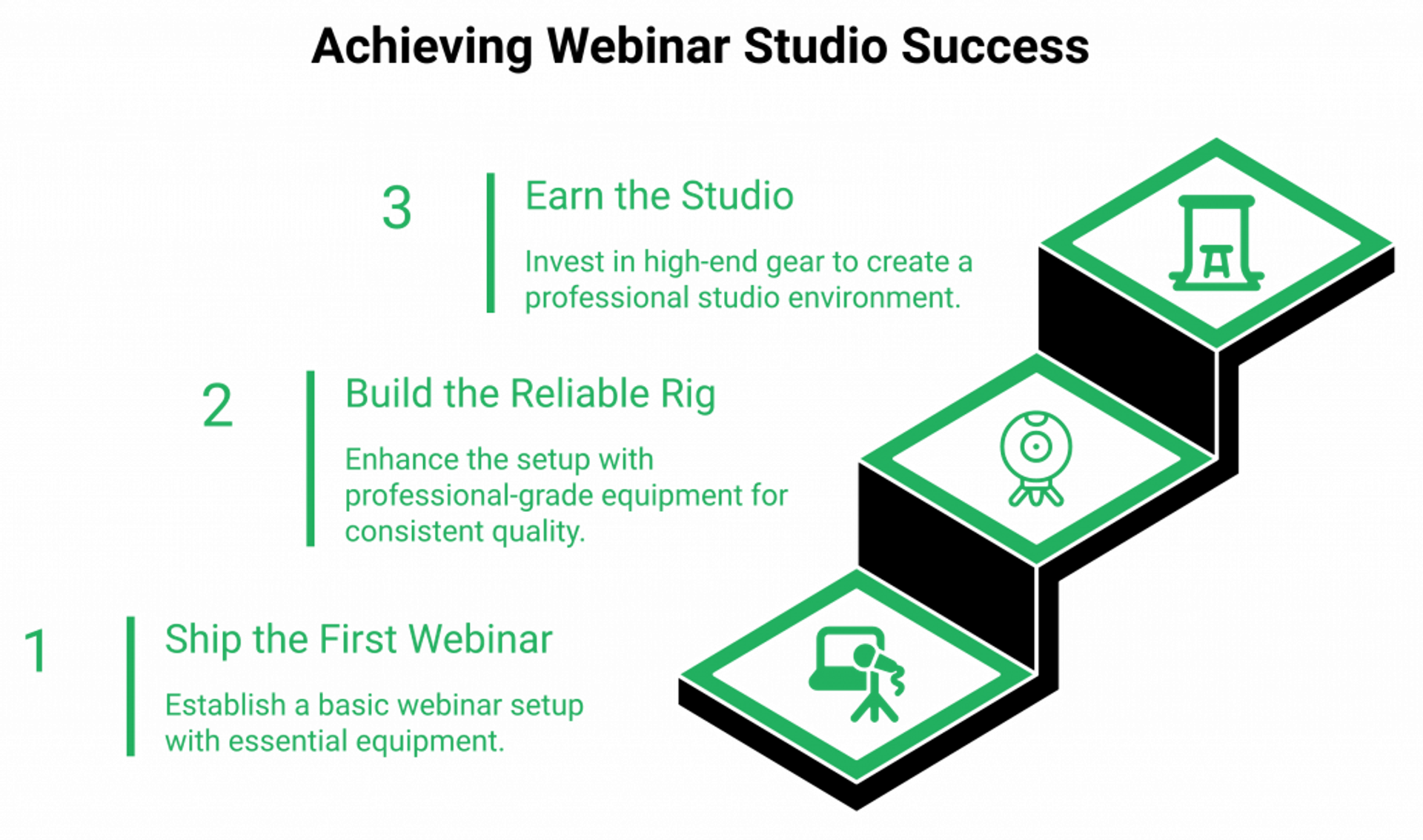
The three-tier kit by revenue band
| Stage | Webinar Revenue | Camera | Microphone | Lighting | Software |
|---|---|---|---|---|---|
| ⭐ Stage 1 | $0 to $10K | Laptop webcam | $60 USB mic (Samson Q2U) | North-facing window | EasyWebinar Standard |
| ⭐ Stage 2 | $10K to $100K | Logitech Brio or Insta360 Link 2 | Shure MV7+ ($280) | $40 ring light + 6-foot backdrop | EasyWebinar Standard |
| ⭐ Stage 3 | $100K to $1M+ | Sony ZV-E10 + Cam Link 4K | Rode NT-USB or DJI Mic Mini | 3-point softbox kit | EasyWebinar Pro + EasyCRM |
Carla Biesinger built a $5M evergreen funnel on this trajectory, documented in our course creator case study. K21 Academy hit a 47% show-up rate and 5x registrant growth without a studio, captured in the edtech case study. The pickleball coach we worked with did $200K on Stage 2 gear. None of them needed Stage 3 to break six figures.
My actual desk kit, named
Here’s what’s on my desk right now. ✅
- Camera: Logitech Brio for live, Sony ZV-E10 for evergreen recording.
- Mic: Shure MV7+ on a boom arm, plugged in 24/7.
- Light: one softbox key (left), one fill (right, dimmer), window as backlight.
- Switcher: Stream Deck for scene changes, polls, and CTA triggers.
- Software: our all features stack (live, automated, JIT, on-demand from one setup) plus our sales CRM for the auto-dialer.
I built up to this rig over years, not months. The Brio carried me through hundreds of sessions. The Shure replaced a Blue Yeti only after the room couldn’t tame the condenser pickup. If you want a peer-tested upgrade path, the webinar skills and equipment upgrade guide walks the same ladder.
Done beats polished, every time
Here’s the contrarian close I want every first-time host to read.
I built my first webinar revenue while stuttering, while over-sharing, on a $90 webcam in a bedroom. ⏰ The “professional” voice you hear in your head as the standard? It’s not the standard. The standard is showing up.
“I want to run a monthly webinar but was concerned about the many tasks involved. Having tested EasyWebinar for the last two weeks I’m blown away with how easy it was to setup a sequence of 10 webinars.”David L. EasyWebinar G2 Verified Review
“I’ve been using EasyWebinar to automate my webinars and drive course sales, and it’s been a total game-changer.”Jennifer B. EasyWebinar G2 Verified Review
Ship a webinar this week on whatever gear is on your desk. Iterate the offer. Buy down the next gear rung only when revenue funds it. ✅ When you’re ready, you can sign up free and have your first session live by tonight.
Q10: Ready to skip the gear rabbit hole? Build your first revenue-ready webinar in 15 minutes
The best webinar equipment is the rig you’ll actually use this week. If you’ve got a laptop webcam, a USB mic, and 15 minutes, EasyWebinar’s AI Builder writes your registration page, schedules your replay logic, and connects EasyCRM follow-up so the gear you already own becomes a revenue system tonight. Skip the year-long studio build. Ship the asset that pays for the studio.
The gear is the wrapper, the system is the engine
I’ll borrow a frame from my friend Jason Fladlien. If a group of people you care about is dying of thirst, anything you can put water in will do. ✅
Your offer is the water. The webinar is the cup. The gear is just the label on the cup. Spending six weeks engraving the label while the audience is parched is the most common mistake I watch operators make. ⚠️ Our how to make money with webinars guide goes deeper on why offer beats production.
Trade the studio build for the shipped webinar
Here’s the practical invitation. Our AI funnel builder takes a single prompt and writes the registration page, the reminder emails, the polls, the offer copy, and the replay logic in under 10 minutes. Add 5 minutes to record yourself on whatever camera is on your desk. ⏰
The webinar is live by tonight. The leads route into our sales CRM with Hot, Warm, and Nurture scoring. The auto-dialer calls Hot leads inside 10 minutes of session end. The replay sequence picks up everyone who missed. If you want to compare options before committing, the compare webinar platforms page lays out the tradeoffs honestly.
“I had a lot of resistance to creating an evergreen webinar, because I have tried before and it was difficult to set up. When I signed up for EasyWebinar this time, I was paired up with Rakesh Joshi as the support staff to help me, and working with him has been amazing.”Ajarae C. EasyWebinar G2 Verified Review
“I’m blown away with how easy it was to setup a sequence of 10 webinars and have all the steps done that I need.”David L. EasyWebinar G2 Verified Review
If you’re ready to move, you can request a demo, see webinar pricing, or jump straight to the webinar platform and have your first session built by the end of the day.
Frequently Asked Questions

Casey Zeman
Founder of EasyWebinar
About Author
Over the past decade, I've helped thousands of entrepreneurs, coaches, and consultants turn webinars into a predictable, powerful way to grow their audience, build trust, and scale, without the constant hustle. I created EasyWebinar because I couldn't find a system that combined authenticity, engagement, and automation the way I needed. So, I built one.
Related Posts

10 Best Community Engagement Platforms in 2026
Compare the 10 best community engagement platforms in 2026. Course creators, evaluate live hosting, analytics, and replay to pick your winner today.
10 Best Online Coaching Tools in 2026: Live Session Quality, Scheduling, Recording, and Client Engagement Analytics
Compare the 10 best online coaching tools of 2026 on session quality, scheduling, and analytics. Discover the right fit for your coaching revenue model.
10 Best Webinar Hosting Platforms Ranked by Uptime, Streaming Quality & Cost
Compare 10 webinar hosting platforms ranked by uptime, streaming quality, and cost. Discover which tool actually turns attendees into revenue.
Turn every webinar into a revenue stream
Launch your first paid event in just a few clicks - and start monetizing your expertise.
Book a Call