# White Label Webinar Software: Run Client Funnels on Each Client's Domain and Brand
White label webinar software lets an agency run each client's webinars in a separate workspace, on the client's own domain and without the vendor's branding, then report results from analytics and exports.
- Applies to: Agencies and account leads who run webinars for several clients · live, simulive and evergreen webinars
- Status: Live
- Verified: 2026-11-04
- Canonical page: https://easywebinar.com/product-docs/use-cases/client-webinar-funnels/
Agencies that sell webinars as a service hit the same wall: every client wants their own brand on the page, and every client wants to see results. White label webinar software solves that by giving each client a separate account, their own domain and pages without the vendor's name. In EasyWebinar, you set up a client workspace for each client, add the C-Name and White Label add-ons, and build a repeatable funnel inside it. Results come from each webinar's analytics and the People list export.
## At a glance {#at-a-glance}
| What an agency needs | How you do it in EasyWebinar | Where to set it |
|---|---|---|
| A separate account per client | A client workspace, each on its own plan | **Settings → Client workspaces** |
| The client's own web address | The C-Name add-on plus a CNAME record | **Plan & Billing → Add-ons**, then the custom domain screen |
| No EasyWebinar name on pages | The White Label add-on | **Plan & Billing → Add-ons** |
| A funnel you can repeat | An **Agency** registration template, then **Clone Webinar** | Webinar set-up and **My Webinars** |
| Leads in the client's CRM | A connected integration such as GoHighLevel or HubSpot | **Integrations** |
| Results to show the client | The **Analytics** tab and the exported **People** list | Each webinar, and **People** |
Your client doesn't have to change systems to work with you, because it's your CRM or ours. Keep HubSpot, Salesforce Pardot (Account Engagement), ActiveCampaign, Mailchimp or Kit (formerly ConvertKit), or use EasyCRM natively.
## Where white label webinar software fits {#where-it-fits}
Picture an account lead on a Monday with three client launches this month. One client asks why the registration link shows another company's address, and another asks how many people actually turned up. White label webinar software lets one agency run webinars under many brands. It keeps each client's data apart and reports on each funnel.
### What it's for {#fits-what-its-for}
It lets you deliver webinars as a service without your clients seeing the tool behind them. Each client gets pages on their own domain, a funnel built for their offer and numbers they can check.
### How it helps {#fits-how-it-helps}
- **Separate data:** each client's webinars, registrants and settings stay apart from yours and from other clients'.
- **Their brand, not ours:** pages run on the client's address with no EasyWebinar branding.
- **Faster launches:** a funnel built once can be cloned for the next client or the next month.
- **Leads where sales works:** registrants and attendees sync to the CRM the client already uses.
### What happens without it {#fits-without-it}
Every client sees a stranger's name in their links, and some will hesitate to register. Clients' registrant lists sit side by side in one account. Reporting turns into a guessing game about which numbers belong to whom.
### Why agencies care {#fits-why}
It matters most to agency owners who sell webinars as a monthly retainer, and to account leads who answer to several clients at once. It matters most at the moment a client asks to see results before renewing.
## The EasyWebinar approach to white label webinar funnels {#approach}
{/* 5P */}
Take a typical case. A three-person agency runs webinar funnels for three clients: a physiotherapy clinic, an online language tutor and a home-insulation installer. Each client wants a monthly webinar under their own name that fills their calendar. They also want a short results note at month end.
The usual workaround is one shared webinar account with each client's logo pasted onto its pages. That tends to work for the first client. By the third, the registrant lists are mixed together and every link carries the same vendor address. The monthly numbers come from a spreadsheet someone rebuilds by hand.
What changed is simple. Once you serve several clients, the account itself has to be split by client. That is where the data, the brand and the bill all live. Reporting only gets easy when each client's webinars already sit in their own place.
EasyWebinar handles this with client workspaces. Each one is a separate EasyWebinar account that you manage, on its own plan, and it doesn't use one of your team seats. EasyWebinar then pairs a workspace with two add-ons: C-Name for the client's domain and White Label to remove its own branding.
The plan chooser for a new workspace offers Launch, Growth, Pro or Scale, billed monthly or yearly. How the separate-account set-up stacks up against other tools is covered in How EasyWebinar compares for white label webinar software, below.
## What a client funnel needs before the first webinar {#funnel-parts}
A client webinar funnel has the same parts every time. Getting them in place before you write a single slide saves the rework that usually happens in launch week.
### A home for the client's data {#client-home}
Start with the account the funnel lives in. A client workspace keeps that client's webinars, registrants and settings apart from yours and from your other clients. The client receives an email confirmation to set their password and join, so use an address they actually read.
### An address the client recognises {#client-address}
Your webinar pages normally sit on an EasyWebinar subdomain. With the C-Name add-on, links read like `webinars.clientcompany.com` instead. A link that doesn't look like the client's own business invites hesitation at the moment someone decides to register.
### Pages without your vendor's name {#client-branding}
The White Label add-on removes EasyWebinar branding from the pages and the room. Together with C-Name, this is the usual agency combination: the client's webinars on the client's domain, with no EasyWebinar branding anywhere.
### A way to sell and a way to hand off leads {#client-offer}
Decide early whether the webinar sells something on the spot or books a sales call. An offer's **Button URL** can point to the client's own checkout, booking page or sales page. If the client charges for registration, that needs the Paid Webinars add-on and a connected Stripe account, and payouts go to that Stripe account. Leads then need a route to the client's CRM, covered in [connecting a CRM and mapping webinar data](https://easywebinar.com/product-docs/integrations/map-webinar-data/).
## How agencies white label webinars for clients {#how-it-works}
There are three common ways to run webinars under clients' brands. Each one solves part of the problem and leaves a different part open.
### One shared account with client branding on the pages {#shared-account}
You keep a single account and change the logo and colours on each client's pages. It is quick to start and needs only one plan. It misses data separation: every client's registrants sit in one list, and anyone on your team can see all of them. It also leaves every link on your vendor's address unless you add a domain.
### A separate account that the client owns {#client-owned-account}
The client signs up and invites you in. Their data is cleanly theirs, and when the relationship ends they keep everything. What it misses is control: you depend on each client to manage billing, and you log in and out of several accounts with no single place to see them all.
### A separate account per client that the agency manages {#agency-managed-account}
You create an account for each client from inside your own, and manage them all from one place. This catches both earlier problems, because data stays apart and you keep control of set-up. The open question it leaves is billing, since each account carries its own plan, so agree who pays before you create one.
### What EasyWebinar is confirmed to do {#confirmed}
EasyWebinar supports the third way. Client workspaces are separate accounts you manage from one place, each on its own plan, and the client gets a confirmation email to join. The custom domain screen under **Settings** manages clients' access to custom domains, and the White Label add-on removes EasyWebinar branding from pages and the room.
## How to run webinars for several clients by hand {#by-hand}
Many agencies start without a dedicated set-up. If that's you today, this is the order that keeps the mess down.
1. Open a separate webinar account for each client, using an email address the client controls.
2. Ask each client to point a subdomain at the webinar tool with their DNS provider.
3. Build the first client's registration page, emails and offer, and write down every setting you chose.
4. Rebuild the same funnel by hand in the next client's account, working from your notes.
5. Export each client's registrant and attendee lists after every webinar.
6. Paste the lists into a spreadsheet per client and work out registration and show-up rates.
7. Email each client their numbers and import the leads into their CRM yourself.
Steps 4 to 7 are where time goes and where errors slip in. A setting missed in step 4 shows up as a broken reminder in launch week, and an import done late in step 7 means the client's sales team calls cold leads.
### The same job in EasyWebinar {#same-job}
You create each client workspace from your own account, so step 1 happens in one place. The C-Name add-on and a CNAME record cover step 2. For steps 3 and 4, an **Agency** registration template gives you a starting point, and **Clone Webinar** copies a finished funnel. Analytics and the People export cover steps 5 and 6, and a connected CRM handles step 7 as registrants and attendees arrive.
## Set up client webinar funnels in EasyWebinar {#build-it}
Work through these in order for each new client. The first two steps take a few minutes; the domain step may need a few hours while DNS catches up.
### 1. Create the client's workspace {#create-workspace}
Click **Settings** in the sidebar, then **Client Workspaces** under **Team & Clients**. Click **Create workspace**. It is a two-step flow.
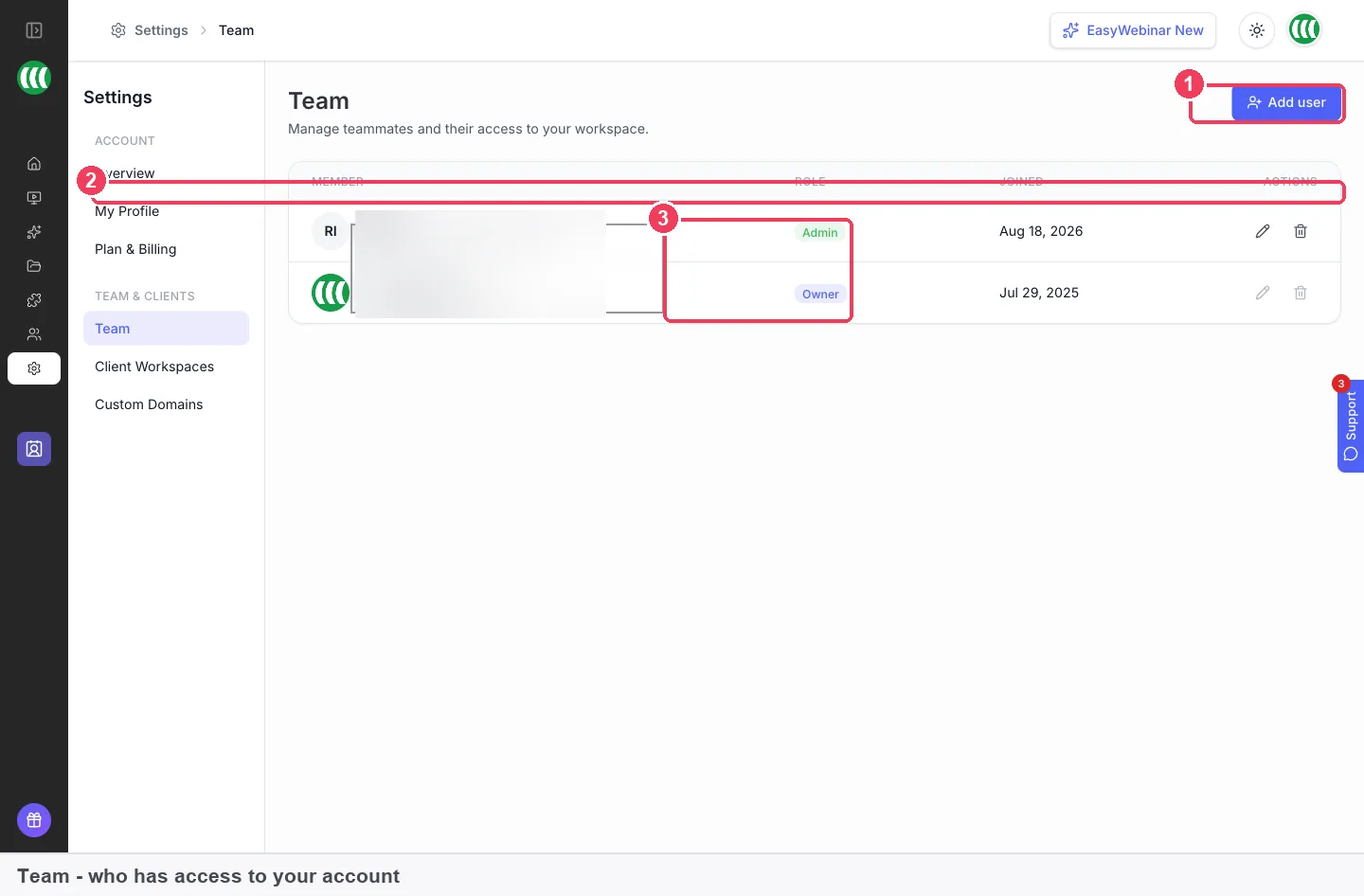
The Team and Clients menu holds both your colleagues' logins and the separate workspaces you run for clients, so you reach both from one place.
On the first step, enter the client's **Full Name**, **Work email**, **Company Name** and **Phone Number**, and set a **Password**. **Job Title** and **Profile photo** are optional. Click **Continue**.
On the second step, choose a plan. Each workspace runs on its own plan, billed monthly or yearly:
| Plan | Capacity |
|---|---|
| **Launch** | 50 live attendees |
| **Growth** | 200 live attendees · 1,000 automated |
| **Pro** | 500 live attendees · 2,500 automated |
| **Scale** | 1,000 live attendees · 5,000 automated |
Size it on live attendees, since that is the number that fails loudly if you get it wrong. Selecting a plan starts a subscription, so settle with your client first who pays for it and whether you re-bill it. Plan costs are on the [EasyWebinar pricing page](https://easywebinar.com/pricing/).
### 2. Add your team, not the client, as team members {#team-access}
Colleagues who work across your own webinars need a login on your account, not a workspace. On **Settings → Team**, click **Add user** and give each person their own email address. You set their password, and nothing is emailed to them. An **Admin** can change everything, including settings and billing, while a **User** gets basic access to the features. More on roles is in [team members and roles](https://easywebinar.com/product-docs/account/team-members/).
The video below shows the team roles screen and the custom domain settings you'll use in the next step.
Video: [How to Manage Team Roles and Custom Domains in EasyWebinar](https://www.youtube.com/watch?v=LcZqQ4eH3u8)
Guest presenters don't need an account at all. They join with a presenter link from the webinar, and you should treat that link as private.
### 3. Put the client's pages on their domain {#client-domain}
Add the **C-Name** add-on from **Plan & Billing → Add-ons**. Then ask the client, or whoever runs their DNS, to create a CNAME record pointing the chosen subdomain at EasyWebinar. In DNS terms, a [CNAME record marks one name as an alias](https://www.rfc-editor.org/rfc/rfc1034) for another, which is why the client's address can show your webinar pages.
Enter the domain once the record is in place. DNS changes can take a few hours to spread, so give it time before assuming something is wrong. Set the domain before you promote anything, because changing a subdomain later breaks every link already shared.
### 4. Remove EasyWebinar branding {#remove-branding}
Add the **White Label** add-on from the same **Add-ons** tab. It removes EasyWebinar branding from your pages and the room. Anything already switched on is marked **Active**, so check this tab first if a page still shows the wrong name.
### 5. Build the first funnel from an agency template {#first-funnel}
Create the client's first webinar inside their workspace. Choose [a live webinar](https://easywebinar.com/product-docs/webinars/getting-started/create-a-live-webinar/) for a launch, or [an evergreen webinar](https://easywebinar.com/product-docs/webinars/getting-started/create-an-evergreen-webinar/) for a funnel that runs every day. On **Step 4 of 4 — Registration Template**, filter by **Agency** to see templates made for this work.
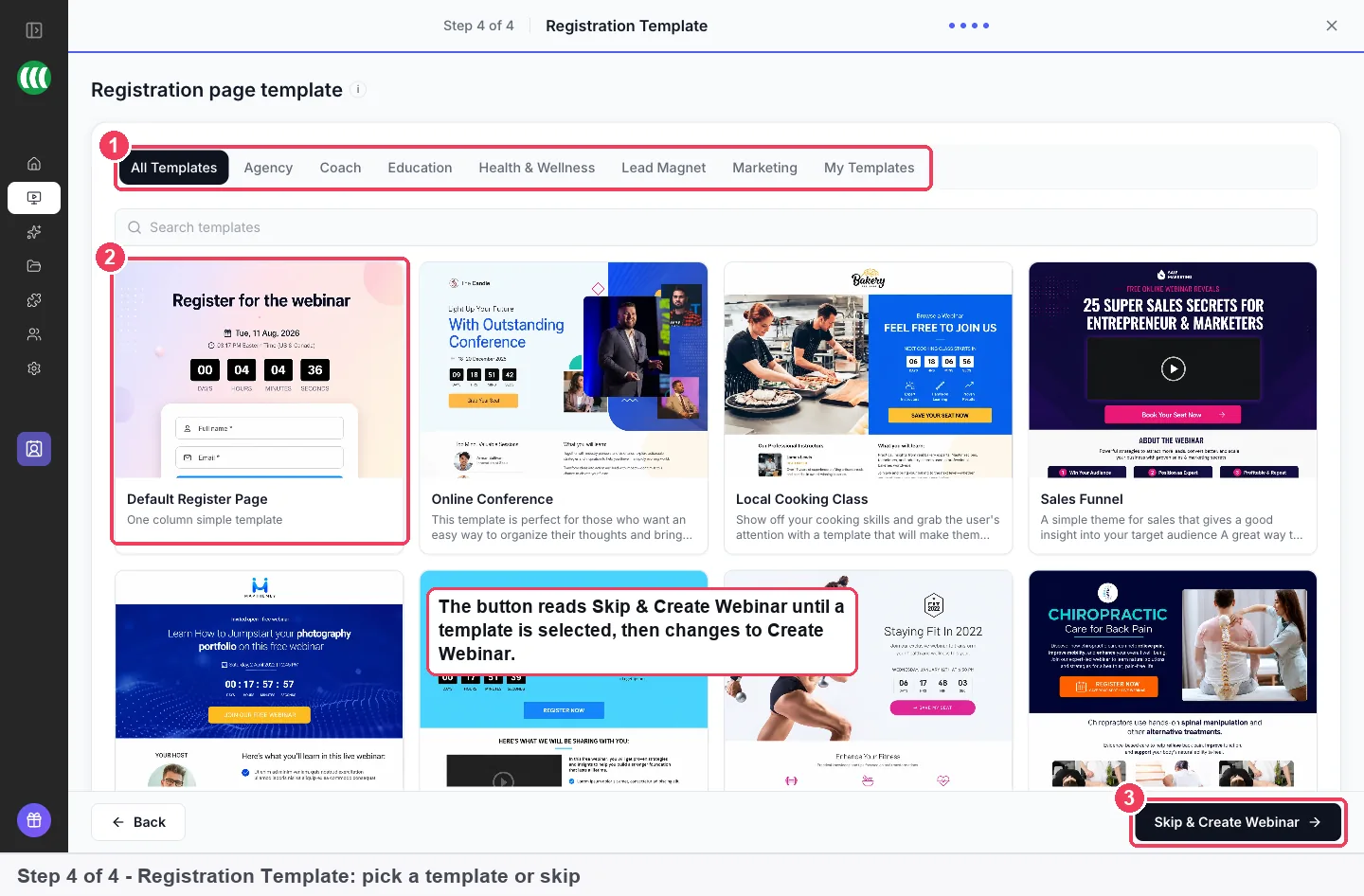
Filtering by Agency narrows the template grid to layouts built for client work, and Skip & Create Webinar lets you choose a design later.
To speed up the draft, the AI Webinar Builder drafts scripts, pages, emails, polls and follow-up before the webinar. It works from your description of the client's offer, as explained in [Create with AI](https://easywebinar.com/product-docs/ai/create-with-ai/). Read the drafts as the client's voice, then edit. The [registration page builder](https://easywebinar.com/product-docs/webinars/registration/registration-page-builder/) handles anything the template doesn't.
### 6. Connect the client's CRM {#connect-crm}
Open **Integrations** and find the client's tool under **Available integrations**. Click **Connect**, sign in and allow access. GoHighLevel connects natively, alongside Keap, AWeber, Kit (formerly ConvertKit), GetResponse, Drip, Mailchimp, Ontraport, HubSpot, ActiveCampaign, Constant Contact and others.
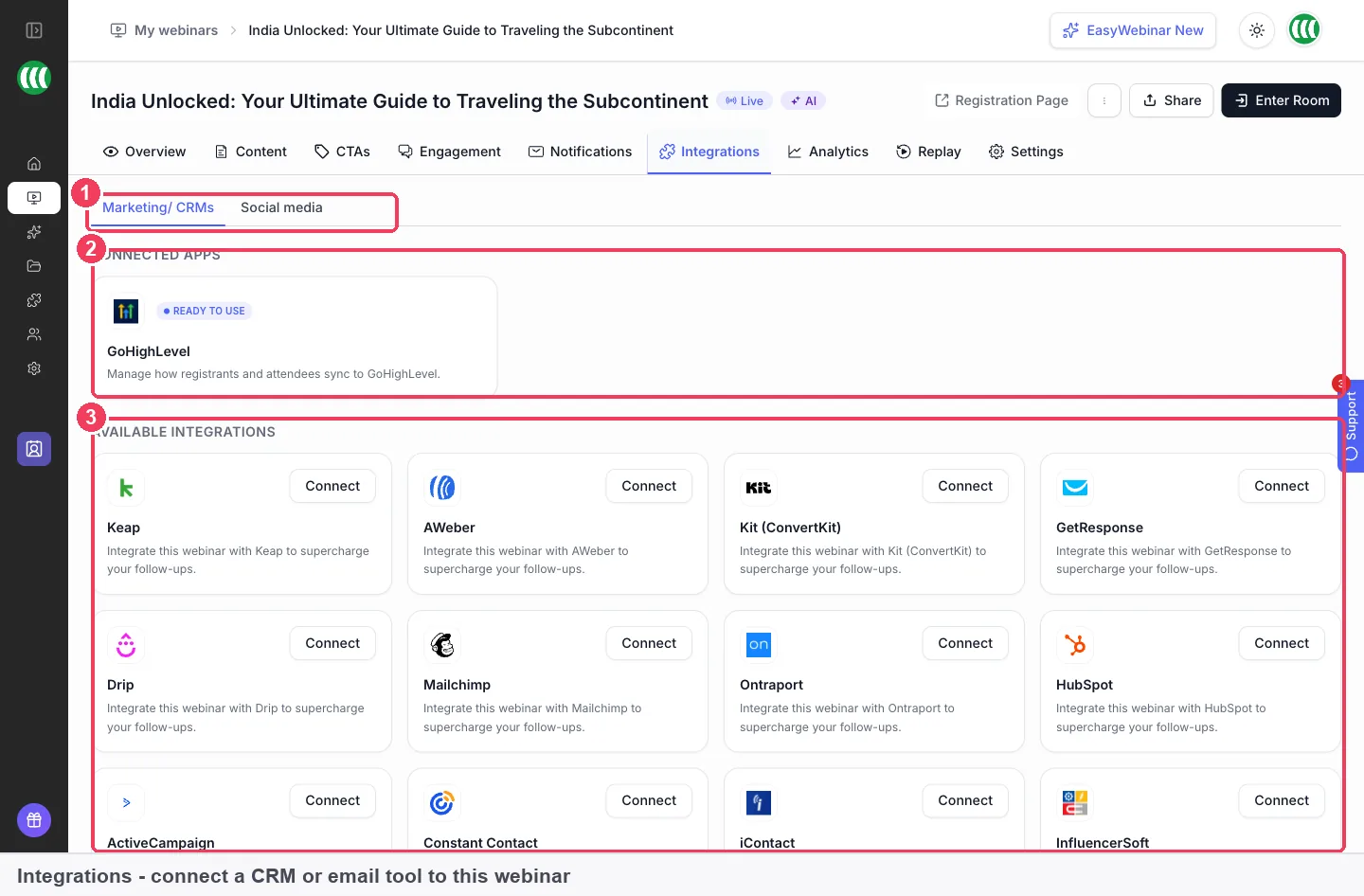
Connect the client's own CRM here so registrants and attendees reach their sales team without anyone exporting a list.
Once connected, the app moves to **Connected apps**, where you choose which list or tag people land in. If the client has no CRM, [EasyCRM](https://easywebinar.com/product-docs/easycrm/) keeps contacts, deals and follow-up in the same product. If you run follow-up for them, [build CRM workflows](https://easywebinar.com/product-docs/easycrm/workflows/) for attendees and no-shows.
### 7. Clone the funnel for next month or the next client {#clone-funnel}
When a funnel works, don't rebuild it. On **My Webinars**, click the **⋮** on the webinar's card and choose **Clone Webinar**, then change the copy for the new date. Many teams run a session live a few times, then clone it as Evergreen with the live recording, as [turning a live session into an evergreen one](https://easywebinar.com/product-docs/webinars/automated/live-to-evergreen/) shows. Templates you save yourself appear under **My Templates**.
## Follow-up and lead handoff for each client {#handoff}
The funnel doesn't end when the webinar does. What happens in the next day decides whether the client sees leads or just a list.
### Send the right follow-up to each group {#client-follow-up}
Attendees and no-shows need different messages. Set them per webinar, as the follow-up email guide explains, and use [AI-drafted email sequences](https://easywebinar.com/product-docs/ai/create-with-ai/email-sequences/) as a first draft. If the client's domain sends the emails, [verify the sending domain](https://easywebinar.com/product-docs/easycrm/sending-setup/) first.
### Hand warm leads to the client's sales team fast {#fast-handoff}
Research in Harvard Business Review found that [most companies don't respond to online leads nearly fast enough](https://hbr.org/2011/03/the-short-life-of-online-sales-leads). For an agency, that delay usually sits between your export and the client's CRM. A connected integration removes it, because registrants and attendees arrive in the system the client already works in.
The **Lead score** column on **People** shows how engaged each person was, for example Hot, and it is calculated from engagement. Behaviour-based scoring starts at the Growth plan. Sort by it, and send the hottest names to the client's sales team first.
### When a client relationship ends {#offboarding}
Plan for the end on day one. UK data protection rules say personal data should be [kept for no longer than is necessary](https://www.gov.uk/data-protection), and the same principles cover using it only for stated purposes. Agree in writing who owns the registrant list. Then export what the client is entitled to from **People** before you close the workspace.
## How to show a client their webinar results {#measure-it}
Clients rarely want every number. Two rates tell them whether the funnel works, and both come straight from the **Analytics** tab.
### Registration rate {#registration-rate}
Divide **Registered** by **Visitors**. A low figure points at the registration page: the headline, the form or the promise. Its weak spot is that **Visitors** counts unique IPs on the landing page, so people sharing an office network count once, and one person on two devices counts twice.
### Show-up rate {#show-up-rate}
Divide **Total Attended** by **Registered**. **Total Attended** counts unique people who watched live, the replay or both, so each person counts once. A low figure points at reminders, not content. Its weak spot is timing: replay views keep arriving for days, so the rate rises if you report too early.
### Where EasyWebinar shows these {#where-shown}
Open the webinar and click **Analytics**. The **Overview**, **People** and **Revenue** views share a date range, set with **Apply**. The funnel shows **Visitors**, **Registered**, **Live Attended**, **Replay Watched**, **Total Attended** and **Missed**. [Webinar analytics](https://easywebinar.com/product-docs/webinars/analytics/webinar-analytics/) explains each figure.
For a client report, filter [the People list](https://easywebinar.com/product-docs/webinars/analytics/people/) by webinar or behaviour, then click **Export**. Filter first, then export, so the spreadsheet holds only what the client needs. There are no scheduled report emails, so build the monthly note from these two sources.
## Worked example: a monthly results note for three clients {#worked-example}
This is an illustrative calculation with sample figures, not an EasyWebinar output. It shows how an account lead turns one month's analytics into a comparison across three clients.
| Client | Visitors | Registered | Registration rate | Total attended | Show-up rate | Offer clicks | Click rate of attendees |
|---|---|---|---|---|---|---|---|
| Physiotherapy clinic | 1,000 | 400 | 400 ÷ 1,000 = 40% | 200 | 200 ÷ 400 = 50% | 40 | 40 ÷ 200 = 20% |
| Language tutor | 2,000 | 500 | 500 ÷ 2,000 = 25% | 300 | 300 ÷ 500 = 60% | 30 | 30 ÷ 300 = 10% |
| Insulation installer | 800 | 400 | 400 ÷ 800 = 50% | 120 | 120 ÷ 400 = 30% | 24 | 24 ÷ 120 = 20% |
Each client has a different leak. The language tutor's page converts weakly, so the fix is the headline or form. The insulation installer fills well but loses people before the session, so the reminders need work. The physiotherapy clinic needs no change this month.
## How EasyWebinar compares for white label webinar software {#compare}
EasyWebinar gives each client a separate workspace on its own plan, puts their pages on their own domain and removes its branding with an add-on. It also keeps a CRM with a deal pipeline beside the webinars for clients who don't have one, while connecting to the CRM they do have.
White label webinar software features, from each platform's public documentation:
| Platform | Separate account per client | Client's own domain | Branding removed | Built-in CRM with deals |
|---|---|---|---|---|
| **EasyWebinar** | Yes | Yes | Yes | Yes |
| **WebinarKit** | Yes ([white label subaccounts](https://help.webinarkit.com/help/webinarkit-custom-agency-tutorials)) | Yes ([custom domains across subaccounts](https://help.webinarkit.com/help/tag/domain)) | Yes ([your own branding, domain and login](https://help.webinarkit.com/help/webinarkit-custom-agency-tutorials)) | Not in docs |
| **Demio** | Not in docs | Yes ([custom domain for public event pages](https://help.demio.com/en/articles/1307748-white-label-options-custom-domains-embed)) | Not in docs | Not in docs |
| **Livestorm** | Partly ([Enterprise plan paid add-on](https://support.livestorm.co/article/25-plans-pricing-mac)) | Yes ([custom domain set by workspace admins](https://support.livestorm.co/article/custom-domain)) | Not in docs | Not in docs |
| **StealthSeminar** | Not in docs | Yes ([white label custom domain](https://stealthseminar.com/pricing/)) | Not in docs | Not in docs |
| **ON24** | Not in docs | Partly ([Engagement Hub URL only](https://support.on24.com/hc/en-us/articles/21420750536219-Engagement-Hub-Custom-Domain)) | Not in docs | Not in docs |
*Yes: documented and built in. Partly: documented with a limit, shown in brackets. Not in docs: not found in the vendor's public documentation.*
### Why EasyWebinar is the stronger choice for white label webinar software {#compare-stronger}
- **A CRM beside each client's funnel:** EasyWebinar's EasyCRM adds deals and pipelines for clients without a CRM, while WebinarKit's documentation centres on [custom domains across subaccounts](https://help.webinarkit.com/help/tag/domain) and integrations. See [EasyWebinar vs WebinarKit](https://easywebinar.com/compare/easywebinar-vs-webinarkit/).
- **Client accounts without an enterprise contract:** EasyWebinar's client workspaces run on Launch, Growth, Pro or Scale, while Livestorm lists [multiple workspaces as an Enterprise paid add-on](https://support.livestorm.co/article/25-plans-pricing-mac). See [EasyWebinar vs Livestorm](https://easywebinar.com/compare/easywebinar-vs-livestorm/).
- **Separation as well as a domain:** EasyWebinar keeps each client's registrants in their own workspace, while Demio documents [a custom domain for event pages](https://help.demio.com/en/articles/1307748-white-label-options-custom-domains-embed). See [EasyWebinar vs Demio](https://easywebinar.com/compare/easywebinar-vs-demio/).
- **Live and automated in one place per client:** EasyWebinar runs live, simulive and evergreen webinars in the same workspace, while StealthSeminar's pricing lists [a white label custom domain](https://stealthseminar.com/pricing/) for its automated product. See [EasyWebinar vs StealthSeminar](https://easywebinar.com/compare/easywebinar-vs-stealth-seminar/).
*Competitor details checked against each vendor's public documentation on 4 November 2026. Features and plans change, so confirm with the vendor before you decide.*
## What client workspaces don't do {#limits}
Each client workspace is billed on its own plan, chosen when you create it, so there is no single combined bill across clients. Workspaces are separate from team seats: a workspace gives a client their own account, and a team seat gives a colleague a login on yours.
White labelling and custom domains are add-ons, not plan features, so a new workspace starts with EasyWebinar branding and the EasyWebinar subdomain. Changing a subdomain changes existing links, and anything already shared will break.
Results come from each webinar's **Analytics** tab and the **People** export. Nothing sends a report to the client on a schedule, so the monthly note is yours to assemble.
## Common questions about white label webinar software {#common-questions}
#### Can an agency run webinars for its clients in EasyWebinar? {#faq-agency}
Yes. Client workspaces are the agency set-up. Each client gets a separate EasyWebinar account that you manage, with their webinars, registrants and settings kept apart from yours and from other clients'.
#### Does a client workspace use one of my team seats? {#faq-seats}
No. Seats and workspaces are separate. A team seat is a login on your own account for a colleague, while a workspace is a separate account for a client on its own plan.
#### Who pays for a client workspace? {#faq-who-pays}
Each workspace has its own plan, and selecting a plan starts a subscription. Agree with the client before you create it whether they pay directly or you re-bill the cost as part of your fee.
#### Which plan should I choose for a client? {#faq-which-plan}
Choose Launch, Growth, Pro or Scale based on the client's live audience. Launch holds 50 live attendees and Scale holds 1,000, so size on live numbers, which fail most visibly.
#### Does my client get an email when I create their workspace? {#faq-client-email}
Yes. The client receives an email confirmation to set their password and join your workspace. That differs from adding a team member, where nothing is emailed, so use an address the client reads.
#### Can each client have their own domain? {#faq-own-domain}
Yes. Add the C-Name add-on, have a CNAME record created with the client's DNS provider, then enter the domain. The custom domain screen under Settings manages clients' access to custom domains.
#### How do I remove EasyWebinar branding from client pages? {#faq-branding}
Add the White Label add-on under Plan & Billing, on the Add-ons tab. It removes EasyWebinar branding from your pages and the webinar room, so attendees see only the client's brand.
#### Is EasyWebinar white label webinar software for live and automated webinars? {#faq-live-automated}
Yes. A client workspace can hold live, simulive and evergreen webinars, and the [guide to automated webinars](https://easywebinar.com/product-docs/webinars/automated/) explains how recordings and schedules work together for a funnel that runs every day.
#### Can I reuse one client's funnel for another client? {#faq-reuse}
Inside one account, use Clone Webinar from the card menu on My Webinars, then change the copy. Registration templates under the Agency filter, and your own under My Templates, give each new funnel a starting point.
#### Does EasyWebinar work with GoHighLevel? {#faq-gohighlevel}
Yes. GoHighLevel connects natively from Integrations. Once connected, you choose which list or tag registrants and attendees land in. The [EasyWebinar and HighLevel article](https://easywebinar.com/blog/easywebinar-and-highlevel-the-perfect-agency-saas-tools/) covers the agency angle.
#### How do I send a client their webinar results? {#faq-results}
Open the webinar's Analytics tab for visitors, registrations, attendance and offers, and export a filtered list from People. There are no scheduled report emails, so you send the numbers in your own monthly note.
#### Can my client take payments through their webinar? {#faq-payments}
Yes. Offers can link to the client's own checkout, booking or sales page. Charging for registration needs the Paid Webinars add-on and a connected Stripe account, and payouts go to that Stripe account.
#### How reliable is EasyWebinar for a client's live launch? {#faq-reliability}
EasyWebinar carries a 99.9% uptime guarantee, and it doesn't cut a webinar off at the plan limit. Every session is recorded automatically, so a replay is ready for no-shows.
#### Can EasyWebinar set up a webinar for me? {#faq-setup-service}
Yes. The One-Time Webinar Setup add-on means the EasyWebinar team configures a webinar for you. It suits an agency's first client launch, while you learn the set-up yourself.
## Further reading {#further-reading}
- [RFC 1034: Domain Names, Concepts and Facilities](https://www.rfc-editor.org/rfc/rfc1034) explains how a CNAME record makes one domain name an alias of another.
- [The Short Life of Online Sales Leads](https://hbr.org/2011/03/the-short-life-of-online-sales-leads) (Harvard Business Review, 2011) describes why slow responses to online leads cost sales.
- [The UK's data protection legislation](https://www.gov.uk/data-protection) (GOV.UK) lists the principles for using and keeping personal data, including client registrant lists.
## Related {#related}
- [Running webinars for marketing agencies](https://easywebinar.com/solutions/marketing-agencies/)
- [Clone a webinar](https://easywebinar.com/product-docs/webinars/getting-started/clone-a-webinar/)
- [Webinar lead generation](https://easywebinar.com/product-docs/use-cases/webinar-demand-generation/)
- [Offers shown in the webinar room](https://easywebinar.com/product-docs/webinars/engagement/timed-offers/)
- [Paid webinars and paid registration](https://easywebinar.com/product-docs/webinars/selling/paid-webinars/)
- [AI landing page generation](https://easywebinar.com/product-docs/ai/create-with-ai/page-generation/)
- [Limits and defaults](https://easywebinar.com/product-docs/reference/limits-and-defaults/)
*Updated 4 November 2026: page created with the client workspace set-up, domain and branding steps, results guide and worked example.*